


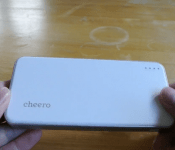
Cheero Energy Plus 12000mAh Review: a very solid package which you can get for ridiculously cheap right now
 There are an almost limitless number of portable battery chargers out there at the moment, with various shapes, sizes, and capacities. So when one comes up with a ridiculous price tag, we just had to take a look. We’ll be taking a look at the Cheero Energy Plus 12000mAh today – you may recognize the brand cheero after our last video review of their Danboard themed battery packs (check out that review here). This time we have a much more ‘normal’ battery pack, but much of the same solid design and value for money we’ve come to expect from cheero. Check out our video review of it below:
As you can see, a very decent package with a very attractive price tag – yes, that was $29.49 USD in case you missed it. Before we go on to giving you the links on where to get one, I just wanted to briefly mention the performance of the Energy Plus when it comes to real world recharging. In my brief tests using the Battery Monitor Widget app as my tool on my Galaxy Note 2, I found that the peak charge rate of the battery pack was around 75% per hour, although you can probably expect closer to 50% per hour – this equates to about 1,550mAh/hr given my battery capacity of 3,100mAh.

 The charging abilities of the Energy Plus are pretty much the normal, and at 12,000mAh, you can expect to charge a few devices more than a few times before needing to charge up again. And that’s when you factor in the price of $29.49 USD again. While you can get other battery packs with similar amounts of capacity for a similar price, I doubt many will offer the quality of the cheero Energy Plus, so if you’re interested in picking one up, cheero is only offering this price to the first 3,000 customers, with 1,000 confirmed to have been sold already. Visit http://www.cheero.net/usa/lp/ep12000/ to purchase, or hit the Amazon link provided below.
http://ws-na.amazon-adsystem.com/widgets/q?ServiceVersion=20070822&Operation=GetAdHtml&ID=OneJS&OneJS=1&source=ac&ref=tf_til&ad_type=product_link&tracking_id=wwwandcom-20&marketplace=amazon®ion=US&placement=B00LAEBJNM&asins=B00LAEBJNM&show_border=true&link_opens_in_new_window=true&MarketPlace=USWhat do you think about the cheero Energy Plus 12000mAh battery pack? Let us know your opinion.
//<![CDATA[
ord = window.ord || Math.floor(Math.random()*1E16);
document.write('‘);
//]]>
The post Cheero Energy Plus 12000mAh Review: a very solid package which you can get for ridiculously cheap right now appeared first on AndroidSPIN.
.CPlase_panel display:none;

The Smart Lamp Speaker by emoi is a cool new Kickstarter that combines the best of many worlds
 I love nifty ideas, and the Smart Lamp Speaker by emoi is one idea that is particularly interesting. Combining traditional household devices like a touchlamp and Bluetooth speaker, the Smart Lamp Speaker puts a new spin on multi-purpose accessories. Using its companion app, the Smart Lamp Speaker can also have its music controller remotely as well as control the brightness of the lamp itself. It can even be set up to be used as an alarm clock, playing music to wake you from your slumber.
https://www.kickstarter.com/projects/1493253417/smart-lamp-speaker/widget/video.htmlIf this sounds like something you might be interested in, emoi is offering the Smart Lamp Speaker at a discount during its Kickstarter campaign which is live now. The standard retail price of the Smart Lamp Speaker is going to be $100 USD, but for backers of the campaign, the price of one Speaker will be lowered to $69 USD. At the time of writing this article, the campaign has accrued $4,523 of its $50,000 target, with 30 days left. If this project takes your fancy, be sure to check out the link below.
https://www.kickstarter.com/projects/1493253417/smart-lamp-speaker/widget/card.html?v=2What do you think about the Smart Lamp Speaker by emoi? Let us know your thoughts in the comments below.
Source: Kickstarter
//<![CDATA[
ord = window.ord || Math.floor(Math.random()*1E16);
document.write('‘);
//]]>
The post The Smart Lamp Speaker by emoi is a cool new Kickstarter that combines the best of many worlds appeared first on AndroidSPIN.
.CPlase_panel display:none;
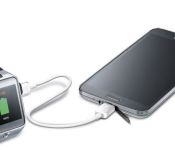
New device to device charging cable announced by Samsung
Samsung announced the release of a new accessory and companion app today that looks to be pretty useful. The idea behind it isn’t new, however the execution is, at least to me. The new cable is called the Power Sharing Cable. Basically it is a cable that sports a micro USB tip on both sides. It will allow you to plug your Galaxy S 5, Galaxy Tab S or other select Galaxy devices into another micro-USB compatible device to charge it from your phone or tablets battery.

As I said before, the idea behind using your phone to tablet to charge up another device isn’t all that new. There have been a number of devices that allow that same operation. However, Samsung has also created a free companion app that takes the sharing of power from a compatible device and manages it a little. The Power Sharing app will give you control over how much power to transfer. Essentially letting you boost your smartwatch power, or any other device, by the amount you need to get you through the rest of your day without sucking the life out of your phones own battery.

 You can use the cable without the app, but you do lose out on the power transfer control and it will continuously pull power. Not a huge issue if you unplug it obviously, but setting it and forgetting it could potential be a problem. The full list of supporting devices according to Samsung include the Galaxy S5, Galaxy Tab S 10.5, Galaxy Tab S 8.4, Galaxy Alpha, Galaxy Avant and Galaxy Note 4. The new Power Sharing Cable is available to order from Samsung today for $19.99.
//<![CDATA[
ord = window.ord || Math.floor(Math.random()*1E16);
document.write('‘);
//]]>
The post New device to device charging cable announced by Samsung appeared first on AndroidSPIN.
.CPlase_panel display:none;
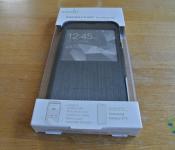
Moshi SenseCover Case for Samsung Galaxy S5 Review: a lesson from Moshi in style
 We’ve covered quite a few Moshi products here at AndroidSPIN, and the one resounding characteristic of all of these products is style. A close second to that is simplicity and function, and with that in mind, we take a look at Moshi’s new Moshi SenseCover Case for Samsung Galaxy S5, it’s newest accessory for Samsung’s first flagship of 2014 and one which should allow you to use your phone even with the case still closed.
What’s in the box
 Contents of the SenseCover box are pretty light with only the case itself and some instructions for downloading the companion app included. No screen protector was probably deemed necessary as this is a full device cover and a screen protector might even interfere with the abilities of the case to work with the touchscreen.
 Just looking at the front of the SenseCover case, I have to say that it is incredibly good looking. The texture on the front of the case gives the illusion of brushed aluminium, but Moshi says it is covered in a leatherette material. It definitely feels cloth-like, but still very smooth.
 Inside the case, more funky materials are featured. The inside of the front cover features what is probably microfibre – one of Moshi’s favored materials – which creates a “shock-absorbing inner shell” to give some protection to your screen when the cover presses against it. The actual case that holds the Galaxy S5 is some kind of hybrid material – it’s not quite hard or stiff enough to be polycarbonate and gives sufficient flexibility to put in (and take out) your Galaxy S5 without much of a fuss.
 A nice brushed-metal magnet on the side of the case completes the case’s notable features with the clasp on the front cover clipping on easily when the SenseCover case is shut.
How does it perform
 The SenseCover performs admirably – it’s easy to get your phone in and out of it, and it appears to provide quite a lot of protection from daily bumps and bruises. The hybrid material of the plastic inner case gives me more confidence than some of other Moshi’s polycarbonate cases.
 There is ample room given to all the various access ports, camera and speaker included, and there are button covers for the hold and volume buttons that will let you use them even when the device is in the case.
 Of course, the main attraction here is the front cover of the SenseCover case. Unfortunately, I didn’t have an operational Galaxy S5 on hand, however we can still take a look at what the device is supposedly capable of. The chief purpose of the SenseCover is to allow users access to the Galaxy S5′s features even with the case closed. This is of course to emulate the functions of Samsung’s own S-View cases, with perhaps a few additional features.
 The SenseCover, as the inscription in the front cover suggests, will allow you to take phone calls simply by swiping along the cover – swipe right for answer, left for decline. While it might not immediately look obvious from just the case, the SenseCover App prompts the user with graphics when a call is incoming.

 I downloaded the SenseCover app quickly to check out what additional features it had – note that the app will naturally be of no use while you don’t have the actual SenseCover case. In addition to being able to answer calls and see part of the screen through the window, the SenseCover app will also allow you to control your music and also take quick photos all without even opening the case. Moshi does suggest that you increase your screen’s sensitivity so that touches are definitely registered through the case.
What I like about the Moshi SenseCover Case for Samsung Galaxy S5
 I’m a huge fan of the exterior of the case. The leatherette finish just makes the SenseCover case look so stylish and professional, all while providing very good function and protection. This is pretty much the hallmark of Moshi’s accessories and it definitely looks like they’ve done it again.
What I don’t like about the Moshi SenseCover Case for Samsung Galaxy S5
While I like the brushed-metal magnet and the clasp mechanism, because it is essentially a smooth surface, that means the clasp can move from time to time. While this is perfect when opening the case – the front cover basically just slides back on – closing the case can sometimes be less straightforward than expected. When the case is being closed, it’s possible that the clasp will only partially meet the magnet, leaving a small gap between the front cover and the rest of the case. While that’s probably not too much of an issue as putting it in your pocket will likely close the case completely, it does open the possibility of dust and what not entering the case unintentionally. At the heart of it, this is really just a niggling annoyance.
Final Thoughts
 I love the Moshi SenseCover Case for the Samsung Galaxy S5. I think it’s a masterpiece in style and simplicity with some great extra functions thrown in. My only real gripe is that I don’t have a Galaxy S5 so that I could use the SenseCover to its full potential, but I’ll leave that decision up to you. It is a bit dear, but when you consider the extra use cases, it makes a little more sense. The SenseCover is available now for $59.99 AUD/$59.99 NZD and is available from selected retailers in Australia and New Zealand.
Australian Retailers: www.beezer.com.au, www.macintoshaddict.com.au, www.gadgetsboutique.com.au
New Zealand Retailers: JB Hi-Fi, Noel Leeming
For more information about the Moshi SenseCover Case for the Samsung Galaxy S5, you can visit its product page on the Moshi website here.
Gallery of Photos


//<![CDATA[
ord = window.ord || Math.floor(Math.random()*1E16);
document.write('‘);
//]]>
The post Moshi SenseCover Case for Samsung Galaxy S5 Review: a lesson from Moshi in style appeared first on AndroidSPIN.
.CPlase_panel display:none;
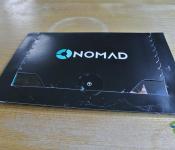
A Quick Look: The micro-USB NomadKey is an evolution of an incredibly convenient design
 Today we’re going to take a quick look at the NomadKey from Nomad. If the name Nomad seems familiar, it’s because we’ve taken a look at their ChargeKey and NomadClip products before. The NomadKey is essentially an evolution of the ChargeKey after what seems like a bit of rebranding by Nomad, so let’s jump in and check out what’s changed.
 The NomadKey is Nomad’s newest conveniently sized charging cable. Available in both micro-USB and Lightning cable, the NomadKey is designed to be put on your keychain and used in cause of emergency when charging or data transfer is needed. At first glance, the NomadKey looks incredibly similar to the ChargeKey, but there are some very key (excuse the pun) differences. For one, the USB end of the NomadKey is now a fully-formed USB, not the half USB of the ChargeKey. Presumably this reduces the chance of things chipping off while in your pocket next to nasty things like your keys.

NomadKey – left; ChargeKey – right
The other thing you will notice is that the NomadKey is somewhat thicker around the rubber area. This gives it a much more sturdy feeling while still giving it the freedom to bend in whatever position you deem necessary.

Probably one of the most prominent changes is the loophole where the NomadKey can be mounted onto keychains. It’s become a lot thicker, reducing the opportunities for it to break off and helps to make the NomadKey look a lot more like, well, a key.
 Overall, it looks like the NomadKey has evolved in all the right places and given us a much improved device that should be able to survive anything our pocket (and keys) throw at them. The NomadKey can be pre-ordered now from hellonomad.com – it will cost you $29 USD a pop and they’ll start shipping out on October 15th. If you buy 2 or more, shipping is free – shipping for one is a $5 flat rate. You can also pre-order Nomad’s other gadgets, the NomadClip and NomadPlus, both of which cost $39 USD.
To find out more or pick one up for yourself, be sure to visit the NomadKey product page here.


//<![CDATA[
ord = window.ord || Math.floor(Math.random()*1E16);
document.write('‘);
//]]>
The post A Quick Look: The micro-USB NomadKey is an evolution of an incredibly convenient design appeared first on AndroidSPIN.
.CPlase_panel display:none;

Booq announces the Taipan Shock, another professional’s ‘on-the-go’ bag
I have this seemingly odd affinity toward bags. There are just so many uses for a good bag that not only looks good, but also offers up plenty of pockets, zippers and pouches to keep things organized. The tech junkie in my needs a lot of organizational additions. No one likes to dig through the bottom of a bag for cords, battery packs, headphone cables or USB sticks. Booq has a pretty good selection of bags, and other accessories

The Taipan Shock uses a 210D nylon material for the interior lining and a 1680D tri-weave polyester exterior fabric that also has a water-repellent coating. The separate laptop compartment offers up thick padding to protect your laptop and uses a genuine YKK water-repellent zipper as well. Internal measurements are 17.3 x 13 x 1 inch and will carry around a 13 – 15 inch Macbook or up to a 16.4-inch laptop. The bag empty weighs in at just over 2 pounds.
“Our goal for the Taipan shock was to create a good-looking everyday bag that can handle the wear-and-tear that comes with frequent use,” says booq’s lead designer S. Kema Subsomboon. “We designed the bag’s exterior so it transitions well from a commute to the office, and we also made sure the interior organization and storage can house a wide array of professional items.


In the video of the bag you can see the gentleman change out the zipper puller from black to red. Booq includes a red, orange and blue with the bag so you can add a dash of color. The Taipan Shock also features Booq’s Terraling service. Terraling is a simple 3-step registration process that uses each bags unique serial number found on each bag. Toss in the reflective logos on the back, padded shoulder straps, and it looks like a breathable mesh back with the price tag of $95 and you have a pretty good looking bag.
Interested in the Booq Taipan Shock? Feel free to pick one up through Amazon.
.

//<![CDATA[
ord = window.ord || Math.floor(Math.random()*1E16);
document.write('‘);
//]]>
The post Booq announces the Taipan Shock, another professional’s ‘on-the-go’ bag appeared first on AndroidSPIN.
.CPlase_panel display:none;
Misfit Flash is a new $50 full featured fitness and sleep tracker wearable
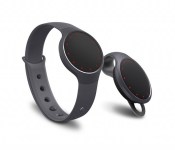
The first Misfit wearable was the Misfit Shine. It is a small little puck like device that resides in a rubber strap for your wrist. Misfit also had a small clip, a necklace and even a pair of socks for you to place the puck inside to help you track your walking and such. We had a set that we received for review at CES 2014. We had a good time with them and they certainly looked pretty slick. Now Misfit has announced a new tracker that goes to the opposite side of the coin and is targeting the sporty thrifty people out there with its latest Misfit Flash.

The Misfit Flash resembles the Shine except it is made from a soft-touch plastic that is waterproof to 30 meters (Shine is 50 meters). The new Flash will be offered in a variety of flashy sporty colors such as Frost, Onyx, Fuchsia, Zest and Wave. There will be a total of 7 color offerings at launch time this October. Similar to the Shine it runs on a single CR2032 coin cell battery with a battery life of about 6 months. Just like the Shine it will track your steps, calories burned, distance traveled along with sleep duration and sleep quality.

“Flash is the only fully featured activity and sleep tracker in the world for under $50, making it an incredible value,” said Tim Golnik, VP of Product and Design at Misfit.
Interestingly enough, the Misfit Flash was created in partnership with The Coca-Cola Company. Apparently they are a long-term strategic partner of Misfit. Anyways, to sum up the whole announcement, Misfit launched a plastic version of the Shine to appeal to a broader market of more sporty individuals that couldn’t wrap their head around a Shine at $99.99.
While I enjoyed my time with the Shine, they really need to dump some time and money into the Android companion app. I understand there is a pretty decent tie in from Apple with John Sculley in the mix and the company name, Misfit, stemmed from Steve Jobs, but if you are going to go cross-platform, make the apps work and be as useful as competing OS platforms are. Point in case, the iOS Misfit app is pretty outstanding, where as the Android app lacks a large portion of the functions and has some serious sync issues. Maybe an update is coming with the release of the Flash to help ease the pain. Hey, I can hope right? Regardless of that small caveat, you might be interested in the Misfit Flash. If so, direct yourself over to the Misfit website to pre-order one when ever you are ready.
Press Release:
BURLINGAME, CA September 16, 2014— Misfit, makers of Shine, today announced its second wearable product, Misfit Flash, a versatile and easy-to-use fitness and sleep monitor.
Crafted out of a special soft-touch plastic, Flash is comfortable, extremely durable, and waterproof to 30 meters, making it fit for even the toughest uses. It comes in seven unique colors including a lemon-lime Zest, funky Fuchsia, and minimalist Frost.
“Flash is the only fully featured activity and sleep tracker in the world for under $50, making it an incredible value,” said Tim Golnik, VP of Product and Design at Misfit.
Like Shine, Flash never requires charging and can be worn virtually anywhere—on a user’s wrist, pants, shirt, shoes, lapel, or even on a keychain. Flash includes the very best of Shine’s user experience and automatically measures steps, calories, distance, sleep quality and duration, and even tracks cycling and swimming. The entire front of Flash is a button; to check your progress toward your daily activity goal and the time of day, simply press it. Flash syncs wirelessly with the Misfit App on iOS and Android phones.
Available for $49.99 in the United States, Flash will be available at Best Buy, Target, Amazon, Walmart and other retailers worldwide in October, and can be pre-ordered now at misfit.com/flash.
Flash was originally created in partnership with The Coca-Cola Company, Misfit’s long-term strategic partner, to encourage active lifestyles globally. Misfit’s first product, Shine, launched in late 2013, and is now available in tens of thousands of retail locations in over 40 countries.
About Misfit
Misfit invents and manufactures great wearable and smart home products. The company was founded in 2011 by Sonny Vu with John Sculley, the former CEO of Apple and Pepsi, and Sridhar Iyengar, co-founder and former CTO of AgaMatrix.
//<![CDATA[
ord = window.ord || Math.floor(Math.random()*1E16);
document.write('‘);
//]]>
The post Misfit Flash is a new $50 full featured fitness and sleep tracker wearable appeared first on AndroidSPIN.
.CPlase_panel display:none;

MEElectronics Air-Fi Metro2 AF72 In-Ear Bluetooth Wireless Headset Review: Light, powerful and portable
 One thing that has always impressed me about MEElectronics is their will to perfect the products that they have produced, and the MEElectronics Air-Fi Metro2 AF72 In-Ear Bluetooth Wireless Headset is the latest example of that striving for perfection. Taking into account feedback from users, MEElectronics say the Metro2′s are even better than before, so let’s check them out and see what’s what.
What’s in the box
 We’ve reviewed quite a few MEElectronics products here at AndroidSPIN before so we generally know what to expect when we open one of their boxes – as expected, they haven’t disappointed. Along with the Metro2 headset itself, we get the usual suspects of spare earbuds in different sizes and a pouch to carry all your gear in, as well as a charging cable, some stabilizing ear inserts to add to the earbuds if you prefer, and a few little clips that can be used to tidily store the headset when you’re done using them.
 As the full name of the device suggests, the Metro2 is a Bluetooth headset and is comprised only of the earbuds, the cord between them and an in-line control module that is used for turning the headset on and off, changing volume and houses the built-in microphone. The first thing that struck me about the Metro2′s is exactly how small it seems. My only other experience with fully wireless earphones have been the Denon Exercise Freak earphones (see that review here), and I assumed they had to be that big due to the necessary electronics. As you can see though, the Metro2 has none of that bulk and keeps an extremely slim profile – still not as small as an unpowered pair of earphones, but still surprisingly small. In fact, MEElectronics claims the Metro2′s are the “world’s lightest stereo wireless headset at 0.4 ounces”, and I’m inclined to believe them as they really are extremely light.
How do they perform?
 The audio quality of the Metro2′s is impressive – despite its diminutive size and weight, the Metro2′s still pack a punch in the sound department and manage to give extremely good performance on all fronts, highs, mids and bass. If anything, it tends towards the bassy side, but this can be reeled in with some EQ tweaking. Part of this sound quality is thanks to the noise cancelling of the earbuds themselves – the Metro2′s are advertised as noise cancelling and using the passive abilities of the well-fitting earbuds, the headset is able to create a very isolated space to fully enjoy the audio exploits of the earphones.
 A side-effect of the well-fitting earbuds can, however, be discomfort. Many of you who have read my audio product reviews will know I generally shy away from earphones due to discomfort they can cause – unfortunately, the Metro2′s fall into this category. By virtue of needing to engage the passive noise cancelling, you do have to quite firmly insert the earbuds into your ears and after an hour or two, I found myself with very sore ears. I do have to mention that this is a very personal critique – I’m sure many of you reading this very much enjoy using earphones, so you can take my words with a grain of salt.
 Bluetooth pairing, as you might expect given the maturity of the technology, is extremely simple and will have you up and listening in no time. MEElectronics cleverly uses the power button as a multifunction button, used for powering on and off the headset as well as initiating pairing.
 As a completely wireless set of earphones, you would expect the stability of the Metro2′s to be pretty good. With the addition of the stabilizing ear inserts we mentioned earlier and the earbuds firmly stuck into your ears, the Metro2′s may as well be glued in there. I found myself having to shake my head very violently to even get them to dislodge slightly, and even then, I think I did myself more of a disservice as I could still hear music coming from the headset. If you’re looking for a headset for fitness use, with the added bonus of its small footprint weight and size-wise, I would say the Metro2′s are a pretty good candidate.
 Microphone performance is good on the Metro2′s, however due to the wraparound nature of how one wears the headset, it’s actually quite hard to get a good signal without grabbing the mic and pulling it into a more convenient position. Of course, there’s nothing stopping you wearing the Metro2′s dangling around the front of your face, but that would probably look a little unusual.
 MEElectronics says that the music playback time of the Metro2′s is about 5 hours, and that’s just about exactly what my experiences have been. It is a bit short for my liking as it can’t really get me through a full work day (after which requires a two hour charge time), but it’s really not surprising given the lightweight design of the headset. For many people, particularly those who would use this as a fitness accessory for an hour or two, this is probably a decent trade-off.
Final Thoughts
 Overall, I really like the MEElectronics Air-Fi Metro2 AF72 In-Ear Bluetooth Wireless Headset – they’re light, compact and manages to pack some serious punch. The audio quality is great and made better by the passive noise cancelling and its size and stability features make it ideal for people on the go or just want a headset that is distreet. At a MSRP of $99.99, that’s a decent price for the package they’re offering, and MEElectronics is making it that much cheaper by offering the Metro2′s for $79.99 as part of a sale.
If you’re interested in picking up a pair of Metro2 earphones, you can visit the product page here, or to check out MEElectronics’ other products, visit their homepage here.
Gallery of Photos


//<![CDATA[
ord = window.ord || Math.floor(Math.random()*1E16);
document.write('‘);
//]]>
The post MEElectronics Air-Fi Metro2 AF72 In-Ear Bluetooth Wireless Headset Review: Light, powerful and portable appeared first on AndroidSPIN.
.CPlase_panel display:none;
[Deal Alert] NES30 Bluetooth Controller, so full of nostalgia for $30
The Nintendo Entertainment System is the king of consoles. Many say it is the home console that started it all. While there were others before it, Nintendo took the NES and made it a household name. I used to have two, but sadly they got hijacked during a series of moves after high school. Still erks me. In the digital era we live in now it is pretty common place to have those old school NES titles on other high-end gadgets like our phones and tablets. As nostalgic as that might be, the controller is the real win of falling back to the glory days of Super Mario. So why not grab a redefined version that connects via Bluetooth or USB?

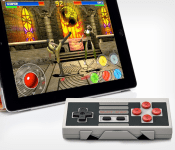
While it isn’t exactly the same thing., it is pretty close. At least it looks like an NES controller, just with a few extra buttons. It needs those extra buttons though, as much as I’d like a traditional A and B Bluetooth game controller, you would want to use it beyond just classic 8-bit gaming.
The NES30 brings in four buttons along with two shoulder buttons. It syncs up to your iOS or Android device through Bluetooth, but it can also connect to other devices, like your computer, with a USB cable. Listed battery life is pretty solid also coming in at 20+ hours.

 I know you want one. Who wouldn’t? If you do, then you might want to consider hurrying cause it is listed only for another 7 days. Hit the link below.
NES30 Bluetooth Controller for $29.99.
//<![CDATA[
ord = window.ord || Math.floor(Math.random()*1E16);
document.write('‘);
//]]>
The post [Deal Alert] NES30 Bluetooth Controller, so full of nostalgia for $30 appeared first on AndroidSPIN.
.CPlase_panel display:none;

LG G Watch goes on sale in the Play Store for $179
The LG G Watch has dropped its price tag by $50 in the Play Store today. That brings the Android Wear powered smartwatch down to $179. That makes it $0.99 less than Best Buy has been selling it for the last few weeks. The new price tag is only going to be effective until September 23rd as part of a special fall savings.

It probably isn’t a coincidence that the price dropped the same time Apple did their iWatch announcement. You know where to go to grab this in the Play Store, or you can just go to Best Buy and not wait on shipping.
//<![CDATA[
ord = window.ord || Math.floor(Math.random()*1E16);
document.write('‘);
//]]>
The post LG G Watch goes on sale in the Play Store for $179 appeared first on AndroidSPIN.
.CPlase_panel display:none;
 AIVAnet