


Marshall Stanmore II and Acton II go live with Alexa and Assistant support
Rock and roll heritage backed by Amazon and Google tech.

Marshall debuted upgraded versions of its Bluetooth speakers last year with multi-room capabilities and Chromecast support along with Spotify Connect, and at IFA 2018 the company is introduicng a new lineup of products with Alexa and Google Assistant integration.
The Stanmore II and Acton II are the first Marshall products in the Marshall Voice series. Unlike the portable Kilburn, the Stanmore and Acton need to be plugged into a wall. The styling of either speaker hasn’t changed considerably, but they do feature a new fret design, and another notable addition is a gold strip at the bottom with five LEDs that will light up when invoking Alexa or Assistant.
Alexa integration is enabled out of the box, and Marshall says Assistant will be available later in the year. In addition to playing music, you’ll be able to interact with either speaker just as you would with a Google Home or Echo, allowing you to set reminders, control smart home products, get weather updates, and much more. The underlying hardware itself hasn’t changed from last year, so you shouldn’t have any problems getting room-filling sound from either speaker.
I’ve been using a first-gen Stanmore hooked up to a Chromecast Audio for three years now, and while that combination has served me very well, built-in Alexa and Assistant integration is a noteworthy addition that enables a whole host of new experiences.
The Stanmore II Voice will go on sale from October 2 for $399, with pre-orders going live later today. The speaker will make its debut in the U.S., followed by other markets where it’ll be available for €399/£349. As for the Acton II Voice, the speaker will be hitting store shelves on November 9 for $299/€299/£269, with pre-orders kicking off from October 2.
See at Marshall
olloclip’s new Multi-Device Clip is perfect for the avid phone photographer

olloclip is changing the phoneography game (yet again) with a new Multi-Device Clip!
If you’re someone who’s an avid phoneographer (cough me cough), or maybe just someone who’s spent some time scrolling through social media, then you’ve probably heard of olloclip, the awesome mobile photography company that makes high-quality lenses for your Android phone.
If you’ve never played with an olloclip lens, that’s totally cool, but you are missing out big time: Which is why I’m so excited to tell you about the new Multi-Device Clip from olloclip!
What is a Multi-Device Clip, you might ask? Well, it’s a tool designed to easily and quickly enhance the built-in camera on most smartphones and tablets. This super compact accessory can expand to fit a variety of case and phone sizes, meaning that you don’t have to take your case off if you’re trying to quickly snap that fleeting picture-perfect moment.
The Multi-Device Clip is unlike any product on the market. It remains our goal at olloclip to continually enhance consumer’s mobile photography experience through the most compact, accurate and easy-to-use products. We designed the Multi-Device Clip to serve the greatest range of smartphones, including those with a screen protector or thin case, for ultimate versatility. (Todd Williams, global sales director at olloclip)
The new Multi-Device Clip will work with olloclip’s Connect X interchangeable lenses effortlessly. You have options to shoot with lenses like:
- Super-Wide
- Ultra-Wide
- Telephoto
- Fisheye and Macro
- Macro 7X +14X
- Macro 21X
Olloclip’s new Multi-Device Clip will be available with any of the Connect X lenses mid-September starting at $60. For more information, sign up to hear once the Multi-Device Clip launches!
Android Pie issue tracker: The biggest bugs and problems

Call them bugs or call them unintended features — Android Pie has a few
Android Pie is the first time we’ve seen such a wide adoption of a new platform version at launch. Google’s Pixel phones have it, of course, but we’ve also seen the stable and final version come to Essential’s PH1. Google tells us that the phones from Sony, Xiaomi, Nokia, Oppo, Vivo, and OnePlus that were part of the Android P beta will all be updated early this fall, as well as all qualifying Android One devices. And with any new software, there will be bugs.
More: The Android P Beta includes phones from 7 manufacturers in addition to Pixels
Android Pie has its share of those dreaded “unintended behaviors and features” that software developers hate to see and we hate to stumble across while we try to use our phones. Some are minor, some are going to be inconvenient, and some might be a reason to hold off on updating if you haven’t already. I’ve looked through bug trackers, official forums, Reddit, XDA forums, and every other place I could think of to see what folks are saying to build out a list of the most significant (read: most often reported) bugs for phones with the official Android Pie release.
Here’s what’s happening as of late August 2018.
Pie bugs across the board
These are the issues that users with all phones have reported seeing. It’s likely that these are actual platform bugs and fixing them for one phone fixes them for all.
- Battery draining fast while idle.
- Battery draining fast with Adaptive Battery enabled.
These two bugs may be an incompatibility with specific apps. That could mean an adjustment in the Android framework is needed, or it could be poorly developed apps going rouge. Or both.
- Google Assistant voice match settings not stored correctly.
This could be a bug in Assistant or it could be a bug in Android Pie. What I know for sure is that several folks have reported that using a shared Google Home product involves retraining Assistant to your voice each time you want to use any personalized setting or feature.
- Bluetooth connection and volume bugs
There will always be Bluetooth issues when a project uses the latest open-source Bluetooth stack and tries to connect to other devices that use proprietary older versions of the standard. This is why some companies are late to adopt the newest version of Bluetooth and why Bluetooth in your car — which is probably a very old version and in dire need of an update — can suck. Google will get these issues fixed in time for the next version of Bluetooth to arrive.
Original Pixel and Pixel XL
- Home and recents buttons disappear; sometimes require a reboot to come back
- Phone becomes unresponsive while charging
- Fast charging no longer working with some chargers
- Other parties unable to hear during an outbound call
- OTA update still failing for some users
Pixel 2 and Pixel 2 XL
- Constant scanning for Wi-Fi networks
- Incoming calls default to speakerphone when answered
- Video capture freezing after a minute or two
- Adaptive Brightness feature not triggering as expected
- Display can become too bright or too dim while using the automatic setting
Essential PH1
- Wi-Fi connection issues
- Call volume bugs (too loud and too quiet are both reported as bugs)
- Notch settings in the developer options are gone

Some of these bugs are self-explanatory, and some total code geek level. Some can also be a coincidence where multiple users have a hardware fault and some may be present on your phone even if you’ve never done the thing needed to trigger them. Hunting and killing bugs is hard but having more phones see Android Pie earlier than ever before will help get them sorted and fixed.
I know plenty of other people are seeing some bugs, maybe these or others that aren’t listed. If you’re using Android Pie and seeing things that are off-kilter, jump into the comments and let everyone know what you’re seeing and on what phone.
To file an official bug report, look here for the right place to talk about your particular device.
Update August 2018: This post will be continually updated until every major bug in Android Pie has been found and squashed. We hate bugs!
Android 9 Pie
- Android 9 Pie review: Greater than the sum of its slices
- Everything you need to know about Android 9 Pie!
- Will my phone get Android Pie?
- How to get Android 9 Pie on your Pixel right now
- Join the Discussion
The Google Assistant can now speak two languages at once
It works with English, German, Spanish, French, Italian, and Japanese.
So far, IFA 2018’s been a pretty big deal for Google. Wear OS is confirmed to get a brand-new UI starting next month and the Google Home Max is finally making its way to the United Kingdom.
Now, Google’s announced that the Google Assistant is officially bilingual starting today.
Google’s been steadily updating the Assistant to work with more and more languages, and with the new bilingual feature, you’ll now be able to talk to the Assistant on your phone, Google Home, Smart Display, etc. in two different languages without having to switch back and forth between them in the app.
The Assistant can be configured to understand any pair of English, German, Spanish, French, Italian, and Japanese, with support for additional languages coming in the next few months.
This feature should be rolling out to Assistant devices now, so be sure to keep an eye out for it!
HTC U12 Life announced with funky design and dual cameras, starts at £299
Google Home
- Google Home review
- Google Home Mini: Everything you need to know!
- Google Home Max review
- These services work with Google Home
- Google Home vs. Amazon Echo
- Join our Google Home forums!
Verizon
Best Buy
Target
Google Store
Ultimate Ears is bringing the noise with the new Boom 3 and Megaboom 3
Third time’s the charm for Ultimate Ears’ latest in the Boom line of Bluetooth speakers.

UE’s Boom speaker line is one of the most popular in all of Bluetooth speakerdom, and for good reason. They have awesome sound, are well-made, and have been reasonably priced, often going on sale on Amazon.
Now, Ultimate Ears has announced the Boom 3 and Megaboom 3, which continue the tradition of portable, water-resistant Bluetooth speakers with a long range (now 150 feet, up from 100), long battery life, and a brand new smart feature called the “Magic Button.”
The Magic Button instantly controls Apple Music on your iPhone or iPad and Deezer Premium on Android, and is limited to those services for now. The physical redesign comes in the form of two-tone fabric, which UE says is made for motorcycle jackets and fire equipment.
UE is also promising deeper bass on the Megaboom 3, as well as “improved clarity.” The company is also completely skipping the “2” moniker for Megaboom and aligning both Booms under the “3” name.
Both speakers now feature an IP67 rating, which means they’re dustproof and can survive submersion in up to 3 feet of water for 30 minutes, so they’re perfect for all environments. Even better is that they’re both now designed to float, so you can enjoy some tunes by the pool or right in the pool.
You can pre-order the Boom 3 in five colors for $149.99 and the Megaboom 3 for $199.99 in three colors. Both speakers should hit the U.S. and select countries in Europe and Asia on September 18.
Jaybird X4 announced, includes waterproofing and 8-hour battery for $130
Pre-orders are live right now.

Jaybird’s long been one of the leading names when it comes to fitness headphones/earbuds, and following up on the X3s that were released in 2016, we’ve now got an announcement for the Jaybird X4 out of IFA 2018.
The Jaybird X4 looks very similar to the X3 and retains the same general design of two earbuds connected by a wire with a small module for in-line playback controls. This time around, however, Jaybird’s designed the X4 to be more durable and comfortable.

On the durability side of things, there’s IPX7 waterproofing to protect the X4 from rain, snow, and “accidental submersion.” To make sure the Jaybird X4 are easy on your ears, the earbuds come equipped with Jaybird’s all-new Comply Ultra foam tips that use thermo-reactive foam to adjust their shape based on the layout of your ear canals.
Along with this, Jaybird’s also included its Speed Cinch cord that allows you to quickly adjust the length of the cable so that the fit isn’t too tight or loose. There’s also 8 hours of music playback, 1 hour of use after 10 minutes of charging, and customizable EQ settings in the Jaybird app.
You can pre-order the Jaybird X4 starting today with global online and retail sales expected to begin in September. Black Metallic/Flash and Metallic/Jade colors will be available everywhere while Storm Metallic/Glacier is exclusive to Best Buy and Jaybird’s online store.
Pricing is set at $129.99.
See at Jaybird
Apple Invites Media to September 12 Event at Apple Park: ‘Gather Round’
Apple today sent out media invites for its annual iPhone-centric event that will be held on Wednesday, September 12 at 10:00 a.m. at the Steve Jobs Theater on the Apple Park Campus in Cupertino, California.
The media invites released today give a first look at the theme of the event and feature the tagline “Gather Round,” likely referencing the main ring-shaped building at Apple Park.
There are a lot of product refreshes that we could see at the fall 2018 event. First and foremost, Apple is expected to be introducing three iPhones this year: a second-generation 5.8-inch OLED device, a larger-screened 6.5-inch OLED device, and a lower-cost 6.1-inch smartphone with an LCD display.
All three iPhones are expected to feature upgraded A12 processors, faster LTE, edge-to-edge displays, and Face ID integration, with Apple doing away with the Home button for its entire 2018 iPhone lineup.
Apple’s low-cost iPhone, which could be priced around $700, is expected to use an aluminum frame and a single-lens camera, keeping costs low. The two OLED iPhones, which could cost somewhere between $800 and $1,000, will use stainless steel frames with dual-lens cameras.

Along with fresh iPhones, Apple is expected to introduce the Apple Watch Series 4, which is said to feature a larger display likely implemented through a reduction in bezel size. Longer battery life and improved health monitoring capabilities are also rumored, but beyond that, we don’t know much about the new wrist-worn devices.
 A mockup of what the Apple Watch Series 4 might look like
New iPad Pro models with Face ID, slimmer bezels, and no Home button are in the works, as are refreshed Macs that include a low-cost MacBook and a new Mac mini, but it is not clear if these products will come at the September event.
Apple may use a second October event to unveil new iPads and Macs as it has done in past years where Macs and iPads were introduced in the fall.
 2018 iPad Pro mockup via Benjamin Geskin
New Apple Watch bands, revamped AirPods with “Hey Siri” support, and the long-awaited AirPower charging mat, which is designed to charge the Apple Watch, iPhone, and AirPods at the same time, will all likely be introduced in September.
Apple’s 2018 iPhone keynote event will begin at 10:00 a.m. Pacific Time. Apple will live stream the event on its website and on Apple TV, but for those who are unable to watch, MacRumors will be providing full event coverage both on MacRumors.com and through our MacRumorsLive Twitter account.
Related Roundups: Apple Watch, watchOS 4, watchOS 5, 2018 iPhones, AirPodsBuyer’s Guide: Apple Watch (Caution), AirPods (Caution)
Discuss this article in our forums
ZTE Axon 9 Pro hands-on
ZTE is having a hard year. Back in May, it was forced to “cease major operating activities” after the U.S. banned the company from buying U.S. goods (such as Qualcomm processors) due to the company violating sanctions against Iran. This ban was reversed after a month, under the condition that the company would have to pay a $1 billion fine to the U.S., with $400,000 extra left in escrow. This put a significant dent in the company’s operations, but ZTE is hoping for a comeback with a device it thinks will bring back the glory days.
Join us as we go hands-on with the ZTE Axon 9 Pro.

The Axon 9 Pro is a fairly sizable device. At 6.21 inches, its screen is definitely going to catch a few glances, but it’s crowded by a beefier chin and notch than most. Regardless, the 2,248 x 1,080 screen is the most interesting part of this device, due to a specialized chip that makes the viewing experience on this phone different from any other device on the market.

The Axon 9 Pro sports a dedicated display processor separate from the Qualcomm Snapdragon 845 powering the device. This processor interpolates all video data before it reaches the screen, similar to something you would find on a high-end TV. It artificially increases the frame rate of all video to 60fps, including media from local storage, YouTube, and even games.
This design decision is extremely interesting because not all video was made to be viewed at 60 frames per second. Things like movies and YouTube were specifically crafted at 24 and 30 frames per second, and it is a bit odd to artificially interpolate content to a higher frame rate. The biggest benefit I see from this technology is gaming.
See also
Fortnite on Android first look – you might want to wait off…
At this point, whether you’re a gamer or not, there’s a good chance that you’ve at least heard about Fortnite. This free-to-play game has taken the world by storm and has ended up earning the …
In gaming, a higher frame rate almost always directly translates to a better experience. Games like Fortnite are locked to 30fps on mobile, while PC players are playing on frame rates up to 240fps. A higher frame rate almost always translates directly to faster response time in the game, something nearly every gamer wants. Now, I should be clear that simply interpolating extra frames is not going to help you quite as much as truly generated frames, but it should lead to a better experience overall.
This feature can be turned off if you’re not so hot on it. While I would love to try this phone in a gaming scenario, general media is something most people would probably like to keep at their native frame rates.
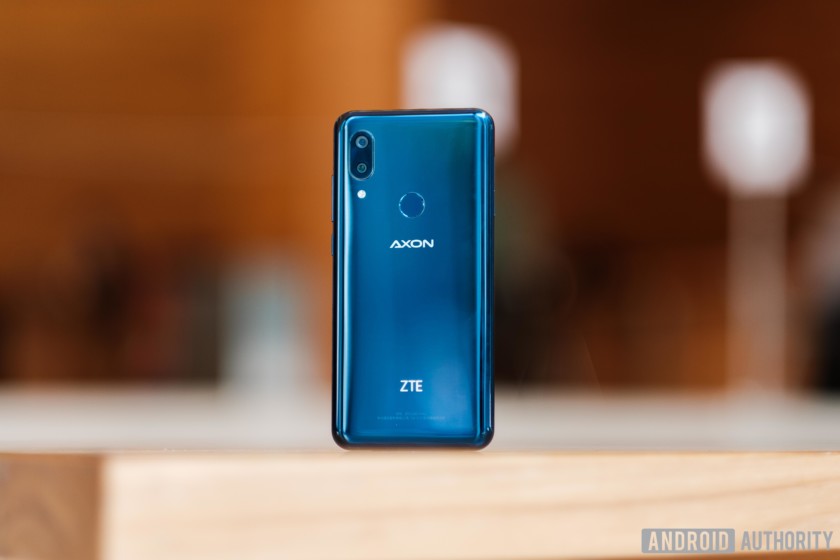
Ignoring the screen, the ZTE Axon 9 Pro has all the specs you would expect out of a 2018 flagship. It’s packing a Qualcomm Snapdragon 845, 6GB of LPDDR4X RAM and 128GB of internal storage, so ZTE is clearly trying to go head-to-head with the giants in the market. You’ll also find a 12MP regular and 20MP super wide-angle rear-facing camera setup on this device, which we will be sure to test rigorously during our camera review process. The 12MP camera is also optically stabilized, so we’re hoping for sharp images.
The camera is housed in a glass chassis we’re not used to seeing on ZTE devices. This phone feels relatively premium in hand, though it doesn’t stand out a lot from the loads other phones in this form factor. There is a fingerprint reader directly above the Axon logo. The phone itself is fairly minimalist, but the orientation of the components on the back of the device feels a bit busy.

With a 4,000mAh battery, wireless charging, IP68 water resistance and stereo speakers, it really seems like ZTE is trying to deliver an option for fans of the OnePlus 6 who were disappointed by the lack of bells and whistles. At 649 euros (~$757), this could be a good option for the user who wants it all but isn’t willing to spend a thousand bucks to get it.
The ZTE Axon 9 Pro will run Android 8.1 Oreo at launch, but ZTE told me it’s making Android Pie a high priority for the near future. ZTE is calling its software skin “Stock Plus” due to its extremely minimal UI tweaks and use of core Google apps. I quite enjoyed it during my hands-on time, but it will take more testing to see how this UI performs on a daily basis. Even Google’s news feed shows up when you swipe to the right — something usually reserved for Pixel and Android One devices.

What do you think of the ZTE Axon 9 Pro? Interpolating video content seems bold, but I want to see what it does for gaming before I pass it off as a complete gimmick. Let us know your thoughts in the comments down below, and be sure to check out our other Axon 9 Pro coverage below:
- ZTE Axon 9 Pro is here: Everything you need to know
- ZTE Axon 9 Pro specs: Does it tick all your preferred boxes?
BlackBerry Key2 LE hands-on: Lighter phone, lighter price
The BlackBerry Key2 made quite a splash when it landed earlier this year, borrowing the best aspects of the KeyOne and refining it for hardcore enthusiasts. While we liked that device, many considered the $650 price tag to be just a bit too hefty for a Snapdragon 660 processor. This time, BlackBerry has shaved off a few of the finer points of that device to deliver something much more manageable for your wallet.
This is our BlackBerry Key2 LE hands-on.


The Key2 LE has an incredibly similar footprint to the standard Key2, though the body is just a tad shorter overall. This leads to a keyboard with 10 percent smaller buttons, but I personally didn’t notice a huge difference. The keys also come much closer to the edge of the body, making it feel like the device is utilizing space better than before.
The screen on this phone is the exact same 1080p IPS panel found on the original BlackBerry Key2, so I’m glad to see TCL isn’t skimping on such a core aspect of the phone. What it has opted to skimp on is the processor, RAM, battery, storage, and camera. This phone is called the “light edition” for a reason.
The BlackBerry Key2 LE feels remarkably similar to the Key2, but the company has definitely made compromises.

Inside, you’ll find a Snapdragon 636 processor. This chip is still pretty new, but that doesn’t mean it’s better. The 636 is clocked a bit lower than the 660 and has a slightly weaker GPU to boot. It’s certainly not a bad processor, but it won’t perform quite as well as the chip found in the Key2. This decision was likely made to save on battery power, which has been reduced to 3,000mAh from the 3,500mAh we saw before.

Storage and RAM options in this phone have been tiered down as well. Now you’ll find 32 and 64GB storage capacities, while the RAM is cut to 4GB. I personally think companies should be banned from selling 32GB phones at this point, but here we are. This decreased RAM also worries me a little bit, because BlackBerry Hub was notorious for RAM troubles after the 3GB KeyOne presented consistent stuttering issues within the app. Still, we’ll have to see if 4GB is the right amount of RAM for the job.
Editor’s Pick
Best phones for business use
If you want to buy a smartphone for personal use, there are tons of options to choose from. However, sometimes consumer phones don’t quite cut it for business use. Companies may want to have phones …
The camera is in the same position as before, but it doesn’t jut out nearly as much anymore. Instead, the body of the device wraps around the camera instead of coming to a sharp corner and almost entirely eliminates the off-center wobble you get from setting the phone onto a table. That rear camera is now a 13+5MP pairing instead of the Key2’s 12+12MP, so it’s been downgraded a bit too. BlackBerry admitted to me that the Key2 tended to suffer in low-light circumstances, and that it’s received feedback and is working on improvements for the entire Key2 line. I’m hoping to see some improvements in the new phone, even if it’s not technically as good as the standard Key2.

The body is now made of a polycarbonate plastic with a soft touch finish, and honestly, it feels pretty great. The sides of the device still feel like metal, just softer. The back is cushier overall with a new finish, and BlackBerry has purposefully removed any hard edges and replaced them with curves. The chamfer on the sides of the phone are now gone, giving it a much more playful feel in the hand. Even the speaker grilles have been replaced with longer rounded cutlets, in absence of the perfectly machined circular cutouts from the Key2. BlackBerry told us the LE was always planned to have a more approachable aesthetic with design language that takes cues from “feminine touches.”

That feeling of playfulness is bolstered by the fact that the LE is 30 percent lighter than the original model. This was immediately evident in my hands-on time with the device, and I confirmed with BlackBerry that this was the case before the briefing even started. The phone still feels great to hold, and it’s light and feels less like an over-engineered slate of metal.

The most striking change in this device is probably the color options. The BlackBerry Key2 LE will come in slate, champagne, and atomic. The red accentuated atomic is the obvious centerpiece of the bunch. This colorway is vibrantly red, with color that bleeds onto the small slivers or frets of plastic between the keys. I personally thought it looked fantastic, though you might want to give the other colors a look if you’re looking for something more subtle. The slate model is deliberately more deep grey than black, and the champagne finds itself somewhere in the silver-turquoise zone.
The company is targeting a different market with the BlackBerry Key2 LE, in case the color options aren’t a giveaway.

BlackBerry told me the color options were a response to the profile of the consumer buying this device. While the Key2’s audience is likely to be much more productivity-focused, BlackBerry wanted to bring their keyboard and willingness to stand out to a new group. This is the audience that isn’t satisfied with the majority of the smartphone market looking virtually identical. Take this reasoning as you will, but I’m glad to see BlackBerry experimenting with a device that they don’t feel obligated to be super serious with.

Like the Key2, the Key2 LE keeps the headphone jack, the customizable convenience key, and the fingerprint sensor in the spacebar which is handy. It lacks things like water resistance and wireless charging, while the keyboard scrolling feature has been removed as well, with BlackBerry reps explaining this device offers a bridge into the new world of BlackBerry, with capacitive scrolling potentially confusing to new users. You can make your own assessment of whether or not these are deal-breakers, as each user values a different set of specifications.

The Key2 LE will be available for $399 for the 32GB storage option, and $449 for the 64GB model. BlackBerry said availability starts globally “beginning next month,” meaning September, which is right around the corner.
| Display | 4.5-inch IPS LCD 1,620 x 1,080 resolution 434ppi 3:2 aspect ratio Corning Gorilla Glass 3 |
| Keyboard | 35 key backlit physical QWERTY keyboard Integrated fingerprint sensor |
| SoC | Qualcomm Snapdragon 636 (Kryo 260 octa-core, clocked at 1.8Ghz) |
| GPU | Adreno 509 |
| RAM | 4GB |
| Storage | 32/64GB Expandable |
| Cameras | Rear: Main: 13MP sensor with an ƒ/2.2 aperture and 1.12μm pixels, phase detect autofocus Second: 5MP sensor with an ƒ/2.4 aperture and 1.12μm pixels, HDR, 4K video recording at 30fps Front: |
| Audio | 3.5mm headphone jack HD audio for improved audio playback |
| Battery | 3,000mAh Qualcomm Quick Charge 3.0 |
| IP rating | N/A |
| Sensors | GPS Fingerprint Accelerometer Magnetometer Gyroscope Proximity Ambient light Hall |
| Network | BBE100-1 — EU, Africa, AU, Japan FD-LTE 1, 2, 3, 4, 5, 7, 8, 12, 13, 17, 19, 20, 26, 28, 32 TD-LTE 38, 40, 41 BBE100-4 (dual-SIM) — EU, Africa, AU, Japan BBE100-2 — Canada, US, LATAM BBE100-5 (dual SIM) — North America open market |
| Connectivity | 802.11 b/g/n for 2.4GHz, 802.11 a/n and ac for 5GHz 4G mobile hotspot, Wi-Fi Direct Bluetooth 5.0 LE USB Type-C (USB 2.0) USB OTG, NFC, FM radio |
| Software | Android 8.1 Oreo |
| Dimensions | 150.25 x 71.8 x 8.35mm 156g |
| Colors | atomic, champagne, slate |
What are your thoughts on the BlackBerry Key2 LE? Hit us with your comments below and let us know if you think this new model deserves to exist.
Sony Xperia XZ3 hands-on review
Research Center:
Sony Xperia XZ3
The Sony Xperia XZ3 is here and it boasts a gorgeous OLED display – the first in a Sony smartphone. As for the rest, it’s a refinement of the new design Sony established with the Xperia XZ2, which was unveiled barely six months ago. There are some intriguing highlights, but does the XZ3 offer enough to command a premium price tag and wrestle back some market share for Sony? Let’s take a closer look.
Ambient Flow design, fantastic screen
Sony’s smartphones were looking increasingly dated before introduced Ambient Flow, a new design language starting in the XZ2 series. The harsh angles were smoothed out as gentle curves came in and the fingerprint sensor made its way around the back.
We’re still looking at a glass sandwich here with an aluminum frame, but the curved back looks great and makes it more comfortable to hold. We like the feel of this phone, it’s nicely balanced, but it is also seriously slippery and quickly covered in finger smudges when handled.
The slimmed down bezels are still bigger than those you’ll find in most other flagships, but they’re not obnoxious and we’re glad Sony has resisted the urge to work a notch in there. It’s 5 percent bigger than the XZ2, but Sony has packed in a screen that’s 11 percent bigger, so it’s moving in the right direction of bezel-less phones.
The 6-inch OLED display with a modern 18:9 aspect ratio is the headline here. Sony has finally made the switch to superior OLED tech in its smartphones, just as it has done in its TV range. This translates to inky blacks and no risk of the backlight showing through because pixels are turned on and off individually.
Sony has finally made the switch to superior OLED tech in its smartphones, just as it has done in its TV range.
It’s also a Quad HD+ resolution, which means it’s not full 4K, but you’re unlikely to notice in a screen this size. More importantly, it does support HDR so colors really pop out of the screen. Make no mistake this is far and away the best display that Sony has put in a phone.
The display is flanked by speakers that are 20 percent bigger than the speakers in the XZ2, so we expect more treble, bass, and volume, which helps to make this a really attractive prospect for people who like to watch movies or game on their phone. There’s support for Hi-Res audio and Sony is sticking with its odd Dynamic Vibration System, which occasionally increases immersion with vibrations to punctuate the onscreen action as intended, but more often feels distracting.
Rich Shibley/Digital Trends
We watched a quick video on the Xperia XZ3 and it looked fantastic. We were also able to hear it above the hustle and bustle of the show floor at IFA 2018 without having to crank the volume all the way up.
The exterior is about as durable as glass can be with Gorilla Glass 5 protection on the front and back, and the frame is made of a tough aluminum alloy that should withstand a drop without cracking. We still think you’ll want a case because this is a slippery phone and it will scuff or crack if you drop it and you’re unlucky. There’s also an IP68 rating, so it can be submerged in water without worry.
Flagship specs, single-lens camera
There are no real surprises inside the Xperia XZ3. The ubiquitous, Qualcomm Snapdragon 845 processor is backed by 4GB of RAM, and will ensure this phone can handle anything you throw at it. There’s 64GB of storage and a MicroSD card slot for more space if you need it.
There are no real surprises inside the Xperia XZ3.
Sony dabbled with dual-camera tech with its XZ2 Premium, but it’s reverting back to a single-lens camera on the XZ3. It’s the same 19-megapixel camera, and in our Xperia XZ2 review we found it captured plenty of detail and accurate colors, but didn’t always get the exposure right.
There’s no doubt Sony has the skills to turn out excellent camera hardware, as evidenced by the fact that so many manufacturers use its sensors, but it’s software and tuning that really elevates camera performance to the next level and that’s where Sony can fall down. We need to test it out in the wild to see if there are any telling improvements, but we expect it be very capable, if not quite at the level of devices like Huawei’s P20 Pro, Google’s Pixel 2, Samsung’s Galaxy Note 9, or Apple’s iPhone X.
Rich Shibley/Digital Trends
It’s a different story with the front-facing camera, which has been upgraded to a 13-megapixel lens — good news for selfie fans. The f/1.9 aperture should allow it to handle low light a bit better and there’s support for bokeh portrait shots and beauty functions in selfie mode. You’ll also find the usual collection of Sony’s camera modes and Google Lens in the main camera.
Pie for you, day-long battery
We’re pleased to see that the Xperia XZ3 will run the latest Android 9.0 Pie out of the box, but there is a Sony skin on top and the usual array of largely unnecessary bloatware. Just like every other manufacturer at the moment, Sony talked about A.I. but didn’t reveal a great deal. There’s a nice Smart Launch feature that detects when you hold the XZ3 up in landscape and automatically launches the camera, though we couldn’t get it to work when we tried it.
It will cost $900, which puts it in the top tier.
There’s also a feature called Side Sense, which reminded us of Samsung’s Edge Sense. It brings up a shortcut menu when you tap the side of the Xperia XZ3 display, but it’s not the most intuitive feature. It’s supposed to get more useful as it learns your routine, offering music on your commute or email when you’re at work, but we think it might be one of those things you forget about until you accidentally trigger it.
The battery is rated at 3,330mAh which is a slightly larger capacity than the XZ2, and should easily be enough to see you through a busy day. We’re also glad to find support for Qi wireless charging.
Price and availability
If you like the look of the Sony Xperia XZ3, then you’ll be glad to know that it’s coming to the U.S. and will be available to buy at Amazon and Best Buy from October 17.
The less welcome news is that it will cost $900, which puts it in the top-tier market, up against phones like Samsung’s Galaxy Note 9. Whether it offers enough to compete in that kind of company is debatable, and with a new iPhone and the Pixel 3 around the corner, you’re not short of alternatives.
Sony Xperia XZ3 Compared To
Moto Z3
Moto Z3 Play
Moto E5 Plus
Nokia 7 Plus
Porsche Design Huawei Mate RS
Alcatel 3V
Sony Xperia XA2 Ultra
Meizu M3 Max
Huawei Mate 8
ZTE Grand X Max+
LG G Flex
LG Optimus 4X HD
HTC One S
Samsung Galaxy S II
Google Nexus S
We’re keen to spend some more time with the Sony Xperia XZ3, and the OLED looks great, but when you consider that it will cost more than the Samsung Galaxy S9 Plus, it’s hard to escape the conclusion that it’s too expensive.

