


Mophie Unveils New Wireless Charging Options
Mophie today announced the launch of four new wireless charging products designed for the iPhone and other Qi-based smartphones, debuting the Charge Stream Vent Mount, the Charge Stream Desk Stand, and the Charge Stream Powerstation Wireless in standard and XL configurations.
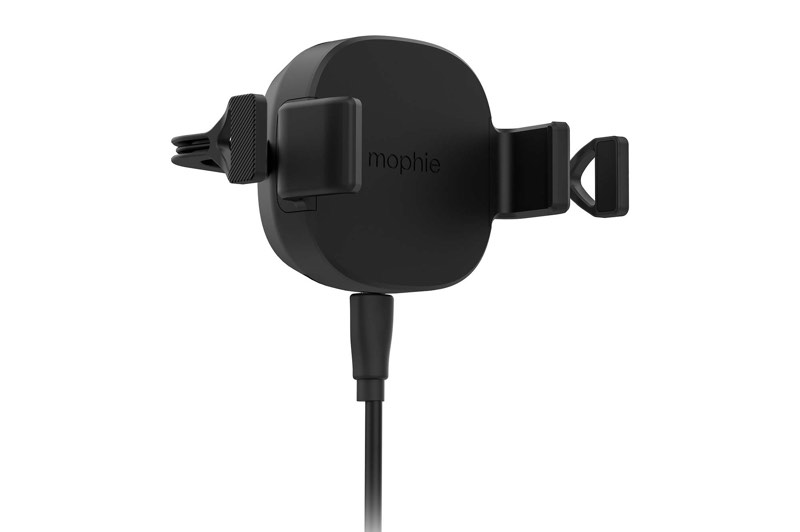
The Charge Stream Vent Mount ($69.95) is designed to fit in most vehicles with a four-prong mount that slips over the air vent. It’s meant to accommodate one-handed smartphone insertion and removal, and should work with most smartphones regardless of size. Rubberized arms hold a device in place while charging, and for iPhones, it supports faster 7.5W charging speeds.
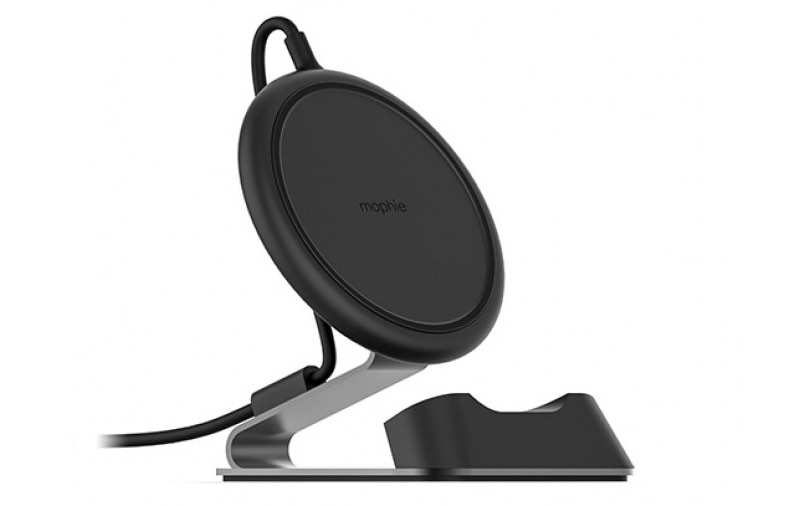
Mophie’s new Charge Stream Desk Stand ($69.95) , which is coming this fall, looks similar to its existing charging pad for iPhones. It offers 7.5W charging speeds while holding an iPhone or other smartphone upright in portrait or landscape mode. The charging pad can be removed from its steel frame and used as a traditional wireless charging pad if desired.
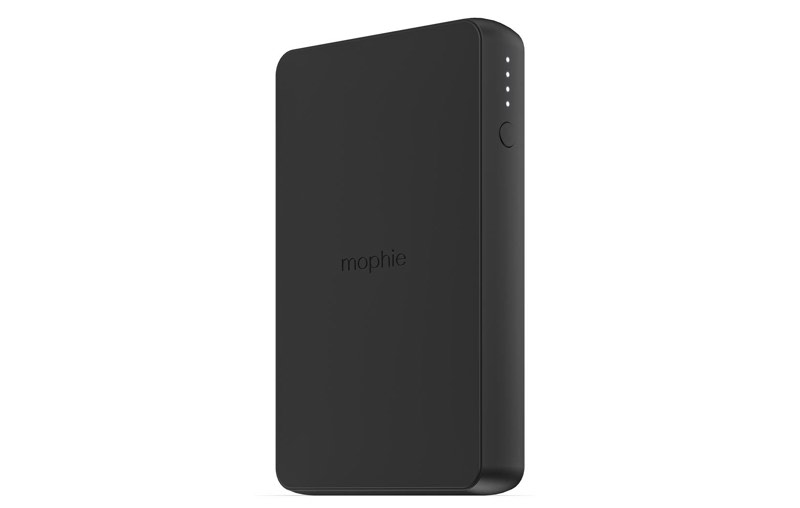
The Charge Stream Powerstation Wireless ($79.95) and the Charge Stream Powerstation Wireless XL ($99.95) work as a traditional wireless charging pad when near a wall outlet and as a 5W wireless charging battery pack when on the go. The Powerstation Wireless features a 6,040mAh capacity, while the Powerstation Wireless XL features a 10,000mAh capacity. An included USB-A port can also charge a second device.
With the exception of the Desk Stand, which is not yet available, all of the new wireless charging options can be purchased from the Mophie website starting today.
Discuss this article in our forums
Google Assistant goes bilingual, lets you speak two languages interchangeably
Whether you’ve come to say “Hola!” or “Bienvenue” or “Auf Wiedersehen,” Google Assistant is ready to answer you right back as the smart assistant becomes the first of its kind to go fully bilingual. Users can now speak two languages interchangeably with the Google Assistant on smart speakers and phones and the Assistant will respond in kind.
As of right now, the Assistant can understand any pair of languages with English, German, French, Spanish, Italian, and Japanese, with more languages to come in the coming months.
Although it’s an advancement for the worldwide market, there have been hints of the new ability coming since the beginning of the year as Google rolled out new features and analysts reverse-engineered the launch of new routines and integrations for Assistant. Google announced at the beginning of the year that it anticipated offering support for up to 30 languages by the end of 2018. In February, it announced a breakthrough feature by which Google Assistant could automatically detect which language a user’s commands were in and respond in kind. Google also published a technical blog post explaining how the speech research team at Google tackled the multilingual problem.
Bilingualism is also likely to lead to multilingualism, a natural progression of Google’s direction. But even the ability to detect and speak two languages simultaneously is a huge win for bilingual communities like Quebec, where most people speak French and English, and India, where demand for bilingual services in Hindi and English is so high that Google recently developed bilingual support for its Feed service (previously known as Google Now), and expects to roll out support for Hindi very soon.
The new bilingual feature will also be particularly helpful for Google Assistant users who speak their native language in their home, but may speak a different language at work or while out with friends.
Previously, Google Assistant was capable of understanding different languages but users had to physically designate a primary and a secondary language in the app’s settings. The new feature goes a long way toward reducing that friction and giving users the organic engagement that is high on Google’s list of goals.
By year’s end, Google’s language support services are expected to allow the company to reach 95 percent of Android smartphones worldwide that are capable of running Google Assistant.
The development is a big leg up for Google and an indication of the strength of its language support and artificial intelligence development. The company has struggled since the launch of the Google Home smart speaker line to compete with Amazon, which launched Alexa earlier but, like Siri, has much more limited language support than Google does.
The announcement included the fact that Google Home Max will launch on Thursday, August 30, in the U.K., France, and Germany. Google Home Max has been available in the U.S., Canada, and Australia for nearly a year.
The mega version of Google’s smart speaker features “Smart Sound,” enabling it to automatically adapt itself based on where it’s placed in the room. The high-end smart speaker also works with more than 150 home automation brands and more than 1,000 smart home devices.
Google also announced that its “ecosystem partners” will be introducing new phones and a range of smart home devices and appliances that support the Google Assistant in Europe in the near future.
Editors’ Recommendations
- Google Docs’ A.I. grammar checker will fix your poor writing habits
- Google Home will stamp its passport in at least seven new countries this year
- Here’s how to change Google Assistant’s voice on your Google Home device
- Google Home adds Spanish speaking and listening capabilities
- Google Assistant: Everything you need to know
Your keyboard could predict if you have early-onset Parkinson’s disease
Keyboards are smart things these days. Some use machine learning to speed up our typing by predicting which letter or word we’ll want next. Others look at our typing habits and try to use this to guess our emotional state. Now, researchers from Australia’s Charles Sturt University have a new idea: Using the subtle clues in a person’s typing to look for early signs of Parkinson’s disease.
Parkinson’s is a progressive neurodegenerative brain disorder, which causes a range of physical and psychological symptoms. More advanced Parkinson’s is noticeable through physical traits, such as involuntary tremors and the distinctive shuffling walk known as Parkinsonian gait. However, it can be tough to spot early on before such symptoms have manifested.
That’s a problem because this period before diagnosis is a crucial time for patients. By the point of diagnosis, 70 percent of the brain’s dopaminergic neurons — the neurons which synthesize the neurotransmitter dopamine — may have already been irreversibly lost. While there is currently no cure for Parkinson’s, there is plenty of active research into finding drugs that will slow or halt its progression. For these drugs to be effective, early intervention is of the utmost importance.
The Charles Sturt researchers have developed software that monitors the time between key presses on a keyboard and uses this as a measure of hand tremor frequency. In tests, the system was able to correctly identify patients with mild Parkinson’s with 78 percent accuracy. While that’s not perfect accuracy by any means, it’s still enough that a person might want to get themselves examined more closely.
“Around 75 percent of PD sufferers have hand tremor as one of their symptoms, so being able to detect that tremor from keystroke characteristics can provide a second cardinal feature to satisfy the clinical diagnosis of the disease,” lead author Warwick Adams told Digital Trends. “What makes this finding so exciting is that it can lead to development of a widely available screening test for early PD: One that will be able to be used by first-level clinicians, as well as by individuals themselves.”
In addition to aiding with diagnosis, the technology could also help monitor the effectiveness of individual medication. Even without a Parkinson’s cure, this could be useful right now, since the required dosage of dopamine replacement medication changes over time.
“The reason for focusing on typing is that it is something that nearly everyone does, and it can be monitored as people use their own computer in their own home, without needing any specialized equipment,” Adams continued. “There is already a patent pending and, over the next couple years, the plan is to commercialize this research — ideally in partnership with a drug company or diagnostic services provider.”
Editors’ Recommendations
- MIT can charge implants with external wireless power from 125 feet away
- Parkinson’s is hard to detect early, but this ingenious mobile app can help
- Tuberculosis is a killer, but scientists are fighting back with nanobots
- By studying patient data, A.I. can limit toxicity in cancer treatment
- Now you can watch free movies and TV shows with the Tubi TV app
Lenovo’s Snapdragon-powered Yoga C630 promises 25 hours of battery life
Previous
Next
1 of 12

Julian Chokkattu/Digital Trends

Julian Chokkattu/Digital Trends

Julian Chokkattu/Digital Trends

Julian Chokkattu/Digital Trends

Julian Chokkattu/Digital Trends

Julian Chokkattu/Digital Trends

Julian Chokkattu/Digital Trends

Julian Chokkattu/Digital Trends

Julian Chokkattu/Digital Trends

Julian Chokkattu/Digital Trends

Julian Chokkattu/Digital Trends

Julian Chokkattu/Digital Trends
Lenovo revealed at IFA 2018 that Qualcomm’s Snapdragon processor is finally arriving on the Yoga laptop. Thanks to the octa-core Snapdragon 850 processor, the Lenovo Yoga C630 Windows on Snapdragon, or WOS, is the first always-on, always connected Yoga convertible in Lenovo’s lineup. By going with a low-power ARM-based Snapdragon chipset, Lenovo claims that the Yoga C930 can deliver more than 25 hours of computing time. Lenovo also introduced a Yoga C930 and Yoga S730.
The battery life gain on the Yoga C630 WOC isn’t without compromises, and users of the system will have to live within the sandboxed environments of Microsoft’s Windows 10 S operating system. This means you won’t be able sideload apps, and your experience will be largely limited to the apps found inside the Microsoft Store. If you can live within these confines, you’ll get a sleek convertible laptop that’s just 0.49 inches thick. The device has an overall footprint of 12.08 x 8.52 inches.
Even though it may run Windows 10, the Yoga C630 WOS shares many traits with modern smartphones. Its LTE modem allows the device to download updates and emails while the laptop is in sleep mode, and the fanless design will result in a very quiet experience. The C630 WOS comes with a polished metal and soft-touch design, Lenovo said, and if you’re an artist or heavy note-taker, you can also add an optional Lenovo Active Pen. The Yoga C630 WOS will be available in November starting at $850.
 Julian Chokkattu/Digital Trends
If you’re after a more premium Yoga experience, Lenovo’s flagship Yoga C930 delivers with a CNC aluminum unibody design that’s 0.57-inch thick and a 360-degree convertible hinge that integrates a sleek Dolby Atmos-optimized soundbar. New this year is Dolby Vision HDR support on both the 13.9-inch 4K and the FHD display options.
Given that the Yoga C930 ships with either an Intel 8th-Gen Core i7 or Core i5 processor and not a Snapdragon CPU, battery life maxes out at 12 hours. The C930 can be configured with up to a 2TB solid-state drive and 16GB DDR4 RAM. Other features include a Windows Hello compatible fingerprint reader and active stylus support, along with a stylus bay to house the digital pen inside the laptop when it’s not being used.
 Chuong Nguyen/Digital Trends
Pricing for the Yoga C930 starts at $1,399 when the device becomes available in October, but if you want a less expensive premium experience, the Lenovo Yoga S730 delivers Intel’s 8th-Gen Core i5 or i7 processor configurations on a Windows 10 Home experience starting at $999. The laptop comes with a smaller 13.3-inch FHD panel and tops out with 16GB RAM and 1TB SSD. Lenovo claims that the display is 15 percent brighter compared to the last-generation Yoga S700 series. Like the more expensive flagship C930, the Yoga S730 comes with far-field microphones and wake on voice for use with a digital assistant. Other features include slim bezels on the sides and top, a new cooling system, and Dolby Atmos support. The Yoga S730 will be available in November.
Editors’ Recommendations
- Lenovo’s keyboard-less Yoga Book now comes with dual screens
- Acer Spin 5 vs. Lenovo Yoga 730
- Lenovo’s Yoga Book with the cool touch keyboard may get a follow-up this fall
- Asus made a dual-screen laptop that looks like the future of computers
- Intel’s latest 8th-gen mobile processors improve battery life and performance
Lenovo brings gaming to the ThinkPad for the first time with its X1 Extreme
Lenovo’s ThinkPad X1 Extreme made its debut at this week’s IFA 2018 convention in Berlin. Ideal for the workplace, this new laptop includes features that enhance security in the office, including a fingerprint reader, an infrared scanner, and a ThinkShutter cover for the built-in webcam. Measuring 0.72 inches thin and weighing up to 4.04 pounds. it’s nice and portable for workers on the go.
Although Lenovo didn’t provide any detailed specifics about the new laptop’s processors, the options will be based on Intel’s eighth-generation “Coffee Lake-H” family introduced in April. There are two Core i7 six-core processors in this family, along with two Core i5 four-core chips.
The processor backs a 15.6-inch IPS screen with two configurations: A 1,920 x 1,080 resolution with a decent brightness of 300 nits, and a touch-enabled 3,840 x 2,160 resolution with HDR support at a brighter 400 nits. These screens are powered by the CPU’s integrated graphics and a discrete GeForce GTX 1050 Ti Max-Q chip for decent gaming when the boss isn’t looking. The GPU includes 4GB of dedicated video memory.
According to the specs, this laptop supports up to 64GB of system memory (DDR4) clocked at 2,666MHz, meaning it can handle up to two 32GB sticks (2x slots). For storage, you can have two stick-shaped M.2 2280 PCIe SSDs supporting up to 2TB of storage (2x 1TB). If you need additional storage, just connect an external drive to one of the laptop’s many ports.
The ThinkPad X1 Extreme includes two USB-A ports (5Gbps), two Thunderbolt 3 ports (40Gbps), one SD card reader, and one HDMI 2.0 port. There doesn’t appear to be an Ethernet port, so networking falls back on the laptop’s Wireless AC connectivity, or an adapter or dock you can purchase separately. Presumably, Bluetooth is also on the menu, although it wasn’t included in Lenovo’s prerelease notes.
Lenovo says the top cover structure consists of four layers of reinforced carbon fiber. It also ships with a stylus that supports tilt and shade functions, and a 135-watt power supply that’s 25 percent smaller than what’s used by other ThinkPad models. An 80WHr rapid-charge battery powers this laptop, promising up to 15 hours of use on a single charge.
Sound is handled by Dolby Audio Premium, which includes support for Dolby Vision and Dolby ATMOS. The laptop weighs 3.75 pounds without the touchscreen and 4.04 pounds with touch intact. The fingerprint reader resides to the right of the backlit keyboard.
The Lenovo ThinkPad X1 Extreme arrives in September with a starting price of $1,860. Here are the specifications at a glance:
- Screen size: 15.6-inches
- Screen resolution: Full HD (300 nits) / 4K with Touch (400 nits)
- Processor: Up to Core i7 with vPro (Coffee Lake-H)
- Graphics: GeForce GTX 1050 Ti Max-Q (4GB)
- Memory: Up to 64GB DDR4 @ 2,666MHz (2x 32GB)
- Storage: 2x M.2 2280 PCIe SSD up to 2TB (2x 1TB)
- Ports: 2x USB-A, 2x Thunderbolt 3, 1x SD card reader, 1x HDMI 2.0
- Audio: Dolby Audio Premium
- Battery: 80WHr
- Camera: HD with ThinkShutter, HD + IR
- Size: 14.24 x 9.67 x 0.72 inches
- Weight: 3.75 pounds (no touch) / 4.04 pounds (with touch)
Editors’ Recommendations
- Lenovo’s first VR-certified 15-inch mobile workstation packs a six-core CPU
- Touchpad on the new Asus ZenBook Flip turns into an LED-illuminated NumberPad
- Dell’s new Inspiron 2-in-1 PCs, premium Inspiron 2-in-1 Chromebook debut at IFA
- Lenovo’s new mobile workstations pack a punch with Xeon CPUs, Quadro graphics
- Lenovo ThinkPad T480s review
Lenovo brings gaming to the ThinkPad for the first time with its X1 Extreme
Lenovo’s ThinkPad X1 Extreme made its debut at this week’s IFA 2018 convention in Berlin. Ideal for the workplace, this new laptop includes features that enhance security in the office, including a fingerprint reader, an infrared scanner, and a ThinkShutter cover for the built-in webcam. Measuring 0.72 inches thin and weighing up to 4.04 pounds. it’s nice and portable for workers on the go.
Although Lenovo didn’t provide any detailed specifics about the new laptop’s processors, the options will be based on Intel’s eighth-generation “Coffee Lake-H” family introduced in April. There are two Core i7 six-core processors in this family, along with two Core i5 four-core chips.
The processor backs a 15.6-inch IPS screen with two configurations: A 1,920 x 1,080 resolution with a decent brightness of 300 nits, and a touch-enabled 3,840 x 2,160 resolution with HDR support at a brighter 400 nits. These screens are powered by the CPU’s integrated graphics and a discrete GeForce GTX 1050 Ti Max-Q chip for decent gaming when the boss isn’t looking. The GPU includes 4GB of dedicated video memory.
According to the specs, this laptop supports up to 64GB of system memory (DDR4) clocked at 2,666MHz, meaning it can handle up to two 32GB sticks (2x slots). For storage, you can have two stick-shaped M.2 2280 PCIe SSDs supporting up to 2TB of storage (2x 1TB). If you need additional storage, just connect an external drive to one of the laptop’s many ports.
The ThinkPad X1 Extreme includes two USB-A ports (5Gbps), two Thunderbolt 3 ports (40Gbps), one SD card reader, and one HDMI 2.0 port. There doesn’t appear to be an Ethernet port, so networking falls back on the laptop’s Wireless AC connectivity, or an adapter or dock you can purchase separately. Presumably, Bluetooth is also on the menu, although it wasn’t included in Lenovo’s prerelease notes.
Lenovo says the top cover structure consists of four layers of reinforced carbon fiber. It also ships with a stylus that supports tilt and shade functions, and a 135-watt power supply that’s 25 percent smaller than what’s used by other ThinkPad models. An 80WHr rapid-charge battery powers this laptop, promising up to 15 hours of use on a single charge.
Sound is handled by Dolby Audio Premium, which includes support for Dolby Vision and Dolby ATMOS. The laptop weighs 3.75 pounds without the touchscreen and 4.04 pounds with touch intact. The fingerprint reader resides to the right of the backlit keyboard.
The Lenovo ThinkPad X1 Extreme arrives in September with a starting price of $1,860. Here are the specifications at a glance:
- Screen size: 15.6-inches
- Screen resolution: Full HD (300 nits) / 4K with Touch (400 nits)
- Processor: Up to Core i7 with vPro (Coffee Lake-H)
- Graphics: GeForce GTX 1050 Ti Max-Q (4GB)
- Memory: Up to 64GB DDR4 @ 2,666MHz (2x 32GB)
- Storage: 2x M.2 2280 PCIe SSD up to 2TB (2x 1TB)
- Ports: 2x USB-A, 2x Thunderbolt 3, 1x SD card reader, 1x HDMI 2.0
- Audio: Dolby Audio Premium
- Battery: 80WHr
- Camera: HD with ThinkShutter, HD + IR
- Size: 14.24 x 9.67 x 0.72 inches
- Weight: 3.75 pounds (no touch) / 4.04 pounds (with touch)
Editors’ Recommendations
- Lenovo’s first VR-certified 15-inch mobile workstation packs a six-core CPU
- Touchpad on the new Asus ZenBook Flip turns into an LED-illuminated NumberPad
- Dell’s new Inspiron 2-in-1 PCs, premium Inspiron 2-in-1 Chromebook debut at IFA
- Lenovo’s new mobile workstations pack a punch with Xeon CPUs, Quadro graphics
- Lenovo ThinkPad T480s review
The best laptops of IFA 2018
IFA is one of the larger stages for new laptops each year, and this year’s selection of proves that to be true. Though we’re still waiting for new laptops from Microsoft, Apple, and Google, other big players introduced sweeping portfolios of new Windows 10 laptops, 2-in-1s, Chromebooks — and even some experimental oddities that defy the conventional categories.
Here are the five laptops from IFA 2018 that we’re most excited to get extended hands-on time with later this year.
Lenovo ThinkPad X1 Extreme
Previous
Next
1 of 7


There’s no lack of love for the ThinkPad brand out there, especially if we’re talking about the excellent new X1-series laptops Lenovo has launched in the past few years. This newest 15-inch ThinkPad X1 laptop takes the premium-level build and components to the next level, throwing in a capable graphics card, the GeForce GTX 1050 Ti Max-Q. On top of that, it comes with a powerful Intel H-series six-core processor, a 4K HDR display, and up to 15 hours of battery life.
The ThinkPad X1 Extreme has its aim set directly on laptop like the Dell XPS 15 and the 15-inch MacBook Pro. Despite its hefty $1,860 starting price, we think this laptop has the potential to reach beyond just ThinkPad devotees.
Asus ZenBook S
Previous
Next
1 of 6


The original ZenBook S was launched just recently, and we reviewed it as one of our favorite premium 13-inch laptop. It has a killer design, a gorgeous 4K display, and excellent performance. Asus is already following it up by refreshing it with the newest 8th-gen Intel processors, more specifically, the Whisky Lake chips announced at IFA.
Asus says these news chips provide a 10 percent performance enhancements over the previous ZenBook S — and even more interestingly, up to twenty hours of battery life. Manufacturer battery claims always have to be taken with a grain of salt, but it’s still an impressing number to boost. So far, only the Surface Book 2 (which has extra juice in the tablet) and Qualcomm-powered PCs have come close to lasting for twenty hours.
Lenovo Yoga Book
Previous
Next
1 of 11

Andy Boxall/Digital Trends

Andy Boxall/Digital Trends

Andy Boxall/Digital Trends

Andy Boxall/Digital Trends

Andy Boxall/Digital Trends

Andy Boxall/Digital Trends

Andy Boxall/Digital Trends

Andy Boxall/Digital Trends

Andy Boxall/Digital Trends

Andy Boxall/Digital Trends

Andy Boxall/Digital Trends
The original Yoga Book seemed crazy when first introduced in 2016, but these days a keyboard-less, dual-screen notebook feels more like the future of laptop form factors than a silly experiment. The 2nd-generation Yoga Book was teased at Computex earlier this year, alongside a couple of other interesting keyboard-less designs, but IFA was its full, official introduction. The new version comes with two 10.8-inch displays, one in the lid and one where the keyboard would normally. In place of a keyboard is a Full HD E-Ink display that works for both typing and stylus use. We found typing significantly improved this time around.
The lack of a keyboard means the Yoga Book is incredibly thin and light. In fact, as far as we can tell, it’s the thinnest and lightest laptop ever made. It starts at $1,000 for the base model, which comes with a 7th-gen Y-Series processor. It’s unfortunate Lenovo couldn’t implement the new 8th-gen processors in time, though it seems as if the project has been in the works for a long time.
Read out Lenovo Yoga Book hands-on review
Asus ZenBook 13 / 14 / 15
Previous
Next
1 of 3


Asus relaunched the ZenBook 13 at IFA, showing off its new trimmed-down bezels and smaller footprint. There’s now a 92 percent screen-to-body ratio, making for a great new look for these affordable ZenBooks. They come in 13-inch, 14-inch, and 15-inch sizes, with options of up to a 4K display. It’s not all just about looks, though — Asus has packed some impressive components under the hood too.
All models come with the latest Whiskey Lake 8th-gen processors and options for a discrete graphics card. The GeForce MX150 is available for the smaller sizes, and the GTX 1050 (Max-Q) for the 15-inch. The most interesting feature included is the touchpad, which can be turned into a Numpad when needed. We don’t have any details on specific configuration options, pricing, or release date yet.
Acer Swift 5
Previous
Next
1 of 4


The Swift 5 was advertised in its announcement as the lightest 15-inch ever made. It also has tiny bezels and a thinned out chassis, for a modern look that’s a huge upgrade over last year’s model. The design is an impressive feat, but it’s actually not the most compelling feature of the laptop.
Thanks to the new Intel U-Series processors, the Swift 5 comes with both built-in 4G LTE and Gigabit Wi-Fi. While it’s not the only laptop to receive these important new connectivity features, the $1,100 starting price makes it a bit more accessible for the average person.
Editors’ Recommendations
- The $1,100 Acer Swift is the lightest 15-inch laptop ever made
- The ThinkPad X1 Extreme might be my dream laptop
- Asus ZenBook UX330UA review
- Lenovo’s keyboard-less Yoga Book now comes with dual screens
- MacBook Pro 13-inch with Touch Bar review
Lenovo’s keyboard-less Yoga Book now comes with dual screens
Previous
Next
1 of 15

Chuong Nguyen/Digital Trends

Chuong Nguyen/Digital Trends

Chuong Nguyen/Digital Trends

Chuong Nguyen/Digital Trends

Chuong Nguyen/Digital Trends

Chuong Nguyen/Digital Trends

Chuong Nguyen/Digital Trends

Chuong Nguyen/Digital Trends

Chuong Nguyen/Digital Trends

Chuong Nguyen/Digital Trends

Chuong Nguyen/Digital Trends

Chuong Nguyen/Digital Trends

Chuong Nguyen/Digital Trends

Chuong Nguyen/Digital Trends

Chuong Nguyen/Digital Trends
When it debuted two years ago, Lenovo’s groundbreaking Yoga Book reimagined the traditional keyboard with a glass surface and laser-etched keys. At IFA, Lenovo is back again with an updated Yoga Book with two displays, and the refreshed device lends insight into how a dual-screen computing device could work. Like its predecessor, this year’s Yoga Book is also geared at note-takers.
The original Yoga Book came with a primary display, a hinge that liberally borrows from Lenovo’s Yoga convertible laptops, and a second glass panel. On traditional notebooks, a physical keyboard would occupy much of the surface on this glass panel, but Lenovo swapped out a physical keyboard with moving parts in favor of laser-etched capacitive touch keys on the glass surface. The move not only allowed the Yoga Book to be extremely slim and sturdy for its size, but it gave Lenovo the opportunity to introduce a physical notepad where handwritten sketches and notes can be digitally transcribed, allowing the user to retain both the pen-and-paper copy and a saved digital file.
 Chuong Nguyen/Digital Trends
Unlike the original Yoga Book, which came with Android and Windows options, this year’s Yoga Book C930 is purely a Windows affair, and will be available in October starting at $999. Lenovo is swapping out the glass-etched keyboard and paper notepad accessory from the previous generation in favor of an electronic ink display, making this year’s Yoga Book a true dual-screen laptop. The main display comes with a 10.8-inch panel and a resolution of 2,560 x 1,600 pixels, while the 10.8-inch E Ink panel comes with a full HD resolution.
Because the device relies on a secondary glass screen rather than a physical keyboard for input, the Yoga Book is an extremely slim device, measuring 9.9mm thick when closed. Lenovo claims that the Yoga Book is the world’s thinnest and lightest dual-display laptop. Because the device is so thin, Lenovo created a new way to open the Yoga Book when it’s resting on a table. Instead of lifting the lid, you can now knock on the device and it will open.
 Chuong Nguyen/Digital Trends
The electronic ink display serves as the keyboard, notepad, and e-reader, depending on the application in use, and this year’s Yoga Book C930 delivers a keyboard with bigger keys and a larger trackpad. It remains to be seen how comfortable the Yoga Book’s E Ink keyboard will be for long typing sessions. Note-takers and digital artists can rely on the Wacom Active Pen with Bluetooth to jot notes or draw on either displays. The pen attaches to the Yoga Book via magnets. There’s also an IR optical fingerprint sensor and support for Dolby Atmos audio on the dual speaker system.
The laptop ships with either a 7th-generation Intel Core i5 7Y54 or 7th generation Intel Core m3 7Y30 processor, 4GB RAM, up to 256GB of solid-state storage, and two USB-C ports. For mobile users, the Yoga Book C930 can also be configured with optional LTE connectivity.
Editors’ Recommendations
- Lenovo Yoga Book C930 hands-on review
- Intel hopes to kick-start dual-screen Windows 10 market with its own designs
- Brace yourself! The age of keyboard-less laptops is upon us
- The best laptops of IFA 2018
- Windows 10 Mail will let you handwrite your email with a stylus
The ThinkPad X1 Extreme might be my dream laptop
Previous
Next
1 of 10


I’m not the target audience for a “mobile workstation” laptop. I don’t edit video. I don’t run complex simulations. I rarely even edit photos, and when I do, it’s a simple change of aspect ratio in GIMP. Yet two years ago, Lenovo’s ThinkPad P50 seduced me with its combination of simple functionality and incredible power. I spend a lot of time in front of a computer. I use a PC for work, then relax by firing up a PC game like World of Warcraft or Warframe. Lenovo’s ThinkPad P50 handled both without trouble.
Handling the P50 itself, though, was trouble. It weighed 5.6 pounds and was about an inch thick, enough to make hauling it in my usual messenger bag a chore. The problem might’ve been a deal breaker if I were to buy it for my own, personal use.
Lenovo understand my plight, it seems, and now it has a solution: The Lenovo ThinkPad X1 Extreme.
Lenovo has wrapped everything I liked about the hefty P50 into a much more portable device.
For those unfamiliar, the X1 lineup serves as the flagship ThinkPads. The ThinkPad X1 Carbon and X1 Yoga are top-tier portable business laptops with one weak spot. They’re not all as powerful, especially in the graphics department. The X1 Extreme fixes that issue — and then some.
I’ll get straight the point. The ThinkPad X1 Extreme comes with Nvidia’s GeForce 1050 Ti Max-Q graphics chip. It’s not god-tier hardware, but we’ve tested plenty of 1050 Ti hardware in the past and have always judged the 1080p gaming performance on the enjoyable side of adequate.
Lenovo’s decision to pick this chip, instead of the workstation-focused Quadro line, is a bit weird given the ThinkPad’s supposed focus on business use. Not that I care. That’s not what I want it for. I’d rather have the GeForce; it moderates the laptop’s price and will offer access to driver updates that focus on gaming instead of CAD.


And here’s the other key point: The X1 Extreme keeps the 15-inch display, but it weighs about 3.8 pounds.
That’s almost half what the P50 weighed. That’s what 13-inch laptops weighed just a few years ago. You can buy a lighter laptop, to be sure, but at 3.8 pounds it’s light enough to not feel like a burden. It even shaves about a half-pound off the weight of Microsoft’s Surface Book 2 15-inch, a device I often tote to and from the Digital Trends office.
I often worry that laptop progress has stalled. I worry that today’s laptops aren’t that much better than those which came a few years ago. But here, I can see and feel the progress. Lenovo has wrapped everything I liked about the hefty P50 into a much more portable device, and they’re not even charging more for it. The X1 Extreme will start at $1,860 – the P50 I loved in 2016 was priced at $2,350.
There’s no doubt I’ll be giving the X1 Extreme a close look, and I won’t have to wait long to do it. The first units will be sold later this month. If you want a Core i9 model you’ll have to wait until December, but if your interest in the X1 Extreme aligns with mine, you can skip that.
As for me, well, I hope to see the X1 Extreme in our lab soon. A World of Warcraft expansion just came out, and I need to put it through its paces.
Editors’ Recommendations
- The best laptops of IFA 2018
- Dell XPS 15 9570 review
- Microsoft Surface Laptop review
- Samsung Galaxy Tab S4 review
- Lenovo revamps Legion brand with affordable gaming laptops and desktops
Lenovo Yoga Book C930 hands-on review
Research Center:
Lenovo Yoga Book C930
Everything about the Lenovo Yoga Book C930 feels like the future. It’s the laptop James T. Kirk would use (in the new movies, of course). Why? Because it doesn’t have an actual, physical keyboard, and instead has a beautiful piece of glass covering an E-Ink screen on which the keyboard appears. What’s more sci-fi than typing on nothing more than a glass panel?
Of course, it’s actually not sci-fi at all, because the vast majority of us type on a pane of glass everyday. The touchscreen smartphone has made this a normal action, so why does having one on a laptop feel so futuristic? After all, we could type on a tablet too if we wanted more screen real estate than a phone. It’s all to do with the Yoga Book being an actual computer, despite its high-tech looks. At its heart, this is still a laptop.
Wait, no keyboard?
Without a physical keyboard, you’re probably wondering how you’re supposed to get any work done on the Yoga Book like you would on an ordinary laptop. But it’s less akin to typing on a tablet than you might think. Due to it being in a laptop configuration with the screen upright in front of you, typing feels quite natural. The E-Ink keyboard is sized perfectly, and I could touch type on it almost immediately, without much practice. The keys animate and even provide some haptic feedback vibrations depending on the key presses.
There’s even an E-Ink touchpad to navigate around Windows 10. Don’t dismiss it as slow because it’s E-Ink either, as there is no lag when using it as a keyboard. Typing is not usually an action that fills me with joy, but I smiled when typing on the Yoga Book C930. Take that as a sign that it’s a very special experience.
Lenovo even explained the keyboard has a degree of intelligence, where it learns how you type and will adjust its understanding of where you hit keys on a repeated basis. If you always hit the F key in a way that touches the R key, the Yoga Book will learn that’s how you type.
If you always hit the F key in a way that touches the R key, the Yoga Book will learn that’s how you type.
But it’s a special experience long before you even get to the keyboard. It’s ultra-thin when closed, and the wonderfully over-engineered hinge system looks fantastic, just like it did on the first Yoga Book. Lenovo is proud of its solution to the slightly awkward way of prising the old model open, and we think it’s one of the most fun solutions to an unusual problem we’ve seen in a while.
With the Yoga Book closed, you knock twice on the leading edge — really — and the top section automatically pops up a centimeter or so, allowing you to easily open the clamshell. It reminded us of Huawei’s innovative solution to where it would place the front facing camera on the MateBook X Pro. Different, innovative, and fun.
The E-Ink screen is more than just a keyboard too. Using a menu in the top right, you can change it to a notepad on which to scribble notes with the included stylus. A button on the stylus erases or copies text, all of it fast and responsive, even offering varying pressures for more creative uses.
Andy Boxall/Digital Trends
E-Ink limitations mean it’s not in color though. The pen magnetically attaches to the Yoga Book’s case when not in use, and is included with the package rather than being sold as an extra. Most will be familiar with E-Ink screen technology from e-readers like the Amazon Kindle, as it’s easy on the eyes when reading. The Yoga Book’s keyboard also has a reading mode, ready to display a book or two, but only in limited formats like PDFs at launch, with others to follow later.
You knock twice on the leading edge and the top section automatically pops up a centimeter or so.
Whether open or closed, the Yoga Book is a compact, highly portable computer at 0.39 inches thick and only 1.7 pounds in weight. In case you’re counting, that makes the Yoga Book the lightest laptop ever made — and very close to one of the thinnest as well. Its overall footprint is small too, with both screens measuring in at 10.8-inches. The LCD IPS main display has a 2560 x 1600 pixel resolution and looked bright and punchy in our brief hands-on, while the E-Ink screen has a 1920 x 1080 pixel resolution.
Inside there is a choice of processor, the seventh generation Intel Core M3 7Y30 or Core i5 7Y54, and both are matched to 4GB of RAM and either 128GB or 256GB of SSD storage. We’re a little disappointed Lenovo couldn’t use Intel’s newer 8th-gen Y-Series processors, especially since they were announced at the very same conference. Lenovo says it just missed the boat on integrating the new processors. Unfortunately, that means the Yoga Book could begin to feel quite outdated in just a couple of years. A 4G LTE version will be sold in some regions, but is not expected to come to North America.
Lenovo Yoga Book C930 Compared To
HP ZBook Studio G4
Acer Aspire VX 5-591G 5652
Asus Zenbook 3 UX390UA
Lenovo ThinkPad X260
Lenovo Ideapad 710S
Dell XPS 13 (Skylake)
LG Gram 15 Z960
Asus Zenbook UX501VW-DS71T
Samsung ATIV Book 9 (2014)
Dell XPS 15 (2012)
Fujitsu LifeBook S6510
Panasonic Y2
Compaq Presario R3000
Gateway 200XL
Sony VAIO PCG-Z1AP1
Approximately nine hours of use is expected from the battery, while the E-Ink screen used on its own to read books will last around 13 hours on a single charge. There are two ports, both USB Type-C 3.1, plus a fingerprint sensor along the top edge of the E-Ink screen. It uses an infrared sensor to operate even if your fingers are damp. There are a couple of speakers, complete with Dolby Atmos, and a physical volume rocker on the side of the body, alongside a sleep/wake key.
Is it love?
While we fell completely, head-over-heels in love with the Yoga Book C930, we’re also aware this could be an old-fashioned crush that may spoil when we spend more time with it. There are question marks over the effectiveness of the keyboard when typing for a long time, or when accuracy fails due to tiredness or fatigue, things that a physical keyboard compensates for naturally.
We fell completely, head-over-heels in love with the Yoga Book C930.
The Yoga Book is also small for a laptop — and expensive too. It’s $1,000 for the basic 128GB Core m3 model and around $1,500 for the upper model. Only after spending more time with it will we know if it can challenge other laptop computers that cost this much, or if its natural competition is the Apple iPad Pro with a keyboard case and the Apple Pencil. It is unquestionably more versatile than the iPad, and definitely better-looking; but for travel convenience the iPad makes a very strong case for itself. There also won’t be an Android version like there was with the first model either.
It’s coming out in October, and despite not getting to swoon over it for very long, it’s still fresh in our mind as one of the standout new devices revealed at the IFA 2018 technology show. The Lenovo Yoga Book C930 has a fresh design, innovative enjoyable-to-use technology, masses of sci-fi cool, and a case you knock twice to open up. At this point, we’re counting out the dollar bills to get one.

