


Temi is your personal robot butler, like an Amazon Echo Show on wheels
While popular culture has consistently served up a vision of the future that features robot servants at our beck and call, they’ve been slow to infiltrate our homes so far. Despite the development of increasingly sophisticated robotics and artificial intelligence, domestic robots have yet to take off.
Temi could be in the vanguard of a new wave of robot butlers designed to cater to our whims, or it could be a glorified smart speaker on wheels. We took it for a spin at IFA in Berlin to find out exactly what it’s capable of.
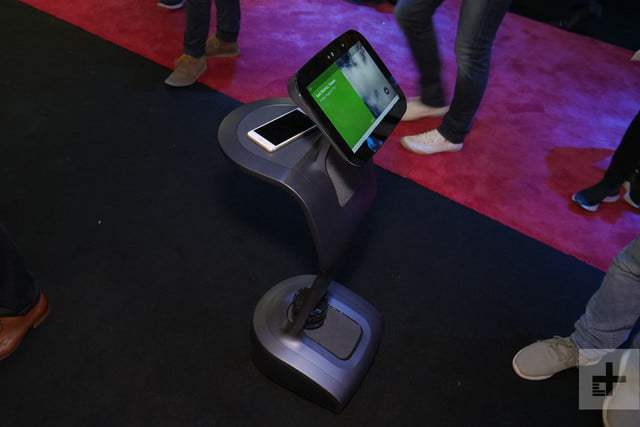
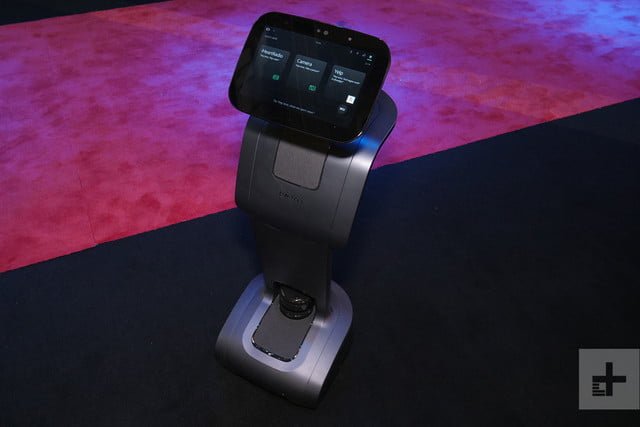
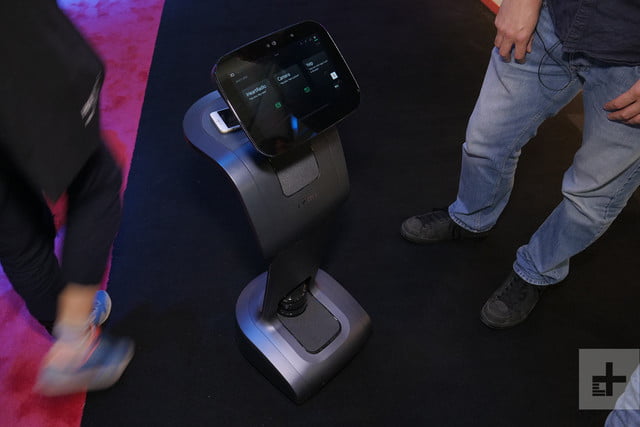
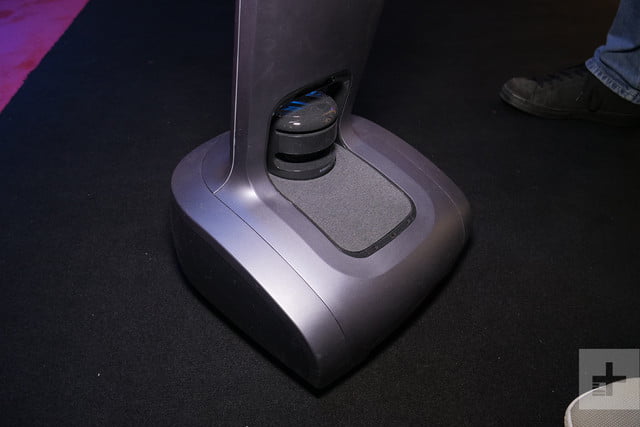
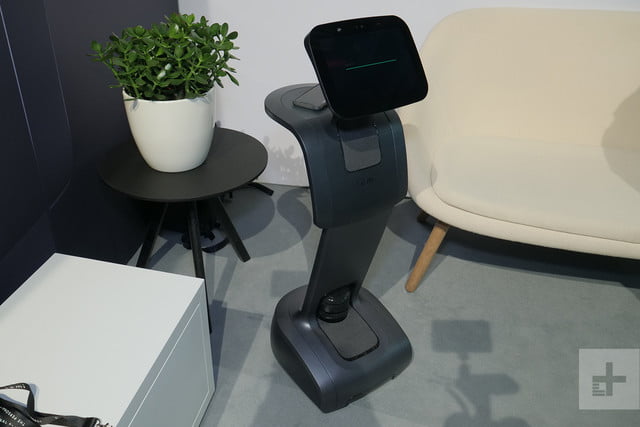
Standing just over 3 feet high, Temi has an Android tablet for a head, with a 10.1-inch screen. Behind that and a little lower there’s a kind of shelf that also works as a wireless charging pad for phones. The main body is curved with a couple of midrange speakers in the chest area and then a subwoofer built into the base.
There’s a lot of clever tech inside Temi.
There’s a lot of clever tech inside Temi. Cameras, sensors, microphones, and more enable it to hear you and track your movements, tilting its head up and down and turning around. Temi can also navigate around using lidar to detect and avoid any obstacles. Tap it on the head or ask it, and it will track and follow you around, turning as you do to ensure that it’s always facing you.
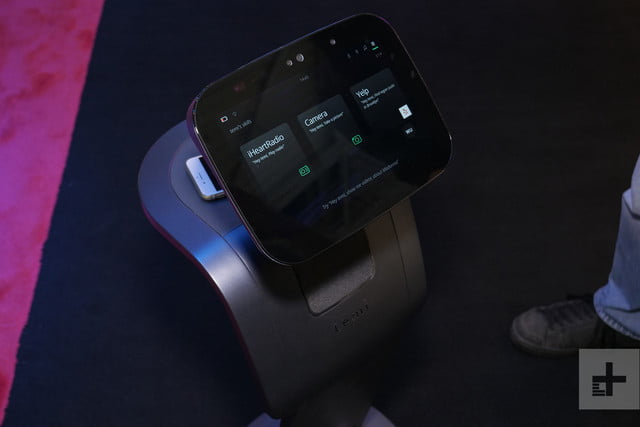
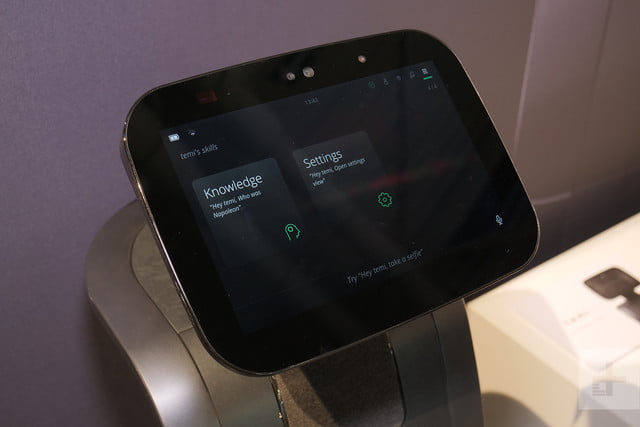
You can use a range of voice commands with Temi. Just like any other voice assistant it can answer basic questions, tell you about the weather, and play music and video. There’s support for a few major apps such as Google, Reddit, YouTube, CNN, Yelp, Deezer, and Uber, but because Temi runs a modified version of Android, developers have to add support.
If you’ve ever used an Amazon Echo Show, then the tablet portion of Temi will be easy to understand. While it currently uses a proprietary voice assistant, there are strong rumors that the final product will have Google Assistant on board. That would be a good thing because, even allowing for a noisy show floor, we weren’t too impressed with its voice recognition during our demo – it frequently misunderstood commands, even from the makers.
Previous
Next
1 of 7
Rich Shibley/Digital Trends
Rich Shibley/Digital Trends
Rich Shibley/Digital Trends
Rich Shibley/Digital Trends
Rich Shibley/Digital Trends
Rich Shibley/Digital Trends
Rich Shibley/Digital Trends
We’ve seen telepresence robots before, but Temi is quite sophisticated in that department. We tried out a video call and it worked very well, although it doesn’t show you from a very flattering angle unless you sit down because it’s only 3 feet tall.
You can chat as you walk around with Temi following you, but the caller on the other end can also swipe left or right to turn Temi, or tap and hold on spots in your room to command Temi to go there. They don’t have to be too precise, as Temi will plot its own route to avoid obstacles.
If you did buy a Temi, one of the first things you would do is set up a map of your home for it, so you can tell it to go the kitchen or the dining room, for example. It will remember the rooms you define and they can also be used during video calls.
Temi comes with a charging base station and will keep itself charged up so you don’t have to worry about plugging it in. Apparently, it will decide when to charge based on your schedule and remaining power to ensure it’s ready to go when you need it.
For all its sophistication, Temi is essentially offering a smart speaker experience in mobile form.
It has Bluetooth and Wi-Fi connectivity you have the option of adding cellular data support.
For all its sophistication, Temi is essentially offering a smart speaker experience in mobile form. It works well as a telepresence robot, and it might be nice sometimes to have your music follow you from room to room, but you’re going to have to pay a big premium for that mobility.
If you consider that the base model costs $1,500, then there’s a good chance it would be cheaper to fit our every room in your home with a mix of Amazon Echo Shows and other speakers. It wouldn’t be as cool as having a robot that can follow you, of course, but all you’d really miss out on is the telepresence functionality and that remote-control element.
It’s also worth noting that Temi can’t climb stairs, so it will work best in homes that are on one level.
There is going to be a higher end model of Temi available for $1,900 which adds a 4K display, more powerful Harman Kardon speakers, and a more luxurious finish.
Ultimately, we’re not sure Temi is worth the investment unless the telepresence feature is something you would use a lot or you have another specific use case in mind. Temi will be available from October this year.
Editors’ Recommendations
- Ecovacs Deebot 901 robotic vacuum review
- iLife A7 Robot Vacuum review
- Born to hug: 6 of the weirdest, most outlandish robots humanity has ever created
- Meet Fusion: A helpful robotic ‘parasite’ that lives on your back
- It’s curtains for Kuri: Work ceased on robot companion project
Sony Xperia XZ3 hands-on: Damn fine hardware, with potential pain points

This is some beautiful hardware that steps beyond the XZ2 in the right ways.
Sony’s strategy of releasing a new flagship phone every six months means you don’t have to wait long to see the company’s latest mobile tech. But it also means that the generation-over-generation changes are extremely subtle compared to others that refresh once a year. The Xperia XZ3 hasn’t broken that mold, but what has changed is notable and the overall product is still enticing — particularly from a hardware perspective.
It’s easy to dismiss the XZ3 as “yet another Sony phone” at first glance — and I’ll admit that was my first reaction — but believe me, there’s more to this hardware than you think. Sony’s design languages is intact, but the details dramatically change the feel of this phone. The 6-inch display makes this phone slightly larger than the XZ2, but it doesn’t feel as big or “pillowy” as I liked to refer to the XZ2.
The aluminum frame thins out around the sides of the phone, the back is flatter across the middle and the curves are more subtle. The curved screen makes a massive difference to the feel of the phone because of how it lets the glass more aggressively curve over into the thin sides. In short, it feels like the Galaxy S9+ — and that’s a really good thing. And call me crazy, but I think Sony’s execution of the metal, glass and joins is actually better than Samsung’s latest. The color selections Sony made are absolutely fantastic. Whether you go with the monolithic all-black, the pleasant sea foam green or my personal favorite white-and-silver, each one has a nice mixture of finishes and a great depth to the color.
Sony managed to notably improve on the XZ2’s hardware; it’s stunning.
The new 6-inch OLED display looked really good to my eyes, but then again you expect that in this level of device. What I didn’t expect from Sony was shrunken top and bottom bezels, which brings the XZ3’s edges closer to what the rest of the industry has reached. They’re now down to the size where you can give them a pass, at least if you consider the new and improved speakers.
The one curveball feature on the XZ3 that I can’t wrap my head around is “Side sense,” the feature not unlike HTC’s Edge Sense that lets you tap along the sides of the phone to perform actions without pressing a button. Sony has a pretty basic implementation here: you double-tap your thumb on either side of the phone, and a menu pops out with apps you can launch. It’s basically the same as using an Edge panel on a modern Galaxy phone, except you don’t have to look at the little pull-in tab all the time.
This new ‘Side sense’ feature needs some fine tuning.
Unfortunately, I spent several minutes trying to get it to consistently trigger and just couldn’t make it happen with anywhere near 100% accuracy. You need a pretty firm double-press, which can be tough on a phone with such a thin metal edge. It’s a very neat idea that could be incredibly useful if Sony fine tunes the system and makes it more configurable. And unlike the HTC U12+ it isn’t a core part of the phone’s navigation, so I’m willing to give it a “wait and see” pass for the moment.
Sony’s also shipping this phone with Android 9 Pie out of the box, which gives it a leg up over all of the phones that launched recently with Oreo. Sony’s software continues to be fast and clean, following in the footsteps of Google Pixels albeit with a little extra Sony style — something most people either love or hate.
As ever, there are (potential) caveats here. I still don’t like the fingerprint sensor placement, as just like the XZ2 it’s way too far down the back of the phone. There’s no headphone jack here, either. The display looked great in my short time with it, but Sony has a track record of screens with weak outdoor visibility — hopefully switching to OLED fixed that. I’m also concerned by the longevity of a phone this big with a 3300mAh battery. The camera, too, has potential to be a dealbreaker. Taking a few shots in the (admittedly poorly lit) Sony booth at IFA 2018, the camera was sometimes slow to capture, and the grain and chroma noise in the resulting photos was immediately noticeable — that’s just not something I can put up with in a $900 phone.
Sony made a darn nice phone, and no longer has a bunch of bone-headed mistakes.
When using the Xperia XZ3, I fell back to the usual question of whether it’s a “too little too late” situation with Sony’s flagships. The company is so saddled by the baggage of releasing expensive, subpar phones for so long that now it almost doesn’t have a chance to capture any market — even though it’s fixed most of its flaws. The Xperia XZ3 looks and feels like a phone that’s every bit as nice as — or nicer than — the high-price competition. It no longer has bone-headed mistakes like an oddly placed NFC antenna or a missing fingerprint sensor. It has most of the features that people desire (or at least complain about not having) like an SD card slot, stereo speakers, notch-free display, simple up-to-date software, wireless charging and more. I can’t yet find a critical problem here — just issues that come down to preference.
If you’re someone who doesn’t scoff at the Galaxy Note 9’s $1000 price tag, I’m not sure how you can look at the Xperia XZ3 and not think it’s at least worth considering at $900.
Casio Pro Trek WSD-F30 hands-on review
Research Center:
Casio Pro Trek WSD-F30
Shaving 4mm off anything doesn’t sound like very much. Reducing the length of a car by 4mm, for example, would not make any appreciable difference. But when Casio cut it away from the WSD-F20 Pro Trek smartwatch’s case to make the WSD-F30 Pro Trek Smart, it made a considerable difference to the wearability and style, without sacrificing any technology. In fact, the watch became even more useful.
Smaller, but still large
Before we go any further, we should say that while the WSD-F30 definitely looks more at home on most wrists than the WSD-F20, it’s still a big watch. The case is 53mm wide, after all. Like many other Casio watches, the size means it’s tough, and the Pro Trek WSD-F30 meets military standards, plus it’s water resistant to 50 meters, even though it has a microphone for Google Assistant. It’s impressive. The watch’s bold design is tailored to those who embrace the outdoor lifestyle, and the new blue color looks superb — not as faceless as the black version, or as ostentatious as the orange model.
We spoke to Kayo Okada, product planner at Casio, who said the neutral blue model along with the smaller case size will help make the WSD-F30 appeal to more people, after the masculinity of the orange and black WSD-F20. We agree. The blue tone minimizes the size and striking looks, without losing the watch’s character. It’s 83 grams in weight, but does not overpower the wrist. We were genuinely impressed with the WSD-F30 Pro Trek’s wearability. Okada further explained those who buy Pro Trek watches embrace the active lifestyle, and tend to wear these watches throughout the week.
The watch’s bold design is tailored to those who embrace the outdoor lifestyle.
Putting on the Pro Trek is a joy. It’s supremely comfortable (provided you’re slightly used to wearing large watches), and the strap has more holes than previous models to fit more wrists without a problem. Not only does it feel great, we think it looks great too. The large buttons are easy to find and press, have an easy-to-locate texture, and respond quickly — and clearly marked as well. The top is for maps, and the lower is for the sensor toolkit. Other niceties that simplify a complex watch include a clear compass indicator when in battery saving mode.
Power-saving features
Work on the WSD-F30 started straight after the launch of the F20 in 2017, according to Okada, and shrinking the watch was a considerable technical challenge. Casio followed a step-by-step process: redesigning the internals to fit the smaller case, using new components, changing the screens. The WSD-F30 has a 1.2-inch OLED for Google’s Wear OS, and a second 1.2-inch monochrome screen for the battery-saving Multi Timepiece mode. Casio would not disclose the capacity of the new battery, which is smaller, yet it should return one-and-a-half days of regular Wear OS use, Okada said. This is through some clever software management that increases the watch’s efficiency.
Rich Shibley/Digital Trends
Casio knows the Pro Trek smartwatch will have to battle situations where power-sucking GPS is essential, potentially over long periods of time, so the company has added two special modes to lengthen battery life. Multi-Timepiece mode shuts down Wear OS and the OLED screen, turning on the monochrome LCD instead, which then shows the time and information from some sensors. It’s activated using an option under the menu, and takes a few seconds to turn on. Reverting to Wear OS involves rebooting the watch entirely, which takes a few minutes.
Casio Pro Trek WSD-F30 Compared To
Tag Heuer Connected Modular 41
Mondaine Smart Helvetica
Nixon Regulus
Alpina AlpinerX
Apple Watch Series 3
Motorola Moto 360 (2015)
LG Watch Sport
Huawei Watch 2 Sport
Huawei Fit
Apple Watch Series 2
Martian Passport MP100WSB
Garmin fenix 2
LG G Watch R
Martian Notifier Watch
Phosphor Touch Time
More interesting is Extend Mode. Here, you can schedule when the watch wakes up, at which time the Multi-Timepiece data and color maps are shown, ready to guide you along a hike. It’s a set-and-forget feature we can see being really helpful. We also like how the monochrome screen can be brought to life when viewing the sensor data, making it more readable in sunlight. Wear OS was swift and smooth in our short test, and all the sensor data appeared quickly on screen.
Software
When the WSD-F30 launches, it will have Google’s new version of Wear OS onboard, but the version we used did not have it installed. However, we could try all the watch’s special features. Pressing the lower button scrolls through data from the various onboard sensors, while the top button brings up the maps. Google Maps is displayed when working online, while Mapbox supplies offline maps; you can download and store up to five on the watch. Range can be specified with a maximum area of around 50km. By selecting smaller areas, detail is increased.
Putting on the Pro Trek is a joy.
These features, along with the various app partners — ranging from surfing app Glassy to fishing app Fishbrain — tell you at whom the Pro Trek Smart is aimed, but does that mean outdoorsy types shouldn’t buy it? Usually, hardcore watches with specific functions appeal only to their niche; we think Casio fans generally will be tempted by the F30. It’s not as full-on rugged as the G Shock Rangeman, which Ms. Okada said is designed for extreme situations, and due to the neater style and more versatile strap, we can see the Pro Trek Smart being purchased by those with very little interest in hiking — just because they like the look.
Expensive
We appreciate how focused the F30 Pro Trek is. This is a smartwatch with a clear function. It’s not just about style like a fashion smartwatch, or solely about technology either; yet it manages to straddle both worlds very effectively, and even appeal to those who aren’t into the outdoors lifestyle. Casio is a master at this. Look no further than its G Shock Gravitymaster watches for pilots, or G Shock Frogman watches, which are popular with those who never fly or dive.
Rich Shibley/Digital Trends
If there is a problem, it’s the price. The Pro Trek WSD-F30 will cost $550, or 550 euros, when it’s released in early 2019. That’s twice the price of some simpler fashion smartwatches, and more expensive than a 4G LTE Apple Watch. It’s somewhat justified by the functionality, military spec durability, and sheer engineering involved, but it’ll be a hard sell for those who are less interested in the features and more into the style.
We have no doubt the Casio Pro Trek WSD-F30 will satisfy both the outdoors fan, and the watch fan, provided your wallet can take the strain.
Best wireless chargers of IFA 2018
Wireless charging has been steadily gaining ground over the last few years, but Apple’s adoption of the Qi standard in its iPhone range took things to a whole new level. Purveyors of smartphone accessories have been devising a wide range of new products capable of top wireless charging speeds for Apple and Samsung phones, and we’re seeing a growing trend toward trying to make them stylish so they blend in with your office or home.
We have a best wireless chargers roundup at Digital Trends, but we saw several great new candidates for the list here in Berlin at IFA 2018. These are our top picks.
Anker PowerWave 15
Previous
Next
1 of 2

Simon Hill/Digital Trends

Simon Hill/Digital Trends
We’re big fans of Anker products because they’re unfussy, they tend to work well, they last the distance, and they’re always reasonably priced. Its PowerWave wireless charging pads have been out for a while, but they have a somewhat utilitarian look. Anker is keen to add a slightly more stylish and premium feel and so the latest version combines a black, soft-touch pad with a sturdy, dark gray, aluminum frame.
There are rubber feet on the bottom to stop it sliding around and a blue light on the front to show it’s powered. We’re not sure about the price just yet, but this charger will support fast wireless charging for iPhones and Samsung Galaxy phones and it should be available very soon.
Moshi Porto Q
 Simon Hill/Digital Trends
With a hugely popular range of stylish bags and phone cases Moshi is a strong brand in mobile accessories and it has just unveiled a new range of wireless charging accessories. Our top pick is the Porto Q which is an attractive pad covered in gray fabric with a 5,000mAh battery inside. That means you can take it with you wherever you go and charge up throughout the day. It also sports a USB-A port for charging any devices that lack Qi functionality, and there’s a USB-C port to charge it up.
The Moshi Porto Q will go on sale in the next couple of months and will cost you $80, but Moshi also has a simpler puck charger without the battery inside for $40.
Nomad Base Station
 Simon Hill/Digital Trends
For a touch of class, you can’t beat the stylish leather accessories turned out by Nomad. Their cases are fantastic and now they’re branching out into wireless charging pads. Since people typically have multiple devices that work with Qi wireless charging their first release will be the Base Station which can accommodate two smartphones at once. It will wirelessly charge your phone at maximum speed, whether it’s an iPhone, a Galaxy, or something else.
Finished in black leather, this pad is going to blend in with any environment. It also features a USB-A port for any older devices that may lack Qi support and a USB-C port for newer devices without wireless charging capability. It will be coming out soon and will set you back $100.
Ventev Wireless Chargepad
 Simon Hill/Digital Trends
Gray fabric is a bit of a trend in the new wireless charging pads we’re seeing and this one from Ventev has an aluminum base with rubber feet on the bottom to keep it from sliding around. It’s capable of fast wireless charging and it comes with a cable and the right adapter to deliver maximum power. There’s a simple blue light on the front to show that it’s working. You can buy this one at Amazon right now for $50.
Aircharge Dual Charger
Previous
Next
1 of 2

Simon Hill/Digital Trends

Simon Hill/Digital Trends
Here’s a dual wireless charging pad that can charge up two phones simultaneously or a phone and something else, like perhaps a PS4 gamepad if you have the Aircharge PS4 DualShock Smart Adapter. Aircharge is planning to sell a bundle that includes an unobtrusive attachment for a PS4 controller and allows you to place it on the pad to recharge.
It supports charging at maximum speeds and it’s finished in black. You can get the pad itself for $40 and the PS4 attachment will cost you $20, but Aircharge is likely to offer the pair as a bundle when it comes out. The company also has a nice new line of puck-style chargers finished in wood, leather, and Gorilla Glass.
Zens Dual and Watch
 Simon Hill/Digital Trends
This slim aluminum charging pad also includes room for an Apple Watch. Two smartphones can be charged swiftly with up to 10W being delivered to both pads simultaneously for a total of 20W maximum. It’s a very sturdy construction with a nonslip finish and it’s both MFi and Qi certified. There’s a tiny white LED on each pad to show it’s working.
With the ability to charge two phones and the watch at once this could be the ideal solution for the nightstand to meet all your wireless charging needs. You can buy it for $100 and it should be available in Best Buy from September 15.
Editors’ Recommendations
- The best wireless phone chargers for your iPhone or Android
- Nomad creates a wireless charging pad just for the Tesla Model 3
- Mophie vs. Belkin vs. Anker vs. iOttie: Finding the best wireless charging pad for iPhones
- Samsung’s Wireless Charger Duo can charge two devices at the same time
- The best iPhone accessories
Should you still consider a mesh network in a small space?

Best answer: It depends on your needs, but if you want top speeds in your apartment without running Ethernet cable everywhere, get a mesh network
Amazon: Google WiFi three-pack ($300)
How your apartment Wi-Fi is now

If you live in an apartment — or even close to other houses — you can probably open your phone and see dozens of Wi-Fi networks from your neighbors. Most of those networks use the 2.4Ghz channel, which is designed to travel over long distances. Some closer to you will also be on the 5Ghz channel, which prioritizes speed over distance.
Even if you’re in the same room as your router, you may notice that you still have trouble connecting to your network. For demanding appliances — like your desktop PC or gaming console — you’d be better off with a wired connection from your router to the device. However, a wired connection in an apartment may be hard to route — and I say this as someone who has proudly taped an Ethernet cable to my ceiling.
What a mesh system offers

Mesh routers like the Google Wifi, Orbi, Eero or AmpliFi may not seem like an obvious choice for your apartment. You’re not exactly struggling for coverage since you can clearly reach your network from across your apartment complex. But Mesh systems may be worth looking at because of just how they work.
When the routers inside your mesh network talk to each other, they aren’t using the same 2.4Ghz or 5Ghz channel that your laptop, smartphone, or other devices use to connect to the network. Because of this, the routers in the mesh system don’t have to worry about interference when they’re communicating with each other.
Why this is better

Using a smartphone, laptop, or other device over Wi-Fi may still present the same issues with interference from your neighbor’s networks, but if your device is closer to one of our mesh routers, you should still have a better signal than you did before installing the mesh system.
The best part of a mesh system in an apartment comes for your more demanding devices — your game console, desktop computer or other devices that you would traditionally use an Ethernet cable for. A Google Wifi router offers an Ethernet port that you can use to connect those devices, and for all intents and purposes, it’s no different than running a long Ethernet cable from your main router. Speeds will be the same, and applications like Plex will work exactly the same as if you ran the long Ethernet cable.
Our pick
Google Wifi

$300 at Amazon
Google’s Wifi systems are a breeze to set up, look great and all the maintenance is handled for you.
While it doesn’t offer many advanced features, Google has the basics covered with its mesh routers. More importantly, they take almost no effort to install and pair, security updates are applied without any user interaction and the routers themselves look great.
The Samsung Galaxy Tab A 16GB tablet has dropped to just $130 today
Hook yourself up.
The Samsung Galaxy Tab A eight-inch 16GB tablet is down to $129.99 on Amazon. This is a price match of Best Buy so you can find it there as well. The tablet normally sells for around $179, so this is a nice chunk off the price.

The Galaxy Tab A has an eight-inch display with 1024 x 768 pixel resolution. It includes a 1.2GHz quad-core processor, 1.5GB RAM, 16GB flash storage, and the Android 5.0 operating system. It has a 4200mAh battery with features like Ultra Power Saving mode to shut down non-essential apps and save some juice when you need it most. Invest in an inexpensive microSD card if you want to increase your storage.
See on Amazon
Get a fresh look with a new band for you Samsung Gear S2

Give your Samsung Gear S2 a fresh look with a new wristband!
The Samsung Gear S2 is over two years old now, but it’s still a great smartwatch for. You may be thinking it’s time to upgrade to the new Galaxy Watch or an Wear OS option but if you’re really still loving the Gear S2 — or don’t want to spend hundreds of dollars on an upgrade — you can make your watch feel brand new without breaking the bank.
The price of replacement bands has dropped so low that you can completely revamp the look of your Gear S2 for as low as $10. Let’s dive in on the best replacement bands for the Gear S2!
- V_moro
- Getwow
- Moretek
- MoKo
- FanTEK
V_moro watch bands

$9 at Amazon
If you’re a fan of giving your technology a bit of personal flair, then the V_moro watch bands should certainly pique your interest. There are over a dozen different silicone bands available in different solid colors, as well as a four-pack of floral and vintage designs.
The individual bands are $10, but the real price-performers here are the multi-packs, which give you four watch bands for the price of two. Considering just how easy it is to swap bands on a Gear S2, these packs can let you pick a new watch band every day to match your daily outfits.
Silicone bands are durable, waterproof, sweatproof, and work well in all seasons, meaning V_moro’s bands should stand up well to anything you might throw at them short of an open fire or a sword.
Getwow watch bands

$8 at Amazon
Another great place to look is at the watch bands from Getwow. These rubberized bands have been so popular that they only have two eye-catching designs left — one dark and floral, the other bright and woodsy. At these prices, you should grab one before they vanish forever!
At $8 and $6, these bands are an impulse buy that can boost your style for less than a weekend of Pumpkin Spice lattes (we won’t judge). Some of the Amazon reviews have mentioned the band being a bit big on slimmer wrists, but they’ve also said these bands are more comfortable than the bands the Gear S2 came with.
Moretek watch bands

$11 at Amazon
If you’ve got a Samsung Gear S2 Classic and want a watch band that will work well for fitness and prevents sweat from building up between your wrist and your watch, Moretek has you covered, with their porous silicone bands.
There are five color combinations that you’ll be able to choose from here, and the perfectly perforated design of these bands lets the two-tone color scheme shine through the gaps and add a subtle pop of color to your watch and your wrist.
MoKo watch bands

$10 at Amazon
If you want to avoid clasps, the MoKo band for Gear S2 Classic is a magnetic option that adheres to itself. This means that if you have a wrist larger, or smaller, than the norm you don’t have to worry about it not fitting correctly.
Milanese loop bands are great for those of us with wrist sizes that seem to always be between the holes on our watch bands. These bands are easy to slip on and off because all you need to do is slide or life the magnetic clasp to loosen the band. The classic silver version is $10, but if you’re looking for a unique and psychedelic watch band for your Gear S2 Classic, there’s a Colorful anodized version that shimmers like a rainbow.
FanTEK watch bands

$8 at Amazon
Not everybody wants a watch band that stands out like a shiny glitter bomb. Thankfully, FanTEK comes through with affordable watch bands that sport muted designs. Unlike the bright designs on many other watch bands, you’ll find dark colors and simple designs that draw your eye to the Gear S2 without being overwhelming.
FanTEK’s bands sport a lovely crimson, an alluring navy blue, a subtle charcoal gray, and the standard black. There’s also a white version, but that’s kind of bland. The black version can be had for $6, but the colors will run you $8.
How to replace your Gear S2 watch band
Once you get your Gear S2 replacement band, it’s easy to change it out. Just follow along with our how-to video!
What caught your eye?
Did any of these watch bands look like a real winner? Let us know about it in the comments below!
Update August 2018: I’ve updated pricing and pictures for our favorite functional and fashionable Gear S2 bands to reflect changes in designs and available colors. I’ve also removed the Honeda due to dwindling supply.
Samsung Gear S2
- In-depth Samsung Gear S2 review
- Full Gear S2 specs
- Here are the phones that work with Gear S2
- Gear S2 vs. Apple Watch
- Join the discussion in our forums!
Samsung
Amazon
AT&T
Verizon
Best Buy
Resist the urge to go swimming with your water-resistant Android phone
Not unless you like living on the edge, anyway.

Every so often, we have to be reminded of a harsh reality — phones just shouldn’t be used in water, even if they’re built to. The advent of water-resistant smartphones has paved the way for swimming with your phone and potentially dropping it in the pool without having to be immediately stressed out about an insurance claim. Yay!
Or not. Although companies are increasingly making smartphones with IP68 water resistance, they’re not exactly advertising a day in the pool with them anymore. There’s a reason for that: they really don’t want you to ruin your phone.
IP Ratings Explained
Yes, the phones are water resistant, but there are many ways you can still suffer water damage. The most commonly listed disclaimer is that sitting submerged in a certain amount of water for a certain amount of time (usually varies by phone and manufacturer) is enough for the phone to potentially take on water damage.

But here are all the things they don’t tell you:
- Those figures are estimates. A phone could survive longer, and it can also take damage in a matter of minutes.
- The claims these companies make are more often than not based on tests which are done with fresh water.
- You’d be surprised just how much water you encounter on a daily basis is actually pure. The water in your swimming pool has chemicals. Your juice or soda has lots of bad stuff for electronics. And even water from your sink may have trace amounts of harmful bits. And don’t even think about using your phone in a sea of salt water, a deadly combo that’ll eat right through the strongest adhesives and sealants.
- Even with pure water, there’s no guarantee that the seals used inside the phone won’t wear over time.
- Even steam could be enough to damage a phone (though that’s probably only in the most extreme cases).
Just take a look at Sony’s page on the matter to see what we’re talking about. Despite extolling the virtues of water resistance and explaining exactly what their devices are rated for, they still have a long list of guidelines and a recommendation that you should generally be looking to avoid wet conditions whenever possible.
I come to all of you with this on a random Friday afternoon because I’m a victim of my own brand of carelessness. My Samsung Galaxy S9+ is usually good to sit inside of a 20-minute shower, with it resting up on a shelf that doesn’t come into direct contact with the shower stream. It sits in a case that protects the charging port and headphone jack, but nothing more.

And for months it’s been problem-free… until the one time it wasn’t. I suddenly began experiencing problems with my speaker that I’d never had before. It wasn’t the usual waterlogged speaker sputtering until the water dried up or worked its way out. It was dying, and there was no amount of drying or waiting that could bring it back. I took the thing back to AT&T to be slapped with a big old deductible for water damage.
Granted, the phone wasn’t totally useless. I could still use apps, make calls, and all that good stuff, and I was probably really unlucky as I’d never come across any issues using my previous IP68-rated phone in this manner. But when you’re buying a product that has IP68 water resistance, know that resistance is not equivalent to invulnerability. Do yourself a favor and treat the phone like the fragile little $1,000 baby it is.
Power up on-the-go with this $6 Quick Charge 3.0 Dual USB Car Charger
Keep this stashed in your glove box for safe keeping.

The Choetech 30W Dual USB Car Charger is available at Amazon for just $5.99 when you enter promo code QMX7USG8 during checkout. That’ll save you $9 off its average price.
This car charger features a Quick Charge 3.0 port which is capable of charging compatible devices four times faster than regular chargers can. It sounds like marketing nonsense, but it actually works really well. A USB-C cable is included with its purchase too, which is awesome because a USB-C cable would normally cost you at least $5 by itself anyway. There are safeguards to protect your devices from over-current, over-charging, and more.
Choetech includes an 18-month warranty with this charger’s purchase as well. At Amazon, over 1,500 customers reviewed it resulting in a rating of 4.6 out of 5 stars.
See at Amazon
How to measure your home for the required number of smoke detectors

Smoke detectors come in all shapes and sizes but still have one important job — letting you know that there may be a fire or similar emergency situation. To do that job efficiently and correctly you need to cover the right areas inside your house so that smoke (or other indicators of a fire) can be detected quickly and accurately. However, the requirements published by the National Fire Protection Association (NFPA) can sometimes be hard to understand. Here’s what you need to know to make sure you’re getting proper protection.
Products Used In This Guide
- Amazon: Nest Protect ($124)
National regulations
The NPFA regulations for residential dwellings — single family homes that don’t house a business or provide care services — say you’ll need an alarm in the following places:
- All sleeping rooms and guest rooms.
- Outside of each separate sleeping area, within 21 feet measured along the path of normal travel.
- Every level of a dwelling where separated by a door, one shall be on each side of the door.
- For dwellings greater than 1,000 square feet per level, one alarm for every 500 square feet of floor space mounted on the ceiling and within 30 linear feet of another detector.
- Dwellings with vaulted ceilings allow detectors placed to protect an upper floor will also be designated as protecting the lower floor in areas with those types of high ceilings.
- New homes built since 2007 require interconnected alarms/detectors.
- Detectors shouldn’t be placed inside a garage, attic, furnace room, or kitchen because they can cause false alarms.
Even when pulled away from the more technical wording intended for contractors, these rules can be a bit confusing. And any local regulations (check with your closest fire department station) supersede these regulations. Here’s an easy way to break it down.
- You need one alarm for every room designated as a bedroom or guest room.
- You need an alarm on the outside of sleeping areas within 21 feet of its door. That means one detector can cover multiple rooms.
- If you have a door to the basement stairs or an upper floor, you need one detector on each side of it.
- If your house is bigger than 1,000 square feet — excluding an attached garage — you need a detector for every 500 square feet and it has to be no further than 30 feet away from another detector.
The first three bullet points are easy to understand — you know which rooms are intended for sleeping and if you have a door leading to the basement stairs. The last bit can be a little confusing, especially since a mounted detector can fulfill more than one of these requirements. If you have a home that was built during or after 2007, someone already did the work and you know where smoke detectors are required. If you’re installing new detectors you’ll need to know the size of your home in square feet and if all levels are the same size.

For example, if you have a 3,000 square foot two-story house, you probably have 1,500 feet of floor space per level. That means you need at least three detectors per floor to meet these requirements (1,500 sq. feet divided by 500 sq. feet). Before you go buying anything extra, see where detectors needed for sleeping areas will be placed. If you need to mount two detectors outside of sleeping rooms in order for them to be within 30 feet of each other, you have met the requirements for that level. A good place for any alarms that are needed to fulfill the 500 square foot rule is at the foot and head of any stairs.
It’s recommended that you don’t put a detector inside an unfinished attic, a garage, your kitchen, or any room with a furnace or water heater. This is because these places tend to have water vapor or pollutants in the air that can cause false alarms. Your local building code may have different requirements here, though, so you should ask your Fire Marshall.
Our top equipment pick
If you want to protect your home from both smoke and carbon monoxide, there’s only really one choice. Don’t be tempted to go cheap when you’re buying something like a smoke detector but don’t spend money on products that aren’t great at what they do. That makes the Nest Protect the logical choice. These smart alarms use advanced detection methods and split-spectrum sensors to continuously monitor levels of pollutants (read: smoke) and carbon monoxide, and the Nest app lets you monitor things while away from home.
Best smoke detector
Nest Protect

$124 at Amazon
If you’re replacing or adding smoke detectors, the Nest Protect is your best buy.
A smoke detector needs to warn you when appropriate, and not give false alarms. The Nest Protect excels at both and also provides excellent carbon monoxide detection. Because they’re from Nest, they are easily integrated into any home automation plan and work with Amazon Alexa and Google Assistant.

