


Olloclip’s new iPhone X system makes it painless to swap out lenses
Olloclip is bringing its mobile lenses to the iPhone X, but unlike other add-on lenses, these support all three built-in cameras — the two on the back, and one on the front. The Olloclip mobile lens system for iPhone X consists of a spring-loaded adapter that easily clips onto the top-right corner, and uses interchangeable modules for swapping lenses between the front and rear cameras. Olloclip is offering a variety of lens systems that are priced between $60-$100, while individual lenses cost between $45-$60.
Each lens module is swappable, simply by popping it out.
Pressing a button expands the adapter to easily clip onto (or remove from) an iPhone X. The adapter has two lens mounts, one positioned horizontally over the front camera, and another vertically over the rear cameras. Olloclip calls the lens modules Connect X, and each can be removed from the mount, allowing you to switch lenses or “flip” a lens from the rear camera to the front. A button easily removes or locks the lens into the mount. For the rear camera mount, you can also rotate the lens to cover over either the iPhone X’s standard lens or telephoto lens. (To use the telephoto lens, you have to switch to Portrait mode in the native camera app.) Once the adapter (Olloclip refers to it as the Expanding Lens Mount) is clipped onto the phone, it perfectly aligns over the lenses, and depending on the camera you’re using, you can swap the Connect X modules without needing to remove the adapter. For the user, you now have creative options for shooting selfies (front camera) or portraits (rear telephoto camera), not to mention videos.
Olloclip sells different Connect X systems. The Mobile Photography Box Set ($100) includes the adapter, super-wide lens and macro (15x) and fisheye combo lens (to use the macro lens, you simply twist off the fisheye lens; this will be familiar to existing Olloclip users). Customers can also opt for systems just the adapter with a super-wide ($60), macro-fisheye ($60), ultra-wide ($60), or 2X telephoto ($80) lens. The super-wide is a four-element lens with 120-degree of view, while the ultra-wide pushes that to 180-degree view (the latter captures more, but you get some distortion). The fisheye gives you the rounded, 155-degree “action cam” view. All optics are made from glass elements, but the rest of the construction is plastic.
You only need to buy a system once, since you can purchase additional lenses to build out your system. Each system also comes with a “pendant stand” that you clip the adapter onto when it’s not in use; it splits open to function as a smartphone stand (ideal for FaceTime sessions), and a carabiner lets you hook it onto a keychain ring, zipper pull, etc. (Olloclip will also sell a Macro 14x + 7x and a Macro 21x lens, but both aren’t yet listed on its website).
The Connect X is an evolution of an existing Olloclip patent for interchangeable lenses, so it isn’t entirely new (unfortunately, the lenses are unique, so you can’t re-use Olloclip lenses you purchased for an older iPhone). But the Expanding Lens Mount is new, and unlike previous mounts, you don’t need to fudge with aligning over the camera lenses. Although the iPhone X system is compatible with phones that have screen protectors, it suffers from the same problem that all add-on lenses face: it will not work with phones that are inside a case. That means you need to remove the phone from a case every time you want to use it, which is annoying — especially if you use a really tight-fitting case, like an Otterbox. In fact, the frequent removal of our phone from an Apple silicone case caused it to crack in multiple areas. Although it fit over a slim case from Incase, it wasn’t secure.
For people who carry their phones “naked,” it isn’t an issue, but for those who protect their phone with a case, it’s something to consider. Olloclip does sell the Slim Case for iPhone X ($30) that is compatible with the system. The rubber bumper case has a scratch-resistant back and raised bezels to protect the phone from touching the surface. It’s an option, but you’ll have to decide what’s more important: a case that works with these lenses, or another that better matches your personality.
Olloclip Slim Case is compatible withe new Connect X lens system. Olloclip
Olloclip sent us a pre-production version of the Mobile Photography Box Set to try, prior to the announcement (the only difference from a production version is that it doesn’t have Olloclip’s new logo). Compared to original Olloclips, the iPhone X version has a construction that feels well-made, even if it’s plastic; the optics, however, look like quality glass. It lacks the luxury and refinement of a Moment lens, but Olloclips are much more versatile and affordable for a multi-lens system. We do wonder if the spring-loaded mechanism will loosen over time: We often found the adapter had removed itself from the Pendant Stand when we stashed it in our pocket or bag — maybe it’s a pre-production issue, or just carelessness on our part. Overall, it feels solid, but we can see breakage due to the plastic build and moving parts.
Image quality is quite good. While add-on lenses won’t improve a smartphone camera’s technical performance, they should degrade image quality either. Overall, the Olloclip lenses maintained quality when compared to the standard lens. Coloring seems slightly softer, but it’s hard to tell. The distortion from the super-wide lens isn’t terrible, although photos shot with the fisheye lens look washed out and isn’t as sharp as we would like. However, we’re viewing our images at 100 percent, which most people don’t; at smaller sizes, they look fine for sharing purposes. It’s cool that with we can also shoot creatively with the front (selfie) camera.
In addition to the iPhone X system, Olloclip also announced single-lens systems for the iPhone 8, 8 Plus, 7, and 7 Plus. The Connect Lenses were all previously available in packs of two or sets like the Filmer’s Kit. By offering single-lens sets, Olloclip lowers the price for iPhoneographers who only want one lens. Pricing ranges from $60-$80.
Olloclip lens systems for (from left to right) iPhone X, iPhone 8Plus/7 Plus, and iPhone 8/7.
The Connect X systems are available at Olloclip’s website. The Mobile Photography Box Set is also available now via Amazon, and Apple retail stores in June.
Les Shu contributed to this article.
Editors’ Recommendations
- The best iPhone camera lenses you can get your hands on
- Snapchat now uses the iPhone X’s TrueDepth Camera to make better filters
- How to clean your camera lens to keep it as good as new
- The best point-and-shoot cameras you can buy
- The best DSLR cameras
Facebook takes aim at Tinder and Bumble with its own dating service
When Mark Zuckerberg took the stage this week at Facebook’s F8 developer conference to discuss the future of Facebook and its related properties — including Instagram — one of the first new features he announced was something of a surprise. Facebook is going to get into the dating game.
“We’re building a feature for dating and relationships within the Facebook app. People already use Facebook to meet new people, and we want to make that experience better,” Facebook said in an announcement. “People will be able to create a dating profile that is separate from their Facebook profile — and potential matches will be recommended based on dating preferences, things in common, and mutual friends.”
It’s a move that Zuckerberg justifies by claiming that one in three marriages in the U.S. begins online, and by citing the number of people who come up to him on the street, gesture to their children, and thank him personally. He even goes on to dig at popular dating app Tinder, by saying the Facebook dating service is designed for “relationships” instead of “hookups.” Its actual use in practice, Zuckerberg neglects to mention, will be up to its users.
The dating service functionality will reportedly go into testing later this year, so details are sparse beyond what Zuckerberg teased at the F8 keynote.
“They’ll have the option to discover others with similar interests through their Groups or Events. However, what people do within the dating feature will not be shown to their friends. We’ll share more information when this begins testing later this year,” the announcement continues.
That means you’ll at least have some amount of privacy on your dating profile, but it begs the question of why users wouldn’t just continue using apps like Tinder, which already use Facebook data to fill out your profile.
The announcement comes on the heels of Bumble’s high-profile departure from Facebook, as the dating service removed its previous Facebook profile requirement after some users cited issues with the direction Facebook has been heading lately.
“The reason behind this improvement is due to the overwhelming request from prospective users who are not too fond of Facebook and, because of this, refused to give online dating a try,” a Bumble PR representative told Ars Technica.
Where to buy the Oculus Go

VR goes cordless
Now that we have received the update that Oculus Go will be shipping today and it’s time to see all the reasons why you need to add it to your battle station of games and technology. Check out below to see where to get your own Oculus Go!
See on Amazon
What is Oculus Go?
First, there was the Oculus Rift and Gear VR, but now Oculus has created the Oculus Go(OGO). This headset is completely cordless and severs the need for a high-end computer or a quality phone. The device will be manufactured by Xiaomi and the price will be $199. To see where the money you’re putting into this device is going click here
Yes, significantly better. BTW, did someone from support get in touch with you about the video regression? There is a task open.
— John Carmack (@ID_AA_Carmack) February 23, 2018
Around February 2nd the trusted developers received their dev kits, letting the world know their thoughts. One in particular, Kevin W. mentions ” The display is much crisper than CV1. The FOV(field of view) seemed slightly tighter (not much). Felt like the same performance as a GVR(Gear VR), just better screen.” Then, John Carmack, the Oculus VR CTO, tweeted that the Oculus Go will run “significantly better” than the Galaxy 7 on a Gear VR.
So, not only is the OGO going to be the first VR headset released that is completely cordless, but it’s going to top some of the headsets that are used through other devices. So, when you can get a Gear VR off of Amazon for about $100 why not take the $99 plunge into having something with a better performance that’s standalone for the new age?
Read more about the Oculus Go here!
Where can I get one?

All the listed sites sell the 32GB for $199 and the 63GB for $249.
Amazon
As of right now the best place to order your Oculus Go headset is through Amazon. With your Amazon Prime subscription, you can have it shipped to you in two days! Amazon does not have UK and other major EU country shipping options as of yet, but we will keep you posted!
See on Amazon
Oculus Store
Other than Amazon, you can also order your Oculus Go to the Oculus Store. Confirmed they are shipping in the UK and major EU countries!
See at Oculus
Best Buy – UK & EU country shipping available
Other than that call your local Best Buy as they already have them on the shelves if you prefer to buy them in person.
See at Best Buy
Where will you buy yours?
Tell us in the comment section below! How excited are you?
Facebook announces Clear History tool for wiping your browsing history
Think of it as a clear cookies tool but for Facebook.
Facebook found itself in quite the pickle earlier this year when it was discovered to have sold millions of its users’ data to Cambridge Analytica, and as a result of the backlash that followed the ordeal, the social network’s announced a new tool called “Clear History.”

Similar to how web browsers allow you to clear cookies, Clear History will enable users to wipe their Facebook browsing history with just a couple clicks – including things you’ve clicked on, websites you’ve gone to, etc.
Once Clear History arrives, you’ll be able to easily see any information that’s been collected from websites or apps that are linked to your Facebook account. Along with this, you’ll be given the ability to clear any of this info or prevent it from being stored on your account entirely.
However, just like when you clear cookies from a web browser, some things may not work like you’d expect them to. As CEO Mark Zuckerberg notes in a Facebook post –
To be clear, when you clear your cookies in your browser, it can make parts of your experience worse. You may have to sign back in to every website, and you may have to reconfigure things. The same will be true here. Your Facebook won’t be as good while it relearns your preferences.
Facebook should roll out Clear History at some point in the coming months and is working with privacy advocates and policymakers to ensure everything works the way it should.
How to check if your Facebook info was accessed by Cambridge Analytica
Which Oculus Go should you buy — 32GB or 64GB?

Deciding which Oculus Go headset is right for you made easy
The Oculus Go headset started shipping today. So, you went online to check your buying options and saw there were two different types of Oculus Go headsets for you to choose from. Now you’re stuck. Which do you buy? Here we’re gonna help you figure that out!
Read more about the Ouclus Go here!
32GB headset

Whether you’re new to VR or only enjoy playing on some weekends when you have the free time, the 32GB headset is the one for you. You won’t need a whole lot of memory space if it’s going to take you a month or so to complete a game that you’re only playing a few hours a week. Same goes for if you’re buying this headset for a child, or just for the new Facebook 360 live chats that were announced at F8. These types of apps don’t take up too much space on the headset, so you’ll have plenty of space for a few games even after installing Facebook or Netflix.
Long story short, if you’re only buying your headset to stream your favorite shows or browse the internet you’ll be perfectly fine with the 32GB. But, if you’re buying the Oculus Go to dive into the world of virtual reality, you might want to look into the 64BG. Check out below for why!
See at Amazon
64GB headset

There are no ways to expand the storage like you can with the Gear VR. Local files like movies can take up to 2GB each, or more. Not to mention all of the apps that are already available in the store, your storage space is going to go by pretty fast if you only have 32GB. Let’s not forget the operating systems(OS) that all Android-powered devices have. As we don’t have the devices in our hands as of yet, we don’t know how much of that space will be taken by the OS alone.
So, if you’re an avid user of VR or know you’re going to dive into this head first make sure the waters deep enough. By that I mean, get the 64GB headset!
See at Amazon
Time to buy
Now that you’re all set it’s time to fly the nest little birds. Go see all of your buying options and get your Oculus Go today!
You can get the 32GB headset for $199 and the 64GB headset for $249.
Click here to see buying options for Oculus Go
See at Amazon
Which will you buy?
Based on how you use VR now, and the advice above, which headset did you decide on purchasing? Tell us in the comment section below, and let us know where you ordered yours from!
Today’s best deals you won’t want to miss
Whether you’re looking for new tech gear or household items, we’ve got you covered.
Today you can get big discounts on Aukey’s dual USB wall charger, Sengled’s Bluetooth bulb, Fitbit trackers, and more! Don’t pass these up.
View the rest of the deals
If you want to know about the deals as soon as they are happening, you’ll want to follow Thrifter on Twitter, and sign up for the newsletter, because missing out on a great deal stinks!
WhatsApp gets group video calls, video chat coming to Instagram
Video call all the things.
During Facebook’s F8 conference on May 1, the company announced new video-centric features that are coming to two of its most popular apps – WhatsApp and Instagram.

Starting first with WhatsApp, the communications tool is finally getting support for group video calls. This is a feature that’s been long-overdue for WhatsApp, and although specifics on how it’ll work haven’t been shared yet, this is still an exciting day for users that have been waiting for years for it.
Oh, and stickers are coming if you’re interested in that sort of thing.
Jumping over to Instagram, this year’s F8 was also used to announce that it’ll be updated with video chat support. You’ll be able to chat one-on-one with someone or with a group of people, and starting a video call will be as easy as tapping a new camera icon that’ll be present at the top of a direct message thread.
Instagram’s testing video calls right now and will expand them to all users “soon.”
Facebook announces Clear History tool for wiping your browsing history
Pick up a 12-pack of Soylent for as little as $24 and put an end to skipping meals
Here’s your impulse buy of the day.
Update: This deal has returned!
 Unless you live under a rock, odds are you’ve heard of Soylent before. This meal replacement drink has been the center of attention for quite some time, and people seem to really love it. Right now, you can save 20% on a variety of flavors by clipping the on-page coupon here before checking out. These rarely go on sale during the year, and most of the discounts tend to take place during January for those kickstarting a New Year’s resolution.
This deal must be completed using Amazon’s Subscribe & Save option. That will sign you up to receive shipments of Soylent at monthly intervals of your choice, however you can cancel your subscription immediately after this purchase is made so it doesn’t renew or charge you anything else.
This discount drops a 12-pack of the original flavor down to just $25.50, or you can try the coffee flavor or vanilla for less than $4 more. If you don’t need the premade drinks, you can pick up just over 2 pounds of the powder for $25.50 as well.
With Soylent being a full meal replacement, this is a great way to get those meals in during your busy times. We’ve all been there before, caught up at the office, sitting for long hours in front of our monitors, and the last thing on our mind is food. It’s not healthy, so stop doing it and put the excuses behind. Use this discount to make the first step towards a healthier you.
Our pal Mark Guim has had amazing success using Soylent. He says:
I’ve been drinking Soylent for about two years and I absolutely love it. When I have a busy schedule, I prefer to drink it rather than order delivery or cook a meal. Ordering out can get very expensive and cooking can take a long time.
When trying to lose weight in the past year, counting calories has been important. Tracking with Soylent is easy because I know every bottle is 400 calories. I don’t drink Soylent for all my meals, but I’ve lost over 30 pounds this year by going to the gym 3-4 times a week and keeping my intake to about 2,000 calories a day.
See at Amazon
How to unblock someone on Instagram
Living in the public eye is a defining aspect of social media; even if you’re not an actor or musician, your life might be on display for the rest for the world every time you post a picture on Instagram. Occasionally, there might be people you don’t want seeing your posts. Maybe you’ve got an ex-lover keeping tabs on you. Maybe you don’t want your grandparents to see those photos of you doing Jägerbombs. Maybe you’re late with the rent, and don’t want your roommates to see that avocado toast you had for breakfast. Whatever your reasons, you may have needed to block someone at some point.
But what if you decide to let them back into you (online) life? Fortunately, unblocking someone on Instagram is easy — read on for a step-by-step how-to. Our ultimate guide to using Instagram is chock-full of other useful tips, so you may want to check that out, too.
On mobile
If you’re using the Instagram app on your phone, tap the humanoid icon in the bottom right to open your profile.
Next, tap the menu icon in the upper right (the three dots) to bring up the options menu.
Scroll down to the Account settings and tap Blocked Users.
Here, you will see every user that you have blocked. Click on them to go to their profile. Then, simply tap Unblock.
Instagram will ask if you’re sure; tap Yes, I’m sure.
On desktop
Although most us likely have access to our phones at all times, you can also unblock people from a computer. Instagram’s web portal isn’t quite as fleshed out as its mobile app, but it still lets you control most of the aspects of managing your account.
First, navigate to the Instagram website and log in to your account. The website doesn’t give you the same options menu that you have in the mobile app, so you can’t simply pull up a list of blocked users. Instead, you need to type the name of the person you want to unblock into the search bar.
Once you pull up their profile, click the menu icon (three dots) next to their username and select Unblock this user.
Note: Just because you’ve unblocked someone, doesn’t mean you’re necessarily friends again. When you block someone, it removes them from your followers, and you from theirs. Furthermore, according to Instagram, people you unblock will not receive a notification about it. As such, you will need to follow them again if you want to see their posts back in your feed, and you may have to let them know they can follow you to see your posts once again. Hopefully, they won’t ask any awkward questions about why you blocked them in the first place, but if they do, well, you can always just block them again.
Editors’ Recommendations
- From grit to sparkle: How to clean up your Instagram account
- How to use Instagram
- How to go live on Instagram
- How to use Instagram Stories: Everything you need to know
- Inbox full of spam? Here’s how to block an email address in Gmail
Sony Xperia Ear Duo wireless earbuds launching May 25 for $280
Pre-orders are open now on Amazon.
Despite being released well over a year ago, the Android space has yet to get a true alternative to Apple AirPods. Sony’s the latest company throwing its hat in this ring with the Xperia Ear Duo, and we now know they’ll officially launch on May 25.
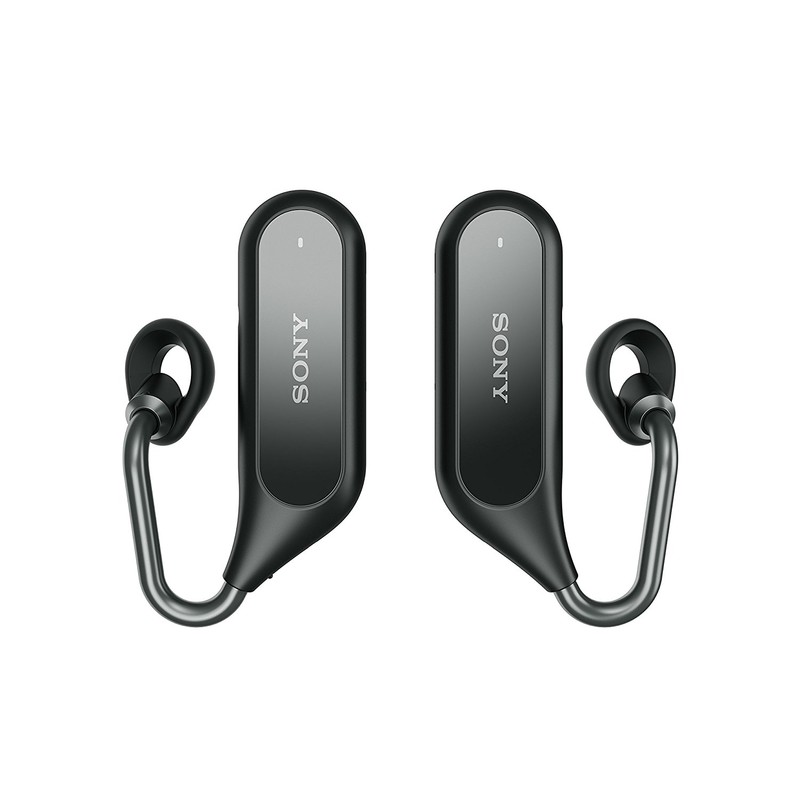
Although the truly wire-free design isn’t necessarily new anymore, Sony’s approaching this form factor a bit differently than we’ve seen from other brands. The Ear Duo hooks underneath your ear rather than just hanging out of it and this allows for a more ergonomic design and the ability to still easily hear the world around you.


Other useful features include volume levels that automatically adjust based on ambient noise in your environment, head gestures, Google Assistant and Siri support, 4 hours of playback with 3 full recharges in the included charging case, and just 7 minutes of charging will get you 1 hour of use.
Sony’s trying a lot of cool things with the Xperia Ear Duo, but that also results in a very steep price. If you want to secure a pair for yourself, you’ll need to hand over $279.99 – $120 more than AirPods.
If you’re interested, you can place your pre-orders on Amazon right now and get the Ear Duo in Black or Gold.
See at Amazon

