


U.S. Senate will vote on May 16 to possibly restore Net Neutrality
Even if the vote passes the Senate, there’s still a long battle ahead.
In mid-December last year, the FCC voted to repeal Net Neutrality. That repeal will officially go into action on June 11, but not before the U.S. Senate votes to hopefully restore it.

FCC Chairman Ajit Pai
On May 14, Democratic Senator Ed Markey announced that he and other fellow Democrats have pushed the U.S. Senate to vote on whether or not the FCC’s repeal of Net Neutrality should be reversed. The vote will take place on Wednesday, May 16, and it’s being done as part of a Congressional Review Act (also known as a CRA).
Commenting on the announcement, Senator Markey said –
By passing my CRA resolution to put net neutrality back on the books, we can send a clear message to American families that we support them, not the special interest agenda of President Trump and his broadband baron allies. May 16 will be the most important vote for the internet in the history of the Senate, and I call on my Republicans colleagues to join this movement and stand on the right side of digital history.
So far, 50 of the 100 Senators have said they’ll vote to restore Net Neutrality (one of which is a Republican). Considering this and the fact that Republican Senator John McCain will be absent due to his current health conditions, there’s a chance the Democrats could get the vote to go through.
If that happens, however, that doesn’t necessarily mean Net Neutrality will once again be alive and well. After the Senate, the vote will then need to through the House of Representatives where Republicans have the majority of seats at 236 to 193. If it by some miracle gets through the House, there’s still the chance that President Trump will veto it.
Even with those obstacles in mind, it’s still somewhat reassuring to see that action is being taken to roll back FCC Chairman Ajit Pai’s decision.
What do you expect will happen this Wednesday?
Net neutrality, consolidation, monopolies, and you
At Google I/O, an Apple fan discovers the importance of cross-platform support

I’m iPhone and you’re Android so we can’t be friends — that’s such a backward sentiment and it’s time we stop thinking that way.
If you wonder what it feels like to be an Apple fan in a sea of Android enthusiasts, you might be surprised to know that it’s really no different from being surrounded by people who are like-minded about the operating system they prefer. In other words, we all love technology and have the same agenda: to make great advancements and have the best user experience.
I spend the better part of a week with Googlers and my Apple-minded takeaway is let’s make great technology for everyone, no matter which devices we use.
Google shoots for the moon

At the I/O keynote, Google announced a bunch of new features I’m super excited about that are supposed to launch “in the coming weeks.” Stuff like Continued Conversations using Google Assistant, Pretty Please to teach kids about manners while they’re using tech, smart editing features in Google Photos, Android Dashboard, which gives you a quick view of how much your using your phone and provide settings to help you reduce screen time, and visual positioning in Google Maps for more accurate walking directions.
Google encourages a culture of coming up with the most ridiculous of possibilities (or impossibilities), and then asks, “How can we make this a reality?” Some stuff doesn’t ever see the light of day, but when they get it right, it’s pretty amazing.
That’s the joy of exploring new technology. When it works, it has the potential to benefit everyone they’re willing to share what they’ve learned. Each one of the upcoming Android-only features made me think, “Cool! I wish iOS had this.”
What I’m tired of hearing when one company announces cool new tech is, “Big deal. Google/Apple has been doing this for years.” Guess what? It doesn’t matter who did it first. I only care whether everyone gets the chance to use it.
In the music world, we have this saying, “There are no more songs left to be written.” The idea is that there are only so many times the same chords can be used in a specific order. At some point, all the ways you can string together notes have been used. It doesn’t mean one artist is copycatting another. It’s about the song’s creation that matters, not who put C, D, and E together first.
That privacy though
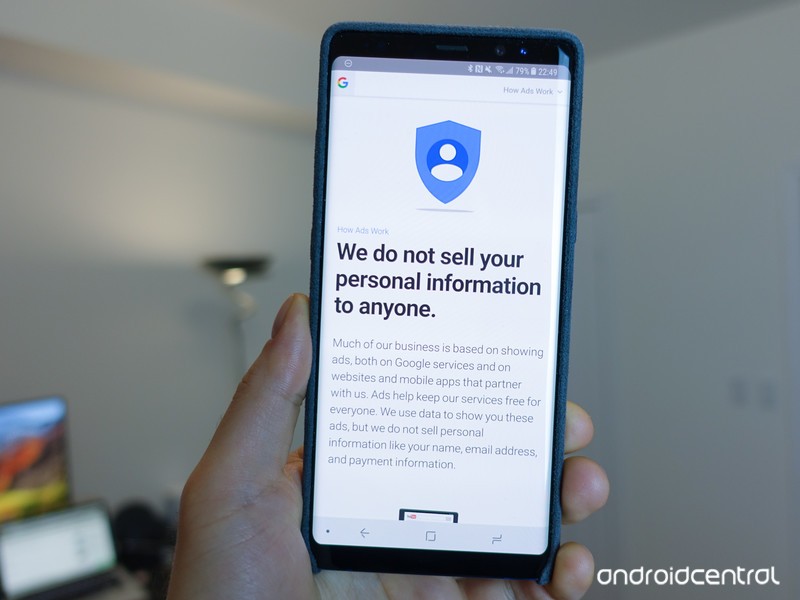
My Apple-loving brain is sometimes at odds with Google’s collection of my data. I could write a completely separate editorial about this, but that’s not why I’m here.
What I am here to say is that I see the benefit of allowing Google to store some of my data if it’s being used responsibly, which the company makes clear in its Privacy Policy.
I steadfastly believe that Google Assistant is markedly better than Siri, in part, due to the fact that Google Assistant is allowed to remember things.
I’ve compared Siri to a person who’s had a memory charm cast on them. If you remove your assistant’s memories every day before they leave the office, they’re not going to be a very good assistant, are they?
If you protect my data, maybe it’s not so bad that you store some of it on your servers to create a better experience for me.
Maybe (I’m still working this out).
The things Apple and Google are doing right

One take away I have from attending I/O is how Google is working toward integrating more cross-platform content.
ARCore, for example, is something I’m really excited about because it makes it possible for me, on my iPhone, to play AR games with you, on your Android phone, thanks to Cloud Anchors.
Cloud Anchors connect multiple devices in the real world to augmented reality content. The information is sent to the cloud, which is then sent to a second (or third or fourth) device, which also sends information back to the cloud. The result is cross-platform supported multiplayer AR gaming and I love it.
I love that Google created this cool technology and made it compatible with ARKit. I love that Apple didn’t tell Google, “Nope” when it wanted to share the technology across all supported devices.
This is how Apple and Google should be working together on everything.
The things I hope Apple and Google will do more of in the future

If I learned anything at I/O its that I want everyone to experience the same amazing technology.
I want to see more collaboration between the two companies (and, why not throw Microsoft into this discussion, too).
If Apple users are concerned with how Google collects data, maybe Apple should share some of its vast knowledge of privacy.
If Google is behind the times when it comes to accessibility, maybe it should ask Apple for advice.
If Siri can’t stop sucking as a personal assistant, maybe it should call up Google Assistant for an AI chat (um, I think I can help).
In conclusion
As much as I love practically everything about Apple, I also love practically everything I saw at Google I/O. Maybe that makes me a dope, but maybe there are a lot more people like me in the world and maybe we should stop talking about what the other guy is doing wrong and start figuring out how to make everyone’s experience better, no matter what tech we use.
The $35 Corsair Survivor Stealth is a tough 128GB USB 3.0 flash drive
Keep all your files safe.
The Corsair Flash Survivor Stealth 128GB USB 3.0 Flash Drive is down to $34.99 on Amazon from a street price around $65. This is a match for its lowest ever, a drop we’ve only seen once or twice before. The 64GB version is priced at just over $34 right now as you’re getting double the space for the same cost.

If you’ve got files you absolutely do not want to lose, this flash drive is made from hard-anodized, aircraft-grade aluminum. It has a water seal that is water-resistant up to 200 meters. It is vibration and shock resistant thanks to the molded shock damping collar. In addition to all that you get a high-performance USB 3.0 drive that’s compatible with Mac, Windows, and Linux and comes with a five-year warranty.
See on Amazon
Google One is replacing Drive for paid online storage
The service also comes with expert help, Play credits, and more.
Google I/O may be over, but that doesn’t mean Google-centric announcements stop. Today, the search giant announced that it’s upgrading its paid Drive storage plans under a new Google One moniker.

Similar to what you can get with Drive storage right now, Google One will allow users to buy additional space in the cloud for housing all of your files across Google Photos, Gmail, and Drive. The fundamentals of the service are remaining the same, but there are a few nice upgrades coming along with the new logo.
All Google One users will get 15GB of free storage like we currently have, but some of the paid tiers are gaining some extra bang-for-the-buck.
- There’s an all-new 200GB tier that costs $2.99/month
- The $9.99/month plan now comes with 2TB instead of 1TB
- Anyone on an existing 1TB tier through Drive will automatically be upgraded to 2TB for free
Aside from these three changes, the rest of the existing plans remain the same.
With the rebrand to Google One, you’ll also be able to share your cloud storage with family members. Google notes that you can allow up to 5 accounts to access one plan and each member will have their own private section of storage only they can use.
Last but not least, Google One subscribers will get fast access to “experts for help” and benefits for being a customer, “like credits on Google Play or deals on select hotels found in Google Search.”
Google One will be rolling out to users in the U.S. over the coming months and will later be followed by a global expansion.
Sign up for Google One updates
Carpool Karaoke’s Distribution in Apple’s TV App Suggests Roadmap for Future Shows
On Friday, Apple began promoting its streaming show Carpool Karaoke: The Series inside of the TV app, marking the first time the entire series will be available for people who don’t subscribe to Apple Music. Carpool Karaoke and Planet of the Apps — which represent Apple’s foray into original television content — have been mainly housed inside of the Music app since they both launched last year, and in the ensuing months the company has been connected to over a dozen upcoming original TV shows.
Apple has set aside $1 billion for its TV efforts, with a global team working on high-quality dramas that reports have compared to Stranger Things and Westworld, in terms of scale. Due to the amount of money it’s putting into the initiative, Apple is expected to distribute the shows via subscription service of some kind, and with the recent expansion of Carpool Karaoke into TV we now have a potential hint at what Apple might do when launching its next set of shows.
Apple started off leaning into Apple Music as its home for new shows, with a “TV & Movies” category in the Browse tab, so it’s been somewhat unclear how the company will go about launching its own streaming TV service. Possibilities include keeping the shows within Apple Music and bundling a TV category into user subscriptions, launching a completely new streaming service and connecting it to iTunes somehow, or making the service and shows available in the existing TV app.
That last option appears like a solid guess now that the entirety of Carpool Karaoke is rolling out on TV. When the app is opened this week, Apple gives Carpool Karaoke prime placement on the “What to Watch” tab, along with an exclusive tab bar that highlights the free episodes of the show. One of the advantages of Apple TV and the TV app is a quick snapshot of every app that a show or film is available on, and for Carpool Karaoke instead of just “Music,” it’s now “Available on TV.”

This means that when you click the play button, you won’t be diverted to another app to stream the show since it’ll be playing directly in TV, similar to how purchased movies and TV shows from iTunes work in the app (on the other hand, Planet of the Apps does not have an “Available on TV” label and still must be watched in Music). If combined with its upcoming plan to offer subscriptions to other streaming services in TV, Apple could then let users subscribe to its own service within the app, with a dedicated area for shows exclusive to the company.
Apple’s weekly rollout model for episodes of Carpool Karaoke could also be a hint at how some shows might debut on the dedicated streaming service. Following the first two episodes, Apple will now put one episode onto the TV app every Friday until the season is finished at episode 19. Streaming networks vary in episode distribution strategy, with Netflix popularizing the all-at-once model while Hulu chooses to release episodes of its shows, like The Handmaid’s Tale, one episode per week.
 Every Friday, Apple will add a new episode of Carpool Karaoke into TV
The tricky thing is that Apple Music itself does connect to the TV app, so even if some shows initially launch bundled into Apple Music, you’ll still be able to keep them organized in TV (like you can with Planet of the Apps right now), with the main difference simply being the actual location of streaming the series. Of course, we won’t know for sure how we’ll be watching Apple’s shows until the company lays down its plans for the rollout, which could launch as early as March 2019 according to the latest rumor.
Related Roundup: Apple TVTag: Apple’s Hollywood ambitionsBuyer’s Guide: Apple TV (Neutral)
Discuss this article in our forums
iPhone SE 2 Rumors Remain Conflicted Over Design and Release Date
iPhone SE 2 rumors are running rampant, but there is little consensus about what to expect should the device be real.
The latest word comes from Japanese blog Mac Otakara, citing Chinese accessory makers who claim production has yet to begin for the second-generation iPhone SE. In fact, Apple is apparently still considering a final design for the device among the several different prototypes it is said to have tested.
The report claims that at least one of those prototypes has an iPhone X-esque design, including a nearly full screen display with no home button and a notch, while other prototypes are believed to have a similar design as the current iPhone SE, except with a glass back, presumably to allow wireless charging.
Ben Geskin recently shared photos of what appears to be iPhone display glass with a shallow cutout resembling the TrueDepth sensor housing on iPhone X, but in a follow-up tweet, he said his “main source” says that the new iPhone SE will have the same design and display as the current model, but with a glass back.
Alleged iPhone SE (2018) parts?
via https://t.co/pJsOlU5ZlN pic.twitter.com/zYD8f7ybc0
— Ben Geskin (@VenyaGeskin1) May 10, 2018
I have to say, that my main source is saying that SE2 will have the same design (and display) as the first SE, but with a glass back.
— Ben Geskin (@VenyaGeskin1) May 10, 2018
Meanwhile, MacRumors obtained renders from case maker Olixar last week that depicted a new iPhone SE with an iPhone X-esque display, but still with an aluminum, flat-edged frame like the current model and iPhone 5s. Olixar said its renders are based on information obtained from a “reliable source” in China.
The renders suggest the iPhone SE’s notch would be approximately half as wide as the one on the iPhone X, likely making it too slim to house facial recognition sensors. One possibility is that the iPhone SE does move to an edge-to-edge design, with a notch, but without any of the Face ID technology.
As we said at the time, however, it’s hard to imagine that Apple would include Face ID on the iPhone SE without significantly raising its price, as such a move would likely cannibalize sales of the iPhone X lineup.
And without Touch ID or Face ID, it’s unclear how authentication would work on the new iPhone SE. Chinese company Vivo’s new X20 Plus UD became the first smartphone with an in-display fingerprint sensor early this year, but Apple seemed to have elected against that approach early on with the iPhone X.
In whatever form it arrives, the accessory makers believe the new iPhone SE is more likely to launch in the third quarter of 2018, suggesting the device could be unveiled alongside a new iPhone X and iPhone X Plus in September. If true, however, Apple has likely already finalized the design of the device.
A handful of earlier reports and regulatory filings had suggested the new iPhone SE could be unveiled in May or at WWDC 2018 in June.
It’s unclear how the Chinese accessory makers obtained their information, but they could be confusing one of the prototypes with the rumored 6.1-inch iPhone. That device is expected to have some iPhone X features like Face ID, but lack an OLED display, stainless steel frame, and 3D Touch to achieve a lower price point.
All in all, it’s a confusing mess right now. Apple often prototypes several iPhone models, and it could even have some fake versions passing through the supply chain to throw off leakers. But where there’s smoke, there’s often fire, so specifics aside, it sounds like a new iPhone SE of some kind is in the works.
Apple hasn’t truly updated the iPhone SE since it launched in March 2016, beyond doubling its available storage capacities a year later. The device currently starts at $349 in the United States with 32GB of storage.
Related Roundup: iPhone SETag: macotakara.jpBuyer’s Guide: iPhone SE (Don’t Buy)
Discuss this article in our forums
Apple Seeds Fifth Beta of macOS High Sierra 10.13.5 to Developers
Apple today seeded the fifth beta of an upcoming macOS High Sierra 10.13.5 update to developers, one week after seeding the fourth beta and more than a month after releasing the macOS High Sierra 10.13.4 update.
The new macOS High Sierra 10.13.5 beta can be downloaded through Apple Developer Center or the Software Update mechanism in the Mac App Store with the proper profile installed.
macOS High Sierra 10.13.5 introduces support for Messages on iCloud, a feature that was previously present in macOS High Sierra 10.13.4 betas before being pulled ahead of the release of the update. Messages on iCloud is also available in iOS 11.4.
The Messages on iCloud feature is designed to store your iMessages in iCloud for improved syncing. Right now, incoming iMessages are sent to all devices where you’re signed into your Apple ID, but it’s not true cloud-based syncing because your old messages don’t show up on new devices nor does deleting a message remove it from all of your devices, both features enabled through Messages on iCloud.
Messages on iCloud also allows your older iMessages and attachments to be stored in iCloud rather than on your iPhone, iPad or Mac, saving valuable storage space.
The update also likely includes bug fixes and performance improvements for issues that weren’t addressed in macOS High Sierra 10.13.4, but as Apple does not provide detailed release notes for macOS High Sierra beta updates, we may not know exactly what’s included until the new software is provided to the public.
No other major outward-facing changes were found in the first four betas of macOS High Sierra 10.13.5, but we’ll update this post should any new features be found in the fifth.
The previous update, macOS High Sierra 10.13.4, brought support for external graphics processors (eGPUs) along with Business Chat in Messages and several other bug fixes and smaller feature improvements.
Related Roundup: macOS High Sierra
Discuss this article in our forums
Apple Seeds Fifth Beta of watchOS 4.3.1 to Developers
Apple today seeded the fifth beta of an upcoming watchOS 4.3.1 update to developers for testing purposes, one week after seeding the fourth watchOS 4.3.1 beta and more than a month after releasing watchOS 4.3.
Once the proper configuration profile has been installed from the Apple Developer Center, the new watchOS 4.3.1 beta can be downloaded through the dedicated Apple Watch app on the iPhone by going to General –> Software update.
To install the update, the Apple Watch needs to have at least 50 percent battery, it must be placed on the charger, and it has to be in range of the iPhone.
Shortly before watchOS 4.3.1 was introduced, Apple stopped allowing developers to update Apple Watch apps built on the original watchOS 1 SDK. In watchOS 4.3.1, there’s an alert when launching a watchOS 1 app that warns that the app may not be compatible with future versions of watchOS. This suggests Apple will drop support for watchOS 1 apps entirely in the future, just as it did with support for 32-bit iOS apps in iOS 11.
Code hidden within watchOS 4.3.1 also suggests Apple is working on introducing support for custom third-party watch faces, but this is likely a feature that would be introduced as part of a major watchOS 5 update rather than through watchOS 4.3.1.
There were no major new features discovered in first four watchOS 4.3.1 betas, which is unsurprising as this is a minor 4.x.x update. It’s likely this update focuses primarily on bug fixes to address issues discovered since the release of watchOS 4.3.
Apple does not provide detailed release notes for watchOS, so we may not know what’s included in the update until it sees a public release.
Related Roundups: Apple Watch, watchOS 4Buyer’s Guide: Apple Watch (Neutral)
Discuss this article in our forums
Apple Seeds Fifth Beta of tvOS 11.4 to Developers
Apple today seeded the fifth beta of an upcoming tvOS 11.4 update to developers for testing purposes, one week after seeding the fourth beta and more than a month after releasing the tvOS 11.3 update.
Designed for the fourth and fifth-generation Apple TV models, the new tvOS 11.4 developer beta can be downloaded onto the Apple TV via a profile that’s installed using Xcode.
tvOS 11.4, paired with iOS 11.4, reintroduces AirPlay 2 features that were present in early tvOS and iOS 11.3 betas but were removed ahead of release. With AirPlay 2, the same audio content can be played on multiple devices (like the Apple TV) throughout your home, and audio playback can be controlled via the iPhone or through Siri commands. After installing iOS 11.4 and tvOS 11.4, the Apple TV is also once again be listed in the Home app.
There were no other new features discovered in the first four tvOS 11.4 updates, and it’s likely it focuses on bug fixes and other small improvements. Apple’s tvOS updates have historically been minor in scale, and we may not find any other new additions.
We’ll update this post should new features be introduced in the fifth beta of tvOS 11.4.
Related Roundup: Apple TVBuyer’s Guide: Apple TV (Neutral)
Discuss this article in our forums
Apple Seeds Fifth Beta of iOS 11.4 to Developers
Apple today seeded the fifth beta of an upcoming iOS 11.4 update to developers, one week after seeding the fourth beta and more than a month after releasing iOS 11.3, a major update that introduced several new features.
Registered developers can download the new iOS 11.4 beta from Apple’s Developer Center or over-the-air once the proper configuration profile has been installed from the Developer Center.
The iOS 11.4 update introduces a new ClassKit framework for educational institutions, which supports new features announced at Apple’s March 27 education-focused event.
For regular users, the iOS 11.4 update adds features that were originally present in the iOS 11.3 beta but removed ahead of release.
It includes support for Messages on iCloud, designed to store your iMessages in iCloud rather than on each individual device, allowing for improved syncing capabilities. Currently, incoming iMessages are sent to all devices where you’re signed in to your Apple ID, but there is no true cross-device syncing.
Messages on iCloud will allow you to download all of your iMessages on new devices, and a message deleted on one device will remove it on all devices. Older messages and attachments are also stored in iCloud rather than on-device, saving valuable storage space.
The iOS 11.4 update also includes AirPlay 2 features, with the Apple TV once again available in the Home app. With AirPlay 2, the same audio content can be played in multiple rooms on devices that support AirPlay 2. AirPlay 2 includes a feature that lets you ask Siri on one device to play content on another AirPlay 2-enabled device. So, for example, you can ask Siri on iPhone to play content on your Apple TV in another room if you’re running the iOS 11.4 and tvOS 11.4 betas.
There were initially signs of support for HomePod stereo sound in the first iOS 11.4 beta, a long-promised feature, but stereo sound didn’t work properly and the mention was removed in the second beta. It’s not clear if it will return for the update’s release.
For the iPhone 8 and iPhone 8 Plus, there is a new (PRODUCT)RED wallpaper available, which is not available on iPhone X.
iOS 11.3, the previous update to iOS 11, introduced a new Battery Health feature for monitoring the status of your iPhone’s battery, Business Chat for iMessage, which lets you communicate with companies directly in the Messages app, ARKit 1.5 with augmented reality improvements, new Animoji on iPhone X, Health Records from participating medical providers, and more.
Related Roundup: iOS 11
Discuss this article in our forums

