


Acer’s new 4K, HDR, 144Hz G-Sync gaming monitor will cost $2,000
If you need a 27-inch monitor that has just about every cutting-edge feature there is for a gaming display, Acer’s new Predator X27 4K is right up your street. The only downside is that it’s incredibly expensive. While you can pick up a monitor with 4K resolution, or a high-refresh rate, or G-Sync support for a few hundred dollars, if you want all of them in one display, it’s going to cost you a lot.
For a few years now, the only real way to experience high-refresh rate gaming was to opt for a 1080P or 1440P display. That’s not been much of an issue, considering almost no one could afford a graphics card that could support high frame-rate gaming at 4K anyway. Now that we have a new Nvidia graphics generation on the horizon though, Acer has stepped up with a brand-new 4K monitor that can do just about everything.
The new Predator X27 4K has a full, 4K resolution (3,840 x 2,160), a 144Hz refresh rate, 99 percent coverage of the Adobe RGB color gamut, 10-bit HDR support, G-Sync frame synchronizing technology, and a brightness of 1,000 nits. There are no monitors out there for gamers that have that kind of feature set and perhaps that’s why Acer feels confident pricing the new Predator display at $2,000.
Other features of this display include a 4ms response time, which isn’t as good as some, but is certainly fast enough for almost all users and is still rather impressive, considering this display is made using an IPS panel. That’s why it can support a huge viewing angle of 178 degrees on both the horizontal and vertical axis and guarantees a uniform color display across the screen.
In terms of inputs, it sports HDMI 2.0, DisplayPort 1.4, and a USB hub with four USB-A 3.0 ports. The monitor stand can be adjusted through all three major axis, offering tilt, swivel and height adjustment. It also supports VESA mounts for those who would rather use an adjustable arm.
You can’t quite buy this monitor just yet, but you can pre-order it from Newegg, as The Verge points out. The price is currently set at $2,000 and unless some competition shows up in the near future, is unlikely to come down for a while.
Editors’ Recommendations
- The best ultrawide monitors
- The best monitor you can buy
- The best HDR monitors
- The best monitors for photo editing
- The best gaming laptops
Microsoft acquires conversational A.I. technology firm Semantic
Microsoft is betting big on artificial intelligence. In a blog post published Sunday, May 20, the Redmond, Washington-based technology giant announced the acquisition of Semantic Machines, a company focused on building conversational A.I. “Their work uses the power of machine learning to enable users to discover, access, and interact with information and services in a much more natural way, and with significantly less effort,” Microsoft notes. The move could help give Cortana the leg up it needs on competitors like Amazon Alexa and Google Assistant.
“AI researchers have made great strides in recent years, but we are still at the beginning of teaching computers to understand the full context of human communication,” wrote David Ku, CVP and chief technology officer of Microsoft A.I. and Research. “Most of today’s bots and intelligent assistants respond to simple commands and queries, such as giving a weather report, playing a song or sharing a reminder, but aren’t able to understand meaning or carry on conversations.” But conversational A.I. could turn this norm on its head, and Semantic could be at the forefront of this change.
Semantic has previously worked with major tech firms, leading automatic speech recognition development for Apple’s Siri. In essence, Semantic employs machine learning in order to provide context to chatbot conversations, making dialogue seem a bit more natural and better-flowing.
“With the acquisition of Semantic Machines, we will establish a conversational AI center of excellence in Berkeley to push forward the boundaries of what is possible in language interfaces,” wrote Ku. “Combining Semantic Machines’ technology with Microsoft’s own A.I. advances, we aim to deliver powerful, natural and more productive user experiences that will take conversational computing to a new level. We’re excited to bring the Semantic Machines team and their technology to Microsoft.”
Thus far, no financial details of the acquisition have been disclosed.
Microsoft is by no means the only company trying to make strides when it comes to artificial intelligence and its smart assistants. Amazon, for example, is trying to give Alexa a better memory, while Google is making bots so human-esque that they’re practically indistinguishable from humans during phone conversations with its new Duplex offering. We’ll just have to see how Microsoft keeps up.
Editors’ Recommendations
- We’ve only just ‘scratched the surface of what’s possible’ with Alexa, exec says
- Replaced by robots: 8 jobs that could be hit hard by the A.I. revolution
- Before Google’s lifelike Duplex A.I., these chatbots paved the way
- EA used machine learning to make A.I. better than you at ‘Battlefield 1’
- Amazon Alexa is great. But what if she could do more?
Will you be using a case with your OnePlus 6?
The new glass back is screaming for some sort of protection.
The OnePlus 6 officially goes on sale today, and if you’re in the market for a new phone, it’s absolutely worth checking out. It’s fast, has a great set of cameras, and features one of the most stunning designs we’ve ever seen from the company.

OnePlus opted for a glass back on the OnePlus 6, and while this does give the phone a striking appearance, it also makes it quite a bit more fragile than past releases.
Some of our forum users recently started talking about whether or not they’ll be using a case to protect the phone when they buy it, and this is what they had to say.
Armeniandave
05-19-2018 11:01 AM“
I’m torn between the full karbon case and the nylon case. I’m just concerned the nylon one will be too thick. It does look really nice though!
Reply
bhatech
05-19-2018 11:23 AM“
Same here I think I’ll go with Karbon since had the Hyperknit case for S9 and Google pixel 2 XL case which both have similar kind of fabric material. Initially it was nice but felt it was not that comfortable to grip after few days.
Also, the nylon case will be adding little extra bulk compared to Karbon case. Both should be good but personally will go for Karbon this time around.Reply
vwite
05-19-2018 03:24 PM“
same here, nylon looks really nice but it’s just nylon (cheap material) karbon is actual kevlar and slimmer, I barely look at the back of my phone so I think I’ll go with karbon if I don’t find a third party better one
Reply
Ca_lvn
05-20-2018 09:45 AM“
Hopefully there offer the Sandstone case the same as my 5T best case ever , no slip with the sand design and minimalist
Reply
How about you? Are you going to use a case with the OnePlus 6?
Join the conversation in the forums!
OnePlus 6
- OnePlus 6 review
- OnePlus 6 vs. OnePlus 5T: How much changes in six months?
- OnePlus 6 vs. OnePlus 5: Should you upgrade?
- These are the official OnePlus 6 cases
- The OnePlus 6 doesn’t work on Verizon or Sprint
- Join the discussion in the forums
YouTube Music has the potential to solve Google’s streaming conundrum
Spotify, you might want to pay attention to what’s happening here.
On May 17, Google officially announced YouTube Music and YouTube Premium — the two services that’ll immediately be replacing YouTube Red and Play Music later on down the road.
Despite offering an excellent product, Google’s presence in the music streaming market has been less than prominent for some time. Spotify, Apple Music, Pandora, and others have dominated, but Google’s struggled to find its footing.
The all-new YouTube Music aims to fix this, and while it’s too early to say for sure whether the gambit will work, I think it’s the best shot Google has at reserving a place at the head of the table.
The new subscription model makes sense
In its current form, Google’s options for music streaming is beyond complicated.
To a newcomer, the most obvious choice would be to sign up for Google Play Music All Access — the paid version of Play Music that gives you access to on-demand listening, the ability to save songs for offline use, etc. With that subscription, you also get access to YouTube Red for add-free YouTube videos, original programming, and more.
Alternatively, if you’re tired of watching ads before YouTube videos, you can sign up for YouTube Red. However, along with improving your YouTube experience, this also comes with Google Play Music All Access as an added bonus.
As a YouTube Red/Play Music All Access subscriber, you can listen to music through three apps — Play Music, YouTube, and YouTube Music. You can’t sign up for YouTube Music separately, but it comes with your subscription just because.
It’s all very confusing.
With Google’s new service, you’ll sign up for YouTube Music and access all your songs, playlists, and more through its app. Want to watch YouTube Originals and have ad-free YouTube videos? Just pay $2 more each month. This new setup is clean, simple, and is far easier for everyone to understand.
Music + Premium is more expensive than Red, but it’s still a tremendous value
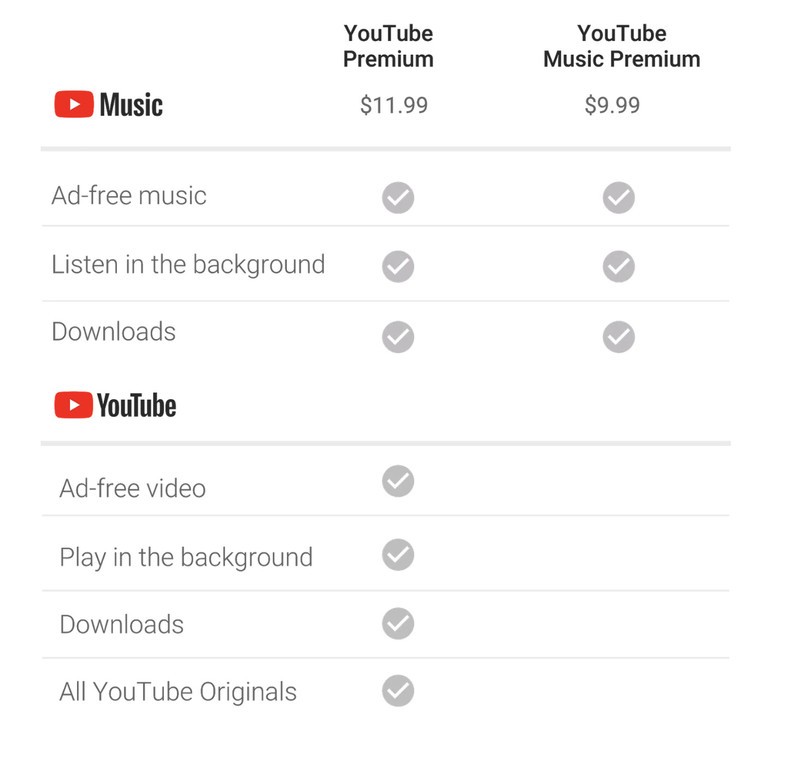
One of the biggest points of contention for the new YouTube Music is its price. As it stands, $9.99/month secures you with all the features found in YouTube Red and Play Music All Access for one monthly fee.
If you’re an existing YouTube Red subscriber, you’ll get all of the YouTube Premium benefits for the old $9.99/month rate.
That $9.99/month rate is sticking around with YouTube Music, but you’ll only get music-centric features — such as ad-free music and the ability to both download songs and listen to music videos in the background.
If you want to watch YouTube Originals, get rid of ads before you regular YouTube clips, and have non-music videos playing in the background, you’ll sign up for YouTube Premium for $11.99/month.
Google’s doing good by its existing subscribers by grandfathering them into the old rate, but for new members, this still looks like a great deal. YouTube Music’s $9.99/month rate makes its pricing identical to Spotify, Apple Music, and just about everyone else, but only YouTube Music allows you to pay $2 more each month for an enhanced YouTube experience and access to (some) high-quality original programming. That’s a huge value proposition, and it should make YouTub Music awfully enticing to potential customers.
Unlike Google Play, the YouTube brand means something
Something else that Google has working in its favor is the YouTube brand. While this was present with YouTube Red, Play Music serving as the primary music app gave it something of an identity crisis. Plus, it doesn’t help that “Google Play” doesn’t mean much of anything to some consumers.
YouTube, on the other hand, is a brand that’s recognizable by everyone. We all know what YouTube is, so YouTube Music naturally seems to be a service that offers music streaming and access to music videos. YouTube Premium, on the other hand, sounds like a premium/upgraded version of the regular YouTube we know and love.
What the hell was YouTube Red supposed to mean?
The branding for these services may not directly impact you with your day-to-day use, but they can severely hinder or excel Google’s prominence in the streaming market. YouTube Music and YouTube Premium are far easier to understand than the current mix of YouTube Red, YouTube Music, and Google Play Music, and that simplicity is something Google desperately needs.
Google can excel with a top-notch Android app
More functional branding and a better subscription model are both great, and these can be made even better with a high-quality mobile app.
YouTube Music is pretty barebones in its current state, and while Play Music looks and feels a lot better, it’s in dire need of a visual refresh.

Google’s given us a tease at what we can expect from the new YouTube Music app, and what we’ve seen so far does look promising. YouTube Music will be gaining all of the AI elements found in Play Music, meaning that it’ll recommend certain songs and playlists to listen to based on what you’re doing. AI is what Google does best, so injecting it into its premier music service only makes sense.
Add that together with a dark theme, bottom-navigation tabs, and an overall sleek look, and YouTube Music has what it takes to offer one of the best music experiences on Android — especially when big names like Spotify are lagging so far behind.
What do you think will happen?
Google’s poised to do something special with its new YouTube Music + Premium initiative, but do you think it’ll actually work?
Sound off in the comments below with your own thoughts and let me know what you think Google should do!
LG announces Q7 mid-range series with glass designs and slim bezels
The lineup includes three phones — the Q7, Q7+, and Q7a.
Hot off the heels of the G7 ThinQ, LG’s announced three new Android phones for 2018 that are targeted directly at the budget market – the LG Q7, Q7+, and Q7a. These are successors to LG’s Q6 series, and they keep with the trend of offering a premium design with mid-range specs at affordable prices.

First, let’s talk about what’s included with the phones no matter which variant you choose. LG’s using a 2.5D Arc Glass design this time around, offering a big improvement over the plastic we saw with the Q6 last year. Despite the glass construction, you’ll still find an IP68 dust/water resistance and a MIL-STD 810G rating.
No pricing details have been announced yet.
On the front of the phones is a 5.5-inch FHD+ FullVision display with an 18:9 aspect ratio and slim bezels all around. The Q7 series comes equipped with LG QLens that uses “AI technology” for enhanced image recognition, Android 8.0 Oreo is on-board out of the box, and you’ll find a 1.5GHz or 1.8GHz octa-core processor depending on which phone you choose.
Both the Q7 and Q7a come equipped with a 13MP camera on the back and a 5MP Super Wide Angle front-facing shooter, with the Q7 also offering a version with an 8MP selfie camera. On the other hand, the Q7+ boasts a 16MP rear camera and a 5MP Super Wide Angle or 8MP sensor on the front.
As for RAM and storage, the Q7 and Q7a come with 3GB RAM and 32GB of internal space that can be expanded up to 2TB. The Q7+ kicks things up to 4GB RAM and 64GB of storage that can also be expanded to that 2TB limit.
The Q7 series will initially be available in “key markets” in Europe next month, with countries in both Asia and the Americas to follow after that.
Best Cheap Android Phones in 2018
LG G7
- LG G7 hands-on preview: All about that bass
- LG G7 Specifications: Everything you need to know
- Join the LG G7 forums
How to fix an Oculus Go Controller that doesn’t connect

Don’t let your controller grief you
Sometimes technology does that thing where it randomly decides, “Hey, yeah, I don’t wanna work anymore. Cool? Cool.” So before you panic, we’ve got some solutions for you to try out before you get too frustrated. Here’s how to get your Oculus Go (OGO) controller to connect to your device so you can get it back into all the super cool experiences it has to offer!
Check the controller
The Oculus Go controller is not chargeable like the controller for the Google Daydream. Thankfully a battery was included in the box with the OGO! Outside of this, there are a few things you want to check for when going over your controller. Before anything, go through all these steps first.
Remove the cap from the controller. Get a firm grip on both ends and pull. Don’t worry, you won’t break it.

Check inside for the instructions. This will give you all of your warnings and let you know which direction the battery goes.

Check the inside of the controller for any dirt, grime or parts that look like it might be severing the connection.

Make sure the battery connection on the other end of the controller is also untarnished.

Insert the battery. The flat side goes in first.

Press down the battery to ensure you have a secrure fit.

Re-cap the device and test the connection once again!
After you’ve gone through all of the checkpoints you want to make sure that there are no loose or broken pieces. If there are, contact the seller of your device to see what the warranty on it is as you might need something replaced. If you have no visible issues but still cannot connect your controller try out the next options we have.
Testing buttons
Your controller isn’t connecting so let’s try to now convince it that it’s disconnecting from this ghost pairing it has. Go through these steps to reset the controller with just the buttons on it.
Press any button on the controller.

Press and hold the Oculus button to try and reset the position of the controller.

Press and hold the Oculus button and back button until the controller LED blinks and then fully lights up to re-pair the controller.
While doing these steps if you do not experience any lights you might just have a defective controller. In this case contact Oculus Support about a replacement.
Using the app


Now test to see if the controller is even connecting to the app and registering it as your controller. If you do not see a controller listed on the app and none of the above steps worked, check in with Oculus Support as you might need a replacement.
Unpair and re-pair your Oculus Go controller:
Open the Oculus companion app on your phone.
Tap Settings from the bottom menu.
Tap the headset you currently have paired.
Tap Controller, then tap the controller you currently have paired.
Tap Unpair Controller.
Last options

If nothing has been working for you, or you are still experiencing issues, it might be time to try and reset your device. Thankfully Oculus has made that process very easy to be done. Otherwise, the only option might be to contact Oculus Support to see what options they have available to you. Be sure to have your receipt and which company you bought your device from handy.
How to reset your Oculus
Oculus Go

- A parent’s guide to Oculus Go
- Oculus Go vs. Lenovo Mirage Solo
- Best Gamepad for Oculus Go
- Best Battery Backup for Oculus Go
Oculus Go 32GB
Oculus Go 64GB
Where to buy the LG G7 ThinQ
Your guide for buying the G7 in the U.S. and Canada.
LG’s playing it safe this year with the G7 ThinQ, but that doesn’t necessarily mean it’s a bad phone. In fact, based on what we’ve seen so far, the G7 will be one heck of a smartphone that could be very well-deserving of a place in your pocket.

If you live in the United States or Canada and are interested in picking up the G7 ThinQ for yourself, here’s everything you need to know.
United States
AT&T
Although LG devices usually show up on AT&T like clockwork, this year appears to be different.
A spokesperson from AT&T recently confirmed that it won’t be selling the G7 ThinQ, but instead will “launch a new LG device this summer only from AT&T.” We aren’t sure if that’ll be a new phone entirely or a slightly improved version of the G7, but we’ll certainly be keeping an eye out for whatever happens here.
Sprint
If Sprint’s your carrier of choice, you’ll be able to place pre-orders for the phone beginning May 25. Following that, regular sales will begin online and in-stores on June 1.
See at Sprint
T-Mobile
Jumping over to T-Mobile, the Un-Carrier has announced that it’ll officially open pre-orders for the G7 on Friday, May 25 at 5:00 AM Pacific Time.
The phone will cost $30 down and then $30/month afterward, resulting in a final retail price of $750 ($30 more than the Galaxy S9). To help offset the cost, T-Mobile will be running a BOGO promo that’ll allow you to get two G7s for the price of one via monthly bill credits.
Following pre-orders, the G7 ThinQ will be available at participating T-Mobile stores around the U.S. starting June 1.
See at T-Mobile
U.S. Cellular
Similar to Sprint, U.S. Cellular will also start selling the G7 on June 1. The phone will be available in-stores and at uscellular.com, but there’s currently no word on pre-orders through the carrier.
See at U.S. Cellular
Verizon
Last but not least for U.S. carriers, Verizon has confirmed that it’ll open pre-orders for the G7 on May 24 – a day before Sprint.
There’s no word on an official launch, but it’ll likely line up with the June 1 date we’re seeing from everyone else.
See at Verizon
Canada
Bell
It’s been confirmed that the LG G7 will launch on Bell, and it’ll do so on June 1.
See at Bell
Freedom Mobile
Just like Bell, Freedom Mobile will also begin carrying the G7 on June 1. However, further details are currently unknown.
See at Freedom Mobile
Rogers
Once again, Rogers will begin selling the LG G7 on – you guessed it – June 1.
See at Rogers
SaskTel
Ready for a curveball? SaskTel will allow you to purchase the G7 on June 1.
See at SaskTel
Telus
Lastly, Telus has also been confirmed for a June 1 date on which it’ll open sales for the G7.
See at Telus
LG G7
- LG G7 hands-on preview: All about that bass
- LG G7 Specifications: Everything you need to know
- Join the LG G7 forums
Orbit’s discounted smart irrigation controller will help you save money every month
Keep it green for less.

As part of its Gold Box deals of the day, Amazon is offering some pretty sweet discounts on a variety of Orbit’s popular irrigation products. The best deal here is the B-hyve smart sprinkler controller, which is down to $68.20. This normally sells for closer to $100, and we’ve never seen it drop quite this low before. It’s similar to the discounted Rachio system, except it comes in at a fraction of the price with many of the same features.
If you don’t already have a sprinkler system installed at your house, you can opt for the Yard Enforcer motion activated sprinkler for $40.99. This stakes into the ground and you run a hose to it. You can set it to automatically detect motion to activate, which will help keep those unwanted guests from overtaking your garden. Lastly, the programmable hose faucet timer is down to $18.66, and this is one of the easiest and most cost-effective ways to turn automate watering your grass. You can set the run times from it and let it run as you please, or manually override it for when you need a little extra water.
Irrigation systems can keep your lawn looking green and everything great, but they can also cost you a small fortune on your water bill. These discounted Orbit products will easily pay for themselves over time and help you save money in the long run, so be sure to grab them now.
See at Amazon
GRID Autosport for Android: Everything you need to know

Start revving your engines — GRID Autosport is on its way to Android!
There are a ton of great racing games available for Android, and they all bring something fun and interesting to the table.
But sometimes you just want a pure, realistic racing experience. Android has a couple racing sims available, but nothing that will compare to GRID Autosport. Developed by Codemasters Racing and Feral Interactive, GRID is set to finally cross the finish line and arrive on Android in the coming months — and we’re confident it’s going to be worth the wait!
What makes GRID Autosport is so special?
This game is made by Codemasters Racing, so you know it’s good.
Oh, you need more than that? Well, besides the fact that it’s made by the premier racing game developers in the industry, the game is aiming to take the graphics, gameplay, and glory you experience playing games on console and bring the experience to mobile. Who doesn’t want that?
GRID will feature 100 cars to collect and 100 circuits to burn rubber on through the bevy of game modes.
That means a full racing experience without shoddy upgrading systems and energy systems limiting how and when you race (looking at you, EA’s Need For Speed: No Limits). To accomplish that, Codemasters and its co-developers at Feral Interactive will likely set a premium price of around $10 for the privilege to play GRID Autosport — but if you’re a racing fan, that’s a pittance to pay for the mobile racing game you’ve been waiting for.
GRID will feature 100 cars to collect and 100 circuits to burn rubber on through the bevy of game modes including a full-fledged career mode along with options for time trails and quick races. There’s also an amazing physics engine for realistic damage when you crash into the wall or tire barricades. That attention to detail and realism means a lot, especially when you’re just starting out and crashing into a bunch of stuff all the time.
When new cars or tracks are available, you should be able to download them in game for free, as that’s how it works with the iOS version. And that’s amazing.
GRID Autosport is currently available on Steam and iOS if you want to learn more about the game or pick it up on another platform, although it’s a paid title so it’s really up to you if you want to buy it across multiple platforms or just wait for it to come to Android.
What sets it apart from other racing titles like Real Racing 3?
When we’re talking about games offering realistic racing experiences for mobile, the first game that should pop to your mind is Real Racing 3. It’s one of the more popular free games for Android and has been the pinnacle of the racing scene on Android for a good number of years now.
Not to slight Real Racing 3, as it’s still a great game five years on from its initial release — but GRID Autosport looks primed to absolutely blow it out of the water in terms of realism, physics, and depth of gameplay.
And you’d expect such from a paid title vs. a free game, right? GRID sells for $10 on the iOS App Store, and we’d expect a similar price set for its Google Play release.
When is it coming out for Android?
The short answer is it’s coming soon with no exact release date set.
Back in September 2017, Feral Interactive announced that they hit a bump in development that has pushed back the Android release to “the first half of 2018”. Which means racing fans should expect to see it pop up on the Google Play Store by July at the latest, assuming there aren’t further development delays.
The developers also mentioned that the game will use Vulcan graphics API which is to say it’s going to look absolutely gorgeous when it finally arrives.
Android Gaming

- Best Android games
- Best free Android games
- Best games with no in-app purchases
- Best action games for Android
- Best RPGs for Android
- All the Android gaming news!
Connect another light to your smart home with the $17 TP-Link soft white LED bulb
Ok Google, turn on the living room.
The TP-Link soft white dimmable A19 smart LED bulb is down to $17.27 on Amazon. This smart bulb fluctuates a lot in price, but it has been holding steady around $20 or more for the last few months. This drop is one of the best we’ve seen since the holiday shopping season last year.

TP-Link’s smart bulbs are some of the easiest to set up. They connect quickly to your smart home and work with Alexa, Google Assistant, and Microsoft’s Cortana. The Kasa app works on both Android and iOS and lets you turn your light on and off from anywhere. The bulb is dimmable so you can make it as bright as you want it to be. Users give this series 4.1 stars based on 4,329 reviews.
I use a TP-Link Kasa smart bulb with colors. It’s currently $38, but if you really want the ability to change from white to blue to orange, that’s the one you want.
See on Amazon

