


T-Mobile website bug reportedly exposed private customer account details
Due to a bug in T-Mobile’s website back in April, customers’ account information was left accessible for anyone to see, ZDnet reports. While the security flaw has since been fixed, personal information could have potentially been misused by anyone who knew where to look.
The subdomain — promotool.t-mobile.com — is a customer care portal for employees to access internal tools. But the bug allowed for it to be easily found through search engines and didn’t require a password to access the tools.
The flaw was due to a hidden API — it provided T-Mobile customer data by adding the customer’s cell phone number to the end of the web address. This data included a customer’s billing account number, postal address, and account information, such as the status of their bills, including if service for an account was suspended or a bill is past due. For some, customer account PINs and tax ID numbers were also accessible.
The API was pulled by T-Mobile a day after it was reported by security researcher Ryan Stevenson, who was also awarded a $1,000 bug bounty later. While it’s not clear how long the API was exposed, a spokesperson for T-Mobile told ZDnet that there’s no evidence any customer information was accessed.
This is isn’t the first time an issue like this has happened to T-Mobile. In October, a security flaw allowed hackers to gain access to similar information through a T-Mobile website. Hackers were able to obtain email addresses, account numbers, and more, simply by using the customer’s phone number.
The flaw was discovered by security researcher Karan Saini, and it allowed hackers to gain information that could then be used in a social engineering attack, as well as provided access to other personal information online. T-Mobile claimed the bug only affected a small amount of customers and that it was fixed within 24 hours of being discovered.
News of the most recent flaw comes a little less than a month after the merger with T-Mobile and Sprint was announced — which was also in April. While both carriers agreed on combining companies, we have yet to see whether the U.S. Justice Department will approve it.
Editors’ Recommendations
- Data-stealing bug prompts Comcast to shut down Xfinity activation website
- TeenSafe phone-monitoring app leaks ‘tens of thousands’ of accounts
- Twitter urges its users to change their passwords due to a bug
- Facebook apologizes after a glitch saved discarded webcam videos
- Panera Bread’s data leak might affect more than 37 million customers
Qualcomm expected to reveal Snapdragon chip dedicated to VR, AR next month
Qualcomm is expected to reveal a new processor dedicated to stand-alone VR headsets next week during the Augmented World Expo in Santa Clara, California. Called the Snapdragon XR1, the all-in-one chip will consist of CPU cores, a graphics processor, one component dedicated to security, and another dedicated to artificial intelligence. It will also support voice control and head-tracking interaction, sources claim.
This isn’t the first time we’ve heard the term “XR” from Qualcomm. The company mentioned XR when it revealed its new Snapdragon 845-based VR headset reference design earlier this year, and covered the XR topic at great length during the North American Augmented World Expo convention in 2017. XR is short for “extended reality,” an “umbrella term” that covers augmented reality, virtual reality, and mixed reality.
“XR is an emerging umbrella term that is already being used to encapsulate AR, VR, and everything in between,” Qualcomm said in January. “XR is a mobile market that’s gaining momentum as VR and AR markets may combine to create a $108 billion market by 2021.”
Qualcomm’s latest headset reference design supports room-scale six degrees of freedom, meaning you can move left, right, up, down, forward, and backward without any wires or external sensors. It also includes a “slam” component — simultaneous localization and mapping — that not only keeps track of your physical environment, but tracks where you’re located within that environment.
That said, the Snapdragon 845 isn’t really an XR-first chip but it certainly supports “immersive XR experiences.” The chip packs eight Kyro processor cores, the Adreno GPU supporting XR, components for audio and cameras, built-in Wi-Fi and LTE connectivity, and a processing unit dedicated to security. It also contains a co-processor, the Hexagon 685 DSP, tuned for artificial intelligence and machine learning.
So why the XR1 chip? It could be a custom version of the Snapdragon 845 without all the phone-centric necessities and fine-tuned for augmented reality and virtual reality experiences. Qualcomm also likely tweaked the architecture to pull better battery life out of an XR headset. We expect to see a new reference design along with the new chip during the show next week.
Sources close to Qualcomm’s upcoming XR1 launch claim that the company is currently working with HTC, Vuzix, and several other headset manufacturers to incorporate the chip into future headsets. HTC’s current stand-alone VR headset, the Vive Focus, will hit North American shores later this year based on Qualcomm’s first VR headset reference design. Facebook’s just-released Oculus Go, manufactured by smartphone maker Xiaomi, relies on Qualcomm’s older Snapdragon 821 chip.
Stand-alone headsets are a new trend in the VR market, as they don’t require an expensive tethered PC like the HTC Vive and Oculus Rift, nor do they rely on a smartphone like Samsung’s Gear VR. Google and Qualcomm first revealed their stand-alone VR initiative last year with HTC and Lenovo serving as showrunners. But Lenovo is thus far the only stand-alone Daydream headset provider while HTC abandoned ship and did its own Google-free thing in China.
Editors’ Recommendations
- Apple’s wireless, mixed-reality glasses could launch in 2020
- Leaked docs show Google may be cooking up a stand-alone AR headset
- Mozilla announces Firefox Reality, a browser for augmented and virtual reality
- Oculus Go review
- Like the internet? Google wants to attach it to your face
Qualcomm expected to reveal Snapdragon chip dedicated to VR, AR next month
Qualcomm is expected to reveal a new processor dedicated to stand-alone VR headsets next week during the Augmented World Expo in Santa Clara, California. Called the Snapdragon XR1, the all-in-one chip will consist of CPU cores, a graphics processor, one component dedicated to security, and another dedicated to artificial intelligence. It will also support voice control and head-tracking interaction, sources claim.
This isn’t the first time we’ve heard the term “XR” from Qualcomm. The company mentioned XR when it revealed its new Snapdragon 845-based VR headset reference design earlier this year, and covered the XR topic at great length during the North American Augmented World Expo convention in 2017. XR is short for “extended reality,” an “umbrella term” that covers augmented reality, virtual reality, and mixed reality.
“XR is an emerging umbrella term that is already being used to encapsulate AR, VR, and everything in between,” Qualcomm said in January. “XR is a mobile market that’s gaining momentum as VR and AR markets may combine to create a $108 billion market by 2021.”
Qualcomm’s latest headset reference design supports room-scale six degrees of freedom, meaning you can move left, right, up, down, forward, and backward without any wires or external sensors. It also includes a “slam” component — simultaneous localization and mapping — that not only keeps track of your physical environment, but tracks where you’re located within that environment.
That said, the Snapdragon 845 isn’t really an XR-first chip but it certainly supports “immersive XR experiences.” The chip packs eight Kyro processor cores, the Adreno GPU supporting XR, components for audio and cameras, built-in Wi-Fi and LTE connectivity, and a processing unit dedicated to security. It also contains a co-processor, the Hexagon 685 DSP, tuned for artificial intelligence and machine learning.
So why the XR1 chip? It could be a custom version of the Snapdragon 845 without all the phone-centric necessities and fine-tuned for augmented reality and virtual reality experiences. Qualcomm also likely tweaked the architecture to pull better battery life out of an XR headset. We expect to see a new reference design along with the new chip during the show next week.
Sources close to Qualcomm’s upcoming XR1 launch claim that the company is currently working with HTC, Vuzix, and several other headset manufacturers to incorporate the chip into future headsets. HTC’s current stand-alone VR headset, the Vive Focus, will hit North American shores later this year based on Qualcomm’s first VR headset reference design. Facebook’s just-released Oculus Go, manufactured by smartphone maker Xiaomi, relies on Qualcomm’s older Snapdragon 821 chip.
Stand-alone headsets are a new trend in the VR market, as they don’t require an expensive tethered PC like the HTC Vive and Oculus Rift, nor do they rely on a smartphone like Samsung’s Gear VR. Google and Qualcomm first revealed their stand-alone VR initiative last year with HTC and Lenovo serving as showrunners. But Lenovo is thus far the only stand-alone Daydream headset provider while HTC abandoned ship and did its own Google-free thing in China.
Editors’ Recommendations
- Apple’s wireless, mixed-reality glasses could launch in 2020
- Leaked docs show Google may be cooking up a stand-alone AR headset
- Mozilla announces Firefox Reality, a browser for augmented and virtual reality
- Oculus Go review
- Like the internet? Google wants to attach it to your face
Do you use Samsung DeX with the Galaxy S9?
It’s a fun accessory, but how useful is DeX in the real world?
The Samsung Galaxy S9 is the Jack of all Trades when it comes to Android phones, offering every feature under the sun and then some.

One trick brought over to the S9 from the S8 series is support for Samsung DeX. DeX allows you to dock your Galaxy S9/S9+ into a hub, connect it to a monitor, and use it like a traditional desktop computer with your own keyboard and mouse.
The idea is that this allows the S9 to be your one-stop computing system, and while it’s a great idea in theory, is it something that people are actually using?
Here’s what the AC community had to say.
waveuk
05-19-2018 02:29 AM“
I wanted to try it and I have to say I am vey well surprised with it.
DEX desktop opens in a few seconds once docked and you just have all your phone data there.
It really works like a desktop and is supper smooth.
While you cannot replace a PC with it due to what app runs it is having a Chromebook.
Most important apps run a DEX version, being full screen, and then you have the…
Reply
afh3
05-20-2018 08:32 AM“
It is pretty nice, isn’t it.
I paired mine to a compact bluetooth keyboard with a built-in track-pad, from Logitech. Works well in combination.
I’d be curious to know if anyone has run a DeX Pad vs DeX Station to confirm that the alleged higher resolutions on a compatible TV screen are available with the new 2018 DeX Pad.
Reply
Thomasrope
05-21-2018 10:31 AM“
I received a free Dex Oad with my S9+ and I finally got a chance to try it out. it’s a cool gadget (I love my gadgets) but I can’t see a real practical use for it that I couldn’t accomplish with Screen Mirroring. Can someone give me some ideas on productive uses for this thing?
Reply
JREwing
05-24-2018 12:11 PM“
I have to be honest: I bought this with $99 to blow. I am amazed at what this DexPad does. My Note 8 is just so so as a trackpad, so I use a wireless mouse. I have a wired keyboard to a monitor. Many apps are not polished to work with Dex, but the main one’s like Office 365 products work great.
One problem is that when varifying passwords with my LastPass, I can’t use the fingerprint reader, so…Reply
How about you? Do you use Samsung DeX?
Join the conversation in the forums!
Samsung Galaxy S9 and S9+
- Galaxy S9 and S9+: Everything you need to know!
- Galaxy S9 review: A great phone for the masses
- Complete Galaxy S9 and S9+ specs
- Galaxy S9 vs. Galaxy S8: Should you upgrade?
- Join our Galaxy S9 forums
Verizon
AT&T
T-Mobile
Sprint
HTC U12+ vs. Samsung Galaxy S9+: Which should you buy?

Two plus-sized phones, only one option available to most consumers.
Samsung has been enjoying the limelight for a few years now as the leading Android brand, but it wasn’t too long ago that HTC was a major competitor, stealing customers away with its far superior build quality and audio delivery. These days though, neither of those features are unique to HTC anymore. Ever since Samsung shifted from plastic to glass and metal in its flagships, its build quality has been top-notch, and the more recent dual speaker system has made its newer phones formidable in the audio realm as well.
Recent years haven’t been terribly kind to HTC, with the company gradually fading into obscurity. That’s more the fault of availability than the quality of its products, as HTC has still been putting out great devices each year and even building the last two generations of Google’s Pixel devices. The company’s most recent announcement, the U12+, is a perfect example — an excellent flagship-tier phone that won’t be available in any physical locations in North America.
That doesn’t mean you can’t still order one online, though, and if you’re buying unlocked to use in the States, it’ll work on just about every network but Sprint. So should you buy the fancy new U12+, or stick with the tried and true Galaxy S9+?
Specifications
While it’s by no means the only way to compare phones (or even the best way to), it’s good to know where the U12+ and the Galaxy S9+ differ in terms of hardware specs. Like most flagship phones these days though, they’re pretty much the same across the board.
| Operating System | Android 8.0 Oreo | Android 8.0 Oreo |
| Display | 6-inch 18:9 Super LCD 6 2880 x 1440, 537PPI | 6.2-inch 18.5:9 Super AMOLED 2960 x 1440, 529PPI |
| Chipset | Octa-core Qualcomm Snapdragon 845, four 2.8GHz Kyro 385 Gold cores, four 1.7GHz Kyro 385 Silver cores | Octa-core Qualcomm Snapdragon 845, four 2.8GHz Kyro 385 Gold cores, four 1.7GHz Kyro 385 Silver cores |
| GPU | Adreno 630 | Adreno 630 |
| RAM | 6GB | 6GB |
| Storage | 64GB/128GB | 64GB/128GB/256GB |
| Expandable | Yes (microSD slot) | Yes (microSD slot) |
| Battery | 3500mAh | 3500mAh |
| Water resistance | IP68 | IP68 |
| Rear Camera | 12MP f/1.8 + 16MP f/2.6, PDAF + laser autofocus, 4K at 60fps | 12MP f/1.5-2.4 + 12MP f/2.4, PDAF, 4K at 60fps |
| Front Camera | 8MP f/2.0 (x2), 1080p video | 8MP f/1.7, 1440p video |
| Connectivity | WiFi ac, Bluetooth 5.0, NFC, GPS, GLONASS, USB-C | WiFi ac, Bluetooth 5.0, NFC, GPS, GLONASS, USB-C |
| Security | Fingerprint sensor (back), face unlock | Fingerprint sensor (back), iris scanner, face unlock |
| SIM | Nano SIM | Nano SIM |
| Dimensions | 156.6x 73.9 x 8.7mm | 158.1 x 73.8 x 8.5mm |
| Weight | 188g | 189g |
What the HTC U12+ does better

The U12+ is HTC’s most modern-looking phone yet, with all the necessary stylings to fit in with other 2018 flagships — a rear-mounted fingerprint sensor with face unlock as a fallback, a tall 18:9 display, IP68 water resistance, and so on. Unfortunately, it also follows the recent trend of bucking the headphone jack (as did last year’s U11), but you don’t have to worry about a notch taking up part of your display up top.
Edge Sense is the U12+’s big differentiator.
The real advantages of the U12+ come in the form of its software. Though little has changed about HTC’s Sense interface in years, that’s not necessarily a bad thing, as the company continues its effort of leaving stock Android mostly alone with a few minor tweaks here and there. Those tweaks include the new Edge Sense 2, which improves upon last year’s ability to detect launch certain actions by squeezing the sides of the phone. Now, in addition to squeezing, you can double-tap either side of the phone to trigger a separate action — by default, the screen shrinks down to one-handed mode and moves to the side you tapped, but you can reprogram this action to do just about anything you’d like.
Edge Sense is also now able to detect when you’re holding the phone vertically by feeling how your fingers are gripping the sides, and automatically lock the orientation accordingly. This means that you can you can use the U12+ while lying in bed without having to toggle auto-rotation or fumble with trying to keep the phone mostly vertical.
Read more: HTC U12+ hands-on preview
Like the Galaxy S9+, the U12+ has dual cameras, with the same combination of wide angle and telephoto lenses, but while we haven’t yet spent any quality time with the cameras, the U12+ got a DxOMark score of 103, beating out the S9+’s score of 99. While benchmarks certainly aren’t everything, this at least instills some early confidence that the U12+ may be formidable for stills. While both phones offer portrait mode photography, the U12+ also allows you to adjust your point of focus and amount of background blur after the shot is taken.
The U12+ looks great for video, as well. While it can’t match the S9+ is slow-motion video (HTC maxes out at 240fps at 1080p, versus Samsung’s insane 960fps in 720p), it’s the only one of the two able to shoot 4K in 60fps, and it’s backed by both OIS and EIS for stability. In addition, HTC uses what it calls Sonic Zoom to allow you to directionally amplify audio on a distant subject, quieting down the surrounding noise when you zoom into a subject while filming.
See at Amazon
What the Samsung Galaxy S9+ does better

HTC may be one of the original champions of premium design, but Samsung has stepped up its game considerably in recent years. While the curved glass may not be in everyone’s favor, it’s hard to argue with the striking aesthetic and in-hand feel of the Galaxy S9+. The rounded sides make the S9+ feel smaller than it actually is, and unlike the U12+ it still retains a 3.5mm headphone jack for wired audio. The S9+ is also the only one of the two phones to support wireless charging, though in HTC’s defense, many will find Quick Charge 4 much more useful — the S9+ only supports the slower Quick Charge 2.
Samsung’s software has always had a reputation of being bloated and overcrowded with too many Samsung and carrier apps, and while that’s still true to some extent, the software on the S9+ is cleaner than ever. More importantly, the additional software is finally actually useful. While not perfect, Bixby is able to pull off quite a few actions Google Assistant can’t do just yet, particularly with system-level commands. Samsung Pay is the most widely supported mobile payment service around, thanks to the MST technology that emulates a physical card swipe. Apps Edge makes the curved glass functional with quick access to favorite contacts and frequently used apps.
Read more: Samsung Galaxy S9 review
Photography is an area where Samsung has always excelled, and the S9+ features the company’s best camera experience yet. Just like the U12+, the S9+ makes use of a wide-angle and a telephoto lens, but the primary sensor features dual apertures — with the tap of a button, you can switch between f/1.5 and f/2.4, adding nearly 1.3 stops of light for night shots. The results are really fantastic; photos from the S9+ look great in nearly any circumstance, but particularly in low light, this is one of the best options money can buy. Add to that the ability to shoot slow-motion video at 960fps, and the Galaxy S9+ has plenty of room for creative shots of all kinds.
Perhaps the S9+’s biggest advantage, though, is simply its availability. While the U12+ looks like a fantastic phone, you won’t find it on any store shelves; HTC is only selling the phone directly from its own site and through Amazon. On the other hand, Samsung is absolutely everywhere; nearly every carrier store worldwide is plastered with ads and banners for the S9+, and you can buy one directly in-store. If you live in the U.S. and like to try before you buy, the S9+ is your only viable option between the two phones.
See at Amazon
Which one is right for you?
There are plenty of reasons to go for either phone over the other, but for consumers in North America, the choice is practically already made for you; the Galaxy S9+ is the only phone of the two that you can actually pick up and handle before buying it, and it’s the only option for customers on Sprint’s network. HTC allows for financing and trade-ins on its site to make the U12+ more affordable upfront, but you’ll have nowhere to turn if something goes wrong with the phone later on down the line — you’ll just have to ship it off under a warranty claim.
If you live somewhere that will actually carry the U12+ in stores, it becomes a much more compelling option. While a bit pricey at $799, it’s still cheaper than the Galaxy S9+, and offers a cleaner software experience and a flat display that should be less prone to damage. In addition, some will find Edge Sense 2 much more convenient than the Bixby button on the S9+ — especially because HTC actually lets you customize your actions. However, if you like to leave your wallet at home and depend on mobile payments instead, there’s a very compelling argument to be made for Samsung Pay on the Galaxy S9+.
Which phone would you buy, given the two options? What, if anything, would you bring over from the other phone? Would you like to see Edge Sense on the Galaxy S9+? Or maybe dual apertures or MST payments on the U12+? Let us know in the comments below!
Samsung Galaxy S9 and S9+
- Galaxy S9 and S9+: Everything you need to know!
- Galaxy S9 review: A great phone for the masses
- Complete Galaxy S9 and S9+ specs
- Galaxy S9 vs. Galaxy S8: Should you upgrade?
- Join our Galaxy S9 forums
Verizon
AT&T
T-Mobile
Sprint
These refurbished Amazon Fire tablets are down to their lowest prices yet
Might as well get two!
Amazon’s most affordable tablet, the Fire 7, is down to $34.99 refurbished compared to $50 new. If 7 inches isn’t quite enough for you, you can step up to the Fire HD 8 version refurbished for $49.99. That is $30 off the price of a new one. The Fire 7 is only available in black. The Fire HD 8 has several colors at this price, but the non-black versions are in limited supply.

Both of these tablets come with a 90-day warranty. You get access to everything Amazon has to offer, which even means talking to Alexa hands-free as long as the device is connected to power or the screen is on. You also get Amazon’s X-Ray, which is a nifty feature that gives you background information about the show and actors you are watching, and FreeTime parental controls, which have recently been expanded with even more features.
You can’t go wrong with any of these models, but keep in mind that the internal storage in them fills rather quickly. You do get unlimited Amazon cloud storage, but you’ll still want to take some of the money you save to invest in a microSD card for it so you can store more files, media, and apps.
See on Amazon
Create chaos as the grim reaper in Death Coming! [Game of the Week]

Update May 25, 2018: Become Death in the new puzzle game Death Coming! Then, we recommend checking back into Guns of Boom ahead of its first competitive esports season!
Death Coming
Death Coming manages to straddle the line between being cute and sardonic.
In the game you play a recently deceased kid who’s been given an opportunity at a second chance by Death himself — but only if you help him with his bidding. To do that, you’ll need to coordinate certain “accidents” to fulfill Death’s quota. This requires triggering death traps to catch as many people as you can, with each level having three specific targets for you to get.
It’s right in line with Peace, Death! in terms of being pretty dark in its subject manner, but it offers a puzzle experience that may remind you of those times playing The Sims where you’re trying to get them to murder themselves.
You can download and try out Death Coming for free, and then unlock the full game for just $2 if you find yourself really enjoying it.
Download: Death Coming (Free, $1.99 to unlock full game)
Guns of Boom
“Guns of Boom?” you ask yourself. “That game’s over a year old! Why is it on this list?”
Well, to celebrate its one-year anniversary, Guns of Boom have announced that it’s finally “going pro” with its first esports season!
That’s right, the developers at Game Insight have teamed up with ESL to launch the inaugural esports season for the cartoony mobile shooter. The first season is open to players who are level 22 or higher and is set to kick off on June 9th. This follows on the heels of the new partnership with Danny Trejo (the next “Trejo’s Fight event” set to start on June 4), and follows up on the December announcement of the more competitive “Pro mode”.
Basically what I’m saying here is if you’re one of the millions of people who’ve played Guns of Boom in the past year, now’s a good time to revisit the game. The devs have done a good job of keeping it from being a purely pay-to-win format and have continually tweaked to make it more competitive.
If you get good enough, you might just be able to go pro!
Download: Guns of Boom (Free w/IAPs)
Android Gaming

- Best Android games
- Best free Android games
- Best games with no in-app purchases
- Best action games for Android
- Best RPGs for Android
- All the Android gaming news!
YouTube Music review: A mixtape full of promise

Guess who’s back, back again. YouTube Music’s back. Tell a friend.
AC
Score
4
YouTube is one of the most-used video platforms in the world, and much of that popularity comes from the diversity and depth of music it offers. It’s no surprise that YouTube would seek to capitalize on its massive library to try and better market itself to music lovers, but the original YouTube Music that launched back in 2015 was too limited, too clunky, and had too little cooperation from the music labels. By the time it got its act together, everyone had written it off.
This time, Google has learned from its mistakes. It has worked extensively with record labels. It has consolidated its music teams and completely overhauled the app design and how it presents traditional music alongside its ever-growing library of music videos, live concerts, covers, remixes, and user-uploaded music.
This time, YouTube Music is ready to rock you. Well, almost ready.


Jump right in — YouTube already knows what you like
For most music services, when you sign up and start using it, you have to suffer through a setup process. you pick a few genres or artists that you like, and then the service will generate suggestions based on your choices. YouTube Music will let you tell it what artists you like if you want to, but honestly, if you already had a Google account — and thus a YouTube account — YouTube probably already knows what you like.
When you open YouTube Music for the first time, the only thing it’ll ask you off the bat — apart from if you want to subscribe to YouTube Music Premium — is to access your location so that it can suggest music based on where you are and what you’re likely doing.
The constantly shifting recommendation carousels on the Home feed are based on your location, history, and time of day, and they’re really useful, especially when you’re building up a traditional “library”.
But if you want to be scared by how well YouTube Music knows you, start Your Mixtape.


Your Mixtape is an endless mix of videos YouTube compiles based on your library and history — and if you want to know just how dead-on YouTube Music knows you, this is the best way to tell. My first time firing up Your Mixtape, I hit the thumbs down and next track buttons 5-6 times in the course of an hour. I’m three days in with the new YouTube Music, though, and I’m not reaching for my phone to change the songs anymore.
Instead, I’m reaching for my phone so I can add the current track to my library.
Not only does YouTube Music learn your tastes faster than Spotify, it has way, way more music to serve up, thanks to a library that has just about every song you could ever search for.

YouTube Music has everything: mainstream music, 500 kinds of covers, and more pirates than Disneyland
YouTube is one of the most-used sites on the internet, and as such, it is home to an ungodly amount of uploaded music. Some music has been uploaded by the legal owners and record labels, like Ariana Grande and Daughtry. Some music has been remixed 12 ways to Sunday or covered by an up-and-coming musician. And then there’s a lot of music that was uploaded without copyright consent.
YouTube Music is great because it knows what I like, and has all the obscure stuff I go to YouTube for anyway.
YouTube Music serves all of them up in the same app and in the same search results.
To its credit, YouTube does the best it can to comply with international copyright and media laws and has cooperated extensively with record labels in recent months and years to improve the legal music offerings on the platform.
One of YouTube Music’s tentpole features is the addition of official album, single, and song listings for tens of millions of tracks from most of the top labels. This makes YouTube Music look and behave a little more like a traditional music player, and it makes this label-uploaded music easier to distinguish as it sits in the Song and Album categories rather than the free-for-all that is Videos.


But there’s a vast, vast amount of music which either can’t be uploaded by the labels or has not been commercially released — unreleased demos, tracks stuck in a vault, soundtracks from the Disney Parks firework shows — and the only reliable place to look for this music is YouTube.
This kind of music being included in YouTube Music is priceless. It allows normal users to try and patch the holes in YouTube’s library — much like the music locker on Google Play Music — and it allows users to mix that music they won’t find anywhere else with the latest songs from their favorite artists in one place.


Everything ties to YouTube, for better or worse
Speaking of one place, YouTube Music is fed by — and feeds back to — your YouTube account. Just as YouTube Music pulled on your YouTube history to attain its stunning recommendations, everything you listen to in YouTube Music goes onto that same YouTube history. All of your YouTube Music searches appear in your previous searches when you search on YouTube. This can be an annoyance when trying to dig through your YouTube histories for a video you want to rewatch, but the real double-edged sword is this:
Every album you add to your YouTube Music library populates in the main YouTube app in your Playlists as a ‘saved playlist’ titled “Album – ALBUM NAME HERE”. Every playlist you make or save to library from YouTube’s recommendations is added to your Playlists in the main YouTube app, too. For many users, this is good news, as it means that you can access your playlists and albums from either app or website, should you only have access to YouTube but not YouTube Music on a device.


However, for YouTubers that actively use playlists in the main YouTube app, be prepared for your Playlists list to explode, especially on the YouTube app where you can’t filter your playlists between created and saved playlists. If you’d like to filter your playlist to only show playlists that you made and curated, you’ll want to head to your Channel page and click “Created playlists”.
Hopefully with this overhauled YouTube Music experience, YouTube will either give us a way to quickly filter out YouTube Music playlists and watch history in the main app when we want to just look at the videos we’ve been watching — or even better, give us playlist folders so we can keep the Album playlists out of the way — but for now, you have one YouTube watch history, one YouTube search history, and very limited options on playlist organization.


YouTube Music (Key) Beta 2.0
Regardless of the hype around YouTube Music right now, this highly revised service is still very, very clearly unfinished. Not all albums are populating in search results properly, even when they’re in the system. Not all albums for an artist are appearing on their page, even if songs from those albums are appearing in their song lists. Downloaded music storage is displaying oddly on phones with microSD cards, like the Samsung Galaxy S9.
Casting from YouTube Music is a bit of a roulette game right now. Your playback queue can change order (and even content) when it begins casting, and shuffle and repeat vanish from your playback controls while casting. Some of the casting quirks date back to the previous versions of YouTube Music, but they need fixing now more than ever.

That said, almost every single UI change that comes with the new YouTube Music is an improvement. The options menu that pops up for songs is more robust — even if it has a tendency to scroll when to try to hit an option — and YouTube Music’s Last Played section of the Library tab is a godsend, especially when trying to start back up a station or playlist you stumbled upon days ago. Tapping a playlist opens it to view rather than autoplaying it, a welcome change.
Download controls are easier to find and use for albums and playlists, and the Downloads section is the first category in your Library so that you can switch to offline tunes quicker when you’re on the go. Of course, Downloads are only available to YouTube Music Premium subscribers…

What is YouTube Music Premium and why do I want it?
YouTube Music has two tiers of service, like most music services: Free and Premium. YouTube Music Premium is $9.99/month for an individual, and it is included in your current subscription if you subscribe to Google Play Music Unlimited or YouTube Red. Family plans for YouTube Red/Google Play Music are available for up to 6 people at $14.99/month. YouTube Music Premium has a short but highly important feature list:
- Removes ads
- Enables Background playback, which allows you to listen to music with the screen off or while using other apps on your phone
- Enables Offline playback, allowing you to download music for listening to when you’re out and about without burning through your data cap
- Google Home integration allows you to play albums/stations/artists via Google Home and on Chromecast Audio. With a Free account, you can only cast to TVs
If you’re going to purchase YouTube Music Premium, you should splurge $2/month more for YouTube Premium, which extends the ad-removal, background playback and offline playback to the main YouTube app, as well as giving you access to YouTube Originals.

Jump on this bandwagon, because it is going places
Many look at YouTube Music and wonder if it’s going to last. Listen to the app for one day and I can all but guarantee you’ll know that answer is ‘no’. Even if YouTube Music’s recommendations weren’t uncannily accurate, even if its selection didn’t trounce any other music subscription on the market today, and even if it weren’t the streaming platform with a damn-near universal sharing option — a YouTube link — we know YouTube Music is a long-haul endeavor for Google.
They’ve been building up the team and the contracts behind this for years, and Google intends to make it their only music service in a few short years. That’s right, Google Play Music — and its free, 50,000 music locker — is going to be (eventually) migrated to YouTube Music, which means not only is YouTube Music going to have the best selection and the best algorithms, it’s going to have the best music locker service, too.
So does YouTube Music have some kinks to work out? Absolutely. Is it worth your time, attention, and your money? You bet your Bluetooth headphones, it is. Now if you’ll excuse me, I have some unreleased Disney Parks music to go savor.
See at YouTube
Unlocked Moto Z and Z Play being updated to Android 8.0 Oreo in the U.S.
The update is rolling out to users now!
This August will mark the one-year anniversary when Android Oreo was first released to the public, but as the Android world often goes, there are still plenty of handsets not running this version of the OS. Thankfully, owners of the unlocked Moto Z and Z Play in the U.S. don’t have to wait for the update any longer.

As spotted by Android Police, Android 8.0 Oreo is now rolling out to owners of the first-gen Moto Z and Z Play. The update weighs in around 1.4GB, and it includes all of the Oreo features you’d expect — including picture-in-picture, notification dots, Android’s new emoji style, and plenty more.
The Moto Z Play is also updated to the April 2018 security patch with this update, but for whatever reason, the regular Moto Z is only upgraded to the March 2018 one.
You should be notified of the OTA update soon if you haven’t gotten it already, but as always, you can do a manual check by going to Settings -> About phone -> System update -> Check for updates.
If you’ve got a Moto Z or Z Play, have you updated to Oreo yet?
YouTube Music review: A mixtape full of promise
Android Oreo
- Android Oreo review!
- Everything new in Android Oreo
- How to get Android Oreo on your Pixel or Nexus
- Oreo will make you love notifications again
- Will my phone get Android Oreo?
- Join the Discussion
How to download music in YouTube Music for offline playback

One of YouTube Music’s original flaws has turned into an awesome feature.
Keeping some music offline is critical, because networks fail, Wi-Fi gets spotty, and we all get trapped in a car for hours on end at some point, with only our offline music to save us. YouTube Music is no exception to this rule, and while most of YouTube Music’s download settings are pretty straightforward, there’s a diamond hiding in the rough here that can keep you bouncing to new music every day even while offline.
As a reminder, offline playback is a feature of YouTube Music Premium. In order to download music, you need to be a subscriber. If you’re a Google Play Music, YouTube Red, or YouTube Premium subscriber, YouTube Music Premium is included in your subscription.
Now then, let’s get down(loading) with our bad selves!
- How to change your download quality
- How to download an individual song
- How to download a playlist
- How to download an album
- How to download your Offline mixtape
- How to disable streaming over mobile data
How to change your download quality
Selecting your download quality is more important in YouTube Music than it might be in other music apps because YouTube Music can download video or audio, and that choice can have drastic differences in how much space your music takes up. So before we get to downloading, let’s get this set the way we want it.
Tap your avatar in the top right corner of the screen.
Tap Settings.
Tap Downloads.

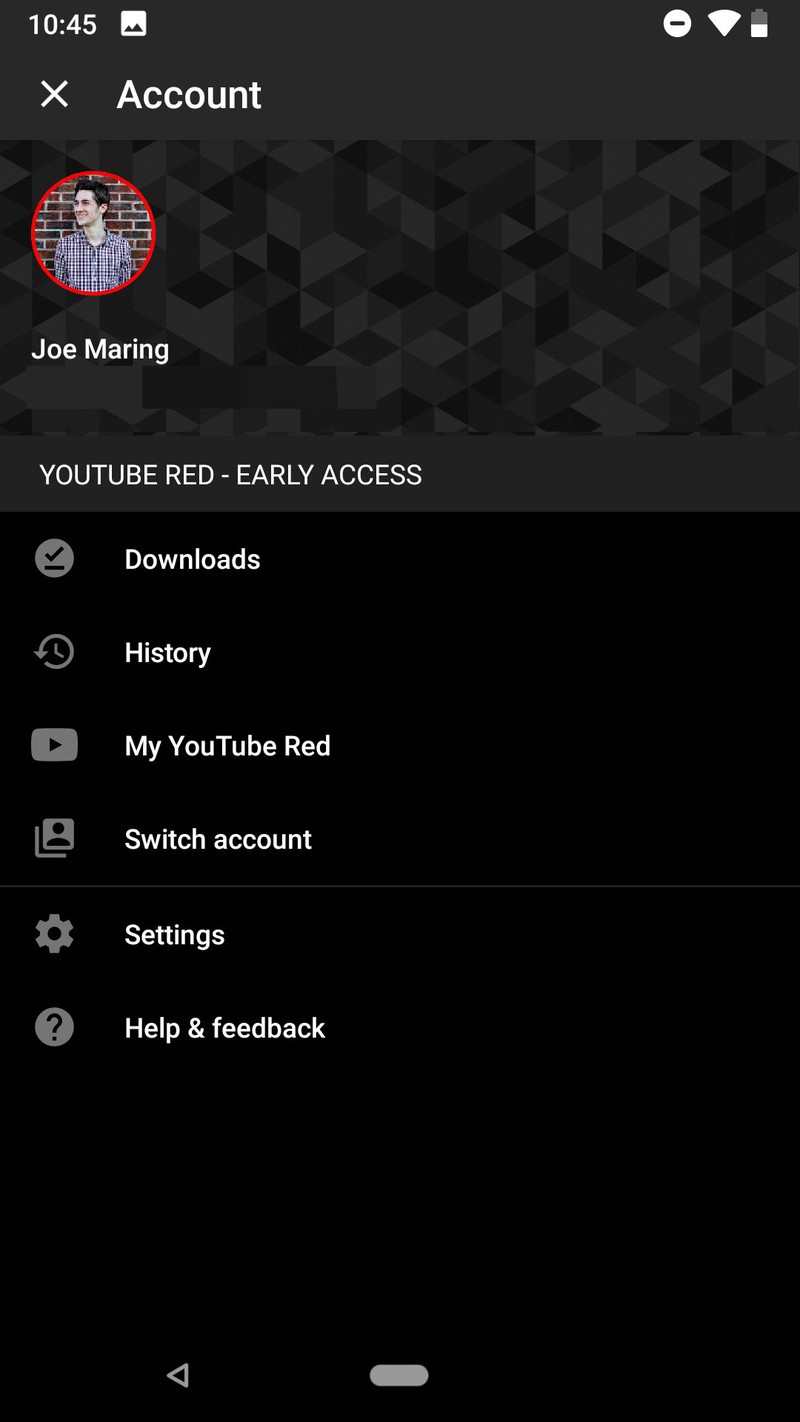

Tap Media quality.
Select the quality level you desire.
- Audio only will only store the audio of any video or song downloaded. This will allow you to download higher quality audio without dealing with the extra storage space HD video uses.
- Medium 360p downloads the video and audio at a lower SD quality.
- High 720p downloads the video and audio at HD quality.


You can also choose the download quality during your first video or playlist download. The main YouTube app has a download quality option to Ask each time, which would be nice for YouTube Music where you might want mostly audio only except for a few lyric videos or favorite music videos. We can only hope that’ll migrate to YouTube Music in the future.
How to download an individual song
While browsing YouTube Music, you’ll no doubt come across a song or 50 that you’ll want to download so you can listen to them later. Unlike Google Play Music or Spotify, you can download individual songs or videos without having to download an entire album or playlist, and it is easy to do.
Tap the three dot menu icon to the right of a song’s title on the playback screen, album listing, or search results.
Tap Download.


How to download a playlist
Downloading individual songs is nice, but it can get time-consuming. Downloading playlists is much more efficient for downloading songs in bulk, and the option to download them isn’t hidden in an options menu anymore.
In the Library tab, tap Playlists.
Tap the playlist you want to download.
Tap the download icon, the down-arrow icon between the playlist thumbnail and three-dot menu icons.


How to download an album
Now that traditional albums are a part of YouTube Music, you can download them just as you can playlists and videos, and the download button for albums isn’t hiding in a menu like it is for songs and playlists!
In the Library tab, tap Albums.
Tap the album you wish to download.
Tap the download icon, the down-arrow icon between the Add to Library and three-dot menu icons.


How to download your Offline mixtape
Offline mixtape is an automatic playlist that YouTube Music will build and download based on what it thinks you like and how many songs you want it to download. The feature was YouTube Music’s original offline option, and for much of its previous life was the only way to download music for offline playback.
These days, Offline mixtape isn’t your only option, but it’s one you’ll definitely want to use. Offline mixtape is refreshed every 24 hours and tweaked according to what you’re listening to. Think of it like a Spotify Daily Mix, except that it’s available offline and you can control how big or small the playlist is.
Here’s how to get it set up:
In the Library tab, tap Downloads.
YouTube will suggest that you download Offline mixtape. Tap Turn On.

The default Offline mixtape will download the next time you are on Wi-Fi. To adjust this, tap the settings gear.
Drag the songs slider left or right to the number of songs you want.


Offline mixtape can have anywhere between 1 and 100 songs right now. It will download immediately if you’re on Wi-Fi and re-download itself on Wi-Fi every day or so.
How to disable streaming over mobile data
Music apps can burn through a data cap if you get into a good groove and forget you left your Wi-Fi off, but YouTube Music, which is built upon video, and burn through your data cap as quickly as a Netflix or Hulu binge if you’re not careful. If you’ve got unlimited data, lucky you, but for the rest of us with a cap, you’ll want to consider disabling streaming over Wi-Fi, especially if you don’t use Audio-only mode.
Tap your avatar in the top right corner of the screen.
Tap Settings.
Tap Stream via Wi-Fi only.

Time to download the party
No matter how much or how little you download for offline playback, you should probably keep something downloaded, just in case there’s a major network outage or you get stuck on a Wi-Fi-less plane with triplets crying two rows behind you. Music makes us better, keeps us sane, and we should always have some on-hand.
Read the full YouTube Music review!

