


YouTube: Everything you need to know

From user-uploaded videos to movies and music, YouTube’s got you covered.
In February 2005, a small company by the name of YouTube was founded. YouTube was trying something new by giving people a free, easy-to-use platform for uploading videos, and a little over a year later, it was purchased by Google.
While YouTube continues to be the largest and most popular user-uploaded video site around, it’s since expanded into the markets of music streaming, live television programming, and even creating original content similar to Netflix and Hulu.
It can be difficult to keep track of everything the YouTube brand is attached to these days, so to help keep you in the loop, here’s everything you need to know.
YouTube

No matter what new ventures YouTube decides to tackle, the company’s bread and butter will always be its main YouTube service for user-created content.
Anyone can upload videos to YouTube, and with enough hard work and dedication, make money on them, too. You can subscribe to channels/users you’re particularly fond of, search for specific videos, and catch up with the most popular videos that are currently trending.
You can access YouTube just about anywhere, be it your Android phone, computer, or even a TV.
YouTube has always been free to use, and while there are paid versions we’ll dive into in just a minute, the main service itself can be accessed without spending a dime (as long as you’re okay with advertisements before your videos).
How to use YouTube for Android
YouTube Music

In an effort to compete with the likes of Apple Music and Spotify, Google’s using its YouTube brand to take them head-on with YouTube Music.
YouTube Music follows in the footsteps of its competitors with a price tag of $9.99/month, and for that price, you get access to unlimited on-demand streaming, curated playlists, offline downloads, ad-free music videos, and plenty more.
The end goal is to have YouTube Music eventually replace Google Play Music, and to ensure that transition process is as seamless as can be, Google’s confirmed that all of Play Music’s best features will eventually come over to YouTube Music — including a digital locker for storing all of your locally owned songs!
YouTube Music is still in early access and gradually rolling out to users, but even in this inaugural stage, is showing a lot of promise.
In addition to completely revamped mobile apps for Android and iOS, you can also access YouTube Music via a brand-new desktop site.
YouTube Music: Everything you need to know!
YouTube Premium / Red

If you’re already paying $9.99/month for YouTube Music, you might as well throw in another two dollars and get YouTube Premium, also known as YouTube Red.
YouTube Premium is a subscription service that costs $11.99/month, and in addition to full access to YouTube Music, you also get ad-free videos on YouTube, background playback, and the ability to watch YouTube Originals.
This basically gives you the experience previously found with YouTube Red, and even though it now costs a couple bucks more each month, is still a tremendous value.
What is YouTube Premium? Everything you need to know!
YouTube TV

Last but not least, the YouTube brand is also used to offer an Internet-based live television service via YouTube TV.
YouTube TV costs $40/month, giving you access to more than 60 channels with local sports/news, cloud DVR, and the ability to watch on up to three screens at a time.
You can watch YouTube TV from your Android or iOS device, computer, or right on your TV through a number of smart TV apps (such as Roku, Android TV, Xbox One, and more).
YouTube TV costs a bit more than competing services such as Sling TV and Philo, but for folks invested in the Google ecosystem that want to supplement their live television shows with YouTube programming, too, YouTube TV is still worth checking out.
YouTube TV: Everything you need to know
How do you use YouTube?
Which YouTube do you use most?
Fallout 76: Everything you need to know!
Fallout 76 is about to take nuclear survival to an entirely new level.

Post-apocalyptic nuclear wastelands are supposed to be terrifying, but we’re always excited to experience those conditions whenever we take a visit back to the world of Fallout. With Fallout 4 having kicked this generation off, Bethesda is ready to turn in yet another new title – and all of this is before we’ve had another proper Elder Scrolls game!
It’s called Fallout 76. And no, that doesn’t mean it’s the 76th Fallout game made. To find out the significance of that number and everything else you need to know about Fallout 76, read on.
What’s Fallout 76?
The Fallout series has traditionally placed players within a post-nuclear world. It’s a survival game at heart, they’re typically open world affairs ever since the third mainline title, and they feature Bethesda’s signature RPG touch, but with a combat twist that’ll make each encounter equally interesting and intense.
You’re typically in control of a character who has spent most of their life within a “vault,” built for sheltering survivors from the effects of nuclear radiation. In previous Fallout titles, these vaults were typically evacuated due to emergency circumstances, with the events forcing you out into the world to fend for yourself. Some of these vaults are moderate in size, but there are a number of bigger ones called “controlled vaults” which house as much as 500 survivors.
The original purpose of these vaults was to have them open exactly 20 years after the nuclear bombs dropped, with the creators looking to compare the survival rate of those who were let out versus those who remained inside. Vault 76 was one such vault, and it serves as the starting point for Fallout 76.
What’s the story so far?

While the trailer nor Bethesda managed to reveal any hard facts, several things within the announcement trailer help us begin to paint a picture. For starters, the game is seemingly set in the year 2102, as spotted by the date entered on one of the Pip-Boy units lying around. We’re not sure if the entirety of the game moves on chronologically from that point, but it’s significant for a couple of different reasons.
The first reason is that this will have been the earliest time in a Fallout game we’ve ever seen. The original Fallout took place in 2161. Fallout 2 was 2241. Fallout 3 and New Vegas were 2277 and 2281, respectively. The most recent entry – Fallout 4 – took us to the year 2287.
While the bombs have already dropped by the time 2102 arrived (doomsday was October 23rd, 2077), Fallout 76 should be the purest a Fallout world has ever been, meaning buildings won’t be as worn down, vegetation won’t be as scarce, wildlife won’t be as mutated, and things might not be quite as depressing overall. That’s not to say you should expect an oasis, but it could be the perfect excuse for Bethesda to give us more of a living, breathing world when previous games gave them every excuse not to.
The second reason the year 2102 is significant is because Vault 76 was supposed to have opened precisely 20 years after the first bombs dropped — the inhabitants even seem to be celebrating their “Reclamation Day” at some point — but that date would mark 25 years. That means one of two things happened: the vault did open five years ago and we’re just seeing the abandonment in all its glory, or something terrible has happened that delayed the grand opening. And if you know the history of Fallout games, you know you’ll almost never leave the vault due to some regular occurrence.
Beyond that, Bethesda dropped hints as to the game’s setting. The song playing on the radio throughout the trailer is Country Roads, a country song about West Virginia. Considering earlier Fallout games mentioned Vault 76 was located somewhat close to Washington, DC, the theory fits.
Base building, rodent killing, and online play?

The first Fallout 76 trailer didn’t give us any expectations of gameplay mechanics, but some early rumors have given us an idea of what to expect. We’ve heard that the base building aspect introduced in Fallout 4 will return in Fallout 76, presumably with more polish and a greater level of detail. In fact, it may serve as the entirety of the game’s premise (whereas Fallout 4’s felt like more of an afterthought feature). We can see a situation where you’re one of Vault 76’s inhabitants and you’re tasked with building up a settlement to help you and your family survive.
And we’re sure all this base building would necessitate supply and food runs, meaning there’ll be plenty of reasons and opportunities to venture off into the wildlands. Expect a huge bundle of quests along the way that’ll help you gain new companions, gather the supplies you need, and indulge in Fallout’s unique combat system that mixes real-time action and turn-based strategy.
Fallout 76 will not be your typical Fallout game.
Another rumor running rampant is that Fallout 76 will be the first ever online Fallout game. Kotaku reports that Fallout 76 originally began as an experimental project to see if an online component would be right for Fallout 4. While that development never came to fruition for the existing title, Fallout 76 gives them a nice opportunity to take a chance.
It’s suggested that it will be akin to games like Rust or ARK: Survival Evolved, where dozens and hundreds of players can exist on the same server. In those games, you start off with absolutely nothing in your possession, and it’s up to you to start building the shelter, sowing the seeds, crafting your tools, and marking your territory. This would seem to imply that there will be both cooperative and PVP elements in play.
But those who are fans of single-player experiences shouldn’t fret, apparently. It’s said there will still be a massive quest line for you to enjoy should you shy away from interconnected conflict. That’s sure to be good news for folks who enjoy Bethesda games for their strong single-player stories. Unfortunately, it’s not clear whether the game will be entirely online and whether players can enjoy their musings around Vault 76 without having to deal with the pressures of being online.
When can you play it?
Bethesda didn’t have much to share about Fallout 76 or its release date just yet, but considering they have their own press conference scheduled on Sunday, June 10th ahead of E3 2018, we can expect to learn more then.
For what it’s worth, the exact date on the Pip-Boy in the trailer is October 27th, 2102. Some believe this could be a nod to the game’s release date in 2018. While we’ve seen release dates for games teased this way in the past, there’s always a chance that there’s no connection. Whatever the case, we at least know for certain that you’ll be able to play the game on PS4, Xbox One, and PC whenever it launches. Be sure to check back often for more news and updates about Fallout 76 as we begin the long wait for an eventual release!
PlayStation 4

- PS4 vs. PS4 Slim vs. PS4 Pro: Which should you buy?
- PlayStation VR Review
- Playing PS4 games through your phone is awesome
Amazon
Share Passwords With AirDrop From iOS 12’s New Password Management System
Password managers are a great way to keep your logins secure. Instead of using Post-It Notes or spreadsheets to keep track of your passwords, password managers like 1Password — and Apple’s new password management options and API in iOS 12 — allow you to store unique and difficult to crack passwords like (jW2cBCJXXhF in a way that is easily accessible and secure.
But one of the downsides to making your NYTimes password BKtat8uW(aJb is the difficulty in sharing it with someone else. There are lots of reasons you might want to share a password, and Apple has made it much easier in the new iOS 12 Beta. Now, you can share passwords with other people directly from the iOS Password Manager via AirDrop.
On an iOS 12 device, open the iOS Settings app and go to Website & App Passwords. Then, select a login, tap on the password field and an option to AirDrop the login will appear. The login can be AirDropped to any iOS 12 or macOS Mojave device. Users on both devices are required to authenticate via Touch ID or Face ID (or a regular old password, depending on which Mac you have) before the password can be sent or saved.
The new password management API (and this sharing system) is meant to streamline and simplify the way passwords work on iOS devices. Apple will automatically suggest strong, unique passwords, with iOS 12 offering the tools to create, store, and retrieve passwords no matter where an account is created. The new features work in both third-party apps like 1Password, as well as Safari. All of your passwords will be stored in iCloud Keychain no matter where they are created and they are synced across all of your devices.
For third-party password apps, such as 1Password or LastPass, Apple is adding a new Password Autofill Extension that will let these password management apps to supply autofill passwords in apps and Safari, making it much easier to enter a password stored in an app like 1Password or LastPass.
Also new in iOS 12 is a feature that lets you ask Siri to get your passwords. With a simple command like “Siri, show me my passwords,” Siri will open up your iCloud Keychain after you authenticate your identity with a fingerprint, a Face ID scan, or a passcode.
iOS 12 is available now as a developer beta, with public betas expected later this month and a final public release expected in early fall.
Related Roundup: iOS 12
Discuss this article in our forums
Shawn Mendes Breaks Apple Music Record to Become Most-Streamed Pop Album of 2018 in One Week
Singer/songwriter Shawn Mendes has broken the latest Apple Music record, with his self-titled third album becoming the most-streamed pop album of 2018 in under one week (via Billboard). Released on May 25, the new Shawn Mendes album was accompanied by a collection of bonus material on Apple Music, including a Beats 1 interview with Zane Lowe, exclusive live concert and Q&A session, playlists, and more.
The previous record holder for most-streamed pop album of 2018 was Justin Timberlake’s “Man of the Woods,” which launched in February. In the wake of the news, Apple Music confirmed that Mendes has also surpassed one billion global streams on the music service, encompassing his three studio albums, singles, and live recordings.
There have been a few record breaking stories related to Apple Music this year, most recently with rapper J. Cole breaking the record for most album streams in the first 24 hours in the United States. Prior to that, Cardi B’s “Invasion of Privacy” set a new record for first-week streams by a female artist on Apple Music, beating Taylor Swift’s “Reputation.”
According to the last count, Apple Music has over 50 million users total, combining those paying for the service and anyone on a free trial. The last specific paid count sat at 40 million in April, compared to 71 million listeners paying for Spotify.
Apple Music isn’t tipped for a major revamp in iOS 12, but beta testers have discovered that artist profiles will be slightly upgraded in the new software with bigger portraits and a handy shuffle-all Play button. Subscribers will also be able to search for some songs even if they only know a snippet of the track’s lyrics.
Tag: Apple Music
Discuss this article in our forums
Class Action Lawsuit: Apple Watches Have Defective Displays That Can Spontaneously Detach
A new class action lawsuit filed against Apple this week alleges that all Apple Watch models suffer from a defect that causes the display to “crack, shatter, or detach from the body of the watch, through no fault of the wearer.”
The proposed class is all current and former owners of all models, sizes, and variants of the Apple Watch, including the original, Series 1, Series 2, and Series 3 generations, purchased in the United States between April 2015 and present, according to court documents obtained by MacRumors.
The complaint, filed in Northern California district court, alleges that Apple has sold millions of watches with the defect throughout the United States, and “either knew, or should have known,” about the display issues. Apple is said to have “actively concealed” and “failed to disclose” the defect to customers.
The complaint adds that Apple’s internal policy is to “deny the existence of the defect, claim the defect is the result of accidental damage caused by consumers, and then refuse to honor its limited warranty on those grounds,” resulting in customers facing expensive fees to repair or replace their defective watches.
Apple Watch out-of-warranty service fees range from $229 to $329 in the United States, excluding high-end Edition models.
The lawsuit was brought against Apple by Colorado resident Kenneth Sciacca, who purchased an Apple Watch Series 2 in December 2016. In or around March 2018, the screen on Sciacca’s watch is said to have “unexpectedly detached from the watch’s body shortly after he removed the watch from its charger.”
The complaint cites a handful of comments from the Apple Support Communities, and similar complaints can be found scattered across the MacRumors forums, Reddit, Twitter, and other discussion platforms.
Apple has acknowledged issues with swollen batteries in select original and Series 2 models, which can cause the display to pop off, and offered free repairs up to three years after purchase, according to internal guidelines previously obtained by MacRumors. However, the complaint alleges that Apple refuses to extend the free repairs to watches with detached displays but no swollen battery.
Apple is accused of unlawful business acts and practices, in violation of California’s Business and Professions Code, in addition to violating California’s Consumers Legal Remedies Act and the Magnuson-Moss Warranty Act, breaching express and implied warranties, and unjust enrichment.
The complaint is seeking damages to fully compensate affected Apple Watch owners for all losses sustained as a result of the alleged defect, plus further relief as seen fit by the court. A jury trial has been demanded.
Related Roundups: Apple Watch, watchOS 4Tag: lawsuitBuyer’s Guide: Apple Watch (Neutral)
Discuss this article in our forums
US DOJ to Consult With MVNOs on T-Mobile/Sprint Merger
As part of its antitrust examination into the T-Mobile/Sprint merger, the US Department of Justice is looking at how the two firms combining would affect smaller wireless carriers that frequently buy network access on larger networks to resell to “pre-paid or price-conscious consumers” according to a report from Reuters.
There are concerns, the report claims, that because Sprint and T-Mobile are more popular for smaller mobile virtual network operator or MVNO carriers looking to resell cellular service to users, a combined firm may result in higher costs for those MVNOs and their customers because of decreased competition.
The Justice Department, which is evaluating T-Mobile’s $26 billion deal to buy Sprint, has been speaking with small wireless operators that buy access to the major wireless networks at wholesale rates, and is seeking their opinions about the merger.
There’s no indication yet that this part of the antitrust investigation could cause any issues for the merger, but it does illustrate how complicated these large telecom mergers can be and how many different issues they can affect.
Back in April, Sprint and T-Mobile — the third- and fourth-largest mobile carriers in the US – agreed to combine into a giant carrier with more customers than AT&T. The companies hope to complete the merger by the first half of next year, but have to get approval from antitrust regulators first.
Tags: Sprint, T-Mobile
Discuss this article in our forums
BlackBerry KEY2 hands-on: It’s all about speed
BlackBerry’s renaissance launched with aplomb last year with the BlackBerry KEYone. A year on, and two new variants later, including the first dual SIM BlackBerry ever, the company is back with its new keyboard-toting phone, the BlackBerry KEY2. It’s got an updated design, a new special key, and the first ever dual camera on a BlackBerry, but should this be your new phone? Let’s take a look!

The KEYone inspired nostalgia amongst BlackBerry users everywhere, with a design reminiscent of iconic devices such as the BlackBerry Bold 9000. The BlackBerry KEY2 brings a few tweaks based on feedback from users, partners, and customers, and builds on this with an emphasis on a better overall typing experience. The curves of the KEYone have been replaced by a flatter design with straighter edges, and the device is one millimeter thinner as well as 12 grams lighter. The result is a much better in-hand experience more conducive to one-handed typing. The keys have also moved to the righthand side of the KEY2 — with the power button gaining a textured finish — to provide a more seamless experience and look.
The KEY2’s typing experience is where it really shines thanks to 20% larger keys
The KEY2’s typing experience is where it really shines. The keys are now 20 percent larger and there’s more room for them, now that the glass display stretches all the way to the top of the phone. Personally, I found the KEYone keyboard to be a little cramped, but the KEY2 is more comfortable to use. Like the KEYone, there’s the fingerprint sensor in the space bar, and it works well whether the phone is flat on a table or in your hand.

The big addition to the keyboard is the new speed key. One of the best parts of the BlackBerry experience is the ability to program a key to quickly launch apps, shortcuts, or other features directly from your homescreen when you tap or long press it. On the KEYone, you had to go back to the homescreen to use it, but you no longer have to with BlackBerry KEY2 — pressing the speed key and activating your shortcut will work regardless of which app you are in. The larger keys provide excellent tactile feedback and the keyboard still comes with all the swipe gestures and functionality we’ve come to expect from BlackBerry’s physical keyboards.
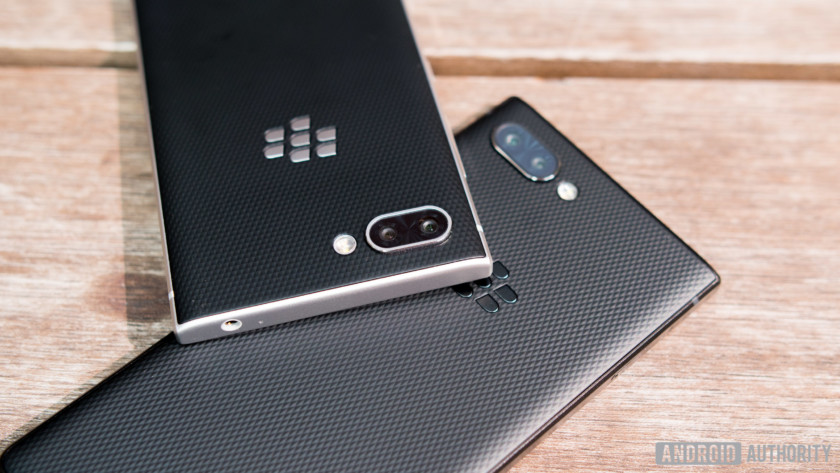
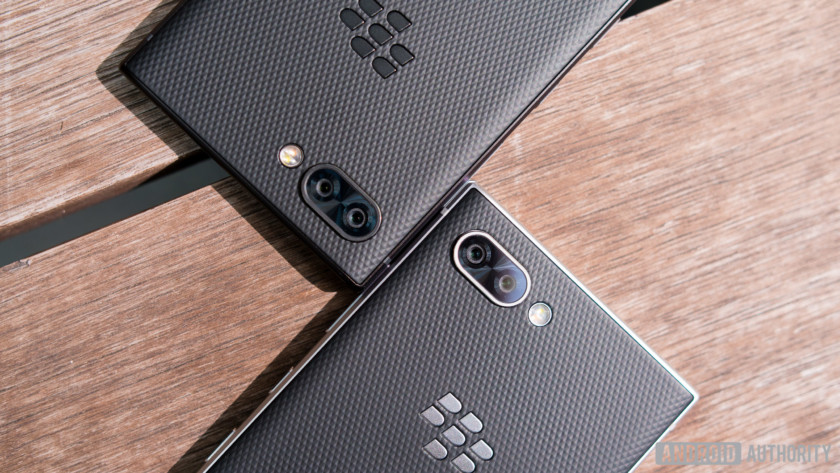
The speed key isn’t the only new feature on the KEY2, it also features the company’s first dual camera offering. The back has two 12MP sensors, with the main sensor offering f/1.8 aperture and 1.28μm pixel size. The second sensor has a 12MP resolution with an f/2.6 aperture, 1µ pixel size, and a telephoto lens offering 2X zoom. The BlackBerry KEY2 uses both lenses to offer a portrait mode because it’s 2018 and every camera offers this feature. The front camera has an 8MP sensor with an f/2.0 aperture and 1.12μm pixel size.
Neither rear camera offers optical image stabilization and portrait mode is limited to just the rear cameras, but it’s an improvement over previous BlackBerry devices nonetheless. While the hardware is new, the real story is the software, which BlackBerry said it heavily refined to capture much better pictures. We’ll have to wait for the full review to confirm this, but the early signs are promising.

The BlackBerry KEY2 runs Android 8.1 Oreo out of the box, and BlackBerry confirmed the device will get an update to Android P, although it wouldn’t say past that. The software experience is largely what we’ve come to expect from BlackBerry, and its best-in-class DTEK security suite now features an updated UI. A couple of interesting additions to DTEK include the ability to see whether apps are running in the background or foreground, which is particularly useful for finding apps you’ve never opened that consistently run in the background and turning them off.
DTEK has also gained new sensitive permissions, which will help alleviate any security concerns users may have. Out of the box, the microphone and camera are set as sensitive permissions. When an app is trying to use either of these, you’ll get a notification and will have to explicitly grant it access. This could stop rogue apps and also provide you with an understanding of which apps use these features. If the phone app asks for permission to use the microphone, you’ll obviously want to grant it. If the calculator asks to use your microphone, you might want to think twice.

The other big addition to the software experience is a new Private Locker feature, which creates a private area on your phone. While other Android phones also offer this feature, BlackBerry’s integration is a little different. Inside the locker you can add apps, photos, files, documents and more. Photos added to the locker don’t appear in the regular gallery and won’t back up to the cloud.
The Private locker lets you hide apps from your homescreen or app drawer, which is great for hiding your banking apps
Even more interesting, the Private locker lets you hide apps in the locker from your homescreen or app drawer. This is particularly useful for hiding sensitive items like banking apps, and the only way to launch them is to either access via the locker or using keyboard shortcuts. Everything in the Private Locker is only accessible via your fingerprint, password, or pin. Even when you launch an app in the locker using a keyboard shortcut, you’ll need to authenticate before opening it.
Those changes aside, the rest of the BlackBerry KEY2 experience is similar to the KEYone, with a few hardware updates. The KEY2 is powered by the Qualcomm Snapdragon 660 processor and comes with 6GB of RAM and 64GB of internal storage standard. The first version of the KEYone — which only had 3GB of RAM — was a little sluggish in every day use. 6GB of RAM will go a long way to prevent any performance issues this time around. Versions with up to 128GB of storage and dual SIM functionality will be available in select non-U.S. markets, but the KEY2 will only come in the 6GB and 64GB variant stateside.
The display is the same 4.5-inch Full HD LCD panel with 3:2 aspect ratio as the KEYone, though the glass extending to the top of the phone makes it feel a little more immersive. There’s a USB Type-C port, as well as a headphone jack (which Blackberry said it has no plans to drop anytime soon). There’s also dual speakers, improvements in the antenna positioning, LTE Cat 9 offering 300Mbps download speeds, and Gorilla Glass 3 protection over the display.

The 3,500mAh battery unit supports Quick Charge 3.0 and should last about two days, according to the company. To improve your battery experience, the new Power Center app lets you see how much battery individual apps are using, and whether any apps are slowing your device down. The app gives you recommendations on improving battery life.
BlackBerry is also using machine learning to help you manage your battery life. The Power Center application will learn your charging habits and use this data to predict whether you’ll run out of battery. If you always charge around 11 p.m., the phone will learn this. If you’ve been using the phone heavily in the morning, it’ll try and work out if you’re likely to make it to your charging window without running out of juice. Instead of having to wait to hit the five percent low battery warning, it’ll prompt you hours in advance so you have time to find an outlet and top the battery up.
Instead of having to wait to hit the low battery warning, it’ll prompt you hours in advance so you have time to find an outlet and top the battery up.
The BlackBerry KEY2 will launch by the end of June in the U.S. and other select markets like Canada, the U.K., Germany, France, and China. It’ll then roll out to other markets starting in July. It’ll cost $649 in the U.S., with pricing in other markets to be confirmed later.
The BlackBerry KEY2 brings a host of tweaks to improve the overall experience, but the updated keyboard is its biggest change. The larger keys make for a much better typing experience and will be a welcome change for anyone who had issues with the small keys of the original KEYone.

What do you think of the BlackBerry KEY2 and do you plan to buy one? Check out the rest of our BlackBerry KEY2 coverage below and let us know your views in the comments below!
- BlackBerry KEY2 Specs: two cameras and twice the power
- BlackBerry KEY2: when can you buy it?
- BlackBerry KEY2 is official: Better keyboard, more RAM, and dual cameras
- Here are our favorite BlackBerry KEY2 features
Blackberry Key2 hands-on review
Research Center:
Blackberry Key2
Enough with the nostalgia, it’s back to business for BlackBerry. The BlackBerry Key2 is its follow-up to last year’s surprise hit, the BlackBerry KeyOne. Yes, BlackBerry is still around. Yes, there’s a physical keyboard. No, it’s not BlackBerry OS, but Android.
The Key2 is a spectacularly refined successor, improving on the KeyOne in every single way. If the Key2 were a person, it would be the dashing CEO to a successful megacorporation. It redefines suave.
Elegant and charming
Put the Key2 next to the KeyOne, and the differences are striking. The Key2, which is a tad taller, oozes elegance. It’s thinner and more angular all around, with chamfered edges offering a firm grip when held in the palm. The utilitarian design strips away all unnecessary fluff on the front of the phone.
The 4.5-inch screen moves up a little, and the bezels surrounding the display have shrunk, giving the Key2 a slightly more contemporary look. You’ll still find capacitive Android navigation controls below the screen, but all the other buttons on the phone are now on the right edge — including the power button and the Convenience Key. The power button is textured, so you’ll know which one you’re about to press.
At the bottom is a USB Type-C charging port, with speaker grilles surrounding it, and at the top edge is a headphone jack that’s slightly off-center. This slightly askew placement may be the only design flaw we’ve found with the Key2: It just looks strange, and we compulsively want to correct it ourselves.
If the Key2 were a person, it would be the dashing CEO to a successful megacorporation. It redefines suave.
The back of the phone isn’t too different from the KeyOne. The soft-touch material feels nice to the touch, and best of all, it doesn’t capture grubby fingerprint marks like most glass phones these days. It’ll almost always look presentable. The camera isn’t as big and bold as the KeyOne. There are two lenses now, but they manage to look understated.
The IPS LCD screen has a 1,620 x 1,080 pixel resolution, with a pixel density of 434 pixels per inch and a 3:2 aspect ratio. The screen looks sharp, colorful, and bright enough to see on an overcast day. Blacks don’t look as rich as we’ve seen on OLED screens, but we didn’t have any qualms about the 4.5-inch display here. It’s protected by Gorilla Glass 3, which is a bit of a disappointment as most flagship phones use the stronger Gorilla Glass 5.
Blackberry Key2 Compared To
Blackberry KeyOne
BlackBerry Priv
Motorola Photon Q 4G LTE
HTC Rezound
HTC Amaze 4G
T-Mobile Sidekick 4G
T-Mobile MyTouch 4G Slide
Samsung Infuse 4G
HTC Inspire 4G
Motorola Atrix 4G
Samsung Epic 4G
Motorola Devour
Samsung Moment
Motorola Cliq
T-Mobile G1
Despite being slightly taller in length than its predecessor, the Key2 is 12 grams lighter, and feels comfortable to hold. We also didn’t have any problems reaching the top of the screen. The only downside with the build of the phone is that it’s still not water resistant. It’s unfortunate, but understandable considering the technical hurdle with a physical keyboard.
The Key2 looks sharp, suave, and elegant. There are two color options: Silver and Black. We’re torn on which we’d pick, because we love the subtle look of the all-black color; but the accents on the silver color really do elevate the refined design of the Key2. It’s a good problem to have.
The perfect keyboard, and a new key
The Key2, like the KeyOne, is all about the physical keyboard. If it’s not good, then what’s the point? The company told Digital Trends it spent an enormous amount of time playing around with different designs of the keyboard to make sure it’s perfect. It is. We can’t think of a better word to describe it.
We’ve talked about transitioning from an iPhone X touchscreen keyboard to the BlackBerry KeyOne keyboard — a fun experiment, but our typing speed became a lot slower. With the Key2, moving the screen a little higher means there’s more room at the bottom for a slightly bigger keyboard. The raised frets are gone between the rows of keys, the keys are a tad bigger, and in general, there’s more breathing room.
Julian Chokkattu/Digital Trends
The matte keys slope down a bit, and they deliver a satisfying tactile sensation when pressed — they’re not too mushy, but they’re certainly not stiff. The extra room really does help us type faster. That’s not to mention the fact that the backlit keyboard is still capacitive, meaning you can flick upwards under the predictive word bar to use suggested words quickly for even faster typing.
The keyboard also doubles as a trackpad, allowing you to scroll through the Android operating system and apps. Each key also can be mapped to an app or shortcut twice — a short press and a long press. For example, tap the M key to launch Google Maps, and then press and hold the M key to launch a messaging app. That’s a lot of shortcuts, and they’re often easy to remember. It helps minimize contact with the touchscreen, so your fingers are always close to the convenient keyboard.
The matte keys slope down a bit, and they deliver a satisfying tactile sensation when pressed.
But the biggest change to the Key2’s keyboard is the addition of a new key. It’s called the Speed Key, and it replaces the extra shift key that sat on the far right side of the keyboard. If you’re in an app, press and hold the Speed Key, and then short tap or long tap any other key to jump to a remapped app. It’s kind of like alt-tabbing on a computer, but it gets you where you want to go much faster — perfect for multi-taskers. For example, if you’re in Chrome, but you want to jump to Gmail, press and hold the Speed Key, and then tap the G key (presuming you’ve remapped the G key to Gmail). You’ll jump straight into the app, without having to exit Chrome, opening the app drawer, and finding the Gmail icon.
We’ve fallen in love with the Key2’s keyboard in the brief time we’ve played around with it. Will it make us transition from a touchscreen keyboard? Maybe. Most likely not. But there’s a niche group of people that adore physical keyboards and desire them, and that’s who BlackBerry is successfully targeting.
Strong specifications, improved security and privacy
The Key2 is powered by Qualcomm’s Snapdragon 660 processor with 6GB of RAM, which should be plenty of power for most people. The extra RAM will help with multitasking, but the Snapdragon 660 is no Snapdragon 845. The latter processor powers flagship phones like the Samsung Galaxy S9 and is more capable. Still, in our brief time with the phone, we encountered zero hiccups moving throughout the OS. Apps opened quickly and fluidly. We’ll do more testing to see if the Snapdragon 660 is capable enough.
There’s 64GB of internal storage in the U.S. model, and a 128GB model will be available in certain markets. There’s a MicroSD card slot too, so you can add more space when you need it.
Julian Chokkattu/Digital Trends
The Key2 has a 3,500mAh battery capacity, which means it should still offer fantastic battery life. It’s only 5mAh smaller than the battery on the KeyOne, which could easily stay powered for two days. It supports Qualcomm’s Quick Charge 3.0, so you can juice up faster.
The phone runs Android 8.1 Oreo, and BlackBerry said it will get two Android version upgrades. That means it will get Android P, though maybe not immediately after it’s launched, and it will get Android Q in 2019. The software is mostly stock Android, but there are a few changes made by BlackBerry and a whole lot of BlackBerry apps. The most noticeable visual addition is the BlackBerry Productivity Tab, which sticks out on the right edge of the screen — it now lets you add widgets, so you don’t need to swipe through too many home screens.
It’s only 5mAh smaller than the battery on the KeyOne, which could easily stay powered for two days.
The apps present on the phone will mostly be familiar for BlackBerry users, but there are a few new ones and big updates to older apps. There’s the BlackBerry Hub, where you can see all your notifications, BBM, BlackBerry Privacy Shade, and Locker. The Locker app now lets you store and hide apps, requiring a passcode or fingerprint activation (via the spacebar key) to open them. Handy if you want to keep a dating app a secret from coworkers, or other sensitive files. Locker also now has the privacy-focused Firefox Focus browser pre-installed, which deletes browsing history as soon as you leave the app. The default browser on the phone is still Chrome.
Photos taken with the fingerprint sensor are also hidden away in the gallery app, and they’re not uploaded to the Google Photos cloud — another privacy-friendly feature. A new app called Power Center tells you what apps are draining your battery, and it learns your charging habits so it will send an alert when it knows you won’t make it to your typical charging window.
BlackBerry said it has employed the use of machine learning throughout the operating system as well. For example, the DTEK app will tell you if there’s an app accessing sensitive information like a microphone, and you can deny the request. This happens after you have agreed to allow the app to access the microphone through Google Play permissions, as an extra security measure.
The Convenience Key — the physical button below the power button — now has three modes. There’s a Car profile, a Meeting profile, and a Home profile. So if you press the button when the phone is connected to your car’s Bluetooth, then it will present you with three pre-configured apps of your choosing such as Google Maps, or Spotify. The Work profile apps will show up when you’re connected to your work Wi-Fi, and your Home apps will be present on your home Wi-Fi. It’s succinctly convenient.
It can all feel overwhelming, but the minor redesigns and updates to apps and BlackBerry services in the Key2 make it fairly accessible for the average person to adapt to and use.
Dual camera
Jumping on the dual camera trend, BlackBerry’s Key2 has two 12-megapixel cameras on the back.
Jumping on the dual camera trend, BlackBerry’s Key2 has two 12-megapixel cameras on the back — one with an f/1.8 aperture, and the other with an f/2.6 aperture. There’s 2x optical zoom now, as well as a Portrait Mode. The shutter reacts quickly, and the photos we took look pretty good. We were surprised with the camera on the KeyOne, and we’re expecting it to be quite capable on the Key2, though we’ll need to do more testing.
Price and availability
The BlackBerry Key2 costs $650, and it will be available in the U.S. this month. It’s slightly more expensive than last year’s KeyOne, and but we think the build quality and dedication to creating the perfect keyboard is going to make this phone worth its price tag — especially considering there are hardly any phones out there with a physical keyboard.
Sure, it doesn’t have the Snapdragon 845 like the OnePlus 6, but again, the people buying this phone care more about the keyboard than raw specifications. We can’t wait to use the Key2 more and put it through its paces.
Do you plan on upgrading to the Galaxy Note 9?
Samsung’s playing it safe this year.
Leaked renders of the Samsung Galaxy Note 9 surfaced on June 6, and to not much surprise, revealed that the phone will look eerily similar to the Note 8.

We’re still expecting the Note 9 to come equipped with a faster processor, new software features, and improved cameras, but when it comes to its design, it doesn’t appear that we’ll be seeing much change at all.
Some of the Android Central forum users were quick to leave their comments about the Note 9, and this is what they said.
Hermes Hidayat
06-06-2018 01:46 AM“
i would wait for Note 10 instead.as so far from what Samsung has made is like big difference every 2 models…like S6 to S7 ,S8 to S9…
Reply
kj11
06-06-2018 07:00 PM“
Doubt it. Given the leaked video posted on another forum it looks like a note 8 with a finger print scanner that’s been moved a little lower to appease everyone who thought it’s placement on the note 8 was the worst thing that’s ever happened to them.
I stuck with the note 5 for 2 years, shouldn’t be a problem to do the same with the 8
Reply
Telstar1948
06-06-2018 06:48 AM“
Not planning on it – unless my Note8 gets run over by a dump truck, then I probably will. I may decide to go with a 2-year replacement cycle so that I can get more use for my money.
Reply
cwbcpa
06-06-2018 11:36 AM“
I have a wait and see attitude right now. I’m extremely happy with my Note 8 and certainly don’t need to upgrade. It would be a want rather than a need. Same with the Gear S4. My S3 is great but if they integrate Bixby or Google assistant into the next watch, I’ll get that too.
I feel like I’m in a good spot this year. If I choose to stick it out with the Note 8/S3 combo, I’ll be just fine.
Reply
Based on what we know so far — Do you plan on upgrading to the Galaxy Note 9?
Join the conversation in the forums!
Samsung Galaxy Note 8
- Galaxy Note 8 review
- Galaxy Note 8 vs. Galaxy S8+
- Which Note 8 color is best?
- Complete Galaxy Note 8 specs
- Join our Galaxy Note 8 forums
Verizon
AT&T
T-Mobile
Sprint
Best Buy
Google Pixel 3: News, Rumors, Release Date, Specs, and more!
Everything we know about what’ll likely be one of the year’s best phones.
Google first introduced its Pixel series in 2016, and since then, has been hard at work to establish itself as a serious player in the smartphone market. Google may be one of the most powerful and iconic companies in the world, but when it comes to hardware, is still very much a newcomer.

We saw vast improvements with the Pixel 2 compared to the original Pixel line, and we’re expecting to get that again with the Pixel 3. Google’s quickly learning what it takes to compete with the likes of Samsung and Apple, and seeing as how the Pixel 2 was one of 2017’s best phones, there’s a lot riding on this year’s entry.
Ladies and gentlemen, here’s everything we know so far about the Google Pixel 3.
June 4, 2018 — Google’s apparently working on a mid-range Pixel phone
According to one tipster, Google’s in the process of developing a mid-range Pixel phone that’s codenamed “Bonito” and is powered by the Snapdragon 710 processor.
Rumors of a mid-range Pixel first popped up in April, but the old claim of it launching this July has since been replaced with a release scheduled for the first half of 2019.
That would suggest that Google may launch this new Pixel phone during I/O next year, but with so much discrepancy surrounding the release date, it’s entirely possible it’ll be announced alongside the Pixel 3 in October.
May 30, 2018 (part 2) — Verizon is said to be the exclusive carrier for the Pixel 3, again 😕
A report from Bloomberg recently surfaced confirming a few details about Google’s upcoming phones per a source that’s familiar with their production. According to the report:
- The Pixel 3 series will once again be exclusive to Verizon Wireless in the U.S.
- A notch will be present on the larger Pixel 3 XL
- Google will announce/launch the phones in October
- Foxconn will manufacture the Pixel 3/3 XL
- Stereo speakers will be present on both phones
- The Pixel 3 XL will have dual front-facing cameras
- “Both models will include upgraded, single-lens cameras on the back”
When will the Pixel 3 be released?
In 2016 and 2017, Google held its hardware event on October 4. We don’t have a concrete date for this year’s event quite yet, but there’s no reason to believe Google will deter from this pattern.
Another October 4 event isn’t out of the question seeing as how that falls on a Thursday this year, but at the very least, we should be looking at some point in early October.
Pre-orders for the Pixel 3 will likely open shortly after it’s announced that same day with shipments going out at least a couple of weeks later.
How much will the Pixel 3 cost?
Over the past couple years, pricing for Google’s Pixel phones has remained mostly the same. The MSRP for the Pixel and Pixel 2 series is as follows:
- Pixel w/ 32GB — $649
- Pixel w/ 128GB — $749
- Pixel 2 w/ 64GB — $649
- Pixel 2 w/ 128GB — $749
- Pixel XL w/ 32GB — $769
- Pixel XL w/ 128GB — $869
- Pixel 2 XL w/ 64GB —$849
- Pixel 2 XL w/ 128GB — $949
I imagine we’ll see similar numbers with the Pixel 3, but don’t be too surprised if we get a Pixel 3 XL variant that crosses the $1000 threshold.
Google Pixel 2 and Pixel 2 XL
- Pixel 2 FAQ: Everything you need to know!
- Google Pixel 2 and 2 XL review: The new standard
- Google Pixel 2 specs
- Google Pixel 2 vs. Pixel 2 XL: What’s the difference?
- Join our Pixel 2 forums
Best Buy
Verizon
Google Store
Project Fi

