


Which Samsung Galaxy outlasts the rest on battery life? Not the one you expect
Ever wonder if newer phones actually boast better battery life than their predecessors? To find out, we to put the Galaxy S9 Plus and several other Samsung phones — specifically the S8, S8 Plus, and Note 8 — to the test. The company’s website claims that the S9 Plus lasts longer than the standard S9, but does it outperform previous Galaxy models?
To ensure no outside variables hindered our experiment, we made sure that each phone was connected to the same Wi-Fi network and the same social media accounts, and receiving notifications in the same way. The display brightness on each device was also identical. To test the overall longevity of each battery, we played a continuous loop of the beloved Nyan Cat video, and waited patiently to see which phone would last the longest.
Battery test results
1st: Galaxy S8 Plus
2nd: Galaxy Note 8
3rd: Galaxy S8
4th: Galaxy S9 Plus
Three hours in, there wasn’t a noticeable difference; the Note 8 still had 74-percent battery life, the S8 and S8 Plus were hovering around 72 percent, and the S9 Plus was in the middle with 73 percent. Fast forward an impressive 12 hours and 7 minutes, and we have our winner, the S8 Plus. The Note 8 came in second at 11 hours and 13 minutes, while third and fourth place went to the S8 and S9 Plus, respectively.
It’s hard to say why the S8 Plus lasted significantly longer than the other models — especially since they all sport similar battery sizes and identical processors — but clearly, it’s the S8 Plus has something going for it. In another recent battery battle, we put a host of flagships, including the Galaxy S9 Plus and S8 Plus, to the same test. The Galaxy S8 Plus was again victorious, with the S9 Plus coming in at a close second.
Keep in mind, however, the battery test is just a simplified overview of how long your phone may last. The S9 Plus is still a fantastic device… even if the battery life could be better.
David Cogen — a regular contributor here at Digital Trends — runs TheUnlockr.com, a popular tech blog that focuses on tech news, tips and tricks, and the latest tech. You can also find him over at Twitter discussing the latest tech trends.
Editors’ Recommendations
- Battery battle: Samsung Galaxy S9 Plus vs. iPhone X, Pixel 2 XL, and more
- Samsung Galaxy S9 and S9 Plus: Here’s everything you need to know
- Speed test: Galaxy S9 Plus vs. S8 vs. S8 Plus vs. Note 8
- We put the last 4 iPhones through a battery beatdown
- Samsung Galaxy S9 Plus review
Apple Celebrates Pride in San Francisco Parade
Apple this weekend participated in the annual San Francisco Pride Parade, as part of its longstanding support of the LGBTQ community.
Photo: Trey Forgety
Apple’s CEO Tim Cook, environmental chief Lisa Jackson, and health and fitness director Jay Blahnik were among the many Apple employees who marched in the parade, wearing Pride-themed t-shirts with rainbow-colored Apple logos.
Happy Pride to the Apple employees marching today in San Francisco and to everyone celebrating #Pride2018 across the country! pic.twitter.com/UUoZDAWjnC
— Tim Cook (@tim_cook) June 24, 2018
Apple also had a dedicated area at One Market Plaza where people could leave their signature or a message, take Animoji photos, and more.
#applepride pic.twitter.com/c4r8q2jrvw
— Lisa P. Jackson (@lisapjackson) June 24, 2018
#applepride pic.twitter.com/rvq0oqpeP3
— Bill Zhao (@cybermaster) June 24, 2018
Apple has been celebrating Pride throughout the month of June, introducing a new Pride-themed Apple Watch band and watch face at WWDC. The company routinely supports laws that protect LGBQT rights, and opposes laws that discriminate.
Note: This discussion thread is located in our Politics, Religion, Social forum. All forum members and site visitors are welcome to read and follow the thread, but posting is limited to forum members with at least 100 posts.
Tag: Pride
Discuss this article in our forums
Bluetooth headphones, USB-C monitors, Philips Hue lights, and more are all discounted today
Whether you’re looking for new tech gear or household items, we’ve got you covered.
We found plenty of great deals today that include big discounts on LG’s 4K USB-C monitor, Sony’s Bluetooth headphones, Philips Hue multi-color smart bulbs, and much more! Time’s running out to take advantage of these prices, so hurry!
View the rest of the deals
If you want to know about the deals as soon as they are happening, you’ll want to follow Thrifter on Twitter, and sign up for the newsletter, because missing out on a great deal stinks!
Researcher claims to bypass iPhone security limits, but may have spoken too soon
Julian Chokkattu/Digital Trends
For a brief moment, it seemed as though a security researcher had found a way to get past the security limits on iPhones and iPads by entering an infinite number of passcodes in order to hack into a device. The purported vulnerability was apparently even present in the latest version of iOS, 11.3, but Apple has now pushed back on these claims, and the researcher also appears to be backtracking on his initial findings.
When attempting to access a locked iPhone or iPad, users generally have a set number of passcode attempts to make before being locked out. You can even set your Apple device to automatically erase its contents if a hacker continuously attempts to guess your passcode. But according to Hacker House cybersecurity firm co-founder Matthew Hickey, if an iDevice is plugged in and a hacker tries to send keyboard inputs, it sets off an interrupt request that supersedes all other commands on the device. This, Hickey said, would allows hackers to send every single possible passcode combination in a single string, and because it wouldn’t give Apple’s software any respite, the inputs would take priority over any data-erasing security feature.
“Instead of sending passcode one at a time and waiting, send them all in one go,” Hickey explained. “If you send your brute-force attack in one long string of inputs, it’ll process all of them and bypass the erase data feature.”
However, Apple’s spokesperson countered these claims, noting simply, “The recent report about a passcode bypass on iPhone was in error, and a result of incorrect testing.”
And a bit later, Hickey seemed to concede that his method may not have been entirely accurate. In a tweet, the security researcher explained that not all of the tested passcodes are ultimately sent to an iPhone or iPad’s secure enclave, which is responsible for guarding against these sorts of attacks.
“The [passcodes] don’t always go to the [secure enclave processor] in some instances — due to pocket dialing [or] overly fast inputs — so although it ‘looks’ like pins are being tested, they aren’t always sent and so they don’t count, the devices register less counts than visible,” he noted.
Hickey said that when he attempted to verify his methods, he found where he may have gone wrong: “I went back to double check all code and testing. When I sent codes to the phone, it appears that 20 or more are entered but in reality it’s only ever sending four or five pins to be checked.”
In any case, Apple will soon be debuting another security feature called USB Restricted Mode, which should make it much more difficult for folks to access an iPhone or iPad.
Editors’ Recommendations
- It took them 15 years to hack a master key for 40,000 hotels. But they did it
- BMW racing to patch 14 security vulnerabilities found in its cars
- After the San Bernardino iPhone fiasco, lawmakers introduce the Secure Data Act
- Intel, Microsoft using integrated graphics to thwart next Meltdown-style threats
- Telegram app is a favorite of Kremlin officials, but Russia wants to block it
PopSockets vs. Spigen Style Ring vs. Ringke Ring: Which grip is best?

Sometimes you just need to get a grip on your phone.
We can white-knuckle grip our phones all day while we carry them around, but let’s face it: phones get slippery. Hands get sweaty. Sometimes we just need something a little easier to hold on to. Smartphone grips can help with this, as well as giving us an easy-access kickstand, a secure mounting solution, and even a little style. There’s a variety of smartphone grips out there, but a few styles have risen to the top — accordion-style PopSockets and two ring-based styles, the beefier Spigen Style Ring and the flatter Ringke Ring.
There are many solutions on the market to help us get a grip, but there can only be one on the back of your phone. So which one should you slap on yours?
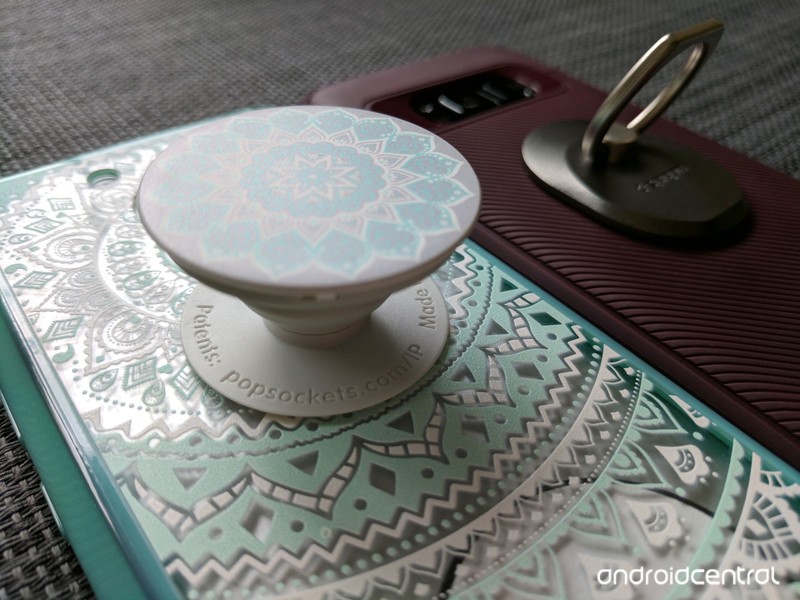
Popping plastic or bending metal
Accordions vs. bearings and hinges
PopSockets are perhaps the most recognizable smartphone grip on the market in hundreds of styles — including licensed versions featuring Star Wars, Harry Potter, Marvel and DC superheroes, and even My Little Pony. A PopSocket can be customized for company swag or personal pride, and most styles are $10-$15, depending on how fancy a design you get.
No matter the color or branding, all PopSockets use the same plastic assembly of “poppable” and collapsible levels to let you have the PopSocket at one of three levels: flat, halfway (one level popped open) and full (both levels popped open). There’s no adjusting the angle of your grip or kickstand here, but there’s also no bearings or hinges to wear out, either. A PopSocket’s plastic can wear out, but that’ll take tens of thousands of pops in and out.
See at PopSockets

Among ring smartphone grips, there are two prevailing styles: Post-style rings and flat-style rings.
The original phone ring — the Spigen Style Ring — features a raised, 360-degree rotating center post and a ring that rotates 180 from it. It’s a bulkier grip, but one that’s easy to slide on and balance with one finger. The Spigen Style Ring also offers a very stable kickstand thanks to two rounded corners on its ring. Spigen’s grip works so well that the market is now filled with post-style grips in every conceivable color, size, and shape, from Batman logos to bedazzled rose gold rings. Whether original or knockoff, all post-style rings have the same repeated complaint: they don’t lay flat on your desktop or nightstand, and can rattle around when your phone rings on Vibrate. Spigen sells the Style Ring at $14 with one included wall/car mount.
See at Amazon

This complaint gave rise to the flat-style ring grip used by the Ringke Ring. Featuring a flat back, the Ringke Ring folds down securely around its circular base, which houses the bearing that the grip rotates 360 degrees upon. This keeps the grip at the desired angle for your finger, rather than being knocked or slipped back to straight as frequently happens with post-style rings. While a flat back doesn’t guarantee that the phone will actually sit flat on a table, the Ringke Ring won’t rattle around the way Spigen’s does.
Some flat-style rings slip a magnetic plate into this flat back so that they can be used with the ever-popular magnetic car mounts, but Ringke has not gone this route. Considering how quickly I’ve scuffed up magnetic versions of flat-style rings, I’m okay with the omission. Ringke Rings sell at $10 with two Ringke Hooks included in the box, which can serve as mounts for your ring or cable grips.
See at Amazon

How your grip gets its grip
Application and Adhesive
All three of these grips — nay, the vast majority of all smartphone grips — use 3M-style adhesives to stick to the back of your phone or phone case. While the adhesive doesn’t quite last forever, it sticks really well while leaving little to no residue when removed. If you need to reposition it once or twice, it can be moved between cases or between phones without losing its strong grip. The only drawback to these adhesives is that they have a tendency to not stick to a couple of styles of phone cases:
- Silicone cases
- Cases with deep/uneven textures
- Some waterproof cases
I’ve used these grips with some cases with shallow texturing, but other textured cases were just too uneven for the adhesive to get a good grip. As a general rule of thumb, if your case has a flat back and isn’t a softer/slipplier silicone, these grips should work just fine.
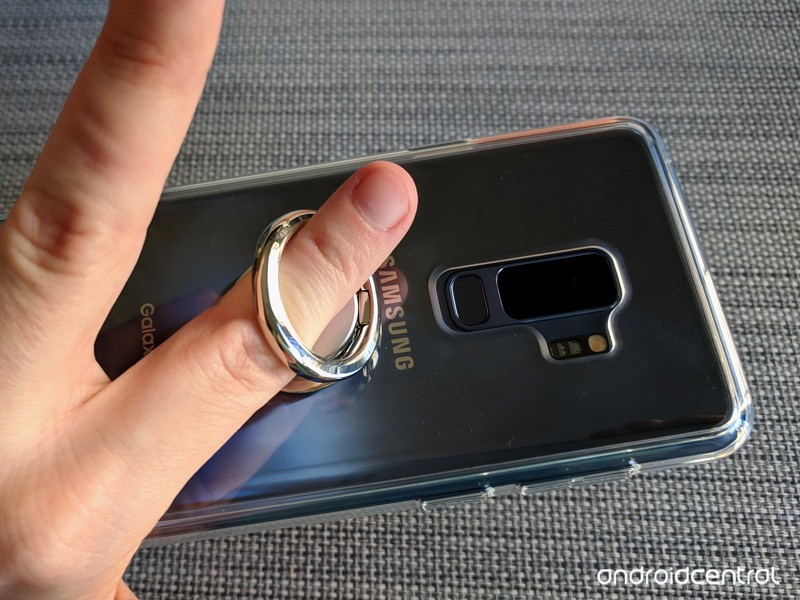
If you like it, then you shoulda put a ring on it
In-hand grip
When it comes to holding your phone with one of these grips, the difference between the rings and PopSockets is clear: a PopSocket requires two fingers to grip each side of its accordion body, while the Spigen Style Ring and Ringke Ring has users slip one finger through the grip to keep ahold of your phone.

Ring grips take a little getting used to, but the grips you can get with them are more diverse and more secure. You can adjust the angle of the ring to reach a wider area of the screen, and you can swing the phone around 180 degrees to wear your phone like the biggest bling ever, allowing you to hold the phone on the back of your hand while you carry beers back from the bar. If your wardrobe is often lacking in phone-sized pockets, this can be a lifesaver.

If you have thin, petite fingers, ring grips can feel huge, whereas a PopSocket’s halfway open mode can provide excellent grip. The fully open mode also keeps things grippy while giving you a little leeway in how closely you grip the phone, but the grip is still not as secure as those on the rings. PopSockets frequently double as a phone-mounted fidget toys for many users, allowing you to pop it in and out and wiggle it around between levels when you need distracting.
Not that I would know anything about that.

Running rings around the competition
Kickstands, stability and mounts
These grips all double as kickstands, but unlike our other categories, there is a clear loser here. The adjustable hinges of the Spigen Style Ring and Ringke Ring allow you to set your kickstand at a variety of heights, both horizontally and vertically. The kickstand ability on a PopSocket, on the other hand, is painfully basic: if your PopSocket is fully extended, it should hold your phone up in landscape mode at a single angle to watch a movie. That’s it.

Whether you use one PopSocket or two — PopSockets began life as headphone cord organizers, wrapping the wire between two PopSockets and then pushing the accordion down to hold them in place — it won’t prop your phone up vertically, something ring-style grips do easily. It may not seem like much, but being able to prop your phone up in portrait mode makes it far easier to see, use, and reference your phone while it sits next to your laptop or keyboard.

That said, being able to prop your phone up vertically is something not everyone needs to do with their phone grip, but every user wants their phone to be stable when its laying on a flat surface, and with a Spigen Style Ring, that just doesn’t happen. It’s the biggest strike against it, but at least you can prop the Spigen Ring up in a low-angle portrait mode to compensate for it. The Ringke Ring will lay flat depending on how balanced the phone sits on top of it, but once you need to start tapping it, expect a little wobble here and there when tapping near the edges of the screen, like the nav bar.

Proprietary mounts aren’t worth the hassle.
If you want to use the designated mounts for these systems, be prepared to shell out. PopSockets sell its mounts separately, and said mounts cost as much as PopSockets themselves. The Spigen Style Ring includes a car/wall mount with purchase, but if you need more than one, you’ll have to buy another Style Ring, too; mounts aren’t sold separately. Ringke doesn’t sell Ringke Hooks separately, either, but at least it put two in the box.
That said, these proprietary mounts are a pain and expensive if you want to use them in multiple cars or rooms of your house, so skip them and reach for those magnetic car mounts that I mentioned earlier. If you place your grip high enough on your phone, you’ll have enough room at the bottom of the phone for the magnetic plate or sticker to get a grip.

Which should you buy?
These grips are fairly close on pricing. The Ringke Ring (with 2 mounting Ringke Hooks) and more basic styles of PopSockets are $10 a pop, while the Spigen Style Ring (and one car mount) is $14 and the most of the Premium or Licensed PopSockets are $15. Which mount you buy then depends on your style…

A PopSocket is a more stylish-looking accessory, adding a pop of flair to your device, but it’s not just not as versatile as ring grips. What it lacks in productivity, though, it makes up in longevity: Popsockets take a long time to wear out, while the bearings that let ring grips hold their angles have a tendency to wear out after a year or less, depending on how hard you are on it.
See at PopSockets

Ring grips are more adaptable and more productive. I use their adjustable kickstands to prop up my phones in portrait mode next to my Chromebook all the time, and I’ve used the steadfast grip of a ring grip to use my phone one-handed while hula-hooping. The Spigen Style Ring is the original and is still just as sturdy as ever, still going strong after three or four different flat-style rings have worn out their bearings, and its pointed ring makes it a more stable, sturdy kickstand.
See at Amazon

But part of why my Spigen Style Ring has held out as long as it has is that I don’t really like using it on tables since its uneven nature makes it rattle around. The Ringke Ring is more stable laying on its flat back and $4 cheaper. Being able to lay the ring down without losing the angle that matches my finger perfectly also makes it easier to slip the Ringke Ring on and off repeatedly without wearing out its bearings too quickly, and it has a cleaner look overall.
So the grip I’ll be trusting as I head out into the world trying to text one-handed with my massive Samsung Galaxy S9+ is without a doubt the Ringke Ring.
See at Amazon
Updated June 2018: We’ve expanded this guide to include the Ringke Ring as a flat-style ring grip and our new winner.
From the Editor’s Desk: One-handed usability in the 19:9 world
When every phone is big and tall, one-handed mode and other accessibility features should come as standard.

It’s the age of big, tall. ridiculous phones, and we need to look again at the usability features that makes these devices easier to wrangle with one hand.
One of the great things about the emergence of 18:9 handsets last year was the ability to cram more inches of screen real estate into a similar device footprint. (Though, sure, direct apples-to-apples comparisons between 16:9 and 18:9 screen sizes can be misleading.) A lot of apps bunch information into rows (think emails in Gmail, or tweets in Twitter), and so a taller phone often gives you better information density. Going tall also lets you expand the screen area without enlarging the part of the phone your hand needs to grip.
But as we’ve moved towards ever taller aspects like 19:9 and 19.5:9 in phones like the OnePlus 6 and LG G7, we need to demand more from the software. Take the LG G7, for instance. It’s not a particularly large phone, fitting into the footprint of a 5.2-inch, 16:9 device, but it is a very tall phone. That means reaching anything around the top of the screen is tricky. And hey, it turns out there’s a lot of stuff you need to interact with located around the top of the screen.
Android’s notification shade lives up there. Countless apps still use hamburger menus in the top-right corner. Most phones still stick volume controls up there. Reaching up there on a 19:9 device is touch.
Short of completely redesigning Android’s system UI, the solution to this is a robust set of usability features. Samsung was first (and initially ridiculed) for its one-handed mode, which shrinks the screen down into a little window, making it easier to reach the top. Others like Huawei, HTC and LG have since gotten on board with their own versions of this feature.
Huawei was first with an ingenious swipe-down gesture on its rear-facing fingerprint scanner, offering a simple gesture to bring down the notification shade at any time, without contorting your thumb up to the top of the screen. Many others, including Google, have followed.
As of Android 9.0, Google’s Pixel phones relocate the volume controls to the right-hand-side of the screen, making it easier to fine-tune the volume without reaching the most inaccessible part of the screen.
Many Android phones implement one or two of these features. But often they’re not enabled by default, and hidden behind layers of menus. And that’s when they’re even there to begin with. Bafflingly, neither the LG G7 nor the OnePlus 6 include the swipe-down fingerprint scanner gesture — even though in OnePlus’s case, last year’s 5T did offer this feature. LG for what it’s worth, does have its own “mini view” feature, but the swipe-in gesture to activate it is frustrating and unreliable.
So if lanky phones are to continue dominating the high end, it’s time for phone makers to start including all, not just some of these usability features, and start telegraphing them to phone owners as part of the initial setup. And Google, as platform holder, should be proactive about building some of these into stock Android. Some of that work seems to have already begun in the current Android P beta.
Big, tall phones are great for all the obvious reasons. But the software side needs to catch up to the hardware if we’re to dodge the related usability frustrations in the next generation of Android flagships.
Other odds and ends on a working Sunday:
-
I’m surprised by how much I’m enjoying using the LG G7 now that I’ve got my hands on a final, production device. (Until the past week or so, everyone’s been using pre-production G7s.) This phone gets the fundamentals right, sports the best wide-angle camera on any phone, with superior wided and built-in audio, and has excellent haptics and solid battery life. Look for a review in the next few days.
-
That said, this is not a particularly interesting phone for enthusiasts. Look to the V40 later this year for more trailblazing tech.
-
I just can’t use a phone with a physical keyboard anymore — which sucks, because I’m envious of the fun everyone seems to be having with the BlackBerry KEY2. Based on what I’m hearing from Andrew and others, this is a nice little niche phone with a lot of thoughtful new additions, and necessary upgrades for owners of the KEYone.
-
Whatever you think of USB-C audio, you can’t argue that the dongle situation on Android phones is a mess, as Jerry details here. It’s a minefield of compatibility issues, and makes Bluetooth audio seem tame by comparison.
-
I’m off to Italy with MrMobile and a handful of other journos and ‘tubers tomorrow where we’ll be seeing what Huawei has in store for us. Follow me, him, and all of us on the socials to follow what we’re up to!
-
The Galaxy Note 9 is shaping up to be the most interesting Note in a long time. (Interesting in a good way, not the other kind of interesting.) Looks like the outside of the phone isn’t changing much, but important upgrades to the battery and camera could see the Note regaining its status as the big, beefy phone for enthusiasts.
That’s it from me, see you on Editor’s Desk in a few weeks!
-Alex
Don’t buy a USB-C adapter that lets you use headphones and charge at the same time

A 2-in-1 adapter could let you listen while you charge if only your phone was built that way.
When the Pixel 2 was first introduced there was an uproar about removing the headphone jack. Much of it was centered around a very real dilemma — you can’t listen to music through wired headphones and charge your phone at the same time.
Those fears were slightly abated when we saw an adapter from Moshi in the Google Store that had both cords and would let you charge and listen, but it never appeared for sale at Google. It did end up for sale at Amazon or other outlets, and it was (is still) socked with a slew of one-star reviews that say it didn’t work. That’s because, for almost everyone, it doesn’t work and never will.
Unless you have a Moto Z series phone, none of the cheap adapters you see for sale offer a headphone jack and charging port. None of them. They all may not work with every Moto Z model, either. My advice is to just stay away from them.
This is because of parts of the USB-C specification that are optional. Motorola offers these options, but phones like the Pixel 2 and almost all others do not. It may be possible to define some fancy logic that allows this to happen, but you won’t get it for $12 on eBay or Amazon.
Buyer beware!
Google Pixel 2 and Pixel 2 XL
- Pixel 2 FAQ: Everything you need to know!
- Google Pixel 2 and 2 XL review: The new standard
- Google Pixel 2 specs
- Google Pixel 2 vs. Pixel 2 XL: What’s the difference?
- Join our Pixel 2 forums
Best Buy
Verizon
Google Store
Project Fi
Tubi TV is a free app that lets you watch TV shows and movies for free, no catch
If the word “Tubi” isn’t part of your streaming entertainment-loving lexicon yet, it probably should be. In the same way that you’ve grown to revere words like Netflix, HBO Now, Hulu, or Amazon Prime Video, you’ll soon feel the same way about Tubi. Really, it’s better than all your streaming standards, and for one simple reason — it’s totally free.
Sure, if you’re looking for great original content or a large selection of both classic and current TV shows and movies, you could turn to Netflix. Or if you’re a Game of Thrones fanatic, you can’t live without HBO Now. But if you’re looking for a way to get thousands of movies and shows straight to your tablet, iPhone, or Android device without coughing up a single cent, then the only (legal) option for you is Tubi TV.
Available on both the iOS App Store and Google Play Store, Tubi TV has been on our radar for several years now. In fact, back in 2015, we noted that it had added 50 films from Paramount, including classic fan favorites like Basic Instinct and The Hunt for Red October. But as it turns out, not many other people are well aware of Tubi TV, which is a shame.
But wait, you say, what’s the catch? While Tubi is actually free, it does feature frequent commercials from various ad partners — come on, they have to make their money somehow, right? And although you won’t be able to watch the latest summer blockbuster through the app a couple weeks after it leaves theaters, you will be able to find other classics and fun television shows to keep you entertained. In fact, there are plenty of titles in Tubi’s catalog that aren’t available on other services, so even if you already subscribe to something else, you could always complement it with the Tubi app. After all, you won’t be paying for it.
To help make it easier for you to navigate the extensive collection, Tubi has cleverly named categories like “Not On Netflix” and “Highly Rated On Rotten Tomatoes.” As Tubi TV notes in its app description, “You can find award-winning films and TV shows that span more than 40 genres from comedy, drama, family & kids, classics and horror, to niche favorites such as Korean dramas, anime and British TV. The videos have commercials, so you get everything for free legally and don’t have to spend a single cent.”
You can download Tubi TV for iOS here or for Android here.
Editors’ Recommendations
- The best livestreaming TV services: PlayStation Vue, Hulu, Sling TV, and more
- Become a TV tech expert with our 4K TV buying guide
- What is Terrarium TV? Here’s everything you need to know
- Time to upgrade! Here are the best 4K TV deals for June 2018
- What is MHL, exactly, and how does it work with your TV?
MIT researchers develop a robot system controlled by brainwaves
The MIT Computer Science and Artificial Intelligence Laboratory (CSAIL) program has come up with some amazing advances in robotics recently, from origami robots that transform themselves to artificial intelligence that can sense people through walls. Its newest project allows you to control a robot just by watching it and correct mistakes with a simple hand gesture.
The team demonstrated the results of their research with a short video showing a human supervising a robot drilling holes in a piece of wood. The interface works on people the robot has never encountered before, meaning there’s no training involved.
The brain sensors can quickly detect when a person notices that the robot is about to make a mistake. Using hand movement, the robot can then be instructed the correct action to perform. CSAIL Director Daniela Rus said the two sensors working in tandem enabled an almost instantaneous response.
“This work combining EEG and EMG feedback enables natural human-robot interactions for a broader set of applications than we’ve been able to do before using only EEG feedback,” Rus said. “By including muscle feedback, we can use gestures to command the robot spatially, with much more nuance and specificity.”
Controlling a robot with your brain often requires you to learn how to “think” in a certain way so the sensors can interpret the commands correctly. It’s one thing in a controlled laboratory environment with a trained operator, but you can imagine how it might be difficult on a noisy construction site, for example.
Everyone’s familiar with the “uh-oh” moment you get when you realize something is about to go haywire. For this project, the brain-wave scanners could quickly detect signals known as “error-related potentials” (ErrPs), which occur naturally when people notice mistakes. An ErrP causes the robot to pause, so the human operator can direct the operation correctly, if needed.
“What’s great about this approach is that there’s no need to train users to think in a prescribed way,” Joseph DelPreto, lead author of a paper on the research, said.“The machine adapts to you, and not the other way around.”
In the study, Baxter the robot chose the correct drill spot 70 percent of the time on his own. With human supervision, that number rose to 97 percent.
“By looking at both muscle and brain signals, we can start to pick up on a person’s natural gestures along with their snap decisions about whether something is going wrong,” DelPreto said. “This helps make communicating with a robot more like communicating with another person.”
Editors’ Recommendations
- To train robotic servants, scientists built a virtual world where chores never end
- The creator of Internet Explorer wants to read your mind with a bracelet
- Runvi’s A.I.-infused smart insoles help runners correct their form
- A sensor-packed exosuit lets you fly a drone by pretending to be one
- MIT’s new A.I. could help map the roads Google hasn’t gotten to yet
Doubling down on what works [#acpodcast]

We’re back to our regular format with Andrew Martonik, Jerry Hildenbrand, and Daniel Bader at the helm for a detailed look at Android Messages, and efficiency of the hardware keyboard on BlackBerry KEY2.
Next, they tackle blatant “inspiration” the Vivo NEX takes from iOS. But it, along with the OPPO Find X, address customer demand for huge screens and no bezels by incorporating pop-up cameras. In a world of solid-state slabs, this is almost a throwback to the days of slider phones. Pull up an earbud or speaker and join us!
Listen now
- Subscribe in iTunes: Audio
- Subscribe in RSS: Audio
- Download directly: Audio
Show Notes and Links:
- BlackBerry KEY2 impressions
- Where to buy the BlackBerry KEY2
- Android Messages for desktop is now rolling out
- How to set up Android Messages for the web
- Vivo NEX hands-on
- OPPO Find X is here with a pop-up slider for all three cameras
Sponsors:
- LightStream LightStream rewards consumers who have good credit with a great interest rate and no fees!
- Thrifter.com: All the best deals from Amazon, Best Buy, and more, fussily curated and constantly updated.

