


Ready to party? Pinterest expands group boards with new activity feed, threads
Pinterest is making planning group projects simpler. On Wednesday, July 11, Pinterest launched several new tools for group boards, designed to streamline communication with group members on shared projects.
The first change for group Pinners is the new activity feed for group boards. The feed tracks all the changes within that group board, including when a member adds a Pin or creates a new section. The activity feed, Pinterest says, is designed both for easily spotting what’s happening on the board as well as having conversations within the board, since all the members will see new pins and comments using the tool.
Expanding on those group conversations, Pinterest has also worked to create more seamless conversations around those Pins. Likes, comments and mentions will now start a new thread, encouraging conversation within the group board.
Both the activity feed and streamlined conversations are for group members only, Pinterest says only group members can see the conversations and activity feed. The updates are a direct result of feedback from users, Pinterest says, who requested easier group communication within the platform.
Group boards are popular for planning parties and events within a larger group, Pinterest says, but group boards can be started on any number of topics. Unlike the typical Pinterest board, group boards allow Pinterest users to invite other collaborators, turning the board from a spot to save ideas to a place to make suggestions within a group. Users can turn boards into group boards by clicking on the edit option within a board and adding other Pinterest users in the collaboration section.
While group boards have been around for awhile, the update aims to make communication with that group streamlined. With the activity feed, notifications from active groups are less likely to get missed. Feeds could also make conversations on the board easier between group members. Pinterest says the change is part of the network’s ongoing process of enhancing events and projects sparked from within the network, including an update earlier this year to dump outdated pins and enhanced search tools.
The group updates are rolling out globally to both the apps and the Pinterest website.
Editors’ Recommendations
- Hootsuite’s new tools add posting and scheduling to Pinterest
- Portable microphone system transcribes multi-person conversations in real time
- Words lead to actions in the latest version of Slack packing Asana, Jira support
- WhatsApp expands its capabilities with a slew of new features
- Facebook is busy enhancing two-factor authentication, group tools, and more
ASUS ZenFone 5 review: A mostly marvelous mid-ranger

After a couple of phones in 2017, ASUS is properly back in contention in the British market with the ZenFone 5.
ASUS has been making phones for many a year now, but in the case of the British market, after the first generation, things just, well, stopped. It restarted in 2017, but as we hit summertime in 2018, finally, ASUS has a phone that hits the right spot at the right price.
The ZenFone 5 is on sale in the UK from July 9 for £350, so it’s very much a mid-range device with a mid-range price. It’s a continuously crowded space, but the ZenFone has come swaggering in with its good looks and its AI camera.
But is it any good?
ASUS ZenFone 5

Price: £350
Bottom line: The ZenFone 5 is an attractive package at an attractive price. It’s far enough away from the likes of the OnePlus 6 to be a contender in a true mid-range price bracket, and while questions linger over future software support, the ZenFone 5 is mostly a winner.
Pros:
- Gorgeous design
- Good looking display
- Decent camera
- Well priced
Cons:
- Zenimoji is a bad idea badly executed
- If you don’t like notches, I have bad news for you
See at ASUS UK
ASUS ZenFone 5 Gorgeous and capable mid-range hardware
We’ve been over this before, but I’ll lay it on the table right at the start. Yes, this looks quite a bit like an iPhone X running Android. ASUS’ somewhat cringeworthy launch event back at MWC 2018 made no apologies over the similarities, nor the constant comparisons.
But this isn’t an iPhone X running Android. For starters, this UK variant costs just £350, a whopping £650 less than the cheapest iPhone X. What this is, is a mid-range Android smartphone that looks like it costs twice as much.
| Screen | 6.2-inch FHD+ (2246 x 1080) Super IPS+ |
| Chipset | Snapdragon 636 |
| RAM | 4GB |
| Storage | 64GB |
| Rear Camera 1 | 12MP, ƒ/1.7 |
| Rear Camera 2 | 12MP, 120-degree wide-angle |
| Front Camera | 8MP, ƒ/2.0 |
| Battery | 3300mAh w/ fast charge |
| Connectivity | Wi-Fi 802.11 ac, BT 5.0 |
| Security | Fingerprint sensor, Face Unlock |
| Colors | Meteor Silver, Midnight Blue |
| Dimensions | 153 x 75.6 x 7.7mm |
| Weight | 165g |
| Price | £350 |
And that’s not really a bad thing, is it?
iPhone resemblance out of the way, here’s what actually makes up the ZenFone 5. Obviously, there’s a notched display, but with this, a 6.2-inch 2246 x 1080 resolution and a 90% screen-to-body ratio, what you get out front is a whole lot of display and not a lot else. There’s a super skinny bezel running across the top and down the sides, with a slim, hardly noticeable chin at the bottom.
If you’re going to do a notch at all (that’s a whole different discussion for another day), at least do it right, like ASUS. It’s not all display, but it’s pretty damn close, and in a mid-range phone that’s more than good enough.
Ignoring the display completely though, take a step back and appreciate the design for what it is. It’s gorgeous. In particular, the Midnight Blue one I have here. The front is black, the metal frame is dark, but not quite black, and the glass panel on the rear is a seductive mirrored blue finish. The display edges have the slightest of curves so they roll seamlessly into the frame.
Don’t leave it naked on a table, though —unless you enjoy picking it up off the floor.
This phone’s predecessor, the ZenFone 4, was something of a looker, but in aping the iPhone X feel, the ZenFone 5 is in a different league. The front being consumed by display has pushed the fingerprint sensor around the back, complementing ASUS’ Face Unlock in a one-two security punch.
The hardware screams premium without running away with your wallet. ASUS tosses a simple TPU case in the box to keep that glass back safe and your metal chamfers from getting chipped, which is a nice touch. But the exterior of the ZenFone 5 is as good as my vastly more expensive iPhone 8 Plus. High praise indeed.
Inside, ASUS is using the new Snapdragon 636 CPU from Qualcomm, an improvement on its predecessor in the UK which ran the Snapdragon 630. It’s paired with 4GB of RAM and 64GB of internal storage which is expandable. And it’s a great performer. ASUS doesn’t use stock Android, it does its own thing, and in the past, an Achilles heel has been day-to-day performance.
But the ZenFone 5 feels no different in most use cases to my Pixel 2. You perhaps see an odd stutter from time to time, but nothing particularly detrimental to the overall experience. Demanding games can chug a little in the most intense moments, with Final Fantasy 15 Pocket Edition, for example, giving the phone a workout. But it’s still very playable if you’re OK ignoring the odd frame skip.
To enhance gaming performance, ASUS’ Game Genie makes a reappearance, and while the “optimizations” may be dubious, it’s a useful ally to ensure that you don’t get any undue distractions while gaming or accidentally back out of the game at the crucial moment. Game Genie is also a simple way to record your mobile escapades or stream them to YouTube or Twitch.
The speakers are even pretty solid, whether gaming or listening to your favorite tunes. The quality isn’t anything to sing about, it’s what you’d expect to find from a mid-range phone, but the volume is loud, made even more so by the “outdoor mode,” designed to give you some additional decibels so you never miss a phone call on the busy streets of the capital.

ASUS ZenFone 5 Software finally (mostly) nailed
The days of heavily bloated, over-the0top ASUS mobile software is at an end. In all honesty, the ZenFone 4 was a decent attempt, but with ZenUI 5 ASUS has given everything another spruce up, trimmed off the last of the fat and left something that’s probably as close as the company will give you to what Google offers on its own phones.
Mostly bloat free with some stock apps remaining Google’s.
The new launcher mimics the upward swiping of the Pixel launcher to open the app drawer, though the default way of organizing apps is infuriating if you just want to see everything alphabetically. Fortunately, it’s an easy fix in the settings.
You have a smattering of ASUS’ own apps, some such as contacts replacing default Google options, but it’s far from overpowering and some have useful features built in. Mobile Manager, for example, gives you additional battery saving controls including a time to schedule the phone to be its most frugal. Battery life isn’t a worry on this phone, though, the 3300mAh power pack is ample to crunch through a day.
But it’s a little bit of a mix of ASUS and Google, and I think it works. The stock SMS app is Google’s, Google Calendar is the default calendar application, and these complement ASUS’s own creations like the dialer, calculator and weather apps.
 Who knew hiding the notch would make it look worse?
What Zen UI remains, is colorful. The stock theme is a mix of white backgrounds and colorful icons, while the launcher has some bright as all hell stock wallpapers. This being an ASUS phone, there’s also a packed theme store with some less vivid designs and those that will blow your eyeballs to pieces.
The software also has a couple of notch-specific features built in. If you really don’t like it, you can simply toggle to hide it, and the top corner portions will be all black, all the time, so as to mimic a standard status bar. I don’t particularly like notches, but ‘hiding’ it just makes the whole interface look odd, so it’s best to embrace it.
Don’t hide the notch, embrace it for better or worse.
Equally down the bottom, you can hide the software buttons while in apps to maximize your screen, and for those apps that don’t fully support notched displays, you can just tap a button and the phone will artificially enlarge everything and push it right out into the corners if you wish. When you’re viewing video content, you just won’t notice it’s there, since the video will cut off inside it and display a regular aspect ratio.
There are some little details that feel like ASUS didn’t properly optimize for the type of display on this phone, though. If you have battery percentage on, for example, the far right item in the status bar is right up against the rounded corner.

There are two clouds that hang over the ZenFone 5 software experience. The first is Zenimoji. It’s like Apple’s Animoji, equally annoying and less well executed. I tried to send one to an iPhone over MMS and the iPhone couldn’t even open it. Which phone’s fault that is doesn’t really matter, the ultimate result is a bad experience all around. The saved Zenimoji on the ZenFone 5 are also pretty low quality, too, so honestly, just avoid it. It’s just bad.
The other more serious cloud is over ASUS’ commitment to updates. During my time with the ZenFone 5, I’ve received four pre-release updates, one of which added Zenimoji. The last added the May security update but the phone remains on Android 8.0. Oreo is good, and lord knows expected, but it’s not even the latest version and the security patch is still behind. Perhaps its past experiences but we’re still going to need to see how ASUS actually handles this stuff when the phone is in peoples hands.

ASUS ZenFone 5 An AI camera
AI is one of the hot new buzzwords in the smartphone space and anyone who’s anyone is throwing some kind of AI into their phones. In ASUS’ case, like Huawei, you have an AI camera, that is, one that’s smart and learns things.
There are a number of benefits to this, or in theory at least. I’d probably need much longer with the phone for it to truly show whether it’s a useful feature or bogus marketing. On a basic level, the AI camera is smart enough to recognize the scene you’re shooting and adjust its settings automatically to produce the best looking photos. It’s also part of what powers the phone’s portrait mode and it will detect your dog. Canine photography has never had it this good.
Over time, the ZenFone 5 should learn how you like your photos to look and make the necessary adjustments without you touching anything. The end result: Great photos, all the time.

On a hardware level, the rear camera array is made up of a pair of 12MP sensors, with the main shooter utilizing Sony’s IMX363 and an aperture of ƒ/1.7. The secondary camera offers a 120-degree wide-angle shot, with a simple tap in the camera app to switch between the two.
The front shooter is 8MP, and if you’re really into your selfie game, the ASUS SelfieMaster application will help you add all the lovely beautification you want. Didn’t help me, but there’s only so much software can do.
The main app is pretty simple to get your head around. There’s a one-touch option to use Google Lens, which is nice, and a heap of creative filters, different shooting modes including super-resolution and panorama, and a pretty robust pro mode with all the manual settings you could want.


ASUS has been pushing a hard sell on its cameras for years now, going right the way back to the ZenFone 2 launch where press were invited to explore the low light capabilities by shooting into a dark box. We’ve come a long way since then, and that we can buy a mid-range phone that shoots great photos means we all win.
But I’ll let you be the judge.

ASUS ZenFone 5 Should you buy one?
I criticised the ZenFone 4 for its price, because in the UK at least it was more expensive than competing handsets without offering a compelling argument for choosing it instead. The price point for the ZenFone 5 is £100 less than its predecessor launched at, which certainly puts it in the right ballpark.
At £350 it offers good value. You get a strong camera, a gorgeous, premium looking phone, good battery life and a nice display. It’s a good phone, and anyone who pre-ordered before July 8 from ASUS will have managed to get one for £300, which is really good value.
It finally feels like ASUS is properly back in the UK market and is here to compete. Since making its return we’ve only seen the Tango-fitted ZenFone AR and the too-expensive ZenFone 4. For 2018 it feels like things have been reset and we’re getting the right phone at the right price for this market.
The elephant in the room is always the competition. The Honor 10 isn’t much more expensive, and the Nokia 7 Plus is the same price at £350 complete with Android One. It’s not a bad thing, there’s some strong choice now in the mid-range, and if ASUS can commit and deliver regular software updates, it truly will be able to hang with the big boys.
4
out of 5
Standing alone, the ZenFone 5 is a really nice mid-range device, much improved on ASUS phones of old and something genuinely enjoyable to use. It has its quirks, it has things that could easily have been left out (Zenimoji be gone), but on the whole, a job well done.
See at Amazon US
See at ASUS UK
Best Amazon Prime Day Deals 2018
The celebrations have already begun!
Amazon Prime Day doesn’t officially begin until July 16 at 3pm ET, but that hasn’t stopped the company from beginning the deals a little bit early. Alongside the announcement, Amazon stated that a few deals would be available instantly for Prime members, and there are a few that you definitely won’t want to miss. In the coming days, we expect to see more deals leak, and our continuously updated tracker will highlight all the best Amazon Prime Day deals.

Be sure to check back often, as this page will be constantly adding fresh new deals. If you’re looking for deals on Amazon’s Echo hardware, Kindle Unlimited, Prime Pantry and more, we’ve got you covered.
Prime Exclusive Deals of the Day
In the lead-up to Prime Day, Amazon has switched over its Gold Box deals of the day to be all Prime member exclusive deals. Unlike some of the offers below, these prices expire at the end of the day, so you won’t have much time to think about them.
Today’s deals include:
- Hisense 40-inch LED TV – $194.99 (Was $239)
- Anker Roav Viva Car Charger w/ Alexa – $33.99 (Was $60)
- Hamilton Beach Coffee Makers – Various Prices
- Bic Writing Supplies – Starting at $1.81
- Starter Activewear for the Family – Up to 60% off
- Musical Instruments from Yamaha, Shure, and more – Starting at $24.99
- Trtl Travel Pillow – $20.98 (Was $30)
- Coravin Wine System – $174.95 (Was $350)
- Calvin Klein Men’s Clothing – Up to 50% off
Echo Hardware
To kick things off, the company slashed $100 on the price of the Echo Show, dropping it down to just $129.99. This is the lowest we’ve ever seen it go and makes it the same price as the smaller screened Echo Spot. We’ve seen Amazon offer Voice Shopping exclusive deals in the past during Prime Day, so if you don’t have an Alexa device, or want another, this is a no-brainer purchase.
The Echo Dot is also down to $34.99, which is the lowest we’ve seen it hit this year.
Kindle Unlimited and Amazon Music Unlimited
If you’ve yet to try out Amazon’s Music Unlimited service, you can get a four-month membership for just $0.99. That’s right, all four months of unlimited access to all the music in the company’s library (which is rather extensive) for just one dollar. Prefer to read books instead of listening to music? No worries, Amazon has three months of Kindle Unlimited available for $0.99 as well. This gets you access to over a million book titles, and you can read as many of them as your heart desires during that time frame.
You can also go all-in on a Kindle Unlimited subscription and save 40% when you checkout with the coupon code PDKU18. This drops the one-year subscription down to $80.32 and the two-year subscription to $143.86. If you want to just buy a few books, you can get $10 towards any Kindle, print, or Audible book purchase when you buy any Kindle book for $5 or more before July 15.
Audible
Through the end of July, Amazon is offering Audible subscriptions at just $5 per month to new and returning members. The deal will remain active for three months, after which the service will begin billing you at its regular monthly price of $14.95. You can also choose to cancel the service at any time if you decide it’s not for you.
Amazon’s In-house brands
Amazon has a bunch of its own brands, and right now it’s offering 20% off home, kitchen, and other AmazonBasics gear, 30% off Amazon Elements multivitamins, and up to 25% off Stone & Beam furniture. There are a bunch of other Amazon brands from AmazonFresh to Mama Bear and Goodthreads that will also have discounted items available.
Twitch Prime Games and Gear
For the gamers out there, Amazon is offering a free PC game each day through July 18 via Twitch Prime. There are popular titles like Pillars of Eternity, Q.U.B.E, Hue, and more. You’ll also get exclusive in-game look for Warframe and PlayerUnknown’s Battlegrounds, and if you’re looking to load up on Twitch apparel, the merch is 50% off right now.
Prime Credit Cardholder Offers
Finally, let’s discuss the Amazon Prime credit cards. Normally, the Amazon Prime Store Card and Amazon Prime Rewards Visa Card extend shoppers 5% cash back on all Amazon.com orders. You can put the cash back rewards towards your monthly statements or a future Amazon purchase.
Last year during Prime Day, Amazon upped its cash back offer from the standard 5% to 20% on thousands of items exclusively for cardholders. That means smart deal hunters with an Amazon Prime Store Card or Amazon Prime Rewards Visa Card were essentially saving an additional 15% on Prime Day. Eligible items included GoPro action cameras and Garmin fitness trackers. In fact, Amazon’s already running some bonus cash back offers for cardholders including 10% back on LG 4K OLED TVs and 20% back on the GoPro Hero action camera.
What’s more, Amazon is sweetening the pot by throwing in a free gift card upon approval. New Prime Store cardholders will receive a $20 gift card, while Prime Rewards Visa cardholders will get a $70 gift card. Both the credit card and gift card are automatically loaded into your Amazon account following the approval process, meaning if you apply now both will be ready to use during the big event.
Of course, to take advantage of any of these offers you need to be an Amazon Prime member. If you aren’t already, you can sign up for a free 30-day trial so you can access all these deals and save during the big event.
The Thrifter team is going to be covering ALL things Prime Day, and you won’t want to miss out. Sign up now to have tips, tricks, deals, and more delivered right to your inbox.
Would you consider getting the OnePlus 6 over the Pixel 2?
Here’s what the AC community has to say about this comparison.
Earlier this week, I wrote an editorial titled The OnePlus 6 is now my go-to phone instead of the Pixel 2. In that piece, I explained how the OnePlus 6’s software features, Dash Charge system, alert slider, and more make it a better fit for me than Google’s flagship.

Shortly after this was published, it sparked a conversation in the AC forums — OnePlus 6 or Pixel 2?
Here are just a few of the responses to that question.
mustang7757
07-09-2018 07:52 PM“
both great phone’s
the 1+6 adds more customization as close to stock andriodReply
TraderGary
07-09-2018 10:22 PM“
The 1+6 can’t be used on Google Fi, so it can’t even be considered here.
Not that I would anyway.Reply
Theot
07-10-2018 11:53 AM“
I really like what OP is doing and I almost sold my pixel 2 to get an OP6 but the Pixel 2 camera is so good and so much better than anything else I’ve used or seen pics from I just cannot go away from it right now. That and support is my other concern. When I had a defective unit Google swapped it no questions asked. IDK if I can count on OP for that kind of service.
That said, I really…
Reply
sulla1965
07-10-2018 12:25 PM“
If the oneplus 6 worked on Verizon I definitely would get one. I like the pixel 2 xl, but I definitely don’t like the $800+ price tag that comes with it. The pixel 2 may be the better overall device, but it’s not $400 better IMO
Reply
Now, I’d love to hear from you — Would you consider getting the OnePlus 6 over the Pixel 2? Why or why not?
Join the conversation in the forums!
How to prepare for Fortnite Season 5
New skins, time traveling, and sea monsters. Get ready.

Fortnite Season 5 is nearly upon us. If you’ve been following the craze to date, you’ll know that new seasons bring many exciting items, tons of changes, and new game modes.
Epic typically prefers to surprise us with new content, so we’re still not exactly sure what to expect in this new season. But leaks have started telling the story, and in-game hints and teasers are tipping us off to potentially insane content. If you aren’t already prepared for Fortnite Season 5, allow us to get you up to speed.
Complete the Fortnite Season 4 Battle Pass

The first thing you’ll want to do is complete as much of the Fortnite Season 4 Battle Pass as you can because once Season 5 hits you’ll no longer be able to do so. The Battle Pass allows players to earn rewards such as skins, emotes, and even V-Bucks, so you’ll want to get on the ball to get the remaining goods.
This would also be a good time to knock those challenges out, as those are also being wiped at the beginning of the season and will help you complete the Battle Pass. And if all else fails (and you happen to have some expendable dough), you can always buy your way to the end.
Save for the Fortnite Season 5 Battle Pass
Speaking of the Battle Pass, you’ll want to have your funds ready for Season 5, as well. While you can get some rewards on the free Battle Pass tier without paying a dime, the premium tier will offer much better and much more things.
The Battle Pass costs just $9.99, or 950 V-Bucks, which is the in-game currency for Fortnite. See if you can’t scrounge up some dollars to get the most out of Season 5.
What are those strange rifts in the sky?
Oh, you weren’t there for the big rocket launch event that Epic used to tease Season 5? While that rocket did sputter and spiral back toward the map, it didn’t actually hit the planet. Instead, it crashed into the protective bubble that surrounds it, and that caused a phenomenon where the rocket entered and exited the scene through strange blue rifts until it blasted off into space one last time to leave a permanent hairline crack in the sky.
The rocket launch caused blue rifts to appear over Moisty Mire, and they’ve been growing in numbers and size ever since. At the close of Season 4, those rifts began popping up at random spots on the map, and if you happen to be at that spot at 4PM Eastern the day they appear, they’ll spawn or destroy something.

We still have no clue what it’s all about, but some have speculated that it may be a foreshadowing of some sort of disruption in the space-time continuum, which could mean we’re in for some time traveling goodness.
Victims of the rifts so far have been the signs at Tomato Town, the motel, the Durr Burger restaurant in Greasy Grove, and the NOMS store in Retail Row. As for what the rifts brought, so far we’ve seen it spawn an old-style horse carriage, which supports the whole time travel theory. The latest foreign object is a rusty old anchor, which could lend credence to theories about a supposed giant sea monster coming to the game.

And if neither of those guesses is accurate, we’ll just play it safe and say aliens. It’s always aliens, right? Anyway, weird stuff is happening and we’ll have to wait until Fortnite Season 5 to get answers.
Practice your building at the Playground
At some point in Season 4, Epic introduced a limited-time mode called the Playground. It’s a game mode designed to allow you to build and shoot and do everything else you can do in Fortnite, but without the constant worry and threat of trying to survive the new-age hunger games.
Many people have been using the Playground as an opportunity to practice their building skills because it’s kind of hard to do that in regular games where people are actively trying to murder you. That’s something you could do in the PVE mode if you spent money to buy the Founder’s Pack, but those who have been in it solely for Battle Royale have never had something like this before.
Unfortunately, Epic is still calling this a limited-time mode, and there’s no guarantee that the Playground will be around for the long haul. In a Reddit post, however, Epic confirmed that Playground was the beginning of what Fortnite’s creative mode would be, and noted that it’ll be back in grander ways down the line.

As for the mode we have now, it will be removed from the game as soon as Season 5 hits, so you’ll want to squeeze some building practice or just create something cool there while you can. (Someone recreated Call of Duty’s Nuketown map!)
Get ready for new map changes

We’re not sure if we’ll get the same sort of massive map changes Fortnite Season 4 brought us, with Dusty Depot being blown away to make room for Dusty Divots, as well as a few other new hotspots to check out.
Leaked game assets suggest we’ll see some sort of library, a new restaurant, and even a point of interest themed after the wild west for Season 5. We’re also seeing signs of life return to the massive meteor-made crater now known as Dusty Divots, with trees, grass, and other vegetation beginning to grow there.
Plan out which new skins you want
A new season wouldn’t be a new season without new skins. As you’d guess, some new skins, emotes, glider trails, and more will be on tap for Fortnite Season 5. It seems we’re in for more detective and hero skins, as well as one patriotic-looking teddy bear skin that I just have to have. The skins were leaked by Twitter account TwoEpicBuddies.

Cosmetics in the items shop cost anywhere from 200 to 2,000 V-Bucks depending on the item. For the sake of preparation, note that 2,500 V-Bucks costs $25. Figure out your budget and which skins you want so you don’t lose out once the floodgates open.
One other thing to mention: when purchasing Season 4’s Battle Pass, you were given two skins immediately instead of having to get to a higher tier. The catch was that the skins start out in their basic forms, and you had to complete challenges to upgrade them with better effects. It was a first for Epic and we’re not sure if they’ll do it again for Season 5, but don’t be surprised if you have to take on more challenges than usual.
Prepare to fight the Leviathan

That blue crack in the sky could also be where the Leviathan lands. Yes, you heard that right: the Leviathan is said to be featured in a big way this upcoming season.
Dormant game assets in Fortnite were uncovered and seem to suggest that an interesting new limited-time game mode is on the way. It’s said to be another big team mode, with one team looking to escort the Leviathan creature, while another will try to stop it.
We’re not exactly sure what sort of creature the Leviathan will be. It’s known as a sea monster in Hebrew mythology, but Epic could have their own unique take on the thing.
For what it’s worth, Epic previously released a premium skin called Leviathan, so it could be a gigantic version of that little fellow. And what do you know? The original picture they used to tease the Leviathan skin has those same strange blue rifts in it.
When does Fortnite Season 5 start?
Fortnite Season 5 will begin on July 12th at 1AM Pacific, 4AM Eastern. It’ll last for 10 exact weeks, which means things will wrap up on September 20th.
Don’t forget that there will be scheduled maintenance in the hours leading up to the season’s launch, so be sure to plan your gaming sessions accordingly. Once it launches, you’ll be on patch version 5.0, and your new Battle Pass, store items, and seasonal challenges will appear soon afterward.
PlayStation 4

- PS4 vs. PS4 Slim vs. PS4 Pro: Which should you buy?
- PlayStation VR Review
- Playing PS4 games through your phone is awesome
Amazon
Samsung Galaxy Tab S4 leaks with keyboard cover and stylus
Up close and personal with Samsung’s next tab.
It’s no secret that Samsung’s working on the Galaxy Tab S4, and thanks to tipster Evan Blass on Twitter, we have yet another render of the device — this time showing it off in a white paint job and with a couple of its official accessories.

Starting first with the white color, it looks like it’ll only be visible from the back and frame of the tablet. Samsung’s sticking with black bezels on the front of the Tab S4, and depending on your personal preference, that’s either a job well-done or a huge eyesore.
These renders also showcase what’s likely a first-party keyboard cover from Samsung and a stylus. While the overall design is mostly the same, the Tab S4’s stylus appears to be shiner and drops the pen clip found on the one offered with the Tab S3.

We still aren’t sure when the Galaxy Tab S4 will be announced or how much it’ll cost, but with IFA coming up this August, that’s likely where we’ll see Samsung unveil all of these important details.
Are you looking forward to a new Samsung tablet?
Best Android Tablets in 2018
What apps and services are bundled on an Amazon Prime Exclusive phone?

These days, Prime Exclusive phones are a pretty incredible deal.
Remember when Amazon started offering certain phones at a discount through its Prime Exclusive program? Originally, this meant that your phone would come loaded with tons of non-removable Amazon apps, along with annoying lock screen ads for Amazon products. You could pay to have the lock screen ads removed months after buying the phone, but the Amazon apps would remain.
Sounds annoying, right? Luckily, Amazon no longer fills your lock screen with ads, but you do still get a few related apps pre-installed on Prime Exclusive phones. Don’t worry, it’s not nearly as bad as you might think — let’s take a look at what all came on my Prime Exclusive Moto Z3 Play.
Motorola’s phones run an extremely close to stock build of Android, which makes it easy to spot non-Google apps on the Moto Z3 Play. Even without opening the app drawer, the default home screen is littered with Amazon apps; Amazon Shopping, Prime Video, Amazon Kindle, Amazon Music, and a folder containing even more branded apps — not to mention a shortcut to Moto Alexa in the dock.
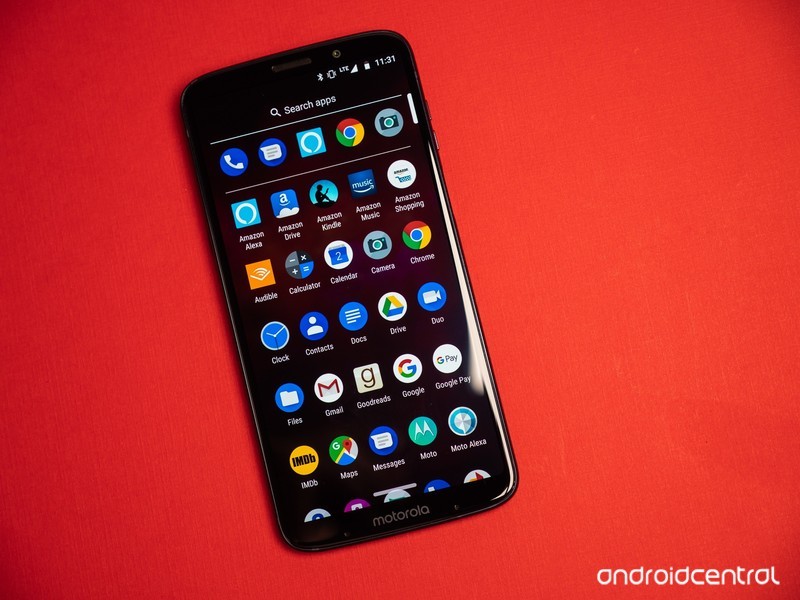
Swiping up into the app drawer reveals, unsurprisingly, even more Amazon apps. In alphabetical order, the Prime Exclusive Moto Z3 Play ships with Amazon Alexa, Amazon Drive, Amazon Kindle, Amazon Music, Amazon Shopping, Audible, Goodreads, IMDb, Moto Alexa, Prime Now, Prime Photos, and Prime Video. Yep, that’s a whole lot, but don’t panic just yet. There’s good news ahead.
Every single Amazon app that comes on a Prime Exclusive phone can be either disabled or uninstalled entirely.
Every single Amazon-related app that comes on the Moto Z3 Play can be either disabled or uninstalled entirely. I did so with all but Amazon Shopping, which I actually use almost every day. Specifically, you won’t be able to completely uninstall Amazon Alexa, Amazon Kindle, Amazon Music, Audible, Prime Photos, or Prime Video — you’ll have to settle for disabling them instead. But the fact of the matter is that even on a Prime Exclusive phone, you can entirely free your home screen of Amazon apps without having to root or switch to a third-party launcher that allows for hiding apps.
The question is — should you? While you might not appreciate the initial clutter, Amazon’s services are genuinely useful. Amazon Music is a great alternative to streaming services like Google Play Music or Spotify that doesn’t charge an additional monthly fee for Prime members, and Prime Video is the host to plenty of excellent exclusive content like The Man In The High Castle. Likewise, Audible (bought by Amazon back in 2008) is the largest distributor of audiobooks online.

Truthfully, I don’t use the vast majority of Amazon’s services, save for its online shopping resources — hence why I got rid of everything else on my phone. But especially for users that aren’t already settled into alternatives like Spotify, Netflix, or Hulu, Amazon’s services offer a lot of value, given that they come included with an Amazon Prime membership. Especially if you already have a Prime Exclusive phone, these features are definitely worth trying out, at the very least.
In any case, Prime Exclusive phones come with virtually no compromise these days, compared to their more expensive Amazon-free counterparts. You’ll still need to sign into your Amazon account during the initial setup, and you still need an existing Amazon Prime membership to buy these phones in the first place. But once you’re through the initial setup process, how much Amazon interferes with your phone … is really up to you.
Have you bought a Prime Exclusive phone before? Knowing how little it affects your phone overall, would you be open to buying one now? Let us know in the comments below!
See at Amazon
AT&T will be the exclusive U.S. wireless seller of Magic Leap AR headsets
This is part of a “strategic” partnership between the two companies.
Magic Leap — the Google-funded company creating a powerful new AR platform — is partnering with AT&T to help get its products in as many hands as possible when its ready for a consumer release.

In a press release that AT&T issued on Wednesday, July 11, CEO John Donovan said:
“AT&T is excited to pair our pioneering technologies, unmatched network, content platform, and vast customer ecosystem with Magic Leap’s efforts to build the next generation of computing.
With this agreement, AT&T will be the “exclusive wireless distributor” of Magic Leap products in the United States once they’re ready to be for an official launch.
In late-December last year, Magic Leap announced its first piece of hardware as the Magic Leap One — consisting of a headset, wireless controller, and a mini computer that powers the experience. Magic Leap One is currently being offered to developers and creators, and while a consumer version has yet to be announced, this partnership with AT&T shows that Magic Leap is getting everything set in place for when that day comes around.
Magic Leap unveils first AR headset that’ll launch in 2018

Command & Conquer: Rivals: Everything you need to know

Command your troops and conquer your enemies!
One of the most contentious games announced at this year’s E3 was EA revealing that a new Command & Conquer game was coming our way. Yes, the cherished real-time strategy franchise would be back in 2018 with Command & Conquer: Rivals — a brand new game designed for mobile. All you need to do is check the reactions on the official reveal trailer on YouTube (2.3K thumbs up to 55K thumbs down) to get a pretty good sense of the immediate reaction to this title.
As a gamer who grew up playing C&C: Red Alert throughout the 90s, I’ll admit I was a little apprehensive about how the C&C formula would be translated to mobile. I have a fountain of fond memories attached to this RTS franchise, so it was important to me that the mobile release retain much of the same look and feel as the games I remember.
Having played C&C Rivals for about a month in pre-alpha, I must say I’ve been pleasantly surprised by the game and think it has potential to be a really great mobile title. In spite of the criticism EA has rightly faced for some exploitive mobile releases in the past, the development for Rivals is shaping up nicely and should live up to even the most ornery fan’s expectations.
Pre-register for Command & Conquer: Rivals
Note: Command & Conquer Rivals is currently in pre-alpha testing, which means we’re still very early into the game’s development. As such, aspects of the game discussed here might change by the time the game is officially released.
The factions are at war again

C&C Rivals once again pits the Global Defense Initiative (GDI) against the Brotherhood of Nod in a battle to control nuclear launch sites. Unlike the previous PC games in the franchise that featured single-player campaigns for both factions, Rivals is a purely PvP gaming experience for mobile.
Each match has you battling on a smaller map where you must fight to control the majority of three contested areas on the map that control the launch of a nuclear missile. Control the areas for long enough and you’ll launch a nuclear strike at your enemy’s mobile HQ. It takes two nukes to take down your enemy’s base, however, you’re also able to deal damage with your troops if you can sneak them past your opponent’s defenses.
Troops are spawned onto the battlefield by spending Tiberium, an extraterrestrial green crystal that you generate at a standard rate automatically and can be doubled by deploying a Harvester. The game is heavy on the strategy, so you’re going to need to manage both how you spend your Tiberium on HQ upgrades and troops, along with sending the right troops in to defend or attack.
Great PvP action

In spite of the limited player base due to the game still being in pre-alpha release status, there’s always been players available to play against and the action is always varied, balanced, and challenging. There’s a learning curve for figuring out the best ways to deploy your troops, and you quickly learn the strengths and weaknesses of each troop type as you play. For example, the most basic ground group is best for countering rocket launcher troops, which are best at countering vehicles, with most vehicles being strong against other vehicles and aerial units.
The tap controls for controlling troops works really well, and often matches will come down to which player does a better job of positioning and managing their troops. While the map is always the same size, the placement of rocks and Tiberium fields can drastically change the layout of the battlefield and will absolutely have an impact on your strategy.
Daily missions also throw a bit of a wrench into your strategies, as occasionally you’ll forgo actually winning to the match to complete some goals. For example, you might be tasked with taking out your opponent’s Harvester, which may require you to send a tank on a bee-line straight to your opponent’s base.
Familiar mobile gaming trappings

In spite of all the good here, this is still a free-to-play mobile game from a major publisher so you should already know there’s going to be some timed crates, card collecting, and a bit of a grind involved for upgrading your troops.
You need coins to upgrade your troops and cards to level them up — both of which are found in your daily crate drops. Diamonds are the other in-app currency deployed here and are predominately used for buying bulk coins and rushing crate deliveries. Cards, crates, and coins can be bought in the shop, but at this point of early development, there are no micro-transactions although the interface is there.
The crate system is pretty basic at this point and designed to have you checking in every four to eight hours. Given the reliable state of gameplay and EA’s masterful ability to use micro-transactions for monetization, you can be sure that this will be a popular money sink for many RTS fans.
Are you GDI or Nod?

One interesting decision at this point is the separation of the GDI and Nod factions. You start out playing as GDI and unlock the NOD after leveling up to Level 4. Rather than offering the same troops with a different color palette, there are unique troop sets for both the GDI and Nod. The troop types are still mirrored, but the stats and abilities of equal GDI and Nod troops are appropriately different.
Currently, there is no cross-play between factions: when you play GDI, you are matched against another GDI commander and likewise when playing as Nod. Overall, I’ve found the gameplay to be varied and rewarding at its best moments, and frustrating and glitchy at times which is to be expected for an app in development. Given the vastly different strategies I’ve seen employed for both factions in the game, and the variety of strengths and weaknesses across the growing assortment of troops to choose from, I continue to remain cautiously optimistic about this game.
Have you checked out the game?
The game is currently in pre-alpha, but you can help test the game by pre-registering for the game on Google Play. If you’re in the U.S. or Canada, you may be invited to test the pre-alpha version of the game and will also receive a special early bird bundle when the game launches.
Download Command & Conquer: Rivals (free, pre-alpha)
Android Gaming

- Best Android games
- Best free Android games
- Best games with no in-app purchases
- Best action games for Android
- Best RPGs for Android
- All the Android gaming news!
Early access for HTC’s Exodus blockchain phone opens in Q3 2018
HTC is partnering with Cryptokitties, Animoca, and Bitmark to help create Exodus.
This past May, HTC confirmed it was working on a new phone by the name of “Exodus.” Rather than release another typical Android handset, Exodus is a smartphone that’s powered by blockchain. Today, July 11, HTC announced it’s opening up early access for Exodus during Q3 this year.

Per an HTC press release:
Context and meaning are being destroyed by copyright and privacy laws that were written for a bygone era. Join the Exodus of people who will take back control of the value that exists in their personal identity and data. HTC, the leading innovator in smart phone devices, is spearheading a movement and it starts in the third quarter with the launch of early access to the world’s first major blockchain phone – the Exodus.
To help make Exodus a reality, HTC is partnering with Cryptokitties, Animoca, and Bitmark. HTC says its partnership with Cryptokitties “is the beginning of a nonfungible, collectible marketplace and crypto gaming app store.”
By working with Animoca (the distributor of Cryptokitties) and Bitmark (“the crypto-based digital ownership project”), HTC will be able to further its advancements into the crypto world.
As someone who’s not very invested in blockchain, none of this means that much to me. However, if this is a niche you find yourself getting excited about, are you interested in what HTC’s trying to do with its Exodus project? Do you plan on signing up for the early access program? Sound off in the comments below.
HTC U12+ review: Buttonless blunder

