


Ringke Onyx Case for Samsung Galaxy S9+ review: Hello darkness, my old friend

It’s not the boldest case on the block, but sometimes subtle style is best.
I’ll admit it: I’ve been spoiled by gold colors and flashy fashions. When I go looking for a phone case, I want something that stands out, but far more often, cases are designed to blend in. Subtle cases allow our phones to draw less unwanted attention when using our gleaming $800 smartphones in crowded areas, and they fit a larger variety of occasions, locations, and wardrobes.
Subtle, unobtrusive cases are more generic, but that also makes them more adaptable and popular. Ringke’s Onyx case for the Samsung Galaxy S9+ proves that just because a case is subtle, it doesn’t have to be boring, too.
Ringke Onyx Case for Samsung Galaxy S9+

Price: $9.99
Bottom line: This is a simple case with a light-duty protection at a great price if you don’t mind it being a dark solid color.
The Good
- Lightweight protection with subtle texture near the top and bottom
- Wide port cutouts and gentle slope to the fingerprint sensor
The Bad
- Limited color options
- The flat back gets a little slick in sweaty hands
See at Amazon

Ringke Onyx Case for Samsung Galaxy S9+ What I like
Ringke has taken a two-tone approach to its monochromatic Onyx. The majority of the back is covered by horizontal stripes, a pattern with maybe a millimeter of depth to it that it barely noticed in-hand. Meanwhile, the top and bottom of the case’s back are slightly raised with a more pronounced angular texture, allowing you to recognize how far up or down the phone you’re gripping by feel alone.
The grip around the sides of the Onyx is firm, and the buttons still satisfyingly clicky through the thin silicone covering. The silicone under the fingerprint sensor is gently sloped, helping guide you up to the sensor without sliding you up too far to smudge the camera lens, and the rest of the cutouts are thoughtfully spaced to accommodate boxy OTG cables and adapters.

Ringke Onyx Case for Samsung Galaxy S9+ What doesn’t work
This is a very lightweight, silicone case, and as such it’s not going to provide the best protection against drops. That’s the trade-off that comes with every light-duty case, but if you want some extra protection, you can stick a phone grip to the back. Phone grips can even allow you to add a pop of color to the otherwise monochromatic case; I’ve been using a red Spigen Style Ring and it looks fierce.
The Onyx comes in three colors, but it’s a sliding scale of one color: There’s a burgundy Lilac Purple, an almost black Plum Violet, and then there’s the actual, factual Black. I’m not saying any of these colors are bad, but they are a bit basic, and if you’ve got a Coral Blue, Silver, or the newer Rose Gold variant, these cases won’t compliment your phone nearly as much as a color-matched model would.

Ringke Onyx Case for Samsung Galaxy S9+
Ringke’s Onyx case is subtle yet sophisticated. It is monochromatic without being monotonous, it is a case with depth, even if its back is flat. There are technicolor cases out there, but who says that they
4
out of 5
Do I wish there was a deep sea blue to compliment the black and purple models of the Onyx case? Yes, yes I do, but there’s a reason that most women have a little black dress in their wardrobe: black goes with everything.
See at Amazon
These are all the Huawei/Honor phones coming out in 2018
Having trouble keeping up with Huawei’s countless phones? You’re in the right place.

Although it may not be as popular as Samsung or Apple in the U.S., one of the world’s biggest smartphone brands is Huawei.
Huawei often releases some of the best and most interesting Android phones of the year, including powerful flagships and more affordable options through its Honor sub-brand.
It can be hard to keep up with Huawei’s endless releases, so to help keep you in check, here are all the phones the company’s launching in 2018.
The phones we’re still expecting
Huawei Mate 11

The Mate 10 Pro
Towards the end of 2017, Huawei decided to go out with a bang with the impressive Mate 10 and Mate 10 Pro.
The Mate 10 Pro paved the way for Huawei’s 2018 lineup, featuring the Kirin 970, a large 6-inch 18:9 screen, and fantastic dual cameras.
Rumors surrounding its successor are still pretty light, but if it’s anything like last year’s model, it’ll be big, powerful, and a true beauty to look at. The Mate 10 Pro was the first in the series to adopt a new glass back, and we’ll likely see Huawei continue that trend this year with the Mate 11.
Huawei Mate 10 Pro review: Best Android flagship for battery life
Honor 8X

Released at the very end of last year, the Honor 7X continues to be one of the best ways to spend less than $200 on a smartphone well into 2018.
Honor really hit the nail on the head with the 7X, offering a sturdy metal design, fast Kirin 659 processor, 5.93-inch 18:9 display, and respectable dual cameras for just $199 in the U.S.
We fully expect an Honor 8X to be announced before 2018 is over, featuring a similar price and even more bang-for-your-buck.
Honor 7X review: The new budget champion
The phones that have already come out
Huawei P20/P20 Lite/P20 Pro

A few months after the Mate 10’s U.S. launch, Huawei came out swinging once more with its P20 series — consisting of the P20, P20 Lite, and P20 Pro.
There are a lot of similarities with the three phones, including glass designs, fingerprint sensors, and notches in their displays.
While all of the handsets are worth a look, the P20 Pro is easily the most eye-catching. In addition to its ultra-reflective and color-changing glass back with the Twilight color, you’ll find not one, not two, but three rear cameras — including a 40MP RGB sensor, 20MP mono sensor, and 8MP telephoto one.
The end result of this wild combination are some of the best photographs you can take from a smartphone, especially when it comes to low-light shots.
You’ll find a lot to love about the P20 Pro, but depending on where you live, buying it could prove to be a bit tricky.
Where to buy the Huawei P20 Pro in the U.S. and Canada
Huawei Porsche Design Mate RS

If the P20 Pro isn’t cool enough for you and you’ve got endless amounts of cash to burn through, the Huawei Porsche Design Mate RS might be the perfect fit.
This is essentially the same phone as the P20 Pro, but it’s got a different design, stunning red color, in-screen fingerprint sensor, and a pain-inducing $2000 price tag.
The Porsche Design Mate RS certainly isn’t for everyone, but it’s easily the most eye-catching phone in all of Huawei’s lineup for the year.
See at Porsche Design
Huawei Mate SE

On the complete polar opposite end of the spectrum from the Mate RS is the Huawei Mate SE.
The Mate SE costs just $249 in the States and comes with a 5.93-inch edge-to-edge 18:9 FHD+ display, dual 16MP and 2MP rear cameras, Kirin 659 processor, 4GB RAM, 64GB of storage, and a large 3,340 mAh battery. It’s also available in both Grey and Gold colors.
You get a lot of bang-for-your-buck with the Mate SE, but if you want to stretch your dollars even further, I’d suggest checking out the Honor 7X that was released at the tail-end of 2017.
Honor 7X vs. Huawei Mate SE: What’s the difference?
Huawei Nova 3

If you like the Huawei P20 but wish it came in a more affordable package, that’s where the Huawei Nova 3 comes into play.
In regards to its design, the phone looks very similar to its P20 cousin. The front is home to a 6.3-inch Full HD+ display with a 19:9 aspect ratio, and because this is 2018, there’s a notch at the very top.
Around back is a glass finish that comes in Purple, Black, Aqua Blue, and Primrose Gold/Yellow colors. This is also where you’ll find the fingerprint sensor and dual 16MP + 24MP primary cameras.
Under the hood is the Kirin 970 processor, 6GB RAM, and Android 8.1 Oreo. Huawei will officially unveil the Nova 3 on July 18, but it’s already up for pre-order on VMall right now.
See at VMall
Honor View 10

Honor’s first phone for 2018 was the Honor View 10, and boy does it have a lot to offer. This is one of the pricier Honor phones at $499, but it comes equipped with just about every flagship feature you could ask for.
The Honor 10 impresses at first glance with a metal unibody design and ultra-slim bezels. The display measures in at 5.99-inches with an 18:9 aspect ratio and has a resolution of 2160 x 1080. There’s a fingerprint sensor underneath it, 3.5mm headphone jack on the bottom of the frame, and dual 16MP + 20MP cameras on the back.
Other goodies include the Kirin 970, 6GB RAM, 128GB of storage, NFC, and Android 8.0 Oreo with EMUI 8.0 on top of it. Add all that together with a face unlock feature and a long-lasting 3,750 mAh battery, and you end up with one heck of a phone.
See at Amazon
Honor 10

The Honor 10 was released in late April, and it has more in common with the Honor View 10 than just a similar name. Just like the View 10, the Honor 10 has the Kirin 970, 6GB RAM, and either 128GB or 64GB of storage. However, that’s where the similarities end.
You’ll find dual cameras on the Honor 10, but they’re a bit different with 16MP and 24MP sensors. There’s also a 24MP shooter for the selfie camera, 5.84-inch 1080p LCD screen with a notch at the top, and a reflective, color-changing glass back just like the Huawei P20 Pro.
The Honor 10 is available in China and the UK, and depending on the storage configuration you choose, you’ll spend between $414 and $478.
Honor 10 announced with the P20’s design and a much lower price
Honor 7A/7C

Next up, we’ve got the Honor 7A and 7C. These are the cheapest phones on this list, coming in at £139.99 and £169.99, respectively.
You won’t find the most impressive specs on the 7A and 7C, but what you do get is all the basics for a solid experience at an incredible price.
The 7A is the more affordable of the two, offering a plastic body with a metal-like finish, Snapdragon 430 processor, 2GB RAM, 16GB of storage, and a single 13MP camera. With the 7C, you get a faster Snapdragon 450, 3GB RAM, 32GB of storage, and a depth-sensing 2MP camera to go along with the primary 13MP shooter.
You can purchase the Honor 7A and 7C in the UK and India.
Honor 7A + 7C bring face unlock to the sub-£170 price point
Honor Play

There’s been a recent interest in gaming phones in the Android space, with notable handsets including the Razer Phone and Asus ROG Phone. Honor’s the latest company to take a stab at this growing niche with the Honor Play.
A good gaming phone needs to be plenty powerful, and the Honor Play delivers here. It’s powered by the Kirin 970 and comes with a feature called GPU Turbo that allows you to eek out even more performance when playing particularly demanding titles.
You’ve got your choice between 4 and 6GB of RAM depending on the model you choose and 64GB of storage is present for housing all your local files. Other specs include a 3,750 mAh battery, Android 8.1 Oreo, and a 6.3-inch 19:9 screen with a resolution of 1080 x 2280.
The Honor Play is launching first in China with a starting price of around $375.
See at VMall
Honor 9i

The Honor 9i was also announced alongside the Honor Play, but it ditches the gaming focus and instead aims to be your typical Honor mid-ranger.
Up front is a 5.84-inch 19:9 display with a 1080 x 2280 resolution. The Kirin 659 powers the phone along with 4GB RAM and a 3,000 mAh battery should offer respectable endurance.
Other features include dual 13MP + 12MP cameras on the back, 64 or 128GB of storage, and Android 8.0 Oreo.
Similar to the Honor Play, the Honor 9i is also launching in China and carries a starting price of $220.
See at VMall
Honor 10 GT

In early July, Honor officially took the wraps off of the Honor 10 GT. This is mostly the same phone as the Honor 10 that was released earlier in the year, save for the fact that it has a whopping 8GB RAM.
Aside from that, everything else is just as you’d expect. The Honor 10 GT is powered by the Kirin 970 processor, has a 3,400 mAh battery, 5.8-inch 2280 x 1080 display, 16MP selfie camera, 16MP + 24MP rear-facing sensors, and the rare 3.5mm headphone jack.
The Honor 10 GT is launching in China on July 24, and while pricing is still unknown, it’ll likely cost around $500 or so.
See at Honor
Huawei P20 + P20 Pro
- Huawei P20 and P20 Pro hands-on
- Huawei P20 and P20 Pro specs
- The Porsche Design Mate RS is a P20 Pro that costs $2000
- Join the discussion in the forums
Updated July 11, 2018: Moved the Huawei Nova 3 to The phones that have already come out section.
Android Phones With The Best Battery Life in 2018
- Best overall
- Best for hard workers
- Best for less
Best overall
Google Pixel 2 XL

See at Best Buy
The Google Pixel 2 XL is very large, but for that size you get a 3520mAh battery capacity to make sure you get through a full day with charge to spare. Google’s software is light, and has power management to make sure your phone is both powerful and efficient. The more advanced “battery saver” features of other phones aren’t present here, but from our experiences you don’t need those — the phone just does optimization on its own, and your battery lasts.
The battery life is hardly the only reason to buy the Pixel 2 XL. You also get Google’s fantastic software, along with years of guaranteed updates, and great performance. The camera is still one of the best available, and the hardware is solid as well. The only downside you can really find here is the below-average display.
Bottom line: Between a big battery, an efficient processor and Android Oreo’s various enhancements, the Pixel 2 XL is easily an all-day phone.
One more thing: The smaller Pixel 2 may be appealing with its lower price, but it doesn’t have proportionately good battery life.
Best for hard workers
BlackBerry KEY2

See at BlackBerry Mobile
The BlackBerry KEY2 is all about getting work done — just look at that hardware keyboard and you instantly figure that out. And you can’t do your work when your battery is dead, or even when you’re worried about running out of juice. So BlackBerry paired up an efficient processor with a 3500mAh battery to make sure you always get through the day.
On top of the larger-than-usual battery and efficient processor, you also get battery controls and alerts that make sure you won’t be caught without battery when you need it. The smaller display and simpler software on the KEY2 also help stretch every mAh to the fullest. You just won’t have to worry about charging mid-day on this phone.
Bottom-line: You won’t all of a sudden decide to use a hardware keyboard phone for the battery alone — but if you’re drawn to that keyboard, you’ll also be reassured the KEY2 won’t die prematurely.
One more thing: You’ll pay a little extra for the KEY2 than the capabilities would lead you to expect, but for specific users it’s definitely worth the money.
Best for less
Moto Z3 Play

See at Amazon
Motorola’s “Play” line has always focused on battery, and even as the battery sizes have decreased in successive generations the Moto Z3 Play still rules the roost in the mid-range segment. A 3000mAh battery doesn’t sound like a lot, but the Snapdragon 636 processor is super efficient and Android 8.1 software helps make the most of it all.
But the Moto Z3 Play’s real benefit is a separate Moto Mod attachment that comes in the box, which in a snap adds another 2200mAh of capacity in a still-thin package . You can easily go through a full heavy day with just the internal battery — but add the included Moto Mod and you have a two-day phone.
The rest of the phone experience is textbook Moto, including clean software, robust hardware and a solid metal build. At $499 it’s quite expensive for the performance, but if you need that battery life on a budget it’s top of the list.
Bottom-line: The Moto Z3 Play can easily be a two-day phone, and the rest of the experience will make sure you actually want to use it that long.
One more thing: Amazon offers the Moto Z3 Play directly at a $50 discount.
Conclusion
Every phone maker has a claim about “all-day” battery life, but only a few live up to it. The Pixel 2 XL is a solid battery performer and also a great overall phone. Hard workers who may benefit from a hardware keyboard will love the BlackBerry KEY2’s battery, and if you don’t want to spend so much the Moto Z3 Play (and its included Moto Mod) will give you two days of charge-free use.
Best overall
Google Pixel 2 XL
See at Best Buy
The Google Pixel 2 XL is very large, but for that size you get a 3520mAh battery capacity to make sure you get through a full day with charge to spare. Google’s software is light, and has power management to make sure your phone is both powerful and efficient. The more advanced “battery saver” features of other phones aren’t present here, but from our experiences you don’t need those — the phone just does optimization on its own, and your battery lasts.
The battery life is hardly the only reason to buy the Pixel 2 XL. You also get Google’s fantastic software, along with years of guaranteed updates, and great performance. The camera is still one of the best available, and the hardware is solid as well. The only downside you can really find here is the below-average display.
Bottom line: Between a big battery, an efficient processor and Android Oreo’s various enhancements, the Pixel 2 XL is easily an all-day phone.
One more thing: The smaller Pixel 2 may be appealing with its lower price, but it doesn’t have proportionately good battery life.
Update July 2018: The entire list has been overhauled, with the Pixel 2 XL taking the top spot from the generally less appealing Huawei Mate 10 Pro. The new BlackBerry KEY2 replaces the KEYone, and the Moto Z3 Play comes in as a great option for less money.
Best Motorola Phones in 2018
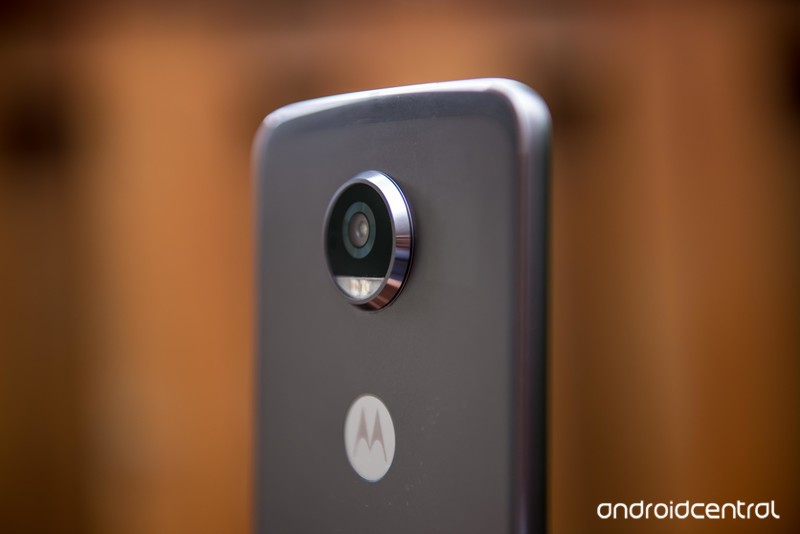
Motorola continues to make compelling phones in a few different categories
The last few years have been one of quiet overhaul for Lenovo-owned Motorola, bringing all of its disparate product lines, from the inexpensive Moto E to the premium Moto Z, into a familiar aesthetic. We’ve seen a bunch of new phones come out in 2018 that cement Motorola as the budget king while also trying to get its Moto Z series in line with other budget flagships on the market.
With new phones like the Moto Z3 Play and another one coming in August, there’s plenty of reasons to be excited about Motorola in 2018 and beyond.
Moto Z3 Play
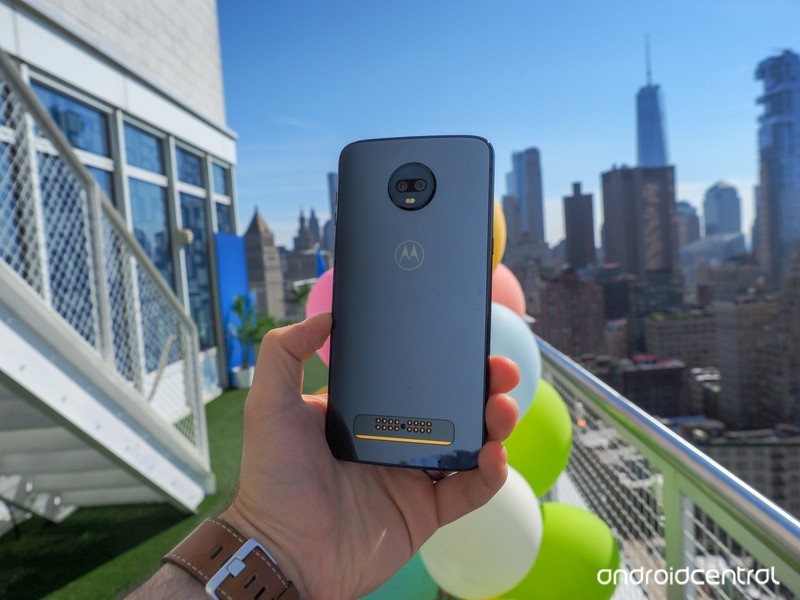
Released June 2018 The latest phone in Motorola’s Moto Z lineup is a minor improvement over its predecessor, but the Moto Z3 Play is still impressive nonetheless. For $499, you get a tall 18:9 display with plenty of power in the Snapdragon 636, along with a dual camera that goes the distance in most lighting environments.
Best of all, the phone still supports all the same Moto Mods that have been available since the first Moto Z device was released in 2016.
See at Amazon
Moto E5 series
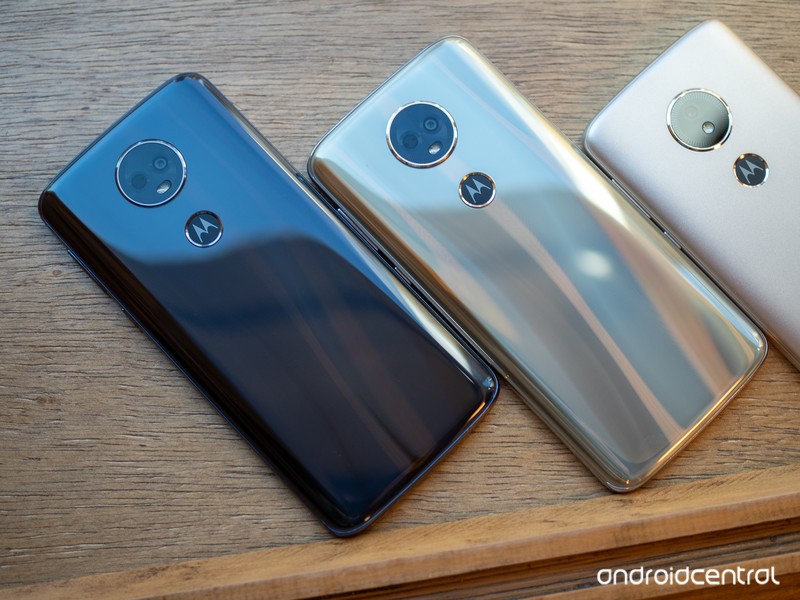
Released May 2018 Motorola went bigger and more versatile with its Moto E5 series, featuring a regular model, a Play, and a Plus — just like the G6 lineup. Once again, only two of the models, the E5 Play and E5 Plus, are available in North America, but they’re both interesting for their own reasons. The Moto E5 Play features a durable black plastic body with a removable battery; the Moto E5 Plus has a large 6-inch screen and a massive 5000mAh battery.
See at Amazon
Moto G6 series
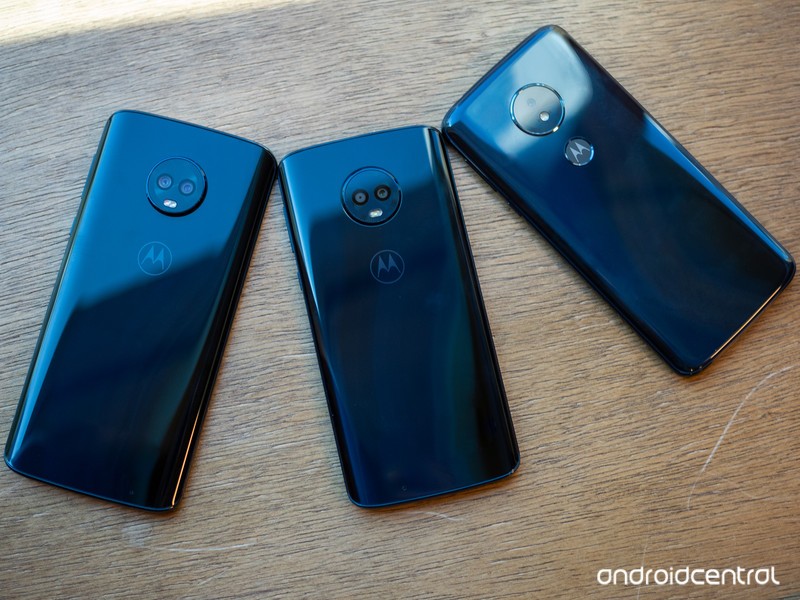
Released April 2018 With the Moto G6 series, Motorola cements itself as the most capable manufacturer of budget devices in the world. With three devices at three distinct price points, the G6 Play, G6, and G6 Plus are separated only by their specs, but they share the same tall, glass-clad body and 18:9 screen aspect ratios.
While the Moto G6 Plus isn’t available in North America, it’s widely available in Europe, Asia, and South America. The Moto G6 and G6 Play are available in North America unlocked or through various carriers.
Where to buy the Moto G6
See at Amazon
Moto X4
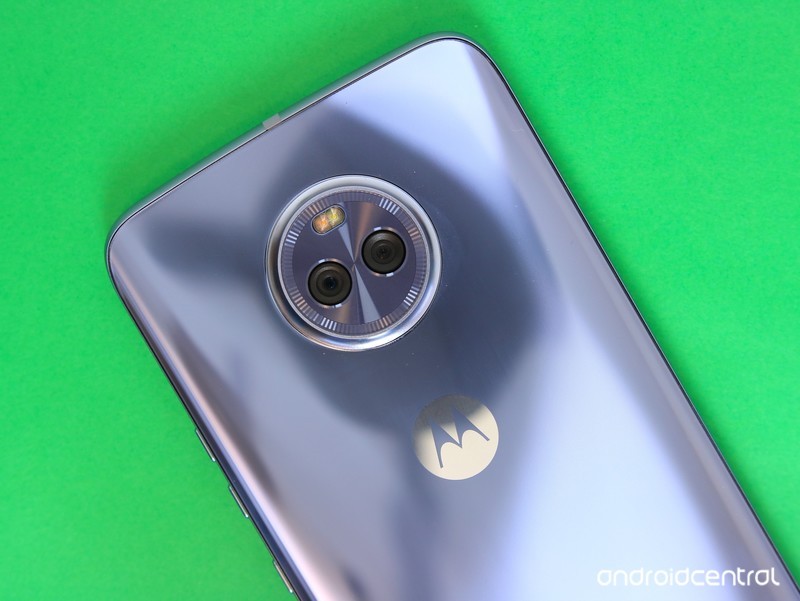
Released October 2017 The Moto X4 was the rebirth of the beloved Moto X lineup that disappeared shortly after Lenovo bought Motorola from Google. Now covered in glass, the Moto X4 was the first phone to ship with Amazon’s Alexa assistant built-in, and featured all of Motorola’s staple software features, including Moto Display. It was also Motorola’s first phone to feature a wide-angle secondary camera.
See at Amazon
Moto Z2 Play
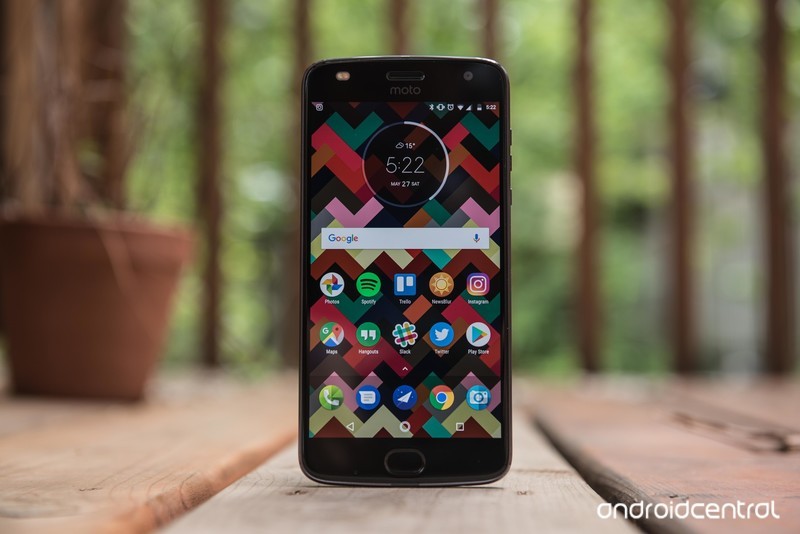
Released June 2017 Motorola followed up the Moto Z Play pretty quickly, and the Moto Z2 Play is a worthy sequel that tries to bridge the gap between the more affordable Play and the regular “Z” flagship from 2016. The phone features a much sleeker design than its predecessor, shaving a full millimeter of thickness, but doing so cuts down on the battery by 15%.
Aside from the improved, all-metal chassis, the Z2 Play sports a much-improved 12MP camera with a wider aperture and Dual Pixel Focus technology, as well as a newer version of the oft-lauded Moto Display feature that we’ve grown to love so much.
Of course, the Z2 Play also supports Moto Mods, and was announced alongside three new add-ons that are also compatible with older versions.
Moto Z2 Play review
See at Motorola
Moto G5 and G5 Plus
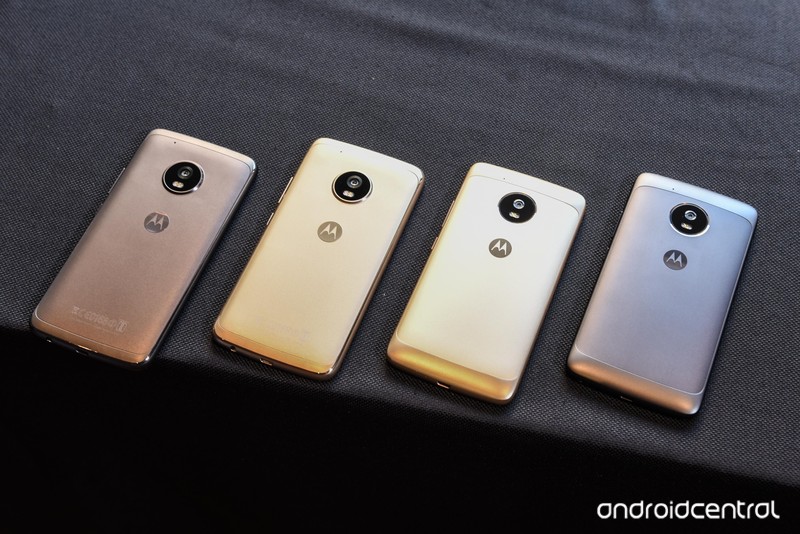
Released March 2017 The Moto G5 series features two models of differing size, capability, and price. The Moto G5, which is not officially available in the U.S., cuts costs by sticking with plastic and only a splash of metal, while the G5 Plus goes decidedly mid-range with its Snapdragon 625 chip and up to 4GB of RAM. Both models feature improved cameras and batteries, but the G5 Plus manages to compete with devices twice the price thanks to a large-pixel sensor and a wide-open lens.
The Moto G5 and G5 Plus also reinforce a recognizable design language that began in 2016 with the Moto Z and Z Force. A wider, easier-to-use fingerprint sensor (now on the cheaper model, too), rounded sides and a circular camera module maintain visual continuity with the Moto Z line, and the metal makes both phones feel very good.
The Moto G5 Plus is still available, but it’s been largely supplanted by the Moto G6 series (above).
Moto G5 Plus review
See at Amazon
Updated July 2018: This post has been updated with the latest Motorola phones that you need to care about.
Cover a large home in strong Wi-Fi with the $219 Netgear Orbi 3-pack system
Wi-Fi Blanket.
The Netgear Orbi home mesh networking system 3-pack is down to $219.48 on Amazon. Just clip the $30 coupon to get in on the discount. This same kit sells for around $294 usually, and this price is the lowest we’ve ever seen.

The Orbi mesh networking system covers up to 6,000 square feet in high-performance Wi-Fi. It can produce speeds up to 2.2Gbps, and these satellites are designed to be compact so they can be placed conveniently throughout your home. All the satellites share a single name so you won’t have any network interruption when you go from room to room. Use the free Orbi app to set it all up in minutes.
See on Amazon
Astropad Standard and Studio Apps Updated With Support for Luna Display Adapter, Which is Now Available for Pre-Order
Astropad today introduced new updates for both its Astropad Studio and Astropad Standard apps, bringing support for the Luna Display adapter, which is also now available for pre-order.
Introduced as a Kickstarter project last year, the Luna Display is designed to turn any iPad into a wireless second display for the Mac.
Astropad alone mirrors the Mac display, but Luna Display is designed to extend the Mac display rather than simply mirror it.
The Luna Display adapter plugs into a Mac using Mini DisplayPort or USB-C, and then after downloading the app, the Luna Display serves as an extension of the Mac, letting Mac content be accessed directly from an iPad.
Both of the Astropad apps now support Luna Display, and the Luna Display itself can be pre-ordered from the Luna Display website for $69.99.

Astropad also announced today that it is discontinuing all support for third-party styluses. The company says that third-party styluses deliver poor performance compared to Apple Pencil and create engineering complexities.
Astropad no longer recommends third-party styluses for artists. Support will cease at the end of 2018 to allow Astropad to focus on optimizing its apps for the Apple Pencil.
Astropad Standard can be downloaded from the App Store for $29.99. [Direct Link]
Astropad Studio, which costs $11.99 per month for syncing and monthly feature updates, is free to download initially. [Direct Link]
Tag: Astropad
Discuss this article in our forums
Pinterest Gains Collaborative ‘Activity Feed’ Tool to Make Event Planning Easier
Pinterest today announced the launch of a new social collaboration tool, called the “activity feed” for group boards. This section of the app will let members weigh in with a quick like or comment, @ mention another user, or start a new thread, and includes updates when members add new pins, create new sections, new members join, someone likes or comments, and more.
The app had comment support before, but each comment had to be attached to a specific pin. Now all comments will be organized in the activity feed so that conversations are easier to follow, and users will be able to start threads of their own on the collaborative board for all members to see, or under specific activities in the feed.
Pinterest is hoping to further facilitate the use of its platform as a party-planning tool for birthdays, weddings, and other events by introducing deeper social features that keep its users within the app. Earlier this year, the company introduced a “Following” tab that makes it easier to discover new ideas from users you follow.
The majority of Pinners use group boards to collaborate with family and friends as they plan parties, events and projects together. These updates are in direct response to requests from Pinners just like these, and they’re part of our ongoing effort to make Pinterest a more productive place to bring events and other projects to life.
The group activity feed will be available starting today across Pinterest’s mobile apps and on the web.
Tag: Pinterest
Discuss this article in our forums
Procreate for iPad Gains New Liquify Filter, Warp Transform Mode and Symmetry Drawing Guide
The Procreate app for iOS was today updated to version 4.1, introducing several major new features that will enhance the drawing and art creation experience on the iPad.
A new Metal 2-powered Liquify feature lets artists push, pull, expand, pinch, and twirl their art using either touch-based gestures or Apple Pencil pressure for more control.
The Symmetry Drawing Guide in Procreate 4.1 lets users mirror strokes as they paint, with customizations that include half, quadrant, or radial devision with both mirror and rotational modes. Symmetry can be used with any brush or paint tool, along with Liquify and ColorDrop for unique works of art.
A new Warp Transform mode offers 16 adjustable nodes and depth layering, and it can be used alongside the existing Freeform and Distort Transform modes, while a new Layer Select gesture option lets users select a layer by touching the layer’s content.
The built-in Perspective tools in Procreate have been improved with 2D and Isometric Guides, offering more control over grid measurements. Drawing Assist also snaps lines to guides for faster, more precise sketches.
Other notable improvements include Brush Set import and export, a 30-second time-lapse export option, and a color invert option for layers.
Procreate 4.1 is a free update for existing users. New users can download Procreate from the App Store for $9.99. [Direct Link]
Discuss this article in our forums
Mac Mini Refresh, New Low-Cost Notebook, Apple Watches With Larger Displays and More Coming This Fall
Apple is working on updates across its entire product line for the second half of 2018, according to a new investor’s note shared this morning by reliable Apple analyst Ming-Chi Kuo, with refreshes expected for iPhone, iPad, Mac mini, MacBook Pro, iMac, and Apple Watch.
Much of what Kuo has to share has been mentioned before, but he provides a nice overview of what we can expect to see this fall along with some interesting new tidbits on Apple’s upcoming product lineup.
- iPhone – There are three iPhones in the works, two OLED models in 5.8 and 6.5-inch sizes and one lower-cost LED model that will be available in a 6.1-inch size. All three will feature Face ID and upgraded A12 processors. While the two OLED models will have dual-lens cameras, the lower-cost model will feature a single-lens camera.
- iPad Pro – Apple is working on two new 11 and 12.9-inch iPad Pro models that are equipped with a full-screen design similar to the iPhone X and no Home button, with Apple to replace Touch ID with Face ID.
- Mac mini – Kuo didn’t have a lot of information to share on the Mac mini, but he says a processor upgrade is expected. The Mac mini has not been updated for more than 1,300 days, aka over 3 and a half years. It’s not clear if additional upgrades will be included, such as a redesigned chassis, but at least some kind of refresh is on the horizon.
- MacBook Pro – Processor upgrades expected.
- MacBook – Processor upgrades expected.
- New Low-Priced Notebook – Kuo believes Apple is designing a new low-priced notebook. He originally said that this would be in the MacBook Air family, but now has changed his mind. Previous rumors have suggested this machine could be a 12-inch MacBook, so Apple may be planning to expand the MacBook lineup with an additional low-cost option to replace the MacBook Air.
- iMac – Kuo says to expect a significant display performance upgrade, but he does not go into detail about what this will entail and we haven’t heard additional iMac rumors at this time. He says the iMac, like other Macs, will get a processor refresh.
- Apple Watch – Apple is working on two new Apple Watch models for 2018 that will have bigger displays and enhanced heart rate detection features. The two Apple Watch models will measure in at 1.57 inches (39.9mm) and 1.78 inches (45.2mm), compared to the current 38 and 42mm sizes. Rumors have not been clear on whether the Apple Watch itself will be larger or if the bigger display will come from a reduction in bezels.
Kuo wraps up his note with a prediction that the highly-anticipated AirPods and the AirPower will go into mass production in the third quarter of 2018, suggesting a late fall launch. Apple first announced the AirPower in the fall of 2017, but has reportedly run into some problems with production. Recent rumors have said Apple is aiming for a September launch for the AirPower.
Kuo doesn’t provide details on when we might see refreshes to Apple’s other product lines, but the company could be planning to launch all of the new products at its annual September event, which is typically held during the first or second week of September.
In the past, Apple has also held separate October events when there is a heavy fall product lineup to unveil, so Macs and iPads could also come in that month.
Related Roundups: iPad Pro, iMac, Mac mini, MacBook Pro, Apple Watch, watchOS 4, watchOS 5, MacBook, 2018 iPhones, AirPodsBuyer’s Guide: 10.5″ iPad Pro (Don’t Buy), iMac (Don’t Buy), Mac Mini (Don’t Buy), MacBook Pro (Don’t Buy), Apple Watch (Caution), 12.9″ iPad Pro (Caution), MacBook (Don’t Buy), AirPods (Caution)
Discuss this article in our forums
Common LG G7 ThinQ problems, and how to fix them
Julian Chokkattu/Digital Trends
The LG G7 ThinQ is an interesting phone that offers great sound quality, speedy software, and solid battery life. It’s a solid, if unremarkable, flagship, but it doesn’t always work as expected. We’ve been digging around to find the most commonly reported LG G7 ThinQ problems and we’ve identified possible workarounds or fixes to help you overcome them.
It’s a glass phone, so if you don’t want problems with cracks or scratches, you’ll want to start by investing in one of the best LG G7 ThinQ cases.
Problem: Backlight bleed
There have been quite a few reports of backlight bleed on some LG G7 ThinQ handsets. This is when the backlight that’s used to light up the LCD is coming through at a certain spot and illuminating it more than it should. There are threads at XDA Developers forum and on Reddit about this problem and it mostly seems to appear at the bottom of the screen to the right of the home icon.
Solution:
- There’s no fix for backlight bleed, as it’s a manufacturing issue. If your LG G7 ThinQ has backlight bleed, then you’ll want to contact LG, your carrier, or your retailer and arrange for a replacement handset.
Issue: Battery percentage not appearing
A few people have been complaining that the battery percentage isn’t showing in their notification panel, even when it’s turned on in the settings, as in this XDA Developers forum thread. Luckily, it’s easy to fix.
Possible fix:
- Start by going to Settings > Battery and make sure that Battery percentage on status bar is toggled on. Go to Settings > Display > New Second Screen and make sure it’s set to Standard. You should also go to Settings > Display > Display size and turn it all the way down to the smallest.
- If none of that worked, then back up your files and try a factory reset. This will wipe your phone. Go to Settings > General > Backup & Reset > Factory Data Reset and tap Reset phone.
Glitch: Auto brightness too dark
There are discussions at the XDA Developers forum and on Reddit about the auto brightness on the LG G7 ThinQ being too aggressive and making the screen too dark. Some people have also found that they’re unable to adjust the brightness level when auto-brightness is turned on – this seems to be specific to T-Mobile.
Workarounds:
- If you’re able to adjust the brightness level while auto-brightness is on, then go to a dark environment and drag the brightness slider as low as you want it to go to recalibrate it. This should set a minimum brightness for that light level.
- Go to Settings > Display and toggle Auto off, then set the brightness level as low as you ever want it to go and toggle Auto back on.
- There is a brightness boost icon at the left end of the brightness bar that you can tap to boost the brightness level.
- Try an app like Lux to get more control over your screen’s brightness.
Problem: Camera lag
We noted a little camera lag in our review, and it’s something that has cropped up in discussions on Reddit and at the XDA Developer forum and Android Central forum. Some people are having issues with the time between tapping the shutter button and the photo being taken; others have found that it takes a while for the photo to save to the gallery.
Workarounds:
- Try opening the Settings in the camera and turn HDR off and then test to see if it’s faster. Unfortunately, the quality won’t be as good, but you may notice that the lag is gone.
- The problem is more pronounced indoors or in low-light conditions, so try to snapshots in well-lit environments. Unfortunately, this is par for the course with cameras in general.
- Open the camera and tap Mode > Manual Camera. You can adjust various settings in here including the shutter speed, which is second from the end on the right.
- If your problem is with slow saving to the gallery, you might test without a MicroSD card in the phone to see if that’s slowing things down.
That’s it for issues so far but check out our LG G7 ThinQ tips and tricks to get more out of your phone.
Editors’ Recommendations
- LG G7 ThinQ vs. LG G6: Out with the old, in with the new
- LG G7 ThinQ vs. Samsung Galaxy S9 Plus: Clash for the heavyweight title
- LG V35 ThinQ vs. LG G7 ThinQ: Which phone prevails in stablemate showdown?
- Take control of your LG G7 ThinQ with these helpful tips and tricks
- LG G7 ThinQ vs. iPhone X: Which phone comes out on top?

