


Netflix releases Android app for select HTC phones, Samsung Nexus S
 Well, it looks like the LG Revolution won’t be the first Android phone to get Netflix after all. The app has just hit the Android Market and is currently available for the HTC Incredible, Nexus One, Evo 4G, and G2, plus the Samsung Nexus S. As you might expect, there’s not a lot of surprises in terms of functionality — you can resume watching where you left off on your TV or computer, and the app will allow you to manage your instant queue in addition to letting you simply browse movies. On its official blog, Netflix explains that while the app is currently limited to phones with “requisite playback support,” it anticipates that many of the “technical challenges will be resolved in the coming months,” and that it will be able to “provide a Netflix application that will work on a large majority of Android phones.” That’s some curious wording, to be sure, and a notable change from earlier talk that suggested only certain Qualcomm processors would support the necessary DRM for Netflix. Also not supported at the moment: Canada. If none of that precludes you, however, you can hit up the Android Market link below to try it out for yourself.
Windows Phone 7 connector for Mac updated
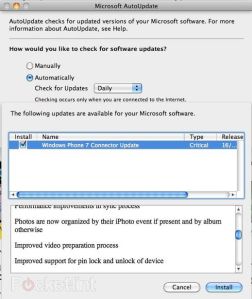 Microsoft has released a new version of its Windows Phone 7 connector software for the Mac, bringing with it a number of new features and plenty of bug fixes that were no doubt annoying Mac-owning Windows Phone 7 fans.
The new update, which Microsoft describes as “critical” and weighs in at 7.6MB, brings a new device setup experience and the ability to now sync purchased audio content from the device.
Fixes includ performance upgrades, better handling of photos with Apple’s iPhoto 11 and fixing an issue where some AAC or MP4 files wouldn’t play on the phone.
The new update is available via the Microsoft AutoUpdate app and is available now.
Full features and fixes in full:
New features:
Purchased audio content is synced from device
New device setup experience
Browse device now supports manual import from device, delete from device and preview.
Improvements and fixes:
Performance improvements in sync process
Photos are now organized by their iPhoto event if present and by album otherwise
Improved video preparation process
Improved support for pin lock and unlock of device
Improved meta data transfer settings (bookmarks, rating and release dates and now transferred)
Fixed issue with remote iTunes installations
Fixed issue with .AAC and certain .MP4 files not playing on device
Apple Lossless encoded files are no longer synced as they are unsupported on device. They will be ignored like protected content. Please convert these files, as necessary.
Improved support for iPhoto 11.
Google Maps 5 Updated to Include 3D Maps and Offline Navigation
 Google’s never been afraid to “blow it out” with Google Maps, most famously with its inclusion of Navigation, which knocked the legs out from under a lot of the GPS device and navigation app market.Google Maps 5.0 for Android might seem similarly earth shattering, but it marks a significant change to the basic technology of Google Maps. Most importantly, Google is now using vector graphics for its maps, which are scalable and much lighter weight than the traditional stitched together images used in most Google Maps incarnations. The vectors also enable something else a whole lot sexier: a two finger swipe can “tilt” the map and now you’ve got a 3D view of the landscape. It’s not quite as flashy as Google Earth, but it looks a whole lot more useful. The other thing these low-bandwidth vector maps enables is offline caching of maps, specifically your most frequently visited locations, and entire trips that have been routed in Navigation, including potential reroutes. Anybody with an Android 1.6 or higher device can download 5.0 right now for free, but the 3D and offline features are 2.0+ only.
Google Voice app now supports iPad and iPod touch, brings Click2Call
 So, how exactly does a voice app work on devices without any cellular ties? Glad you asked! Google has just updated the iOS Google Voice app to include support for the iPod touch and iPad, but neither of them can make cellular calls directly. Instead, you can use the app to initiate GVoice calls with a nearby phone. The process is known as Click2Call — users simply click any ‘Call’ button within the app and then choose which of their phones they want to ring. It’s probably more time consuming than just grabbing your phone from the start, but hey, there it is. In other news, the app now disables text forwarding when you enable Push Notifications (to avoid double alerts), and there’s a new Do Not Disturb option in the Settings tab for those who’d prefer to disconnect. Hit the iTunes link below to get your download on, and let us know how things shake out in comments.
Download and install the new Android Market on your rooted 2.2+ device

Been dying to try out the new Android Market, announced last week? If so, we’ve got a package here you might like. Available for download is the new Android Market version 2.2.6, and we’re going to tell you how to install it, as well as how to get rid of it if it causes you problems. As always, TalkAndroid cannot be held liable for any damage you may do to your device, as you will be messing with some base system files, but if you’re ready to don your geek hat, hit the break for a full set of instructions.
Requirements: You will need your device to be rooted, as well as running a ROM that is based on 2.2 or above. You will also need root access to the file system. We will be showing you how to do this with Root Explorer, which is a $2.50 app, but well worth the cost. I use it just about every day. Read more 
Google Latitude available now for iPhone
Google has gone all official with its Latitude app for the iPhone although the app did appear, albeit briefly, in the App Store last week.
It seems that we’re supposed to actually be seeing it now though, with a Google blog post being published to mark the release.
Google Latitude has been available to Android, BlackBerry, Symbian and Windows Mobile users for a while now, but this is the first time that Apple-phone owners have been able to opt in to the location-based platform.
“Since launching last year, Latitude’s focus has always been on one goal: make it simple to stay in touch with friends and family by sharing where you are with each other,” said Chris Lambert, software engineer on the Google Latitude Team.
“Simple setup. Simple sharing without fumbling for your phone. Now, you can use Latitude on your iPhone just like the more than 9 million people actively using it.”
With Google Latitude on your iPhone you’ll be able to see where you Latitude opted-in buddies are, show off where you are and contact your pals from within the app.
The app supports multi-tasking too, so you’ll be able to leave it running in the background (even in standby mode) and your location will still be available for others to see.
OnLive demos Windows 7 on an iPad and Galaxy Tab, launches cloud computing tablet app
 Flash on an iPad? No problem, and neither is QuickTime on a Samsung Galaxy Tab — assuming you’re running both from a virtualized Windows 7 PC using OnLive’s new app. OnLive may have originally pitched itself as a streaming games service, but founder Steve Perlman revised his ambitions at the D: Dive into Mobile conference today, showing off a host of Windows 7 programs (including 3D modeling software Maya, above) running on the pair of ARM-based tablets. Like always, OnLive requires a nearby server and fast internet connection to function adequately, and the apps themselves would need touch controls, but Perlman said it’s actually easier to deliver apps than games since they’re less sensitive to lag. OnLive didn’t provide a date when we can expect full cloud functionality, but you can get a sneak peek at a pared-down version right now — the brand-new OnLive Viewer app, which lets you spectate games in progress (and will eventually let you play them) is now available for iPad.
How-To: Install the Android 2.3 Gingerbread keyboard on your rooted device
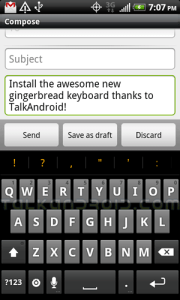 Want to check out some new Gingerbread goodness, like… now? Well you’re in luck, as Peter Alfonso, creator and maintainer of the infamous custom ROM, “Bugless Beast”, has gotten it all tucked away in a nice, flashable zip file – the keyboard, that is. Thanks to Peter, you can now install the Gingerbread keyboard on your rooted Android device through recovery, and it’s very easy to do. Just hit the break to find out how!
- Download the zip file here
- Put the zip file on your sd card, preferrably on the root of the card
- Boot into recovery and flash the file like you would any other zip
- Reboot. When you get to a text field (i.e. – messages or email), press and hold the text input box, choose “input method” and then “Android Keyboard”
And that’s it! You’ll be loving on some 2.3 keyboard goodness. As always, it’s a good idea to backup your current default Android keyboard. It’s as easy as renaming the LatinIME.apk in /system/app, which can be done via ADB or something like Root Explorer. I like to rename these types of things to something like “LatinIME.apk.bak” to make it easily findable again.
As always, a few warnings.
- You should be running a 2.2 based custom ROM
- Auto correct is not yet fully functional
- Will not work on a 2.1 based ROM due to voice search issues
- If you are using a DROID X, be sure to go to mounts > storage > mount system and then back to install the zip file
Be sure to let us know what you think in the comments below! As always, TalkAndroid cannot be held liable for any possible damage to your device.
Dolphin Browser Mini Preview2 Now Available for Android
 The team behind Dolphin Browser has been hard at work on a new version, which they consider an upgrade to the original Dolphin Browser. Unlike their Dolphin Browser HD, however, this new “Mini” version will be compatible with all Android devices.
Dolphin Browser Mini will support a slew of new features, like:
- A new “fresh” UI
- A faster browsing experience
- Infinite tabs
- A new menu “tool box” design
Hit the source link for more details, or download via the QR code below and check it out for yourself.

Official Android 2.2 (Froyo) update emerges for Sprint's Epic 4G
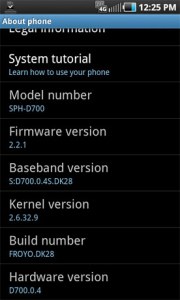 Samsung may have missed its promised September (and November) ship dates for Froyo on the Galaxy S range, but at this point, we’re just pleased to see any progress at all. Sprint’s Epic 4G has just become the first US Galaxy S phone to nab an official Android 2.2 (v2.2.1, in fact) build, with the requisite files populating Google’s servers this evening. If you’ll recall, a near-final build actually leaked out around three weeks ago, but the DK28 version making the rounds at xda-developers looks to be the real deal. Head on over to get your update going, and be sure to let us know how everything turns out in comments below.
 AIVAnet