


2016 Mini Cooper Clubman review – Roadshow
The Good The 2015 Mini Clubman is the largest Mini yet, but is still quite compact. The larger footprint directly manifests as improved interior space. The more premium Mini offers amenities such as semiautonomous parking, remote-opening rear doors and a well-appointed cabin. Both the new 1.5- and 2.0-liter turbocharged engines offer excellent performance that is well matched for the sport-tuned suspension.
The Bad The infotainment system lacks support for Apple CarPlay or Android Auto, and the destination and music search interfaces are needlessly tedious. This more premium Mini’s price easily crests $40,000. Some buyers may find that a big pill to swallow for such a small car.
The Bottom Line The 2016 Mini Clubman is the biggest and most premium Mini yet, but it’s still a Mini: quite small, playful and quirky. This odd balance of lilliputian luxury puts the Clubman in a class of its own.
Let’s start with a superlative. The 2016 Mini Cooper Clubman is the longest Mini model yet. Stretching to 168.3 inches from nose to tail, it’s just over a foot longer than the previous Clubman model. Heck, it’s more than 6 inches longer than the Countryman CUV.
But it almost had to be this way. The dimensions of the new Cooper four-door that joined the lineup this generation are so close to the first-generation Clubman that the new model had to grow significantly to justify its existence.
Grown-up style
But Mini didn’t just physically scale up the Clubman; the automaker is also taking the vehicle’s style, amenities and image upscale as well. This is a more grown-up Mini. One that is less “quirky and cutesy” and more “premium compact.” One Mini representative used the term “flagship” when describing the Clubman, which makes me think of it as the BMW 7er of the compact class.
The elongated profile preserves and exaggerates the Clubman’s characteristic low and wide proportions. Its track is about 2.5 inches wider than before (overall width is up by 4.6 inches) and the wheelbase is 4.8 inches longer, but the roof sits within a quarter inch of the older car’s. These proportions make the Clubman look hunkered down to the ground and still appear compact when viewed curbside.

The new Clubman is longer from nose to tail than even the Countryman small crossover.
Antuan Goodwin/Roadshow
For comparison’s sake, the new Clubman is about an inch longer than the Mk7 Volkswagen Golf, but its roof sits about an inch lower.
The increased dimensions pay off in the cabin, where the Clubman has 2 more inches of knee space in the second row and more head and shoulder room all around. Of the current Mini lineup, this is the one that should be easiest to load a car seat into. There’s also significantly more cargo volume than before, both with the rear seats occupied and especially when they’re folded flat, when the Clubman’s 47.9 cubic feet of cargo volume bests the Countryman by 5.7 cubic feet.
2016
Mini
Clubman
S:
Mini
scales
up…
See full gallery


1 – 6 of 32
Next
Prev
In growing up as a Mini, the Clubman loses the asymmetrical design that it debuted with. The first generation featured a small, rear-hinged coach door only on the passenger (right-hand) side. The new model uses a more traditional four-door configuration. Well, technically, a six-door configuration, since the Clubman retains its dual rear doors on the hatchback — only now, those doors can be opened remotely with the touch of the key fob, which is pretty sweet to see in action, or by kicking a foot beneath the rear bumper while the key fob is on your person.
Modular TwinPower engines
The Clubman is available with two turbocharged engine options, and it should come as no surprise that they’re largely identical to the ones in the hardtop two- and four-door models that debuted previously.
Base Cooper models feature a 1.5-liter TwinPower turbocharged three-cylinder engine that makes 134 horsepower and 162 pound-feet of torque. Before you pooh-pooh the idea of a premium three-cylinder engine, I should say that BMW’s two-stage turbocharging does an excellent job of making this feel like a much larger engine and eliminating throttle-response lag. Everyone I’ve spoken to who’s driven the 1.5-liter agrees that it’s a good little motor.

Beneath the clamshell hood is Mini’s new modular 2.0-liter turbocharged engine. The 189 horsepower, 207 pound-foot mill is sourced from BMW.
Antuan Goodwin/Roadshow
With the aid of either a six-speed automatic transmission or a six-speed manual, power reaches the front wheels. The manual gearbox is the more efficient of the two, with an estimated fuel economy of 25 mpg city, 35 mpg highway and 28 combined, but only just so. The automatic, which I was able to test, only loses 1 estimated mpg on the highway by comparison.
The TwinPower engines are of a modular design, so just slap an extra cylinder onto the end of the three-banger and you’ve got the more potent Cooper S with its 2.0-liter TwinPower turbocharged four-cylinder engine. (OK, it’s probably more complex than just slapping it on.)
The extra displacement nets the Cooper Clubman S extra output, which now sits at 189 horsepower and 207 pound-feet of torque. The S can be had with either a six-speed manual transmission or a new eight-speed automatic transmission with optional paddle shifters and launch control. With the eight-speed in place, the S is good for an estimated 24 city, 34 highway and 27 combined mpg. The six-speed loses 1 to 2 mpg across the board.
Mini has also announced that it will be making the Clubman S available with the All4 all-wheel drive system, which it borrows from the Countryman and Paceman crossovers, as a $1,800 option.
I first drove the manually shifted example and found it pleasing, yet a bit odd. For starters, the shifter throw feels ridiculously long — especially the 4-5 shift which I had to lock my elbow to reach. The clutch pedal is a much better built piece of the puzzle with a good weight that’s not too light and not too heavy, and really good engagement. The Mini will also auto rev-match when shifting (blipping the throttle on downshift and holding on ups) which allowed me to be a bit lazy getting it into gear. The upshot is that this is the sort of car you could shift all day and not get tired, which I think works well with the Clubman’s laid-back attitude.

The Clubman S is available with either a six-speed manual or eight-speed automatic transmission. Both options are good with unique strengths and weaknesses.
Antuan Goodwin/Roadshow
Later, I was able to add to my experiences with more extensive testing of the eight-speed automatic transmission. As slushboxes go, this one is a peach. Shifts were quick and well-defined when the system detected that I was driving aggressively, particularly when in the Sport mode. Paddle shifters proved to be useful and easily accessible when needed for more spirited driving or to preselect a lower gear in anticipation of a pass. When driving in a more relaxed manner around town, those same quick shifts translated into smooth acceleration.
Both the Cooper and Cooper S feature three drive modes, which are selected with a ring around the shift lever. The first mode is Green, which adjusts the throttle mapping, climate controls and other vehicle systems to save fuel. The instrument cluster displays a readout indicating how many additional miles you’re getting per gallon when in Green mode.
Mid is the odd name for the Mini’s normal, baseline drive-mode setting. Think of it as the default. Finally, there’s Sport, which livens up the performance, sharpens the throttle response, and on the Cooper S model, amps up and deepens the exhaust note. On Clubman models equipped with the optional adaptive suspension, the drive modes adjust the ride characteristics as well.
Owlet Baby Monitor review – CNET
The Good The Owlet Baby Monitor is well-designed and easy to use. It’s comfortable for kids, and sends alerts very reliably.
The Bad For the $250 price tag, the features just seem way too sparse.
The Bottom Line The Owlet is reliable enough to help some parents relax, but it doesn’t offer as many features as the price tag might indicate. It won’t replace a more conventional baby monitor, either.
Visit manufacturer site for details.
When you hear the phrase “baby monitor,” the first thing you might think of is a set of old walkie-talkie-type devices that let you hear your sleeping child (along with some static). But the Owlet Baby Monitor, along with a wave of new devices like it, are redefining that term.
The Owlet is a two-part device. It includes a small bootie that fits on your child’s foot and a base station that sits next to your bed. These two components communicate, so when the monitor senses abnormal oxygen levels or heart rate for your child, the base station then sets off an appropriate alarm. After working with the Owlet for a few days, I love the concept and performance. My wife and I really did sleep easier knowing our son’s vitals were being monitored.
That said, I can’t recommend the Owlet to everyone, simply because the $250 price tag is so much higher than what its straightforward features seem to justify. Plus, it just won’t replace more traditional monitors that let you know if your kid wakes up at night.
This smart sock uses oximetry to monitor…
See full gallery


1 – 5 of 9
Next
Prev
The Owlet’s components are well designed and durable. The socks are comfortable for babies, and they fit snugly and reliably even on squirmy children. They measure heart rate and oxygen levels with pulse oximetry — a technology used in many hospitals.
I like the dual devices of the system. The plug-in base means the bootie recharges, rather than using replaceable batteries like some other monitors of this sort. Plus, having a separate piece for alarms lets me leave my phone silenced at night, so I don’t mix up alerts regarding my son’s well-being with, say, a retweet or favorite on social media.
Still, I want to see more smarts for the price before I’ll be comfortable spending $250 on the Owlet. Right now, it doesn’t include alerts if your child flips onto their stomach, or if your child has woken up and is crying. It also doesn’t help you track any sleep patterns over time. All of these features can be found in other monitors for lower prices, and most of them wouldn’t take significant changes to the Owlet’s hardware.
So while I like the Owlet Baby Monitor, I can’t recommend it as a priority purchase until the price drops or the feature list grows.
Epson Home Cinema 5040UB Release Date, Price and Specs – CNET

Epson
True 4K projectors are coming down in price at a glacial pace, but lower-resolution units that claim to benefit from being fed 4K TV shows and movies are much more affordable.
Epson’s Home Cinema 5040UB is the latest example, coming this August for $2999.
It three LCD chips have a native resolution of 1080p, but it can accept 4K resolution sources via its HDMI and convert them for display. Epson says its 4K Enhancement technology, which shifts each pixel diagonally 0.5 pixels, can “double the resolution to 3840 x 2160 and surpass Full HD image quality.” I tested the feature on last year’s Epson LS1000 laser projector and the improvement was negligible.
HDR, on the other hand, delivers a much more visible improvement than 4K, and the 5040 can handle it too. Epson claims an impressive 2500 lumens and improved black levels for better contrast compared to previous units like the 5030 we reviewed. The company also says the 5040 can render all of the DCI color gamut used for today’s HDR TV shows and movies.
The projector has a pair of HDMI inputs that work with the HDMI 2.0a transmission and HDCP 2.2 copy protection standards, so it work can handle the full capabilities of playback units like the Samsung UBD-K8500 4K Blu-ray player.
Epson is also selling a version of the projector, model 5040UBe ($3299) that uses an outboard HDMI connection box that communicates with the projector via the WirelessHD standard.
Epson gave me a demo of the new 5040UB projector with the “Kingsman: The Secret Service” 4K Blu-ray, and it compared well to a much more-expensive native 4K projector from Sony. Of course I’ll reserve full judgement for a CNET review.
In the meantime, here are some other specs and features for the 5040UB.
- 1080p native resolution with 4K Enhancement Technology
- 2500 lumens brightness
- Full DCI color gamut
- Auto Iris
- Power zoom, focus and lens shift (10 memories)
- ± 96.3 percent vertical axis, ±47.1 percent horizontal axis lens shift
- Wireless HDMI (5040UBe only)
A pair of related models will also arrive in August as part of Epson’s Pro Cinema line for the custom installation market. The 6040UB ($3999) has basically the same specs as the 5040UB, but with a black instead of white body, and built-in ISF calibration tools as well as SF Day and ISF Night picture memory modes. The company will also release the Pro Cinema 4040 for ($2699), which is dimmer than the other three at 2300 lumens, but is otherwise similar to the 5040UB.
Canon imageCLASS LBP151dw review – CNET
The Good The Canon LBP151DW is adept at printing high quality text documents with respectable print speeds. With the help of its 802.11 b/g/n Wi-Fi print server, it can also connect to the cloud to print directly from mobile devices and Google Chrome Web browsers.
The Bad The printer can’t scan or copy documents; doesn’t support Apple AirPrint; the toner refills are more expensive than average.
The Bottom Line The Canon LBP151DW is a competent workhorse laser printer, but rival models offer more features and lower ink costs for the same price.
Single-function printers — those without scanning or copying capability — are a rare species these days, but a simple monochrome laser printer like the Canon imageCLASS LBP151dw ($169, £119, AU$230) is all you really need if you print mostly text documents and don’t have a need for color output. The printer is fast to spit out jobs and it’s great for connecting to a variety of computers and mobile devices. But printers are ultimately judged by the cost of their consumables, and the LBP151dw will ultimately cost you a lot more to refill the toner than competing devices.
Canon imageCLASS LBP151dw
See full gallery


1 – 5 of 9
Next
Prev
Design
The imageCLASS LBP151dw is your basic black box of a printer. You can load 250 sheets of basic white paper into the tray on the bottom, or you can also feed different types of media like card stock or envelopes into the manual feed tray.
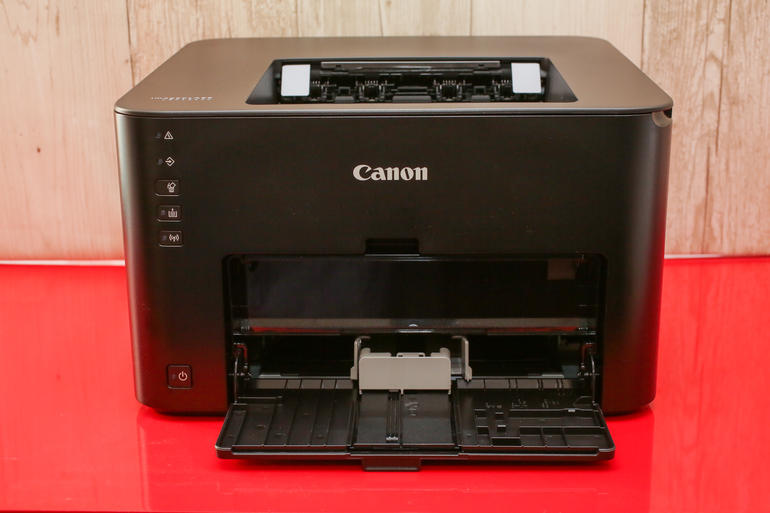 View full gallery
Canon imageCLASS LBP151dw
Sarah Tew/CNET
The unit measures 15.4-inches (39.1 cm) wide, 13.2-inches (33.5 cm) deep and 9.7-inches (24.6 cm) tall, which means it’s bigger than the HP LaserJet Pro P1102W and not quite as compact as the Brother HL-L2360DW, but it should still fit just fine on a small desk without taking up too much space.
There’s no display on the front so you can’t monitor the progress of a multi-page job, but that’s to be expected for a monolaser printer. There is, however, an indicator button that lights up on the control panel if you’re out of paper, or if there’s a jam to clear. To that end, I never experienced a single paper jam in the few days I spent testing the Canon.
Canon imageCLASS LBP151dw
| $84, £59 UK, $114 AU |
| 15.4″ x 13.2″ x 9.7″ (39.1 cm x 33. cm x 24.6 cm) |
| 1 black toner cartridge |
| Yes |
| No |
| No |
| USB, Ethernet, Canon PRINT Business app, Mopria Print Services, Google Cloud Print |
| 250 Sheets |
| None |
Features
The LBP151dw was designed for the economic-minded and has a built-in auto-duplexer, which is just a fancy way of saying that it can flip a sheet and print on both sides before spitting out the paper.
BabyBit Baby Monitor Release Date, Price and Specs – CNET

BabyBit
It can be tough to leave infants or toddlers with a caretaker while you’re out, whether they’re family members, friends, or hired help. But that’s exactly what millions of parents have to do when they go back to work soon after delivering a child. One developer, launching their Indiegogo campaign today, is hoping to make that prospect just a little less scary for new parents.
The $159 BabyBit Baby Monitor isn’t like other monitors. Instead of offering information to caretakers who might just be a few rooms away from a sleeping child, the device sends information to parents who are away from the house while their child is under another’s supervision.
Here’s how it works. The monitor clips to a child’s onesie and connects via Bluetooth to the caretaker’s phone. From there, it can offer some basic information — like if the child is crying — for the caretaker who’s watching the child. But the app also monitors things like a caretaker’s distance from the child, whether the child has been crying inconsolably for a longer period of time, and other important reasons for concern. Then, in the case of any of these, the app sends a notification to parents, who can check in with the caretaker to find out how they can help.
It’s a pretty simple mechanism, but it’s one no other device has done. And if it works, it could be an important addition to the current market. One of my biggest fears as an absentminded parent is accidentally leaving my son in the car while I’m thinking about a work project or talking on the phone with someone. And as research has indicated, it’s a mistake that can happen to anyone.
But with a device that not only notifies me if my phone goes out of close range with my son, but also notifies my wife if I stay out of range for more than, say, 3 minutes — that could actually save lives. And if BabyBit’s prototype car integration, which turns on the AC in the case of a child being left inside, also comes to fruition, the smart monitor could be a must-buy for many parents.
One of my big questions for BabyBit is whether the Bluetooth technology that responds to the proximity of users’ phones will be reliable. If the notifications for parents are simply based on signal strength, then depending on the quality of the signal and the nature of the environment, it could lead to too many false alarms, or too few real alarms. I’ll just have to wait to actually test BabyBit before knowing how well this feature works.
Crowd sourced projects always involve risk for investors, but according to the BabyBit team, they have a working beta unit of the monitor, and an app that is being tested and honed right now. That in combination with their backing by Jaguar Land Rover’s start-up incubator gives me hope that the November release date for BabyBit is attainable. Of course, it all depends on whether the project gains support.
Huawei Honor 5C Release Date, Price and Specs – CNET
Huawei offshoot Honor is bringing its latest smartphone to Europe. The Honor 5C is all about wowing potential buyers with the killer combination of high-octane power and an eye-catchingly low price. It’s just £150 in the UK — that converts to about $220 or AU$295, although a release has yet to be announced in the US or Australia.
Available in grey, silver and gold, the phone’s all-metal body is clad in brushed aluminium and from the back is reminiscent of the HTC One M9 — a slick-looking phone that really nailed it in the design department. The square 13-megapixel camera that sits on the rear not only promises to take great photos, but has a special coating that Honor says will reduce glare and prevent fingerprints from causing blur. It’s accompanied by an 8-megapixel selfie snapper on the front.
The 5C isn’t all about photography though. It has impressive features and specs across the board. These include two quad-core processors and a dual SIM-card slot, which will come in particularly handy if you’re a frequent traveller.
The 5C has been out in China for some time now, where dual SIM-card slots are common. This is not so much the case in Europe, even though there are undoubtedly phone users here who might appreciate the option to switch between SIMs. All the better for Honor — being able to offer this unusual feature will help it stand out in the otherwise crowded European smartphone market.
Honor 5C brings two SIMs and octa-core power
See full gallery


1 – 4 of 8
Next
Prev
Another major selling point is the 5C’s £150 price tag. From 20 June you can buy the phone SIM-free online from Honor, Amazon and a number of other retail sites. Alternatively, the 5C will be available on pay as you go or on contract from Three starting in August.
Key specs
- Quad-core 2.0GHz processor, plus quad-core 1.7GHz processor
- 2GB of RAM
- 16GB of onboard storage (expandable with a microSD up to 128GB)
- 3,000 mAh battery
- 5.2-inch Full-HD IPS display
- 13-megapixel rear camera with flash-capable HDR mode
- 8-megapixel front-facing camera
- Dual SIM-card slots
Mini review video: Our verdict on the OnePlus 3 in a minute
While you were refreshing Engadget to see all the new stuff Apple, Microsoft and Sony announced this week, you may have missed the fact that OnePlus came out with a new phone. The OnePlus 3 — yes, that would be its third-generation flagship — comes in at a reasonable $399 and as usual, boasts some impressive specs for the price. In addition to offering top-notch internals, it brings a more premium-feeling aluminum design as well as dual SIM support.
That said, we wish it came with more storage options (just one 64GB version) and the supposedly fast-charging charger isn’t always that fast. If money is no object, we still prefer the Samsung Galaxy S7 and HTC 10 — at least in absolute terms. But if you want a flagship-caliber phone but don’t have flagship money to spend, this is your best bet.
Bose QuietComfort 35 review – CNET
The Good The Bose QuietComfort 35 combines top-of-the-line active-noise canceling with wireless Bluetooth operation in an extra-comfortable, fold-up design. The sound is excellent for Bluetooth, and it doubles as a great headset for phone calls. Works in wired mode with included cord if battery dies.
The Bad Battery isn’t user-replaceable, and the headphone is heavier than the QuietComfort 25.
The Bottom Line Bluetooth meets best-in-class noise canceling: the Bose QuietComfort 35 is the ultimate noise canceling wireless headphone you can buy right now.
This is the Bose product a lot of people have been waiting for: the QuietComfort 35, an active noise-canceling headphone that’s also wireless.
At $350 (£290, AU$499), it costs more than the wired QuietComfort 25. But at least it’s only a $50 price bump, which puts this around what Beats’ competing Studio Wireless costs. (That 2014 headphone has been discounted in recent months, however, indicating Beats probably has something new coming.)
While the QC35 is very similar looking to the QC25 and is relatively lightweight, it is heavier than the QC25, weighing in at 10.9 ounces or 309 grams vs. 6.9 ounces or 196 grams. The one significant exterior design change Bose has made is to widen the headband, which makes for a little more stable fit with perhaps some added sturdiness.

The QuietComfort 35 has a wider headband than the QuietComfort 25 and weighs more.
Sarah Tew/CNET
With microphones inside and outside the earcups, Bose says the QC35 senses, measures and sends unwanted sounds to two proprietary digital electronic chips — one for each ear — that respond with a precise, equal and opposite signal in less than a fraction of a millisecond. According to Bose, the headphone is also equipped with a new digital equalizing system that balances the sound, whether you’re listening at lower or higher volumes.
Battery life is rated at 20 hours, which is quite good. However, Bose has moved to an integrated rechargeable battery from the the QC25’s AAA removable battery configuration. (Bose’s SoundLink Around-Ear Wireless Headphones II also uses an integrated rechargeable battery.) I personally don’t have a problem with the change — and don’t like having to buy new batteries — but some people prefer their powered headphones to use standard batteries so you can swap in a new one should the headphone die, say, mid-flight. Also, rechargeable batteries only have so many charges in them, and while the one in the QC35 should last several years, it’s not user-replaceable. (By comparison, the Parrot Zik has a removable, rechargeable battery.)
The good news is the headphone does work as a wired headphone if the battery runs out of juice (a 47.2-inch cord is included — it’s slimmer than the one that comes with the QC25 and has no integrated microphone). You just can’t use the noise-canceling or Bluetooth, of course, but at least you can get some sound out of it, and the tight seal of the ear cups does provide a fair amount of noise isolation. As a passive headphone, the QC35 sounds decent — just not $350 decent. When powered on, the digital processing and equalization features do smooth things out and improve the sound, so it’s best used it as a powered headphone.

The headphone is also available in a silver version.
Sarah Tew/CNET
It’s also worth noting that it’s important to have the corded option for airplane use. Some airlines will still restrict you from using Bluetooth headphones during portions of the flight, and a cord is necessary to plug into your seat’s in-flight entertainment system. Thats’ the one drawback of Bose’s upcoming QuietControl 30 in-ear Bluetooth headphone with variable noise-canceling: it can only be used as a wireless headphone and has no corded option.
As for other features, there’s an integrated remote on the right earcup with buttons for adjusting the volume, controlling playback and answering and ending calls. The QC35 also works with Bose’s free Connect app for iOS and Android devices, and I didn’t have any trouble pairing the headphone with an iPhone 6S, Samsung Galaxy S7 Edge and and MacBook Air (you can pair the headphone with two devices at the same time and jump back and forth between them).
Bose may add features to the Connect app in the future, but currently it’s pretty basic: It allows you to manage your pairing list, upgrade the firmware and change the auto power off settings (the headphone powers down if you don’t use it for a certain length of time, which is a good battery-saving feature). When you turn on the headphones, a female voice advises you of how much battery life is remaining and with which devices you’re paired. That information is also available in the app.
Bose QuietComfort 35 (pictures)
See full gallery


1 – 5 of 21
Next
Prev
Available in silver or black, the QC35 is designed to be used as an advanced wireless headset, and it muffles ambient sounds like wind and crowd noise so callers can hear you better — and vice versa. There’s also a side-tone feature that allows you to hear your own voice in the headphones as you speak so you don’t raise your voice while talking.
It works really well as a headset and is great for conference calls (I’m on one as I write this). It’s superior to the QC25 in this regard.
Best noise-canceling, excellent sound for Bluetooth
The QC35 may not be the best-sounding Bluetooth headphone out there, but it’s certainly among them. I spent most of my time comparing it to the Sennheiser Momentum Wireless and the Beats Studio Wireless, both of which are Bluetooth headphones that feature active noise-canceling (the Parrot Zik 3 and Sony H.ear on Wireless NC do, too).
Xiaomi Mi Max review – CNET
The Good The Xiaomi Mi Max has a brilliant, massive 6.4-inch screen and ridiculously good battery life.
The Bad The phone’s enormous size makes it hard to use one-handed; it’s also heavy and sticks out uncomfortably in your pants pocket.
The Bottom Line The Xiaomi Mi Max’s premium build, amazing battery life and superlarge screen make this a good phone for watching videos and playing games but the size makes it hard to use with one hand.
Visit manufacturer site for details.
If the phrase “too big” never made it into your vocabulary, then the 6.4-inch Xiaomi Mi Max was made for people like you. The display is bright and the battery lasts for a good, long time, but the question for any phone this large will always come back to size: is it too much for you, or can you work with it?
I’m personally not a fan. Phones don’t need to be small, but they also shouldn’t be hard to use one-handed. And let’s be clear here, the Max is a strictly two-handed affair if you want to use it without difficulty (unless you have really large hands). I found it hard to reach apps, and it’s just a pain to keep adjusting my grip to reach stuff at the top of the phone. Still, I guess the Mi Max is really useful to shade your face on a sunny day, and I do really like how the metal chassis feels in my hands.
 View full gallery
The Xiaomi Mi Max is big enough to use as a shade if it’s sunny outside.
Aloysius Low/CNET
Of course, the real reason you’re buying this phone is to watch video and read — e-books, articles, Facebook, whatever — and the Mi Max is perfect for this. The large 6.4-inch full-HD (1,920×1,080 pixels) is sharp and vibrant, and Xiaomi’s Sunlight Display technology makes details like words and images clearer under bright sunlight. Gaming on the phone was great. Asphalt 8 ran smoothly on High settings, and I actually liked having a bigger screen here.
Ninebot by Segway miniPro Release Date, Price and Specs – CNET
In the space of twelve months, hoverboards went from cool new gadgets to public (spaces) enemy number one. Between being a pedestrian hazard and potentially explosive, these motorized self-balancing skateboards are illegal to use outside of private property in New York City and the entirety of the United Kingdom (to name just a few locales), and many airlines ban their transport, too.
Into that challenging market comes Segway. That company’s original product, the self-balancing two-wheeled Personal Transporter scooter, was essentially the original hoverboard. In fact, Ninebot — the Chinese company that purchased Segway in 2015 — has successfully barred all rival hoverboards from the US market, saying they infringe on Segway’s patent for self-balancing two-wheeled devices.
And with its new miniPro, Segway’s pitch is now, “Why settle for those knockoffs when you can get the real thing?” Indeed, the Segway miniPro is essentially a downsized version of the old Personal Transporter. But the name brand status will cost you a pretty penny: $999, to be precise.

The Ninebot by Segway miniPro is a high-end hoverboard with unusual features including a steering column and Bluetooth remote.
Sarah Tew/CNET
The classic Segway handlebars have been shrunken down to a distinctive knee-high “steering bar” poking up from the main platform. It’s also better built than most hoverboards with chunky tires and a substantial-feeling platform to stand upon.
But while it may look like an old-school Segway, the miniPro’s weight limit is a lot more conservative — 185 pounds (84 kg) versus 260 pounds (118 kg). While most hoverboards are controlled by leaning with your feet, only the miniPro is supplemented by the steering bar which makes finer control possible. You grip the steering bar above your knee and lean left or right to turn. It’s easy to turn 360 degrees on the spot as a result.
Related Links
- Before you even think of buying a hoverboard, read this
- Segway bought by Chinese rival Ninebot
- Segway offers hoverboard competitor in US for $1,000
- Hoverboards banned again for infringing Segway patents
It pays to keep in mind that the steering bar is “live” when powered on, and should definitely not be used to steady yourself when getting on unless you want to be flung off. Instead you need to step on one of the pads, listen for the beep and then carefully lift your other foot onto it. It takes a little practice, but it’s not like balancing on a bike as the pads are unusually sensitive. You may end up scooting back and forward slightly when you stand still just to keep your balance.

Sarah Tew/CNET
While it’s locked to 4 MPH (6.4 km/h) for the first kilometer, it’s capable of a potential top speed of 10 MPH (16.1 km/h). But the device is designed to slow you down way before that and it does this by gently leaning backwards. The hoverboard beeps and notifies you when you’re going “too fast” which we found was around the 6 to 7 MPH mark (10 km/h).
It’s definitely fun to ride around and a few people including myself experienced a kind of Hello Panda moreishness. You want to keep riding as soon as you get off.
One thing we did notice is that the unit can be a little hyperactive when left to its own devices. It can slowly roll away when sitting by itself even when on a flat surface. This is surely a gyroscope issue but it shouldn’t move unless being controlled (either by a rider or by Bluetooth). While there is a balance control slider which is designed to prevent this happening it wasn’t very effective. The scooter slid backwards and forwards anyway.

Screenshot: Ty Pendlebury/CNET
And yes, the Segway is controllable by Bluetooth. The scooter comes with an app (iOS and Android) which is used for a bunch of different functions — and this includes annoyingly insistent and undefeatable safety instructions (even if you’ve sat through them before you need to wait 30 seconds or shut down the app to leave). The app also monitors speed and charge levels.
The remote control gives you a D-Pad type surface to control the miniPro but there’s no camera and it’s only over Bluetooth. This means line-of-sight with 50 feet (15m) or so. It’s a fun trick and great for scaring pets, but it’s even harder to control than when riding. Braking takes a lot longer, even when you pull right back, and it’s really easy to crash the unit. As a result it’s probably not something you’ll use a lot.
It’s worthwhile noting that there is a China-only version called the mini (as opposed to the miniPro) which is only $300. Segway says the differences between the two are in the feature set, and that the local version was subject to the UL 2272 certification which covers hoverboards specifically, unlike the mini.
Expensive, impractical — and incredibly fun
The Segway is like one of those cool mini Mercedes electric cars for kids — it looks like fun but its kind of out of the reach of most people. As a commuter device, though, the Ninebot by Segway miniPro is pretty limited because it’s not designed to go over significant humps like crosswalks. This is a toy primarily, and a pretty expensive one.
But we can’t deny that it’s also very fun. Everyone in the office was crowding around and demanding a ride. For a product in our office full of jaded tech journalists, that’s a rare feat these days.
 AIVAnet