


2016 Chrysler 300 Limited AWD review – Roadshow
The Good The 2016 Chrysler 300 looks good, drives smooth and packs the always excellent Uconnect touchscreen infotainment system.
The Bad Fuel economy is not great, and mediocre interior materials make certain parts creak and groan while other parts look old straight from the factory.
The Bottom Line The Chrysler 300 gives you a uniquely stylish look, combined with a comfortable cabin and driving demeanor, but it lags behind the competition in fuel economy and interior fit and finish.
Ever since the Chrysler 300 appeared on the scene in 2004, it provided sharp-looking big-body cruising, without breaking the bank. More than a decade later, it still occupies that same spot, albeit with a flashier wrapper and nicer equipment.
Trouble is, while the 300 was rolling down the boulevard, several new challengers appeared — a refreshed Toyota Avalon, an all-new Nissan Maxima and even a refreshed platform-mate, the Dodge Charger. The 300 hasn’t gotten worse over time, others have risen up around it. But in the face of all these new, uh, faces, the 300 remains a competent machine.
Looks and feels

If it’s good enough for Heisenberg…
Andrew Krok/Roadshow
The 300 has never not been handsome. It’s a blocky car, punctuated by strong fenders and the appearance of a low roofline. It looks mean, which might explain its brief appearance as Walter White’s wheels in “Breaking Bad.” It’s a more restrained, conservative look than the overly stylized Maxima, the musclebound Charger or the Avalon, which looks like the visual embodiment of a lullaby.
Inside, large and commanding front seats lend a feeling of executive-style appointment, and while an all-black interior may add a bit of drabness, it’s never unattractive.
While the look is fine, I had some issues with the fit and finish. Whereas the leather is surprisingly supple, the plastics throughout are anything but. The softest plastic lies atop the dashboard, but looks like it’s fading straight from the factory. My car’s faux-wood trim was attractive, but the storage cubby door on the center stack creaked like a 100-year-old house’s stairs.
There’s also the matter of the shift knob. The rotary dial is love-it-or-hate-it. I don’t mind it, but it’s made of a very cheap looking plastic. The gauges are also a bit in your face for a car that’s more on the demure side — neon blue lighting and sportily arranged numbers make for a strange juxtaposition.
Tech-forward, but not leading the charge

The 300’s Uconnect system is excellent as always, but its 3G telematics is a bit behind the times.
Andrew Krok/Roadshow
If there is one thing I absolutely adore in a Chrysler, it’s the infotainment system. Uconnect is snappy, well laid out and easy to get used to, all of which earn high praise from me. The associated information display between the gauges is easy to navigate, and I like just how much it’s capable of displaying, from engine oil temperature to individual tire pressures to one of the best looking fuel economy gauges in the industry.
Bear in mind, not all 300s feature this system. With a 300 in base trim, you will need to add the $2,395 Premium group to get the 8.4-inch touchscreen Uconnect system. The Anniversary Edition 300 I drove came with the system as standard, but with a $2,995 premium over the base price.
Additional apps are available in the system, such as Pandora, iHeartRadio and Slacker Radio, but they require the Uconnect Access phone app. There’s a Wi-Fi hotspot with an embedded modem that also powers some of Uconnect’s apps, like Yelp, but its 3G speeds are a bit behind the curve. Nevertheless, the 300’s two USB ports in the back, complementing the one up front, let passengers keep their phones charged on longer hauls.
In its effort to innovate, Chrysler integrates the windshield wipers and turn signals into a single stalk on the left side. If you’re not used to Chrysler vehicles, this will be as annoying as it is confusing. Changing a very traditional configuration may be a bridge too far.
iBaby Air Release Date, Price and Specs – CNET
I love raising my baby in a city, if only because I’m able to maintain a life without too much trouble. But with cities often comes pollution, and air-quality problems have been linked to major long-term health concerns — especially for young children. It’s not just an outdoor problem, either. Volatile Organic Compounds (VOCs) are commonly found indoors, including carbon monoxide, methane, ammonia, and plenty of others.
But now iBaby, a company that’s built a name as a popular developer of baby monitors, has a solution: a smart air-quality monitor and purifier called the iBaby Air. The device just reached full funding on Indiegogo, but I got my hands on one before it launches later this year. Here are four things you need to know about iBaby Air.
iBaby’s tiny new air purifier packs a punch
See full gallery


1 – 4 of 8
Next
Prev
It does something few other devices do
Sure, plenty of gadgets monitor your home for carbon monoxide or smoke. Some even track dust, pollen, and CO2 levels. But few devices offer the sort of all inclusive air-quality monitoring that iBaby says it does. Of course, how well it tracks VOCs still has to be tested. But it’s at least trying something few consumer devices in the past have done.
The iBaby Air has some legit smarts
Aside from tracking air quality in the moment, the iBaby Air maps your home’s air quality over time, letting you see improvements as you make them. While another recent crowdfunding project called Wynd is doing something similar, iBaby Air sweetens the deal with a speaker for music and two-way audio, a full RGB color nightlight and other features in the app.

Chris Monroe/CNET
The iBaby Air is small, portable and sleek
The white finish looks fine, and the additional optional wood finishes will fit nicely with different home aesthetics. Plus, unlike those conventional air purifiers that take up a whole corner of your house, the 6-inch-tall iBaby Air can just perch on a mantle, out of the way.
The iBaby Air costs $150
That’s not expensive, but it’s not cheap either. Standard air ionizers cost around $60 to $80. The iBaby Air adds a lot of smarts to the package, but whether that merits the extra 70 or 80 bucks will depend on what users are looking for.
Nikon D500 review – CNET
The Good The Nikon D500 is fast with excellent continuous-shooting and autofocus performance, its 4K video support is a welcome novelty for its dSLR price class and, of course, there’s the great photo quality.
The Bad Terrible wireless file-transfer and remote-control app, and its Live View (contrast) autofocus could use a boost.
The Bottom Line There’s tons to like about the Nikon D500, from its fast shooting and excellent image quality to its broad feature set and streamlined design. But it still falls short with its Live View autofocus and seriously subpar wireless file transfer and shooting operation.
After 6 years neglecting the power APS-C action photographer, Nikon released the mostly impressive D500 dSLR, the little sister to the pro full-frame D5. With the same autofocus and metering systems as that model, a high-sensitivity 20.9-megapixel CMOS sensor, a large tilting touchscreen and 4K video, it hits most of the essential targets for a camera in its class. Only a couple of flaws knock it slightly off course.
The D500’s body runs $2,000 (£1,730, AU$3,500); the camera also comes in a kit with the DX 16-80mm f2.8-4mm lens for $2,600 (£2,480, AU$4,500). Unlike a lot of kit lenses I’ve seen, this one’s pretty good, and has a useful general-purpose focal-length range equivalent to 24-120mm. The lens is sharp, with a reasonable maximum-aperture range that should match the needs of people who’d be buying the body and want something for routine situations.
Joining the 1-million ISO club
It takes more than just raw speed to optimize a camera for continuous shooting. You need the ability to take decent photos at high sensitivities. That’s the only way you can use action-stopping fast shutter speeds and sharpness-maximizing narrower apertures under a lot of conditions; most activities don’t take place in bright, direct sunlight. The D500 delivers a maximum sensitivity of ISO 1,640,000 — highest in its price range — though the camera’s native range stops at ISO 51200, leaving five stops in the expanded range.
Nikon D500 full-resolution photo samples
See full gallery


1 – 5 of 16
Next
Prev
JPEGs look clean through ISO 6400. At ISO 6400 you can still process the raws to obtain more detail, though the trade-off is a lot of “grain” and hot pixels in dark areas. Between ISO 12800 and ISO 102400 (Hi 1) in JPEGs you can see some smearing and processed color noise, but it still retains modest amount of detail. Beyond that, you can still get recognizable photos at small sizes. Processing the raw files doesn’t help much; I suspect Nikon’s performing some in-camera wizardry to produce what it does. Overall, though, the similarly priced Nikon D750, with its full-frame sensor, still produces better photos
The color rendering and white balance are excellent. Its default Standard Picture Control increases contrast and you lose some highlight and shadow detail, and midtones are compressed, but the occasional hue shift is minor.
The D500 is the first camera to bring 4K video to a consumer-priced dSLR, and the quality is quite good for an APS-C sensor; sharp, with a solid dynamic range and the same excellent color. You can see a lot of noise in shadows above ISO 6400, but overall it’s peachy.
Analysis samples

Low iso tk
Lori Grunin/CNET

Despite the stratospheric ISO sensitivity claims, JPEGs are only clean through about ISO 6400, though depending upon the scene and lighting you may get pretty good results through ISO 25600.
Lori Grunin/CNET

You don’t want to venture into the expanded sensitivity ranges often, but they’ll serve if you’re desperate in low lighting. There’s an odd white-balance shift in both raw and JPEG files at ISO 102400.
Lori Grunin/CNET

In dim light the highest ISO sensitivity images look much better than our test shots, but you still don’t want to use them at 100 percent.
Lori Grunin/CNET

I’m impressed that Nikon can produce a recognizable image from this noisy mess at its Hi 5 sensitivity, equivalent to ISO 1638400. (JPEG on left, unprocessed raw on right.) In the expanded ranges, the JPEG processing delivers better results than you can probably get with raw processing, so if you enter that territory then change the in-camera settings to help keep from blowing up the highlights.
Lori Grunin/CNET

The D500 delivers excellent color reproduction and white balance under most conditions.
Lori Grunin/CNET
Lenovo K4 Note review
Lenovo is slowly but surely making an impact in the Android smartphone market, particularly here in India. Lenovo has some fantastic devices on offer, with a smartphone portfolio that is continuously expanding, and one of the most popular of their devices is the Lenovo K4 Note.
Its predecessor was very popular, and the latest offering takes things one step further, with the K4 Note bringing some of the best features of the higher-end Vibe X3 to this affordable series. What does this device bring to the table? We find out, in this comprehensive Lenovo K4 Note review!
Buy now from Amazon
Unboxing
The phone comes in pretty standard packaging, with an image of the phone and the large VIBE branding splashed across the box. Opening the box reveals the phone in all its glory, and it’s nice to see the device already in a protective case. The hard plastic case isn’t the most impressive though, and if you are particularly clumsy, you may be better off picking something sturdier.
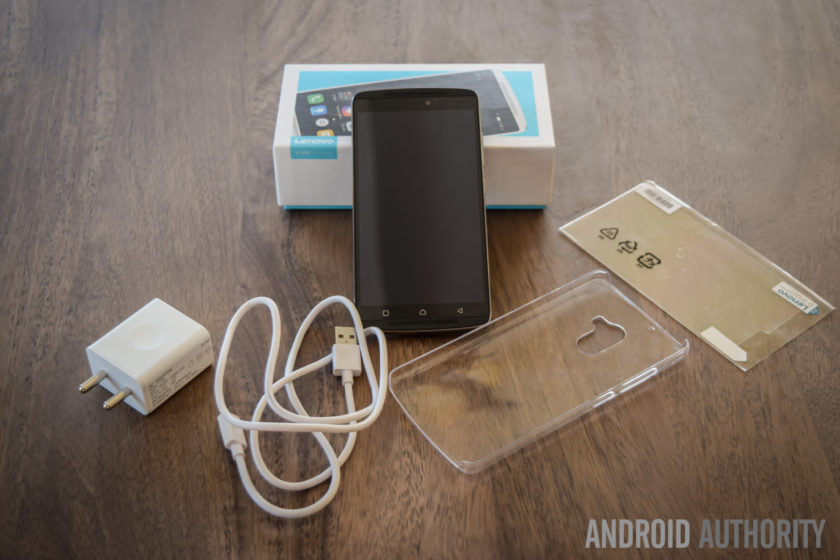
Diving in deeper, you will find the standard documentation, an AC wall adapter, and a USB charging cable, and Lenovo also includes a screen guard with the device, which is another nice touch. There are no headphones included, but that does make sense, given the affordable nature of this phone. Setting up the device only takes a few minutes, and follows the standard steps that any Android smartphone user will be familiar with. Once the phone is setup, you will find the official update for Android 6.0 Marshmallow waiting for you.
Design

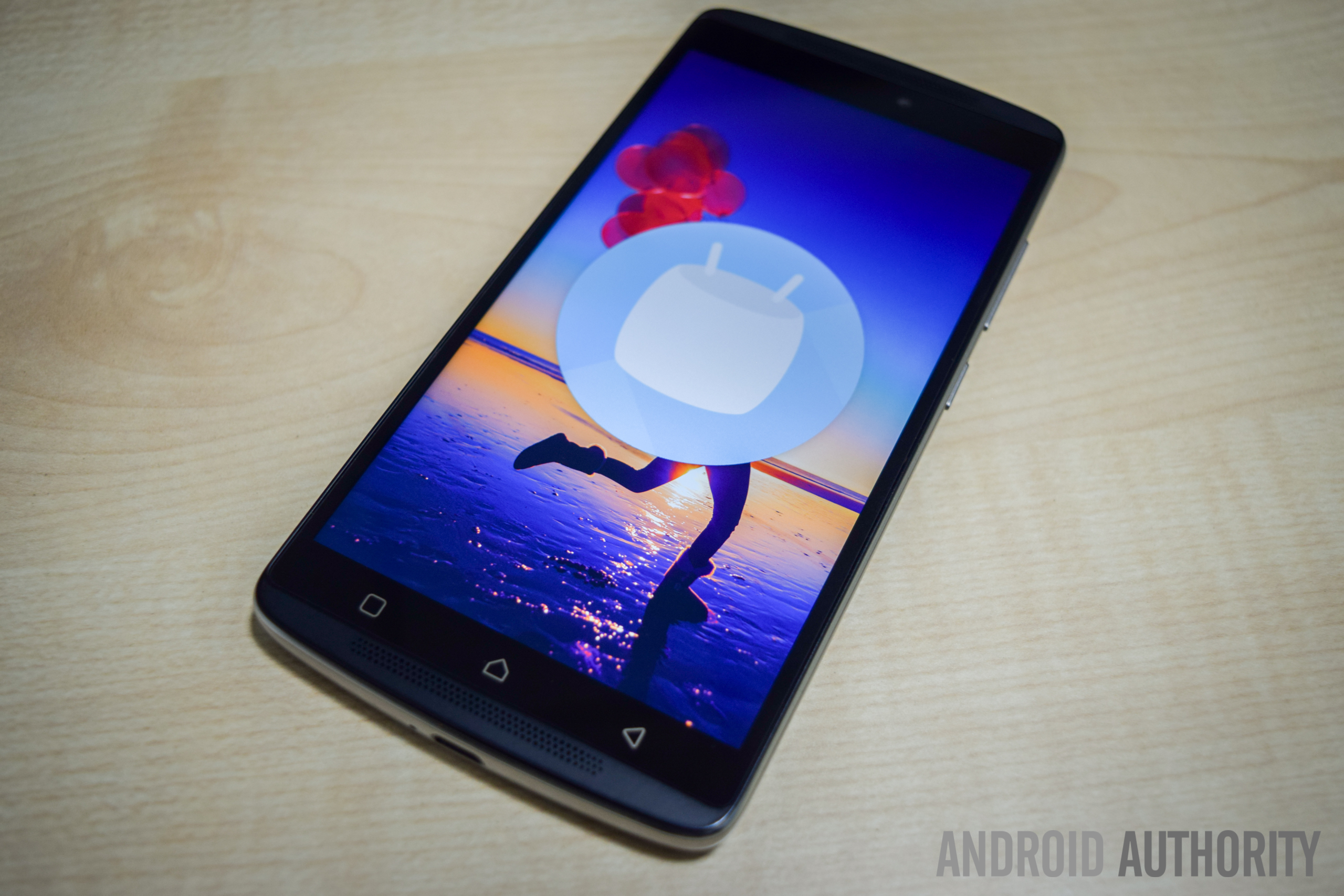
The K4 Note sees a significant upgrade in terms of design and build quality, when compared to its predecessor. The device now features a metal frame and a polycarbonate plastic backing, which makes the phone feel sturdy and solid in the hand. The combination of dual-front facing speakers and a fingerprint scanner just below the camera makes the K4 Note aesthetically similar to the Lenovo Vibe X3, which isn’t really surprising, given that this device has been released in some markets as the Vibe X3 Lite.
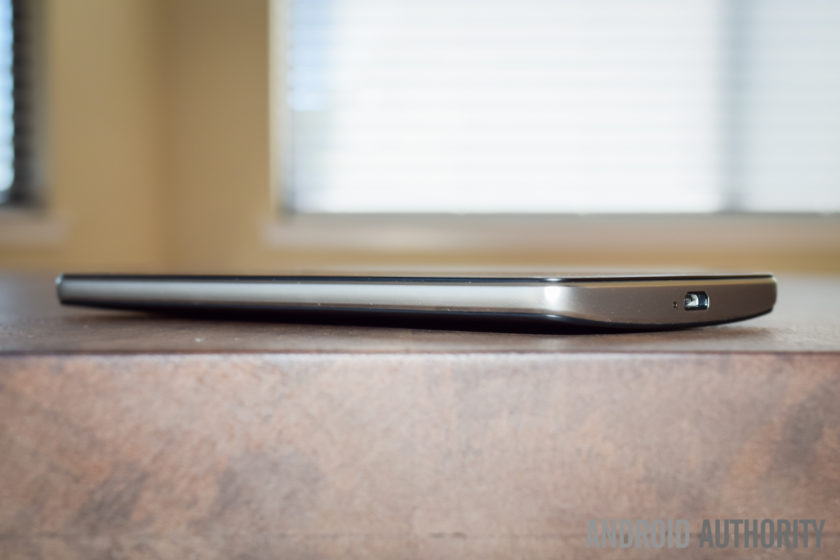
The plastic backing is removable, giving you access to the microSD card and SIM card slots, but the battery cannot be replaced. Removing the plastic back cover is when you notice how thin and flimsy it is, but despite appearances, it certainly holds up very well, and is something you won’t even notice when snapped in place. For those still worried, the device does come with a plastic protective case in the box, and there is also a version of the phone now available with a wood backing. The wooden back doesn’t seem to be sold separately yet, but is something that we can expect to see soon.
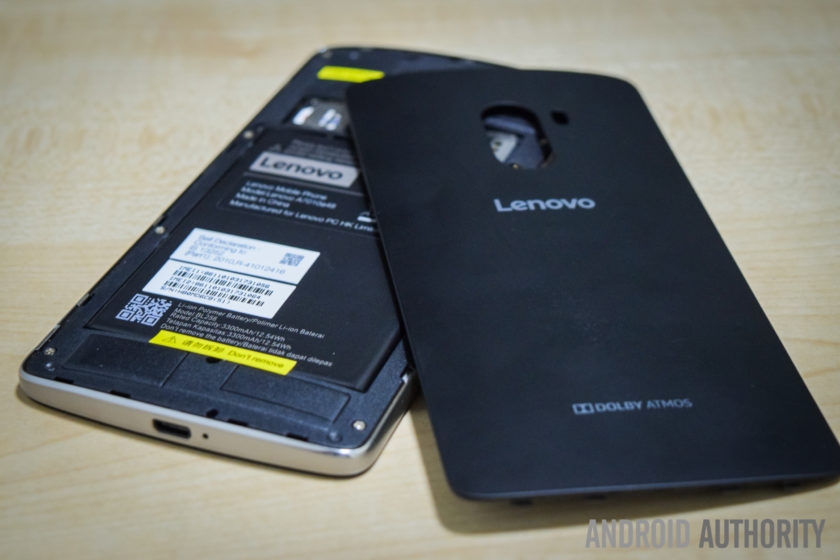
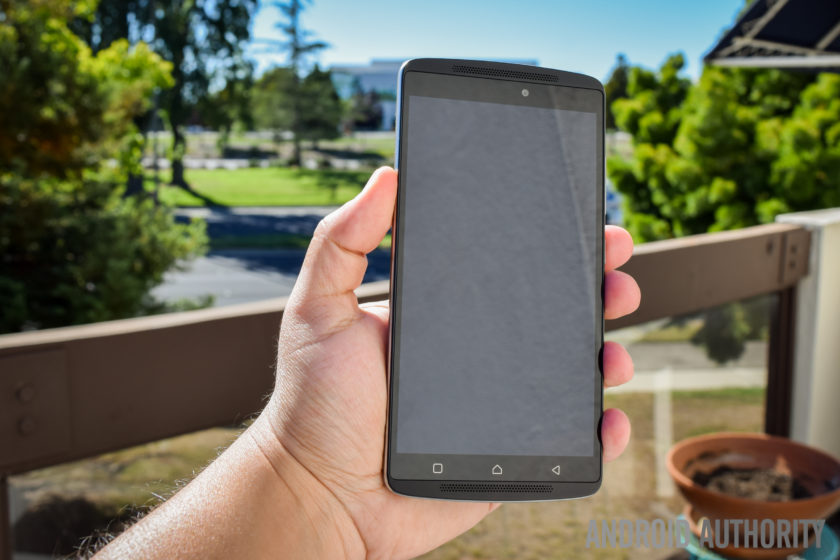
Taking a look around the phone, the headphone jack and microUSB port are at the top and bottom respectively, and the power button is below the volume rocker on the right side. On the back is the camera that is centrally located along the top, and below it is the fingerprint scanner. Up front, below the display are the three capacitive navigation keys, but these buttons aren’t illuminated, which can make them quite difficult to see in the dark.
The power button doesn’t come with something like a ridged pattern to help differentiate it from the volume rocker, but the buttons are placed far enough away from each other for this to be a minor concern. The buttons also protrude quite a bit, so you can actually easily see which button you are pressing. The buttons don’t offer as much tactile feedback as might be expected, and the power button in particular feels quite mushy. However, with you being able to unlock the device and directly go to the homescreen using the fingerprint scanner, you won’t need to use the power button all that much anyway.

As far as the handling experience is concerned, a slight curve on the back allows for the phone to nestle nicely in the palm of your hand, and unlike metal smartphones, the device isn’t slippery either, courtesy of the polycarbonate backing. Overall, the Lenovo K4 Note is a very well-designed smartphone, and as is also the case with some of its competitors, the design and build quality of the phone certainly goes beyond what you would expect from a sub-$200 device.
Display

The K4 Note comes with a 5.5-inch IPS LCD display, with a Full HD resolution, resulting in a pixel density of 401 ppi. Many affordable smartphones are starting to boast Quad HD screens now, but 1080p gets the job done here, with text appearing sharp, and watching videos and playing games is a lot of fun as well. The viewing angles aren’t great however, and while the brightness at the highest setting is good enough to allow for easy outdoor viewing, the screen can be quite dull and dark when the brightness is set to less than 40% even when indoors.
Lenovo in video:
-

Lenovo foldable smartphone a… -
Lenovo PHAB2, PHAB2 Plus, PH… -
Lenovo Tab3 Lineup Hands On -
Lenovo Vibe K5 and K5 Plus h…
The default color balance is good enough, but the color temperature is on the cooler side. You do have some options available to set the color balance and temperature to your liking, including a manual mode that gives you granular control over these aspects. One preset setting is called Comfort Mode, that helps protect your eyes when browsing the phone for long periods of time. There is also Smart Brightness, which judges when the phone is in harsh lighting conditions and enhances the visibility. It works well enough, but as mentioned, the display brightness is cranked up anyway.
Performance

Under the hood, the K4 Note comes with an octa-core MediaTek MT6753 processor, clocked at 1.3 GHz, and backed by the Mali-T720MP3 GPU and 3 GB of RAM. There is also a version with 2 GB of RAM, but this iteration hasn’t been released in India. The performance has been pretty good, helped along by a clean software package, and there have been no glaring issues. The device handles day to day tasks very well, and opening, closing, and switching between apps has been smooth.


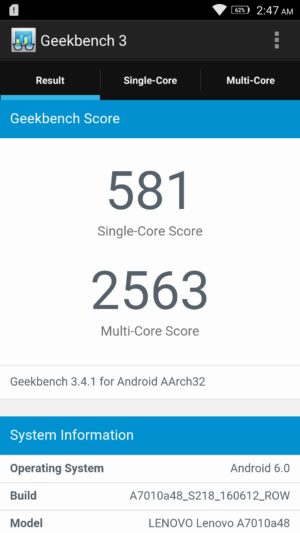
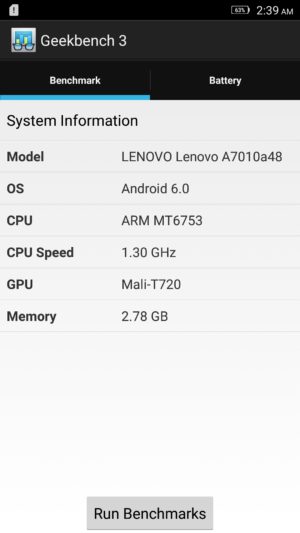
Of course, the K4 Note isn’t a performance powerhouse, and the benchmark scores reflect that, but with average usage, this phone certainly impresses. The gaming experience has been enjoyable as well, and playing games like Stick Cricket 2, UFC, and NBA Live Mobile have been a lot of fun. Games do take a bit to load, and there are some instances of stutter when navigating through the menus and settings, but when it comes to the actual gameplay, things have been smooth and lag free for the most part.
Hardware

16 GB is the only on-board storage option available here in India, but in other markets, there are 8 GB and 32 GB iterations to be found. However, something to keep in mind is that the latter two come with 2 GB of RAM, while this Indian edition features 3 GB of RAM. If storage is a concern, the device features a dedicated microSD card slot, allowing for up to an additional 256 GB of space.
You get two microSIM card slots here, and you can pre-select which SIM can be used to for calling, texts, and data. The option you select for data will allow for access to 3G/4G LTE, while the other sticks to EDGE. It’s also a nice touch that you can choose different ringtones and message tones for the two SIM cards, making it easy for you to distinguish between them. There have been no issues with voice calling, with both parties able to hear the other loud and clear.

The K4 Note comes with dual front-facing speakers – which is always the best placement for speakers – with Dolby ATMOS features. While these speakers don’t get as loud as I would have liked, you get a rich stereo sound which further enhances the video-viewing and gaming experiences.
The Dolby ATMOS settings allow you to choose between preset options like Movie, Music, Game, or Voice, and you can also set up custom settings depending on your liking. You also get additional features, including Surround Virtualizer, Dialogue Enhances, and Volume Leveler. This is buried in the Settings menu however, and is found under the “Ringtones and Volumes” section.

With headphones on, the audio is absolutely fantastic, with impressive bass that I haven’t found with other, more expensive, smartphones. Something to remember is that it can get really loud with headphones on, so much so that the default volume setting is set to 50%, and you won’t find yourself needing to go any higher than that. If good audio is one of your requirements, the K4 Note is definitely a great option.
The phone comes with a fingerprint scanner on the back, and this is another feature that was very impressive. The setup is quick and easy, and the scanner is very accurate, but while it’s definitely fast enough, it may not be as fast as other sensors out there. Using the scanner unlocks the phone and takes you directly into the homescreen, which means that you will rarely have to reach for the power button.

The scanner comes with a few extra uses when the phone is as well. You can set it up so that a single tap can have it function as a back button or take you back to the homescreen, and a long press can open the Recent Apps screen, or again, take you back to the homescreen. Finally, you can have the scanner function as a shutter button as well, which is very useful when taking selfies. These are similar to the gesture support offered by rival Chinese OEM Huawei in some of its recent flagships.

The K4 Note comes with a 3,300 mAh non-removable battery, that allows for really good battery life. I was able to consistently get up to 5 hours of screen-on time with the device, and an impressive stand-by times means that the device easily lasted through a full day of use, and sometimes even two, depending on my usage. With heavy usage however, while the screen-on time was still pretty good, it was easy to drain the battery rather quickly.


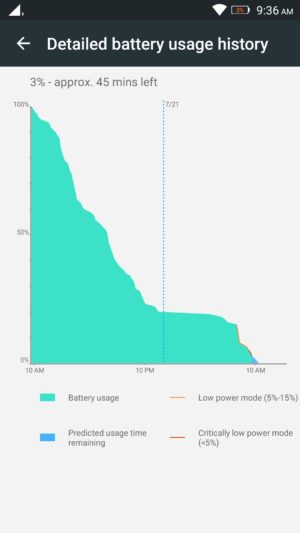

You get the standard Battery Saver mode that automatically kicks in at the 15% mark, and there is also an Ultimate Battery Saver feature, that minimalizes the UI, and allows for only calls and texts. An interesting battery feature is “Scheduled Power On and Off,” that lets you preset a time period where the device automatically switches off and turns back on again.
Camera

The Lenovo K4 Note features a 13 MP rear camera with a f/2.2 aperture, and a dual LED flash, along with a 5 MP front-facing unit, also with the same aperture.
The default camera app is very simplistic, and everything you may need can be found easily on the viewfinder. At the top left are the buttons to switch between the cameras and toggle HDR, and at the bottom is the button to toggle the flash. Only two modes are available in the menu, including Panorama and another that adds color filters to your images. Further in the settings is where you fill find the option to choose the settings for aspect ratio, photo resolution, snap mode, triaxial leveling, and guidelines.

Using the front-facing camera adds the Beauty mode, and you also have an option called “fill light,” that adds two, pink or chrome, bars at the top and bottom of the screen to light up your face in dark environments, but it doesn’t really help much, and results in a pink or bronze hue in the shot.
As far as the image quality is concerned, the 13 MP rear camera is capable of taking some nice shots, especially in well-lit situations, and the images can be crisp and clear sometimes. Not surprisingly, some noise and grain starts to creep in as lighting conditions deteriorate though. The camera doesn’t handle shadows particularly well either, with very little detail to be seen, and while HDR tends to help here, it creates an oversharpened, unnatural looking shot. The camera also tends to underexpose shots in a few situations, and when you use the tap to focus feature, it also adjusts the exposure, leading to either overblown highlights or super dark shadows.

As far as video is concerned, the camera is capable of recording at a Full HD resolution at 30 fps. Video quality isn’t particularly impressive, and with no OIS, you can get some noisy and shaky videos. The phone comes with a 3 microphone system intended to help with background noise reduction, and while it does a good job when outdoors, the sound is somewhat muted when recording audio in quieter locations.
Overall, the K4 Note camera is serviceable and will certainly get the job done in a pinch, but it’s in the little details that the camera lets you down. It’s certainly not the worst camera we’ve seen on an affordable smartphone, but it isn’t close to the best either and if the camera is important to you, this is certainly something to keep in mind.
Software
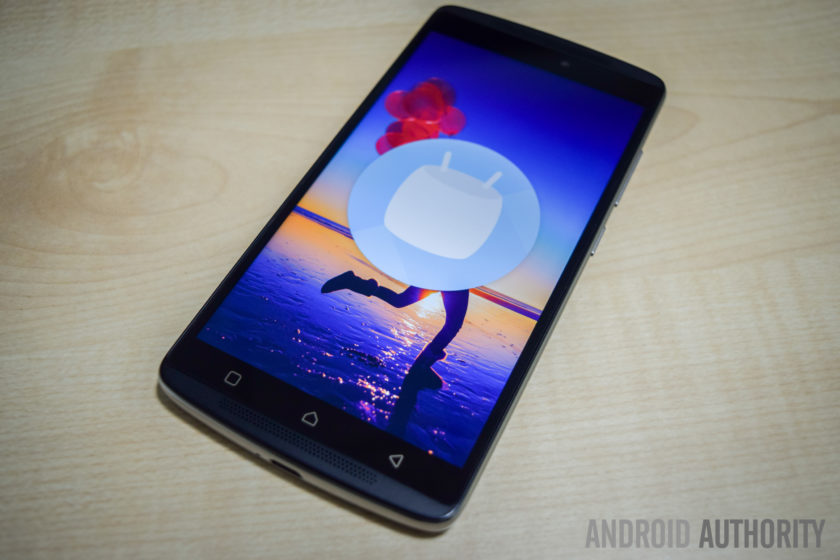
On the software side of things, the K4 Note is running Android 5.1 Lollipop out of the box, but – following the update’s release in India last month – there is now an official update to Android 6.0 Marshmallow immediately available after you first set up the phone.
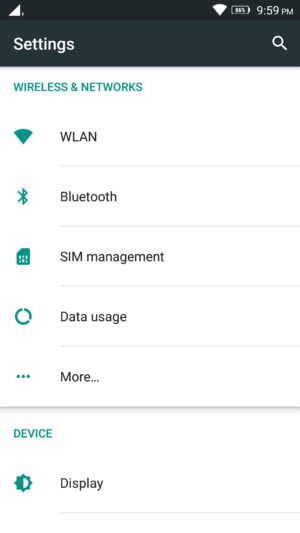
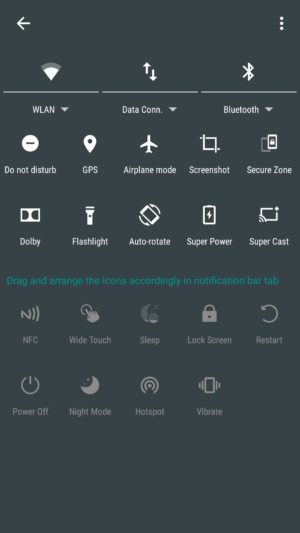
The software experience is very clean and minimalistic, at least on the surface, and while it does have significant differences, quite a lot of stock and Material Design elements are to be seen here. The Settings menu and Recent Apps screen are the same as stock, Chrome is the default web browser, and Google Keyboard is the preset keyboard of choice. The notification dropdown and Quick Settings menu are also similar in the look, but it is packed with a lot more options, with even more available when you dive deeper, allowing you to pick and choose which settings are more useful to you.
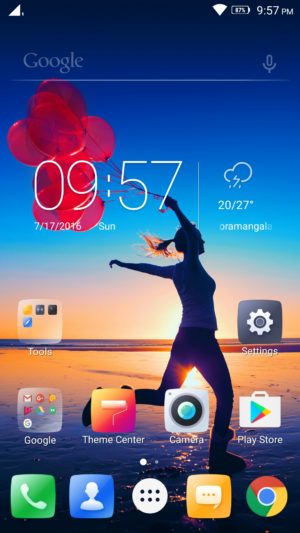
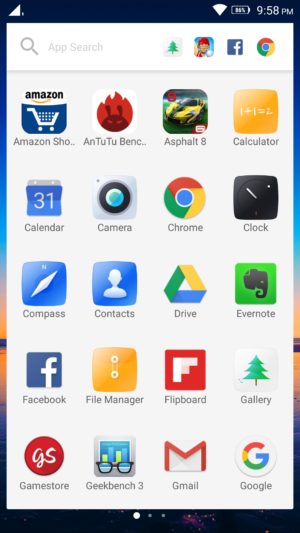
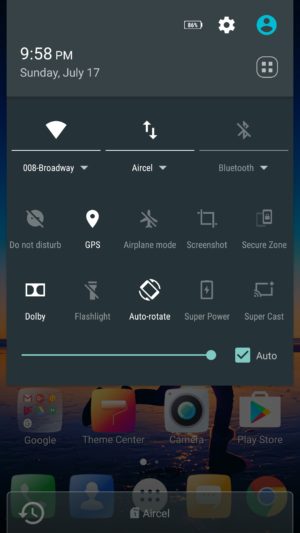
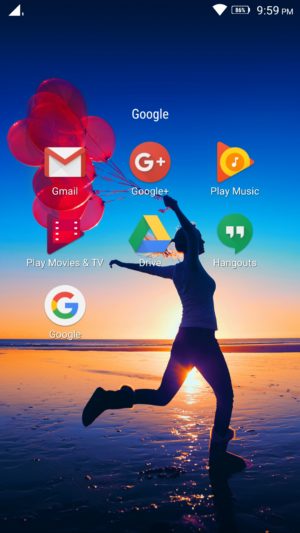
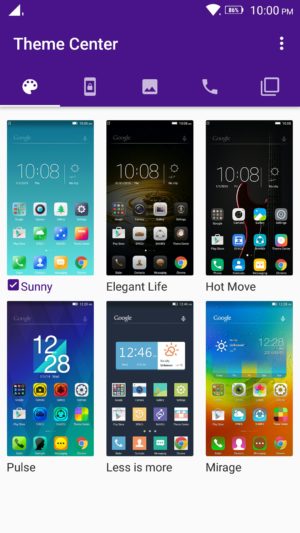
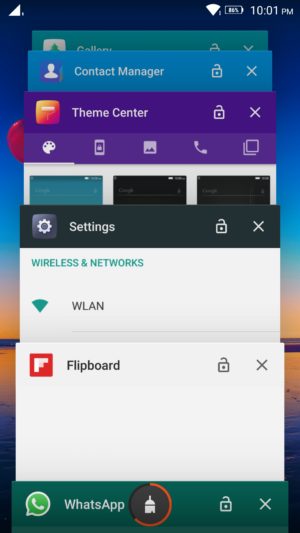
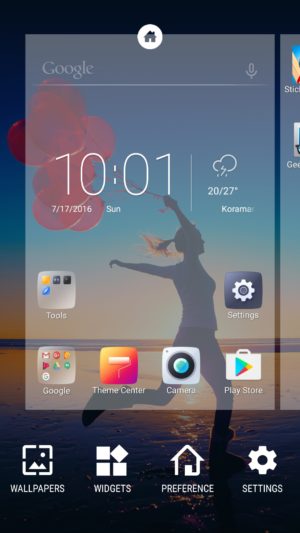
The app drawer retains the Material Design look, but is side swiping, instead of a top to bottom scroll. A nice addition here is that the app search menu up to also comes with a section that houses the most recent apps opened. There is a lot of bloatware to be seen however, with a slew of unnecessary, often redundant, apps pre-installed on the device.
Luckily you can uninstall most of these third-party applications, and the only ones that can’t be removed are Lenovo staples like ShareIT, SyncIT, and the Lenovo Companion app. There is also a Theme Center, but it isn’t particularly robust, and all you can really do is change the look of the lockscreen, icons, and wallpapers.
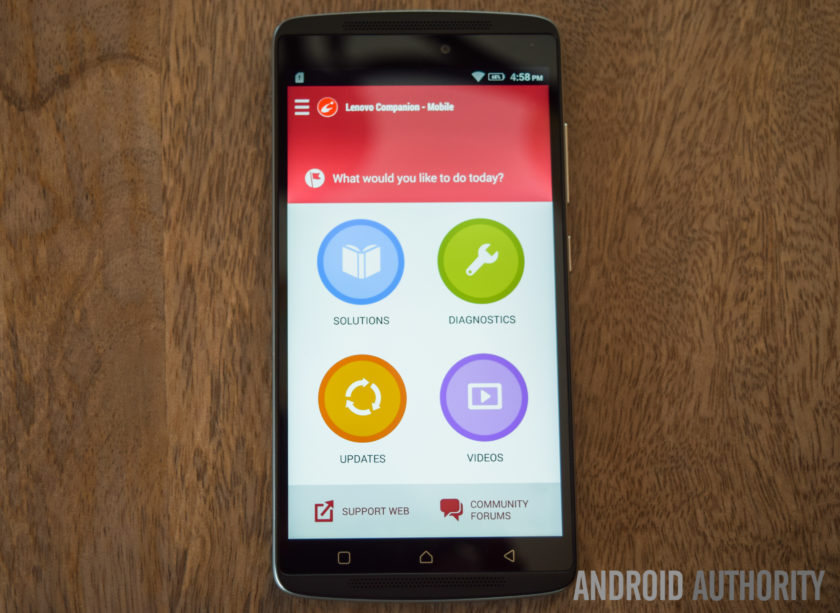
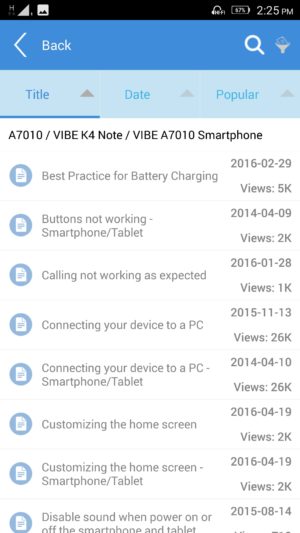
The Lenovo Companion app is a very useful tool to have, and provides a quick and easy way to set up service requests, or browse through the forums to find solutions to everyday problems you might come across. There are also video guides available, and also a robust diagnostics tool that lets you check whether all the device hardware is working the way it should be.
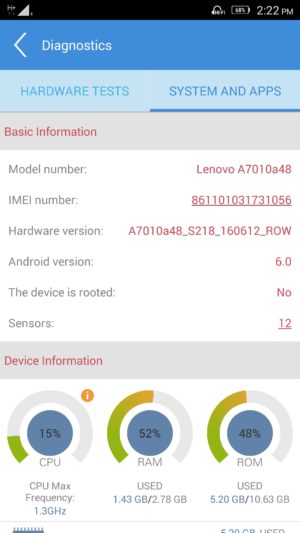
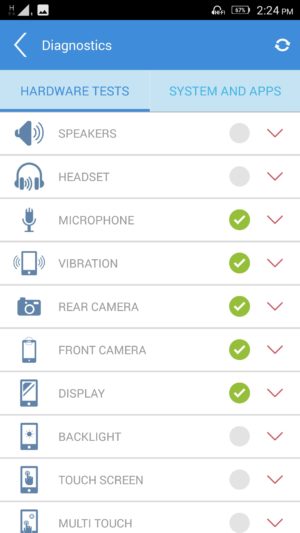
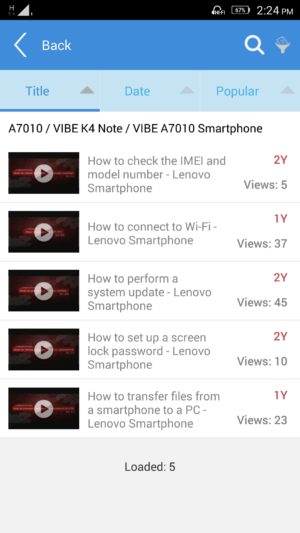
Finally, another feature that can be useful to some is Secure Zone; it can be toggled in the Quick Settings menu, and allows you to set up two virtual zones, that help keep your professional and personal lives separate. You can set up each zone to have their own accounts, passwords, and apps, and settings of one don’t carry over to the other.
If a notification arrives in one zone, you will know via a red dot that appears in the status bar, and you will then have to switch over to be able to check it. App data and documents are also kept apart, and if you are looking to share anything between the two, the way to do it is a via an OpenUserData shared folder. However, call logs and messages are shared between the zones.
Specifications
| Display | 5.5-inch IPS LCD display Full HD resolution, 401 ppi |
| Processor | 1.3 GHz octa-core MediaTek MT6753 processor Mali-T720MP3 GPU |
| RAM | 3 GB |
| Storage | 16 GB expandable via microSD card up to 256 GB |
| Connectivity | Wi-Fi 802.11 a/b/g/n/ac Bluetooth 4.0 GPS NFC FM Radio microUSB 2.0 |
| Camera | 13 MP rear camera, f/2.2 aperture, dual LED flash 5 MP front-facing camera |
| Battery | 3,300 mAh |
| Software | Android 6.0 Marshmallow |
| Dimensions | 153.6 x 76.5 x 9.2 mm 158 grams |
Gallery
Pricing and final thoughts
The Lenovo K4 Note is currently priced at Rs 10,999 (~$164), and the wooden back version isn’t that much more, priced at Rs 11,499 (~$171).
So, there you have it for this in-depth look at the Lenovo K4 Note! Lenovo has certainly done a fantastic job with this smartphone, and while using, it has been difficult for me to wrap my head around how affordable it is. With a solid design, decent performance, great audio, and good battery life, Lenovo checks all the right boxes.
The software package does have a lot of extras, but you always have the option to de-activate the various settings and enjoy a stock-like experience, and the only real caveat here is the camera performance, which isn’t poor by any means. There are a lot of great affordable smartphones out there, but Lenovo stands out with a great audio experience, and if that is a requirement, I would definitely recommend the K4 Note.
What do you think of the Lenovo K4 Note and do you plan to buy one? If not, what other affordable smartphone would you buy? Let us know your views down below guys!
Buy now from Amazon
Segway miniPRO by Ninebot Review
Walking on our own two feet just isn’t enough anymore for some people, there now needs to be some style behind the process – or else you’ll look very much like everyone else, exerting energy into it. While some don’t mind it all, others however are finding alternative forms of personal transportation. Over the most recent holiday season, so-called “hoverboards” roared unexpectedly onto the scene and became highly coveted amongst gift hunters, garnering huge sales in the process. Despite the sales surge, controversies surrounding safety recalls and the banning of its use in certain places, seemingly killed the hoverboard’s potential.
Long time connoisseur in personal transportation, Segway, believes that a better alternative will be achieved by the company’s latest, consumer-centric transportation vehicle in the Segway miniPRO by Ninebot. Given Segway’s history and reputation, the miniPRO is clearly distancing itself from being associated with hoverboards in general, as there’s no mention of it being one at all. Instead, Segway is selling it as being a “smart self balancing personal transporter.” This Bluetooth enabled personal transporter can be controlled via your Android smartphone, in addition to delivering vital information about its operation.
Slapped with an MSRP of $1300, it might be regarded as a pricey investment at first, but considering that commercial Segways start at $5,000 at the very minimum, the miniPRO’s cost is definitely easier on the pockets. Is it really worth getting though and is this the future of personal transportation tech?
Buy the Segway miniPRO now!
Design

First and foremost, the Segway miniPRO is a beast in terms of its size and puts to shame how those aforementioned “hoverboards” are built. Right away after taking out of the packaging, it’s tough to overlook the sense of solidness that accompanies its construction and design – one that favors an aggressive styling with its mostly dark black paint job. Meanwhile, the red accents found throughout the body help to exemplify its aggressiveness even more, making those hoverboards appear kiddy by comparison.
Top phones of 2016:
-

Alcatel Idol 4s Review -
Are Mods the future? | Moto … -
OnePlus 3 Review! -
HTC 10 Review -
LG G5 Review! -
Samsung Galaxy S7 Edge Revie…
Even though it shares the same foundation as most hoverboards, where it’s essentially a base held together by two 10.5” pneumatic, air-filled tires, which in this case are military-grade shock resistant and durable, the miniPRO is differentiated by a center column that controls its left/right steering by swaying your knees towards the corresponding direction. Again, there’s that sense of meticulousness with its design, as it incorporates an abundant set of LEDs and indicators on the platform to provide lighting while it’s on operation and relevant vehicle diagnostics without having to rely on the app – they include things like the battery level, speed limit, and Bluetooth connectivity indicators.
This isn’t a dainty, hastily put together contraption, like some of those unbranded hoverboards you might find sold at grocery stores. Building on top of its existing reputation in the business, Segway’s devotion in designing a personal transporter for the masses is evident here with the miniPRO’s outstanding design.
Balancing & Movement

Anyone who has experience in riding a hoverboard will undoubtedly have an easier time adjusting to the Segway miniPRO’s operation, seeing that its steering implementation is similar to a certain degree. Forward/backward movement is done in similar fashion by balancing yourself on the board and either leaning towards the appropriate direction. Of course, leaning a little bit makes the miniPRO move slowly, but leaning a lot will naturally make you move quicker. The skill in balancing on the Segway miniPRO might be difficult to newcomers who’ve never used a hoverboard, but once mastered, getting on/off and movement becomes second nature – it’s just finding that sweet spot with your center of gravity.
What’s different, though, is the center column that rests over the knees for left/right steering. This particularly implementation isn’t just safer for the rider, but also more logical because it aids in the balancing. In comparison, typical hoverboards rely on opposing foot tilting, wherein a left turn is done by tilting you left food forward and your right one backwards, which we feel is a more clumsy way of executing it – more so when you’re already trying to keep steady on the board. This implementation is what sets this apart from other personal transporters.
Admittedly, navigating around on the miniPRO was a breeze, even on some steep inclines. With a maximum weight limit of 220lbs, we’re able to safely traverse terrains without any issues, including some uneven areas. However, it’s best to take these types of terrains with caution, since going through them at faster speeds is a cause for some unbalancing.
We only had one minor altercation riding the Segway miniPRO, which relates to one incident when we got off it, but our shirt got caught towards the end of the center column – causing the unit to steer towards one direction, as well as the wheels grazing the bottom of our ankle.
Is it a practical form of personal transportation?

Size-wise, the Segway miniPRO offers personal transportation in a package that’s considerably less than your ordinary bicycle, but still bulkier and heavier than a skateboard or scooter. With a top speed of 10 mph and a range of 14 miles, the miniPRO clearly has some advantage over other manual forms of personal transportation, but we wouldn’t recommend lugging around a heavy backpack or other gear while using it. Instability alone, especially at higher speeds, is something we’re afraid of happening in the process. Even by ourselves, we still feel leery about pushing it to its maximum speed limit.
Using it to travel short distances is fine, say somewhere around one or two miles, but bear in mind that factors such as weight, terrain, and the incline will play a role in depleting its battery faster. Speaking of battery life, it might not have gotten close to its rated range of 14 miles from a full charge, but given out weight and whatnot, our 6 miles of usage isn’t too shabby at all. And when it comes to recharging it, the included wall adapter plugs into the port on the front section of the miniPRO, taking upwards of around 4 hours to completely charge.

The premise of the Segway miniPRO is alluring, a personal transporter that gets you from point A to point B in style. At the same time, though, its heavy weight (28 lbs) makes it almost impractical to bring along on the subway – you’ll be exerting more energy just lugging it around and carrying up stairs. Yes, there’s a steering guide at the top of the column that extends that allows us to pull the miniPRO, but it’s still a lot of work bringing it around. In fact, it’s just as heavy as some entry-level folding bikes.
Ninebot app

When it comes to its smartphone integration, the Bluetooth connection paired with the Ninebot app for Android allows us to do a host of things, ranging from customizing the LED lights, calibrating the unit, obtaining diagnostics information, and even remotely controlling it with the app. You can guide the miniPRO using the on-screen controls with the app, allowing for all the same movements available to us as if we were actually riding it. Remotely controlling is neat, obviously, but the only limitation here is the reach of the Bluetooth connection.
And as for security, the anti-theft security alarm feature is only available when the miniPRO is on and connected via Bluetooth to our connected Android smartphone – a Samsung Galaxy S7 in this case. When it’s enabled, the miniPRO will vibrate a little and flash some of its LEDs in the event it’s disturbed, as well as informing us via the app if it’s been moved or touched
 Related: Xiaomi backed Ninebot acquires Segway1
Unfortunately, there’s no way to have this feature enabled without having the Segway miniPRO turned on. Add to that, the whole security feature is rendered useless because you need to have it turned on and connected via Bluetooth for it to work properly. If we’re to grab a quick coffee from a store and leave the miniPRO outside, someone could very well snag it quickly and be a good distance away by the time we realize that the Bluetooth connection was severed.
Gallery
Conclusion

The promise of being the next step in the evolution of personal transportation is strongly evident with the Segway miniPRO by Ninebot, since its implementation is something we feel as being far more logical than the typical hoverboard. From its meticulous design, stylish flavor, smooth operation, and smartphone integration, it seems like the personal transporter that we’ve all been waiting for. Accompanied with the established reputation of the name Segway, the miniPRO seems like it’s on its way to success, right?
Now that’s a loaded question to answer, even for us, given that its sticker tag of $1300 will make it a difficult proposition for garnering widespread adoption. Over at Amazon, its price has been lowered to make it $1000, but it’s still a pricey investment for people to justify purchasing over other alternatives. Indeed, it’s a pretty cool gadget that’ll make your friends jealous, and it’s also more affordable than most commercial Segways. At the end of the day, however, it’s just too much of an expensive investment to spur adoption on a mass scale.
And herein lies the biggest issue; just like with smartphones, the tech surrounding personal transportation devices has improved dramatically but, rather crucially, battery technology has progressed at a slower rate.
For half the cost, alternatives like a decent folding bike or electric scooter, will offer more versatility for those who really need to cover distances. And of course, bikes and scooters only have to rely on the energy level of its rider – whereas the Segway miniPRO won’t be much of a help when its battery is depleted. And herein lies the biggest issue; just like with smartphones, the tech surrounding personal transportation devices has improved dramatically but, rather crucially, battery technology has progressed at a slower rate. As far as the technology goes however, the Segway miniPRO is a lot more comfortable than alternatives like a hoverboard.
What do you think of the Segway miniPRO and would you buy one? Let us know your views down below!!
Buy the Segway miniPRO now!
ZTE Axon 7 review
It was merely a year ago when we found out that ZTE was behind the mysterious “Axon Phone,” a promising offering which aimed to keep the consumer in mind. With its Axon sub-brand, ZTE hoped to capture more of the U.S. market by striking a balance between affordability and premiumness.
Interested in ZTE?
- ZTE Axon 7 hands on
- ZTE VR announced
- ZTE ZMAX Pro hands on
- ZTE Grand X Max 2 review
After testing the original ZTE Axon extensively, we granted it our 2015 Editors’ Choice award for its incredible value. Although the original Axon wasn’t perfect by any stretch, it did incorporate unique features like a two-year premium warranty while still making only a few compromises.
On the surface, the succeeding Axon 7 appears to be a major step forward once again, considering the many improvements ZTE has made. It is evident that the ZTE Axon 7 is more than just a minor refinement to the ZTE Axon, but in an increasingly-competitive “flagship killer” market, has ZTE really done enough to make the Axon 7 worthy of your consideration? Let’s explore that question and more with our comprehensive ZTE Axon 7 review!
Buy the Axon 7 now!
Design

The Axon 7’s design could be viewed as a normalization of that of the first Axon, as ZTE has both literally and metaphorically smoothed the edges. Although the updated design is less likely to raise eyebrows, it certainly has character. Unlike many metal smartphones, the Axon 7 does not incorporate plastic caps in its design and instead embraces an aluminum unibody free of any edges.
Although the updated design is less likely to raise eyebrows, it certainly has character
The curved back, although similarly done before, is elegant and feels excellent in the hand. The build quality is great, and it’s very unlikely that you’ll be able to get the Axon 7 to bend, even if you try. The power and volume buttons, which are now both on the right side of the device, as well as the recessed fingerprint reader are very ergonomic. The latter may seem senseless, but it is actually very nice when trying to differentiate it from the camera module.

Some of our keen-eyed readers have likely already noticed and may have even already objected to the Axon 7’s camera hump. Thankfully, it’s not thick enough to cause the phone to wobble when typing on a table, except when typing with excessive force.
ZTE has implemented antenna lines in a such a way to compliment the design rather than blemishing it. The chamfer found where the aluminum meets with the front of the device is also quite nice and feels natural, next to the very slightly curved display.

The “Designed in the USA” tag located on the rear of the Axon 7 may prompt some questions, considering that ZTE is, after all, a Chinese smartphone manufacturer. However, ZTE tells us that they collaborated with Designworks, a US-based BMW Group subsidiary, when designing the Axon 7. This can definitely be seen in the Axon 7’s design, most noticeably with the phone’s curved shape.
I wish the phone wasn’t so slippery in the hand
Although I really like the Axon 7’s design overall, I do wish that the phone wasn’t so slippery in the hand. The Axon 7’s size, smooth metal, and curved side edges combined certainly do not help make the device easier to grip. Although I eventually became accustomed to the Axon 7’s slippery profile, its height is still somewhat problematic. Reaching for the top to access the notification panel can be very interesting at times, given that any adjustment in the hand must be done very carefully due to the phone’s lack of grip.

The three non-illuminated capacitive keys on the U.S. Axon 7 do the job, but could be spaced out a bit more. I am nearly sure that the current implementation was designed to cater to aesthetics, but it can be difficult, especially at first or in a dark environment, to locate the side keys, as they are curiously closer to the center than to the edges of the display.
For what it’s worth, however, I really enjoyed the ability to change the key layout. The indeterminate iconography may be a bit jarring for first-time users, but oftentimes becomes irrelevant after a day or so of use.
Display

ZTE has definitely exceeded my expectations with the Axon 7’s display. Whereas many similarly priced options compromise on either resolution or panel quality, the Axon 7 offers one of the very best displays I have seen on a smartphone. It’s a Quad HD 5.5″ AMOLED display with a pixel density of 538 PPI, which translates to excellent sharpness, punchy and saturated colors, deep blacks, great color reproduction, and excellent contrast and viewing angles. It’s most definitely worthy of competing with the highest-end of displays, like those found on phones such as the Samsung Galaxy S7.
The edges of the display glass taper down to meet with the chamfered aluminum
Sunlight readability is also good, and the display also seems to get dim enough in darker environments. The larger screen size is great for any type of content, without being too big to hold comfortably in many cases. The Corning Gorilla Glass 4 protection is also great to see, so users should not have to worry about scratching the display. The edges of the display glass taper down to meet with the chamfered aluminum, which gives the Axon 7 a consistent premium feel when swiping near the edges.
Performance

Under the hood, the Axon 7 is powered by a quad-core Qualcomm Snapdragon 820, with two of the cores running at 2.15GHz and the other two running at 1.6GHz. The Snapdragon 820 has been used in every major flagship smartphone this year, and for good reason, as it is an absolute beast of a processor, offering up some of the best performance to date. It’s a notable step forward from last year’s Snapdragon 810, which was plagued by overheating rumors.
The overall experience is remarkably smooth
In addition to a Snapdragon 820, however, the Axon 7 includes 4 GB of RAM, which is enough for even the heaviest of multitasking. Day-to-day performance was absolutely wonderful and the overall experience is remarkably smooth. The Adreno 530 GPU is also more than enough for mobile gaming.


Although benchmark scores aren’t everything, it is clear that ZTE’s software optimization and selective component choices have paid off. The ludicrous 140,393 score in Antutu is undoubtedly incredible as it reflects actual performance quite well.
Hardware

Last year, we were slightly disappointed that the Axon was only available with 32 GB of non-expandable storage. With the Axon 7, however, ZTE has included not only double the amount of storage (now 64 GB), but has also included a microSD card expansion slot, which accepts up to 256 GB.
Please do keep in mind, however, that you will need to give up one of the SIM card slots if you’d like to take advantage of microSD card expansion. Regardless, this is an invaluable inclusion for those needing lots of space, and may just give the Axon 7 a slight edge over much of the competition.

The ZTE Axon 7 is an unlocked dual-SIM device which works with all major carriers in the United States, so regardless of whether you’re on T-Mobile’s Band 12 or Verizon, you’ll be receiving full coverage. Since the Axon 7 isn’t officially supported by Verizon or Sprint, however, you will need to contact ZTE if any issues arise.
Even when plugging in a pair of $8 earbuds, the difference in audio quality is noticeable
Although ZTE did implement high-quality audio with the first-generation Axon, the Axon 7 takes it to the next level. With dual independent Hi-Fi audio chips, the AKM AK4961 and AKM AK4490, both recording and listening to audio on the Axon 7 is an excellent experience. Even when plugging in a pair of $8 earbuds, the difference in audio quality is noticeable, especially when streaming at higher bitrates. The audio sounds fuller and the volume isn’t as limited as it is on other devices.
If you’re interested in how the Hi-Fi audio recording sounds, you should have a listen of our video review found above, as the voice over was recorded using the Axon 7 and a Rode smartLav+ microphone. For informal recordings, ZTE states that the dual noise cancelling internal microphones are able to clearly capture voices up to eight meters away from the phone, which is quite impressive.

The listening experience with the Axon 7 is extraordinary
Unlike its predecessor, the ZTE Axon 7 features dual-front facing stereo speakers with Dolby Atmos surround sound technology. The listening experience with the Axon 7 is extraordinary; the sound is impressively clear, loud, and full. There’s very little distortion, even at full volume, and the audio is surprisingly immersive. The quality is nearly unmatched, and gives the speaker found on the HTC 10 a run for its money. Whether you choose to listen to music, play a mobile game, or watch a movie, the Axon 7’s speakers will impress you.

The fingerprint reader on the back of the Axon 7 is both fast and accurate, easily beating out comparable devices like the Huawei Nexus 6P. The reversible USB Type-C port is also great to see, and Quick Charge 3.0 (QC3.0) delivers on its promise of providing a 50% charge in just a half hour. Unlike some manufacturers, ZTE has included a QC3.0 complaint charger in the box, so you won’t have to worry about buying one yourself.
 Need an extra charger? Best USB Type-C Cables14
Battery Life


The Axon 7’s 3250mAh non-removable battery may seem somewhat small after factoring in the powerful processor and high resolution display, but it actually holds up quite well. Battery life with the Axon 7 is excellent; I was consistently able to achieve upwards of five hours of screen on time with a full day of heavy use. With moderate usage, six hours of screen on time was achievable.
I was consistently able to achieve upwards of five hours of screen on time with a full day of heavy use
Overall, battery life is very comparable to that of the Galaxy S7, which is excellent considering the phone’s price. It does lack wireless charging, unfortunately, but that’s because of the Axon’s metal body. Thankfully for ZTE, many users prefer the much faster QC 3.0 wired charging anyway.
Camera

ZTE has included a 20 MP f/1.8 rear camera with optical image stabilization and phase detection autofocus. In good lighting conditions, the camera does quite well. Images come out sharp and detailed with good contrast and accurate color reproduction. It doesn’t always set exposure correctly, however, and some images can look a bit washed out. Otherwise, the camera is a great performer in good lighting. The 8 MP front-facing camera also performed very well.
ZTE Axon 7 camera samples:

With its fast f/1.8 aperture and OIS, it seems that the Axon 7 would offer great low-light performance. Unfortunately, this is simply not the case; images taken in darker conditions were soft with muted colors. This seems to be more of a software issue as there is an excessive amount of noise reduction taking place in most images. The good news is that this may be able to be at least partially corrected with a software update as the hardware doesn’t seem to be the issue.
The camera performance is where the Axon 7 feels most compromised
It’s difficult to deny that the camera performance is where the Axon 7 feels most compromised. The camera is great, but it’s simply not as excellent as those found on the Galaxy S7 or even Xiaomi Mi 5.
With that said, ZTE’s camera app is very nice and easy to use. The automatic mode will automatically turn on HDR and night mode for you and the manual mode is very comprehensive. There’s also a bunch of filters and additional modes like Panorama and Timelapse. The simple “capture” and “cheese” voice commands to take a picture worked surprisingly well, and using the fingerprint reader on the back as a shutter button is ingenious.
Software

Although the Axon 7 runs ZTE’s MiFavor UI 4.0 over Android 6.0.1 Marshmallow, a “stock Android” theme is available and selected by default. When using the stock Android theme, the launcher is like the Google Now Launcher with a transparent app drawer and a few bonus features like the ability to change the home screen transitions. The multitasking menu is pretty much the same as well, but with a very handy “clear all” button.
ZTE’s software feels like stock Android with a very slight tasteful twist
Overall, ZTE’s software feels like stock Android with a very slight tasteful twist. I found myself really enjoying the full screen notification panel and editable quick toggles, and the “frequently used” settings page seems like a nice touch.

Many of the other changes made are either too subtle to mention or purely functional. The latter changes include, for example, a lock screen wallpaper which changes each time you unlock the device. We haven’t seen that feature here in the U.S. yet, but it works quite well and is a nice differentiation. There are also gestures like double tap to wake and shake for the flashlight which are always nice to have, and the power saving modes are comfortably advanced.
You can simply hold the phone up to your ear and the phone will ask who do you want to call?
My favorite addition, however, is the “My Voice” app, which allows you to use genuinely useful voice commands throughout the interface. For example, as long as the screen is on, you can simply hold the phone up to your ear and the phone will ask “who do you want to call?” You can say the phone number or a contact name and the dialer app will place the call. It’s a really cool and unique feature that I wish Google themselves would take note of.
While this is the best software we’ve seen from ZTE to date, there are still areas that could use some additional polish. For example, some translations are grammatically incorrect, the dialer app doesn’t work with third party services like Google Voice, and functional changes like My Voice could be better integrated within Android. With that said, the minor changes needed are just that: minor.
Gallery

Price
The ZTE Axon 7 is available in the United States for $399.99 from Amazon, Best Buy, B&H Photo, Newegg, and directly from ZTE. That’s a surprisingly low price for what the Axon 7 is, considering that it is unlocked and compatible with every major 4G LTE network within the United States.
There are two color options available: ion gold and quartz gray. The Ion Gold model ships on July 27th and the Quartz Gray model ships on August 17th. Both models are now available for pre-order.
Unlike virtually every other smartphone out there, the Axon 7 includes a two-year warranty. ZTE’s Axon Passport 2.0 program provides everything from upgrade, replacement, and setup assistance to unlimited out-of-warranty repairs for a deductible. Each repair, whether in or out of warranty, will include a free advanced exchange and free two-way shipping. There’s also a 30-day risk free trial period, during which you can return the phone to ZTE for a full refund if you’re unhappy with it.
Conclusion

ZTE’s Axon 7 blows past the competition by providing amazing hardware, great audio fidelity, an exceptional display at a price point that should worry the competition.
It is clear that ZTE has put a massive amount of time and effort into the Axon 7, making it one of the best smartphones we’ve encountered. It’s surprisingly similar to popular offerings like the Galaxy S7 and HTC 10, while costing much less. It’s one of the very few smartphones that feels largely uncompromised, even next to the very best. If you’re looking for a flagship smartphone and don’t need the absolute best of cameras, we cannot recommend the ZTE Axon 7 enough. Simply put… ZTE’s Axon 7 blows past the competition by providing amazing hardware, great audio fidelity, an exceptional display at a price point that should worry the competition.
Interested in ZTE?
- ZTE Axon 7 hands on
- ZTE VR announced
- ZTE ZMAX Pro hands on
- ZTE Grand X Max 2 review
So, what do you think of the ZTE Axon 7? It will certainly be interesting to see how ZTE’s strategy plays out. Are you considering purchasing the Axon 7? Do you already have one on pre-order or does another device take your fancy, and if so, which one? Please do let us know your thoughts in the comments below!
Buy the Axon 7 now!
SanDisk iXpand Memory Case review – CNET
The Good The iXpand Memory Case has built-in storage to expand the capacity of an iPhone 6 or 6S. The bundled application makes it easy to transfer photos and video from from your phone’s internal memory.
The Bad The port placement is awkward and the case itself is bulky, especially when the optional battery is attached.
The Bottom Line While the design could be better, the iXpand Memory Case is one of the only solutions for expanding iPhone storage.
There’s nothing worse than getting an “out of storage space” pop-up on your phone when trying to capture a once-in-a-lifetime moment. And once you’re locked into a small-capacity iPhone (I’m looking at you, 16GB owners) there’s no easy way to expand the storage space — unlike with, say, an Android phone with an SD card slot. Sure, you can back up to iCloud Drive or Dropbox, but the cost can add up.
SandDisk’s iXpand Memory Case, available only for the iPhone 6 and 6s, offers a novel cure for the storage space blues. It builds extra flash memory right into an iPhone case that connects via the lightning port on the phone. And it works very well, although it’s much more expensive than an SD card and isn’t as good as many cases I’ve used.
The iXpand comes in four colors (gray, blue, red and teal) three capacities: a 32GB model for $60 (roughly £45 or AU$80), a 64GB model for $100(£76, AU$133) and a 128GB version for $130 (£98, AU$174). I tested the largest size in teal. An optional 1,900mAH battery, which magnetically latches onto the back of the case, is also available for $40 (£30, AU$53).
SanDisk iXpand Memory Case (pictures)
See full gallery


1 – 5 of 14
Next
Prev
You’ll need to use SanDisk’s well-designed companion app to transfer photos from the phone’s internal memory to the case, but fortunately that’s an easy process. After the transfer is finished, the app automatically offers the option of deleting images from the iPhone, thus freeing up space. The dashboard for the application organizes all the content stored on the drive and makes it easy to move files back and forth and find the ones you need.
Oppo R9 Plus review – CNET
The Good For a moderate cost, the Oppo R9 Plus give a surprising high level of power and a battery level to match.
The Bad The design isn’t going to win any awards for originality and it’s not a pure Android experience.
The Bottom Line If you want a big screen phone that lasts and lasts, the Oppo R9 Plus has the right price.
Visit manufacturer site for details.
It seems that these days one of the worst insults you can deliver to a phone is that it looks like an iPhone. My colleague Aloysius Low called out the smaller size Oppo R9 for this, as did Daniel Van Boom on the Meizu Pro 6.
The Oppo R9 Plus keeps the Apple-esque trend going, but unlike my colleagues I actually think the phone looks great, even if the rose-gold shade isn’t my favourite.
The R9 Plus has a 6-inch screen, compared to the 5.5-inch of the R9. The bigger screen has the same 1,920×1,080-pixel resolution, which means a slight reduction in pixels-per-inch from the R9 (367 vs 401), but you’re not going to notice. The rear camera has been upped from 13-megapixels to 16-megapixels but, again, that’s not going to change your world. (The front camera is the same 16-megapixels as the R9 — it’s a selfie-lover’s dream.)
 View full gallery
Dave Cheng/CNET
What you will notice is the big in both battery and processing power that the R9 Plus offers over the R9. The Plus has the Snapdragon 652 CPU. It’s a 1.8GHz octa-core chip, but what matters is that it has a big uptick in both general performance and graphics processing power over the basic R9 model. In fact, in our benchmark testing, it was up there with the Sony Xperia X and the Huawei Mate 8.
Battery life is the other big bonus. With a 4,120mAh battery, I was expecting something good, but the R9 Plus exceeded my expectations with a test result of 17 hours and 30 minutes. That makes it one of the best batteries we’ve seen this year.
Take a look at the Oppo R9 Plus powerhouse
See full gallery


1 – 5 of 7
Next
Prev
More importantly, all this is coming at just AU$100 more than the R9 — AU$699. That’s around $530 or £395, although we’re still waiting for official pricing and availability outside of the Asia-Pacific region.
It may be an iPhone clone, but the Oppo R9 Plus packs enough power in to make it a worthwhile option for a mid-range Android phone. And unless you’re absolutely against using a 6-inch screen, it’s a better option than the R9 given its small additional cost.
Windows 10’s Anniversary Update makes a great OS better
“It’s nice, for once, to be able to recommend a new version of Windows without any hesitation.” That’s how I summarized my review of Windows 10 last year, and for the most part, it’s lived up to my expectations. Other than Microsoft’s bafflingly forceful automatic upgrade policy (which has led to lawsuits and plenty of ticked off users), the operating system’s first year on the market has been relatively smooth.
Microsoft says the software is now running on over 350 million devices worldwide, and it’s seeing the highest customer satisfaction ratings ever for a Windows release. So expectations are running pretty high for the Windows 10 Anniversary Update, which arrives August 2nd. But while it definitely delivers some useful upgrades to key features like Cortana and Windows Ink, don’t expect any massive changes to Windows 10 as a whole.
Cortana

Expect to see Microsoft’s virtual assistant just about everywhere in the Anniversary Update. Cortana is accessible through the lock screen, allowing you to ask simple questions or do things like play music, without even having to log in. She’ll also control some apps like iHeartRadio and Pandora, with voice commands. (Unfortunately, there’s no Spotify support yet.)
Perhaps most intriguingly, Cortana will also work across different platforms, with the ability to talk to Windows Phone and Android devices. You’ll be able to see notifications from your phone right on the Windows desktop, as well as alerts like when your phone is running low on battery. While there’s a Cortana app on iOS, this extensive integration won’t be available to iPhone users just yet. Microsoft reps say one reason for that is that it’s simply harder to implement it on Apple’s platform.
Cortana is also getting the smarts to act like a real assistant. Just like before, you can send her reminders and have her recall them at any point. Now, you’ll also be able to add photos to those reminders, as well as create them from Windows apps directly. And yes, those reminders carry over to Cortana’s mobile apps too. They’re particularly useful for things like frequent flyer numbers or complex parking spot locations, where asking your phone to look it up is easier than searching through your notes manually. She can also search within your documents for specific bits of text.
While I still find Google Now to be more accurate at listening to voice commands, Cortana stands out as the only voice-powered digital assistant on a desktop OS. Apple’s Siri will be the highlight of MacOS Sierra this fall when it’s officially released (though you can try it in beta form now), but Cortana still has that beat feature-wise.
Windows Ink

With the Windows 10 Anniversary Update, Ink finally steps out from behind the scenes for stylus users with an interface all its own. Clicking the eraser button on the Surface Pen, for example, brings up a new menu on the right side of the screen. From there, you can create a Sticky Note (basically a digital Post-It), access a blank sketch pad or jot notes down on a screenshot of whatever you’re looking at. Other active stylus models will have access to the feature too, and you’ll even be able to use it with a keyboard and mouse (right-click on the taskbar and choose “Show Windows Ink Workspace” button).
While it’s still fairly rudimentary, the current Ink interface is a lot more useful than what Microsoft offered in the past. Previously, hitting the Surface Pen’s eraser button would simply open up a blank OneNote document. It was great for people who liked to sketch or jot down handwritten notes, but that was about it. I’ve found myself using the stylus even more now with the Surface Pro 4 to create Sticky reminders, or simply caption an image to share with friends.
Just like Cortana, you can also access all of the new Ink features from the lock screen. So if you have to take some emergency notes for class, or simply want to jot down a burst of inspiration, you won’t have to wait to log into Windows to do so.
Windows Hello
Microsoft’s biometric authentication feature is branching out from the lock screen to let you sign into apps like DropBox and iHeartradio. It’ll even log you into some websites when you’re using the Edge browser. Hello was one of the best additions to Windows 10, so it was only a matter of time until its zippy login capabilities spread throughout the OS.
Still, the problem with Windows Hello is actually being able to use it. Fingerprint sensors and depth-sensing cameras (like Intel’s RealSense) still aren’t all that common. You’ll find them on the Surface machines and some high-end notebooks and tablets, but you can forget about them if you’re on a budget. And if you’re using a desktop, you’re even worse off. You can buy a third-party fingerprint sensor, but it won’t be as fast or accurate as the hardware used inside phones. And, for some reason, external depth-sensing cameras are still practically non-existent (unless you pay through the nose for a RealSense developer device).
At this point, Microsoft doesn’t have an answer to the lack of Windows Hello-compatible hardware out there. But company reps say they hope that once Microsoft adds more features to Windows Hello, manufacturers will feel more compelled to add the necessary hardware.
Microsoft Edge

Remember all the promises of browser extension support on Edge? Well, they’re finally here with the Anniversary Update. You’ll be able to choose from a handful of popular options like LastPass, AdBlock, Pocket and Evernote’s Clipper. The selection was pretty limited during my testing, but hopefully developers will adopt Edge’s extensions quickly. Microsoft claims that Edge is more power efficient now (something it already touted over its competitors), and it has even more support for newer web standards.
Start Menu
Rather than just highlighting a few apps in the Start Menu, the Anniversary Update brings all of your installed apps into a single (and very long) drop-down list. It might seem a bit overwhelming to new users, but it saves power users an extra click when they need to peruse their apps. Live Tiles are smarter now as well: If you click on a news app displaying a specific story, you’ll be directed to that story once the app launches. Sure, neither change is as drastic as the return of the Start Menu, but they’re still helpful tweaks.
Wrap-up
If you were expecting a huge change with the Windows 10 Anniversary Update, then you’ll probably be disappointed here. But, in a way, its lack of any major additions says a lot about how much Microsoft got right when it first launched Windows 10. It’s a stable, secure and fast OS. The Anniversary Update simply makes it better, and that’s something I think every PC user will appreciate.
SpeedX Leopard Pro Release Date, Price and Specs – CNET
In March, a new bike company known as SpeedX launched a crowdfunding campaign on Kickstarter. The company was looking to raise $50,000 to help launch the first-ever smart aero road bike. Within two hours, the campaign surpassed the initial financing goal, going on to raise over $2.3 million from over 1,200 backers. This made it the most funded bike in Kickstarter’s history.
SpeedX was offering a high-end road bike with better components than brands such as Trek, Cannondale and Cervelo for thousands less. The campaign and product were both intriguing. I was close to becoming a backer myself, but had second thoughts. There was no way this no-name company would be able to deliver the bike on time, let alone deliver a product that lives up to the hype.
I was wrong. The SpeedX Leopard Pro is as elegant as the campaign originally promised. Even more impressive, the company will begin shipping the bike to backers this August.
The SpeedX Leopard Pro is available for preorder now through the SpeedX website for $2,500 (about £1,900, AU$3,350). A more affordable model with a slightly different components, called the SpeedX Leopard, can be had for $1,400 (about £1,000, AU$1,875). Preorders are slated to ship in September.
What are the specs?
Despite the $2,500 price tag, the SpeedX Leopard Pro seems like an incredible value. The frame and fork are made from a mix of T1000 and T800 carbon fiber. The handlebars and seat post are also made from carbon. This makes the bike incredibly light, with a weight of just over 17 pounds.

Dan Graziano/CNET
As for the groupset, it’s Shimano Ultegra Di2, which features electronic shifting. My only complaint about the bike is that it lacks disc brakes, which I prefer for better stopping power, although a few commenters were quick to point out that most racing bikes don’t include them.
The more affordable Leopard model swaps out the Ultegra groupset for a Shimano 105 groupset. The handlebars are also aluminum rather than carbon fiber, although the bike still has the same carbon frame as the more expensive model, with a weight of about 19lbs.
I’m a big fan of the overall look of the bike. Both models feature full internal wiring to give them that clean look. There’s also an integrated rear LED light that will automatically turn on when it gets dark, which I thought was a great idea.

Dan Graziano/CNET
What makes this bike smart?
You may hear the word “smart bike” and assume there’s an electric motor, but that’s not the case. What makes the Leopard smart is the built-in GPS, altimeter and speed sensors, which essentially replaces the need for a separate Garmin or Polar bike computer.
These sensors are used to measure moving time, distance, speed, altitude, cadence, calorie burn and can provide navigation. There’s also Bluetooth and ANT+ built-in for connecting a power meter or heart-rate sensor. All of this data can be viewed in real time on the 2.4-inch color screen, which can also display incoming calls and notifications when your smartphone is connected.

Dan Graziano/CNET
Post-ride data can be viewed in the SpeedX mobile app. In addition to viewing a map of the ride and all of the recorded data, the app is similar to Strava and includes online challenges and leaderboards.
What about battery life?
Yes, the bike has to be charged, but it won’t be very often. The battery, which powers the built-in display, will last up to 40 hours of continuous usage. Charging is done through a small microUSB port on the back of the bike (our model didn’t have a protective flap covering it but the company says the final ones will).
This isn’t the kind of bike you would leave outside, at least not in New York City, and it only takes 30 minutes for a full charge, but it would have been cool if you could charge it simply by pedaling.

Dan Graziano/CNET
Is it too good to be true?
I didn’t get to ride the bike for an extended period, but I was impressed with the ride in the short time I did spend with it. The electronic shifting was smooth, and it felt as if I could really get some speed on the bike. The seat wasn’t the most comfortable, but that’s pretty standard. While my first impressions were positive, further testing will be needed to make a final conclusion.
My only concern is with the company itself. While SpeedX offers a lifetime warranty on the frame and a 30-day money back guarantee on the entire purchase, this is still a company we know little about. A lifetime warranty could mean only a few months if business were to go south.
The Leopard and Leopard Pro are an incredible value. SpeedX has said it can offer these low prices by cutting out the middleman to deliver high-quality bikes cheaper than the competition, but a part of me wonders if you are better off going with a true and tested bike from a reliable brand.
Only time will tell how SpeedX and the Leopard bikes continue to perform, but it is a company I plan to keep my eye on.
 AIVAnet