


Nokia 3.1 Plus preview: Covering all the bases
With the Nokia 3.1 Plus, HMD is making sure it leaves no corner of the budget segment left untouched.

HMD Global is on a roll. The company unveiled the Nokia 7.1 earlier this month in London, and is now following it up with the Nokia 3.1 Plus. With the Nokia 6.1 Plus and the Nokia 5.1 Plus also making their debut over the last two months, it’s clear that HMD is looking to offer a range of options in the budget segment.
The Nokia 3.1 Plus shares the same moniker as the Nokia 3.1, but the two phones are nothing alike. HMD introduced a new design language with the Nokia 6.1 Plus, and we’re seeing a continuation of that in the Nokia 3.1 Plus. The phone has a similar design with an oblong camera housing that contains the two rear cameras as well as the flash module, but there are a few key differences.
First up, the Nokia 3.1 Plus has a polycarbonate back instead of glass, and the matte texture makes it great to hold the device. There are plastic inserts at the top and bottom for the antennae, and the chassis is reinforced with an internal die cast metal midframe.
The phone features a 6-inch HD+ display, and unlike the Nokia 6.1 Plus and the 5.1 Plus, there’s no notch here. The 18:9 screen has a resolution of 1440 x 720, and while the phone would have benefited from a Full HD panel, doing so would have had an adverse effect on battery life and performance.
Talking about performance, the Nokia 3.1 suffered in this area on account of the MediaTek MT6750, but HMD is making amends by switching to a Helio P22. The P22 is manufactured on a much more energy-efficient 12nm node, and has eight Cortex A53 cores that go up to 2.0GHz. The result is a drastic uptick in performance, and in the three days I used the phone I didn’t face a lot of lag or stutter.
| Screen | 6.0-inch 18:9 HD+ (1440×720) IPS LCD |
| Chipset | MediaTek Helio P22 |
| RAM | 2/3GB LPDDR3X |
| Storage | 16/32GB, MicroSD slot |
| Software | Android 8.1 Oreo |
| Rear Camera 1 | 13MP, ƒ/2.0 |
| Rear Camera 2 | 5MP, ƒ/2.4 |
| Front Camera | 8MP, ƒ/2.2 |
| Security | Rear fingerprint |
| Battery | 3500mAh |
| Connectivity | Wi-Fi 802.11 b/g/n, BT4.1, FM radio |
| Colors | Blue, White, Baltic |
| Dimensions | 156.6 x 76.4 x 8.1mm |
| Weight | 180g |
The unit I’m using has 3GB of RAM and 32GB of storage, but the base model of the Nokia 3.1 Plus comes with just 2GB/16GB. With even entry-level devices coming with 3GB of RAM, it would’ve made more sense had HMD offered the 3GB variant as standard.
There are a few features missing from the device, including the ability to connect to 5GHz Wi-Fi networks. VoLTE is thankfully enabled out of the box, and you also get a 3.5mm jack, FM radio, and a dual SIM slot along with a dedicated MicroSD slot.
One of the key highlights on the Nokia 3.1 Plus is the 3500mAh battery, with HMD touting two-day usage from a full charge. That claim definitely holds up in real world usage, and while I haven’t used the phone for enough time to deliver an accurate assessment on the battery life, you’ll easily get more than a day’s worth of use even under heavy load.
As for the software side of things, the Nokia 3.1 Plus comes with Android 8.1 Oreo out of the box, with an update to Pie in the works. The software experience itself is identical to what you’d find on any HMD device today, and like all Android One devices, the Nokia 3.1 Plus will receive platform updates for two years and three years’ worth of security updates.

The Nokia 3.1 Plus will be available in three color options — Blue, White, and Baltic — and the phone will be going up for sale in India starting October 19 for ₹11,999 ($160).
Unlike the Nokia 6.1 Plus and 5.1 Plus — which are targeted online — the 3.1 Plus will be sold in the offline market. It will be hitting global markets for €159, with availability kicking off later this year.
The Nokia 3.1 Plus joins the rest of HMD’s recent launches in offering great value for money, and it’s easy to see that the Finnish manufacturer is setting its sights on the likes of Xiaomi and Samsung with its aggressive launch cycle. The only difference here is that HMD’s phones come with an uncluttered software experience with the promise of quick updates, unlike a majority of devices in this category.
What are your thoughts on the Nokia 3.1 Plus?
Nokia 7.1, 6.1 and 6.1 Plus to get stable Android 9.0 Pie update this month
Nokia is set to deliver the stable Pie update to three phones this month.

HMD Global delivered the stable Android 9.0 Pie update to the Nokia 7 Plus at the end of last month, and the company has detailed the update schedule for other devices in its portfolio.
The Nokia 7.1, Nokia 6.1 Plus, and Nokia 6.1 are now in the beta labs program, and HMD says it will deliver the stable Pie build to all three devices before the end of October.
The Nokia 8 and Nokia 8 Sirocco will be picking up the stable Pie update in November. Committing to Android One for all of its devices gives HMD a leg up when it comes to updates, and that’s exactly what we’re seeing here.
By the end of November, the company will have six devices running the stable version of Android 9.0 Pie. There’s no mention as to when the other devices in the HMD portfolio will get the update, but it shouldn’t be too long after the current set of devices are updated.
Razer Phone 2 heeft helderder scherm en lichtgevend RGB-logo
Razer heeft een opvolger aangekondigd voor haar gamingtelefoon de Razer Phone. De nieuwe Razer Phone 2 krijgt een 50% helderder IGZO-scherm met snelle refresh rate van 120 hertz en een achterkant met lichtgevende logo dankzij Razer Chroma. Spectaculair anders is de Razer Phone 2 daarmee niet, meer een verfijning.
Game-hardware-fabrikant Razer begeeft zich sinds 2017 in de mobiele telefonie en gooide met de allereerste Razer Phone meteen al hoge ogen dankzij z’n scherm. Deze kent met een refresh rate van 120Hz extra soepele beeldovergangen. Ideaal voor het spelen van games. Voor 2018 doet Razer er een stapje bovenop want het scherm op de Razer Phone 2 is 50% helderder en kent een betere kleurweergave. Het gaat nog altijd om een IGZO-paneel met resolutie van 2560 bij 1440 pixels.
De Razer Phone 2 in Black
Om ideaal te zijn voor gaming is de Razer 2 voorzien van de nieuwe Snapdragon 845-processor van Qualcomm voorzien van ‘Vapor Chamber Cooling’. Koeling gebeurt dus niet via een heatpipe maar via een vloeistof dat omgezet wordt naar stoom. De Razer Phone 2 kan draadloos opgeladen worden en is IP67 water- en stofbestendig. Allemaal dingen die de eerste Razer Phone niet had.
Ontvang een e-mail wanneer de Phone 2 verkrijgbaar is
Razer Chrome-verlichting
Qua ontwerp is er nauwelijks iets gewijzigd. Zo zit er nog altijd een dubbele speaker voorop voor stereo-geluid waarover Dolby Atmos-geluid afgespeeld kan worden. Ook HDR en 5.1 geluid worden ondersteund. Een 3,5 mm koptelefoonuitgang ontbreekt maar Razer levert een hoogwaardige 24-bits DAC mee. Deze steek je in de USB-C uitgang waarna je je eigen 3,5 mm koptelefoon kunt inpluggen. De achterkant is ditmaal van glas en het logo voorzien van Razer’s eigen Chroma-techniek. Met andere woorden; er zit RGB-verlichting in waarmee je uit 16,8 miljoen verschillende kleuren kunt kiezen. Het logo kan dienst doen als notificatie-lamp.
 Razer Chroma RGB-verlichting
Razer Phone 2 in Nederland
De Razer Phone 2 kost 849,99 euro en komt uit in de kleuren Mirror Black en Satin Black. Verwacht het toestel vanaf 9 november in de winkel. Dat model komt met 64 GB aan geheugenopslag. Heb je toch echt meer nodig dan zul je even moeten wachten op de uitvoering met 128 GB aan opslag. Die volgt later en krijgt een meer robuuste behuizing.
How to Take Burst Photos on iPhone and iPad
Burst Mode refers to when the camera on your iOS device captures a series of photos in rapid succession, at a rate of ten frames per second. It’s a great way to shoot an action scene or an unexpected event, since you’re always more likely to end up with the picture you were aiming for.
For instance, the picture below was taken when the sun came out momentarily from behind the clouds to throw light on the beautiful yellow ocher leaves of a tree. Burst Mode made it possible to shoot the whole event and then save out the one shot that captured the tree at its most vivid during its brief illumination.
To take a photo in Burst Mode, launch the Camera app from the Lock Screen – if your device is unlocked, select the Camera app from the Home screen or slide the Control Center into view and launch it from there. Once you have a shot in frame, tap and hold the shutter button at the bottom of the Camera interface for the duration of the scene that you’re trying to capture.

Notice the counter increase at the bottom of the frame for as long as you hold down the shutter. This indicates how many shots are being captured in the current burst. Simply take your finger off the shutter when you want to end the burst of shots.
When you take a series of burst photos, they automatically appear in the Photo app under the Album name Bursts. You’ll also find them in your main Photo Library as well as the Moments section found in the Photos tab. Here’s how to view your burst photos and pick out the best images from them for safe keeping.
How to View Burst Photos
Launch the Photos app.
Tap a collection of burst photos – they appear in the Photos Library as a single picture, but if you look closely, you’ll see more images stacked underneath the top thumbnail image.
Tap Select at the bottom of the screen.
Swipe the film strip-like ribbon of images below the photo to view the other shots in the burst.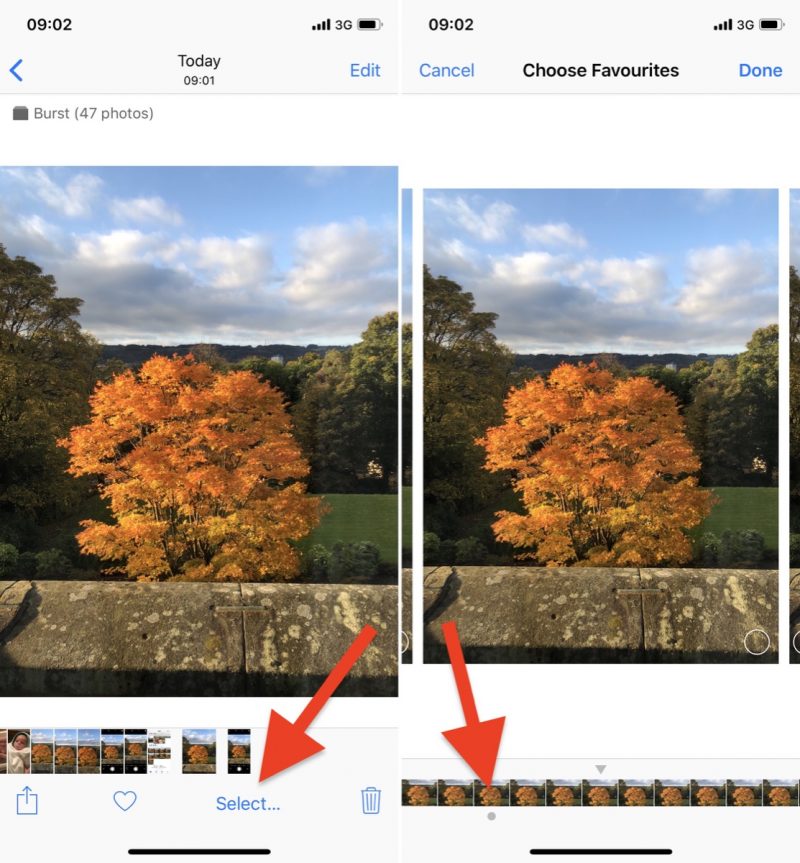
Any dots you see below images in a burst indicate that Apple’s algorithms think they have the best focus and detail in the set, but of course you may think differently.
How to Save Individual Images in Burst Photos
Tap a stack of burst photos in your Photo Library.
Tap Select in the top-right corner of the screen.
Tap each image in the series that you want to keep.
Tap Done in the top-right corner of the screen.
To keep only the images that you ticked in the burst series, tap Keep Only Favorites. Otherwise, tap Keep everything.
Related Roundup: iOS 12Tag: photography
Discuss this article in our forums
Flir’s stealthy drones will help Army vehicles spot enemies in the distance
FLIR Systems
For as long as there has been warfare, there have been reconnaissance scouts, sent out to survey the scene and report back to their commanders about enemy troops, prevailing conditions, and more. That same information is as useful today as it’s ever been, although the technology has changed a whole lot along the way. Case in point? The Black Hornet Vehicle Reconnaissance System, a new unmanned nano drone which can be deployed — either solo or in a group — to find and identify threats along a planned military route. It can then feedback 360-degree elevated information in real time from a radius of up to two kilometers.
“A typical scenario is when an armored or non-armored mobilized combat patrol moves into an hostile urban environment, where they have little or no information on where the threat would come from, where the potential enemy would be hiding, and where they could be expecting an ambush,” Ole Aguirre, senior director of Unmanned Systems and Integrated Solutions at manufacturer Flir Systems, told Digital Trends. “By launching the Black Hornets from a safe distance before moving the patrol into an exposed street or alley, the NUAVs provide live video feeds in day or night conditions to observe rooftops, crossroads, dark alleys or even go inside buildings to seek out enemy snipers or assault teams.”
FLIR Systems
The Black Hornet can be launched from a special external mount, which can be attached to any military vehicle. This includes armored personnel carriers, infantry fighting vehicles, and light utility vehicles. The mount holds three of the UAVs, which can be easily deployed with the touch of a button. Unlike other drones, the Black Hornet is designed to be silent, thereby not giving away its position while collecting intel on enemies or subjects of interest.
“The Flir Black Hornet VRS is designed to be integrated onto any vehicle, ideal for mounted Army, Marine, or special operations forces combat or reconnaissance teams,” Aguirre continued. “Key markets are the United States or NATO vehicle modernization programs, like the Joint Light Tactical Vehicle (JLTV) Program or Stryker Modernization Program. It is also designed to meet key ISR capability gaps for small special operations units operating detached from larger combat support elements.”
Editors’ Recommendations
- Wavesense ground-penetrating radar aids navigation with road data
- Honda is giving cars the ability to see around corners to avoid accidents
- The best used cars you can buy for under $15,000
- 2018 Land Rover Range Rover Sport HSE Td6 Review
- Riding along in Audi’s e-tron, the electric SUV born to slay Teslas
Tesla’s referral program lets owners send laser-etched photos into space
Being a Tesla owner certainly has its perks. There’s the fact that your car isn’t reliant on fossil fuels to get around, the fact that you get to drive an incredibly cool car that can go 0 to 60 mph in a matter of seconds, and then there’s the latest one: The option to fire a laser-etched photograph deep into outer space.
The ability to send any image into orbit is an honor being bestowed on Tesla owners who refer one other person to the company’s cars before December 10 through the company’s referral program. Tesla owners just have to provide a referral code to their friends and family, which can earn them a variety of rewards when those folks go on to purchase a Model S, Model X, Model 3 or solar products.
The reward in question, titled “Launch Your Photo into Deep Space Orbit,” is, well, exactly as it sounds. Tesla owners with one qualifying referral can claim the perk, which allows them to select a photo of their choice to be laser-etched and fired off into deep space orbit. Photos can be uploaded via the Tesla mobile app, and the company will take care of the rest, including launching it into the great unknown — a task that presumably will be handled by Tesla CEO Elon Musk’s other company, SpaceX. They just have to pick a photo before the December deadline.
Also included in the latest round of referral rewards for Tesla owners is a $100 Supercharging Credit (a replacement for the Free Unlimited Supercharging perk, which has been retired and was only available for the Model 3 with the Performance trim package, per Teslarati). The more limited charging credit now applies to all Model S, X, and 3 vehicles.
Tesla loyalists with four qualifying referrals can also score a perk that gives them priority for software updates. Once they have reached that perk level, their car will automatically be first in line to get over-the-air updates as they become available. If they own more than one Tesla, all of their vehicles will be given the priority position when it comes to software upgrades.
Editors’ Recommendations
- Tesla warns owners to protect against car thieves using key fobs
- Tesla extends battery capacity to help owners of the older Model S flee Florence
- Here’s the latest news on the Tesla Model 3, including specs and performance
- Elon Musk says a $25K Tesla is possible in ‘maybe 3 years’
Razer Phone 2 hands-on preview: Same game, better phone
The second-generation Razer Phone is just as good at gaming, and better at being a phone.
Although flawed in execution, the original Razer Phone wasn’t hopelessly bad. It was a good idea in need of further refinement. Razer had a silky 120Hz display, but daylight visibility was so poor that outdoor use was painful. It had a dual camera system, but with photo quality that’d be embarrassing on a phone half the price. Plus it was missing table-stakes features like water resistance, and shipped on an old version of Android. Although some of the above improved with software updates, the out-of-box experience was far from ideal.
And that’s where the Razer Phone 2 aims to improve: Keeping what was great about the original (because for a first-effort smartphone they got a lot right), while addressing those major pain points.
The result of Razer’s efforts might just be the best gaming smartphone of 2018.

If you’ve followed any of the leaks, you won’t be surprised by the basic structure of the second-gen Razer Phone. From the front and the sides… well, it’s a Razer Phone. It’s almost exactly the same size, with the same 16:9 aspect ratio, same front speaker grilles, and a very similar metal frame.
All the Razer Phone 2’s big changes can be found on the inside, or around the back.
Flip the phone over, though, and the main cosmetic changes come into focus — a new Gorilla Glass 5 rear with a redesigned camera module and glowing Razer logo. (This, by the way, is just about the only way to quickly tell a Razer Phone 1 from a Razer Phone 2.) The move to a glass-backed design also helps to enable wireless charging via Razer’s own charging dock or any other Qi-compatible pad.
This is still a humongous, beefy, powerful gaming phone. It’s big, it’s angular and it’s not even trying to be ergonomic. But like Razer’s gaming laptops, the Razer Phone 2 is designed to be something suited to everyday life, not just marathon PUBG sessions. It’s the antidote to gaming phones like the Xiaomi BlackShark or ASUS ROG Phone, that look more like props from a low-budget sci-fi movie. To put it another way, this is a gaming phone for grown-ups.
Although the external hardware mostly hasn’t changed much, the fundamentals of the Razer Phone have received some important upgrades. A quick side-by-side comparison with the first Razer Phone reveals a marked improvement, but our time with the device ahead of the phone’s launch was spent exclusively indoors.
The sizeable speakers are just as loud and bassy as before, only now Razer has figured out how to pair them with IP67 water and dust resistance. (Again, another reason to take actually take the Razer Phone 2 out of the house.) And there’s still no 3.5mm jack, but the bundled headphone dongle now boasts a 32-bit DAC for clearer wired audio when you plug in a headset.

Besides the jump up to a Snapdragon 845 platform, the rest of the spec sheet makes for very familiar reading: It’s fuelled by a 4000mAh battery with Quick Charge 4+ wired charging. RAM stays at 8GB, and storage at 64GB with optional microSD expansion. That’s all fine, with the possible exception of the slightly stingy helping of internal storage. I can live with 64 gigs quite happily. And other brands like Google are continuing to ship 64GB as standard in their phones. But if there’s one thing that can make short work of your internal flash, it’s high-end games, and that’s precisely the focus of this phone. Considering the high price of the Razer Phone 2, 128GB would seem a more reasonable number.
The focus on incremental upgrades means that playing games, as well as regular smartphone duties, should be a familiar experience, only with a welcome performance bump. What’s more, Razer has also upgraded the cooling system with a vapor chamber to help it run at peak performance for longer.

There’s obviously no wacky fan attachment or anything close to the array of attachments we’ve seen for the ASUS ROG Phone. But that’s all part of the balance Razer is pursuing in this product.
Of course, the Razer logo around the back glows. And of course there’s a wireless charging dock that does the same.
That said, the Razer Phone 2 is a little more playful than its predecessor, and one area where that’s evident is the eye-catching glowing Razer logo around the back.
This uses a mobile version of Razer’s Chroma software, which owners of its PCs and gaming peripherals will be familiar with. You can control the color and pattern of the glow, and use it as a notification LED as well if you want. (As a result, there’s no more front-facing notification LED under the speaker grille.) Like all of Razer’s more ostentatious features, you can balance the brightness here to minimize the battery hit of having to light up both sides of your phone at once.

The cameras have also been a big focus of attention in the Razer Phone 2, and rightly so after the debacle of the previous generation. Razer freely admits that when the first phone launched, its camera was disappointing, and so significant engineering effort has gone into improving image quality and populating the camera app with the features we all expect from a flagship phone. The upgraded dual camera rig features a 12MP main camera with optical image stabilization, 1.4-micron pixels and an f/1.75 lens. That’s paired with a 16-megapixel 2X telephoto at f/2.6.
Improved optics combined with the Snapdragon 845’s image signal processor should provide a significant step up in photo quality.
First impressions are promising, especially considering the dismal camera performance of the original Razer Phone. But for the same reason, I’m hesitant to expect miracles from these cameras. We’ll wait until we get review units before we deliver our verdict.
Around the front, Razer is also targeting streamers, with a new front camera capable of shooting 1080p video at 60 frames per second.
When it comes to software, the Razer Phone 2 is pretty much a repeat performance of the original. That’s not a bad thing, but there is one caveat to state upfront: It runs Android 8.1 Oreo out of the box, and given the enthusiast focus of this phone it’s disappointing not to see Android 9 Pie loaded on here.
No Android Pie for now.
The other major software traits of the Razer Phone haven’t gone anywhere. The stock launcher is, once again, a special version of Nova Launcher optimized for the 120Hz display. And there’s still an abundance of theming opportunities on the Razer theme store. Besides that, it’s bone stock Android with Razer-green accents.
Gaming performance is hard to judge in the limited time we had with the Razer Phone 2 ahead of the launch. However, the device seemed speedy even when playing demanding titles like Gear Club and PUBG. How well that performance holds up over intensive play sessions remains to be seen. And Razer still faces an uphill challenge in convincing mobile game developers to support its 120Hz displays — though the company says it’s made progress over the past year, and many titles will just work at the higher refresh rates without any optimization.

Whether there’s a mass market for gaming phones in the same way there is for gaming laptops is an open question. Nevertheless, the Razer Phone 2 is the most compelling product we’ve seen in this nascent category. It’s a refinement of the original that doesn’t abandon the core idea of a gaming phone that you can also use as a dependable daily driver. And it appears to fix the fatal flaws that prevented its predecessor from successfully straddling the flagship/gaming line.
But with a price tag of €849 ($799, £779), it could have its work cut out when pitted against more mainstream brands.
See at Razer
Apple to Donate to Hurricane Michael Relief Efforts
Apple CEO Tim Cook tonight announced that Apple will be donating to recovery and relief efforts for those in the Gulf Coast region who are located in the path of Hurricane Michael.
Image via The Weather Channel
Hurricane Michael made landfall in Florida earlier today causing widespread devastation with winds up to 155 miles per hour. It is now making its way across Georgia and is expected to hit several states in the southeast, including Alabama, South Carolina, North Carolina, and Virginia.
I grew up on the shores of the Gulf Coast, near Pensacola and Mobile, and that region holds a special place in my heart. That’s never been more true than now. To all those communities in the path of Hurricane Michael, you are in my prayers. Please stay safe.
— Tim Cook (@tim_cook) October 11, 2018
When the hurricane hit Florida, it was classified as a Category 4 storm, the strongest to hit the continental United States since Hurricane Andrew. It has now weakened to a Category 1 storm, but has done serious damage and left hundreds of thousands without power.
Apple is standing with our friends and neighbors in the Gulf Coast region, and will be donating to recovery and relief efforts.
— Tim Cook (@tim_cook) October 11, 2018
Cook did not say how much Apple plans to donate, but for other recent hurricane disasters, the company has provided $1 million in aid.
Tag: Tim Cook
Discuss this article in our forums
Here’s a first look at Pixel USB-C earbuds that come bundled with the Pixel 3
After ditching the 3.5mm headphone jack with the Pixel 2, Google wants us to use wired headphones once again with the new Pixel 3.
With the Google Pixel 3 and Pixel 3 XL, the company bundles its new Pixel USB-C earbuds. Just like the Google Pixel Buds, the Pixel USB-C earbuds integrate Google Assistant into the audio experience for Pixel users.
These Made for Google headphones (well, obviously) ensure complete compatibility with Google devices and with 24-bit Digital Audio aim to provide a high-quality audio experience.
Getting Started

Once you plug your earbuds to the USB-C port on your Pixel 3 or Pixel 3 XL, you’d see an Assistant notification prompting you to follow the instructions to set up the headphones. Tap on “Finish Setup” and you’d be guided through the setup for the earbuds, starting with fitting instructions.
Google suggests that the loop on the earbuds is meant to sit on the arc of your ear, so the earbuds are held in place.
You can adjust the size of the loop by either pulling on the loop to increase the size or pulling on the cable from below the earbud to decrease it in size. Once you’ve found a good fit, you’ll be prompted to set up your Google Assistant.


Note that for Google Assistant to help you with your notifications via the earbuds, notifications must be enabled in the Assistant settings menu. You’d also need to grant the Google app access to your notifications. Also, message notifications work only on Android P devices.
Google Assistant

Once set up, you can use the Assistant simply by pressing and holding the black button in the middle of your remote while speaking to get directions, set reminders, send texts, and ask for information. This feature works only with USB-C devices running Android N and above.
Google Assistant can also give you updates on your daily itinerary, recent messages, emails, or calendar events without you having to look at your phone. All you need to do is simply press and hold the volume-up button on your remote to get the latest update from your Assistant. You can also reply to incoming texts directly while using your earbuds.
With the Pixel USB-C earbuds, you can get access to real-time translation for more than 40 languages via the Google Translate app. To try this feature, press and hold the black button, and say “Help me speak German,” for example.

Google is quite benevolent (unlike folks from Cupertino) when it comes to Pixel 3. Apart from the Pixel USB-C earbuds, the company also bundles an upgraded UBC-C digital-to-3.5mm adapter for those who prefer to use their existing 3.5mm headsets.
For those that aren’t getting the Pixel 3 but want the earbuds, the Pixel USB-C earbuds are available now for $30.
Razer Blade 15 gives more bang for your buck, adds ‘mercury white’ edition
Previous
Next
1 of 6
![Blade 15 [Fall 2018] Base Model](https://www.aivanet.com/wp-content/uploads/2018/10/1539226909_6493091724813.jpg)
![Blade 15 [Fall 2018] Base Model](https://www.aivanet.com/wp-content/uploads/2018/10/1539226909_4116476330906.jpg)
![Blade 15 [Fall 2018] Base Model](https://www.aivanet.com/wp-content/uploads/2018/10/1539226909_4621368568391.jpg)
![Blade 15 [Fall 2018] Base Model](https://www.aivanet.com/wp-content/uploads/2018/10/1539226910_6230346538127.jpg)
![Blade 15 [Fall 2018] Base Model](https://www.aivanet.com/wp-content/uploads/2018/10/1539226910_3436560600996.jpg)
![Blade 15 [Fall 2018] Base Model](https://www.aivanet.com/wp-content/uploads/2018/10/1539226910_8022691704333.jpg)
When Razer introduced its lineup of Razer Blade gaming notebooks, they were seemingly built without compromise with a price tag to match. Before today, anyone looking to get their hands on a Razer Blade 15 would need to shell out at least $1,900. However, Razer introduced a new base model to the lineup, saving potential shoppers a few hundred dollars; starting at $1,600, the new Razer Blade 15 base model still packs a punch under its hood.
As one might expect, the base model looks nearly identical on the outside featuring the same black aluminum chassis and port selection, but now offers a new single-zone RGB keyboard. Gamers on a budget need not worry as the keyboard still reacts with Razer’s Chroma standard for immersive in-game lighting effects, but merely doesn’t offer the ability to control different areas of the keyboard separately.
On the inside, gamers will be pleased to see an Nvidia GeForce GTX 1060, an Intel eighth-generation i7 6-core CPU, and 16 GB of memory. However, Razer needed to cut somewhere to bring the bring down, and they began with the unit’s storage. Instead of featuring a single SSD drive, the new Razer Blade 15 base model will offer a dual-storage system with either a 128GB SSD and 1TB HDD, or a 256GB SSD and 2TB HDD.
Previous
Next
1 of 5
![Blade 15 [Fall 2018] Mercury Edition](https://www.aivanet.com/wp-content/uploads/2018/10/1539226910_4973292380571.jpg)
![Blade 15 [Fall 2018] Mercury Edition](https://www.aivanet.com/wp-content/uploads/2018/10/1539226910_6331915378571.jpg)
![Blade 15 [Fall 2018] Mercury Edition](https://www.aivanet.com/wp-content/uploads/2018/10/1539226910_5184203468263.jpg)
![Blade 15 [Fall 2018] Mercury Edition](https://www.aivanet.com/wp-content/uploads/2018/10/1539226910_8280546020717.jpg)
![Blade 15 [Fall 2018] Mercury Edition](https://www.aivanet.com/wp-content/uploads/2018/10/1539226910_8963754229248.jpg)
Razer is known to offer some excellent displays on their units including 1080p 60Hz, 1080p 144Hz, and 4K 60Hz displays. As expected, the base model will feature the lower-end 1080p 60Hz display, but tests of the screen on previous units lead us to believe that most consumers will be quite happy with the offering, not to mention the machine’s razor-thin bezels (pun intended).
If the thought of an expensive budget machine isn’t getting you excited, you might be interested in the company’s latest design effort. Later this year, Razer will be offering a mercury white (which appears grey) limited edition of its Razer Blade 15 machine. The new creation will feature a matte-white finish with black USB ports and a non-illuminated, tone-on-tone Razer logo on the cover.
The new Razer Blade 15 base model will be available for purchase on Wednesday, October 10 in the United States, Canada, and China. European and Asian-Pacific countries should see the product arrive sometime in November. Fans of the mercury white edition will need to stay tuned for an exact launch date.
Editors’ Recommendations
- Razer Blade 15 (2018) review
- How Razer forged the Blade 15, the slim gaming laptop nobody else could build
- Alienware has unleashed the M15, its thinnest gaming PC yet
- Razer’s new Sila router is primed to deliver lag-free gaming connections
- Dell XPS 15 vs. Razer Blade 15

