


OPPO R17 Pro with three cameras and waterdrop notch arrives in Europe
The R17 Pro has a narrow notch, three cameras, and a gradient finish at the back.

OPPO unveiled its first phone in European markets earlier this year with the Find X, and the brand is now introducing the R17 Pro in the region under the RX17 Pro moniker. The R17 Pro debuted a few months ago in China, and forms the basis for the OnePlus 6T.
The phone has an evocative design with a gradient pattern at the back that’s dubbed Radiant Mist. There’s a 6.4-inch FHD+ AMOLED screen up front with a resolution of 2340 x 1080, and the device has a smaller waterdrop notch. The display is backed by a layer of Gorilla Glass 6.
Under the hood, you get a Snapdragon 710 along with 8GB of RAM and 128GB of storage as standard, and unlike the OnePlus 6T, the secondary SIM card slot can hold a MicroSD card. Round the back, there’s a primary 12MP wide-angle shooter joined by a 20MP sensor and a 3D imaging sensor that’s primarily used for AR. The R17 Pro has a HDR-enabled 25MP front camera as well.
The phone loses out on the 3.5mm jack, but you do get NFC, Wi-Fi ac, Bluetooth 5.0, and a 3700mAh battery with SuperVOOC charging. The charging tech allows the device to go from flat to 40% in just 10 minutes. On the software front, the R17 Pro is running ColorOS 5.2 based on Android 8.1 Oreo.
The R17 Pro will be available starting November 16 for €599. Who’s interested?
How to restore your apps and settings to a new Android phone

Whether you’re upgrading to a new device or are resetting your phone, it’s incredibly easy to restore your apps and settings. Google automatically backs up information like contacts, calendar entries, call logs, texts, Do Not Disturb settings, and more to the cloud, allowing you to pick up from where you left off. Here’s how you can restore your apps and settings when moving to a new Android phone.
Products used in this guide
- Amazon: Nokia 7.1 ($349)
- Amazon: Xiaomi Mi A2 ($229)
How to enable the Android backup service
Before we get started with restoring data, you have to make sure that the backup service is running on your current phone. Here’s how you can get started:
Open Settings from the home screen or app drawer.
Scroll down to the bottom of the page.
Tap System.
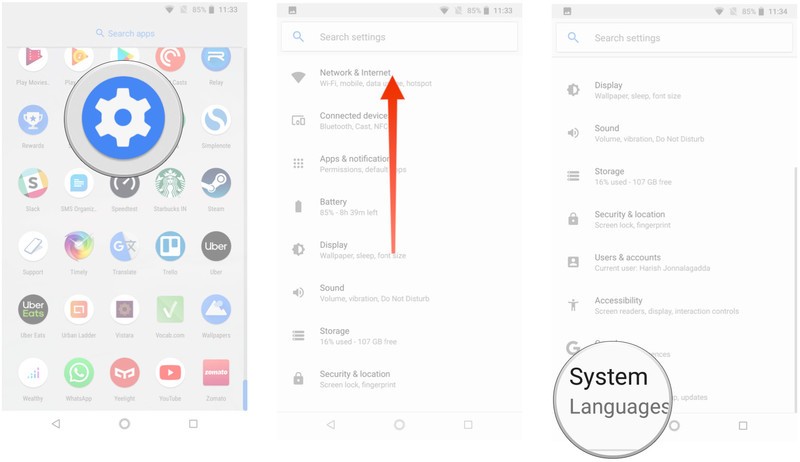
Select Backup.
Ensure the Back up to Google Drive toggle is selected.
You’ll be able to see the data that is being backed up.

Now that you’ve enabled the Android backup service, your system settings and app data will be automatically saved to Drive. When you’re switching to a new phone, you can rely on the service to restore your settings, apps, and associated data.
Note: The menu layout may not look exactly as above on your phone, but any phone running Nougat and above should have an equivalent of Backup & reset.
How to restore apps and settings on a new Android phone
Restoring apps is straightforward, and you’ll be able to do so during initial configuration. If you’re using the Google Now or Pixel Launcher, your home screen background, icon and widget layout, as well as the folder structure, is now saved to the cloud, allowing you to restore your settings to a new handset and retain your home screen layout.
Select the language and hit the Let’s Go button at the welcome screen.
Tap Copy your data to use the restore option.
Connect to a Wi-Fi network to get started.
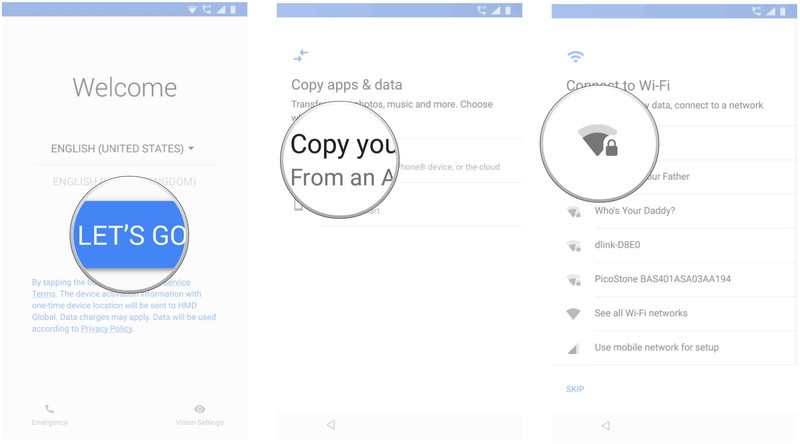
At the next screen, you’ll see all the restore options available. Select A backup from an Android phone if you have your old phone handy. In this instance, we’ll go with the A backup from the cloud option.
Sign in to your Google account (if you haven’t already, set up two-factor authentication).
Select I agree to Google’s Terms of Service to proceed.

You’ll see a list of backup options. Select the relevant one to restore data.
Hit Restore if you want all the data and settings from your previous device restored.
Hit Apps to choose what apps to install on your new device.
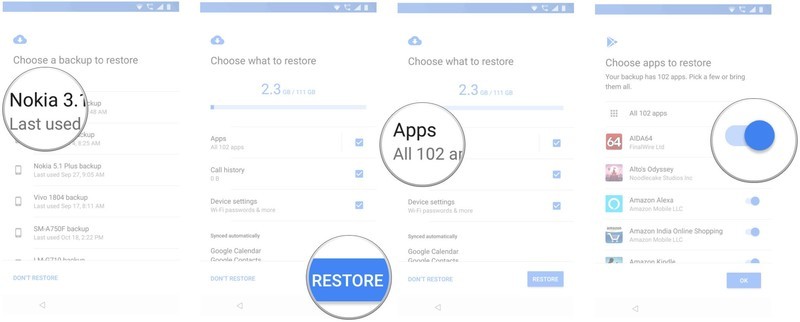
Your data will be restored in the background. In the meantime, you can set up a screen lock and biometric authentication.
Hit Set up screen lock to get started.
Choose a mode of screen unlock and add your fingerprint.
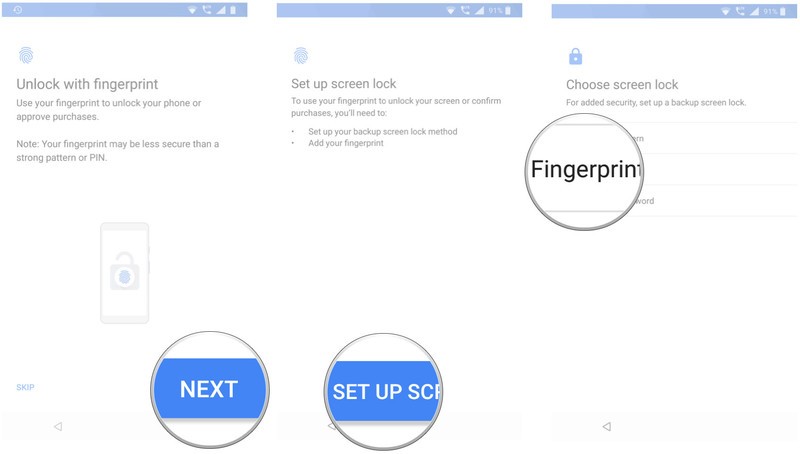
You can set up Google Assistant after you’re done registering your fingerprints.
Select Get Started to use Voice Match.
Train Assistant to recognize your voice and hit Done to finish.
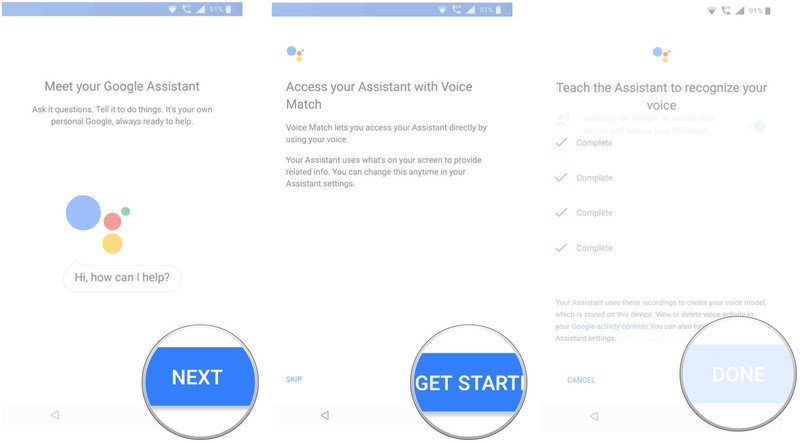
That’s it! Once the initial setup is completed, apps and settings will be restored in the background.
Where does all the app data get stored? Google is backing up the app data to Drive, allocating 25MB for each app. Data used by the backup system doesn’t count toward your storage quota. Meanwhile, developers can choose to select what app data gets stored in the cloud, and you can opt-out of the service at any time through your device settings.
Your privacy
Gathering data and sending it off to a remote server means it’s outside the app sandbox and depends on Google — as well as the people who made your phone — to do the right things. That may not always be the case, as phone manufacturers have a lot of leeway when they make an Android-powered phone. Google’s thoughts on the issue:
Caution: Because the backup transport can differ from device to device, Android cannot guarantee the security of your data while using backup. Be cautious about using backup to store sensitive data, such as usernames and passwords.
Google provides plenty of documentation on how to use the Backup service, so developers have the means to be cautious and do the right thing with sensitive data. Don’t let this scare you away from using the service, but you do need to be aware.
The ability to restore apps and settings is available on all current phones running Android 6.0 and above, although you will encounter a few variations in the initial configuration if you’re using a phone from the likes of Samsung, LG, Huawei, and other manufacturers that use a custom skin.
Our top equipment picks
Nokia is back
Nokia 7.1

$349 at Amazon
The best that Nokia has to offer in the U.S.
The Nokia 7.1 combines a gorgeous screen with robust hardware and great cameras. It’s available unlocked from Amazon and you can use it on GSM carriers like T-Mobile and AT&T as well as MVNOs like Metro or Cricket Wireless.
Best of Android One
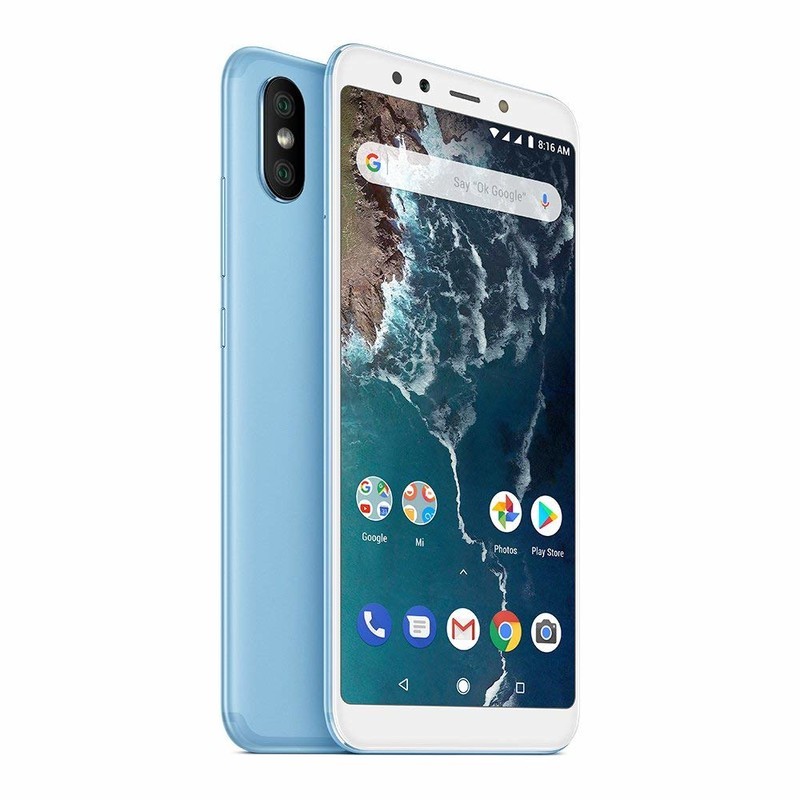
Xiaomi Mi A2
$229 at Amazon
Great hardware at an affordable price.
Xiaomi’s Mi A2 is one of the best options currently available if you’re looking for a phone under $300. With great hardware backed by Android One, the device has plenty to offer. While it’s not officially available in the U.S., you can get a global variant and use it on T-Mobile and AT&T.
Amazon Echo Plus (2nd gen) vs. Sonos Play:1 — Which should you buy?
I listen to a lot of music — and control a lot of connected devices — so I know the ropes when it comes to smart speakers.
Amazon Echo Plus
Alexa’s got skills

$149 at Amazon
Pros
- Powered by Alexa
- Built-in smart home hub
- Multiroom audio with other Echo devices
Cons
- Can’t stream all music services
- Sound doesn’t match Sonos quality
The Echo Plus is a great sounding speaker at the center of your smart home, with plenty of smart features right out of the box.
Sonos Play:1
Sonos lacks smarts

$149 at Amazon
Pros
- Amazing sound for its size
- Can stream all the top music services
- Plays nicely with other Sonos speakers
Cons
- No native Alexa support
- No built-in smart home controls
The Sonos Play:1 is a great sounding speaker that checks all the right boxes. It’s not a “smart” speaker, but it can still get the job done.
Unless you are already deep in the Sonos ecosystem or you’re only looking to just play music, the Amazon Echo Plus edges out the Sonos Play:1 in a few key areas. Sonos can’t be beaten when it comes to sound quality, but the native Alexa support and smart home hub capabilities give the Echo Plus the winning combo.
Audio Lowdown
There are tons of options these days when it comes to smart speakers. While you, of course, want to get the best sound you can, you’ll also want to keep things simple at the same time. The Echo Plus has the advantage of having much to offer in a compact package.
| Multiroom Audio | Yes | Yes |
| Native Alexa Support | Yes | No |
| Smart Home Hub | Yes | No |
| Bluetooth | Yes | No |
Sounding Off

The battle for space in your connected home is an ongoing one — and won’t be stopping anytime soon. Adding smart devices like lights, locks, cameras, and speakers most often require adding a hub of some sort as well. The Echo Plus is dual-duty in that it can act as a hub for many of your smart devices — freeing you from additional hardware — and also sounds great at the same time.
Unfortunately, the Play:1 doesn’t have anything smart about it. It works with other Sonos speakers to play music from wherever you choose, but making it “smart” requires adding … wait for it … a separate Amazon Echo device.
Multi-room audio is something that both of the speakers offer, toting the ability to easily stream to other devices in their respective families. Sonos, known for their ease of use and seemingly endless networking, can easily stream pretty much any music service under the sun. The Echo Plus, however, is limited to a smaller set of services, Amazon Music obviously being the top dog. This is where the Play:1 steals some thunder from the Echo Plus — it’s first and foremost a speaker. Anything beyond that is just an afterthought.
Echo Has Smarts

Alexa support is becoming more and more of a selling feature for devices, and here it’s no different. Buying an Echo product from Amazon, you get Alexa support right out of the box, which means you can ask it questions, add things to your shopping list, play music, request something be played on your Fire TV — the list goes on. While the Sonos isn’t completely lacking in this area, you will need to add an Echo of some sort (Plus, Dot or Show) to your smart home in order to take full advantage of these features on the Play:1. Even then, you can just control music on your speakers — and only if you’re in earshot of your Echo device.
Where the Sonos does salvage a few points is from the dead-simple setup and great networking features. Your Sonos speakers all play well together if you’re looking to spread the listening love across your entire home. While the Echo’s multiroom audio works well, it’s not nearly straightforward as Sonos. Sonos does what it does very well — playing music from nearly any service whenever and wherever you want it — and it’s hard to see that changing anytime in the near future.
Let’s not forget that the Echo Plus also sports Bluetooth, so unlike Sonos, you can connect your phone directly to it to stream rather than routing through the cloud.
Listen Up
If you’re aiming solely to listen to music and don’t need any smart features, Sonos wins almost every time. But in the connected home where you’re looking to do more with less, the Echo Plus is the slight winner here as it adds Alexa support, Bluetooth, and smart home hub features that you won’t find in the Sonos Play:1.
Amazon Echo Plus
Alexa’s got skills
$149 at Amazon
Sweet spot of smarts and sound.
While the Echo Plus may not sound as great as the Sonos Play:1, the built-in smarts and Alexa integration make it our top pick.
Sonos Play:1
Sonos lacks smarts
Lacks features for the smart home.
$149 at Amazon
The Sonos Play:1 does what it does extremely well. It sounds amazing but lacks any smart features out of the box.
How long do you plan on keeping the Galaxy Note 9 for?
Something new is always right around the corner.
If you want a big Android phone that can do everything and then some, the Samsung Galaxy Note 9 is still one of the best handsets you can get. The Note 9 is chock-full of software features, its S Pen is more functional than ever before, and its gorgeous AMOLED display is still one of the best we’ve ever seen.

There’s no denying that the Note 9 is a great phone, but with new devices being released all the time, it can be hard to keep your existing phone in your pocket and not go for something else.
With that being the case, how long do you plan on keeping the Note 9 for? Here’s what the AC forum community has to say:
LdotAdot13
11-05-2018 09:44 PM“
if the S10 wows me, I’ll buy it. If not I’ll wait and see what the Note 10 looks like. I usually keep my phone’s until a new one comes out.
Reply
frederickdawg
11-05-2018 08:29 PM“
12 months.
Reply
PraetorianGuard14
11-05-2018 08:49 PM“
Two years, maybe three. Should be enough time for 5G to settle in.
Reply
monicakm
11-05-2018 08:56 PM“
I just can’t imagine a phone having anything else that could entice me to upgrade. It’s the epitome of, the pinnacle of cell phone technology 😀
Reply
What about you? How long will you be keeping your Note 9?
Join the conversation in the forums!
Samsung Galaxy Note 9
- Samsung Galaxy Note 9 review
- Galaxy Note 9 vs. Note 8
- Where to buy the Galaxy Note 9
- Galaxy Note 9 specifications
- Is the Note 8 still a good buy?
- Join our Galaxy Note 9 forums
AT&T
Verizon
T-Mobile
Samsung
Amazon
Best replacement keyboard for your Kano Computer
Sometimes your keyboard breaks, which is also known as the worst thing in the entire universe. Well, no need to worry. These are some great replacement keyboards that’ll help your Kano Computer to shine in the way it deserves. These keyboards will be compact and slim, wireless and completely easy to set up. They also won’t be lacking in quality, so you’ll definitely not have to worry about that.
Keyboards with touchpads
Small but reliable
Riii Miniature Wireless USB Keyboard with Touchpad

Perfect for those out there who would rather just sit with their keyboard on their lap, no fuss involved. It comes with an auto sleep and wake feature, meaning that battery life and power consumption won’t be strained when you leave the keyboard alone for a few hours. What it lacks in size, it makes up for with quality.
$34 at The Pi Hut
Compact and slim
Logitech Wireless K400

This is an easy-to-use and comfortable keyboard, with large keys and a USB dongle included to set up the keyboard to your Kano Computer as quick as a flash. Touchpad included, in case of faulty or broken mouse.
$23 at Amazon
Fashionable and supportive
Victsing Ultra-Slim Wireless Keyboard

An incredible range that’ll allow you to use your keyboard from up to 10 meters away. It’s designed with frosted keycap and rubber support, allowing you to feel that little more fashionable while comfortable.
$20 at Amazon
Keyboards without touchpads
Okay, so you’ve got your keyboards with touchpads. But what about if you don’t want a touchpad included, and just want a regular wireless keyboard for your monitor?
Curved and stylish
Logitech K350 2.4Ghz Wireless Keyboard

Do you like your keyboard with curves? This wireless keyboard from Logitech boasts a curved layout that guides hands into just the right position. What’s more, you can add a compatible mouse to the keyboard, if you so choose.
$34 at Amazon
Long-lasting and robust
Logitech Wireless K270

Plug and play, with a tiny receiver included, so you can add a number of compatible devices to this keyboard. It also boasts a long-lasting battery life of three years, with three AAA batteries included when you buy.
$30 at Amazon
Portable and ULTRA slim
TeckNet Ultra Slim 2.4G USB Wireless Keyboard
This one has an ultra-slim design, making portability no issue. The keys are also very quiet, so noise irritation won’t be a problem. It’s also incredibly easy to set up with a Nano USB receiver.
$15 at Amazon
So now, not only do you have a range of quality keyboards with a touchpad, but those without a touchpad too. It’s up to you now whether you’d like the best of both worlds or not. The one keyboard that stands out for me, however, is the Logitech Wireless K400 with its smooth interface and a built-in touchpad. All of the keyboards included here have their own fantastic qualities: silent keys, portability, slim and stylish, as well as putting comfort first. No matter what, you’ll find something here that will appeal to you.
Improve your drive with a $14 iClever Bluetooth FM transmitter
Smarten up your old car stereo.

If you’re sick of listening to the same songs and commercials over and over on the radio during your commute but your car stereo system does not support Bluetooth, then an iClever Bluetooth FM Transmitter is the device for you. You can pick one up for $14.39 today by using coupon code BP2O8W8M at checkout, taking almost $10 off the asking price.
The iClever device is powered by your car’s cigarette lighter socket. Simply plug it in, tune it and your radio to an unused frequency in your area and hook your phone up via Bluetooth and you’re ready to go. You’ll then be able to play all your favorite tracks from phone and use services like Apple Music or Spotify to stream on your existing in-car system. It’s also great for avid podcast listeners or Audible fiends.
There’s a built-in mic for taking hands-free calls on the go and, if you prefer, the transmitter supports a microSD card up to 32GB in size if you want to load up some music rather than using the Bluetooth connection.
See at Amazon
The Google Pixel 3 XL is the best unlocked Android phone you can buy

The Google Pixel 3 XL is far and away the best phone Google has made, and that also makes it the best unlocked Android phone. With the Pixel 3 XL, simplicity is the goal: the hardware is efficiently designed, the software gets out of your way, and all of the features have a distinct purpose. It also offers the best overall camera experience of any phone.
Our pick
Google Pixel 3 XL

$899 from Google Store
$899 from Best Buy
The best unlocked Android phone.
The Pixel 3 XL focuses on having the fastest, simplest and most helpful software experience, running on simple and powerful hardware. It accents everything with an amazing camera and a handful of features that make it stand out from the competition.
Who should buy this phone
The Pixel 3 XL is not for those who measure a phone’s quality by the spec sheet numbers or the raw scale of features it offers. But if you just look at the spec sheet and the features, you’re missing out on the bigger picture: the Pixel 3 XL is an amazing phone to use.
The Pixel 3 XL offers an exceptional smartphone experience, whether you’re a novice or a pro.
Whether you’re a novice or a seasoned pro, Google’s software experience is immediately appealing. Android 9 Pie is simple, smooth, easy to use and isn’t saddled by a bunch of features or extras that get in your way. You won’t experience bloatware or unwanted apps, and the deep integration with Google services makes setup, sync and app management easy. Everything you do on the Pixel 3 XL is fast, and you can do as much, or as little, as you see fit with it.
One of the biggest selling points is its cameras. The rear camera takes the best photos in the business, whether you want to just point and shoot or get deeper into the extra features. On the front, a pair of cameras offers fantastic selfies for just you or a group — you can even go all-out with selfie portrait mode.
This phone is the complete package. Sure it’s missing a couple of the highest-end specs, and it isn’t as customizable as the competition, but the pros heavily outweigh those cons.
Is it a good time to buy this phone?
Yes. The Pixel 3 XL was released in mid-October, and Google holds to a strict yearly cycle for releasing phones. This will be the latest and greatest from the company for months to come.
Reasons to buy
- Amazing photo quality
- Great selfies
- Super-loud stereo speakers
- Simple, intuitive software
- Wireless charging
- Guaranteed software updates
Reasons not to buy
- No headphone jack
- Display notch
There are so many great Android phones available, but the Pixel 3 XL stands out
It should come as little surprise that Google’s own Pixel phones offer the best possible Android experience. It starts with the hardware, which is clean, efficient and robust. The three color options give you choices on the look, but regardless you get great speakers, wireless charging and solid (if unspectacular) battery life. The screen is also great, with the extra-large 6.3-inch OLED panel giving you plenty of room to view everything.
It should come as little surprise that the best Android experience comes directly from Google.
Android 9 Pie is an excellent operating system filled with nice-to-have features, but at the same time isn’t weighed down by extra cruft or bloatware that you don’t want. It’s capable of being a simple and easy to use system, or a super-powerful tool for more advanced users — the choice is yours. In either case, you benefit from fantastic performance and smooth animations, plus deep integration with Google’s services. You also get three years of guaranteed software updates, plus unlimited Google Photos backups at full resolution — nice perks.
On both phones, you get the same industry-leading camera performance. The rear camera has just a single sensor and lens, but Google’s software takes it to new heights. You can take amazing photos with little thought in any scene, and new enhancements to processing give you better digital zoom and multi-frame capture without any configuration or changing of modes. The dual selfie cameras give the you flexibility to shoot super-sharp single shots, group wide-angle shots, or uniquely processed portrait mode photos.
Every Pixel 3 XL is unlocked (yes, even the ones Best Buy and Verizon sell), with the same hardware, so you don’t have to worry about network band compatibility or dealing with different versions of the phone.
Alternatives to the Google Pixel 3 XL
The Pixel 3 XL is a great choice for so many people, but of course, there are some potential buyers who don’t want to go all-in with the Google way of doing things. That’s why there are other phones out there that offer a different experience and are worthy of considering.
Compact pick
Google Pixel 3

$799 from Google Store
The complete Pixel experience, in a smaller size to fit your hands and pockets.
This is a simple equation: take the Pixel 3 XL, and scale it down to a size that’s more manageable in one hand. You get all of the same specs, features and camera quality as the larger phone — you just get less screen to work with, and a smaller battery that leads to shorter battery life.
Not everyone wants a huge phone (though most people clearly do), and the Pixel 3 delivers the same great Pixel experience with a size that’s comfortable for a wide range of hand (and pocket) sizes. The Pixel 3 is small enough to fit in your bag or pocket even with a case on, and you won’t find yourself fumbling around to awkwardly to reach the top of the screen.
Despite being smaller, the Pixel 3 has all of the same great hardware, specs, features and camera quality as the larger 3 XL. That includes the glass build, wireless charging, screen quality and stereo speakers. The only things you miss out on here is just the sheer size of the 3 XL’s screen, and its larger battery. Apps may feel more cramped, requiring a little more zooming or scrolling, and at the end of the day you’re going to have less wiggle room in the battery. If you’re a heavy phone user, the Pixel 3 may not be able to manage everything you throw at it without a midday top-up.
A do-everything flagship
Samsung Galaxy S9+

$730 from Amazon
A great all-around phone with wide appeal, and amazing hardware and features.
The Galaxy S9+ is the phone anyone can pick up and make their own. You don’t miss out on a single spec or hardware feature, and it has both one of the best displays and best camera experiences available. It’s also cheaper than Google’s latest phones.
Samsung makes phones that appeal to the widest possible market, and that’s why the Galaxy S9+ is so easy to recommend. It has every hardware feature and spec you could want out of a phone in 2018, and the software is there to make it all work. You can also customize the software to do whatever you want, but that means it takes a lot more setup and massaging to work just right — and in the end, it still won’t match Google’s simplicity.
But the GS9+ does most things just as well as the Pixel 3 XL, and even bests it in a couple areas: namely its higher display brightness, expandable storage and headphone jack. Being several months old, it’s also much cheaper. You’ll pay about $725 for the Galaxy S9+, which is a considerable savings over the Pixel 3 XL and enough of a discount to make many people consider it.
Special stylus
Samsung Galaxy Note 9

$930 from Amazon
An incredible phone with a huge price to match.
The Galaxy S9+ is great, but the Samsung Note 9 is even greater. It does everything the GS9+ does, but adds in a larger screen, more storage, longer battery life and an S Pen stylus. And it’s about $200 more because of it.
The Galaxy Note 9 is easily the best Note phone Samsung has ever made, and for once it’s actually better than the latest Galaxy S phone in every way. The battery has jumped up to 4000mAh, which gives you effortless all-day battery life, and the rest of the experience is the same as what the Galaxy S9+ offers.
That means you get top-end specs, a great camera, an industry-leading display and so much more. And the Note has an S Pen, which remains unmatched in the smartphone world. The problem is its $925+ price tag, which is a tough pill to swallow when you can get almost the same experience for about $200 less with the Galaxy S9+. That makes this an “upgrade” and not the standard recommendation.
Great value
OnePlus 6T

$549 from OnePlus
A flagship in every way but price.
OnePlus has a formula that just works: make a phone that can compete with flagships in most ways, then drop the price by a few hundred dollars. It’s amazing what you can get for just $550 in the OnePlus 6T, with great hardware, above-average cameras, super-fast software, and a packed spec sheet.
With a price of just $550, it almost doesn’t make sense how good the OnePlus 6T is. Great hardware and a super spec sheet rival the competition, and the 6.41-inch AMOLED screen is no slouch. The cameras are a step down from the top tier, but they’re consistent and produce great images. And its OxygenOS software is actually capable of challenging Google’s in simplicity and speed.
The OnePlus 6T isn’t perfect, and has many shortcomings when compared head-to-head with the other phones here. But with a price tag that’s $300 less, it’s hard to complain about the small issues. Given its price it’s shocking how close the OnePlus 6T gets to the competition, and there’s a good chance you’ll be willing to forego a few nice-to-have extras to save so much money.
Budget pick
Moto G6

$239 from Amazon
The best budget Android phone for most people, hitting all of the basics at an incredible price.
The Moto G6 is a budget-priced winner in every respect. From the modern design to the dual camera setup and excellent performance, the Moto G6 represents the pinnacle of Motorola’s dominance in the budget phone space.
In a world filled with great low-cost Android phones, the Moto G6 stands above the rest — and that makes sense, because Motorola has been dominating this space for years. The Moto G6 hovers around $220, yet offers a modern design and many of the same software features as the higher-end smartphones on this list.
It has a big screen, good battery life, surprisingly quick performance and a nicer camera than you’d expect for the money. It has modern conveniences like a USB-C port and fast charging, plus bonuses like a 3.5mm headphone jack. Motorola’s software is also fantastic, with a clean interface and useful features you’ll take advantage of every day.
Bottom line
The Google Pixel 3 XL is the best unlocked Android phone you can buy today. It has amazing performance, simple and powerful software, great cameras and no clear issues or downsides. Its hardware matches the competition in terms of quality and features, and finally isn’t let down by a subpar screen. You can also get the same features in a smaller size (for less money) with the Pixel 3. Samsung’s Galaxy S9+ and Note 9 offer compelling alternatives to those who want more features and can manage the software. And for those who put price first, the OnePlus 6T offers an exceptional value for a flagship while the Moto G6 gives you most of what you’re looking for for hundreds less still.
Credits — The team that worked on this guide

Andrew Martonik is the Executive Editor, U.S. at Android Central. He has been a mobile enthusiast since the Windows Mobile days, and covering all things Android-related with a unique perspective at AC since 2012. For suggestions and updates, you can reach him at andrew.martonik@androidcentral.com or on Twitter at @andrewmartonik.

Daniel Bader is the Managing Editor of Android Central. As he’s writing this, a mountain of old Android phones is about to fall on his head, but his Great Dane will protect him. He drinks way too much coffee and sleeps too little. He wonders if there’s a correlation.

Jerry Hildenbrand is Mobile Nation’s Senior Editor and works from a Chromebook full time. Currently he is using Google’s Pixelbook but is always looking at new products and may have any Chromebook in his hands at any time. You’ll find him across the Mobile Nations network and you can hit him up on Twitter if you want to say hey.
OnePlus 6T, Xperia XZ3, Honor 8X, and more now support ARCore
Google’s AR platform is now available to more than just the Pixels.

You don’t need to own a Pixel from Google to take advantage of ARCore anymore! Google is working with partners like Samsung, Motorola, Huawei, Xiaomi and others to bring augmented reality to all types of phones at all price ranges.
Here’s the complete list!
Phones with ARCore support
Asus
- ROG Phone
- Zenfone AR
- Pixel and Pixel XL
- Pixel 2 and Pixel 2 XL
- Pixel 3 and Pixel 3 XL
- Nexus 6P
- Nexus 5X
Huawei
- Honor 8X
- Honor 10
- Honor View 10 Lite
- Mate 20 Series
- Nova 3/Nova 3i
- P20/P20 Pro
- Porsche Design Mate RS
- Porsche Design Mate 20 RS
- Y9 (2019)
LG
- LG G6
- LG G7
- LG G7 One
- V30 and V30S
- LG V35
- LG V40
- LG Q6
- LG Q8
Motorola
- Moto G5S Plus
- Moto G6
- Moto G6 Plus
- Moto X4
- Moto Z2 Force
- Moto Z3
- Moto Z3 Play
Nokia (HMD Global)
- Nokia 6 (2018)
- Nokia 6.1 Plus
- Nokia 7 Plus
- Nokia 7.1
- Nokia 8
- Nokia 8 Sirocco
- Nokia 8.1
OnePlus
- OnePlus 6T
- OnePlus 6
- OnePlus 5T
- OnePlus 5
- OnePlus 3T
Razer
- Razer Phone
Samsung
- Galaxy S7 and S7 edge
- Galaxy S8 and S8+
- Galaxy S9 and S9+
- Galaxy Note 8
- Galaxy Note 9
- Galaxy A5 (2017)
- Galaxy A7 (2017)
- Galaxy A8 and A8+ (2018)
- Galaxy Tab S3
- Galaxy J7
- Galaxy J5 and J5 Pro
Sony
- Xperia X
- Xperia XZ Premium
- Xperia XZ1
- Xperia XZ1 Compact
- Xperia XZ2
- Xperia XZ2 Compact
- Xperia XZ2 Premium
- Xperia XZ3
Xiaomi
- Mi 8/Mi SE
- Mi Mix 2S
- Mi MIx 3
- Pocophone F1
Excited to get started with ARCore? Make sure you have the framework app installed and get ready for some exciting new apps to head your way!
Updated November 2018: This article was updated with a complete list of all the phones that support ARCore.
NVIDIA’s highly-rated Shield TV is down to just $140 for a limited time
Stream your favorite shows and play your favorite games all with one device.

The NVIDIA Shield TV with remote is down to $139.99 at Amazon. This deal saves you $39 off the regular price of this item.
It’s improved over previous iterations. Heck, this one gives you access to Amazon Prime Video, which is a step-up by itself. Sure, the Shield is more expensive than a Roku but the Shield is a gaming console, too, and a decent one at that.
We took a look at whether or not the Shield TV is worth it in 2018, and concluded that it indeed is by saying:
The NVIDIA Shield TV is still the best Android TV box you can buy in 2018. NVIDIA has done a great job offering software updates that continually make the Shield TV better than before, and the 16GB is a great option for any habitual streamer. So yes, it’s absolutely your best bet for an Android TV box in 2018.
Odds are this deal won’t stick around for too long, so be sure to grab one now, before the price drop disappears.
See at Amazon
Mophie Juice Pack now available for the Galaxy Note 9
Add an extra 2,525 mAh to your Note 9 for $99.95.
Battery packs are often essential accessories for smartphones, and no one does battery packs better than Mophie. The Samsung Galaxy Note 9 is already outfitted with a huge internal battery at 4,000 mAh, but if that’s still not enough for you, you can now buy Mophie’s Juice Pack for the phone.

The Juice Pack comes equipped with a 2,525 mAh battery and does so in a case that’s ultra-slim and mostly retains the Note 9’s low profile. It also offers impact protection against drops and has rubberized pads around the inside to safeguard the Note 9 even more in the event of a fall.
Even with the case on, the Note 9 still works with wireless chargers and supports fast wireless charging when on a Qi-compatible charger.
If you’re interested, the Galaxy Note 9 Juice Pack is available for purchase now at Mophie’s website for $99.95.
See at Mophie
Samsung Galaxy Note 9
- Samsung Galaxy Note 9 review
- Galaxy Note 9 vs. Note 8
- Where to buy the Galaxy Note 9
- Galaxy Note 9 specifications
- Is the Note 8 still a good buy?
- Join our Galaxy Note 9 forums
AT&T
Verizon
T-Mobile
Samsung
Amazon
 AIVAnet