


Grab a 6-quart Instant Pot programmable pressure cooker for $70
What’s for dinner?

The Instant Pot Duo60 6-quart 7-in-1 multi-use programmable pressure cooker is down to $69.95 on Amazon. The pressure cooker normally sells for around $100. Its lowest price ever was a drop to $60 on Prime Day, but it hasn’t reached that price on Amazon since. We’ll see some discounts on it for Black Friday, but those tend to sell out in minutes, and they won’t be much steeper than today’s deal. In this instance it’s probably wiser to just get it while it’s in stock if you’re determined to get one for the holidays. You may also see a clippable coupon to save you almost $2 off, which just sweetens the deal even more.
You can use this as a pressure cooker, slow cooker, rice and porridge cooker, yogurt maker, cake maker, egg cooker, saute/searing, steamer, warmer, and sterilizer. The customer reviews are insane, too. It’s very user-friendly to boot. You’ll get a few different accessories, including a steam rack (with handles), recipe booklet, two different spoons, a measuring cup, and a user manual.
If you need recipe inspiration, check out The Instant Pot Cookbook. You might also want a tempered glass lid so you can see what’s going on.
See at Amazon
Review: 2019 Acura RDX Offers Novel Touchpad Infotainment Controls, but CarPlay Doesn’t Fully Support Them
As part of my continuing series of articles looking at how car manufacturers have integrated CarPlay into their infotainment systems, I’ve taken a look at the 2019 Acura RDX, the popular crossover SUV from Honda’s luxury brand. Acura has been gradually rolling out CarPlay support across its lineup over the past few model years, and the new 2019 RDX is the first of this model to support the feature.
My test vehicle was a well-equipped RDX with Acura’s Super Handling All-Wheel Drive (SH-AWD), Technology package, and an A-Spec trim designed for those who want a bold look.
The Technology package adds a premium ELS Studio audio system that offers 12 speakers, Acura’s navigation system, two rear USB charging ports, parking sensors, and blind spot and rear cross traffic warning systems.
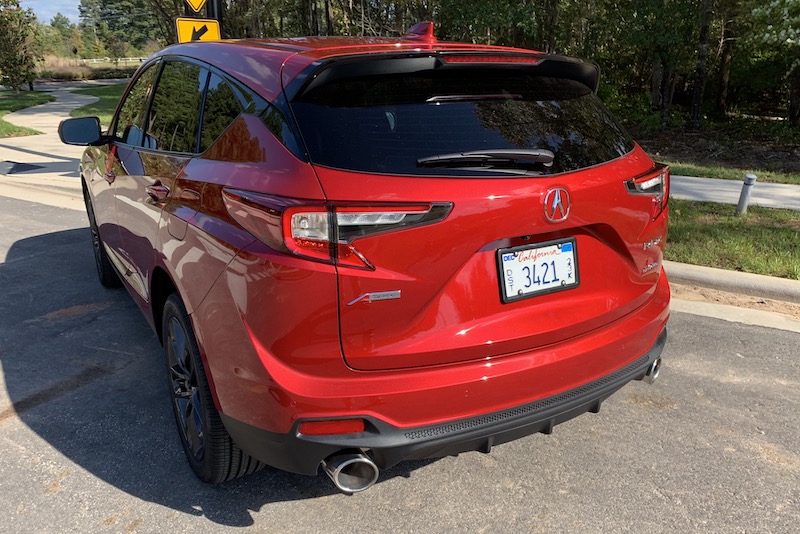
The A-Spec package adds larger 20-inch wheels in “Shark Gray,” special exterior accents like a unique front bumper with LED fog lights, dual oval exhaust, and prominent badging. Inside, the A-Spec package adds a sport steering wheel that feels great in the hands, and leather seats in either full black or red with black inserts, including heated and ventilated front seats. Regardless of seating color, red is a prominent highlight color in other areas of the A-Spec cabin, including on the instrument panel and nighttime ambient lighting. The audio system is also upgraded to 16 speakers, including four embedded in the roof of the vehicle.
There’s an additional Advance package that includes some other nice features such as rain-sensing windshield wipers, a heads-up display, a surround-view camera system, and 16-way power front seats including thigh extensions and side bolsters, but interestingly that package is not available on models equipped with the A-Spec package.
Acura tells me it’s received some feedback from customers who would have liked to add some of these Advance package features to an A-Spec vehicle, so it’s potentially something Acura will be taking a look at for the future as it weighs customizability against the simplicity of minimal trim packages.
Infotainment System Overview
Acura’s built-in infotainment system handles all of the usual functions, including radio, SiriusXM, Bluetooth phone connectivity, voice control, optional navigation and more. A beautiful 10.2-inch widescreen center display is standard, as is CarPlay support, which is a welcome decision compared to some other manufacturers that offer it only with certain trims or as a standalone option for an extra charge.
 Acura RDX’s center stack with high-mount infotainment display
As part of its research, Acura’s product development team determined that the optimal placement for a large infotainment display is mounted high on the dashboard and pushed back from the driver, minimizing the distance the driver’s eyes need to travel from the road to glance at the display. What that means, however, is that touchscreen operation is infeasible, as it requires a stretch to reach even the near side of the display.
Manufacturers have come up with various solutions to the infotainment control issue, with some keeping the display close enough for touchscreen operation while others use some form of control knob to allow for scrolling through and selecting onscreen options.
 True Touchpad Interface
In the RDX, Acura has launched a new True Touchpad Interface (TTI) within easy reach in the center console, and while it’s not the only car to offer touchpad control of the infotainment system, it does offer a unique absolute positioning design where the small touchpad maps directly to the display above – pressing the top left corner of the touchpad activates the icon or menu option at the top left of the display, for example.
The TTI system takes a little bit of getting used to, but once you get the hang of it and stop trying to swipe around to the button you want on the display, it’s a simple and natural way to navigate through various options, and the RDX has a comfortable palm rest below the touchpad to support your hand.
The touchpad is surrounded by a raised border that makes it easy to tell where your finger is by feel, and as your finger rests on various areas of the touchpad, the corresponding function on the display highlights to let you know where you are. Once the desired function is highlighted, a press on the touchpad in that location registers your selection.
 Display highlighting Navigation icon corresponding to location being touched on TTI
Similar to some other widescreen infotainment systems, Acura’s system in the RDX allows for two separate content windows, a large primary one taking up the majority of the screen, and then a smaller one off to the right side that can show options such as a clock or a secondary function of the system.

For example, if you have navigation up on the main part of the screen, the secondary portion of the display can show your current audio selection, whether it be radio, SiriusXM, or another source.
The TTI system includes a secondary touchpad, a thin strip along the right side that corresponds to the secondary content zone of the display above. Swiping up or down on this portion of the touchpad scrolls through the available content screens like clock or audio information, and pressing this strip swaps the two content zones, such as bringing the audio content over to the primary zone of the display while pushing navigation off to a small map on the right side. It’s a handy system that makes it easy to manage multiple functions of the infotainment system.

Above the TTI touchpad is a set of three physical buttons: a Back button, a Home button, and a Cards button that lets you quickly access the available content for the secondary zone of the display without needing to scroll through the options one by one.
 Top right physical button brings up card options for secondary display zone
The TTI touchpad can also be used to input handwriting for operations such as spelling out a destination or a phone number. In practice, I found this to be quite finicky and generally had a hard time getting the system to recognize the characters I was intending to draw.
 Steering wheel and multi-information dashboard display
(Voice control button is at lower left on steering wheel)
Of course, the TTI is only one way to control the infotainment system, with voice being the other primary system. The new RDX includes a revamped natural language voice recognition system, meaning you don’t need to use specific phrasing for the system to recognize your requests. I found the system to be quite good at recognizing requests using a variety of wordings, while a fairly natural-sounding voice offered audio feedback and navigation prompts.
Interface
One of the great features of Acura’s infotainment system is the customizability of the home screens. Much like an iPhone, the system supports multiple pages of “apps,” such as navigation, radio, SiriusXM, Bluetooth, Aux, Hotspot controls, CarPlay, and more.

By pressing and holding on an app icon using the touchpad, you can enter an edit mode that lets you move the icon around the home screen or to a different page. This lets you put your most frequently used functions on the front page and in the most easily accessible locations such as in the corners.
 Edit mode for rearranging home screen icons
These home screen icons aren’t limited to just general functions like navigation or radio. Various “Favorites” like frequently used destinations, specific phone contacts, and radio stations can be added directly to the home screen with their own icons, allowing for one-touch access. And for apps you know you’ll never use, you can delete them entirely from the home screen.
 “Home” favorite for one-touch access to navigation route home
Built-in Navigation
I found Acura’s built-in navigation to be quite powerful, easily recognizing a variety of addresses and POIs while providing accurate directions and estimated arrival times, as well as helpful voice prompts. The system makes it easy to set favorite destinations or select from recent ones, or you can quickly search for nearby POIs in various categories.
 Navigation search results
Several different views are supported, including 2D and 3D views with available “north up” and “heading up” options for 2D mode. The system also shows helpful information like distance to next maneuver, direction and street name of the next turn, follow-up maneuvers, and lane guidance. You can also easily add waypoints if you need to make a stop on the way to your final destination.
Aside from the standard navigation mode, the system also offers an exploration mode, which lets you easily zoom and pan around the map for an overview of routes and traffic conditions, and you can select locations and POIs directly from the map.
CarPlay
As with nearly every other car manufacturer, Acura’s CarPlay implementation is a wired one, so you’ll need to plug your phone into a USB port in the center console in order to get CarPlay up and running.
 Center console with phone slot and cupholders
Fortunately, the center console in the RDX includes a convenient slot housing the required USB port and providing simple and space-saving storage of your phone and cable while connected to the system. A sliding metal cover can hide away your phone and other small items in the neighboring cup holders.
 Center console with sliding cover closed
CarPlay shows up as its own app on the RDX’s home screen, making it easy to hop into CarPlay as needed. And as with other apps, you can customize its location on the home screen.

Once you enter CarPlay, you’ll be greeted with the familiar 4×2 grid of app icons from your iPhone, taking up the primary zone on the RDX’s display. The secondary display zone is not dedicated to CarPlay, so it can show content from the native system such as a navigation route in progress or the current audio information.

As usual, I won’t delve too much into the specifics of CarPlay itself, as that’s generally a consistent experience from vehicle to vehicle, but the one aspect that does vary is system control. CarPlay can support both direct touchscreen manipulation and selection highlighting via off-screen control methods such as knobs and jog wheels. But as you’ll quickly find when you enter CarPlay for the first time on the RDX, it doesn’t support absolute touchpad positioning, and that’s a disappointing realization.
You can certainly control CarPlay using the touchpad, but it’s a traditional trackpad mechanism where you have to swipe in various directions to move the highlights on the user interface to the desired function. You can’t just tap on the touchpad in the location where your intended CarPlay icon or menu option is displayed.
What this means is that the method of controlling your infotainment system differs depending on whether you’re in the native Acura system or in CarPlay, and that takes a bit of brain processing power to remember as you rapidly switch back and forth between the systems. Here’s hoping that Acura and Apple are working together to bring absolute touchpad positioning to CarPlay, as it’s a handy control mechanism.
In fact, Android Auto isn’t supported at all on the RDX at the moment, as Acura says it’s still working with Google on developing the ability for Android Auto to recognize absolute touchpad positioning, and so Android Auto support won’t be coming until a future software update.
 Waze on CarPlay
The hardware Back and Home buttons on the RDX do work with CarPlay to some degree, although the integration could be improved a bit. The Back button does typically reverse through your previous actions, backing up through menus and even moving out of apps back to the CarPlay home screen. I did find a few apps such as Google Maps and Waze, however, where pressing the Back button yielded a chime but didn’t actually step back to the previous action.
The hardware Home button always takes you back to the Acura home screen, even if you’re in CarPlay, and it would be nice if the system could intelligently take you back to either the CarPlay or Acura home screen depending on which system you’re currently in, with perhaps a second press of the button in CarPlay mode taking you all the way out to the Acura home screen.
CarPlay can of course also be controlled via voice, and that functionality is accessible through the same steering wheel button used for Acura’s built-in voice assistant. A short press on the button brings up Acura’s system, while a long press brings up Siri.
I mentioned earlier that the dual-zone display lets you quickly swap back and forth between different functions in the Acura infotainment, but CarPlay is a bit limited in that regard. If you’re using Acura’s navigation and listening to music via CarPlay, the integration works fine and the secondary display zone will say “Apple CarPlay” and show the currently playing track and artwork, whether you’re using Apple’s Music app or another service like Pandora or Spotify.

Pressing the right-side strip on the TTI will then conveniently bring your CarPlay audio over to the primary zone and slide the Acura navigation over to the right side.

With the cards options for the secondary display zone, you can even assign audio to both zones, displaying the traditional CarPlay “Now Playing” interface in the primary zone and album artwork in the secondary zone.

Things don’t work quite as well when you’re using other functions. For example, if you’re using CarPlay navigation in the primary display zone and SiriusXM in the secondary zone, swapping the zones will move the SiriusXM controls to the primary zone, but there’s no “mini” mode for CarPlay’s maps apps to show in the secondary zone.
 SiriusXM on left, CarPlay Apple Maps on right
As a result, all you’ll see on the right is a CarPlay-like icon and text saying “Apple CarPlay” and “Route Active” with no details on the navigation in progress. You will, however, still receive navigation voice prompts.
Ports and Connectivity
If you’re looking to charge your devices in the RDX, you’ll find several options, including the prominent USB port in the center console that gives your device access to the infotainment system. Another USB port is located underneath the center stack adjacent to a large storage space.
 Ports under the center stack
If you have the Technology package, you’ll get two more USB ports on the rear of the center console, giving your rear passengers convenient accessing to charging. All of the USB ports in the RDX offer 2.5A charging, so even devices like iPads with demanding charging loads will refuel fairly quickly.
 Rear USB ports
Hotspot capabilities come standard on the 2019 RDX, although you’ll have to subscribe to an AT&T data plan. Conversely, you can tether the car to your phone’s cellular connection to support internet-connected features of the infotainment system.
Wrap-up
I came away impressed with the overall driving experience of the 2019 Acura RDX, and the infotainment system is one of the best I’ve tested with a powerful navigation system, a terrific widescreen center display, and a unique but natural-feeling touchpad control interface. CarPlay works well, and I appreciate the ability to use the secondary display zone to show details on apps from the built-in system while using CarPlay. It’s a handy way to take advantage of CarPlay navigation and SiriusXM radio simultaneously, for example, and keep tabs on everything at once. It’s a welcome enhancement to CarPlay’s one-app-at-a-time experience.
The most significant negative is the lack of full True Touchpad Interface support in CarPlay, and hopefully that’s something Apple will address at some point. TTI is a solid control mechanism, but I feel like CarPlay hampered my ability to become fluent with it simply because I was constantly switching between CarPlay and Acura’s system.
As a result, I still found myself dragging my finger around on the touchpad even when using the native Acura system rather than heading straight for the area corresponding to my desired target. I have no doubt the interface would have become second nature more quickly without CarPlay and the built-in system constantly fighting to retrain my brain.
The 2019 Acura RDX starts at an MSRP of $37,300 with CarPlay supported on all vehicles including the entry-level Standard trim. The Technology package adds $3,200 to the total cost, and if you want even more you can opt for either the A-Spec package for a further $3,000 or the Advance package for $4,900, both on top of the Technology package. SH-AWD is an additional $2,000 on all levels.
Related Roundup: CarPlayTag: Acura
Discuss this article in our forums
Apple Now Has 132K Full-Time Employees, Spent $14.2B on R&D in 2018 Fiscal Year
Following the conclusion of its 2018 fiscal year, which ended September 29, Apple today filed its annual Form 10-K [PDF] with the SEC. We’ve combed through the exhaustive, legalese-rich 72-page report so you don’t have to.
Highlights:
- 9,000 more employees: Apple has 132,000 full-time employees as of the end of its 2018 fiscal year, up from 123,000 a year prior.
- R&D expenses rose nearly $3 billion: Apple spent $14.2 billion on research and development in its 2018 fiscal year, a nearly 23 percent increase over the $11.5 billion it spent in its 2017 fiscal year.
- Apple continues to execute its share repurchase program: Apple had 23,712 shareholders of record as of October 26, 2018, down from 25,333 as of October 20, 2017. There were 4,754,986,000 outstanding shares of Apple stock as of the end of its 2018 fiscal year.
- Genius Bar expenses are down: Apple’s expenses from warranty claims totaled $4.1 billion in its 2018 fiscal year, down from $4.3 billion in its 2017 fiscal year and $4.6 billion in its 2016 fiscal year.
- CapEx to drop: Apple anticipates utilizing approximately $14 billion for capital expenditures during its 2019 fiscal year, down from $16.7 billion in its 2018 fiscal year. The capital is used towards Apple’s manufacturing equipment, data centers, corporate facilities, and retail stores.
- Apple snaps up more office space: Apple owned 16.5 million square feet and leased 24.3 million square feet of building space as of September 29, 2018. By comparison, Apple owned 13.4 million square feet and leased 23.0 million square feet of building space as of September 30, 2017.
Apple’s annual Form 10-K also acknowledges that “international trade disputes” could adversely affect its business, almost certainly referring to an ongoing trade dispute between the United States and China:
International trade disputes could result in tariffs and other protectionist measures that could adversely affect the Company’s business. Tariffs could increase the cost of the Company’s products and the components and raw materials that go into making them. These increased costs could adversely impact the gross margin that the Company earns on its products. Tariffs could also make the Company’s products more expensive for customers, which could make the Company’s products less competitive and reduce consumer demand. Countries may also adopt other protectionist measures that could limit the Company’s ability to offer its products and services. Political uncertainty surrounding international trade disputes and protectionist measures could also have a negative effect on consumer confidence and spending, which could adversely affect the Company’s business.
Apple’s annual Form 10-K can be viewed or downloaded in a variety of formats from the company’s Investor Relations website.
Note: Due to the political nature of the discussion regarding this topic, the discussion thread is located in our Politics, Religion, Social Issues forum. All forum members and site visitors are welcome to read and follow the thread, but posting is limited to forum members with at least 100 posts.
Tags: AAPL, SEC
Discuss this article in our forums
Top 4 Ways to Market Your Business
Marketing your company can now be done in a number of different ways. This is the case due to the expansion of technology and innovation, and as a result the tools available at your disposal that you can use. One example of this can be pointed to social media channels, which have now become a necessary marketing platform if the modern business wants to reach their target audience. In addition to this, it’s necessary to have a strong online presence via a website, engage in email marketing and remain consistent in everything that you do. For more information on these aforementioned tips, continue reading.
- Social media channels
The very first way to ensure that you are searchable and are able to embark on various marketing endeavors is to create social media channels. This includes Instagram and Facebook, as well as another that you consider would be important for targeting your audience. Nowadays many people spend a lot of time on these various platforms, and you would miss out on communicating with consumers if you do not establish yourself on them as well. Not to mention, some people now get their source of daily news from these various outlets.
- Have a website
A business without a website is not credible. Even the average person has a website, whether it’s for their hobby or to showcase their portfolio. It has become easier than ever to create one, and it can even assist with your various sales efforts if you set up an e-commerce component. Of course, don’t forget that the quality of content you post is incredibly important if you want consumers to re-visit your site and tell their friends and family about you. Make sure that it is user-friendly and thus easy to navigate, and you will improve your company’s visibility as a result of it.
- Email marketing
A cost-effective method for promoting your business is through free email marketing. There are plenty of online software programs that offer the necessary templates and know-how for how to do this. All that will be necessary from your part is to come up with the content that will captivate people’s attention when they open up the email. No matter what message you are trying to promote, whether it’s a sales promotion or welcoming a new subscriber, you can easily communicate and reach anyone.
- Consistency
Once you get into the groove of marketing, you need to remain consistent. In other words, stick to the branding that you have set up for yourself, and remember to post on a regular basis. This includes on your website and social media, and also stay in contact with your audience by reaching out to them. This could be done through the aforementioned email marketing tactics or another way.
How many of the steps already outlined have you taken in order to properly market your goods and services? At the end of the day, if you don’t put in the effort and money behind it, consumers will not know about you and the result is falling behind on your profitability, and not to mention your competitors. Strive towards success at all times and continue marketing your various goods and services.
Kobo Forma review
Over the past few years, indie bookstores have experienced a renaissance while eBook sales have declined significantly. While digital book sales still make up nearly a quarter of book sales, the ebook reader market is diminishing as a growing number of readers are downloading books to smartphones.
Can a fresh ebook reader from Kobo help? Likely not, because the Kobo Forma is quite pricey at $280, but it manages to hold its own over Amazon’s second-gen Kindle Oasis.
Designed with comfort in mind
With a few exceptions, the Kobo Forma maintains the same design aesthetic as other Kobo ebook readers, with one major exception: It is remarkably thin. Coming in at 8.5mm at its thickest point, the Forma is slightly thinner than the Samsung Galaxy Note 9.
Steven Winkelman/Digital Trends
There’s an eight-inch E Ink display accompanied by a grip on one side. The grip curves slightly upward, making the Forma easy to hold with one hand. It doesn’t matter which way you hold the Forma, because there’s an accelerometer that will automatically change the screen orientation however you hold it, in whichever hand.
The grip is home to the Forma’s page turn buttons, power button, and MicroUSB charging port. The page turn buttons are responsive and easy to tap, but the power button is spongy and located in an awkward spot. And while It may be a minor quibble, we wish Rakuten — the company that manufactures the Kobo — would switch to the more universal USB-C charging port for its flagship ebook reader.
The 8-inch E Ink screen is larger than any other Kindle or Kobo ebook reader currently on the market.
Flip the Kobo Forma over and you’ll find a textured plastic back with a rubberized coating. The texture and finish make the Forma easy to hold, but it feels a bit cheap when compared to the less expensive second-generation Kindle Oasis. But the Forma has an IPX8 rating, meaning it can survive when submerged in up to a meter of water for an hour. That’s the same rating you’ll find on the Kindle Oasis as well as the 2018 Kindle Paperwhite.
Although you’re not going to be able to put the Kobo Forma in your pocket, it’s small enough to easily store in a bag without taking up too much space, and it’s lightweight so it never feels cumbersome.
Big screen
At eight-inches, the E Ink screen on the Kobo Forma is larger than any other Kindle or Kobo ebook reader currently on the market. It comes in an inch larger than the Kindle Oasis, and two inches larger than many other ebook readers. While those extra inches make the Forma less portable than its competitors, we think it’s a great trade off for a more immersive reading experience.
Steven Winkelman/Digital Trends
The Forma’s screen produces crisp text, and images are surprisingly sharp. Page transitions are almost instantaneous, and we didn’t notice any screen ghosting thanks to intermittent screen refreshes.
It’s also easy to customize the reading experience easily on the Forma. The ebook reader allows you to choose from nearly a dozen different fonts and 50 font size options. There’s also options to tweak font weight and sharpness as well.
Content on the Forma loads quickly and page turns are nearly instantaneous.
Like most E Ink devices, the Forma is easy to read in direct sunlight. Even in different situations and environments, the Forma does a superb job of keeping brightness and color temperature perfect for any scenario. We do think the automatic brightness doesn’t go low enough in dark environments, but you can easily make adjustments manually with the brightness slider.
You’ll find an excellent blue-light filter on the Kobo Forma called ComfortLight Pro. It uses your timezone and sleeping habits to determine when to minimize blue-light exposure. The screen turns more orange as it inches closer to your bedtime, to ensure you get a good night’s sleep. Blue-light exposure at night can have adverse effects on your health.
Snappy hardware, intuitive software
The hardware for the Forma doesn’t stray far from what you’d expect for a premium ebook reader. It has a 1GHz processor paired with 512MB of RAM. You should have no problems, as content loads quickly and page turns are nearly instantaneous.The 8GB of onboard storage also allows you to store about 6,000 ebooks.
Steven Winkelman/Digital Trends
These specs are nearly identical to the Kobo Aura H2O. They’re also very similar to what you’ll find on the Kindle Oasis and All New Kindle Paperwhite. The primary difference is Amazon now offers 32GB storage options for its newer ebook readers, which helps for readers that plan to store audiobooks on the device.
One feature that’s missing on the Forma is Bluetooth connectivity. Amazon added this feature to the Kindle Oasis in 2017, and more recently to the Kindle Paperwhite. Bluetooth connectivity allows readers to pair headphones to the ebook reader and listen to audiobooks. It’s surprising Rakuten Kobo didn’t add this feature to the Forma since it has been heavily pushing its audiobook store as an alternative to Audible.
With stats like overall read time and book completion percentage, Forma’s Activity feature is a fun glimpse into your reading habits .
The software side is where the Forma shines. For newcomers to the ebook reader space, you should have no problem setting up and using the Kobo Forma. The homepage shows your current book along with your personal library. There’s also an icon for the bookstore, with a best sellers carousel front and center. The menu bar at the top of the screen has a battery life indicator, a search bar, sync icon, brightness control, and a drop-down menu that allows you to quickly access ebook features.
While reading, you’ll still be able to access all the features in the top menu as well as a bottom bar that allows you to customize your reading experience. Simply tap the top of the screen and both menus will appear. In the bottom menu, you can quickly access a page slider and table of contents icon. You can also change screen settings, see your reading activity, change the font, and even see a selection of recommended books here.
But there are a few features that are hard to find worth mentioning. Overdrive allows you to easily check out digital titles from your local library. Once you’ve set up Overdrive, just search for a title in the Kobo store, tap the three dot icon and you’ll see an option to check out or reserve from your local library if the title is available.
Steven Winkelman/Digital Trends
Pocket is also available on the ebook reader. Pocket, which is also an Android or iPhone app, lets you send articles from your computer or phone to the Forma to read offline. Amazon offers a similar feature on its Kindle ebook readers with Instapaper, but charges $20 a year for it.
Finally, we’d be remiss if we didn’t mention Activity. This feature provides in-depth stats about your reading, with data such as overall reading time, average reading time per session, how quickly you read, and percentage of books you’ve completed. It’s a fun and enlightening glimpse into your reading habits.
Kobo Store is a great alternative
It’s no secret Amazon has amassed the largest digital bookstore on earth, but don’t let that fool you into think Rakuten won’t have all the titles you want. It’s massive, with more than six million books. We didn’t have much trouble finding titles we wanted to read, however, be prepared for disappointment if you’re looking for digital magazines or newspapers as content is limited to ebooks and audiobooks.
In addition to the Kobo Store, you can also easily download books from other retailers in just about any format imaginable. And since the Kobo Forma also has Overdrive integration, you can also check out books from your local library.
Read for weeks on a single charge
A 1,200mAh battery powers the Kobo Forma. That’s slightly smaller than the battery on the Kobo Aura HD, but Rakuten Kobo claims you should get weeks of use between charges.
Kobo Forma Compared To
Kobo Clara HD
Sony Digital Paper DPT-RP1
Boox Max 2
Kindle Oasis (2017)
Kobo Aura H2O Edition 2
Kobo Aura One
Kindle Oasis
Amazon Kindle Paperwhite (2013)
Kobo Aura HD
Kobo Mini
Sony Reader PRS-T2
Spring Design Alex
Barnes & Noble Nook
Amazon Kindle 2
Sony PRS-700
While we have not had the opportunity to fully drain the battery on the Kobo Forma just yet, we think you should have no problem getting at least two to three weeks per charge. If you turn off ComfortLight PRO expect to eek out another week. And while its not the best battery life we’ve seen on an ebook reader, it’s on par with the similarly priced second generation Kindle Oasis.
Price, availability, and warranty information
The Kobo Forma costs $280, and it’s available for purchase now from Rakuten’s website.
The Forma is covered by a one-year limited warranty that covers manufacturing defects. Warranty claims are made via the company’s return hotline and require an RMA from the manufacturer along with the original receipt. You’re responsible for shipping costs when sending in an item for repair or replacement.
Our Take
At $280, the Kobo Forma is on the expensive side of ebook readers. While we wish the build quality reflected its premium price point, it is still an excellent value for serious readers.
Is there a better alternative?
Possibly. If you’re a fan of self-published books, listen to lots of audio books, or are deeply entrenched in the Amazon ecosphere, you’ll probably want to check out the second generation Kindle Oasis. It has a smaller display, but you’ll have access to Amazon’s immense library of traditional ebook titles along with more than a million self-self-published titles. You can also store audiobooks on the Oasis and listen to them with Bluetooth headphones.
The Kobo Clara HD is also an option for readers who are looking for a less expensive option from Rakuten. It offers many of the same features you’ll find on the Kobo Forma, but has a smaller six-inch display, and is not waterproof.
How long will it last?
Given you take care of the Kobo Forma and don’t crack the display, we believe it should last four to five years. Ebook readers do not evolve as quickly as other mobile products, and we don’t expect to see a product that would render the Kobo Forma obsolete any time soon.
Should you buy it?
Yes. It may not feel as premium as we’d like, but the Kobo Forma ticks off all the boxes of what you’d want in the perfect ebook reader.
Nikkei: Apple Told Suppliers to Cancel Plans for Additional iPhone XR Production Lines
Apple has told iPhone assemblers to halt plans for additional production lines dedicated to the iPhone XR, claimed a new report on Monday.
According to sources cited by the Nikkei Asian Review, Apple has informed Taiwanese smartphone manufacturers Foxconn and Pegatron of the cancelation, which the report said signaled “disappointing demand” for Apple’s lower cost flagship model, which launched late last month.
“For the Foxconn side, it first prepared nearly 60 assembly lines for Apple’s XR model, but recently uses only around 45 production lines as its top customer said it does not need to manufacture that many by now,” a source familiar with the situation said.
That means Foxconn, the Taiwanese company traded as Hon Hai Precision Industry, would produce around 100,000 fewer units daily to reflect the new demand outlook — down 20% to 25% from the original optimistic outlook, this person said.
As for Pegatron, the iPhone assembler is said to be “suspending plans to ramp up production and awaiting further instructions from Apple,” according to Nikkei’s supply chain sources.
Apple has reportedly also asked smaller iPhone assembler Wistron to stand by for rush orders, but Nikkei’s sources said the company will receive no orders for the iPhone XR this holiday season.
Nikkei’s reporting on iPhone supplies has been off the mark in recent years, with claims of Apple slashing iPhone production orders on weak demand being at odds with later sales figures.
The latest report also clashes with recent remarks made by noted Apple analyst Ming-Chi Kuo, who said that iPhone XR pre-order demand in the first three days of the device’s availability was “better than that” of the iPhone 8 and iPhone 8 Plus during the same period last year.
Kuo said that although pre-order demand immediately after launch has been lower for the iPhone XR versus the flagship iPhone XS models, overall iPhone XR shipment momentum is “more stable” because it will drive more customers to upgrade than the iPhone 8 series over time.
On the flip side, some analysts expressed concerns that the iPhone XR’s strong availability following launch implied weak sales of the $749 handset.
In addition, Apple’s $89 to $93 billion revenue forecast for the first fiscal quarter of 2019 was cautious in its earnings call, but Apple blamed this on foreign exchange costs, issues with supply/demand balance, and weakness in emerging markets.
Apple CFO Maestri also explained that Apple had “some uncertainty” around supply/demand balance for the “unprecedented number” of new products the company had launched over the last six weeks.
The launch timing of the new iPhones was also said to be a factor, with the iPhone XR coming later than the XS and the XS Max. This had an effect on Apple’s Q4 revenue and is also expected to impact Q1.
Related Roundup: iPhone XRTag: nikkei.comBuyer’s Guide: iPhone XR (Buy Now)
Discuss this article in our forums
iPad Pro Reviews Roundup: Blazingly Fast With a More Balanced Design, But Some Face ID and USB-C Quirks
The first wave of reviews of Apple’s redesigned iPad Pro were published this morning. We’ve collected some of the key takeaways below.
The new upgraded 11-inch and 12.9-inch iPad Pro models feature edge-to-edge displays that do away with the Home button, slim bezels all the way around, and a TrueDepth camera system that enables Face ID. Apple’s new iPad Pro models also work with the Apple Pencil 2 and revamped Smart Keyboards.
On the new iPad Pro design:
- Engadget’s Chris Velazco:
Apple says this is the iPad it’s wanted to build all along, and I’m not surprised. All the horsepower tucked away inside (and there’s a lot of it) is more accessible because of this streamlined design, and I don’t think I could go back to an iPad that wasn’t this trim.
- TechCrunch’s Matthew Panzarino:
The overall aesthetic is much more businesslike and less ‘friendly’ in that very curvy sort of Apple way. I like it, a lot. The flat edges are pretty clearly done that way to let Apple use more of the interior space without having to cede a few millimeters all the way around the edge to unusable space. In every curved iPad, there’s a bit of space all the way around that is pretty much air. Cutting off the chin and forehead of the iPad Pro did a lot to balance the design out and make it more holdable.
On the Liquid Retina display:
- iMore’s Rene Ritchie:
Apple’s doing all the color management and individual color calibration you expect here, so iPad Pro looks dead accurate — so much so that, like iPhone XR, it can be hard to tell Apple LCD from Apple OLED in anything but the deep blacks and the off-axis. And yeah, that’s still impressive.
- The Verge’s Nilay Patel:
Apple keeps saying the iPad Pro now has an “all screen design” that “goes from edge to edge,” but let’s just be honest: nothing about these bezels is edge-to-edge. It is, however, an extremely nice 264ppi LCD screen, and I continue to be a fan of Apple’s fancy technique to round off the corners of LCDs.
Apart from the corners, the new iPad Pro display is substantially the same as last year’s Pro, with Apple’s extremely smooth 120Hz ProMotion variable refresh rate system, True Tone automatic color calibration, and wide color support. This is one of the best, most accurate mobile displays you can look at.
On Face ID:
- The Wired’s Jeffrey Van Camp:
It works well, and doesn’t require that cut-out notch on the screen like the iPhone. It’s not quirk-free, though. We usually hold our iPhones in a portrait (vertical) orientation because that’s just how they fit in our hand. With an iPad like this, you almost always use two hands, and that means there isn’t really a “right” or “wrong” way to hold it. From time to time, my hands would sometimes accidentally block the Face ID camera when I held it in landscape (widescreen) orientation. And if I’m lounging around, my face may also be out of view. As I’ve gotten used to keeping my head in front of the tablet screen, and my hands away from its front-facing camera, Face ID evolved from a hindrance to a helpful, secure aid.
On the second-generation Apple Pencil:
- iMore’s Rene Ritchie:
The new Apple Pencil has the same tip and core technology as the original but just about everything else has changed. There’s no cap on the back to lose anymore and no Lightning plug either. It charges inductively now by magnetically piggy-backing right onto the side of the iPad Pro. It uses a series of magnets carefully arranged with alternating poles to force precise alignment and, when it gets it, locks into place with a satisfying, AirPods style thunk.
- TechRadar’s Gareth Beavis:
We had a few issues with the Pencil. The first is with synchronisation: when it clips on magnetically, it’s supposed to pair with the iPad Pro (which ours did) and then be ready to use when removed (which ours did not always do). It also came unclipped easily when the iPad Pro was taken out of a rucksack, with the Pencil slipping off into some dark recess rather often.
There were multiple times when we’d remove it to no result – another connection was needed to get it to work, and we’d have to ‘tap to connect’. Not what you’d expect for something that costs $129.
On the USB-C port that replaces a Lightning connector:
- Pocket-lint’s Stuart Miles:
Included in the box is a 18W USB-C charger that means you can charge much faster and if you’re a heavy user you’ll need it. Using USB-C means you can charge it with your MacBook charger and it also supports reverse charging – so you could use it to charge your iPhone if your battery is low.
- The Verge’s Nilay Patel:
I tried a handful of USB-C hubs with an assortment of USB-A, HDMI, card readers, and Ethernet ports, and everything worked as intended… other stuff didn’t work, though: printers didn’t do anything. A Native Instruments Maschine mk3 audio controller sat in silence. A Beyerdynamic USB-C microphone only worked when we used an A-to-C cable plugged into a hub. USB-C is still kind of messy and weird, so you’ll just have to try things and see what works for you.
But one extremely important category of devices will definitely not work: iOS does not support external storage. You can plug as many flash drives or hard drives as you want into the iPad Pro’s USB-C port, and nothing will happen.
On the iPad Pro’s battery life:
- Mashable’s Raymond Wong:
Battery life is also as excellent as on previous iPads. Apple advertises “up to 10 hours” for mixed usage and I got just about exactly that for reading, playing some games, watchings lots of YouTube and Netflix, and typing out some of this review. More intensive apps like Rush CC and iMovie will drain your battery quicker, so keep that in mind. But even still, I still got around 7-8 hours while working with pro-level apps.
The iPad Pro can be purchased from the Apple online store and it will be available in retail locations starting on November 7.
Pricing on the 11-inch iPad Pro starts at $799 for 64GB of storage, with 256GB of storage available for $949, 512GB of storage available for $1149, and 1TB of storage available for $1549. Models with cellular connectivity are available for an additional $150 over the base price for each storage tier.
Related Roundup: iPad ProBuyer’s Guide: 11″ iPad Pro (Buy Now), 12.9″ iPad Pro (Buy Now)
Discuss this article in our forums
How to Use Apple’s Live Listen Feature With AirPods in iOS 12
Since 2014, Apple has included a feature in iOS called Live Listen that allows an iPhone or iPad to serve as a remote microphone for an MFI-compatible hearing aid.
When Apple released iOS 12 in September, it added Live Listen support for AirPods, making it possible to use your iOS device as a directional mic and have the audio relayed to Apple’s wireless earphones.
As an accessibility feature, the idea behind Live Listen is for it to be used by people who are hard of hearing or need extra help separating voices in a loud environment, but it can be useful in other ways, too.
If you’re on a family vacation, for instance, you could use your iPhone or iPad as a makeshift baby monitor for when the baby’s napping and you’re in another room with the TV on. All you’d need to do is put the iOS device near the baby’s crib and wear a single AirPod, which should have a strong enough Bluetooth range to allow you to listen in from afar.
Live Listen will work even when other audio is being played on your iPhone or iPad – so you could listen to a podcast, say, and still be keeping tabs on the baby. Just note that whatever it is that you’re listening to will switch to mono output to match the Live Listen stream, and the AirPods’ tap gestures will be disabled for as long as the feature is active.
Live Listen is easy to set up and use once you know how. The following steps show you how it’s done on an iPhone or iPad running iOS 12.
How to Set Up Live Listen on iPhone and iPad
Launch the Settings app on your iPhone or iPad.
Tap Control Center.
Tap Customize Controls.
Scroll down and tap the green plus (+) button next to Hearing.
How to Use Live Listen on iPhone and iPad
Put your AirPods in and connect them to your iPhone or iPad in the usual way.
Launch Control Center on your iOS device: On an iPad with a Home button, double-tap the Home button; on iPhone 8 or earlier, swipe up from the bottom of the screen; and on a 2018 iPad Pro or iPhone R/X/XS/XS Max, swipe down from the upper right of the screen.
Tap the Hearing icon.
Tap Live Listen.
Place your iPhone or iPad close to the person you want to hear, preferably in front of them.If the output to your AirPods is too quiet or too loud, use the volume buttons on your iPhone or iPad to adjust the volume level.

If you see the message “Unavailable for current route” when you try to turn on Live Listen, restarting your iOS device and then forgetting and re-connecting your AirPods in the Settings app’s Bluetooth menu should fix the issue.
Related Roundups: iOS 12, AirPodsBuyer’s Guide: AirPods (Caution)
Discuss this article in our forums
Apple Pay Rolling Out in Germany
Apple Pay is about to launch in Germany. Banks such as HVB and Bunq this morning sent out emails to customers announcing their imminent support for Apple Pay in the country.
An Apple Pay page has also gone live today on Apple’s own regional German website. We’ll update this article as soon as we can confirm that the mobile payment system is operational for end users.
Apple Pay support in Germany has been rumored for some time, while Apple has been working to establish deals over fees and other factors with German banks.
(Thanks, Lukas!)
Related Roundup: Apple PayTag: Germany
Discuss this article in our forums
Elon Musk shows off Boring Company‘s ‘disturbingly long’ tunnel under Los Angeles
Billionaire entrepreneur and Twitter enthusiast Elon Musk took to the microblogging site on Sunday to show off the interior of a “disturbingly long” tunnel.
This, of course, is no ordinary tunnel as it’s been built by Musk’s Boring Company, the outfit that’s aiming to create a new high-speed transit system beneath the streets of Los Angeles, and other cities if the scheme proves viable.
The two-mile-long test tunnel in south-west Los Angeles is gearing up for a grand opening on December 10, with members of the public to be offered free rides along its track the following day.
“Walked full length of Boring Co tunnel under LA tonight,” Musk said in his tweet, describing it, rather curiously, as “disturbingly long,” a description that leaves us wondering how he might describe Line 3 of China’s Guangzhou Metro, which, at 37.5 miles (60.4 km), is currently the longest transit tunnel in the world.
Accompanying the tweet is a trance-inducing video (below) that takes you on a ride of the full length of the tunnel ahead of its official opening in December.
pic.twitter.com/xGJ4Bc6HpL
— Elon Musk (@elonmusk) November 3, 2018
The tunnel travels a short distance north from below the headquarters of SpaceX — another of Musk’s ventures — before turning and traveling west for several miles.
The route that the tunnel takes is probably the least important part of its design. For Musk and his Boring Company team, it’s the first real chance to showcase a functioning system as he seeks to convince city planners of its potential to transform transit in cities facing such challenges — which means pretty much all of them.
So how would Musk’s high-speed, subterranean transit system work?
The idea is to use electric-powered sleds to move vehicles, as well as foot passengers and cyclists, to multiple destinations across a city at speeds of up to 150 mph.
As demonstrated in the video at the top of the page, vehicles and passenger pods would be lowered from street level onto the sleds via an elevator system, with recent reports suggesting the elevators could also connect to office buildings and private residences.
At the start of a journey, the sled transfers from a side tunnel onto the main track, so all of the passengers are constantly on the move. “This is a big difference compared to subways that stop at every stop, whether you’re getting off or not,” Musk said.
Another important part of the project is to revolutionize the tunneling industry with faster, more efficient boring machines.
In a positive sign for the Boring Company, it’s already been chosen to enter into talks for the design of a high-speed, 18-mile tunnel link between downtown Chicago and O’Hare International Airport, and the company’s idea for a fast transit tunnel between Dodger Stadium and a transit hub in Los Angeles has also been welcomed by the authorities.
Editors’ Recommendations
- Elon Musk to give free rides in first Boring Company tunnel in December
- Elon Musk’s Boring Company wants to dig a tunnel to Dodger Stadium
- Elon Musk’s Boring Company turns digging machine into ‘best video game ever’
- An elevator in your garage? Boring Company gets OK to test Loop Lift from tunnel
- What is the Hyperloop? Here’s everything you need to know
 AIVAnet