


The Pixel 3 should have had face unlock as an example for OEMs to follow

Face unlock is a mess on Android right now. Google could have fixed that.
Google’s Pixel 3 and 3 XL are easily the two best Android phones you can buy right now. They have gorgeous AMOLED displays, deliver a phenomenal software experience, and provide the best camera package currently available in a smartphone. Add that together with wireless charging, a fast fingerprint sensor, and proper water resistance, and you end up with one hell of a value proposition.
The Pixel 3 series isn’t perfect, however, and one of its biggest omissions is a face unlock system. This is something we’ve seen other OEMs dabble with, ranging from Samsung to Honor, but for whatever reason, Google chose to completely sit this one out.
The Pixel 3 straight up ignores that face unlock is a thing.
The lack of face unlock may not seem like that big of a deal when looking at the Pixel 3 on its own, but when you consider that the Pixel series still serves as an example of what Google thinks Android phones should look and feel like, it becomes a much bigger problem.
Face unlock exists in the Android world but in a messy, non-organized manner. Samsung has its own version that uses a combination of iris scanning and facial recognition. OnePlus’s face unlock isn’t very secure, but works blazingly fast using just the front-facing camera. Some phones like the Oppo Find X rely solely on facial recognition and have ditched the fingerprint sensor entirely.
Some of these work really well while others could still use some time in the oven, but no matter how they perform, they all share one thing in common — they’re mostly useless once you’ve moved past the lock screen. If you want to use your face to log into a password manager, banking app, or anything else, you’re probably going to be out of luck. Samsung does have something called Samsung Pass that can use your fingerprint or face/irises to log into an app, but the support for it is so minimal that it doesn’t really matter (not to mention that it only works on Samsung phones).

Face ID is still the best face unlock platform the market’s seen — and it’s only going to get better.
That’s all to say that while face unlock does exist on Android, its implementation is sorely lacking. We’ve yet to see anything that even comes close to Face ID on the iPhone, but that’s not so much the fault of Samsung, OnePlus, and other OEMs as it is Google’s.
With Android 9 Pie, one of the new features is something called BiometricPrompt API. Here’s what Google had to say about it on the Android Developers Blog:
Starting in Android P, developers can use the BiometricPrompt API to integrate biometric authentication into their apps in a device and biometric agnostic way. BiometricPrompt only exposes strong modalities, so developers can be assured of a consistent level of security across all devices their application runs on.
In other words, this API makes it easier than ever for developers to offer biometric authentication with their apps for both fingerprint sensors and face unlock systems. Not only that, it cuts out the hard work for devs and provides a clear standard for what facial unlock data qualifies as strong enough for use beyond the lock screen.
The software is in place with Android Pie for Google to finally deliver something that can compete with Face ID, and if Google had created a secure facial unlock system on the Pixel 3 + 3 XL that other OEMs could model on their own phones, we’d be looking at a future where every Android phone can ship with the ability to use your face for unlocking it, logging into apps, and authenticating payments.
Instead, Google simply ignored that face unlock is a thing and stuck with the tried-and-true fingerprint sensor — giving other OEMs no clear example to follow for another year when it comes to facial recognition.

In-display sensors are the current hotness in Android biometrics. They’re fine.
I don’t expect fingerprint sensors to die out anytime soon, and looking at devices like the OnePlus 6T, it’s evident that we’re only going to see more phones that go the route of using slow optical in-display sensor. I’m fine with those sticking around for the interim, but it’s time Google makes a concentrated effort on pushing a streamlined facial unlock system and perfecting it to the same level (if not better) than Face ID.
That’s something that simply needs to happen if we want to keep pushing forward towards a future with no bezels. Here’s to hoping Google addresses this with the Pixel 4.
Google Pixel 3 review: Fewer features make for incredible phones
Google Pixel 3 and Pixel 3 XL
- Google Pixel 3 and 3 XL review
- Google Pixel 3 and 3 XL: Everything you need to know!
- Google Pixel 3 vs. Pixel 3 XL: Which should you buy?
- Google Pixel 3 and 3 XL specifications
- Join our Pixel 3 forums
Best Buy
Verizon
Google Store
Project Fi
How are you liking Android Pie on the Pixel 3?
Android 9 Pie shines on the Pixel 3 + 3 XL.
We’ve been messing around with Android 9 Pie since March when the first Developer Preview landed, but all those months later, this version of our favorite OS has evolved into something really special.

Pie is one of the biggest changes we’ve seen to Android in quite a few updates, and just like past Nexuses and Pixels before it, the Pixel 3 is the best phone to use if you want the ultimate Pie experience.
According to some Pixel 3 owners, this is what they’ve got to say about the overall software package.
psteve2005
11-03-2018 02:38 PM“
Pie on my Pixel 3 has been faultless so far. I’m not keen on the gestures compared to what I’ve seen of OnePlus and the iPhone, but hopefully this will change in time.
Reply
DMP89145
11-03-2018 02:46 PM“
YAH!
I am a big proponent of 9.0 on Pixel 3. IMO, it is Google at it’s best yet. I’ll start with the heart of the device Google Assistant. I’m a big user of GA as a main pillar of the device to handle a lot of the navigation of my daily use. Couple that with the simple and clean interface that 9.0 provides and you have a powerful and effecient OS.
To me, 9.0 highlights Google’s strength in…
Reply
bhatech
11-03-2018 04:32 PM“
I always love new platform updates (Android, iOS, Mac, Windows etc). I do love the design language evolve in Android Pie and additional things like adaptive battery, digital well being etc. I love gesture navigation on iOS and honestly I don’t mind the gesture navigation on Pie as well. Most of them complain about requiring to get two swipes to get to app drawer on app launcher. Guess what I…
Reply
11-04-2018 12:12 AM“
Gestures are terribly implemented, the recent apps page is generally less useful and slower to use, adaptive battery too aggressively kills background apps, and the digital well-being “beta” feature is useless. Who’s idea was it to make an app to constantly track your usage of other apps? Like, “Oh, you use apps too much? Let’s make an app that gives you a bunch of statistics for you to…
Reply
What about you? How are you liking Android Pie on the Pixel 3?
Join the conversation in the forums!
Google Pixel 3 and Pixel 3 XL
- Google Pixel 3 and 3 XL review
- Google Pixel 3 and 3 XL: Everything you need to know!
- Google Pixel 3 vs. Pixel 3 XL: Which should you buy?
- Google Pixel 3 and 3 XL specifications
- Join our Pixel 3 forums
Best Buy
Verizon
Google Store
Project Fi
Samsung begins teasing its upcoming foldable phone

This will be the next big thing … at some point.
The mobile industry has been tracking this rumored Samsung “Galaxy X” prototype phone for several months, gradually pushing back the supposed launch timeline for what’s apparently to be a successor to the general “Galaxy S” line. But even so, we’re still struggling for details on what this supposed Galaxy X with a foldable display will be. Here’s the latest information.
The latest Galaxy X news
November 5, 2018 — Samsung begins teasing its upcoming foldable phone

They did it. They finally did it! After years of endless back and forth rumors, Samsung’s officially begun marketing for its upcoming foldable phone.
If you take a look at Samsung Mobile’s Facebook and Twitter accounts, you’ll see that the profile picture has been changed to show the Samsung logo folded underneath itself — obviously hinting at the foldable Galaxy X smartphone.
It’s still unclear when exactly the Galaxy X will be announced, but a report from late last week claimed we’d learn more about the phone at Samsung’s developer conference that’s taking place on November 7 and 8.
October 12, 2018 — Samsung’s foldable phone will basically be a pocketable tablet
The folks at CNET recently had a chance to speak with DJ Koh (Samsung’s head of mobile) about the upcoming Galaxy X, and during their conversation, Koh offered some further details about what we can expect from the upcoming foldable phone.
Per CNET’s article:
DJ Koh, CEO of Samsung’s mobile business, said you’ll be able to use the device as a tablet with multitasking capability before being able to fold it up into a more portable phone.
We’ve been expecting that the Galaxy X will offer more screen real estate compared to traditional phones, so it’ll be interesting to see how close of a tablet experience it really is able to offer.
The Galaxy X is still scheduled to arrive at some point before 2018 is over, so stay tuned.
September 4, 2018 — Samsung confirms a folding phone will be launched this year
While there’s been no doubt that Samsung’s working on a foldable smartphone, one detail we haven’t had a definite answer on is when the thing will be released. That’s now changing, however, as the company’s CEO of its mobile division — DJ Kohn — confirmed to CNBC that a folding phone will launch at some point this year.
Koh told CNBC that “it’s time to deliver” and that Samsung has “nearly concluded” its development of the phone. We’re still uncertain how exactly the foldable nature will be implemented, but during IFA in Berlin, Kohn went on record saying:
You can use most of the uses … on foldable status. But when you need to browse or see something, then you may need to unfold it. But even unfolded, what kind of benefit does that give compared to the tablet? If the unfolded experience is the same as the tablet, why would they (consumers) buy it? So every device, every feature, every innovation should have a meaningful message to our end customer. So when the end customer uses it, they think ‘wow, this is the reason Samsung made it’.
July 18, 2018 — Galaxy X reported to fold in the shape of a wallet, might cost over $1,500
A report from The Wall Street Journal surfaced this morning outlining a few key details we can expect from the Galaxy X. When describing the design of the phone, part of the report notes that:
The screen can be folded in half, like a wallet, these people said. When folded, the exterior of the phone boasts a small display bar on the front and cameras in the back, they added.
Furthermore, it’s said that the Galaxy X has a screen that measures in at 7-inches diagonally.
As for pricing and availability, WSJ notes that the Galaxy X has “taken on a greater sense of urgency in recent months” and that its price tag could reach well beyond $1,500. The phone’s expected to be released at some point in early 2019.
All the big details
Some background on Galaxy X rumors

No, you didn’t miss an announcement — Samsung didn’t have anything public to say about the Galaxy X (if that is its real name) at CES 2018. But as many companies do, Samsung took the opportunity of having so many high-up industry people together to show off what it’s working on to partners. According to The Investor, this year that included the Galaxy X. The device in question has a 7.3-inch display that can fold in the middle — multiple versions were shown, with different capabilities such as folding both inwards and outwards.
The inward-folding model (protecting the screen when closed) is reportedly the design with the most traction at the moment. The outward-folding one, on the other hand, includes “more advanced next-generation technology,” whatever that entails. The rest of the specs of the phone aren’t yet known, and considering how far out we are from a potential release — reportedly as late as early 2019 — those can and will change between now and then.
How will a ‘foldable’ phone actually work?
Samsung has of course been putting curved panels in production phones since the Galaxy Note Edge that eventually spawned into a phenomenon that has become a hallmark of Samsung’s high-end devices. The company has been experimenting with bendable OLED panels for years, going so far as to show them off publicly as technology demonstrations. But the question is whether it could make devices with displays that could be actively bent or folded thousands of times as a regular part of use. The display would have to be very robust, but then you also have the issue of what covers the display panel — typical Gorilla Glass wouldn’t do the trick.

LetsGoDigital has worked up renderings based on reports and patent filings that show the Galaxy X as a vertical-orientation phone, but with a hinge mechanism built into the sides of the phone. The phone would be rigid (and what looks to be extremely tall as well) when the display is extended and flat, but you could pull the top and bottom apart to expose the hinge to then bend while the screen follows suit.
Further renders show the phone while closed, which leaves a gap around the hinge portion not unlike a Microsoft Surface Book laptop. Large internal components would of course split between the top and bottom halves of the phone by the hinge.

Early rumors pointed to a Galaxy X with a hinge and two displays, but now we’re talking about just one panel.
Early rumors of the Galaxy X pointed to some sort of announcement or teaser as early as late 2017, which obviously didn’t happen. But those same rumors questioned whether the Galaxy X was truly a “bendable” phone with a single screen, or simply a hinged device with two distinct panels — like the ZTE Axon M, for example. It seems now that Samsung’s going to attempt a full-on single bendable display. Other rumors also had indicated Samsung had a more tablet-shaped device with this bendable display technology in place, and that may still be on the table in different future devices, but in terms of the “Galaxy X” it looks to be a traditional vertical phone orientation.
When it will be announced
During IFA 2018 over in Berlin, Samsung’s mobile division CEO — DJ Koh — confirmed that a foldable smartphone will be launched before the year is over.
Koh teased that we may learn more information during the Samsung Developer Conference in November, but it’s still unclear when this year the phone will actually go up for purchase.
Update August 2018: Updated with a new statement from Samsung about the Galaxy X’s launch.
Should you use Google Assistant or Amazon Alexa routines?
Here at Android Central, we’re big into connected home products that are designed to make life easier. If you’re trying to pick between Google Assistant and Amazon Alexa, we’re here to help you determine which offers the features and services you need most!
Amazon Alexa Routines w/ Amazon Echo Plus
Best for smart home

$150 at Amazon
Pros
- Easy to create custom routines
- Great for smart home control and automation
- Benefited by Amazon’s growing Echo product line
Cons
- Less useful for day-planning purposes
- Somewhat limited if you don’t have other smart home products
Amazon makes it easy to control your Echo speakers and other smart home products with customizable routines. We’d recommend buying an Echo Plus for it’s built-in smart home hub functionality.
Google Assistant Routines w/ Google Home
Great for any Android user

$130 at Best Buy
Pros
- Google Assistant is baked into Android OS
- Works well with Chromecast-enabled devices
- Makes convenient uses of your Google Data
Cons
- Clunky to create custom routines
- User interface is hidden in the Home app
Google Assistant is great for a lot of things, but creating custom routines is still a total chore. Fortunately, there are the convenient, ready-made routines which you’ll probably use on a near-daily basis.
What’s a routine?
First off, you might be wondering what exactly a “routine” is in terms of an AI assistant. In short, routines let you bundle together multiple actions or functions with just a single voice command, whether that includes playing news or other media on your speakers or controlling multiple smart home products at the same time.
For example, you could create a “movie night” routine that dims all the smart lights in your TV room and flips on a smart switch connected to your TV and/or streaming box, or set a custom routine when you leave or arrive that sets your smart thermostat to a specified temperature and turns off or on all the lights in your house.
Alexa does it best
Both Google Assistant and Alexa let you create custom routines, and both services have unique strengths and weaknesses in this space. In terms of general ease of use, Alexa is the clear winner. Routines are a core feature in Alexa’s bag of tricks — not only is it easier to create a custom routine with Alexa, but I’ve also found them to be more reliable in daily usage.
Google, on the other hand, has basically hidden its routines settings deep within the Google Home app. The preset routine phrases work fine and integrate well with Google’s most popular services, such as the “morning briefing” routine, which offers valuable information that’s entirely customizable for getting your day started right. Unfortunately, creating your own fun custom routines is a labored exercise and they often don’t work the way you’d expect.
Keep it simple, stupid
Given that routines are designed to function as rather simple “If this, then that” functions, you would think that it would be pretty straightforward to create your own in the respective Amazon Alexa and Google Home apps and for the most part, it is.

However, the Alexa app makes routine creation much easier. It starts with placing the routines menu in an easy to access location, right there in the main drop-down menu of the Alexa app.
I use custom Alexa routines almost exclusively for controlling smart home products…
Starting out on the creation screen, everything is clearly laid out with the Alexa wake word automatically included in your custom routine phrase, and the available actions organized in a visual menu. You’re able to add as many actions as you desire, which includes adjustments to any smart home products you own. With the Amazon Echo Plus doubling as a smart home hub, you’re able to directly connect and control a ton of great smart home products to Alexa and easily set up all sorts of custom routines for any purpose or occasion.

To get to the In the Google Home app, it requires navigating through four menu screens before you find the routines section and that’s can be brutal for the user.
Once you’re there. you’ll see your list of existing custom routines along with the ready-made routines that, admittedly, are the most common and useful routines that you’ll use. To create your own, you are required to create a voice command and set an optional time and day that triggers the routine.
…while I use Google Assistant for the daily routines that make better use of my Google data.
The confusing part is adding an action, which requires you to type out the phrase you would speak to your Google Assistant. This wouldn’t be such an issue if just worked as you’d expect, but I’ve literally never gotten a custom routine to work with Google Assistant the way I intended. I’ve tried to create fun commands for automatically binging my favorite shows up on Netflix on a Chromecast, and despite carefully crafting the command to the proper syntax (“watch The Office from Netflix on Chromecast”), I invariably get an error message from the Assistant.
The worst part of it is that my Google Assistant seems to understand what is being asked of it, but states that it cannot complete the function at this time. This could be because I’m up in Canada and all the fun Google features never seem to work the way they should, but compared to the general ease of using Alexa routines, it’s a huge disappointment.
| Custom Routines available | Yes | Yes |
| Works with smart home products | Yes | Yes, but hub required |
| Mobile app | Alexa | Google Home |
The one aspect where Google outshines Amazon’s routines is the pre-made routines and the ability for Google Assistant to control or send information to your phone. You can customize the “night time” routine to put your phone on silent and then customize your good morning routine to take it off silent before running down your daily calendar and other morning briefing items.
Having tested both systems in my house for many months now, I’ve settled into using Alexa routines almost exclusively for controlling smart home products, while I use Google Assistant for the features and routines that make use of my Google data. So keep that in mind when deciding between which platform to go with.
Amazon Alexa w/ Amazon Echo Plus
Smart home whiz
$150 at Amazon
Amazon can’t be beat for custom controls
Creating custom routines with Alexa is easy and fun, but limited by your available smart home products. Takes more effort and set up to get the same personalized experience Google offers.
Product B
Google’s okay

Google is your personal digital assistant
$130 at Best Buy
The ready-made routines are actually very useful, but creating your own custom routines is clunky and frustrating. Probably part of the reason why the feature is not front and center in the Google Home app.
Asus ZenFone 6 leak shows the most peculiar notch we’ve ever seen
This is….unique.

Notches on smartphones are commonplace these days. It’s obvious that not everyone is a fan of them, but they’re no longer surprising or unexpected. A new leak from HDBlog in Italy has revealed a few hands-on photos of the upcoming Asus ZenFone 6, and while it does have a notch, it’s unlike anything we’ve ever seen before.
The actual size of the notch is quite small and reminiscent to the one found on the Essential Phone, but its placement is what’s causing for a lot of commotion. Rather than being placed in the center at the top of the display, it’s positioned at the far right. Another leak showed this same thing about a week ago, fueling the idea that this is the real deal.
Looking through these new photos, we can also see that the ZenFone 6 will have a large-ish chin below the display, dual rear cameras, a USB-C port for charging, and even a 3.5mm headphone jack.
The ZenFone 6 will likely be a pretty typical mid-range Android phone whenever it’s released, but it’ll be interesting to hear Asus’s reasoning for this notch placement. It’s quite the eyesore to my eyes right now, but that could change once we actually get a look at the phone in-person.
What’s your take on this new notch style?
The Pixel 3 should have had face unlock as an example for OEMs to follow
Amazon is giving everyone free shipping on everything for the holidays
Get your ship together.

If you’re lacking in the Prime membership department, this year you won’t have to sigh wistfully whilst looking in the windows of Amazon’s free shipping department. Starting today, for a limited time, Amazon is offering all customers free shipping with no minimum purchase required.
This offer applies to hundreds of millions of items, and it’ll work on orders that will arrive in time for Christmas. So if you’re ordering something with a massive shipping delay, this promotion may not apply, but basically everything else is fair game. Pair the shipping offer with some choice Thrifter deals and you’ll have yourself a recipe for success this holiday season.
Amazon isn’t the only merchant slashing shipping fees. Both Target and Best Buy are offering similar promotions. We haven’t heard anything yet from Walmart, but it’s safe to assume at this point that we will.
While this offer will undoubtedly come in handy on Black Friday, you can start taking advantage of it now. Check out Amazon’s Early Black Friday deals, and get inspired with Amazon Holiday gift guides.
Of course, if you want more benefits, like free videos, music streaming, books, and guaranteed shipping speeds, you may want to try out a free 30-day trial of Amazon Prime.
See at Amazon
These are the best phones for playing PUBG Mobile

PUBG Mobile is a graphics-intensive game that demands a powerful phone, and the Razer Phone 2 is your best option.
Our Pick
Razer Phone 2

$799 at Amazon
The gaming phone refined.
For this second iteration, Razer kept everything that made the Razer Phone such a great gaming phone — the latest Snapdragon chipset, 8GB of RAM, and that buttery-smooth 120hz display — and then doubled down on the other important stuff that makes for a great phone including a brighter display, water-resistance, wireless charging, and improved camera sensors and software.
Is it a good time to buy the Razer Phone 2?
The Razer Phone 2 is one of the newest phones you can buy right now. It’s not likely to be made available on a wireless plan deal through a carrier, but you’re able to buy unlocked versions through Amazon and Razer.
Reasons to buy
- Brighter display with 120hz refresh rate
- Software optimization for gaming
- Better camera hardware and software
- Front-facing speakers with Dobly Atmos are epic
Reasons not to buy
- No headphone jack
- Pricy to buy outright

Advertisement
Why you should buy the Razer Phone 2
PUBG Mobile is a fast-paced and competitive game that requires a powerful phone to get the most out of it. Playing at the highest graphics settings lets you scan farther distances when looking for enemies, so you can get the jump on them before they see you.
Razer Phone 2’s design is perfectly suited for PUBG gamers who want to play on the highest graphics settings.
Razer’s phone design is perfectly suited for PUBG gamers, with specs and a display capable of running the game at the highest graphics settings, along with front-facing speakers that are nice and loud, so you can hear the more subtle sounds. Even the blockish design is pretty great with no slippery curves to contend with Then, there’s the massive battery, which is enhanced by the gaming optimization features built into the Razer Phone’s software that let you prioritize game performance or battery life. It can also block incoming notifications, so a distraction won’t result in an early demise.
Unfortunately, the first Razer Phone fell short in a number of areas that held it back from being more than just a great phone for gaming. With the Razer Phone 2, Razer appears to have fixed many of the biggest gripes against it while also including some flashy RGB on the back for fun.
A Razer Phone 2 won’t make you a better PUBG player, but it will let your skills grow without ever impeding your gameplay — plus you gotta love that RGB, baby!
Alternatives to the Razer Phone 2
If you’re not down with Razer’s blocky designed phone, we’d recommend these other great phones from Samsung and OnePlus.
The Best Display
Samsung Galaxy S9+

$805 at Amazon
The most gorgeous screen you’ll see on a phone
Samsung has refined its top flagship to make the performance slightly faster and the display slightly brighter for an all-around better experience for mobile gamers.
The Galaxy S9+ is a great gaming phone because it’s just a great phone, period. When it comes to playing a game like PUBG Mobile, the best differentiator the Galaxy S9+ has going for it is its brilliant Infinity Display.
This phone has the top-end specs you’d expect and easily handles running PUBG itself, but you also get some other great hardware features like a headphone jack, a microSD card slot, water resistance, and support for wireless charging that make it a better phone overall.
I personally think this phone is not as comfortable to hold for lengthy gaming sessions without a case, but it’s arguably a better phone overall than the Razer Phone, so if camera performance and a sleek design for your phone are your top priority, this is a great option.
Value Pick
OnePlus 6T

$549 at OnePlus
Latest from OnePlus offers great value
The OnePlus 6T is a great option for anyone who wants to save some money on a device with flagship specs.
With a game like PUBG Mobile, you’re going to want to play on a newer phone to get the best performance from the game itself. These days, to buy a brand new flagship phone can mean dropping up to or over $1,000.
Enter the OnePlus 6T. Starting at just $549, the latest comes with a Snapdragon 845 and 6GB of RAM base, with an option for 8GB if you so desire. The display is big and bright, too, which makes for a better time trying to track down enemies across a field.
Bottom line
PUBG Mobile is an intense game that can be scaled down to play on low-end devices, but for the best experience, you’re going to want a phone that’s been designed to run games at their highest settings. Thanks to Razer addressing the issues that held back its first mobile attempt, the Razer Phone 2 is a genuinely compelling option that makes mobile gaming that much better.
Credits — The team that worked on this guide

Marc Lagace is the Apps and Games Editor at Android Central. He’s been a gamer for most of his life and actually took a university course on Video Game Theory — which he aced! You can reach out to him on Twitter @spacelagace.
This is the lowest price we’ve ever seen on the 32GB Nokia 6.1
Talk to me.
The Nokia 6.1 Android One 32GB unlocked smartphone is down to $199.99 on Amazon. This smartphone has sold for around $230 since August and was going for as much as $270 before that. It has never dropped below $230 before, so this is a fantastic deal.

The Nokia 6.1 got a 4.5 out of 5 from our review. We said Nokia’s 2018 smartphone delivers on the three major things a budget phone should deliver on: “a lag-free experience in day-to-day usage, a sturdy chassis, and timely updates.”
The phone is made with a solid block of aluminum, has a Snapdragon 630 mobile processor, 3GB RAM, Android One for the latest Android updates, 32GB of onboard storage, and more. It uses a bright 5.5-inch HD screen made with Corning Gorilla glass and USB-C charging that powers it to 50% in 30 minutes.
If 32GB isn’t enough for you, you can add a microSD card with more of your favorite music and media. Samsung’s 64GB Evo Select microSD card is down to just $14 and is a good option.
See on Amazon
Add Bluetooth to nearly any car with this $7 AmazonBasics kit
Go hands-free with this discounted Bluetooth kit.
Update: This product is down to one of its lowest prices ever today!

The AmazonBasics Bluetooth Hands-Free Car Kit is on sale for only $6.86 right now which is an insane deal. It sometimes sells for as much as $30. It is currently an add-on item however, meaning it can only be shipped in orders totaling $25 or more.
You don’t need to replace your head unit or trade in your current car, all you need is this hands-free Bluetooth kit and a few minutes of time to install it. All you do is plug the power cable into the cigarette lighter socket and then the 3.5mm audio cable into the Aux input of your vehicle. Then simply pair your phone with the setup, and voila, you have Bluetooth to receive calls, listen to music and more.
There are other similar products that enable you to begin using Bluetooth in your vehicle too. They might not be as affordable, but you’d likely find higher sound quality by choosing an option like Nulaxy’s Bluetooth FM Transmitter or the Aukey Bluetooth Receiver kit, which comes with a powerful USB car charger too. As an owner of the second suggestion, I’m a huge fan of how easy it is to start playing my favorite songs while I’m trying to get on the road in a hurry.
See at Amazon
Get some nice budget Bluetooth headphones with the $50 Jabra Move
Easy listening.
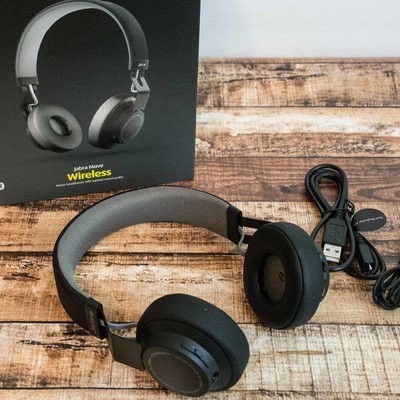
Amazon has the Jabra Move Wireless Stereo Bluetooth Headphones on sale for $50.27. While the discount fluctuates a bit depending on the pair you go with, this is available in black, gold, red, and cobalt, and these normally cost $65.
These ultra-lightweight headphones let you listen to music and take phone calls. The 40mm Dynamic Drivers will keep your music sounding great, and the wireless connectivity means you can listen from your phone, tablet, laptop, and other devices. The battery lasts for up to 8 hours on a single charge, and the customer reviews are solid.
You might want to pick up a carrying case with your purchase, and this one is available in coordinating colors.
See at Amazon
 AIVAnet