


The Verizon GizmoWatch puts a quick-communication device on your kid’s wrist
Today’s smartwatches may be largely tailored to adults, but that doesn’t mean that kids have to be left out completely. In fact, Verizon has announced a new addition to its lineup of smartwatches for kids — the Verizon GizmoWatch.
The GizmoWatch is the first device in the lineup to offer 4G LTE connectivity, meaning that your child should have decently fast connectivity most of the time, especially if they stay within the limits of a city. Apart from the 4G connectivity, you will find a basic user interface that shows the time and allows kids to message their parents quickly and easily.
Parents also have a lot of control over how the watch is used. Parents can pick up to 10 phone numbers that can call kids — and any other phone number won’t go through at all. Parents can also pick up to 20 pre-approved messages that can be sent. On top of that, parents can choose when the watch turns on and shuts down. All of this can be controlled through the accompanying iOS or Android app.
Under the hood, the device features a Qualcomm Snapdragon 2100 processor, which is the chip found on most flagship Wear OS smartwatches from last year.
When it comes to price, the watch is priced at $180, which is pretty expensive for such a basic device. There are plenty of fully featured Wear OS smartwatches that do a whole lot more but come at the same price, though of course, parents probably won’t want their kids to use one of those devices. You will also have to pay an extra $5 per month to cover the data costs of the device.
Of course, just because the GizmoWatch is a decent device, there are plenty of questions about whether or not you should be strapping a GPS to your kids 24/7. With the device, parents can track their kids’ movements at all times but whether parents actually want to, or feel the need to do so, is another question altogether.
According to Verizon, the GizmoWatch is built for kids between the ages of 3 and 11 years old. It’s available now from the Verizon website.
Editors’ Recommendations
- Which Verizon plan is best for you? We check out family, individual, and prepaid
- Palm (2018) hands-on review
- The best unlimited data plans of 2018
- Palm (2018): Everything you need to know
- We tried Visible’s $40 unlimited data plan for two weeks to see how it fares
CyberGhost VPN review – just shy of truly elite
CyberGhost VPN’s ownership changed hands last year, but that hasn’t affected its easy to use apps, privacy-friendly policy, and excellent security features. CyberGhost has consistently ranked among the top VPN services around.
What exactly does it offer? Find out in this comprehensive CyberGhost VPN review!
Getting Started
CyberGhost makes it very easy to get started. Just select your subscription type, payment method, and provide an email address. Once the payment is complete, a username and password are sent to that email.
If you set the account up from the website, the Windows or Mac OS app will automatically be downloaded. You can download the mobile apps from the Google Play Store or the Apple App Store. There are also useful guides available to help you manually set up GhostVPN on Linux, Chrome OS, directly on routers, and more.
If you want to test out CyberGhost without paying first, your best bet is to download the Android or iOS apps. These give you a free seven-day trial and don’t require any account registration or payment information. You only get a one-day trial with the Windows and MacOS app after you create an account on the website.
Payment and pricing

CyberGhost VPN’s subscription periods range from monthly to as long as three years. Unsurprisingly, the discount and savings grow exponentially when you opt for longterm subscriptions. It starts at a relatively expensive $11.99 per month, but the price can drop to just $2.75 per month (billed at $99 for a three-year subscription). The annual and 2-year plans are priced at $59.98 ($4.99 per month) and $90.96 ($3.79 per month) respectively.
Special Offer: For a limited time, you can avail the special $2.75 rate for an 18-month plan (billed at $49.95) and enjoy a new half-yearly plan priced at $4.99 per month (billed at $29.94 every 6 months).
Get CyberGhost now
CyberGhost VPN accepts American Express, Visa, and Mastercard credit and debit cards, Paypal, and Bitcoin. These options should be more than enough for most, though some VPN services like NordVPN include a slew of regional payment options as well. Even after you’ve paid, you can cancel your subscription by taking advantage of the company’s 30-day no questions asked money-back guarantee.
Setup & settings
CyberGhost’s apps are easy to install, available for Windows, Mac OS, Android, and iOS, along with guides to manually set up the VPN on Chrome OS, Linux, gaming consoles, and more. In this review, we will take a closer look at the Windows and Android apps.
Windows

Logging into the app, you are greeted with six tiles with different privacy, security, and accessibility options. The tiles completely take the guesswork out of selecting the correct server for the right purpose — the app chooses for you. These are the tiles:
- Surf anonymously – If you want to simply keep your online activity private, the “surf anonymously” option is the way to go. The app will connect to a server that provides the fastest speed and lowest latency. Keep in mind accessing streaming sites and torrenting may not be possible with some of the servers it connects to.
- Unblock streaming – This is pretty self-explanatory. The app selects the correct server required to access Netflix, Amazon Prime, BBC iPlayer, Hulu, Sky, and a slew of others. Just pick the service you want to use and tap on the play icon. The app also automatically launches your browser and opens the streaming service you want to access, which is a nice touch.
- Protect Wi-Fi – This mode helps keep your data and activity safe when connected to a public Wi-Fi network. You can also have this mode automatically turn on whenever your device connects to an unknown network.
- Torrent anonymously – Unlike some VPN services, CyberGhost doesn’t allow torrenting from every server. With this option, the app selects the best server that will let you download torrents safely.
- Unlock basic websites – This mode is needed in regions where various websites, particularly of the social media variety, are blocked. Using this mode lets you access these sites without issue.
- Choose my server – Of course, you can manually select a server to connect to if you know what you’re doing. You can sort through the server and country list with filters like load, speed, privacy, torrenting-friendly, and other extra features.

This is an ideal setup for first-time users who don’t know how to use a VPN. Just pick a mode and tap connect. Other VPNs like PureVPN have a similar approach. However, the UI of the CyberGhost app just seems more user-friendly. Not everything is perfect though.
CyberGhost gives you the ability to access not only the U.S. catalog of Netflix but also those of France, Germany, Denmark, and the U.K. While this worked well enough — particularly for Netflix U.S. — it required multiple attempts when connecting to other regions because of really slow speeds. In some cases, like with the BBC iPlayer, the streaming service identified a proxy in use and needed a few more attempts to find the right server.

When connected to a server, the page gives you a lot more information that most other VPNs do. Apart from the expected server location and new IP address, you can also toggle through screens that show the total connected time, current download speed, total download amount, and even the number of malware, ads, and trackers blocked.

The Settings menu is pretty simple. You can set up startup behavior, choose the type of VPN protocol, and set Wi-Fi rules. Advanced options include the ability to set proxy settings and add host and IP exceptions. A nice feature to have is App Protection, that will let you automatically connect to the VPN (you can even choose a particular mode) when a certain app is launched. For example, you can make the app automatically connect to a “torrent anonymously” server when you launch your BitTorrent client.
Android


At first glance, the Android app seems quite different from the Windows one, but it can do all the same stuff. The main difference is it uses slides instead of tiles and better background art. You also don’t get all six modes with the Android app, with the option to “unlock basic websites” and “torrent anonymously” unavailable. You can still do both as long as you know the right server to connect to (for torrenting). The “choose my server” mode doesn’t have many sorting options or filters either. Basically, the Android version is much simpler than the Windows app, but you should still be able to easily get everything done.
Security & privacy

This service comes with a lot of security and privacy features. Most of these options are available on other competing services and are generally what you’d expect from a good VPN service. These include IP and DNS leak protection, a VPN kill switch, zero activity logging, and the best encryption protocols.
CyberGhost makes it very easy to pick the right server based on your needs with specialty servers for P2P and modes that let you access various other services. A network kill switch is available, and App Protection is another really useful security feature to have.
We tested for IP leaks, WebRTC detection, and DNS leaks using ipleak.net and found no issues. CyberGhost is based in Romania, where there are no mandatory data retention directives. However, being an EU member, Romania follows the mandatory data retention laws implemented in the European Union. That shouldn’t be an issue though, CyberGhost has a zero logging policy and many security and privacy features.
Speed


CyberGhost VPN isn’t the fastest VPN I’ve tested, with a significant drop of around 60 to 70 percent even with the servers closest to me. However, the drop in speed stays in the same range regardless of which location I was connected to, which is pretty impressive. I got similar speeds connected to Mumbai, Australia, or the U.S.
All modes work as expected. Unblocking streaming sites required multiple attempts in some cases, but eventually connected to the streaming service. The one issue I had with using the different modes was the lack of consistency. Unless you use the “choose my server” mode, you don’t have any control over which specific server you connect to.
While the app is supposed to pick the best server for you, I sometimes found the speed to be far too slow, with a drop of around 90 percent even when connected to servers close to me. Disconnecting and reconnecting to the VPN and a new server brought the speed up to the mark though.
CyberGhost VPN also takes around 20 seconds to connect to a server, which is comparatively quite slow. Weird though is the fact that it takes almost as long to disconnect. With most other VPNs, disconnecting from a server is usually nearly instantaneous, so this definitely surprised me a little.
Key features

- Allows up to seven concurrent connections, the most I’ve seen so far.
- Over 3000 servers in more than 60 countries and growing every day.
- Zero activity or connection logging.
- Torrenting works fine but doesn’t on every server. Luckily, it is easy to identify the correct server via the “torrent anonymously” mode. Remember to respect your country’s copyright laws. We do not condone or encourage any illegal activities.
- One of the best VPN services for access to media streaming.
- Useful security features like network kill switch, app protection, and Wi-Fi protection.
- Comparatively expensive monthly rate but significant discounts are available with long-term plans.
- One of the few premium VPN services to offer a free seven-day trial (with mobile apps), as well as a 30-day no questions asked money-back guarantee.
CyberGhost VPN – Final thoughts

CyberGhost does everything we’ve come to expect from the best VPN services around. The easy-to-use and self-explanatory UI is a positive, its zero logging policy is a huge plus and, at least with its long-term plans, it’s extremely affordable. Unfortunately, as good as everything appears at first glance, CyberGhost VPN falls just short of being perfect.
The speeds could definitely be faster, especially when connected to nearby servers. However, it was nice to see the speed remain about the same regardless of which location you are connected to. Multiple attempts are sometimes required to get something to work (like unblocking a particular streaming service) or to get the speed up to the mark. The built-in ad blocker isn’t particularly aggressive. More recently, I’ve noticed the Windows app tends to get stuck for 20-30 seconds before working again when trying to connect to a server for the first time.
CyberGhost VPN is continuously adding more servers and locations around the world and it is only going to get better. It may not be the absolute best right now, but it’s only a few key upgrades away from being one.
Special Offer: For a limited time, you can avail the special $2.75 rate for an 18-month plan (billed at $49.95) and enjoy a new half-yearly plan priced at $4.99 per month (billed at $29.94 every 6 months).
Get CyberGhost now
We’ll be bringing you even more quick review looks at some of the best VPN services in the weeks and months to come. If there is a particular VPN you would like us to review, do let us know in the comments section below!
Other VPNs worth checking out:
- ExpressVPN
- NordVPN
- SaferVPN
- PureVPN
- IPVanish
- StrongVPN
Join us for a special live video version of the #ACPodcast on Oct 18 @ 11am
We’ll be live on October 18 at 8am PT / 11am ET / 4pm BST
The Android Central Podcast began in March 2010, long before Android was a household name. Back then, the site was run by a ragtag group of bloggers eager to tell the world about this incredible new mobile operating system, in an environment dominated by Motorola, HTC, BlackBerry and Apple. Things have changed a lot since then, and the crew that made up the first couple hundred episodes has long since dispersed. Well, save for a couple.
To celebrate 400 episodes of the best darn Android podcast in the world, we thought we’d go old school one last time — with a live video podcast hosted by the OG himself, Phil Nickinson.
Join us on October 18 at 8am PT / 11am ET / 4pm BST for an hour of classic #ACPodcast hijinks, featuring the original lineup of Phil Nickinson, Alex Dobie, Andrew Martonik, Russell Holly, and Jerry Hildenbrand. Plus a few special guests sprinkled throughout the hour.

Check back this weekend when the actual #ACPodcast400 launches with some more special content and a look back at the last couple of weeks of tech news.
Thanks for all the support over the years — we appreciate you.
-The Android Central Podcast team
Johns Hopkins’ lab-grown human retina could lead to big insights
Scientists from Johns Hopkins University have successfully grown human retina tissue from scratch in a lab. The work could help with the development of new therapeutics related to eye diseases. These lab-grown retinal cells won’t be used for transplants, however. Instead, they are being used by researchers to gain a better understanding of the way in which the color-detecting cells in the eye function.
“We believe that there are hundreds of different cell types in the human retina,” Robert Johnston, an assistant professor in the Department of Biology at Johns Hopkins, told Digital Trends. “What I wanted to do was to try to figure out more about the color-detecting cone cells.”
The retinas were grown from stem cells called retinal organoids. Growing organoids in a Petri dish in this way means that you do not have to directly study humans, and instead focus on model systems which function in the same way. Nonetheless, the growth process took place on the same timescale as human fetal development, meaning that anything that went wrong could have cost the researchers up to a year of patient waiting.
A day 361 organoid at 200x magnification. Johns Hopkins University
During the growth process, the retina’s blue-detecting cells were the first to grow. These were followed by the red-detecting cells, and finally the green-detecting ones. The researchers discovered that the release of thyroid hormone dictates whether cells become blue, red, or green detectors. The levels of this hormone are controlled by the eye tissue. Early on in the development of the retina, they hypothesize that thyroid hormone levels are low, since this is when blue cells are created. Later on, it gets higher to make the red and green cells. As a result, the team believes that children who are born with decreased thyroid hormone may be more prone to develop color blindness.
The work demonstrated that it is possible, through CRISPR gene editing, to make only blue or only red and green cells. The researchers hope to use this knowledge in the future to develop therapeutic applications that involve these color-detecting cells. In particular, they aim to use the scientific and technological breakthrough to help treat macular degeneration, the leading cause of vision loss.
A paper describing the research was recently published in the journal Science.
Editors’ Recommendations
- No, blue light from your cell phone won’t make you blind
- A new way to ‘freeze’ water could help transform organ preservation
- This CO2-sucking rock takes eons to form naturally. Now we can grow it in weeks
- The best movies on Netflix right now (October 2018)
- ‘Rogue medicine in a bathtub’: 4 experts on the vice and virtue of pharma hacking
How easy is it to set up LIFX with Google Home?

LIFX has a great app for controlling its smart bulbs, but turning on the lights and changing their colors is even easier with Google Assistant. Once connected, you’ll be able to use your voice to control your LIFX lights from your phone or Google Home — and don’t worry, setup is quick and easy.
Our top picks
- The best bulb: LIFX A19 ($60)
- The cheapest assistant: Google Home Mini ($49)
The Guide
First, connect your lights to LIFX
Download and launch the LIFX app.
Tap the plus button in the top right corner of the screen.
Tap Connect Light.

Tap your LIFX bulb in the list.
Enter your Wi-Fi network and password.
Wait for your bulb to connect, then name it and rejoice!
With your light bulb set up and connected to your LIFX account, it’s time to hop over to the Google Home app to finish the setup.
Linking LIFX to your Google account
Open the Google Home app.
Tap the Add button under your home group.
Tap Set up device.

Under Works with Google, tap Have something already set up?
Find and tap LIFX in the list of supported services.
Sign into your LIFX account.
Authorize Google to access LIFX.
Assign your bulb(s) to a room.

That’s it! With LIFX connected to your Google account, you should see your bulbs within the Google Home app. From here, you can tap the lightbulbs to toggle them on or off, or use Google Assistant to do more advanced tasks like changing the bulbs to specific colors.
Our top equipment picks
You don’t need a ton of hardware to make this all work — just a LIFX bulb and your favorite Google Assistant-powered device. Most people will be best suited with a Google Home Mini, the cheapest speaker in Google’s lineup, making it relatively affordable to set up multiple Google Homes around the house.
All you need to get smart, voice-controlled lighting is a LIFX bulb and a Google Assistant-powered speaker. We recommend the A19 bulb and the Google Home Mini, but there are plenty of other options. LIFX offers other lights like the BR30, which offers the exact same features in a floodlight form factor, and the LIFX Plus, which adds infrared lighting to the mix for augmenting night vision security cameras. Likewise, the Google Home, Home Max, and Home Hub all offer the same voice control as the Home Mini, but with larger, better-sounding speakers.
Smart lighting
LIFX A19

$60 at Amazon
The universal smart bulb
The LIFX A19 bulb fits into almost any standard lighting fixture and provides wireless control and millions of colors to choose from. You can buy a single bulb or buy in bulk to save money and light multiple rooms.
Smart assistant
Google Home Mini

$49 at Google
Google Assistant in a compact package
The Google Home Mini is a small Assistant-powered speaker that allows you to check the weather, play music, and of course, control your smart home. It won’t beat out Google’s larger speakers, but it still sounds surprisingly good for its size. It’s small enough to fit onto most shelves and can even be mounted to the wall with third-party accessories.
You can pre-load Red Dead Redemption 2 starting Friday, October 19

Rockstar’s near-guaranteed hit Red Dead Redemption 2 is preparing to hit Xbox and PlayStation servers everywhere this Friday to get you ready for the big launch day.
Red Dead Redemption 2 launches on October 26, 2018, and is available now for pre-order starting at $59.99. The game world is reportedly massive, with huge 4K assets to boot, which will put some serious pressure on your downloads and HDD storage space. To help you prepare, Rockstar will allow players across Xbox One and PlayStation 4 to begin pre-loading the game this Friday, at 12AM ET.
Additionally, Rockstar will drop the launch trailer for the game tomorrow at 10AM, which we’ll slip in here once it goes live.
Red Dead Redemption 2 is set at the dawn of the industrial age in a fictional reimagining of the Wild West. The game is a prequel to the original Red Dead Redemption, with character Dutch Van der Linde and John Marston both returning from the previous game.
Early previews of the game speak of an open world with unprecedented detail and interactivity, which, like Grand Theft Auto V before it, could redefine the very idea of “open world” once it launches. We’ll have to wait and see.
If you’ve already made up your mind, you can pre-order Red Dead Redemption 2 now at both Amazon and the PlayStation Store starting at $59.99, ready for launch on October 26, 2018.
See at Amazon
See at PlayStation Store
Here’s everything you need to know about the Huawei Mate 20 series
Huawei’s Mate family is bigger than ever this year.

Following up on last year’s Mate 10 series, Huawei’s cranking things up to, well, 20, with its all-new Huawei Mate 20 family. There are a total of four phones in this year’s lineup, but the two you’ll care about the most are the Mate 20 and Mate 20 Pro.
We’ve got a lot to dive into with this guide, so without further ado, here’s everything you need to know about the Huawei Mate 20 series!
Check out our hands-on coverage
As mentioned above, the Mate 20 and Mate 20 Pro are the biggest and most impressive handsets of this entire lineup. As such, we spent a good deal of time with both phones to get an idea for how they work and feel ahead of our full review.
The Mate 20 features an extremely small waterdrop-style notch with great specs across the board, but the real star of the show is the Mate 20 Pro. Its triple rear camera package is one of the most capable we’ve ever seen, it’s using Huawei’s own take on Face ID, and the display glass is curved over the sides to mimic something you’d find on a Samsung Galaxy or Note phone.
We need to reserve any final judgment for the final review, but right now, things are looking mighty good for Huawei.
Huawei Mate 20 + Mate 20 Pro hands-on preview: The phones that do everything
Here are the Mate 20 + Mate 20 Pro specs
Speaking of specs, both the Mate 20 and Mate 20 Pro have plenty of these to dive into.
Want a fast processor? The Kirin 980 is a best. Need lots of RAM? How’s 6GB sound?
Check out the full rundown here 👇
Huawei Mate 20 + Mate 20 Pro specifications
The Mate 20 Lite is the most affordable of the bunch
If you don’t want to spend a ton of cash on a new phone but still want the Huawei experience, the Mate 20 Lite should be at the very top of your radar.
Announced in late August during IFA 2018, the Huawei Mate 20 Lite comes equipped with a 6.3-inch Full HD display, Kirin 710 processor, dual 20MP + 2MP rear cameras, and a pretty solid 3,750 mAh battery.
The phone isn’t quite as impressive as what you’ll find with the Mate 20 Pro, but with a starting price of just £379, it offers a tremendous amount of value.
Huawei Mate 20 Lite launches in the UK: Kirin 710, quad cameras, big battery
And then there’s the ginormous Mate 20 X

Among all of the Mate 20 phones, perhaps the most eye-catching is the Mate 20 X.
This phone came as a complete surprise during Huawei’s announcement event for the Mate 20 and Mate 20 Pro, and its biggest standout feature is easily its ginormous 7.2-inch display.
The Mate 20 X also has the powerful Kirin 980 CPU, a ridiculous 5,000 mAh battery (the Note 9 has a 4,000 mAh pack, for comparison), and can be used with an optional gaming grip to essentially turn it into an Android-powered Nintendo Switch. This thing’s crazy.
Huawei announces the Mate 20 X — a phone with a 7.2-inch OLED display
The Mate 20 Pro’s camera package is insane

A big focus for the Mate 20 and Mate 20 Pro are the cameras, and for good reason. Both handsets have three rear cameras, but the combo on the Mate 20 Pro is what really has our attention.
The main camera is a wide-angle 40MP sensor with an 1/1.8 aperture. This is joined by a 3x telephoto 8MP camera, and unlike the P20 Pro, the Mate 20 Pro ditches a monochrome third sensor in favor of an ultra-wide 20MP one.
This combination of sensors should allow for some truly incredible photographs, potentially going on par or besting what you’ll find on the Google Pixel 3.
Huawei’s got two different notch styles

Although the Mate 20 Pro is the most powerful of all these phones, it actually has the biggest notch. Inside that notch is not only the front-facing camera, but also the earpiece and helpful sensors that allow Huawei’s take on Face ID to work.
The regular Mate 20 lacks those additional sensors, but as such, has a much smaller notch in the waterdrop style we’ve been seeing from some other OEMs.
The new colors are simply gorgeous

Huawei’s been dabbling with new and exciting colors for its past few smartphones, and with the Mate 20, that’s no different.
The Mate 20 and Mate 20 Pro are available in a total of four colors, including Black, Twilight, Midnight Blue, and Emerald. The Twilight color is the same one that was introduced on the P20 series earlier this year, but Midnight Blue and Emerald are brand-new and feature a subtle texture underneath the glass that helps reduce fingerprints and add a big of welcome grip.
A note on U.S. availability
If you follow the tech world, you’ll know that the U.S. government and Huawei aren’t on the best of terms. As such, you won’t see any of these phones sold on wireless carriers here in the States.
With that said, it’s likely Huawei will eventually bring the Mate 20 Pro to the country with a full U.S. warranty in an unlocked fashion for use on GSM carriers like AT&T and T-Mobile. Along with that, you should see international variants pop up at some point on Amazon for the Mate 20, Mate 20 Lite, and Mate 20 X.
Here’s when and where you can buy the phones
Interested in buying any of the new Mate 20 phones? Here’s what you need to know.
- Mate 20 Lite: Available for purchase now from Carphone Warehouse, Vodafone, and EE for £379.
- Mate 20 X: Available October 26 for €899.
- Mate 20: Pre-orders likely opening soon; starts at €899.
- Mate 20 Pro: Pre-orders likely opening soon; starts at €1049.
Updated October 17, 2018: Refreshed this guide now that all of the Mate 20 series has been revealed.
Mophie Launches New Powerstation USB-C 3XL for Charging Apple’s MacBooks
Mophie today announced the launch of the new Powerstation USB-C 3XL, which has been designed to charge Apple’s line of MacBook devices.
The fabric-covered Powerstation USB-C 3XL includes a 26,000mAh battery that Mophie says is able to provide a 12-inch MacBook with up to 18 hours of additional battery life. It is Mophie’s largest Powerstation to date.
Though designed to charge the MacBook at full speed, the 45W Powerstation USB-C 3XL can be used to provide a little additional juice for the more powerful MacBook Pro models. Battery life won’t go quite as far, though, nor will charging be as fast.
The Powerstation USB-C 3XL can also be used to fast charge an iPhone 8 or later with a USB-C to Lightning cable, and there is a built-in USB-A port for charging iOS devices and other accessories with a traditional USB-A to Lightning cable.
Mophie says the new Powerstation USB-C 3XL features Priority+ Charging that’s designed to send power to connected devices before charging the Powerstation when it’s plugged into a power source.
Mophie’s new Powerstation USB-C 3XL can be purchased from the Mophie website, from the Apple online store, or from Apple retail stores starting today, with the device priced at $199.95.
Tag: Mophie
Discuss this article in our forums
Poptel P10 Review: An ultra-rugged phone that’s just adequate
When you look at the lineup of smartphones, all you are likely to see are glass and metal sandwiches. These look absolutely phenomenal, but aren’t exactly the most rugged options on the market.
It seems that ruggedized phones have taken a back seat from most OEM’s. There are still a few options available, and the Poptel P10 is one of the latest to hit the scene.
Poptel P10 Specs
On the specs-side of things, there’s not really too much to write home about with the Poptel P10. We have a 5.5-inch display with a 2015-sequel resolution of 1280 x 640.
Under the hood, Poptel included the MediaTek Helio P23 chipset combined with 4GB of RAM and 64GB of storage. This is all powered by a respectable 3,600mAh battery that aims to get you through the day.
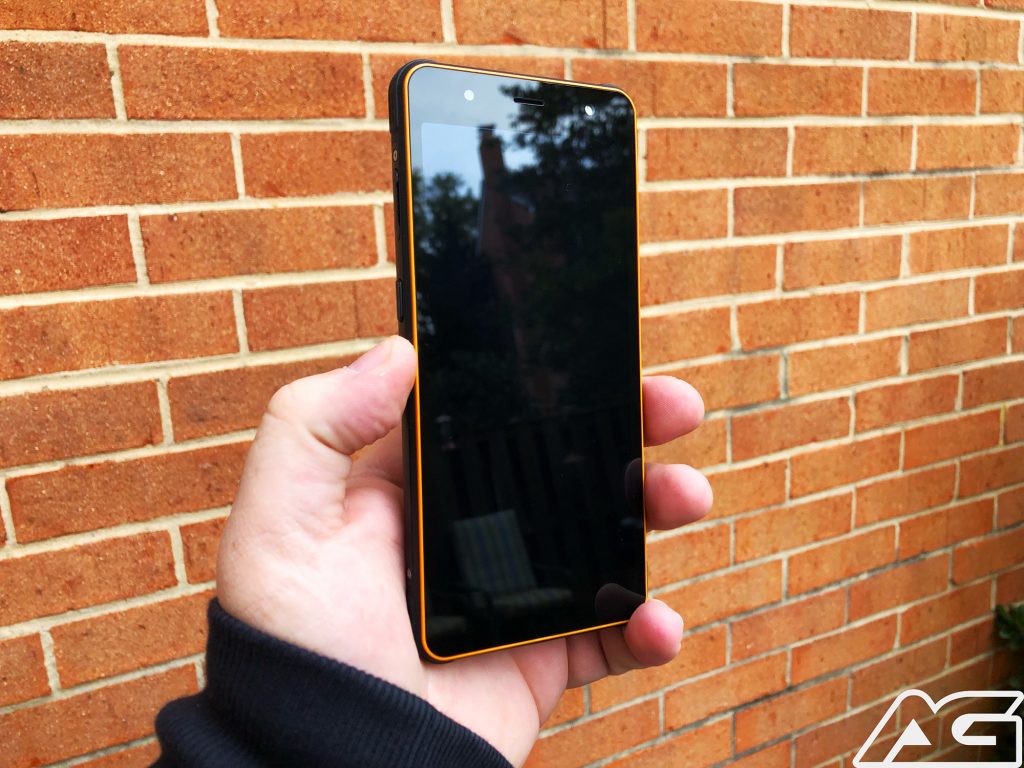
As for the cameras, again there isn’t much to write home about. There is a single 13MP sensor found on the back, along with an 8MP selfie camera. We’ll touch a bit more on these later, but they are pretty pedestrian for the budget market.
Some of the extras included is the rear-mounted fingerprint scanner, NFC, Bluetooth 4.1, and Android 8.1 Oreo. These are all things that we would expect to see from a budget handset, albeit a bit disappointing for the price tag.
Ruggedness
As you can tell from the spec sheet, the Poptel P10 isn’t really designed for spec-heads. Instead, it’s designed to be practically indestructible, regardless of what you throw at it.
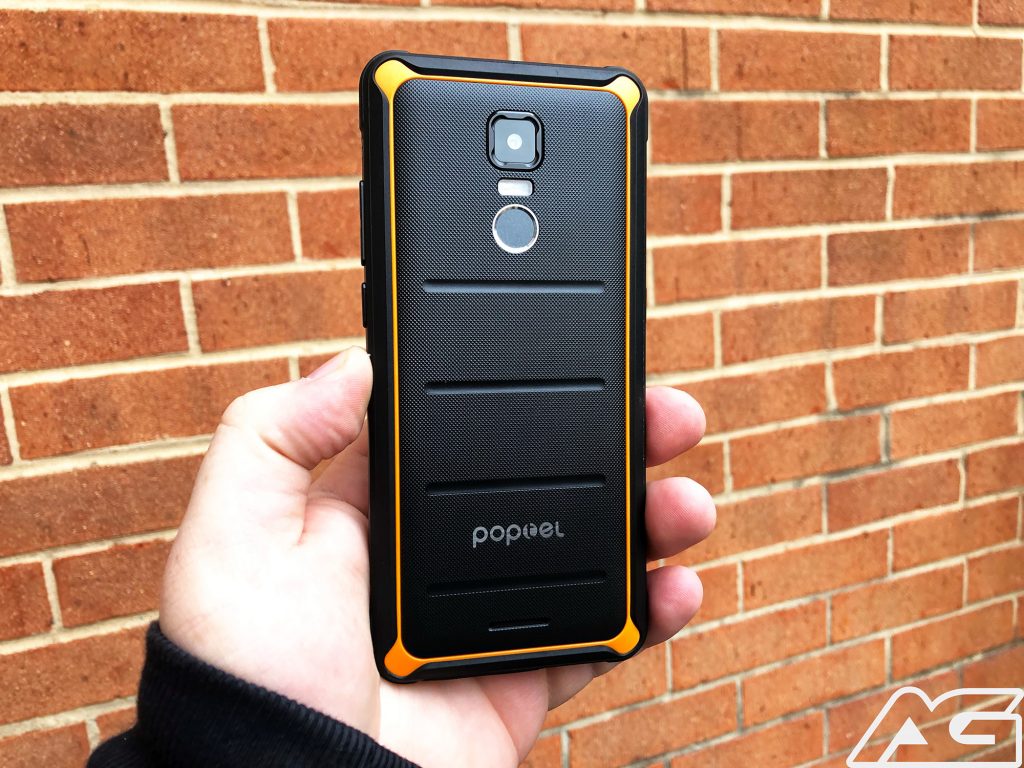
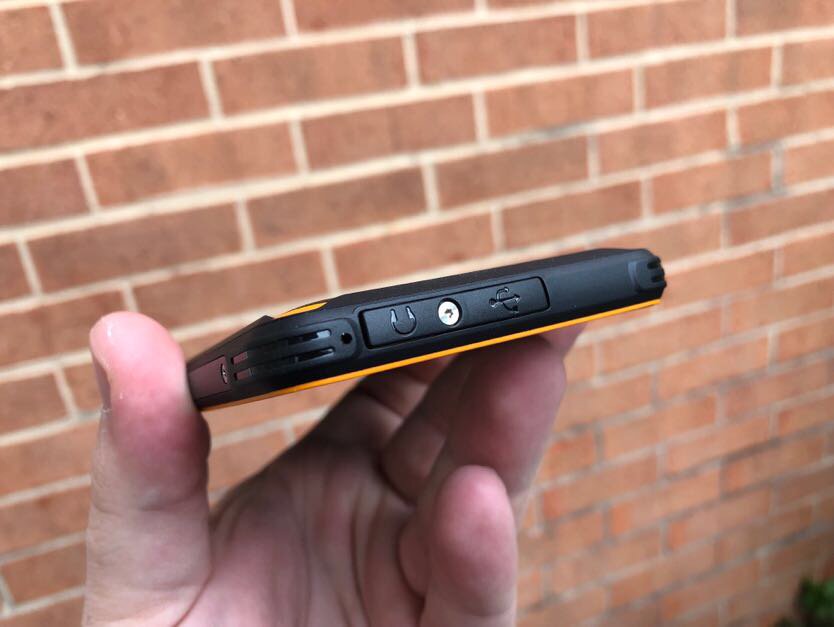
The P10 is IP68-rated, which means that the handset is waterproof in up to about 4 feet of water for half an hour. This also means that it is resistant to dust, sand, and just about anything else that would ruin those precious flagships.
In our testing, we had some accidental drops with the P10 and you can’t even tell. The rugged body provides shock-resistance and we didn’t even end up scratching the screen at all. That point alone sold me on someone picking up the device for a little one who needs a smartphone.
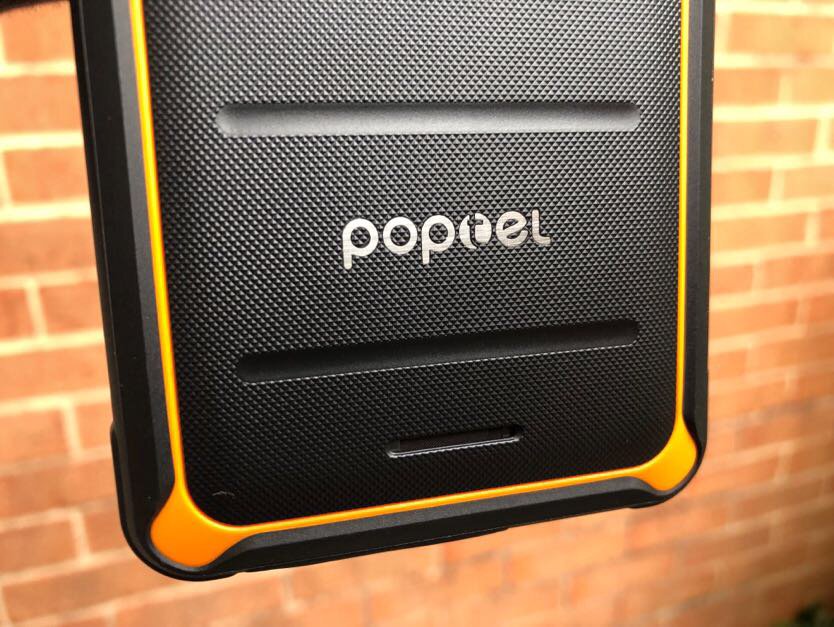
Aside from the frame, the body of the handset is also rugged, and sports an interesting texture. This allows for the phone to actually sit nicely in the hand, without feeling like it will slip out at any time.
On another note, it was pretty neat to see the different Torx screws placed around the device. These are not to be unscrewed or tinkered with, but added a nice touch that I didn’t think I would care about.
Performance
Now, it’s all fine and dandy that the P10 can withstand the elements, but how does it perform. In short, surprisingly well. I was heading into this review expecting lagginess and just an overall bad experience.
Removing the “flagship” mindset was tough at first, but once I did that, the P10 was impressive. Sure, we’re not getting Stock Android, but instead, a skinned version from Poptel.
This is adequate and doesn’t leave a bad taste in my mouth, but it’s not a good one either. Regardless, we have seen worse versions of skinned Android on devices that are priced much higher.
You will begin to experience some lag when trying to do any type of intense gaming, but that’s to be expected. If you just want to play some solitaire or other non-graphic-intensive games, then you’ll be just fine. Just don’t expect to be able to play Fortnite on the go with the P10.
On the battery side of things, we would have liked to see more. Sure, the LCD panel doesn’t draw a lot of power, but we didn’t see as much battery life as we expected. This may have something to do with power consumption from the Helio P23, but we would have liked to see Poptel push the limits with a bigger battery.
Finally, it’s important to make note that the P10 will only work GSM networks. So, if you’re on Verizon or Sprint, you’ll be left out to dry.
Camera
I almost skipped this section because of how disappointing it is. But it wouldn’t be a proper AndroidGuys review without at least touching on it.
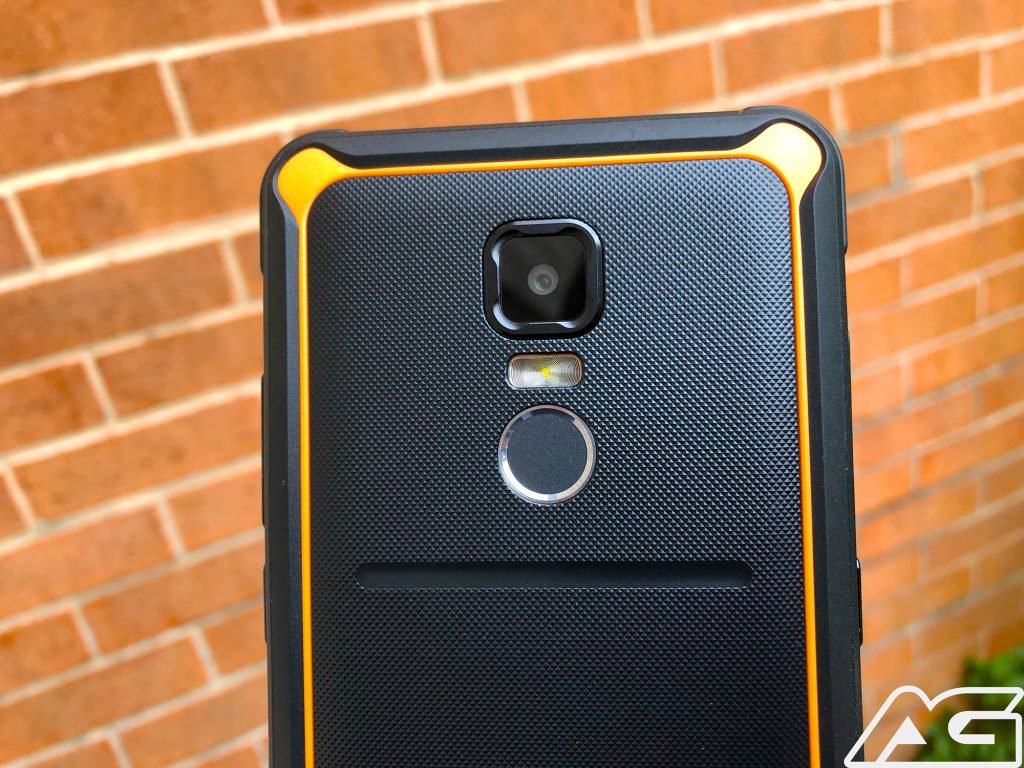
The cameras will do exactly what you think – Take potato pictures. If you need a work phone that takes pictures of various pieces of equipment, then it’ll work just fine.
However, if you need those high-quality pictures for your job, then you might want to look elsewhere. The P10 will get the job done (see the recurring theme?), but there are definitely noticeable sacrifices.
The camera software itself is actually refreshing to see, as there’s not much going on here. You are greeted with the shutter button and a few different modes, but there’s nothing super-crazy or insane.
Conclusion
All-in-all, the Poptel P10 is just an adequate smartphone with a pretty sweet rugged design. If you need a spare work phone that is able to withstand the elements while providing access to calls, messages, or emails, then you’ve come to the right place. If you are expecting an experience on par with the Moto G lineup, then you might want to take a step back.
Pricing for the Poptel P10 starts at $219.99 and is available in Black, Orange, Navy Blue, Green, and Gray. Currently, the handset is available from our friends over at GearBest and AliExpress and you can get one now.
Let us know what you think about the Poptel P10 and if you will be picking one up!
Healthy mice born from two genetic mothers using stem cells, gene editing
Leyun Wang
Healthy mice have been born with two genetic mothers and went on to bear healthy offspring of their own, according to a recent paper published by researchers at the Chinese Academy of Sciences. By using stem cells and gene editing, the researchers suggest that certain hurdles to same-sex parents bearing mammal offspring could be overcome. The research could pave the way for more advanced breeding methods in other mammals.
According to the researchers, the main motivation for their study was to examine why mammals — unlike reptiles, amphibians, and fish — can only reliably produce young with genetic parents from both genders.
“”We were interested in the question of why mammals can only undergo sexual reproduction,” Qi Zhou, a developmental biologist at the Chinese Academy of Sciences and senior author of the recent paper, said. “We have made several findings in the past by combining reproduction and regeneration, so we tried to find out whether more normal mice with two female parents, or even mice with two male parents, could be produced using haploid embryonic stem cells with gene deletions.”
Mammalian offspring that don’t get genetic material from both male and female parents often die or experience abnormal development, due to a mechanism called genome imprinting. That’s not the case for other animals such as reptiles, fish, and amphibians. Scientists have previously been able to create mice with two genetic mothers (bimaternal) by deleting certain genetic features, but those mice proved to not be viable, according to Zhou.
In the recent study, Zhou and his colleagues used stem cells that contained half the normal number of chromosomes, along with DNA from just one parent. They used more than 200 embryos to create 29 live mice, which they said were free from defects and grew to have babies of their own.
Using a similar but more complicated technique, the researchers also produced 12 mice with two genetic fathers, which only survived for 48 hours after birth. The researchers note that there are challenges in translating this work to other mammals but hope to expand their technique to more animals in the future.
“This research shows us what’s possible,” Wei Li, another of the paper’s senior authors, said. “We saw that the defects in bimaternal mice can be eliminated and that bipaternal reproduction barriers in mammals can also be crossed through imprinting modification. We also revealed some of the most important imprinted regions that hinder the development of mice with same-sex parents, which are also interesting for studying genomic imprinting and animal cloning.”
A paper detailing the study was published in the journal Cell Stem Cell.
 AIVAnet