


Apple’s Online Store Down Ahead of iPhone XR Pre-Orders
Apple has taken its online storefront down to prepare for pre-orders for the 6.1-inch iPhone XR, the third iPhone in the 2018 iPhone lineup. Apple will begin accepting orders for the iPhone XR at 12:01 a.m. Pacific Time or 3:01 a.m. Eastern Time on Friday, October 19.
In other countries, pre-order times will vary based on local time zone. Pre-orders will kick off at 6:01 p.m. in Sydney, for example, 3:01 p.m. in China, and 8:01 a.m. in the UK. For full details on when pre-orders go live in your country, make sure to check out our post that lists all pre-order times by country.
Subscribe to the MacRumors YouTube channel for more videos.
Apple will accept pre-orders through the Apple website and the Apple Store app. T-Mobile, AT&T, Sprint, and Verizon will all be accepting pre-orders for the iPhone XR in the United States, as will major retailers like Best Buy.

Pre-orders for the iPhone XR will be available from Apple at 12:01 a.m. Pacific Time in the following first wave launch countries:
Albania, Andorra, Australia, Austria, Bahrain, Belgium, Bosnia, Bulgaria, Canada, China, Croatia, Cyprus, Czech Republic, Denmark, Estonia, Finland, France, Germany, Greece, Greenland, Guernsey, Herzegovina, Hong Kong, Hungary, Iceland, India, Ireland, Isle of Man, Italy, Japan, Jersey, Kosovo, Kuwait, Latvia, Liechtenstein, Lithuania, Luxembourg, Macedonia, Malta, Malaysia, Mexico, Monaco, Montenegro, Netherlands, New Zealand, Norway, Oman, Poland, Portugal, Puerto Rico, Qatar, Romania, Russia, Saudi Arabia, Singapore, Serbia, Slovakia, Slovenia, South Africa, Spain, Sweden, Switzerland, Taiwan, Thailand, the UAE, UK, US and US Virgin Islands.
iPhone XR will expand to Israel on November 1 and Armenia, Bhutan, Brunei, Cambodia, Georgia, Kazakhstan, South Korea, Macau, Maldives, Myanmar, Ukraine, and Vietnam on November 2, according to pre-order details shared by Apple.
Apple did not launch the iPhone XR at the same time as the iPhone XS and XS Max because of issues that delayed production, so it is not clear if Apple will have adequate supply to meet demand. Customers hoping to get one of the new devices on launch day should order as early as possible just in case.
The iPhone XR is priced starting at $749, and it is available in 64, 128, and 512GB capacities in six colors: white, black, blue, coral, yellow, and (PRODUCT)RED.
Compared to the iPhone XS and XS Max, the iPhone XR has an LCD display instead of an OLED display, a single-lens camera rather than a dual lens camera, Haptic Touch instead of 3D Touch, and LTE Advanced instead of Gigabit LTE. On the plus side, the iPhone XR offers even longer battery life than the iPhone XS Max.
For more detail on the iPhone XR, make sure to check out our iPhone XR roundup to read up on the new device’s feature set ahead of when pre-orders begin.
The first pre-orders placed for the new iPhone XR models will arrive on Friday, October 26, the iPhone XR’s official launch date.
Related Roundup: iPhone XRBuyer’s Guide: iPhone XR (Caution)
Discuss this article in our forums
For only $4,950, you can get jetpack lessons from the world’s only instructor
Drew Prindle/Digital Trends
Unless you sell a startup to Google or turn to a life of surprisingly well-paid crime, chances are that you won’t be able to afford a jetpack of your very own any time soon. But if you’re dreaming of reenacting JetPack Aviation founder David Mayman’s various gravity-defying daredevil feats on a budget, you’ve finally got your chance.
That’s because Jetpack Aviation is now offering one heck of a day out with Mayman as he puts fellow jetpack enthusiasts through a one-on-one training session. During your time together, you’ll get to grips with takeoffs, landings, hovering, and multidirectional flight. Or, at least, as much as you can hope to get to grips with them in around 20 minutes’ of total flight time.
“Experience the ultimate aviation thrill,” the company’s website reads. “Fly the world’s only jetpack! More people have walked on the moon than flown a jetpack.” Total cost for the experience? A not-exactly paltry $4,950, although that price is still a whole lot cheaper than the cost of actually buying a jetpack for yourself.
Jetpack Aviation’s JB-10 jetpack is more than just a “booster in a backpack.” Along with a pair of jet turbines, it boasts assorted sensors capable of measuring its orientation hundreds of times every second and sending a stream of constant data to the control system, all while vectoring the thrusters to keep the pilot stable.
The flight sessions take place at a purpose-built facility close to Los Angeles “surrounded by lemon groves,” with spectacular views of the Pacific Ocean. You’ll be flying with Mayman, the world’s only authorized jetpack instructor, using the same model JB-10 jetpack that he memorably flew around the Statue of Liberty in 2015. While the jetpack is reportedly capable of flying up to 18,000 feet in altitude, for the purposes of the session you’ll be flying at around 20 feet, with a safety tether system attached. All equipment is provided by the company, and you’ll even get to keep your personalized flight suit as a memento of the day.
Now if you’ll excuse us, we’ve got to forward this article to assorted friends and family members, just in case anyone is feeling especially generous around the time of our next birthday!
Editors’ Recommendations
- The latest ‘Fortnite’ event is an all-around explosive good time
- MoviePass forces customers to choose between only two movies
- World’s only revolving glass floor debuts at Space Needle
- I only watched free streaming services for a month, and I didn’t miss much
- TimeShift Sample Video (for reference only)
Porsche Design Huawei Mate 20 RS hands-on review
Research Center:
Porsche Design Huawei Mate 20 RS
The Huawei Porsche Design Mate 20 RS is shocking, and we’re not talking about the price. It’s shocking because there is a notch above the screen, something the company avoided putting on the Mate RS earlier this year, despite its sister phone — the P20 Pro — having one. Porsche Design is not one to cave, but it appears this time it has done so.
Is it a bad thing? No, of course not. It doesn’t affect the way the phone works, and it keeps the design consistent with the Mate 20 Pro, on which the phone is based. But we suspect the real reason is that the notch plays a specific role on the Mate 20 Pro — it houses the 3D face unlock camera sensors, which is also present on the Mate 20 RS. There’s a reason for everything, but we can still imagine Porsche Design being unhappy about having to include it.
It’s a Mate 20 Pro
The phone shares a lot with the Mate 20 Pro. It has the same Kirin 980 processor, the same three-lens camera array on the back, and the same in-display fingerprint sensor. The body is also shapely and curved, fitting into your hand perfectly. It has the same Android 9.0 Pie with EMUI 9.0 software onboard, and the same 4,200mAh battery with super-fast charging, and support for wireless charging, and reverse charging. The only major difference internally is the choice of 256GB or 512GB of storage space.
What are the other differences? The back of the phone has two pieces of leather either side of an incredibly reflective piece of glass. These leather panels increase grip, and give the phone some style to match its price. A Porsche Design logo is in the center of the phone, but this time no logo appears on the front. Not only does the notch get in the way, but the lower chin has been made even smaller, giving more space for screen rather than logos.
The two models at 256GB and 512GB cost $1,955 and $2420 respectively.
In the hand the phone feels much like the Mate 20 Pro. The leather adds more tactility, and comes in a racing car red color alongside a muted black. The three panels are symmetrical and vertical, making it look like a racing stripe. The screen looks identical to the Pro, and the camera will operate in the same manner.
On the Mate RS, we were disappointed by the in-display fingerprint sensor, but have so far been more impressed with the one fitted to the Mate 20 Pro. We imagine this will continue on the Mate 20 RS, but were unable to try it out on the demo model.
Few reasons to buy over the Pro
Yes, the Porsche Design Mate 20 RS will come in a nice box, and probably have a nice case and accessories with it; but aside from the additional storage space and two strips of leather on the back, the phone offers little over the standard Mate 20 Pro. Anyone familiar with Porsche Design phones will already know the price will be different, and it costs 1,695 euros for the 256GB model, or 2,095 euros for the 512GB version. That’s $1,955 and $2,420 converted over respectively.
Porsche Design Huawei Mate 20 RS Compared To
LG V40 ThinQ
Huawei Mate 20 Pro
Samsung Galaxy Note 9
LG V30
HTC U11
Nokia 8
Moto Z2 Play
Xiaomi Mi Mix
HTC One Remix
Huawei Ascend Mate 2
LG G Flex
LG Lucid 2
Motorola Droid Razr HD
Motorola Droid Bionic
Motorola Photon 4G
The Porsche Design Mate 20 RS suffers from the same problem as the Huawei Mate 10 Porsche Design — there’s no strong reason to pay so much extra for it. Yes we like the fine design, and yes, we appreciate the attention to detail; but it’s twice the price. A U.S. release is unlikely, given none of the previous models have been sold in North America. However, we’re far more saddened about the Mate 20 Pro not going on sale than a more expensive version hitting the shelves.
Biologists have found a protein that could make space farming possible
An off-Earth colony seems pretty promising with the rate climate change is going. But that’s easier said than done. Building a viable colony anywhere outside of Earth’s atmosphere will pose engineering and logistical challenges unlike anything we have experienced. Not only will we need to transport those space pilgrims, but we’ll also need to shelter and feed them. That last point may pose the most difficult challenge. As Mark Watney made clear in The Martian, farming in space isn’t as easy as it is on Earth.
Now, researchers at the University of Zurich have shown how space farming may be possible. By engineering plants to excrete excess amounts of a certain hormone, they demonstrated that crops can thrive despite challenging space conditions, such as low-nutrient soil and microgravity.
“Food … production is and probably will be a big challenge in the next decades on this planet, because of increasing world population, decreasing arable land, and limited fertilizer resources,” Lorenzo Borghi, a biologist at the University of Zurich who worked on the research, told Digital Trends. “If we start colonizing other planets or employing humans in long space missions, local food … production in laboratory conditions or alien soils will be as challenging, as alien soils are very likely far poorer in nutrients compared to our agricultural lands.”
There are ways around that, Borghi pointed out, such as shipping soil and fertilizer to space. However, transport comes at a significant economic and ecological cost.
Instead, Borghi and his colleagues propose that a plant hormone may be able to boost crop production by encouraging a symbiotic relationship between plant roots and fungi in the soil. Called mycorrhiza, this relationship provides plants with more resources, such as water, nitrogen, and phosphate. The plant hormone, strigolactone, triggers this symbiotic relationship.
“We engineered plants that can exude high amounts of strigolactone to the soil and thus obtain high levels of mycorrhization,” Borghi said. “We tested these plants in microgravity and found that they can obtain high levels of mycorrhization and high biomass production even in microgravity.” That is, higher levels of the plant hormone may counteract the negative effects of microgravity and poor soil on crop propagation. “Therefore we suggest that it will be important to choose crop varieties with high strigolactone exudation for future space farming on alien soils.”
To simulate space farming conditions, Borghi and his team grew petunias — which are in the same family as tomatoes, potatoes, and eggplants — in low gravity. But before we pack astronaut backpacks full of engineered plants, the researchers will want to test their plants in real space conditions, either on a space station of an alien world.
A paper detailing the research was published this month in the journal Nature Microgravity.
Editors’ Recommendations
- Leafy greens are grown by machines at new, automated Silicon Valley farm
- Attention, space gardeners: Simulated Martian soil now on sale for $20 a kilo
- ‘Crop-dusting’ drones drop biodegradable sensors instead of pesticides
- The BrambleBee robot promises to help honeybees pollinate flowers
- 15 epic sci-fi novels you should read before they become blockbuster films
Kyocera’s KY-O1L is small enough to fit alongside your business card
While most of us are perfectly happy with our smartphones, some prefer something a little more compact and pocketable. For those people, Japanese company Kyocera has come up with a device that it’s billing as the “thinnest smartphone in the world.” It’s called the KY-O1L, and it’s built specifically to fit inside a business card holder. For that, the phone has been given the nickname of the “card phone.”
The phone itself comes in at 5.3mm thick and weighs a measly 47g, making it also one of the lightest devices around. On top of that, it boasts LTE connectivity and a 2.8-inch monochrome epaper display. Powering it all is a 380mAh battery, which should be more than enough for a phone with an epaper display.
Of course, there is some debate about whether or not this is really the thinnest phone out there. As The Verge notes, the 2016 Moto Z came in at only 5.2mm — though that excludes the camera bump. Before that, there was the Oppo R5, which came in at a tiny 4.9mm thick. That said, none of those phones offer the same adorable basic-ness as the KY-O1L.
Whether it is truly the thinnest phone or just one of them, it’s still an interesting device. The user interface offers everything a basic phone needs, though there is no app marketplace and as such, this is perhaps only a good choice for those that need something to make calls and text people, with the occasional news reading online. There’s also no camera so don’t expect to get any shots with this device.
The Kyocera KY-O1L comes at 32,000 yen, which equates to around $300. It’s also only available in Japan so don’t expect to get your hands on the phone anytime soon if you don’t live there. Even in Japan, it’s only available on the country’s NTT Docomo carrier.
Smaller phones may be a growing trend. Just recently Palm took the wraps off of a new smartphone that’s specifically aimed at reducing people’s addiction to their phones. It syncs to your primary phone, so you’ll get all your notifications and calls.
Editors’ Recommendations
- The best rugged smartphones of 2018
- Samsung Galaxy X: Everything we know so far
- The best Galaxy S8 Plus cases and covers
- Essential PH-1 Phone: Everything you need to know
- Pixel 3 and Pixel 3 XL: 5 features we love, 5 features we don’t
Vertu Aster P seemingly announced out of nowhere for $5,000
You can step all the way up to $14,146 for a gold-plated model.
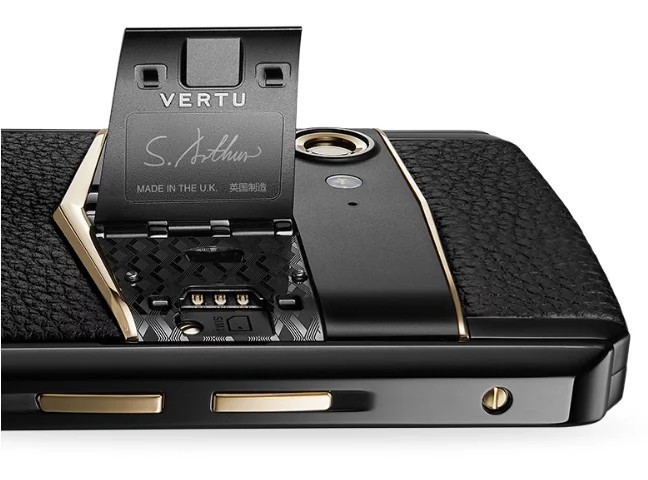
There’s a lot of discussion right now about more and more smartphones creeping towards the $1000 price point, but one company that’s been soaring well beyond that is Vertu. Vertu’s released a number of multi-thousand dollar Android phones in the past, and now the company’s returning with the $5,000 Aster P.
While luxury phones from Vertu aren’t anything new, this is the first new phone from the company since it reportedly closed up shop in July 2017 and cut around 200 employees.
So, what kind of phone are we getting with the Vertu Aster P? More or less what we’ve come to expect from past Vertu phones. The phone is handmade in England and features a titanium frame and display that’s covered by a measly 133-carat sapphire crystal glass panel. You can outfit the back with a variety of materials, including the likes of crocodile and lizard leather.
Also similar to other Vertu phones is the red ruby button that contacts your own personal concierge. Pop open the winged-panel on the back and you’ll find the SIM card slot and a signature of the person that actually crafted your phone.
You’d expect such a luxury phone to come with top-notch specs, but that’s not the case. The AMOLED display measures in at just 4.9-inches, the Snapdragon 660 and 6GB of RAM power everything, and there’s 128GB of onboard storage. You’ll also find a 12MP rear camera and 20MP selfie camera.
The Vertu Aster P is only being sold in China and has a cool starting price of just $5,167. If you want to splurge for the model that’s outfitted with gold, you’ll see a modest increase to $14,146.
Vertu Constellation Review: The Billionaire’s Phone
Echo Dot owners can get three months of SiriusXM streaming radio for free
Alexa’s always ready to play your favorite stations.

SiriusXM is teaming up with Amazon to offer three months of streaming radio for free to Echo Dot owners. New customers who sign up for a SiriusXM All Access or SiriusXM Premier subscription will receive one of the smart speakers featuring Amazon Alexa for free, which is a $50 savings. Plus it’s the latest (third-gen) version of the device. Furthermore, SiriusXM is offering 60% off six-month All Access subscriptions right now.
If you’re already a SiriusXM Select listener, upgrading to one of the tiers above will also score you a free Echo Dot. Once it’s arrived at your home, not only will you be able to listen to your favorite SiriusXM channels, but you’ll also gain access to tons of Alexa Skills, check the weather, and use it to control connected smart home devices like Philips Hue lights.
The Echo Dot was just recently upgraded for its third generation, too. You can find out more about its latest enhancements by reading through our review of the device.
See at Amazon
See at SiriusXM
Not all endless games are shallow: Alto’s Odyssey proves it (Review)
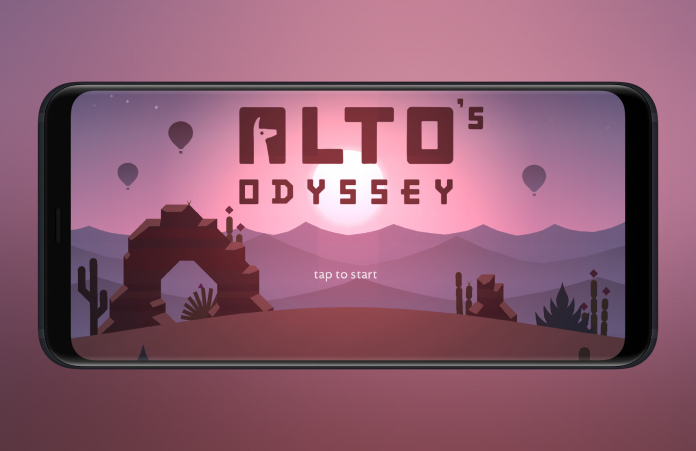
I am not really a fan of the endless genre. For me, they are all designed in a way that spending on microtransactions is the main goal of it, rather than having entertaining gameplay with great design. That’s why when I approached Alto’s Odyssey, I was a bit skeptical. Fortunately, all of my fears weren’t realized, and I ended up enjoying this game much more than I imagined, and I couldn’t put it down for a while.
Developer: Noodlecake Studios Inc
Price: Free
Overview
While the franchise has been around since 2015 (you might have heard about Alto’s Adventure), Alto’s Odyssey was just launched in July for Android devices. Its premise is pretty simple: you control Alto, a sandboarder with superb stamina, across a beautiful, atmospheric desert. There are several structures in the world that you can grind on, such as ropes, balloons (like the one Team Rocket had, just not Meowth-shaped), and more.
Acceleration is done for you automatically, but you can make your character jump by tapping on the screen. Holding it will let you flip your character in order to make backflips. If you do something wrong, like hitting a rock, falling off a cliff, or landing a flip in the wrong way, Alto will not be able to sandboard anymore, which means game over for you.
Tutorial
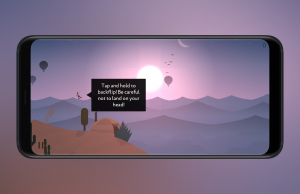 In order to familiarize yourself with the controls, Alto’s Odyssey offers a nice tutorial. Apart from the basic controls, it also explains stuff like jumps, backflips, and coins. In case you die on the tutorial, Alto will just revive and you will be able to try again. Later in the game, when you get a nicer sandboard, you will get a tutorial again for learning about tricks on walls. It is all pretty easy, although there is no mention of items you can collect throughout the game apart from coins, which are a common thing in games anyways.
Gameplay
In case you have missed it before, Alto’s Odyssey is an endless runner. This means that the game ends when you die. Not before, not after. Recognizing that this kind of game can get boring very fast, Noodlecake Studios has added a vast amount of different components to keep you entertained.
At the most basic level, you have items that you collect during your trips to the desert. These include super coins (a coin that gives you more coins), pots (which normally house even more coins), magnets (which attract nearby coins to you), and flowers (which let you smash rocks). Although nice to have, these don’t have any meaningful impact on the gameplay and, on their own, provide almost no value.
Also, there is the currency component. It is fairly common for games to have some sort of currency that you collect in order to buy enhancements, new items, or progress in some sort of way. Alto’s Odyssey lets you collect coins that are scattered through the world. You can exchange for a handful of items, but they are not essential. This means that they do not hinder your progress, as we have seen in an increasing amount of games in the Play Store.
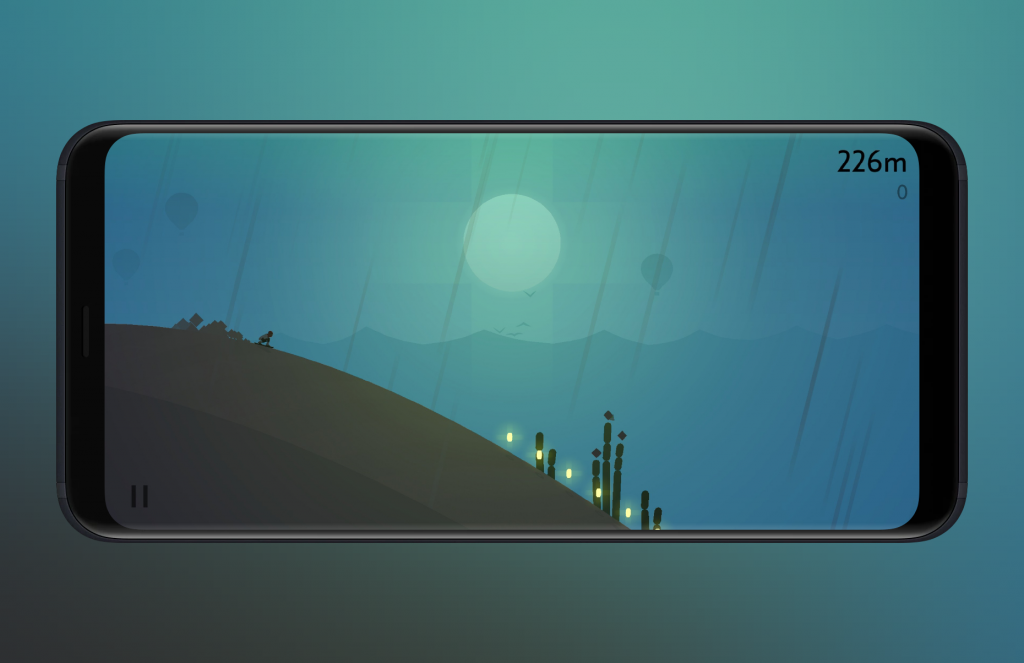
There are upgrades that let you prolong the effects of magnets and flowers, but you can also buy a radio (which, once bought, gives you “something useful” when you encounter it while sandboarding), a compass (to travel to other biomes), and a wingsuit (to do additional tricks). If you feel like coins are hard to come by, then you can also buy a coin doubler with real cash. You can also pay to remove ads, or get coins outright.
Objectives
As you may have figured, this is not enough to hold a game these days. It may have worked on the days where Temple Run was popular, but we have thankfully grown as a mobile gamer generation. Alto’s Odyssey introduces objectives, which, in my opinion, work in a superb way to increase the enjoyment out of the game. You get three at first, and, when you complete them, you get to the next level and get three new objectives, and so on.
These objectives can vary both in the required action, and in their difficulty. For example, some are very easy, such as “collect a super coin.” Others require you do to a double backflip, which is not as easy as it sounds. Some require you to hover over globes, to jump over them, to travel a certain amount of meters, and everything in between. It is very entertaining to complete these objectives, since it brings some kind of purpose apart from the “travel as far as you can” that endless games normally have.

As a plus, getting to a certain number of levels will grant you a new character to choose from. These characters have different strengths or are able to do different things. For example, there is one that travels faster than others, while other can double jump. This is the kind of progression that is so commonly missing from other games, so it’s nice to see Alto’s Odyssey providing it.
There are a total of 180 objectives to complete, which gives you plenty of stuff to complete and increases its replay value significantly.
Biomes
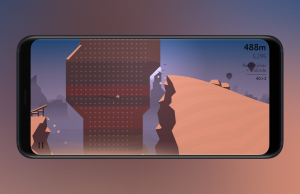 Even though they are referred to as “levels,” the game itself only changes when you reach a new biome. According to the Merriam-Webster dictionary, a biome is “a major ecological community type.” In this game, a biome is kind of that too, because the environment changes a bit from biome to biome. You start on a plain desert that has few stuff in it, but you can go to ruins, canyons, and temples.
While every world is randomly-generated, this variation in the environments that you find makes the game a lot less monotonous. Also, as previously said, when you reach a certain level, you can purchase a snowboard that lets you slide through walls and jump from one wall to the other, which brings a whole new dimension to the game. This makes it less dependent on sandboarding through the desert only, increasing its fun factor.
Graphics and Sound
There’s no way of talking about Alto’s Odyssey without its graphics. This is, by far, the greatest “feature” of the game. They are not striving for realism, but rather for simplicity and creating an atmosphere. There are time variations, so you will play in every condition from dawn until dusk. The background with the rising sun while the foreground has shadows all over is breathtaking, and really does a lot to set an atmosphere of relaxation and calmness.
All special effects are smooth and details, while not prominent, add a lot to the philosophy. Most of the elements in the game are simple without feeling unpolished. For example, in order to identify walls that can be jumped at, the game adds small dots that do not disturb the design style. Balloons have just enough details to figure that it is a balloon, but nothing more. Flags from ropes are just colored squares, but once you board through them, they fall gracefully to the ground. Nothing tries to be realistic, but everything does its best to immerse you into the experience.

Of course, this could not be done without audio that properly sets the tone. Sound effects and music all work together to complement the atmosphere set by the graphics. Normally, I find that audio in games is just there, either adding just a little bit to the gameplay or not making it worse. This game, however, is one of the few in which the graphics and the sound work together in a superb way towards a common goal.
Zen Mode
If all you want is to relax and sandboard without feeling anxious about objectives and unlocking characters, there is a Zen Mode. Here, Alto cannot die, although you can still screw up, but tapping on the screen will fix that. Also, the game recommends you to play with headphones because the music is incredibly relaxing. This mode highlights the work made by the team in order to portray this game as a relaxing, breathtaking adventure.
Conclusion
Alto’s Odyssey gets elements from the endless genre, but slaps a lot of different mechanics on top to make an enjoyable game. Objectives, new characters, and additional mechanics make this game stray away from the usual get-highest-score-possible business. Even if you are not fully convinced by this, the graphics at least are worth a look. Such an atmospheric game, in which the graphics and the sound blend together to create an astonishing experience, is something that is not commonly seen on the Play Store. Give it a go, you might end up as hooked as I was.
Download and install Alto’s Odyssey from the Google Play Store.
Scientists created a condom that self-lubricates during sex. You’re welcome
In the future, condoms will lubricate themselves — and you’ve got Bill and Melinda Gates to thank for it. Well, them and some smart chemists from Boston University. As part of a brief put out by the Bill & Melinda Gates Foundation for ideas to encourage condom use, Boston University chemist Mark Grinstaff and colleagues set about trying to come up with a way to make condoms more comfortable to wear.
While most commercially available condoms use a silicone oil coating as a lubricant, this doesn’t necessarily hang around for the whole, err, session. Instead, Grinstaff and associates have created a special coating which responds to bodily fluids by becoming more slippery than Mark Zuckerberg at a privacy summit.
“The idea is to develop an improved condom whereby the condom itself has a slippery surface, thus added lubricants like silicone oil are not needed,” Grinstaff told Digital Trends. “We have coated the condom with a polymer which holds onto water molecules, and thus a thin layer of water resides on the surface of the condom to provide lubricity.”
The researchers tested the friction that resulted when rubbing the polymer-coated latex over a surface resembling skin for around 15 minutes. After this time, the polymer-coated latex generated approximately half the friction compared with standard latex which had been lubricated with water. Non-treated latex with a commercially available lubricant performed better at first, but after the 15-minute test period was still not as effective as the newly developed polymer-coated latex. The new material additionally scored well when people were asked to rate its slipperiness. A massive 85 percent of test participants described it as more slippery than the non-treated latex with added lubricant.
“The next steps include manufacturing the condom under [good manufacturing practices] and conducting a marketing study with couples,” Grinstaff said. “One of the authors on the paper, Dr. Stacy Chin, has started a company, [Hydroglyde Coatings], to develop a self-lubricating condom. In fact, she has a new formulation that performs even better.”
The paper describing the work, “Friction-lowering capabilities and human subject preferences for a hydrophilic surface coating on latex substrates,” was recently published in the journal Royal Society Open Science.
Editors’ Recommendations
- NASA’s invention of the year award goes to … space lube?
- How to clean a cast-iron skillet and prevent rust
- How to season a cast-iron skillet
- Engineered sand could remove nasty toxins to produce drinkable water
- Regular Wi-Fi can accurately detect bombs, chemicals, and weapons in bags
Handy Google Pixel 3 tips and tricks
The Google Pixel 3 and Pixel 3 XL are phones with hidden depths. In this guide, we’ve got step-by-step instructions for you here to help you customize your new phones, dig into the best shortcuts, and uncover the most exciting features.
We’ll run through some features exclusive to the Pixel line, and some that will work on any Android 9.0 Pie phone. Before we dive in, Pixel 3 XL owners might want to look at how to hide the notch. Without further ado, here are our top Pixel 3 tips.
How to customize your home screen
Tap and hold on any open area of your home screen and you’ll get a pop-up menu that lets you select Widgets and Wallpapers – we recommend the Living Universe section in Wallpapers, where Google offers some fantastic animated wallpapers. Some of the other categories offer a Daily wallpaper option that changes your wallpaper every day.
You’ll also find Home settings in here, where you can decide if you want Notification dots, whether new app icons should be added to the Home screen, set At A Glance info like calendar events to stay at the top of the screen, and more.
How to choose quick settings toggles
Pull down the notification shade with two fingers and tap the wee pencil icon at the bottom right to edit the quick settings toggles that appear. You can simply tap and drag icons to add or remove them and select your preferred spot.
How to use Night Light
Because blue light can make it harder to fall asleep, most phone manufacturers now offer a blue light filter that can be scheduled to kick in near bedtime. On your Pixel 3, go into Settings > Display > Night Light and tap Schedule, where you can choose to have it turn on precisely when you want or automatically align with the sunset and sunrise in your area.
You can also set this as a part of your Wind Down bedtime routine in Settings > Digital Wellbeing.
How to free up storage space
With 64GB of storage in the base model and no room for a Micro SD card, you might find that you run out of space on your Pixel 3 or 3 XL. Apart from uninstalling apps you don’t need, you should also go to Settings > Storage and tap Free up space.
Another way to free up space is to back up photos and video to Google Photos, where you can back up everything in its original quality for free. Once everything is backed up, tap on the small hamburger menu at the top left in Google Photos and then tap Settings > Free up device storage.
How to have Google Assistant screen your calls
If a call comes in that you suspect may be spam — or you just don’t want to take it — tap Screen call and Google Assistant will answer for you, saying, “Hi, the person you’re calling is using a screening service from Google, and will get a copy of this conversation. Go ahead and say your name, and why you’re calling.”
You’ll see what they say transcribed in real time on your Pixel 3 screen and you can choose whether to answer, send a quick reply, or report as spam.
How to use split screen
To use split screen, simply swipe up from the bottom of the screen to open the multitasking view showing your recent apps and tap the app icon at the top of one of the apps you want open. Then select Split screen and choose the second app you want open. You can drag the bar in the middle to resize, then simply drag it all the way to the top or bottom when you’re done to go full screen with one of the apps.
How to configure Ambient Display
We definitely recommend turning Ambient Display on, so that you can see new notifications and other information on your Pixel 3’s screen even when it’s locked, but you should configure it. Since battery life isn’t the best, we wouldn’t recommend leaving it on all the time. Go to Settings > Display > Advanced > Ambient Display and make sure that the Always on mode is off, but New notifications is on. We also turned on Double-tap to check phone and Lift to check phone, but you might feel one of those options is enough.
How to quick launch the camera
Simon Hill/Digital Trends
You can simply double tap the power button to quickly launch the camera app at any time, even when your Pixel 3 is locked. It’s a handy shortcut when you want to capture a spontaneous moment and speed is important. You can toggle this feature on and off in Settings > System > Gestures > Jump to camera.
How to use volume keys for camera gestures
You can use your Pixel 3’s volume keys to snap photos or zoom in if you configure them. Open the camera app and swipe over to More > Settings, then tap Gestures and choose your preference.
You can also set what double tapping on the screen in the camera app should do here: Zoom in or switch cameras.
How to quickly switch to front-facing camera one-handed
Sometimes you’ll negotiate into the perfect group selfie position and realize that the main camera is on instead of the front-facing camera. Don’t worry, just twist your wrist twice and it should switch to the front-facing camera. This should be on by default, but you can find the option in Settings > System > Gestures > Flip camera.
If you haven’t already, you might want to check out key settings you need to change on your brand-new Google Pixel 3 or Pixel 3 XL.
Editors’ Recommendations
- Key settings you need to change on your brand-new Google Pixel 3 or 3 XL phone
- Pixel 3 XL vs. Pixel 2 XL vs. Pixel XL: Which XL is best for you?
- The best Google Pixel tips and tricks
- Pixel 3 XL vs. iPhone XS Max: Which plus-sized flagship reigns supreme?
- Google Pixel 3 and Pixel 3 XL: Everything you need to know
 AIVAnet