


JBL Link View review: A smart display with lots of potential not yet realized

These days smart speakers are nothing new but they are still evolving. Just as with the Echo and later the Echo Show, Amazon was first to the party. Now, Google is once again playing catch up with their very own smart displays hitting the market. First came the Lenovo Smart Display which was quickly followed by the JBL Link View. At this moment they are the only two players in the market for a Google Assistant powered smart display. For the past few weeks, I’ve been using the JBL Link View with much delight and a few gripes.
Design
The JBL Link View comes in an oblong pill shape that seems more like a display has been slapped on a speaker than a display with speakers attached. This should come as no surprise since JBL is first and foremost an audio company. Upon opening the box, I found the design to be wider and bulkier than I expected. I can’t say I was immediately a fan of the design but as time went on it grew on me.
One aspect of the design that really stood out to me is the size of the bezels around the display. In a world where bezels are constantly shrinking on our phones, computers, and TVs it is a bit strange to see such large bezels on a new device. If it were a tablet the bezels might make sense but smart displays are not tablets and not designed to be held during usage. JBL isn’t the only one guilty of this, as every smart display that I’ve seen so far includes large bezels.
The next thing that stood out to me was the privacy switch. If you’ve been concerned about bringing a connected camera into your home, the privacy switch is a nice reassuring feature. The privacy switch is a one hundred percent manual slider switch that completely covers the camera with an orange piece of plastic. This makes it easy to see whether or not your camera is blocked.

As with other smart speakers on the market, there is also a mute switch on the back and volume controls. Even though you’ll most likely be controlling the volume with voice commands or by using the on-screen controls these controls are still handy to have.

One of the reasons you’ll most likely be using the voice commands is if you decide to put this in the kitchen. After using the JBL Link View for the past week I found that is one of the best rooms for a smart display to live. In order to make the Link View even more kitchen friendly, it comes with an IPX4 rating making it splashproof. That’s not quite as good as many new phones but it should stand up to the occasional splash in the kitchen without issue.

A small and often overlooked design element is the power plug. If you’re like me with a house full of gadgets crowding your outlets, then you’ll be happy to know the Link View doesn’t feature a large boxy plug. It was really refreshing to see the power cable used a normal sized plug instead of some oddly shaped large rectangle. Thankfully, JBL saw fit to hide all the components in the Link View itself and provide you with a small normal sized power plug that wouldn’t crowd your surge protector.
Display
I was a little disappointed at first when I read that the 8-inch display on JBL Link View would only have a 720p resolution. In a world of QHD phones and 4K TVs, the thought of using a 720p screen seemed like a big step backward.
However, in practice, I found this was not an issue at all. Most times you’ll be at least three feet or more from the display and at this distance, you won’t notice the lower resolution. During my time watching YouTube videos or movies from Google Play I found no issues with the video quality.

It definitely was not as good as my phone, tablet, or TV screen but a smart display isn’t really designed around media consumption. It is there to help give you visual results and information and it does this well.
I did find some light leaking around the top and bottom bezels and that was unfortunate. Overall it was only a minor issue because it is only visible when the ambient display is on.
How Good is the Screen?
Personally, I have loved having a screen on my smart speaker. I’m a visual person and getting visual feedback from my commands and questions is quite satisfying. The animations were all smooth and flowing, reminiscent of the material design we’ve come to know and love.
I enjoyed asking for the weather and seeing the forecast pop up on the screen. Controlling your smart home is also made easier by providing extra controls on screen whenever you turn the lights on or off. Besides the ability to toggle lights on or off, you’re also presented with controls for brightness and color. These controls will linger on the screen for a while giving you plenty of time to access them which is a nice touch.


Using it for recipes in the kitchen is fantastic since it gives you step by step instructions that you can advance hands-free. Even better you can bring up a recipe video on YouTube with ease.
Another way it makes a great kitchen companion is by allowing you to watch movies through Google Play or catch up on your YouTube videos.
While it plays music just like any other Google Assistant speaker with the screen it also allows you to watch the music videos via YouTube. If you happen to have YouTube TV you’ll even be able to watch TV on it. Beyond watching videos I also appreciated the other ways it would show information.
Whether that be showing a picture related to my question or providing follow up questions at the bottom of the screen. Often times it leads me to click on related questions and learning more about the subject.


I also enjoyed some of the added touches such as providing a breakdown of scoring quarter by quarter when asking for the football score. Little additions such as this show how Google put thought into how to utilize the display in useful ways, providing an improved experience over an audio-only device. That doesn’t mean it still doesn’t have a long way to go.
So Much Potential
There is still a lot of room for improvement and innovation. For instance, when turning on a light it was fantastic to see the controls pop up on the screen. I loved that I could toggle the light on/off, change the color, or brightness of the bulb. Features like this would make a smart display the perfect smart home hub. Unfortunately, there is no way to bring up some sort of hub to give you full control over your smart home devices.
I found myself giving variations of “show me my lights” commands hoping to get a screen for controls over every light in my home. Sadly, there was no way to do this. There is also no way to view my Arlo cameras at this time.
READ MORE: What are smart displays and what good are they?
Another feature that would have been beneficial is viewing the weather radar. I tried several commands but could never get this to work.
Making video calls using the JBL Link View worked well but you are limited to only using Duo. Unfortunately, not many people use Duo and support for some other video calling apps would be much appreciated.
Speaking of video calls, the Echo Show offers the ability to “drop in” and view your home through the camera. This is yet another feature I wish Google smart displays included. Having the ability to call my smart speaker through Duo or view it through the Google Home app would be such a convenient way to check on things while I’m away.
The ambient display also leaves much to be desired. This comes on after the display has been idle for a while showing only a small clock in the bottom left-hand corner. If this clock were larger it would be easier to read from several feet away or even from across the room. Furthermore, I’d love if it offered some more info or customization. Perhaps allowing you to adjust the clock to the size you see fit and show more information like the weather.
Sound Quality
With JBL’s audio prowess it should be no surprise that the JBL Link View has outstanding audio quality. The two speakers on the front provide stereo sound while a passive radiator on the back makes sure you feel the bass. This helped give a balanced sound with plenty of clarity in the mids and highs along with hard hitting bass.

Final Thoughts
After weeks of using the JBL Link View, I’ve come to love having a screen on my smart speaker, but it’s not yet essential. I use smart speakers every day and I’ve been a big fan of them since my first Echo speaker and later my Google Home speaker. Similar to when the Google Home was first launched smart displays right now are full of potential which isn’t yet realized.
Even if they only have a limited use, for now, the JBL Link View has sold me on smart displays. The great thing about smart displays or speakers is they will continue to evolve and improve over time. When I first got the Google Home it couldn’t do half of what it is capable of now. The same will be true for smart displays.
Over time it will improve and gain new abilities becoming a vital part of your smart home. As long as you don’t need the larger screen size offered by the Lenovo smart display, the JBL Link View is the clear way to go. No other smart display currently offers this level of sound quality and you’ll be grateful for that every time you start your favorite playlist or queue up a video to watch.
Buy from JBL Buy from Best Buy Buy from B&H Photo
How to Force Restart or Hard Reset the iPhone 8 and iPhone 8 Plus
Apple in 2017 changed the method to force restart or hard reset an iPhone 8 or iPhone 8 Plus.
While rebooting an iPhone 7 or iPhone 7 Plus requires pressing and holding both the Sleep/Wake and Volume Down buttons for at least 10 seconds until the Apple logo appears, restarting an iPhone 8 or iPhone 8 Plus is a three step process that involves the Volume Up button, the Volume Down button, and the Side button on the device.
How to Force Restart or Hard Reset the iPhone 8 and iPhone 8 Plus
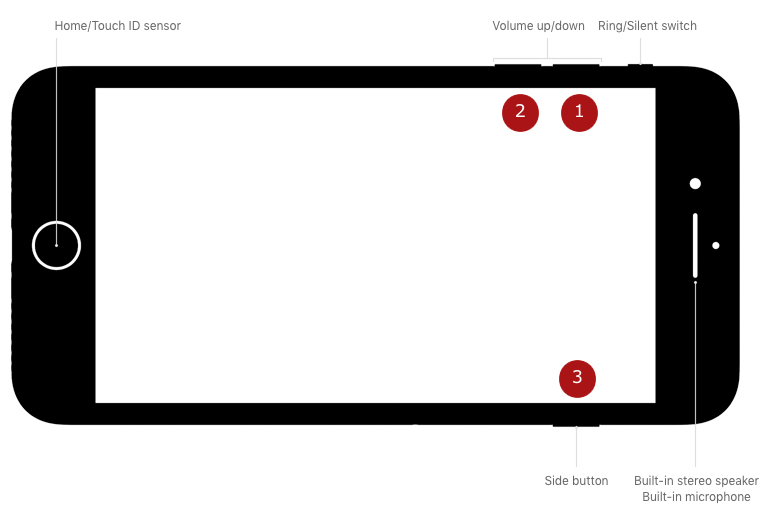 Press and quickly release the Volume Up button.
Press and quickly release the Volume Down button.
Press and hold the Side button (aka power) until you see the Apple logo.Powering off regularly still requires holding down the Side button for a few seconds until the “slide to power off” prompt appears. In iOS 11 and iOS 12, there’s also a “Shut Down” option in the Settings app at the bottom of the General menu.
Apple made this change because on iPhone 8 and iPhone 8 Plus, pressing and holding the Side aka Sleep/Wake button and one of the Volume buttons now activates the Emergency SOS feature.
Force restarting an iPhone is different than recovery using DFU mode, for which the steps remain the same as the iPhone 7 and iPhone 7 Plus.
Discuss this article in our forums
Here’s how scientists read a charred 16th-century scroll without unraveling it
What do you do when you’re an historian trying to recover information from a severely damaged 16th century scroll that’s darn near unreadable? You turn to cutting-edge technology, of course. At least, that is what several international researchers have been lending their expert assistance to — and they’ve been able to help reveal the hidden text inside the severely burned rolled-up document as a result.
“For historical documents that are delicate — often due to fire or water damage — it is problematic to open or unroll them, as this would cause further damage,” Paul Rosin, a professor in the U.K.’s Cardiff University’s School of Computer Science and Informatics, told Digital Trends. “Not only is this a problem, but if the document disintegrates then the results may not be readable.”
The team involved in the project started by carrying out a non-destructive 3D X-ray scan of the document at the U.K.’s Queen Mary University. This technique creates thousands of thin cross sections of the document, on which the ink was visible as bright blobs. The 3D data was then passed to computer scientists at Cardiff University and a collaborator at China’s Beihang University, who used computer vision algorithms to create a flat representation of the scroll. This allowed the team to extract the writing on its surface.
“Our work was a good proof of concept to show that it is possible to extract information even from very challenging data,” Rosin continued.
He noted that, in this case, the documents were not of essential historical importance: Being legal documents referring to a few land transactions, records about disturbances of the peace, payment of fines, names of jurors, and other local information. However, there is no reason why the same technique could not be used for other, more crucial documents in the future.
“For something as important as the Dead Sea Scrolls probably even extracting a few phrases would be considered worthwhile,” he said.
Research like this isn’t the first time that the worlds of historical research and high-tech have crossed paths to avoid damaging potentially significant finds. Previously, researchers exploring the Great Pyramid of Giza used a not-dissimilar technique called “muon tomography” to map a newly discovered hidden chamber in the enormous structure. In another instance, Lidar — a laser-based tool most commonly used in self-driving cars — was utilized to create a detailed map of a long-lost city hidden beneath the jungle in Cambodia.
Editors’ Recommendations
- Want a peek into the future? Watch these robots 3D print concrete structures
- How to unlock a phone on each and every carrier
- How to root Android phones or tablets (and unroot them)
- Home printer buying guide: How to choose a printer that best fits your needs
- How to unpair an Apple Watch
Like a Bat-Signal for cyclists, this laser light makes bikes visible to drivers
Having lights on your bicycle isn’t just an optional extra — it’s a legal requirement in most places, provided that you wish to cycle after it’s dark. Well, you’ve probably never seen seen a bike light quite like the one created by U.K. startup Beryl, though. Called the Laserlight Core, it’s a smart projection system that’s designed for safer cycling. It works by projecting an image of a cyclist 20 feet in front of you as you ride. Think of it as your own attention-grabbing, cycling-themed Bat-Signal, and you won’t be too far wrong.
“We have combined a high-spec white front light with the patented Beryl laser projection, allowing cyclists to both see and be seen, beaming out blind spots as they ride through the city,” Beryl CEO Emily Brooke told Digital Trends. “The light can function either as a standard front light or, with [the] laser enabled, with a push of a button.”
Beryl grew out of Brooke’s Product Design degree at Brighton University in the U.K. While she was there, she read about the high number of bike accidents that happen as the result of bikes being in a car’s blind spot. Brooke went on to create the first Beryl light prototype, which quickly caught the attention of transport officials in London. They incorporated it into the London bike share scheme in 2015, and it has since been been piloted in New York, Montreal, and — very soon — Glasgow, Scotland.
The Laserlight Core is the company’s second-generation light, incorporating improvements in laser technology to produce Beryl’s clearest, most defined laser projection to date. It also boasts other improvements over its predecessor, the Laserlight Blaze. These include a “day flash mode,” lighter casing, and a tool-free bracket with silicone band mount.
“The Laserlight is a patented technology, and so Beryl is the only company that uses the forward image projection,” Brooke said. “We believe that the Laserlight is unique in the space, as it is focusing on strategic visibility: Visibility where it really matters.”
As ever, we offer our usual warnings about the potential risks inherent in Kickstarter campaigns — even when the company has successfully shipped products previously. If you’re keen to go ahead and get involved, however, head over to the project’s crowdfunding page, where you can pledge your dough. Prices start at $75, and shipping is set to take place in December.
With any luck, that should mean it’s poised to be a great holiday gift for the cycling enthusiast in your life.
Editors’ Recommendations
- Awesome Tech You Can’t Buy Yet: Screen-blocking specs, cybershoes, and more
- Don’t get burned! How to back crowdfunding projects the smart way
- How laser projection is taking IMAX even further over the top
- Apple AR glasses: News and rumors about ‘Project Mirrorshades’
- These Raspberry Pi 3 bundles will cover everyone, from coders to gamers
Google to shut down Google+ after exposure of 500,000 users’ data
Google announced that it will shut down Google+ for consumers after revealing that the social networking site suffered from a security vulnerability that affects as many as 500,000 of its users. It’s believed that the personal data of hundreds of thousands of Google+ users may have been exposed on the site between 2015 and March 2018, though Google claims that it does not believe that data from its users were misused as part of the glitch.
The security flaw could have revealed personal details that about its users to potential hackers, such as a user’s name, gender, email address, and occupation. In its report, Google claims that the bug was discovered when it launched Project Strobe to review third-party developer access to Google account and Android device data.
“We made Google+ with privacy in mind and therefore keep this API’s log data for only two weeks,” Google revealed in a blog post after the Wall Street Journal reported the flaw. “That means we cannot confirm which users were impacted by this bug. However, we ran a detailed analysis over the two weeks prior to patching the bug, and from that analysis, the Profiles of up to 500,000 Google+ accounts were potentially affected. Our analysis showed that up to 438 applications may have used this API.”
Google claimed that after the bug was discovered, it was quickly patched and that it was not aware of any abuse. However, it did not reveal the flaw initially as a way to preserve its reputation and not invite regulatory scrutiny, according to a report on the Wall Street Journal. In addition to shutting down consumer accounts, Google also plans to announce changes to its privacy policy in response to the potential data breach, the Journal reported, including new changes to its APIs to limit developers access to user’s data on Gmail and Android devices.
Rival Facebook is still reeling from a public relations fiasco after it revealed earlier this year that data from its users was misused as part of the Cambridge Analytica scandal. More recently, Facebook also discovered a bug that allowed hackers access to its users’ private data. The Facebook security flaw affected 50 million users, and Facebook made a decision to forcibly log off 90 million of its users as a result of the issue. Affected users could log back into their Facebook account to regain access to the social network. Facebook also forced to implement sweeping changes to how it handles data in an effort to rebuild trust as a result of its recent breaches.
Google made the decision to shutter Google+ over the next 10 months, citing a lack of user engagement. “The consumer version of Google+ currently has low usage and engagement: 90 percent of Google+ user sessions are less than five seconds,” Google said.
Editors’ Recommendations
- Facebook’s latest data breach could earn Europeans thousands in compensation
- Is Google launching an A.I. fitness coach for smartwatches?
- Google’s Titan Key ensures your phone and apps are virtually unhackable
- Riddled with problems, Chrome 69 isn’t the celebration Google hoped for
- Google will warn businesses if state-sponsored hackers target G Suite users
Google to shut down Google+ after exposure of 500,000 users’ data
Google announced that it will shut down Google+ for consumers after revealing that the social networking site suffered from a security vulnerability that affects as many as 500,000 of its users. It’s believed that the personal data of hundreds of thousands of Google+ users may have been exposed on the site between 2015 and March 2018, though Google claims that it does not believe that data from its users were misused as part of the glitch.
The security flaw could have revealed personal details that about its users to potential hackers, such as a user’s name, gender, email address, and occupation. In its report, Google claims that the bug was discovered when it launched Project Strobe to review third-party developer access to Google account and Android device data.
“We made Google+ with privacy in mind and therefore keep this API’s log data for only two weeks,” Google revealed in a blog post after the Wall Street Journal reported the flaw. “That means we cannot confirm which users were impacted by this bug. However, we ran a detailed analysis over the two weeks prior to patching the bug, and from that analysis, the Profiles of up to 500,000 Google+ accounts were potentially affected. Our analysis showed that up to 438 applications may have used this API.”
Google claimed that after the bug was discovered, it was quickly patched and that it was not aware of any abuse. However, it did not reveal the flaw initially as a way to preserve its reputation and not invite regulatory scrutiny, according to a report on the Wall Street Journal. In addition to shutting down consumer accounts, Google also plans to announce changes to its privacy policy in response to the potential data breach, the Journal reported, including new changes to its APIs to limit developers access to user’s data on Gmail and Android devices.
Rival Facebook is still reeling from a public relations fiasco after it revealed earlier this year that data from its users was misused as part of the Cambridge Analytica scandal. More recently, Facebook also discovered a bug that allowed hackers access to its users’ private data. The Facebook security flaw affected 50 million users, and Facebook made a decision to forcibly log off 90 million of its users as a result of the issue. Affected users could log back into their Facebook account to regain access to the social network. Facebook also forced to implement sweeping changes to how it handles data in an effort to rebuild trust as a result of its recent breaches.
Google made the decision to shutter Google+ over the next 10 months, citing a lack of user engagement. “The consumer version of Google+ currently has low usage and engagement: 90 percent of Google+ user sessions are less than five seconds,” Google said.
Editors’ Recommendations
- Facebook’s latest data breach could earn Europeans thousands in compensation
- Is Google launching an A.I. fitness coach for smartwatches?
- Google’s Titan Key ensures your phone and apps are virtually unhackable
- Riddled with problems, Chrome 69 isn’t the celebration Google hoped for
- Google will warn businesses if state-sponsored hackers target G Suite users
Chrome 70 could break thousands of websites, but that’s their own fault
As a result of using old security certificates, thousands of sites on the internet may stop working as soon as October 16. When Google begins rolling out its next version of the Chrome browser — called Chrome 70 — users navigating to these sites will be greeted with a security warning once Google drops trust for HTTPS security certificates issued by Symantec prior to June 2016.
When Google discovered more than a year ago that Symantec had improperly issued security certificates, it warned that it will drop support for the affected batches of certificates from the security firm. In essence, security certificates issued by Symantec prior to June 2016 won’t be trusted by Chrome 70, and web developers had more than a year to prepare for the change. Security researcher Scott Helme found more than 1,000 sites in the top million websites ranked by Alexa that may be affected by the change once Google rolls out Chrome 70, including a few notable government sites from India and Tel Aviv. A few of the sites on Helme’s list recently changed to new certificates, so they won’t be affected.
In addition to Symantec certificates, users visiting websites using certificates issued by Thawte, VeriSign, Equifax, GeoTrust, and RapidSSL prior to June 2016 will also be greeted with a security warning on Chrome 70, TechCrunch reported.
Google also made recent headlines for some of its efforts in building trust on the internet. The company came under fire with the release of Chrome 69 for trying to hide the “www” portion of a web address in the Chrome omnibox. After users protested, Google reversed course, but it said that the change is still incoming once Chrome 70 launches. An even more radical change that Google is exploring includes killing web addresses altogether. Google hasn’t revealed what the alternative to URLs would be, but the company stated that this is an idea that it is still working on as part of its effort to help build a safer web experience.
Chrome 70 follows on the heels of Chrome’s major redesign with the launch of Chrome 69. The next version of Google’s web browser will introduce new features, such as shape detection and barcode scanning, Web Authentication support with biometric scanners on MacOS and Android where available, and Web Bluetooth support on Windows 10, Google announced. With Chrome 70, Google will also reverse its recent controversial decision to forcibly sign users into the browser once they log into a Google account on the web.
Editors’ Recommendations
- Google tried to kill ‘www,’ until Chrome users protested the change
- Chrome 70 allows users to opt out of controversial auto sign-in feature
- Your Google Chrome extensions are about to get a lot safer
- Google’s Pixelbook 2 tablet could debut with fingerprint security
- Chrome 69 logs you in without consent, but Google says it’s for your own good
Portable hard drives, gaming consoles, and more are discounted today
Whether you’re looking for new tech gear or household items, we’ve got you covered.
There’s never a shortage of deals available, but sorting through all of them can be difficult at times. We’ve handpicked all the best tech, and everyday essentials discounts that you can take advantage of right now and brought them to one central location. From portable hard drives to 24-ounce water bottles, these are today’s best deals.
Tech Deals
View the rest of the deals
Everyday Essentials
If you want to know about the deals as soon as they are happening, you’ll want to follow Thrifter on Twitter, and sign up for the newsletter, because missing out on a great deal stinks!
Best Replacement Bands for Samsung Galaxy Watch 42mm

The Galaxy Watch is one of the best companions for your phone, and you can personalize the heck out of it. You can choose your own watch face, and swap the watch band out for any 20mm strap. If you’re only going to get one watch band, check out the Speidel Stretch Band. You’ll likely need to a visit a jeweler to get the perfect size, but after that the watch band will go on in an instant and won’t need to be re-sized if your wrists get bigger.
Here are the best replacement bands for the Samsung Galaxy Watch 42mm!
Totally metal
Kai Tian Stainless Steel Band

This band from Kai Tain is made of brushed stainless steel, and it comes with a free resizing kit to make the perfect fit. It’s available in black or silver, and the standard clasp makes putting the band on a breeze.
$20 at Amazon
Wooden wonder
LDFAS 20mm Wood Band

This band has something you don’t see every day: red sandalwood in between each link. You can get this band with black, rose gold or silver steel, and all look great with the red wood. There’s a clasp to easily get the band on and off your wrist, and quick release pins to make installation a piece of cake.
$30 at Amazon
Stretch armstrong
Speidel Stainless Steel Watch Band

Stretch watch bands are awesome because they go on in an instant, and they’re always the perfect fit. Getting that perfect fit means visiting a professional jeweler, but it’s worth the time. This band from Speidel comes with either a straight or curved end, and the company offers a few color options.
$35 at Amazon
Lust after the leather
Barton 20mm Top Grain Leather Watch Band

Top Grain leather is the highest quality leather available, and this band lets you wear some right on your wrist. There are 15 different color combinations to best match your personal style, and the quick release pins make putting the band on a breeze.
$24 at Amazon
Less expensive, still stylish
WOCCI Vintage Leather Watch Strap

This band is a thinner leather, so it’ll flex a bit easier on your wrist. There are only a few color options — 3 to be exact — that’ll fit your Galaxy Watch. The watch doesn’t feature quick release pins, but it does include an installation kit.
$13 at Amazon
Minimalist style
Benchmark Straps Suede Watch Band

If you want a watch band to match your Blue Suede Shoes, this is the one for you. The suede has a minimal design, with no stitching along the sides. There are seven different colors to choose from that’ll fit your Galaxy Watch, and genuine leather underneath to make the strap a bit sturdier. Finally, there’s a kit included to install the band onto your watch.
$20 at Amazon
For your daily workout
Moretek Silicone Replacement Strap

While the Galaxy Watch comes with a silicone band, this one would be a bit better for your workouts. The extra perforations on the band makes your wrist breathe easier, and lets you get a more exact fit, leading to a more accurate heart rate reading. The strap comes in 13 different colors, and features quick-release pins so you can swap it for something classier after your workout.
$10 at Amazon
Totally secure
STYLELOVER NATO Strap

If you want a watch band that won’t budge, you want a NATO strap. This one from STYLELOVER is made of heavy duty nylon, and it comes in 16 different colors. The only buckle color is silver, so keep that in mind if you want one for your Galaxy Watch.
$9 at Amazon
Mix and match
Ritche NATO Strap 4 pack

If you like to mix and match your bands, this pack from Ritche is a great way to do just that. You get four NATO straps, so you can swap them out so the pattern fits your mood. All of the bands have silver buckles and keepers, so you won’t have to deal with paint chipping. Finally, there’s an installation kit and a few extra pins included inside.
$12 at Amazon
All of these are great options, but the Galaxy Watch works with any 20mm strap. Again, my personal favorite is the Speidel Stretch Band since it goes on and off in an instant and will always have a perfect fit, but feel free to get any strap to make the watch perfect for you!
Charge your phone faster with Aukey’s $8 Quick Charge 3.0 USB wall charger
A faster charge is always better.
The Aukey Quick Charge 3.0 18W USB wall charger is down to $7.92 with code 9ZMNJXPJ. The charger goes for $13 without the code and that’s the price it regularly sells at. We’ve never seen this model drop so low before.

You can use this charger to plug directly into an outlet and charge, but you’ll also need one of these if you ever want to get the most out of a wireless charger like this because these devices usually do not come with a Quick Charge wall adapter and need one for the fastest possible juice. This is a Qualcomm-certified Quick Charge 3.0 device, so any smartphone or tablet or other device compatible with that technology can use this to get super fast charging speeds. It’s also backwards compatible to work with previous generations of Quick Charge, and it will charge non-QC compatible devices with standard USB power up to 2.4A. Aukey backs it up with a two-year warranty.
See on Amazon
 AIVAnet