


Grab the Ultimate Data and Analytics bundle for $29!
Data can be super powerful, but only if you know how to read and analyze it. Unfortunately, that is the hard part and there are tons of different ways to do it which are super advanced. You could spend hours and hours researching the best way to understand the data and information that is at your fingertips, but that will just consume more time and money.
This amazing data and analytics bundle will get you nearly all the information you could desire to get started. From courses on the essential software you will need to more in-depth information like Oracle databases, SAS courses and more, there is tons and tons to learn here.

With this bundle you’ll get:
- Lifetime access to all 400+ courses
- Access to all future online data & analytics courses
- Access to experts via online academic support
- Courses on essential software used for business analytics & business intelligence
- Certificates of completion in SAS, R, Oracle & database courses
- SAS courses, including SAS Dataset, SAS Format & SAS Functions training
- R courses, including R Business Analytics, R-Studio, R Programming & Anova training
- Pinnacle data & analytics courses, including Hadoop, Cloud, Tableau, MongoDB & Informatica training
- Oracle & other database courses, including Oracle SOA Suite, Oracle SQL, RMAN, Oracle Database and Toad training
With its normal price tag of $2,099 this bundle may have been out of reach for many previously. Right now you can pick it up for just $29, which is a huge discount. The 130 courses will get you tons of great information, and when you run into an issue you’ll be able to access experts through an online support channel.
Don’t miss out on this 98% savings and be sure to pick up your bundle right now.
See at Android Central Offers
Treat your waist to a new perfectly-fitting leather SlideBelt for $47
The one belt to rule them all.

Today only, Amazon is offering 25% off select SlideBelts. These premium top-grain leather belts are only $46.50, and they usually go for around $62. Today’s deal gets you the best price in Amazon’s history for this item. There are multiple color options to choose from, but only through the end of the day.
These highly-rated belts fit up to a 48″ waist and they’re designed to be ultra-comfortable. They don’t have any notches, but rather they use a ratcheting buckle that locks in place. That means no more adding holes as you lose weight. No more punching a hole because the original ones are spaced awkwardly. No more stretching your belt out and having it loosen as you wear it throughout the day. The SlideBelt will fit you correctly every single time. You can even discreetly give yourself some slack if you overdo it on the Thanksgiving turkey.
The buckles can be switched out with additional belt straps so you aren’t that guy wearing a brown belt with black pants, too. Remember that this sale ends tonight!
See at Amazon
Save 25% on Speck’s cases for Google Pixel 3, Galaxy S9, and more
This coupon code discounts Speck’s entire product range for the next couple days.

If you’ve pre-ordered a Google Pixel 3 and are wanting to grab a case before your fancy new phone arrives, you’re in luck. We’ve partnered with Speck to offer 25% off its entire site including the newly-released case lineup for Google Pixel 3 and Pixel 3 XL as well as cases for all the Samsung Galaxy devices, and more. Simply use coupon code MOBILE at checkout to receive the discount. The code is good for today and tomorrow, so don’t hesitate.
Consider the Speck Presidio Stay Clear case if you want to show off the good looks of your Pixel 3 with its transparent design, resistance to discoloration and 8-foot drop protection. It’s down to under $30 with our coupon.
For a little added protection, why not opt for the Speck Presidio Grip case? The two-layer case with raised rubber grip offers protection from drops up to 10 feet. It’s available for Pixel 3 and Pixel 3 XL.
There’s much more on offer — including cases for Motorola and LG phones, as well as Kindles and laptop backpacks, too — and our discount applies to all full-priced products (with a maximum of five items per order). Speck offers free shipping within the U.S. or you can get expedited 2-day shipping for $5.
See at Speck
Smart Displays finally support multi-room audio with Google Home speakers
There’s a lot going on with the Google Assistant — let’s break down the important stuff.

In May 2016, we got our very first taste of the Google Assistant with the debut of Allo. The Assistant was a big draw to Allo at the time, with Google marketing it as a helpful bot that could make restaurant reservations, search the web, and more within your conversations.
Since then, the Assistant has gained heaps of new features and expanded to smartphones, tablets, speakers, and more. Google’s shown no interest in slowing down development for the Assistant, meaning that it’s likely here for the long-haul.
Whether this is your first encounter with it or you just need a quick refresher, here’s everything you need to know about the Google Assistant.
The latest Google Assistant news
October 11, 2018 — Smart Displays getting multi-room audio support, call screening coming to Pixel + Pixel 2, and more

Google was mighty busy this past Tuesday unveiling all of its new hardware for the next year, but on top of the Pixel 3, Pixel Slate, and Home Hub, existing phones and Smart Displays have just been confirmed to get a slew of new features, too.
For starters, one of the most long-awaited features for Smart Displays — support for audio groups within the Google Home app, has finally arrived. Now, you can add any Smart Display to audio groups with other Google Home speakers and have your music play throughout your entire house on all your Assistant devices.
Speaking of Smart Displays, the new software features shown on the Home Hub are coming to all other Smart Displays. This includes the Home View dashboard for controlling your smart home devices, the ability to have Google Photos automatically put new pictures on your Ambient Mode, and support for the Nest Hello Doorbell.
Some other big updates include:
- The Pixel 3’s call screening feature is coming to Pixel and Pixel 2 phones in November.
- Google Duplex will be able to book restaurant reservations for Pixel owners later this year in New York, Atlanta, Phoneix, and the San Franciso Bay Area.
- You can now talk to the Google Assistant and get answers without having to unlock your phone.
- The Google Home app has a new “Filters” setting that helps you manage your kids’ device use and can block them from using Assistant speakers or Smart Displays at bedtime.
October 4, 2018 — The Google Assistant can now book Uber and Lyft rides

Ride-sharing services are one of the best ways to get around nowadays, and rolling out to users this week, you’ll now be able to book a ride from your favorite service using the Google Assistant on your phone or smart speaker.
Just say, “Hey Google, book a ride to Starbucks” or “Get me a taxi to John F Kennedy Airport.” You can then choose from Uber, Lyft, Ola, Grab, GO-JEK, and more, or specify the ride service you want by name with your initial command.
After selecting the ride you want, you’ll be redirected to its respective app to confirm the booking and you’ll be all set. Google says this is initially available in English in any country where the ride services are offered. Over the coming months, it’ll be expanded to additional languages.
October 3, 2018 — Google Assistant gets a complete revamp on phones

Back at Google I/O in May, Google announced an all-new user interface for Google Assistant on phones with new visual controls, deeper app integration, and more. Now, the new UI is finally rolling out to everyone.
What you’ll notice right off the bat are the visual tweaks. The Google Sans font is put into full use, there are new touch controls you can use after certain commands (such as dimming your smart lights), and everything just looks more rounded and polished.
A swipe up after prompting the Assistant now brings you to your daily overview page that was launched earlier this year, and if you’re typing to use the assistant, there’s a new messaging UI so you can easily add commas, change words, and more.


Last but certainly not least, Google’s giving developers a bunch of new tools to integrate new experiences into the Assistant. For example, you can start and complete a Starbucks order with full menu visuals, Fitbit’s Fitstar can show GIFs of upcoming workouts, and much more.
This update is rolling out now, so be sure to keep an eye out for it over the next couple of days.
September 18, 2018 — The Google Assistant can now lock your kids’ devices with Family Link
Google regularly updates its parental control suite, Family Link, with new features to make parenting in the modern world as easy as can be. With the latest update, you can now connect Family Link to the Google Assistant so you can control your kiddos’ devices with just your voice.
Assuming you’ve got Family Link set up for your family, you’ll be able to say commands such as, “Hey Google, lock Timmy’s phone” to remotely lock his device. Timmy will have five minutes to finish up whatever he’s doing, and once those five minutes are up, the phone is locked. Similarly, the Google Assistant will also be able to detect if a kid is talking to it and provide more kid-friendly responses as it sees fit.
Along with the Assistant updates, Google’s also expanding Family Link so that it can now be used with kids older than 13-year-old.
September 16, 2018 — Google details improvements made to Sound Search

Now Playing was a nifty little feature when it debuted on the Google Pixel 2, and Sound Search through Google Assistant paled in comparison to it. Google AI knows there’s still plenty of work to be done with Sound Search, but have shared some of the steps they’ve undertaken in the last several months to try and improve the Sound Search on Google Assistant and the Google app, including:
- Detailing of Now Playing’s musical fingerprinting system through embeddings to match a sound sample against a vast database
- Leveraging server-side resources and procession power for Sound Search to increase accuracy and speed of song matching
- Weighting the song sample catalog by popularity so that popular songs match quicker and obscure songs need higher levels of embedded matches to trigger a result
Google AI admits that trying to replicate the accuracy and success of Now Playing, which matches on-device against a small database, against a Sound Search sever-side database that’s 1000 times bigger, is not without difficulties that they’re continuing to work through, but they claim that they’ve already seen marked improvement to Sound Search in the last year. The challenges of identifying sounds in noisy environments like a crowded dance floor or sporting event are still being worked through, but knowing Google, it can only get better.
Read Google AI’s full Sound Search journey
September 11, 2018 — Google Assistant now supports Danish and Norwegian languages
Increased language support is always something we love to see with the Google Assistant, and most recently, everyone’s favorite AI can now speak in Danish and Norwegian.
The official Assistant pages are now live in both languages, but as we see with all of these rollouts, it may take some time for it to reach your devices. To check and see if the Assistant’s arrived for you, simply hold down the home button on a phone that’s set to either language and see if you’ve got the Assistant UI instead of the old Google voice search one.
September 10, 2018 — Disney doubles its Google Assistant content with three new games
Google Assistant can help your kids with questions about their homework or the universe, can help remind you and your kids when you need to get going for soccer practice, and it can even tell them a bedtime story. Disney is bringing a little more magic to the Google Home and beyond with three new Google Assistant activities.
- Maui’s Music Game lets kids help Maui defeat monster and reunite with Moana after getting separated from his hook in Lalotai, the Realm of Monsters. While playing, you’ll be rewarded with musical conch shells that play music from the film. You’re Welcome!
- Disney Princess brings you along on a daily adventure with one of your favorite princesses. Help Ariel learn what human world objects are called, navigate Jasmine through a horse race, and hear fun stories from Cinderella and Tiana. You can also get nerdy with Belle answering her questions about your favorite books.
- Toy Story Freeze Dance gets active with an interactive dance game that initiates you as one Bonnie’s new toys. Learn the moves and the meaning of being a toy, but make sure you pay attention, because at any moment, you could have to FREEZE! to avoid exposing the biggest secret in toydom.
These games are designed for Google Home, but you can also play them on phones and Google Assistant-enabled Chromebooks and TVs, as well as those nifty new Smart Displays. These games join Disney’s current Google Assistant offerings:
- Mickey Mouse Adventure
- Cars Adventure
- Belle’s Castle Adventure
- Star Wars Trivia Challenge
August 21, 2018 — “Hey Google, tell me something good” now dishes out “good news”
Staying up to date on all of the current news is important no matter who you are, but with everything going on in our world, sometimes it’s easy to feel like nothing good is happening. In an effort to bring “good news” to light, Google’s launching a new Assistant command in the U.S.
When talking to the Assistant on your phone, Google Home, or Smart Display, you can now say “Hey Google, tell me something good” to hear about how people are solving real issues all around us.
Google partnered with Solutions Journalism Network for this feature, and per Google, solutions journalism, “highlights how problems are solvable and that doing better is possible.”
If you’re in the U.S., you can try out this command starting today.
August 14, 2018 — Pandora Premium now supported by Google Home and Smart Displays
Users have been able to stream Pandora through Google Home speakers for quite some time now, but starting today, you’ll be able to link your Pandora Premium account so you can listen to specific, on-demand songs/playlists in addition to the service’s popular radio stations.
Pandora Premium costs $9.99/month like the majority of its competitors, but if you own a Google Home, you can get a free 90-day trial to test out the service before handing over any of your hard-earned cash.
You can start listening to Pandora Premium on the Google Home, Home Mini, Home Max, Lenovo Smart Display, and other Google Assistant speakers right now.
August 9, 2018 — Deeper, more specific news coverage is now rolling out
Pretty much since the Assistant’s inception, you’ve been able to say “Hey, Google, what’s the news?” to get a quick overview of all the big headlines for any given day.
Starting today and rolling out to users across the U.S., you can now ask the Assistant about news for specific topics, such as “What’s the latest on NASA?” or “What’s the news on the women’s national soccer team?”. Asking these questions on a Smart Display will pull up related YouTube videos while audio-only speakers such as Google Home will read out excerpts from news articles.
Additionally, this command will also be available for Android Auto, Android phones, and Assistant-powered headphones like the Bose QC35 II.
August 3, 2018 — Google Home can now understand what room it’s in for contextual light controls
That title might make this not sound all that exciting, but this is actually pretty cool.
Up until now, asking your Google Home to “turn on the lights” or “tune off the lights” without specifying a certain room would result in every single connected light being turned on/off. However, a new update now allows the Google Home to only control the lights in the same room as it when this command is issued.
For example, if you have a Google Home assigned to the same room as the smart lights in your living room, asking that Google Home to turn on the lights will only activate the bulbs in the living room. You can still specify rooms with your voice, but this update should make these interactions a lot more natural.
Following numerous Redditors discovering this feature, Google confirmed to Android Police that this is indeed rolling out to users and will be making its way to everyone over the coming days.
July 27, 2018 — You can now schedule custom routines for specific times/days
Building upon Custom Routines that were added to Google Assistant earlier this year, users can now schedule these routines to go off at a certain time/day. Previously, custom routines you made could only be used after saying a specific command.
While creating a routine, you’ll now see a new “Set a time and day” option under the “When” section. Here, you can choose the time you want it to play and what day(s) it should repeat.
There are a lot of ways to take advantage of this, with one example being to have your coffee pot turn on, crank up the AC, and hear about the weather as you’re waking up without having to ever speak to your Google Home. Neat!
July 26, 2018 — Dutch is now an officially supported language
Good news, Dutch speakers! As of July 26, 2018, Google’s confirmed that the Google Assistant now speaks Dutch as one of its official languages.
Assuming you’ve got an Android phone running Marshmallow or later, you can now access the Assistant to ask it questions about the weather, create calendar appointments, control smart home devices, and more.
In addition to your phone, you’ll also be able to use Dutch on the Google Home later in the year once the smart speaker goes on sale in the Netherlands.
July 17, 2018 — New Google Assistant page shows commute times, packages, upcoming flights, and more

Starting today, the Assistant on your phone is getting a big visual overhaul. After prompting the Assistant, tap the icon near the top right that previously opened up the Explore page for finding new Assistant actions and it’ll now show a visual overview of your day.
Similar to old Google Now cards, this page shows things like your commute to work, the current weather, upcoming flights, packages that are on their way from recent online orders, calendar appointments, and much more.
In the near future, Google says it’ll let you see a quick overview of notes/lists from Google Keep, Todoist, Bring!, and more, a discovery page that’ll help you find nearby events/activities, reminders of where you last parked your car, and recommendations for songs and podcasts the Assistant thinks you’ll like.
This new interface is rolling out today and is available on Android and iOS for all languages the Assistant supports.
July 10, 2018 — Google updates the UX for selecting the Assistant’s voice

During Google I/O this past May, four new voices were added to the Assistant’s existing male and female voices to help give it some more personality. Starting today, English users in the United States will see a new user interface when changing the voice.
With the new UX, users will now see a horizontal row of colors that denotes each voice rather than a vertical list of Voice 1, Voice 2, etc. The colors are entirely random and consist of Red, Orange, Amber, Green, Cyan, Blue, Purple, and Pink.
Google says the new look should be live for everyone by the end of the week!
July 10, 2018 — Deezer Premium is now supported on Google Homes in the U.S., Canada, Australia, and Italy
Deezer may not be as popular as rivals like Spotify and Pandora, but for subscribers of the paid Deezer Premium service, you’ll be happy to know that you can now listen to all of your Deezer songs and playlists through your Google Home.
Deezer Premium streaming has been available through Google Home since August 2017, but it was initially only live in France and Germany. This was later expanded to the United Kingdom in April of this year, and with this latest rollout, Deezer Premium now works on Google Homes that are in the United States, Canada, Australia, and Italy.
To link Deezer Premium to your Google Home, open the Home app, go to Music, and link your Deezer account.
The service regularly costs $9.99/month, but if you’re a new member, Google’s offering three months for just $0.99. If you want to take advantage of this offer, it’s good until September 20.
June 26, 2018 — All Google Home speakers now support Spanish
While users have been able to talk to Assistant in Spanish on their phones, we’re just now getting the ability to do the same on Google Home speakers.
Now, users in the United States, Spain, Mexico and other countries can choose to speak to Google Assistant in Spanish. If you want to change what language Google Home uses, open the Home app on your phone. The tap Settings -> Preferences -> Español.
All Google Home Speakers now support Spanish
June 12, 2018 — Google Home can now handle up to three commands at once
It can get old trying to ask multiple questions to our smart speakers — “What’s the weather” and “How’s my schedule” — but nowGoogle Home can understand up to three commands. Now, you can get your calendar, find out the weather and start playing music by only saying “Okay Google” once.
Another new feature is support for Multiple Actions. So now, instead of asking, “What’s the weather in New York and the weather in San Francisco?”, you can ask, “What’s the weather in New York and San Francisco?” This is a subtle change, but it makes conversing with Google Assistant much more like conversing with a human.
Google Home can now handle up to three commands at once
May 9, 2018 — Google announced a heap of new features at I/O

To little surprise, the Google Assistant was the star of the show for a good chunk of I/O’s opening keynote this year.
A lot of new features were announced for the Assistant, including new voices, the ability to ask follow-up questions without having to say “Hey, Google” each time, and an option for making your own custom Routines.
However, the most exciting thing was a system called Google Duplex. With this, the Assistant can call businesses and make appointments/reservations on your behalf. It’s wickedly cool and definitely one of the wildest things to come out of this year’s conference.
What’s new in Google Home and Assistant at Google I/O 2018
All the important details
Google Now paved the way for Google Assistant


The Google Now page compared to the new Google Feed.
Before there was the Google Assistant, we had Google Now. Google Now was introduced to the world all the way back in 2012, offering contextual info through the Google Now page and helpful answers to random questions with an “OK Google” voice command.
A lot of what made Google Now so great can still be found in the Google Assistant today, with the exception of the Google Now page. The Google Now page used to be home to cards showcasing the weather, information on packages that had shipped from online orders, boarding passes, and more. It’s since been replaced by the Google Feed – a collection of news stories Google thinks you’ll be interested in – and it’s definitely the biggest departure between the two services.
The Google Assistant as a whole is still more powerful than Google Now ever was, but long-time Android users like myself are still mourning the loss of that Now page. RIP, old friend.
Read more: Google Now is being left to wither and die as Google Assistant takes the focus
It’s available on just about everything
In just a few short years, the Google Assistant’s gone from being exclusive to a now-failed chat app to being integrated into just about anything you can think of.
You’ll find Google Assistant built right into most Android phones, it’s the star of the show for the Google Home lineup, and it’s even making its way into sound bars.
Here’s the full list of devices with Google Assistant
Setting up the Google Assistant is as easy or complex as you want
When you set up a device for the first time that has the Assistant, getting started is pretty simple. Accessing it is just a voice command or tap away depending on what gadget you’re using, but if you want to really fine-tune your experience, Google’s got you covered.
Take a quick dive into your Assistant settings and you’ll find options for just about everything – including your weather preferences, changing the Assistant’s voice, retraining your voice model, picking out preferred news sources, and much more.
How to set up and customize Google Assistant
Google Assistant is available in multiple regions and languages
Of course, a smart voice assistant isn’t any good if you can’t actually use it. Fortunately, Google Assistant will be available in 52 countries —adding 38 countries this year — and 17 languages by the end of 2018.
More: Google Assistant will expand to 38 countries and 17 languages in 2018
The Lenovo Smart Display is the best way to get Google Assistant in your home

Smart speakers like the Google Home and Home Mini are great affordable ways to bring the Assistant into your house, but if you’ve got a bit more cash to spend and want the ultimate Google Assistant experience, it really is worth looking into the Lenovo Smart Display.
The Lenovo Smart Display has all of the Assistant goodies you know and love but elevates them to the next level thanks to its built-in screen. You can use it to watch YouTube videos, browse upcoming weather, use music controls, and so much more.
Lenovo’s option is definitely the most popular right now, but you can also pick up a Smart Display from JBL and one that’s made by Google itself in just a few short days.
4 reasons I want a Lenovo Smart Display over a Google Home
Then again, is an always-listening speaker the right fit for your home?
However, the convenience of a Google Home (or any smart speaker for that matter) does come at the cost of privacy. Speakers like the Google Home are “always listening”, meaning they’re constantly on the lookout for a hot word to know when you’re talking to it (such as “Ok, Google” and “Hey, Google”).
This means the microphone on a Google Home is always active, but it’s not necessarily storing all the audio it hears when it doesn’t detect its hot word.
Most all speakers allow you to restore some privacy by being able to mute the microphone, but if you want to start asking the Assistant questions, you’ll need to unmute it first.
To learn more about these “always listening” speakers, I’ll pass the mic over to Jerry
The Assistant is now better than ever on Wear OS
Wear OS 2.0 is now available for almost all smartwatches, and with it comes a completely revamped way to experience the Google Assistant.
You can still perform your usual assortment of voice commands just like before, but in Wear OS 2.0, there’s now an Assistant feed you can access at any time by swiping to the right. Here you’ll see info about the weather, upcoming calendar appointments, traffic conditions, and more.
There are a lot of important updates in Google’s latest wearable revamp, but the renewed focus on the Assistant is definitely one of the best.
Wear OS 2.0 review: Simplicity, speed, and Assistant’s wearable redemption
IFTTT supercharges the Assistant’s usefulness

IFTTT (If This Then That) is a powerful online tool that allows you trigger something (that) if a certain event (this) happens. You can connect IFTTT to the Google Assistant to create your own recipes using this formula, and it can allow for some incredibly helpful combinations.
Some of our favorite uses for IFTTT and the Assistant include adding contacts to your Google account, setting your Google Calendar status to Busy for a certain period of time, and much, much more.
Getting started with IFTTT can take some time and patience if you’re new to it, but once you’re all set up and ready to go, it can prove to be a lifesaver.
How to connect Google Home and IFTTT to do amazing things with your connected tech
You’ll get the same experience no matter what devices you use
With so many devices capable of running the Assistant, it’d be easy to think that the experience you get on one gadget would be different from another. This is something that Google struggled with for a while at first, but we’re finally in a position where the Assistant experience you get on a smart speaker, for example, is the same you’ll get on your phone.
There are a handful of features here and there that still create for some discrepency, but for the most part, the Assistant you use on your Pixel 2 is the same one found on Google Home.
Google Home and Google Assistant finally offer the same experience
Google Duplex is actually going to be a thing

Google showed off Duplex — Google Assistant making natural-sounding phone calls on your behalf — at I/O 2018, but quickly noted that it was just an experiment. Flash forward a couple months, and Google announced that certain users have started testing Duplex, and a public release will be here in the next few months. Before you know it, Google Assistant will be able to book hotels, dinner reservations, hair appointments and more without you lifting a finger.
More: What is Google Duplex?
Updated October 2018: Refreshed sections about Smart Displays and the Assistant on Wear OS
Transfer data and charge devices with the $22 Aukey 10-port Powered USB Hub
Turn one port into ten.

Computers seem to offer fewer USB ports as time goes on, or maybe we just have more to plug in. In either case, Aukey’s 10-port Powered USB Hub can help solve your problem. Though it’s normally priced just under $30 on average, using coupon code MPNZH9KT at Amazon can discount its price down to $21.99 right now. That’ll save you $18 off its current cost there.
By plugging this single device into a USB port on your laptop or computer, you’ll instantly gain access to seven USB 3.0 data ports with transfer speeds of up to 5Gbps, along with three AiPower adaptive charging ports. You’ll want to be aware that the data ports can’t charge, while the charging ports can’t transfer data.
Best of all, there’s no setup required. You simply plug it in and begin using it. It’s compatible with Windows and Mac and comes with a 48W power adapter, along with a 2-year product replacement warranty. At Amazon, 75 customers reviewed the hub resulting in a rating of 4.2 out of 5 stars.
See at Amazon
Where to pick up a Razer Phone 2

Best answer: If you’re looking to buy a Razer Phone 2 unlocked, the best places to go are Amazon and Razer.
- Amazon: Razer Phone 2 ($800)
- Razer: Razer Phone 2 ($800)
Buy it unlocked from Razer and Amazon
The two main stores where you can buy an unlocked Razer Phone 2 are Amazon and Razer’s own retail page. Both are accepting preorders ahead of the expected October 26 availability, and both are selling at the RRP of $799.99.
Other retailers will likely join, such as local partners and carriers in launch territories, but right now hit one of these two stores to get your name in for an unlocked phone with no contract commitment.
The Razer Phone 2 will support Verizon in the U.S.
A question that many American phone buyers have when dealing with unlocked handsets is whether or not it will work with the Verizon Wireless network.
Razer has confirmed on its store that the Razer Phone 2 is both GSM and Verizon compatible in the U.S., so no worries there.
Choose Razer’s store for accessory bundles
While both stores are selling the phone at the same price, Razer is the place to go if you want to snag some accessories to bundle with your phone. The official case, tempered glass screen protector and eventually, the Chroma wireless charging dock, are all listed in the Razer Store. (It’s never a bad idea to get a case and screen protector right away.)
Currently, Amazon doesn’t have these listed, so it’s accessories you seek, you need to go the Razer route.
For gamers
Razer Phone 2

$800 from Amazon
A newer, shinier phone for gamers available from October 26.
The Razer Phone 2 is a little bit better than its predecessor in all the areas without hiking the price to ridiculous levels. And it’ll support Verizon, if you need that.
Soulcalibur VI: Everything you need to know

Transcending history and the world, a tale of souls and swords, eternally retold.
Soulcalibur was originally released in 1995 on PlayStation under the name Soul Edge. This was the very first game of the Soul Series, one fondly known to carry on the story of Soulcalibur. This story revolves around a sword named the Soul Edge that gained sentience through the bloodshed and hatred of battle. In a counter to this evil, the Soulcalibur was created, which served to be a blade like no other. Since the release of Soul Edge, the Soul Series has had a total of nine sequels, and the next one is going to be Soulcalibur VI, coming to you on October 19, 2018.
So get ready for the fight. Get ready to re-learn all of your favorite battle combinations and figure out which character is the most broken to make your friends angry while playing. This game is absolutely one of my favorite tournament-style fighting games that’s perfect for a night in with friends or family. You can preorder it on Amazon for $60, with more deluxe options available.
See at Amazon
Get hyped with some kick-ass gameplay
As you can tell from the gameplay trailer, they’ve really stuck to the shine of the weapons we remember from the original Soulcalibur games. Except now with modern-day graphics, we get to enjoy them on a level we haven’t been able to before. I mean, just look at how those weapons glide through bodies with their sleek designs. Reactions to combat have been improved, and the overall aesthetic of power moves is something to drool over.
I’m so excited to see how Voldo will look gracefully gliding over the battlefield. Remember kids: Never fight the dancers. Not only will they beat you up, but they’re going to look beautiful doing it.
All the exciting new fighters are coming at you, with knives

Let me tell you how excited I am to introduce Groh, Geralt, and Azwel. These are three new characters that are coming with the standard game. Groh is a pretty edgy boy, using his double saber, named the Aerondight Replica. This weapon has the ability to be used as a staff or separated into two pieces for him to use like daggers. Be still, my beating heart.

Then there’s Geralt, who you might recognize from a fan-favorite called The Witcher. Not only have they incorporated his magic into the game, but the design team even went so far as to add in visuals of him choosing his steel blades for human opponents, and his silver blades for his monster opponents.
Next up, there’s Azwel. The supposed “Leader of Humanity” who fights with a blade called the Palindrome. He’s got a very Thanos feel to him because the gauntlets he’s wearing allow him to summon all sorts of weapons and defenses (and, yes, even at a range).
Tira’s known as the Bird of Death, and she’ll only be available to those who purchase the DLC. A rogue fighter by nature, Tira is wicked fast and so talented with her hula hoop of death. She looks like she’s going to kill me and I love her.
Returning Characters

Here’s a compiled list of all the returning characters you’ll see in the base story of the game!
- Astaroth
- Cervantes
- Ivy
- Killik
- Maxi
- Mitsurugi
- Nightmare
- Raphael
- Seon Mi-Na
- Siegfried
- Sophitia
- Taki
- Talim
- Voldo
- Xianghua
- Yoshimitsu
- Zasalamel
Check out all these preorder options!

If you’re a die-hard Soulcalibur fan, you’ll want to jump on this bandwagon early. Like the usual preorders, there are a few benefits you get from preparing!
Deluxe Edition
Physical copy only

$100 at Amazon
Upgrade with some amazing content
The Deluxe Edition of Soulcalibur VI comes with a physical copy of the game, a metal case with built-in soundbox, and the entire soundtrack is on the disc. You’ll also receive the Soulcalibur VI Season Pass that includes 3 playable characters and 2 armor packs!
Collector’s Edition
Physical copy only
$150 at Amazon
Upgrade with some amazing content
The collector’s edition comes with all of the same bonuses that comes with the Deluxe edition, plus a few awesome trinkets! This package includes a 12-inch Sophita figure, the collector’s edition box and a 120-page art book of game content.
Best screen protectors for Google Pixel 3
Avoid disaster by getting a screen protector for your new phone.
The Pixel 3 is here, and it’ll be in the hands of awaiting customers soon. But as great as it is to get a new toy, that can immediately turn to disappointment if things go sideways. Fortunately, there are a few screen protectors to protect that awesome display. Here are the best screen protectors for the Google Pixel 3!
Triple threat
Mr Shield for Google Pixel 3

It never hurts to have spares, and this pack from Mr Shield includes three tempered glass screen protectors for your Pixel 3. You get cutouts at the top and bottom for the front speakers and standard features like scratch resistance and 9H hardness. The kit includes everything you need for installation, including extra alcohol wipes and sticky tabs for when you need to attach the second or third protector.
$7 at Amazon
Tip Top
TopACE Google Pixel 3 Screen Protector

We’ve had no problems recommending TopACE screen protectors in the past, and we have no problem with this one. This is a single pack, with cutouts for the speakers, cameras, and proximity sensors on the front. TopACE states the screen protector is slim enough to fit under most cases, and you won’t have any air bubbles after installation. The screen protector is scratch- and fingerprint-resistant, so your phone will look its best.
$9 at Amazon
Double trouble
Wellci Google Pixel 3 Screen Protector

This two-pack of screen protectors is great if you and your partner both get a Pixel 3, or if you just want a backup. You get cutouts for the speakers, front cameras, and proximity sensor, and standard features like an oleophobic coating to keep fingerprints away, as well as scratch resistance. The screen protector should also be thin enough to fit under most cases.
$11 at Amazon
Invisible
Zagg InvisibleShield Glass+ Screen Protector

This screen protector from Zagg has a generous cutout at the top for the speaker and all the sensors, and a small one at the bottom for the second speaker. The screen protector is scratch- and fingerprint-resistant, so your phone will always look as good as the day you bought it. Zagg also claims the screen protector has built-in blue light filtering, so you should have less eye strain after looking at your phone all day.
$45 at Best Buy
All of these screen protectors would be great on your phone, but I’m leaning towards the Zagg InvisibleShield myself. I’ve used and enjoyed ZAGG screen protectors in the past, so I know they can make a great piece of glass. Having said that, you can’t go wrong with any of these picks.
Fortnite is now available to download on all compatible Android phones

The hottest game of 2018 has finally arrived on Android.
Fortnite has been blowing up lately. Millions of people have become obsessed with the game, both as players and just watching popular Twitch streamers play the game.
Interested to learn more about what the heck Fortnite is all about? Just keep reading.
What’s new with Fortnite?
October 11, 2018 — Download the Android Fortnite installer direct from Epic Games

Android users can now directly download the Fortnite Installer from the Epic Games website.
For anyone who doesn’t own a Samsung phone, getting Fortnite on your phone seemed to be its own game of patience and sheer luck as you waited for Epic Games’ invite program to loop you into the fun by sending you an email link to the Fortnite Installer. Well, the wait is finally over as now any Android user can download the installer and get in on the fun. You can browse on over to the Fortnite Android site or scan the QR code in the screenshot above with Google Lens or another QR code scanner to get started.
Download Fortnite Installer for Android
September 27, 2018 — Season 6 has arrived!
With it comes an all-new Battle Pass complete with new challenges to complete and skins to unlock. There are more than 100 new items, including the addition of pets and music themes for the very first time.
As usual, you can complete the free tier of the Battle Pass for limited rewards, or pay 950 V-Bucks (about $10) for much more.
There are also mounds of changes, as usual. You’ll find a good amount of bugs squashed, map tweaks, balance changes, new items, and more.

For starters, Epic has added Shadow Stones. This new consumable will put you into “Shadow Form” for a brief period of time, granting you invisibility when stationary (folks can see feint traces of you when you move), increased movement speed and jump height, immunity to fall damage, and a “Phase” ability which lets you move unimpeded in any direction. The downside is that you can’t use any weapons while in this mode. The effect lasts for 45 seconds or until you decide to cancel it by aiming down sights.
Moving on, a few more weapons and items have been added to the vault, including the impulse grenade, suppressed submachine gun, light machine gun, bouncer, and remote explosives. The vault is a balancing tool that Epic uses to remove items from the main Fortnite modes for balance reasons, though players can still find and play with them in Playgrounds mode.

Other key changes include more than four new locations (Floating Island, Corrupted Areas, Corn Fields, Haunted Castle), custom controller bindings, input-based matchmaking for PlayStation 4 users (something that hopefully paves the way for Bluetooth controller support on Android), tweaked safe zone moving times and radiuses, and audio changes to make it easier to know whether someone is above or below you.
Be sure to read the full patch notes over at Epic’s website. We’ll see you inside the eye of the storm!
September 6, 2018 — Epic Games offers an in-depth look at Android release alongside v5.40 update!
The latest Fortnite update has gone live in the Fortnite Installer app, bringing with it the new “High Stakes” heist mode along with support for VOIP voice chat (so you can enjoy all the inane chatter from the 12-year-olds that make up Fortnite’s player base).
The update also expands the list of compatible devices to include Essential-PH, Motorola, HTC, and Sony Xperia devices. It also adds some new weapons including the Grappler, which offers new ways for players to get around the map. The full patch notes can be found here.
Also of note is this detailed blog post from the developers that goes into some depth about the challenges the team went through to port the game over to Android. There are some really neat bits for those interested in the technical challenges Epic Games faced as they worked to optimize the game for the range of Android devices the game supports, along with Epic Game’s battle against websites pushing malware disguised as Fortnite. However, there’s of course no clear mention of the exploit found in the first Fortnite Installer that allowed hackers to install practically anything in the background without asking for the user’s permissions because that, according to Epic Games CEO Tim Sweeney, should not have been disclosed to the public until mid-November. So maybe they’ll address that particular issue in a future blog post in a couple months’ time.
September 4, 2018 — New “High Stakes” heist mode launches this week!
You have to give the Fortnite developers credit for continuing to add creative new modes to the game. Coming in the v5.40 update expected to start rolling out tomorrow, players will be able to check out a new game mode, “High Stakes”.
Will you get away with the jewel? #HighStakes launches tomorrow. 💎💼🚐 pic.twitter.com/OnopM9TnID
— Fortnite (@FortniteGame) September 4, 2018
The new squad-based mode tasks your team with tracking down one of four safes scattered through the map. In each safe is a special jewel statue which you must collect and then outrun and outgun your opponents as you make your way to a getaway van. The new game mode was previewed at PAX West over Labor Day weekend and is expected to go live on September 5.
August 23, 2018 — More mobile bug fixes arrive with Fortnite Update v5.30
Epic Games has announced the latest major update to Fortnite that tweaks some aspects of gameplay, introduces a new game mode, and provides some much-needed fixes for the mobile version of the game. You’ll now be able to find a “Rift-To-Go” item that lets you teleport above your current location and bust out your glider, or check out Score Royale Limited Time Mode (LTM), which offers a new way to compete as players loot and eliminate other players to earn points.
But most importantly, the graphical settings for mobile appear to be fixed along with some improvements for controlling vehicles and building. Here’s the full list from the mobile patch notes:
- Players must now select a preferred fire mode before proceeding to matchmaking.
- A dedicated button to powerslide while driving has been added to the UI.
- The button for exiting a vehicle will now always remain consistent.
- Turbo building will no longer be interrupted by switching structure types.
Bug Fixes
- Fixed camera jitter while moving and looking simultaneously.
- Fixed an issue where settings would appear in-game lower than intended resulting in missing shadows and lower image quality.
August 16, 2018 — Update v5.21 addresses Fortnite’s poor performance on most Android phones
On the same day that Fornite started rolling out for non-Samsung Galaxy devices, the Fortnite devs took to Twitter to acknowledge stability issues with the app on devices with 4GB of RAM — which describes almost all Android phones that Fortnite is currently available on.
We have seen reports that some players on 4GB Android devices are encountering an issue causing poor performance. This is due to multiple background applications running–leaving the device without enough memory for Fortnite. We are investigating and working on a fix!
— Fortnite (@FortniteGame) August 14, 2018
That fix arrived with an update to v5.21, which appears to have addressed the abysmal frame rate issues and much of the frustrating performance issues that have plagued Fortnite through its first week on Android.
Other significant additions in the v5.21 update are a couple new game modes: Soaring 50’s and Sniper Shootout. You can check them out for a limited time.
August 13, 2018 — Epic opens the Fortnite Android Beta to a ton of non-Samsung phones/tablets
Fortnite’s short-lived exclusivity on Samsung devices has come to an end. After a few days of being limited to select Galaxy-branded gadgets, Epic’s now expanded its Fortnite Android Beta to a heap of other phones and tablets.
Hey Android owners! We’re excited to open up the #FortniteAndroid Beta to more devices starting… TODAY! Check your email as the first wave of invites have started to go out. Not signed up yet? Head to our website for more info: https://t.co/AvolyySFZ1 pic.twitter.com/DuW5yzpcqd
— Fortnite (@FortniteGame) August 13, 2018
You can find the full list below in the Where can I download the game? section, but some notable additions include the Google Pixel 2/2 XL, OnePlus 6, Razer Phone, and the LG G7.
If you haven’t already received an invite to join the beta, head to Epic’s website, enter your email to sign up, and wait for the invitation to come through.
August 10, 2018 — Google now warns players that Fortnite isn’t available on the Play Store
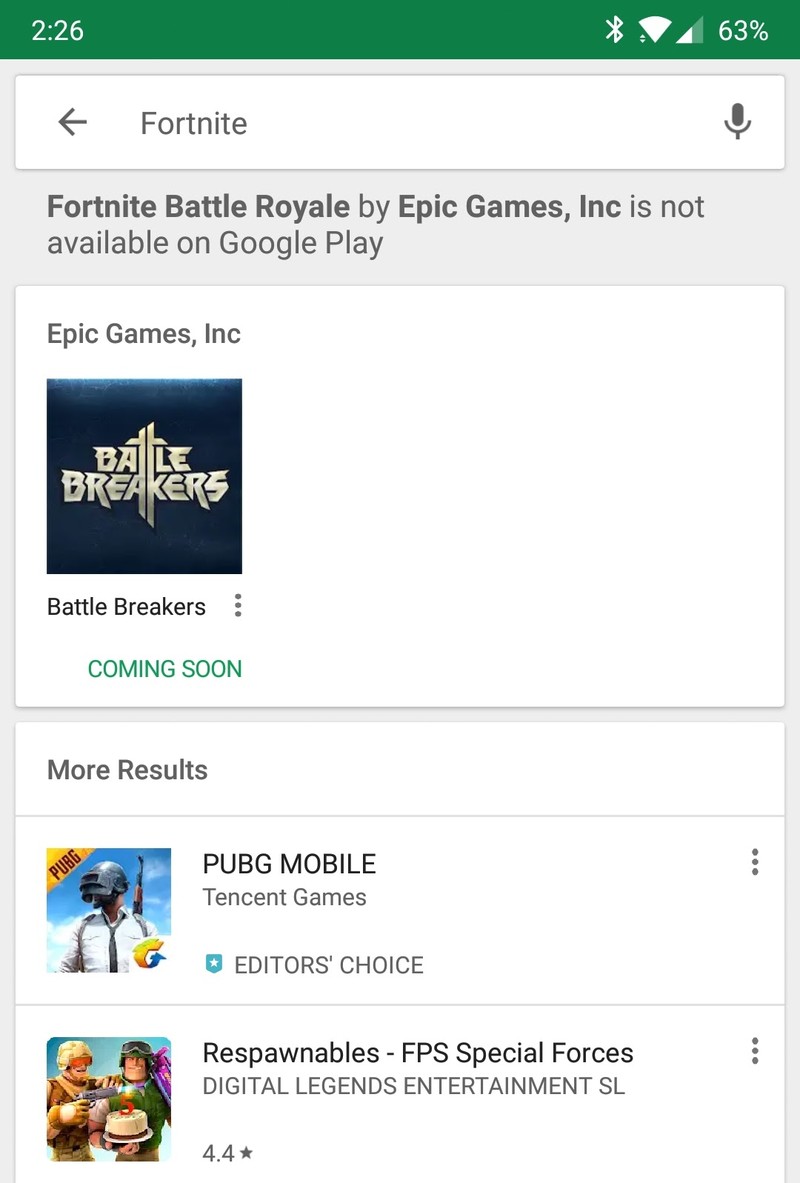
Epic’s decision to not release Fortnite on the Play Store is a controversial one for a lot of reasons — mainly because it gives crooks a field day with tricking people into downloading fake versions that serve to do nothing but cause trouble.
In an effort to combat this, searching for “Fortnite” on the Play Store now returns a message that reads, “Fortnite Battle Royale by Epic Games, Inc is not available on Google Play.”
It’s a small heads-up to let people know the legit version of Fortnite isn’t anywhere to be found, and hopefully, it’ll be enough to stop people from downloading bad actors.
Users will also see the warning pop up when searching for “Fortnite Battle Royale”, “Fortnite Mobile”, etc.
August 9, 2018 — Fortnite Beta for Android is officially live, exclusive to Samsung Galaxy devices until August 12
In spite of all of those clickbait ads you’ve probably seen over the past several months, the Fortnite Beta was officially announced today at the Samsung Unpacked event alongside the Samsung Galaxy Note 9.
Samsung and Epic Games have teamed up to make Fortnite exclusive to Samsung Galaxy phones until August 12, at which point the beta will be opened up to other Android devices. If you’ve got a Samsung Galaxy S7 or better, you can download and start playing Fortnite on your phone right now!
August 3, 2018 — Epic confirms that it won’t be offering Fortnite for Android via the Google Play Store
It’s official, folks. A few days after rumors started piling up, Epic has confirmed that Fortnite for Android won’t be offered on the Google Play Store. Instead, users will have to download the game directly from Epic’s website.
Talking to The Verge, Epic CEO Tim Sweeney said:
Epic wants to have a direct relationship with our customers on all platforms where that’s possible. The great thing about the Internet and the digital revolution is that this is possible, now that physical storefronts and middlemen distributors are no longer required.
In addition to having a more direct relationship with players, Epic’s second reason for bypassing the Play Store is that it won’t have to hand over 30% of all sales from in-game purchases to Google. According to Sweeny, “30 percent is disproportionate to the cost of the services these stores perform.”
Sweeny also went on to say that Fortnite for Android will be available globally except for China. However, Epic is currently working on finding a way to bring both the iOS and Android version of the game to the country at some point in the near future.
July 30, 2018 — Fortnite for Android might not be on the Play Store and require a manual APK download
Just a few days after it was reported that Fortnite will be launching as a limited exclusive for the Galaxy Note 9, we now have some interesting details about how the Android app will be distributed.
The folks at XDA recently took a look at the source code on Epic’s official website, and while doing so, came across some instructions telling people how to download the Android port. Specifically, it talks about going to Epic’s site and downloading the game’s APK file there rather than doing so through Google Play.
With a move like this, there are a few important things to point out.
First off, while manually downloading APK files isn’t all that difficult, it does require you to accept downloads from unknown sources (possibly making yourself vulnerable to security threats) and can be a clunky process for users that aren’t familiar with doing so. On the flip side, Epic gets to avoid Google’s 30 percent cut from all in-game purchases.
It’s still unclear if this process will be set in stone for the game’s foreseeable future or just during its exclusivity to the Note 9, but all these details should be explained in just a few short days.
July 16, 2018 — Season 5 Battle Pass has begun, still no official Android launch date set
We’re midway through July and still no word from Epic Games as to when specifically Fortnite will be released for Android this summer.
Meanwhile, the Season 5 Battle Pass has begun for all other platforms that Fortnite is available on, which either means that the Android version is imminent or we’re going to have to wait for this season to wrap up and hope it’s released ahead of Season 6. Battle Pass seasons typically last around 10 weeks, which would mean Season 5 should wrap up around the third week of September which lines up nicely with the Autumnal equinox and the official end of summer.
Speculation on the Fortnite forums is rampant, with some posters confident the Android version will be released imminently in the coming weeks, while others are prepared to wait until September. We’ll be sure to let you know as soon as a more concrete date is set.
May 18, 2018 — The Android version will be here “this summer.”
Fortnite’s iOS version has been out for a hot minute now, and to ensure the experience is as good as can be, Epic outlined a heap of improvements coming to the game — including a customizable HUD, voice chat, improved controls, and more.
You can read through all the changes here, but the most exciting news has to do with Fortnite’s Android release. Epic notes that the game will be here “this summer”, and while that’s not as specific as we’d like, it’s still a step in the right direction.
Sign up for Fortnite Mobile
All the big details
What is Fortnite?
Fortnite is what would happen if you combined two of the most addictive games out there — Minecraft and PUBG.
Fortnite offers a free 100-player Player Vs Player (PvP) Battle Royale game mode. Just like PUBG, you’re dropped onto the large island map and must arm yourself and outlive your competition. But in Fortnite, you always start out armed with a pickaxe which can be used as a melee weapon or to harvest raw supplies for building walls, ramps, and shelters.
It certainly adds extra layers of strategy to the format, creating essentially a perfect storm of addictive gaming action that’s as fun to watch as it is to play. Oh, speaking of storms all the action takes place in the eye of a deadly electrical storm meaning you can’t just hunker down and hide out the whole game. You got to keep moving.
How do you play the game?
Just like PUBG, your goal is to be the last man standing — with up to 100 players involved in each match, that’s no small task.
Each game starts with the players jumping out of the flying “Battle Bus” and parachuting down onto a giant island. Once landed, you must loot nearby buildings for items, guns, and ammo to defend yourself and attack other players.
You also need to keep an eye on the map, as every few minutes the storm closes in on the play area. If you’re caught in the storm, you slowly die so you do not want to forget to regularly check where you are on the map. Eventually, the play constricts to a tiny area for the final showdown between the remaining players — there can only be one winner!
Unlike PUBG, you’re able to carry more than two guns. Instead, you’re limited to the number of weapons and items you can carry at one time. Also, guns are color-coded to denote their rarity — from grey (common) to orange (legendary) — and the rarer the gun, the deadlier it is.
Then there’s the crafting element. Every player starts out with a pickaxe which can be used as a melee weapon or used to break down trees and buildings to harvest the raw resources. You can then use these raw resources to build your own structures, whether it be a defensive wall to provide cover from an advancing enemy, a set of stairs to reach the second floor of a building or your own watchtower to snipe players from across the map. The resources you mine will determine the strength. Steel is stronger than brick, which is stronger than wood.
The game is regularly updated every couple of months with a new season’s worth of content and new Battle Pass achievements to work towards. The latest update has brought on Season 6, which has introduces new spooky locations on the map and Shadow Stones, a consumable item that grants the player temporary invisibility. Be sure to read the full patch notes for all the latest features and items added to the game.
Where can I download the game?
Since Epic Games has decided to release Fortnite for Android outside the confines of the Google Play Store, you’ll need to download the Fortnite Installer APK to get the game on your phone.
Epic struck a deal with Samsung to make Fortnite available for select Samsung devices right now, so if you head to the Galaxy App Store on your Galaxy S9/S9+, Note 8, Galaxy S8/S8+, Galaxy S7/S7 Edge, Tab S3, or Tab S4 and search “Fortnite”, you can download the 4MB installer to get the game on your handset right now.
If you own a non-Samsung phone, you can head to Epic’s website and enter your email to sign up for an invite to the beta. The first round of invitations went out to users in August, and according to Epic’s site, Fortnite for Android is compatible with the following:
- Google Pixel 2 / 2 XL
- Google Pixel / Pixel XL
- LG G7
- LG V35
- LG V30 / V30+
- LG G6
- LG V20
- LG G5
- Essential Phone
- OnePlus 6
- OnePlus 5 / 5T
- Razer Phone
- Huawei Mate 10 / Mate 10 Pro
- Huawei Mate RS
- Huawei P20 / P20 Pro
- Huawei Nova 3
- Honor 10
- Honor Play
- Honor V10
- Asus ROG Phone
- Asus Zenfone 4 Pro
- Asus Zenfone 5Z
- Asus ZenFone V
- Xiaomi Blackshark
- Xiaomi Mi 5 / 5S / 5S Plus
- Xiaomi Mi 6 / 6 Plus
- Xioami Mi 8 / 8 Explorer / 8SE
- Xiaomi Mi Mix
- Xiaomi Mi Mix 2
- Xiaomi Mi Mix 2S
- Xiaomi Mi Note 2
- ZTE Axon 7 / 7S
- ZTE Axon M
- ZTE Nubia Z17 / Z17S
- ZTE Nubia Z11
How to download the Fortnite Beta on your phone
Is it free to play?
Fortnite for mobile includes the PvP Battle Royale game that’s free to play across all platforms. The console versions have a paid game mode called Save The World that’s Player vs Environment (PvE). Save The World plays more like Minecraft, where you’re harvesting more resources and stocking up on loot to survive waves of AI enemies in a sort of tower defense-style of gameplay.
The PvE mode will never be available in Fortnite Mobile due to CPU limitations and, frankly, it’s the PvP mode that everyone is crazy for so that’s quite alright with us.
Having said that, there are some reasons to spend money on Fortnite. The best way to spend money is to buy a Battle Pass which gives you daily challenges over the span of a Fortnite Season (typically lasts 10 weeks) which let you unlock a ton of cool outfits, dance emotes, and other goodies to customize your character. You can also spend V-Bucks, the in-game currency, to buy cosmetic items for your player and people sure have been buying stuff. According to this report from Sensor Tower analtyics, Fortnite Mobile players spent more than $1 million during the first 72 hours of its release on iOS. Fortunately, nothing you can buy will give you an actual advantage in the game to prevent people from paying to win. In this case, its a matter of playing to look cool
So, to answer the question, you have the option to spend money on Fortnite if you want a cool looking character, but the game is free to play and you won’t need to pay to win.
Where’s the support for Bluetooth controls?
Epic Games has confirmed that Bluetooth controller support is coming, but as of right now only touchscreen controls are available.
Is it cross-platform?
Epic Games have indicated that you will be able to play Fortnite across all platforms. Your Fortnite profile can be connected to all the platforms you play on so you can add to your stats however you connect to the game.
Don’t be worried about getting mismatched as the one mobile player in a server of PC and console players. If you’re playing solo on mobile, you will only be matched up against other mobile players. If you join a squad with friends playing on another platform, then that squad will be matched against a multi-platform population, essentially making cross-platform play opt-in.
- Learn more about Fortnite Mobile
How does it compare to the PC or console version?
The mobile version of Fortnite is the exact same game as you would find on the other platforms, including PS4, PC, Xbox One, and Nintendo Switch. There main differences are the user interfaces which are nearly identical in the menus but the mobile game features on-screen controls and toned down graphical performance. But if you’re a fan of the game and want to jump in for a quick game of Battle Royale on your phone, you won’t need to worry about playing a vastly different game. Fortnite on Android is still Fortnite.
Are you hyped on Fortnite?
Fortnite has been out for Android for over a month now. What are your thoughts on the game and the cultural craze surrounding it?
Updated September 2018: We have all the Fortnite Season 6 details for you right here!
Android Gaming

- Best Android games
- Best free Android games
- Best games with no in-app purchases
- Best action games for Android
- Best RPGs for Android
- All the Android gaming news!
Grab Sony’s CarPlay and Android Auto head unit for just under $300 today
Add it today!

Right now you can pick up Sony’s XAV-AX100 CarPlay / Android Auto head unit for just $299.87, which is about $100 less than it normally sells for. This double-din radio has a 6.4-inch touchscreen and uses the CarPlay interface when an iPhone is connected and Android Auto for Android-powered smartphones. Both interfaces allow for you to use a custom skin displaying the content of your connected phone to complete tasks like navigation, calls, SMS, and more.
You’ll need to have a vehicle that has a double-din slot, which not all vehicles can accommodate. Additionally, you will need some wiring harnesses, adapters for steering wheel controls, and more. Consult a local professional installer if you’re not comfortable completing the job yourself.
See at Amazon
 AIVAnet