


Show off your Pixel 3 while keeping it safe with a clear case
The Google Pixel 3 is a beautifully crafted phone with a thin profile and an iconic look. It’s only natural you’d want to show that off, but the Pixel 3 is also a phone with a glass back and a very high price tag, so you should really, really get a case on it. Thankfully, clear cases can keep your phone safe while showing it off for all the world to see.
Crystal clear choice
Spigen Liquid Crystal

$15 at Amazon
Eschewing bulkier hard-plastic backs, the Liquid Crystal’s flexible TPU is easy to apply and easier to grip. This crystal clear case gives your Google Pixel 3 light protection that is as thin as it is beautiful.
A clear deal
MoKo Clear Case

If you want to show off your new Pixel 3, MoKo’s clear case is for you. Its soft TPU material that adds grip without covering up the Pixel 3’s beauty and precise cutouts ensure it doesn’t get in the way of the charging port, camera, and speakers.
$8 at Amazon
Translucent treat
Cimo Slim Grip

$8 at Amazon
Clear cases can be boring. Cimo knows that you want to show off your Pixel 3, but show some personality, too. Its Slim Grip’s translucence lets your Pixel’s design shine through blue or purple — or clear if you want to be plain. What? No, I’m not judging you.
Crystal-clear drop-protection
Tech21 Evo Check

$40 at Google Store
Some people have a tendency to drop their phones. It’s just a fact of life, and knowing this, Google partnered with impact masters Tech21 for the Evo Check Pixel 3 case. It’s rated to keep your phone safe from repeated 12-foot drops and does so without adding any unnecessary bulk.
Smooth operator
Caseology Waterfall

$13 at Amazon
Caseology is one of the most trusted casemakers around, and the detailed quality they bring to cases like the Waterfall keep us coming back year after year. The back corners of the Waterfall have almost invisible bumpers to help keep the hard acrylic back from scratching on dirty desktops.
Unique design
Ringke Fusion-X

$10 at Amazon
Sturdy impact resistant bumpers safeguard against unwanted drops and bumps, and while the more subtle black is a solid choice, the translucent Ruby Red gives the Pixel 3 a bold and dangerous gleam. Ringke also adds anchor points to the Fusion X so you can attach it to a wrist strap or lanyard.
Ghost case
ESR Essential Zero case

“Zero” is an apt name for this incredibly thin clear case. It’s made of flexible TPU rubber and is only 1 millimeter thick at its thinnest point. There are raised edges around the camera and screen to protect each from scratches, and there’s a “microdot” pattern on the inside of the back to prevent that wet, clingy look.
$13 at Amazon
Dual-layer design
Speck Presidio

If you’re looking for a little more protection and don’t mind a smidgen of bulk, the Speck Presidio features a flexible TPU interior and a hard plastic outer shell for extra drop and scratch protection. The outside is also coated to prevent fingerprints and discoloration.
$40 at Best Buy
Bonus kickstand
Spigen Ultra Hybrid S

Spigen’s clear Ultra Hybrid S features a built-in metal kickstand, which isn’t incredibly sturdy, but it’ll do in a pinch. The fit of the case is excellent, offering great tactile feedback on the button covers, and a raised lip around the camera and screen to protect the glass from scratches.
$14 at Amazon
Barely there
totallee Thin Pixel 3 Case

If you’re only looking for scratch protection, then check out totallee’s incredibly thin case, which has a frosted, translucent finish, which is matte and grippy. It’s prefect if you like to keep your phone in your pocket.
$28 at Amazon
For my money, I’d just as soon get a clear case that has some color to it, like the Cimo Slim Grip, because colored clear cases tend to have less discoloration and yellowing over time than traditional crystal-clear cases. Add some color and some serious protection with the Tech21 Evo Check; it may be the most expensive case on this list, but if you’re hard on your phones, it’ll be more than worth it.
Mechanical keyboards, SanDisk storage, and more are discounted today
Whether you’re looking for new tech gear or household items, we’ve got you covered.
There’s never a shortage of deals available, but sorting through all of them can be difficult at times. We’ve handpicked all the best tech, and everyday essentials discounts that you can take advantage of right now and brought them to one central location. From SanDisk storage solutions to bean bag chairs, these are today’s best deals.
Tech Deals
View the rest of the deals
Everyday Essentials
If you want to know about the deals as soon as they are happening, you’ll want to follow Thrifter on Twitter, and sign up for the newsletter, because missing out on a great deal stinks!
What is Amazon Alexa Guard?

Best answer: Alexa Guard is Amazon’s way of turning you Echo speakers into a security system by having the speakers listen for specific sounds.
Amazon: Amazon Echo Plus (2nd Gen) ($150)
Amazon: Ring Video Doorbell 2 ($200)
Amazon: Ring Stick Up Cam ($180)
Amazon: Philips Hue White and Color Ambiance Starter Kit ($200)
What is Amazon Alexa Guard?
Alexa Guard will be a way you can use your existing Echo speakers to build a home security system. Here’s how it’ll work: your Echo speakers already have microphones on them to hear voice commands. If you tell your speaker you’re leaving the house, the microphones will start monitoring for strange sounds.
Those sounds can be glass breaking, a smoke and carbon monoxide detector blaring, or other specific sounds. This doesn’t need new hardware: Amazon just trained Alexa to be able to detect those noises. If it does detect something, you’ll get an alert on your smartphone.
Alexa Guard will get even better the more smart home pieces you have. If you have smart lights installed and hooked up to Alexa, it will randomly turn your lights on and off to simulate someone being home. If you have a security system from Ring or ADT, Alexa Guard will be able to send an alert to whoever is monitoring your home.
When can I use Amazon Alexa Guard?
Amazon announced the new feature in fall 2018, but did not specify when it would roll out to users.
A smarter speaker
Amazon Echo Plus (2nd Gen)

$150 at Amazon
Home automation, great sound and now: home security.
Amazon’s Echo Plus speaker lets you listen to your favorite music, control your smart home, and so much more. And with Alexa Guard, it’ll keep an ear out when you’re away from home.
Eyes up
Ring Video Doorbell 2

$200 at Amazon
Keep an eye on your stuff.
If you don’t already have an Echo speaker and want something for home security, you may as well spring for a security camera. This model from Ring will keep a watch over your entryway, and you’ll be able to check on it at any time from your smartphone.
Look inside
Ring Stick Up Cam

$180 at Amazon
A camera for inside the home.
If you have a camera pointing outside, you may as well get one for indoors as well. This Ring camera can be placed anywhere inside your home, and ties in nicely with Alexa. The camera can alert you with Alexa Guard, or you can check in at any time from Ring’s app.
Shine bright
Philips Hue White and Color Ambiance Starter Kit

$200 at Amazon
Light up your whole home.
Whether you use them with Alexa Guard to deter intruders, or to compliment the lighting during your favorite movie, Philips Hue are the smart bulbs to have. This kit includes a hub that will connect all the bulbs to your internet router, as well as four bulbs. If you get more bulbs in the future, the hub you already have can be used to connect those.
‘GrayKey’ iPhone Unlocking Box No Longer Works After iOS 12 Update
Apple has effectively disabled the GrayKey iPhone unlocking device used by law enforcement agencies to crack the passcodes on iPhones, reports Forbes.
Multiple anonymous sources have told Forbes that the GrayKey box is unable to obtain the passcodes of any iPhone or iPad running iOS 12 or later.
GrayKey iPhone cracking box, via MalwareBytes.
On these devices, law enforcement agencies are limited to a partial extraction that provides unencrypted files and metadata like file size and folder structure.
It is not clear what method Apple used to block GrayKey access to iPhones running iOS 12 and later. Vladimir Katalov, CEO of ElcomSoft, said Apple’s method is unknown.
“No idea. It could be everything from better kernel protection to stronger configuration-profile installation restrictions,” he suggested. The kernel is the core part of the operating system, from which the rest of iOS launches. Configuration profiles typically allow individuals and companies to customize the ways in which iOS apps work.
Details about the GrayKey box, made by a company called Grayshift, first leaked in March of this year. Provided to law enforcement agencies, the GrayKey box connects to an iPhone and then installs proprietary software that’s designed to crack the passcode of the device.
It can take as little as 6.5 minutes for the box to crack a 4-digit passcode, while a 6-digit passcode can be calculated in approximately 11 hours.
Apple in an iOS 11 update introduced a new USB Restricted Mode feature that prevents USB accessories like the GrayKey box from connecting to an iPhone or iPad if it’s been more than an hour since the device was last unlocked.
It was believed that this would prevent the GrayKey device from working, but after details on USB Restricted Mode were released, forensic experts said that it had already been defeated.
It’s not known if USB Restricted Mode had an impact or if Apple implemented another method for blocking the GrayKey box, but companies like Grayshift are likely to find a workaround or a new method for cracking the iPhone.
As Rochester Police Department Captain John Sherwin told Forbes, there’s always a new method in the works. “Give it time and I am sure a ‘workaround’ will be developed … and then the cycle will repeat,” he said. Someone is always building a better mousetrap, whether it’s Apple or someone trying to defeat device security.”
Note: Due to the political nature of the discussion regarding this topic, the discussion thread is located in our Politics, Religion, Social Issues forum. All forum members and site visitors are welcome to read and follow the thread, but posting is limited to forum members with at least 100 posts.
Discuss this article in our forums
What’s it like to die? This VR experience puts doctors in a dying man’s shoes
Virtual reality may be able to transport you to spectacular other worlds, but a large part of its promise is the ability to also put you into the shoes of other people. In doing so, the hope is that VR could help make us more empathetic, since it gives us the ability to literally experience life from another person’s perspective.
That’s what VR studio Embodied Labs hopes to do. Based in Los Angeles — arguably the entertainment capital of the world — Embodied Labs wants to use cutting edge virtual reality to do something more than provide escapism. It wants to use it to promote empathy. And it wants to do it in such a way that can help train tomorrow’s caregivers.
We’ve previously covered Embodied Labs’ work creating a virtual experience intended to simulate the effects of Alzheimer’s disease. Called “The Beatriz Lab: A Journey Through Alzheimer’s Disease,” it follow the fictitious character Beatriz, a math teacher in her 60s, as she grapples with the neurodegenerative disease. Now Embodied Labs is back with another virtual training tool, this time designed to function as an end-of-life simulation for educating staff and medical students in hospices, hospitals, and universities. It’s currently being used at the Gosnell Memorial Hospice House in Scarborough, Maine, as well as by medical students at the University of New England.
Meet Clay
The 30-minute simulation places users in the role of “Clay,” a 66-year-old lung cancer patient in need of hospice care. During the course of the VR story, Clay has important conversations with family, suffers a fall that puts him in the E.R., and eventually winds up in hospice care. Through simulating physical changes in virtual reality — such as how Clay’s skin alters and his senses dull — the user also gets to feel some approximation of what it would be like to experience end-stage cancer. By the end of the experience, Clay’s eyesight becomes dim as his life comes to a close. For anyone who associates VR predominantly with gaming, the effect is surprisingly poignant.
Embodied Labs
“The embodied experience includes receiving a terminal diagnosis from your oncologist, counseling from your case manager, and care from your hospice provider and family, and ultimately, it involves reaching the end of your life,” Erin Washington, co-founder and COO at Embodied Labs, told Digital Trends. “By embodying Clay, people gain insights into challenges faced by patients and families when curative treatment is not available, learn how hospice care supports loved ones, and explore the physical, spiritual, and mental changes that may occur at end of life.”
Embodied Labs provides an experience that caregivers or clinicians cannot get simply by reading textbooks.
Through its painstakingly created and very human VR experiences, the company has cornered the market on a type of next-generation training tool. It provides an experience that caregivers or clinicians cannot get simply by reading textbooks.
“Embodied Labs creates immersive training and wellness tools for healthcare students, and for professional and family caregivers, so they can feel more empowered and confident in having the difficult conversations that surround end-of-life decisions,” Washington continued. “Organizations such as skilled nursing facilities, medical schools, hospice and home care agencies, and assisted-living providers use Embodied Labs to improve outcomes, operations, and culture.”
In addition to creating its experiences, Embodied Labs creates customized assessment questions to be answered before and after staff and students sample a VR scenario. This qualitative and quantitative data can then be used to provide new insights, on the part of professionals, into things such as how conversations about end-of-life are carried out.
Building empathy
But does this actually work, or is this a case of creating a solution to a problem that doesn’t actually exist? In fact, according to a new piece of research, virtual reality really be prove to be a useful tool in encouraging empathy.
In a study published this month in the open-access journal PLOS ONE, researchers from Stanford University compared the attitudes of people who had read a first-person narrative piece of writing about homelessness, those who had experienced a 2D interactive narrative about it on computer, and those who had undergone a perspective-taking VR scenario on the same topic. They found that the people who had experienced the VR simulation were more likely to sign a petition to support homeless populations. Follow-up surveys also found that they experienced longer-lasting empathetic feelings than those who had done the narrative-reading task.
Attempts to “gamify” complex scenarios risk inadvertently diminishing them.
Of course, there are problematic aspects with the idea of building empathy through VR. A 30-minute simulation about end-of-life conversations is not the same thing as experiencing it for real. A person really experiencing the effects of homelessness or discriminatory activity cannot simply take off their headset when they decide they’ve had enough of their life circumstances. Attempts to “gamify” complex scenarios risk inadvertently diminishing them, and carry the chance of turning something intended for good into something exploitative.
However, properly considered, there is room for virtual reality as a teaching tool. Certainly, it needs the proper care and attention of trained professionals, and it shouldn’t be considered a substitute for other forms of teaching. But as something that we’re glad to see being explored? Absolutely. And if it potentially means more empathetic treatment for yourself and your fellow human beings, you should be, too.
Editors’ Recommendations
- VR experience shows caregivers what it’s like to live with Alzheimer’s disease
- No longer a gaming novelty, VR gets acceptance letter from Arizona State
- Daydream VR users can browse with Google Chrome in virtual space
- These gloves will make virtual reality feel even more immersive
- The best Oculus Rift games available today
Leak confirms new MacBook, Mac Mini, and iMac are incoming
A day after a delayed education order hinted at new MacBook models, another leak is seemingly confirming new products from Apple. In the latest, new filings with the Eurasian Economic Commission hint at several new MacBook, Mac Mini, and iMac models.
The filings, originally spotted by Consomac.fr, reveal that Apple has been granted permission to sell and market the new laptops and desktop models in central and northern Eurasia. Translated from the original language, the filings also show Apple model numbers which have never been seen before — including A1993, A2115, A2116, and A1932. These seem to refer to the iMac, Mac Mini, and MacBook, though the A1932 model has previously been found in prior filings.
Similar filings from the Eurasian Economic Commission have come up in the past, and the updated model numbers make sense and confirm the existence of new devices. The filings, though, reveal little about what specs the new models will feature.
Neither the MacBook Air nor the Mac Mini have seen updates for some time, dating back to the middle of 2017, and late 2014. The Mac Mini is still running Intel Haswell Processors, and the MacBook Air was just refreshed in mid-2017, but without new processors and just getting a bump in processing speed from 1.6GHz to 1.8GHz.
Based on previous speculation from supply chain analyst Ming-Chi Kuo, it could be likely that this incoming MacBook is meant to replace the MacBook Air with a new model featuring a 13-inch Retina display and updated Intel chipset. Previous rumors have also indicated that new MacBook Air replacement models could come in at a costly $1,200, with a price drop on older models to $999. And, considering the last iMac was more of a workstation, the new model could also possibly be refreshed with Intel’s latest 9th-generation processors, with little or no design changes.
There is less than a week now until the October 30 Apple event. The fourth Apple event of the year, it is widely expected to feature an iPad Pro 2018 with smaller bezels, with an AirPods 2 also likely to be unveiled. The timing is just right, especially after recent device unveils from Apple competitors, including the Google Pixel Slate, and the Microsoft Surface Pro 6.
Editors’ Recommendations
- A MacBook Air with Retina display and Mac Mini “Pro” could arrive this fall
- Apple preps production of updated MacBook Air for a 2018 launch
- A canceled education order is increasing hopes for new Macbook model
- Apple’s new MacBook Air with Intel’s 8th-gen processors expected this year
- What’s the skinny? Apple may launch a new MacBook with ultrathin design soon
Buy any iPhone X, XS, or XS Max from Verizon and score an iPhone XR totally free
Julian Chokkattu/Digital Trends
This year has been a pretty good one for flagship phones – 2018 has seen the release of some great mobile devices, from Samsung’s Galaxy Note 9 to the impressive Google Pixel 3. Apple also got in on the action, revealing its new flagship lineup which includes the iPhone XS, the larger XS Max, and one surprise that few saw coming – the more budget-friendly iPhone XR.
It’s no secret that Apple hardware is expensive. The iPhone X turned heads last year with its launch price of $1,000, and the iPhone XS isn’t any cheaper. Apple took a surprising turn when it also revealed a third device this year, the iPhone XR, with a starting price of only $750, and Verizon customers (or those willing to switch) can even score one for free. Read on to find out how.
Brand-name flagships are typically released in two variants: A standard-sized smartphone and a second oversized one with a larger display, and the iPhone XS and XS Max followed this model. It seems that the designers at Apple headquarters have been paying attention to consumer demand for less expensive flagships, though, and so we saw the Cupertino, California-based company also roll out the iPhone XR as a third and more affordable alternative to the very pricey XS.
The iPhone XR’s hardware isn’t quite as good as that of its beefier (and more expensive) siblings, but it still boasts excellent flagship-like specs for a competitive price. If you’re a Verizon customer or are looking to switch service providers, then the best way to score a deal on the new iPhone XR right now is the carrier’s ongoing “buy one, get one” iPhone offer. This promotion gives you $750 toward a new iPhone XR when you purchase an iPhone X, iPhone XS, or iPhone XS Max.
Note that this discount comes in the form of a rebate via bill credits, so you’ll need to buy both phones first and then you’ll receive the cost of the iPhone XR ($750) back over 24 months. This $750 rebate covers the price of the standard 64GB iPhone XR, but you can also apply it toward a 128GB or 256GB iPhone XR – just bear in mind that you’ll be on the hook for the extra cost of the models with extra storage.
Verizon
Follow @dealsDT
Looking for more great deals? Find iPhone deals, Apple Watch deals, MacBook deals, and more on our Black Friday deals page.
We strive to help our readers find the best deals on quality products and services, and choose what we cover carefully and independently. If you find a better price for a product listed here, or want to suggest one of your own, email us at dealsteam@digitaltrends.com.Digital Trends may earn commission on products purchased through our links, which supports the work we do for our readers.
Editors’ Recommendations
- How to buy the iPhone XS, iPhone XS Max, and iPhone XR in the U.K.
- Apple iPhone XS vs. iPhone XS Max vs. iPhone XR
- iPhone XS, iPhone XS Max, and iPhone XR: How to buy Apple’s new phones
- Apple iPhone XS: News, release, specs, and more
- The best iPhone XS cases
These are the best shower speakers you can buy

Sing along with your favorite tunes in the shower with these great speakers.
If you’re sick of belting out your favorite tunes in the shower a cappella you may want to consider getting a speaker to use in the shower. We’ve compiled a list of the best shower speakers you can find to help you sing like nobody’s listening.
Lots of colors
Ultimate Ears Wonderboom

This Bluetooth speaker is cute as a button! The Wonderboom comes with big sound, a lovely design, and an IPX7 rating, meaning it can be submerged in up to 1 meter of water for 30 minutes — it’s perfect for the shower.
$73 at Amazon
Super small
Polk Audio BOOM Swimmer

This tadpole-looking device was conceived by the folks at Polk Audio to be as versatile as possible. The tail-end of the speaker is bendable, making it easy to wrap around shower curtain rods or even your shower head pipe, meaning there is always a convenient place to put it. The IPX7 rating will keep the Boom Swimmer pumping out the tunes regardless of how many times you splash it while showering.
$59 at Amazon
Affordable IPX5
OontZ Angle 3

Not every water-resistant speaker has to break the bank, and the OontZ Angle 3 can be a perfect shower companion. It’s got a 12-hour battery life which should keep you singing in the shower for a long time. Its IPX5 rating can handle gentle splashes and jets of water, so don’t submerge it or put it directly in your shower’s stream and you should be good to go!
$26 at Amazon
Suction cup installation
SoundBot SB510

The simple interface on the front of SoundBot will let you control playback or adjust volume with just a tap of its buttons, meaning you don’t need to get out of the shower and touch your phone to change songs. Its water-resistant rating only protects the SoundBot from splashing; however, It installs super easily with a suction cup that is attached to the back of the speaker, so you should have no problem finding a place for it that’s out of harm’s way.
$15 at Amazon
Super portable
Ultimate Ears Roll 2

The Ultimate Ears Roll 2 has an IPX7 rating, meaning submerging it in up to 3 feet of water for about half an hour won’t cause any damage, so your daily showers won’t affect it at all. Plus, on the back, it comes with a bungee cord loop, making it easy to wrap or tie the speaker around your curtain rod or shower head, so it stays out of your way while you’re headbanging in the shower.
$79 at Amazon
Huge battery life
Fugoo Tough

The thing that stands out the most with the Fugoo Tough is its 40-hour battery life. If you are truly using this in just the shower, you could probably go for weeks without needing a charge. On top of it all, the sound quality is very good. The Fugoo Sport has six drivers that are spread out across all four sides, giving you clear, well-balanced 360-degree sound.
$80 at Amazon
Lots of power
Ultimate Ears Boom 3

Taking the Boom 3 into your shower is absolutely no problem as it has a very high water-resistant rating, allowing it to be submerged in 3 feet of water for 30 minutes. It’s also protected against dirt and mud, but you can hand-wash the speaker with warm, soapy water just in case it gets messy. Plus, if you truly want the Boom 3 to live up to its onomatopoeic name, you have the option to set up another one to make a stereo pair and really raise the roof.
$150 at Amazon
FM radio included
Sbode Bluetooth Speaker

With eight hours of battery life, you should get quite a few showers between charges, and its IPX6 is plenty of protection from water for your average shower, but you won’t be able to submerge it, so keep it away from bath time! Plus, it has an FM radio built-in, meaning you can go old school and listen to your favorite local morning show while you’re getting ready for the day in the morning.
$45 at Amazon
I often listen to the radio in the morning (yes, people still listen to the radio) so I like the Sbode Bluetooth Speaker for my morning showers. It sounds good and at $45 it didn’t feel like my bank account would mind.
The best thing about a good shower speaker is you can use it outside of the shower too! Lots of these options listed above are not only good for in the shower, but by the pool, or out camping as well!
The best leather cases for the Google Pixel 3
Google Pixel 3 is a gorgeous device, and it would only be fitting to add a gorgeous case to protect it. Silicone and hard plastic cases are great for protection, but a leather case just adds the right touch of elegance. These are the best leather cases for your new Pixel 3 that we’ve found so far.
Slim wallet
Bellroy leather phone wallet
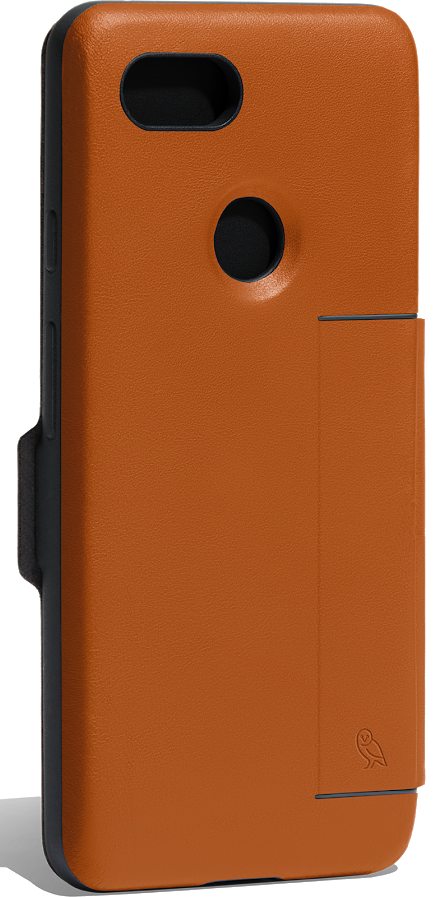
Bellroy, the maker of fine leather goods, has a slim wallet option for your Pixel 3. It has a slot that’s big enough to fit two cards comfortably, and the magnetic closure makes sure your cards are tightly secured.
$89 at Bellroy
Extra cool
Bettop faux-leather case

Bettop’s one-piece case has an inner layer of TPU rubber to cushion your Pixel 3 in case you drop it, and the outside is covered in PU leather, which has a great texture and looks just like the real thing. Comes in black or gray.
$8 at Amazon
Sleek and refined
Bellroy leather case

If you don’t need a wallet slot but still want a slim leather case, then Bellroy’s regular leather case should do the trick. It offers a slim profile, minimalist design, and comes in either black, navy, or “caramel” brown.
$45 at Bellroy
Folio-style wallet
Arae leather wallet case

If you like more of a classic wallet case, then Arae’s case is perfect for cutting down on your pocket carry. It has slots for four cards and a larger cash pocket, and your Pixel 3 is secured in an inner bumper case. Comes in black or rose gold.
$13 at Amazon
Thin and simple
Free-Case wallet case

This wallet case has only one slot for cards and a larger cash pocket, but you’d buy this case for its looks over its function. It has great-looking stitching, and the genuine leather should patina nicely over time. Comes in brown or black.
$10 at Amazon
Great kickstand
Maxboost folio-style wallet

This black wallet case has white stitching and a triangular magnetic closure, which adds a unique accent. The front cover folds back into a convenient and sturdy kickstand, and there’s room inside for three cards and a bit of cash.
$10 at Amazon
There will certainly be more cases to come in the next few months, but for now, these are your best options. It may be expensive, but the Bellroy leather case is the best option right now, with its sleek design and great color.
The Pixel 3 is quickly becoming my favorite phone ever

I take for granted that people pay the same attention to the Pixel line as I do. I mean, I’ve been looking for something like the Pixel 3 since I began reviewing phones almost 10 years ago. A product that doesn’t wear its specs on its sleeves but instead focuses on optimizing the experience for the way I actually use a phone throughout the day.
In my time using the Pixel 3, I’ve returned to one thought again and again: I don’t need anything else. What the Pixel 2 lacked, its successor possesses. And while that doesn’t quite mean my search for the perfect phone is over, it’s certainly slowed down for the moment.
If you live in a country where you can buy the Pixel 3, you should absolutely consider it as your next phone.
Perfectly composed
Google Pixel 3

$799 at Google Store
The perfect size, weight, and feature set for most people
The Google Pixel 3 manages to get almost everything right, including the way it gets out of your way when you don’t need it. An Amazing display, camera, and performance mixes well with awesome sound, water resistance, stereo speakers, and a lovely, minimal design. Plus the best of Android before anyone else.
Pros
- Great minimal design and lovely build quality
- Incredible performance
- Best-in-class camera
- Fastest Android updates out there
- Amazing haptics
Cons
- Not quite all-day battery life (but close)
- Wireless charging support is a mess
- No headphone jack
- A few memory-related issues
- Expensive
I value a few things in a phone, and they all have to be present for me to consider the product a success:
A reliable camera
I need my phone camera to work. That means it needs to open quickly and be able to take a photo that comes out pretty well to great almost all the time. Only three companies right now check that box, and they’re Google, Apple, and Samsung. I don’t want my photos overwhelmed by AI or effects, and I don’t need a bevy of manual controls (though they’re certainly appreciated). I just want to press the shutter button and get a nice photo, preferably in focus.
I have a dog and a child, notoriously difficult subjects to capture without blur. The Pixel 3 does a pretty good job almost all of the time.
Great haptics
I know, this is a weird one, but in the last few years — ever since the iPhone 6S shipped with the Taptic Engine — I’ve become obsessed with good haptics in phones. Actually, to be more precise, I’ve become obsessed with bad haptics, to the point where I can barely use a phone with a mushy, buzzy, dissonant vibration motor.
Intuitive software
There’s something about being able to pick up a phone and understand how it works. Some of that comes down to hardware design, sure — the position of the buttons, or the presence or absence of hardware navigation keys — but it’s mainly how the software works with the hardware where intuition kicks in.
One example is gestures, like the ability to swipe down on the rear fingerprint sensor to check notifications. Another is a useful ambient display, found on devices from Motorola and Samsung — so, so useful. A hardware mute button, like on OnePlus phones. A shortcut to the camera app by, say, double-tapping the power button.
Great display and sound
I’m increasingly doing actual work on my phone, so the better the screen and the clearer the audio, the more easily I can get stuff done (or sit and watch YouTube videos and pretend to get work done, let’s be honest). Fantastic sound is definitely additive — you can tell when a phone blasts a tune or projects a podcast. With the screen it’s different; sure, you can tell that a Samsung phone has an incredible screen, but it’s a lot easier to identify a poor display. Like on last year’s Pixel 2 XL.
One-handed use
I’m not against big phones, but I prefer ones that I can easily use in one hand. Samsung does a great job making its bigger phones feel smaller with an awesome one-handed mode, but I’ll take, say, a Galaxy S9 on its own over an S9+ in one-handed mode any day of the week. Similarly, the Pixel 3 (which is nearly the same size as the Galaxy S9) is easily used in one hand but has a screen big enough that I don’t feel short-changed by its diminutive stature.
Everything else is gravy
I never feel battery anxiety because I’m constantly near a charger, portable or otherwise. If a phone can get me through the day, that’s good enough; I don’t need two. Similarly, I appreciate fantastic data speeds and headphone jacks and styluses and all the other amenities, but they either improve or mask what is already, to me, a good or bad product.

Which brings us to the Pixel 3
If you’ve ever taken a Psychology 101 course, you’ll know about Maslow’s hierarchy of needs, this pyramid of requirements that humans need for basic satisfaction, success, and ultimately fulfillment. At the bottom of the pyramid are the body’s needs: food, water, shelter. Security. Safety. Those are required to climb to the next tier, like intimacy, friendship, relationships. Those still must be satisfied to reach the top of the pyramid: self-actualization and the fulfillment of one’s true purpose.
A smartphone is just an object, a bunch of metal and glass and circuitry. The materials are important, and must be constructed in a way to be solid, reliable. The screen must be sharp enough to see clearly; the responsiveness close to real-time. As we move up the pyramid, the software must be intuitive, fast, reliable. It must get out of the user’s way. The top of the pyramid is a bit abstract, this notion of satisfaction, of completeness.

I’m not saying the Pixel 3 is perfect, but it’s close. The issues that I’ve experienced are surmountable. Solvable. The phone’s software gets out of my way so I can do the things I want to do with my phone: communicate with my friends and family.
Take photos of my daughter. Pick it up at 7pm and not feel battery anxiety. Put it next to the sink while I’m doing dishes and not worry about water damage. Place it on a wireless charger to top it up. And, ultimately, feel confident that it’s receiving everything Android is and will be for years to come.


There’s an evangelical quality to smartphone brands; just look at Apple. Within the Android space, doubly so. One can’t merely praise a phone or its manufacturer without inviting a mob of criticism — it doesn’t matter the company, nor the phone model. There will be haters.
But what I appreciate about using the Pixel 3 is that the decisions Google made about it, from the things made it in, to the glaring omissions, make sense in the context of what it’s trying to accomplish. And while that invariably downplays specs and suppresses a fair number of features, there is no bloat. And by bloat, I don’t mean “bloatware” but actual excess. In this case, there is virtue in Google’s restraint.

I’ll also point to some of the most promising improvements over previous models:
- The haptics are outstanding. These are some of the best haptics I’ve used in an Android phone, though admittedly they pale in comparison to Apple’s Taptic Engine in the newer iPhones. I spoke to Mario Queiroz, Google’s VP of Product Management, and he told me that the company not only sources bigger, more powerful vibration motors, but works with the creator to gain low-level access to its drivers. That means being able to more finely manipulate the way the vibration motor responds to events, which is why you feel small, deliberate haptic feedback — such as swiping down on the notification shade — all over the OS.
The phone’s camera is stupefyingly reliable, and the photos it captures are better than anything else out there.
-
Camera quality is better in surprising ways. Everyone acknowledges (or should acknowledge) that the Pixel’s cameras are just better, but what’s often overlooked is the variety of difficult-to-shoot photos that the Pixels get right. For example, the common situation of shooting a candid photo of people inside using artificial lighting. So many phones can’t, due to small sensors or poor IQ, keep shutter speeds high enough to prevent blur. The Pixel 3 nails these kinds of photos almost every time.
-
Wireless charging is now a must-have. I’ve all but removed wired chargers from my office desk and bedside table. Every phone I use on a regular basis has wireless charging; the ones that don’t never last longer than a few days in my pocket. The reality is that by early next year, every major phone release from every manufacturer of note will have integrated wireless charging — except for OnePlus, but we know how they do. On the Pixel 3, it means slumping into bed and not worrying about finding my cord in the dark (because silence and darkness are essential when you have a newborn).

-
The size is right. Yes, the physical size is more or less identical to the Pixel 2, but its larger screen makes it a better use of space, and the new frosted glass back is more comfortable to hold when the phone isn’t in a case. While holding the phone, it’s easy to reach up to the top of the screen, and that’s really all I need. The 5.5-inch OLED display is beautiful — much better than its predecessor’s — and there’s more than enough room to watch video comfortably.
-
Battery life is great. This one has been hotly contested, but I’ve found battery life on the smaller Pixel 3 to be more than good enough for my use. I consider myself a pretty average user — no long gaming sessions, between three and four hours of screen-on time a day — and my phone lasts well into the evening, if not the entire day, with no top-ups. That means I can safely take it off the charger around 7 am and not place it on a wireless pad for topping up at all and still have around 10% left when I go to bed at 11:30 or midnight. That’s pretty good.
-
The software is a joy to use. I’m not going to argue about which Android “skin” is better — you do you. But what I will suggest is that, objectively, the team that builds the Pixel has a more nuanced understanding of how the latest version of Android should fit with its hardware. That’s especially true this year, since Google designed and built the two Pixel phones on its own, sans LG or HTC. That’s a first for the company since the inception of the Nexus program in 2010.

It’s not all perfect
Like all Pixels (and Nexuses before them), the Pixel 3 is not without its issues. Of course, the biggest and most notable issue to date is its memory management, which seems to be either hampered by the 4GB of RAM inside the phone (not an inherent problem, but it appears to be approaching one) or a major bug left unsolved before shipping. Either way, its symptoms are deleterious to the overall experience. These include apps being purged from memory while they’re running — most notably, music apps like Spotify and Pocket Casts just stop playing in the background when performing memory-intensive tasks like using the camera.
Worse is the fact that in certain situations, photos don’t save once they’re taken. I was taking photos for this very article only to discover when checking Google Photos that two of them didn’t exist. But because I was taking comparison photos on an iPhone XS and Pixel 2, I knew I’d taken them. (Redundancy=not thinking you’re crazy.)
I have faith that these issues will be resolved in software and, like so many early-days Pixel issues (there have been so many) it’ll quickly be forgotten.

I’m also not thrilled with the fact that Google’s implementation of wireless charging is an utter mess. Google has implemented its own proprietary 10W wireless charging standard; its Qi support is limited to 5W. Google is working with third-party accessory manufacturers to certify new products for its new phones, but that won’t appease many people who went out and bought 10W wireless chargers hoping they’d work.
Nearly everything about the Pixel 3 delights me.
There are other issues that others have experienced, like rattling speakers at high volumes, and crackly sound when recording video, that I can’t reproduce. Doesn’t mean they’re not issues for some people, and that’s certainly a problem for Google, which has a reputation for releasing unfinished products.
Finally, I don’t love how expensive the baby Pixel is this year. At $800, it’s certainly worth the high price, but it’s still a lot of money and $150 more than last year’s entry point. Google is clearly attempting to narrow the delta between big and small phone — with comparable displays, identical cameras, and all-day battery life — and in my view, the small phone is the better proposition this year. But that doesn’t diminish the considerable price bump.
Not falling into the trap
It’s always easy to get caught up in the relentless controversies surrounding the release of a product early in its cycle. The “-gates.” Thanks to Google’s predilection for buggy shipping software and being opaque about their inevitable fixes, many people just write off the company, and its phones, completely. I think that’s a mistake.
Nothing I’ve experienced on the Pixel 3 so far is even close to a dealbreaker. I take photos and listen to music all day, every day, and I can count on a single hand the number of lost photos or purged music players. I’m not going to pretend the issues aren’t there, but I’m willing to live with them (and remain optimistic they’ll be fixed) because practically everything else has been unabashedly positive. Trash me in the comments if you want (and you will), but that’s my experience and I’m owning it.

The best phone for people who just want a phone
So many people refer to the Pixel series as the Android version of the iPhone. (Our frenemies at Android Authority actually titled their Pixel 3 review “The Android iPhone”.) They say it as a pejorative, but to me that its biggest selling feature. Why is the iPhone so impressive? Because the phone largely gets out of its own way and lets the features speak for it. The iPhone is only as good as its experiences, and the fact that Apple controls the interaction between hardware and software ensures that everything from touch response to camera quality to haptics are as good as they can be.
4.5
out of 5
Google does the same. While Android is a different beast entirely to iOS, it’s the areas Google makes Android more like iOS — and I’m not talking about copying the aesthetic like Huawei or Xiaomi, but actually finding ways to make the experience more complete — where it excels. Monthly security patches. Regular platform updates. A camera that’s damn near magic. Touch response that’s practically unrivaled on the platform. These are thing things I want from a smartphone. These are the things that matter to me.
But these are the things I believe, with a bit of education, will matter to others, too.
See at Google Store
 AIVAnet