


iPhone XR Repair Fees Without AppleCare+: $199 for Screen Damage, $399 for Other Damage
Apple has detailed out-of-warranty repair fees for the iPhone XR ahead of the smartphone’s launch on Friday.
In the United States, Apple will charge $199 to repair a damaged iPhone XR screen and $399 to repair other damage to the device, unless it is a manufacturing defect covered by Apple’s standard one-year limited warranty. Prices vary in the United Kingdom, Canada, Australia, and other countries.
These prices do not apply to customers who purchase AppleCare+ for the iPhone XR, starting at $149 in full or $7.99 per month.
AppleCare+ is an optional warranty plan that extends an iPhone’s warranty coverage to two years from the purchase date of the plan. AppleCare+ adds up to two incidents of accidental damage coverage, each subject to a lower service fee of $29 for screen repairs and $99 for any other damage.
As with any form of insurance, AppleCare+ provides peace of mind, but only yields savings in the event it is used.
If the screen cracks on an iPhone XR, for example, the repair fee with AppleCare+ is up to $178, savings of at least $21. If the back glass shatters, the repair fee with AppleCare+ is up to $248, savings of at least $151. Those prices are based on the full $149 cost of AppleCare+ for iPhone XR plus deductibles.
If a customer pays for AppleCare+ in monthly instalments, there is the potential for even more savings versus the out-of-warranty fees.
iPhone XR pre-orders began last Friday in over 50 countries. The first deliveries to customers and in-store availability will begin Friday, October 26. The colorful device starts at $749 in the United States.
Related Roundup: iPhone XRTag: AppleCareBuyer’s Guide: iPhone XR (Buy Now)
Discuss this article in our forums
From electron microscopes to X-rays, high-tech tools expose low-tech art forgery
Icilio Federico Joni (1866-1946) was a masterful Italian artist of medieval paintings. Trained in the techniques of Middle Age artisans, Joni used his skills to legitimately restore 14th-century works. Then, he started forging them.
“As to beauty — they are lovely! But there are too many of them,” art historian Mary Berenson said of the fake medieval works of art cropping up in the early 1900s. (Nevertheless, her husband, Bernard, seemed to continue passing them off as genuine even after figuring out what Joni was up to.)
Madonna and Child, a painting believed to be by 14th-century painter Duccio di Buoninsegna but later suspected of being a forgery. Click/drag/scroll to zoom. Indianapolis Museum of Art
In 1951, donors gifted the Indianapolis Museum of Art with Madonna and Child, a 14th-century painting they’d purchased a few years earlier from an Italian art firm.
The gilded painting, depicting Mary in a blue robe holding a steady-gazed baby Jesus, hung in the museum until the 1990s. That’s when a curator, who’d recently attended a lecture about a prominent forger, noticed literal cracks in the painting’s facade.
After the painting had spent a few decades in storage, Greg Smith, the museum’s senior conservation scientist, decided to take a closer look at the suspected forgery.
“In our laboratory we have about one-and-a-half million dollars worth of scientific equipment and imaging systems, and so we threw all of that artwork in kind of a crescendoed approach,” he told Digital Trends. Glennis Rayermann, then a Ph.D student at the University of Washington, assisted with the project, attempting to figure out if the painting was indeed a fake and if Joni was responsible.
Mind the beeswax
In 2006, Kim Muir and Narayan Khandekar published a paper in the Journal of the American Institute for Conservation about the techniques they’d used to analyze a Joni painting. While the 20th-century artist was a restorer, anything he touched was suspect. As the researchers noted, the curator Gianni Mazzoni once said, “There was a time, around 1930, when the notoriety of Joni had grown to such a point that it conferred an air of uncertainty onto every gold ground painting that came from Sienese and Florentine antique shops.”
Dr. Gregory Smith, senior conservation scientist at the Indianapolis Museum of Art, uses a microscope to search for signs of forgery on a 17th century painting. Indianapolis Museum of Art
Using Muir and Khandekar’s paper as a template, Rayermann outlined a plan to analyze the Indianapolis museum painting from the ground up. “You do as much as you can at the beginning non-invasively, non-destructively,” she explained. That meant photography, X-rays, infrared, ultraviolet lights, and microscopes.
With the X-rays, she was “looking for the bones of the painting,” she said. Painted on wood panels, the Madonna and Child is made of two planks held together by four wooden joints. Other elements revealed by the X-ray, like the grain of the wood, the shape of the nails, and the placement of the fasteners, all appeared consistent with medieval manufacture. It’s not easy to assign those results to the “it’s not a fake” column, though. Joni learned these methods and would often use very old wood to make his forgeries look authentic.
“I have a couple inklings that what we’re seeing …. isn’t from the Middle Ages.”
One non-invasive method of aging wood is dendrochronology, like counting a tree’s rings. But the Joni painting is coated in beeswax, obscuring the telltale lines. It’s a centuries-old practice artists used to keep the wood from warping. If only one side of the wood is painted, the back tends to swell over time, Smith explained.
“This could have been a trick that Joni did in order to try and prevent you from seeing the back of the wood, something that might give away the fact that this isn’t ancient,” Smith said, “Or he could have been doing it intentionally to try and mimic the technique.”
High(lighted) brow
The X-ray revealed details beyond just the painting’s construction. Rayermann describes the painting like a layer cake, and from the bottom up it’s stacked like this: the wood panels, the ground layer, the preparatory layer, the paint layers, and the surface. The x-ray didn’t skip over all of them and go straight to the wood. It showed the ghostly outlines of mother and child on the preparatory layer. The faces have no distinguishable features.
How the Indianapolis Museum of Art documents an painting layer by layer.
Typically in the Middle Ages, and even into Rembrandt’s time, artists would use lead white on this underlayer to paint in noses, brows, upper lips, and other areas to make highlights and give the final image more dimension. They show up brightly in x-rays but are missing from Madonna and Child.
The pigments artists used in the 13th and 14th centuries were limited, and peachy flesh tones often have a greenish cast. The painters used a green earth pigment for shading and adding depth to faces. With special lamps, Rayermann captured infrared images from the painting and was able to determine what pigments were present.
Cameras and x-rays could only take the analysis so far, and some techniques required an actual sample of the painting.
The Madonna and child’s faces have a verdigris cast under normal light, but those areas look blush pink in false color infrared images. Photoshopped versions of the infrared images then show how a pigment absorbs and reflects the light. Green earth would appear a dark brown, almost black. Nothing like that shows in the Indianapolis museum’s painting. Chrome oxide green, cadmium green, viridian, and cobalt titanate green look pink or red under in false colored images.
“All of those are the modern, synthetic pigments so they didn’t exist prior to around 1700,” said Rayermann. “From even just the initial data, I have a couple inklings that what we’re seeing in the painting isn’t from the Middle Ages.”
After visiting Joni’s workshop in 1899, Mary Berenson described him in her diary as “a rakish-looking man of 30, very free and easy — a good fellow.” According to her, the forgeries were a communal affair, created by “a rollicking band of young men,” each with their own task: drawing, caking dirt on the painting, and crafting the frame. A group of children and their large dog watched over the paintings as they dried in the sun. They viewed themselves as tradesmen, not artists, Berenson explained, with no reason to hide what they were doing.
Cutting in
Cameras and x-rays could only take the analysis so far, and some techniques required an actual sample of the painting. To keep the damage to a minimum, Rayermann took a tiny slice — on the scale of millimeters — out of an area next to a crack. There are a few tools scientists can use to make miniature holes, including eye surgeons’ scalpels or a chemically etched tungsten needle. To lift the sample out of the painting, she used a single strand of deer fur. The sliver ended up being less than the width of a human hair.
A before (left) and after image of the sample used in running tests on the Madonna and Child painting. At less than a milimeter in size, the sample would be smaller than the tip of a pencil. Indianapolis Museum of Art
Despite the minute sample size, Rayermann extracted a lot of information. She uses the analogy of a layer cake. If the modern pigments detected on the infrared image were merely the icing atop other types of paint, then they could’ve been the work of a genuine restorer trying to salvage a damaged 14th century artwork, for example. To get a sense of what each layer’s makeup, Rayermann encased the sample in plastic resin, cured it, and polished a new, flat edge.
As you may remember from art class, tempera paints favored by medieval artists was a mixture of pigments and egg yolk. It dried quickly, created a vibrant hue, and stuck fast to the surface. “My impression is tempera is a pain in the butt to work with,” said Rayermann. For that reason, oil painting began spreading in the 15th century, because it was more versatile and allowed artists to layer colors on top of each other. Using a variety of instruments, Rayermann wanted to see the Madonna and Child’s paint binding material. If it was egg, that would be more consistent with a medieval work.
Dr. Greg Miller and Victor Chen running tests on a painting in the Conservation Science Laboratory of the Indianapolis Museum of Art. Indianapolis Museum of Art
First, using Fourier-transform infrared spectroscopy, she found the binding media’s “molecular fingerprint,” which is based on which wavelengths of infrared light the substance absorbs. There are libraries of known fingerprints, and Rayermann matched the paint sample with aged egg yolk. But the fingerprint on its own isn’t enough to convict. Maybe the egg yolk had an accomplice.
Mass spectrometry bombards a sample with electrons, destroying it but allowing the researcher to see the types and proportion of molecules present. The ratios of the fatty acids in the painting slice didn’t correlate with pure egg yolk. (To avoid further damaging the painting, Rayermann decided not to take another sample to test the proteins as well.)
In a CSI episode, the rate at which one of the molecules vaporized would let a lab tech calculate the age of the paint, but in real life, a variety of factors can mess with this calculation. Pigments can speed up the reaction, as can heating the painting — which is certainly something Joni did to age his forgeries.
To get help identify the the type of compounds used in paint colors, conservation scientists will test samples using a method called Fourier-transform Raman spectroscopy. This machine will then identify the molecular fingerprint of a specific type of material/paint.
To investigate the egg yolk substance further, Rayermann applied a protein-binding stain to the sample to see where it fluoresced. As you’d expect with tempera, which contains protein, the paint layer lit up. When a lipid stain was applied, the same area flouresced again. It reinforced the mass spec results, that the binding media wasn’t just egg but also contained an oil, other than what’s naturally found in eggs.
“All these different little pieces were kind of coming together,” said Rayermann. At the bottom of the sample, the lipid stain also lit up the preparatory layer. It could have been a restorer’s work, but it’s unlikely a painter from the middle ages would have added an oil-based paint to that under portion of the painting.
Cracks appear
In 1932, Joni published a memoir in which he detailed some of his forgery techniques. “It’s basically his tips and tricks for how to make an old painting,” said Rayermann. “It’s pretty great.”
A microscopic crack that appears in the Madonna and Child painting. The crack contains clues to the kinds of compounds used during its creation. If the painting contains trace amounts of compounds from dyes that didn’t come about until the 1700s, for example, it would be a clear giveaway that it isn’t a 14th century painting. Indianapolis Museum of Art
One that he didn’t mind divulging was a method of mimicking craquelure, the naturally occurring cracks that form in tempera and oil paintings as the layers respond to changes in temperature and humidity. After etching in the cracks, Joni would roll up the painting to create them.
Eventually, his fake craquelure became too recognizable, and he had to find a new way of inducing them.
In a letter Joni wrote shortly before his death, he explained a bit of his new process of spraying and drying his forgeries to make the cracks. But he had also figured out that he needed to create cracks in the gesso or ground layer, too, otherwise the paint’s craquelure looked artificial.
“It’s not just modern touches added on top of medieval paint.”
On the Madonna and Child painting, there are two sizes of cracks, ones that are larger and can be measured in millimeters that go to the ground layer and smaller ones, on the magnitude of microns, that are surface-level. In his letter, Rayermann notes, Joni uses two different Italian words, depending on which type of crack he’s describing.
Because Joni was fracturing multiple layers on his paintings, the gesso would occasionally peek through the ruptured paint. This was a dead giveaway that he fixed by covering the white gesso with umber.
An electron microscope allows the viewer to see even tiny samples in extreme detail. When the electron beam is set to high enough energy, the sample emits x-rays that can reveal what elements are present. Part of sample where there was a crack contained manganese and iron, consistent with a pigment made of iron oxide and manganese oxide — otherwise known as umber.
Icilio Federico Joni (1866-1946), was a 19th century painter who specialized creating forgeries of Renaissance paintings.
There were other elements in the crack as well. There was phosphorous. When Rayermann compared the result with the reference library, it matched with a pigment called bone black.
“You could imagine that a painting that’s hundreds of years old, if it was displayed by a fireplace then soot might collect in the cracks,” she said, “but the fact that it’s bone black — it’s a manmade pigment, and so the fact that it’s present in the crack means somebody intentionally put that black pigment in there.” Without a little accumulated dust, a forger’s cracks would appear too neat and new.
Using the same electron microscopy on the paint layers also surfaced an interesting element. “In three very diverse regions of the painting — an area of blue, an area of the flesh, and an area of the red robe — I’m seeing titanium top to bottom throughout the paint layer,” said Rayermann
That matches with the false color images, where pigments show up as raspberry hue. The sample’s molecular fingerprints match with anatase titanium white, viridian, cobalt violet light, and synthetic ultramarine pigments, none of which were created until after 1800. The white pigment wasn’t widely available until 1918. “That was the most damning of them,” said Rayermann. “It’s not just modern touches added on top of medieval paint. The whole thing is modern.”
Forging ahead
“I would guess there’s not a museum out there that doesn’t have a fake in its collection,” said Smith. The stack of evidence suggesting the Indianapolis Museum of Art’s Madonna and Child is the work of Joni is compelling, but that doesn’t mean it’s doomed to stay in storage forever.
“All of the science and technology which goes into unraveling or uncovering one of these fakes can be fascinating to our public and can really highlight what the authentic artwork is,” he said. “So imagine an exhibition where the Joni painting is hanging next to a Duccio or Jacopo painting that is an original, and you can highlight how one is different from the other.”
Joni once said he could easily teach others how to make a painting look old, but he’d never been able to pass on his gift for painting “with the spirit and the soul” of the artist he was copying. Having been recognized for his talent, the forger has had his works exhibited in Siena, Italy. After one exhibition, art historian Joseph Connors visited a villa and spotted what looked like a Renaissance painting. “Grandfather thought it was Botticelli,” the owner told him. “Father suspected it was a fake. Now we’re hoping it’s Joni.”
Editors’ Recommendations
- Talking Tech with Elon Musk!
- Trends with Benefits Weekly Tech Podcast
- Trends with Benefits Weekly Tech Podcast
- Trends with Benefits Weekly Tech Podcast
- Trends with Benefits Weekly Tech Podcast
Google’s new floating keyboard is so helpful, it’ll put you on cloud nine
Andy Boxall/DigitalTrends
Google has added an interesting new feature to its Gboard Android keyboard app. It’s called Floating Keyboard and it may just be the answer to your problems if your swanky new bezel-less smartphone almost slips out your hand as you furiously type on the keyboard. It’s also great for anyone who feels the keyboard is never quite where it needs to be, due to a big screen, small fingers, or a time-sapping combination of both.
Provided your app has been updated to version 7.6 or later, you should be able to find this handy feature right now. Exactly as the name suggests, it undocks the keyboard from the bottom edge of the screen and lets you move it around freely, putting it exactly where your fingers want to be.
Why would you want to use this over a one-handed keyboard, where the keys are edged over to one side of the screen? It’s particularly suited to the new generation of smartphones with very small chin bezels. These areas gave us something to grab onto and steady the phone in our hand when typing, but now they’re much smaller, it’s easier to fumble the phone when typing — a potentially expensive mistake. Place the floating keyboard higher up the screen, and the chances of this happening are reduced.
Want to give it a try? If you don’t already have Gboard installed on your Android phone, go and get it now, because it’s superior to most other keyboard apps out there. To find the Floating Keyboard mode you have to go digging into some menus. Tap the Google “G” icon on the keyboard, then the three dots for further options, found on the far left of the top menu that appears. An icon for the Floating Keyboard should be one of the large buttons where the keyboard used to be. Tap it, and the keyboard will float on the screen.
To return the keyboard to its docked position, just reverse the instructions and tap the Floating Keyboard icon again. If you want to make access even quicker, tap and hold the Floating Keyboard icon and drag it on to the quick access row, where it replaces one of the other options already there.
If the keyboard on your phone screen always feels a little awkward to type on, or you’re worried about dropping your phone, give this feature a try — it may be exactly what you’ve been looking for.
Editors’ Recommendations
- The MacBook’s keyboard sucks, so use this mechanical keyboard instead
- Tap Strap wearable keyboard gains support for VR applications
- 18 portable tech gadgets you’ll want to use every day
- Lenovo Yoga Book C930 hands-on review
- The best mechanical keyboards of 2018
How to View the Desktop Version of a Website on Your iPhone and iPad
Most popular websites these days come in both desktop and mobile versions, with the latter rendering content in a more responsive fashion for a consistent browsing experience across a variety of tablet and smartphone screens.
Mobile-friendly websites are often stripped down and streamlined for easier navigation, with the result that some full-page content isn’t displayed at all – and even when it is, finding that content can sometimes be a chore, especially if you’re used to the desktop version of a site.
Recognizing this, Apple has had the foresight to let you bypass mobile versions of websites and view original desktop versions on its mobile devices instead. To request a desktop site on your iPhone and iPad, simply follow these steps.
Launch Safari on your iOS device and navigate to the website in question.
Long press the Reload button in the far right of the address bar.
On iPhone, tap Request Desktop Site at the bottom of the screen. On iPad, the same option appears in the dropdown menu below the Reload button.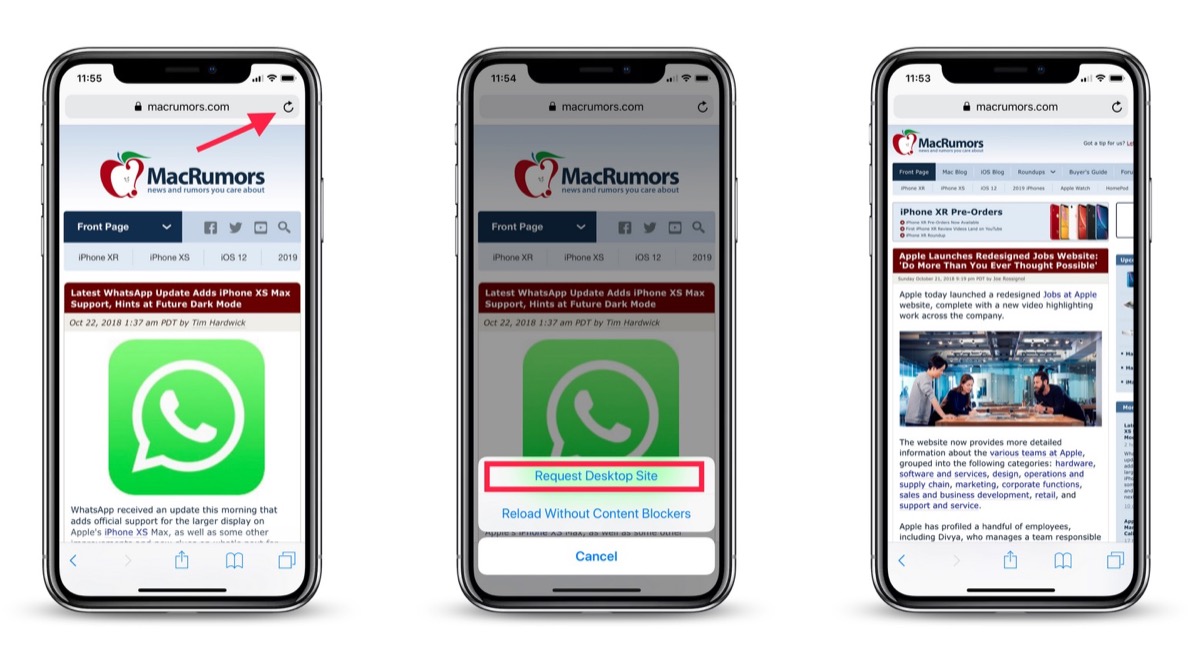
Note that you can also access this option by tapping the Share button (the square with an arrow pointing out) and selecting Request Desktop Site from the third row of the Share Sheet.
With that done, Safari should remember your preference for that particular website and load the desktop version the next time you visit it.
Related Roundup: iOS 12Tag: Safari
Discuss this article in our forums
Flying food: Uber has set a target date to use drones for meal delivery
studioEAST/Getty Images
Uber has joined a growing list of companies keen on using drones for delivery.
It wants to integrate the technology into UberEats, its meal-delivery service, and envisages dropping off its first drone-delivered dinners as early as 2021.
The company better known for ridesharing revealed earlier this year that it’s keen to utilize drone technology for its UberEats meal-delivery service, but a job ad spotted over the weekend by the Wall Street Journal suggests, for the first time, a target date for its first drone delivery.
The job ad is titled “flight standards and training” and the position is based in Uber’s home city of San Francisco.
Following an inquiry by the Journal, Uber took down the listing from its website, but at the time of writing it can still be viewed here on LinkedIn’s site. An unnamed spokesperson at Uber said only that the posting “does not fully reflect our program, which is still in its very early days.”
The ad says the primary focus of the role is to develop “standards, procedures, and training while reducing operational risk for all UberExpress flight operations.” UberExpress is the internal name used for the company’s drone-based plan.
The person who takes up the post will also be required to “enable safe, legal, efficient, and scalable flight operations to deliver flights in 2019 and commercial operations in multiple markets by 2021.”
To achieve its goal, Uber will have to first build a drone platform — including the machine itself — capable of carrying out the deliveries. And then there’s the tricky matter of overcoming regulatory hurdles. Lots of companies — web giant Amazon among them — want to use drones to drop orders at people’s doors, but the Federal Aviation Administration has so far proceeded with extreme caution when it comes to commercial drone operations, and so it would have to be be reassured about safety when considering licenses for such platforms.
Uber CEO Dara Khosrowshahi revealed Uber’s plans to use drones as part of UberEats during an on-stage interview with Bloomberg in May 2018. Like its rivals in the highly compettive meal-delivery business, Uber currently uses drivers and cyclists to fulfill orders, but autonomous delivery drones, which are able to pass straight over gridlocked city streets and buildings, could give its own service the edge by offering a speedier alternative once the technology is fully ready.
Editors’ Recommendations
- Death from above? How we’re preparing for a future filled with weaponized drones
- Skydio’s self-flying drone now has an Apple Watch app for flight prep
- This golf course’s delivery drone flies the 19th hole to you
- Your Uber Eats delivery fee is going up (or maybe down)
- Startup inks ‘world’s largest deal’ for driverless grocery deliveries
NYPD pulls thousands of its body cameras after one of them exploded
Andrew Burton/Getty Images
For New York cops, fighting crime must be tough enough without having to worry about your body camera exploding.
But that’s exactly what happened to one of the city’s police officers during a shift in Staten Island on Sunday.
A statement from the NYPD described how the officer noticed something was up when smoke was spotted coming from the camera. Right after removing it, “the device exploded,” the NYPD said.
In the police department’s own words: “Last night, an officer retrieved a body-cam for deployment on a midnight tour and noticed there was smoke exiting from the bottom portal and immediately removed it. After it was safely removed, the device exploded.”
Fortunately, no one was injured in the incident, which is thought to have been caused by the camera’s battery.
All officers with the assigned LE-5 camera — built by body camera specialist Vievu — have been told to stop using it immediately and return the device to their commands.
Some NYPD officers use the LE-4 body camera, though these are deemed to be safe and are therefore not part of the recall. According to the Daily Beast, the incident has led to about 3,000 of the NYPD’s 15,000 body cameras being taken out of service until further notice.
Axon, the Scottsdale, Arizona-based parent company of Vievu, said in a message to the media that “safety is of the utmost importance,” adding that it intends to do “whatever is necessary to quickly and safely resolve this situation.
It’s certainly not the first time a lithium-ion battery inside a portable device has gone up in flames. The battery is at risk of such destructive behavior if it sustains damage or has a design fault, as famously happened with Samsung’s doomed Galaxy Note 7 smartphone.
If you’re wondering about the potential ferocity of such an explosion, check out this video showing an electronic cigarette going up in flames while it was inside a man’s pants pocket. If the the cop’s camera explosion was anything like that, then the officer clearly had a lucky escape on Sunday.
The NYPD started equipping its officers with body cameras in April 2017. It has previously stated that it wants all of its officers to be equipped with the devices by the end of 2018, but it’s not yet clear if the incident will have any effect on the planned rollout.
“Nothing is more important than the safety of our officers, and equipping the NYPD with the best equipment is a paramount priority,” the police department said in its statement on Sunday.
Editors’ Recommendations
- iPad battery explosion prompts Apple Store evacuation in Amsterdam
- It’s tough to trust a smart smoke alarm, but Roost and Nest Protect won me over
- LG V40 ThinQ Review
- The Mission Workshop Radian is the one bag to rule them all
- The race is on: Full-frame dominates Photokina (and could drive prices down)
Latest WhatsApp Update Adds iPhone XS Max Support, Hints at Future Dark Mode
WhatsApp received an update this morning that adds official support for the larger display on Apple’s iPhone XS Max, as well as some other improvements and new clues on what’s next for the messaging platform.
Prior to today’s update, the WhatsApp interface didn’t scale properly on the 2,688 x 1,242 resolution screen exclusive to Apple’s new 6.5-inch device, but happily the issue has been fixed in this update and the UI now takes full advantage of the larger OLED display.
Elsewhere in this version (2.18.100), WhatsApp has introduced a redesigned contextual action menu for message bubbles in chat threads. Previously, a long press on a message would bring up a horizontal popup menu similar to the one found elsewhere in iOS.
 Old message action menu (left) versus redesigned menu
In contrast, the new vertical menu masks the background to highlight the selected message and allows more options to be shown in the first popup, with an ellipsis replacing the arrow button to reveal additional actions.
Elsewhere, consecutive voice messages now play in sequence, so users no longer have to tap play on each message. The latest update also adds new reply options to user status messages, with documents, voice messages, locations and vCards being added to the existing text, images, GIFs and videos.
In addition to these changes, WABetaInfo has uncovered alpha code in the latest version suggesting future features for the app will include an optional Dark Mode and the ability to preview videos in WhatsApp notifications.
 Image via WABetaInfo
In the hidden Dark Mode, incoming messages currently have a dark gray color and outgoing messages are dark green, but it’s worth noting that the theme is still in early testing and may look very different when the Dark Mode officially goes live.
WhatsApp is a free download for iPhone available from the App Store. [Direct Link]
Tag: WhatsApp
Discuss this article in our forums
Apple Launches Redesigned Jobs Website: ‘Do More Than You Ever Thought Possible’
Apple today launched a redesigned Jobs at Apple website, complete with a new video highlighting work across the company.
The website now provides more detailed information about the various teams at Apple, grouped into the following categories: hardware, software and services, design, operations and supply chain, marketing, corporate functions, sales and business development, retail, and support and service.
Apple has profiled a handful of employees, including Divya, who manages a team responsible for developing the Apple Watch’s sensors.
A new About Apple page highlights the company’s innovative business practices, collaborative work environment, employee benefits, diverse workforce, and other advantages of working at the tech giant.
Apple has expanded its Students section with a list of opportunities for interns, undergrads, and graduates, ranging from the AppleCare College Program to the Apple Store Leader Program. The updated page includes a profile from a software engineer named Alexa, who describes her impact at Apple.
Apple’s jobs search portal has also been updated with a cleaner design.

Apple says it has created over two million jobs in the United States, including those attributable to the App Store ecosystem. Apple also says it is an equal opportunity employer that is committed to inclusion and diversity.
Discuss this article in our forums
Useful LG V40 ThinQ tips and tricks
The LG V40 ThinQ was one of the first premium smartphones available in the U.S. to feature a triple-camera setup, and it’s backed up by a stylish design and top-of-the-line specs. It takes time to learn what this powerful phone and versatile camera are truly capable of, but we’re here to help.
Further reading
Best LG V40 ThinQ cases
Key settings you need to change
Everything you need to know
If you’ve managed to get your hands on LG’s latest and greatest smartphone, we’ve compiled a few of our favorite LG V40 ThinQ tips and tricks so you can get more out of it. Let’s dive in and unlock the hidden features and functions that await.
How to customize your home screen
Ready for your new LG V40 ThinQ to feel like it’s actually yours? How about updating the home screen to reflect your taste and preferences. You can easily change the wallpaper, add widgets, or even change the grid layout on your home screen in just a few easy steps.
To make customizations, long press on the home screen. The home screen will reduce and a menu will appear with four options. If you wish to add interactive widgets to your screen, tap Widgets and select the one you’d like to use by long pressing on the image and dragging it to the home screen.
If you want to change the wallpaper, theme, or always on display setting, select Wallpaper & Theme. Choose the wallpaper you’d like to use by tapping on it. Choose if you’d like the new wallpaper to appear on the home screen, lock screen, or both by selecting the appropriate radio buttons. Click the Set Wallpaper button to confirm your option.
Finally, to change the spacing between apps on the home screen, you’ll need to adjust the grid. Just tap Grid and select your preferred option and press the Apply button.
How to use Triple Shot
Can’t decide which lens to use on your LG V40 ThinQ? Not to worry because Triple Shot allows you to quickly (well, fairly quickly) take a photo with each lens.
To use the feature, simply open the camera app and select Triple Shot from the menu bar below the viewfinder. Once in Triple Shot mode, you’ll want to make sure the focal point is centered in the viewfinder before tapping the shutter button. Once you tap the shutter button, you’ll want to keep the camera very still until you see the message Triple Shot is being saved.
In addition to seeing three photos appear in the Photos app, you’ll also see a compilation video of all three shots set to music. While we’ve never found the video to be very useful, you can edit it by tapping on the Overflow (three dot) icon on the top-right side of the screen and selecting Edit in Quick Video Editor.
How to quickly uninstall apps
While the LG V40 ThinQ doesn’t have a ton of extra apps, you will find a little bloatware. For the most part, it’s just Yahoo branded apps, however you may not want them. Luckily, the apps can be easily uninstalled directly from the home screen.
To uninstall an app, long press on the app you’d like to delete. When the app bubble appears, just select App info and tap Uninstall. Press OK to confirm.
How to tidy up your screen with an app drawer
If you’re not a fan of apps filling up your home screen, there’s an alternative to the multi-app folder system you’ve probably created to tidy things up. On the LG V40 ThinQ, you can easily create an app drawer that’s accessible from the app bar on the bottom of the screen.
To set up the App drawer, you’ll need to tap Settings > Display > Home Screen > Select Home. Select the Home with separate apps list radio button and toggle on the Apps List Icon option before tapping Ok.
How to create a schedule for the blue light filter
If you’re looking to get a good night’s sleep, you’ll probably want to keep your LG V40 ThinQ out of the bedroom. But you’re probably not going to do that, so scheduling the blue light filter on your phone may be the next best option.
Finding the blue light filter on the LG V40 ThinQ is a little more difficult than it should be since it’s hidden in the settings and is called Comfort View. If you want to set up the blue light filter, go to Settings > Display > Comfort View. Tap Schedule and enter the times you’d like to schedule the filter to be on or off.
How to take a cinemagraph
In addition to including some serious camera hardware in the LG V40 ThinQ, the South Korean smartphone manufacturer also made some impressive changes to the camera software. One such change is the addition of the cinemagraph mode.
A cinemagraph is a still image with repeated movement in an isolated area. The best cinemagraphs tend to be images where there’s both distinct background and foreground movement. You can see an example above where the busy subway station appears to be perfectly still as the train arrives.
To take a cinemagraph on the LG V40 ThinQ, open the camera app and tap Mode followed by Cine Shot. Capture your 2-second clip by tapping the red shutter button. Once the image is captured, just use your finger to paint over the area where you’d like to see movement. If you select a larger area than necessary, you can easily make adjustments by tapping the eraser icon. When you’re satisfied with your cinemagraph, just tap Save and it will appear as a GIF in your photo gallery.
How to preview shots for each lens
Julian Chokkattu/Digital Trends
One of the biggest selling points of the LG V40 ThinQ is the triple-camera array on the back. In addition to the primary camera, there’s also a super-wide-angle lens and a telephoto lens that will help you get the best shot.
Not sure which lens will get you the best shot? Well, you’re in luck because LG created a way for you to easily preview what your shot will look like on each lens. Simply long tap on any of the lens icons (trees) on the right side of the viewfinder and a tiny preview window for each lens will appear. When you’ve decided which lens to use, simply tap on it and press the shutter button to grab your perfect photo.
How to use split-screen mode
Want to watch Hulu in the background while you send an email? Like most Android smartphones, you can easily activate split-screen mode on your LG V40 ThinQ.
To use split-screen mode, open the apps you’d like to use and make sure the app you’d like on top is active on the display. Long press the Overview (square) button and select the app you’d like on the bottom half of the screen. To adjust the size of either half, drag the resize slider that sits between the two apps.
Ready to return to a single app? Just drag the resize slider all the way to the top or bottom of the screen.
How to use Screen Pin
If you’ve ever had a child accidentally send a message or email on your phone, you’ll appreciate Screen Pin. With Screen Pin, you can restrict the person using your phone to a single app.
To turn on Screen Pin, open the app you’d like to pin. Tap the Overview (square) button in the navigation bar. Select the app you’d like to pin. Tap the blue pin icon that appears on the bottom right side. When the pop-up appears asking you to confirm your selection, select Pin.
Finished with Screen Pin? Just tap the Back and Overview buttons simultaneously to unpin the app.
Editors’ Recommendations
- LG V40 ThinQ: Everything you need to know
- Key settings you need to change on your brand-new LG V40 ThinQ
- LG V40 ThinQ Review
- These are the best LG V40 ThinQ cases to stop unsightly damage
- LG V40 ThinQ vs. Samsung Galaxy Note 9: Can the V40 unseat the king?
Apple Signs Lease for Large Manufacturing Facility in Milpitas, California
Apple has reportedly signed a 10-year lease for nearly 314,000 square feet of industrial manufacturing space in Santa Clara County, California (via Silicon Valley Business Journal).
The agreement between Apple and project developer McCarthy Ranch is for a sing-story warehouse facility located at McCarthy Creekside, a new multiphase development in the city of Milpitas, for which Apple is said to be paying around 90 cents per square foot.
Render depicting corner of 800,000 square foot industrial development in Milpitas
Silicon Valley’s vacancy rate was already a miniscule 1.5 percent, but the deal has reportedly made it hit an all-time low of just to 0.7 percent, according to the Journal.
“The shortage of available warehouse space is restricting tenant mobility,” Lena Tutko, research manager for Colliers International, said. “Warehouse users are often left with two options: renewing their lease, as seen by the top four of five deals of the third quarter, or relocate outside of the Valley.”
It’s not yet clear what Apple’s plans are for the industrial space north of San Jose, but developer Joey McCarthy told the Journal that McCarthy Creekside is purpose-built for “industrial, R&D, [and] manufacturing.”
Aside from specialist operations like the Mac Pro facility in Austin, Texas, the vast majority of Apple’s manufacturing takes place outside of the U.S., which adds an extra layer of intrigue to the company’s intentions in Milpitas.
On the other hand, the space could indicate an expansion of Apple’s autonomous car project. Apple is believed to be using several Bay Area facilities for its self-driving car research, while McCarthy Creekside is already home to autonomous driving R&D, with a building on the development having been leased to electric vehicle maker SF Motors.
Related Roundup: Apple Car
Discuss this article in our forums
 AIVAnet