


Square Launches All-in-One Payment Device ‘Terminal’ With NFC and Card Support
Payments company Square today announced the launch of a new point-of-sale hardware device called “Terminal,” which combines NFC, credit/debit card swiping, and chip-based payments all in one piece of hardware. Like Square’s other devices, Terminal supports Apple Pay, Google Pay, and other mobile wallets using near-field communication.
Square says Terminal can be used alongside an existing point-of-sale solution or as its own standalone payment processing system. Terminal also has an all-day battery, Wi-Fi and Ethernet internet connections, an offline mode, quick setup, fraud prevention, and is fully mobile so it can be used on a countertop or taken directly to customers. In terms of pricing, businesses will have to pay one transaction rate of 2.6% + 10¢ for every payment, and Square promises no hidden fees.
“We love how the hardware, payments, and printer are all part of one device,” said Fabrice Borg, manager of Prive by Laurent D Salon in New York, NY. “Square Terminal makes for a more seamless and professional experience when we bring the terminal to our customers and they can pay for their services right from the salon chair.”
Square first launched its original NFC reader back in November 2015, allowing any business to introduce Apple Pay support to their checkout process. Over the years the company expanded into the United Kingdom, introduced new point-of-sale devices like the Square Register, and updated the swipe-based Square Reader with a Lightning connector.
Those interested can purchase Terminal in the Square Shop for $399, or pay $37 per month for 12 months.
Related Roundup: Apple PayTag: Square
Discuss this article in our forums
Apple Highlights Apps Offering Siri Shortcuts Integration
Apple in iOS 12 introduced a new Siri Shortcuts feature that’s designed to let users create multi-step automations using first and third-party apps.
Since iOS 12’s release, app developers have been adding Siri Shortcuts support to their apps, and today, Apple highlighted several apps that have launched useful Siri Shortcut options.
Tile, for example, has added a Shortcut designed to let you find an item attached to a Tile device, like your keys, by asking Siri. Apps like CARROT and Dark Sky offer up weather details with Siri commands like “rain report” or “UV index,” while Citymapper lets you get commute information in seconds.
Evernote lets you get quick access to Shortcuts for sharing notes, creating audio notes, creating camera notes, and printing, while Day One has Shortcuts for creating journal entries and recording audio. Calendar app Fantastical lets you schedule events and preview what’s coming next, and Trello, Things, and Omnifocus all have Shortcut options for streamlining projects.

Apple also highlights Waterminder for tracking your water intake, Lose It! for keeping track of what you’re eating, MyTherapy for monitoring daily medications, and meditation in Headspace, all features that can be accessed via simple Siri commands without the need to open up the respective apps.
Related Roundup: iOS 12Tag: Siri
Discuss this article in our forums
Apple Pay Promo Offers $25 Coupon After $100 Purchase From Oakley
Apple today sent out emails highlighting its latest Apple Pay promotion, which offers Apple Pay users a $25 coupon after they spend $100 at Oakley.com.
To get the reward, users must make a purchase of $100 or more from the Oakley website and then use Apple Pay as a payment option when checking out.
The discount is not immediate and will not apply to the $100 purchase, but will instead be provided as an additional $25 discount coupon within two weeks of purchase.
Apple says the deal will be available from October 18 through October 24. The $25 coupon must be redeemed before December 31, 2018, and it can only be used on full-price items. The full fine print:
Offer valid on purchases of $100 or more on Oakley.com with Apple Pay from October 18 through 24. Customers will receive their $25 coupon via email within two weeks of purchase. Limit one per customer. Coupon must be redeemed before December 31, 2018, and can only be used on full-priced items. Cannot be combined with other promotions or discounts. Void where prohibited. Some restrictions apply. Offer only valid with Oakley.
Apple’s latest email also promotes several other companies that offer outdoor and cold weather gear including Ugg, The North Face, and Teva, all of which support Apple Pay.
Related Roundup: Apple Pay
Discuss this article in our forums
When You Can Pre-Order the iPhone XR in Every Time Zone
Pre-orders for the iPhone XR will kick off on Friday, October 19 at 12:01 a.m. Pacific Time, allowing customers to purchase the third flagship iPhone in the 2018 iPhone lineup.
Apple is planning to make the new devices available in multiple countries around the world simultaneously, so we’ve created a list of when pre-orders will kick off all around the world.
- Australia West – 3:01 p.m. AWST
- Australia East – 5:01 p.m. AEST
- Austria – 9:01 a.m. CEST
- Belgium – 9:01 a.m. CEST
- Canada West – 12:01 a.m. PDT
- Canada East – 3:01 a.m. EDT
- China – 3:01 p.m. CST
- Denmark – 9:01 a.m. CEST
- Finland – 10:01 a.m. EEST
- France – 9:01 a.m. CEST
- Germany – 9:01 a.m. CES
- Guernsey – 8:01 a.m. BST
- Hong Kong – 3:01 p.m. HKT
- Ireland – 8:01 a.m. IST
- Isle of Man – 8:01 a.m. BST
- Italy – 9:01 a.m. CEST
- Japan – 4:01 p.m. JST
- Jersey – 8:01 a.m. BST
- Luxembourg – 9:01 a.m. CEST
- Mexico – 2:01 a.m. CDT
- Netherlands – 9:01 a.m. CEST
- New Zealand – 8:01 p.m. NZDT
- Norway – 9:01 a.m. CEST
- Portugal – 8:01 a.m. WEST
- Puerto Rico – 3:01 a.m. AST
- Saudi Arabia – 10:01 a.m. AST
- Singapore – 3:01 p.m. SGT
- Spain – 9:01 a.m. CEST
- Sweden – 9:01 a.m. CEST
- Switzerland – 9:01 a.m. CEST
- Taiwan – 3:01 p.m. CST
- UAE – 11:01 a.m GST
- United Kingdom – 8:01 a.m. BST
- United States West – 12:01 a.m. PDT
- United States Mountain – 1:01 a.m. MDT
- United States Central – 2:01 a.m. CDT
- United States East – 3:01 a.m. EDT
- US Virgin Islands – 3:01 a.m. AST
We haven’t listed every time zone for every country, such as in Canada, Russia, and the United States, nor have we listed every available pre-order country, so make sure to double check your specific time zone so you’re certain you know the exact time that pre-orders will kick off. A time zone converting website is a useful tool for confirming accurate pre-order times.
It’s not yet clear if supplies of the iPhone XR will be constrained, but there have been rumors of production issues that led to a launch delay, so it’s best to pre-order the iPhone XR as soon as possible if you’re aiming to get a new device on release day.
iPhone XR pre-orders will be available on October 19 in Albania, Andorra, Australia, Austria, Bahrain, Belgium, Bosnia, Bulgaria, Canada, China, Croatia, Cyprus, Czech Republic, Denmark, Estonia, Finland, France, Germany, Greece, Greenland, Guernsey, Herzegovina, Hong Kong, Hungary, Iceland, India, Ireland, Isle of Man, Italy, Japan, Jersey, Kosovo, Kuwait, Latvia, Liechtenstein, Lithuania, Luxembourg, Macedonia, Malta, Malaysia, Mexico, Monaco, Montenegro, Netherlands, New Zealand, Norway, Oman, Poland, Portugal, Puerto Rico, Qatar, Romania, Russia, Saudi Arabia, Singapore, Serbia, Slovakia, Slovenia, South Africa, Spain, Sweden, Switzerland, Taiwan, Thailand, the UAE, UK, US, and US Virgin Islands.
The first iPhone XR pre-orders will arrive to customers on Friday, October 26, the XR’s official launch date.
Related Roundup: iPhone XRBuyer’s Guide: iPhone XR (Caution)
Discuss this article in our forums
Are e-cigarettes safe? Here’s what the most recent science says
arminstaudt/123RF
Vaping is on the rise especially among teens who are hitting their Juuls before, during and after class. This newfound adolescent experimentation has kicked off a renewed interest in the safety of vaping. Often touted as a safer alternative to cigarette smoking, there is a lot of hysteria and misconceptions surrounding vaping and its health effects. Is vaping safe? We combed the recent medical and scientific literature to see what the latest science has to say. Here’s what we found.
E-cig vapor contains fewer toxic substances than cigarette smoke does
It’s been well documented that cigarette smoke contains a variety of poisonous and carcinogenic compounds, but what about the vapor from e-cigarettes? A 2014 study tested 21 different e-cig liquids and found that e-cigarette vapors did contain toxic compounds, but at a level that was 9–450 times lower than cigarette smoke. In fact, many of the vapors were no higher than the reference product which served as the baseline for measurement. That’s good news for people who are quitting smoking and vaping instead.
Toxins in e-cig vapor may be absorbed into the body
Previous studies show that e-cig vapor contains low amounts of toxic and carcinogenic compounds, but what happens to these substances when these are inhaled? A March 2018 study published in Pediatrics examined the urine and saliva of adolescent subjects to find out. Their research showed that teens who both smoked cigarettes and vaped had the highest levels of toxins and carcinogens when compared to e-cig user and non-smokers. Teens who only smoked e-cigs were not spared as they also had elevated levels of potentially harmful compounds such as acrylonitrile, acrolein, propylene oxide, acrylamide, and crotonaldehyde.
“The presence of harmful ingredients in e-cigarette vapor has been established; we can now say that these chemicals are found in the body of human adolescents who use these products,” concluded the authors of the study. We still don’t know whether the levels of these toxic an carcinogenic chemicals will have a long-term effect on the body. Only time will tell.
Vaping may increase your risk of heart attack
Vaping may give you a buzz and calm your nerves, but what it does to your cardiovascular health is concerning. A small study by researchers at Karolinska Institute revealed that vaping with nicotine produced a significant increase in heart rate, blood pressure, and arterial stiffness. A combination that later in life can lead to heart attack and stroke.
A follow-up study in 2018 by UCSF professor of medicine Stanton Glantz expanded the scope of the research by looking at the survey results from 70,000 people. After taking into account other demographics and health factors such as hypertension, diabetes, and high cholesterol, Glantz found that daily e-cig use doubles your chance of a heart attack. This risk is only slightly lower than daily cigarette use which triples your risk.
The worst combination is vaping and smoking cigarettes every day, which increases your heart attack risk fivefold. There is a silver lining, though: If you only use e-cigs occasionally, then you have little to worry about as your heart attack risk does not significantly change. Another piece of good news? This risk disappears as soon as you stop vaping.
Flavorings taste good, but they’re not good for your lungs
The favorite flavoring agent Cinnamaldehyde is the chemical that gives cinnamon its characteristic smell and taste. It’s deemed safe for use in food products, and has therefore found its way into many popular e-cigarette flavors — but little research has looked what happens to Cinnamaldehyde when is it vaporized and inhaled.
A team of researchers University of North Carolina at Chapel Hill explored this question and discovered that Cinnamaldehyde disrupted the function of the cilia in lung cells that were grown in a lab. Inside our bodies, these cilia are critical to our respiratory system because they remove bacteria and other foreign substances from the lungs, Without functional cilia, people are at significantly higher risk of developing bronchitis and lung infections.
Lead study author Phillip Clapp, Ph.D. points out that most flavoring agents are reactive aldehydes that are similar to Cinnamaldehyde. They also are added in very high concentration. If Cinnamaldehyde has this profound of an effect on the lungs, then it is possible these other flavorings may have the same deleterious effect, too. Further study is needed to either confirm or refute these findings — though it’s worth noting that lung damage isn’t necessarily the only harm flavorings might cause. Other experiments suggest that flavoring compounds might also be harmful to blood cells.
Vaping often leads to cigarette use in teens, but not adults
Vaping was introduced as a way for people to kick the smoking habit without giving up their love of smoking. They could inhale the tasty liquid vapor of an e-cigarette and avoid the harmful toxins and carcinogens that come from tobacco smoke. While adults often stick to e-cigs after giving up regular cigarettes, teens often do the opposite. Teens are turning up their noses at cigarettes and choosing to vape instead. Once they start using e-cigs, teens are six times more likely than non-smokers to start smoking once they reached legal age, according to a 2016 study by researchers at the University of Southern California.
Editors’ Recommendations
- The best e-cigarettes
- The best vaporizers for flower and concentrates
- The numbers don’t lie: Facebook is faltering. So what will eventually replace it?
- The ThinkPad X1 Extreme might be my dream laptop
- The MacBook’s keyboard sucks, so use this mechanical keyboard instead
Ryzen shine! AMD’s next CPUs could beat Intel at gaming in 2019
Bill Roberson/Digital Trends
A new hint at the performance of AMD’s next-generation Zen 2 CPUs — likely to be called Ryzen 3000-series — suggests they could be far more capable than the company’s existing chips. The rumor claims that they offer as much as a 13-percent improvement in instructions per clock (IPC), which when combined with a likely clock speed increase and maybe even additional cores, could see AMD steal the performance crown from Intel in more than just multi-threaded settings.
AMD’s first-generation Ryzen CPUs offered more than 50 percent improvement in instructions per clock over its predecessor chips. That, combined with additional cores made AMD’s CPUs competitive with Intel at the top end for the first time in a long time. Intel still retained a small but noticeable lead in single-threaded and gaming scenarios, but AMD’s Zen+ Ryzen 2000-series CPUs closed the gap a little more with a further three-percent increase in IPC over the first Ryzen chips. If claims of a 13-percent increase in IPC with Zen 2 hold true, AMD may pull ahead of Intel in gaming and single-threaded tasks, and may offer greater multi-threaded performance, too.
This latest rumor comes from Twitter user Bits and Chips, via Hexus. While Bits and Chips suggests that its tweets shouldn’t be taken too seriously, it has in the past leaked news for Zen which turned out to be correct. It claims that a source who works at a “big company” shared the “13 percent” figure, but didn’t relay much clarification for it.
Zen+ -> Zen2: +13% IPC (Average) in scientific tasks. Not bad.P.S. No gaming data, atm.
— Bits And Chips – Eng (@BitsAndChipsEng) October 16, 2018
The source did claim that clock speeds won’t change much between the Zen+ and Zen 2 generations. That said, since the 7nm process should be more efficient, it may open up more room for overclocking in turn.
The Zen 2 architecture is expected to make its debut at CES 2019, with some suggestion that the first CPUs will go on sale in May that same year. We did hear rumblings that top Zen 2 CPUs may raise the core count to 16, but we would expect most Ryzen 3000 CPUs to retain more common core counts to focus performance on limited thread software like gaming.
For those already running Ryzen CPUs, either first or second-generation, the most exciting part of this is that motherboards will be immediately compatible with Zen 2 chips when they debut. The AM4 socket is being used for all generations of Zen right through until 2020, so AMD fans won’t need to factor in a motherboard upgrade just to retain the latest and greatest performance.
Editors’ Recommendations
- Intel’s ninth-generation CPUs could launch on October 1
- AMD Ryzen will add two budget CPUs, gaming-oriented update October 29
- AMD’s 32-core Threadripper 2990X could cost a whopping $1,800
- AMD’s Ryzen desktop CPUs for 2019 may double the core count
- The best processors for gaming
Samsung Galaxy Book 2 packs Snapdragon 850 into Always Connected Windows 2-in-1
Previous
Next
1 of 12

Julian Chokkattu/Digital Trends

Julian Chokkattu/Digital Trends

Julian Chokkattu/Digital Trends

Julian Chokkattu/Digital Trends

Julian Chokkattu/Digital Trends

Julian Chokkattu/Digital Trends

Julian Chokkattu/Digital Trends

Julian Chokkattu/Digital Trends

Julian Chokkattu/Digital Trends

Julian Chokkattu/Digital Trends

Julian Chokkattu/Digital Trends

Julian Chokkattu/Digital Trends
Samsung’s new Galaxy Book 2 is moving away from Intel hardware, as the second-generation device ditches the Core M3 and Core i5 configuration options for a Qualcomm Snapdragon 850. The high-end system on a chip (SoC) combines a powerful octa-core processor with an onboard graphics processor for solid all-round performance and efficiency. But that’s not all the new Samsung 2-in-1 has to offer.
The original Galaxy Book was a valiant effort to create a versatile modern 2-in-1, and we found it to be light and powerful, and noted that it came with a beautiful display. But a lackluster battery life and terrible keyboard meant that it didn’t hold a candle to some of our favorite 2-in-1s like Microsoft’s Surface Pro. The Galaxy Book 2, however, appears to have taken great strides to fix its predecessor’s most glaring problems.
For starters, its battery life is supposedly far more impressive. While we don’t have raw watt-hour numbers for it, Samsung claims that when it’s running the Windows 10 S operating system it ships with, it can achieve as much as 20 hours. While we’d expect that to be in ideal scenarios, the company only claimed a life of 11 hours with the original Galaxy Book, so that gives us hope for great improvement to its life between charges. Fast charging, too, means that downtime with this device should be minimal, even for heavy users.
Alongside the new Qualcomm SoC Samsung has maintained the same 4GB of memory, though it has upped the default storage from 64GB with the last generation to a respectable 128GB as the default this time around. The display has received a bump in resolution, too, offering 216 pixels per inch with its 2,160 x 1,440 panel.
The physicality of the device hasn’t changed much. The curved corners of the Galaxy Book have been made more square on the Galaxy Book 2, and the bezels have been slimmed down slightly — but not enough to significantly hinder your grip while it’s being used as a tablet. Most interestingly, the Galaxy Book 2 now contains an integrated stand, similar to the stand on other 2-in-1 devices, like the Surface Pro 6.
The new-generation 2-in-1 is a little larger and heavier as well, though not so much that we’re concerned about portability.
Other new features include built-in Gigabit LTE connectivity. This was optional with the original Galaxy Book, but Samsung claims that implementing it for everyone will allow every user to remain connected at high speed at all times. Its ports include a pair of USB-C, a MicroSD card reader, and a 3.5mm headphone jack.
The Samsung Galaxy Book 2 is set to go on sale at an entry-level price point of $1,000 and will be available in AT&T, Microsoft, and Samsung’s stores on November 2. Those wishing to try before they buy will be able to test it out in AT&T, Sprint, and Verizon stores later in the month.
Huawei Mate 20 Pro vs. Mate 20 vs. Mate 20 X vs. Mate 20 Lite
 Julian Chokkattu/Digital Trends
With the reveal of the Mate 20, Mate 20 Pro, and Mate 20 X, Huawei’s new Mate 20 series is now complete, and the three new phones join the Mate 20 Lite. All four phones are powerful, A.I.-driven phones with prices to suit a range of budgets, and screen sizes for almost everyone’s tastes.
But with four Mate 20 phones up for consideration, which phone is best for you? Should you splurge all of your money on the Mate 20 Pro, save some green with the Mate 20 Lite, or go for one of the two middle options? We took a look to find out.
Specs
Mate 20 Pro
Mate 20
Mate 20 X
Mate 20 Lite
Size
157.8 x 72.3 x 8.6 mm (6.22 x 2.85 x 0.34 inches)
158.2 x 77.2 x 8.3 mm (6.22 x 3.04 x 0.33 inches)
174.6 x 85.4 x 8.2 mm (6.87 x 3.36 x 0.32 inches)
158.3 x 75.3 x 7.6 mm (6.23 x 2.96 x 0.30 inches)
Weight
189 grams (6.66 ounces)
188 grams (6.63 ounces)
232 grams (8.18 ounces)
172 grams (6.07 ounces)
Screen size
6.39-inch AMOLED
6.53-inch IPS LCD
7.2-inch IPS LCD
6.3-inch IPS LCD
Screen resolution
3,120 x 1,440 pixels (538 pixels-per-inch)
2,244 x 1,080 pixels (381 pixels per inch)
2,244 x 1,080 pixels (346 pixels per inch)
2,340 x 1,080 pixels (409 pixels per inch)
Operating system
EMUI 9 (over Android 9.0 Pie)
EMUI 9 (over Android 9.0 Pie)
EMUI 9 (over Android 9.0 Pie)
EMUI 8.2 (over Android 8.1 Oreo)
Storage space
128GB
128GB
128GB
64GB
MicroSD card slot
No — expansion of up to 256GB via proprietary Nano Memory Card
No — expansion of up to 256GB via proprietary Nano Memory Card
No — expansion of up to 256GB via proprietary Nano Memory Card
Yes, up to 256GB
Tap-to-pay services
Google Pay
Google Pay
Google Pay
Google Pay
Processor
Kirin 980
Kirin 980
Kirin 980
Kirin 710
RAM
6GB
4GB, 6GB
6GB
4GB, 6GB
Camera
Triple sensor 40MP and 20MP and 8MP rear, 24MP front
Triple sensor 16MP and 12MP and 8MP rear, 24MP front
Triple sensor 40MP and 20MP and 8MP rear, 24MP front
Dual sensor 20MP and 2MP rear, dual sensor 24MP and 2MP front
Video
2,160p at 30 frames per second, 1,080p at 60 fps, 720p at 960 fps
2,160p at 30 frames per second, 1,080p at 60 fps, 720p at 960 fps
2,160p at 30 frames per second, 1,080p at 60 fps, 720p at 960 fps
1,080p at 30 fps
Bluetooth version
Bluetooth 5.0
Bluetooth 5.0
Bluetooth 5.0
Bluetooth 4.2
Ports
USB-C
3.5mm headphone jack, USB-C
3.5mm headphone jack, USB-C
3.5mm headphone jack, USB-C
Fingerprint sensor
Yes (in-display)
Yes
Yes
Yes
Water resistance
IP68
IP53
IP53
No
Battery
4,200mAh
Huawei SuperCharge fast charging (up to 70 percent in 30 minutes)
Qi wireless charging
4,000mAh
Huawei SuperCharge fast charging (up to 60 percent in 30 minutes)
5,000mAh
Huawei SuperCharge fast charging
3,750mAh
App marketplace
Google Play Store
Google Play Store
Google Play Store
Google Play Store
Network support
T-Mobile, AT&T
T-Mobile, AT&T
T-Mobile, AT&T
T-Mobile, AT&T
Colors
Emerald Green, Midnight Blue, Twilight, Pink Gold, Black
Midnight Blue, Twilight, Black
Midnight Blue, Phantom Silver
Black, Sapphire Blue
Price
1,049 Euros (around $1,220)
799 Euros (roughly $930)
899 Euros (roughly $1,050)
380 British pounds (roughly $500)
Buy from
Huawei
Huawei
Huawei
Huawei
Review score
Hands-on review
Hands-on review
Mate 20 X news
Hands-on review
Performance, battery life, and charging
 Julian Chokkattu/Digital Trends
The Mate 20 Lite is an early casualty of this battle, since it’s equipped with the least powerful processor here — the Kirin 710. The remaining three phones are equipped with Huawei’s new, super-powerful Kirin 980 processor, and have access to 128GB of onboard storage, and up to 6GB of RAM, making them similarly powerful. However, the Mate 20 X comes with an innovative cooling system that uses graphene and a vapor chamber to keep the phone cool. This should mean the Mate 20 X’s processor can handle more demanding tasks without having to slow down, giving it an edge in performance.
Each of these phones also has a beefy battery, and they’re all likely able to provide multiple days of battery life on a single charge. The Mate 20 X’s 5,000mAh battery is the biggest by far, dwarfing the large 4,200mAh battery in the Mate 20 Pro. Only the Mate 20 Pro comes with Qi wireless charging, but the Mate 20, Pro, and X get Huawei’s SuperCharge fast charging. Huawei claims the Mate 20 Pro can recharge up to 70 percent in 30 minutes — and the Mate 20 and X aren’t far behind this speed.
While each phone does well in this category, we’re giving this to the well cooled Mate 20 X with its huge battery.
Winner: Huawei Mate 20 X
Design and durability
Previous
Next
1 of 4

Mate 20 Pro Julian Chokkattu/Digital Trends

Mate 20 Julian Chokkattu/Digital Trends

Mate 20 X Andy Boxall/Digital Trends
Mate 20 Lite Andy Boxall/Digital Trends
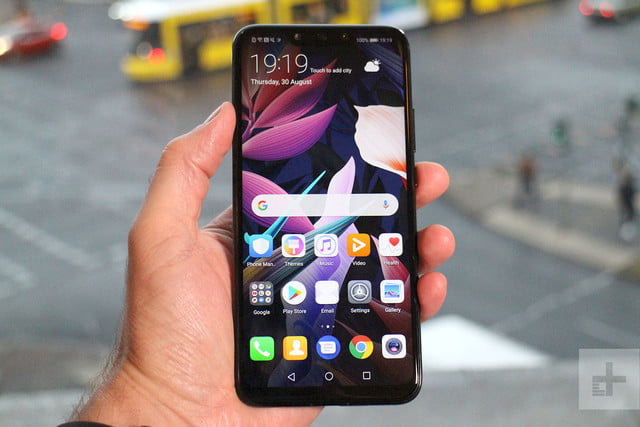
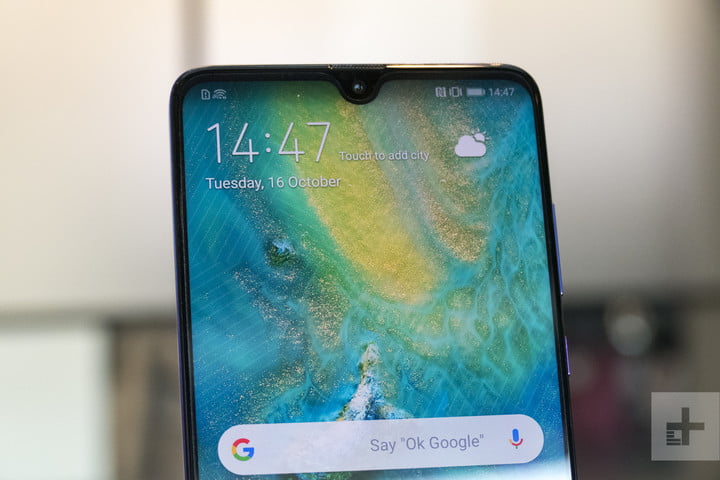
While we may have our qualms about whether the Mate 20 series is as good looking as the P20 Pro, these phones certainly have their charm. Being the cheapest, the Mate 20 Lite is probably the least attractive, with a traditionally chunky notch. That said, it’s a relative observation, and it’s still an attractive design with a glass back. The Mate 20 Pro also has a huge notch where the 3D face-sensing tech lives, but it’s also the only phone with an AMOLED display that curves into the all-glass body. The Mate 20 and Mate 20 X have the best notch — the tiny Dewdrop design — and also have premium glass builds. That said, the Mate 20 X is utterly massive, and almost impossible to wield one-handed.
There’s a clearer winner in durability. Each phone uses a potentially fragile glass build, but only the Mate 20 Pro comes with significant water-resistance with an IP68-rating. The Mate 20 has a splash-resistant IP54-rating, while the Mate 20 X has an even lower IP53-rating. The Mate 20 Lite is the worst off, with no water-resistance at all.
It’s hard to rule a winner in design, and though we prefer the Dewdrop notch of the Mate 20 and X, the Mate 20 Pro’s water-resistance is enough — for us — to bring it back to win this round.
Winner: Huawei Mate 20 Pro
Display
 Julian Chokkattu/Digital Trends
There are a wide range of big displays here, from 6.3-inches to a massive 7.2-inches. But size isn’t everything, and it’s the Mate 20 Pro’s AMOLED display that’s the best looking. The LCD displays on the Mate 20, X, and Lite are great, but they pale into insignificance next to the deep inky blacks and vibrant colors on the Mate 20 Pro. It’s also the only phone with a 1440p resolution — the rest top out at 1080p — and it curves into the body. While it’s rudely interrupted by the large notch, it’s still easily the brightest, crispest, and most beautiful display here.
Winner: Huawei Mate 20 Pro
Camera
 Julian Chokkattu/Digital Trends
The Mate 20 Lite was always going to be the weakest option here, and though its twinned 20-megapixel and 2-megapixel camera lenses do a good job, it’s not up to the standard of the triple-lens set-ups on the other three phones. The Mate 20 comes with a 16-megapixel ultra wide-angle lens, a 12-megapixel wide-angle lens, and an 8-megapixel 2-times telephoto zoom lens. We’re expecting this camera to take some amazing photos — but not as amazing as the 40-megapixel wide-angle lens, 20-megapixel ultra wide-angle lens, and 8-megapixel 3-times telephoto zoom lens in the Mate 20 Pro and Mate 20 X.
The Mate 20 Pro and X are equally matched in other areas too, with the same 24-megapixel selfie lens, the same A.I.-tweaked settings and modes — including some amazing video modes that change your view in real-time. They’re even equal in pure video terms too, with both being able to take 4K video at 30 frames-per-second, and super-slow motion at 960 fps.
The Mate 20 Pro and X are equal on paper, and until we’ve tested to see if they differ in real terms, we can’t prize them apart.
Winners: Mate 20 Pro and Mate 20 X
Software and updates
 Mate 20 Pro Julian Chokkattu/Digital Trends
Stock Android fans beware: You’ll find Huawei’s Emotion UI (EMUI) skin laid over Android on each of these phones. The Mate 20 Lite is an early casualty though, as it’s running Android 8.1 Oreo — and there hasn’t been word that it’ll get an update to Android 9.0 Pie yet. Each of the other phones comes with the latest EMUI 9 laid over Android 9.0 Pie. It’s a surprise to see this OS on Huawei’s phones so fast — a heavily customized skin like EMUI often takes months to update, so we didn’t expect to see a Huawei phone running Pie for a while longer. It’s a nice surprise, and it bodes very well for later updates to the Mate 20, Pro, and X. Expect Android Q, and possibly Android R on those phones.
Winners: Huawei Mate 20, Mate 20 Pro, and Mate 20 X
Special features
 Julian Chokkattu/Digital Trends
You’ll find Huawei’s super-powered gaming mode, GPU Turbo, on each of these phones, and there’s advanced A.I. built into each of them as well, which will recognize scenes in your camera, manage your resources while gaming, and power the Qmoji Animoji-style AR emoji feature. The A.I. goes even further in the Mate 20, Pro, and X though, with A.I. handling the real-time filters laid over video, and real-time object identification. Those three phones also have access to Huawei’s new gesture navigation.
But it’s the Mate 20 Pro that packs the most special features. It’s the only phone to come with an in-display fingerprint scanner, and there’s also advanced facial recognition on the level of Apple’s FaceID, and the ability to reverse wireless charge. Drop a wirelessly charging device on top of the Mate 20 Pro and the Huawei phone will charge the other device. It’s bonkers and we love it.
Winner: Huawei Mate 20 Pro
Price
None of these phones has been officially released in the U.S. yet, but you can pick one up from an importer as long as you don’t mind paying import tax. They also won’t work with Verizon or Sprint, so keep that in mind if you’re locked in with either.
The Mate 20 Pro costs 1,049 Euros (around $1,220), and the Mate 20 starts from 799 Euros (roughly $930). Both phones are currently available for pre-order. The Mate 20 X costs 899 Euros (roughly $1,050), and will be available for pre-order from October 26. The Mate 20 Lite is the cheapest at just 380 British pounds (roughly $500), and is currently available for purchase.
Overall winner: Mate 20 Pro
It would have been embarrassing for Huawei if the phone it had pegged as the most advanced didn’t win this battle, and thankfully Huawei’s most advanced flagship phone ever has come out on top, thanks largely to its incredible camera, AMOLED display, in-display fingerprint scanner, and advanced facial recognition tech. If money is no impediment, then the Mate 20 Pro is definitely the phone to get.
But the others still have their places. The Mate 20 Lite is an excellent $500 phone (though it’s up against the mighty OnePlus 6 in that price range), the Mate 20 is still an exceptional flagship device which serves as the Galaxy S9 to the Mate 20 Pro’s Galaxy Note 9. The Mate 20 X is an odd phone to pin down, but it’s clearly the phone to get if you want the largest possible screen you can lay your hands on, or a powerful mobile gaming device like no other.
Whichever you pick will be highly personal though, and you’ll be happy either way. But we’d pick the Mate 20 Pro every day.
Editors’ Recommendations
- Huawei Mate 20 hands-on review
- Huawei Mate 20 Pro vs. Samsung Galaxy Note 9: Flagship fight
- Huawei Mate 20, Pro, and X: Everything you need to know
- Huawei Mate 20 Pro hands-on review
- The Huawei Mate 20 Lite is A.I.-powered, attractive, and affordable
Huawei is working on a 5G foldable phone, the Mate 20 X may be its template
Andy Boxall/Digital Trends
Huawei CEO Richard Yu may have given us a clue for the eventual size of its first foldable smartphone. We can say for certain this device will operate on 5G networks, as Yu confirmed this in an interview with Digital Trends and select international media representatives during the launch of the Huawei Mate 20 range,
“We are working on foldable phones,” Yu said. Foldable 5G phones.”
Huawei’s 5G ambitions are no secret, meaning this should come as no surprise. It has invested considerably in 5G infrastructure and technology, has spoken out about plans for 5G devices and networks in 2019 before, and revealed the world’s first commercialized 5G chipset at the beginning of the year.
This is the first time the company has linked 5G to its foldable phone. A Huawei executive had previously spoken about the potential for a foldable phone from the company, and hinted it may come in 2019, while Richard Yu himself has also discussed the potential of such a device. During our interview in London, Yu expanded slightly on the project’s progress, and said the phone was “not commercialized yet.”
“Maybe sometime we will launch that, but not this time,” he said.
Mate 20 X
-
3.
Mate 20 X
While we have not seen the phone, and know nothing about the potential specification or size, Yu steered the conversation in a different direction, which may give us a hint at the potential size of a Huawei foldable phone.
“Before the foldable phones, we are introducing the Huawei Mate 20 X,” he said. “It is 7.2-inch, but in your hand it’s not so big, not so bulky.”
“We are working on foldable phones. Foldable 5G phones.
The Huawei Mate 20 X is one of the biggest smartphones — in terms of screen size — we’ve ever seen. The device itself however, is surprisingly compact, and the body is very slim. We can speculate the Mate 20 X is a template for the eventual folding phone, particularly due to the timing in our conversation with Richard Yu. Naturally, it’s also his job to highlight the latest devices, rather than talk about possible future ones during these interviews, so it may also be coincidental.
That said, the whole idea of a folding phone is to provide a larger screen without the need to carry around a large phone. If the 7.2-inch Mate 20 X folded in half, it would be considerably more manageable, without sacrificing the big-screen mobile experience. At the very least, it helps us better imagine the benefits of a folding phone.
Huawei has not officially announced a folding phone, and while it’s now certain the company is working on a 5G prototype, this is not evidence the device in question will ever be released.
Editors’ Recommendations
- Huawei hasn’t forgotten — expect a foldable phone from company in 2019
- Huawei Mate 20 Pro vs. Mate 20 vs. Mate 20 X vs. Mate 20 Lite
- Huawei Mate 20, Pro, and X: Everything you need to know
- Huawei Mate 20 Pro vs. Samsung Galaxy Note 9: Flagship fight
- Huawei still in on smartwatches, working to make them better
Who is ‘Scam Likely,’ and why are you receiving calls from them?
Further reading
How to remain anonymous online
How to block a number in iOS and Android
How to stop spam emails
If you’re a T-Mobile or MetroPCS customer, you may have noticed that some of your incoming calls are now being marked “Scam Likely.” While that may seem like a bold marketing choice for a firm to tag their calls, it’s actually your carrier’s way of helping you more easily identify scam calls. If you’ve ever answered any of these marked calls, you’d realize the alerts are usually pretty spot on. Here’s what you need to know about how the feature operates, and how to enable it if you haven’t done so already.
How it works
T-Mobile first started rolling out its free protection services — as well as a paid solution — back in 2017, namely as a way to help its customers prevent and avoid robocalls and other types of spam. These features were later extended to MetroPCS users (a T-Mobile-owned company) and are now accessible to customers of both carriers, regardless of the type of phone they’re using.
The first service is called Scam ID, which identifies potential scam calls by cross-referencing the number with a database of potentially fraudulent ones. This tag is applied on the carrier side of things, meaning you don’t have to worry about downloading any special software to your phone, and will work regardless of the type of phone you have, assuming it has Caller ID.
The calls will still come through on your device, but you can decide whether to accept the call based on the actual phone number or deny it. While this anti-scam feature works most of the time, it is still possible that a legitimate call will get tagged with the “Scam Likely” marker, so having the option to still receive calls with this tag, especially if you are expecting one from a number not saved in your address book, is a good thing to have.
The second service is called Scam Block, which takes Scam ID one step further and prevents all calls with the “Scam Likely” tag from ever reaching your phone. Both features are free and don’t require any additional software to use — you just have to be a T-Mobile or MetroPCS customer.
Enabling Scam ID and Scam Block
Scam ID should be enabled automatically, but if for some reason it’s not, you can enable it by dialing #664# on your T-Mobile device. Scam Block has to be manually activated. To do so, dial #662# on your device. Keep in mind that you can dial #632# at any time to turn it off again.
If for some reason you really don’t want to have Scam ID enabled, you’ll have to contact customer support or visit a retail store to get it turned off. Considering it doesn’t do anything other than alert you to possibly fraudulent calls, however, there’s not much reason to disable it.
Similar services via other providers
Jonathan Weiss/123RF
T-Mobile also offers a paid service called Name ID, which identifies a caller’s name and location, and allows you to block personal numbers (even if they are not in your address book). It can even identify the types of organizations calling you. While Name ID is included in the T-Mobile One Plus and One Plus International plans at no extra cost, it will cost you an additional $4 a month on any other plan.
Other wireless carriers offer similar services, but T-Mobile’s is the only one that doesn’t require an app to use. AT&T customers can enable scam protection for free by downloading the Call Protect app for Android or iOS. AT&T customers also have the option to download the AT&T Mobile Security app on their Android or iOS device, if they want to use the company’s malware protection service.
Sprint and Verizon also offer similar services, but they require a premium fee. Sprint customers can sign up for Premium Caller ID services through the Premium Caller ID app, for example, which will run you $3 a month. Verizon users have the option to pay for call protection using the Caller Name ID app, but, unfortunately, this is the most expensive service of the bunch, and will require you to spend $3 a month per line in order to avoid receiving calls from potentially fraudulent numbers.
Still, it’s a small price to pay for some added peace of mind.
Editors’ Recommendations
- How to unlock a phone on each and every carrier
- Firm warns that almost half of all U.S. calls could be scams by 2019
- How to block text messages on iOS and Android
- The white van speaker scam explained, and how it moved to Craigslist and Facebook
- How to block calls on an iPhone
 AIVAnet