


Google’s pop-up stores are now open in New York and Chicago
The Google Hardware Store is open for business.
Now that Google’s new hardware for the year is here, it’s time for the company to start promoting it and getting the tech into people’s hands. One way Google’s going about doing this is with two pop-up stores that are open now in New York and Chicago.

While we’ve seen New York pop-up stores for the past two years, Chicago’s replacing Los Angeles this time around.
Google’s promoting these as the “Google Hardware Store”, and at the Hardware Stores, you’ll be able to play with the Pixel 3, Pixel Slate, and Home Hub. Google has a funky treehouse inside the store where you can “hang out with Google Home Hub”, and to test the Pixel 3’s Top Shot feature, you can hop on the indoor swing to see how the phone handles taking a photo of a moving subject.
Both stores are open Monday – Saturday from 11:00 AM to 8:00 PM with Sunday hours going from 11:00 AM to 6:00 PM. You’ll also find a variety of special events taking place, including scavenger hunts, group photo walks, and learning how to make handmade marshmallows.
It’s currently unclear how long the stores will be open for, so be sure to check them out soon to experience everything for yourself.
Google Pixel 3: Everything you need to know!
Google Pixel 3 and Pixel 3 XL
- Google Pixel 3 and 3 XL review
- Google Pixel 3 and 3 XL: Everything you need to know!
- Google Pixel 3 vs. Pixel 3 XL: Which should you buy?
- Google Pixel 3 and 3 XL specifications
- Join our Pixel 3 forums
Best Buy
Verizon
Google Store
Project Fi
Will a Netgear Arlo Pro 2 cover my entire home?

Best answer: The Arlo Pro 2 system has a range of 300 feet, which should be more than sufficient to cover every home area you want to place cameras at.
Amazon: Arlo Pro 2 ($480)
Just how far away can my Netgear Arlo Pro 2 cameras be placed?
The Netgear Arlo Pro 2 security system is built upon two components: the Netgear Arlo base station, and the individual Netgear Arlo cameras that connect to the internet through the base station. The maximum range from a base station to a Netgear Arlo Pro 2 camera is of 300 feet, but that range can be shortened by the number and thickness of the walls the signal is having to penetrate.
If your house has thicker walls — or walls made of denser materials like brick, stone, or concrete — it’s possible for the signal range of your Arlo Pro 2 cameras to shrink a little. The 300-foot range is about the size of a football field, and even with some passive signal blocking from brick walls, that range should more than cover most homes, yards, and non-metal garages.
What if I need more range than that?

Unfortunately, Arlo Pro 2 cameras can’t connect directly to the internet through your Wi-Fi network; they have to connect to the Arlo Pro 2 base station. There are a couple of solutions you can use if you need more range, but they boil down to two basic methods:
- Move your Arlo Pro 2 base station to a better location in your house so that every camera can get a signal from it. While the Arlo Pro 2 base does require a hardwired ethernet connection, this doesn’t mean that it’s trapped next to your router. Range extenders like the Netgear Powerline Adapter 2000 can let you position your base station in any room with a power outlet for optimum placement.
- Get a second Arlo Pro 2 base station. If you need to place cameras over a larger area than 300 feet, you’ll need to get a second Arlo Pro 2 base station and connect the cameras outside the first station’s range to the second base station. This option can get quite expensive, and managing cameras through multiple base stations can be a little extra hassle, but it is doable.
Our pick
Arlo Pro 2

$480 at Amazon
Netgear’s Arlo Pro 2 cameras are IP56 dust and water-resistant, magnetically mounted for precision placement, and battery powered so you’re not tied to your power outlets. All of your Netgear Arlo Pro 2 cameras feed back to the Pro 2 base station, from which you can manage, monitor and back-up your camera recordings securely.
Where to buy the Google Pixel 3 and Pixel 3 XL

Here’s where you can get Google’s latest phones, in either size.
The Google Pixel 3 is now available for purchase across the United States, and if you want the best Android phone money can buy in 2018, it needs to be at the very top of your shopping list.
Both the Pixel 3 and 3 XL are outfitted with vastly improved displays compared to last year’s models, refined designs, and damn impressive cameras. If you want to buy one, here’s everything you need to know.
Verizon
Once again Verizon is the “exclusive” carrier for the Pixel 3 and Pixel 3 XL in the U.S. That’s, of course, a bit of a misnomer because that exclusivity only reaches as far as buying from a carrier goes. Still, that means Verizon is the only one of the big four U.S. carriers to offer the phone directly.
Pricing is set at $799 for the Pixel 3 ($33.33/month for 24 months) and $929 for the Pixel 3 XL ($38.74/month for 24 months). Add $100 to each to jump to 128GB of storage. Available colors include Just Black, Clearly White, and Not Pink.
Right now, Verizon’s running a buy one, get one promo where you’ll receive a 64GB Pixel 3 for free (or $799.99 off another Pixel 3 or 3 XL model) after buying one Pixel 3 or Pixel 3 XL on a monthy installment plan. You will need to add a new line of service and the credit is applied as a $33.33/month credit for 24 months.
See at Verizon
Project Fi
Remember that whole “exclusive carrier” thing? Well, you can buy the Pixel 3 and Pixel 3 XL from Google’s own carrier, Project Fi. When you do, you’re basically just getting a phone as if it were purchased from the Google Store, but it comes ready to rock with your Project Fi account if you have one already. If you’re starting a new Project Fi line, the phone’s ridiculously easy to get set up thanks to its eSIM — you just power it up and follow a few prompts.
Pricing is set at $799 for the Pixel 3 and $899 for the Pixel 3 XL. Add $100 to each to jump to 128GB of storage. Once again, colors include Just Black, Clearly White, and Not Pink.
For a limited time, Project Fi is offering a $799 service credit when you buy two Pixel 3 or 3 XL phones and add a new member to an existing group/family plan.
See at Project Fi
Best Buy
Best Buy is a massive retailer partner to have on board for the Pixel 3 and Pixel 3 XL, but unfortunately, the partnership is only to sell the phones as “Verizon” devices. The phones are actually unlocked and will work on any carrier of your choice, be it one of the big four or a prepaid carrier, but chances are you won’t be able to get Best Buy to sell you one unless you have a Verizon account.
Pricing is set at $799 for the Pixel 3 and $899 for the Pixel 3 XL. Add $100 to each to jump to 128GB of storage.
Best Buy’s latest offer? You’ll receive a free $100 Best Buy gift card with a qualified activation of either the Pixel 3 or Pixel 3 XL.
See at Best Buy
Google Store
If you’re buying a Google phone, there’s a seamless experience to be had buying from the Google Store directly. When you do, you’ll be able to take advantage of Google’s trade-in offers, which could be as high as $400, as well as its 24-month no-interest financing options that mirror those offered by carriers. Google even offers “Preferred Care” plans for an extended warranty and extra support.
Should you choose to buy a Pixel 3 from the Google Store, you’ll be able to snag 6 months of YouTube Music Premium for free (a $60 value).
Pricing is set at $799 for the Pixel 3 and $899 for the Pixel 3 XL. Add $100 to each to jump to 128GB of storage.
See at Google Store
Google Pixel 3 and Pixel 3 XL
- Google Pixel 3 and 3 XL review
- Google Pixel 3 and 3 XL: Everything you need to know!
- Google Pixel 3 vs. Pixel 3 XL: Which should you buy?
- Google Pixel 3 and 3 XL specifications
- Join our Pixel 3 forums
Best Buy
Verizon
Google Store
Project Fi
Lego building kits, smart lights, and more are discounted today
Whether you’re looking for new tech gear or household items, we’ve got you covered.
There’s never a shortage of deals available, but sorting through all of them can be difficult at times. We’ve handpicked all the best tech, and everyday essentials discounts that you can take advantage of right now and brought them to one central location. From smart lights to playtime patios, these are today’s best deals.
Tech Deals
View the rest of the deals
Everyday Essentials
If you want to know about the deals as soon as they are happening, you’ll want to follow Thrifter on Twitter, and sign up for the newsletter, because missing out on a great deal stinks!
Best Wallet Cases for the Pixel 3 XL
Given how reliable mobile pay options are in 2018, it’s actually not that big of a deal if you forget your wallet at home. Our phones can now store most credit and/or loyalty cards, with your photo ID being the only phyisical card you actually need to have on you. This makes a wallet case a fantastic option for the new Pixel 3 XL, and we’ve rounded up some of the best case options from cheaper options made from synthetic leather to the premium Bellroy Leather Wallet Case.
Budget folio case
Abacus24-7 Flip Cover Wallet Case

Made of synthetic leather with a clear ID pocket and a hidden money pocket, this folio-style wallet case may just check all your boxes. It can store up to three cards along with some cash and the front cover doubles up as a kickstand.
$10 at Amazon
Sleek design
Torubia Wallet Case

Plan to use Google Pay for most of your purchases and only need a slot for your ID card? Check out this slim case that doesn’t add much bulk to your pocket carry.
$7 at Retailer
Classic style
ProCase Vintage Wallet Flip Case

ProCase is known for their wallet cases made with genuine leather, and if you’ve used one before, you’ll know what to expect here. You get the standard folio style with a magnetic clasp and storage for two cards and a cash money pocket. Get that real leather feel for less.
$30 at Amazon
Premium, dude!
Bellroy Leather Phone Wallet

You went all-out on the larger Pixel 3 XL, so why not go the distance with a premium wallet case? From Bellroy, this Made for Google case features four card slots — two on the front cover, and two more hidden between the case and the back of your phone. Made from environmentally certified leather and available in five beautiful colors.
$90 at Bellroy
We’ll be updating this list with other wallet-style case options as they emerge, but for now it’s hard not to swoon over that Bellroy Leather Wallet case. It’s definitely worth picking up if it fits in your budget,
Here’s where you can buy the LG V40, and how much it’ll cost

How much you can expect to pay for LG’s latest.
LG’s going for the extreme high end of the market with the V40, and unlike the G7 earlier this year it has the support of all major U.S. carriers to do it. The V40 starts at $900, which puts it at the absolute top of the range for most people, so carrier financing plans are going to be key to get this phone out the door.
Here’s what you can expect to pay from each carrier and retailer out there, along with all of the current deals and incentives on offer to try and lighten the blow of that price tag.
Unlocked
LG didn’t actually announce specific availability of its unlocked V40, but even so, both Best Buy and B&H is selling a carrier-free version of the phone that’ll set you back $949.99.
See at Best Buy
See at B&H
AT&T
AT&T is promoting its “Next” plan, which gets the monthly cost for the V40 down to $31.67 per month … though that’s spread over 30 months rather than the typical 24-month payment plan. The total price for the phone is $950 all-in.
As for promotions that AT&T is running, here’s what you can currently get:
- Buy an LG V40 and get a free case or screen protector when you purchase both in the same transaction.
- Buy one LG V40 on AT&T Next and get another one for free! (You’ll need to add a new line of wireless service and be subscribed to DIRECTV in order to be eligible).
- Receive a $350 credit when you buy an LG V40 and trade in your current phone.
See at AT&T
T-Mobile
T-Mobile is the cheapest of the big four carriers, coming in at $920 if you buy the phone outright.
If you prefer to pay month-to-month, you’ll pay $0 down and then $25.56/month for a total of 36 months. If you have average credit, that changes to $700 down and $9/month for 24 months.
See at T-Mobile
Sprint
Sprint has the V40 listed for $960, or an even $40 per month over 24 months. The carrier is most likely to push you toward a lease deal, though, which it’s advertising as $20 per month for 18 months … though you’re obligated to return the phone and upgrade at the end of the term.
See at Sprint
Verizon
Verizon has the highest price tag on the V40, coming in at a smooth $980. That usually breaks down to $40.84 per month on a 24-month financing plan, but right now you can grab it for $32.49/month.
You can buy the Aurora Black color if you’d like, but remember that Verizon is the only place in the United States where you can buy the sleek Moroccan Blue variant that has an excellent soft-touch finish on its glass back.
Lastly, if you buy the V40 by November 2, you can get a $200 credit and a free 256GB microSD card with no trade-in required.
See at Verizon
US Cellular
US Cellular, as it usually does, comes in with the absolute cheapest offer for the V40: just $899.70, setting the benchmark for the phone’s price.
If you don’t want to pay that full price at once, you can also shell out $24.99/month over the course of 30 months with 0% interest and $0 down.
See at US Cellular
LG V40
- LG V40 ThinQ review: Five cameras aimed at Samsung
- LG V40: All of the latest news!
- LG V40 specifications
- LG V40 vs. Samsung Galaxy S9+: Which should you buy?
- Join our LG V40 forums
AT&T
Verizon
T-Mobile
Sprint
Best Buy
How to update the firmware on the Sony WH1000XM3 headphones
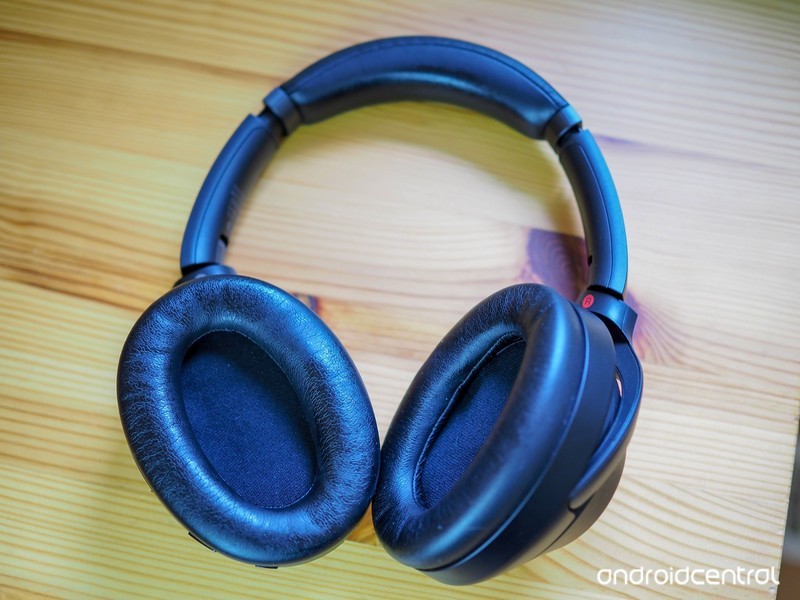
The Sony WH1000XM3 headphones come with a range of excellent features, and Sony is updating them with new features all the time. Version 2.0 brings support for Google Assistant, with more feature set to be added later. This guide will show you how to update the firmware on your new headphones.
What you’ll need
- Amazon: Sony WH1000XM3 headphones ($348)
- Google Play Store: Sony | Headphones Connect app (Free)
The Guide
First, make sure your headphones are paired with your phone
Launch the Sony | Headphones Connect application.
Connect your WH1000XM3 to the Sony | Headphones Connect app (this should happen automatically if you’re paired).
If there’s an update available, you’ll see the banner at the bottom of the screen. Press More Info.
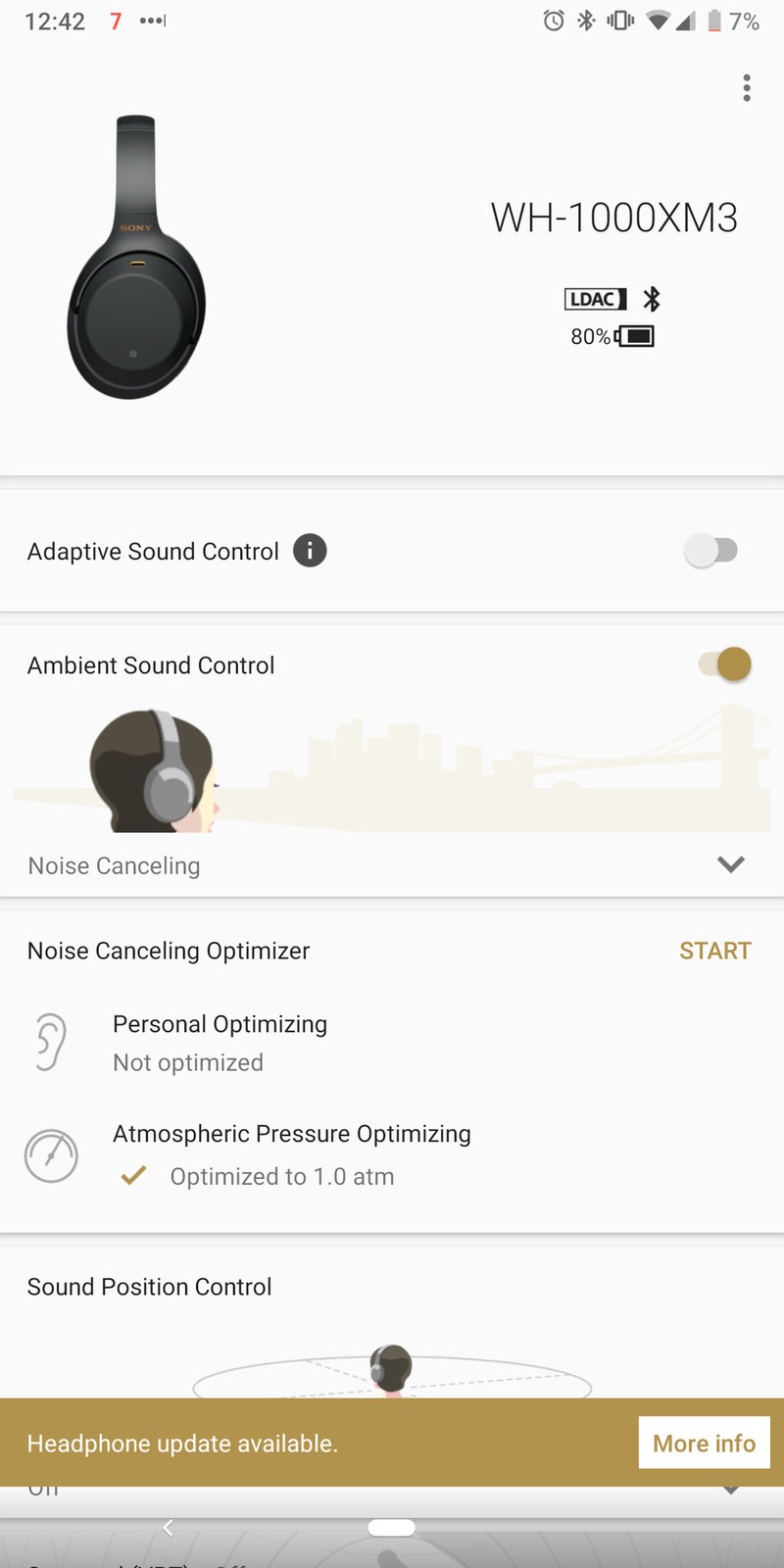

Press OK to start the update.
- The transfer will start. It will automatically move to the next screen after the transfer has been completed. This will take about one minute.
When the software update is completed, press “OK”.
Once you’ve updated the firmware on your Sony WH1000XM3 headphones, you’ll get the access to the latest features that Sony has made available. In the case of Version 2.0.0, this will allow you to access Google Assistant directly from the headphones, once Google enables the feature in late 2018.
Our top equipment picks
Our pick
Sony WH1000XM3 Wireless Headphones
<img src=”https://www.androidcentral.com/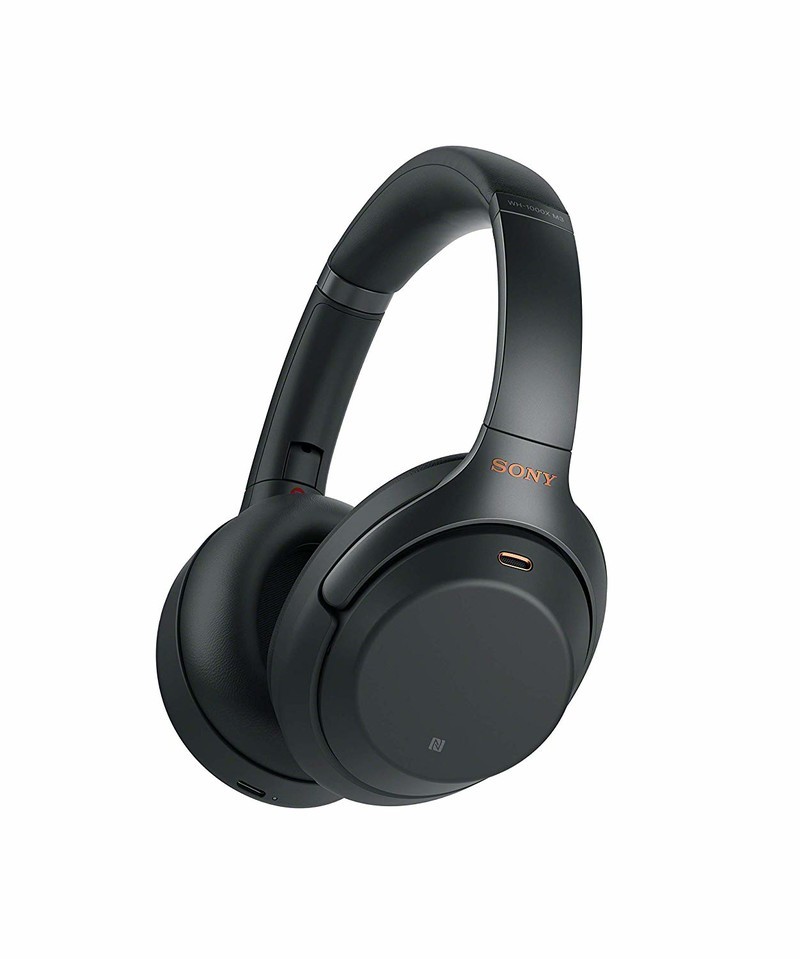
$348 at Amazon
The best wireless headphones are even better this year.
The best headphones offer comfort, connectivity, and compatibility with all your devices, and the Sony WH1000XM3 achieves this. USB-C charging keeps them future-proof, redesigned ear pads make them more comfortable, and improved power efficiency means they offer hours of audio playback.
Google Pixel 3s bought from Best Buy are apparently SIM locked to Verizon

This is not a great sign.
Verizon being the “exclusive” carrier for the Pixel 3 and Pixel 3 XL is a bit of an annoyance because it reduces the options for getting the phones in a store and with incentives from other carriers. But now it looks like that exclusivity is more restrictive than in the past — Pixel 3s sold by Best Buy are seemingly SIM locked to Verizon. Early units being sold today (the first actual day of retail availability) from Best Buy aren’t working with non-Verizon SIM cards.

To be clear here, Best Buy technically only sells a “Verizon” Pixel 3 and Pixel 3 XL. But if we were to follow the past experience of the original Pixel and Pixel 2, these “Verizon” phones were actually identical to the unlocked models and could be used on any carrier of your choice — the only hurdle was getting Best Buy or Verizon to sell you one without a Verizon account.
But yes, it seems that Pixel 3s sold by Best Buy are SIM locked — its product pages even say so. Compare that to Best Buy’s listing for the “Verizon” Pixel 2 that clearly lists that phone as being unlocked, which it was. I was tipped off to the issue by a reader (thanks, Alex!) who had zero problems walking into a Best Buy and buying a fresh Pixel 3 XL without a Verizon account … but was unable to get it to work with either a T-Mobile or AT&T SIM. Putting a Verizon SIM in it, the phone worked fine — but it complained again as soon as it had another U.S. SIM inserted, so this isn’t just a “first-time setup” requirement.
Typically, the only reason why a Pixel would be SIM locked is if it was being sold by Verizon — or Best Buy as a Verizon reseller — on a multi-month financing plan. When the phone is sold full-price with no contract, Verizon account or financing plan, we would typically expect that SIM slot to be unlocked. At this point, the information we have is that this is not the case when the phone comes from Best Buy. Verizon can, of course, unlock any phone that has a SIM lock to its network. Whether a Verizon representative (in store, online or on the phone) would be willing to do that for you when you’re not a Verizon customer is another question entirely.
For now, this means you should buy from the Google Store if you intend to use another carrier.
Thankfully, even if this is the by-the-book rule that Best Buy and Verizon are now following, this isn’t a catastrophic problem … so long as you know what to do. You can still buy the Pixel 3 and 3 XL from the Google Store, including with 24-month no-interest financing. Those phones will never be SIM locked — and heck, you can even use it on Verizon if you wish. You’ll just have to accept the trade-off of not being able to get any incentives Best Buy and/or Verizon are offering with purchase.
For now, this means that you should stay away from buying a Pixel 3 or 3 XL from Best Buy or Verizon if intend to use it on a carrier other than Verizon. That is, until we get this whole situation sorted out.
I’m trying to track down the details on this, and have reached out to Google for clarification on the situation. This story will be updated with any future information as soon as it’s available.
Google Pixel 3 and Pixel 3 XL
- Google Pixel 3 and 3 XL review
- Google Pixel 3 and 3 XL: Everything you need to know!
- Google Pixel 3 vs. Pixel 3 XL: Which should you buy?
- Google Pixel 3 and 3 XL specifications
- Join our Pixel 3 forums
Best Buy
Verizon
Google Store
Project Fi
Canada Daily Deals: TCL 4K TVs, Nest Hello doorbells, AMD Ryzen CPUs, more
Whether you’re looking for new tech gear or household items, we’ve got you covered.
We found plenty of great deals today that include big discounts on TCL 4K HDR Roku TVs, Jabra Elite Active 65t true-wireless earphones, Nest Hello bundles, AMD Ryzen processors, USB-C cables, and much more!
View the rest of the deals
Each day, the Thrifter Canada team scouts out and shares amazing deals on products you know and love, helping you find the best prices on the ‘net.
For more Canadian deals coverage, be sure to keep an eye on Thrifter CA, sign up for the Canadian newsletter and follow the team on Twitter.
LG V40 ThinQ review: Five cameras aimed straight at Samsung

LG basically made its own version of a Galaxy S9+, and that may just be enough.
From the start, LG’s V series has been about content creation and offering more ways to capture the world around you. But over the years, the G and V series have to converged to the point where they’re nearly identical. Not unlike Samsung’s Galaxy S and Note lines (go figure), the G and V series are basically the same aside from slightly different sizes and some key feature advancements that a staggered release cycle affords.
In a world where the LG G7 hasn’t garnered the mind share of Samsung’s Galaxy S9+, that leaves the V40 in a tough spot considering how much it shares with LG’s attempt from earlier in the year. The “hook,” if you will, is a five-camera setup that’s backed up by neat camera software. But the V40 has more to offer, as the rest of the phone is filled with appealing specs and features lifted directly from Samsung’s playbook.
Here’s how it all comes together in the LG V40.
Five camera fun
LG V40 ThinQ

$949 at Best Buy
A great all-around high-end phone, with a price tag to match.
LG managed to make a top-notch phone by following Samsung’s lead. The V40 is a beautiful and solid phone that’s filled with must-have and nice-to-have features, with top-end specs and a large high-quality display. The software is quick and relatively simple, choosing to lean toward Google’s ecosystem more than ever. The triple camera combination is a treat to shoot with and provides both unique and good-looking photos. The only potential shortcoming is underwhelming battery life that isn’t as good as you’d expect for the V40’s size.
Pros:
- Big, beautiful screen
- Triple camera is a treat
- Solid and beautiful hardware
- Headphone jack and good DAC
- Wireless charging
- Simpler software than before
Cons:
- A phone this big should have more battery
- Secondary cameras missing OIS
- No higher storage option available
- Aurora Black model is slippery
About this review
I’ve been using a U.S. unlocked LG V40 for 6 days, initially in San Francisco, CA and then in Seattle, WA. The phone’s software updated 2 days into the review period to build OPM1.171019.026 with the September 1, 2018 security patch. It was provided to Android Central for review by LG.

Solid
LG V40 Hardware, display and features
The V40 generally follows the industry trend of being a rounded metal-frame phone with smoothly sculpted glass and a typical layout of buttons and ports. The 6.4-inch display is notably larger than the G7, and is ever-so-slightly larger than the Galaxy S9+ — less than 1mm taller, and 2mm wider. It has a notch, of course, but LG made a subtle change to make the bottom bezel the same thickness as the top — and despite the notch up there it has a very nice sense of symmetry when you look at the screen.
This is a really nice OLED screen you’ll enjoy looking at, but it isn’t quite as good as Samsung’s.
That display is an OLED panel, which marks a move away from the G7’s LCD and hasn’t exactly been a point of strength for LG phones. You may recall the furor over the Pixel 2 XL’s LG-made panel being so bad, but thankfully the V40’s panel looks nothing like that. Actually, it looks really good. It’s crisp and colorful, with only mild color shifting at tight viewing angles. And it now has a proper auto-high-brightness mode that can enable by default in sunlight and doesn’t need to be triggered manually. The max brightness is good enough to easily see the screen in bright sunlight, and it also gets really dim at night. I won’t say it’s as wonderful as Samsung’s latest screens — which are just amazing — but it’s darn close, and good enough that I haven’t found any reason to complain about its characteristics.
The phone is solid, but the matte glass finish is what really takes it over the top — don’t get the Aurora Black color.
Because it’s relatively light, the V40 doesn’t seem quite as solid or substantial. At 169 grams it’s 10% lighter than the Galaxy S9+ and 16% lighter than the Note 9 — it’s also over 1mm thinner. But most people will find the reduction in quality heft a fine trade-off for being able to use the phone in one hand more comfortably. The V40 is still awkwardly tall and a little slippery when it comes to adjusting your hand to reach the top third of the display, but the lower weight helps with usability regardless.
The slippery finish is actually exclusive to this Aurora Black V40 that I’ve been using, because LG has an altogether different finish for its other colors. Moroccan Blue, which is the only non-black option in the U.S., and other international options have a softer matte finish to the glass that is amazing to hold. The frosted glass finish is easier to grip, collects fewer fingerprints and offers a neat color-shifting look that makes the black version even more boring by comparison. It’s a shame LG didn’t apply this “soft” finish to all of the colors — a big missed opportunity to differentiate entirely from Samsung’s glossy backs. The black one looks and feels fine, and has a subtle color-shift effect to a more blue-green in the right lighting, but as soon as your see Moroccan Blue you’ll want it — and sadly, it’s exclusive to Verizon for some unknown period.
LG took Samsung’s lead and simply offers every spec and feature the competition has.
Elsewhere, LG’s done a darn good job of filling the V40 with the features people are clamoring for. It’s water resistant, of course. The 64GB of storage is typical, but the SD card slot is a nice bonus for many people. There’s also a headphone jack, which is appreciated, and LG continues to get plaudits for including a nice DAC to help it out. LG’s so-called “BoomBox” speaker system is an attempt to skip dual speakers in favor of using the whole phone as a resonator for the single speaker at the bottom, and for the most part it works well. When you set the phone down on a table it really helps amplify the sound, and it sounds pretty good — but when you crank up the volume a bit when watching or listening to something as you hold the phone, it feels … odd. The whole phone vibrates, which isn’t pleasing, and you can still run into the age-old problem of blocking the single bottom speaker with your pinky finger.

Triple treat
LG V40 Cameras
We’ll eventually reach the point of diminishing returns with the number of cameras on smartphones — but right now, having three distinct sensors and lenses on the back of a phone seems totally normal. LG’s marketing talks about a “penta” (five) camera setup on the V40, but of course, only three are on the back with the other two on the front. The set of three breaks down like this: a 12MP main sensor with a standard-view lens, a 16MP sensor with a wide-angle lens, and another 12MP sensor (different from the primary) with a 2X telephoto lens.
The main camera took a step up, and the two supporting lenses just add to the experience.
The wide-angle sensor and lens are the same as the LG G7, which is fine, but the main sensor and lens have thankfully been upgraded. The main sensor has 1.4-micron pixels, much larger than the G7’s 1-micron, and the lens is now a little brighter at f/1.5. There are also purported upgrades to the photo processing, including smarter HDR that chooses how many frames to process based on what’s in the scene and specific changes to improve low-light photo quality overall.


I’m so glad LG made the sensor and lens upgrade to get more light in. It really shows in the final product, whether you’re shooting in low light or not. Shooting in auto mode it seems pretty clear when the multi-frame HDR mode kicks in and really bumps up the colors, but even without it the V40 takes pleasing and natural-looking photos. My only complaint is in the fine details, where LG’s processing lands in a weird middle ground between Samsung and Google. It isn’t super-smooth like Samsung, nor is it natural like Google — when you zoom in you’ll see blotchy chroma noise on occasion, and oftentimes sharp edges come out soft. It looks just fine on a phone or even a computer screen, but zooming in reveals displeasing defects in some photos.
Photo quality is good, but the prevailing feeling is that the V40’s camera is fun to shoot with.
LG’s wide-angle camera continues to be a unique treat. I love taking these wide-angle shots, and they just offer a nice change of pace to mix up the kinds of photos I share with people. Not all scenes call for it, but going back to a phone without a wide-angle camera feels like a limitation. The telephoto camera isn’t such a great success. A sensor with 1-micron pixels behind an f/2.6 lens without OIS is a recipe for poor photos in anything but perfect lighting, as so many other manufacturers have found. It’s useful for zooming with less resolution in daylight, and facilitates a proper portrait mode with faux bokeh, but it isn’t nearly as good as the Galaxy S9+’s better sensor and OIS.
The combination of three sensors and really good camera software make the V40 a downright fun phone to shoot with, and also has the quality to back it up. LG’s software makes switching between the three cameras seamless and even offers options to preview all three views at once or capture photos sequentially each one. There’s a robust manual mode if you want it, but the automatic mode absolutely gets the job done with no fuss. LG may not be winning the camera battle with absolute quality and accuracy when you nitpick the details, but the whole experience is right up there with the competition.
The dual front-facing cameras don’t change the game much from the LG G7. The main camera is the same 8MP sensor with fixed focus, an f/1.9 lens and 80-degree field-of-view. It’s paired with a 5MP sensor with fixed focus and an f/2.2 lens, but a slightly wider 90-degree lens. This gives you some flexibility for a tighter selfie with the main camera or a larger group shot with the secondary, but we’re talking about 80- vs. 90-degrees here, which is small. The main camera captures much more detail in your face, but either one will be good enough for social media and messaging. The wide-angle shooter is near-necessary for group shots, but I still wish at least the main sensor had auto focus, as that’s a premium feature I expect on a high-end phone like this.

Going simpler
LG V40 Software, performance and battery life
I stopped using the LG V30 before its Oreo update and didn’t spend much time with the LG G7, so this is my first time really getting in deep with the company’s latest software offering. The V40 is launching on Android 8.1, which in itself isn’t disappointing except for the fact that LG made a grandiose announcement that its “Global Software Upgrade Center” would be improving its update cadence and stability. Where’s Android 9 Pie at?


Even though we’re looking at Oreo, LG has made a concerted effort to streamline and simplify its software. In my time speaking with LG representatives, they specifically called out the reduced amount of bloatware and duplicate apps on the V40. LG no longer ships its own calendar or calculator apps, for example, and defaults to Google’s instead. This is one of the main benefits of LG’s software over Samsung’s — it’s at least somewhat self-aware of the fact that very few people want its apps, so it’s cutting back on the offerings. There are still a few that can’t be disabled, but there’s far less app cruft to deal with than in the past.
Feature creep has been reduced, as has bloatware and duplicate apps. LG is going simpler.
The feature creep has also been reduced, with fewer unnecessary whizz-bang things popping up and distracting you. I still had to spend the typical couple of hours going through settings and turning off things that I don’t want, but it can all be turned off, which I really appreciate. There are still baffling omissions like not having a fingerprint swipe gesture for the notification shade and having an app drawer that doesn’t auto-sort alphabetically, but on the whole, I’m finding LG’s software to be quite pleasant.
If you’re a fan of Google’s services you’ll be fine with LG’s integration of the Google Assistant, Google Feed and Google Lens as well, which replaces any sort of LG-specific “AI” you’d expect. The Feed is found as part of the default launcher, the side-mounted Assistant button auto-launches the service and Google Lens is baked right into the camera app. You can just as easily ignore it all, but I find it much less intrusive than Samsung’s Bixby push, and the hardware button placement is low enough that it isn’t accidentally pressed every single day.
Performance and stability are both great — now, how about that Pie update?
Performance and stability have also been excellent, which I’d completely expect for this class of phone with these internals. The only sluggishness I’ve seen has been with opening the camera after a handful of hours of not using it, which is disappointing. I want that camera to always be available, and sometimes it takes a few beats to get going with a double-press of the power button. The rest of the experience has been a treat, no matter what I’ve thrown at the phone.


So how long does the performance last? Unlike the Galaxy Note 9, the V40 doesn’t have an impressively sized battery, at just 3300mAh, considering the overall footprint of the phone. That’s considerably less than the Note’s 4000 and even Galaxy S9+’s 3500mAh. As you can see in the above screenshots, battery life can obviously vary based on how hard you hit the phone. I don’t do anything to “save” battery on my phones — I use auto brightness, let all of my apps sync and use the phone whenever (and however) I need it. On a heavy day I was able to kill the V40 in under 14 hours with over 4 hours of screen-on time, tons of Bluetooth audio, lots of time on LTE and about 30 minutes of driving with navigation Android Auto. On easier days, I went to bed with over 30% battery remaining despite my typical usage and over 3 hours of screen-on time.
The V40 will handle a full day of use no problem — the question is how much reserve you’ll have left at the end of the day.
These numbers are very much in line with my Galaxy S9+ battery life history: the V40 will handle a full day of typical use with plenty to spare and no battery-saving tricks; but if you hit it hard, you may be looking at a late-evening top-up or very little left in the tank at the end of the day.
When it comes to recharging, the V40 is really quick. That smaller capacity paired with Quick Charge 3.0 leads to fast top-ups over USB-C, which you may need if you hit the phone hard. It also has wireless charging, and worked perfectly with my Samsung wireless chargers.
I know most people won’t need more battery capacity than the V40 offers, and I certainly appreciate the lighter overall weight of the phone. But LG could’ve really stuck it to the competition by getting this capacity up above 3500mAh just to give a bit more longevity confidence to potential buyers.

Conclusion
LG V40 Review
As I used the LG V40 for the past week, I wonder why interest in LG’s latest phones isn’t higher. A few years ago, LG was doing pretty quirky stuff with its phones that was polarizing (and sometimes objectively bad). Now, it’s making darn good phones that match the competition spec-for-spec and feature-for-feature, and have a couple neat differentiators — and the V40 is a perfect example. It’s not weird or compromised, it’s just a top-end flagship with everything we expect in that class. It effectively lands between the Galaxy S9+ and Note 9, but offers just a little bit of LG flair to stand out. That’s a fine recipe.
Purely phone versus phone, I actually like the V40 more than the Galaxy S9+ — but you have to look at the price differential.
The hardware is very similar to the Galaxy S9+. The display, too, is approaching Samsung’s greatness. It has effectively the same hardware features in terms of battery, wireless charging, SD card slot, speakers, a headphone jack and IP68 resistance. The main camera isn’t quite on Samsung’s level, but the addition of a wide-angle shooter and neat camera software may make up for it in some people’s eyes. I actually feel like LG’s software is comparable to Samsung’s as well — it has a little less polish, but much less bloatware and fewer odd quirks. And yeah, it focuses on Google Assistant instead of Bixby.
Putting aside LG’s clear disadvantage of momentum and branding, the V40 is every bit as nice a phone as the Galaxy S9+. But that’s really the issue for LG: it’s making a phone that, on the whole, is comparable to Samsung’s, rather than objectively better. In that case, what’s the real draw for someone to try out an LG phone rather than stick with the Samsung brand they already know and trust?
4
out of 5
Well, it really comes down to a handful of choices on marginal differences — primarily, in the camera and software experience. You have to want the wide-angle lens on the back and fun camera software. You could also desire a phone that has a flat display rather than a curved one. Or you just don’t enjoy Samsung’s software. The soft matte finish on the back glass (except for the black model) is a small point of differentiation as well, but not a game-changer. Aside from those small areas, the V40 simply mirrors the Galaxy S9+ — and most people will be looking to Samsung by default. Particularly when the Galaxy S9+ is $100-150 less at retail.
Making a decision in a vacuum purely phone versus phone, I actually like the V40 more than the Galaxy S9+. I land on LG’s side with the cameras and software, and find the other small differences to be inconsequential. But give me a $150 discount, and it’s near-impossible to turn down the Galaxy S9+ in that scenario. Up against the Note 9, LG matches Samsung on price but loses out in battery and doesn’t offer a stylus — a different scenario, for sure. Perhaps LG can truly compete in a month when the inevitable price cuts arrive.
See at Best Buy
LG V40
- LG V40 ThinQ review: Five cameras aimed at Samsung
- LG V40: All of the latest news!
- LG V40 specifications
- LG V40 vs. Samsung Galaxy S9+: Which should you buy?
- Join our LG V40 forums
AT&T
Verizon
T-Mobile
Sprint
Best Buy
 AIVAnet