


Some iPhone XR Models Start Selling Out
iPhone XR pre-orders kicked off at 12:01 a.m. Pacific Time, and just a half hour after orders went live, some colors started selling out and became unavailable for launch day delivery in the United States.
Right now, some yellow iPhone XR models from T-Mobile won’t ship out for one to two weeks, delivering in November instead of on October 26. In the UK, iPhone XR supply is also starting to slowly sell out, with coral and yellow models starting to list a one to two week delivery estimate.
All other colors are still available for launch day delivery in the United States at this time, but available supply for in-store pickup has dwindled for some models in some areas.
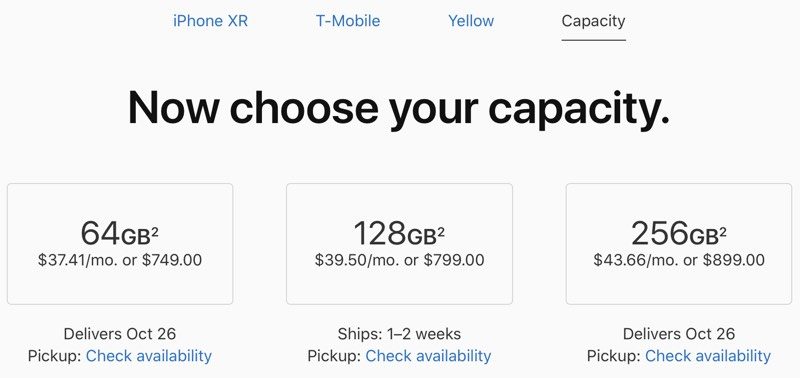
It’s not clear if yellow is a popular color choice or if Apple made fewer yellow iPhone XR models, but with one color selling out, the others could soon follow.
Apple did not provide SIM-free models of the iPhone XR for pre-order in the United States, which typically means that supplies are not quite as strong as Apple would like. SIM-free models are, however, available in other countries around the world.
Curiously, Apple has also not provided iPhone XR cases for the new device, which is unusual as new iPhone releases are typically accompanied by matching cases. iPhone XR press releases in some countries mentioned that Apple would debut a clear case for the iPhone XR to show off the colors of the device, but no such case is available as of yet.
If you’re planning to get an iPhone XR, it’s best to place an order right away if you want launch day delivery, because it’s not clear if and when available stock will sell out. Apple will, as always, have some devices available for walk-in purchases on October 26.
Related Roundup: iPhone XRBuyer’s Guide: iPhone XR (Buy Now)
Discuss this article in our forums
Xiaomi Mi Mix 3 will come with 10GB of RAM and slide-out front cameras
The Mi Mix 3 is Xiaomi’s most ambitious device yet.

The Mi Mix 3 is turning out to be one of the most interesting devices of the year. Xiaomi has teased earlier in the year that it was adopting a sliding design to hide the cameras when not in use, and the phone will be the first in the world to sport 10GB of RAM.
Here’s everything we know so far about the Mi Mix.
October 19, 2018 — Xiaomi shows off the sliding design on the Mi Mix 3
Quite a few Mi Fans have been asking how the sliding form factor works for #MiMIX3. 😎Here’s a quick video showing how easy it is to slide down and reveal the TWO front cameras. Only 6 days left.#Xiaomi pic.twitter.com/gfRlPKbO6M
— Donovan Sung (@donovansung) October 19, 2018
Ahead of the Mix 3 launch, Xiaomi is showing off how the sliding mechanism works on the device. The screen slides down to reveal the dual front cameras, with XIaomi highlighting a few potential use cases in the teaser video.
October 17, 2018 — Mi Mix 3 confirmed with 10GB of RAM
5G speeds, 10GB RAM, 8 days left. ❤️ #Xiaomi #MiMIX3 https://t.co/SYCnyDx2eJ
— Donovan Sung (@donovansung) October 17, 2018
It’s official: the Mi Mix 3 will be the first phone in the world to feature 10GB of RAM. Xiaomi’s director of product management Donovan Sung served up the information on Twitter, where he previously shared that the device would also sport 5G connectivity.
October 16, 2018 — Mi Mix 3 will be unveiled on October 25
Xiaomi is rolling out media invites for the Mi Mix 3 event, which will take place on October 25. Unlike the first two generations, it looks like the Mi Mix 3 will sport a unique sliding design to hide the front camera assembly.
August 30, 2018 — Xiaomi teases the sliding design of the Mi Mix 3
When Xiaomi unveiled the Mi Mix 2 last year, it mentioned that it experimented with different designs for hiding the front camera before settling on the current implementation — positioning it in the bottom bar. One of those designs included a notch much like the Essential Phone, and at the time Xiaomi said it would try something different this year.
We now have a better idea of that will look like thanks to a render posted by Xiaomi president Lin Bin on Chinese microblogging platform Weibo. According to the render, the upcoming Mi Mix 3 will sport a camera slider that’s similar to what we’ve seen on the Find X, with the front camera housing tucked behind the slider.
That said, there are a few key differences. Based on the render, it looks like Xiaomi is integrating the camera module into the chassis itself, with the display sliding down to reveal the camera array. It also looks like we’ll see a similar IR-based face unlock system like the Mi 8 and the POCO F1.
Bin’s post came on the heels of the Honor Magic 2 announcement, with Honor’s upcoming phone also offering a mechanical slider that hides the camera sensors. The Mi Mix 2 debuted last September, but the Mix 3 is slated for an unveil in the month of October.
When is the Xiaomi Mi Mix 3 launching?
The Mi Mix 3 will be unveiled in China on October 25, and will likely make its global debut before the end of the year.
Will it have global LTE bands?
If the Mi Miix 2 was any indication, Xiaomi will offer a variant of the Mix 3 with global LTE bands. It’s another question entirely whether the device will be available in most Western markets, but with Xiaomi now having an official presence in the UK, it’s likely the device will be officially sold in the country.
What are the specs?
Xiaomi is set to offer the Mi Mix 3 with 10GB of RAM and 5G connectivity. It will also have a face unlock feature and dual 24MP cameras up front. Details are liight on the rest of the hardware, but with the launch slated for the last week of October, we should know more about the device shortly.
How to get followers on Twitter
Twitter can be stressful. Unlike Facebook or Snapchat, it’s hard to feel content when only your closest friends and loved ones are following and interacting with your posts. Watching others gain followers as you get left behind can evoke feelings of inadequacy akin to watching the cool kids in high school eat at the best table in the lunchroom.
Further reading
How to change your Twitter name
How to delete your Twitter account
Best tech titans to follow on Twitter
There’s a fine line between looking desperate and building your personal brand, but it can be walked with the right set of guidance. Below, we’ve outlined some tips to help you accrue more followers on Twitter. Just make sure to employ them sparingly.
Step 1: Select the right photos
First impressions are important, especially on Twitter. Given your profile is one of the first things people will see, it’s important to choose a profile picture and cover photo that can be identified when small. Whether one of your tweets pop up in someone’s timeline or someone searches for you specifically and previews your profile, you want them to be able to recognize you for you. Still, try not to overthink it.
For a personal account, it’s best to use a picture of your face for your profile picture. This could be an actual photo or an illustration; you just want something that shows off who you are. Your cover photo allows you to express yourself in a slightly larger format, and can include banners from your latest project or your favorite vacation photo, among other things. You want to avoid forgoing a picture entirely, however, as this may lead people to think you’re a bot or spammer. Also, once you’ve picked the perfect pics, try not to change them too often, as you might confuse your followers.
Step 2: Write a solid bio
After looking at your picture, people will typically read your bio. People on Twitter aren’t generally known for their patience, however, so don’t be overzealous when describing yourself or fill your bio with unnecessary tags. You only have 160 characters to write about what you do and like, but this should be more than enough. Feel empowered to use a little bit of humor, but don’t feel like you have to in order to be appreciated.
Step 3: Get verified, if possible
Getting that little check mark next to your name can go a long way toward proving you really are who you say you are to your followers. Although Twitter has paused it’s public submissions for verification for the time being, accounts of public interest can still be verified. If you can’t get verified right away, don’t sweat it, as there are still plenty of other ways to boost your follower count.
Step 4: Tweet
This might seem like a no-brainer, but consistently updating your Twitter account is the best way to keep (and gain) followers. You don’t want to risk people unfollowing you or forgetting who you are because you only tweet once every three months. Unless you’re a famous celebrity, you’ll probably need to tweet a bit more than that.
uhhh of course i’m going to see mamma mia 2 for the 500th time it’s called mamma mia here we go again not mamma mia here we go once
— grace ???? (@gracepxx) July 31, 2018
Now, this doesn’t necessarily mean tweeting about every little thing that pops into your head, even if Twitter can handle the stream of consciousness thing better than most sites. Instead, spare the internet and only write about things that you’re passionate about. There isn’t really a magic number for how often you should tweet, but try to do so at least every day so that others know you use Twitter fairly regularly.
Step 5: Respond and retweet
A retweet is a great way to connect with people of similar interests and to share content that you enjoy. If you retweet a really cool article about the space station, then someone else might see it and begin following you. Same goes for commenting on articles and tweets you like. Having something witty or interesting to contribute to a conversation is bound to get some people interested in the things you do and say. Some sites will ask others to retweet you, but we’ve yet to figure out a graceful way to do that. There is a time and a place to add something like “please RT,” but those are few and far between.
Step 6: Use hashtags
Hashtags are a magical, magical thing. They can be used to be sassy, to further explain a point, or to put more eyes on your tweet. Using hashtags that are trending is a great way to get more readers because your tweets will come up if someone else is searching for that particular tag. It’s also nice to be a part of the conversation, and to get the opportunity to connect with people who may have similar interests or opinions as you.
#WeUnderstandThatAsCorporateEntitiesOurPresenceInCertainDiscussionsIsNotAlwaysRequiredSoWeWillStriveToLimitOurActivitiesToJustSellingYouShit
— Slack (@SlackHQ) September 18, 2014
It is entirely possible to overdo it with hashtags, however, especially on Twitter. While it may be fine to attach 10 or 15 hashtags to a post on Instagram, you should keep it to one or two on Twitter. Don’t #hashtag everything #in #your #tweet. Not only does it make your tweets hard to read, but no one is going to be searching for most of these terms and it could end up making you look ridiculous. Tweeting about trending topics can help you build your audience, but if nothing really strikes your fancy, you can always try making something up on your own.
Step 7: Follow people that have similar interests
Though you’ll probably end up doing this naturally if you spend enough time on Twitter, following people you like is actually a great way to grab some followers. If you follow people who share your interests, they are generally more likely to follow you back and/or retweet you. This exposes you to all of their followers, who may also share similar interests with you. From there, the cycle continues.
Give the people what they want, as long as they want the same things as you do. Tagging people with similar interests in your posts (sparingly) can also bring in the followers, as those accounts are more likely to interact with your posts if you weren’t already on their radar. This doesn’t mean you have to only tweet about one particular thing — unless you are working on a specific social media brand — but find people that you appreciate and they will probably appreciate you in turn.
Step 8: Know when to tweet
You’ll certainly get some readers if you’re constantly tweeting at 3 a.m., but you want more than just some. Twitter, like most social media sites, gets the most traffic at 9 a.m., noon, and 6 p.m. for fairly obvious reasons. These times directly correlate to when people are going to work, on their lunch break, and leaving work. This is when people are most actively checking their phones and computers.
Another handy trick is to pay attention to tweets that get the most engagement and retweet them at a different peak hour. This ensures that followers in other time zones can still see your content, and is a good way to cover your bases. We don’t recommend doing this with every tweet, or even most of them, but every once in a while this may give you the attention you’re craving.
So, go out and try some of these tips! If they don’t work right away, just stick around, post, and interact with things you like. Sooner or later, people will follow.
Editors’ Recommendations
- A lot less clutter! Twitter relaunches purely chronological timeline
- How to get followers on Tumblr
- How to link Instagram to Facebook
- How to delete your Instagram account
- Automate all the little stuff in your life with these awesome IFTTT recipes
Samsung Galaxy Book 2 hands-on review
Research Center:
Samsung Galaxy Book 2
There are plenty of 2-in-1 devices to choose from, including now the Surface Pro 6 and the Google Pixel Slate. The form factor is clearly a big deciding factor for anyone looking to buy a new device, why is why Samsung is again getting back in the action with the launch of the new Galaxy Book 2.
Powered by the Qualcomm Snapdragon 850 rather than an Intel chip, the Galaxy Book 2 isn’t your average PC. But with a beautiful 12-inch Super AMOLED display, big promises for up to 20 hours of battery life, and gigabit LTE speeds, it just might have something the competitors don’t offer. We had some hands-on time with the device to see how it compared.
Kicking into action
The original Galaxy Book always shared some DNA with the Surface Pro, but its sequel takes it a step further. That’s largely due to the new, built-in kickstand that feels plenty sturdy. No more need to fiddle with a flimsy folio cover just to get some work done. Of course, you can also detach the keyboard completely for tablet mode.
The device has a solid, all-aluminum, silver chassis and a weight of 1.75 pounds, which is just a hair heavier than the magnesium Surface Pro 6. It’s not as light as an iPad, though it felt comfortable to hold as a tablet.
The 12-inch display is a high point of the device with a resolution of 2,160 x 1,440 and 216 PPI (pixels per inch). That might be less than the Surface Pro 6 and Pixel Slate, but Samsung is using its proprietary Super AMOLED panel to make the colors really pop. In our time with it, we noticed black colors in webpages were deep, and images on the Digital Trends homepage were super bright.
Unfortunately, that size also comes with large bezels flanking the bright display, which aren’t the most attractive. The Galaxy Book 2 isn’t alone though — we’ve noticed them in the Surface Pro 6 and Pixel Slate too.
The keyboard and S Pen included
Unlike the competition, Samsung includes the S Pen and Keyboard inside the Galaxy Book 2 box. In our brief testing, we found both to be very responsive. We were told the specs on the S Pen are the same as the one inside the Galaxy Note 9, though the design is quite different. It is larger, thicker, and has a new magnet on the side to attach to the left side of the Galaxy Book 2. Just like the mobile version, it makes good contact with the screen and writes smoothly.
The smooth keycaps provided solid room for travel when speed typing, and it wasn’t overly loud when slammed down.
Asides from the fact that now attaches via a POGO connection, the keyboard is about the same as the original Galaxy Book, down to the great typing experience and the way it doubles as a cover. The smooth keycaps provided solid room for travel when speed typing, and it wasn’t overly loud when slammed down. The touchpad under the keyboard, though, is still a bit too small for our liking.
Connectivity is impressive with two USB-C ports and a microSD card slot. This means you’ll need to embrace dongles to enjoy your accessories, but the port selection makes the Galaxy Book 2 more futureproof than a Surface Pro 6 with its aging mini-DisplayPort and USB-A. It also includes a headphone jack unlike Google’s Pixel Slate.
And after putting the Galaxy Book 2 in sleep mode, we were quickly able to jump back into the action. No need to fiddle with Wi-Fi. That’s thanks to the super fast gigabit LTE connection, which threw us right back into Slack chats and emails almost immediately after pushing the power button to return from sleep mode. It might not be a feature everyone needs, but it’s a significant boost compared to both the Surface Pro 6 and Pixel Slate — and comes at no additional cost.
A bit faster, a bit longer
This year delivered many devices with Qualcomm Snapdragon 835 processor, but the Samsung Galaxy Book 2 is the second device this year to ship with the newest Qualcomm Snapdragon 850 chipset. The change should make for 30 percent more performance, and address original concerns which showed that Snapdragon-powered Windows 10 devices were too slow.
In our initial testing of opening up several of the preloaded apps, and the Digital Trends website, YouTube, NotePad, and Samsung’s website there was no slowdown on the Galaxy Book 2. Even with just 4GB RAM, there was little to no latency in our initial web browsing and app usage with the device.
Julian Chokkattu/Digital Trends
That brings us to this devices’ other big performance claim: Up to twenty hours of battery. It’s not an uncommon claim for Qualcomm-powered PCs, but it’s still a big advantage over the Surface Pro 6, which gets closer to ten hours of standard usage. Our hands-on unit was charged up to around 67 percent when we were handed it on the showroom floor. After an hour and a half of use, it was still locked in at the same percentage. We’ll be looking forward to more testing in the coming weeks.
Windows 10 in S Mode
To make the most of the battery life and performance, the Samsung Galaxy Book 2 runs Windows 10 in S mode. That locks the system down to running apps from the Microsoft Store only, which wasn’t a problem for us in our general web browsing tests. For software like Chrome and Photoshop though, switching to regular Windows 10 is the best bet. You can always update to standard Windows 10 for free, but it might possibly come with the cost of decreased battery life or performance.
Samsung also throws in apps which are meant to work with your other Galaxy devices. This includes Samsung Flow, which can be used sync with, mirror, and transfer files to your Galaxy phone to see notifications in real-time, right on your screen. We weren’t able to pair our phone to try these apps out, but look forward to trying in our final review.
The Galaxy Book 2 starts at $1,000, which includes the keyboard and stylus bundled in. That might sound expensive at first when compared to cheaper Qualcomm PCs like the $700 Asus NovaGo, though it’s not far off the HP Envy x2, which was priced at $1,000 at launch. Meanwhile, the Surface Pro 6 starts at $900 for the Core i5 version, though it doesn’t come with the Type Cover keyboard or Surface Pen.
Samsung Galaxy Book 2 Compared To
Microsoft Surface Pro 6
Asus NovaGo
HP Spectre x360 13-ae002xx
Lenovo Yoga 730
HP Envy x360 15
Dell Inspiron 13 5000 2-in-1
Acer Nitro 5 Spin
Dell XPS 15 2-in-1
HP Envy x2 (2017)
Acer Switch 3
Lenovo Yoga 720 13-inch
Samsung Galaxy Book
Acer Switch Alpha 12
Huawei Matebook
Acer Aspire R7 (late 2013)
The Samsung Galaxy Book 2 will be available online at ATT.com, Microsoft.com and Samsung.com for $1,000 starting November 2, 2018. It will also be available in stores at AT&T, Sprint and Verizon later in the month.
Samsung Galaxy Book 2 hands-on review
Research Center:
Samsung Galaxy Book 2
There are plenty of 2-in-1 devices to choose from, including now the Surface Pro 6 and the Google Pixel Slate. The form factor is clearly a big deciding factor for anyone looking to buy a new device, why is why Samsung is again getting back in the action with the launch of the new Galaxy Book 2.
Powered by the Qualcomm Snapdragon 850 rather than an Intel chip, the Galaxy Book 2 isn’t your average PC. But with a beautiful 12-inch Super AMOLED display, big promises for up to 20 hours of battery life, and gigabit LTE speeds, it just might have something the competitors don’t offer. We had some hands-on time with the device to see how it compared.
Kicking into action
The original Galaxy Book always shared some DNA with the Surface Pro, but its sequel takes it a step further. That’s largely due to the new, built-in kickstand that feels plenty sturdy. No more need to fiddle with a flimsy folio cover just to get some work done. Of course, you can also detach the keyboard completely for tablet mode.
The device has a solid, all-aluminum, silver chassis and a weight of 1.75 pounds, which is just a hair heavier than the magnesium Surface Pro 6. It’s not as light as an iPad, though it felt comfortable to hold as a tablet.
The 12-inch display is a high point of the device with a resolution of 2,160 x 1,440 and 216 PPI (pixels per inch). That might be less than the Surface Pro 6 and Pixel Slate, but Samsung is using its proprietary Super AMOLED panel to make the colors really pop. In our time with it, we noticed black colors in webpages were deep, and images on the Digital Trends homepage were super bright.
Unfortunately, that size also comes with large bezels flanking the bright display, which aren’t the most attractive. The Galaxy Book 2 isn’t alone though — we’ve noticed them in the Surface Pro 6 and Pixel Slate too.
The keyboard and S Pen included
Unlike the competition, Samsung includes the S Pen and Keyboard inside the Galaxy Book 2 box. In our brief testing, we found both to be very responsive. We were told the specs on the S Pen are the same as the one inside the Galaxy Note 9, though the design is quite different. It is larger, thicker, and has a new magnet on the side to attach to the left side of the Galaxy Book 2. Just like the mobile version, it makes good contact with the screen and writes smoothly.
The smooth keycaps provided solid room for travel when speed typing, and it wasn’t overly loud when slammed down.
Asides from the fact that now attaches via a POGO connection, the keyboard is about the same as the original Galaxy Book, down to the great typing experience and the way it doubles as a cover. The smooth keycaps provided solid room for travel when speed typing, and it wasn’t overly loud when slammed down. The touchpad under the keyboard, though, is still a bit too small for our liking.
Connectivity is impressive with two USB-C ports and a microSD card slot. This means you’ll need to embrace dongles to enjoy your accessories, but the port selection makes the Galaxy Book 2 more futureproof than a Surface Pro 6 with its aging mini-DisplayPort and USB-A. It also includes a headphone jack unlike Google’s Pixel Slate.
And after putting the Galaxy Book 2 in sleep mode, we were quickly able to jump back into the action. No need to fiddle with Wi-Fi. That’s thanks to the super fast gigabit LTE connection, which threw us right back into Slack chats and emails almost immediately after pushing the power button to return from sleep mode. It might not be a feature everyone needs, but it’s a significant boost compared to both the Surface Pro 6 and Pixel Slate — and comes at no additional cost.
A bit faster, a bit longer
This year delivered many devices with Qualcomm Snapdragon 835 processor, but the Samsung Galaxy Book 2 is the second device this year to ship with the newest Qualcomm Snapdragon 850 chipset. The change should make for 30 percent more performance, and address original concerns which showed that Snapdragon-powered Windows 10 devices were too slow.
In our initial testing of opening up several of the preloaded apps, and the Digital Trends website, YouTube, NotePad, and Samsung’s website there was no slowdown on the Galaxy Book 2. Even with just 4GB RAM, there was little to no latency in our initial web browsing and app usage with the device.
Julian Chokkattu/Digital Trends
That brings us to this devices’ other big performance claim: Up to twenty hours of battery. It’s not an uncommon claim for Qualcomm-powered PCs, but it’s still a big advantage over the Surface Pro 6, which gets closer to ten hours of standard usage. Our hands-on unit was charged up to around 67 percent when we were handed it on the showroom floor. After an hour and a half of use, it was still locked in at the same percentage. We’ll be looking forward to more testing in the coming weeks.
Windows 10 in S Mode
To make the most of the battery life and performance, the Samsung Galaxy Book 2 runs Windows 10 in S mode. That locks the system down to running apps from the Microsoft Store only, which wasn’t a problem for us in our general web browsing tests. For software like Chrome and Photoshop though, switching to regular Windows 10 is the best bet. You can always update to standard Windows 10 for free, but it might possibly come with the cost of decreased battery life or performance.
Samsung also throws in apps which are meant to work with your other Galaxy devices. This includes Samsung Flow, which can be used sync with, mirror, and transfer files to your Galaxy phone to see notifications in real-time, right on your screen. We weren’t able to pair our phone to try these apps out, but look forward to trying in our final review.
The Galaxy Book 2 starts at $1,000, which includes the keyboard and stylus bundled in. That might sound expensive at first when compared to cheaper Qualcomm PCs like the $700 Asus NovaGo, though it’s not far off the HP Envy x2, which was priced at $1,000 at launch. Meanwhile, the Surface Pro 6 starts at $900 for the Core i5 version, though it doesn’t come with the Type Cover keyboard or Surface Pen.
Samsung Galaxy Book 2 Compared To
Microsoft Surface Pro 6
Asus NovaGo
HP Spectre x360 13-ae002xx
Lenovo Yoga 730
HP Envy x360 15
Dell Inspiron 13 5000 2-in-1
Acer Nitro 5 Spin
Dell XPS 15 2-in-1
HP Envy x2 (2017)
Acer Switch 3
Lenovo Yoga 720 13-inch
Samsung Galaxy Book
Acer Switch Alpha 12
Huawei Matebook
Acer Aspire R7 (late 2013)
The Samsung Galaxy Book 2 will be available online at ATT.com, Microsoft.com and Samsung.com for $1,000 starting November 2, 2018. It will also be available in stores at AT&T, Sprint and Verizon later in the month.
Samsung Chromebook Plus V2 vs. Google Pixelbook
Mark Coppock/Digital Trends
Samsung has one of the best Chrome OS 2-in-1s available, the Chromebook Pro. That’ll run you $600. The company also has another option that’s $100 less, the Chromebook Plus V2, that’s meant to be more of a budget option. It’s smaller, slower, and not as well built, but Samsung hopes its lower price is enough to make up for those limitations.
And then there’s the Google Pixelbook, the most premium Chromebook you can buy. Its presence at the top of the Chrome OS food chain raises an interesting question: Can you spend around half as much on a Chromebook and be happy with the savings? Read on to find out.
Design
The Chromebook Plus V2 has an aluminum lid and a plastic bottom portion, which fits perfectly within a price point that’s neither inexpensive nor premium. The build quality is solid enough, with some minimal flexing in the plastic keyboard deck, and you won’t be left thinking you spent too much money. At the same time, you also won’t stand out in the Chromebook crowd, thanks to an aesthetic that’s a familiar dark gray color with zero bling.
The Google Pixelbook is a very different Chromebook, sporting a premium build that blends metal, plastic, and glass to quite obviously mimic the company’s Pixel line of smartphones. It’s an elegant aesthetic that positions the Pixelbook at the top of the Chromebook heap, and the glass cutout adorning the upper quarter of the chassis’ backside isn’t just attractive. It’s also function, improving wireless connectivity by giving plenty of surface area for signals to traverse.
Other design aspects matter as well when comparing these two Chrome OS 2-in-1s. For example, the bezels on both 2-in-1s are more substantial than usual, making each more comfortable to use in tablet mode without suffering from inadvertent touch responses — but a tad outdated. In terms of inputs, the Pixelbook’s keyboard is more expansive and has a more comfortable action. Both machines have good touchpads for traditional input and control, active pens, and touch displays — though Samsung’s is a little finicky.
The Pixelbook’s design is superior, and you’ll pay almost double the price to get it, at least. In our estimation, Google’s Chromebook is better worth the money.
Performance
Mark Coppock/Digital Trends
The Chromebook Plus V2 uses an Intel Celeron 3965Y CPU, which is a performance upgrade from the ARM processor used in the first version. That doesn’t mean it’s fast, though. The Pixelbook’s 7th-gen Core i5 and i7 powers, albeit they’re low-powered versions, are much quicker and make a huge difference when running multiple Chrome tabs and Android apps.
Also, the Chromebook Plus V2 comes with only 4GB of RAM, which is okay for Chrome OS but not nearly as effective as the up to 16GB of RAM that Google offers on the Pixelbook. Combined with up to 512GB of fast PCIe NVME solid-state drive (storage) compared to the Samsung’s 32GB of slow eMMC storage, that makes the Pixelbook a much better performer for anything you’ll want to do.
In addition, the Pixelbook enjoys a 12.3-inch IPS displays running at 2,400 x 1,600 resolution in the 3:2 productivity-friendly aspect ratio. That compares to the smaller 12.20-inch IPS display at 1,920 x 1,200 resolution with a 16:10 aspect ratio on the Chromebook Plus V2. The Samsung’s display has good colors and contrast and is generally a pleasure to use, but the Pixelbook’s is larger, sharper, and superior in all the essential display metrics.
The Pixelbook is faster, hands-down, and it has a better display. Once again, Google justifies its higher price.
Portability
Mark Coppock/Digital Trends
Samsung packed 39 watt-hours of battery capacity into the Chromebook Plus V2. That’s a decent amount for a smaller Chrome OS 2-in-1, given the platform’s less demanding nature. It provides this notebook with some very healthy battery life, scoring a strong four and a half hours on our most demanding battery test, seven and a half hours on our web browsing test, and just under nine hours on our video test. The Chromebook Plus v2 is also portable, at 0.7o inches thick and weighing 2.93 pounds.
The Pixelbook’s battery is a slightly larger 41 watt-hours, which it managed to power the 2-in-1’s faster components and larger display for four hours and 1o minutes in our Basemark test. That’s only slightly behind the Chromebook Plus V2. And the Pixelbook is a thin at 0.40 inches and light at 2.4 pounds, making it even more portable than the Chromebook Plus V2.
Generally speaking, both of these 2-in-1s can likely provide all-day battery life unless you’re running Android action games non-stop. And they’re both easy to slip into a backpack. That makes them just about even in this category.
The Google Pixelbook is well worth its higher price
The Samsung Chromebook Plus V2 is $500 for its Celeron CPU, 4GB of RAM, and 32GB of storage. That’s not a terrible price for a Chrome OS 2-in-1 with these specs, but it’s not a killer deal either. In fact, it’s only $100 less than Samsung’s own Chromebook Pro that’s much better in many ways.
The Pixelbook is a much more expensive machine, starting at $1,000 retail (but sometimes on sale for $750) and heading north from there. But it’s also a much better machine, and you’ll likely feel better about what you spent than on Samsung’s quasi-budget 2-in-1. If you’re choosing between these two Chromebooks, choose the Pixelbook. You’ll be glad you spent the extra cash.
Editors’ Recommendations
- HP Chromebook x2 Review
- Google Pixelbook review
- Everything you need to know about the Pixel Slate
- Samsung Chromebook Plus V2 review
- The best laptops for college in 2018
USB-C Instead of Lightning Again Rumored for Upcoming iPad Pro Models
Apple’s upcoming iPad Pro models will feature a USB-C port instead of a traditional Lightning port, according to information gathered from accessory makers at the Global Source Mobile Electronics Trade Fair by Japanese site Mac Otakara.
The trade fair kicked off today and Mac Otakara heard “talk” from manufacturers attending the event about a switch to USB-C.
iPad Pro mockup by Álvaro Pabesio
This isn’t the first time we’ve heard of Apple’s plans to adopt USB-C instead of Lightning on its new iPad Pro models, which would further bridge the gap between mobile device and computer.
Apple analyst Ming-Chi Kuo, who often accurately predicts Apple’s plans, said in September that Apple’s 2018 iPad Pro models will use USB-C instead of Lightning. USB-C connectivity would enable new functionality, such as the ability to connect an iPad Pro to a 4K monitor.
Mac Otakara also says that manufacturers at the event were showing off a photo of the 2018 iPad Pro dimensions that was first shared on Slashleaks last week.
That image, said to be based on measurements secured from case makers, suggested the smaller iPad Pro model will be 7 inches wide (178.52mm) and 9.7 inches tall (247.64mm), while the larger model will be 8.5 inches wide (215mm) and 11 inches tall (280.66mm). Both models could have bezels that measure in at 6mm around all sides, and at least one model may be as thin as 5.9mm.

Apple’s new iPad Pro models are rumored to feature a TrueDepth camera system for Face ID and no Home button. The new devices are expected to make their debut on Tuesday, October 30, at an event Apple is planning to hold in Brooklyn, New York.
Related Roundup: iPad ProBuyer’s Guide: 10.5″ iPad Pro (Don’t Buy), 12.9″ iPad Pro (Don’t Buy)
Discuss this article in our forums
Apple’s Online Store Down Ahead of iPhone XR Pre-Orders
Apple has taken its online storefront down to prepare for pre-orders for the 6.1-inch iPhone XR, the third iPhone in the 2018 iPhone lineup. Apple will begin accepting orders for the iPhone XR at 12:01 a.m. Pacific Time or 3:01 a.m. Eastern Time on Friday, October 19.
In other countries, pre-order times will vary based on local time zone. Pre-orders will kick off at 6:01 p.m. in Sydney, for example, 3:01 p.m. in China, and 8:01 a.m. in the UK. For full details on when pre-orders go live in your country, make sure to check out our post that lists all pre-order times by country.
Subscribe to the MacRumors YouTube channel for more videos.
Apple will accept pre-orders through the Apple website and the Apple Store app. T-Mobile, AT&T, Sprint, and Verizon will all be accepting pre-orders for the iPhone XR in the United States, as will major retailers like Best Buy.

Pre-orders for the iPhone XR will be available from Apple at 12:01 a.m. Pacific Time in the following first wave launch countries:
Albania, Andorra, Australia, Austria, Bahrain, Belgium, Bosnia, Bulgaria, Canada, China, Croatia, Cyprus, Czech Republic, Denmark, Estonia, Finland, France, Germany, Greece, Greenland, Guernsey, Herzegovina, Hong Kong, Hungary, Iceland, India, Ireland, Isle of Man, Italy, Japan, Jersey, Kosovo, Kuwait, Latvia, Liechtenstein, Lithuania, Luxembourg, Macedonia, Malta, Malaysia, Mexico, Monaco, Montenegro, Netherlands, New Zealand, Norway, Oman, Poland, Portugal, Puerto Rico, Qatar, Romania, Russia, Saudi Arabia, Singapore, Serbia, Slovakia, Slovenia, South Africa, Spain, Sweden, Switzerland, Taiwan, Thailand, the UAE, UK, US and US Virgin Islands.
iPhone XR will expand to Israel on November 1 and Armenia, Bhutan, Brunei, Cambodia, Georgia, Kazakhstan, South Korea, Macau, Maldives, Myanmar, Ukraine, and Vietnam on November 2, according to pre-order details shared by Apple.
Apple did not launch the iPhone XR at the same time as the iPhone XS and XS Max because of issues that delayed production, so it is not clear if Apple will have adequate supply to meet demand. Customers hoping to get one of the new devices on launch day should order as early as possible just in case.
The iPhone XR is priced starting at $749, and it is available in 64, 128, and 512GB capacities in six colors: white, black, blue, coral, yellow, and (PRODUCT)RED.
Compared to the iPhone XS and XS Max, the iPhone XR has an LCD display instead of an OLED display, a single-lens camera rather than a dual lens camera, Haptic Touch instead of 3D Touch, and LTE Advanced instead of Gigabit LTE. On the plus side, the iPhone XR offers even longer battery life than the iPhone XS Max.
For more detail on the iPhone XR, make sure to check out our iPhone XR roundup to read up on the new device’s feature set ahead of when pre-orders begin.
The first pre-orders placed for the new iPhone XR models will arrive on Friday, October 26, the iPhone XR’s official launch date.
Related Roundup: iPhone XRBuyer’s Guide: iPhone XR (Caution)
Discuss this article in our forums
For only $4,950, you can get jetpack lessons from the world’s only instructor
Drew Prindle/Digital Trends
Unless you sell a startup to Google or turn to a life of surprisingly well-paid crime, chances are that you won’t be able to afford a jetpack of your very own any time soon. But if you’re dreaming of reenacting JetPack Aviation founder David Mayman’s various gravity-defying daredevil feats on a budget, you’ve finally got your chance.
That’s because Jetpack Aviation is now offering one heck of a day out with Mayman as he puts fellow jetpack enthusiasts through a one-on-one training session. During your time together, you’ll get to grips with takeoffs, landings, hovering, and multidirectional flight. Or, at least, as much as you can hope to get to grips with them in around 20 minutes’ of total flight time.
“Experience the ultimate aviation thrill,” the company’s website reads. “Fly the world’s only jetpack! More people have walked on the moon than flown a jetpack.” Total cost for the experience? A not-exactly paltry $4,950, although that price is still a whole lot cheaper than the cost of actually buying a jetpack for yourself.
Jetpack Aviation’s JB-10 jetpack is more than just a “booster in a backpack.” Along with a pair of jet turbines, it boasts assorted sensors capable of measuring its orientation hundreds of times every second and sending a stream of constant data to the control system, all while vectoring the thrusters to keep the pilot stable.
The flight sessions take place at a purpose-built facility close to Los Angeles “surrounded by lemon groves,” with spectacular views of the Pacific Ocean. You’ll be flying with Mayman, the world’s only authorized jetpack instructor, using the same model JB-10 jetpack that he memorably flew around the Statue of Liberty in 2015. While the jetpack is reportedly capable of flying up to 18,000 feet in altitude, for the purposes of the session you’ll be flying at around 20 feet, with a safety tether system attached. All equipment is provided by the company, and you’ll even get to keep your personalized flight suit as a memento of the day.
Now if you’ll excuse us, we’ve got to forward this article to assorted friends and family members, just in case anyone is feeling especially generous around the time of our next birthday!
Editors’ Recommendations
- The latest ‘Fortnite’ event is an all-around explosive good time
- MoviePass forces customers to choose between only two movies
- World’s only revolving glass floor debuts at Space Needle
- I only watched free streaming services for a month, and I didn’t miss much
- TimeShift Sample Video (for reference only)
Porsche Design Huawei Mate 20 RS hands-on review
Research Center:
Porsche Design Huawei Mate 20 RS
The Huawei Porsche Design Mate 20 RS is shocking, and we’re not talking about the price. It’s shocking because there is a notch above the screen, something the company avoided putting on the Mate RS earlier this year, despite its sister phone — the P20 Pro — having one. Porsche Design is not one to cave, but it appears this time it has done so.
Is it a bad thing? No, of course not. It doesn’t affect the way the phone works, and it keeps the design consistent with the Mate 20 Pro, on which the phone is based. But we suspect the real reason is that the notch plays a specific role on the Mate 20 Pro — it houses the 3D face unlock camera sensors, which is also present on the Mate 20 RS. There’s a reason for everything, but we can still imagine Porsche Design being unhappy about having to include it.
It’s a Mate 20 Pro
The phone shares a lot with the Mate 20 Pro. It has the same Kirin 980 processor, the same three-lens camera array on the back, and the same in-display fingerprint sensor. The body is also shapely and curved, fitting into your hand perfectly. It has the same Android 9.0 Pie with EMUI 9.0 software onboard, and the same 4,200mAh battery with super-fast charging, and support for wireless charging, and reverse charging. The only major difference internally is the choice of 256GB or 512GB of storage space.
What are the other differences? The back of the phone has two pieces of leather either side of an incredibly reflective piece of glass. These leather panels increase grip, and give the phone some style to match its price. A Porsche Design logo is in the center of the phone, but this time no logo appears on the front. Not only does the notch get in the way, but the lower chin has been made even smaller, giving more space for screen rather than logos.
The two models at 256GB and 512GB cost $1,955 and $2420 respectively.
In the hand the phone feels much like the Mate 20 Pro. The leather adds more tactility, and comes in a racing car red color alongside a muted black. The three panels are symmetrical and vertical, making it look like a racing stripe. The screen looks identical to the Pro, and the camera will operate in the same manner.
On the Mate RS, we were disappointed by the in-display fingerprint sensor, but have so far been more impressed with the one fitted to the Mate 20 Pro. We imagine this will continue on the Mate 20 RS, but were unable to try it out on the demo model.
Few reasons to buy over the Pro
Yes, the Porsche Design Mate 20 RS will come in a nice box, and probably have a nice case and accessories with it; but aside from the additional storage space and two strips of leather on the back, the phone offers little over the standard Mate 20 Pro. Anyone familiar with Porsche Design phones will already know the price will be different, and it costs 1,695 euros for the 256GB model, or 2,095 euros for the 512GB version. That’s $1,955 and $2,420 converted over respectively.
Porsche Design Huawei Mate 20 RS Compared To
LG V40 ThinQ
Huawei Mate 20 Pro
Samsung Galaxy Note 9
LG V30
HTC U11
Nokia 8
Moto Z2 Play
Xiaomi Mi Mix
HTC One Remix
Huawei Ascend Mate 2
LG G Flex
LG Lucid 2
Motorola Droid Razr HD
Motorola Droid Bionic
Motorola Photon 4G
The Porsche Design Mate 20 RS suffers from the same problem as the Huawei Mate 10 Porsche Design — there’s no strong reason to pay so much extra for it. Yes we like the fine design, and yes, we appreciate the attention to detail; but it’s twice the price. A U.S. release is unlikely, given none of the previous models have been sold in North America. However, we’re far more saddened about the Mate 20 Pro not going on sale than a more expensive version hitting the shelves.
 AIVAnet