


Facebook October 2018 security breach: Everything you need to know
Around 30 million people had their information compromised.

Earlier this year, Facebook came under fire for sharing heaps of data for over 87 million users with Cambridge Analytica. As if the company wasn’t already having a tough time regaining the trust of its user base, Facebook’s now announced that information for around 30 million people was exposed during an attack it shut down in September.
Here’s everything you need to know.
What happened?
Between July 2017 and September 2018, attackers accessed Facebook and created a security vulnerability that allowed them to retrieve access tokens to take over people’s accounts.
Facebook says it noticed “an unusual spike of activity” on September 14, and on September 25, determined that it was being attacked.
Within two days, we closed the vulnerability, stopped the attack, and secured people’s accounts by restoring the access tokens for people who were potentially exposed.
Facebook originally estimated that up to 50 million users had their information exposed, but that number has since dropped down to around 30 million. Of that number, 15 million users had their name and contact info (phone number and/or email) compromised while another 14 million lost that and their gender, Facebook username, location, language, relationship status, hometown, religion, current area of residence, birthdate, devices used to access Facebook, work, education, and more.
For the remaining 1 million, Facebook says that no information was compromised.
This attack did not affect Facebook Messenger, Messenger Kids, Instagram, WhatsApp, Oculus, Workplace, Pages, payments, any third-party apps, or developer/advertising accounts.
What’s Facebook doing?
Facebook is working with the FBI to determine exactly how this happened, and per the official press release, the FBI’s asked Facebook “not to discuss who may be behind the attack.”

The 30 million affected users will see customized messages on the Facebook app and website to let them know what info of theirs was stolen, and the company’s Help Center has also been updated with new information about the attack.
What can you do to protect yourself?
Facebook says it’ll be reaching out to users to tell them what next steps they should take, but as always with these attacks, there are a few things you can do right now to ensure you’re taking the right steps.
For starters, it’s never a bad idea to reset your password when something like this happens. Also, if you’re still not using a password manager or two-factor authentication, now’s a good time to change that.
WWE 2K19 Universe Mode puts you in control of your own wrestling promotions
Show Vince McMahon how it’s done.

WWE 2K19’s Universe Mode is one of the most interesting ones in wrestling video games. The mode essentially lets you play the role of pro wrestling booker. That is, you’re in charge of which matches go on the show card, who wins championships, and who becomes the face of your company.
Feeling a bit overwhelmed trying to put on the best wrestling shows you can? Don’t worry. We have a few things you can do to make your Universe Mode experience more enjoyable.
Start out with one show at first

To be honest, WWE 2K19 throws way too much at you out of the starting gate. The game starts you out with three weekly shows to manage all at once, each with half a dozen matches between as many as 50 different superstars.
That’s… a lot. If you’re having problems keeping up and juggling all your talent, delete some shows. I find it helpful to start with just one flagship show. Not only will it be easier to remember all your storylines and booking plans, but it won’t be as much of a drag to get to each monthly pay-per-view event and advance your storylines.
Don’t have much more than 30 superstars per show

In the continued spirit of cutting back, try and keep your roster size manageable, too. Universe Mode seems to work best with around 30 superstars competing for 3-4 different championships.
An optimal roster tends to have 5-6 main event and World Championship competitors, 9-10 mid-card superstars to fight for something like the Intercontinental Championship, 6-7 women to compete for the Women’s Championship, and four different tag teams competing for the Tag Team Champions. Alongside championship divisions, I like to keep 2-3 non-regular superstars in the rotation for flavor.
The goal here is to focus on key rivalries while you fill the rest of your show cards out with interesting matches for superstars who aren’t squabbling with enemies or fighting for gold.
If you try to put 100 wrestlers on your show, well, things just feel far too inconsistent from one week to the next, and you’re never going to be able to give all of them the shine they need. Feel free to play around with these values and find what’s best for you.
Rotate superstars in and out on a regular basis to keep things fresh
Notice when I said I keep a rotation? It’s a good idea to shake the roster up now and then to keep things fresh. Try out some new superstars you haven’t used before or in a while. Bring in a legend or two to build a big WrestleMania main event. Find some new wrestlers in Community Creations to keep new faces coming and going.
As you get deeper into your Universe, you’ll likely add more shows and you could eventually use the brand split feature to feature more superstars at the same time. Don’t forget to do an annual roster shakeup!
Customize your match tables for more realistic or crazy booking

New to WWE 2K19, you can customize your show’s match table to change which matches show up on your shows and how often they appear.
Want something more realistic? Crank the bar up on normal singles and tag team matches. If you’re running a hardcore promotion, maybe make every match of the Extreme Rules variety. It’s up to you!
Let the CPU do its own thing a bit
While a full hands-on approach to Universe Mode can be fun, it can be far more interesting to see how things play out in your Universe if you let the AI handle booking.
It doesn’t hurt to let the CPU take care of setting the weekly events during lull periods where you don’t have a specific rivalry you want to see. I’ve found that it helps bring to light interesting matchups and rivalries I might not have thought about on my own.
Stick to auto booking until you’ve finished your first PPV event
As a matter of fact, why not just let your entire first month of Universe be completely random? It’ll help settle you in and get some initial rivalries going without the stress of having to plan everything out on your own. It’ll also give you time to learn all the different systems at play.
Simulate matches to guarantee a winner

WWE 2K19 now allows you to choose the winner of matches you decide to simulate. While it may sound like a small feature, this is a life saver for those with more meticulous booking plans who don’t want to manually play some of the matches. While we’d always prefer to watch every match unfold, this tool ensures nothing ever happens in your Universe that you didn’t intend.
Watch or play all the rivalry matches

Look, we get it — not everyone has the time to go through entire match cards. Many of the matches in Universe Mode can be simulated with little consequence, but you’ll at least want to watch or play all the matches which are directly tied to a rivalry, denoted by a “Rivalry” badge when looking at the match on the show card..
These matches will always trigger some sort of cutscene, run-in, promo, or beatdown to help move the rivalry forward. You’ll have a much better time in Universe Mode telling your stories when you witness actual animosity between these matches.
Customize your shows and events to make them your own

It’s easy enough to start up your WWE Universe and leave it exactly the way the game has it, but the whole point of the game is that it’s your baby. Don’t be afraid to change from the status quo.
Upload a custom show logo and make a custom arena. Create your own monthly themed PPV events. Make an all-women’s brand, or something more akin to an independent promotion. Use different music, graphics, and championship titles. Use crazy custom superstars you’ve never used before. No matter what you decide to do, just remember that it’s all about what you want.
Remember, it’s YOUR universe
At the end of the day, just do whatever it is that tickles your fancy in this mode. Nothing is irreversible in WWE 2K19, so if you don’t like the direction you’re headed, it’s easy enough to make a new Universe or shake up an existing one. You can have as many as three separate Universes running at the same time, so play around with it and see if you can produce the sorts of memorable wrestling shows we’ve come to know and love.
PlayStation 4

- PS4 vs. PS4 Slim vs. PS4 Pro: Which should you buy?
- PlayStation VR Review
- Playing PS4 games through your phone is awesome
Amazon
Get protection without bulk with these thin Google Pixel 3 cases
Google made the Pixel 3 beautifully thin, but unfortunately, it also made the Pixel 3 a glass-backed phone, and glass-backed phones need cases before they face the concrete jungles of the real world. Nobody likes a clunky tank of a case, but you can protect your phone without losing that thin feel. There are many cases on the market for the Pixel 3 that are so thin, you’ll forget you have a case!
Like totally perfect
Totallee Case

$29 at Totallee
It doesn’t get much thinner than Totallee, a casemaker that is 110 percent about making phone cases so totally and completely thin, you’ll forget you even put a case on your phone. This 0.02-inch case comes in three styles: Frosted Clear, Solid Black, and a softer Glossy Clear, but it won’t be shipping until later this month.
Lightweight companion
Spigen Thin Fit
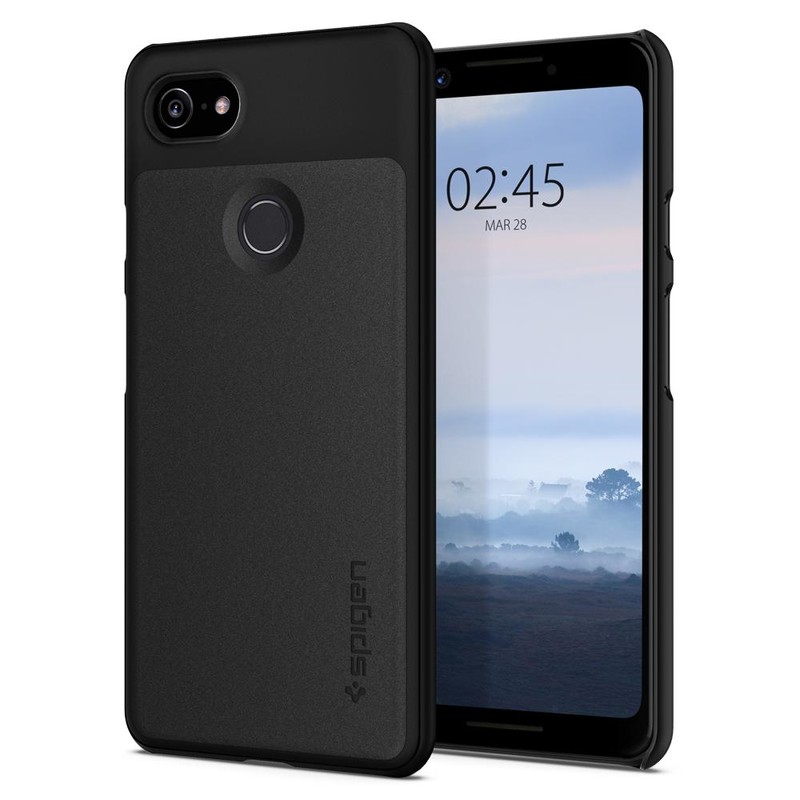
$12 at Amazon
It’s right there in the name: Spigen Thin Fit case. This aptly-named case offers corner protection and just enough lip around the camera and screen to help avoid scratches and scuffs. Just keep in mind that the top and bottom of the case are open and exposed.
Matte magic
Avalri Ultra Thin

$12 at Amazon
This hardshell case wraps around the back and corners of your Google Pixel 3, giving some scuff and scratch protection without any bulk at all. Avalri’s ultra-thin case is just 0.03 inches in thickness and comes in black or a beautiful blue.
Like nothing’s there
Cimo Slim Grip

$8 at Amazon
There are slim cases, and then there’s the Cimo Slim Grip. This is one of the thinnest cases on the market to protect and showcase your Pixel 3. Its translucence lets the Pixel 3’s natural beauty shine through one of three cool colors — blue, purple, and white.
Crystal clear
Spigen Liquid Crystal

$12 at Amazon
Eschewing bulkier hard-plastic backs, the Liquid Crystal’s flexible TPU is easy to apply and easier to grip. This crystal clear case gives your Google Pixel 3 light protection that is as thin as it is beautiful.
Clearly a good choice
MoKo Clear Case

If you want to show off your new Pixel 3, MoKo’s clear case is for you. Its soft TPU material adds grip without covering up the Pixel 3’s beauty, and precise cutouts ensure it doesn’t get in the way of the charging port, camera, and speakers.
$8 at Amazon
Again, we’ve love the Totallee case for as long as they’ve been making cases for Android phones, but if you’re looking for a thin case that has a thinner price tag, the Cimo Slim Grip gives lightweight protection without any bulk, and its translucent tints allow you to show off your Pixel 3 while still keeping it safe.
Whitestone Dome Glass Screen Protector for Note 9 review: The clear winner
An expensive solution to a potentially more expensive problem.

Tell me if you’ve heard this one before. Company releases phone claiming that its glass screen is “stronger” and “less prone to scratches and cracks” than the one before. So you believe the claim and forgo buying a screen protector only to drop the phone onto concrete shortly thereafter. Your heart stops and you inhale sharply as you lean down to pick up the face-down phone. You turn it around and it’s a spiderweb of debris, money down the drain.
Or this one. Company releases phone claiming that its glass screen is “stronger” and “less prone to scratches and cracks” than the one before. You don’t believe the claim because it’s still just glass and glass scratches and breaks. You log onto Google, search for “best screen protector for phone” and buy the recommended one. When it arrives in the mail, you eagerly unbox it, follow the vague and poorly-written instructions, and end up with a bunch of frustrating air bubbles that distract you every time you look at the phone.
Both of these scenarios are pretty common. The issue has been exacerbated with the proliferation of curved glass phones — phones like the Galaxy Note 9. Phones that cost way too much money to risk having their screens shatter, or having bubbles under their screen protector.
That’s where Whitestone’s Dome Glass comes in.
Liquid courage
Dome Glass Screen Protector

$45 at Amazon
An accurate install and high-quality part
Whitestone uses a very complicated and involved install process to accomplish what few other accessory makers can do: a clean, bubble-free install on a curved-glass phone. And it works.
Pros:
- Finished product is perfect
- Installation is straightforward
- Glass appears high quality
Cons:
- Installation is very involved
- Very difficult to correct if you make a mistake
- Expensive

Whitestone Dome Glass What’s good
Whitestone approaches a screen protector installation like surgery, and for good reason: I’ve tried installing so-called “professional” and “easy-to-apply” screen protectors on Galaxy devices going back to the S8 and they’ve all turned out badly.
Name a company — Zagg, IQ Shield, Skinomi — and I’ve had a poor experience. They’re not bad products, but the reality is it’s really hard to get a screen protector, especially one made of tempered glass, to adhere properly to a curved screen.
Well, by approaching the installation like a surgery, Whitestone has managed the impossible: a perfect installation. The process is seriously involved: there are about 10 steps you have to follow, and to the letter, or you risk something going wrong.
First, there are all the precautionary measures to ensure that, when the adhesive is eventually applied to the screen, it doesn’t damage the Note 9’s buttons or ports. So you have stickers and absorbing sheets and a full-tilt station to acquaint yourself with.

But once you read the instructions a few times — they’re not translated well, so I made sure to read them more than a few times — it’s pretty straightforward. The tricky part is making sure that, once the adhesive is applied, the tempered glass adheres bubble-free to the screen. Because unlike some film-based screen covers, air bubbles can’t be forced out of this one. If they’re there, they’re there for life.
Note: I highly recommend buying the 2-pack when investing in Whitestone’s screen protector. It saves you from having to salvage a disastrous first attempt (as you’ll read below) and lets you replace an installation if it becomes too scratched.

Once the protector is installed, the cool part begins: using the included UV curing light, which sets the adhesive in under a minute and ensures that touch response is identical to the display in its natural state. It’s USB-powered, so you’ll have to plug it into a nearby AC adapter or battery pack, but you only need it for a couple of minutes.
You pay more not necessarily for a higher-quality screen protector but a better installation that ensures the protector adheres properly.
The best part of Whitestone’s Dome Glass is the fact that, once properly installed, it’s not going anywhere, even on the notoriously finicky rounded edges of the Note 9. To wit, I’ve been using it for over a week now and there’s no evidence of the edge lift that you commonly see in cheaper solutions.
And how is the tempered glass itself? Honestly, it’s fine. It’s a standard 9H-rated glass slab, thick and weighty but likely no higher quality than anything you’d find for a quarter the price. That’s not really what Whitestone is selling here, because a properly-installed curved screen protector is going to be much less likely to crack or dislodge when dropped. The fact that the Dome Glass adheres to the Note 9’s screen uniformly ensures that are no areas of particular weakness. And that is this product’s greatest strength.

Whitestone Dome Glass What’s not good
As far as screen protectors go, there isn’t a lot to complain about here. I did have to throw away my first install because I made an error in my first attempt, letting the adhesive run too far down my phone. The most important thing to know about the Dome Glass is precision: every step needs to be followed perfectly, or you risk ruining the process.
Then there’s the question of cost, and whether you need a screen protector at all. Whitestone makes a good product, but it costs $45 for a single and $60 for a two-pack. (There’s also a $35 “refill” that arrives without the UV curing light). If you want the best, this is it.
But with Gorilla Glass 5, the Note 9 has a pretty tough glass exterior on its own. It may hold up to a few minor falls, and you’ll probably not notice the average scratch against it.

Should you buy it? Absolutely
If you regularly drop your phone, a screen protector is a must. If you regularly drop your Note 9, Whitestone’s Dome Glass is basically your only reliable bet. In this case, you’re not paying for a higher-quality product but for the tools to successfully install it.
4.5
out of 5
Yes, the Note 9 is one of the most expensive phones out there. And yes, its curved display is often more hassle than it’s worth.
But if you want the best, you have to pay for it — and that’s true of the phone and the screen protector.
See at Amazon
Samsung Galaxy Note 9
- Samsung Galaxy Note 9 review
- Galaxy Note 9 vs. Note 8
- Where to buy the Galaxy Note 9
- Galaxy Note 9 specifications
- Is the Note 8 still a good buy?
- Join our Galaxy Note 9 forums
AT&T
Verizon
T-Mobile
Samsung
Amazon
Does Nest Secure work with my existing home security system?

Best answer: No, the Nest Secure system doesn’t work with any existing security solutions. Nest Secure offers a comprehensive package for home security, but it uses Thread and Weave for communication instead of the more popular Zigbee or Z-Wave protocols. For the most interoperability with existing wireless security systems, we recommend Simplisafe.
Amazon: SimpliSafe Wireless Home Security ($274)
An awesome, but seemingly closed, ecosystem
There’s no denying that the Nest Secure, a system consisting of a Nest Guard base station and one or more sensors and cameras, is a great family of products. The pieces look great, are easy to install, and you’ll find every sensor, camera, or extra you could ever want to be built by Nest. Everything works well, too. Your Nest Hello doorbell can act as a security camera along with the Nest Cam itself; you can tell the Nest Guard to ignore that open door by swiping your Nest Tag across it; you can know exactly what’s going on even if you’re not home via the Nest app. However, part of the reason the Nest ecosystem works so well is that it’s using a different set of protocols for communication.
Thread and Weave are more futureproof, but not many other companies are using them. Yet.
Zigbee and Z-Wave are industry standards when it comes to internet-of-things communication. They work well and best of all, are designed for devices to communicate regardless of who makes them. Nest Secure doesn’t use either of these communication protocols and instead the pieces talk to each other using Thread and Weave. Thread is a collaboration from Google, Samsung, ARM, and others that natively handles IPv6 through an open wireless protocol. Without getting too deep, Thread is based on the 6LoWPAN adaption layer. Thread and Zigbee are working on what’s called the ZigBee Cluster Library so ZigBee devices can run using Thread for communications, but not the other way around.
Weave is Nest’s proprietary application communications protocol that allows devices to communicate securely through their own peer-to-peer network. Nest has opened Weave support to other companies, but this doesn’t mean that your Nest Cam can work with another company’s system. It means the other company’s camera can work with Nest products.
Adding a piece vs. upgrading it all
If you’re looking for a new security system or are thinking of replacing an existing system with something new, the Nest Secure system is a great choice. You’ll love how the pieces look and how easy it is to get it all working. You’ll probably love everything except the price, but this isn’t something you’ll be replacing very often so price shouldn’t be the biggest part of a buying decision. You won’t go wrong by buying a Nest Secure starter system.
However, if you’re just looking to add a camera or sensor to an existing system or extending it, Nest isn’t what you’re looking for. there are plenty of other companies that use the more popular Zigbee and Z-Wave communication protocols, but I’d recommend products from SimpliSafe as your best bet for interoperability. The company also makes an outstanding full system if you’re looking at starting from scratch, too.
Our pick
SimpliSafe

$274 at Amazon
Better interoperability
If you’re looking to extend or add to an existing system, SimpliSafe uses industry standard communication protocols. A SimpliSafe system is a great buy if you’re starting fresh, too!.
Starting fresh
Nest Secure

$399 at Best Buy
Still a great choice.
Nest Secure might not work well with other systems but its still a great choice when starting from the ground up.
Xbox One bundles, the Fitbit Charge 2, and more are discounted today
Whether you’re looking for new tech gear or household items, we’ve got you covered.
There’s never a shortage of deals available, but sorting through all of them can be difficult at times. We’ve handpicked all the best tech, and everyday essentials discounts that you can take advantage of right now and brought them to one central location. From Xbox consoles to Swiss Gear backpacks, these are today’s best deals.
Tech Deals
View the rest of the deals
Everyday Essentials
If you want to know about the deals as soon as they are happening, you’ll want to follow Thrifter on Twitter, and sign up for the newsletter, because missing out on a great deal stinks!
Canada Daily Deals: Oculus Go, Philips Hue bundles, Nintendo Switch, more
Whether you’re looking for new tech gear or household items, we’ve got you covered.
We found plenty of great deals today that include big discounts on Oculus Go, Choetech Micro-USB/USB-C 2-in-1 cables, Philips Hue + Amazon Echo bundles, Nintendo Switch consoles, and much more!
View the rest of the deals
Each day, the Thrifter Canada team scouts out and shares amazing deals on products you know and love, helping you find the best prices on the ‘net.
For more Canadian deals coverage, be sure to keep an eye on Thrifter CA, sign up for the Canadian newsletter and follow the team on Twitter.
MacRumors Giveaway: Win a ‘Dockit W3’ Handmade iPhone and Apple Watch Dock from WhyWood
For this week’s giveaway, we’ve teamed up with WhyWood to offer MacRumors readers a chance to win something a little bit out of the ordinary – a high quality wooden iPhone and Apple Watch dock made primarily by hand in Switzerland.
The WhyWood Dockit W3, made from oak or walnut, can charge multiple devices all at once.
It has a 7.5W wireless charger for charging the latest 2017 and 2018 iPhones at maximum wireless charging speed, a Lightning port for charging the AirPods or Apple TV Remote, and a built-in magnetic Apple Watch charger for charging the Apple Watch Series 1 through 4 models.

Each dock is available with a black or white accent stripe, and feet made from microsuction tape make sure the dock stays in place on your desk or nightstand.
At the back of the Dockit, there are two USB 3.0 ports for charging additional devices, along with a Smart USB charger that features a 4.6-foot cord. WhyWood says that up to five devices can be charged at their fastest possible charging speed using the dock.

Each Dockit has been designed with safety features that include short circuit prevention, temperature control, output voltage surge protection, and power overload recovery.
Because it’s made largely by hand in Switzerland and has multiple ports built in, the Dockit W3 is priced starting at $193 for the 7.5W charging version. WhyWood also offers other Dockit configurations like the Dockit W1 with 7.5W charger and Lightning connector, or the Dockit W2 with 7.5W charger and Apple Watch charger, or the Dockit 2L1W with two Lightning ports and an Apple Watch charger.

The Dockit W3, which is the dock we’re giving away, is the most feature rich version that WhyWood offers. It is available with or without engraving, and a company logo can also be included.

We have two of the Dockit W3s to give away to MacRumors readers. To enter to win our giveaway, use the Rafflecopter widget below and enter an email address. Email addresses will be used solely for contact purposes to reach the winners and send the prizes. You can earn additional entries by subscribing to our weekly newsletter, subscribing to our YouTube channel, following us on Twitter, following us on Instagram, or visiting the MacRumors Facebook page.
Due to the complexities of international laws regarding giveaways, only U.S. residents who are 18 years or older and Canadian residents (excluding Quebec) who have reached the age of majority in their province or territory are eligible to enter. To offer feedback or get more information on the giveaway restrictions, please refer to our Site Feedback section, as that is where discussion of the rules will be redirected.
a Rafflecopter giveawayThe contest will run from today (October 12) at 11:00 a.m. Pacific Time through 11:00 a.m. Pacific Time on October 19. The winners will be chosen randomly on October 19 and will be contacted by email. The winners will have 48 hours to respond and provide a shipping address before new winners are chosen.
Tag: giveaway
Discuss this article in our forums
Hackers Accessed Data From 29 Million Facebook Users
Two weeks ago, Facebook announced that it discovered a security breach allowing hackers to steal Facebook data from millions of accounts, and today, Facebook shared further data on just what was accessed.
To get the Facebook data, hackers took advantage of a security flaw in the social network’s “View As” code, a feature designed to let people see what their profile looks like to someone else. The Facebook access tokens that hackers were able to obtain are basically digital keys that allow people to stay logged in to Facebook.
According to Facebook, hackers used a set of accounts that they controlled that were connected to Facebook friends. An automated technique was used to move from account to account, allowing them to collect access tokens in September 2018.
Hackers were able to obtain timeline posts, friend lists, groups, and the names of recent Messenger conversations from an initial 400,000 people. People in this group who were Page admins of a Page that had received a message from someone on Facebook had the content of their messages stolen.
After stealing data from the 400,000 people attacked first, Facebook used their friends list to steal access tokens for approximately 30 million people.
For 15 million people, attackers were able to access name and contact details that include phone number and email address.
For 14 million people, hackers were able to access the same information as well as other data that includes username, gender, location, relationship status, religion, hometown, current city, birthdate, device types used to access Facebook, education, work, the last 10 places where they checked in, websites, people, Pages they follow, and 15 most recent searches.
An additional 1 million people had their access tokens stolen but no information was obtained.
According to Facebook, people can find out whether or not they were affected through the Facebook Help Center. Over the “coming days,” Facebook plans to send customized messages to the 30 million people who were affected to explain what information hackers might have obtained.
The FBI is investigating the attack and Facebook has been asked “not to discuss who may be behind [the] attack.”
Tag: Facebook
Discuss this article in our forums
Apple Criticizes Proposed Anti-Encryption Legislation in Australia
The Australian government is considering a bill that would require tech companies like Apple to provide “critical assistance” to government agencies who are investigating crimes.
According to the Australian government, encryption is problematic because encrypted communications “are increasingly being used by terrorist groups and organized criminals to avoid detection and disruption.”
As noted by TechCrunch, Apple today penned a seven-page letter to the Australian parliament criticizing the proposed legislation.
In the letter, Apple calls the bill “dangerously ambiguous” and explains the importance of encryption in “protecting national security and citizens’ lives” from criminal attackers who are finding more serious and sophisticated ways to infiltrate iOS devices.
In the face of these threats, this is no time to weaken encryption. There is profound risk of making criminals’ jobs easier, not harder. Increasingly stronger — not weaker — encryption is the best way to protect against these threats.
Apple says that it “challenges the idea” that weaker encryption is necessary to aid law enforcement investigations as it has processed more than 26,000 requests for data to help solve crimes in Australia over the course of the last five years.
According to Apple, the language in the bill is broad and vague, with “ill-defined restrictions.” As an example, Apple says the language in the bill would permit the government to order companies who make smart home speakers to “install persistent eavesdropping capabilities” or require device makers to create a tool to unlock devices.
Apple says additional work needs to be done on the bill to include a “firm mandate” that “prohibits the weakening of encryption or security protections,” with the company going on to outline a wide range of specific concerns that it hopes the Australian parliament will address. The list of flaws Apple has found with the bill can be found in the full letter.
Apple has been fighting against anti-encryption legislation and attempts to weaken device encryption for years, and its most public battle was against the U.S. government in 2016 after Apple was ordered to help the FBI unlock the iPhone owned by Syed Farook, one of the shooters in the December 2015 attacks in San Bernardino.
Apple opposed the order and claimed that it would set a “dangerous precedent” with serious implications for the future of smartphone encryption. Apple ultimately held its ground and the U.S. government backed off after finding an alternate way to access the device, but Apple has continually had to deal with further law enforcement efforts to combat encryption.
Note: Due to the political nature of the discussion regarding this topic, the discussion thread is located in our Politics, Religion, Social Issues forum. All forum members and site visitors are welcome to read and follow the thread, but posting is limited to forum members with at least 100 posts.
Tags: Australia, Encryption
Discuss this article in our forums
 AIVAnet