


The Google Assistant can now book Uber and Lyft rides
There’s a lot going on with the Google Assistant — let’s break down the important stuff.

In May 2016, we got our very first taste of the Google Assistant with the debut of Allo. The Assistant was a big draw to Allo at the time, with Google marketing it as a helpful bot that could make restaurant reservations, search the web, and more within your conversations.
Since then, the Assistant has gained heaps of new features and expanded to smartphones, tablets, speakers, and more. Google’s shown no interest in slowing down development for the Assistant, meaning that it’s likely here for the long-haul.
Whether this is your first encounter with it or you just need a quick refresher, here’s everything you need to know about the Google Assistant.
The latest Google Assistant news
October 4, 2018 — The Google Assistant can now book Uber and Lyft rides

Ride-sharing services are one of the best ways to get around nowadays, and rolling out to users this week, you’ll now be able to book a ride from your favorite service using the Google Assistant on your phone or smart speaker.
Just say, “Hey Google, book a ride to Starbucks” or “Get me a taxi to John F Kennedy Airport.” You can then choose from Uber, Lyft, Ola, Grab, GO-JEK, and more, or specify the ride service you want by name with your initial command.
After selecting the ride you want, you’ll be redirected to its respective app to confirm the booking and you’ll be all set. Google says this is initially available in English in any country where the ride services are offered. Over the coming months, it’ll be expanded to additional languages.
October 3, 2018 — Google Assistant gets a complete revamp on phones

Back at Google I/O in May, Google announced an all-new user interface for Google Assistant on phones with new visual controls, deeper app integration, and more. Now, the new UI is finally rolling out to everyone.
What you’ll notice right off the bat are the visual tweaks. The Google Sans font is put into full use, there are new touch controls you can use after certain commands (such as dimming your smart lights), and everything just looks more rounded and polished.
A swipe up after prompting the Assistant now brings you to your daily overview page that was launched earlier this year, and if you’re typing to use the assistant, there’s a new messaging UI so you can easily add commas, change words, and more.


Last but certainly not least, Google’s giving developers a bunch of new tools to integrate new experiences into the Assistant. For example, you can start and complete a Starbucks order with full menu visuals, Fitbit’s Fitstar can show GIFs of upcoming workouts, and much more.
This update is rolling out now, so be sure to keep an eye out for it over the next couple of days.
September 18, 2018 — The Google Assistant can now lock your kids’ devices with Family Link
Google regularly updates its parental control suite, Family Link, with new features to make parenting in the modern world as easy as can be. With the latest update, you can now connect Family Link to the Google Assistant so you can control your kiddos’ devices with just your voice.
Assuming you’ve got Family Link set up for your family, you’ll be able to say commands such as, “Hey Google, lock Timmy’s phone” to remotely lock his device. Timmy will have five minutes to finish up whatever he’s doing, and once those five minutes are up, the phone is locked. Similarly, the Google Assistant will also be able to detect if a kid is talking to it and provide more kid-friendly responses as it sees fit.
Along with the Assistant updates, Google’s also expanding Family Link so that it can now be used with kids older than 13-year-old.
September 16, 2018 — Google details improvements made to Sound Search

Now Playing was a nifty little feature when it debuted on the Google Pixel 2, and Sound Search through Google Assistant paled in comparison to it. Google AI knows there’s still plenty of work to be done with Sound Search, but have shared some of the steps they’ve undertaken in the last several months to try and improve the Sound Search on Google Assistant and the Google app, including:
- Detailing of Now Playing’s musical fingerprinting system through embeddings to match a sound sample against a vast database
- Leveraging server-side resources and procession power for Sound Search to increase accuracy and speed of song matching
- Weighting the song sample catalog by popularity so that popular songs match quicker and obscure songs need higher levels of embedded matches to trigger a result
Google AI admits that trying to replicate the accuracy and success of Now Playing, which matches on-device against a small database, against a Sound Search sever-side database that’s 1000 times bigger, is not without difficulties that they’re continuing to work through, but they claim that they’ve already seen marked improvement to Sound Search in the last year. The challenges of identifying sounds in noisy environments like a crowded dance floor or sporting event are still being worked through, but knowing Google, it can only get better.
Read Google AI’s full Sound Search journey
September 11, 2018 — Google Assistant now supports Danish and Norwegian languages
Increased language support is always something we love to see with the Google Assistant, and most recently, everyone’s favorite AI can now speak in Danish and Norwegian.
The official Assistant pages are now live in both languages, but as we see with all of these rollouts, it may take some time for it to reach your devices. To check and see if the Assistant’s arrived for you, simply hold down the home button on a phone that’s set to either language and see if you’ve got the Assistant UI instead of the old Google voice search one.
September 10, 2018 — Disney doubles its Google Assistant content with three new games
Google Assistant can help your kids with questions about their homework or the universe, can help remind you and your kids when you need to get going for soccer practice, and it can even tell them a bedtime story. Disney is bringing a little more magic to the Google Home and beyond with three new Google Assistant activities.
- Maui’s Music Game lets kids help Maui defeat monster and reunite with Moana after getting separated from his hook in Lalotai, the Realm of Monsters. While playing, you’ll be rewarded with musical conch shells that play music from the film. You’re Welcome!
- Disney Princess brings you along on a daily adventure with one of your favorite princesses. Help Ariel learn what human world objects are called, navigate Jasmine through a horse race, and hear fun stories from Cinderella and Tiana. You can also get nerdy with Belle answering her questions about your favorite books.
- Toy Story Freeze Dance gets active with an interactive dance game that initiates you as one Bonnie’s new toys. Learn the moves and the meaning of being a toy, but make sure you pay attention, because at any moment, you could have to FREEZE! to avoid exposing the biggest secret in toydom.
These games are designed for Google Home, but you can also play them on phones and Google Assistant-enabled Chromebooks and TVs, as well as those nifty new Smart Displays. These games join Disney’s current Google Assistant offerings:
- Mickey Mouse Adventure
- Cars Adventure
- Belle’s Castle Adventure
- Star Wars Trivia Challenge
August 21, 2018 — “Hey Google, tell me something good” now dishes out “good news”
Staying up to date on all of the current news is important no matter who you are, but with everything going on in our world, sometimes it’s easy to feel like nothing good is happening. In an effort to bring “good news” to light, Google’s launching a new Assistant command in the U.S.
When talking to the Assistant on your phone, Google Home, or Smart Display, you can now say “Hey Google, tell me something good” to hear about how people are solving real issues all around us.
Google partnered with Solutions Journalism Network for this feature, and per Google, solutions journalism, “highlights how problems are solvable and that doing better is possible.”
If you’re in the U.S., you can try out this command starting today.
August 14, 2018 — Pandora Premium now supported by Google Home and Smart Displays
Users have been able to stream Pandora through Google Home speakers for quite some time now, but starting today, you’ll be able to link your Pandora Premium account so you can listen to specific, on-demand songs/playlists in addition to the service’s popular radio stations.
Pandora Premium costs $9.99/month like the majority of its competitors, but if you own a Google Home, you can get a free 90-day trial to test out the service before handing over any of your hard-earned cash.
You can start listening to Pandora Premium on the Google Home, Home Mini, Home Max, Lenovo Smart Display, and other Google Assistant speakers right now.
August 9, 2018 — Deeper, more specific news coverage is now rolling out
Pretty much since the Assistant’s inception, you’ve been able to say “Hey, Google, what’s the news?” to get a quick overview of all the big headlines for any given day.
Starting today and rolling out to users across the U.S., you can now ask the Assistant about news for specific topics, such as “What’s the latest on NASA?” or “What’s the news on the women’s national soccer team?”. Asking these questions on a Smart Display will pull up related YouTube videos while audio-only speakers such as Google Home will read out excerpts from news articles.
Additionally, this command will also be available for Android Auto, Android phones, and Assistant-powered headphones like the Bose QC35 II.
August 3, 2018 — Google Home can now understand what room it’s in for contextual light controls
That title might make this not sound all that exciting, but this is actually pretty cool.
Up until now, asking your Google Home to “turn on the lights” or “tune off the lights” without specifying a certain room would result in every single connected light being turned on/off. However, a new update now allows the Google Home to only control the lights in the same room as it when this command is issued.
For example, if you have a Google Home assigned to the same room as the smart lights in your living room, asking that Google Home to turn on the lights will only activate the bulbs in the living room. You can still specify rooms with your voice, but this update should make these interactions a lot more natural.
Following numerous Redditors discovering this feature, Google confirmed to Android Police that this is indeed rolling out to users and will be making its way to everyone over the coming days.
July 27, 2018 — You can now schedule custom routines for specific times/days
Building upon Custom Routines that were added to Google Assistant earlier this year, users can now schedule these routines to go off at a certain time/day. Previously, custom routines you made could only be used after saying a specific command.
While creating a routine, you’ll now see a new “Set a time and day” option under the “When” section. Here, you can choose the time you want it to play and what day(s) it should repeat.
There are a lot of ways to take advantage of this, with one example being to have your coffee pot turn on, crank up the AC, and hear about the weather as you’re waking up without having to ever speak to your Google Home. Neat!
July 26, 2018 — Dutch is now an officially supported language
Good news, Dutch speakers! As of July 26, 2018, Google’s confirmed that the Google Assistant now speaks Dutch as one of its official languages.
Assuming you’ve got an Android phone running Marshmallow or later, you can now access the Assistant to ask it questions about the weather, create calendar appointments, control smart home devices, and more.
In addition to your phone, you’ll also be able to use Dutch on the Google Home later in the year once the smart speaker goes on sale in the Netherlands.
July 17, 2018 — New Google Assistant page shows commute times, packages, upcoming flights, and more

Starting today, the Assistant on your phone is getting a big visual overhaul. After prompting the Assistant, tap the icon near the top right that previously opened up the Explore page for finding new Assistant actions and it’ll now show a visual overview of your day.
Similar to old Google Now cards, this page shows things like your commute to work, the current weather, upcoming flights, packages that are on their way from recent online orders, calendar appointments, and much more.
In the near future, Google says it’ll let you see a quick overview of notes/lists from Google Keep, Todoist, Bring!, and more, a discovery page that’ll help you find nearby events/activities, reminders of where you last parked your car, and recommendations for songs and podcasts the Assistant thinks you’ll like.
This new interface is rolling out today and is available on Android and iOS for all languages the Assistant supports.
July 10, 2018 — Google updates the UX for selecting the Assistant’s voice

During Google I/O this past May, four new voices were added to the Assistant’s existing male and female voices to help give it some more personality. Starting today, English users in the United States will see a new user interface when changing the voice.
With the new UX, users will now see a horizontal row of colors that denotes each voice rather than a vertical list of Voice 1, Voice 2, etc. The colors are entirely random and consist of Red, Orange, Amber, Green, Cyan, Blue, Purple, and Pink.
Google says the new look should be live for everyone by the end of the week!
July 10, 2018 — Deezer Premium is now supported on Google Homes in the U.S., Canada, Australia, and Italy
Deezer may not be as popular as rivals like Spotify and Pandora, but for subscribers of the paid Deezer Premium service, you’ll be happy to know that you can now listen to all of your Deezer songs and playlists through your Google Home.
Deezer Premium streaming has been available through Google Home since August 2017, but it was initially only live in France and Germany. This was later expanded to the United Kingdom in April of this year, and with this latest rollout, Deezer Premium now works on Google Homes that are in the United States, Canada, Australia, and Italy.
To link Deezer Premium to your Google Home, open the Home app, go to Music, and link your Deezer account.
The service regularly costs $9.99/month, but if you’re a new member, Google’s offering three months for just $0.99. If you want to take advantage of this offer, it’s good until September 20.
June 26, 2018 — All Google Home speakers now support Spanish
While users have been able to talk to Assistant in Spanish on their phones, we’re just now getting the ability to do the same on Google Home speakers.
Now, users in the United States, Spain, Mexico and other countries can choose to speak to Google Assistant in Spanish. If you want to change what language Google Home uses, open the Home app on your phone. The tap Settings -> Preferences -> Español.
All Google Home Speakers now support Spanish
June 12, 2018 — Google Home can now handle up to three commands at once
It can get old trying to ask multiple questions to our smart speakers — “What’s the weather” and “How’s my schedule” — but nowGoogle Home can understand up to three commands. Now, you can get your calendar, find out the weather and start playing music by only saying “Okay Google” once.
Another new feature is support for Multiple Actions. So now, instead of asking, “What’s the weather in New York and the weather in San Francisco?”, you can ask, “What’s the weather in New York and San Francisco?” This is a subtle change, but it makes conversing with Google Assistant much more like conversing with a human.
Google Home can now handle up to three commands at once
May 9, 2018 — Google announced a heap of new features at I/O

To little surprise, the Google Assistant was the star of the show for a good chunk of I/O’s opening keynote this year.
A lot of new features were announced for the Assistant, including new voices, the ability to ask follow-up questions without having to say “Hey, Google” each time, and an option for making your own custom Routines.
However, the most exciting thing was a system called Google Duplex. With this, the Assistant can call businesses and make appointments/reservations on your behalf. It’s wickedly cool and definitely one of the wildest things to come out of this year’s conference.
What’s new in Google Home and Assistant at Google I/O 2018
All the important details
Google Now paved the way for Google Assistant


The Google Now page compared to the new Google Feed.
Before there was the Google Assistant, we had Google Now. Google Now was introduced to the world all the way back in 2012, offering contextual info through the Google Now page and helpful answers to random questions with an “OK Google” voice command.
A lot of what made Google Now so great can still be found in the Google Assistant today, with the exception of the Google Now page. The Google Now page used to be home to cards showcasing the weather, information on packages that had shipped from online orders, boarding passes, and more. It’s since been replaced by the Google Feed – a collection of news stories Google thinks you’ll be interested in – and it’s definitely the biggest departure between the two services.
The Google Assistant as a whole is still more powerful than Google Now ever was, but long-time Android users like myself are still mourning the loss of that Now page. RIP, old friend.
Read more: Google Now is being left to wither and die as Google Assistant takes the focus
It’s available on just about everything
In just a few short years, the Google Assistant’s gone from being exclusive to a now-failed chat app to being integrated into just about anything you can think of.
You’ll find Google Assistant built right into most Android phones, it’s the star of the show for the Google Home lineup, and it’s even making its way into sound bars.
Here’s the full list of devices with Google Assistant
Setting up the Google Assistant is as easy or complex as you want
When you set up a device for the first time that has the Assistant, getting started is pretty simple. Accessing it is just a voice command or tap away depending on what gadget you’re using, but if you want to really fine-tune your experience, Google’s got you covered.
Take a quick dive into your Assistant settings and you’ll find options for just about everything – including your weather preferences, changing the Assistant’s voice, retraining your voice model, picking out preferred news sources, and much more.
How to set up and customize Google Assistant
Google Assistant is available in multiple regions and languages
Of course, a smart voice assistant isn’t any good if you can’t actually use it. Fortunately, Google Assistant will be available in 52 countries —adding 38 countries this year — and 17 languages by the end of 2018.
More: Google Assistant will expand to 38 countries and 17 languages in 2018
The Lenovo Smart Display is the best way to get Google Assistant in your home

Smart speakers like the Google Home and Home Mini are great affordable ways to bring the Assistant into your house, but if you’ve got a bit more cash to spend and want the ultimate Google Assistant experience, it really is worth looking into the Lenovo Smart Display.
The Lenovo Smart Display has all of the Assistant goodies you know and love but elevates them to the next level thanks to its built-in screen. You can use it to watch YouTube videos, browse upcoming weather, use music controls, and so much more.
Lenovo’s option is definitely the most popular right now, but you can also pick up a Smart Display from JBL and one that’s made by Google itself in just a few short days.
4 reasons I want a Lenovo Smart Display over a Google Home
Then again, is an always-listening speaker the right fit for your home?
However, the convenience of a Google Home (or any smart speaker for that matter) does come at the cost of privacy. Speakers like the Google Home are “always listening”, meaning they’re constantly on the lookout for a hot word to know when you’re talking to it (such as “Ok, Google” and “Hey, Google”).
This means the microphone on a Google Home is always active, but it’s not necessarily storing all the audio it hears when it doesn’t detect its hot word.
Most all speakers allow you to restore some privacy by being able to mute the microphone, but if you want to start asking the Assistant questions, you’ll need to unmute it first.
To learn more about these “always listening” speakers, I’ll pass the mic over to Jerry
The Assistant is now better than ever on Wear OS
Wear OS 2.0 is now available for almost all smartwatches, and with it comes a completely revamped way to experience the Google Assistant.
You can still perform your usual assortment of voice commands just like before, but in Wear OS 2.0, there’s now an Assistant feed you can access at any time by swiping to the right. Here you’ll see info about the weather, upcoming calendar appointments, traffic conditions, and more.
There are a lot of important updates in Google’s latest wearable revamp, but the renewed focus on the Assistant is definitely one of the best.
Wear OS 2.0 review: Simplicity, speed, and Assistant’s wearable redemption
IFTTT supercharges the Assistant’s usefulness

IFTTT (If This Then That) is a powerful online tool that allows you trigger something (that) if a certain event (this) happens. You can connect IFTTT to the Google Assistant to create your own recipes using this formula, and it can allow for some incredibly helpful combinations.
Some of our favorite uses for IFTTT and the Assistant include adding contacts to your Google account, setting your Google Calendar status to Busy for a certain period of time, and much, much more.
Getting started with IFTTT can take some time and patience if you’re new to it, but once you’re all set up and ready to go, it can prove to be a lifesaver.
How to connect Google Home and IFTTT to do amazing things with your connected tech
You’ll get the same experience no matter what devices you use
With so many devices capable of running the Assistant, it’d be easy to think that the experience you get on one gadget would be different from another. This is something that Google struggled with for a while at first, but we’re finally in a position where the Assistant experience you get on a smart speaker, for example, is the same you’ll get on your phone.
There are a handful of features here and there that still create for some discrepency, but for the most part, the Assistant you use on your Pixel 2 is the same one found on Google Home.
Google Home and Google Assistant finally offer the same experience
Google Duplex is actually going to be a thing

Google showed off Duplex — Google Assistant making natural-sounding phone calls on your behalf — at I/O 2018, but quickly noted that it was just an experiment. Flash forward a couple months, and Google announced that certain users have started testing Duplex, and a public release will be here in the next few months. Before you know it, Google Assistant will be able to book hotels, dinner reservations, hair appointments and more without you lifting a finger.
More: What is Google Duplex?
Updated October 2018: Refreshed sections about Smart Displays and the Assistant on Wear OS
Don’t buy an Amazon Fire TV Cube — get this instead (probably)
 The Amazon Fire TV Cube is still a fine device, but you can get nearly the same features for less money.
An Amazon Fire TV Stick 4K bundled with a new Echo Dot does nearly the same stuff as a Fire TV Cube — and for just two-thirds of the cost.
I’m going to to out on a bit of limb here — I have yet to use the new Amazon Fire TV Stick 4K. It ships at the end of October. But barring some sort of huge performance catastrophe in which it runs ridiculously slower than the Fire TV Cube (and I’m willing to give Amazon the benefit of the doubt here), I’m pretty confident in the following statement:
You probably shouldn’t buy the $119 Amazon Fire TV Cube. Instead, I’d pick up an $80 Fire TV Stick 4K/Echo Dot bundle. Here’s why:
Dolby Vision is important
If you’re just getting into the world of 4K televisions, know this: HDR is important. It’s short for high-dynamic range, and it basically makes colors more colorful — because it can show a greater, more dynamic range of colors — and because it also will help make blacks look darker. It allows for greater contrast.
There are two main flavors of HDR. There’s the open-source HDR10 (and now HDR10+, and there’s the proprietary Dolby Vision. Generally speaking, Dolby Vision is considered to be the better of the two standards.
 The Amazon Fire TV Stick 4K is the first Fire TV to support the Dolby Vision HDR standard.
In addition to your television having to support one or both of those standards, whatever device you have connected to it also will need to support an HDR standard if you want to watch content in HDR.
The new Fire TV Stick 4K supports HDR10+ and Dolby Vision. In fact, it’s the first (and only) Fire TV device to support Dolby Vision. The Fire TV Cube does not.
For a lot of folks who have 4K televisions that support Dolby Vision, that’s all you need to know.
For those who are looking to buy devices to last a good while, this is the way I’d go. The $119 Fire TV Cube will not get a magic update with Dolby Vision due to the processor it’s using.
You’ll keep (nearly) the same Alexa support
Basically, the Fire TV Cube is a (soon-to-be-extinct) Fire TV 4K pendant combined with an Echo Dot. Same internals, only with microphones and a speaker crammed in there, so you can do all the same hands-free Alexa stuff.
The Fire TV Cube does go a little bit further, though, with CEC control and in infrared emitter — allowing you to tell your TV to change the channel, or change the volume, or turn things off and on.
That was especially important because the Alexa Voice Remote that originally shipped with the Fire TV Cube — well, it kind of sucked, unable to adjust volume or turn off the TV. For that, you’d either need to use your voice — which I still contend is not a great way to watch TV — or use a second remote control.
With the new Fire TV Stick 4K we have a new Alexa Voice Remote with proper IR controls for volume and power. And a current-generation Echo Dot brings that same Alexa support, just without the integrated TV control.
The bottom line
Look, unless you just have to be able to turn your TV on and off with your voice, or just have to keep things condensed into a single device, or just have to have an IR extender attached to your streaming box, I’d go with the Fire TV Stick 4K/Echo Dot bundle. You’ll save about $40 right now, and that’s not bad on devices that Amazon is almost certain to refresh again in a couple years anyway.
There’s nothing inherently wrong with a Fire TV Cube — at least nothing that a better remote control won’t fix. But if you’re going to go that route (and spend more money in the process), at least be sure to order the updated Fire TV Cube bundle, which ships on Oct. 31 and includes the new remote.
But me? I’d save the $40 and just get a Fire TV Stick 4K with the new remote, and with Dolby Vision, and with an Echo Dot for the Alexa stuff. It’ll save you money now, and it’s got the features you’ll want for the long haul.
See at Amazon
Amazon Fire TV
- What’s new on Amazon Prime Video
- Read our full review!
- Get the latest news
- Join the discussion
Buy at Amazon
Nokia 7.1 hands-on: A $350 success story
It won’t make headlines, but this phone ticks all the right boxes.
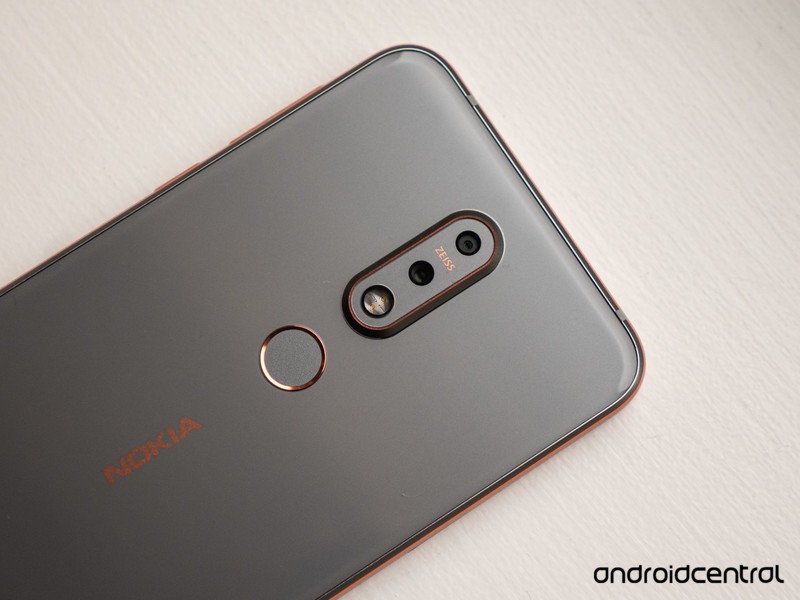
The Nokia 7.1 isn’t going to steal any headlines but it represents a significant upgrade over its predecessor and could be a smash hit. Replacing the Nokia 7, it borrows several clues from the more-premium Nokia 7 Plus, and at $349, it could be a smash-hit stateside.
Aiming to provide competition for devices like the Honor 10, it has everything you’d expect in a mid-range smartphone. Excellent design, smooth performance and the best of Google, including fast updates thanks to Android One, no bloatware, and a streamlined experience — basically, everything we’ve come to expect from the new-and-improved Nokia.
The die-cast metal core and aluminum frame feels great in the hand, and the anodized metal finish looks stunning. Nokia tells us the design has been inspired by aspects of jewelry design, and this is apparent in the Gloss Steel version.
The hint of copper trim around the edges provides a subtle beauty, and it really feels like the Nokia 7.1 has been designed to accessorize with whichever outfit you’re wearing.
Great design, smooth performance and the best of Google — Nokia in a nutshell.
The 5.84-inch FHD+ 19:9 display is packed inside a compact body that belies the size of the screen, with 2.5D curved glass on top and rounded corners adding to the ergonomic feel. The display brings full HDR10 support, and promises to offer better a more immersive experience thanks to SDR to HDR real-time upscaling throughout the phone.
The rear fingerprint sensor is each to reach, fast, and sits beneath the dual camera setup. The main camera is a respectable 12MP f/1.8 combo, while the second camera is used to capture depth for portrait mode shots.
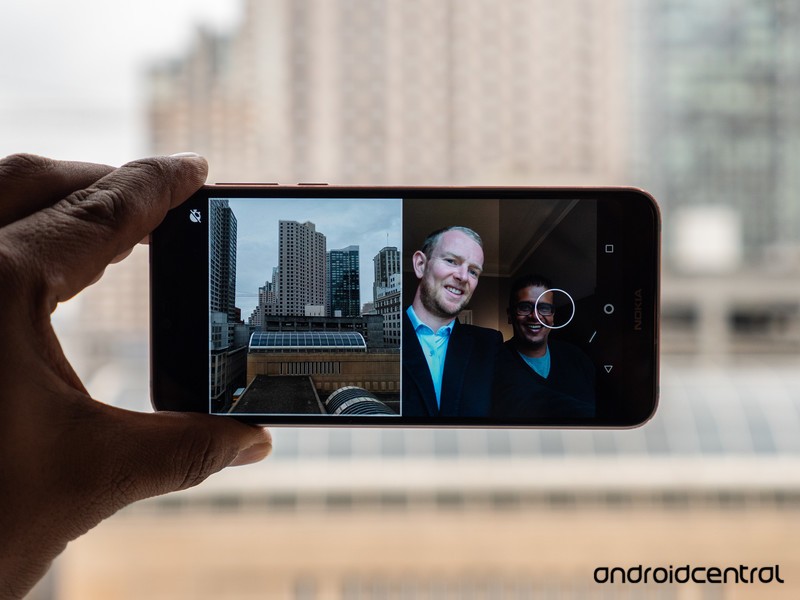
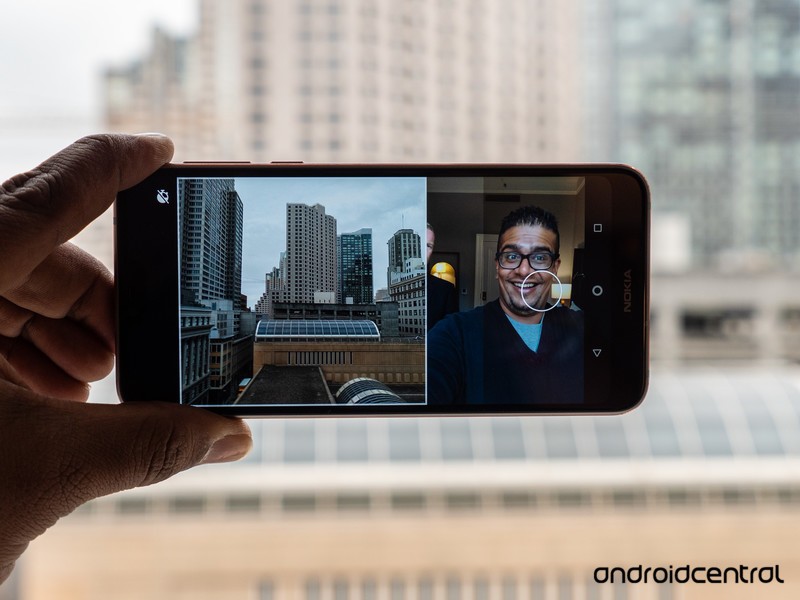
The updated bothie mode now lets you adjust the split between the front and rear cameras (right).
Nokia says the 7.1 is designed with storytellers in mind, and there’s a few new camera experiences to help you broadcast to your heart’s desire. You can now control the amount of bokeh in a picture using a helpful slider, and the viewfinder updates in real-time.
The single front 8MP camera comes with a new AI assisted portrait mode — we weren’t able to test it, but I wouldn’t expect excellent results here. Nokia has also added the Pro Camera, allowing you to fiddle with advanced settings when taking an image — and updated its dual capture “Bothie” mode to offer additional customization over your live streams. You can now add Snapchat-like filters and masks, and adjust the split between front and rear cameras – unlike the 50:50 split it is on other Nokia phones.
The Nokia 7.1 has a clean Android One take on Oreo, which should be lightening fast with the Snapdragon 636 processor. In the U.S., you’ll get 4GB of RAM and 64GB of storage while some markets will get a cheaper model with 3GB of RAM and 32GB of storage. The 3080mAh battery is on par with other devices at this price point and should power you through a full day.
Looking at everything it offers, the Nokia 7.1 offers a compelling mid-range experience at an attractive price point. It’ll be available at Amazon, Best Buy and B&H starting at $349, with pre-sales launching on October 5, and the phone available on October 28.
The widespread availability — crucially, including in-store at Best Buy from early next month — should put this phone front and center in front of prospective buyers and it has a real chance of being a success for Nokia stateside.
See at Amazon
Nokia 7.1 specs: 5.84-inch display, HDR upscaling, Android One

Here’s everything you can expect.
The Nokia 7.1 brings a vastly improved package from the Nokia 7 late last year, and offers a compelling mid-range package at an affordable price. It comes with a larger display, slightly bigger battery, some key spec changes and bokeh capture in the front and rear cameras.
Here’s everything you’ll find inside the Nokia 7.1.
| Operating system | Android One (Oreo) |
| Display | 5.84-inch LCD, 2160×1090 (19:9)HDR10Real-time SDR to HDR upscaling |
| Processor | Qualcomm Snapdragon 636 |
| RAM | 3GB / 4GB (U.S.) |
| Storage | 32GB / 64GB |
| Expandable | Yes, MicroSD up to 400GB |
| Rear camera 1 | 12MP, 1.28-micron, f/1.8, dual PDAF |
| Rear camera 2 | 5MP, f/2.4, 1.12-micron |
| Front camera 1 | 8MP, f/2.0, 84° field of view |
| Connectivity | USB-CBluetooth 5.0NFCLTE Cat. 6 (300Mbps DL/50Mbps UL)802.11n/ac |
| Audio | Nokia OZO audio3.5mm headphone jack |
| Battery | 3060mAhNon-removable |
| Charging | Fast wireless charging |
| Security | One-touch fingerprint sensor |
| Dimensions | TBC |
| SIM card | Dual nano SIM or nano SIM + MicroSD |
| Colors | Gloss Midnight BlueGloss Steel |
This is everything you need to know about the Nokia 7.1
This could be the mid-range phone to get this year.

Just in time for the big holiday shopping season, Nokia’s making a return to the United States with its latest smartphone — the Nokia 7.1. The Nokia 7.1 is a mid-range handset running Android One that offers a wide array of specs, features, and more at an extremely competitive price.
Is this a phone that deserves a spot on your shortlist this year? Here’s what you need to know.
Check out our hands-on coverage
We need to spend a bit more time with the Nokia 7.1 before we give it our full and final review, but in the meantime, do check out Nirave’s initial hands-on impressions.
The Nokia 7.1 is already looking great thanks to a well-constructed design, promising cameras, and a gorgeous display.
Get the full scoop here 👇
Nokia 7.1 hands-on: A $350 success story
Get familiar with all the specs
To meet such a competitive price, Nokia couldn’t outfit the 7.1 with the latest and greatest specifications around. Some corners had to be cut, but even so, we’re still looking at a pretty respectable spec sheet.
Some of the highlights here include a Snapdragon 636 processor, 4GB RAM, 32 or 64GB of expandable storage, dual rear cameras, and a 3,060 mAh battery.
Nokia 7.1 specifications: 5.84-inch display, HDR upscaling, Android One
It’s running Android One

All of Nokia’s phones going forward are powered by either Android Go or Android One, so it shouldn’t be much of a surprise that the Nokia 7.1 falls into the latter program. However, even if it isn’t surprising, it’s still darn exciting.
Android One means that the Nokia 7.1 has an extremely clean software experience that looks very close to what you’d find on a Google Pixel phone. There are a few custom software tweaks, such as Nokia’s own camera app, but this is still a stock Android experience through and through.
The Nokia 7.1 is currently based on Android Oreo, but we should hopefully see an update to Android 9 Pie in the not too distant future.
The display is impressive for this price

Smartphones in the $300 – $400 price range usually don’t have the best displays, but this is one area in which the Nokia 7.1 doesn’t disappoint.
On the front of the phone is a large 5.84-inch LCD panel with a resolution of 2160 x 1090. The aspect ratio is tall and narrow at 19:9, and since this is 2018, there is a notch at the top.
That’s all fine and dandy on its own, but Nokia kicks things up a notch (pun definitely intended) by integrating full HDR10 support and real-time SDR to HDR upscaling throughout the entire UI to give you an extremely rich and vibrant screen no matter what you’re looking at.
Here’s when and where you can buy it

If you’re interested in picking up the Nokia 7.1 for yourself, pre-orders go live at Amazon, Best Buy, and B&H starting Friday, October 5 with shipments scheduled to go out on October 28. In addition to online sales, the Nokia 7.1 will also be available in-stores at Best Buy locations beginning November 4.
The Nokia 7.1 costs $349, and to keep it protected after the fact, Nokia’s also selling an official clear case and flip cover that’ll run you $10 and $20, respectively.
See at Amazon
The best sweat-resistant Bose headphones for working out
We’re a virtual company made up of tech experts from across the globe. An Android phone is only as good as the headphones you have to accompany it, so let us help you find the best way to jam out to your favorite tunes.

The Bose SoundSport Wireless headphones feature a winning combination of amazing sound and great battery life. The IPX4 rating means they’re protected against sweat and water, and while the $149 price isn’t cheap, you really do get what you pay for.
Our pick
Bose SoundSport Wireless

- $149 at Amazon
- $150 at Best Buy
Amazing sound to keep the blood pumping.
Bose’s expertise in sound quality shines through with the SoundSport Wireless. In addition to a wonderfully balanced soundstage, you also get six hours of battery per charge and IPX4 water plus sweat resistance.
Who should buy the SoundSport Wireless?
Anybody that wants some of the best sound quality they can find in a pair of workout headphones should check these out. The SoundSport Wirelsss bring the best of Bose’s audio expertise to a form factor that’s suitable for the gym, and while they aren’t cheap, they’re still not quite as expensive as some of the company’s other offerings.
Is it a good time to buy?
Probably. The SoundSport Wirelss were originally launched back in 2016, but even so, continue to be some of the best wireless workout earbuds on the market.
Reasons to buy
- Stupendous sound quality
- Water and sweat resistant
- NFC + Bluetooth pairing
- Up to six hours of battery per charge
Reasons not to buy
- Expensive 💰
This is Bose’s most complete, well-rounded pair of workout headphones
Bose is one of the oldest and most-well audio brands in the world, and while its headphones are usually focused on non-gym environments, the company’s SoundSport lineup has steadily become one of the best names for workout-focused offerings.
The SoundSport Wireless offer some of the best sound you can find in a pair of workout headphones.
The SoundSport Wireless isn’t the newest entry in the SoundSport family, but it’s one of the best. Without a doubt, one of the biggest reasons you should consider picking up these earbuds is for their sound. The bass is powerful, mids are clear, and everything just sounds so darn good no matter what you’re listening to.
Battery life is another important factor when it comes to workout headphones, and with the SoundSport Wireless, this is another area they excel at. The up to six hours of use in between charges might not be as legendary as what you’d find on the Jaybird X4, but it’s still more than enough for runs, walks, and gym sessions.
There’s an IPX4 rating to keep the earbuds protected against both water and sweat, and thanks to the superb StayHere+ Sport tips, the SoundSport Wireless always feel secure and steady in your ear no matter how hard your blood is pumping.
Add that all together with support for the Bose Connect companion app, Bluetooth + NFC pairing, and inline controls for music/calls, and you end up with one insane package.
Alternatives to the SoundSport Wireless
If you like what you see with the SoundSport Wireless but have a bit more cash to spend and want something that’s even more advanced, there are a couple other options worth checking out.
Completely wire-free
Bose SoundSport Free

Expensive, truly wire-free buds.
$199 at Amazon
The SoundSport Free offer the same great Bose sound, up to five hours of playback, an extra 10 hours of use with the charging case, and includes a “Find My Buds” feature in case you misplace one (or both).
This is Bose’s first shot at completely wireless earbuds, and compared to some other first efforts, it’s pretty admirable just how well these really work. The sound is great, battery life is pretty good, and the fit is top-notch. To learn more, check out Harish’s full review.
Built-in heart-rate monitoring
Bose SoundSport Pulse

Great buds with built-in heart-rate tracking.
$199 at Amazon
Like the form factor of the SoundSport Wireless but wish they did more? The SoundSport Pulse keeps everything great about the Wireless but adds built-in heart-rate tracking to take your workouts to the next level.
The SoundSport Pulse is literally the SoundSport Wireless with a heart-rate tracker built right into them. Some buyers may not be willing to hand over another $50 for that privelege, but if you’re serious about getting the very most out of your workouts, having earbuds and heart-rate tracking in one device could prove to be rather useful.
Bottom line
While the SoundSport Free and Pulse are both great options, the Bose SoundSport Wireless is the best all-around package of sound quality, battery, comfort, and price.
Credits — The team that worked on this guide

Joe Maring is Android Central’s News Editor and has had a love for anything with a screen and CPU since he can remember. He’s been talking/writing about Android in one form or another since 2012 and often does so while camping out at the nearest coffee shop. Have a tip? Send an email to joe.maring@mobilenations.com!

Daniel Bader is the Managing Editor of Android Central. As he’s writing this, a mountain of old Android phones is about to fall on his head, but his Great Dane will protect him. He drinks way too much coffee and sleeps too little. He wonders if there’s a correlation.
Fitbit Charge 3 launches on October 7 for $150

The bolstered fitness tracker is more comfortable and packs more smart features than its predecessor.
Following its announcement in August, the Fitbit Charge 3 is nearly ready to start hitting wrists everywhere. The new fitness tracker, which is a gradual evolution of the Charge 2, will hit stores starting on October 7.
Fitbit isn’t reinventing the wheel with the Charge 3, as it largely looks much like the Charge 2 that preceded it. However, the company has packed in a number of new features and upgrades that should make for a more comfortable and stylish fitness watch. The display, for example, is a gray-scale OLED panel that Fitbit says should be 40 percent sharper and brighter than the one present on the Charge 2. That display is also covered in Corning Gorilla Glass 3 for a little extra durability.
Also on board is the dashboard from the Ionic and Versa, which will let you quickly check in on all of your stats. Those include basic things like your steps and calories burned, but you can also see your heart rate, most recent exercises, and Fitbit’s female health tracking tools. The Special Edition Charge 3 also includes Fitbit Pay for contactless payments at the register.
Battery life, which has always been one of Fitbit’s selling points, is still high here, with up to seven days of use on a charge. The watch is also water resistant at up to 50 meters, and a new swimming mode should help you accurately track workout while you’re in the pool.
A major new addition coming with the Charge 3 is its new Sleep Score function. It won’t be immediately available, but Fitbit says that it is planning to open enrollment for qualifying Fitbit users (those with newer trackers like the CHarge 3, Versa, and Ionic) starting in November for the Sleep Score beta program. The feature works by giving you a sleep score based on your heart rate and SpO2 sensor data.
The Fitbit Charge 3 is available to preorder now, starting at $150. Otherwise, you can pick up the new tracker at stores starting on its October 7 launch date.
See at Fitbit
Call of Duty: Black Ops 4’s Blackout will have better looting at launch
Boots are back on the ground.

It wouldn’t be a year in gaming without the annual Call of Duty release blessing the fall launch schedule. The last title we got was a non-Black Ops game, which means we’re due for another from the talented team over at Treyarch.
Call of Duty: Black Ops 4 is poised to build on the previous game by implementing changes inspired by fan feedback and introducing some interesting new game modes that’ll change your expectation of what a Call of Duty experience is supposed to be. Here’s everything you need to know.
October 4, 2018 — Treyarch announces tweaks to Blackout’s loot pickup mechanic
One of the most frustrating mechanics in the Call of Duty: Black Ops 4 Blackout beta was loot pickup. It was a bit awkward as you would have to hold the Square button (X on Xbox One) to confirm pickups, something tha tmade the process slower. Treyarch favored this approach as it saves the quick tap for the reload mechanic, a much more important thing to make sure you can do at a moment’s notice.
But many fans complained about the mechanic, and so an option was born. You can now switch between tap or hold to loot, and you also get the option of looting everything in your immediate area with one button instead of having to go to each item and pick them up individually.
Sir David Young and team have created this peace offering. It still needs to go through the normal quality assurance and integration steps. But, ASAP. I promise. Just don’t yell at me when you turn this on but can’t reload after a hot drop! pic.twitter.com/hw2BB4ouMQ
— Lord Vonderhaar (@DavidVonderhaar) October 3, 2018
The developer still hasn’t addressed other looting concerns, such as the difficulties experienced when opening a downed players bag and trying to cycle through their inventory. It works, but it just isn’t always intuitive. The jury is still out on whether this is intentional, with many believing Treyarch wanted there to be real risk involved in looting downed enemies during the heat of battle.
More than the changes themselves, today’s news is nice reassurance that Treyarch are not only willing to address player pain points with updates, but also be transparent about them. That should bode well for the game mode come Black Ops 4’s launch, which happens October on PlayStation 4, Xbox One, and PC.
September 26, 2018 — PS4 gets content a week early

Sony has revealed new details about their timed content exclusivity deal for Call of Duty: Black Ops 4. New content — which you get as part of owning the Black Ops Pass — will arrive 7 days early on PlayStation 4. Such a deal isn’t new for Sony and Activision, though it does mark the first time since this marketing partnership began that the gap has been narrowed from 30 days to 7.
We also have a bit better of an idea regarding the timeline of the first content drops. Here’s what’s planned:
- Nuketown: This fan-favorite map returns in November in an all-new take.
- Specialists: The first of several new characters will debut in December.
- Blackout: Launch day is only the start; Blackout will continue to evolve after launch with regular map updates, expansions and new Blackout modes.
- Events: Seasonal, weekly, and time-limited events bringing new game modes and content to players.
Call of Duty: Black Ops 4 launches October 12th for PlayStation 4, Xbox One, and PC.
September 4, 2018 — New Blackout beta details arrive
Waiting for the Blackout beta for Call of Duty: Black Ops 4? The wait isn’t long now, with PlayStation 4 gamers finally able to check the new Battle Royale game mode out on September 10th, while friends on other platforms will get a chance to play starting on September 14th. No matter which camp you fall in, you’ll have until September 17th to see what it’s all about.
The official Call of Duty Twitter is getting folks hype about its arrival by sharing our first look at the Blackout map, which is naturally the largest in franchise history. The map shows several classic names, including Nuketown Island, Hyro Dam, and Firing Range. You’ll note that these are based on maps from older Call of Duty games, except they’ll all exist on the same seamless map in Black Ops 4’s Blackout mode.
Where are you dropping first?This is Blackout, featuring the largest map in Call of Duty history. Pre-order #BlackOps4 and get access to the Blackout Beta, playable September 10 on PS4: https://t.co/XFvGMDwF3M pic.twitter.com/RAxzzDxjPO
— Call of Duty (@CallofDuty) September 5, 2018
We count just 14 unique locations named throughout the map, which is a little on the light side compared to Battle Royale games like Fortnite and PUBG. But the areas should be highly detailed, and there are lots of other smaller settlements and compounds which don’t have names littered throughout the map. It’ll be just a few days before we can see how all of this looks inside the actual game world, so get ready.
July 20, 2018 — Mystery Box Collector’s Edition is now up for pre-order

There’s a new pre-order option for those who eat, sleep and breath Black Ops. It’s the “Mystery Box Edition” and it’ll launch October 12, 2018.
The biggest thing that comes with the Mystery Box is, well, the box itself. If you aren’t in the know, these boxes are scattered throughout Zombies maps, and allows the player to get a random weapon, item, or perk upon opening it. It looks like Black Ops 4’s box is more ominous than ever, with skeleton heads whose eyes light up in blue. It looks really cool.
You’ll find an interesting assortment of collectibles inside the box. There are FigPins, a pop socket, the first edition of a new Dark Horse-made Zombies comic, 10 specialist patches, 3 lithographs, as well as the game itself inside a nice steelbook case. On the digital side, you’ll be getting the Black Ops pass, which grants you access to all the new zombies and multiplayer content that’ll be released in Black Ops 4’s life cycle.
Call of Duty: Black Ops 4 Mystery Box Edition will run you a whopping $199.99, but considering all it comes with it just may be worth the money. Head to Amazon to pre-order yours today.
See at Amazon
What is Call of Duty: Black Ops 4?
This is the latest game in the Call of Duty series, and, specifically, the fifth such game made by Treyarch, the studio which got its start with Call of Duty: World at War and exclusively made Black Ops games ever since.
Black Ops games have never followed traditional Call of Duty standards in terms of story. They’re set in a dystopian-like universe that explores alternate realities. One of the games even straddled the line of supernatural, with Black Ops 3’s events all taking place inside someone’s head.
While the original Black Ops game was set in a period during the Cold War, subsequent titles have gone for a more futuristic setting so as to introduce interesting new gameplay mechanics.
Is there a story mode?
Earlier Black Ops games featured original stories, but Call of Duty: Black Ops 4 will not. In fact, this will be the first ever Call of Duty game that doesn’t have a single-player campaign.
It was originally rumored that Treyarch had started on a campaign for the game, but scrapped it during development as it wouldn’t be finished in time. We later learned that this wasn’t the case, and it was instead a conscious decision by the team to focus their time on multiplayer as a majority of players don’t finish the single-player campaigns in Call of Duty games.
If you love a good single-player campaign and nothing more, it’s wise to skip this one. But Treyarch has mentioned that this isn’t necessarily the start of a trend and that single-player campaigns can and will return to future Call of Duty titles.
Gameplay

With multiplayer being the sole way to play Call of Duty: Black Ops 4, Treyarch wants to ensure they make the deepest shooter possible, and also looked to address some of the more unpopular things they tried in Black Ops 3. Jetpacks and wall-running have been completely removed from the game.
The fan cry for “boots on the ground” has been quite loud, which is why many were ecstatic for Call of Duty: World War 2’s launch. Treyarch’s removal of the feature is a testament to their ability to listen to feedback and not only understand what their fans want, but take action on it.
A lot of the good stuff is returning, though, including the game’s use of Specialist characters. These characters are unique and feature special traits, abilities, and finishing moves. We’re getting four new characters with this launch for a grand total of 10:
- Torque: This is the builder of your team. You can make barricades to control firing lanes in the game, as well as more advanced deployment of barbed wire. Torque’s barricades have heat and distortion fields built-in, so anyone looking to challenge the area you’re denying will have a tough time.
- Ajax: When you need someone to push into an enemy zone, Ajax is the pick. He has a shield, and the shield has a hole in it, so whoever uses him can still be a deadly force. Ajax also has a flashbang that can be cooked, and the longer you cook it, the more flashes it will set off.
- Recon: A new fog of war mechanic means enemies won’t always show up on your radar whenever they shoot, so Recon’s goal is to reveal them.
- Crash: Medic fans will love Crash. He can not only heal allies, but he can also buff them in certain ways. And if you’re wondering why he has to heal anyone, it’s because Black Ops 4 will not have regenerative health.
All of these specialists share much of the same weapon and equipment pool, but there will be some mods and attachments specific to each character. And not all attachments will be made equally, with tier 2 versions of mods offering greater benefits than their standard ones.

Speaking of which, gunplay is getting a big upgrade in Black Ops 4. Treyarch has implemented predictive recoil patterns for each gun, which means you’ll have a rough idea of how your gun will react whenever you shoot it. The recoil mechanic in previous games was based on RNG, something Treyarch felt was important to eliminate as they wanted all of the game systems in Black Ops 4 to be learnable.
Scorestreaks are back. This staple Call of Duty feature nets you game-changing perks and bonuses as you rack up kills. Treyarch hasn’t yet revealed any new scorestreaks or changes to existing ones.
Players will do battle on a number of maps, five of which are fan favorites from previous Black Ops games that have been remade. Those include Jungle, Slums, Summit, Firing Range, and, of course, Nuketown. The former four will be available at launch, though Nuketown will arrive a bit later.
When you want to take a break from multiplayer, you can play Solo Missions, a collection of missions that’ll let you test your skill with any of the specialists. These missions will contain light backstories for each specialist if you’re interested in learning more about them.
It’s clear Treyarch wants more for Call of Duty than its roots as a simple twitch shooter. The continued focus on unique character abilities and an upgraded ballistics system puts it in league with the likes of Rainbow Six: Siege, and should help position it well to become a fun game to follow and play for eSports.
Zombies
What’s a Black Ops game without a zombie mode? Zombies in Black Ops 4 will have the most launch content we’ve seen yet. This coop mode lets you and up to three other friends take on a horde of zombie enemies across several big maps, with each wave being interspersed with time-sensitive objectives.
Black Ops 4 will feature three such maps at launch, two of which are entirely new and one that has been remade from a previous game. The new maps – Voyage of Despair and IX – have a short storyline of their own to follow, and will feature all-new original characters Scarlett, Shaw, Diego, and Bruno.

The remake is Blood of the Dead, which is based on the Mob of the Dead map from Black Ops 2. Its story will feature the original Primis gang, including Nikolai, Takeo, Richtofen, and Dempsey. A fourth map made for the Primis characters named Classified is also on the way, but will only be available for Black Ops Pass owners and anyone buying the Special Edition versions of the game.
You’ll get more customization than ever before, as players can now customize their starting loadouts before each game. And the game at large can be played to your exact liking with over 100 variable “mutations” that can be applied. These mutations can alter things like zombie speed, health, damage, and overall difficulty.
And to give players a reason to keep coming back, Treyarch will run events called Callings. These limited time events may offer rewards or introduce new gameplay twists to help keep things fresh.
Blackout Mode
Peg Call of Duty as another game jumping on the Battle Royale bandwagon. Black Ops 4 will have its own royale mode called Blackout, and it’ll feature the single largest map we’ve ever seen in a Call of Duty game. It’s said the original test map for Blackout mode was 144 square miles wide. We don’t know how much it’s been shrunken or enlarged since then, but it sounds massive either way. The map will have iconic locations from previous Black Ops games, and it can be traversed by land, sea, or air.
Treyarch doesn’t seem to be touting any crazy twists on the genre. The teaser trailer for the mode suggests players will parachute down into the play area to find their starting loot before the game eventually shepherds players into tighter areas. Their whole selling point, then, is that this is a Battle Royale game with the tried and true gunplay, smooth controls, and fast-paced action that Call of Duty is known for. They’re also taking care to ensure each game feels different through the mode’s core mechanics, something they hope will keep players hungry for more.
In the mode, you’ll be able to play as series favorites Alex Mason, Raul Menendez, and all of the original Primis crew, among other characters. Treyarch didn’t have much to say regarding how, exactly, the mode will operate, but we do know the company is looking to incorporate bullet drop, a first for a Call of Duty game.
Black Ops Pass
Treyarch is trying a different monetization model with Black Ops 4. Instead of offering up new maps in flat-rate map packs, you will now have to buy a Black Ops Pass. The pass will offer up access to new content as soon as it becomes available.
Pricing information for the Black Ops Pass hasn’t yet been revealed, but we do know that the pass will eventually offer up 12 additional multiplayer maps, four exclusive characters to use in Blackout mode, and four Zombies maps throughout 2019, as well as the Classified Zombies map at launch.
Activision has also confirmed that you will need to buy special editions of the game starting at $100 if you want the Black Ops Pass at launch. They have plans to make the pass available separately, but not until a later date.
Beta
Yes, there’s a private beta, and you’ll be able to play it by doing one simple thing: pre-order the game. Treyarch hasn’t ruled out other ways to access the beta, but this is your safest best to try it out early if you don’t mind committing your money to a pre-order.
A beta launch date has yet to be set, but previous rumors suggest we’ll see it at some point in August. An open beta is also still a possibility leading up to the game’s launch.
Pre-order deals
There are lots of good things to be had for pre-ordering Call of Duty: Black Ops 4. All standard edition pre-orders will be in line for a Black Ops 3 map pack that will feature Jungle Summit, Slums, and Firing Range. You’ll also get access to the private beta in August.
See at Amazon

Get the Digital Deluxe Edition for $100 and you’ll get 2,400 Call of Duty Points and the Black Ops Pass to go along with it.
See at Amazon
The Digital Deluxe Enhanced Edition is the same as the Digital Deluxe Edition, but comes with 8,500 Call of Duty Points. It’ll run you $130.
See at Amazon

Finally, there’s a $120 Call of Duty: Black Ops 4 Pro Edition that adds in a steelbook, a pop socket, 10 specialist patches, three Zombies-inspired collectible art cards, 1,100 Call of Duty Points, and a Call of Duty Endowment (C.O.D.E.) calling card. This version of the game is available exclusively at GameStop.
See at GameStop
When can you play it?
The boots hit the ground for Call of Duty: Black Ops 4 on October 12th for PlayStation 4, Xbox One, and PC. Let us know if you’ll be joining in on the fun.
Updated October 2018: Treyarch announced a key change to Black Ops 4’s looting mechanic. All the details for you right here.
PlayStation 4

- PS4 vs. PS4 Slim vs. PS4 Pro: Which should you buy?
- PlayStation VR Review
- Playing PS4 games through your phone is awesome
Amazon
Instagram Launches New ‘Nametag’ Feature for Adding Friends IRL
Instagram today debuted a new feature called “Nametag,” which is a customizable identification card that’s designed to allow people to easily find your Instagram profile when it’s scanned.
The Nametag feature makes it simpler for people who you meet in real life to follow you on Instagram. You can set up your Nametag by going to your profile, tapping the hamburger button at the top, and selecting the “Nametag” option.
Nametags can be personalized with various colors, emojis, selfies, and stickers.
Scanning a Nametag is done within the Instagram app through swiping right into the camera or tapping on the camera and choosing the “Scan a Nametag” option. Nametags can also be shared in text messages and on other social media sites.
In addition to Nametags, Instagram is also launching a new School Communities test feature. School Communities is designed to let you connect with other students or recent grades from your university.
Connecting to other users is done in a “common space” at several test universities across the United States. Those who are at a test site and choose to join can add a line to their profile listing university, class year, and relevant groups.
Everyone who is participating in the Communities feature can see a directory listing of all of the people who have added the same university.
The new Nametag feature is rolling out to iOS users starting today. School Communities are in “some US universities” and will be expanded to additional universities in the coming weeks.
Tag: Instagram
Discuss this article in our forums
 AIVAnet