


Urbanear Lotsen Speaker Review: A better “smart” speaker clone?
 edf
edf
Urbanears has been an audio company for a long time now. It focuses mainly on aesthetics rather than creating the highest audio quality for only prestigious “audiophiles”. The company’s newest project includes a 3-tier family of smarter, connected speakers. These include the Baggen at the high end, Stammen in the middle, and the Lotsen on the low end. I’ve received the Lotsen to review. This family of speakers seems to rival the similar families from Sonos (Play series) and Bose (Soundtouch series).
I’m already heavily invested in Sonos’ lineup. So, while not only reviewing this speaker, I got the chance to compare it to its biggest rival.
Setup and Features


The initial setup of the Lotsen wasn’t tricky at all. Plug in and turn on for the physical speaker, and app setup was pretty straightforward. The app, ‘Connected Speakers’ which you download for free on Google Play, allows for a host of settings changes. You can set up the preset channels or change music quality, and directly stream music from your device.
Speaking of preset channels, the Lotsen features a second dial on top that allows you to switch from Bluetooth, wifi, or preset channels. The Bluetooth and wifi selects are pretty self-explanatory and work as advertised.
Channels are something unique to the Lotsen speaker. You can (using the app) assign Spotify playlist, radio channels, and more to a set channel. From there, you can then turn the dial to start up that particular choice without using a device. I’ve set mine up to a few different Spotify radio playlists. Now I can leisurely listen to music without having got pull out my phone first.
With the ability to do Bluetooth, Aux, Wifi, Airplay, Google Cast, and a somewhat native Spotify, there isn’t a connectivity feature I miss.
Sound


Urbanears Lotsen speaker is designed to fill a similar space that a Sonos One would, on a side table, bookshelf, or pair up in stereo in separate corners of a room. The Lotsen does a good job filling a room with sound, but honestly, I was hoping for more regarding quality.
The Lotsen contains a primary driver and a tweeter to the front, so no surround or 360 sound. For someone like me that listen to a lot of urban (RnB, Hip Hop, etc.) and electronic genres, I like some bass in my audio devices.
It doesn’t deliver super deep bass, especially at quieter volumes. The bass and even the treble of this speaker is “safe.” It doesn’t wow the audio geek in you, but it does perform at a standard level. Unfortunately, it isn’t only the lower levels that suffer, but the highest levels suffer a bit too. Not that you wouldn’t want to listen to the Lotsen at higher volumes, but it’ll start to get messy.
With all that said, this speaker is solid in sound for what it is. Especially when you consider the features it offers (Airplay, Google Cast, Bluetooth, AUX, AND without a phone) for the price it’s set. Looking at the Losten reveals a speaker that fills a room in a variety of ways that can support any general consumer. Overall the audio is balanced but teeters off at super low or super loud volumes.
Design and Availability


While offering a decent sound signature that can easily fill a bed or living room, the Urbanears Lotsen has a unique look. The Lotsen is a rectangular brick of a speaker with four small feet on the bottom to raise it for that the power cable. That brick design is made of plastic and covered with fabric to hide what I assume is a speaker grill. The fabric does add a nice aesthetic touch though. It comes in 5 different colors and doesn’t scream ‘smart speaker.’ This technique is evident in all of Urbanear’s products, where the company may not cram all of the latest specs into its product, contemporary design is also at the forefront.
The Lotsen is available to purchase for $200 at Urbanears website, Amazon, and a host of other online stores. Again for that price, you could buy a competitor’s speaker. You may then would have to sort through a pro/con list to make sure of your decision. Urbanears also offer the Stammen and Baggen speakers of the family for 250 and 350 respectively. For only $50 more, it’s hard not to see if the Stammen improves on the Lotsen’s audio shortcomings.
Conclusion

In the end, this speaker is for a customer who cares about modern design as much as a decent sound. That person doesn’t want to always fiddle with their phone to hear some of their favorite music. They also may host a small party mode type of environment, including being able to host a variety other devices. If you solely care about audio quality and are ok with losing out on some unique features the Urbanears Lotsen is not for you.
Apple Urging Major Newspapers to Join Texture Subscription Service
Apple has been talking with major U.S. newspapers about adding their content to the Texture magazine app that Apple purchased in March, reports Recode.
Eddy Cue and other Apple executives have spoken with the New York Times, the Wall Street Journal, and the Washington Post about joining the Texture service.
All of these newspapers limit the number of stories people can read without a paid subscription. The Washington Post, for example, charges $10 a month for access, while The New York Times costs $15 per month and The Wall Street Journal costs $37 per month.
Apple’s Texture app provides access to more than 200 popular magazines like People, The New Yorker, Time, National Geographic, Shape, Newsweek, and more, all for a $9.99 per month fee.
According to Recode, it’s not yet clear if Apple is aiming to add stories from the newspapers to the same $9.99 subscription service or offer the content as a paid add-on, and it’s not known if the news sites are interested.
Newspapers likely won’t make as much through Texture as they do through their own subscriptions and may not want to be part of a bundled service. It is possible, however, that the news providers will opt in to Texture given Apple’s active install base of more than 1.3 billion devices.
An additional worry for the papers, says one executive familiar with the conversations, is that being part of a bundle of publications is less attractive than a one-to-one relationship with subscribers. It also leaves open the possibility that Apple could drop them from the bundle down the road.
Rumors have previously suggested that Apple is aiming to create an all-in-one subscription service that would offer access to digital magazines and news, Apple Music, and original television content, and adding newspaper content to Texture could be the first step towards that goal.
Tags: Apple News, Texture
Discuss this article in our forums
Refreshed Surface Pro 6 could arrive at Microsoft’s October 2 event
In addition to launching its major Windows update — the aptly named Windows 10 October 2018 Update — next month, Microsoft is also slated to unveil a refresh to its Surface lineup. The Surface-maker sent out invitations with the phrase “A moment of your time” to media outlets for a press event scheduled for October 2 in New York City at 4 p.m. local time. The event, according to The Verge, will focus on Microsoft’s hardware, software, and services.
It’s widely anticipated that Microsoft will use its New York venue to unveil refreshes to the Surface Pro convertible tablet and the Surface laptop with Intel’s latest processors. The timing makes sense, given that Intel recently announced its new 8th-generation mobile processors at IFA. The chip-maker’s Whiskey Lake U-series processor and energy efficient Amber Lake Y-series processors could be making their way into Microsoft’s new Surface laptop and the Surface Pro at the event.
Beyond new processors, it’s unclear what other changes Microsoft will add, if any, to these two PCs. Previously, it was speculated that Microsoft is working on completely redesigning its Surface Pro tablet, but according to The Verge, that redesign won’t be ready by October. This means that we’ll likely have to wait until next year to see what Microsoft has in store for a redesigned Surface Pro.
Another Surface product that could benefit from a refresh is the Surface Studio. Microsoft’s all-in-one desktop PC was launched more than a year ago, and the computer could be made more competitive if Microsoft updated the processor and graphics card.
Other products in the Surface lineup include the Surface Book — which Microsoft updated earlier this year with new processor choices, better graphics, and support for the USB-C port — and the more affordable Surface Go tablet, which was announced this summer. Microsoft also announced its Surface Hub 2 earlier this year, but the device won’t be available until 2019.
This will be a busy fall season for tech announcements. Apple’s iPhone announcement is scheduled for September 12, while Google will announce its new Pixel phones — and potentially even updated Pixelbook 2 models — at a New York event on October 9. Additionally, Microsoft could also use the venue for its October event to showcase some of the major new features from its Windows 10 2018 Update.
Editors’ Recommendations
- Microsoft leak hints dual-screen Andromeda device targets launch later this year
- The Surface Go tablet unofficially leaks online
- Everything we know about Microsoft’s Surface Pro 6
- Microsoft’s Surface Mobile Mouse is the ideal companion for your Surface Go
- Turn your Surface Pro into a cheap Surface Studio with Kensington’s dock
Do we call it a roboat? An autonomous sailboat successfully crosses Atlantic Ocean
Offshore Sensing AS
The first unmanned and autonomous sailboat has successfully crossed the Atlantic Ocean, completing the journey between Newfoundland, Canada, and Ireland. The 1,800 mile journey took two and a half months. It was part of the Microtransat Challenge for robotic boats, and bolsters the possibility of unmanned boats being used for long-haul missions. This could include everything from ocean research to surveillance.
“This has never been done before,” David Peddie, CEO of Norwegian-based Offshore Sensing AS, which built the vessel, told Digital Trends. “The Sailbuoy [robotic boat] crossed this distance all by itself without incident. The significance of this is that it proves that one can use unmanned surface vehicles to explore the oceans for extended periods and distance. This greatly reduces the cost of exploring the oceans, and therefore enables a much more detailed knowledge of the oceans than is possible using conventional manned technology.”
According to Peddie, the journey was surprisingly uneventful when it came to dealing with major challenges. That’s a significant departure from the 20 previous unsuccessful efforts made by teams trying to complete the challenge since it started in 2010.
“We had to wait a while for the right wind conditions to deploy safely; otherwise, the crossing has been normal with not too much wind and waves,” he said. “We had to avoid some oil platforms, but this is not unusual since we test in the North Sea.” He also noted that an effort was made to stay away from other ships, since there was a risk that the boat may have been picked up by passing traffic.
Sailbuoy ships cost $175,000 each and are powered by on-board solar panels. They send constant GPS data to reveal exactly where they are located.
Peddie told us that he has no immediate goals to follow this feat, although he is interested in doing more testing to see how much wind the boat can stand. “We would like to try and see how it behaves in hurricane conditions,” he said. “But most of our efforts these days is [focused on testing] the performance of sensors mounted on it and how well it functions as an sensor platform.”
Editors’ Recommendations
- Volvo has designed a self-docking system for yachts
- The best shows on Amazon Prime right now (September 2018)
- The best PS1 games of all time
- Ecovacs Deebot 901 robotic vacuum review
- From robot insects to human-sniffing sensors, this rescue tech could save lives
5 reasons why you shouldn’t be surprised Elon Musk smoked weed
As you’ve probably noticed, the internet is crapping its pants over Elon Musk. Again.
Why? Because The Tesla CEO went on Joe Rogan’s podcast and took a tiny hit from a spliff (for all you squares reading this, that’s half tobacco/half weed) during a recorded video interview.
The video went viral almost immediately, and shorty thereafter, Tesla’s stock took a hit. Apparently the footage of Musk puffing on jazz cabbage has some investors worried about his fitness to run a publicly traded company.
That’s ridiculous. Here are five reasons why nobody should be surprised that Elon Musk gets down.
1. This is the guy who dreamt up the Hyperloop. Who else, other than a stoner, would come up with a transportation system based on giant vacuum tubes? Your boy Elon was clearly baked out of his gourd when he went to a bank and saw the pneumatic tube system at the drive-through. He then did what any genius-level stoner would do: He went home and wrote a whitepaper. Don’t quote me on this, but I’m fairly certain that’s how the Hyperloop was born.
2. He’s dating Grimes (or was — I really haven’t kept up with all the gossip). Let’s be honest: The only way anyone can survive a Grimes concert is by smoking a shipping container full of Chernobyl Kush and getting so blitzed that your brain doesn’t process auditory information correctly.
3. He’s a billionaire, and CEO of multiple high-value companies. If you think for a second that Elon hasn’t snorted blow in a nightclub bathroom before, or dropped LSD directly into his eyeballs at Burning Man, then you’re delusional. This dude has done things that regular people like you and I only see in movies — so smoking a bit of loud with Joe Rogan is probably child’s play for him
4. He recently tweeted about making Tesla private again, and said he had secured funding to do so at $420 per share. Coincidence? I think not.
5. Seriously? You’re still reading? Who cares if he gets stoned? There are far, far worse things going on in the world than a grown man taking a completely legal puff on a completely legal blunt.
Ok. That last one wasn’t really a reason.
Elon Musk’s appearance on Rogan is entertaining to watch, for sure. It also shows how Musk’s cult of personality has turned into a circus that has nothing to do with the technology his companies build. Musk wants to build electric, autonomous cars. He wants to send people to space. He wants to build high-speed tunnels to connect faraway cities. These — and many other things that Musk works on — will have serious consequences for millions of people. It’s worth giving them serious thought.
Musk hitting a blunt? C’mon. It’s hilarious. It’s also irrelevant.
This article represents the views of the author, who was probably stoned while he wrote this.
Editors’ Recommendations
- Tesla isn’t going private (but it had the funding to do so, Musk says)
- Tesla board waits for Musk’s plan to go private as Saudi Arabia stays silent
- The Boring Company doesn’t sound so boring anymore
- No, this airborne Tesla isn’t the flying car Elon Musk talked about
- Here’s everything you need to know about SpaceX Starlink
Lex is a wearable exoskeleton that lets you take a comfortable seat anywhere
How awesome would it be if, any time you started to feel tired, you could just kick back and relax on a chair that appears seemingly from out of nowhere? What if this miraculous chair also happened to be one of the most ergonomic sitting devices you’ve ever encountered, promising a seat that ensures you maintain the best possible posture? That is the mission statement of a fancy new Kickstarter campaign for Lex, a pair of wearable, folding exoskeleton legs that just so happen to transform into an ultra-versatile portable seat.
“You can lead a better life and prevent a lot of injuries by maintaining the correct posture, caring for your shoulders, and finding a chance to relax your body more,” Lex team member Don Plooksawasdi told Digital Trends. “If you find that hard to do in your daily life, the Lex is here to help.”
The lightweight, 2.2-pound exoskeleton legs retract when they’re not in use, giving you the ability to move around easily and without any restrictions. (You can even jump while wearing it!) It attaches to your body just like a belt, requiring only three straps. When it’s in folded mode, the Lex is hardly visible from the side.
Previous
Next
1 of 5


Whether you want it as an easy accessory for festivals and other outdoor events, or simply fancy a superior alternative to the chair for your workplace, this could be the answer you’re searching for to make life more convenient and comfortable. Well, so long as you weigh 264 pounds or less.
As ever, we offer our usual advice about the potential risks of crowdfunding campaigns — which can mean delays, or even products that never ship or don’t ship quite as expected. However, if you’re happy to take the risk, head over to Lex’s Kickstarter page to pledge your cash and support. A single Lex unit costs around $215, with $45 extra for shipping to the U.S. The product, available in four colors, is due to ship to customers in December.
We’ve previously covered some awesome high-tech exoskeleton projects here at Digital Trends. While some are more high tech and servo-assisted than Lex, this may just turn out to be our favorite!
Editors’ Recommendations
- This Minion-looking robot will nag you to improve your posture as you work
- The best camping chairs
- This cockpit-style simulator will make your VR experiences more immersive
- Awesome Tech You Can’t Buy Yet: VR gaming cockpits, mosquito bracelets, and more
- The best camping cots
Sony Xperia XZ3 vs. Galaxy Note 9: Can Sony topple Samsung’s giant?
Rich Shibley/Digital Trends
Sony’s new Xperia XZ3 has been revealed, and it boasts everything that made the Xperia XZ2 a great phone — along with a few beneficial changes and Sony’s first-ever OLED smartphone display. Are these small tweaks enough to make the Xperia XZ3 a contender against one of the biggest flagship phones of 2018? To see whether the Xperia XZ3 can hold its own against the Galaxy Note 9, we put the two phones head-to-head in a series of comparisons to decide which of these two amazing devices should be your next phone.
Specs
Sony Xperia XZ3
Samsung Galaxy Note 9
Size
158 x 73 x 9.9 mm (6.22 x 2.87 x 0.39 inches)
161.9 x 76.4 x 8.8 mm (6.37 x 3 x 0.35 inches)
Weight
193 grams (6.81 ounces)
201 grams (7.09 ounces)
Screen size
6-inch OLED display
6.4-inch Super AMOLED display
Screen resolution
2,880 x 1,440 pixels (537 pixels per inch)
2,960 x 1,440 pixels (516 pixels per inch)
Operating system
Sony UI (over Android 9.0 Pie)
Samsung Experience UI (over Android 8.1 Oreo)
Storage space
64GB
128GB (with 6GB of RAM), 512GB (with 8GB of RAM)
MicroSD card slot
Yes, up to 512GB
Yes, up to 512GB
Tap-to-pay services
Google Pay
Google Pay, Samsung Pay
Processor
Qualcomm Snapdragon 845
Qualcomm Snapdragon 845
RAM
4GB
6GB (with 128GB storage), 8GB (with 512GB storage)
Camera
19MP rear, 13MP front
Dual 12MP (with OIS) and 12MP zoom (with OIS) rear, variable aperture, 8MP front
Video
2,160p at 30 frames per second, 1080p at 960 fps
2,160p at 60 frames per second, 1,080p at 240 fps, 720p at 960 fps
Bluetooth version
Bluetooth 5.0
Bluetooth 5.0
Ports
USB-C
3.5mm headphone jack, USB-C
Fingerprint sensor
Yes
Yes
Water resistance
IP68/IP65
IP68
Battery
3,330mAh
QuickCharge 3.0
Qi wireless charging
4,000mAh
QuickCharge 2.0
Qi wireless charging
App marketplace
Google Play Store
Google Play Store
Network support
T-Mobile, AT&T
T-Mobile, AT&T, Verizon, Sprint
Colors
Black, Silver White, Forest Green, Bordeaux Red
Ocean Blue, Lavender Purple
Price
$900
Starting from $1,000
Buy from
Best Buy, Amazon
Amazon, Best Buy, Walmart, Samsung
Review score
Hands-on review
4 out of 5 stars
Performance, battery life, and charging
Rich Shibley/Digital Trends
Going by the numbers, the Note 9 has a slight edge on the XZ3 in terms of pure performance. Both phones are equipped with the powerful Snapdragon 845 — but the Note 9’s water-cooling system should mean that it can push harder and for longer, without as much risk of overheating. The Note 9 also has more RAM, with 6GB and 8GB options dwarfing the XZ3’s 4GB. To be fair, you’re unlikely to notice these differences in real-life use — but it’s clear that the Note 9 is the objectively more powerful phone.
Storage options paint a similarly one-sided story. The Note 9’s 128GB model has twice the storage of the XZ3’s 64GB — and that’s without mentioning the ludicrously roomy Note 9 model with 512GB of storage. However, both have support for MicroSD cards up to 512GB in size, making it unlikely users of either phone will run out of storage quickly.
The winner isn’t as clear in battery life and charging. The Note 9 comes with a massive 4,000mAh battery that comfortably lasts a day — and while the 3,330mAh battery in the XZ3 is clearly smaller, it should also easily see you through a day’s use, putting these two phones in similar positions. Both have Qi wireless charging available, which is convenient, but the XZ3’s quick charging tops the Note 9’s with support for QuickCharge 3.0.
While the XZ3 claws back some points with speedy charging, it’s clear Samsung’s titan is the more powerful phone.
Winner: Samsung Galaxy Note 9
Design and durability
Julian Chokkattu/Digital Trends
Consumers in 2018 demands beautiful flagships, and neither phone lets us down in that regard. The XZ3 and the Note 9 are both desirable glass phones with aluminum frames, and curves that gently wrap around their bodies. However, the XZ3’s bezels aren’t as slim as the Note 9’s, and Sony’s Ambient Flow design has yet to catch up fully with the sleek and slick Samsung flagship range. If you’re still rocking your old wired headphones, it’s important to note that only the Note 9 is equipped with a headphone jack.
In terms of durability, you’re likely to want a case for the XZ3 and the Note 9 — glass is fragile and can be slippery, so the added protection and grip will be a must for some. These phones are otherwise well-protected, with IP68 ratings against water immersion and dust. The XZ3 goes a step further with an IP65 rating as well — giving it protection from jets of water from any direction, as well as full immersion protection.
Style and beauty are subjective — but we think the majority of people would agree the Note 9 is the prettier of these two. While the XZ3 gets points for its IP65 rating, the headphone jack on the Note 9 seals the deal.
Winner: Samsung Galaxy Note 9
Display
Rich Shibley/Digital Trends
Sony has been using LCD screens in its Xperia phones for years — so it’s a pretty big deal that the XZ3 now comes with the more advanced OLED display technology. It’s a beautiful screen, with inky blacks and deep, vibrant colors — it’s the most beautiful display we’ve ever seen on an Xperia phone.
But can it beat the Note 9’s Super AMOLED display? DisplayMate named the Note 9’s display as the best it had ever tested, and using it makes it easy to see why. It’s exceptionally sharp, and the color reproduction is nearly perfect — as is the deepness of blacks.
The Note 9 has one of the best displays around, and we’re not sure the Xperia XZ3 can beat it. If it turns out the XZ3’s screen outperforms the Note 9’s after further testing, we’ll change this verdict — but until then, the Galaxy Note 9 wins.
Winner: Samsung Galaxy Note 9
Camera
Julian Chokkattu/Digital Trends
It’s bad news for anyone hoping Sony would carry on the dual-lens camera seen on the Xperia XZ2 Premium — the XZ3 is equipped with just a single rear-facing lens. It’s very similar to the camera lens from the XZ2 — a 19-megapixel camera that provided good shots, but sometimes struggled with exposure. It wasn’t as good as the XZ2 Premium’s dual-lens set-up, and therefore isn’t as strong as the dual 12-megapixel lens setup on the Note 9.
There’s a 13-megapixel lens around the front of the XZ3 though, and it’s likely that this monster of a front-facing lens will be the match of the Note 9’s 8-megapixel selfie shooter. Video is a closer race too. Both phones have support for 4K recording, as well as super slow motion video at 960 frames per second — but the XZ3 can record super slow motion video at 1080p, beating the Note 9’s 720p.
But it’s too little, too late. It’s still early days for the XZ3, but the Samsung Galaxy Note 9 has the clearly superior camera. We haven’t even mentioned the Note 9’s variable aperture or A.I.-driven scene optimization — because we didn’t have to. The Note 9 runs away with this.
Winner: Samsung Galaxy Note 9
Software and updates
Rich Shibley/Digital Trends
You’ll find fairly heavily altered versions of Android on both of these phones. Samsung uses the Samsung Experience UI on its phones, and while it’s much better than the old TouchWiz UI, it’s pretty far from stock Android. Purists won’t have any more luck with the Xperia XZ3 though, as Sony uses its own custom UI and adds a lot of additional bloatware.
However, the XZ3 has a serious advantage by being one of the earliest phones to adopt Android 9.0 Pie. Samsung’s update record isn’t as solid as Sony’s, and we suspect it’ll be months before Samsung upgrades the Note 9 to Android Pie. You can probably expect to get a quicker update to Android Q from Sony’s phone as well, making the XZ3 the phone to get if you love sampling the latest Android treats soon after launch.
Winner: Sony Xperia XZ3
Special features
Julian Chokkattu/Digital Trends
You either love or hate the special features on the Xperia XZ3, as a lot of them are fairly niche. There’s the usual Xperia shoes-ins — PS Remote Play for PlayStation 4 remote streaming, and the 3D Creator app. But the XZ3 has also seen some new and useful additions. Users can use Side Sense to bring up a menu with a single tap, and Smart Launch launches the camera app when the device is put into landscape mode.
But the XZ3’s options pale in comparison to the Galaxy Note 9’s vast plethora of tools. The S Pen in particular has seen some serious improvements, including a low-power Bluetooth remote connection that supplements its usual uses. Samsung’s DeX desktop mode has been improved too, and no longer requires the expensive dock to work. Bixby is more useful than before, and Note 9 owners also benefit from fast facial unlocking.
Winner: Samsung Galaxy Note 9
Price
The Galaxy Note 9 is currently available from most major carriers, with prices starting from a whopping $1,000. The Xperia XZ3 will cost $900 when it releases on October 17 — but keep in mind that it’ll only work on T-Mobile and AT&T.
Overall winner: Samsung Galaxy Note 9
The Galaxy Note 9 is among the best smartphones in the world right now, so the Xperia XZ3 was always going to have a hard time topping it. It’s clear to us that the Note 9 is the superior phone in most categories, and that means it’s the Samsung you should be picking.
However, the competition was not completely in the Note 9’s favor, and some categories are closer than the final score would have you believe. The Xperia XZ3 is still a powerful phone with a gorgeous display, and if you love Xperia phones, then it’s a great choice for you. But for everyone else, it should be the Note 9.
Editors’ Recommendations
- The Sony Xperia XZ3: Everything you need to know
- Sony Xperia XZ2 Premium review
- Sony Xperia XZ2 Compact review
- Sony’s Xperia XZ2 Premium has a crazy-high ISO for photos and video
- Sony Xperia XZ3 hands-on review
The best smart thermostat to integrate with Alexa

It’s a trick question! If there’s a Skill, there’s a way. But it’s still worth knowing what you can (and can’t) say to Alexa to control your thermostat.
The ecobee4 Smart Thermostat is your best option if you want a thermostat that integrates with Alexa. It includes a room sensor to better learn your environment, and Alexa is built right in so you don’t need an Amazon Echo to use this with your voice. The thermostat’s design will also look great on your wall.
Our Pick
ecobee4 Smart Thermostat with Built-In Alexa, Room Sensor Included

- $250 from Amazon
- $250 from Best Buy
The latest ecobee has Alexa built right in, and it includes a room sensor to better balance the temperature in your home.
The most important job for a thermostat is to keep your house or apartment at a comfortable temperature, and the ecobee simply does this the best.
Why you should buy this thermostat
There are a few good options for smart thermostats, but the ecobee4 is the best when it comes to keeping your home your desired temperature. This kit comes with a room sensor that helps the thermostat keep the temperature balanced, and you can purchase more sensors to cover all your favorite rooms. Installation just takes 30 minutes, and the thermostat is hard-wired to your home so there aren’t any batteries to replace. And with Alexa built-in, you can control the other pieces of your smart home just by talking to this thermostat.
Is it a good time to buy the ecobee4?
Yes. Thermostats aren’t a product that will need to replaced every few years like a smartphone, so a potential new model won’t be significantly different in how it works than the current models. This thermostat has been on the market since 2017, so there you can be sure it’s a good product without any major defects.
Reasons to buy
- Comes with a sensor for your rooms
- Alexa built-in for voice commands
- Wires directly into your home
Reasons not to buy
- A Nest’s dial is easier to control temperature
- Pricey
Why this is the thermostat for you
It may sound like we’re harping on this a bit, but the ecobee4 is the best thermostat that does thermostat things. With the included sensor, it can find out what the temperature is in your desired room, then the thermostat adjust things to make sure that room is your ideal temp. And if you have multiple rooms that you want to make sure are consistent — say, your children’s rooms — you can easily buy and add more sensors.
Having Alexa built-in makes changing the temperature that much easier, and means you need one less device in your home.
Having Alexa built-in may sound like a gimmick, but it means you can change the temperature with your voice without needing another device. And if you have smart lights or other gadgets controlled by Alexa, you can just control those by speaking into the thermostat.
Alternatives to the ecobee4
The ecobee4 is a bit expensive, so the Nest E may seem appealing for its lower price. If you have a small home it’ll work great, but Nest’s sensors simply don’t work as well as ecobee’s.
Runner-up
Nest Thermostat E

If you have a smaller home or apartment, the Nest E is perfect for you.
$169 at Best Buy
While Nest’s separate sensors don’t work as well as ecobee’s, that’s not really a concern if you have a smaller home. The Nest E still offers Alexa integration, though you’ll need another device for voice commands.
Nest has some more expensive options, but the Nest E is good enough for most people. You still get Alexa integration, but you’ll need one of the Echo speakers or another device to actually use the voice commands. Nest’s awesome dial is here, so you can easily change the temperature by giving that a spin. While Nest does offer its own sensors for faraway rooms, they simply don’t work as well as ecobee’s.
Value Pick
Honeywell TH6 Thermostat

Don’t spend more than you have to on a basic thermostat.
$115 at Amazon
Honeywell has made thermostats forever, and this model works perfectly with Alexa. You also get basic scheduling options.
This thermostat doesn’t offer as many custom scheduling options as the ecobee and Nest models, but the basics are here: Alexa integration and the ability to change the temperature from anywhere in the world. If that’s all you need in your thermostat, there’s no sense in spending more money.
Bottom line
The ecobee4 is the best option if you want a thermostat that works with Alexa. There’s a room sensor included to get a better feel for your home’s temperature, and you can give voice commands directly to the thermostat since Alexa is built-in. It’s a bit expensive, but it’s a great investment to help you save money in your home.
Credits — The team that worked on this guide

Tom Westrick is a U.S.-based freelancer. He’s been poking and prodding at Android phones since 2011, and covering various topics for Android Central since 2017. He can often be found with multiple laptops in his backpack and a cup of iced tea in his hand. Follow him on Twitter.

Phil Nickinson is the editor of CordCutters.com, the Head Dad behind Modern Dad and Editor Emeritus of AndroidCentral.com. He’s been a journalist since starting at his hometown newspaper in 1998, and with Mobile Nations since 2009. Follow him on Twitter: @Mdrndad.
Amazon’s Fire TV Stick is down to just $25 right now for Prime members
Streaming made affordable.
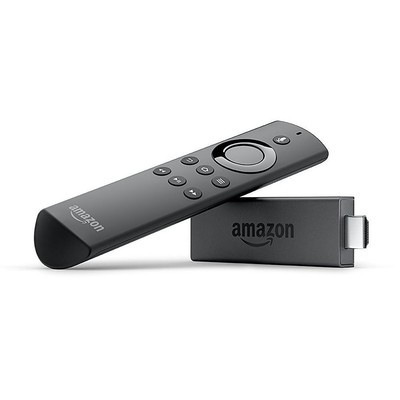
Right now, Prime members can pick up an Amazon Fire TV Stick for just $24.99, which is $15 less than it normally sells for. The Fire TV Stick is Amazon’s most affordable streaming hardware that provides quick and easy access to popular services like Amazon Prime Video, Hulu, Netflix, and more. It has an Alexa-enabled voice remote, which means that you can speak to it and get your favorite shows played without having to search for them manually.
If you’re looking for something more robust, the Fire TV Cube is also on sale, which adds the best of Amazon’s Alexa as well. This one lets you turn your TV on, change apps, and more with just your voice. You can’t go wrong with either, but you’ll want to make sure you grab one now, before the discounts are gone.
See at Amazon
Wireless headphones, the Mohawk drone, and more are discounted today
Whether you’re looking for new tech gear or household items, we’ve got you covered.
We found plenty of great deals today that include big discounts on the Kids Edition Fire HD 8 tablets, the Decade Collection BeatsX wireless headphones, Aukey’s Mohawk drone, and more!
View the rest of the deals
If you want to know about the deals as soon as they are happening, you’ll want to follow Thrifter on Twitter, and sign up for the newsletter, because missing out on a great deal stinks!
 AIVAnet