


Georgia under fire for lax voting security after precinct’s 243-percent turnout
Joe Raedle/Getty Images
Amidst growing concerns over national voter fraud during major elections, a microscope has been turned on Georgia where concerns over inflated voter numbers, phony ballots, and poor voting machine security following the state’s 2018 primary election. In one grievous instance, a precinct with just 276 registered voters recorded 670 ballots, a 243-percent turnout.
Election interference is one of the largest talking points in the U.S. and has been since the 2016 presidential election. As we move toward the midterm elections in November this year, even greater scrutiny is being faced by states that appear more susceptible to it than others. Georgia has swiftly arisen as a state with most concern, with a number of noted instances of problems with voting in the primaries that took place in May this year.
A federal lawsuit against the state has begun to turn up evidence of a number of notable problems with the primary voting procedure. McClatchy reports massive swings in registered voter numbers, testimony from many voters who found themselves turned away at polling stations or told to go elsewhere, the issuing of incorrect ballots, and major issues with the voting machines themselves.
Georgia is just one of four states that use voting machines which cannot and do not provide a paper proof of a vote, making them hard to audit. The 16-year-old machines have suffered freezes and crashes on election days, and as Ars Technica highlights, key data that showed poor security on these machines mysteriously disappeared during a 2017 investigation.
Georgia’s Secretary of State, Brian Kemp, has promised to conduct a bipartisan investigation into changing voting machines before the 2020 elections, though that would not take place in time for the 2018 midterms. However, that may not be necessary, as a group of senators on both sites of the aisle have called for a ban on all paperless voting machines. While it is far from being passed into law, it may well provide more protection against voter fraud in the future.
Some hope that blockchain technology might provide a better system for voting security, but it’s no silver bullet to a problem that appears only more stark as the midterms draw closer.
Editors’ Recommendations
- Microsoft stops a Russian attempt at hacking 2018 midterm elections
- The Justice Department is now cracking down on cryptocurrency scams
- What is a blockchain?
- Theranos founder Elizabeth Holmes could face 20 years in prison
PaintShop Pro 2019 is more well-rounded with 360 compatibility, speed boost
Corel’s Photoshop competitor PaintShop Pro is getting both new tools and a performance boost. On Thursday, August 9, Corel launched PaintShop Pro 2019, an update to the popular photo editor that expands creative tools, enhances performance and simplifies usability. Among the changes are new 360 photo editing support and an artificial intelligence tool that mimics classic painting styles.
The 360 photo support adds a handful of features unique to immersive photography. A tripod removal tool, for example, allows editors to select a tripod (or even a drone) to remove it from the image. A straightening tool is also included.
PaintShop Pro 2019 can also convert a 360 photo into different formats. Tiny Planet wraps the view around a sphere, Rabbit Hole inverts that sphere or editors can convert the image into a panorama. The conversion tools allow for dragging the field of view or altering the aspect ratio. PaintShop Pro’s adjust and effects menu can also be used with 360 photos.
Along with the 360 photo compatibility, the update brings what Corel calls Pic-to-Painting. The tool uses artificial intelligence to convert the image into a style of painting, popularized by mobile apps like Prisma. Users choose a painting style and adjust the strength — the effect then becomes a new layer on the image, allowing for additional edits. Pic-to-Painting is a free plug-in available for the 2019 software, a decision that Corel says was made to keep the footprint of the program small.
The updated features come with faster performance for existing tools, including crops, cloning, and the One-Step Photo Fix. Corel says that the update focuses on improving performance for the most used tools. The update also enhances 4K stylus support, adds support for more stylus and graphics tablets, and includes support for over 100 new RAW file types.
The performance updates and new tools join enhancements to the program’s usability. The crop workflow is enhanced with four new shortcuts in a toolbar above the crop tool. The custom content including plug-ins, brushes and other third-party content also automatically updates with from older versions of the software, by up to three versions. Users can also change the font size on the user interface.
“PaintShop Pro 2019 is absolutely the Photoshop alternative — we have a number of different photo editing tools, it’s absolutely affordable, and it’s subscription free which we will maintain,” Chris Pierce, the senior product manager for photography programs at Corel, said in a statement. “And it’s packed full of features.”
PaintShop Pro 2019 is available for about $80, or bundled with PhotoMirage Express, Painter Essentials, Perfectly Clear 3.5 SE, Corel AfterShot3 and Creative Collection for $100. Existing users can upgrade for $60 for PaintShop Pro only, or $80 to upgrade the bundle.
Editors’ Recommendations
- Picture this: PhotoMirage creates moving images from still photographs
- Photo FOMO: Red gets cheaper, Skylum backs A.I., Illustrator teases new tool
- Want to find out which viral photos were Photoshopped? So does Adobe
- Google Photos now using A.I. to simplify editing and sharing images
- The best photo-editing apps for Android and iOS
What we love and hate about Android 9.0 Pie
Andy Boxall/DigitalTrends.com
Is your Google Pixel phone downloading Android 9.0 Pie at this very moment? Or maybe you’re eagerly awaiting an update to your Samsung, LG, or OnePlus phone for the latest version of Google’s mobile operating system? Either way, you’re about to have a serving of Pie, and we know what ingredients work, and which ones don’t.
Best Android 9.0 features
There are plenty of great features in Android 9.0 Pie, and it’s tough to single out any one as its best. Therefore, here are some that we really love, because they improve Android in a meaningful way that we’ll want to use on a daily basis.
App Navigation
Andy Boxall/DigitalTrends.com
Google has introduced a new app navigation system when you swipe up from the bottom of the screen. Open apps appear as cards that are swiped through from left to right, rather than vertically like in older versions. Swipe up to dismiss, or down to enter. It’s smooth, fast, easy to manage with one hand, and you can easily see the content where you left off. However, it’s the fast access to recently used apps at the bottom of the screen that really works well. Swipe it up again to enter the full app drawer.
It’s a delight to use, and a big enhancement over previous versions. It will also work really well on longer 18:9 aspect ratio screens. Google also gets gesture controls right in the open app tray, but doesn’t quite succeed when it comes to gestures to completely control Android 9.0 Pie.
Notifications
Andy Boxall/DigitalTrends.com
Whether you’re viewing them on the lock screen, muting them, scheduling them to appear later, scrolling through them in the notification shade, or interacting with them — notifications are one of the biggest improvement in 9.0 Pie over previous Android versions. They look better thanks to a new font and more minimal design. The OS will even recognize if you never click on a notification, and it will suggest blocking that app’s notifications completely.
Do Not Disturb
Andy Boxall/DigitalTrends.com
The Do Not Disturb feature is comprehensive, and covers calls, notifications, messages, reminders, and plenty more. It’s now dead simple to use, as turning it on will automatically block all visual and sound interruptions. You can customize this further if you want.
Digital Wellbeing
Andy Boxall/DigitalTrends.com
Sold as a way to reduce the time you spend on your phone, Digital Wellbeing — which is a beta service at the moment and only available on Pixel phones — is better employed as a way to minimize distractions, and make your phone a more pleasant companion. We love the Wind Down grey-scale option, where the screen goes completely grey at a set time to remind you it’s time for sleep, while cutting down on harmful blue light from the display. There’s plenty of options to tweak, and some interesting graphs to browse related to time spent on the device too. While we like this, we’re not sure it’ll be widely used. Hopefully, the basic functions will encourage further use.
App Actions
Julian Chokkattu/Digital Trends
We like anything that potentially saves us time and effort, and App Actions promises to do that. These contextual shortcuts appear in the app drawer, and are suggestions on features, apps, or services that you may want to activate based on your habits and time of day. For example, in the morning it may provide a shortcut to Google Maps and your route to work, or to open a playlist when you plug in or connect headphones. You don’t need to do anything to make App Actions operate either, just use your phone normally and they’ll learn as you go.
Simple UI changes
Not all the improvements are major changes. We like some of the little things too. Android 8.0 Oreo’s on-screen volume control was already better looking than before, but in 9.0 Pie it functions better too. Media volume is prioritized, and a tap of the musical note icon instantly mutes the audio, while the settings cog opens a wider menu. There’s also now a way to prevent accidental screen rotations thanks to a new icon that appears in the bottom navigation bar. Additionally, screenshots are much easier to edit, and the new font looks great. The more you use Android 9.0, the more you’ll appreciate these little changes.
Project Treble
Project Treble is the name given to Google’s solution to the OS update problem, and it’s a considerable step forward (it was technically introduced in Oreo). More phones will be eligible, quickly, for the new version. Not only did the beta version of Pie come to more devices, but the final version is also ready for non-Pixel and Nexus phones on day one. The Essential phone’s update, for example, is out right now, and that’s a first for a new version of Android. Also, all the other non-Pixel phones in the beta test will receive the update in the near future. It’s a positive step, and one that should only improve with future versions too.
Worst Android 9.0 features
It’s hard to call any of the alterations made to Android in version 9.0 Pie “bad.” Plus, what we don’t like, others may find helpful, mainly due to Android’s customization and how we all choose to set the device up. However, there are a few features which either don’t live up to expectations, or potentially bring about changes that we don’t always like.
Gesture navigation
Andy Boxall/DigitalTrends.com
Many have tried, but it’s very hard to beat the traditional three-button Android navigation system. Now it’s Google’s turn to change it, prompted by the emergence of devices with larger screens, smaller bezels, and cleaner lines. And definitely not influenced by the iPhone X’s gesture controls. Nope.
Google’s new gesture control system is based on a complicated system of swipes and taps, and we expect these systems to be easy to master in just a few moments. However, it’s not very logical in Pie, and there are a few too many gestures to memorize quickly. Google can’t even totally commit and has still included a tiny Back button to confuse us even more.
It’s early days, but we definitely still prefer the traditional Android buttons, and are pleased they have not been replaced entirely yet — that might change with the upcoming Pixel 3. We expect Google to continue enhancing the gesture navigation system, and for it to improve over the coming months. It’ll inevitably be compared to iOS’s gesture controls, but it’s simply not as smooth or as intuitive.
Adaptive brightness
Artificial intelligence doesn’t need to be included in every aspect of the phone, Google, and we feel the brightness control should be left down to either the ambient light sensor or the slider control. The ambient light sensor often makes a mess of its adjustments, and having another digital overseer playing about with the brightness now based on usage seems like overkill. Potentially annoying overkill too. Thankfully, if it’s a pest you can turn it off, but that just makes us question its usefulness even more.
Design and settings
Andy Boxall/DigitalTrends.com
Android 9.0 Pie for the most part is visually very attractive. However, it has been pointed out that the new notification shade shortcut icons are housed inside some very large, obvious, and rather jarring circular buttons, where traditionally the shortcuts have been laid across a blank background. Additionally, depending on how you set up your phone, getting to the settings menu now takes an extra step unless you include a shortcut icon on your home screen. What works for some in Android 9.0, may not work for others.
Notch support
Andy Boxall/Digital Trends
There are plenty of people that hate the notch, but its existence is not going away any time soon, and now Android supports it natively, meaning there are likely to be plenty more examples to look on with disdain. The feature itself makes good sense, as it allows the screen to adapt to the presence of a cutout, and still display information correctly without the manufacturer having to independently change the software to cope. However, that won’t appease the haters. This is also a good example of a feature that some will welcome, and not dislike. Those who don’t mind the notch will rejoice that phones with the design feature will operate properly.
My phone may never get any Pie
Yes, Project Treble will help other Android devices get version 9.0 Pie potentially faster than before, but this doesn’t help the many devices that aren’t running a recent version of Android, or those which have heavy manufacturer customization. If you’re reading this months after the public release of Android 9.0, and still haven’t seen an update on your phone, it won’t be a massive surprise and that’s a big problem. If you haven’t got Android 9.0 Pie on your Pixel or other compatible phone yet, then here’s what you need to do to get it.
Editors’ Recommendations
- Android 9.0 Pie: Everything you need to know
- Got Android 9.0 Pie? Here’s why you should turn off auto screen rotation
- Here’s how Google’s Digital Wellbeing feature looks and works in Android 9.0 Pie
- How to take a screenshot on a Galaxy S9 and other Android phones
- Here’s how to download and install Android 9.0 Pie
What is Samsung Knox?

Knox is Samsung’s tool to separate your data from your work, but it can be useful for everyone, too!
A lot of people use their own phones for work; BYOD (Bring Your Own Device) policies are getting more and more popular as phone prices keep rising and consumer models become more secure. We’ve seen Enterprise-level programs for mobile from both Apple and Google, but perhaps one of the easiest to use — both for you and any IT manager — is Samsung Knox.
If you have a Galaxy S phone that’s not more than a couple years old, you probably have Samsung Knox software on it. It’s not really something you can install because it’s part of the Android OS the way Samsung builds it and it isn’t any sort of app or support library. Knox is part of Android if it’s installed, and people who don’t want it know how difficult it can be to erase. Let’s take a look at exactly what Samsung Knox is and what it does.
What is Samsung Knox?

Samsung Knox is a special security layer found in top-tier Samsung phones that can separate and isolate personal and business user data. You can almost think of it as a way to turn one phone into two because of the way it manages apps and the data those apps create, as well as any data you enter into them.
Knox has been hacked, but only by people who hack secure products for a living and then help patch any exploits they find.
You migrate between the two layers by tapping the Knox icon and entering a password. This password is unique and separate from any password you use to unlock the phone, so even if someone were able to bypass the lock screen the Knox secured data would be inaccessible without some really fancy tricks by people who try to defeat secure software as their living, then help to patch things so those tricks no longer work.
By default, once you enter the Knox-protected side of your phone you only have access to a few apps — Camera, Gallery, Email, My Files, Phone, Contacts, Samsung Internet Browser, Downloads, and S Planner. You can add other apps to the Knox-protected layer and they will be “copied” to a place where they and their data is kept separate from the same app on the “regular” layer in your phone.
Knox needs two things in order to work. You need the right device — not all Samsung phones (or watches and tablets) support Knox, and you can see the list of supported devices here. You’ll also need the right software and you can find Samsung Secure Folder in the Play Store if you use a compatible phone to search for it; it’s not going to show up if you’re using a device that can’t install it.
Knox is also software your company’s IT department can use to manage everyone’s device.
There’s also a third important component that can be used for Enterprise management — Knox Premium or an equivalent. This isn’t something you would use at home (but you could if you really wanted to) and it’s a way for an IT department to manage the Koox layer on phones that are part of the server’s group. It’s basically a cloud-based management solution built to work with Knox, and a turn-key secure platform. You can learn more about it here and if you’re an IT professional looking for a multi-device management solution you can talk to a representative from any of the four major U.S. mobile carriers for quotes.
Knox is certified for use in government installations in the following countries: Finland, France, Kazakhstan, Netherlands, Spain, The United Kingdom, and the United States. It’s also FIPS 140-2 and ISCCC complaint in certain configurations. What this means is that organizations like the U.S. Dept. of Defense think Knox is safe enough for its employees (items with clearance levels of sensitive or lower) to use. That means it’s also safe enough for you.
With Android Oreo, Knox was merged into Google’s Enterprise solution Android for Work to provide real-time protection of the Linux Kernel, malware checking and parts of the trusted boot procedure.
Do you need to use it?
You don’t have to use Samsung Knox, and unless you are the type who fiddles around inside your phone’s software you’ll never know it’s there. But if you have a phone that’s built for Knox, it’s free so you certainly can.
Chances are you don’t carry Top Secret information around and nobody is tailing you and trying to steal your data. But people and organizations that do want to steal user data are opportunistic — you might not be a target, but they will be more than happy to get everything they could should they happen to find your phone. Using Knox to handle the things you think need to be secured is easy and has a good track record when it comes to security.
Knox is free and you already have it — why not use it?
Knox is also a great way to hide certain files and folders from others who might have access to your phone from time to time, like siblings or roommates. By placing an application inside Knox you have hidden it’s data unless you know the password, and you can also use the My Files app to secure any file or folder from prying eyes.
You probably wouldn’t want to use Samsung Knox for your day-to-day things like text messaging or your contacts (though you could). But for anything you think is a little bit sensitive — think “things you would never want Mom to see” — Knox is a great way to secure them. You don’t have to be part of an Enterprise organization to value your privacy, and Samsung has given you a very good tool to do it with.
Samsung Galaxy S9 and S9+
- Galaxy S9 and S9+: Everything you need to know!
- Galaxy S9 review: A great phone for the masses
- Complete Galaxy S9 and S9+ specs
- Galaxy S9 vs. Galaxy S8: Should you upgrade?
- Join our Galaxy S9 forums
Amazon
Verizon
AT&T
T-Mobile
Sprint
The best headphones for PlayStation 4

Up your PS4 audio game with these great headsets.
What you can see is only a part of the gaming experience and for the best time, you need some quality audio.
For the most immersive action, you should consider getting yourself a good headset. If you need some help choosing, here are six great choices covering all different budgets.
- Astro Gaming A50 Wireless
- SteelSeries Arctis 7
- Sony Gold Wireless
- Astro Gaming A10
- Razer Thresher Ultimate
- Turtle Beach Elite Pro Tournament
- Plantronics RIG 400HS
- SteelSeries Arctis Pro + GameDAC
Astro A50 Wireless

Astro’s A50 Wireless may be pricey at $299, but the headset deserves consideration as it produces some of the finest sound you can find in a gaming headset. The A50 features Dolby 7.1 surround sound thanks to its built-in MixAmp DAC.
The headset features 15 hours of battery life, and it can be charged back up by docking it into a magnetic charging cradle. As far as wireless is concerned, it connects to the PS4 through a base station using a 5GHz wireless transmitter. This allows the headset to be completely wireless without the need for a chat cable.
And, of course, all of Astro’s usual charm is still present. It’s one of the most comfortable headsets money can buy, and the ability to make it your own with custom ear cushions, headbands, and ear plates. Learn more about the headset by reading a review of the Xbox version produced by our friends at Windows Central.
See at Amazon
SteelSeries Arctis 7

The wireless Arctis 7 from SteelSeries is one of the finest pieces of gaming audio you can ever put upon your head. It’s certainly one of the most comfortable thanks to its innovative “ski-band” design which suspends the headset using a taught fabric band.
This allows the weight of the headset to be distributed much better and as such you can wear the Arctis 7 for long periods without getting fatigued. It hooks up to the PS4 or PC via the included USB dongle and features a retractable microphone with noise cancellation.
You lose the 7.1 surround sound by using it with a PS4 over a PC, but you still get a rich, full sound that isn’t overly bass heavy but still allows you to feel the rumble when necessary.
It’s available in a variety of colors for around $145, and for more check out a full review over on Windows Central.
See at Amazon
Sony Gold Wireless 2018

Sony has two wireless headsets, but it’s the lower cost Gold that gets our nod. It’s substantially cheaper than the Platinum wireless model at $85 while offering much of the same experience.
This is a large headset that Sony has designed with PlayStation VR also in mind. The ear cushions are huge and soft and completely cover the ears, while the whole thing is nice and light so you can comfortably play for extended periods.
The party piece is the companion app on the PS4 that allows you to tune the headset specifically to certain games. You’re getting 7.1 virtual surround sound, too, which for the price is astonishing. Just don’t lose the USB dongle, because you can’t buy a replacement.
See at Amazon
Astro Gaming A10

Astro makes a bunch of great headsets but its new entry-level model, the A10, is one of the most compelling. For starters, it’s really affordable at around $53, and it’s also wired for folks who prefer that. It’s also made from “damage resistant polycarbonate” so it should be able to take a beating in your gaming bag.
The design definitely fits within Astro’s family, with large cups that cover the ears and nice big comfy memory foam cushions. The microphone isn’t retractable or detachable but does have a neat trick where it’ll auto-mute when you flip it up against the side of your head.
At this price, you’re not getting much in the way of fancy features or surround sound, but you do get a solid, well made, great sounding headset with an inline volume remote so you never need to take your eye off the game.
See at Amazon
Razer Thresher Ultimate

One of the more expensive headsets here, the Thresher Ultimate for PS4 from Razer is packed with features, quality and style. This wireless headset will deliver you Dolby 7.1 audio for an incredible, immersive experience in your games. It’s crisp and clear and you’ll hear every detail you need.
It provides lag-free audio and voice at distances up to 12m (40 feet) and is designed to be worn by pro-gamers for long periods. The ear cups are large and trimmed in a leatherette material while being super soft and extremely comfortable.
The included base station also allows you to quickly switch between playing on PS4 and PC with the same headset. It isn’t cheap at $250, but it’s called ultimate for a reason. Be sure to check out the Windows Central review of the Xbox One version of this headset.
See at Razer
Turtle Beach Elite Pro Tournament

The Elite Pro Tournament headset delivers stunning, crystalline audio combined with next-level comfort. The headset’s generous cushioning across the headband and earcups allow you to forget you’re even wearing a headset, reducing the physical delta between you and complete immersion.
If you throw in the Elite Pro Tournament’s Tactical Audio Controller, you’ll end up with unprecedented control over your game. Adjust audio levels, surround sound modes, mic feedback and more without interrupting play.
Every aspect of this experience simply screams premium. Turtle Beach has outdone itself with the Elite Pro Tournament headset. It will set you back around $200, or $350 if you throw in the audio controller, which is a lot, but you have supreme sound quality and ultimate control.
See at Amazon
Plantronics RIG 400HS

The only difference between the RIG 400HS (PS4 version) and the RIG 400HX (Xbox version) from Plantronics is the color of the box, the console badge on the box and the color of the tag on the left side of the headset. Otherwise they’re exactly the same and it doesn’t matter which you snag, you can use both with both consoles.
What you get though for $50 is a really comfortable, superb sounding wired headset with inline volume and microphone mute controls. The microphone detaches, too, even if you’re not that likely to use this as a pair of headphones.
The ear cups are trimmed in fabric, thick and delightfully soft and they’re light enough that you’ll not be worried about fatigue at the crucial moment. There’s an awful lot of headset here for very little money.
See at Amazon
SteelSeries Arctis Pro + GameDAC

SteelSeries’ latest headset is the company’s approach to the ‘Pro’ market, taking on the likes of Turtle Beach, Razer and Astro Gaming at the very high end.
What the Arctis Pro does is take everything that’s awesome about the Arctis 7, and turn it up a couple of notches. The skiband design remains so it’s super comfortable, and with the included GameDAC powered by an ESS Saber with an included amplifier, you get gaming’s first Hi-Res Audio certified headset.
The sound is amazing, the comfort is sublime and while you’re going to have to drop $250, for serious gamers it’s money well spent.
See at Amazon
Updated August 2018: We’ve added one of the best wireless gaming headsets available to this list with the addition of the Astro A50 Wireless.
PlayStation 4

- PS4 vs. PS4 Slim vs. PS4 Pro: Which should you buy?
- PlayStation VR Review
- Playing PS4 games through your phone is awesome
Amazon
This $100 Vizio sound bar is ridiculously good
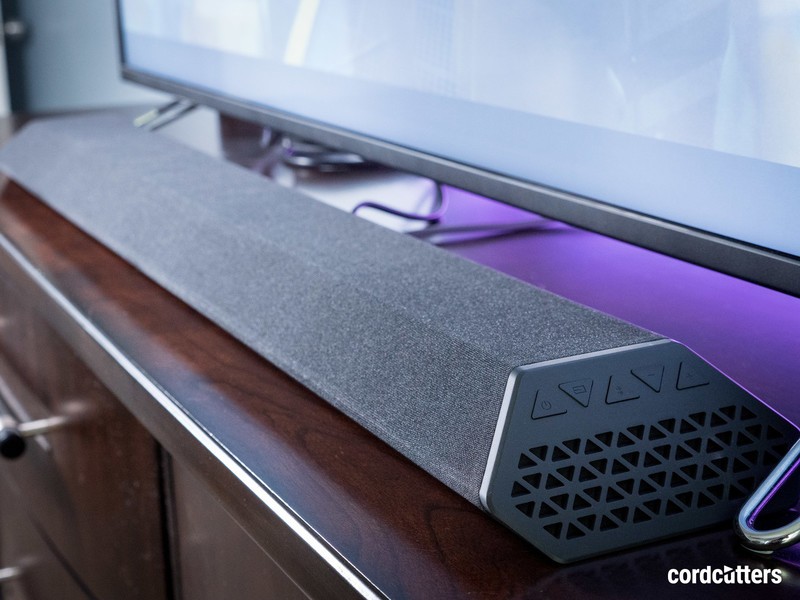 The Vizio SB362An-F6 sound bar. ($98 at Walmart)
OK, actually it’s only $98. And that makes it even better.

There’s absolutely nothing wrong with being an audiophile. We should all want good audio. But we also know that the price of audio can increase exponentially as quality improves. And so there’s also nothing wrong with just wanting some decent audio.
Sound bars are a great way to pipe audio out of your home entertainment system. And they can get pricey, too, as they add features and include better specs.
But they don’t have to. Sometimes a basic sound bar is all you need. And the Vizio SB362An-F6 turns out to be an excellent sound bar for the price, hovering just under $100.
This is a no-frills sound bar. It’s got an optical input, and a 3.5mm aux input, and that’s it. No HDMI. No internet connectivity. And exactly zero hassle. It just works, and it sounds pretty darn good for $100. Certainly better than other sound bars we’ve used at that price point.
This one’s definitely worth a look, whether you use Android TV, Apple TV, an Xbox or even an Amazon Fire TV. It’ll be hard to beat it for the money.
Read the full review at CordCutters
See at Walmart
Introducing CordCutters.com
- The hardware you need
- All about streaming services
- What channels are on which service
- FREE over-the-air TV
- How to watch sports
- Join the discussion
Get the latest deals
Have you signed up for Android Pie’s Digital Wellbeing beta?
“I got how many notifications today?”
Android Pie officially dropped this past Monday, and with it comes a new gesture navigation system, an updated UI, battery-saving features, and plenty more. Along with all this, Pixel and Pixel 2 owners running the new software can also sign up to join Google’s Digital Wellbeing beta.

After you sign up for the beta, you’ll receive instructions on how to download the Digital Wellbeing app from the Play Store. Once you do this, a Digital Wellbeing section will automatically appear in your settings.
Digital Wellbeing is designed to help you use your phone less, and as such, Google’s providing stats to help you see how much you’re using your phone throughout the day, which apps you’re spending the most time on, and give you tools that are designed to make it easier to put your device down.
Going through the forums, it looks like a lot of our members have already signed up for the beta!
Tomster88
08-09-2018 01:13 AM“
I opted into the Beta And I got the email today and downloaded it. It’s fascinating to see how many times I’ve unlocked my phone today LOL
Reply
DMP89145
08-08-2018 07:26 PM“
Alright, I generally don’t do any type of Betas… BUT I jumped in on this one.. Interested to see how things look after a week of so … Was already staggered a bit at the number of notifications..:confused:
Reply
Mike Dee
08-07-2018 01:25 PM“
I registered yesterday and received the email today. Not sure how it works yet.
Reply
mrjetpacks
08-07-2018 09:09 PM“
I already downloaded the APK
Reply
What about you? Have you signed up for Digital Wellbeing?
Join the conversation in the forums!
Android 9 Pie
- Android 9 Pie review: Greater than the sum of its slices
- Everything you need to know about Android 9 Pie!
- Will my phone get Android Pie?
- How to get Android 9 Pie on your Pixel right now
- Join the Discussion
Watch the Samsung Galaxy Note 9 launch event: Live at 11:00 a.m. ET!
The new S Pen-toting flagship is ready to burst onto the scene.
It’s the moment we’ve been waiting for since the Galaxy S9 was announced: the Galaxy Note 9’s launch event. The Note fans among us have had August 9 circled on the calendar for weeks now, and it’s finally time to see the successor to the phone that’s in so many pockets today.
We’re always interested in the spectacle that is a Samsung launch event.
Many of the Note 9’s specs and details have leaked, but that doesn’t mean we aren’t interested in the spectacle that is a Samsung launch event. Part of the experience of getting a new Samsung phone is seeing all of the circumstances surrounding its launch, and they’re always a good time.
It all gets going at 11:00 a.m. ET in New York City — that translates to 8:00 a.m. PT, 4:00 p.m. CET and 8:30 p.m. IST for folks elsewhere in the world. No matter where you are, you can watch the show unfold right here at the video player above. As the launch event wraps up, be sure to follow all of Android Central’s coverage to get every bit of Note 9 information you desire!
Samsung Galaxy Note 9
- Samsung Galaxy Note 9 rumors: Release date, specs, price, and features!
- Is it best to buy the Galaxy S9 or wait for the Note 9?
- Do you plan on upgrading to the Note 9?
- Galaxy Note 8 review
- Join our Galaxy Note 9 forums
Xfinity August 2018 security vulnerability: Everything you need to know
Two different vulnerabilities exposed social security numbers and addresses.

Comcast’s Xfinity internet/TV/home phone service is one of the most popular across the United States, and according to a report from BuzzFeed News, two individual security vulnerabilities left the social security numbers and home addresses of all 26.5 million subscribers exposed and accessible to even novice hackers.
Comcast says that there’s no reason to believe any information was actually stolen, but even so, here’s what you should know about what’s going on.
What happened?
The first of the two vulnerabilities allowed attackers to obtain customers’ full addresses using Comcast’s in-home authentication system.

When connected to your home Xfinity network, you could log in to pay your bill by simply selecting the correct address from a list of five (see the picture above).
As BuzzFeed News notes in its article:
If a hacker obtained a customer’s IP address and spoofed Comcast using an “X-forwarded-for” technique, they could repeatedly refresh this login page to reveal the customer’s location. That’s because each time the page refreshed, three addresses would change, while one address, the correct address, remained the same.
The second vulnerability has the potential to be even more damning as it exposed the last four digits of social security numbers,
On the log-in page for Comcast Authorized Dealers (Comcast employees that are selling the service at other retailers), the “Exisitng Customer Address” page asks for a user’s address, last four digits of their SSN, account pin, and drivers license number.
The last four social security number digits are shown on this page, and by just having the billing address of a customer, an attacker could use a brute-force attack to repeatedly enter four-number combos until they got the right match. Per BuzzFeed News:
Because the login page did not limit the number of attempts, hackers could use a program that runs until the correct Social Security number is inputted into the form.
What you can do to protect yourself
The in-home authentication system has since been disabled after Comcast was informed of the vulnerability, and for the Authorized Dealer log-in, Comcast says it’s placed “a strict rate limit on the portal” to prevent it from being abused.
Although Comcast is still conducting an investigation into the matter, the company says it doesn’t believe any information was wrongfully used.
Even so, it’s never a bad idea to update your password or start using two-factor authentication for all your online accounts when something like this pops up. In these situations, you can never be too safe.
Best Password Managers For Android
These are the best phones for playing PUBG Mobile

PUBG Mobile is a graphics-intensive game that demands a powerful phone, and the Razer Phone is your best option.
Our Pick
Razer Phone

$699 at Amazon
The best gaming phone, period.
The Razer Phone is a specs beast, with a powerful Snapdragon 835 chipset, a whopping 8GB of RAM, a huge 4000mAh battery, and a 5.7-inch display that supports a refresh rate of up to 120Hz — capable of producing the most buttery-smooth frame rate you’ve seen on a phone.
Why you should buy the Razer Phone
If you’ve played PUBG Mobile, you’ll know it’s a very fast-paced and competitive game. If you want to win consistently, you’ll need to refine your reflexes and learn how to scan the horizon for enemies and try and get the jump on them before they see you.
With the Razer Phone, you get a phone that’s perfectly designed to handle a game like PUBG Mobile. The specs will run the game smooth as butter and the display is capable of running the game at its highest graphics settings. The front-facing speakers are nice and loud and will let you hear the subtle sounds around your character, and even the blockish design is great with none of that curved screen business which could result in accidental touches around the edges.
Then, there’s the massive battery which is enhanced by the gaming optimization features built into the Razer Phone’s software that let you prioritized game performance or battery life and can also block incoming notifications so a distraction doesn’t cause you an early demise. Plus, it’s also got front-facing speakers that sound amazing and 64GB of onboard storage along with a dedicated microSD slot.
A Razer Phone won’t make you a better PUBG player, but it will let your skills grow without ever impeding your gameplay.

Advertisement
The Best Display
Samsung Galaxy S9+

$820 at Amazon
The most gorgeous screen you’ll see on a phone.
The Galaxy S9+ is a great gaming phone because it is a great phone, period. But when it comes to playing a game like PUBG Mobile, the best differentiator the Galaxy S9+ has going for it is its brilliant Infinity Display.
Samsung has refined its top flagship to make the performance slightly faster and the display slightly brighter for an all-around better experience for mobile gamers.
This phone has the top-end specs you’d expect and easily handles running PUBG itself, but you also get some other great hardware features like a headphone jack, a microSD card slot, water resistance, and support for wireless charging that make it a better phone overall.
I personally think this phone is not as comfortable to hold for lengthy gaming sessions without a case, but it’s arguably a better phone overall than the Razer Phone so if camera performance and a sleek design for your phone are your top priority, this is a great option.
Value Pick
OnePlus 6

$529 at OnePlus
A great deal, with gaming chops.
With a game like PUBG Mobile, you’re going to want to play on a newer phone to get the best performance from the game itself. But these days, to buy a brand new flagship phone can mean dropping up to or over $1000.
The OnePlus 6 costs just $529 and comes with a Snapdragon 845 and 6GB of RAM base, with an option for 8GB if you so desire. The display is big and bright, too, which makes for a better time trying to track down enemies across a field.
The OnePlus 6 is a great option for anyone who wants to save some money on a device with flagship specs.
Bottom line
PUBG Mobile is an intense game that can be scaled down to play on low-end devices, but for the best experience, you’re going to want a phone that’s been designed to run games at their highest settings. Sure, the Samsung Galaxy S9 and OnePlus 6 are outstanding devices that run PUBG Mobile like a dream.
In my experience, the Razer Phone has proven to be the best device with its 120Hz refresh rate and design focused for gamers.
 AIVAnet