


Students can stream Spotify, Hulu, and Showtime all for $5 a month
So much content for such a tiny price.
Listen to your favorite music, watch your favorite shows, and catch up on a few series you couldn’t watch before with this expanded bundle from Spotify that now includes Hulu and Showtime. Spotify first teamed up with Hulu late last year to offer a similar service, but Showtime is a new addition that doesn’t add anything to the price. That’s a great combo of programs, especially if you don’t have cable but do have access to some high-speed Internet. You will need to prove you’re attending a Title IV accredited institution to get the deal, so no fooling the system.

The bundle includes a subscription to Spotify Premium, Hulu with Limited Commercials, and Showtime streaming services. The Hulu subscription is regularly $7.99 a month by itself. Spotify Premium is $9.99 and Showtime is $10.99 a month when purchased directly. There are lots of ways to get discounts on all of these services, but getting all three together for $4.99 is nuts.
The original plan combining a subscription to Spotify and Hulu eventually became available to everyone for $12.99, which was still a savings of $5 a month over having both plans individually. Spotify might do the same for this expanded plan eventually. We’ll definitely be keeping an eye out for that.
That $4.99 a month for students is right in line with other streaming services. Both Amazon Music Unlimited and Apple Music have plans at the same price point for students, but neither of those plans include a video service just yet.
The even crazier part is if you sign up for Spotify’s bundle you’ll get the first three months for 99 cents, saving you even more money over time. Plus, if you’re already subscribed to Hulu or Showtime you can still get this deal. You’ll just have to change some billing info around.
See at Spotify
The most essential cases for your Essential Phone
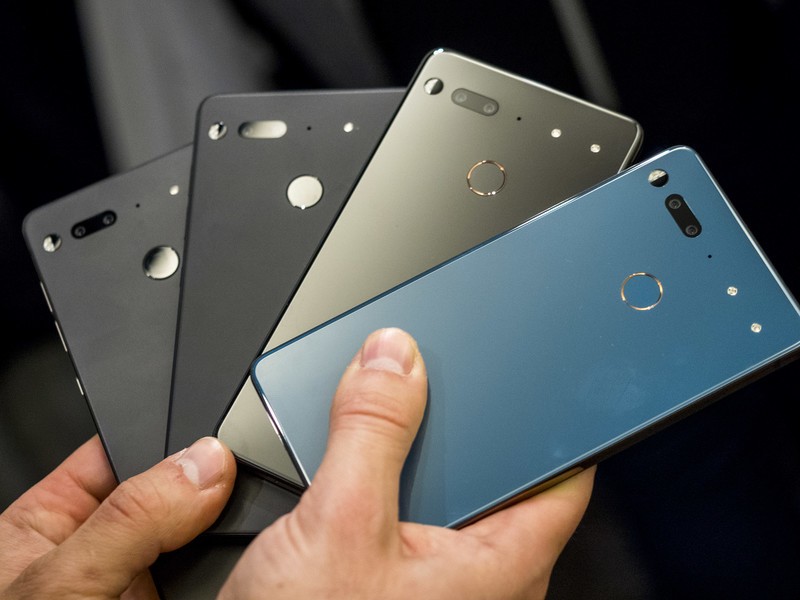
Keep your Essential Phone safe and functional with a quality case!
The Essential Phone was the first phone released by Andy Rubin’s new company in 2017, and while it didn’t blow away the competition, it certainly was a trendsetter for the things we’ve seen on smartphones since — shrinking bezels and screen notches.
We’ve seen some deep discounts including it being the best deal of Prime Day; there’s a ton of new Essential Phone owners out there. If you are among them, you should absolutely get a case. Do note that the 360-camera accessory won’t be compatible with most cases, although we’ve added a couple of cases that are designed to accommodate the accessory.
- Incipio DualPro
- Incipio NGP Pure clear case
- TUDIA Ceramic Feel case
- TUDIA Carbon Fiber case
- Feitenn Flip Wallet case
- Poetic Guardian Full-Body case
- TUDIA Snap On Case
- DUEDUE Heavy Duty Hybrid Case
Incipio DualPro
Best Overall

This case offers dual-layer protection that will keep your Essential phone well protected from scuffs and drop damage. The hardened outer shell features a soft touch finish that feels great in your hand and the overall design minimalist. Get yours for around $20
See at Amazon
This is the first of two Incipio cases on our list, and it’s our top pick overall because of its minimalist design and soft touch finish. It’s an excellent option for keeping your Essential phone safe that’s available at the best price we’ve seen — just $20.
Incipio NGP Pure clear case
Best Clear Case
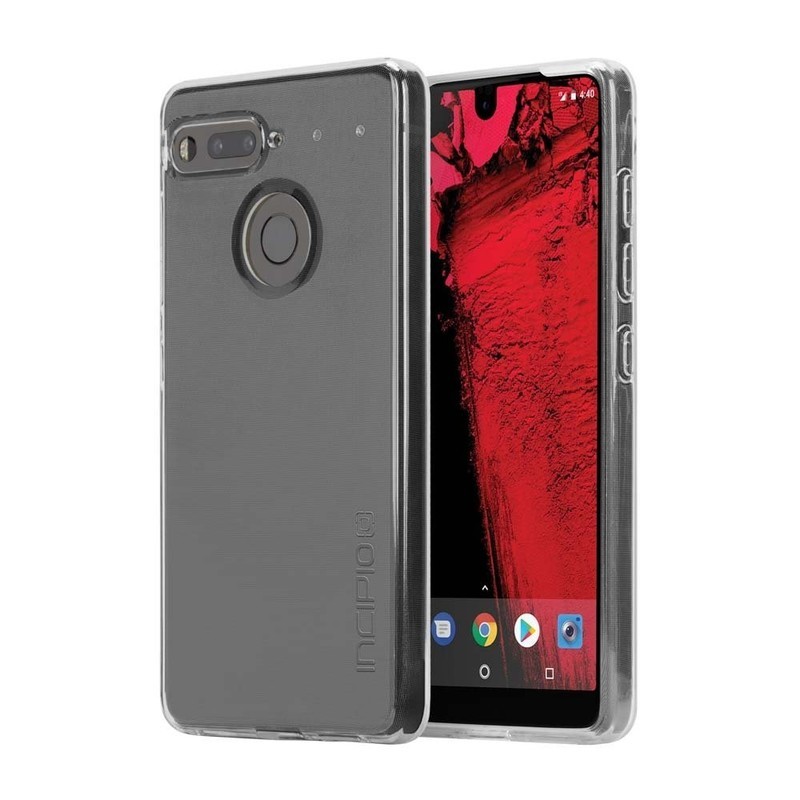
If you bought your Essential Phone because of its fresh design choices, you might be wary to cover that ceramic up with an opaque plastic case. Incipio has you covered with this one-piece clear case that offers a clear view of your Essential Phone while keeping it protected. Get yours for as low as $13 on Amazon!
See at Amazon
Made of a flexible polymer material, this is an easy case to install with full coverage around the edges of your phone, including a lip around the screen and protection for the camera around back.
TUDIA Ceramic Feel case
Feels like Ceramic

If you love the feel of that Ceramic backing but also want to keep it safe, TUDIA offers this case that mimics the same hand feel of the Essential Phone’s ceramic while keeping the device itself safe. It’s a thin and minimalist case that’s available in five different styles (including the super stylish white marble pictured) for just $20.
See at Amazon
The Essential Phone was designed with a ceramic backing — not something you see on many major phone releases. So if you want to retain that feeling in the hand, TUDIA designed the case with tempered glass on the back of the case that also adds extra protection. By doing this, they’ve managed to maintain the look and feel of the Essential Phone which is pretty great.
TUDIA Carbon Fiber case
Spigen alternative

This one-piece case is made of TPU and features carbon fiber accents along the top and bottom, along with textured sections along the sides. The design of this case is not compatible with the 360-degree camera attachment, but it does offer great protection for your phone while keeping the camera, fingerprint sensor, and buttons fully accessible. Get yours for just $10.
See at Amazon
One of our favorite cases is the Spigen Rugged armor case, but Spigen didn’t design cases for the Essential Phone. Fortunately, TUDIA stepped up and offers a very similar one with some extra accents that should help with grip along the sides.
Feitenn Flip Wallet case
Best wallet case

This functional wallet case combines synthetic leather or fabric with a soft and clear TPU shell on the inside to provide top-notch protection for your phone. Cases start at around $10 and are available in your choice of six color styles.
See at Amazon
Looking to add some extra functionality to your phone carry? A wallet case lets you store your ID, credit card, and some cash right along with your phone so everything you need for a night out is in one place. There’s a magnetic closure to keep the front flap closed when not in use, and it can also be folded over to be used as a kickstand for watching videos.
Poetic Guardian Full-body case
Best Full-body Case
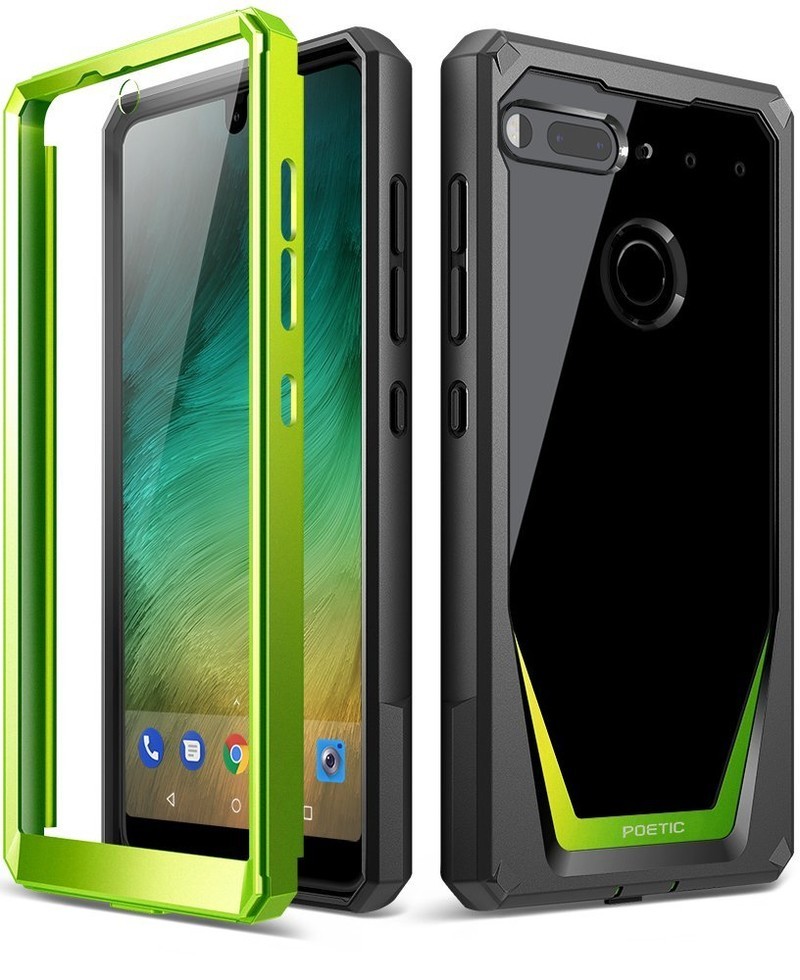
The Poetic Guardian is a full-body case that includes a front plate with a built-in screen protector. Combining soft and shock absorbing TPU with rigid PC bumpers offers great protection for your phone and a clear back panel to show off the design of your phone. It’s available in four fun color styles for just $17
See at Amazon
Looking for something that combines flashy design with rugged protection? Check out these Poetic Guardian cases which combine quality protection along with the views of a clear case.
TUDIA Snap On Case
Best Case for Add-ons

It’s a thin case made of polycarbonate material that offers basic protection against drops and scratches — except it also leaves the top corner of the back exposed so you can attach the 360-degree camera without removing the case. Priced at just $11, this case accommodates the use of Essential’s 360-degree camera accessory.
See at Amazon
If you want to get the most out of the Essential Phone and that camera accessory, then you might be interested in this case from TUDIA. This case does somewhat compromise the effectiveness of the case by leaving an eighth of the back of your phone exposed, but if you want the 360-camera accessory (just $47), this is a great option.
DUEDUE Heavy Duty Hybrid Case
Best Heavy Duty Case

This rugged case offers triple-layer protection for your phone so that your phone is always well protected — but if the moment strikes you and you want to capture some 360-degree videos or photos, simply fold down the top half of the back of the case and voila! You have access to the accessory port for attaching that camera.
See at Amazon
This case option is the best solution we’ve found for keeping your Essential Phone protected while also accommodating the 360-degree camera. Available for $10, this case lets you make use of the camera accessory without compromising any protection.
Update August 2018: Updated pricing information and removed options that are no longer available. These are still the best options for the Essential Phone!
Essential Phone
- Essential Phone review
- Essential Phone specs
- The latest Essential Phone news
- Join our Essential Phone forums!
Amazon
Best Buy
Sprint
Telus
How to clean your Oculus Go

Clean off the jelly fingerprints and get back to the fun.
Now that the Oculus Go has hit store shelves, everyone wants to get their hands on one. So you bring it home, get it all set up, play your device and have an amazing time — except when you go to put it down, you put it into a puddle of milk your toddler spilled three hours before. Or, maybe you just want to maintain the cleanliness that it came out of the box with. Whatever your reasons, we’re here to help you figure out how to clean your Oculus Go headset. From the safest cleaners to the proper cleaning steps are, you have come to the right place.
Warnings
When it comes to cleaning your VR headset, there are a few things you might not know. Before you get your supplies to clean — or worse, guess the right strategy — let us help you out.
Do not use chemicals on your lenses
This will cause permanent damage to your lenses that will take away from your experience.
Do not use abrasive cloths
Even if you’re not using them on a surface you need to see from, make sure you aren’t using any abrasive cloths. Remember, this headset has to go back on your face, and if you use a brillo pad to wipe out the inside, you’re just going to make your face hurt from the rough plastic you’ve created.
Remember to clean your device
Even though it’s a preference, you don’t have to clean your headset after every use. But you do want to make sure you give it a good wipe down here and there. This will make sure your lenses are always showing you pristine images and you aren’t sharing germs with your friends (or yourself)!
Disinfecting wipes or casual maintenance

So what you want to do is get yourself some alcohol-free sanitary wipes. The reason you don’t want alcohol in the solution is that the alcohol in most cleaners will actually damage the lenses to your VR headset. This means you’ll get warps in the glass or even color distortion which will absolutely ruin your headset. So, even if you think you’re super careful with your cleaning, it’s best to not take any chances of a drip or slip. You can use these wipes on just about your entire headset, including the controller, but you still want to do your best to avoid the lenses anyway.
Alcohol-free sanitary wipe

There are two different types of disinfecting wipes that should be in your cleaning cabinet if you own a VR headset. The first one is an alcohol-free sanitary wipe. You can find these wipes for about $8, and they’re perfect for cleaning out the headset between turns with friends. This way when one person is done using your Oculus Go, they can wipe off all their sweat and germs before passing it around.
See on Amazon.
The deep clean

First thing’s first, you want to make sure you have a dry microfiber cloth, a can of compressed air, a few Q-tips, and non-alcoholic disinfectant wipes. These will be all the handy tools you might already have available in your home. If not, there’s no problem. They’re all easily found on Amazon.
The necessities

You can find a can of compressed air for $9 and a pack of microfiber cloths for $12, both on Amazon.
See on Amazon.
Take your can of compressed air and get into all those hard-to-reach places to knock all the dust lose.
Use your Q-tip to finish cleaning the dust knocked loose.
Use your Q-Tip to wipe out the edges of your lenses.
Use a dry microfiber cloth to wipe down the outside of the device.
Use a non-alcoholic wipe to clean out the hard plastic and foam interface.
Use a dry microfiber cloth to wipe down the inside of the device.
Use a dry microfiber cloth to clean the lenses – circular motions!
Use your non-alcoholic wipes to clean off the controller.
What’s your routine?
How often do you clean your headset, and what are your favorite products to use? Tell us in the comment section below!
Updated August 2018: Updated this guide with new formatting so that it’s even easier to read!
Be kind to the planet with these new green Nimble charging accessories
Tech for good.

Nimble, a company founded by people from Mophie, is here to change the way we charge our phones. The brand just started selling tech charging accessories on its website, and items will be listed on Amazon soon too.
Here’s the thing. The tech products we rely on, and the accessories for those products, don’t come at a low cost. Yes, yes, maybe you got yourself a nice Thrifter deal, but I’m not talking about cost in terms of money here. The vast majority of the time, things like phones, portable chargers, and cables are made with components that are awful for the environment. Plastic, metal, toxic chemicals like lead and mercury… it’s all bad, and it gets even worse when items aren’t recycled properly. We’re talking chemicals-in-groundwater bad. Irreversible-mercury-contamination bad. I’m not here to lecture you for something that almost everyone is guilty of, but electronic waste is super-harmful to our planet and the people that live on it.
Nimble is here to help. Currently, the product lineup consists of a wireless charging stand, wall chargers, a travel-friendly wireless charger, four portable battery chargers with various mAh capacities, and a USB-C cable. Prices start at $19.95, and the best part is, the items are much more eco-friendly than your average consumer electronics. The company works with thoughtful suppliers and aims to work with better materials, like bioplastics and organic hemp. The packaging is environmentally responsible, the pricing is a benefit of digital-only branding, which also cuts down on transportation pollution, and the brand’s One-for-One Tech Recovery Project includes a prepaid envelope with every purchase. Fill it with old or obsolete electronics and send it in to get recycled. It couldn’t be simpler than that.
The items are high quality, too. Every charging brick has an 18W USB-C port, there are multiple 15W USB-A ports, there’s a bioplastic-and-magnet cable management system, the wireless charging pad has an additional USB-A port and a kickstand…the list goes on and on. You can really tell how much thought Nimble put into the items it makes. More accessories are coming within the next year, too.
Perhaps next time you’re in the market for a new tech accessory, you can do yourself and the planet a favor and pick one up from Nimble.
OnePlus 5/5T get front-facing portrait mode with OxygenOS Open Beta
Wondering what’s new in the latest Open Beta? You’re in the right place.
There are a lot of reasons to like OnePlus phones, but one aspect that’s remained since the beginning is the excellent software experience they offer. All OnePlus phones now run OxygenOS, and if you want to test out new software features before anyone else, you can sign up for the OxygenOS Open Beta.

OnePlus updates the Open Beta quite frequently, with each new version including bug fixes, security patches, and feature galore.
To make sure you never miss a beat, here’s everything new in the beta right now.
August 29, 2018 — OnePlus 5 and 5T get portrait mode for the front-facing camera, August security patch, and updated Gaming Mode
OnePlus has announced that Open Beta 17 and 15 is rolling out now for the OnePlus 5 and 5T. This is a pretty big update, with one of the most notable changes being the addition of a portrait mode for the front-facing camera — something that was first introduced with the newer OnePlus 6.
This update also includes Gaming Mode 3.0 that offers improvements in the form of a call suspension notification, text notification mode, and UI + interaction optimizations.
Along with all that, you’ll also find:
- August 2018 Android security patch
- Refreshed Weather app with hourly forecasts, improved accuracy, and 8 units of meteorological data including precipitation probability and perceived temperature
- Note app has a new UI and an optimized process for sharing notes as an image
- UI optimization for OnePlus Switch
- Added Toast message source for Toast messages sent by background apps
- Added description about sleep standby optimization when the function is turned on for the first time
- Optimized background power consumption control
- Fixed call recording issue in India
July 16, 2018 — Google Lens comes to the OnePlus 5/5T
Open Beta 14 and 12 have been announced for the OnePlus 5 and 5T, respectively, and while this is a much smaller update compared to the previous one, the two changes that are here are more than welcome.
First off, this Open Beta adds a shortcut to Google Lens right in the main OnePlus Camera app. To access it, open the camera, swipe up from the bottom, and tap the new Google Lens icon.
Along with this, OnePlus also says that it’s “improved photo clarity and optimizations to reduce oil painting effect.”
July 9, 2018 — The final Open Beta for the 3/3T adds minor launcher and camera improvements
A new Open Beta for the OnePlus 3 and 3T is rolling out now, specifically Open Beta 39 and 30, respectively.
With this Open Beta, both phones are getting a few upgrades to the OnePlus Launcher. Search tags in the app drawer have been improved, there’s a “New installs” section in the app drawer, and OnePlus says its improved the app list for the hidden space and toolbox.
The camera app has been optimized for switching between the front/rear camera and there’s a new feature that lets you scrub through AAC audio files.
As OnePlus noted in late June, this is the final Open Beta that the 3/3T are getting. Later this month, OnePlus will issue an update to anyone on the Open Beta that reverts them to a stable build of OxygenOS.
July 3, 2018 — Project Treble and a new UI come to the OnePlus 5 and 5T!
Open Beta 13 and 11 for the OnePlus 5 and 5T is rolling out to users now, and it certainly sounds like one of the most exciting upgrades we’ve seen in a while.
Right off the bat, this Open Beta brings Project Treble support to both phones. This is the new update system from Google that allows for much faster turnaound times with new software, so it’s great to see that it’s making an appearance with the 5 series.


OnePlus highlights a “brand new user interface” that changes the appearance of the Phone app, settings, power menu, and more. The UI is still recognizable as OxygenOS, but the subtle visual improvements are a welcome touch. Even more exciting, there are now considerably more pre-made accent colors to choose from and you can finally customize your own colors to your exact liking.
Here are some of the other goodies you’ll find:
- Improved search tags in the app drawer.
- A “New installs” category tag in the app drawer.
- Improved app list for hidden space and toolbox.
- Optimized log for the contacts page (Phone app).
- Brand new design + improved user experience for the Weather app and all forecasts are now integrated under a single interface leading to a fully immersive experience.
As always, Open Beta 13 and 11 are rolling out to users incrementally right now and will expand to everyone enrolled in the beta over the next few days.
June 13, 2018 — OnePlus 5/5T and 3/3T get June 2018 Android security patch and camera enhancements
There’s a new Open Beta in town for the OnePlus 5, 5T, 3, and 3T! Here’s what you need to know!
For all four phones, you’ll get the June 2018 Android security patch and bug fixes for the OnePlus Switch app.
Specifically for the 5 and 5T, there’s “camera clarity improvement and optimizations to reduce ‘oil painting effect.’”
May 30, 2018 — OnePlus Switch and File Manager get updated for OnePlus 5/5T and 3/3T
The OnePlus 5/5T and 3/3T received updates through the Open Beta recently, offering similar improvements to the OnePlus Switch app and the built-in File Manager.
OnePlus Switch is getting UI improvements, better support for data migration from your apps, and general bug fixes/stability improvements. For the File Manager, you can now manage Parallel Apps files.
Looking specifically at the 5/5T, OnePlus added a heap of System updates, including:
- Added disable peek notifications option for Do Not Disturb
- Added disable peek notifications option in reading mode
- Optimized PIN code confirmation process
- Optimized sleep standby power consumption
As for the OnePlus 3/3T, there’s a new Camera UI that should bring it up to speed with more recent OnePlus phones.
May 15, 2018 — OnePlus 5 & 5T get group MMS, May security patch, and new launcher goodies
OxygenOS Open Beta 10 and 8 for the OnePlus 5 and 5T, respectively, is here and comes with a fair amount to check out.
In regards to user-facing changes, the OnePlus Launcher now has a Toolbox Card in the Shelf, Hidden Space section in the app drawer, and dynamic app icons (such as the calendar, clock, and weather) can now be edited. The OnePlus Switch app has a tweaked UI for the Backup & Restore section, as well as a more accurate time remaining timer and other general bug fixes.
This Open Beta also fixes a bug that was preventing group MMS from working on the 5 and 5T, and last but not least, the May security patch is here in all of its glory.
April 25, 2018 — Double-tap for lock screen comes to OnePlus 5/5T
With Open Beta 9 for the OnePlus 5 and Open Beta 7 for the 5T, OnePlus made very minor changes.
The most notable addition to this version is a new double-tap gesture that’ll turn on the lock screen when your display is off. This can be useful for quickly checking notifications if you don’t want to fully unlock your phone, so it’s nice to see something like this make an appearance.
Other than that, the only other items included is an improved search history when searching for apps in the app drawer and “optimized scanning logic for large files” with the File Manager.
April 9, 2018 — Earphone Mode is introduced and a new Shelf widget
Open Beta 8 for the OnePlus 5 and Open Beta 6 for the 5T have arrived, and the biggest feature here is a new Earphone Mode. With Earphone Mode, any paused music will automatically play once your phone’s connected to a pair of headphones, you’ll find options for notification ringtones, and incoming calls will be announced through your earbuds/headphones, too.
OnePlus is also including a new Membership widget for the Shelf, minor UI updates for the OnePlus Clock, and the security patch has been upgraded to the April 2018 one.
How do you install the Open Beta?
If you’ve got a OnePlus phone, enrolling in the Open Beta is fairly simple.
You’ll need to manually download the latest available version for your device from OnePlus’s website and sideload it, but once you do this, any future versions will be sent to you as over-the-air updates.
Harish wrote up a step-by-step guide walking you through the whole process, and I highly recommend checking it out to ensure nothing goes haywire.
How to install the OxygenOS Open Beta on your OnePlus phone
What phones are supported?
Right now, the list of phones supported by the OxygenOS Open Beta include:
- OnePlus 3
- OnePlus 3T
- OnePlus 5
- OnePlus 5T
The Open Beta isn’t available for the OnePlus 6 quite yet, but that should be changing in the very near future.
OnePlus 5T and OnePlus 5
- OnePlus 5T review: Come for the value, not the excitement
- OnePlus 5T specs
- Should you upgrade from the OnePlus 3T?
- OnePlus 5T vs. Galaxy S8: Beast mode
- All of the latest OnePlus 5T news
- Join the discussion in the forums
OnePlus
Amazon
Laptops, mechanical keyboards, and more are discounted today
Whether you’re looking for new tech gear or household items, we’ve got you covered.
We found plenty of great deals today that include big discounts on the Asus Vivobook laptop, Samsung’s NVMe M.2 SSD, a HyperX mechanical keyboard, and more!
View the rest of the deals
If you want to know about the deals as soon as they are happening, you’ll want to follow Thrifter on Twitter, and sign up for the newsletter, because missing out on a great deal stinks!
Learn about Spider-Man before he slings onto PlayStation 4 next week!
Forget everything you know about Spider-Man video games. This experience is on a whole new level.

Spider-Man is one of the most iconic fictional characters ever created. The web-head has starred in countless comics, movies, TV shows, and video games but not all of them have bee super high quality. While games like Spider-Man 2 are widely regarded as one of the best superhero games of all time, Spider-Man has also been subjected to some extremely bad video games that many of us try to block out of our memory.
With that said, Ratchet and Clank, Sunset Overdrive, and Resistance developer Insomniac Games is spearheading an exciting new vision for the wall-crawler. While we haven’t played the game yet, the studio has proven themselves time and time again and all the trailers we’ve seen look incredibly promising for PlayStation 4 fans this year.
See at Amazon
What’s new with Marvel’s Spider-Man?
Keep up with Peter Parker if you can. The geeky webslinger is back in his most ambitious game yet, and we have all the latest details for you right here.
August 27, 2018
Sony’s Gamescom booth was dominated by Spider-Man this year, giving it center stage just ahead of its release. Though Insomniac has revealed so much already, that doesn’t mean we can ever have too many trailers, right? The videos below are from a series called Just the Facts, where Insomniac breaks down certain aspects of the game.
And, of course, Spider-Man’s gameplay launch trailer released.
In addition, we also received a little tidbit of information confirming how long the game is, courtesy of Insomniac’s community director James Stevenson, who answered a few questions regarding the game on Twitter.
According to Stevenson, Spider-Man will be “around 20 hours on default difficulty.”
Potential spoilers ahead
Since Spider-Man on PS4 is releasing so soon, spoilers are floating around. One such (potential) spoiler hasn’t come from early copies of the game, but instead from a Funko Pop image. It looks like Spider-Man may make a visit to the Negative Zone as he’s getting a separate Funko Pop with his Negative Zone Suit. Insomniac’s Spider-Man is set to have dozens of outfits for Peter to don, however they’re not all getting separate Funko Pops like this one is, implying it serves a greater purpose within the game.
August 8th, 2018
Ahead of Spider-Man’s release in September, its opening hours showcase the kind of tale that Insomniac is looking to craft. While Spider-Man is, of course, the titular character, the man behind the mask is just as important.
“We wanted this to be our own universe,” explains Jon Paquette, Spider-Man’s lead writer, discussing why the company isn’t adapting a previous storyline from the comics. “And we did a couple of things at the start to hopefully make it feel like it’s different. We are not doing the 15-year-old Peter Parker in high school dealing with girl problems and working as a photographer … We wanted to start (with an older, 23-year-old Peter) because we wanted to tell the story of an experienced Spider-Man who gets to the point where his experience isn’t enough.”
This Peter Parker is no longer a Daily Bugle photographer anymore. He’s now working as a scientist, though his employer is being kept a secret from fans at this time as Insomniac doesn’t want to spoil the reveal. His maturity affects his relationships with those around him. No longer a brash, young teenager, Peter is more assured of himself.
Speaking of his relationships, he and Mary Jane are no longer a couple by the beginning of the game. Despite this, previous videos have shown that she plays an important role in Peter’s adventures. In fact, she’s a playable character.
While she doesn’t have any web-slinging abilities, she does have her wits. As an investigative journalist, she’ll utilize her own skills like her keen observation and reflexes in stealth segments to sneak around and complete her own objectives.
July 30th, 2018
Insomniac has announced that Spider-Man has gone gold. This means the game has been finalized and recorded to a master disc from which all the other copies will be made.
We are pleased to announce that #SpiderManPS4 has GONE GOLD for its worldwide release on September 7th. Thanks to @PlayStation and @MarvelGames for their support in the creation of this original Spider-Man adventure. pic.twitter.com/iD4mJmqGfK
— Insomniac Games (@insomniacgames) July 30, 2018
It’s safe to say that the September 7th release date for the game will hold up and there will be plenty of copies to go around.
July 19th, 2018
What would San Diego Comic-Con be without another Spider-Man trailer? The upcoming Insomniac title just received a story trailer which gave us our best look yet at the threats that Peter and his friends will be facing, as well as introduced Osborn and Silver Sable into the mix.

On top of that, Sony revealed a Limited Edition Spider-Man PS4 Pro that will be gracing store shelves this September, launching alongside the game. As seen above, it sports a sleek glossy red color along with Spider-Man’s iconic symbol. It will be available for $399.99 USD/$499.99 CAD in the United States and Canada. The best part: Pre-orders are already available.
See at PlayStation
June 11th, 2018
As we expected, Sony’s E3 2018 show featured a heavy dosage of Marvel’s Spider-Man, the Insomniac-made game that aims to put all the previous ones to shame. We were treated to loads of new gameplay at the show, with Spidey crashing a prison riot caused by Electro’s shenanigans.
Electro is just one of the many villains present. The trailer also confirmed Rhino, Vulture, and Scorpion. That’s alongside previously-confirmed lesser criminals such as Martin Li and the Taskmaster. There’s also a brand new villain named Mr. Negative, who is making his debut in this very game.
Be sure to check out the full gameplay trailer above, which gives us our deepest look at Spider-Man’s combat yet, as well as some crazy web slinging moves we haven’t yet seen.
The Spidey classics, with a new twist

Insomniac has taken great care with Marvel’s golden boy by working closely with comic-book legends like Dan Slott and Christos Gage to craft an original story for Spider-Man. We all know how Peter Parker got his powers, how he struggles to find his footing as a superhero at first, and all that jazz so Insomniac is going to spare us the classic origin story and thrust into the prime of Spidey’s life. Peter Parker is 23, he has been Spider-Man for eight years and has pretty much gotten this whole superhero thing down to a tee.
In the game’s opening, Spider-Man will take down the infamous criminal mastermind, Wilson Fisk AKA Kingpin. Insomniac Games has noted Kingpin as Spider-Man’s greatest villain at this point in his career and it’s a massive achievement for him when he finally takes him down. Peter Parker’s apartment is also littered with various details regarding his past encounters with criminals like Shocker and Rhino meaning he has tackled some of his famous villains but the biggest baddies like Venom and Green Goblin may not have surfaced in New York yet.
On the opposite side of Peter’s life where he’s not wearing the mask, things are a bit more troublesome. His relationship with the red headed bombshell, Mary Jane Watson, is on the rocks, he’s on the verge of being evicted from his messy apartment, and Aunt May is put into danger when she becomes close with the charitable Martin Li. Li looks like a pretty swell guy on the surface but he holds a dark secret inside of him in the form of his super villain alter ego, Mister Negative. In fear that Li could hurt those closest to him, Peter begins his hunt for Li while tackling plenty of other criminals along the way such as Taskmaster.
Beyond that, it’s come to light that players will actually be able to play as Mary Jane Watson at some point during the story. Insomniac wasn’t too chatty about what sort of role she would have when playing as her, nor do we know how her gameplay mechanics will work. Another interesting character that the player may be able to take control of is Miles Morales.
More than an open outdoor world
As much as those in Peter’s life are important to a good Spider-Man story, one of the most vital characters is the city of New York City itself. As expected, there will be tons of side activities to tackle such as stopping robberies and other crimes. According to Game Informer, when they went hands-on with the game, there will actually be a good amount of interiors to go inside during these crimes so it’s not like other Spider-Man games where you have to chase after a speeding car or beat up some guys on the street.
To make the city feel more alive, Insomniac has built a Marvel universe within it. Players will be able to find the Avengers Tower, the Wakandan Embassy, and likely other major landmarks within the world to help take the worldbuilding to another level. There’s no word on if any other Marvel heroes will show up in the game but it’ll likely be kept to a minimum as they’re trying to make a Spider-Man game, not build an expansive Marvel games universe.
With a heavy focus on story and developing Peter Parker’s life and world, a lesser team could forget to develop a really solid set of gameplay systems, but Insomniac isn’t taking their eye off the ball.
Dynamic movements, killer combat
Many look to Spider-Man 2 as the best gameplay experience in a Spidey game due to the incredible attention to detail and physics based gameplay. The webs attached to walls, Spidey swung like a pendulum, and there was an incredible sense of momentum and speed building as you zipped through the city. With all of the advancements and innovations in games in the last decade and a half, Insomniac is on track to deliver the best Spider-Man game, perhaps superhero game, to date.
The most important aspect of the character is the way he moves through the world. Spider-Man will be as agile and fast as ever in this new game where he acts like a speeding train that has had the brakes ripped out. In Insomniac’s game, Spider-Man is equipped to adapt to his environment on the fly. He’ll never stop moving if you don’t want him to, the game is constantly making adjustments so you’re speeding through the world as the real experienced “masked menace” would.
It’s some of the more traditional Spider-Man combat with elements of the Batman Arkham series mixed in.
If you’re swinging but you’re about to smash right into a wall, Spider-Man will instead prepare to run along the wall in the direction you’re holding the stick. If you’re running along a rooftop with lots of vents and other objects, Spider-Man will parkour over them. If you’re running up a wall with a fire escape, he won’t awkwardly get stuck on it, he’ll bounce off each individual layer of the fire escape like stairs or propel himself through them if he’s coming at them from the side.
There’s an almost dynamic nature to the locomotion of Spidey in this game. His animations are diverse so it keeps this fun and fluid sense of rhythm, he’ll twirl, move his body in cool ways, and all sorts of other things you’d expect him to do when going from place to place. It’s safe to say that it will probably one of the most beautifully animated games to date when it drops.
As for combat, it’s some of the more traditional Spider-Man combat with elements of the Batman Arkham series mixed in. You’ll have your punching and kicking but you can also use some gadgets to help keep things fresh and make things easier on yourself. One gadget Spider-Man has is a web grenade, it detonates and then strings up any nearby enemies so you can swing in and deliver some cheap shots or pick them up and swing them around with a makeshift silk lasso.
If you’re feeling a bit playful, you can use the tripwire which is similar to the web grenade. It sits on a surface and when someone walks past it, it shoots a web out at them and slams them toward the wall. If you manage to latch the tripwire on to a person instead of a wall, it will smash two enemies together like Newton balls. If you also happen to knock an enemy off of a building, a tripwire will automatically be deployed and activated to prevent a foe from becoming a splatter on the sidewalk down below. The city is messy enough and Spider-Man doesn’t kill so the game will help you out there.
If you’re in the heat of the moment and you’re keen on doing that, players will be able to slow down time briefly and analyze the area for their next move. Is it singling out a guy? Choosing where to throw a gadget? Using an environmental object to defeat some evildoers? It’s up to you how strategic you want to be with it.
Missions, Trophies, and so many different suits

Of course, New York City is known as the city that never sleeps so there’s always something brewing on the streets whether it be petty crimes or full-blown robberies. Outside of story missions, our friendly neighborhood Spider-Man will get side activities to go clean up the streets. Crimes will play out differently each time so you’re not doing the same repetitive task over and over again so you can grind for that trophy or special in-game perk. According to Game Informer, robberies can evolve into car chases and so forth so it’s always shifting and keeping you on your toes.
If you’re a bit tired of beating people up (you’re a superhero, it’s your job, get over it), you can go and do some of the collectible missions like finding Peter Parker’s lost backpacks. As we saw in Spider-Man: Homecoming last year, Peter tends to just leave his school bag webbed up in alley ways when he has to spring into action. Of course, this can result in some bags being misplaced so you need to go and retrieve some key mementos of Peter’s. The items in the bags will serve as backstory for Peter Parker and fill in some of the blanks in the story as well as give you little trinkets such as the first pair of web-shooters he ever created.
There are other little side activities sprinkled in the world but Insomniac isn’t going to divulge all of them before launch so that there can be some surprises when you play it. Similarly, they were tight lipped on the suit customization.
While it is now officially confirmed there will be dozens of costumes for Spider-Man inspired by comics, other games, and the movies, they’re not revealing many of the suits yet. So far we know that there will be a more traditional suit that you start the game in, an upgraded one with the white spider which supposedly ties into the narrative, the Noir suit, and the Spider-Punk suit.
Each suit has a unique special ability tied to it, the Spider-Punk suit features the ability to pull out a guitar and strum it really hard to create an AOE attack. The other suits have their own benefits but Insomniac isn’t willing to talk too much about them yet.
Oh, and one last thing: they’re including a killer photo mode in the game. Considering Peter Parker is a professional freelance photographer when he isn’t donning his Spidey suit should mean we’ll have plenty of great tools to capture his musings around New York City.
Alright, when can I buy this?

If you’re as excited as we are for this game, you can pre-order the game for $59.99 at most retailers. If you want to go the extra mile, you can drop $149.99 on the Collector’s Edition which includes a nice looking statue, some digital items such as post-launch DLC missions, and a steelbook case.
Spider-Man will swing onto store shelves on September 7th, 2018 exclusively on PlayStation 4, this is NOT a timed exclusive. It will never be on anything else other than PlayStation.
See at Amazon
Updated August 2018: Insomniac has released several new videos detailing quick facts about Peter’s gadgets and tech, his relationships with other characters, the city of New York, and Spider-Man’s combat.
PlayStation 4

- PS4 vs. PS4 Slim vs. PS4 Pro: Which should you buy?
- PlayStation VR Review
- Playing PS4 games through your phone is awesome
Amazon
Take a look at this guide if your Oculus Go isn’t in focus

Although the Oculus Go doesn’t have a manual focus dial, it does come with eyeglass spacers included in the package, letting you wear your prescription frames without scratching up the Go’s lenses. Special corrective lens inserts are available for purchase if your standard frames do not work with the Go. Let’s take a look at how to install the eyeglass spacer, as well as where to find prescription lens inserts made specifically for the Oculus Go. That way, everything is in focus.
Products Used In This Guide
- Amazon: Oculus Go (From $199)
- FramesDirect: VirtuClear custom lens inserts ($80)
How to install the Oculus Go eyeglass spacer
Here’s how to install the spacer that lets you use your own prescription frames with the Oculus Go.
Lift the lens rings up and off the Go’s lenses to remove them. Be careful not to touch the lens itself.

Pull the facial interface foam away from the lenses and light sensor. It should come off rather easily.

Press the eyeglass spacer that came included with your Oculus Go against the bare area around the lenses. The glasses logo on the spacer should be at the top.

Press the foam facial interface back into place, held securely by the light sensor. Ensure it’s not covering the lenses.

Press the lens rings back into place around the lenses. They will clip into place with an audible noise.

You can now safely use your Oculus Go with eyeglasses that measure 142 mm (5.59 inches) or less in width and 50 mm (1.96 inches) or less in height. If your standard eyeglass frames don’t work with the Oculus Go, or you don’t find the need for eyeglasses unless you’re using the Go, you might want to check out prescription lens inserts from FramesDirect.
To install, follow the same steps laid out above to install the eyeglass spacer, but use the custom VirtuClear lens inserts from FramesDirect instead of the stock lens rings in Step 5.
How to put on your Oculus Go while wearing glasses
In order to put on your Oculus Go while wearing eyeglasses, follow these steps.
Loosen the top and side straps. There’s no need to remove them completely.
Place the Oculus Go against your face, around your eyeglasses.
Tighten the top and side straps until the Go sits comfortably on your head without interference from your glasses.
Ensure you also loosen the straps before removing the Oculus Go when using eyeglasses.
Our top equipment picks
Here’s the stuff you need in order to complete the steps in this guide, including adding custom prescription lens inserts to your Oculus Go.
Our Pick
Oculus Go

From $199 at Amazon
Portable, immersive VR.
The Oculus Go offers immersive, high-quality VR that doesn’t rely on attached cables. You can use it just about anywhere along with the included motion controller, and there are plenty of games and experiences available with more on the way every day.
The Oculus Go might not have manual focus adjustment built into the hardware, but an included eyeglass spacer makes it possible for most people to use their standard frames. In cases where this still isn’t possible, custom prescription lens inserts from FramesDirect can be easily added into the mix, allowing just about anyone a clear picture.
Additional Equipment
Check out FramesDirect for custom prescription lens inserts that will bring your Go into focus if standard eyeglasses aren’t an option.
VirtuClear custom lens inserts

$80 at FramesDirect
These are the custom prescription lens inserts recommended by Oculus if you can’t get your Go into focus with standard eyeglasses.
Google Titan Security Key bundle is now available for $50
 The Google Titan Security keys. ($50 at Google)
After a few weeks of teasing, having been introduced at Google’s Cloud Next Conference, the Google Titan Security Key is now available for purchase in the Google Store. The $50 bundle includes a pair of keys, actually. One is a traditional USB-A (and NFC, but more on that in a second) model. The other includes USB (via a micro-USB adapter) and Bluetooth.
Here’s what you need to know:
- The Titan Security Key(s) is based on the standards from the FIDO Alliance, which comes up with the Universal 2-Factor standards used in two-factor authentication. So that’s FIDO, U2F, and 2FA, for those of you who prefer acronyms.
- These keys are a more secure form of two-factor authentication. You’ll still need your password, but then you’ll plug in (or use Bluetooth or NFC) your key and tap it for that second factor of authentication.
- (No, these aren’t also fingerprint scanners.)
- The USB Titan Key also does NFC, which works great with phones. However, we’re awaiting an update to the Android software itself to be able to use NFC with the Titan Key. (Other U2F NFC keys, like the Yubico Neo, work just fine at the moment.)
- This is the sort of thing you’ll need to use in conjunction with the Google Advanced Protection Program. More on that here.
Why’s Google doing this? To help push adoption, for one thing. SMS two-factor codes are notoriously interceptable, and even software tokens aren’t much better. With a physical hardware key, you’re proving that someone (presumably you) are in possession of the key. And as an added layer of security, the keys allow your browser to report back which page you’re trying to log in from. If it’s from something like http://www.googl3.com and not http://www.google.com (or something far more sneaky), it’ll be rejected.
Google also controls this hardware, as well as the firmware. Unlike other U2F keys, the firmware is locked down and can’t be modified. And to be clear, it doesn’t just work with Google’s two-factor systems. It still works with anything that uses the FIDO standards.
And that’s that. Google is selling these as a bundle, for now, because you really should keep one key on hand, and stash the other as a backup. (You’ll need to register both with whatever services you’re using, obviously.)
If you can about your online security, this could well be the best $50 you spend.
See at Google
What it’s like to live under the Google Advanced Protection Program
 The author, and the new Google Titan security key, which uses the U2F protocols developed by the FIDO Alliance to provide a secure second factor of online authentication. The Titan security key is now on sale in the Google Store.
The strongest consumer-level security Google offers requires a few trade-offs, but it also gives a great deal of peace of mind.
I am not what I’d call a Very Important Person. I still consider myself a journalist of sorts (and it’s what’s on my college degree), but I wouldn’t say I practice it in the way I did back when I made newspapers. I also am neither an activist, business leader, or am on a political campaign team.
Am I really a candidate for Google’s Advanced Protection Program? Do I really need the strongest account security Google offers publicly?
I’ll answer that in a minute. But first, I’ll define what I think I am these days: I’m approaching middle age while watching my daughters begin their online lives, and I’m as convinced as ever that the Internet is inherently backwards and broken, and we all need to take our online security more seriously. (That is, if we’re thinking about it at all.)
The question you have to ask yourself is why wouldn’t you want to protect your online life as best you can.
Two-factor security should be mandatory. If a service doesn’t provide it, you probably shouldn’t use that service. But all two-factor schemes are not created equal. One-time passwords sent by SMS can be intercepted by a determined attacker. Software-based tokens are better, but not infallible. Better, still, are physical hardware keys. A physical key that you plug into a computer via USB, or by NFC or Bluetooth, that you connect to an account. Don’t have the key? You’re not getting in.
This is all part of the FIDO Alliance — “the World’s Largest Ecosystem for Standards-Based, Interoperable Authentication” — and U2F, the “Universal 2-Factor” experience born from FIDO. You can basically think of U2F and 2FA as the same thing, and FIDO is the group that makes the standard happen, with folks from Google, Microsoft, Lenovo and Amazon (among others) on its board.
Subscribe to Modern Dad on YouTube!
The basics of the Advanced Protection Program
Physical hardware keys have been around as a second form of authentication for years, and they’ve been an security option for Google accounts for quite some time.
Google’s Advanced Protection Program makes them a mandatory mechanism for logging in, and it makes them the only 2FA option. You’ll still have your Google password, and now you’ll have to use a physical hardware key in conjunction with that password to access your account. No more SMS codes. No more Google Authenticator app. No phone calls. It’s password-and-key, or you’re not getting in.
It’s that simple, really. But Google does go a bit further. You’ll still be able to log in to websites with your Google account. But apps that can access Gmail or Google Drive files will be severely limited. Here’s how Google puts it:
To help protect you, Advanced Protection allows only Google apps and select third-party apps to access your emails and Drive files.
As a trade-off for this tightened security, the functionality of some of your apps may be affected. Most third-party apps that require access to your Gmail or Drive data, such as travel tracking apps, will no longer have permission. And you will only be able to use Chrome and Firefox to access your signed-in Google services like Gmail or Photos.
Apple’s Mail, Calendar, and Contacts apps will continue to be able to access your Google data as normal.
That’ll probably be the biggest hurdle you’ll face in day-to-day use.
Google also throws extra roadblocks in front of someone if they try to pretend that they’re you and you’re logged out of your account.
A common way that hackers try to access your account is by impersonating you and pretending they have been locked out of your account. To give you the strongest protection against this type of fraudulent account access, Advanced Protection adds extra steps to verify your identity during the account recovery process.
If you ever lose access to your account and both of your Security Keys, these added verification requirements will take a few days to restore access to your account.
That’s not one I’ve had to experience yet, but it doesn’t sound like fun.
 Most of us outside of a secure work environment won’t have to use a physical key to authenticate very often, so it’s more like an extremely strong method of protection.
What it’s like to use Google Advanced Protection Program
First, hit up Google’s Advanced Protection Program website. You’ll be instructed to grab a couple of U2F keys. Previously Google recommended third-party keys, which are fine. But now that the Titan keys are available in the Google Store, it’s just as easy to grab them. The way you use them will be exactly the same.
Once you have them, you’ll actually enroll in the service. That’ll turn on all the protections — and it’ll also log you out of everything, for obvious reasons.
So, it’s time to log back in. Or not. This is where things get a little interesting.
I now have to use Gmail in a web browser instead of in a wrapper like Mailplane or Shift. That’s been a minor annoyance, but not really a showstopper. (Hell, it’s one fewer app to be running in the background.) But it also means that Mac OS no longer has access to Gmail, either. That actually was a little surprising, given how well the Advanced Protection Program works with iOS via a helper “Smart Lock” app. Maybe it’ll change at some point. But on the other hand I wouldn’t trade Gmail in a browser for Apple’s Mail app.
 The Google Smartlock app on iPhone X.
Logging back into phones was easy enough. For that I used my Bluetooth/USB fob. The one I’ve had for a month or so now charges via microUSB, which is a little annoying. But, again, not a deal-breaker. If I want to use it with a phone, I connect via Bluetooth. If I want to use it with a computer, I plug it in. Easy enough. I’ve also used the Yubikey Neo, which is USB-A and has NFC built in, and it works great, too. Note that if you’re using an iPhone, you’ll need something with Bluetooth, at least until NFC is officially opened up in iOS 12.
Logging into a Pixelbook took all of 10 seconds. Type in my password, plug in a key and authenticate, and I’m up and running. (Though if you’re really using a Chromebook and really using Advanced Protection you’ll want to make sure you have other basic log-in security implemented, so someone can’t just open the thing up and start using it. Same as any other laptop, really.)
The biggest hiccup for me has been with the NVIDIA Shield TV. (When you get logged out of everything, you get logged out of everything.) You’d think you’d be able to log into just like an Android phone. (Because it’s an Android platform, after all.) But for whatever reason, it just doesn’t work, same as if you tried to log in with some other untrusted third-party source.
Beyond that, things pretty much have been seamless. It’s not like I have to log in to my account every day. (Though in some business environments, that’s exactly what this physical key scheme is great for.)
If I do need to log in to a new device somewhere, I just have to make sure I have my key on me. So I keep one on my keys, and a backup in a safe place. (No, I’m not telling you where.)
By the way: You can un-enroll from the Google Advanced Protection Program if you just can’t live with it. But I haven’t felt that urge at all. Also, you can un-enroll keys from any service at any time — you’ll just have to remember which services you use a key with. (Or you can always just destroy a key if you’re done with it.)
 There’s no single perfect key for everyone — it’s very much going to depend on what devices you need to authenticate.
Which U2F key is best for Advanced Protection?
Here’s where things really come down to your own situation. You can get a straight USB-A key. You can get a USB-C key. You can get a nano key (USB-A or USB-C) that lives in your laptop most of the time but doesn’t get in the way (outside of taking up a port). You can get something with Bluetooth, or NFC.
You don’t have to use Google’s Titan Security Key if something else will work better for you.
(A note on that, though: The USB model of Google’s Titan Security Key includes NFC, but it won’t work at launch. That’ll require a behind-the-scenes update on your phone. Other hardware keys handle NFC just fine, though, if you have to have it right this second.)
It all depends on just how often you need to log in to whatever it is you need to log in to, and the kind of device you’re using. If your business requires daily authorization, but at a trusted computer (say, behind a bunch of locked doors), then maybe a USB-A nano key is the way to go. If, like me, you don’t need to log in very often but still want everything Advanced Protection offers, something larger might not be awful. If you have a USB-C laptop and USB-C phone, well, that makes that decision even easier. It’s going to vary depending on what you use.
And you don’t necessarily need Google’s Titan key, either. They function exactly the same as other U2F keys — only these have the might of Google behind them, controlling the firmware that’s inside. (And that is a good selling point.) And unlike other keys, which can be manipulated by an IT department, the firmware is totally locked down. You’ll be using these as Google intended.
 The Google Titan key is equipped with NFC, but it’ll require a background update before it’ll work with Android phones.
So is Google’s Advanced Protection Program the right thing for you?
That’s one of those things that I can’t answer for you.
The Advanced Protection Program is a little overkill, but it’s also the right way to do security.
On one hand, I want to say yes, it is. I’ve found the tradeoff between security and annoyance to be minimal. It’s not going to completely replace SMS codes and software-based tokens in any event, though it’d be nice if it did. The simple fact is not enough services use hardware keys. (And some only allow them as secondary 2FA methods.) Hit up twofactorauth.org to find out if your favorite service uses them.
And I’m really close to putting my daughter’s account on it. (If I haven’t already, because now that I’m writing this …)
I’ve had to help too many family members reclaim accounts before. It’s just too easy to accidentally click on links that should never have been clicked. It happens to the best of us.
What we need is stronger back-end support to go along with the knowledge that the internet is backwards and broken and we have to be more vigilant.
Google Advanced Protection gives that support.
It’s just up to us to use it. And I’m not turning it off.
Modern Dad
- Subscribe on YouTube
- See the gear
 AIVAnet