


Scared yet? Boston Dynamics’ humanoid robot can now jog freely
Boston Dynamics’ Atlas robot has been untethered and set free, which, for anyone convinced of an imminent robot uprising, is a rather worrying development.
A video posted on YouTube this week shows the humanoid robot running at a fair clip across open land before jumping over a log that it finds in its path.
It’s impressive stuff, and shows just how far bipedal robots have come in a short space of time. For proof, check out this amusing compilation video from a contest in 2015 showing a bunch of similarly designed robots looking as if they’ve spent a night drinking as they simply try to walk, let alone break into a jog à la Atlas.
To be honest, it’s not the most impressive thing we’ve seen Atlas do. Last November, for example, we were treated to a video of the robot performing a perfect backflip. Pretty astonishing for a 5-foot-9-inch, 180-pound machine.
Atlas hasn’t always been so clever, though. Last August, two videos surfaced showing the robot taking a tumble, once on stage when it tripped over a light and again during a shelf-stacking demonstration.
SpotMini goes for a walk
Boston Dynamics also released a video (below) showing its SpotMini “robot dog” navigating a specified route through its office and lab facility. The team said that before the walk, it led the robot along the route manually so it could build up a map of the course using cameras mounted on its front, back, and sides.
“During the autonomous run, SpotMini uses data from the cameras to localize itself in the map and to detect and avoid obstacles,” Boston Dynamics said in notes accompanying the video.
The walk lasted just over six minutes, with the company keen to point out that the QR codes visible in the video are for measuring performance, and are not a navigation aid.
Boston Dynamics has built a stellar reputation in recent years, designing amazingly capable robots, among them BigDog, WildCat, Handle, SpotMini, and Atlas.
The team’s long-term plans for the robots aren’t really clear, but their extraordinary agility and skill means their technologies could one day be applied across a range of industries, possibly sooner rather than later judging by their current abilities. For the time being, Boston Dynamics says it’s keen to continue developing “machines that break boundaries, and work in the real world.”
Editors’ Recommendations
- Boston Dynamics’ SpotMini robot now has a terrifying appendage
- Whatever you do, don’t mess with Boston Dynamics’ SpotMini robot
- Spirit animals: 9 revolutionary robots inspired by real-world creatures
- Counting down the 10 most important robots in history
- Adidas AM4NYC runners are templates for shoe design in the future
DJI’s plush new headquarters will feature a skybridge for drone tests
Currently under construction in the Chinese city of Shenzhen, DJI’s new headquarters is so sci-fi that a video of it looks just like a movie trailer.
The company behind the world’s most popular consumer drones — among them the Mavic Air, Mavic Pro, and Phantom 4 Pro — has teamed up with Foster and Partners to create a design that “defies the traditional idea of office space to form a creative community in the sky.”
When you consider that Foster and Partners deigned Apple’s so-called “spaceship” campus, the sci-fi description makes even more sense. The video showcasing the design, which comes complete with a dramatic soundtrack, features a DJI helicopter on a moving platform, a bunch of flashy cars (belonging to DJI executives?), and, of course, lots of drones, many of which we see buzzing out of the bottom of a skybridge that connects the site’s two, mainly glass, buildings. It all looks very cool indeed.
According to the architect, the construction will combine research and development (R&D) spaces with office space and other areas for public functions.
Floors will be arranged “in floating volumes cantilevered from central cores by large steel megatrusses, creating large, column-free spaces throughout, with unique quadruple-height drone flight testing labs.”
Besides putting each new drone design through its paces, workers will also be able to enjoy a range of facilities outside of work time, including state-of-the-art gymnasiums and “robot fighting rings.”
And just like Apple’s new campus, DJI’s site will include a theater where the company will publicly unveil its future drones, along with any other devices that it releases.
Members of the public will be able to enter the first floor of one of the two buildings to enjoy an exhibition showcasing DJI’s latest products, which besides drones currently include first-person-view drone goggles and camera stabilization devices.
Tech campuses
DJI’s striking design is precisely what you’d expect from a leading tech company building a new headquarters. Besides Apple’s campus, Facebook also has a beautifully designed base in Silicon Valley, California, while Amazon recently opened its “Spheres” space — part office complex, part rainforest — in downtown Seattle, Washington.
In the U.K., meanwhile, Google is currently building its “landscraper” campus in London, a structure so called because it’s far longer than it is tall.
Editors’ Recommendations
- DJI’s Mavic Pro drone has just dropped to its lowest-ever price
- DJI Spring Sale: Score a new DJI drone for as little as $399
- DJI Phantom 4 Pro review
- DJI’s pro-level gimbal controls create custom movement in milliseconds
- DJI Inspire 2 review (updated for 2018)
Forget clocks — this giant robotic sundial is the coolest timepiece ever
Chalk it up to a misspent youth reading way too many steampunk novels if you like, but there’s something inexplicably cool about combining futuristic and past technology to create something fresh. That’s the basis for an innovative project recently shown off at Milan Design Week 2018. Called Sunny Side Up, it’s a fresh take on the sundial, a millennia-old method of telling the time based on where the sun is in the sky.
In order to work, a sundial requires a plate-like dial, a shadow-casting rod called a gnomon and, well, a giant burning ball of gas called the sun. Sunny Side Up updates that idea for the 21st century by keeping the gnomon, but replacing the sun with an artificial light source that circles on a robotic arm. It’s the creation of a Zurich and Marseille, France-based studio called AATB that belongs to artists Andrea Anner and Thibault Brevet.
“We worked with a Universal Robots robotic arm that we programmed to follow the desired trajectory in space and keep the light pointed in the right direction,” Brevet told Digital Trends. “We also developed an aluminum heatsink that can directly attach to the robot, and an interface circuit board that allows us to control and dim the light directly from the robot’s program. Lastly, we machined and polished an aluminum rod that casts the shadow on the wall.”
While it looks pretty awesome in its own right, Sunny Side Up is intended by its creators to be a comment on our current disconnect from the planet and circadian rhythms, epitomized by a 24/7 culture in which even the sun can be replaced by a robot.
“The project was commissioned for an exhibition about mechanical joints in design,” Anner said. “We were interested by the possibility of defining virtual joints with robotic arms by moving objects in space as if they would be physically linked together. The project raises questions about the value of artificial nature and our growing disconnect with the environment, while proposing a contemplative use of robotics to reflect on space and time.”
Sunny Side Up was designed for Milan Design Week, but its creators say that they are now “actively developing” it as a possible commercial product, which can be installed in public spaces or private settings. We don’t know about you, but we’d totally be interested in pledging some cash for our own version on Kickstarter. Even if it might have to be a whole lot smaller to fit into our apartment!
Editors’ Recommendations
- Awesome Tech You Can’t Buy Yet: Smart rings, twin lens cameras, aquatic drones
- Fold it, stretch it, grip it! An origami-inspired arm gives drones grip
- Get your Sagan on with 60 awe-inspiring photos of the final frontier
- The best shows on Hulu right now (May 2018)
- Robot chefs are the focus of new Sony and Carnegie Mellon research
Sorry, Spider-Man! Newly developed bio-fiber is even stronger than spider silk
KTH Royal Institute of Technology
Bio-based materials, such as wood and spider silk, can be impressively strong. But not quite as strong as a new cellulose material developed by researchers from Sweden’s KTH Royal Institute of Technology. The new material is stronger than all previous bio-based materials, whether fabricated or natural. That includes previous record holder dragline spider silk fibers, generally considered to be the strongest bio-based material nature has yet created.
“One of the major challenges for anyone working with nanotech materials is how to make use of the properties that we know exist on the nanoscale,” researcher Daniel Söderberg told Digital Trends. “Nature has, through millions of years of evolution, been able to develop routes for this. An example is the wood that is built from the so-called nanocellulose, which trees build from water and carbon dioxide through biosynthesis. During growth, the tree manages to put the nanocellulose together in a controlled, ordered fashion. Nature is pretty good at this, and wood retains some of the properties of the nanocellulose. What we have done is to develop a process where we can make even better use of the strength and stiffness of nanocellulose, compared to the tree, and make a material out of it that could be used to build strong bio-based products.”
The team’s manufacturing process involves suspending nanofibers in very narrow channels, through which deionized and low pH water flows. This helps the cellulose nanofibrils to self-organize into tightlynbundled packages. The finished material is strong and stiff, but also lightweight. Along with spider webs, the nanocellulose fibers are stronger than metals, alloys, and ceramics.
Due to its apparent compatibility with the human body, the new bio-based material could be used for a range of medical applications. It could also be used for building everything from cars and planes to furniture. And because it is a bio-based material, it has the advantage of potentially being biodegradable.
Söderberg said that the team is currently working on scaling up the fabrication process. This involves overcoming several challenges, such as the speed with which the fibers can be made, and the ability to dry them. “Key questions that we are working on is simplification and parallelization — making several fibers at the same time,” he said.
A paper describing the work, “Multiscale Control of Nanocellulose Assembly: Transferring Remarkable Nanoscale Fibril Mechanics to Macroscopic Fibers,” was recently published in the journal ACS Nano.
Editors’ Recommendations
- Latest Festo creations include a bionic bat and somersaulting robo-spider
- Sony’s Spider-Man universe might include ‘Nightwatch’ film helmed by Spike Lee
- Insomniac’s ‘Spider-Man’ is out this September exclusively for PS4
- Peter Parker will go global in upcoming ‘Spider-Man: Homecoming’ sequel
- SteelSeries Arctis Pro gaming headset review
SpaceX makes rocket launches look easy, nails 25th Falcon 9 landing
The fifth and final version of the Falcon 9 rocket has successfully launched and landed. The highly anticipated event suffered a last-minute delay on May 10, but just about 24 hours later, the rocket successfully took the skies, carrying Bangladesh’s very first satellite, the Bangabandhu-1. This satellite will go into Geostationary Transfer Orbit, and should provide broadcast and communications services to folks in Bangladesh. SpaceX is no stranger to launching satellites, having previously helped the Turkmenistan’s TurkmenAlem satellite into space in April 2015, and Bulgaria’s Bulgariasat-1 last June.
However, this is the first time that an enhanced version of the Falcon 9 rocket, known as “Block 5,” has flown. Heralded as the most advanced iteration of the rocket yet, this ought to be SpaceX’s final version — most impressively, the Block 5 should allow SpaceX to complete more than two flights with the same Falcon 9 booster, which could help cut down on costs, as well as the time required between launches.
“Block 5 is capable of at least 100 flights before being retired,” Musk told reporters on a prelaunch conference call. He added that the Block 5 rockets should be able to launch at least 10 times before needing any major work. Eventually, SpaceX is slated to have “30 to 50” of these rockets in its fleets, though the final number “totally depends” on how many “customers insist on launching a new rocket.”
While few details about the Block 5 are available as of yet, Musk says that the rocket has more powerful engines, hardier hardware, less weight, and a more reproducible structure. But even without the Block 5, SpaceX is already slated to have an extremely productive year, with 30 launches on deck for 2018.
Ultimately, the Block 5 will be the rocket SpaceX depends upon to send humans to the International Space Station. And given this precious cargo, Musk noted that the team had to be especially particular about this spacecraft. “There are thousands and thousands and thousands of requirements,” Musk said of the rocket.
Although this maiden voyage was a success, don’t expect to see this particular Block 5 go back into space anytime soon. “Ironically, we need to take it apart to confirm that it does not need to be taken apart,” Musk said. That means that this rocket probably won’t return to the skies for another couple months.
Editors’ Recommendations
- Watch live as SpaceX attempts to launch (and land) its best Falcon 9 rocket yet
- Everything you need to know about the SpaceX BFR project
- SpaceX has successfully launched its first broadband satellites
- Blue Origin is working on the BE-4, a rocket engine that can launch 100 missions
- Prep for today’s SpaceX launch with USA Today’s AR app
Put down the smartwatch! Xenxo S-Ring packs 12 features into a tiny wearable
Many of us have a smartwatch these days, so if you really want to stay ahead of the tech crowd, you’ll need a new and impressive wearable device. Fortunately, the folks behind a new Kickstarter project, the Xenxo S-Ring, are ready and willing to help. Their new smart ring promises to replace your bulky wristband wearable with a device that has much of the same functionality, but fits on just one single digit of your hand.
The tiny wearable boasts a total of 12 different features, including the ability to answer calls via Bluetooth, built-in microphone and earpiece, 4GB of file storage, Google Assistant and Siri connectivity, alarm clock, NFC payments, pedometer, SOS alerts, Bluetooth key, and more. The device itself packs its own microprocessor and multiple sensors, and can be controlled using a variety of gestures. While it’s far from the first wearable smart ring we’ve covered here at Digital Trends, it may very well be the one with the greatest number of use-cases.
“Initially, the idea was to develop an emergency SOS product,” co-founders Vigneshwar Kg and Ajeem Khan told Digital Trends. “The [original] idea was to go with an SOS panic button in the shoe, but it is not often everyone likes to wear the same kind of shoe everywhere. So we started thinking what else can we do. Then we came up with the concept of an SOS feature in a ring, since most women and men use rings, and rings are even more deceptive: [A potential attacker] will never know when you call for help. But then, would you buy a product that has only an SOS feature in it? Maybe not. So we began to brainstorm what else can be included. After many prototypes, implementing various concepts, and our team’s hard work, emerged the Xenxo S-Ring.”
At the time of writing, the crowdfunding campaign has two weeks left, although it has already raised more than 10 times its original funding goal. As ever, we offer our usual warnings about the risks of crowdfunding campaigns. But if you would like to pledge your hard-earned cash, you can head over to the team’s Kickstarter page. Prices start at $179, which also includes a couple of USB dongles and a one-year warranty. Shipping is set to take place in January 2019.
The terms and conditions for Elon Musk’s Not-A-Flamethrower are ridiculous
Pretty much everything Elon Musk does these days is out there — like, way out there. From shooting a Tesla into space to founding an entire company because he didn’t like L.A. traffic (no, really), Musk and the various companies he’s founded are constantly pushing the boundaries of tech and innovation.
His latest endeavor is an actual flamethrower, or rather, Not-A-Flamethrower. It looks a bit like an Airsoft rifle that’s been modified to shoot flames, and we can’t believe this is something that was actually available for purchase (it has since sold out). And with 20,000 Not-A-Flamethrowers sold, according to the Boring Company’s website, it looks like this crazy idea is actually happening.
There isn’t much to be gleaned from the product page for the flamethrower anymore since it’s no longer available for purchase, but the fine print on that page, coupled with the fact that this is an Elon Musk project, may have tipped you off that this whole venture was going play out like most pre-orders.
Read on to see what buyers of the Not-A-Flamethrower actually got as their terms and conditions, because they’re pretty amazing. Unlike most of the terms and conditions you’ll read in your lifetime — or let’s be honest, not read — you’ll want to stick around for this one. This is far from your standard legalese.
The first page of the terms and conditions seems pretty standard. You have your “Not-A-Flamethrower Terms and Conditions” written across the top, so you know you’re in the right place. Directly below that, though, is something that looks a lot like an “I accept these terms and conditions” clause. Upon closer inspection, however, you’ll realize something is a little off. Checking a lot of boxes? Why would they say it like that? Oh, just wait.
If you managed to not miss the rhyme portion on the original product page, it’s hard to miss the actual rhyme included in the Not-A-Flamethrower’s terms and conditions. It’s not a very good rhyme, but whoever wrote it seems to be aware of that. All that’s left to do is check the box (because we guess you agree with the fact that the rhyme wasn’t very good or something?).
Next, you’ll be presented with an “I understand The Boring Company isn’t responsible for anything I do with this product” clause, which is actually really important considering the company is about to give the gift of projectile fire to nearly a quarter of a million people. However, it goes a little farther than the fact that they aren’t legally responsible for the harm you may cause yourself or others, but also loss of property from “burning things to the ground” or “showing off to your friends and romantic interests.”
There are a few real scenarios interspersed throughout these conditions because, as far as we know, these are the actual terms and conditions of the device. That being the case, Boring also wants to point out that you can’t resell or return the flamethrower if you don’t like it.
The first — and probably last — production run for the Not-a-Flamethrower is slated to wrap up in the next couple of months, with shipping dates now set for the end of spring. Hopefully, whoever is buying these fire guns will take owning them more seriously than the people who are actually selling them.
Editors’ Recommendations
- 5 practical uses for Elon Musk’s impractical flamethrower
- Elon Musk’s new idea involves Boring Company rock and ancient Egyptian sites
- Who to follow on Twitter if you want to understand tech
- Tesla requires all contractors to have an employee vouch for them
- Everything you need to know about the SpaceX BFR project
What’s new in Chrome OS and Chromebooks at Google I/O 2018
There’s more to Chrome than enterprise and education.

Google’s other platform is just as exciting as Android, and these days the two are closer together than ever. Here’s what’s new in Chrome and Chromebooks at Google I/O 2018.
What did Google announce about Chrome OS at I/O 2018?
Google I/O 2018 didn’t have much news surrounding Chrome. Whether our expectations were too high or if the platform just didn’t need much attention right now is best left for another article. But what they did announce is huge — Chrome OS will be able to securely run native Linux apps.
When the announcement is running high-performance Linux programs on Chrome, you don’t mind it being the only big one.
A short mention in the “What’s New in Android Development Tools” session is where we get most of the official information. Android Studio 3.2 Beta for Linux will be able to run on the Pixelbook because the beta channel of its software supports running Linux apps securely. Not a lot there to go on, but an announcement that could change the way a lot of people use Chrome OS as well as change how developers think when it comes to supporting those of us that do.
We also saw some great tools for developers to make better PWAs. Those are Progressive Web Apps and you can see one in action by visiting gmail.com through the Chrome browser on your phone. When it comes to features, a dedicated app may be better, but having a great experience for visitors without asking them to install anything is important, too. PWAs can do just that, and now they are easier to build thanks to Google’s new tools.
Other tools for web development were updated with requested features and applications like Lighthouse (a debugging tool) will also mean a better web with fewer issues.
How will that affect Chromebooks in the future?
Running Linux applications on your Chromebook is as big or bigger than running Android applications. Yes, I said it and I really mean it.
Android apps gave Chromebook users a lot of the small utilities and entertainment apps that just never made it to the Chrome Web Store. I use Slack — a group communication service — as an example because it’s a thing I use every day. I can open a website in a tab on my Chromebook and it works, but I don’t get the control over notifications that I need. Without a Chrome app, this was the only way to use a Chromebook every day for me. Now that I can use the Android App for Slack, I can decide how I get notified and by who and at what times. Little things that mean a lot. Many Chromebook users have a similar story and depend on one or more Android apps.
With the ability to install Linux applications, that list expands to cover the final hole in Chrome for a lot of us — professional content creation and production apps. Linux programs on Chromebooks mean I can use GIMP (an image editor that matches Photoshop feature for feature) or Darktable (a Lightroom replacement) or Ardour (a Digital Audio Workstation) and FluidSynth (a software synthesizer and MIDI sequencer) for audio production. Yes, I’ll need beefy hardware but that’s true for this type of work on every platform — you’re not going to like using Ardour on a MacBook Air.
We’ll learn more about how Linux meshes with Chrome as it rolls out to users, but it’s OK to be excited right now. I am.
What’s new with Android integration?
Not a lot in terms of new features. But existing ones were refined and that’s great.
We see new animations, notifications are styled as native Chrome notifications, a professional audio mode (I’m excited to check that out), and tweaks to multi-window mode(s). Because of how Android is part of Chrome through a native container, Chrome doesn’t need much adjustment here. Neither does Android, and small refinements are going to be where much of the work goes from here out.
For users, the biggest pain points have been the way apps handle the big screen and access removable storage. New Android development tools will make writing apps that scale across any size screen easier and we hope developers take advantage of them. As for removable storage access, we hear that will be solved in a Chrome update very soon.
Chromebooks
- The best Chromebooks
- Chromebooks in education: Everything you need to know
- Should you buy a Chromebook?
- Chromebook Buyers Guide
- Google Pixelbook review
- Join our Chromebook forums
Essential Phone in 2018: Fantastic, if you don’t care about your camera
We were quite underwhelmed by the Essential Phone when we reviewed it back in September 2017. Its software was bare — almost to a fault — and its camera didn’t even come close to the competition at the time.
Andy Rubin and his new smartphone company didn’t take any of those criticisms lying down. Over the past few months, the Essential Phone has received countless camera updates, new features, and stability improvements to make this phone what it was first meant to be.
I’m calling it right now: this phone wins our unofficial “Most Improved Smartphone Since Launch” award.
With that prestigious new title in mind, let’s see if the Essential Phone is actually worth buying in 2018, or if you should hold off for the Essential Phone 2.
Essential Phone in 2018: The bad
I’m going to start off with all the bad things about the Essential Phone, because honestly there isn’t a lot to say here.
Even after dozens of updates, the camera is still by far the worst part of this phone. Photos with the right lighting can be impressive, but everything else — especially low-light shots — are bad. They’re grainy and lack detail. Taking a photo in low light is still very slow too, even after the recent update to address this very issue.

Google Pixel 2
Essential Phone

The camera app is still too bare bones for my liking too. If it were able to take great shots in automatic mode like the Pixel 2, I wouldn’t care. This camera needs as much help as it can get on the software side, and a lack of features in the camera app really isn’t helping.
I get it. The phone’s supposed to have nothing but “the essentials.” Shipping the most bare-bones version of Android possible is all well and good. Sometimes users actually want features — especially when they add a real benefit in everyday use.

Google Pixel 2
Essential Phone

Many of my gripes might be fixed with the Essential Phone 2, though. Head of Industrial Design at Essential Linda Jiang recently admitted the phone’s camera needed work:
In general, one thing that we got hit hard with was the quality of our camera, and we’re really looking forward to improving that with our next-gen, making sure that we’re listening to our customers and their pain points. We’re going to make it better for you.
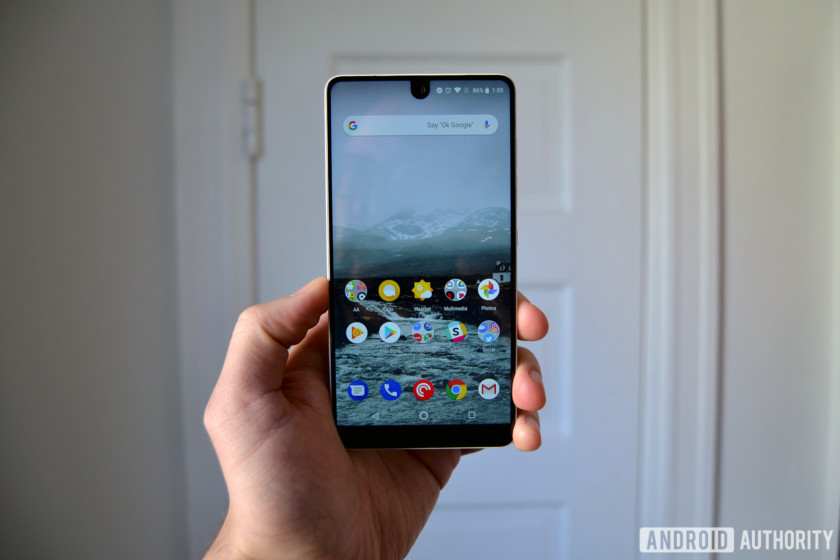
I still run into a fair amount of performance- and touch-related issues on a daily basis. The biggest offender by far is touch latency, which I’m still experiencing even after Essential’s promised fix with the Android 8.1 update. Whether scrolling through Twitter or simply pulling down the notification shade, the phone struggles to keep up with my touches.
This doesn’t have anything to do with the hardware. The Snapdragon 835 chipset and 4GB of RAM is more than enough power to handle multitasking and heavy gameplay, but unfortunately touch issues still hold the Essential Phone back from offering a seamless, smooth experience.
Essential Phone in 2018: The good
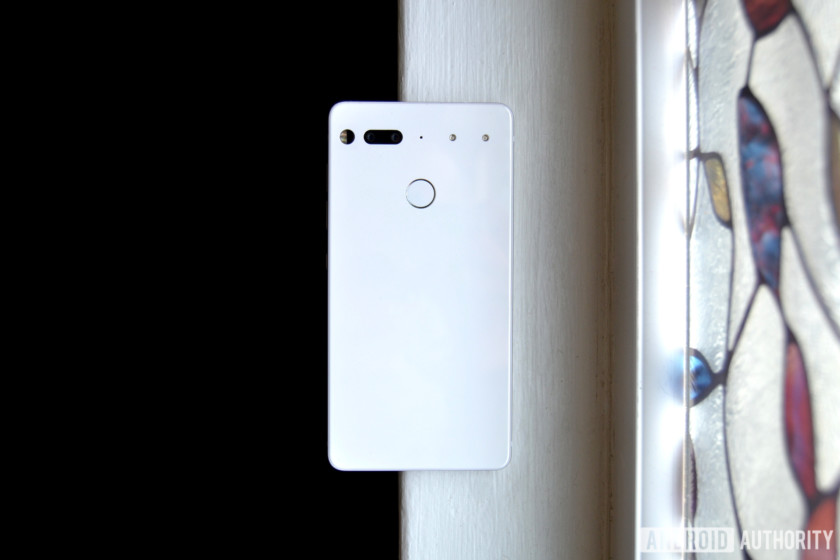
I like everything else about this phone.
Hardware
What hasn’t changed over the past eight months is the hardware, and that’s a good thing. The Essential Phone has some of the best hardware on any smartphone to date, rivaling the likes of the Galaxy S9 and Huawei P20 Pro. It just feels different from other phones.
The Essential Phone has some of the best hardware on any smartphone to date.
It’s a bit heavier than other phones. It even weighs 10 grams more than the Pixel 2 XL. That makes it feel better — almost like it was machined out of a single chunk of titanium. I know it wasn’t, but it feels like it.
The lack of a 3.5mm headphone jack is still annoying — and ironic, considering this phone’s name — but that’s one of the only downsides to the PH-1’s hardware.
Software
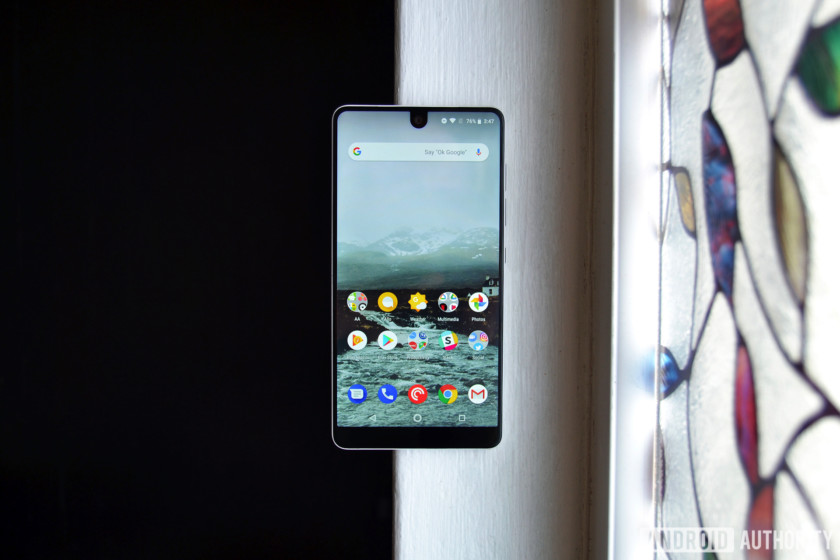
When the Essential Phone first launched, it did not have many apps installed out of the box, nor did it come with many extra features. No night mode. No always-on display. There’s a case to be made for shipping a bare version of Android, sure, but those two features were becoming standard on most Android phones.
Essential has since added both features (well, it added an ambient display mode, not an always-on display mode), and then some. Bluetooth 5 support, new camera modes, and plenty of useful new features are now baked into the PH-1’s software suite, and you can bet the Essential Phone 2 will have these as well.
Throughout its time on the market, Essential has been clear about listening to its users, which is more than we can say for some OEMs.
Updates
The Essential Phone receives quick updates. Like, really quick. Essential rolled out the May 2018 security patch minutes after Google posted the factory images. That’s pretty much been the case for the entirety of the PH-1’s lifespan, and it has me hopeful for future phones from the company.
If you own a Huawei or a Samsung phone and are tired of not receiving software updates, you should check out Essential’s next phone.
Price
This is the entire reason we’re re-reviewing this phone.
The Essential Phone first went on sale for $700. It was not worth $700. Its price has dropped significantly since then — you can now find it on Amazon for only $475.
Now that it costs less than $500, it’s in the same playing field as the OnePlus 5T (which will soon be succeeded by a more expensive smartphone), the Moto Z2 Play, and the Honor View 10. None of those other phones feel quite like this one.
Should you buy the Essential Phone in 2018? If you’re in the market for an Android phone under $500 with a design that truly stands out, I’d have no problem recommending the Essential Phone. However, it’s been almost a full year since it was first announced, so we may not have much longer until the Essential Phone 2 (PH-2?) arrives. The new phone will probably cost more, have a better camera, and be an all-around better device.
Those looking to save some dough on an Android device might not want to overlook this phone.
Buy Essential Phone on Amazon
Google News app hands-on: The be-all-end-all news aggregator
Nestled among the big announcements at this year’s Google I/O was a potentially game changing Google News app. It replaces Google Play Newsstand (good riddance), and incorporates many of the features from your Google Feed into an extremely comprehensive news app.
As a news junkie myself, I couldn’t wait to get my hands on it. Unlike the more spectacular announcements like Duplex, the Google News app is rolling out now and will be available in 127 countries by next week. After spending a few hours with it this morning, I’m happy to report it works well, and is a significant step forward for news apps.
The be-all-end-all news aggregator

Google News takes news aggregation to the next level. It not only incorporates tons of trusted news sources, it groups similar articles together to give readers more perspective on a given story. Before any conspiracy theorists out there start complaining, the bar for a “trusted” news source isn’t that high. If you really don’t see “alternative” sources, you can manually follow and subscribe to more niche publications.
Editor’s Pick
10 best news apps for Android
The Internet has changed the way that we view news. Instead of having a TV producer or a newspaper editor determine the most important stuff for us and then buying into their product, we are …
In the Favorites menu, you can choose all kinds of topics and sources to follow. Any magazines you have purchased or articles you previously saved will also appear here. The app seems to import your previous favorite topics from the Google Play Newsstand app (which not many people used), and it will suggest both topics and sources based on your more recent search history.


Even without specifically choosing topics, Google News gives more options to control what content you’re shown than the Google Feed. You can hide or follow specific sources and choose to see more or less of that kind of content in the future.
For expats like myself, you can follow a location and keep up to date with local news in places of interest like your hometown.
Newscasts and embedded media

One of the more interesting ways Google News displays stories is with their new Newscasts feature. Newscasts are like Instagram Stories. They’re slideshows of several articles from different sources, displaying their headline and a short excerpt. I found the feature a bit overwhelming — I prefer to have more control over how quickly things are shown.

Fortunately, there is an option for Mini cards in the settings, which does away with the animated Newscasts and instead displays the stories as a list. The excerpts are gone, but videos will still play in the smaller icon box. Pages with podcasts or other audio files will also display a play button on the card itself, so you can listen without even opening the page.
Both the standard cards and the mini-cards look and feel good, so it really comes down to personal preference.
Full coverage provides vital context

Perhaps the most unique feature of Google News is Full Coverage, which provides a wealth of information on a given topic. Google uses a technique it calls “temporal co-locality,” which “map[s] relationships between entities and understand the people, places, and things in a story right as it evolves.” The feature works really well.
For the recent news about the end of the Iran nuclear deal, Google News breaks everything down into sections. The Latest updates section pops up first, showing articles and other stories about the topic that have come out since you last checked.

The All coverage section is a great way to discover lesser known publications and follow them for the future
Followed by that is Top coverage, where accusations of favoritism will likely come in. It displays a few of the top stories from trusted news sources, separating opinion and analysis pieces into another section further down the page. Unfortunately each section only shows a few stories and you can’t expand them.
The only way to see more stories is to scroll down to the All coverage section at the bottom. There are tons of stories here, and their sources are clearly displayed above the headline, which is a great way to discover lesser known publications and follow them for the future.


Full coverage also has a few other neat features, like sections for videos (which play in the app), Tweets from relevant authorities, and even frequently asked questions. Much like the rich snippets that appear when you search Google for a question, the answers are automatically generated from more authoritative sources.
In-app reading experience

Any article you choose to read will open within the Google News app, but you can open the original web page for the article or the sources home page with a few quick taps. All of the articles I checked displayed perfectly, and didn’t suffer from any formatting errors.
At the bottom of the article, you’ll find a subscribe button for some sources and a few topics mentioned in the article to explore further. There are also links to related articles and occasionally additional background information about a country or topic taken from Wikipedia or other trusted sources.
The in-app reader doesn’t feature an ad-blocker, which can take some getting used to if you’ve become accustomed to ad-free web browsing. Then again, ads are one of the main ways online publications make money. Something to think about as you enjoy your free content.
Conclusion

I’m really pleased with how well the new Google News app works after a few hours of use. Hopefully as Google’s “reinforcement learning” continues to improve the personalized experience, I’ll see fewer of the irrelevant stories the Google Feed previously tried to shove down my throat.
Also read: Android P beta hands-on: Gestures galore
Google News is a great way to get the day’s news at a glance — it even incorporates local weather at the top of the screen. It’s a natural evolution of news feeds, and since it was developed in close contact with publishers, it’s great for both content producers and consumers.
For news junkies, Google News will always give you something to read. This can be a good thing or a bad thing, but thankfully Google is addressing this problem as well with its new digital wellbeing features.
Google News is rolling out now and will be available in 127 countries on Android, iOS, and the web by the end of next week. As mentioned, the app will arrive as an update to Google Play Newsstand. We’ve included a link to the Play Store listing below. Check out the Play Store listing to see if your region has the update!
Download Google News app
 AIVAnet