


Best Cases for the Huawei Mate SE
These are the best cases for your Huawei Mate SE!

Looking for a case for your brand new Huawei Mate SE? Look no further!
The Huawei Mate SE shares the same external design as the Honor 7X. So if you can’t find a case specifically for the Mate SE, an Honor 7X case will work just as well. While the Mate SE has only been out for a couple of months, there are already plenty of cases to choose from. Here are our favorites!
- Spigen Rugged Armor for Huawei Mate SE
- TopACE Extremely Light Ultra Slim
- BestAlice Hybrid Heavy Duty
- J&D Wallet Case
Spigen Rugged Armor for Huawei Mate SE

Spigen has been making phone cases ever since phones were a thing, and they’re usually one of the first brands to have cases for new phones. Its Rugged Armor line is tried and true, providing a bit of protection and plenty of grip without being too bulky. The Rugged Armor cases are also designed to allow for a tempered glass screen protector, something not all cases do. There’s a cut out on the back for the cameras, flash and fingerprint sensor, and on the bottom for the headphone jack and Micro-USB port. The power and volume buttons are covered, meaning you won’t have to strain your fingers to crank up your tunes.
At $12, the Spigen Rugged Armor case is the most expensive case on our list, but it’s from a reliable brand with a tried and true design.
See at Amazon
TopACE Extremely Light Ultra Slim

If you want to keep the phone super thin but add some grip or a pop of color, a slim case is always a wise choice. The TopACE Extremely Light Ultra Slim is a great choice, with three color options and precise cut-outs for the fingerprint sensor, cameras, flash, and ports. The volume rocker and power button are again covered for ease of use.
The TopACE Extremely Light Ultra Slim is available between $9 and $10 in black, blue and gold.
See at Amazon
BestAlice Hybrid Heavy Duty

On the complete opposite end of the spectrum, we have the BestAlice Hybrid Heavy Duty case. As the name implies, this case uses a separate hard plastic and soft TPU to keep your phone protected. Better yet, there is an integrated kickstand for watching your favorite YouTubers. The case also comes with a tempered glass screen protector for protecting the front glass. All in all, if you need a heavy duty case, this will be the choice for you.
The BestAlice Hybrid Heavy Duty case is available for $10 in grey, blue, gold, rose gold and silver.
See at Amazon
J&D Wallet Case

If you don’t mind the extra bulk, wallet cases are an excellent way to cut down on the number of objects in your pockets. J&D’s version of the wallet case is packed with features for a reasonable price, with a plastic window for photo IDs, two slots for credit cards, a pouch for paper currency, and even an RFID blocker to keep your card info from getting stolen by strangers. You get easy access to the phone’s power and volume buttons, as well as cut-outs for the Micro-USB and headphone ports, and the fingerprint sensor and camera. Finally, there is a removable strap for keeping the phone connected to your wrist. If you’re looking for a wallet case for your Huawei Mate SE, look no further!
The J&D Wallet Case is available for $10 in black leather.
See at Amazon
What about you?
Which style of case do you prefer? Let us know down below!
See Huawei Mate SE at Amazon
This Syma X5C quadcopter with an equipped HD camera is down to just $23
Don’t let this deal fly away! That joke works every time.
The Syma X5C 2.4G RC Quadcopter is down to $22.99 with code M9E225L5 on Amazon. It normally sells between $40 and $50, and this price is even a little better than what it was selling for over Black Friday. The code should work, but if it doesn’t make sure it says “Sold by Tenergy Corporation” before adding to your cart.

If you’ve ever wanted a drone but didn’t want to spend a fortune, the Syma X5C would make a great starting quadcopter for you. The cost is inexpensive enough you can afford to mess around with it, get used to flying, maybe crash a time or two. This drone has a six-axis gyro stabilization system and an HD camera. It can flip and perform 360-degree inversion. It can be flown indoors as well as outdoors and has up to seven minutes of flight time on one charge. More than 4,500 users give it 3.9 stars out of 5.
See on Amazon
Google’s chief of AI is now working for Apple
This is a big win for Apple.
Artificial intelligence has become Google’s bread and butter over the last few years, and one of the brains leading the company’s charge in this direction has been John Giannandrea. However, John’s now leaving Google and has accepted a new position at Apple.

According to The New York Times, Gianandrea will be leading Apple’s “machine learning and A.I. strategy” and be one of just 16 people that report to Tim Cook directly – Apple’s CEO.
Per an email that Tim Cook sent out to Apple employees on Tuesday, April 3:
Our technology must be infused with the values we all hold dear. John shares our commitment to privacy and our thoughtful approach as we make computers even smarter and more personal.
Although it was one of the first companies to market with a consumer-focused virtual assistant, Apple’s fallen by the wayside as Amazon and Google have quickly soared past it with products like Alexa and Google Assistant, respectively.
Apple can’t afford to keep lagging behind in this space, especially now that it’s asking even more of Siri with the HomePod. Gianandrea just may be what Apple needs to race back up to where it should be when it comes to AI, and that should worry Google, Amazon, and anyone else that’s betting big on artificial intelligence.
John Giannandrea has been with Google since 2010 when the search giant acquired the startup Meteweb where he was serving as CTO, so it’ll be interesting to see what sort of impact this has on the company going forward.
BlackBerry is suing Snap Inc. for BBM patent infringements
Clean that winter salt off your lenses with this $13 Philips headlight restoration kit
It’s always safer to have clean headlights.
The Philips Headlight Restoration Kit with UV protection is only $13.39 on Amazon. That’s the lowest price we’ve seen in almost a year for a product that normally sells for around $20 or more.

In four simple steps you can clean the front of your headlights from all the dust, haze and yellowing that has been building up on them. Great for getting rid of that salt build up from the winter roads. It requires no tools than what’s included in the box and you’ll definitely see a noticeable improvement in how bright your lights are. This treatment also provides two years of UV protection for your lenses, and you can use it on your taillights or turn signal lights as well. Users give it 4.1 stars based on 73 reviews.
See on Amazon
How to get the most out of Google Home using Bluetooth
Bluetooth and Google Home are a perfect pairing.
Smart speakers have quickly become commonplace in the consumer tech space, and one of the most popular entries is the Google Home lineup. The Home Mini is an excellent buy for folks that want all of the Google Assistant’s power in an affordable package, the regular Home finds a nice middle-ground between value and sound quality, and the Home Max is an audiophile’s dream.

There’s a neverending list of things you can do with the Google Home, and believe it or not, one of its best features is its expansive use of Bluetooth.
You can use Bluetooth to stream audio from your Google Home to another speaker, send audio from your phone to your Google Home, and even connect your Google Assistant-equipped phone with a Bluetooth speaker to create your own makeshift Home device. If you need a helping hand on how to go about doing all this, you’re in the right place.
How to connect Google Home to other Bluetooth speakers
Although the Google Home Mini sounds quite good considering its small price tag, it can still be easy to wish it had more kick when jamming out to your favorite tunes. Thankfully, there’s an easy way to retain all of the smarts of the Home Mini (or any Home speaker) while amplifying the power of your music.
This is done by connecting your Google Home to another Bluetooth speaker, and the process for doing this is fairly simple.


Open the Google Home app.
Go to the Hamburger menu, and select Devices.
Tap the three dots on the Home speaker you want and choose Settings.
Scroll down and tap Default music speaker.
Turn on pairing mode on your speaker, tap Pair Bluetooth speaker, and select the one you want from the list


You’ll still need to talk to your Google Home in order to issue commands, but music, podcasts, and audiobooks will now play through your Bluetooth speaker instead of the Google Home itself. Responses to questions about the weather, your calendar, traffic, etc. will still play from your Home, but any media will default to the Bluetooth speaker.
If you decide you don’t want to use your Bluetooth speaker any longer, simply go back to the “Default music speaker” tab and choose your Home.
How to connect your phone to Google Home
Google’s Cast technology is used by most apps for easily sending music from your phone to your Google Home, but even so, not every single app has adopted this technology yet. Thankfully, good old Bluetooth still works just fine.


Open the Google Home app.
Go to the Hamburger menu, and select Devices.
Tap the three dots on the Home speaker you want and choose Settings.
Scroll down and tap Paired Bluetooth devices.
From here, choose Enable pairing mode, go to the Bluetooth settings on your phone, pair a new device, and select the Google Home.
With this done, you’ll now be able to see on your phone that it’s connected to your Google Home via Bluetooth.
Alternatively, you can simply say “Ok/Hey Google, Bluetooth pairing” and then jump into your phone’s Bluetooth settings and do it that way.
How to connect Google Assistant on your phone to a Bluetooth speaker
If you don’t have a Google Home but still want the same general experience of owning one, you can sort of replicate this as long as you have a Bluetooth speaker and a phone with the Google Assistant.
Assuming your phone and Bluetooth speaker are already paired with one another, you’ll want to make sure “Ok, Google” detection is enabled on your phone.
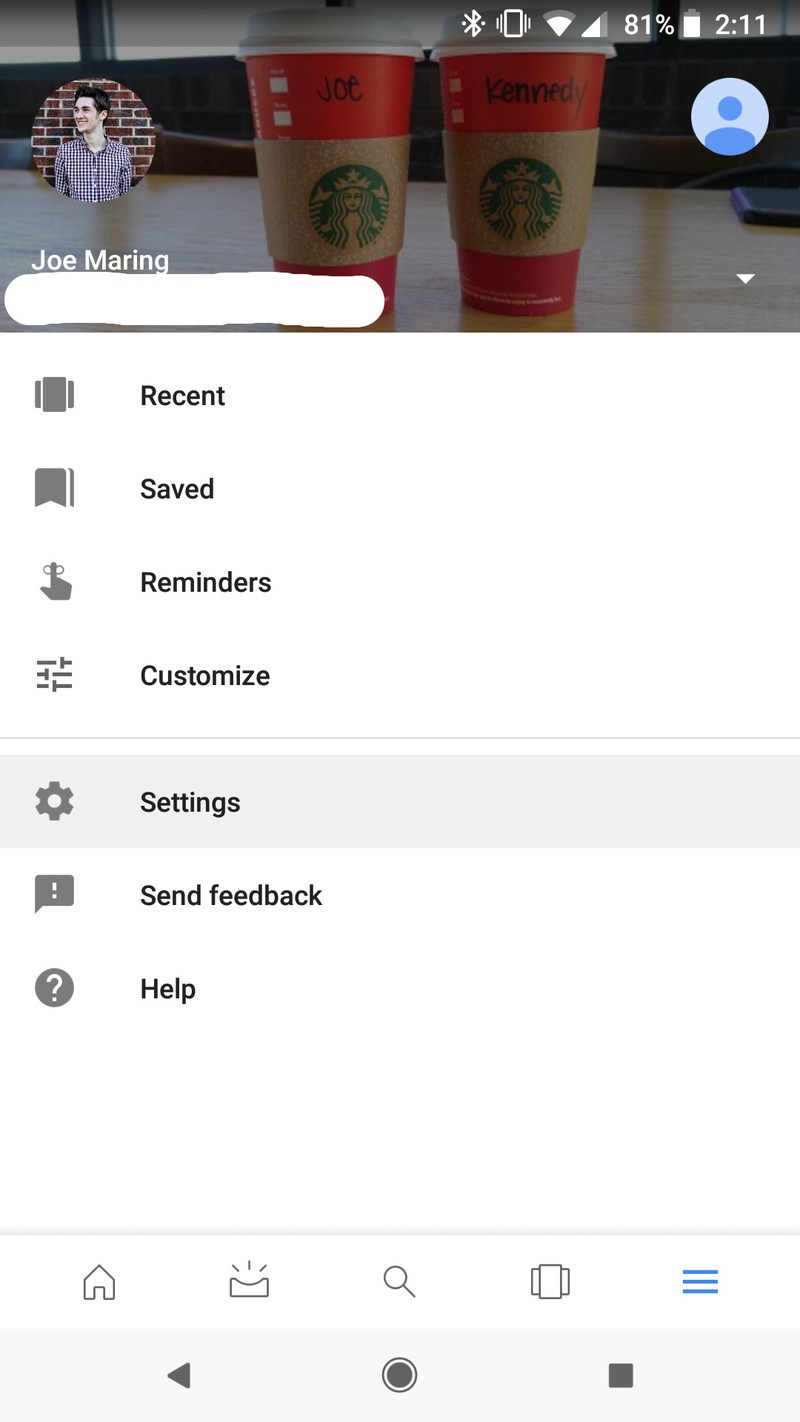


Open the Google app.
Tap the three lines on the bottom navigation bar, and go to Settings.
Choose the Voice option and select Voice Match.
Make sure the Say “Ok, Google” any time and Unlock with Voice Match toggles are enabled.
With this setup, you’ll be able to say “Ok, Google” or “Hey, Google” at any point to your phone and have the Google Assistant pop up – even if your phone is locked. Once you issue your command, the audio will play through the Bluetooth speaker.
It’s not as seamless as having a legit Google Home, but it’s a process that works and can save a bit of money if you want a Google Home-like experience without actually spending any cash for one.
Google Home
- Google Home review
- Google Home Mini: Everything you need to know!
- Google Home Max review
- These services work with Google Home
- Google Home vs. Amazon Echo
- Join our Google Home forums!
Verizon
Best Buy
Target
Google Store
OnePlus 6: News, Rumors, Release Date, Specs, and more!
This is everything you need to know about the OnePlus 6!
OnePlus has been on a cycle of releasing two smartphones per year: a major release in the spring, and a minor tweak of that previous phone in the fall. It’s nearly spring 2018, which means it’s nearly time for another OnePlus phone. Here’s everything you need to know about the upcoming OnePlus 6!
April 4, 2018 – You’ll be able to hide the notch using software
There’s no getting around the fact that the OnePlus 6 will have a notch, but thanks to a software trick, you’ll at least be able to hide it by blacking out a top portion of the phone’s screen.
This won’t be available to use at launch as OnePlus originally decided against including something like this, but CEO Pete Lau recently shared on the OnePlus forums that “it will be added in a future software updated released after the launch of the OnePlus 6.”
April 3, 2018 – OnePlus confirms Snapdragon 845, 8GB RAM, and 256GB storage for OP6.
OnePlus phones typically come with the latest and greatest processing internals around, and although we weren’t expecting the OnePlus 6 to be any different, OnePlus has confirmed a few of the specs we’ve been anticipating for some time.
On its forums, CEO Pete Lau made it official that the OnePlus 6 will have the Snapdragon 845 processor, 8GB RAM, and 256GB of storage. It’s unclear if OnePlus will also offer a 6GB RAM option with less storage like it did with the 5T, but we should know more about that very soon.
The design

The OnePlus 5T was the first time the company increased the size of its displays, and it looks like there will be more refinements coming with the OnePlus 6. The 6 will keep the stretched out design, but will add a notch up top, similar to… some other phones you may have seen. In addition to a high-quality display, OnePlus is also expected to move to a glass back, hopefully including Qi wireless charging in the process.
According to the image, the fingerprint reader will still be mounted on the rear of the phone, though earlier rumors suggested there would be an in-display fingerprint sensor. The dual cameras are still present, though this time in the center instead of the upper left. Of course, this is a leaked image and should be taken with a grain of salt until the official announcement is made.

Not too long after that first photo was shared, Evan Blass shared the above one on Twitter – further confirming much of what we were already expecting. The dual cameras are positioned in a vertical fashion, the fingerprint sensor lies below them, and there’s a 3.5mm headphone jack (yay!).
However, unlike the previous photo, Blass’s shows the back of the OnePlus 6 to have a textured, wood-like finish. OnePlus experimented with a lot of different back materials with the OnePlus One in 2014, and finishes like Sandstone White and Lava Red for the 5T show that the company is trying to stand out with its design. I’m guessing this isn’t the only special back material we’ll see for the 6, and it’ll be exciting to see what else OnePlus has up its sleeve.

Official picture of the OnePlus 6’s notch.
And, of course, the OnePlus 6 will have the infamous notch. This is something we were already anticipating, but OnePlus confirmed our suspicions while speaking to The Verge on March 28.
OnePlus’s reasoning for the notch is that it gives users more screen real-estate as opposed to using a more traditional design, and co-founder Carl Pei argues that it’s more thought-out than a lot of the notches we saw during MWC 2018.
The notch will be hidden whenever you’re watching a video, the clock has been moved to the left of the status bar, and we’ll also see the same gesture system that OnePlus added to the 5T with its OxygenOS Open Beta in late January.
More: OnePlus 6 supposedly leaks with iPhone X notch and glass back
Specifications

Of course, a phone isn’t just a pretty external design. The internal hardware needs to be up to snuff to push pixels and take all of our lovely Instagram photos. Fortunately, it seems the OnePlus 6 will be up to the task. Early benchmarks suggest the phone will ship with Qualcomm’s Snapdragon 845, the same chip that will likely be found in every other flagship device this year. Benchmarks have been gamed in the past — so take this all with the same grain of salt as before — but it’s a safe bet for OnePlus to include all the latest internal hardware with the OnePlus 6, just like they’ve done in previous generations.
A new image recently popped up revealing numerous specs for the OnePlus 6, and while we can’t confirm any of the information presented, it does allow us to build the following spec sheet:
| Operating System | Android 8.1 with Oxygen OS |
| Display | 6.2-inch OLED with notch 2160x 1080 resolution, 18:9 aspect ratio |
| Processor | Qualcomm Snapdragon 845 |
| Camera | 12MP + 20MP rear combo |
| RAM | 8GB |
| Storage | 256 GB |
| Battery | 3300mAhNon-removableDash charging (assumed) |
| Rear cameras | Dual cameras |
| Water resistance | No |
| Colors | Black |
More: Exclusive: OnePlus 6 has 19:9 notched display, Snapdragon 845, top benchmarks
The software

We haven’t seen any leaks for specific software features coming with the OnePlus 6, but it’s safe to expect the same vanilla Android style that OnePlus has used since 2014. OxygenOS is a known quantity at this point, featuring a few key improvements over what ships in Google’s Pixel line. There will surely be an Open Beta for users who like to live on the bleeding edge and try new features at the cost of stability. Expect a true dark theme, expect gesture controls and a few other little niceties that add up to a great software experience.
Price and availability
This is still up in the air at this point, but we can make an educated guess based on OnePlus’ previous devices. The OnePlus 5 retailed for $479, while the OnePlus 5T goes for a cool $499. It’d be nice if the OnePlus 6 kept that same price, but another small price increase isn’t out of the question.
That same leaked image mentioned above suggests that the OnePlus 6 will cost as much as $749, but it’s unclear what currency this is representing. The same post compares the OnePlus 6 against the iPhone X and Galaxy S9+ with $1517 and $1200 price tags, respectively, so either way, we can probably expect OnePlus’s next flagship to cost a good deal less compared to most other OEMs.
As for availability, the OnePlus 3 was released in June of 2016, and the OnePlus 5 in June of 2017. Some early reports suggest we may see an earlier release this year, but June is a safe bet.
Stay tuned for more!
This is what we know — and a bit of what we’re guessing — about the OnePlus 6 for now. We’re expecting an earlier than normal release this year, so stay tuned for more coverage!
OnePlus 5T and OnePlus 5
- OnePlus 5T review: Come for the value, not the excitement
- OnePlus 5T specs
- Should you upgrade from the OnePlus 3T?
- OnePlus 5T vs. Galaxy S8: Beast mode
- All of the latest OnePlus 5T news
- Join the discussion in the forums
OnePlus
Amazon
Updated 4/04/18 – Added info about hiding the notch.
Best Android Phone Under $400 as of April 2018
- Best overall
- Best for Europe
- Best for less
Best overall
Moto X4

See at Amazon
The Moto X4 is the long-awaited sequel to the Moto X Pure Edition, and at $399.99, it’s the best phone you can buy under $400. It has a striking design, clean software, a great display, and a pretty good pair of cameras on the back. It’s also one of the few phones in its price range with an IP68 rating. Even better, you can get the Amazon’s Prime Exclusive version for $280.
Bottom line: If you’re buying an unlocked phone and have a $400 budget, the Moto X4 is your best bet right now.
One more thing: The model made for Project Fi is the only Moto X4 with Android One, and the only model that’s guaranteed to receive updates for at least two years.
Why the Moto X4 is the best
The phone to get if you want bang for your buck.
The design of the Moto X4 is just as nice to hold as it is to look at, thanks to its gentle curves, and it’s relatively durable with IP68 water and dust resistance. The software is as close as it gets to stock Android without bearing the Pixel brand (even more so with the Android One variant on Google Fi), but you still get all of Motorola’s useful motion gestures for quickly launching functions like the camera and flashlight.
You won’t get support for Motorola’s extensive collection of Moto Mods like on the Z2 Play, nor is the battery life from its 3000 mAh cell the best we’ve seen. But the display is terrific, performance with its Snapdragon 630 chipset is smooth and speedy, and its dual cameras can take some really great photos.
Best for Europe
HTC U11 Life (Android One)

See at HTC
If looks are a priority for you, the U11 Life is a great way to get the eye-catching style of HTC’s U11 flagship at about half the price. All it’s missing is that stunning Solar Red finish — or better yet, the translucent look on the new U11+.
The HTC U11 Life is available for $300 from T-Mobile in the U.S., but the model we recommend is the $349 Android One variant you’ll find globally. In our review, we found performance on the Sense version to be slower and less consistent than its specs (Snapdragon 630, 3GB RAM) are capable of, and just like with the Moto X4, only the U11 Life running Android One is guaranteed to receive at least two years’ worth of software updates.
With either model, the U11 Life has some pretty compelling features: IP67 water resistance, a fast fingerprint sensor, HTC’s Edge Sense squeeze functionality, and even a pair of active noise-canceling USB-C headphones included in the box.
Bottom line: If you want flagship style on a budget and don’t mind losing the headphone jack (or living the dongle life), the U11 Life is a great option.
One more thing: Android One is the only software shipping on global units, so if you do want to use the U11 Life with Sense, you’ll need to buy it from T-Mobile in the U.S.
Best for even less
Moto G5 Plus

See at Amazon
The Moto G5 Plus is a wonder of cost-cutting in the right places. For either $229.99 (2GB RAM/32GB storage) or $299.99 (4GB/64GB) you get one of the most well-rounded budget phones out there. Featuring an excellent 5.2-inch display, a great 12MP rear camera, and awesome software touches, the Moto G5 Plus is truly a remarkable achievement.
Bottom line: You can’t go wrong with the Moto G5 Plus, one of the best budget smartphones available right now.
One more thing: The Moto G5 Plus has a smaller, cheaper sibling in the Moto G5, but it’s not officially available in the U.S.
Conclusion
The sub-$400 market is both extremely competitive and a little confusing, but there’s never been more great options readily available, and with the emergence of Android One, you can finally count of getting consistent updates without having to buy a flagship phone straight from Google. The Moto X4 and U11 Life are both great examples of attractive, affordable phones with premium features like water resistance and fast fingerprint sensors. At the same time, devices like the Moto G5 Plus redefine what it means to be a top-tier budget device.
Best overall
Moto X4
See at Amazon
The Moto X4 is the long-awaited sequel to the Moto X Pure Edition, and at $399.99, it’s the best phone you can buy under $400. It has a striking design, clean software, a great display, and a pretty good pair of cameras on the back. It’s also one of the few phones in its price range with an IP68 rating. Even better, you can get the Amazon’s Prime Exclusive version for $280.
Bottom line: If you’re buying an unlocked phone and have a $400 budget, the Moto X4 is your best bet right now.
One more thing: The model made for Project Fi is the only Moto X4 with Android One, and the only model that’s guaranteed to receive updates for at least two years.
Update, April 2018: The Moto X4 is still our best phone under $400, while the U11 Life with Android One has become our top recommendation for European shoppers. We removed the ZTE Axon 7 because it is no longer widely available.
Dell’s new XPS 15 has faster chips in the same bezel-less body
Dell has just revealed its new spring lineup, and among the all-in-ones and gaming PCs taking centre stage is the revamped Dell XPS 15 — and it’s the most powerful version yet. While it looks largely the same as its 2017 predecessor, with an identical chassis, what lies beneath packs a serious punch.
The entry-level model is getting the new six-core H-series CPU, with integrated graphics and the Core i5-8300H CPU as standard, but the top of the line boasts a Core i9 processor, GeForce GTX 1050 Ti graphics and 1TB PCIe NVMe SSD, making the ultrabook a viable option for gamers and creatives.
Like previous XPS 15s, low-end models come with a 56WHr battery, but higher-spec versions come with a 97WHr battery as standard, which according to Dell will give you an impressive 21.5 hours of juice. The upgrade also includes increased memory to 32GB of RAM and a “more power-efficient” 4K Infinity Edge panel. Prices start at $1,000 (costs are yet to be confirmed outside of the US), with pre-ordering open from Dell’s website on April 16.
Via: The Verge
Source: Dell
‘Minit’ is a delightful introduction to speedrunning
I’ve never liked rushing through video games. I prefer to take my time, strolling aimlessly through the digital brush and marveling at each beautifully-realized world. There’s just one problem: I don’t have 100 hours to spend on Monster Hunter World or Assassin’s Creed: Origins. Still, when I dive into a game I want to immerse myself and move at a speed that respects the time and effort put in by the developers.
That glacial pace means I rarely play the same game twice. And it’s why, sadly, I’ll never become a speedrunner with a Super Mario 64 record. I can’t invest the time required, or charge to the finish line without stopping for a moment and admiring the detail in Cool, Cool Mountain. These feelings, though, are why I’ve fallen in love with Minit, a quirky adventure game for the PS4, Xbox One and PC. You can beat the main quest in a few hours and, along the way, gain an intricate understanding of its map, items and puzzles. By the end, I guarantee that you’ll feel like an expert speedrunner.
It all comes down to the 60-second respawn mechanic. At the start of the game, you leave a beach house and find a cursed sword that limits your life to a minute. Every time you die, though, it’s not game over — you simply walk out the door and continue your adventure. To progress, then, you’ll need to understand the world and how its puzzles interconnect. In 60 seconds, for instance, you can find a bartender who wants five crabs obliterated. On your next run, you can look for their positions, and then finally defeat them all on the third.
That’s easier said than done, though. The crabs are spaced out in a way that gives you just enough time to complete the quest. If you’re successful, though, the bartender will give you a cup of coffee and the strength to push large boxes. The latter is required to unlock new parts of the map and create shortcuts for previously impossible tasks. Venture far enough and you’ll find new safe houses — a hotel near a graveyard, for instance, or a steel trailer by the desert. Walk inside and it’ll become your new respawn location, increasing the reach and possibilities of your next run.
How ‘Minit’ was born
Minit was dreamt up during an Adventure Time-themed game jam in 2012. The original project was called ‘Adventure Minute’ and let you play as Finn, with his plucky sidekick Jake in tow. “The whole idea was that you had a minute and whatever direction you headed in, there was completely different stuff waiting for you,” Jan Willem Nijman, a programmer and designer on Minit said. Each run, or minute, unraveled like a self-contained cartoon episode. The team ultimately won the competition and was given a real-life crossbow — which now sits in Devolver Digital’s offices — as a prize. “It was a total surprise that we got it,” Kitty Calis, a designer and Artist on Minit said. “I didn’t see that one coming!”
The team spent the next four years thinking about the game’s untapped potential. Finally, they decided to build a small prototype and show it to Devolver at GDC. “I don’t why, but we decided to just show it and say, ‘Hey, we’re working on a game, would you be interested in publishing it?’” Nijman said. To their surprise, the indie game publisher agreed immediately. “It was just a little house with the character walking around, and the dog sleeping, I think. And then Devolver was like ‘alright, let’s do it!’” The group then spent a year working on the project full-time.
Minit isn’t about maximizing each life; there are no crazy combos or high scores to aim for. Instead, it’s a race to understand what you need to do next and executing that plan within a perfectly-timed minute. Each bite-size puzzle becomes, in essence, its own tiny speedrun. And if you mess up, it’s no big deal because you’ve only wasted a measly minute. “The idea is like, ‘What is a minute in a lifetime?’” Calis said. “It’s just a minute,” Nijman added. “If it was a 30-minute game, where you died every half-hour, it would be horrible and nobody would want to play it!”
Of course, there is a little bit of pressure. Nijman, Calis and the rest of the Minit team — Dominik Johann, co-founder of Accounting+ developer Crows Crows Crows, and Jukio Kallio, a prolific video game composer — know how far you can travel in a minute and designed each puzzle accordingly. “There is an old guy in the game that talks very, very slowly,” Nijman said. “You need to run there right away if you want to hear his whole story. And that’s just something we made. We tried some text, ran to him and said, ‘OK, he can say a few more words’ or ‘Something needs to be shorter.’”
There will be times, though, when you enter an area and have no idea what to do or expect. You might get lost in the haunted house or stumble on a group of enemies armed with bows and arrows. In these instances, the Minit team wants you to “take your time, smell the flowers and look at the little details.” Yes, there’s a timer, but the world is small enough that backtracking rarely feels like a chore. Each area is also packed with hidden hearts and coins, the latter of which can be spent on crucial running shoes.

‘Minit’ has a few bosses that will test your mental dexterity.
Playing Minit, then, is a back-and-forth between speedrunning and goal-less exploration. Nijman said he was inspired by Grim Fandango and other point-and-click adventure games. “Sometimes you’re a bit stuck but then you just go and try somewhere else. A lot of games now are super-hand-holdy, And with Minit we didn’t want to make a really hard game, but we were also OK with people feeling lost for a little bit.” I appreciated those moments of befuddlement because they built up to a “eureka” moment and an exhilarating dash to execute my (often incorrect) solution.
Some puzzle-solving and items are required to reach the end credits. There’s a lot of optional content, however, that players will likely miss the first time through. I never fixed a boat, for instance, that would have opened up an island and a fast-travel system between the different safe houses. There’s also a strange bone in the graveyard that I didn’t know what to do with. According to Nijman, it’s possible to avoid some items altogether or collect them out of the team’s intended order. “I don’t know the optimal route to go through the whole game,” he admitted.
“I don’t know the optimal route to go through the whole game.”
Once you’ve beaten the game, you’ll be given a time, completion rate and respawn tally. A New Game+ mode will then unlock, allowing you to start over with normal or Second Run difficulty. The latter makes the puzzles more complicated — the crabs will be placed in trickier positions, for instance — and cuts the timer to 40 seconds. Normally, I would just move onto a new game, but with Minit I’m tempted to jump back in and test my newfound speedrunning abilities. The adventure takes less than three hours to complete, after all, and I know where most of the items are.
Who knows, maybe I’ll build up the courage someday to complete a speedrun of Super Mario 64.
Source: Minit
Apple exploring ‘touchless’ gestures and curved iPhone screens
A future iPhone could be controlled without you even touching it. Apple is exploring touchless gesture control and curved screens, according to the latest rumors from Bloomberg. A display that “gradually” curves inward from top to bottom is still at least two to three years away, while the touch-free tech “likely won’t be ready for consumers for at least two years.” That’s assuming Apple finds merit in continuing with the R&D cycle for it.
Samsung and Motorola have both used touchless gestures in their handsets before, but it sounds like Apple’s version is a bit different in terms of implementation. Rather than using motion sensors in the bezel, Bloomberg says that the display itself will apparently act as the sensor and your hands will have to be much closer to the screen as a result.
Of course, Apple works on far out technology all the time, and more often than not, it doesn’t come to market. Remember when the company teased swappable camera lenses back in 2012? Or a solar powered iPhone? Well, it’s six and eight years, respectively, since those patents were filed and neither feature has been added yet.
Source: Bloomberg
 AIVAnet