


How’s Android Oreo treating you on the Galaxy Note 8?
So far so good!
Over the past few days, Android Oreo’s been making its way to carrier and unlocked versions of the Galaxy Note 8 here in the U.S. This is an update that’s been a long time coming, and it makes the Note 8 an even better phone than it’s been for the past few months.

With more and more people now experiencing Oreo on their Note 8s, we thought we’d check in with some of our forum users to see what they think of the update so far.
Here’s what some of you had to say.
D13H4RD2L1V3
04-03-2018 09:45 AM“
So, my unlocked unbranded Note8 has finally received the Oreo update, being the second device in the house to receive the upgrade after the Honor 8 Pro.
As is the case, I have installed the update, performed a factory data reset and set up the device as if it was brand-new and not restore any backups, basically starting fresh.
So far, here are some of my impressions.
Less bloat. There…
Reply
kitmo
04-03-2018 10:58 AM“
I like the Oreo update. Things are more organized and there are lots of pluses like the volume is louder, and the screen is more colourful with truer colours. Faster and more organized is my impression. I haven’t noticed things being moved. I’m not sure what you mean “where is our stupid emojii?”
Reply
srgonu
04-03-2018 11:50 AM“
I am liking how responsive overall. Samsung keyboard improved a lot. I hope battery drain when using Google maps is fixed. Need to test that yet.
Reply
galaxyfive
04-04-2018 05:05 AM“
Unlocked, Exynos chip
Good experience over all. Marginally BETTER battery life, nice to have a few more colors in the high contrast keyboard, and a few other subtle improvements. The best Samsung device just got a little better. Sorry S9 /+….
Total update took about 10 minutes.Reply
Now, we want to hear from you – If you’ve got Oreo on your Galaxy Note 8, how have you been liking the update so far?
Join the conversation in the forums!
Samsung Galaxy Note 8
- Galaxy Note 8 review
- Galaxy Note 8 vs. Galaxy S8+
- Which Note 8 color is best?
- Complete Galaxy Note 8 specs
- Join our Galaxy Note 8 forums
Verizon
AT&T
T-Mobile
Sprint
Best Buy
It’s time for app developers to fall out of love with Facebook Login

The tradeoff of sharing data for convenience sake has let complacency creep in for users and app developers alike.
Back in 2009, Facebook unveiled Facebook Connect, a new feature for website and app developers to implement for users signing into apps. By simply tapping the “Connect with Facebook” button, it lets new users skip the account creation step and use their existing Facebook accounts to quickly and efficiently get started with a new app.

It was a breakthrough feature for Facebook at the time, designed ostensibly to make it easy for consumers having to memorize dozens of account passwords for each app you use. In turn, by sharing your Facebook data, app developers are able to better personalize the experience using your profile information and friends list to, as Facebook states in its developer guide, “build value by connecting people together”.
And in the nine years since its initial implementation, we’ve seen just how valuable the renamed Facebook Login service and the data it aggregates for developers has become. A staggering number of apps and games offer that familiar blue button as a simplified way of onboarding new users with just a few taps, all while quietly skimming their profile for relevant personal information and contact lists.
We’ve seen Facebook account data used in apps to effectively target potential voters in both the 2012 and 2016 U.S. Presidential Elections, with the latter causing more than a bit of controversy for Facebook over the last month.
Which brings us up to today in 2018, with Facebook set to facing questions in front of Congress in the coming weeks regarding how it allowed the personal data of over 50 million Facebook users to pass through a third-party app and into the hands of Cambridge Analytica, a British political consulting and data analysis firm alleged to have used the data to target specific Facebook users with messages designed to stoke anxieties and personal biases all in an effort to support the Trump presidential campaign.
- READ: There is ‘good’ data collection and then there’s Facebook, and you need to know the difference
Subtle Conditioning
Politics aside, the scandal around Facebook’s handling of user data has convinced many to consider deleting their Facebook account altogether — but that has proven to be easier said than done. Facebook has been wildly successful at becoming the go-to place for keeping tabs on your friends, and because of this, it’s also a really effective tool for app developers looking to use your network of friends to build out its own user base faster than otherwise possible.
Facebook highlights over 60 apps on its developer site that have successfully implemented Facebook Login to great success, whether to create better user engagement and make it easier for them to convince you that so many people you know are also using the app. If you know you’re among friends using an app you’re probably going to continue to use that app moving forward — it’s essentially an extension of the sticky way Facebook keep you coming back for more, and it’s an incredibly efficient way for app developers to instantly collect a pool of data for any new user that signs up.
Part of the reason Facebook Login is so effective is that it’s straight-up easier than filling out a unique account form every time you download a new app — because let’s be real, no one enjoys filling out forms. In that way and depending on how your personal data is manipulated, Facebook Login could almost fall under the category of a dark pattern — a method for websites or apps to get you to give up more information than is required by playing on assumptions.
Over time, seeing that “Connect with Facebook” button on every login screen conditions us to avoid the hassle of creating a new account by simply tap through to Facebook. This system works be fine as long as there’s a circle of trust built between Facebook, the app developer, and the end user. We blindly allow Facebook to grant the app access to some of our data under the conditions that they’re only accessing basic information and that we are ultimately in control of the data being shared. It capitalizes on our need for immediacy and a frictionless experience using our smartphones and is anchored by the understanding that Facebook supposedly cares about protecting our privacy.
Over time, seeing that “Connect with Facebook” button on every login screen conditions us to avoid the hassle of creating a new account by simply tap through to Facebook.
But it’s fair to say that Facebook should be less trusted today than it was nine years ago. While we rightly should have been skeptical of Facebook’s ability to keep our data secure from the outset, the latest round of scandals has further eroded the remaining trust between Facebook and its users.
By extension, people should be less trusting of connecting their Facebook account to outside apps — whether it’s because you’re afraid it will annoy your contacts with invitations to play a silly mobile game, or because it might try to eventually use your data against you in some nefarious way.


Just like we should all be doing our part to detangle our lives from Facebook’s web, app developers owe it to users to divest in their reliance on Facebook Login. I’ll use PUBG Mobile as an example here because it’s wildly popular at the moment and also a particularly egregious example of how developers, too, can rely too heavily on Facebook Login. When you load up PUBG Mobile on your phone, you’re given two options — play as a guest or login via Facebook. Creating a guest account seems to imply that your account is less-than-official or incomplete without linking your Facebook account. If you do create a guest account, you’ll be greeted with the “Link your Facebook” account every time you log in until you finally relent. Once linked to Facebook, there appears to be no way to unlink the account so you’re stuck with it.
It’s one thing to offer Facebook Login as an alternative way to easily create an account, but to straight up not offer any other way to log in to an app or game is just lazy on the developers part, and speaks to the way Facebook has lulled us all into complacency.
PlayStation VR games releasing in April 2018
What new games does PlayStation VR have in store this month?

Playstation VR has a great selection of games for you to browse through for your adventures in VR. Happily, the list of games is always expanding and adding new titles for you to choose from. If you’ve been trying to figure out what is appearing this month, we’ve got you covered.
Here are the games I’m most excited for!
Time Carnage- April
Time Carnage is a first-person shooter that is all about time travel and shooting down enemies that can be dinosaurs, zombies, or even robots. You can upgrade your weapons to ensure that you will survive throughout each wave of monsters. There is no set day for this games release, so keep an eye open for its release day.
Click Here to Find Out More!
Rick and Morty: Virtual Rick-ality- April 10th
Following the story of two of TV’s favorite characters, you can become Morty and do multiple different tasks like fighting aliens, building different things, and even doing laundry. If you’re a fan of the show, then you’ll love the adventures you go on with this VR game. It’s not available for pre-order yet, but it will be released on April 10th.
Click Here to Find Out More!
Crisis of the Planet of the Apes- April 3rd
Become one of the apes in this new VR game, as you take down the humans that have been trying to capture your kind. Take their guns and use them against the humans, take back your kingdom, and prove to be the superior race. This game is set to release on April 3rd and is currently available to pre-order for $10.
Pre-Order at the PlayStation Store
What are you playing?
February had some real gems that we’ll be trying for sure! Are you interested in this month’s lineup? Or is there an existing PlayStation VR game you’re hooked on? Be sure to leave us a comment and let us know about it!
Updated April 2018: We’ve continued to update this list at the beginning of each month with new releases.
Deal: Buy one Moto X4 for $249 at Project Fi and get another for free
The offer is available through May 2.
Project Fi has quickly become one of the best carrier alternatives in the U.S. compared to the likes of T-Mobile, Verizon, etc., and it’s now running a new promotion that lets you get two Moto X4s for the price of one.

The Moto X4 on Project Fi typically costs $399, but right now you can get it for just $249 (or $10.38/month for 24 months). That’s already a great deal on its own, but Project Fi’s taking things a step further by offering a $249 Fi credit when you purchase two Moto X4s in a single transaction – essentially making one of them free.
In order to get that $249 credit, you’ll need to activate both phones within 30 days of shipment on the same Project Fi group plan.
This offer is available between now and May 2 at 11:59 PM PDT, and you can take advantage of it by clicking/tapping the button below.
See at Project Fi
Google Project Fi
- What is Project Fi?
- Get the latest Project Fi news
- Google Pixel 2 review
- Moto X4 review
- Discuss Project Fi in our forums
- Sign up for Project Fi!

PSA: Sling TV is experiencing streaming issues across multiple platforms
Sling’s aware of the issue and working on it as we speak.
If you’re a Sling TV subscriber and are having trouble watching your favorite game, reality show, etc., you’re not the only one who’s experiencing these issues. At 7:33 PM ET last night (April 3), Sling TV’s support account on Twitter said that it was aware of “streaming issues” that some users were reporting and that it was working to “resolve the issues as quickly as possible.”

Sling issued another update a couple hours later saying that its teams were “still working on the previously identified issue”, and this morning at 6:58 AM ET, said the following:
Update: Our teams have been working all night to resolve this issue, and we thank you for your continued patience. Please stay tuned for additional updates.
— Sling Answers (@slinganswers) April 4, 2018
In other words, Sling TV still probably won’t work if you try to watch it right now.
As a temporary fix, Sling says you should still be able to access your shows through Google Chrome by going to watch.sling.com. We’ll keep an eye on this issue and update this post as we learn more.
Galaxy S8 review, one year later: Much cheaper, still fantastic
The Galaxy S8 is still a great phone, one year after release.
While the Galaxy S9 holds the lion’s share of our current attention, the Galaxy S8 is still chugging along. It’s been a year since the S8’s release, but it’s still worth your money today.
In fact, it may be worth your money more than the S9 is right now. The S9 has the benefit of newer hardware, better cameras, and… not much else, really. The S9 launched with Android 8.0 Oreo, but most S8 models have been updated to that as well. Most of the software features available on the S9 are now on the S8 excluding some hardware-specific additions like super slo-mo and AR Emojis.

I began using the Galaxy S8 a few weeks ago, after using the Pixel 2 XL and before that, a OnePlus 3T. While we may talk up the differences between vanilla Android and Samsung’s flavor, I haven’t had any trouble adjusting. My apps launch, my calls come in, my music plays, and the world turns.
The all-glass design with minimal bezels still looks sufficiently modern, even in a world of notches. The all-glass design makes the phone a bit hard to grip, but the smooth transition between the back glass, metal sides, and glass front makes the phone superbly comfortable to hold. I do throw on a case when I leave the house, just because I don’t trust the phone to survive a drop onto concrete.
The Qualcomm Snapdragon 835 inside the Galaxy S8 is, on paper, slower and less efficient than the Snapdragon 845 that ships in the Galaxy S9 and will be seen inside other 2018 flagships, but the S8 hasn’t left me wanting for more speed. Apps load expediently, the camera is quick to launch, and navigating the interface is nice and smooth.

Battery life is another story, though. The 3,000 mAh cell in the GS8 is enough to get me through the average day, but only just. This includes some time driving and using Android Auto, which allows me to give the phone a small top-up. My daily usage is fairly perfunctory: a few phones calls, streaming music to Bluetooth headphones, and a healthy amount of messaging through Google Voice, Allo, and Slack. This was with the display resolution set to 1080p for even more battery savings.
Be careful when buying a used Galaxy S8, especially if it was “well-loved.” The battery could already be signficantly worn.
Longevity would be my biggest concern for someone who is in the market for a used Galaxy S8. Daniel noted in his review that the battery life at launch left him with about 20% near the end of the day. But batteries degrade over time, and if you’re buying a used Galaxy S8, there’s a good chance it won’t make it completely through the day without some charging. If you’re in the market for a used S8+, its larger cell should mean you’ll likely still make it through the day.
This is the best time to buy a used Galaxy S8
The battery woes highlight Samsung’s biggest strength: the number of options it gives you. You can charge the phone with a USB-C cable, or with a Qi charging pad. You can use the same 3.5mm headphones you’ve had for years without worrying about dongles. You can also use Bluetooth headphones, or a USB DAC. The phone has 64GB of internal storage, but still offers a microSD slot for further expansion.
 Not pictured: the layer of fingerprints normally found all over this glass.
Despite having the 3.5mm jack, the S8 still has its IP68 water and dust resistance.
The plethora of options continue in the phone’s software, for better or worse. I don’t mind having and turning off the features I won’t use, but I can see how it’d get tiring. I love being able to skin the phone with my own theme, or choose the order of my navigation buttons, or augment my home screen with the edge panel. These all seem trivial, but they add up to the phone feeling more specific to me.
There are some annoyances and gaps, though. You can’t hide the status bar icons like you can on vanilla Android, meaning that I’ll always know that NFC and Bluetooth are on. And while Samsung’s theme engine does a lot, the “Notification settings” button can’t be themed or hidden, making this element stick out like an eyesore. This is especially noticeable with Oreo’s new themed media notifications.

The location of the fingerprint sensor is also an annoyance, even with a case on to help my finger find it. I’ve resorted to either having one of my nearby Bluetooth devices unlock the phone with Smart Lock, or using my lock screen PIN unless an app specifically requires my fingerprint. Unlocking is only a minor issue on the smaller S8, but it makes the fingerprint sensor nearly useless on the larger Galaxy S8+ or the Note 8. The S8 also offers facial recognition, but it’s so hit-or-miss that I turned it off completely.
Bixby is another contentious topic. I understand why Samsung wants to offer its own personal assistant — it has the money and the fanbase to keep itself from being reliant on Google — and personal assistants aren’t just born overnight. But Bixby doesn’t offer me anything that I can’t get from Google Assistant, so now there’s a button on the phone that doesn’t do anything.


While the camera may not be as good as the one on the Pixel 2 or S9, it still holds its own. The camera focuses effortlessly and takes photos quickly enough to keep up with my niece and nephews running around. Overall, photos look great. With the phone’s wide f/1.7 aperture, nighttime shots retain plenty of detail, while daytime photos utilize Samsung’s excellent HDR algorithm to capture fine detail and superb dynamic range.
The biggest draw of the Galaxy S8 right now is its price: at the time of writing, Swappa has used models going for as low as $360. Other phones in that price range include the HTC U11 Life, Moto X4, and the Honor 9 Lite. The Galaxy S8 is going to be much faster than those devices, take much better photos, and have a larger market of cases and other accessories. It’s also going to be updated to Android P — eventually.
The real value comes in comparing the S8 to the S9. They have mostly the same design, the same software, and identical amounts of internal storage. The camera on the S9 is much better, but for most situations, the S8 will still take fantastic photos. If you’re eyeing the Galaxy S9, you can get 90% of the same experience for half of the price by buying last year’s device.
You can pick up a brand new Galaxy S8 from Amazon for just under $600, and get it used from places like Swappa for even less.
See at Amazon
Samsung Galaxy S8 and S8+
- Galaxy S8 and S8+ review!
- Galaxy S8 and S8+ specs
- Everything you need to know about the Galaxy S8’s cameras
- Get to know Samsung Bixby
- Join our Galaxy S8 forums
Verizon
AT&T
T-Mobile
Sprint
Unlocked
BlackBerry is suing Snap Inc. for BBM patent infringements
Nobody is safe.
Snap Inc. – the parent company behind Snapchat – is being sued by BlackBerry over digital messaging patents it’s supposedly infringed on. These patents are owned by BlackBerry and were used to help create the company’s once-iconic BBM messaging service.
BlackBerry’s accusing Snap Inc. of infringing on six patents that were filed between 2012 and 2014, and two of them are the same ones that Facebook reportedly infringed on, too.
Just about a month ago, BlackBerry targeted Facebook, Instagram, and WhatsApp with similar claims of all three companies copying its work.
Snap Inc. has yet to comment on the matter, and if you want to read more into the fine details, the case is named as BlackBerry Ltd. v. Snap Inc., 18-cv-02693 with the United States District Court at the Central District of California in Los Angeles.
BlackBerry sues Facebook, Instagram, and WhatsApp for patent infringements
BlackBerry KEYone
- BlackBerry KEYone review
- KEYone vs. Priv: Battle of the BlackBerry keyboards
- BlackBerry KEYone specs
- The latest KEYone news
- Join the discussion in the forums
Amazon
Best Buy
BlackBerry Mobile
Best Android apps for musicians
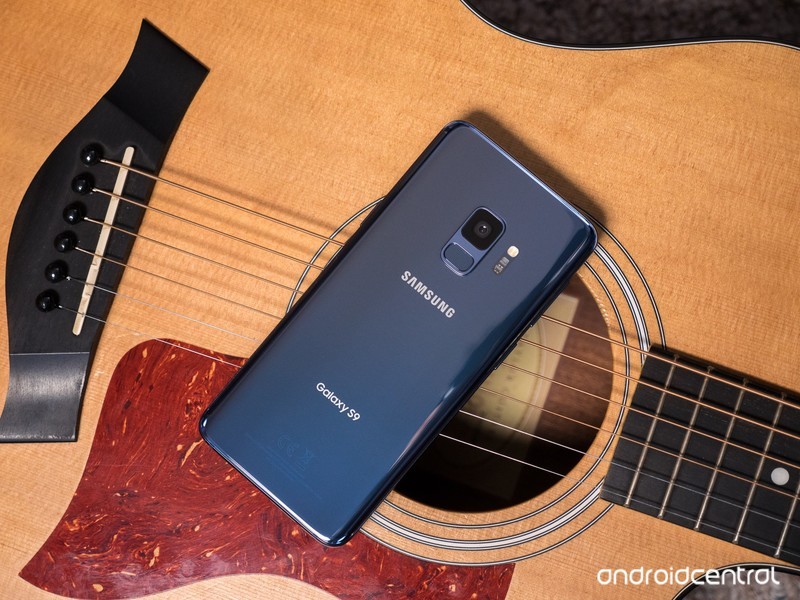
Spend less time searching for apps and more time practicing your trade.
There’s an app for everything. I can track business expenses, check social media, answer emails, and book a flight, all from my phone … why shouldn’t musicians enjoy the same conveniences for their profession? I’ve curated some of the best apps for musicians of all kinds — and don’t worry, starving artists, most of these are free.
The Metronome by Soundbrenner
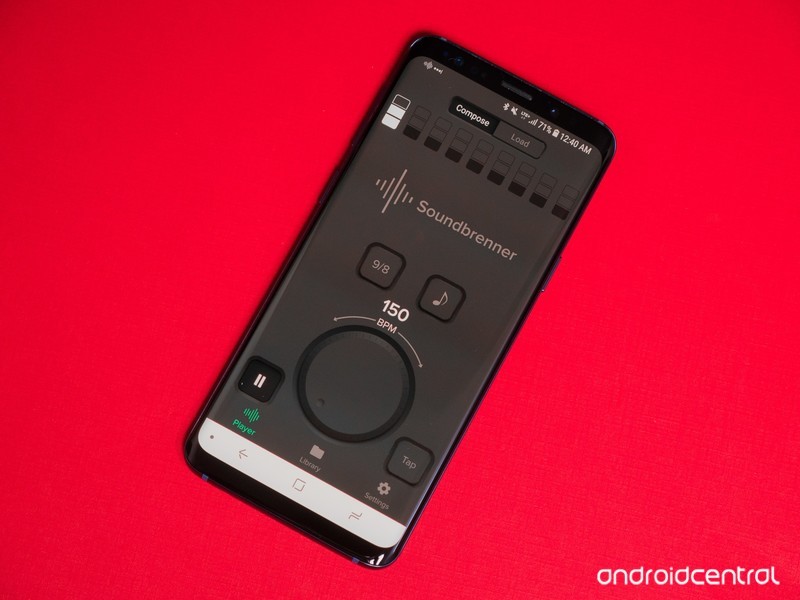
Any musician has heard it a million times before: the best way to improve at your instrument is by slowing things down and practicing to a metronome. There are countless metronomes on the Play Store, but the best one I’ve found is made by Soundbrenner. The minimalist design looks great on any phone, and you can adjust everything from BPM to the subdivision and time signature. You can synchronize multiple phones together to practice with friends.
Download The Metronome by Soundbrenner (Free)
Pitched Tuner
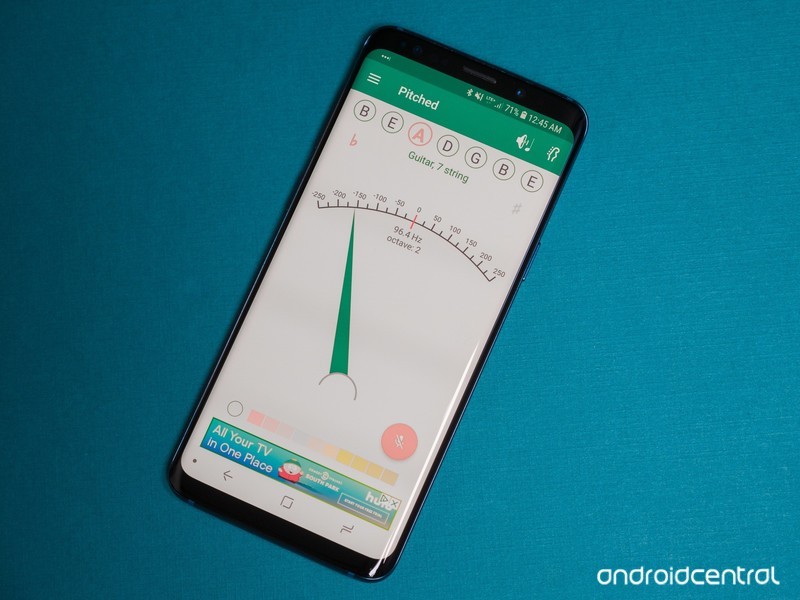
Another essential tool for any musician is a tuner. Whether you’re a guitarist, a saxophonist, or anything else, you need to stay in tune — otherwise, band practice might sound a little off. One of the best tuners we’ve come across is Pitched Tuner from Stonekick. You can choose your instrument and adjust to the tuning of your choice, or just revert to a chromatic tuner. You can even choose between light and dark themes.
Download Pitched Tuner (free)
Songsterr
Another resource every musician can appreciate is notation. Luckily for guitarists, in particular, there’s an endless stream of tabs online that detail how to play all of your favorite songs. Guitar Pro has always been one of the most popular options, but Songsterr has a more organized library and better-designed app. You can play the tabs in real time and adjust playback speed to learn at your own pace, and even view different instruments in the mix.
Download Songsterr (Free)
FL Studio Mobile
When it comes time to commit your ideas to memory, it’s usually best to sit down in your room or studio, but sometimes you just have to record right away before it escapes your mind. With so few digital audio workstations (DAWs) available on Android, you wouldn’t expect to see any big names on the Play Store.
But FL Studio is one of the most popular desktop DAWs around, and its mobile adaptation allows you to record multi-track songs just as you would from your computer. There’s everything from synths to drum machines and a mixer for setting levels, making this an extremely powerful app for musicians on the go.
Download FL Studio Mobile ($15.99)
SoundCloud
These days, it’s hard to imagine reaching a wide audience unless your music is available to stream. There are plenty of great ways to get your music onto Spotify and Apple Music through services like Tunecore and CD Baby, but a cheaper place to start is SoundCloud. Think of it as a social network for artists and their fans — you can interact with others through the comments section of each track, and SoundCloud plays nice with other social networks so your songs can play natively from within a tweet.
Download SoundCloud (free)
What are your favorites?
It’s hard to make a one-size-fits-all list for such an incredibly diverse art form, so we may have left something out that you find indispensable. If so, or if you know of a better alternative to any of the apps mentioned, let us know in the comments below!
U.S. unlocked Galaxy S8/S8+ now being updated to Android 8.0 Oreo
The update is over 1354MB and rolling out now.
Samsung’s Galaxy S8/S8+ are still excellent phones despite the release of the S9 series, and AT&T, Sprint, T-Mobile, and Verizon have been using the last couple weeks to make their versions even better by updating them to Android Oreo. Now, after lots and lots of waiting, the unlocked version here in the U.S. is finally getting similar treatment.
The Oreo update for the unlocked Galaxy S8/S8+ weighs in at 1354MB, and it comes with all the Oreo features you’d expect – including the Autofill API for easier password entry, picture-in-picture, faster/smoother performance, etc.
Version 9.0 of the Samsung Experience is included as well, and if it’s similar to the carrier updates, the February 2018 security patch should also be included.


Oreo is making its way to the unlocked Galaxy S8/S8+ now, so keep an eye out for it over the next couple days.
Thanks, Matthew!
Android Oreo
- Android Oreo review!
- Everything new in Android Oreo
- How to get Android Oreo on your Pixel or Nexus
- Oreo will make you love notifications again
- Will my phone get Android Oreo?
- Join the Discussion
Active shooter at YouTube HQ wounded three before killing herself
The shooter was Nasim Najafi Aghdam.
On April 3 at the YouTube headquarters in San Bruno, California, police responded to multiple 911 calls regarding a possible active shooter in the area.

KRON4, a San Franciso-based news network, reports that one witness heard 20 different shots at one point, and at 1:00 PM local time that day, the San Bruno Poice Department tweeted that residents should stay away from 901 Cherry Ave. due to “police activity.”
Product Manager Todd Sherman had an ongoing thread about his personal encounter, with another employee (Vadim Lavrusik) saying that they heard shots and was then barricaded inside a room with their coworkers.
Hours after this story broke, it was discovered that the shooter was Nasim Najafi Aghdam – a female who apparently had something of a grudge against YouTube due to the company censoring the videos she uploaded to the site.
Aghdam injured three people during the shooting before she was also deceased due to a self-inflicted wound.
 AIVAnet