


Microsoft’s mad scientists are making AR more tactile
Unless you hate fun, Microsoft’s best division is far and away its Research group, which has given us the nearest thing to a Holodeck, a live-action version of Minecraft and much more. Microsoft’s gang of crazy researchers is at it again, showing off a bunch of new controllers for augmented and virtual reality. They’re strictly experimental for now, but show a lot of potential for making AR and VR more fun and useful.
The most versatile controller is called “The Claw” (below). It’s a squeezable, gun-like device that let’s you pick up and handle virtual objects and, thanks to haptic feedback, feel their softness and texture. It can even detect the differences between users’ grips and the “situational context of the virtual scene,” as Microsoft puts it.
In other words, depending on how you hold The Claw, it will deliver touch sensations, resistance that prevents you from penetrating virtual objects, or small vibrations to simulate textures. It does that thanks to a motorized arm connected to the controls on your trigger finger, and a voice-coil to generate the vibrations.
“Haptic Links,” meanwhile, is a two-handed controller that can simulate experiences you do with, well, two hands. That includes banal tasks like carrying boxes or operating a hammer drill, to more highly-skilled activities like playing the trombone or maracas.
Haptic Links “dynamically alter[s] the forces perceived between the user’s hands to support rendering of a variety of two-handed objects and interactions,” Microsoft said. The team created three separate versions that control tension and degrees of freedom: a layer hinge, chain, and ratchet-hinge, each of which works best for different types of simulations.
Lastly, Microsoft showed off the “Canetroller,” a simulated cane for the blind. When you sweep it around a simulated world, it stops when it hits objects, thanks to a wearable, programmable brake. Via vibrotactile feedback, it vibrates when you sweep it across the ground, just like a cane in the real world. Both sensations are enhanced by auditory feedback that simulates the sound of a cane in the real world.
Much like audio descriptions help the blind follow TV shows, movies or smartphone content, a device like the Canetroller could help the blind and low-vision users navigate virtual worlds. “‘Conventional’ virtual reality experiences are heavily visual in nature and not accessible to the vision impaired,” said Microsoft. “Microsoft Research hopes its work can inspire researchers and designers to design more effective tools to make VR more inclusive to differently-abled people all over the world.”
Source: Microsoft
Toshiba’s smart glasses are powered by mini Windows PCs
Toshiba is stepping into the world of wearable computing with its new Windows-powered smart glasses. You can think of them as a slightly more powerful pair of Google Glasses — except, instead of being purely standalone, they’re attached to one of Toshiba’s dynaEdge Mini PCs. Those systems are basically Windows laptops shrunken down into handheld, battery powered bricks. Portable computers are popular with industrial field users who need powerful computers on the go, but find laptops to be too cumbersome. With its new AR100 Head Mounted Display, Toshiba is aiming to make those systems a lot more useful.
The headset weighs just three ounces, and it can be worn over an existing pair of glasses. Its main selling point is an integrated micro-display — while you’re wearing it, it’s as if you’re looking at a five-inch mobile screen from 17 inches away. Additionally, the headset also features GPS, a head tracking accelerometer, a 5 megapixel camera, and a tiny touchpad. For communication, it also packs in dual noise cancelling microphones and an ear speaker.
Toshiba also created a custom interface for controlling the headset, which lets you quickly jump to things like documents, the camera and video chatting with the DynaEdge’s directional controller. While the Head Mounted Display looks more like a goofy sci-fi prop at first glance, I found it to be pretty comfortable to wear. After some adjustment, the display was also easy to see.

Toshiba is positioning this headset as something industrial users might wear when they need to pull up equipment schematics, or when they need to have a quick video chat with someone for field repairs. I was able to pull up PDFs easily, and zoom into specific sections using the touchpad. And while the camera isn’t great, it’s clear enough to let people see exactly what you’re seeing. Whenever you’re recording video, the headset displays a red light as a privacy warning to bystanders. It didn’t take long for me to get used to wearing the display, but I found controlling the interface with the DynaEdge’s controller to be a bit clunky.

At the end of the day, this headset just a tiny screen in your field of vision. It’s not trying to overlay augmented reality imagery like Microsoft’s HoloLens. Its connection to the DynaEdge PC is also a bit clunky — you’ll always have a cable trailing to that, and you’ll have to carry it as you move around with the headset. Beyond the standard model, Toshiba is also delivering the headset attached to safety goggles, a construction helmet, and a headstrap, which will be useful for people with very large glasses.
The AR100 Head Mounted Display system starts at $1,899 for the glasses and a DynaEdge system with a Core M processor. You can also upgrade to faster processors, as well. While this is clearly a first step for Toshiba, it’s an intriguing one. The headset isn’t something that’s meant for consumers, but it’s a glimpse at how wearable computing could change the lives of professional users.
Breaking down Elon Musk’s surprise, sold-out talk at SXSW
An email sent in the dead of night on Saturday revealed Elon Musk, the founder of Tesla and SpaceX, would appear at SXSW for a surprise Q&A session. By 8:30 the following morning, the Moody Theater was sold out; by noon, when Musk was scheduled to take the stage, the arena was packed.
Musk, prodded along by Westworld co-creator Jonathan Nolan, started by talking about his goals for SpaceX and the future of interstellar travel. Audience members submitted questions on a private network, and the first asked how everyday people could help get humans to Mars. Musk’s answer essentially boiled down to, “I appreciate your support, but I got this.”
Though Musk has his hand in myriad industries — transportation, energy, artificial intelligence and space, to name a few — interplanetary travel was the star of the conversation. Early on, the lights dimmed as Nolan introduced the Falcon Heavy & Starman video that hit YouTube over the weekend, highlighting the recent, successful Falcon Heavy launch that put a Tesla in space.
Musk and Nolan’s on-stage talk was casual and meandering, littered with tidbits about Musk’s work habits, his plans for the future and the more terrifying realities of artificial intelligence.
Catch up on the latest news from SXSW 2018 right here.
Microsoft’s Slack rival gets translation and Surface Hub compatibility
Teams just turned one, and for its anniversary, Microsoft has unveiled new professional features for it that go well beyond what rivals like Slack offer. Probably the most important ones for enterprises are compatibility with their existing telephone systems, automatic in-line translation, Surface Hub support, and the ability for participants to dial in with regular telephones.
Microsoft says that its new Direct Routing service will transform Teams into a “full voice service” that works for both calling and meeting room devices. For instance, “Microsoft Teams will be natively supported on a Surface Hub (above), enhancing the capabilities of Teams in huddle spaces and meeting rooms,” the software giant said. Team Meetings will also support audio and HD video conference room systems from Lenovo, HP, Logitech and others, along with any Skype Room systems.
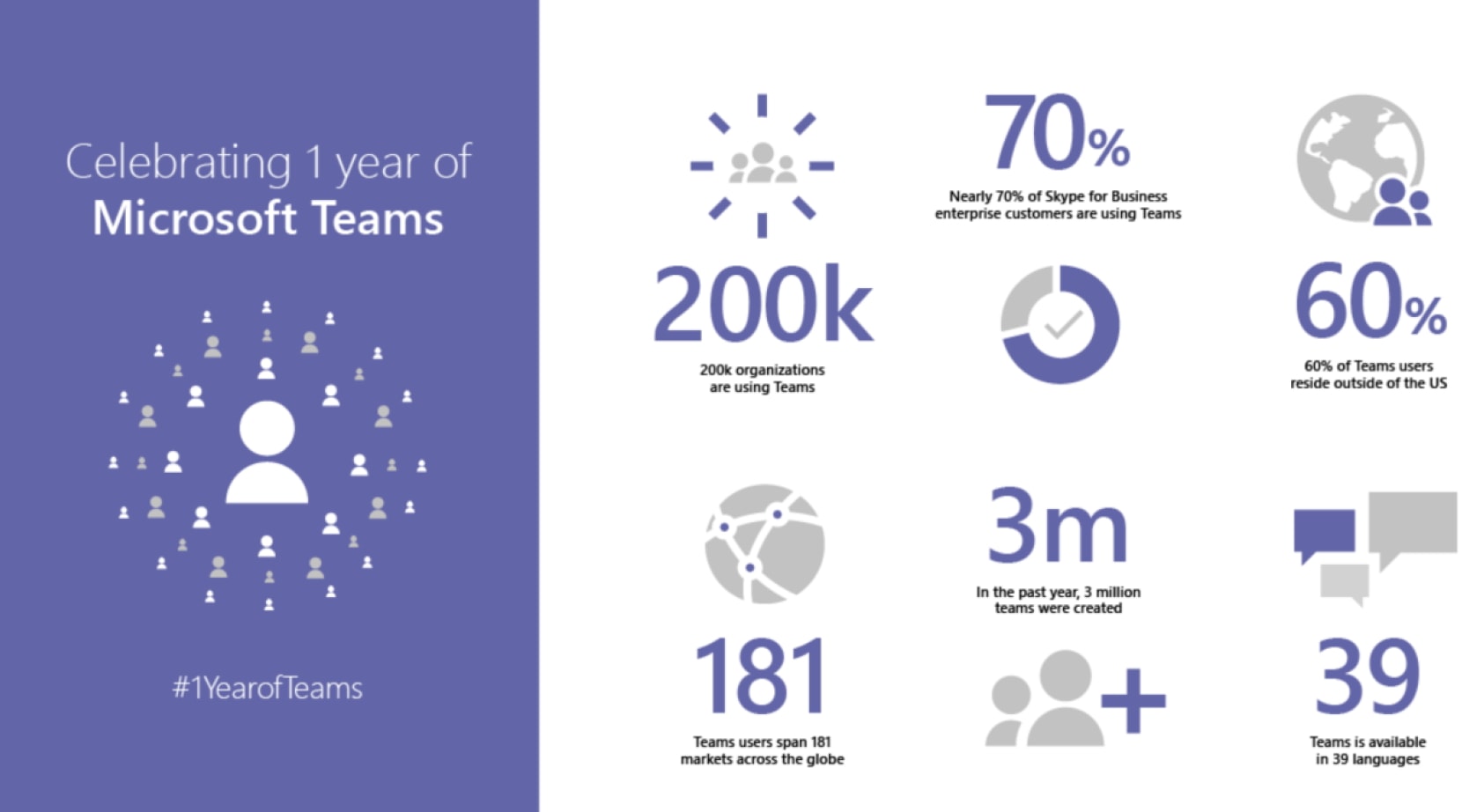
Microsoft’s AI has also made it easier to initiate and participate in Teams chats. You can now start, join or add people to meetings by giving natural language voice commands to Cortana, for one. If participants that speak different languages join in, Teams will support in-line message translation to let them “fluidly communicate with one another by translating posts in channels and chat.”
Another interesting feature is background blur on video. To help participants see you more clearly, the system will blur out a distracting background, putting the focus of the video on you rather than any clutter behind. It’ll also let you share a live video stream, photos or screens from your smartphone.
Finally, Microsoft will soon enable one-click cloud recording, with timecoding and automatic transcription. That’ll let team members search within conversations, read captions and play back portions or all of a meeting. A future upgrade will include facial recognition so that comments can be assigned to specific individuals.
With its relative simplicity, Slack will always have its place, but Microsoft is targeting large enterprises that already have its apps in-house. The ability to use Slack as an full in-house meeting system, even if participants don’t have access to a computer or internet, will no doubt make it a lot more useful for companies. The enterprise calling features are set to arrive in Q2 of 2018, and the other features, like Cloud Recording and in-line translation, will arrive later in the year.
How to Customize Your Apple Watch Workout Metrics
The ability to view live metric data is one of the most important feedback functions of any Apple Watch fitness app. In this article, we’re going to show how you can easily customize the metrics that the stock Workout app shows you when you raise your wrist during exercise.
Checking in on your progress during a workout is best achieved with a quick glance at your watch screen, so choosing which statistics are displayed is an important consideration if you want to minimize the amount of attention this requires. By default, Apple Watch displays things like duration, calories burned, heart rate, and distance, but you can choose to see only those that are important to you based on the type of workout you’re doing. Keep reading to learn how it’s done.
How to Customize Your Metrics for Different Workouts
The Workout app offers either a multiple metrics readout or a single metric view. The Multiple Metric view lets you choose up to five different metrics for individual workouts. The Single Metric option reduces this to one, however turning the Digital Crown in this mode lets you scroll through all available metrics for the current workout. Here’s how to choose between and set up the two viewing modes. Launch the Watch app on your iPhone.
Tap Workout in the app list.
Tap Workout View at the top of the menu.
Tap either Single Metric or Multiple Metric.
If you chose the Multiple Metric option you will see the list of individual workouts beneath. Tap a workout to customize its view.
To remove a metric from the view, tap the red minus symbol next to it in the list. To add a metric, tap the green plus symbol. You can also drag metrics between the two lists and reorder them to suit using the horizontal bars along the right. Note that the order will be reflected in your Apple Watch’s display. Tip: When using the Multiple Metric view, turn the Digital Crown on your Apple Watch to highlight a particular statistic on the screen for easier at-a-glance reading.
Related Roundups: Apple Watch, watchOS 4Buyer’s Guide: Apple Watch (Neutral)
Discuss this article in our forums
WhatsApp Extends Time Limit for Deleting Sent Messages to Over an Hour
WhatsApp has quietly extended the time window in which users can delete a message they already sent to a person or group in the latest version of the popular messaging app.
First noticed by WABetaInfo and reported by The Verge, the change in v2.18.31 means users now have up to one hour, eight minutes, and 16 seconds to “delete for everyone” any message already sent over the platform, rather than the previous time limit of up to seven minutes.
It’s not clear what prompted the specific limit change (other than the value being equal to 4096 seconds, or 2^12) and there’s no mention of it in WhatsApp’s support pages. Nevertheless, users now have a much longer time period in which to delete individual messages or entire chat threads either before or after they’re read.
A new WhatsApp for iOS update (2.18.31) is available on AppStore.
It is a bug fixes update, but it has the new “Delete for everyone” limit, that’s 1 hour, 8 minutes and 16 seconds.— WABetaInfo (@WABetaInfo) March 8, 2018
The “delete for everyone” option was introduced last year, but WhatsApp still lacks a self-destructing message feature like the one found in Telegram, where users can set a countdown on a message in the device-specific secret chat mode. As soon as the time runs out, the message disappears from both devices.
Tag: WhatsApp
Discuss this article in our forums
Apple Updates ‘Made for iPhone, iPad, and iPod’ Logos
Apple has updated its Made for iPhone, Made for iPad, and Made for iPod logos, and accessory makers have 90 days from when the change was announced in mid February to begin using them, according to ChargerLab.
Apple’s new Made for iPhone, iPad, and iPod logos via ChargerLab
The new decals look similar, but they have Apple logos in place of iPhone, iPad, and iPod icons. Apple has also moved iPod from first to last in the list, as the iPhone and iPad have long overshadowed the portable media player. The new logos use Apple’s San Francisco font, compared to Myriad Pro previously.
 Apple’s old Made for iPod, iPhone, and iPad logo
Made for iPhone, Made for iPad, and Made for iPod logos inform customers that an electronic accessory has been certified by the developer to meet Apple’s performance standards. To use the logos, accessory makers must apply to be a MFi Program licensee, and receive approval from Apple.
MFi-licensed technologies include the Lightning connector, CarPlay, GymKit, HomeKit, game controllers, and hearing aids, among others. MFi Program certification is not required for accessories that only make use of standard Bluetooth profiles supported by iOS, or accessories that only use the 3.5mm headphone jack.
For customers, this isn’t a significant change. But, next time you’re shopping for Apple-certified accessories, be aware the logos will soon change on packaging. It doesn’t appear the similar Made for Apple Watch decal has changed.
(Thanks, Nick!)
Tag: MFi Program
Discuss this article in our forums
Samsung Galaxy S9+ Teardown Reveals Components for Dual-Aperture Camera and ‘Lower-Tech’ AR Emoji
Over the weekend, iFixit shared its latest teardown, this one for Samsung’s upcoming Galaxy S9+ smartphone. The Galaxy S9 and S9+ will both launch this Friday, March 16 for around for $720 and $840, respectively, and some initial reviews took to comparing the devices to Apple’s iPhone X.
iFixit did so as well in the new teardown, starting off by trying to get into the back of the S9+ to look at its rear-facing camera components. After applying heat, the iFixit team got into the smartphone and found its dual-aperture camera system, which the team described as one of the only significant hardware changes this year.
Images via iFixit
iFixit explained that the S9+ has a rear-facing camera that automatically adjusts its aperture for low light, and at f/1.5 it has the widest aperture of any phone. For normal photos, Samsung’s new device still has a “more standard” f/2.4 aperture. In comparison, the iPhone X’s dual 12 MP rear cameras include f/1.8 and f/2.4 apertures.
Standard camera lenses use at least five aperture blades to keep the aperture roughly circular throughout many f-stop adjustments. This Galaxy’s aperture has just two rotating, ring-like blades for its single adjustment.
After some trouble dislodging the rear fingerprint sensor, iFixit moved to focus on the battery within the S9+ and discovered a 3.85V, 3,500 mAh battery. As the iFixit team pointed out, the battery in the S9+ shares the same specs as those found in the S8+ last year, and in the Note7 in 2016. The iPhone X’s battery teardown uncovered a 3.81V, 2,716 mAh battery in Apple’s smartphone.
Eventually, the team got underneath the S9+ display and compared its front-facing camera components side-by-side with the iPhone X. iFixit noted that Samsung’s AR Emoji are “lower-tech” compared to Apple’s Animoji, mainly because the S9+ front-facing hardware — composed of an iris scanner, camera, IR emitter, and proximity sensor — are “pretty much exactly” the same as the tech from the Galaxy S8+.
 Galaxy S9+ (left) and iPhone X (right)
Because of this, iFixit pointed out that it might have been a bit too soon for Samsung to debut its own animated emoji characters “without a hardware update to bring it up to speed.” To further explain the distance between the technologies, the teardown team described Apple’s Animoji as having Kinect-level tracking, while Samsung’s emoji are more akin to Snapchat filters.
iFixit gave the Samsung Galaxy S9+ a repairability score of 4 out of 10, explaining that there are a few modular components while noting the chance for breakage if attempting to repair the display and rear glass panel. The iPhone X fared slightly better in its teardown with a 6 out of 10 score. To read more about the Galaxy S9+ and its teardown, visit iFixit’s website.
Tags: Samsung, iFixit, teardown, Galaxy S9
Discuss this article in our forums
Scientology is launching a TV network with streaming options
Scientology’s relentless marketing push is evolving for the modern era. Hollywood Reporter has confirmed that the organization is launching a TV network on March 12th, and it’ll include the virtually obligatory streaming apps. In addition to broadcasting on AT&T’s DirecTV, it’ll also offer streaming through mobile apps (at least iOS), Apple TV and Roku devices. It’s not certain what the network will offer online as of this writing, but there will be on-demand clips in addition to live fare.
The group had hinted about the possibility of a TV offering as far back as 2016, when it opened its own media studio, but it has never formally discussed plans.
To some extent, this is a defensive move. Scientology hasn’t aggressively adopted online video, but its critics certainly have. The 2015 HBO documentary Going Clear has been available on Netflix for a while, and details some of the allegations of systemic abuse and harassment leveled against the organization. It’s not hard to find YouTube videos documenting similar claims, either. While an internet-savvy network isn’t likely to change many minds (especially not when it’s relatively late to the party), it’s hard to imagine the image-obsessed outfit letting its many challengers go unanswered.
Source: Hollywood Reporter
FCC accuses startup of launching satellites without permission
Life isn’t easy if you’re a space technology startup: in addition to the outlandish costs, you have to clear all kinds of regulatory challenges that might cut your plans short if there’s a snag. One company might not have been willing to take “no” for an answer, however. IEEE Spectrum has discovered that the FCC accused startup Swarm Technologies of launching four of its tiny SpaceBEE (Basic Electronic Elements) communication cubesats without obtaining the necessary approvals — in effect, it would be the first satellite maker to go rogue.
The FCC denied Swarm’s application to launch its satellites in December 2017 on the grounds that they posed a safety hazard other spacecraft orbiting Earth. That apparently wasn’t a deterrent, as the SpaceBEEs appear to have launched aboard one of India’s Polar Satellite Launch Vehicles on January 12th (you’re looking at the rocket above). Needless to say, that left officials fuming. The FCC revoked Swarm’s approval for a subsequent mission that would have taken place this April, citing an “apparent unauthorized launch and operation” of the four satellites.
Swarm was undoubtedly aware of the objections, as the April cubesats addressed FCC complaints that the initial models were too small. Unless the Indian space agency ISRO’s description of the cargo and successful launch is inaccurate, though, it didn’t scrap plans to launch the old satellites.
IEEE and TechCrunch have so far been unsuccessful in repeated attempts to reach Swarm for comment. The incident creates all kinds of problems though, and not just for Swarm or the FCC. The launch services company Spaceflight had said it checks its customers’ regulatory licenses, but appears to have let Swarm through the cracks. A spokesperson said the company “has never knowingly” launched clients without FCC licenses. It’s also uncertain whether or not ISRO checks licenses. Although it’s doubtful you’ll see a repeat of this any time soon, there may need to be more stringent checks — space junk is enough of a problem with fully authorized spacecraft, let alone the unsanctioned kind.
Via: TechCrunch
Source: IEEE Spectrum, FCC (1), (2)

