


YouTube TV’s price goes up to $40 per month tomorrow
Today is your last day to get YouTube TV for $35 per month. Tomorrow, the price increases to $40 per month, putting it in line with similar services such as Sony’s PS Vue and Hulu’s live TV plan. Google launched last April in a limited number of markets, but since then, it has grown significantly in both reach and offerings. Google announced the planned price increase last month as it added a number of new channels, including TNT, TBS, Cartoon Network and CNN to the service. Those who subscribe before March 13th will retain the $35 per month price.
Source: Google
Future dialysis patients could grow their own artificial veins
I rarely think about kidney failure, and when I do, it’s almost always in the context of a charity appeal from my local hospital. Dialysis machines are the primary way that people with kidney disorders survive until a donor organ can be found. Going to a hospital multiple times a week to have your blood cleaned never seemed like it was a fun way to spend one’s time, either. But after talking to Aditlys CEO Silvére Lucquin, I learned these trips to the hospital are not the worst part of the process.
Lucquin’s company has been working on a polymer-based implant that can be wired into a person’s blood vessels. The implant is, essentially, a hollow scaffold built from a new plastic polymer that encourages tissue growth. Once inserted into a person’s veins, their own bodies begin growing a new blood vessel around the artificial one. The implant then dissolves after a couple of months. Leaving behind an entirely new link that can be connected up to a dialysis machine.
The implant itself is harnessing a variety of doctrines, including electrospinning and supramolecular chemistry. These techniques have been married under the new process of endogenous tissue restoration which has been pioneered by a company called Xeltis. That company, however, has used the process to restore damaged heart valves, leaving Aditlys to experiment with its vascular implant.
Our kidneys, you see, are filters that clear out the excess fluid and junk that lingers in our bloodstream, turning it into urine. If a person’s kidneys shut down, then the bad stuff in their blood builds up, which can often be fatal. Until a transplant can take place, patients have to visit hospitals every few days to have their blood cleaned. That’s where the dialysis machine comes in, which pulls blood out of a vessel, filters it and pushes it back into their bodies.
In emergencies, that can be carried out using a catheter that’s been inserted into a blood vessel, but that’s not possible on a regular basis. Long-term dialysis users instead need to have a plastic tube implanted into their arm, either an arteriovenous graft or an arteriovenous fistula — essentially an artificial junction. Regular veins simply can’t cope with having thick needles shoved in on a biweekly basis and all that blood taken out. Not to mention that fistulas help improve the blood flow, making dialysis easier.
But “when you leave plastic implants in the body,” explained Lucquin, “they tend to occlude [block] quite easily.” His research claims that these blockages take place around 50 percent of the time, often within the first year. That’s not the only problem because, according to a paper out of Bayer College of Medicine, these implants are a hotbed of germs. Researchers George Nassar and Juan-Carlos Ayus say that the pipes have “repeatedly shown to be a risk factor for bacteremic and nonbacteremic infections.”
Worse still, even in a best-case scenario, fistulas fail in almost 40 percent of implantations for a variety of reasons. Even if it doesn’t, they normally have to be replaced once every two years or so, and that means regular trips back to the vascular surgeon. Those patients, explained Lucquin, “after a decade of dialysis and all that decay, means that it’s really complicated to find a clean place to put a new graft or fistula.”
Now, the hope is that with Aditlys’ new device, many of these issues will go away and most patients will need only one implant. Or, at the very worst, a couple, but that’s not something that Lucquin could comment on publicly. After all, things are at such an early stage that it’s not clear if the theory and the practice really match up. But the CEO did point out that even if the vessels do fail, those failures won’t nearly be as frequent as they are right now.
Of course, it’s going to be several years worth of clinical testing before the company can market the implant to patients. And it’ll take a while before vascular surgeons decide to attempt to use the tool in place of what currently works. But if successful, some of the many additional pains that people with kidney failure have to deal with may be a thing of the past.
Apple to Acquire Digital Magazine Service Texture
Apple today announced it has signed an agreement to acquire digital magazine service Texture, available on iPad, iPhone, Android, Windows, and Kindle devices. The deal is pending approval and financial terms were not disclosed.
Apple’s services chief Eddy Cue, who revealed the news at the SXSW media festival in Austin, Texas today:
We’re excited Texture will join Apple, along with an impressive catalog of magazines from many of the world’s leading publishers. We are committed to quality journalism from trusted sources and allowing magazines to keep producing beautifully designed and engaging stories for users.
iPhone and iPad users can download the Texture app and subscribe to unlimited access to over 200 of the world’s most popular magazines for $6.99 per month as part of an ongoing sale. Magazines can be read on up to five devices per subscription, with the ability to download issues for offline reading.
Some of the magazines available include People, Vogue, Rolling Stone, National Geographic, GQ, Sports Illustrated, Wired, Maxim, Men’s Health, GQ, Bloomberg Businessweek, ESPN The Magazine, and Entertainment Weekly. New issues are available alongside a searchable archive of thousands of past issues.
More details to follow…
Tags: Apple acquisition, Texture
Discuss this article in our forums
UK delays mandatory age verification on porn sites
Ever since the Digital Economy Act became UK law this time last year, we’ve known there would come a time when porn sites would be compelled to verify the age of British visitors to ensure they’re only letting adults in. Not long after, the UK’s digital minister set a deadline of April 2018, at which point porn sites would have to comply or face the consequences. We had assumed everything was on track, but the UK government has admitted we’re nowhere near ready to police porn sites, and now it expects age verification won’t be enforceable until the end of the year.
The UK’s Department for Digital, Culture, Media & Sport announced over the weekend the recipients of a £25 million ($35ish million) pot earmarked for 5G projects. The fund will support trials of 5G-equipped drones geared for “smart farming,” internet of things things in healthcare applications and autonomous vehicle tech, among other research. Curiously, the government slipped into this release an admission that we don’t yet have clear guidelines drawn up for porn sites to follow, and so mandatory age verification will be delayed until these sites know what’s expected of them.
The British Board of Film Classification (BBFC), which decides the age ratings for movies, games and music videos, recently took on the additional role of porn regulator. The BBFC will be able to fine sites that don’t introduce age checks up to £250,000 (around $346,000) or up to 5 percent of their turnover. Additionally, it can order ISPs to block sites and even tell service providers, such as those that process payments or manage on-site advertising, to stop working with sites not adhering to the rules. Social networks will also have a responsibility to mute the voices of non-compliant peddlers.
We knew the BBFC was likely to take on this extra job as far back as 2016, but it was only officially appointed in the new regulatory role last month. That’s the main reason for the delay: The BBFC is just now writing the guidelines porn sites and their service providers will have to follow. These will be published towards the end of this month in draft form, so the industry and anyone else with an opinion can comment on them. When it seems like a best-fit solution has been reached, the government then has to voice its approval before giving porn sites three months to get ready to implement age verification tools. This is all expected to come to a conclusion before the end of the year, but as with all things government, the process could very well drag on for longer.
A big part of what the BBFC has to figure out is what forms of age verification will be appropriate. “We expect to see a number of solutions offered by providers to give people different ways to verify their age,” an FAQ on the BBFC website states. The owner of Pornhub and many other adult sites, Mindgeek, recently detailed the system it intends to use. AgeID is an encrypted login that can work across any site, meaning someone only has to verify their age once to get into any site that uses the same tool. Apparently it doesn’t store any personal information, just the data it needs to tell a site: Yes, this visitor is over 18.
Mindgeek isn’t just planning to use AgeID across its own brands. It intends to license the tool out to other sites and let smaller, independent providers use it for free. There is the question of whether one huge porn distributor should dictate how every UK-facing site checks age, but that’s exactly the kind of thing the BBFC should be looking at. As you can imagine, a lot of people aren’t happy about mandatory age verification in general. The worry is that any mechanism will leave a digital trail, meaning your personal porn habits are cataloged… somewhere — one of the benefits of Mindgeek’s AgeID tool is that it follows you around so you don’t have to log in to every individual site. And if a record exists, how can we be sure this remains private and secure?
In that sense, the BBFC is likely glad to have more time to get its ducks in a row and the industry in agreement. Between now and whenever age verification eventually becomes mandatory, perhaps it will allay the public’s fears by being transparent about how exactly age checking systems are going to work in practice.
Source: UK government
How to find the best TV antenna for free HD channels
You can stream a lot of TV online, but for things like the Olympics and breaking news, you’ll want a local broadcast station to deliver the goods. Buying an antenna isn’t like buying a toaster, though — there is no objectively “best” antenna that will work for most people. Instead, you’ll need to do a bit of research and testing.
If you want to get as many free channels as possible, including your local ABC, NBC, FOX and CBS affiliates, you’ll need to consider where those broadcast towers are located, how strong of a signal they send to your location and what kind of obstructions might be in the way. Thankfully, there are some tools that can help.
Find your local channels (and where they come from)
A free website called AntennaWeb can tell you a lot about what antenna you’ll need. Just plug in your zip code and it will provide you with a list of channels, the strength of antenna they require and a map showing where those broadcasts are coming from. For example, here’s what AntennaWeb returns for where I live in San Diego:

You’ll notice that all the channels come from different directions and have different signal strengths (as noted by their colors).
For contrast, here’s where I used to live in Los Angeles:
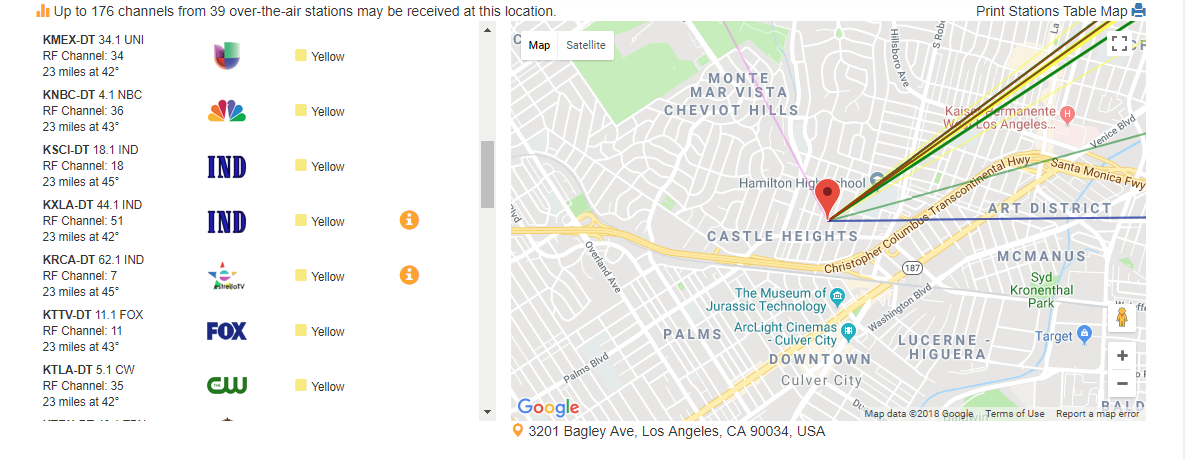
Here, almost all the channels came from one direction, so it’d be best served by a different antenna than the San Diego location. And unfortunately, if you live in a rural area, you may not find that you have any channels available at all.
Pick the right kind of antenna
From the AntennaWeb list, pick the channels that are important to you and note their colors and where they come from.
Armed with that information, you can start searching for antennas. You’ll want to consider a few things.
-
Size and range. Yellow and green channels on that list should work with smaller antennas while red and blue channels may need something bigger and more powerful. You can also note the distance of each channel from your location and compare it to the range offered by the antenna (though the antenna’s range is probably lower than the specs state, thanks to buildings and other obstructions — so always overestimate how much range you’ll need).
-
Indoor vs. outdoor. If you’re close to the broadcast towers in your area — 20 miles or less — and don’t have too many obstructions, you may be able to get by with an indoor antenna that mounts to the wall near your TV. Here are the Wirecutter’s picks for the best indoor antennas to get you started.
-
Directional vs. multi-directional. If you’re in a city, you’ll probably get more channels with an antenna that can receive signals from multiple directions, known as a multi-directional or omni-directional antenna. However, directional antennas tend to be more powerful and can grab stations from farther away — as long as all the channels you’re interested in come from one direction (which is likely if you’re in the suburbs). 1byone makes both directional and multi-directional outdoor antennas that work well in my experience.
-
Amplified. You can get a signal from your antenna by plugging it directly into your TV, but many antennas also come with amplifiers. Amplifiers plug the antenna into a wall outlet, boosting its signal so they can reach farther. This can be good if you’re far away from all of your stations (or if you have to use a coaxial cable longer than 50 feet), but it can also cause problems. The amplified version will usually cost a tad more, but it’s worth trying if the non-amplified version isn’t getting the stations you want.
You shouldn’t have to spend too much to find a good antenna. Most of these categories should have options between $20 and $60, with amplified versions on the higher end of that range.
Once you find an antenna with the right combination of features, you’re ready to try it out.
Exchange it if you don’t get the channels you want

The unfortunate reality of TV antennas is that it’s difficult to know which models will work for your specific location. Beyond all of the above characteristics, buildings, trees and terrain can make a big difference. The best way to find the right antenna is to test it yourself.
So when you buy an antenna, buy from a store with a good return policy — preferably one without a hefty restocking fee — and try it out at home. If you have an indoor antenna, place it as high up as you can, near a window if you can, and on the side of the house facing the most broadcast towers. If you can mount a larger antenna in the attic or on the roof instead of on the living room wall, all the better. It’ll take a bit more work, but you’re basically guaranteed better reception.
Once you’ve mounted the antenna, plug it into the coaxial port on your TV, open your TV’s menu and find the option to scan for over-the-air channels. Once the process is finished, you can see which channels your antenna was able to find and how good of a signal they have. If you aren’t getting as good a signal as you’d hoped, try moving or repositioning the antenna or plugging in an amplifier (if it came with one). If that still doesn’t work, you may have to try something bigger or more powerful. After a little trial and error, you should find the perfect antenna and positioning, and you can enjoy your free, over-the-air HD channels.
Images: Getty Images/iStockphoto (Roof antennas/checkout registers)
ThinkPad X1 Carbon review (2018): The best business laptop returns
Lenovo’s ThinkPad lineup has always been focused on balancing tradition with modernity. It carries the legacy of IBM’s iconic laptop brand, but the company also has to make sure it keeps up with the competition. That’s truer than ever with the new X1 Carbon, Lenovo’s flagship ultraportable, which packs in Intel’s latest chips and a few nifty upgrades. It doesn’t have a folding screen, and it can’t be turned into a slate like the X1 Yoga and the Tablet can. It’s simply a laptop — but it’s one that’s polished enough to compete with the likes of Dell’s XPS 13 and Apple’s MacBook Air.
Hardware
Now in its sixth generation, the X1 Carbon retains everything that’s made the line an ideal productivity machine over the past few years. It starts out at just 2.5 pounds and measures 16 millimeters thick. It’s noticeably lighter than the 2.7-pound XPS 13, so much so that it’s hard to tell that it’s actually a bit thicker. The X1 Carbon’s sturdy carbon-fiber case returns, as does the soft-touch coating, which makes it feel surprisingly luxurious, especially on your wrists.
Aside from some branding tweaks, nothing has changed design-wise. You’ll be able to tell it’s a Thinkpad from across the room. For some users, though, that’s more a feature than a compromise. There’s something comforting about the clean lines of the traditional ThinkPad. Lenovo has modernized the Carbon line over the years, of course — the bezels around the screen got thinner, for example — but not so much as to hide its heritage.

Lenovo also brought back the touchscreen option in the Carbon’s 14-inch display, which was missing in the last generation. It’s a nice thing to have, especially when browsing around the web, but the laptop’s matte finish makes the touch experience a bit rough as compared with mobile glass screens. Our review unit came with a standard 1080p display, but you can also upgrade to a higher-resolution 1440p model that packs in Dolby Vision HDR.
Despite the lower resolution, the screen looks great when browsing the web and watching movies. But if you plan to watch a lot of movies, or you just want the latest tech, it’s worth springing for the HDR option, which will deliver deeper blacks and brighter highlights. The slight jump beyond 1080p will also make text and photos a bit sharper.
If you’re privacy conscious, you’ll definitely appreciate the physical shutter that can be used to block the webcam. It’s a better option than tape, but it would’ve been nice if it were easier to switch on and off. It requires a decent amount of force to be moved, and you might lose a bit of fingernail in the process.

Devindra Hardawar/Engadget
Unfortunately, there’s no Windows Hello support in the webcam unless you upgrade to the higher-resolution monitor. It’s unclear why that is, but it might be due to the size of the 1080p panel. At least the fingerprint reader is more secure than before. The sensor can authenticate your identity entirely on its own, without sharing any data with the computer. The laptop also features two far-field array microphones, which can be useful when you’re shouting commands at Cortana from across the room.
As for connectivity, the Carbon X1 features two Thunderbolt 3–compatible USB-C ports, which can also charge the laptop, as well as two USB Type A connections and an HDMI port. There are also micro-SIM and micro-SD card slots tucked away in the back.
Performance and battery life
PCMark 7
PCMark 8 (Creative Accelerated)
3DMark 11
3DMark (Sky Diver)
ATTO (top reads/writes)
Lenovo ThinkPad X1 Carbon (2018, Core i5-8250U, Intel HD 620)
6,298
5,002
E3,701 / P2,062 / X493
4,706
2.96 GB/s / 1.97 GB/s
Dell XPS 13 (2018, Core i7-8550U, Intel UHD 620)
6,438
4,918
E3,875 / P2,166 / X526
4,901
3.1 GB/s / 527 MB/s
Surface Book 2 (15-inch, 1.9Ghz – 4.2Ghz Core i7-8650U, 6GB NVIDIA GTX 1060)
6,195
4,882
E14,611 / P11,246 / X4,380
15,385
2.25 GB/s / 1.26 GB/s
Surface Book (2016, 2.6GHz Core i7-6600U, 2GB NVIDIA GeForce GTX 965M)
5,452
4,041
E8,083 / P5,980 / X2,228
11,362
1.71 GB/s / 1.26 GB/s
Surface Pro (2017, Core i5, Intel HD 620)
5,731
4,475
E2,782 / P1,666 / X431
4,260
1.6 GB/s / 817 MB/s
Surface Laptop (Core i5, Intel HD 620)
5,075
4,279
E2,974 / P1,702 / X429
3,630
658 MB/s / 238 MB/s
ASUS ROG Zephyrus (2.8GHz Intel Core i7-7700HQ, NVIDIA GTX 1080)
6,030
7,137
E20,000 / P17,017 / X7,793
31,624
3.4 GB/s / 1.64 GB/s
Alienware 15 (2.8GHz Intel Core i7-7700HQ, NVIDIA GTX 1070)
6,847
7,100
E17,041 / P16,365
20,812
2.9 GB/s / 0.9 GB/s
Alienware 13 (2.8GHz Intel Core i7-7700HQ, NVIDIA GTX 1060)
4,692
4,583
E16,703 / P12,776
24,460
1.78 GB/s / 1.04 GB/s
Razer Blade Pro 2016 (2.6GHz Intel Core i7-6700HQ, NVIDIA GTX 1080)
6,884
6,995
E18,231 / P16,346
27,034
2.75 GB/s / 1.1 GB/s
ASUS ROG Strix GL502VS (2.6GHz Intel Core i7-6700HQ , NVIDIA GTX 1070)
5,132
6,757
E15,335 / P13,985
25,976
2.14 GB/s / 1.2 GB/s
HP Spectre x360 (2016, 2.7GHz Core i7-7500U, Intel HD 620)
5,515
4,354
E2,656 / P1,720 / X444
3,743
1.76 GB/s / 579 MB/s
Lenovo Yoga 910 (2.7GHz Core i7-7500U, 8GB, Intel HD 620)
5,822
4,108
E2,927 / P1,651 / X438
3,869
1.59 GB/s / 313 MB/s
Razer Blade (Fall 2016) (2.7GHz Intel Core-i7-7500U, Intel HD 620)
5,462
3,889
E3,022 / P1,768
4,008
1.05 GB/s / 281 MB/s
Razer Blade (Fall 2016) + Razer Core (2.7GHz Intel Core-i7-7500U, NVIDIA GTX 1080)
5,415
4,335
E11,513 / P11,490
16,763
1.05 GB/s / 281 MB/s
ASUS ZenBook 3 (2.7GHz Intel Core-i7-7500U, Intel HD 620)
5,448
3,911
E2,791 / P1,560
3,013
1.67 GB/s / 1.44 GB/s
Razer Blade Stealth (2.5GHz Intel Core i7-6500U, Intel HD 520)
5,131
3,445
E2,788 / P1,599 / X426
3,442
1.5 GB/s / 307 MB/s
The Carbon X1 isn’t exactly a surprising machine — it’s a rock-solid, ultralight business laptop. It sports the same killer keyboard found on all of Lenovo’s professional machines, with a liberal 1.8 millimeters of travel. Typing on it felt better than many desktop keyboards I’ve used, and it certainly blows away Apple’s disastrous flat MacBook options. The touchpad is smooth and accurate, and I’ve got to give Lenovo credit for sticking with the iconic red ThinkPad nub. It takes a bit of getting used to, but it’s a great way to maneuver through Windows in cramped environments.

Devindra Hardawar/Engadget
The Carbon X1 is powerful enough to handle most productivity tasks, thanks to Intel’s 8th-gen processors. Since there’s no dedicated graphics, it’s not a great option for playing games or 3D rendering, but that won’t matter to business users. For the most part, what struck me about the Carbon X1 was just how much it felt like those old ThinkPads I used to adore in the Windows XP era. Of course, it’s a lot lighter and thinner, but it felt just as reliable and empowering. It booted up quickly, launched everything I needed without skipping a beat and, most important, never left me wanting for more power.
In our battery test, which involves looping an HD video, the laptop lasted for 15 and a half hours. That’s among the best we’ve seen in ultraportables. While using it a bit more realistically throughout the day, it typically lasted for eight hours.
| ThinkPad Carbon X1 (2018) | 15:30 |
| Dell XPS 13 (2018) | 9:50 |
| Surface Book 2 15-inch | 20:50 |
| Surface Book with Performance Base (2016) | 16:15 |
| Surface Laptop | 14:49 |
| Surface Pro | 13:40 |
| ASUS ROG Zephyrus | 1:50 |
| Surface Book with Performance Base (2016) | 16:15 |
| Apple MacBook Pro 2016 (13-inch, no Touch Bar) | 11:42 |
| Apple MacBook Pro with Retina display (13-inch, 2015) | 11:23 |
| Apple MacBook Pro 2016 (15-inch) | 11:00 |
| HP Spectre x360 15t | 10:17 |
| Apple MacBook Pro 2016 (13-inch, Touch Bar) | 9:55 |
| ASUS ZenBook 3 | 9:45 |
| Apple MacBook (2016) | 8:45 |
| Samsung Notebook 9 | 8:16 |
| Alienware 13 | 7:32 |
| HP Spectre 13 | 7:07 |
| Razer Blade Stealth (Spring 2016) | 5:48 |
| Razer Blade Stealth (Fall 2016) | 5:36 |
| Dell XPS 15 (2016) | 5:25 (7:40 with the mobile charger) |
| Alienware 15 | 4:31 |
| Razer Blade Pro (2016) | 3:48 |
| ASUS ROG Strix GL502VS | 3:03 |
Pricing and the competition

Devindra Hardawar/Engadget
The ThinkPad X1 Carbon starts at $1,519 with a Core i5 8th-generation processor, 8GB of RAM and a 256GB M.2 SSD. Personally, I’d spend the extra $180 to add the HDR 1440p screen. As usual, you can customize just about every component of the machine on Lenovo’s website, so you’re not just stuck with preconfigured systems that might include features you don’t want.
Not surprisingly, being a business-class machine, it’s more expensive than typical ultraportables. The XPS 13 starts at $999, and you can even get a MacBook Pro cheaper than the Carbon X1 with similar specs and an older 7th-generation Intel CPU. Basically, you’re not buying a ThinkPad if you’re trying to save money.
Wrap-up

Devindra Hardawar/Engadget
While the ThinkPad Carbon X1 isn’t a huge evolution over last year’s model, Lenovo packed in enough upgrades to keep the line in step with modern ultraportables. Unfortunately, you’ll have to go beyond the entry-level model to see the best new features, like the HDR display. Perhaps next year we’ll see a major design leap for the Carbon line — but, knowing the rabid ThinkPad fans out there, Lenovo will have to tread carefully. Bold new ideas are what the X1 Yoga and Tablet models are for. The Carbon, meanwhile, remains the most refined business laptop around.
Amazon brings Alexa calls and messaging to tablets
You no longer need to hang around an Echo speaker to make free calls and messages with Alexa. As of now, you can use Alexa to place calls (including video calls) and send messages from Android tablets, iPads and of course Amazon’s own Fire models. How easy it is depends on the device. It’s easiest on the Fire HD 10, where you only have to ask Alexa to get in touch; other Alexa-ready Fire tablets require that you tap the home button first. And for everyone else, you’ll have to open the Alexa app.
As usual, you don’t need a tablet or Echo speaker to receive calls — you just need the Alexa app. Amazon’s Drop In feature also works between tablets and other Echo devices in your home, so you can use your tablet to ask someone a question when they’re on the other end of the house. Effectively, Amazon is turning your slate into an intercom.
Source: Amazon (1), (2)
The UK is getting a MoviePass clone
It’s hard to deny that MoviePass (the service that allows you to see one 2D movie a day in theaters for a set monthly fee) has been a huge hit in the US. That’s why it’s hardly surprising that the UK has a MoviePass clone of its own in the works. Called cPass, it claims to be the first UK and European movie ticket subscription service, with prices set as £9.95 ($13.83) per month. The service is currently in sign-up mode and hasn’t actually launched yet.
The service seems to work similarly to that of MoviePass. Once you register for cPass and pay the fee, you receive a card in the mail. Then, you simply choose the movie, theater and time you want to see, and “Check in” on the cPass app. When you arrive at the theater, just swipe your card at the box office and enjoy your movie.
The problem is that no major UK-based theater chains had actually ever heard of cPass, according to Deadline. Odeon, Vue, Cineworld and Curzon are all listed as chains that cPass works with, but there is no agreement in place between them. According to cPass’s FAQ, the company doesn’t have partnerships with these cinemas, which already offer their own unlimited movie subscriptions. However, the founders told Deadline that cPass can operate “at any venue that accepts credit and debit cards.”
The big question for any of these unlimited movie ticket deals is how to monetize it. After all, MoviePass loses money on every subscriber. It’s becoming increasingly clear, though, that the real source of revenue is the subscribers themselves — the data that each user provides, and the way that these users can be advertised to as a result of that. It remains to be seen what will happen with cPass, and whether it will actually launch as a fully fledged service.
Source: Deadline, cPass
Philips Hue Reveals First Products in Outdoor Lighting Range Coming This July
At CES in January, Philips announced that it was working on a line of Hue lights for outdoors, so that users could connect and control their lighting on a patio, balcony, or other environment outside. Today, the company has revealed the first set of Philips Hue outdoor range products that will be launching in the United States and Europe this July.
Philips noted that the outdoor products will be available in both the Philips Hue white and Philips Hue white and color ambiance ranges. The outdoor devices will be fully compatible with the Philips hue ecosystem and work “in the same way as the indoor range,” Philips explained. Users will just have to connect their outdoor lights to their Philips Hue bridges, and the new lights will appear in the Hue app and Apple’s Home app so that they can be controlled with taps and through Siri.

The new lights include the Philips Hue Lily, which can be used to highlight key features in a garden, and the Philips Hue Calla, which can be placed in the ground and light pathways through outdoor spaces. Philips said the new line is designed for outdoor weather conditions and each fixture is easy to install.
“Our customers are always looking for new ways to extend their smart lighting system and the new Philips Hue outdoor range takes it a huge step further,” said Sridhar Kumaraswamy, Business Leader Home Systems & Luminaires at Philips Lighting. “While Philips Hue bulbs and luminaires are available for every area inside your home, we wanted to traverse the threshold and offer connected luminaires designed for outside areas. The Philips Hue outdoor range enables you to make the most of your outside areas, be it creating the ideal ambiance to host a BBQ at the weekend or beautifying your garden.”
In terms of price, the Philips Hue outdoor Lily base pack will cost $279.99/€299.99, including three lights and “all the accessories you need to get started.” The Calla bollard base pack will be the cheaper option at $129.99/€139.99. There will also be a number of standalone lighting products in the white range, including Lucca, Tuar, Turaco, and Ludere, with prices starting at $49.99/€69.99.

The company didn’t give any further information on the upcoming Hue app version 3.0 update for iOS and Android devices, expected for Q2 2018. At CES, Philips said the update will “enhance” existing features while also adding in new ones so that Hue lights can be activated “with even more ease.”
Tag: Philips Hue
Discuss this article in our forums
Rihanna is Apple Music’s Most Streamed Female Artist
Rihanna is the world’s most streamed female recording artist on Apple Music, ahead of Taylor Swift, Beyoncé, and Ariana Grande.
Apple recently announced that the Barbadian singer has become the first female artist to surpass two billion streams worldwide on Apple Music, having achieved the milestone on International Women’s Day last Thursday.
Work!@Rihanna sets new streaming record on #InternationalWomensDay. 2 billion streams worldwide and counting. 🔥🔥https://t.co/eiwiOCsVbY
— Apple Music (@AppleMusic) March 10, 2018
It’s unclear if the count is limited to Rihanna’s own songs or includes her features in songs by other artists like Drake, Eminem, and Jay-Z, but it’s an impressive accomplishment either way on the heels of her 30th birthday.
Rihanna topped Apple Music’s list of the top 20 most streamed female artists worldwide:Rihanna
Taylor Swift
Beyoncé
Ariana Grande
Adele
Sia
Lana Del Rey
Selena Gomez
SZA
Lady Gaga
Katy Perry
Nicki Minaj
Demi Lovato
Halsey
Fifth Harmony
P!nk
Kehlani
Mariah Carey
Little Mix
Miley CyrusAll eight of Rihanna’s studio albums are available to stream on Apple Music, whereas some artists don’t offer their complete discography on the service.
Tag: Apple Music
Discuss this article in our forums

