


‘Not Tonight’ makes you a bouncer in post-Brexit Britain
In exactly 12 months, Britain will leave the European Union. It’s a troubling time for the island state as politicians squabble over exit conditions and citizens grapple with a deep divide in their economic, societal and cultural values. For many, the future seems bleak, but it shouldn’t compare to the one found in Not Tonight, an upcoming video game by Tiki Taka Soccer developer Panic Barn. In this alternate version of Britain, one ruled by an extreme right-wing government, you’re forced to work as a bouncer that gets paid for identifying and turning away European citizens. It’s a horrific job, but one that’s necessary to pay the bills and keep your British citizenship.
The core gameplay is similar to the 2013 indie hit Papers, Please. Instead of a border crossing, though, you’re stationed outside pubs and night clubs in chilly rural England. At first, the job is simple — just look at everyone’s IDs and make sure they’re over 18 — but it soon grows into a complex and morally heartbreaking affair. “You’re asked to essentially sift through and distinguish whether someone is European or not,” Panic Barn founder Tim Constant said. Do this while checking tickets, removing contraband and managing VIP queues, and you’ll walk home with a respectable paycheck.
Constant, however, doesn’t want you to do that. “Even if you’re in a shit place, and you’re being persecuted, the overall tone of the game is just… be nice,” he said. “Try to be nice, whatever your situation.” Early in the game, for instance, you’ll be introduced to a resistance group that wants to overthrow the government and its “right-wing awfulness.” To help them, however, you’ll have to disobey your employer and promote a diverse, multicultural society. “Instead of spotting French people walking into a pub, you might be asked to let all the French people in,” Constant added.
Supporting the rebels will improve your standing inside their organisation. You will, however, lose pay and the chance to improve your living standards. Just to make things interesting, there will also be a health meter that depletes if you overwork yourself. By the end of the game, every job or “mission” should feel like a big decision. “Do I feel right about implementing all of this anti-European legislation? I can do something about it, but I might not get the money I need to pay the bills this week.”
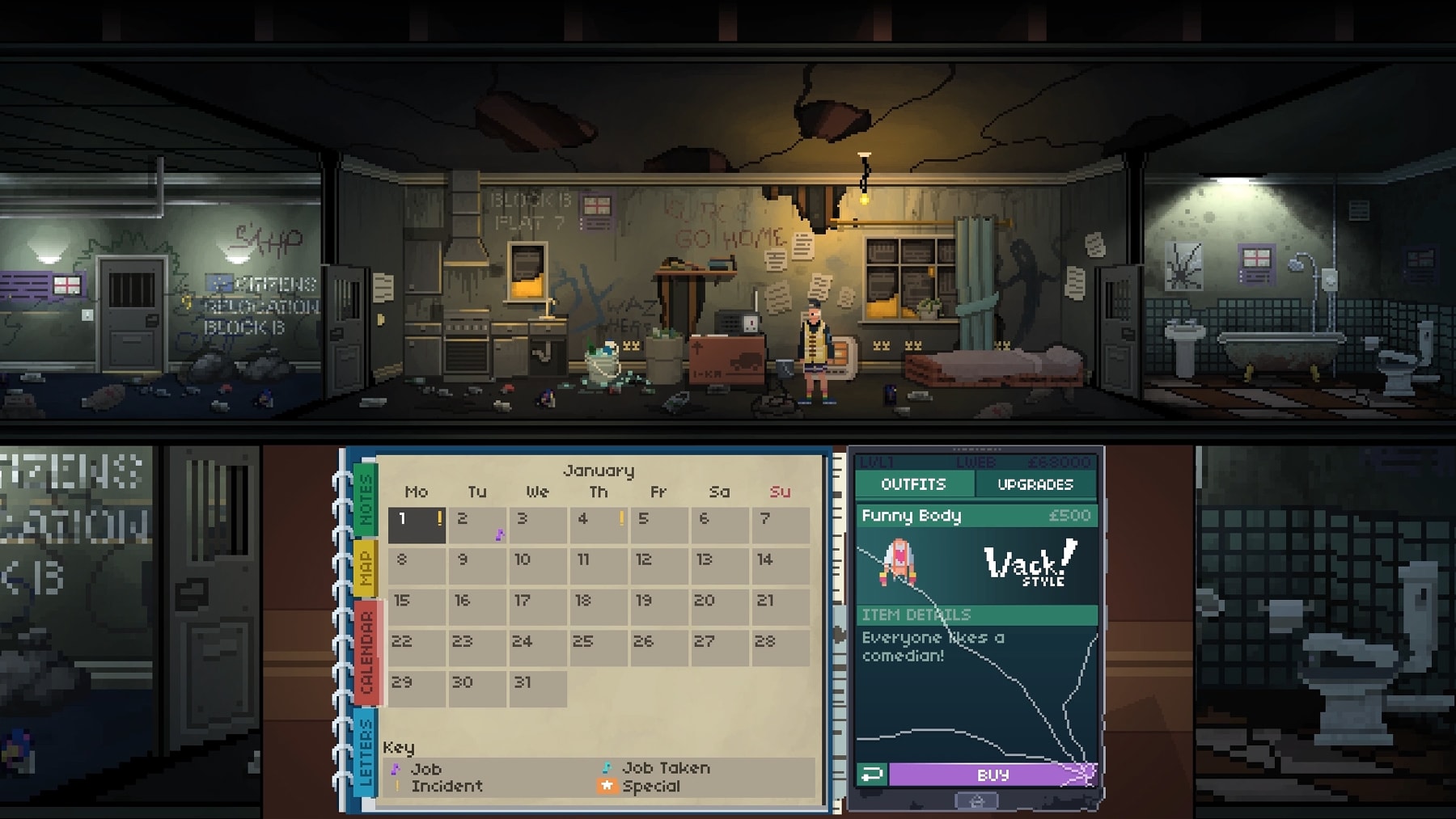
Your flat is where you pick and choose jobs.
No More Robots
The game’s grim world is paired with a dark and typically British sense of humor. There’s a pub, for instance, that deteriorates to the point where it’s just a car park in an empty field. “He’s still holding a party there and you can still go and work for him,” Constant said. The zany tone was inspired by the “crappy clubs” he was desperate to get into as a teenager in Somerset. “The bouncer made that decision and if you didn’t get in, your whole weekend, actually your whole week was basically ruined,” he added.
“This game is anti-Brexit, absolutely.”
Constant hopes that players will laugh and contemplate in equal measure. Not Tonight is a commentary on Brexit, but its exploration of poverty, immigration and social diversity goes beyond Britain’s borders. “It’s not necessarily Brexit itself,” he said, “but anything that’s used to divide us. Anything that divides us into categories is bad in my opinion.” The game will launch “soon” on PC followed by the PS4, Xbox One and Nintendo Switch later this year. Mike Rose, the founder of British publisher No More Robots, hinted that a mobile version could be possible in the future too.
Source: Panic Barn
‘Westworld’ season two trailer offers our first glimpse of Shogunworld
Fans have been theorizing where Westworld would go after the shocking finale to its first season. Now we have a longer look at what will go down starting April 22nd. The latest trailer hints that there’s more than just the western-themed park at play, with a flitting look at Shogunworld. There’s also a tease that we’ll see more of the outside world. Perhaps best of all, though, is that the clip is set to a haunting piano rendition of Nirvana’s classic “Heart-shaped Box.” If you’re in the middle of rewatching season one and looking for clues, the embedded trailer below might give you a few more. Or, it could raise additional questions. Either way, we don’t have too much longer to wait, as season two premieres on April 22nd.
Via: Entertainment Weekly
Source: HBO (YouTube)
Jaguar’s all-electric I-Pace is quick, agile and stylish
Jaguar introduced its low-slung pure electric crossover way back in 2016 at the Los Angeles Auto Show. Since then, it keeps popping up at car events while the automaker slowly doles out information on it. While we wait for the vehicle to make its way into mass production, we were able to take a pre-production version for a spin at Jaguar’s North American headquarters.
The drive wasn’t on the streets of Mahwah, New Jersey near its HQ, but instead on a sort of autocross course in the company parking lot. While my time behind the wheel wasn’t nearly enough to get a true feeling of how the I-Pace (starting at $69,500) would fare in the real world, it was an interesting way to test the SUV’s handling and torque. I’m happy to report, that they both performed admirably.
The all-wheel-drive electric I-Pace turns quickly, almost effortlessly. Cranking the steering wheel hard while accelerating produced less body roll than expected and the crossover kept a solid line around the track as I tried to best my fellow journalists at the event. I got seventh place, then was pushed down to eight, then down to ninth. At that point, I left and made myself believe I was in the top ten at the end of the day without checking on the final standings.

Thanks to the crossover’s 394 horsepower and 512 pounds of torque, the I-Pace leapt when I stomped the accelerator. Jaguar says the SUV will do zero to 60 in 4.5 seconds, which is easy to believe after my quick jaunt on the course. While the power and turning seem to be ready for discerning Jaguar owners, the interior should keep those folks happy too.
The inside of the I-Pace is typical Jaguar with wood paneling and stitched leather. The seats were sportier than expected but nonetheless comfortable with ample side support. On the steering wheel the automaker borrowed the light-up options from the Range Rover Velar. When the car is off, everything is black, lights around the controls come alive once you start the engine.

Meanwhile, the center console has an odd split in the middle with the gear selector on one side and drive modes on the other. It doesn’t seem like it would look good, but somehow it does. The area behind the split will hold a wireless charger for smartphones.
Above that smartphone cubby is the Touch Pro dual display infotainment system and climate control. You may recognize this from, you guessed it, the Velar. Like that car, the knobs serve multiple functions like adjusting the media volume and the dive mode. I didn’t get much of a chance to play with the infotainment system during the quick drive so that’ll have to wait until the full review.

Hopefully, that review won’t be too far into the future though. Jaguar says that it will be available in the second half of this year. The I-Pace might be a great autocross car, but in the real world it might fall short. It’s unlikely, but you never know and we’ll have to wait to make a real assessment of the first electric vehicle from Jaguar.
Click here to catch up on the latest news from the 2018 New York Auto Show.
Apple Music puts all its music videos in one place
In January, Apple released a rundown of some of the features that would be released with iOS 11.3, a list that included Apple Music becoming a “home for music videos.” Well now, ahead of the iOS 11.3 launch, Apple has incorporated a section in Apple Music that’s dedicated to music videos. You can get to it through the “Browse” tab in the Music app and once there, you’ll find sections for new music videos, exclusives, curated playlists, videos by genre and spotlights on particular artists.

In the playlist section, you’ll find collections like “Today’s Video Hits,” “The A-List: K-Pop Videos” and “Y2K Pop Videos.” Among the exclusive videos being offered now are A Tribe Called Quest’s “The Space Program,” Beck’s “Colors” and Kylie Minogue’s “Stop Me from Falling.” And the current artist spotlight is on Taylor Swift.
Apple Music already had videos, but this makes them much easier to find and helps users spot videos they’re more interested in. Plus, it appears that Apple will be personalizing video suggestions based on what you tend to listen to. However, though non-Apple Music subscribers can see the video offerings, you can’t actually play them unless you have a subscription.
Image: Apple Music
Via: The Verge
Twitter makes it easy to share the best part of live videos
When you want to show your Twitter followers a specific part of a live video, you have no choice but to tell them what time to skip to. Now, Twitter has rolled out a new feature called “Timestamps,” which gives you a way to share live videos that start playing at that exact moment you want to show your audience. Say, your pal wiped out surfing a big wave or their cute pet stole their snacks, and you want to show that moment to your followers: all you need to do is scrub to the time you want your audience to see, like you would when you want to embed a YouTube video that starts at a specific part.
It could be the most interesting, controversial, funniest or saddest moment — whatever it is, you can blast the timestamped video to your followers as a new tweet, send it to a friend as a direct message or share it as a link. The feature works for both ongoing live broadcasts and replays, but if you’re watching the former, you can quickly skip to real-time events by tapping “live.” It’ll also work whether you’re sharing videos posted by publications and big companies or those by friends and simple people broadcasting with their phones.
It’s a simple change that could make it easier to communicate your thoughts or to start discussions with friends and followers. And the good news is that you can take advantage of it whatever device you use: it’ll be available on Twitter for Android, iOS, the web and on Periscope starting today.
RED reveals a 5K camera sensor designed for outer space
In a bit of a surprise, RED Camera unveiled its most light-sensitive Super 35 sensor to date for the Epic-W cinema camera. The 5K Gemini sensor, much like the one on Panasonic’s GH5s, has a dual-ISO mode that lets you choose between dynamic range and light-sensitivity. “Images exposed at ISO 3200 in low-light mode will be just as clean as images exposed at ISO 800 in the standard mode,” said RED in a YouTube video (below) explaining the tech.
RED actually released the Gemini sensor earlier this year, but said at the time that it was specifically designed for use in outer space for “a very special customer” (Elon Musk, many folks believed). At the time, RED said that the production run was limited to exactly five, but it’s now offering the sensor on the Epic-W to anyone with $24,500. You can still get that camera with the 8K Helium Super 35mm sensor for $29,500.
At 30.72 x 18mm, the Gemini is taller than RED’s regular Super 35mm sensors, making it ideal for shooters who use anamorphic lenses. In RAW mode, you can shoot 5K video at up to 96 fps, and 2K video at a stellar 300 fps. As with other RED offerings, shooters can also shoot ProRes, though resolution is limited to 4K at 30 fps.
With 5K rather than 8K resolution, the Gemini has larger, more sensitive pixels. There is a trade-off with the low-light mode, however. When shooting with the setting on, you lose some dynamic range, so RED recommends staying in standard mode (which offers 16.5 stops of dynamic range) for most situations. The Red Epic-W with Gemini 5K is now available online for $24,500, and RED says it will offer an upgrade option to current Red Epic-W 8K and Weapon Carbon Fiber owners at a later date.
iOS 11.3 is live now, complete with new battery features
Apple launched iOS 11.3 this morning, bringing updates to ARKit, introducing Health Records and, most notably, adding new battery features. The update comes just a few months after Apple drew public scorn for its practice of slowing down processor speeds on iPhones with aging batteries, and the new indicators help address users’ concerns about throttling and artificial breakdowns.
With today’s update, iOS will show the battery health of an iPhone and recommend if it needs to be serviced — this applies to iPhone 6 and later. Plus, users are now able to turn off the management feature that reduces an iPhone’s processing power — this applies to iPhone 6, 6 Plus, SE,6s, 6s Plus, 7 and 7 Plus.
IOS 11.3 updates the iPhone’s AR functions, allowing apps to read vertical surfaces like walls and doors, and irregular objects like chairs or circular tables. There are also a handful of new Animoji available today: lion, bear, dragon and skull.
The other big update is the addition of Health Records, a portal that allows patients of more than 40 health systems to view their medical records on their iPhone. These systems include Duke, Yale, Stanford and NYU Langone.
iOS 11.3 Release Notes Appear to Have Leaked With No Mention of Messages on iCloud or AirPlay 2
French developer Pierre Blazquez today shared what he claims are the final iOS 11.3 release notes, supposedly obtained from Apple’s servers. His tweet contains images of the release notes in English for the United States.
Apple blog Mac4Ever shared the release notes in French, which we’ve translated and embedded below in English.
While there aren’t too many surprises, it’s worth noting that Messages on iCloud is not listed, despite being enabled in the latest iOS 11.3 and macOS 10.13.4 betas. Apple did say the feature is included in the betas “for testing and evaluation purposes,” so it was never entirely clear if it would be ready for the final release.
Here are the final Release Notes for iOS 11.3 😊 (English version, French version is on @Mac4ever!) #Apple #iOS #iPhone #iPad #Leak pic.twitter.com/ftGY3iBG9E
— Pierre Blazquez (@pierre_blzqz) March 29, 2018
AirPlay 2 is also not listed, although the protocol was removed from the later beta versions of iOS 11.3 and tvOS 11.3. Messages on iCloud and AirPlay 2 were also not listed in macOS 10.13.4 release notes leaked last week.
Beyond that, the release notes seemingly confirm Apple’s new Battery Health feature on iPhones will still be considered a beta feature in the iOS 11.3 public release, Advanced Mobile Location support where available, App Store review sorting, and improved charging management for always-plugged-in iPads.
As expected, there are also new accessibility features, a wide range of stability improvements and bug fixes, and other enhancements:
Augmented Reality
- ARKit 1.5 allows developers to place virtual objects on vertical surfaces like walls and doors in addition to horizontal surfaces
- Adds support for detecting and incorporating images like movie posters or artwork into AR experiences
- Supports a higher resolution real-world camera view when using AR experiences
iPhone Battery Health (Beta)
- Displays information on iPhone maximum battery capacity and peak performance capability
- Indicates if the performance management feature that dynamically manages maximum performance to prevent unexpected shutdowns is on and includes the option to disable it
- Recommends if a battery needs to be replaced
- For more information on batteries and performance, visit this website: https://support.apple.com/en-us/HT208387
iPad charge management
- Maintains battery status when the iPad is plugged in for extended periods of time, such as when used in a kiosk or point-of-sale system, or stored in a charging cart.
Animoji
- Four new Animoji available on the iPhone X: lion, bear, dragon and skull.
Privacy
- When an Apple feature asks to use your personal information, an icon now appears with a link to access detailed information about how your data will be used and protected.
Business Chat (Beta) — US Only
- Communicate with companies to easily ask questions, schedule appointments, and make purchases inside the built-in Messages app on iPhone and iPad
Health Records (Beta) — US Only
- Access health records and view lab results, immunizations, and more in a consolidated timeline in the Health app
Apple Music
- Provides a new experience in video clips, including a Revised Video Clips section featuring exclusive video playlists.
- Find friends with similar tastes through Apple Music’s improved suggestions, which list the genres that the users and mutual friends follow.
News
- The main titles now always appear first in “For You.”
- Watch the best videos selected by News editors.
App Store
- Four options now allow you to sort the customer reviews on the product pages: the most useful, the most favorable, the most critical or the most recent.
- The Updates tab now shows the version of the app and the size of the file.
Safari
- Promotes the protection of privacy by notifying usernames and passwords until they have been selected in a web form field.
- Presents warnings in the smart search field when the user interacts with password entry forms or credit card data on unencrypted web pages.
- Automatic filling of usernames and passwords is now available in apps’ web views.
- By default, articles shared via Mail from Safari are now formatted using Reader mode, if the drive is available.
- In Favorites, folders now have icons for the bookmarks they contain.
Keyboards
- Adds two Shuangpin keyboard layouts.
- Supports connected physical keyboards using Turkish F layout.
- Improves Chinese and Japanese keyboards for better accessibility on devices with a 4.7-inch or 5.5-inch screen.
- Allows you to return to the keyboard with a simple touch after the dictation.
- Fixes a problem that could cause the capitalization of the first letter of some words by the automatic correction feature.
- Fixes an issue on the iPad Pro that prevented the iPad Smart Keyboard from working after connecting to a captive Wi-Fi hotspot.
- Fixes a problem that could cause undesirable activation of the digital layout on the Thai keyboard in landscape mode.
Accessibility
- The App Store now supports accessibility options “Bold Text” and “Large Font” for customizing the display.
- Smart Reversal now supports images on the web and in Mail messages.
- Enhances the RTT experience and supports RTT service for T-Mobile.
- Improves app selection on the iPad for VoiceOver users and selection control.
- Corrects a problem with the incorrect description of the Bluetooth status icon and the Bluetooth icon by VoiceOver.
- Fixes a problem that may prevent the end of call button from appearing in the Phone app when using VoiceOver.
- Fixes an issue preventing access to an app’s built-in ranking with VoiceOver.
- Fixes a problem that may cause distorted audio playback when using real-time listening.
Other Enhancements and Fixes
- Supports AML technology, which provides more accurate location data to emergency services during an emergency call (in countries where this technology is available).
- Supports software authentication, which provides developers with a new way to create and activate HomeKit-compatible accessories.
- Podcasts now plays episodes with a single tap, and you can tap Details to learn more about each one.
- Improves search performance for users with long notes in Contacts.
- Improves the performance of Handoff and the universal clipboard when both devices are connected to the same Wi-Fi network.
- Fixes a problem that may prevent incoming calls from activating the screen.
- Fixes a problem that may prevent or prevent voicemail playback.
- Fixes an issue that prevents opening a web link in Messages.
- Fixes a problem that may prevent users from returning to Mail after previewing an attachment to a message.
- Fixes a problem that could cause the deleted screen to reappear on the locked screen.
- Fixes a problem that can cause the time and notifications to disappear on the locked screen.
- Fixes an issue that prevents parents from using Face ID for approving purchase authorization requests.
- Fixes a problem that could prevent updating of the current weather conditions in Weather.
- Fixes a problem that could prevent the synchronization of contacts with a vehicle directory when connected via Bluetooth.
- Fixes a problem that may prevent an audio app from playing content in a vehicle while it was in the background.
iOS 11.3 remains in beta testing, but a public release appears to be imminent, as the software update was seeded for the new iPad yesterday.
Apple recently confirmed that there will be an iOS 11.4 software update, perhaps including Messages on iCloud and AirPlay 2.
Related Roundup: iOS 11Tags: AirPlay, iMessage, iOS 11.3
Discuss this article in our forums
Darkroom 3.5 Update Adds Depth Editing Features, Depth-Aware Filters, and More
Popular photo editing app Darkroom reached version 3.5 today, introducing the ability to edit Depth shots taken on supporting iPhone cameras, along with several other notable new features.
After updating to v3.5, Darkroom will automatically load the depth map for Portrait photos encountered in the library and recreate applied blur from scratch, handing control of its strength and location back to the user. Thanks to a new depth range selector, it’s now possible to define exactly where the foreground and the background are.
Meanwhile, in what the developers are calling an industry first, Darkroom 3.5 now features Depth-Aware filters. These come premium Portrait Filter pack to be depth-aware. Each filter will automatically adjust foreground and background settings to optimize the focal point of the image on the face, not on the background. User-created filters with depth settings also now carry over those settings to the filter itself.
Additionally in this release, Darkroom’s RAW engine has been rebuilt to take full advantage of the Extended-Range color space of Raw files, which should enable photographers to dramatically improve the amount of detail that’s recoverable from shadows and highlights. Similarly, the brightness, contrast, highlights and shadows sliders have been rebuilt to operate in the extended space, offering finer-grain tone control.

Elsewhere, the developers have undertaken app-wide performance refinements in an effort to make photo editing in Darkroom as fast as photo browsing. There’s also now a dedicated button at the top of the library view for accessing popular third-party camera app Halide, ready for when the announced Darkroom X Halide integration goes live.
Darkroom is a free download from the App Store and includes in-app purchases for some tools. [Direct Link].
Tags: photography, Darkroom, Halide
Discuss this article in our forums
Apple Releases iOS 11.3 With Battery Health Tool, ARKit 1.5, Business Chat, New Animoji, and More
Apple today released iOS 11.3, the twelfth official update to the iOS 11 operating system that first came out in September of 2017. iOS 11.3 comes more than a month the launch of iOS 11.2.6, a minor update that fixed a bug causing crashes due to the incorrect rendering of a character in the Indian language Telugu.
The iOS 11.3 update is available on all eligible devices over-the-air in the Settings app. To access the update, go to Settings –> General –> Software Update. Eligible devices include the iPhone 5s and later, the iPad mini 2 and later, the iPad Air and later, and the 6th-generation iPod touch.
iOS 11.3 is a major update that introduces a long list of new features, including several that Apple has been promising for months. The update introduces a new “Battery Health” feature that’s designed to provide iOS users with more information about their batteries, and it is a function Apple promised to introduce following backlash over the power management features added to older iPhones.
Battery Health offers details on maximum battery capacity and peak performance capability, and for devices with degraded batteries, it provides information on if and when a device is being throttled with performance management features. It also provides a way for customers who do have a device with a degraded battery to turn off performance management all together.

By default, iOS 11.3 disables performance management on the iPhone, and the feature is only re-enabled once a device experiences an unexpected shutdown. Battery Health is only for the iPhone, but on the iPad, Apple is introducing new iPad charge management for tablets that are plugged in for long periods of time.
iOS 11.3 introduces ARKit 1.5, a new version of ARKit that will allow developers to do even more with augmented reality apps. ARKit 1.5 more accurately maps irregularly shaped surfaces, has image and object recognition, and allows virtual objects to be placed on vertical surfaces like walls.
The iOS 11.3 update includes a new Health Records feature in the U.S. that aggregates all of your medical records in one easy-to-access place (as long as you have a participating provider) and it includes four new Animoji (dragon, bear, skull, and lion) on the iPhone X. A new music videos section was added to Apple Music just ahead of the release of iOS 11.3, and the update brings improved friend suggestions.

There are also several other smaller features worth noting in iOS 11.3. A new “For You” section in Apple News displays hand-picked content and top videos, support for Advanced Mobile Location (AML) offers a more accurate location when placing an emergency call in a supported country, software authentication for HomeKit is included to greatly expand the number of devices that can support HomeKit, and a new Privacy screen and icon will show up whenever Apple asks you for info. The privacy screen is reflected in several new splash screens that pop up when you first open apps.
In the App Store, you can finally sort reviews by most helpful, most favorable, most critical, and most recent, a handy change for better finding the app info you’re looking for, and in the Updates tab, more details are available about app update size.

The release of iOS 11.3 includes support for Business Chat in the U.S., which will let you interface with businesses like Wells Fargo, Delta, Hilton and Lowe’s right in the Messages app. Improvements have been made to security in Safari, Handoff and Universal Clipboard have been improved, there are new Accessibility features, and bug fixes for keyboards.
The update also addresses several notable software bugs including an issue that could cause incoming calls not to activate the iPhone’s screen, a bug that prevented voicemail playback, an oversight that did not allow parents to approve child purchases using Face ID, a Bluetooth bug that prevented proper syncing of contacts and music playback in a vehicle, and more. Apple’s full release notes for the update are below:
iOS 11.3 introduces new features including ARKit 1.5 with support for more immersive augmented reality experiences, iPhone Battery Health (Beta), new Animoji for iPhone X users, and more. This update also includes stability improvements and bug fixes.
Augmented Reality
– ARKit 1.5 allows developers to place digital objects on vertical surfaces like walls and doors in addition to horizontal surfaces
– Adds support for detecting and incorporating images like movie posters or artwork into AR experiences
– Supports a higher resolution real world camera view when using AR experiencesiPhone Battery Health (Beta)
– Displays information on iPhone maximum battery capacity and peak performance capability
– Indicates if the performance management feature that dynamically manages maximum performance to prevent unexpected shutdowns is on and includes the option to disable it
– Recommends if a battery needs to be replacediPad charge management
– Maintains battery health when iPad is connected to power for prolonged periods of time, such as when it is used in kiosks, point of sale systems, or stored in charging cartsAnimoji
– Introduces four new Animoji on iPhone X: lion, bear, dragon and skullPrivacy
– When an Apple feature asks to use your personal information, an icon now appears along with a link to detailed information explaining how your data will be used and protectedBusiness Chat (Beta) – US only
– Communicate with companies to easily ask questions, schedule appointments, and make purchases inside the built-in Messages app on iPhone and iPadHealth Records (Beta) – US only
– Access health records and view lab results, immunizations, and more in a consolidated timeline in the Health appApple Music
– Features a new music video experience, including an updated Music Videos section with exclusive video playlists
– Find friends that have similar tastes using updated suggestions in Apple Music that reveal genres people enjoy and mutual friends that follow themNews
– Top Stories now always appear first in For You
– Watch Top Videos curated by News editorsApp Store
– Adds ability to sort customer reviews on product pages by Most Helpful, Most Favorable, Most Critical, or Most Recent
– Improves Updates tab information with app version and file sizeSafari
– Helps protect privacy by only AutoFilling usernames and passwords after selecting them in a web form field
– Includes warnings in the Smart Search Field when interacting with password or credit card forms on non-encrypted web pages
– AutoFill for usernames and passwords is now available in web views within apps
– Articles shared to Mail from Safari are now formatted using Reader mode by default when Reader is available
– Folders in Favorites now show icons for the bookmarks contained withinKeyboards
– Adds two new Shuangpin keyboard layouts
– Adds support for connected hardware keyboards using the Turkish F keyboard layout
– Improves Chinese and Japanese keyboards for better reachability on 4.7-inch and 5.5-inch devices
– Enables switching back to the keyboard after dictation with just one tap
– Addresses an issue where auto-correct could incorrectly capitalize some words
– Fixes an issue on iPad Pro that prevented the iPad Smart Keyboard from working after connecting to a captive Wi-Fi access point
– Fixes an issue that could cause the Thai keyboard to incorrectly switch to the numeric layout when in landscape modeAccessibility
– App Store adds accessibility support for bold and large text for display customization
– Smart Invert adds support for images on the web and in Mail messages
– Improves RTT experience and adds RTT support for T-Mobile
– Improves app switching on iPad for VoiceOver and Switch Control users
– Addresses an issue where VoiceOver incorrectly described Bluetooth status and badge icons
– Fixes an issue where end call button might not be presented in the Phone app when using VoiceOver
– Fixes an issue where in-app app rating was not accessible with VoiceOver
– Resolves an issue when using Live Listen that could distort audio playbackOther improvements and fixes
– Introduces support for the AML standard which provides more accurate location data to emergency responders when SOS is triggered (in supported countries)
– Adds support for software authentication as a new way for developers to create and enable HomeKit compatible accessories
– Podcasts now plays episodes with a single tap, and you can tap Details to learn more about each episode
– Improves search performance for users with long notes in Contacts
– Improves performance of Handoff and Universal Clipboard when both devices are on the same Wi-Fi network
– Fixes an issue that could prevent incoming calls from waking the display
– Addresses an issue that could delay or prevent playback of Visual Voicemail
– Resolves an issue that prevented opening a web link in Messages
– Fixes an issue that could prevent users from returning to Mail after previewing a message attachment
– Fixes an issue that could cause Mail notifications to reappear on the Lock screen after they had been cleared
– Resolves an issue that could cause time and notifications to disappear from the Lock Screen
– Resolves an issue that prevented parents from using Face ID to approve Ask to Buy requests
– Fixes an issue in Weather where current weather conditions may not have been updated
– Fixes an issue where contacts may not sync with a car’s phone book when connected over Bluetooth
– Addresses an issue that could prevent audio apps from playing in cars when the app was in the background
Betas of iOS 11.3 included a Messages on iCloud feature that Apple has been working on for several months, but the iOS 11.3 release notes do not include a mention of Messages on iCloud, suggesting the feature has been delayed for a second time. With Messages on iCloud, all of your iMessages are stored in the cloud, allowing them to sync across devices (even new ones) and saving valuable storage space on your iPhones and iPads.
Early betas also included AirPlay 2 support for iOS 11.3 and tvOS 11.3, but the feature was removed in iOS 11.3 beta 3 and it was not reintroduced in a later beta, suggesting it has been pushed back to a later update.
Related Roundup: iOS 11
Discuss this article in our forums
 AIVAnet