


The WyzeCam gets a smarter sequel that still costs only $20
That the $20 WyzeCam worked as well as it did is still kind of a surprise. It’s no wonder then that the Amazon alums who created it have been working on a sequel: the WyzeCam v2. It’ll still cost $20 when it starts shipping at the end of February, but don’t let yourself be fooled by its almost-unchanged design — version 2 packs a handful of handy extras.
For one, there’s an improved CMOS sensor inside that matte white body, which should help produce crisper images in your 1080p live feed — even when using the WyzeCam in night vision mode. Sound quality should be better too, thanks to a more powerful amplifier and an audio chip tweaked to better resist interference.
The WyzeCam 2’s real value, however, lies in its improved intelligence. Unlike the original, version 2 can highlight people and objects moving in front of the camera — with the first model, you’d get a motion alert and have to sit through motion-triggered clips to figure out what was happening. That’s not necessarily a bad thing, but consider my setup: I still have a WyzeCam facing out over my desk at the Engadget office to make sure random Oath employees don’t come over and fiddle with our treasure trove of gadgets. With the original model, I’d have to watch a clip to see if someone was actually at my desk, or just walking down a corridor behind me. WyzeCam 2, meanwhile, will highlight those people with a color so I could more quickly spot false positives.
Still other features will come over time. After all, Wyze team’s M.O. from the outset was to push out cheap, effective hardware and augment it with software improvements, and that hasn’t changed here. We’re told that a firmware update coming in March will allow the WyzeCam to work with IFTTT applets and provide limited support for Alexa. You won’t be able to issue commands to a WyzeCam through one of Amazon’s speaker tubes, but you can view the live feed from a WyzeCam on devices like the Echo Show and Spot. For now, it’s unclear when — or even if — such features will be made available on the original WyzeCam, but at $20 a pop, the prospect of swapping out your entire collection shouldn’t be too expensive.
Source: WyzeCam
A ‘trapped’ atom is visible to the naked eye
The tiny dot in the center of the screen, between the two metal electrodes, is the light emitted by a single atom. The photo, Single Atom in an Ion Trap, just won the grand prize in the UK’s Engineering and Physical Sciences Research Council (EPSRC) science photo and imaging contest. “The idea of being able to see a single atom with the naked eye had struck me as a wonderfully direct and visceral bridge between the miniscule quantum world and our macroscopic reality,” said Oxford University quantum physics professor David Nadlinger, who took it.
To give an idea as to scale, the gap between the two needlike-like tips is about 2mm, less than a tenth of an inch, so the image is substantially enlarged. Still, it’s a scale that we humans can relate to, unlike the nanometer size of the atom itself.
Here’s how Nadlinger captured the image: A strontium atom was ionized by a laser, then trapped in an ultra-high vacuum chamber (aka, an ion trap) and hit by a blue-violet laser. It was held firmly in place by four electromagnet needles, including the two shown in the image and two others that are out of view. Those created something called a “rotating saddle potential,” that trapped the atom in much the same way that a real rotating saddle can trap a physical ball.
Once stabilized, the strontium ion was hit by an array of lasers from multiple directions, which took it to near absolute zero. The blue-violet light is also just the right frequency so that the ion absorbs and re-emits the light. While a strontium atom is only about a quarter of a nanometer, the lasers created a glow that’s hundreds of times wider than that (it moves a tiny bit, too). Even that would be barely big enough to see, so Nadlinger used some extension tubes and over-exposed the image in a process called “optic elaboration.” (It was shot with a Canon EOS 5D Mark II and EF 50mm f/1.8 lens.)
Nadlinger noted that he’s not the first to photograph an atom in this way; Nobel laureate Hans Dehmelt photographed a single barium atom in 1989. His effort, however, was better publicized thanks in part to the EPSCR photo contest. That aside, it’s a great photo that literally brought an impossibly small world to light, and Nadlinger is one of the few people that could pull it off.
“A back-of-the-envelope calculation showed the numbers to be on my side, and when I set off to the lab with camera and tripods one quiet Sunday afternoon, I was rewarded with this particular picture of a small, pale blue dot.”
Source: ESPRC
‘Super Mario Bros.’ encyclopedia comes to the US October 23rd
Nintendo did many things to mark the 30th anniversary of Super Mario Bros., but there’s been one you couldn’t usually get your hands on unless you lived in Japan: the Super Mario Bros. Encyclopedia. You’ll be glad to hear that it’s coming to the West, though. Dark Horse Publishing has announced that the official guide to Mario’s universe will be available in a standard edition in the US on October 23rd for $40. Amazon is also hinting at releases in the UK and Europe, although we don’t have official information as of this writing.
The 256-page book is full of information and artwork for 17 games in the Super Mario series, including character info, developer interviews and other tidbits. Just don’t expect it to be up to date. As the dates above suggest, you probably won’t find Super Mario Odyssey or Super Mario Run in the book unless there’s an addendum. And this is going to focus on the core Mario games, not offshoots like Paper Mario. Despite the “encyclopedia” in the title, this is more of a look back at a specific period in the franchise’s history than a definitive compendium.
Via: Kotaku
Microsoft stops pushing notifications to Windows 7 and 8 phones
The end of Microsoft’s Windows Phone project has been a long time coming, and now there’s another nail in the coffin. Microsoft is ending support for all push notifications for Windows Phone 7.5 and Windows Phone 8.0 starting Tuesday, February 20th. According to Microsoft’s blog post, in addition to the discontinuation of push notifications, live tiles will no longer be updated and the find my phone feature will not work.
It’s important to note that this doesn’t apply to newer devices. “Windows Phone 7.5 and Windows Phone 8.0 have reached their end of support dates, and thus services for these versions of Windows will be discontinued over time,” according to the release. Windows 8.1 phones will continue to have notification services. Windows 10 Mobile phones are still fully supported, though Microsoft is no longer building new features for the platform because it’s no longer a “focus.”
Via: The Verge
Source: Microsoft
You get to pick the next free games on Twitch Prime
Twitch has been giving away free games with a Prime membership for awhile now, but now you’ll have a say in what’s handed out each month. With the Indie Amplifier program, users can pick from eight indie games and the one with the most votes will be given away March 15th. Here’s what’s in the running:
- I, Hope – Double Plus Good Games
- Kingsway – Carbon Interactive
- Shadow Tactics – Daedlic Games
- Steamworld Dig 2 – Image & Form
- Tomb of Annihilation – Bkom Studios
- Treadnauts – Topstitch Games
- Tumblestone – Quantum Astrophysicists Guild
Voting opens today and runs through Sunday, March 11th. More than just a free game for you, developers have something to gain as well. According to a press release, there’s a $175,000 prize pool for the winning games. And if you want to see what the games are before you vote, a pair of streamers will be playing the games for the next two weeks.
Sony used to hold voting contests for PlayStation Plus’ giveaway indies, but that hasn’t happened in quite some time.
,>
Samsung patents a flying screen that could be used for hovering video
Samsung was awarded a patent by the US Patent and Trademark Office last week for what it’s calling a “flying display device.” The patent, spotted by LetsGoDigital, was filed for in 2016 and describes a drone-like device with a screen that could be capable of streaming video, like, for example, broadcast television, but, as The Verge points out, it could also presumably be used as a hovering advertisement display. According to Samsung’s patent, the flying screen would be supported by four propellers and could have features like voice recognition, a vibration system, an obstacle detection unit with a camera or a sensor as well as gyro, motion and accelerometer sensors. And the display could be a range of devices, including a tablet, a laptop or a mobile medical device.
Additionally, the proposed design shows that the drone could be able to track a users’ eyes, head or hands and would be able to be controlled based on movements of those parts. The system may also be able to track a user’s pupils and adjust the position of its screen based on the angle of their gaze. That might be fun when it’s your tablet following you at home so you can watch a movie while you do your chores, but it may not be as great when it’s a hovering ad following you down the street. Luckily, it’s just a theoretical for now, and there’s no guarantee it will ever come to fruition. But at the very least, it gives us an idea as to what directions these companies are considering taking this technology.
Via: The Verge
Source: USPTO
Twitterrific 5 for Mac Drops to $7.99 Following Discontinuation of Twitter’s Main Mac App
Third-party Twitter client “Twitterrific” has dropped the price of the latest Mac app — Twitterrific 5 for Mac [Direct Link] — to $7.99, down from $19.99. The new price tag marks the lowest that Iconfactory’s app has ever been on the Mac App Store, and follows a 50 percent discount to $9.99 that emerged in December 2017.
Twitterrific’s sale for Mac appeared over the weekend on February 17, the day after Twitter announced it would officially stop supporting the main Twitter for Mac app. Twitter said that it plans to focus its attention on a “great Twitter experience that’s consistent across all platforms,” confirming that the Mac app wasn’t on the company’s list of priorities. Beginning last Friday, Twitter for Mac is no longer available to download, and within the next month the company will stop supporting it completely.
While Twitter guided users to the social network’s desktop website for the “full Twitter experience on Mac,” Twitterrific is now a cheaper alternative for those looking for an app to browse Twitter on a Mac. Twitterrific presents Tweets as they were originally seen on the social network, in a chronological order that filters out other extraneous content, like which Tweets your followers like.

Twitterrific 5 also syncs your timelines across devices (including iPhone and iPad), supports mute filters, has multiple font and text size options, integrates with the Voice Over accessibility feature, and more.
Re-imagined from the ground up to be the Mac’s most friendly, powerful and modern Twitter client. Twitterrific makes Twitter fun.
Twitterrific feels right at home on the Mac. Support for Notification Center, Retina displays, built-in sharing, beautiful animations, full-screen mode & more.
With the new $7.99 price tag, Twitterrific has also undercut Tweetbot’s $9.99 price on the Mac App Store [Direct Link]. Thanks to ongoing updates and developer support, both Twitterrific and Tweetbot have been better received on the iTunes and Mac App Stores with 4-star ratings, compared to Twitter for Mac’s 1-star rating at the time of its removal.
Tags: Twitter, Twitterrific
Discuss this article in our forums
Samsung Galaxy A8+: Everything you need to know
The Galaxy A8+ brings the Infinity Display design aesthetic to the mid-range segment, along with Samsung Pay and IP68 water resistance.

We’re now in the fourth generation of the Galaxy A series. Every year, Samsung introduces a new feature that was previously limited to its flagship Galaxy S range to the mid-range lineup, including Samsung Pay and IP68 certification for dust and water resistance. This year, Samsung is bringing its Infinity Display design language to the Galaxy A series.
There are improvements in other areas as well — the Galaxy A8+ is powered by Samsung’s latest Exynos 7885 Octa, which feature ARM’s high-performance Cortex A73 cores. Based on the region, the device will come with 6GB of RAM as well. With prices starting from $500, there’s certainly a lot to like about the Galaxy A8+. This is what you need to know about Samsung’s latest mid-range phone.
It has a 6-inch Infinity Display

The Galaxy A8+ has an 18.5:9 Infinity Display with thin bezels, much like the Galaxy S8+ and the Note 8. However, while Samsung’s flagships have a QHD panel, the Galaxy A8+ features a 6.0-inch display with a resolution of 2220×1080.
The panel isn’t curved either, so if you had issues using the dual curved screens on the S8+ or the Note 8, then you’ll have an easier time with the Galaxy A8+. The bezels aren’t as narrow either, and the entire design at the front is more in line with that of the LG G6 or the Pixel 2 XL than one of Samsung’s phones.
Samsung Galaxy A8+ review: Throwing down the gauntlet
Samsung leads the display industry right now, with the company seeing record revenues from its display business. As such, the Super AMOLED display on the A8+ is one of the best in this segment, with deep blacks and vibrant colors. Starting this year, Samsung is also extending support for its Gear VR platform to its Galaxy A lineup.
The Galaxy A8+ also has a sensibly-placed fingerprint sensor, which is now located underneath the camera module. This is likely the position Samsung will use for the upcoming Galaxy S9 and S9+ as well, alleviating a major pain point from last year.
Samsung’s most powerful device yet in this segment

With OnePlus gaining popularity in countries like India, Samsung is finally starting to get aggressive in terms of hardware. Earlier models in the Galaxy A series featured underwhelming hardware, but that’s definitely not the case with the Galaxy A8+. With the Exynos 7885 Octa under the hood and 6GB of RAM along with 64GB of storage, the Galaxy A8+ is Samsung’s strongest showing yet in the mid-range price bracket.
The Exynos 7885 Octa is particularly interesting as it features two Cortex A73 cores clocked at 2.2GHz. The two high-performance cores are augmented by six energy-efficient Cortex A53 cores at 1.6GHz. The Galaxy A8+ is well-equipped elsewhere too, featuring a microSD card slot, Wi-Fi ac, Bluetooth 5.0, and a 3500mAh battery that easily manages to deliver a day’s worth of usage from a full charge.
First Samsung phone with dual front cameras

The Galaxy A8+ has the distinction of being the first Samsung phone with dual front cameras. The phone comes with a 16MP f/1.9 lens augmented by a secondary 8MP f/1.9 lens, and offers Live Focus for selfies — a feature that made its debut last year with the Galaxy Note 8 (albeit on the rear camera).
There’s growing demand for phones with high-resolution front cameras, particularly in Asian markets. One out of four devices sold last year in India was advertised with a selfie camera, and that number is only set to grow as the likes of Xiaomi join the fray. For its part, the front camera on the Galaxy A8+ is one of its best features, and Live Focus does a great job in terms of creating a bokeh effect for shots.
If you’re interested in a Samsung phone with a great front camera, the Galaxy A8+ is a great choice.
Runs Android 7.1.1 Nougat out of the box

For a device of its caliber, it’s a shame that the Galaxy A8+ runs Android 7.1.1 Nougat out of the box. The software experience itself is identical to what you’d find on Samsung’s flagships — the phone features Samsung Experience 8.1 out of the box — but it would have been better had the device came with Oreo out of the box.
With the phone not yet making its way to most global markets, there’s still a chance that it will be offered with Oreo out of the box by the time it launches in the U.S.
Wide availability kicking off later this year

The Galaxy A8+ is currently live in two markets — South Korea and India — and the phone is expected to make its way to global markets shortly. Samsung hasn’t shared details on when the Galaxy A8+ — and its smaller sibling, the Galaxy A8 — will make its way to the U.S. or the UK, but if previous launches in the Galaxy A series are any indication, we should know more before the end of the quarter.
The smaller Galaxy A8 is up for sale in the Netherlands as well as other European markets for €499 ($620), and while it hasn’t officially launched in the UK just yet, Clove is selling the device for £479 ($670). The Galaxy A8 series is Samsung’s best showing yet in the mid-range segment, but for $600 there are plenty of other options available, including the OnePlus 5T.
For now though, India seems to be the main priority for the Galaxy A series, where the device is available exclusively on Amazon for ₹32,999 ($512).
See at Amazon India
Linksys Velop mesh router review: Towers of Wi-Fi power
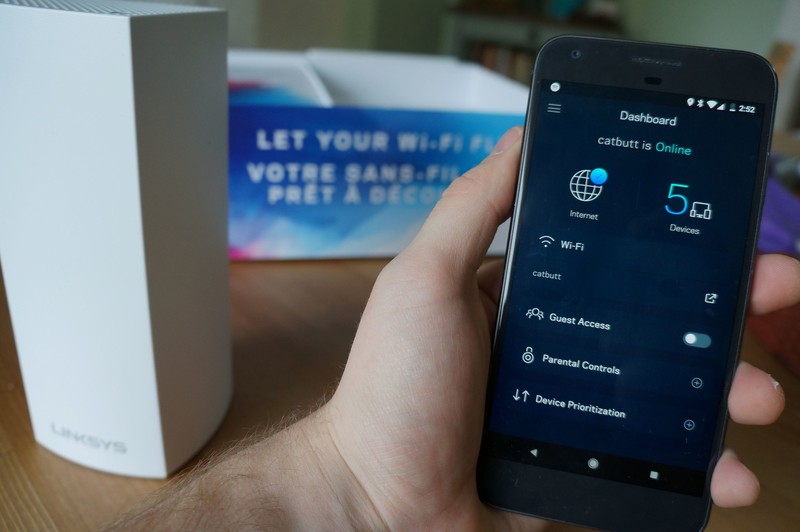
With Linksys Velop, you’ll enjoy top Internet speeds everywhere in your home.
Mesh Wi-Fi systems are the hottest trend in the home internet segment and you might currently be considering upgrading your old router setup to a mesh network. I know I was.
- Speed: MU-MIMO Seamless Wi-Fi (802.11ac)
- Band support: Tri-Band: 2.4 GHz — 2 x 2, 5 GHz Radio 1 — 2 x 2, 5 GHz Radio 2 — 2 x 2
- Local radio: Bluetooth 4.0 LE
- Local connection: 2 WAN/LAN ethernet ports
- Security: WPA2 Encryption
- Processor: 716 MHz Quad Core
- Price: $300
A year ago I moved into a spacious three-story character home with copper piping throughout the walls and floors for the radiators. With the router foolishly located in the basement, the Wi-Fi really struggled to properly service the upper floors where the bedrooms and my home office are located. After dealing with frustrating intermittent connection issues for months, it was due time to test how a mesh Wi-Fi network might improve the situation.
Enter the Linksys Velop Whole Home Wi-Fi system. I received a 2-pack of Velop nodes for reviewing purposes and have been using it for about a week.
Priced at $350 for the two node pack and as high as $500 for the three-pack, this is the most expensive mesh network option out there. Coming from a trusted networking brand like Linksys, could it deliver “Wi-Fi that sets you free” like its packaging proudly proclaims? Let’s dive in.
The design Noticeable nodes
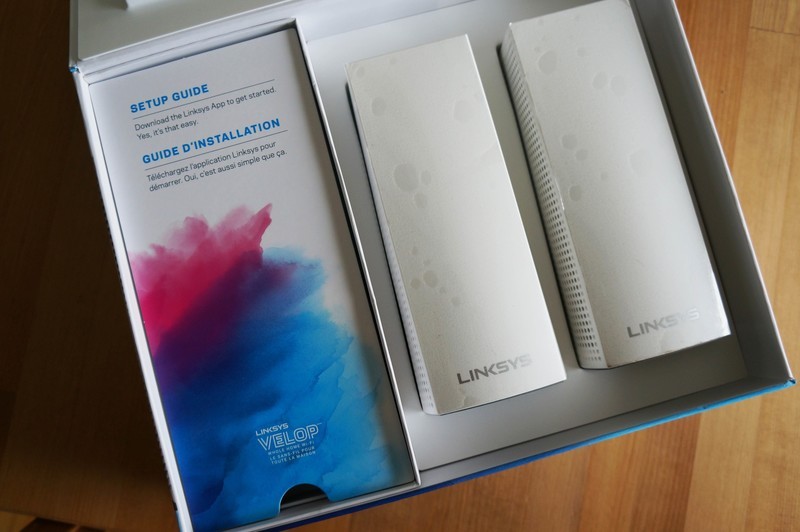
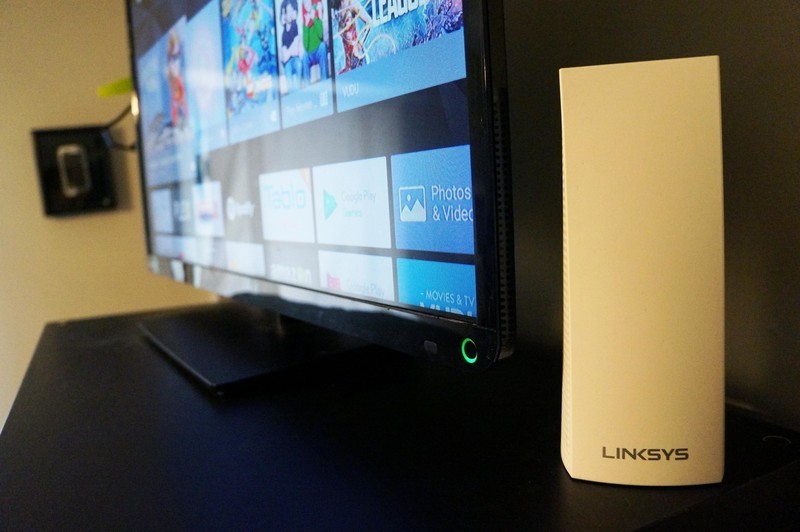
The design of the Linksys Velop nodes is far from subtle. The would tower over competitors like the Google Wi-Fi pucks or sleek Eero nodes, and yet I don’t find them to be too bulky to deal with. Both nodes would eventually find homes hiding behind TV screens, so their taller stature doesn’t really factor into my day-to-day use at all.
Cable management accounts for at least two inches of the Velop node’s height, as there’s ample room provided for connecting the power adapter and ethernet cables necessary for set up. It’s a smaller detail, but I really loved the flexible-yet-firm rubber nubs built into the base that helps keep things organized.
Each Velop node can provide coverage for about 2,000 square feet of your home.
Each node includes two Ethernet ports, an on/off switch and a reset button, and it doesn’t matter which node you use to connect to your modem. Plus, you can optionally use the ethernet ports on the second node for a hard-wired connection for consoles or desktop computers. Once set up, Linksys says each node offers 2,000 square feet of Wi-Fi coverage. Therefore, the two-pack offers up to 4,000 square feet of combined coverage if implemented properly — more than enough range to not only cover the whole house but most of the backyard, too.
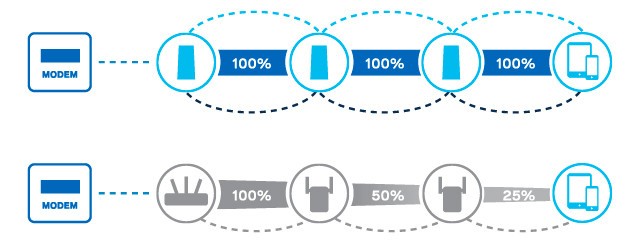
According to Linksys, the Velop system is designed to ensure you get peak Wi-Fi performance throughout your home. Unlike other Wi-Fi extenders that offer might add range at the expense of signal strength, you should be able to do network-heavy activities like stream 4K content wherever you want in your house as if you’re sitting next to the wireless modem.
My only real complaint is somewhat petty but the power supply is massive. It’s as big as any other brick in my set up and plugging it into my power bars was a challenge.
Installation Setup is a breeze
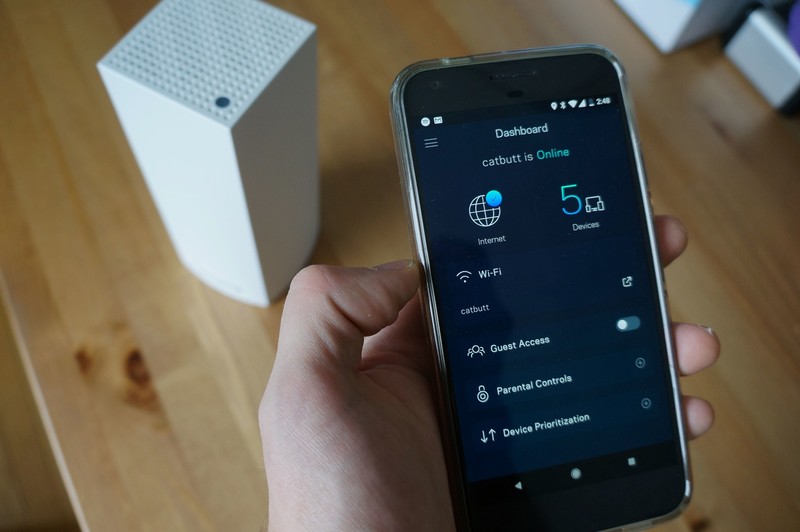
Fortunately, finding an outlet for each node was the most difficult part of the setup process. All you need to get the Velop network set up is a hardwired connection to your existing modem and the Linksys app on your phone.
After plugging in the first node to the modem and creating an account within the Linksys app, you just follow along with the steps on the app and watch the changing lights on the top of the node. This is really refreshing because, after printers, nothing frustrates me more than dealing with network settings.
If the thought of setting up an advanced Wi-Fi network seems like a huge headache, you’ll be thrilled to know that Linksys has made setup foolproof.
Like I mentioned above, our wireless modem is located in the basement, so I had initially set up the node right next to the modem in the basement — but then I remembered that some previous owner had snaked ethernet cable up to the living room. Since the Velop node allows you to use the second ethernet port as a hub for connecting wired devices, it was easy to relocate the node to the living room where it supplied a strong signal to the whole main floor while also still allowing for a hardwired connection to our media center PC.
Once the mesh network was established, setting up the second node was even easier. The only caveat is that it needs to be in range if another connected node. Fortunately, my home office on the second floor was well within range. Adding a second node was as easy as plugging it in and tapping “Add Node” in the app. It was instantly added to the network and best of all it now offered me the option of connecting my NVIDIA Shield TV to the network via ethernet.
Overall, I probably spent more time figuring out where I wanted to place each node than it did to actually get them set up through the app. Considering how expensive this system is, it had better be easy.
The app Features aplenty
I kind of figured that I’d only use the Linksys app for setup and then stash it away in a folder and forget about it. But the Linksys app has proven to be a really convenient tool for managing my home network.
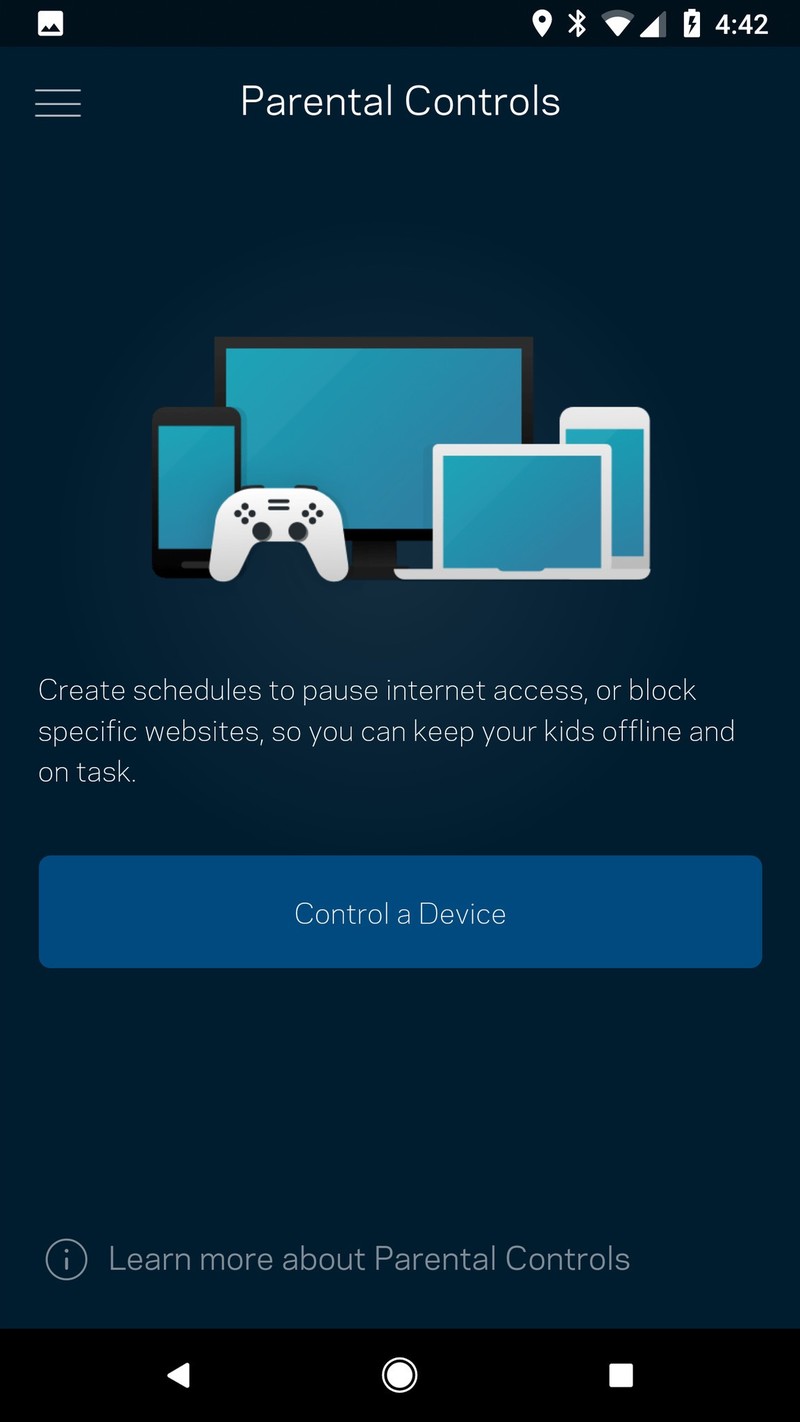
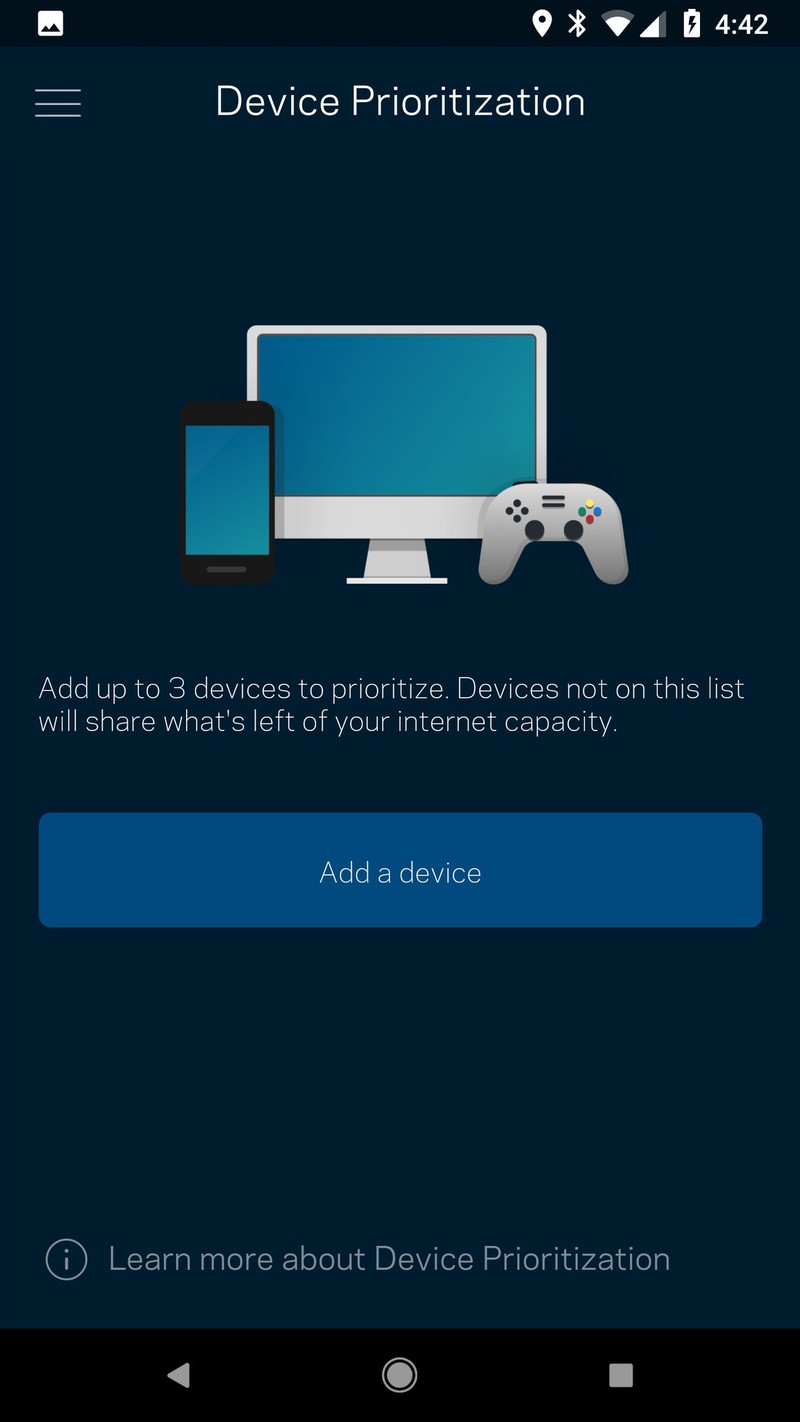
It’s got the standard features you’d expect like a dashboard for looking at your network at a glance and how many devices are currently connected, and also includes parental controls for managing internet access on connected devices and blocking specific websites. You also have the option of activating device prioritization which I guess is one of the perks of being your household network admin.
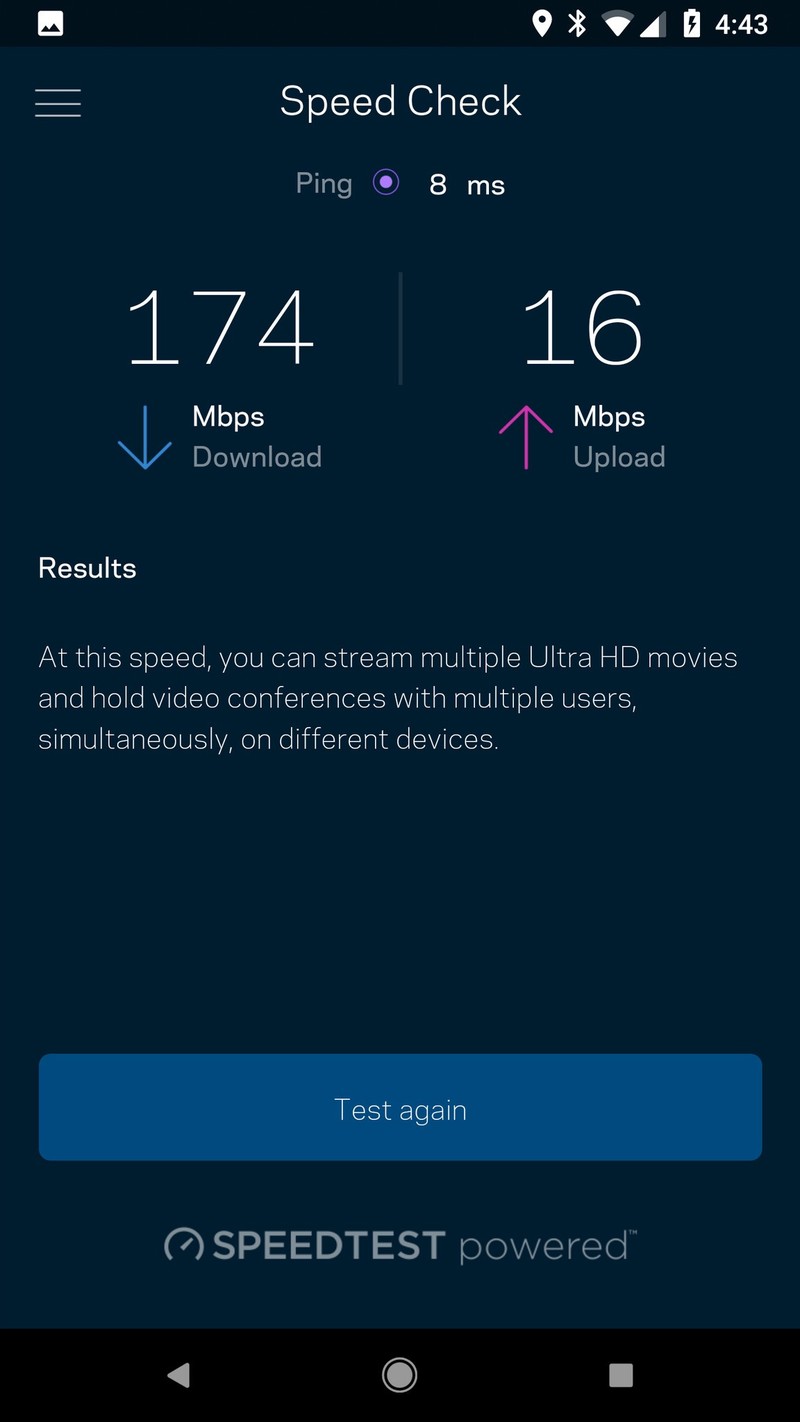
It also includes a built-in tool for checking your network speeds, powered by Ookla’s popular Speedtest service, which is really handy. And the app also contains access to all the advanced settings you’d desire if you’re the type to go in and tinker with your network settings. Firmware will update automatically as required and you can flip the switch to turn on a separate network for guests so that you’re not giving access to your entire network to anyone who visits your house.
Speaking of that guest network, Linksys has also included Alexa compatibility for all its Smart Wi-Fi products, including Velop. That means that you’ll be able to conveniently turn on your guest Wi-Fi as needed using just your voice which is really handy when guests arrive and ask for your Wi-Fi password.
However, you’re also able to ask for the Wi-Fi password for your whole network also using Alexa which, as many Alexa users have pointed out, is a pretty big security issue if you’re trying to keep that password secret and secure. Plus, Alexa can’t always read out every special character, so if your Wi-Fi password is super complex Alexa might not even be able to read it out properly.
Network testing Night and day improvements
In the last year, we’ve added five smart speakers and a bevy of other connected devices to our network, which was a lot for the one wireless modem to handle. Soon I was regularly dealing with stuttering Skype calls, dropped video Hangouts, and (worse of all) buffering Netflix content.
I could instantly tell the internet had improved as soon as I connected all my devices to the new Velop mesh network, but I ran a few tests from my home office on my Pixel XL using the SpeedTest app.
The results were pretty dramatic.
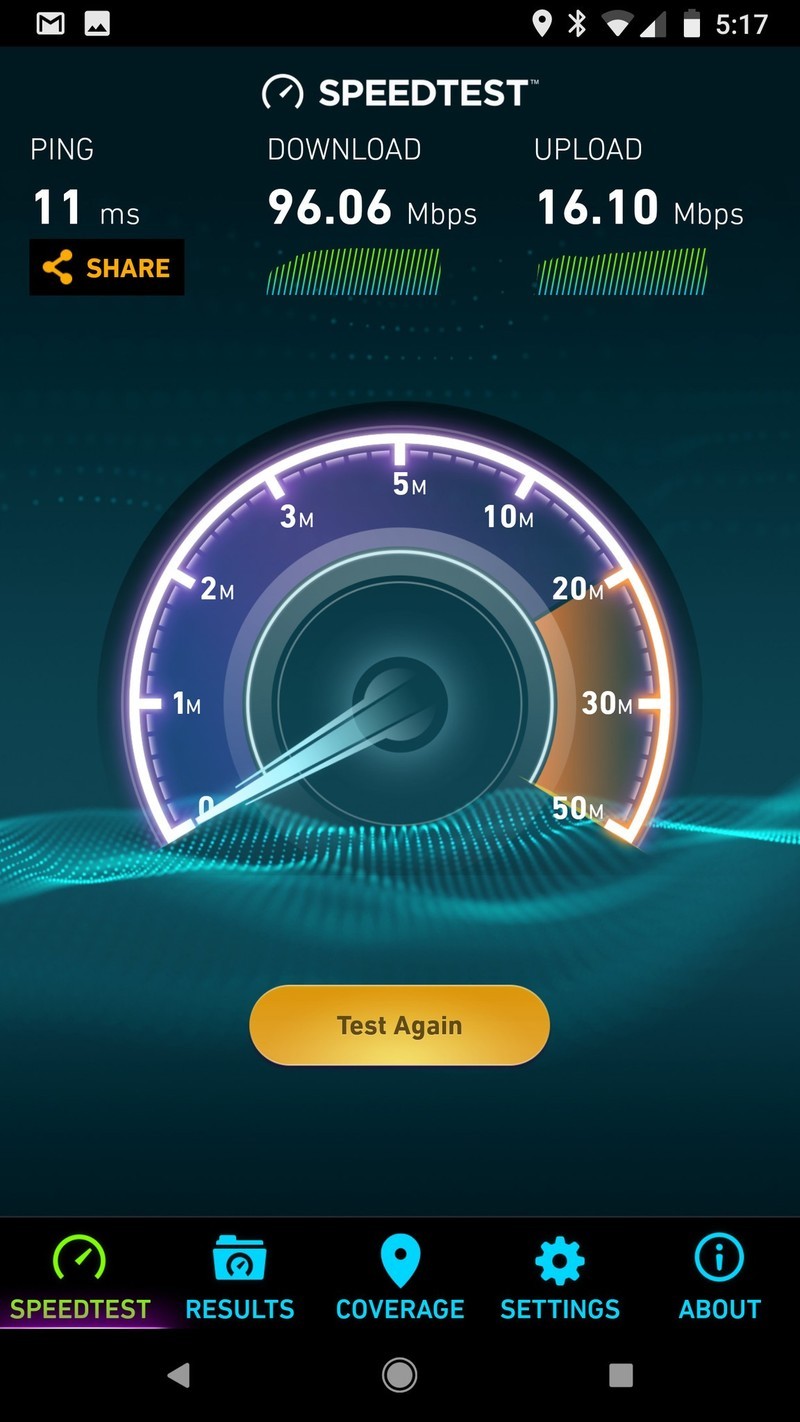
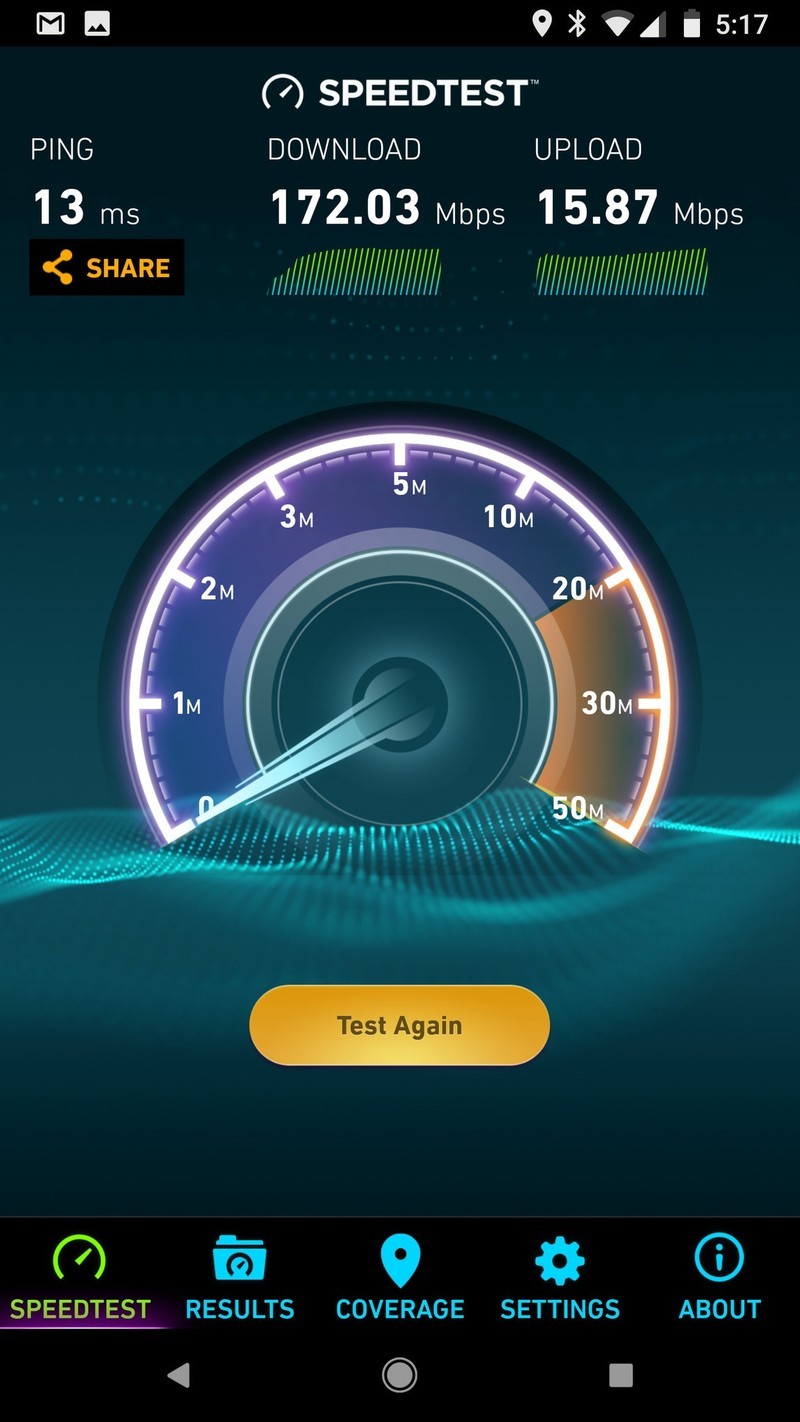
I shouldn’t have expected anything less than this, but damn. On the left is a test of my old Wi-Fi setup from my home office, and the right is the speed test I ran after setting up the Linksys Velop network. That’s a massive jump and the exact performance advertised by Linksys. It’s also extended the Wi-Fi range into our backyard, and if I lived 2,000 miles south from Canada and there wasn’t a foot of snow and ice on our back deck right now I’d probably be writing this review outside just to see how far the range extends.
The verdict Exactly what I needed
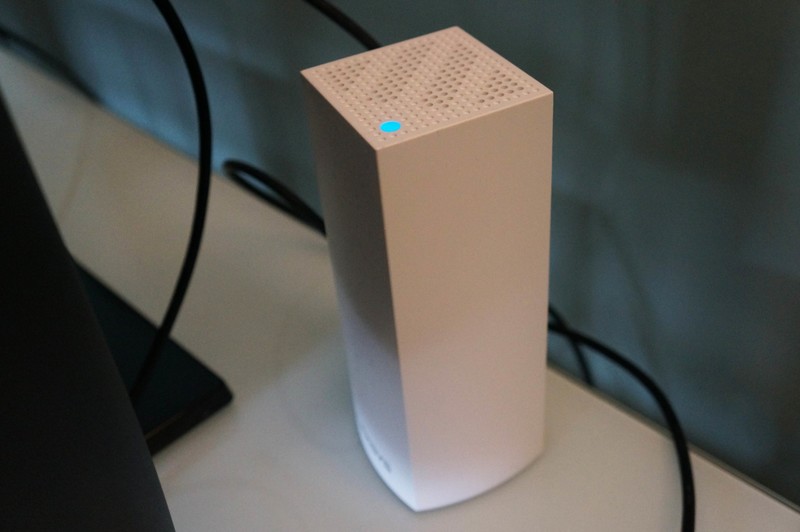
This was my first time setting up and using a mesh network in my home, so I’m still in that honeymoon phase where my internet no longer sucks and everything is rosy in the world. The question ultimately will be if you can justify the higher cost. A 3-pack of Google Wifi will run you around the same as a 2-pack of Linksys Velop nodes, with both claiming to offer similar coverage and consistently fast speeds. Buying the Linksys Velop 3-pack for $500 is absolutely overkill unless you live in a 4,000+ square-foot mansion.
Like our friend Jerry says, the ideal Wi-Fi network is something you should set up once and never think about until it’s time to replace. The Linksys Velop Whole Home Wi-Fi absolutely delivered on its claims, allowing me to significantly improve the network in a big old house that’s now ready to handle further conversion into the 21st century smart home.
See at Amazon
What would you like to see in the Essential Phone 2?
Essential, here’s your to-do list.
For Essential’s first foray into the smartphone world, the Essential Phone could have been a lot worse. The phone still has one of the best designs of any device on the market, its build quality is second-to-none, and relentless software updates have made the UI and camera performance considerably better than they were on day one.

Essential’s already said that it’s working on a successor to the Essential Phone, and while details on what to expect with the Essential Phone 2 are still up in the air, some of our forum users already started talking about what they’d like to see with it.
Here’s what they had to say:
panopticon
02-17-2018 09:45 AM“
They should lose the magnetic accessory attachment, add a real headphone jack that supports HD audio, and waterproof it. Lose the extra rear camera, unless it’s going to be used for something useful. Lastly…a better loudspeaker and redesign the earpiece. Otherwise it’s a solid design. And don’t mess with the build quality!
Reply
philesk
02-17-2018 10:32 AM“
The Essential 2 must have a better camera which has OIC and camera software that really works. Collaborate with Zeiss, Leica, Cannon or Nikon to get the camera hardware and software right. Waterproof and wireless fast charging. Put the finger print reader under the screen and have face unlock that actually works. If they want to charge over $900 & compete with Apple and Samsung they probably need…
Reply
SactoKingsFan
02-17-2018 03:55 PM“
I doubt the headphone jack will be one of the top priorities. Using a better camera with OIS, not releasing the phone several months before it’s ready and keeping the price well below the original $700 will sell a lot more phones than a headphone jack.
Reply
bhatech
02-17-2018 03:52 PM“
My wish list:
1. Main thing is get the software, performance, scrolling, freezing issues etc ironed out at launch and provide a flawless experience like many other phones out of the door.
2. Camera performance, especially speed of capture and lowlight picture improvements.
3. Others, not much. They pretty much nailed with the hardware. So may be water resistant rating, wireless charging…
Reply
With that said, we’d now like to hear from you – What would you like to see in the Essential Phone 2?
Join the conversation in the forums!
Essential Phone
- Essential Phone review
- Essential Phone specs
- The latest Essential Phone news
- Join our Essential Phone forums!
Amazon
Best Buy
Sprint
Telus
 AIVAnet