


AT&T will launch mobile 5G in Atlanta, Dallas and Waco
AT&T is finally willing to say exactly where you’ll see mobile 5G in 2018. The carrier has confirmed that “parts” of Atlanta, Waco and its home turf of Dallas will adopt the standards-based service when it goes live before the end of the year. It’ll name the remaining nine cities “in the coming months.” There’s no mention of the first devices (many of those will have to wait until 2019), but it’s clear that this will be a cautious first step into the future rather than a full-on leap.
The initial coverage will use millimeter wave (very high frequency) spectrum, which isn’t great for range and may serve as more of a stopgap. The kind of coverage you’re used to will have to wait until later, when AT&T can justify moving 5G to more commonly used bands. That shouldn’t be too hard when much of the LTE equipment it’s installing now should help with the migration, but that still entails a wait.
This will still make AT&T the first big carrier to launch 5G. Sprint’s rollout is expected in 2019, T-Mobile only anticipates national coverage by 2020, and Verizon has so far talked more about its fixed 5G than something you can carry in your pocket. However, AT&T can’t quite claim a resounding victory. It’s making some sacrifices to shout “first,” and mature 5G won’t arrive for a long while.
Source: AT&T
Bigelow forms command center for its expandable space stations
Bigelow Aerospace has big plans for its future expandable space stations, so it has formed a whole new company for them. Called Bigelow Space Operations (BSO), the new private space company will oversee the marketing and customer service, as well as become the operations center for the space habitats its parent corporation is developing. If you’ll recall, Bigelow’s inflatable module BEAM is currently being tested aboard the ISS. It’s been doing so well NASA has decided to keep it around longer to be used as an on-orbit storage facility.
Company chief Robert Bigelow told reporters in a call that forming BSO is necessary as it segues “into becoming a production company” after existing as “a laboratory for 17 years.” Bigelow has far more ambitious plans for its creation: It’s already building two versions of the B330, an expandable module that’s much bigger than BEAM and can stay in space on its own. “These single structures that house humans on a permanent basis will be the largest, most complex structures ever known as stations for human use in space,” it said in its announcement. The company has long believed that its B330s could become standalone space stations in Low Earth Orbit that it even teamed up with ULA for its launch. More recently, it announced its plans to send a B330 space station to the lunar orbit by 2022.
Bigelow said it’s spending millions of dollars to study the space market and hiring 3 to 4 dozen employees for its new company. It’s also looking to build a new manufacturing facility in Florida, Alabama or another suitable place. If things go as planned and its space stations become operational, Bigelow expects to hire 400 to 500 more people to serve as BSO’s employees, providing support for its stations as they orbit the Earth and the moon.
Source: Bigelow Space Operations, CNBC
Netflix: ‘Stranger Things’ directors aren’t leaving the show
We haven’t heard much about the next season of Stranger Things, but a rumor on Moviefone.com indicated that its directors, Ross and Matt Duffer, will be less involved after season three wraps up. This evening, Netflix tweeted “Rumors that the Duffer Bros are leaving Stranger Things after season 3 are false,” which doesn’t exactly refute the report, but hopefully means our Eggos and walkie-talkies are safe. The reported cited a source claiming the two would step back to work on two other projects for Netflix, so this could just mean they’re more spread around. Still, we’ll be watching carefully to make sure the quality holds up.
Don’t drop your Eggos. Rumors that the Duffer Bros are leaving Stranger Things after season 3 are false. pic.twitter.com/x4kbL9990e
— Netflix US (@netflix) February 20, 2018
Source: Netflix (Twitter), MovieFone
Boston Dynamics’ robots won’t be held back by puny humans
Are you looking for the exact moment when the robots decide to turn on their human creators? You might want to mark this day on your calendar. Boston Dynamics has posted video of a SpotMini test where it gauged the bot’s ability to adjust to interference — in this case, from a pesky human. The quadruped managed to open a door despite a human pushing its hand down with a hockey stick, pushing the door closed and even tugging on its ‘tail.’ It clearly struggled, but its ability to adapt and rebalance left it unfazed.
This certainly isn’t the first time Boston Dynamics has subjected its robots to abuse, and the company even goes out of its way to address the elephant in the room: no, the robot isn’t hurt or irritated by that cruelty. It’s not actually going to revolt, and the lessons learned here could be useful for search and rescue or other situations where a robot might have to endure all kinds of resistance. Still, it’s hard not to sympathize at least a little with the SpotMini — if it ever develops feelings, it’ll point to this test as the reason it turned resentful.
Source: Boston Dynamics (YouTube)
Apple Named World’s Most Innovative Company Due to Focus on Hardware and Software Integration
Fast Company today published its annual rankings of the 50 most innovative companies in the world, and this year, Apple is the number one company on the list for “delivering the future today.”
Apple was picked for its impressive list of accomplishments in 2017, which included the iPhone X, the Apple Watch Series 3, ARKit, and its unique focus on hardware and software integration that sets it apart from its competitors. Apple designs its own chips that are optimized for its operating systems, resulting in performance that blows the competition away.
But creativity is more than skin deep–and Apple’s approach to the hardware and software engineering that creates its experiences has never been more ambitious. Other makers of phones and tablets buy the same off-the-shelf chips as their competitors. Apple, by contrast, designs its own chips–so an iPhone packs a processor designed specifically optimized for Apple’s operating system, apps, display, camera, and touch sensor. The company has gotten so good at chip design that the A10 Fusion inside the iPhone 7 trounces rival processors in independent speed benchmarks.
Apple also topped the list for its focus on privacy-based artificial intelligence advancements, its growing entertainment business, and its work to improve medical care with CareKit and ResearchKit. Its accomplishments boosted it up three spots from last year, when it was ranked the number four most valuable company in the 2017 list.
To create these rankings, Fast Company says that more than three dozen editors, reporters, and contributors surveyed thousands of companies to identify the most notable innovations of the year and trace their impact on businesses, industries, and the larger culture.
Other companies that made the top 10 list include Netflix, Square, Tencent, Amazon, Patagonia, CVS Health, The Washington Post, Spotify, and the NBA.
In addition to a master list, Fast Company publishes a breakdown of most innovative companies by sector. Apple also topped the list in the “Consumer Electronics” category, beating out companies like Amazon, Nintendo, and Sony.
Tag: fastcompany.com
Discuss this article in our forums
Seven self-help and motivation apps to channel your inner peace

We all go through phases when we feel like we’re not smart enough, attractive enough or exciting enough. No matter how fulfilling our lives are, there are bound to be days when you’ll find yourself wishing you could be someone else. The notion of needing self-help is very real.
These fluctuations are part of life, and every individual goes through them at some point or another. And the good news is, there are steps you can take to pull yourself out of feeling this way.
No, we’re not talking about expensive couch sessions with your therapist. Instead, you could try installing a few apps on your Android phone. Mobile tech influences numerous aspects of our lives. They teach us how to cook, get fit and manage our finances. But they can also help us feel more confident and self-empowered.
We’ve rounded up some of the best self-help and motivational apps for Android for when you feel like you’d need a fresh perspective.
Pacifica
Why you should try it:

- Stress and anxiety are a big component of our modern lives. Want some help in minimizing their effects on your well-being? Pacifica could be the answer.
- The app offers psychologist-designed audio lessons and activities to help you cope with stress, anxiety and even depression.
- Pacifica includes a database of mindfulness meditation audio tools and mood tracker so you can see your progress over time.
- Comes with an elegant interface that’s very easy to use
Install Pacifica
Personality Development

Why you should try it:
- We all have things about our personalities we want to work on. Whether we’re trying to cultivate a character trait or to get rid of some unwanted habit, this app could prove helpful.
- The app includes useful tips, training, skill sharing and quotes on 150 topics of self-improvement.
- It provides easy to understand content for various personality types.
Install Personality Development
Forest: Stay Focused

Why you should try it:
- This app addresses two very common issue today: phone addiction and the inability to stay focused on a task.
- Forest provides an interesting solution: it challenges you to plant a seed in the Forest and watch it grow. But for it to develop and prosper you need to leave the app on and restrain from playing a quick round of Super Mario Run or text your best friend.
- As you continue to stay away from social media and other temptations, you’ll be able to unlock more tree species and earn reward.
- You can easily share your forest and compete with friends.
Install Forest: Stay Focused
Luscher Test

Why you should try it:
- Uncover the hidden depths of your personality with the Luscher Test app. The test was developed by Dr. Max Luscher in Basel, Switzerland. Since color preference is subjective and seated in the unconscious, Dr. Luscher theorized that color selection can reveal the person as they really are, not as they perceive themselves to be.
- The test is very easy to take. You’ll simply have to choose from 8 colors in order of preference: tap on the one you like best, then the second and so on.
- You have to take the test twice so that the app can generate a more accurate interpretation. This helps ensure that the subject has been sure about his choices rather than simply being impulsive.
Install Luscher Test
Mindly

Why you should try it:
- When you feel like you have too much on your plate, it’s easy to get demotivated. Mindly wants to help you organize things, so you can take it one by one.
- Mindly is a great app for visual people who will certainly appreciate the clean and minimalist design.
- The app is basically an organizer for your thoughts. You add thoughts which take the form of colorful circles, as they gravitate around the main idea, which is also represented as a (larger) circle (it could be a speech or a presentation or a design project).
Install Mindly
Habitica

Why you should try it:
- Habitica puts a fun spin on doing chores and completing tasks because it treats everything as a game.
- Input your habits, daily goals and to-do list and create your avatar. As you check off tasks you will unlock new features such as armor, pets and yes! even quests.
- Users can team up with friends and fight monsters to keep each other accountable.
Install Habitica
Life Hacks

Why you should try it:
- Life hacks let you learn something useful every day. Bet you didn’t know you could use a t-shirt as a small pillowcase.
- Choose from a selection of categories including Food, Money Saver or Life Tips
- Stay connected to the stream of life hacks. The app sends you notifications when something new is added, both when you’re online and offline
Install Life Hacks
Android P will prevent apps from quietly hijacking your camera
The threat of someone hijacking your phone’s camera to spy on you unawares is sometimes overstated, but it’s definitely a possibility. Enough so, in fact, that Google is determined to do something about it. Recently discovered code submissions show that Android P should prevent idle apps from using both the camera and microphone. If an inactive program tries to use the camera, Android should shut it off and give you an error message. With the microphone, it’s somewhat different: it’ll allow recording but report empty data until the app is active. Malware wouldn’t get away with recording in the background, but legitimate apps like a voice chat client (which stays active) shouldn’t have an issue.
Google hasn’t even announced Android P, so it could be a while before you hear about these measures in any formal capacity (provided they make the cut). However, its engineers aren’t shy about the goal: this is designed to “protect user privacy.” Creeps and spies couldn’t just trick you into installing an app that records you without permission — they’d have to either find a way to fool Android or change its system-level behavior. We’d be loathe to presume this will make stealthy snooping impossible, but it’ll definitely require more work.
Via: XDA Developers, 9to5Google, Mobile Syrup
Source: AOSP (1), (2)
Bluesmart Cabin 22 Hands-on Review
Research Center:
Bluesmart Cabin 22
The last thing we all need is another product to charge, so is adding smart luggage to the list worthwhile? Bluesmart, pioneers in the world of smart cases for techie travelers, launched the second generation of its connected suitcases, with a refreshed design and updated tech. This is the 22-inch Cabin model and as we’re testing it for a full review, we have some initial impressions.
Made from tough, waterproof polycarbonate, the design is very attractive with a molded, ribbed section on the upper-third that makes it look way more interesting than the typical suitcase.
The case can be tracked using using GPS, Bluetooth, and a built-in 3G SIM card.
There are plenty of handles, too. The telescopic handle is made from aluminum and has three height settings for convenience. Grippy, sturdy plastic grab handles are mounted on the top and the side of the case. On the bottom are four 360-degree spinning wheels for ease of movement. Bluesmart says they’re silent — we certainly can’t hear them rolling around on normal floor surfaces.
But it’s the smart features that are the reasons for buying this bag and Bluesmart has made some improvements. So, let’s dive deeper into them.
Bigger battery, global tracking
The hard shell Bluesmart Cabin 22 weighs 9.4 pounds, so it’s fairly heavy on its own even before you’ve filled it. The weight is due to the amount of tech that’s inside, including what may be its heaviest component: A 10,000mAh battery pack which powers the suitcase for 30 days, according to the company’s official specs. However, because the battery also charges your phone or laptop (there are two USB ports on the exterior), it drains its reserves much quicker than usual, so use it wisely. Despite its size, the battery takes 2.5 hours to fully charge using Bluesmart’s fast charging system.
The case can be tracked using the Bluesmart app, and its location is found using GPS, Bluetooth, and a built-in 3G SIM card — all powered by the same aforementioned battery. Don’t worry, this isn’t a case that requires a contract or monthly payment, as it’s all built into the cost of the case. The location updates only when the case is in motion, refreshing every 30 minutes. This means if the case goes missing, it can quickly be found (in theory, at least). The built-in lock (approved by the Transportation Security Administration, or TSA, in the United States) can be set to automatically activate when there’s ample distance between the app and the case, and the zippers can also be locked and unlocked using the app — or by simply pressing a button on the top of the case.
Andy Boxall/Digital Trends
Andy Boxall/Digital Trends
Andy Boxall/Digital Trends
Andy Boxall/Digital Trends
The 3G SIM ensures the case doesn’t need to be connected to Wi-Fi or Bluetooth to check in with the app either, and enables it to also send notifications with updates. The previous generation Bluesmart relied on Bluetooth only, which meant it was only effective within 30 feet; 3G allows for an almost anywhere connection. For us, it wasn’t entirely successful. We were alerted by the app telling us, “You’re leaving your suitcase behind,” when actually, it was safely in the trunk of our car. It also continued to do this when we arrived at home and moved the case inside. Notifications can be disabled in the app, thankfully.
We set up the app in a few minutes and because it’s registered to you using a unique digital personal identification number (PIN), no one else can use their app with your case, or vice versa. The location of the case shows up on a map and ours showed exactly the right address and location, down to an accuracy of roughly 100 feet. It happened quickly too, requiring only a few seconds to grab onto the signal. The app is simple, but the sign-up process wasn’t properly optimized for the iPhone X’s screen and therefore a pain for this particular user. However, the rest of the app worked perfectly.
It’s well made but do you need the smarts?
The Cabin 22 has a 38-liter capacity, complete with a small central pocket and two separators that can be used to compress everything inside to maximize space. There’s easily enough room for a long weekend; if you pack lightly or wisely, probably longer. This, plus the convenience of its carry-on size, means you can zip through the airport much quicker than you would with checked baggage.
As techies, we like the idea, but as practical travelers, it gives us pause.
As for the tech, we continue to wonder how useful it actually is. Because it’s mostly going to accompany you inside the aircraft’s main cabin, the chance of it being lost is minimal (unless you’re the absent-minded type). This makes us question how many will need the tracking feature — the main reason you’d buy smart luggage. Tracking makes more sense with Bluesmart’s 29-inch Check model, which you would have to check.
The case also has a built-in scale which allows the app to tell you how much it weighs after you’ve filled it. Again, this might be handy for the Check 29 but unnecessary if you’re bringing it onboard. And unless you’re packing bricks or a multi-volume encyclopedia, we doubt it would exceed an airline’s baggage check requirements.
Another issue we’re concerned with is the battery. Airlines recently put in place a policy that bans smart luggage with non-removable batteries. This was an issue with the original Bluesmart bag but thankfully, it’s removable in the new models. However, if it’s removed and there’s no power for the tracking system, wouldn’t that render the bag’s signature feature useless?
As with the first generation model, the Cabin 22 is expensive. It costs $450, which is a lot to spend for features you may not use. But, it’s incredibly successful Indiegogo campaign suggests there are plenty of people who think otherwise. We can see it being attractive to frequent travelers, especially those who make connections and need to ensure his bag is easily located, should he be required to check a bag. We should note that the 3G and GPS tracking system is an improvement over the previous Bluetooth system and since you aren’t paying additional fees for it, it justifies the price tag (similar tracking systems cost $100 or more, plus a monthly fee).
For those who maybe fly once or twice a year, owning any type of smart luggage would be overkill. However, there is value to having a trackable case outside of the airport and we like the idea of knowing if your case actually made it to your hotel room or cruise ship cabin.
Bluesmart Cabin 22 is strong, very well made, and very good-looking. It worked relatively well in our initial tests but we will report more and make a final verdict after we spend additional time with it. As techies, we like the idea but as practical travelers, it gives us pause. We liked the original Bluesmart enough to give it our Editors’ Choice but it was novel at the time — before there was competition and an airline ban. Let’s see if the concept continues to hold up.
How to change the time on a Fitbit
Has your Fitbit device started showing the wrong time? While that’s certainly annoying, don’t fret. You just need to give your fitness tracker a simple push in the right direction to get back on track.
Unfortunately, you can’t change the time manually on Fitbit devices because the watches sync their times based on what time zone the device thinks it’s in — emphasis on “thinks.” Sometimes this process gets messed up due mainly to the Fitbit battery dying or a similar issue getting in the way. If your Fitbit is starting to show the wrong time, there are several ways to correct it. Below we’ve listed the best methods for how to change the time on a Fitbit.
Updating Your Fitbit
Bill Roberson/Digital Trends
First things first: Make sure your Fitbit device and your Fitbit app have been updated to the latest edition. If you need an update, plug your Fitbit into its charger and open the app. If the app needs to be updated, it will let you know upon launching.
To update the device itself, select the Account icon (it looks like a square with text lines in it), and choose the proper Fitbit device if necessary. After choosing the right device, look for a pink Update (sometimes Update Tracker) bar. If there’s no button, your device is already updated.
If there is a choice to update, select it. Updates sometimes fix time errors after resetting the Fitbit, so it’s a great way to fix two things at once — the update does take around an hour to complete, too.
Changing the time zone
If updating your app and device didn’t fix the incorrect time, then you’ll need to make sure its time zone setting is correct. Here’s how to do it.
Step 1: Open your Fitbit app from the appropriate device. It’s generally best for your Fitbit to be close by during this procedure.
Step 2: Choose the Account icon from the Fitbit app home screen. This is located in the top menu section and looks like a square bubble with lines resembling a paragraph of text.
Step 3: Make sure you have the right device selected, if necessary. Now, look for the tab that reads Advanced Settings (sometimes it’s just Settings) and select it.
Step 4: If you’re using the app on an Android or iOS device, you need to take a moment and turn off the automatic time zone feature — this may be the root of your problem. For iOS, look for a section called Time Zone where you can switch off the Set Automatically feature. On Android, you’ll see an Automatic time zone option which needs to be turned off. If you’re in Windows 10 or Fitbit’s online dashboard, you likely won’t need to do this step.
Step 5: Stay in Advanced Settings and look for an option that says either Time Zone or Select time zone then choose that option. This allows you to select your correct time zone from a list.
Step 6: Finally, navigate back to your Account window. Look for the option that says Sync Now and select it. Your Fitbit device should now sync and display the time for the time zone you selected. Check to make sure it’s working correctly.
Bonus tip: Changing between 12 and 24-hour clock formats
Step 1: Fitbit prefers you do this from the Fitbit online dashboard. Log in and select the gear-shaped icon to start.
Step 2: Now, choose Settings and select the tab that says Personal Info.
Step 3: Head toward Advanced Settings and look for Clock Display Time. Under this heading, you’ll see a choice to show time in either 12- or 24-hour units. Select what you prefer and choose Submit.
Editors’ Recommendations
- You can finally do more with the Fitbit Ionic thanks to an OS update
- Stay fit and save cash with our top 10 affordable Fitbit alternatives
- Wake up on time with the best alarm clock apps for Android and iOS
- Start your fitness journey with the best Fitbit deals for Valentine’s Day
- The Sandman Doppler is much more than an alarm clock — it’s a smart home hub
The best custom rooms in Rec Room
Rec Rooms newest update, Custom Rooms is amazing. You should try it!
Since Rec Room was first released for the PlayStation VR I have loved it. Based on the Recreation centers you used to go to as a kid, mainly to keep you from being underfoot, or from hanging around on street corners, Rec Room has a huge amount of pre-made content for you to play around with.
From games like Dodgeball and Paintball to full quests like the Rise of Jumbotron and even Laser Tag, Rec Rooms stock game is enough to keep you busy for hours. Then, because the guys at Against Gravity are crazy, they gave us Custom Rooms.

Custom Rooms Give users the ability to create and save huge rooms or parks for other people to play in. Using the maker pen, a 3D design tool that’s far more powerful than I gave it credit for, and the sandbox tools available, you can make almost anything you want to interact with. There are some limitations, the things you make with the maker pen can’t move or interact with you for example, but there is still plenty to do to make awesome fun happen!
Each week Against gravity posts a list of Featured Rooms, rooms they feel show off the best of the Custom Rooms and then allow you easy access to them in-game. All you need to do is, from your dorm look out over to your pinboard and you will see the featured rooms you can select or you can select custom rooms from your watch and you will see the featured rooms there. Ok enough talk lets dive in!
More: How tall should your PlayStation Camera be for VR?
PokePark

This first room shows off how skilled some people are with the Maker Pen. PokePark is what it says it is, a park full of Pokemon. Some Pokemon are hidden, some are in plain sight, but all have them have been created in loving detail as best they can using just one device. Although you can’t really interact with anything here, it’s not like you can catch them or anything, it is fun to wonder all around this open park finding different Pokemon in different habitats, you can even look out for Team Rocket lurking somewhere near!
While PokePark is a passive Custom Room it is one that will make any Poke Fan smile in delight, and the park keeps getting new Pokemon all the time so it’s well worth a revisit.
TheTunnelRCPark

This was the first Custom Room I played that actually had an interactive element to it other than just walking around, admiring the scenery. In TheTunnelRCpark you actually get to race little RC cars around an awesome race track with loops and jumps and all-terrain obstacles, it’s so much fun, at least once you get the hang of it.
The driving is a little janky in the RC park and it takes a little getting used too. You hold a virtual controller in your virtual hand while you look at a virtual screen in your virtual world, it’s so meta it’s almost mind-blowing. To control the car you pull the trigger to make it go forward and press and hold the Move button to steer. You also have to physically turn the controller while holding both the trigger and the move to actually make your RC car go round corners, so like I say, complicated, but very satisfying when you do get it right.
FunGamesatPark

Although not a featured room this Custom Room came up in my feed as I was wandering about. Fun Games at Park has lots of fun games you might find at a pier or fairground, games like skeeball, tin can alley, and basketball hoops, are all available to play. Now some of the games don’t work very well. They can be a little temperamental but overall it’s a fun little room to kill some time.
That’s it for this one, there isn’t a lot to say, just that I enjoyed it the same way I enjoy these games at the pier when I go.
TheGiantRoom
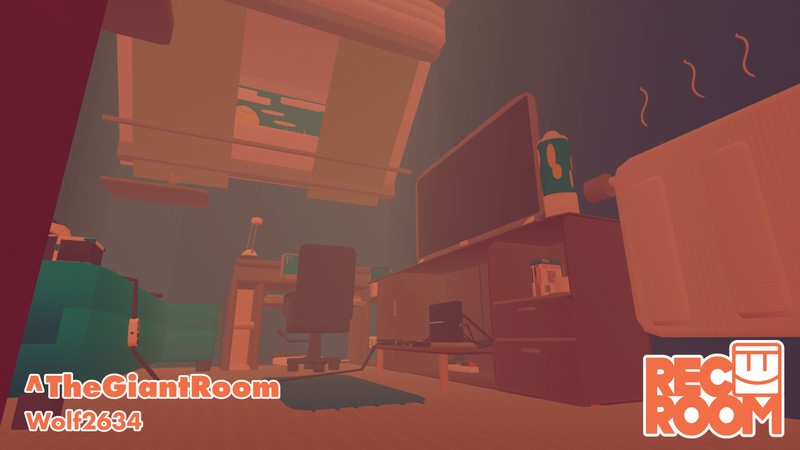
Like the PokePark, The Giant Room isn’t really interactive, it’s more a place of delight and wonder. Being a little person in a huge area is really great fun especially with all the people pretending to be Ant-Man and climbing all over the furniture.
The time and effort put into this must have been huge as making even the simplest of shapes with the Maker pen makes me want to scream! So well done to the guy who managed to not only make a giant PS4 but also an entire PlayStation VR system to go with it. Very Cool.
New Features
So there we have it, 4 fun rooms to check out from the new update to Rec Room. I have spoken to the head of the FeaturedRoom section and she is going to be showing me a lot more in the coming weeks so watch out for more interesting Rooms. With the latest update of adding circuits to the mix the custom rooms are going to take a turn for the awesome and I can’t wait.
We are also creating our Custom Room called MoNaClub! It isn’t quite ready but you can go visit it anytime you like, you might even see some of us there so say hi and be nice!

PlayStation 4
- PS4 vs. PS4 Slim vs. PS4 Pro: Which should you buy?
- PlayStation VR Review
- Playing PS4 games through your phone is awesome
Amazon
 AIVAnet