


iPhone and Android Smartphone Duopoly Reaches Peak With Estimated 99.9% Market Share Last Year
A record 99.9 percent of smartphones sold worldwide last year were based on either Android or iOS, as all competing platforms have effectively been squeezed out, according to data shared today by research firm Gartner.
Android remains more widely adopted than iOS by a significant margin, with a roughly 86-14 percent split between the respective operating systems last year. Android’s dominance is unsurprising given the software is installed on dozens of different smartphone models offered at a range of price points, whereas the iPhone primarily caters to the high-end market.
iOS and Android have been the leading mobile operating systems for many years now, but the duopoly became so dominant last year that Gartner doesn’t even break out BlackBerry and Windows Phone individually anymore. Together, the platforms accounted for less than 0.1 percent market share in 2017.

For perspective, Gartner estimates that of the just over 1.5 billion smartphones sold worldwide last year, handsets running BlackBerry OS, Windows Mobile, and all other platforms made up only 1.5 million of the total.
The writing has long been on the wall for BlackBerry and Windows Phone, which have been ceding market share to Apple and Google for the better part of the last decade. But with Android and iOS finally reaching 99.9 percent market share, it looks like the platforms will be officially dead soon enough.
In the meantime, BlackBerry recently announced it will continue to support its BlackBerry 10 operating system for at least two more years, but it encourages customers to upgrade to its Android-based smartphones manufactured by TCL. BlackBerry World and other legacy services will shut down by the end of 2019.
Back in October, Microsoft likewise announced that it will continue to support Windows 10 Mobile with security updates and bug fixes, but it will no longer develop new features or release any new Windows Phones.
The fall of BlackBerry in particular is remarkable given it was the pioneer of the smartphone industry. Its devices actually continued to grow in popularity for around two years after the iPhone launched in June 2007, at the expense of then-leading Nokia, with a peak market share of around 20 percent in 2009.
It only took a few years until the surging popularity of iPhones and Samsung Galaxy smartphones led iOS and Android to leapfrog BlackBerry and Nokia, and based on today’s data, the duopoly is now firmly entrenched.
Tags: Gartner, BlackBerry, Android, Windows Phone
Discuss this article in our forums
The ZenBook 13 leaves no more excuses for laptops without discrete graphics
Mark Coppock/Digital Trends
The search for the thin, modern laptop that can also game on the side has been a long and arduous journey. We’ve always wanted the best of both worlds — and for the most part, it’s been a crapshoot.
Sure, you could opt for a gaming notebook that has terrible battery life, weighs a ton, and barely fits into your backpack — and don’t forget that hefty power brick! It’s the kind of thing you wouldn’t want to be caught dead with in a coffee shop or business meeting.
But now more than ever, PC makers are helping you avoid such an option, with a growing crop of notebooks that are light enough to easily tote around but pack in discrete GPUs for some real gaming chops. No recent notebook better epitomizes the movement than the new ZenBook 13 UX331UN.
The ZenBook 13 is such a great example of the “stealth” gaming laptop because it offers an Nvidia GeForce MX150 discrete GPU alongside an eighth-generation Intel Core i5-8250U CPU. That’s a potent combination in a notebook that’s only 0.55 inches thin and 2.47 pounds. The MX150 isn’t a hardcore gaming chip by any means, but it’s capable of running older titles quite well and newer titles at decent frame rates as long as you’re willing to turn down the resolution and detail.
For example, in our review testing, the ZenBook 13 was able to run Civilization VI at 33 frames per second (FPS) when set at 1080p resolution at medium graphics. That’s not barn-burning performance, but it’s good enough for some lightweight gaming on the road. Rocket League was also very playable at 48 FPS set at 1080p and extreme details. Those results promise good performance in esports titles like CS:GO, Dota 2, and World of Tanks.
Mark Coppock/Digital Trends
Of course, the industry isn’t stopping there. AMD has its own accelerated processing unit (APU) options like the Ryzen CPU and Vega graphics mashup, and those are also starting make their way into relatively thin and light notebooks. Then there’s the larger productivity notebooks that might have enjoyed low-end discrete graphics in the past, like HP’s Spectre x360 15 or the Dell XPS 15 2-in-1, which are getting a massive upgrade later this year. These machines will have Intel’s “Kaby Lake-G” series of CPUs that mate a fast eighth-generation Core processor with AMD’s Radeon Vega GL GPU, and its performance claims to be as good as a GeForce GTX 1050.
We haven’t arrived quite yet. The ZenBook 13 has its issues — and we still haven’t gotten to benchmark the G series laptops. But we think that the movement to squeeze reasonably fast GPUs into the thinnest and lightest notebooks is a pretty big deal. Combine a lightweight chassis with good battery life and solid game performance, and you’ve got a laptop that finally checks all the boxes.
Editors’ Recommendations
- Asus ZenBook 13 (2018) review
- Asus ZenBook 13 UX331 billed as the ‘thinnest laptop with discrete graphics’
- Cheap, fast laptop gaming is finally becoming reality at CES 2018
- HP Spectre 13 (2017) review
- Asus ZenBook 3 Deluxe (Late 2017) review
Channels officially launches for Android TV and Amazon Fire TV

Having been in preview for a while, Channels has now launched properly as a TV viewer on the Android TV and the Amazon Fire TV.
When it first emerged, Channels was interesting firstly for jumping from iOS and Apple TV, and secondly because the DVR portion can be set up on the Shield. So your Android TV box can become a DVR for an iPhone, iPad and Apple TV.
Crossing the streams.
Work has been ongoing and Channels is now available officially as a viewing app for live TV. And it’s also made an additional jump to the Amazon Fire TV as well.
How it works

Channels has always been the best way to use a HDHomeRun with Apple devices, and its premium price tag was always worth every cent. Fancy Bits, the developer, is a small operation, but when the product is this good, paying for it is more than fine.
Just as with the Apple TV, you can set up Channels to work entirely in the app if you’re going to use it just for watching TV. If you have a HDHomeRun attached to your network it can find this, pull in the program information and let you get on with watching TV.
You can also attach it to a DVR (which is a separate subscription of $8 a month) that lives on your PC or Mac. If you use an NVIDIA Shield, you will be able to set that up to be the DVR, but if you’re running this on a Fire TV or the other supported Android TV devices (Nexus Player, Mi Box or Sony Bravia TVs) then you’ll have to go down the computer route.
At launch, this app doesn’t yet support the DVR feature, but it is coming soon, and it’s the first thing that the developer was actually working on.
Channels is set to be another great cross-platform DVR for NVIDIA Shield TV
Features galore

For a $25 app, you’d expect features, and Channels has them. It’ll also keep getting them, because the developer is very active and there’s a solid community built around the app.
DVR is the big one that’s still to come, and also on the roadmap is a jump back feature, sending you back to your previously watched channel with a double click on the remote.
What Channels does have is a really slick interface that launches really quickly, supports HD TV channels from your HDHomeRun and has the smarts to be able to isolate movies, sports, kids tv, news and so on removing the need to go through your entire guide all the time.
You also get the important pause, fast forward and rewind for live TV, and what’s especially useful for HDHomeRun owners is that Channels will allow you to update the firmware on your tuner from within the app. You don’t need to go back to your PC or open up the official HDHomeRun app at all.
To anyone who ever used Channels on iOS or Apple TV, the app feels very familiar. The overall styling is about the same, but the simplicity of use has always been one of its strongest features, and nothing has changed here.
And it’s pretty easy to set Channels to launch every time you boot your Android TV.
Bright future

There will always be the “why would I get this” responses, especially to an app that costs $24.99. Extra especially when Android TV has a Live Channels app built right in. The answer to that isn’t black and white, and especially with TV, there’s no one “best” solution that will suit everyone.
Why do I like Channels? My household is a mixture of Android and iOS, both mobile and TV, and Channels is an app that bridges that gap. It’s more reliable in my experience than the Google app (which doesn’t have DVR in the UK still), and yes, it’s expensive, but I can have the same experience on the Shield, the Apple TV and the Fire TV Stick we have, as well as easily the best experience on the iPad.
But your needs and tastes will be different. I think for actually enjoying live TV, this is better than Plex, because the Plex way of doing things isn’t ‘normal,’ and I like a traditional guide when I’m watching television. And when DVR is added to the main app, my Shield will be the hub for all the devices I watch TV on.
More will come, even if you’re not taken right now, and I can understand caution. If you’re remotely interested, the Channels forums are a great place to have a look around and chat with some pretty enthusiastic users. Personally, I hope that an Android mobile app will follow, too.
But it is a quality app from a quality developer and one I’m happy has shifted their attention to Android as well.
Get Channels for Android TV from the Play Store
Get Channels for Fire TV from the Amazon Appstore
Why do people care so much about wireless charging?
Wired vs. wireless.
Thanks to the popularity of glass-backed phones like the Galaxy S8, LG V30, and iPhone X, wireless charging is now more prominent than it’s ever been. This is great news for people that love using the feature, but it often results in phones lacking this functionality to be ridiculed and mocked.
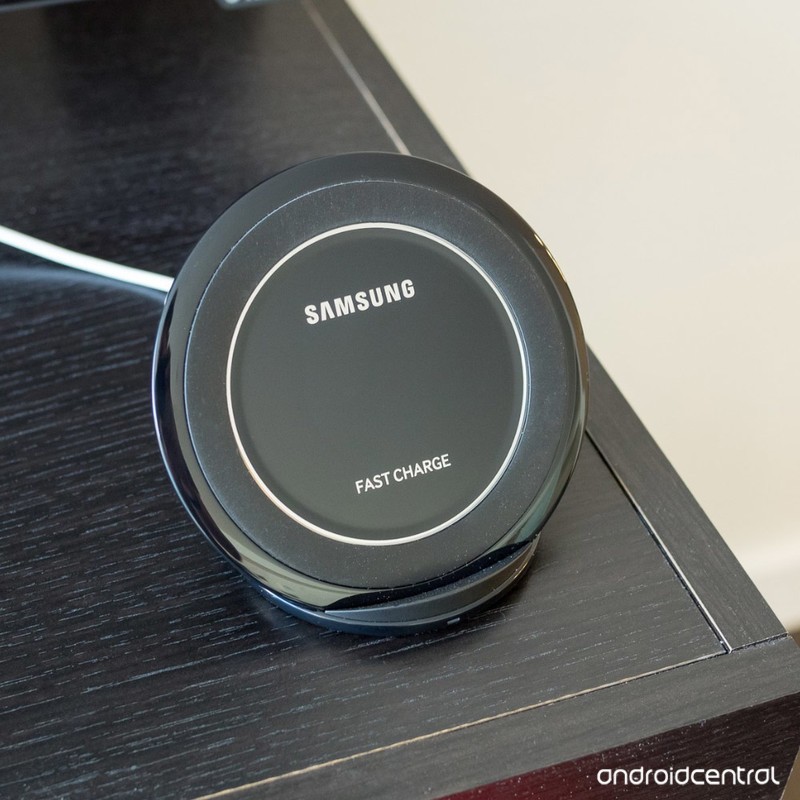
One of our forum users recently told the Android Central community that they don’t understand the big deal surrounding wireless charging and wanted to find out if anyone else felt similarly.
Folks were quick to respond to this, and these are some of the responses.
Ry
02-20-2018 10:29 PM“
For me, it’s the convenience. Excellent for bed time. Plop it down and forget it.
Also, if you go from a phone that has it to one that does it, the loss of a feature will trigger some to call the one without it inferior.
Reply
chanchan05
02-20-2018 11:11 PM“
Well here are advantages I know of/encountered:
1. Some restaurants are already putting wireless charger mats on their tables. Since a lot of the phones are splash resistant anyway, this makes it convenient that you leave the place with a fully charged phone.
2. For people whose job requires them to be always on the move in a building. It’s easier to plop the phone down and it will just…
Reply
Mike Dee
02-20-2018 11:50 PM“
I had a phone with wireless charging when it first came out. I swore it would be a deal breaker for my next purchase but it hasn’t been.
Honestly, as far as I’m concerned it’s not really wireless charging as in power transmitted wirelessly over a distance. That’s coming soon from what I hear.Reply
muzzy996
02-20-2018 11:58 PM“
The benefit I see is the unification of charging method across multiple platforms. It’s nice that Apple recently adopted it and I do wish that my Pixel XL had it. There are cars now that are coming with charging pads – the convenience of just plopping the phone down in a phone tray while driving and it getting charged wirelessly is fantastic. Keeps the car clean of any wires just as having…
Reply
Now, we want to hear from you – Is wireless charging something you care about?
Join the conversation in the forums!
Improve your networking or storage needs with Amazon’s huge one-day sale
You can’t go wrong with any of these really.
One of Amazon’s Gold Box deals today is a huge collection of storage and networking gear from a variety of brands including TP-Link, Asus, Seagate, and more. A lot of these prices are some of the lowest we’ve seen. For example, Seagate’s Backup Plus Slim 1TB portable hard drive is down to $49.99 from a street price around $60.

Here’s a few of the other great items on sale:
- Netgear Wi-Fi Range Extender – $29.99 (from $65)
- Toshiba Canvio Connect II 1TB portable hard drive – $40.59 (from $50)
- Asus AC1300 Gigabit wireless router – $49.99 (from $70)
- TRENDnet 16-port unmanaged Gigabit housing switch – $49.99 (from $70)
- WD Black 512GB performance M.2 SSD – $159.99 (from $200)
See on Amazon
Google Pay Send now starting to replace Google Wallet
More of the same.
Earlier this week, Google announced that it was finally ready to say goodbye to Android Pay and replace it with Google Pay. The end goal of Google Pay is to offer all of the functionality of Android Pay and Google Wallet in one single app, but in the meantime, we get to mess around with the v22 update to Google Wallet that rebrands it as Google Pay Send.


You’ll see a splash screen after getting the new update to remind you of the name change, but aside from a new paint job, all of the core functionality remains mostly the same.
The main page offers easy access to send/receive money with a full history of your past activity below it, a bell icon near the top right shows any notifications you have, and your hamburger menu on the left lets you access your payment methods, settings, and more.
Google Pay Send brings a blue/white paint job to replace Wallet’s green/white one, and in addition to this, now allows you to set reminders for recurring payments. You can access these by going to the Reminders tab from the hamburger menu, and here you can choose to create a reminder to either request or pay money, choose how much it’s for, how often you want to be reminded and on what day/time, and create a note for yourself.


Along with popping up in the Google Pay Send app, you’ll also see these reminders in Google Home, Google Calendar, and Inbox.
The v22 update is rolling out to the Play Store now, but if you haven’t received it yet and want to start messing with Google Pay Send right now, you can download the APK file here
Download: Google Pay Send (free)
Why an ARM processor in a Chromebook isn’t the same as the ARM processor in your phone

Electronics all have one thing in common: how you handle the heat makes all the difference when it comes to performance.
We’ve seen or heard about two really interesting developments when it comes to smart devices recently. The first is that Qualcomm and Microsoft have hooked up and plan to birth some Windows 10 products that run on a Snapdragon processor and promise they will make us happy when it comes to how well they perform. The second is that Samsung has taken an interest in using Android on the desktop and instead of just showing some proof-of-concept video it released the DeX dock.
ARM chips aren’t making good Windows laptops cheap like many hoped, but they will be easy on the battery and have better connectivity.
The jury is still out on the first claim. Companies have announced their 2018 ARM Windows laptops, and like ASUS’ upcoming NovaGo, they sound promising even though they aren’t quite as inexpensive as people had hoped for. They’ll make their way into the hands of people who love to hate things and we’ll find out everything wrong with them soon enough, which means we’ll also know everything good about them. Critical reviews and reviewers can be super helpful when you’re looking at an entirely new thing.
We have had a chance to play with DeX. Issues with the design of the first dock aside, the idea has shown some real promise. Samsung has made the transition from a small screen to a larger screen fairly well, and on the software side, the usability issues are mostly an Android fault or an app fault because things were made for a smaller display. A bigger issue is on the hardware side, and it turns out that even the best and fastest phone hardware can get pretty laggy and perform poorly when you try to scale it to the desktop.
We have a third thing that’s not very new but ties right in with these two. Chromebooks that use ARM hardware have been available for a while, and in 2017 they proved that they can be pretty damn awesome when it comes to performance. Even ARM hardware that’s a lot weaker on the spec sheet than the Snapdragon 835 Samsung’s using with DeX. I’m betting Windows 10 will be the same way. This leads us to the big question: Why?
It’s getting hot in here
 An LG G6 and Galaxy S8 as seen by a Flir thermal Imaging camera.
For starters, I think Samsung did a great job with DeX version one and really hope they keep on it. Remember, the original Galaxy Note was, well, crap. Even T-Mobile decided they didn’t want it and as someone who had a T-Mobile Note under NDA to test and review, I can’t blame them. Like the Note, DeX is a thing that is a solid idea and only needs to be refined. Look for version two to be better, version three to be really interesting, and version four to be a thing everyone can buy once Samsung tames the software side down so that the hardware can support it.
Don’t bail on DeX; remember this is Samsung and Samsung doesn’t like to quit on anything.
And that’s what Samsung will need to do because there’s more to computer hardware than just the parts themselves. The biggest factor in how anything with any processor performs is heat. Specifically, how you get rid of it. Samsung will need to make DeX less hungry so the processor can keep up without running full-tilt right up until it’s throttled back so it doesn’t damage itself.
If you’ever looked at the circuit board inside a phone you know that there are a lot of parts in very close proximity to each other. Inside the Snapdragon SoC (System on Chip) this goes to the extreme. You’ll find a CPU, a GPU, two wireless modems, a Bluetooth controller, a DAC, two DSPs, the power supply integrated circuitry and more. A lot more. All inside a case the size of a postage stamp. Each of these parts is designed to handle temperatures somewhere around 80 degrees Celsius (~180 degrees F) for short periods of time, but for extended periods should run a good bit cooler so the microscopic logic gates inside and the delicate tracing (think wiring) between them doesn’t fry.
You need smart software and air conditioning
 A Qualcomm Snapdragon 835 is smaller than a penny and much more useful.
When you design the software kernel (that’s the brain of an operating system and what interfaces the software you’re using with all the hardware needed to show it to you) you make sure that the temperature of any chips that might get hot is being monitored and then make sure you do something to keep them from overheating. When you’re dealing with a CPU, the thing you do to keep it from happening is to slow down the clock speed of the individual cores inside it. The clock speed is what decides how many things can be processed each second, and when you process fewer things per second the software becomes slower to respond. If you’ve ever heard the phrase “CPU bound” that’s what this is — the software cannot perform any faster because the CPU cores can not process it any faster.
Throttle: throt·tle /THrädl/ verb That word we hate to hear but also keeps our phones from catching fire.
Android is not the most well-optimized software in the world (I hear a software engineer laughing somewhere) but it’s getting there. Google, hardware vendors, and the companies who make Android phones are working hard at it with every new release. Chrome OS is also not the most well-optimized software but once again Google and its partners are also working hard and making it better all the time. But even if the two were equal when it comes to how well the software runs on the hardware, a Chromebook will always outperform a phone with the same hardware because a Chromebook can better handle the heat.
Look at the size of each for the simple answer. More room equals more air which equals cooler temps because the heat can better dissipate. A larger circuit board and more space inside a case also mean the parts that move the heat away from the CPU can be designed “better” and heatsinks (metal pieces that come in contact with the CPU to absorb so of its heat) are more efficient. Without adding a fan, it’s fairly trivial from an engineering viewpoint to move the heat away by building a better heatsink inside a Chromebook simply because you have more room. This is why Chrome always could outperform any phone using the same ARM version hardware, even if that hardware wasn’t nearly as robust as what was on the phone. The refinement of Chrome OS has made it run beautifully on even the cheapest (and I mean that both ways; inexpensive and of lesser quality) chips.
ARM chips are workhorses
 The chip that powers the Nexus 9 makes for a powerful industrial and scientific machine once you add a fan and proper heatsink.
We tend to think of ARM processors as something you only use when another chip from Intel or AMD isn’t an option because they aren’t as good. That’s wrong on every level. Companies like Google use ARM chips in the servers that power the internet, companies like NVIDIA use ARM chips to process some insanely complicated machine vision and artificial intelligence applications, and on a small scale, things like your wireless router use an ARM chip because it’s more power efficient when processing small bursts of data coming very quickly. ARM chips can be just as good or better than traditional X86 CPUs.
ARM chips power Google’s Neural Network hardware, which is almost as power-hungry as the Facebook app.
The Nexus 9 is a great example of this. Initially, we all were impressed with the NVIDIA chipset inside the Nexus 9 when it came to performance. But once we were able to use it more regularly, we saw a different thing; it would run hot, throttle back and was generally a hot mess. Take that same Tegra K1 SoC and put it on a Jetson development board and you have an entirely different beast. I have one here and use it as the core of a multimedia streaming server because it sips power and never bogs down. With a proper channel for heat dissipation, it delivers performance in the same league as an Intel Core i5 using about 80% less power.
ARM processors for Windows 10 laptops and tablets will have some speed bumps, much like we saw with ARM-powered Chromebooks. But I predict they’ll be a smashing success because they can offer a high-performance experience, better connectivity, and amazing battery life; just like they do on our smartphones. But unlike our smartphones, there won’t be as much impact from heat and that means our phones can’t ever reach the same level of performance we see from Chromebooks today and Windows 10 laptops tomorrow.
Chromebooks
- The best Chromebooks
- Should you buy a Chromebook?
- Google Play is coming to Chromebooks
- Acer Chromebook 14 review
- Join our Chromebook forums
Huawei used its Mate 10 Pro to power a driverless car
Huawei’s Mate 10 Pro is one heck of an Android phone, and while Huawei was hoping U.S. carrier availability would get more people to pay attention to it, these plans were ultimately thwarted. Now, just in time for this year’s Mobile World Congress, Huawei’s kicking things up a notch by announcing it was able to use the Mate 10 Pro to turn a Porsche Panamera into a driverless car.

One of the Mate 10 Pro’s most unique features is its ability to use artificial intelligence to understand the world around it and make decisions about what it sees. For example, the camera app on the Mate 10 Pro can tell the difference between food, pets, landscapes, and more, and then adjust shooting modes accordingly to help you get the best possible picture.
That similar tech was used for Huawei’s “RoadReader” driverless car experiment, and when the phone detects what kind of object is in its path, can make decisions about how to avoid it.
Commenting on this, Huawei Western Europe’s Chief Marketing Officer, Andrew Garrihy, said:
Our smartphone is already outstanding at object recognition. We wanted to see if in a short space of time we could teach it to not only drive a car, but to use its AI capabilities to see certain objects, and be taught to avoid them. If our technology is intelligent enough to achieve this in just 5 weeks – what else can it make possible?
Huawei will be showing off its RoadReader project during MWC on February 26 and 27, and those attending will be able to “drive” the car themselves and see firsthand what it’s capable of.
Huawei Mate 10
- Huawei Mate 10 Pro review
- Huawei Mate 10 series specs
- Huawei Mate 10 Pro U.S. review: Close to greatness
- Join the discussion in the forums
- More on 2016’s Mate 9
Mobile World Congress 2018 preview: What to expect (other than the Galaxy S9)
Galaxy S9, plus.
It’s easy to imagine that companies like LG, Huawei, Sony and others were more than a little relieved when Samsung didn’t announce the Galaxy S8 at last year’s Mobile World Congress in Barcelona. The mobile- and cellular-focused show has taken over from January’s CES as the place hardware vendors launch their early-year flagships, and there was plenty to get excited about in 2017.
This year, there’s still a lot to look forward to, but some of the big names are stepping back from the fray, mainly to give breathing room to the most dominant name in Android today: Samsung. Yes, the Galaxy S9 will be launching in just a few days, but it’s not the only name on the MWC shortlist this year. Let’s take a look at all the major announcements to look forward to at Mobile World Congress 2018.
Samsung – Galaxy S9 series

Let’s start with the big one: Samsung is set to announce two phones, the Galaxy S9 and S9+. Both are expected to be extremely similar in design and feature set to the Infinity Display-covered Galaxy S8, with a few notable improvements.
The phones will inevitably sport the faster, less power-hungry Qualcomm Snapdragon 845 platform, and around back the fingerprint sensor will move to a more sensible location underneath the camera(s). I mention cameras plural because the larger S9+ will have an extra camera sensor, a là Note 8, likely for long-distance photography and facilitating Live Focus portrait shots. The S9+ is also expected to have 6GB of RAM compared to the S9’s 4GB, giving it a premium feel for those who want additional multitasking opportunities.
But Samsung is touting camera improvements across both of its new phones. Even the smaller S9 is expected to have a variable aperture, giving it the ability to capture excellent photos in low-light but minimize distortion and maximize speed in outdoor, well-lit scenes.
The Galaxy S9 series will be the stars of the show. They will be everywhere and consume all of the oxygen. That’s alright because they’ll also be the best-selling Android phones of 2018 by a wide margin. Samsung probably won’t announce pricing at the February 25th announcement, but the phones are expected to go on sale as early as March 16. Get those credit cards ready!
Samsung Galaxy S9: Everything you need to know
LG V30s

A lot of ink has already been spilled about LG’s near-cancellation and remarkable resurrection of its 2018 flagship, which definitely won’t be called the G7, but the Korean giant likely didn’t want to play second fiddle to Samsung at this year’s conference. It has hinted that it will relaunch the LG V30 with A.I.-related features and something called “LG Lens” — likely a Google Lens knockoff — as the V30s.
It’s possible we’ll see a new color and a more expensive 256GB option — yawn — but LG’s surprised us in the past, so it’s possible it will happen again.
LG’s 2018 flagship: Here’s everything you need to know
Huawei MateBooks and tablets

We already know when Huawei is launching its next P-series flagship: March 27. Unfortunately, that date falls well outside the confines of MWC, so don’t expect any phone news in Barcelona.
In the meantime, you can expect a few new things from the number three smartphone maker: not smartphones. Namely, MateBooks running Windows 10, and MediaPads running Android. Both series are due for their minor annual refreshes, with the MateBook X getting lauded last summer for its beautiful design and powerful internals, while the MediaPad lineup is one of the few Android-based tablets we’d recommend these days.
Huawei P20 invite hints at triple rear cameras as P20 Lite breaks cover
Sony Xperia XZ2
Sony always comes to MWC with new phones in tow, and this year will be no exception. Expected is at least one phone, the Xperia XZ2, and perhaps a second — a new Premium, or diminutive Compact. Either way, Sony’s design language is in desperate need of a refresh, and with the proliferation of 18:9 phones in the market, now seems like a perfect time to do it. Here’s also hoping that Sony finds a way to bring a fingerprint sensor to this year’s flagship, as it did for its mid-range products back at CES.
The company is also well known for unveiling prototype accessories at shows like this, from experimental projectors to bone-conducting headphones. Given that Sony has had limited success with its phones, I’d love to see some hot new thing to pull in our attention for a few minutes. A man can dream, can’t he?
These are all the phones Sony is launching in 2018
Motorola / Lenovo

Motorola unveiled the highly-regarded Moto G5 and Moto G5 Plus at last year’s MWC, and we’re expecting something similar from them this year. We’ve already seen fairly comprehensive leaks of the G6 series, which includes the G6, G6 Plus, and G6 Play, and it appears that Moto is moving into the 18:9 aspect ratio with these devices, though for some reason a front-facing fingerprint sensor etched below the screen is still a thing. I won’t dismiss it outright until I see it in action, but… weird.
Moto isn’t expected to unveil its flagship Moto Z3 flagships until later this summer, but as the company did at CES, we may see one or two new Moto Mods to play with, which would be really neat.
Motorola’s parent company, Lenovo, is also expected to dish out a few new tablet and Chromebook updates, as they did last year. The unique Yoga Book, which was already slated to ship with Chrome OS but eventually came with either Windows 10 or Android, is likely to see a sequel this year and let’s hope that along with Chrome support, Lenovo has fixed some of those capacitive keyboard issues that bogged down input on the original.
The Moto G6 series shows itself in these revealing leaks
ASUS ZenFone 5 series

ASUS usually shows its latest smartphone lineup at either CES or Computex, in January or June, respectively, but this year we’re expecting a full suite of ZenFone 5 phones to be unveiled at MWC 2018.
As with previous generations of ZenFones, expect lots of models, including a base one, a premium (or deluxe) version, a camera-focused one, and perhaps something special. Given that the ZenFone AR never went anywhere, thanks to Google’s sunsetting of the Tango project, ASUS is probably looking for another angle this time around.
The best ASUS phones you can buy
BlackBerry KEYtwo?

At last year’s MWC, BlackBerry Mobile trumpeted the then-Mercury’s real name, the KEYone, and held a lavish announcement event that trumpeted the phone’s worldwide distribution. BlackBerry Mobile has no such event on the books this time around, but it’s possible we’ll see something a little more low key, or even a sneak peek at something new.
The BlackBerry KEYone Bronze edition goes really well with scotch
Alcatel A new start

We already saw what Alcatel plans to announce at MWC because it gave us a sneak preview of its brand new phone lineup at CES. The Alcatel 5, 3V and 1X will relaunch the TCL-owned brand’s low-cost mission, offering the devices between $100 and $300 in North America and Europe. We got to play with each one, and they look great and perform well for their respective prices, but it’s unclear how Alcatel will differentiate itself from the competition at this late point in the smartphone game.
Hands-on with the phones Alcatel will announce at MWC
Nokia By the numbers

Nokia, which is now owned by HMD Global, has found enormous success with its range of well-built, lightly skinned Android phones, particularly in European and Asian markets, and the company is readying a bunch of updates and new devices to launch at MWC 2018. In terms of price points, we may run the gamut: from the sub-$100 Nokia 1 to the premium, Snapdragon 845-toting Nokia 9, I’m excited to see what the company, which is firing on all cylinders, has in store for us.
Nokia 6 review: A great phone with one drawback
What are you excited about for MWC?
This is but a small roundup of the companies and products we’re expecting to see and interact with at the biggest mobile show of the year. What are you excited about? Let us know in the comments below!
Lava Red OnePlus 5T is officially sold out in North America
Now a collector’s item.
The 5T is OnePlus’s best-looking phone to-date, and limited edition colors like Sandstone White and Lava Red have helped to spruce it up way more than its standard Midnight Black option. The Lava Red OnePlus 5T originally went on sale in North America on February 6, and a little over two weeks later, it’s officially sold out.

OnePlus originally said that the Lava Red 5T would only be available “while supplies last”, and that means your only chance of getting the phone now lies with third-party marketplaces such as eBay and Swappa.
The last embers fade in. The #OnePlus5T Lava Red is officially sold out in North America! Thanks for the amazing support 🔥 pic.twitter.com/Sg74MvUFkX
— OnePlus (@oneplus) February 22, 2018
The OnePlus 5T in Lava Red was selling for $559 with 8GB of RAM and 128GB of storage, and should you find it somewhere else, expect to pay a fair bit more considering it’s now a collector’s item for buyers in the U.S. and Canada.
I’d prefer OnePlus to permanently offer more striking colors like Lava Red rather than running them as limited-time offers, so here’s to hoping that’s something we see changed whenever the OnePlus 6 comes out.
OnePlus 5T and OnePlus 5
- OnePlus 5T review: Come for the value, not the excitement
- OnePlus 5T specs
- Should you upgrade from the OnePlus 3T?
- OnePlus 5T vs. Galaxy S8: Beast mode
- All of the latest OnePlus 5T news
- Join the discussion in the forums
OnePlus
Amazon
 AIVAnet