


Is the Galaxy S9’s battery too small?
mAh count isn’t always everything.
There are a lot of areas where the Galaxy S9 goes a step above the S8. It’s got stereo speakers instead of a mono one, the Snapdragon 845 should offer quite a bit more speed, and the rear camera has a ton of new features – such as a variable aperture and 960 FPS slow-motion video.

However, despite these improvements, one area that Samsung left untouched with the S9 series is battery capacity. Just like the Galaxy S8 and S8+ before them, the S9 and S9+ have 3,000 mAh and 3,500 mAh units, respectively.
It remains to be seen how these batteries fare with Qualcomm’s new silicon, but even so, some of our forum users aren’t too thrilled about Samsung’s decision here.
Floki_vwo
02-25-2018 10:09 PM“
I just can’t understand why in today’s day in age we can’t have a battery that lasts 2 Days in a flagship phone pointless.
At least put a bigger battery in new models. Totally unacceptable will not buy the S9 or the S9 Plus.Reply
Mooncatt
02-25-2018 11:12 PM“
Manufacturers keep pushing for thinner (and thus, weaker in my opinion) phones, so don’t expect huge batteries. On the flip side, I think if a phone came out with a battery that lasts a week between charges, many of these same people would then complain it doesn’t last a full month between charges.
Reply
Then again, some folks don’t see this as an issue.
Almeuit
02-26-2018 10:43 AM“
What’s wrong with the size? It seems pretty normal for me. They can only pack so much battery in a small space and the market wants think phones… so … something has to give :P.
Reply
chanchan05
02-26-2018 12:19 AM“
The new chips are also 30% more power efficient.
It’s just like how the S8 has a smaller battery than the Note 2 or 3 but has a longer rated battery life on tests.
Battery life isn’t always about having more mah.
Reply
Now, we want to hear from you – Is the Galaxy S9’s battery too small, or is it just fine?
Join the conversation in the forums!
Samsung Galaxy S9 and S9+
- Hands-on with the Samsung Galaxy S9 and S9+
- Galaxy S9 and S9+: Everything you need to know!
- Complete Galaxy S9 and S9+ specs
- Galaxy S9 vs. iPhone X: Metal and glass sandwiches
- Galaxy S9 vs. Google Pixel 2: Which should you buy?
- Join our Galaxy S9 forums
Verizon
AT&T
T-Mobile
Sprint
This is our first look at Fitbit’s next smartwatch
It’ll have a lower price, smaller body, and no GPS.
During Fitbit’s latest earnings call earlier this month, CEO James Park said that the company is working on a “mass appeal smartwatch” following disappointing sales of the Fitbit Ionic. Just about a day later, we now have multiple renders showcasing what that smartwatch will look like.

Wareable obtained multiple images of Fitbit’s upcoming smartwatch, and while we don’t have an exact name for it just yet, it’s possible it’ll be marketed as either the Fitbit Blaze 2 or something else entirely.
Just like the Ionic, this new smartwatch will run the new Fitbit OS platform that allows for app support, notifications, and more in addition to Fitbit’s standard fitness-tracking suite. The new watch is expected to be quite a bit smaller than the Ionic, and it’ll come in black, silver, rose gold, and charcoal colors with a variety of different bands.

The smartwatch will be water-resistant up to 50m and comes with the Ionic’s SpO2 sensor that’ll eventually be able to track sleep apnea, but one thing it won’t have is built-in GPS. I’d expect NFC to be on-board so Fitbit can keep pushing its Fitbit Pay platform, but there’s no word on this just yet.
Lastly, to ensure Fitbit’s next gadget can “appeal to a larger, more general smartwatch audience”, Wareable’s source says that this watch will also come with a lower price than the Ionic which currently retails for $299.
We’ll need to get more details from Fitbit before making any real judgments, but at first glance, I really like the aesthetic Fitbit’s going for here. I personally don’t have a problem with the Ionic’s physical appearance, but this new watch does look a lot sleeker and more polished.
What are your initial thoughts on this watch? Sound off in the comments below!
Samsung Gear Sport vs. Fitbit Ionic: Fitness smartwatch showdown
Honor 7X vs. Nokia 6: What you get for $200 will amaze you

Budget phones just keep getting better and better.
When you think of budget phones, Motorola is probably the first name that comes to mind, but there are two other companies you should be paying attention to. Honor and Nokia have been making great affordable phones for a while now, and the Honor 7X and Nokia 6 are perfect examples.
Sitting in the range of $200, both phones offer a lot of bang for your buck, with attractive designs and different software experiences — but that just raises the question, which one is right for you?
What the Honor 7X does better

The Honor 7X is the new kid on the block, with a slick all-metal unibody design and an 18:9 display. It’s certainly the more modern-looking of the two phones, and it’s been outfitted with newer, more powerful specs.
The Honor 7X packs a faster processor and a design more fitting of 2018.
While the RAM configuration is the same on both phones, at 3 to 4GB depending on the particular model, the Honor 7X features a Kirin 659 processor, which easily outpaces the Snapdragon 430 found in the Nokia 6. The result is noticeably faster performance; where we found the Nokia 6 sluggish, the Honor 7X rarely trips up outside of graphics-intensive games.
The Honor 7X wins out yet again in camera performance. Not only does its camera outperform that of the Nokia 6 … but there are two of them. Well, okay, the second sensor is only 2MP and serves to measure depth for portrait mode shots, but the Honor 7X has still been a better overall shooter in our testing.
One area you’ll want to be wary of is the Honor 7X’s software. EMUI is a fairly polarizing software experience that, while not necessarily bad, is considerably different from the versions of Android that most people are familiar with. It’s improved in recent years with EMUI 8, but the Honor 7X is still running the older version 5.1. If you’re looking for latest, greatest software experience … this just isn’t it.
See at Amazon
What the Nokia 6 does better

Despite the Honor 7X winning out in most hardware aspects, the Nokia 6 is still no slouch. Though both phones are built with aluminum, only the Nokia 6 features chamfered edges, creating an attractive premium aesthetic. It also offers stereo speakers that far surpass the tinny unit on the Honor 7X, combining its earpiece with a bottom-firing speaker.
You’ll also find much cleaner software on the Nokia 6, which bears an almost completely stock build of Android 7.1.1 Nougat, save for a few pre-installed apps from Amazon. Even better, HMD Global (the company in charge of Nokia’s mobile division) has promised an update to Android 8.0 soon, making the Nokia 6 one of the cheapest ways to experience Oreo.
The Nokia 6 falls a bit behind, but a newer model is coming to close the gap.
Something to be aware of is that a new version of the Nokia 6 will be available in the coming months, refreshing the specs while maintaining the same general design. Though the RAM and storage configurations remain the same, the 2018 refresh will move to a much faster Snapdragon 630 processor. It also moves the fingerprint sensor to the back, ditches the capacitive buttons, and upgrades from microUSB to USB-C — though it retains the more traditional 16:9 aspect ratio, for better or worse.
See at Amazon
Which one’s right for you?
Which phone you should buy ultimately comes down to your software preferences and quickly you need to upgrade. If you don’t mind using an older build of EMUI, the Honor 7X beats out the Nokia 6 in a lot of important ways, from specs to camera performance and battery life. The 18:9 aspect ratio also gives it a newer look and feel, and the rounded back makes it more comfortable to hold.
Get the Honor 7X now; get the Nokia 6 later.
That could all change with this year’s updated Nokia 6, though. The newer processor, combined with a clean build of Android Oreo, could make the 2018 Nokia 6 faster and more power efficient than the Honor 7X, and the move to USB-C means that you’ll be able to share chargers with most people carrying a recent phone or laptop. The new Nokia 6 will also feature Android One, guaranteeing fast updates to the latest version of Android.
The Honor 7X and Nokia 6 are both fantastic phones for the money, and without official US pricing on the 2018 Nokia 6, it’s hard to say how it’ll compare in terms of value, but at $200 and $229 respectively, you should buy the Honor 7X for now.
Which would you choose?
With all of that in mind, are you buying the Honor 7X or holding off for the refreshed Nokia 6? We’d love to know — drop a line in the comments below.
Evie Launcher review: Still simple, stylish, and steadily improving

In the vast world of third-party Android launchers, Evie Launcher cuts through the crowd with simple sophistication
The world of Android theming is beset with big, bold, bombastic launchers that throw everything but the kitchen sink into their features, bells, and whistles, but sometimes you don’t need all the pomp and pizzazz. Sometimes, you want a launcher that’s light, lithe, and luxurious. If you’re in the market for a launcher that’s as simple as it sophisticated, Evie Launcher may earn its place as your next home screen, and as a free launcher, giving Evie Launcher a try doesn’t cost you anything but a little time.
Evie Launcher’s default setup is breathtakingly simple, featuring only four apps at the bottom of the desktop and one permanent search bar at the top. By default, Evie Launcher keeps the dock turned off, which definitely sets it apart from the pack, but it also leads to Evie missing the dock icons when importing a layout from another launcher during the initial setup.


Another break with tradition is Evie’s default grid size. While 4×4 has been the standard since the 4-inch phone days, Evie Launcher has a default desktop of 5×6 and is willing to take on any grid size from 3×4 to 12×12. With extra tall screens becoming the new normal, having a wide array of grid sizes is important, as you’re going to want a few more rows to take advantage of that real estate.
The search bar is a permanent part of the Evie Launcher home screen, and it features one of the two gestures that are permanently turned on: swipe down to search. I wish there was a toggle to switch this gesture from opening the search bar to the notification shade — especially for those extra tall screens I mentioned before — but for now, it’s a constant reminder that “hey, you can search for stuff”. It’s cool, Evie, but I just wanna see who texted me!

The other permanent gesture fits in with the Samsung Galaxy line and the Google Pixel: swipe up on the desktop to open the app drawer, and swipe down from the top of the app drawer to return to the desktop. The app drawer has two modes: a traditional list style or a more customizable grid layout.
Getting back into Evie’s settings, you have a bit more customization here than most light, speed-oriented launchers. Beyond setting an icon pack and adjusting your app drawer grid, you can turn back on our dock, unread badges or Android O notification dots, and even turn on a few extra gestures.
More robust gesture controls have been listed as “coming soon” for a year now, but there’s still one gesture here I highly recommend turning on: double-tap to lock. There are even two methods you can choose from — just like Nova Launcher — a method that actually locks the phone and a method that just times out the screen in order to keep your phone unlocked via Smart Lock.

Evie Launcher is definitely showing promise, especially for users who will be left wanting when Google Now Launcher is pulled from Google Play. (That is still happening right?) While I wish it was better at importing dock elements, the launcher has made steady, stable progress in the year since we first reviewed it. Once more robust gesture controls come to Evie, it should be quite the apt competitor in a crowded launcher market, but it’s no slouch right now.
Download: Evie Launcher (Free)
Updated February 2018: This review was updated to reflect almost a year of development for Evie Launcher and update some links.
OnePlus 6 supposedly leaks with iPhone X notch and glass back
There’s also an updated fingerprint sensor and two rear cameras.
The OnePlus 5T is still a relatively new phone at just four months old, but the mobile industry stops for no one. Two images of a OnePlus 6 recently popped up on our radar, and if they’re to be believed, OnePlus will be the next company to jump on board the infamous notch train.


As you can see, the OnePlus 6 will come equipped with very slim bezels. This isn’t surprising considering we saw a similar design with the OnePlus 5T, but what is different is the notch at the top of the screen. This is very clearly a direct copy of what Apple did with the iPhone X, but unlike that phone, you won’t find any special face-tracking sensors – just a speaker for phone calls and the front-facing camera.
A glass back could mean OnePlus finally adopts wireless charging.
Moving to the back of the phone, the OnePlus 6 could be the first OnePlus phone to adopt a glass back. This would allow for wireless charging, but it’s also a stark departure from the unique Lava Red and Sandstone White designs we saw with the 5T.
Also on the back of the OnePlus 6 are dual rear cameras in the center and a fingerprint sensor below them – both with updated looks compared to the 5T.
As exciting (or terrifying) as these pictures may be, it’s important to take them with a giant grain of salt. Even if these photos are legit, it’s possible this is just one of the many prototypes OnePlus is working on and not necessarily representative of what the final product will look like.
With that disclaimer out of the way, what are your impressions of the OnePlus 6? Are you a fan of the new look, or do you just wish the notch would die already?
ASUS ZenFone 5 hands-on: This iPhone X runs Android
OnePlus 5T and OnePlus 5
- OnePlus 5T review: Come for the value, not the excitement
- OnePlus 5T specs
- Should you upgrade from the OnePlus 3T?
- OnePlus 5T vs. Galaxy S8: Beast mode
- All of the latest OnePlus 5T news
- Join the discussion in the forums
OnePlus
Amazon
The Netgear R6700 wireless router and CM500 cable modem are bundled together for $88
Free yourself from your ISP and save money, too.
Amazon is offering Netgear’s Nighthawk R7600 router and CM500 modem bundled together for just $88.46 right now. Considering, the Nighthawk R6700 router is $80 on its own, and the CM500 modem is $48, you’re saving a lot of money with this bundle. This price is $10 better than the previous deal we’ve seen for it, and the lowest we’ve ever seen for this bundle.

The Nighthawk R6700 is an awesome router with 19,560 user reviews giving it 4.2 stars. It has high-powered antennas and has technology that boosts range, speed, and performance. It works well in homes with a lot of Wi-Fi devices, which most homes are these days.
We always recommend buying your own cable modem to avoid the rental fees major ISPs charge. And the CM500 is a great machine to do that with because it’s a modern device capable of handling some of the fastest plans available.
With DOCSIS 3.0 and 16×4 channel bonding, the CM500 is capable of speeds up to 680Mbps. It’s compatible with Windows and Mac and works with every major browser. It works with every major ISP, too, including Comcast, Spectrum, Cox, Charter, and others.
See at Amazon
Best Cases for Essential Phone

Keep your Essential Phone safe and functional with a quality case!
The Essential Phone was the first phone released by Andy Rubin’s new company in 2017 and while it didn’t blow away the competition it did offer us phone nerds a sleek new alternative.
With the price of the phone down to just $450 on Amazon and the recent announcement of three new color styles just released, you might be considering picking up the Essential Phone. If you are, you should also considering getting a case.
Do note that the 360-camera accessory will not be compatible with your phone in a case, so that’s worth keeping in mind if you find that add-on (currently available for just $75) to be a compelling feature.
- Incipio DualPro
- Incipio NGP Pure clear case
- TUDIA Ceramic Feel case
- Feitenn Flip Wallet case
- Poetic Guardian Full-Body case
Incipio DualPro

Incipio offers a couple case options for the Essential Phone, and what better place to start than with the refined DualPro case.
Offering two layers of rugged protection, this case will keep your Essential phone well protected from scuffs or drop damage. The hardened outer shell features a soft touch finish that’ll feel real nice in your hand and overall the design here is pretty minimalist.
Available for $25, this is a great option for the Essential Phone.
See at Amazon
Incipio NGP Pure clear case

If you bought your Essential Phone because of it’s fresh design choices, you might be wary to cover that ceramic up with an opaque plastic case. Incipio has you covered with this one-piece clear case that offers a clear view of your Essential Phone while keeping it protected.
Made of a flexible polymer material, this is an easy case to install with full coverage around the edges of your phone, including a lip around the screen and protection for the camera around back.
Get yours for just $18 on Amazon!
See at Amazon
TUDIA Ceramic Feel case

The Essential Phone was designed with a ceramic backing — not something you see on many major phone releases. If you love the feel of that Ceramic backing but also want to keep it safe, TUDIA offers this case that mimics the same hand feel of the Essential Phone’s ceramic while keeping the device itself safe.
To accomplish this, TUDIA designed the case with tempered glass on the back of the case for extra protection — the same rugged stuff used in the best screen protectors. By doing this, they’ve managed to maintain the look and feel of the Essential Phone which is pretty great.
It’s a really thin and minimalist case that’s available in five different styles (including the super stylish white marble pictured) for just $20.
See at Amazon
Feitenn Flip Wallet case

Looking to add some extra functionality to your phone carry? A wallet case lets you store your ID, credit card, and some cash right along with your phone so everything you need for a night out is in one place.
This case combines synthetic leather or fabric with a soft and clear TPU shell on the inside to provide top-notch protection for your phone. There’s a magnetic closure to keep the front flap closed when not in use, and it can also be folded over to be used as a kickstand for watching videos
Get yours for just $12 in your choice of six color styles.
See at Amazon
Poetic Guardian Full-body case

Looking for something that combines flashy design with rugged protection? Check out these Poetic Guardian cases.
This is a full-body case that includes a front plate with a built-in screen protector. Combining soft and shock absorbing TPU with rigid PC bumpers offers great protection for your phone.
The back panel is also clear so you can still show off the design of your phone, and it’s available in four fun color styles.
These will start shipping from Amazon on March 15. Order yours today for just $17.
See at Amazon
Essential Phone
- Essential Phone review
- Essential Phone specs
- The latest Essential Phone news
- Join our Essential Phone forums!
Amazon
Best Buy
Sprint
Telus
Facebook’s job listings are now available in over 40 countries
Facebook’s job listings have been available in the US and Canada for a while, but now they’re expanding in a big way. The feature will be available in over 40 countries in the next few weeks, including the UK, Italy, Spain, Argentina and Brazil. As before, the allure is finding and applying for positions from Facebook’s mobile app or website, rather than having to visit a dedicated job service. Companies can even chat with you through Messenger if they’re interested in your skills.
Product Manager Gaurav Dosi told Engadget that he expects the service to translate well to other countries (many people need jobs, after all). That’s particularly true given the mobile integration. Many would-be workers in some countries don’t have a home PC for their job hunts, so this gives them a readily available way to find openings.
This is both about giving companies a better solution than informal listings and, to a degree, reducing the need to wander to sites like LinkedIn. It not only keeps you visiting Facebook for longer (and thus viewing more ads), it encourages companies to maintain official presences. Not that there’s much room to complain — this could help companies fill positions faster than usual, and might just help you land a dream job.
Source: Facebook
Nokia made a smart, fashionable jacket for first responders
Nokia has been creating unconventional products for years, like that weird touchscreen made of ice from 2010. And now, at MWC 2018, the company is showing off a new, offbeat project that’s in the works: the CHASE (connected health and safety equipment) LifeTech FR (first responders) jacket. This smart garment was designed in collaboration with Kolon, a South Korean fashion brand, and Gina, a software developer from the Czech Republic. While the CHASE LifeTech FR may look like a traditional bright piece you’d see on a cop or firefighter, there are a few things that make it different than your average first-responder jacket.
For starters, there are modular sensors on it, which allow the wearer to access data such as a heart rate, temperature, GPS/location and motion (accelerometer). That’s what the jacket we tried out here in Barcelona had, but the benefit of those swappable modules (located around the sleeve and chest) is that you can put sensors in there that fit different needs. A member of the police force could, for example, have a body cam rather than a temperature sensor — which would be more suitable for firefighters.
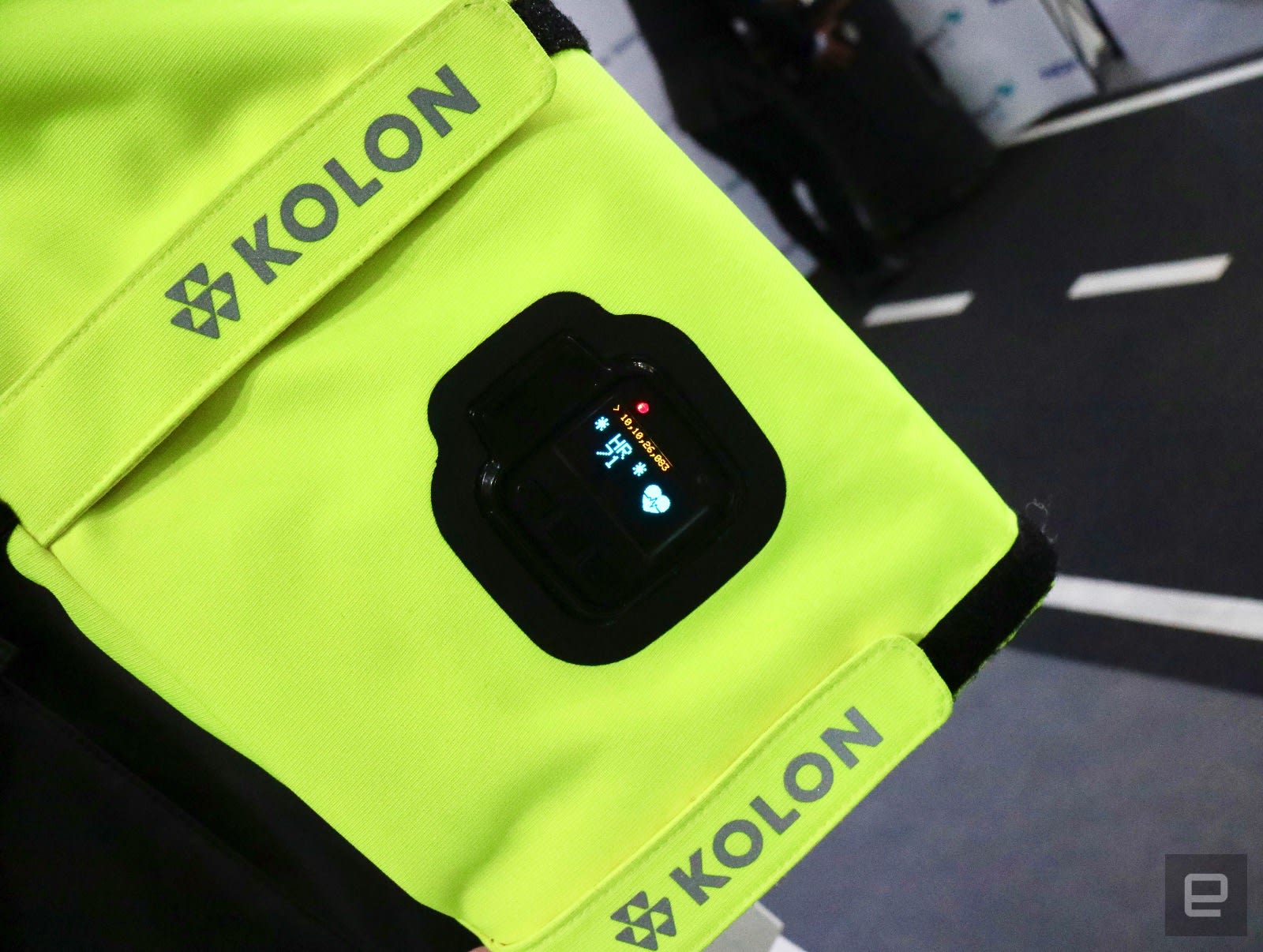
In either case, the data captured by the CHASE LifeTech FR jacket is sent back to a base station, where Gina’s software management system views it in real-time and can use it to keep track of first responders. That’s something that has the potential to save lives, since the jacket’s sensors could help locate an emergency worker who may go missing during a 911 call, or know if a first-responder is dangerously fatigued after working too many hours. Nokia says the possibilities with its CHASE LifeTech FR wearable are endless, as it could support all sorts of safety sensors in the future, including carbon monoxide and environmental ones.
Of course, it’s hard to ignore the fact that the jacket looks straight out of a Calvin Klein menswear runway show, thanks to its slim fit, black details and those large pockets, fancy zippers, long strings and baggy hood. Oh, neon green is also fashionable, but that’s more about safety than anything else — call it a happy coincidence. Additionally, the CHASE LifeTech FR also comes with conductive fabrics, 3M reflective details which meet first-responder specifications and GORE-TEX materials designed to be comfortable, breathable and waterproof. And since the sensors pop out of the jacket, it can be washed without any issues, and first responders can use that cleaning time to charge their modules via microUSB.

Nokia and Kolon said it was crucial to make the CHASE LifeTech FR feel like a regular coat, rather than a big, heavy firefighter jacket. The credit for actually making that happen goes to Kolon though, who has been fusing tech with fashion for almost a decade, with wearables like the heated track jacket it introduced in 2009. Both companies added that, although this is a proof of concept right now, they have plans to make a consumer version of it in the next 12-18 months. But first, the focus is solely on making the CHASE LifeTech FR jacket a reality for first responders all over the world.
Sorry, hypebeasts, you’ll have to wait awhile to get your hands on this one.
Catch up on the latest news from MWC 2018 right here.
How to improve battery life on your smartphone or smartwatch
If you’ve lived with mobile devices for long enough, you’ve likely had that moment when you received a low-battery warning well before the end of the day. It’s more than a little worrying, especially if you’re far from home. But how do you wring the most out of your remaining battery life in those situations — or better yet, avoid those problems in the first place? You don’t always have to rely on your phone’s low-power mode. We’ve compiled a slew of tricks that can extend the longevity of your smartphone or smartwatch, and they’re not necessarily obvious — in many cases, it’s as much about discipline as it is flicking the right software switch.
Start with hardware settings
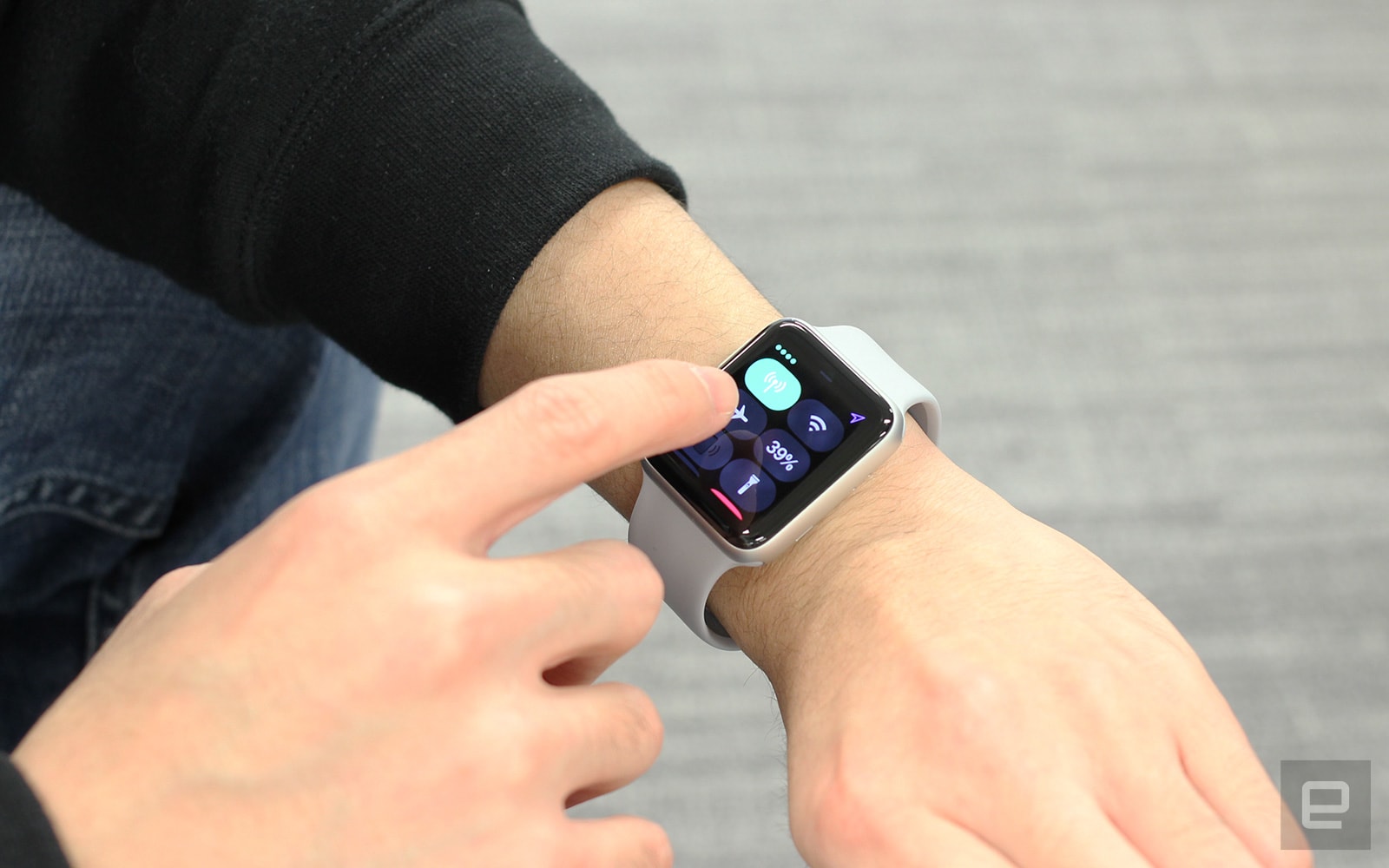
No matter which phone or watch you own, it’s best to start with the basic settings for your display, GPS, sound and wireless connections. They’re easy to change, and the improvements in battery life can sometimes be dramatic enough that you don’t need to do much else.
Your screen brightness could easily be the most important factor. It’s tempting to crank the brightness up to ensure you can see your display in all lighting conditions, but that’s bound to sap a lot of energy. Whether or not the brightness is on auto mode, you’ll want to dial the setting down to where it’s just enough for you to comfortably see what’s on-screen. And leave auto brightness turned on as a general rule: Your device is usually a good judge of when to dim the screen or ramp things up. You may also want to lower the screen-timeout interval, since you rarely need to leave an idle phone awake for minutes at a time.
Some devices will have additional display options that can lengthen your battery life, although they can vary widely. Phones like the Galaxy S8 and Galaxy Note 8 have options for lower resolutions, for example, while the Razer Phone lets you reduce the refresh rate. And if your hardware has an always-on display feature (such as on numerous Android phones, Android Wear watches and Samsung’s Gear line), turn it off unless you really want at-a-glance information.
GPS also tends to be a battery killer, and gadget makers know it — they’ve implemented many ways to scale back positioning or disable it entirely. On Android, you can typically change the location settings to limit tracking to “low accuracy” (WiFi and Bluetooth but not GPS) or “device only” (GPS alone). On iOS, you can turn off location sharing or force apps to only use location info when they’re active. And if you’re wearing a smartwatch, you can sometimes disable it in specific situations. With the Apple Watch, for instance, you can use its companion iPhone app to turn off GPS during workouts.
Wireless connections can also waste energy, although you’ll want to think carefully before switching them off (they’re essential to phones and watches, after all). Bluetooth is usually the easiest to address: If you don’t need it for accessories like smartwatches or wireless headphones, keep it off. After that, it’s trickier. You can turn off WiFi when away from home, but that will chew up cellular data and hurt location accuracy. There’s also airplane mode (which shuts off all wireless connections) if you need it, although it’s really more of a last resort than an everyday solution. Smartphones and smartwatches are designed for always-on connections, and you only want to take them offline if you don’t intend to use them for long stretches of time.
There’s only so much you can do with cellular service, however. You can turn off cellular data altogether if you’re sure you won’t need it away from WiFi, but it’s usually better to disable features that consume data in the background, such as iOS’ Wi-Fi Assist (which uses your cell data when your WiFi connection is poor) or app-specific cellular-data use. And no, dropping to slower speeds (such as from LTE to 3G) won’t usually help. What energy you save may be lost simply because downloads will take more time.
Sound and haptics don’t usually play a significant role in your battery life, so don’t worry too much about keeping your device quiet or vibration-free. Those are more matters of etiquette and personal preference than energy savers, since they’re rarely active for long enough to make a difference.
Cut background activity

If hardware-related tweaks weren’t enough, your next step is to rein in the behavior of your apps. Some programs are particularly chatty by default, and that can be a problem when you have dozens of them on your phone or watch.
Before you do anything else, you should ask whether or not you need a given app in the first place. It’s tempting to install legions of apps “just in case,” but the odds are that you’ll only use a fraction of them on a regular basis. Do you really need notifications from an app you rarely ever use? Get rid of the apps you haven’t touched in months or those that are just as easily replaced by a website. That can even include social networks like Facebook (whose app tends to be large battery drain) if you’re not in a rush to check someone’s status update. While individual apps aren’t usually battery hogs, they can add up if they’re performing background tasks.
Whichever apps you decide to run, you’ll want to limit notifications. They may only pop up on your screen for a brief moment, but receiving dozens of notifications per day can repeatedly wake up your screen and run down your battery. Whether you’re using Android, iOS or a smartwatch, you can go into your settings and either turn off all notifications for a given app or scale back the alerts you get. On Android, you can set notifications to “show silently,” and with iOS, you can individually disable lock screen appearances, banners and sounds. Pruning your notifications will keep your device quiet until you genuinely need it, and it could spare you from information overload in the process.
Some apps have their own notification settings, too, and it’s a good idea to review them to limit alerts to those you care about. You probably don’t need to know every time someone likes an Instagram photo or Twitter post — keep the notifications to essentials like mentions or direct messages. This not only saves battery but also helps you sort through the clutter to find the notifications that matter.
In addition to notifications, there are sometimes background processes beyond location tracking that can have a small impact on your device’s lifespan. Do you actually use “Hey Siri” or “OK Google” activation? If not, disable it. While it shouldn’t significantly hurt your battery life, there’s no point to leaving it on if you’re just as happy pressing a button to talk to an AI assistant. Apps that fetch data on a regular basis, such as email clients and weather utilities, also tend to have options for how frequently they retrieve new data. If you don’t need always need to see the latest message or forecast, slow the update interval down to whatever you’re willing to tolerate.
Just don’t worry about closing apps when you aren’t using them. Modern mobile operating systems like Android and iOS are usually diligent about suspending apps after they’ve gone unused for several minutes, and they shouldn’t use significant battery power unless they’re performing background tasks like music playback or uploads. You might even hurt your battery life by closing apps, since you’re forcing them to load fresh on subsequent launches instead of quickly loading them from system memory.
Limit your usage

We know, we know: It’s no fun to curb your device habits, especially if you love chatting with friends or documenting your life with photos. However, it’s always good to review your usage patterns if settings changes aren’t helping. Thankfully, this doesn’t always mean using your device less often.
It’s a good idea to reduce media streaming when you can. That constant wireless-data use tends to murder your battery no matter which app you’re running. If you can, play files offline. Services like Apple Music, Spotify Premium, Netflix and Hulu all have the option to cache media on your devices — and if you prefer permanent copies, you can always buy downloads from stores like iTunes. You can even save music on smartwatches (Apple Music on an Apple Watch, Spotify on watches like Samsung’s Gear series) if you’d rather not play music from your phone while going for a run.
You can help your battery life by limiting your uploads, for that matter. Some cloud services, such as Apple’s iCloud Photo Library and Google Photos, have options to restrict uploads to those moments when you’re on WiFi (or sometimes only when you’re plugged in). If you can afford to back up your files when you get home, why not? Likewise, it might be better to save big manual uploads like concert videos until you’re near a charger.
Yes, there are times where the best option is simply to restrain yourself. Intensive games (particularly 3D titles), continuous GPS navigation, livestreaming and video chats can be extremely taxing on your device’s power pack, and there’s not much you can do to rein them in. You don’t have to avoid these apps entirely, but it’s smart to budget your time so that they don’t eat more electricity than necessary. You might only want to play a game for 10 minutes, for example, or turn navigation off during the last leg of a trip.
If all else fails…
Should you try everything on this list and still run into trouble, you have a couple of last-ditch options. Check the health of your battery, whether it’s with an app (iOS 11.3 and later have battery health built in) or by contacting technical support. If you’ve owned a device for long enough and use it often, there’s a real possibility that the battery has worn out to the point where it holds a significantly reduced charge. A fresh battery will usually cost you money, of course, but that expense beats having to recharge every few hours.
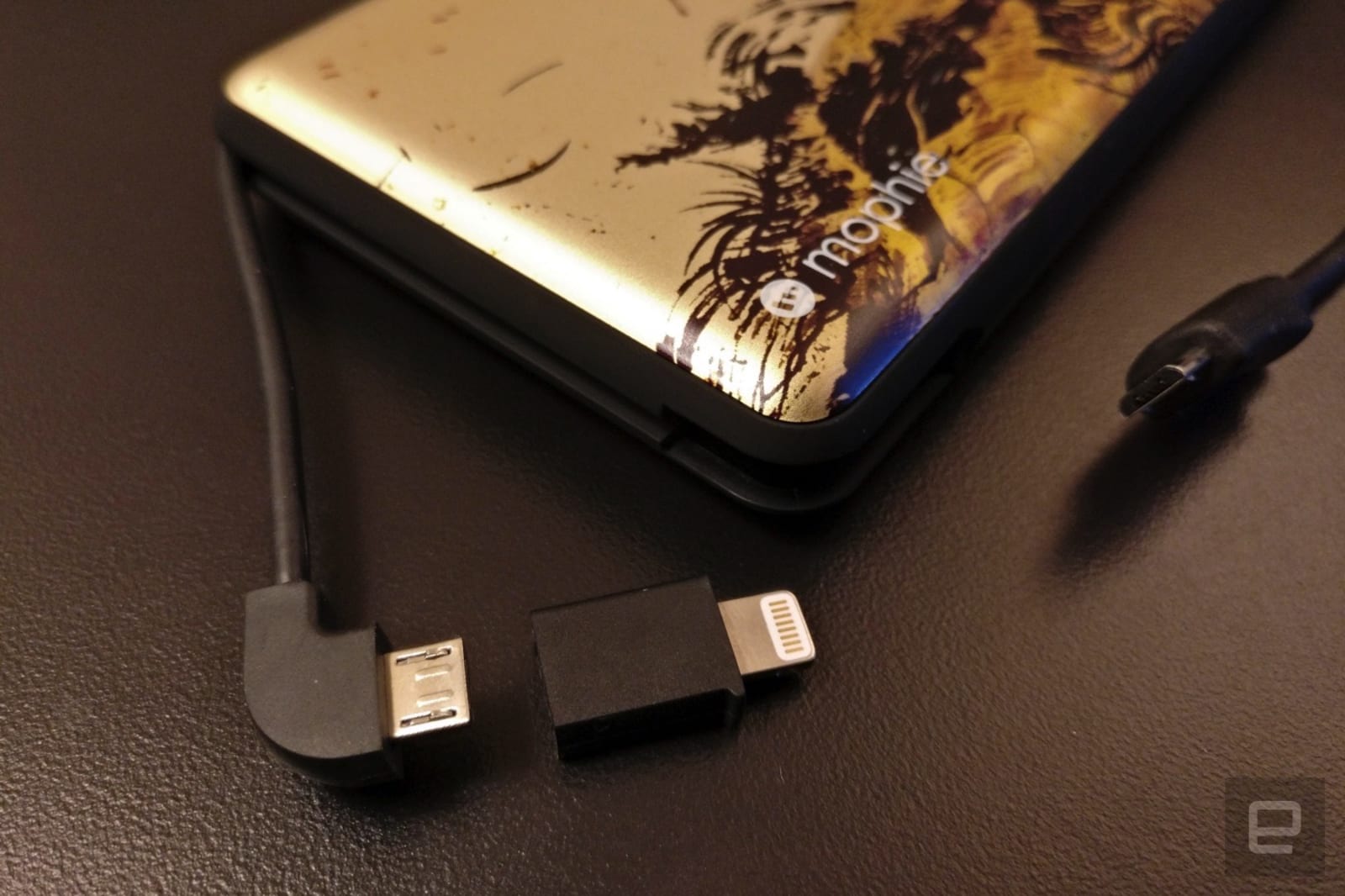
And if that doesn’t work? If you’re otherwise happy with your device or only occasionally run out of juice, consider getting an external battery pack (Anker, Belkin and Mophie are a few of the more common manufacturer options — I use and enjoy a Mophie pack myself). While they’re seldom cheap and can sometimes be bulky, they can easily prove worthwhile if they give you a few extra hours of use on a long day. Just be sure to balance the capacity you want versus the bulk you’re willing to tolerate. As much as you might want to get a gigantic battery that could power your devices through an entire weekend, that behemoth could quickly become a burden when you only need an hour or two at most.
 AIVAnet