


Huawei confirms its next phone is the P20 and will have three cameras
See mooore with AI.
We’ve been hearing leaks and rumors regarding the Huawei P20 for quite some time now, and just a few short days before MWC 2018 begins, Huawei’s sent out a teaser to make sure you don’t forget about its event next month.
There’s been some debate regarding whether the upcoming phone would be branded as the P20 or P11, and while sources of ours confirmed this earlier in the year, this is the first time Huawei’s officially acknowledged the P20 name.
Huawei just confirmed the name of its next flagship: The #HuaweiP20 is officially the #HuaweiP20 pic.twitter.com/HdOAsycA7i
— Alex Dobie (@alexdobie) February 23, 2018
In addition to the name, the teaser also confirms the presence of three rear cameras. Again, while this is something we’ve been anticipating, it’s nice to get confirmation from the horse’s mouth.
Huawei will announce the P20 on March 27 in Paris.
Huawei P20: Rumors, specs, availability, and more!
The most physical PlayStation VR games

So you’re looking for a work out in virtual reality.
If games like Dance Dance Revolution and Just Dance have taught us anything it’s that putting a little pep in your step always leads to a good time. Here we’ve found the best titles for your PlayStation VR (PSVR) system for you to break a sweat in. So if you’re looking for a good in home work out while also having an awesome time in VR, you’ve come to the right place!
Sprint Vector
Not only is it a battle of the fittest, but there is also nifty power-ups to give you the visual experience of a superhero workout. Here you’ll dodge obstacles by moving in the real world with this VR game. Sprint Vector has you racing against your friends to see who can make it across the finish line first. You can get it on Amazon for about $23.99! So, what do you race for? During my own time playing this game I couldn’t stop the fun I was having with the experience of competing in a fun cartoon-like world.
Even when you lose or miss the target of your jump the fast recovery of the mechanics makes this super easy to get back to first place position. So roller blade yourself to the top, or laugh your way into last place! Winning or losing never felt so good!
See on Amazon
Knockout League
It’s not enough to get your workouts by dodging punches in VR or getting the jump on your opponent. You just can’t wrap the experience up until you’ve fist fought a dapper Octopus wearing a monocle and top hat.
You can get this his silly boxing game for $29.99 and it will not only have you moving around to avoid the Knockout punch but also laughing at the situations you’ll find yourself in. So throw on your boxing gloves and get ready for an amazing time with the Knockout League!
See on PlayStation Store
Rec Room
For free on the PlayStation store you can download Rec Room, a series of mini-games for PSVR that are sure to get you breaking a sweat. Whether you choose to sword and board or shoot some laser tag you’re bound to have a pretty stellar time.
Not to mention since Rec Room is cross compatible your VR friends on the computer can play with you from your PlayStation, no PlayStation+ account required!
See on PlayStation Store
VirZOOM
For $399 on Amazon VirZOOM will prove to be the best bike you’ve ever owned. Here you’ll pick a VR mini-game of your choosing so would you like to race cars or ride horses? The bike works just like a gym’s bike equipment except this time you can decide which reality you’d like to be apart of during your actual workout session!
If you’re anything like me you like to be focused on something else while you’re trying to work-out, which makes this so enticing. I always run more miles on the treadmill when I’m listening to my music or watching a TV, and now you can bike more miles by watching the scenery from your VR equipment!
See on Amazon
HoloBall
Here you can take Wall Ball and table tennis to a whole new level. HoloBall places you in a virtual reality room where you are tasked with hitting your ball into targets and not allowing it to be knocked out of the safe zone.
This is definitely a game where you want to make sure you have plenty of open game space to prevent any damage to your room. For $14.99 you’ll get lost in this Tron like scenery and have loads of fun while doing it.
See on PlayStation Store
Sparc
Here we’ll take on many different games at once. Sparc brings you options like room tennis, boxing, or even fencing you so can get moving with a PSVR headset on your face! What is room tennis you ask? Take the mechanics of table tennis and a slightly more narrow space of actual tennis and mesh them together.
The result is a confined room you and an opponent will find yourselves in to see who can get the most points. For $29.99 on Amazon you can get Sparc and challenge your friends to different sports to see who is the best!
See on Amazon
What are Your favorite workout games for PSVR? How do you feel about the titles we mentioned above! Let us know in the comments below!
Treat yourself to some new Anker charging gear for as little as $8
Time to power up.

Anker is a company that many people trust when it comes to charging gear, and these deals make its awesome accessories even more affordable. First up is a wireless charging pad with 12W wall charger for $14.59 when you use the coupon code BEST9911 during checkout. If you want just the charging pad and not the wall charger, you can pick one up for $11.99 when you use the coupon code BEST9811 during checkout. This is a savings of just over $8 and $7 respectively.
If your phone doesn’t support wireless charging and you want something that will get you additional battery life in a hurry, this 18W Anker USB 3.0 wall charger is the way to go. It normally sells for $15.99, but when you check out using coupon code ANKERQC3 you can nab one for $7.99.
You can’t go wrong with any (or all) of these accessories, so be sure to pick them up before the coupon codes expire.
HQ Trivia Android app finally exits beta
Let’s get down to the nitty-gritty.
After becoming a worldwide phenomenon on iOS, HQ Trivia launched on Android as a limited beta last Christmas. The beta was then opened up to anyone that wanted to give HQ a shot on December 31, and just about two months later, HQ Trivia’s Android app is leaving the beta stage for good.

HQ Trivia is now sitting at v1.2.1 on the Play Store, and while there aren’t any big changes to the app now that the beta is over, this will hopefully allow the team at Intermedia Labs to start working on new features and prizes now that all of the major bugs for Android have been worked out.
You can check out our full guide to HQ Trivia if you’re new to the game, but the concept is pretty simple. A live host asks you ten multiple choice questions, and if you get all the way to the end, you win or split the prize. HQ typically gives away $2,500 for each game, but Sunday games have gone up to as much as $25,000.
There’s still some lag with the livestream here and there, but as long as you’ve got a speedy Wi-Fi or data connection, there’s a lot of fun to be had here.
Download: HQ Trivia (free)
How to print from a Chromebook
This is how to print from your Chromebook!
While most of us are living in the cloud, there are still some things that need to be printed out on paper. Printing from a Chromebook is possible, but you will need to have the right equipment and set up.
Buy a Google Cloud-compatible printer

If you don’t already own a printer — or you want to replace your existing model — the best thing you can do is buy a printer that works with Google Cloud Print. Google Cloud Print lets users print from a Chromebook, Windows or Mac computer using the Chrome browser, and iOS and Android devices. You’ll need to tie your Gmail account to the printer before using it for the first time, but after that just keep the printer connected to a network and you can print from any of your devices. Better yet, Google Cloud printers aren’t very expensive: Amazon has models as low as $38.
Even if you have other laptops or desktops, you can still use these printers over Wi-Fi, Ethernet or USB.
See Google Cloud printers at Amazon
Convert an old printer to a Google Cloud printer

Let’s say you have an older printer that you really love. There’s no need to throw it out, but there is some work you’ll need to do to use it as a cloud printer. The printer itself will need to be able to connect over WiFi, so you may need to buy an adapter from your printer’s manufacturer. You’ll also need a desktop computer running Windows or macOS and the Chrome browser to act as your print server.
If this computer is turned off or not connected to WiFi, you won’t be able to print anything to your classic printer. Once you have that set up, visit the Google Cloud Print homepage to set the printer up and connect it to your Google account. The same screen can be used later to manage your printers and print jobs.
Plug in a USB cable — with some major caveats

Chrome OS is super light compared to Windows and macOS, meaning it runs much better on low-powered hardware compared to those operating systems. A major part of this is because Chrome OS was built from the ground up less than ten years ago, while the others have decades of legacy code to enable certain functions. One of these functions is printing, and you can plug a USB printer into a Windows or macOS computer and have it up and running in just a minute.
The same is not true for Chrome OS. If you plug a USB printer into your Chromebook, they just won’t talk to each other. If you have an HP printer, you may be in luck: HP makes an extension that lets Chromebook users print over USB to some HP printers. In my experience, this doesn’t always work out. I’ve tried HP Print for Chrome a few times — both personally and professionally — and it just isn’t stable enough for me to recommend using it. Save yourself the headache and buy a $38 cloud printer.
What say you?
How often do you have to print a document? Let us know down below!
Chromebooks
- The best Chromebooks
- Should you buy a Chromebook?
- Google Play is coming to Chromebooks
- Acer Chromebook 14 review
- Join our Chromebook forums
HTC has reportedly laid off up to 100 employees in the U.S.
The company’s smartphone and VR teams are merging together.
2018’s been a rough year so far for HTC. The company confirmed on February 14 that the president of its smartphone division had officially resigned, and just a little more than a week later, it’s reported that a plethora of HTC employees in the U.S. have been let go.

A source familiar with HTC told this news to Digital Trends, and while it’s still unclear how many employees were terminated, it’s estimated to be anywhere from a few dozen up to “maybe 100” individuals.
The reason for all this? According to a representative from HTC, it’s a result of the company merging its smartphone and VR divisions under one single umbrella.
We have recently brought our smartphone and VR businesses under common leadership in each region. Today, we announced a restructure in North America for the HTC smartphone business that will centralize the reporting structure within the region. In doing so, there have been some employee reductions to align the businesses and empower the teams to share more resources.
What does this mean for HTC’s smartphone business going forward? Probably nothing good. We’re hoping for big things with the U12 later in the year, but with ten quarters of consecutive losses (and counting) and 2,000 of its former hardware employees now working at Google, it’s safe to say that HTC’s seen better days.
HTC’s smartphone president has resigned following ten quarters of losses
Sony’s trying to cash in on Pokémon Go’s success with Ghostbusters World
Coming to Android and iOS at some point in 2018.
If you’ve been itching to catch more virtual monsters and Pokémon Go is starting to get long in the tooth, you’ll soon have a few new options to choose from. In addition to Niantic’s own AR Harry Potter-themed game that’s coming out this year, Sony Pictures Entertainment just announced it’s taking its own stab at this game type with Ghostbusters World.
Ghostbusters World will be available for demo during Mobile World Congress 2018 in Barcelona, Spain, and it’ll feature ghosts from the Ghostbusters movies, TV shows, comics, video games, theme parks, and also introduce original ghosts that are brand-new to the franchise.
Sony Pictures Entertainment Consumer Products, Ghost Corp, FourThirtyThree, and NextAge are all working on the game, and commenting on it, Ivan Reitman (Director and Producer of the original Ghostbusters movie) said:
The Ghostbusters Universe is rich in characters and Ghostbusters World is the perfect medium to get to know these characters in a whole new dimension.
Ghostbusters World will be available on Android and iOS when it’s released this year, and more information will be unveiled at the Game Developers Conference in March.
Google takes ARCore mainstream, brings Google Lens to hundreds more phones
No, postcards won’t solve our Russian interference problem
We just learned all the ways Russian propaganda agents fooled American social media companies, thanks to the recent indictments of Russian nationals by Team Mueller.
After years of these companies forcing us to adhere to their contrived “community safety” policies and made-up rules to police our identities (which they swore was for our own good), their failures are rather spectacular.
Russia’s low-rent spies — I mean trolls — leveraged every hypocrisy (like “real names” policies), weakness (tolerance of hate groups, impersonation, false information) and flouting of laws (political advertising disclosures) inherent in America’s biggest social media companies to do the unimaginable: divide and conquer US democracy.
If you missed it, the Internet Research Agency indictment outlined an operation that ran hundreds (if not tens of thousands) of fake accounts, impersonated the GOP and civil rights groups, stole identities from actual US citizens to set up bank accounts, PayPal accounts and driver’s licenses, and more.

Finding identities to steal was easy. Fooling social media companies desperate to make ad revenue at any cost was even easier.
Some of the reporting that’s come out of it is stellar. I’m thinking of CNNMoney’s superb foray into the fray, interviewing American citizens who, through Facebook pages and social media contacts, inadvertently did work for Russian operatives. Sometimes paid work.
Catching Florine Gruen Goldfarb, who runs the Team Trump Broward County Facebook page, CNN recorded the exact moment her disbelief dug in its heels and insisted that, despite the evidence, no, this couldn’t be true. For those who study belief systems and cults, and how their beliefs double down as a coping mechanism when shown clear evidence that their beliefs are false, it was an exquisite example.
Anyway, as usual, techies and tech companies came out of the woodwork with overly specific solutions.
Facebook looked at its burning forest and focused on one tree: the ads. In all of its (alleged) wisdom and leadership about preventing harm, the company told the press it would, like, totally send people postcards in the mail “to verify the identities and locations of anyone hoping to buy ads related to federal-level candidates.”
It’s an unusually weak response, and odd in light of an eight-piece Twitter thread from Facebook’s vice president for ads, Rob Goldman, insisting that the Russian ads were not meant to sway the election. Which actually, according to the very indictment he cited, was incorrect. Goldman, an executive steering leadership at one of the world’s most valuable advertising and influence properties, was one step past the disbelief of Florine Gruen Goldfarb and well into the vindication phase of denial, seeing evidence that absolved him and his company of responsibility — when there was no such evidence.
Others freaked out about the whole “on the internet no one knows you’re a dog” quandary we’ve been in for decades, and trotted out some oldies but goodies from the “real names” myth and legend files. Some suggested that “real names” or some kind of Internet ID would help.
Digital ID would help. With Digital ID, issued by states to residents, we could require big social to accept Digital ID and software could be written that performs digital signatures on each post, with non-repudiation as a result.
Alas, techies are libertarians so it festers
— Jeff Wilson (@jeffwilsontech) February 18, 2018
We’ve been down the “real names” road before. The policy disproportionately affects — with malice — pretty much everyone but straight white cis dudes. LGBTQ people are exposed to harm by outing, the policy is used to target people of color, and we learned from a National Network to End Domestic Violence (NNEDV) report that the policy puts at least 23 million women (domestic violence victims, comprising 1 in 4 women) directly in the path of violence. As for deterring abuse, empirical evidence has shown that “real names” doesn’t work.
Online ID, “real” or “authentic names” is a cheap fix, one that really isn’t a fix at all. It’s just another forest-for-the-trees moment. A way to cling to the belief that we can somehow automate this Russian problem and solve it with tech.
At any rate, when you’re sending postcards to shore up your failed “real names” policy — or carving up which parts of a federal indictment you’re going to respond to selectively — these are clearly times for desperate measures.
(Incidentally, Facebook’s “real names” policy is now illegal in Germany. You know, the country that wants to do everything it can to not repeat the whole Nazi thing.)
Of course, all of this sure would be easier to figure out if America’s social media companies were transparent or straightforward with us about what’s really going on behind their virtual closed doors. We’ve been here before, too. Like with Facebook sabotaging its own efforts to combat “fake news” on the platform by refusing to share information with the very people it asked to help with the problem.
Maybe — for a start — social media companies like Facebook could follow US laws (like around political advertising). They could take a page from Medium and boot alt-right trolls, and actually purge those bot accounts. They could stop giving space to Sandy Hook hoax pages and their peddlers, stop letting death threats and racist abuse run rampant, and stop enabling neo-Nazis by protecting Holocaust denial as free speech — if only because millions died and we kind of decided that one a long time ago.
So much of this, if not all of it, has revolved around each company’s unwillingness to admit that any of this is happening at every stage. Every day, a denial. A PR dodge. Clinging to the futile belief that none of these are real problems doing actual harm to real people; they’re just PR problems. The only bad people are the ones who don’t follow our rules.
Because we’re seasoned internet cynics, we “know” it’s because the companies are playing a shell game with our lives, using their own truths, data and greed.
But perhaps for these companies, and their leaders, engineers and various teams, some truths are just too much to bear.

We need only look into the faces of men who won’t stop taking millions from the NRA to know what that looks like.
Images: gorodenkoff via Getty Images (Hackers); POOL New / Reuters (Marco Rubio)
YouTube reportedly plans to spend ‘hundreds of millions’ on Red originals
While Facebook and Netflix are (reportedly) spending billions on new programming, YouTube is said to be holding its investments at current levels. Google’s video wing is only spending “a few hundred million” on original shows for Red this year according to Bloomberg’s sources. Other details are scant, but unlike the competition, YouTube also has a live TV service that’s expanding in reach. Google could just be taking a “wait and see” approach to its investments this year. There’s also the chance that the reticence to invest stems from recent black eyes. Its biggest stars have been in the headlines pretty frequently lately and not for flattering reasons.
YouTube put a hold on Logan Paul’s projects for Red in January after shooting video in Japan’s “suicide forest,” as one example. And last year the company did similar to PewDiePie over the top-grossing star’s videos featuring anti-Semitic messages. Even if it isn’t scaling back investments, YouTube may want to consider being more selective with its funds given recent events.
Source: Bloomberg
The best smart speakers for music fans
If you’re a music fan, the first wave of smart speakers was probably a disappointment. While Alexa and Google Assistant have definitively proven they have a place in the home, the first Echo and Google Home devices were unimpressive when it came to actually playing music. They did the job in a pinch, and being able to command Spotify with your voice is a killer feature, but many longed for better-quality audio.
Fortunately, that call has been answered. In the past six months, Sonos, Google and Apple have all released music-first speakers with voice assistants built in. There’s no doubt that the Google Home Max, Alexa-powered Sonos One and Apple HomePod all sound far better than just about any other voice-powered speakers out there. If you value audio quality above all else (and have about $400 to spend), what’s the right smart speaker for you? Let’s break it down.
How we tested
For the purposes of this story, we compared a single HomePod ($350), two Sonos One speakers ($350 total) paired in stereo and a single Google Home Max ($399). While the prices are in the same range, you’ll get different speaker components with each set. Each Sonos One includes a single tweeter and one mid-woofer to cover both mid-range frequencies and bass. The Home Max answers with two tweeters and two large 4.5-inch woofers. The HomePod has perhaps the most unusual arrangement: seven total tweeters (each with its own amplifier), along with a single woofer that points straight up.
To compare the speakers, we set them up in the same room, made sure each was running the most current version of its software and, in the case of the Sonos One, ran the TruePlay tuning software, which adjusts audio quality for the room and placement of the speakers. The HomePod and Home Max both tune themselves automatically; there’s no way to control that part of the audio equation. In all cases, we left EQ settings on default. Finally, we used an Apple Music subscription for the HomePod and Sonos One, while Google Play Music provided audio to the Home Max. Song choices trended toward modern rock, indie and pop, although we sampled songs from every decade since the 1960s.
Lastly, although I did most of the listening, a number of other Engadget editors lent their ears and feedback to this review.
Audio quality
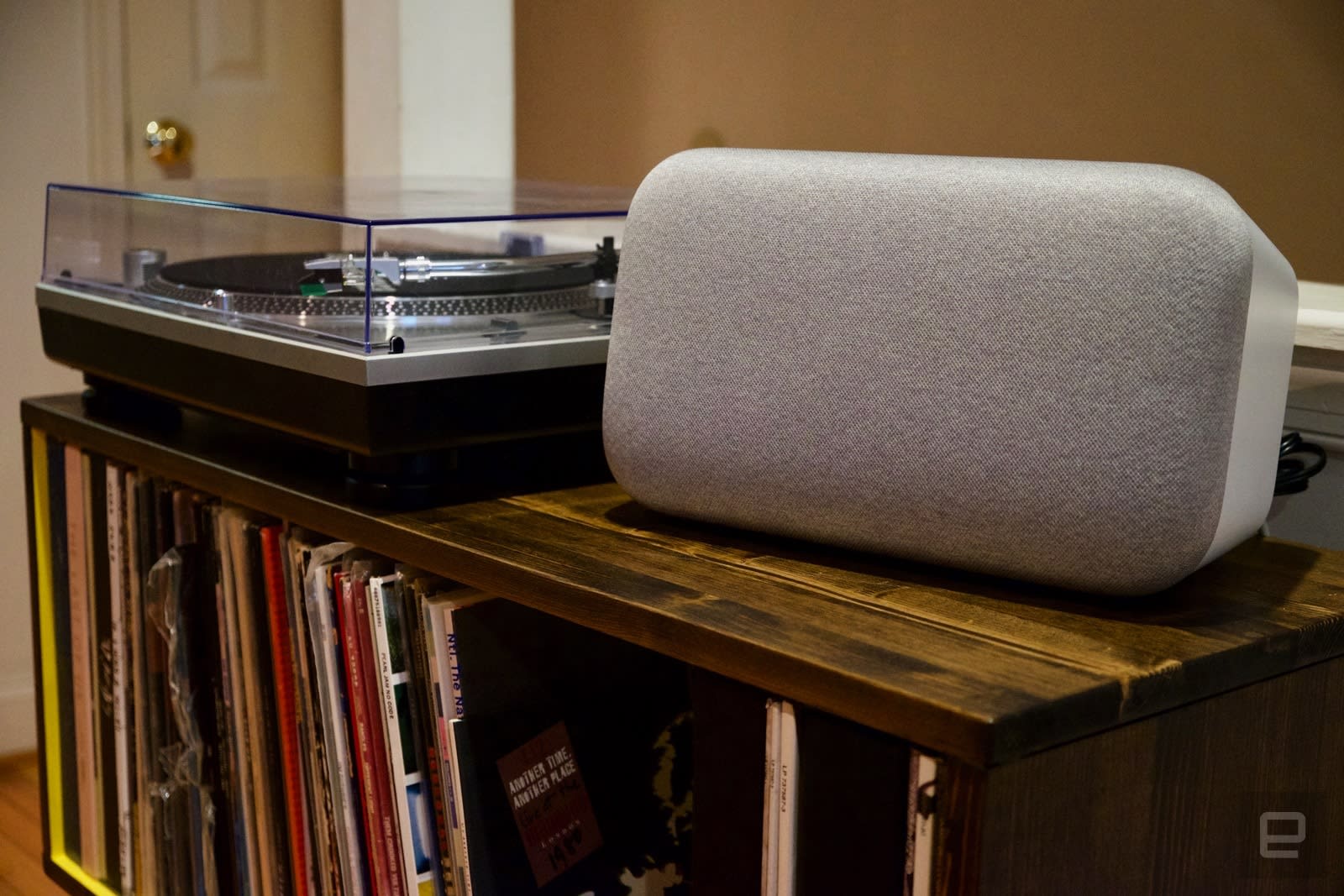
There wasn’t a clear, unequivocal winner among the three speakers tested; rather, each speaker showed its prowess in different situations. Chris Ip, our features editor, did a comparison listen between all three speakers and preferred the HomePod’s rendition of Beyoncé’s “Countdown.” Specifically, Ip is a fan of prominent bass, and the HomePod’s woofer elevated it over the Sonos One. The Home Max also provides strong bass, but it didn’t reproduce mids and highs with the same precision.
That was the story across the board with the Home Max. Its strengths come from two places: bass and volume. At louder volumes (think 75 percent or higher), it sounds better than a pair of Sonos One speakers; the lack of bass means the One ends up sounding shriller than the Home Max when you crank it up. But both the HomePod and Sonos One offered better overall clarity across the range of songs we tested. The bass doesn’t feel as well regulated on the Home Max; while the HomePod does a great job of adjusting bass levels to match the room and the speaker’s overall volume level, the Max’s overall sonic picture is muddier and less distinct than the competition.
As mentioned, the Sonos One is the speaker most lacking in bass here; pairing two of them together helps a bit, but it just doesn’t reproduce the physical, table-rattling, chest-thumping sounds you can coax from the Home Max and HomePod. However, spending $350 on a pair of Sonos One speakers opens up a number of audio experiences that just aren’t possible with the other speakers we looked at. By virtue of being two separate speakers you can place anywhere you want, the pair of Ones naturally did a far better job of reproducing a wide stereo soundstage. The Home Max and Home Pod do a better job of this than they should, but it’s still not the same as having true stereo separation. And if you’re more interested in multi-room audio, two One speakers will give you that option for a lot less money than getting multiple Home Maxes or HomePods (which don’t even have stereo pairing or multi-room audio capabilities yet, though Apple says its speaker will this year).

There wasn’t a definitive winner between the paired Sonos One speakers and the HomePod. When listening to Metallica’s “Master of Puppets,” I preferred how the HomePod added a nice low end to the frantically chugging guitars; the One felt like it lacked the power needed to make the song hit home, particularly at higher volumes. But Sonos did a great job at reproducing the psychedelic soundscape of Pink Floyd’s “Shine On You Crazy Diamond.” For plenty of other songs, it was truly difficult to pick a winner. Executive editor Dana Wollman did a blind test and couldn’t decide which speaker did a better job playing back John Coltrane’s version of “My Favorite Things,” while senior editor Kris Naudus was similarly torn picking between the HomePod and Sonos when listening to “Cherry Tulips” by Headlights.
Along with senior editor Chris Velazco (who wrote our HomePod review), I spent hours bouncing songs back and forth between the speakers — everything from the swirling trip of Beck’s “Colors” and the continually shifting soundscape of the Radiohead classic “Paranoid Android” to Carly Rae Jepsen’s over-the-top hit “Cut to the Feeling” and the electronic glitches of “Such Great Heights” by the Postal Service. Throughout our listening, we were never able to fully write off either the HomePod or the Sonos One.
Ultimately, though, I give a slight edge to the HomePod — it has significantly better bass reproduction, but I wouldn’t describe it as an overly bass-heavy speaker. It just makes it a lot easier to hear every aspect of the song the way it was intended to be heard, bass included. The Sonos One does a lot with lesser specs, and pairing the speakers up in stereo makes for a truly great listening experience. But to my ears, the HomePod more often had the edge.
Everything else

If music were our only focus, we’d be done — but even if sound quality is your foremost concern, there are still other things to consider before making a decision. Specifically, each comes with a voice assistant that can be used to control audio playback, but Siri, the Google Assistant and Alexa can do much more than that. Additionally, each speaker supports different music services in different ways, so that’s another thing to take into account.
Plenty has been said about Siri’s limitations as a personal assistant on the HomePod. Ditto for the device’s reliance on Apple Music. But I think Siri holds its own in a number of situations, specifically finding music. Telling it to just play some music brings up a station populated primarily with music in your library, ensuring you start off with tunes you’ll recognize and enjoy. Siri does a good job of fielding queries like “Play me some rock music from the ’70s,” “Play popular songs from the last decade” or something as simple as “Play me new music I’ll like.”
Initially, the Google Assistant did a horrible job of answering the same questions on the Home Max using Google Play Music. When I asked it to play rock music from the ’60s, it played a compilation album called Rock and Roll Instrumentals: 50’s–60’s that was populated with terrible covers of songs from that period. Eventually, I figured out that I could ask it to play Google’s custom radio stations — just saying something like “Play a station featuring songs from the ’80s” would do the trick. Most users aren’t going to realize that, initially.
Combined, Alexa and Spotify did a solid job answering such requests by pulling up playlists from the service’s massive collection. But Siri still gets the edge with music commands; it add songs to playlists or your library as a whole, and you can tell it that you “like” whatever song is playing to improve Apple Music’s recommendations. Neither the Google Assistant nor Alexa was able to add songs to specific playlists or my music library for either service, though you can tell Google to add a thumbs-up or thumbs-down rating to songs while using Play Music. It’s possible Amazon Music is better supported through Alexa, but far more people are likely to use Alexa and the Sonos One with Spotify.
Siri’s advantage dwindled once we moved on to other tasks. Overall, the Google Assistant was best at answering general knowledge queries, and it also does a better job of recognizing context in follow-up questions. For example, I can ask who the starting quarterback for the New England Patriots is and then ask where “he” went to college, and it’ll know I’m still talking about Tom Brady. Siri and Alexa could also answer these questions, but they didn’t have as much context awareness.

Setting alarms, adding reminders and checking the weather all worked equally well, but Siri falls down when setting timers, because you can set only one at a time. Siri also can’t add things to a calendar, even though it can do so on iOS devices. Both the Google Assistant and Alexa support calendars, but Alexa ultimately wins because it supports multiple Google calendars (including Google’s own G Suite) as well as Microsoft Outlook and Apple iCloud. Strangely enough, Siri is the only assistant that can take notes; it adds them to the Mac/iOS notes app.
Google wins when it comes to using the Home Max as a speakerphone; you can initiate calls with anyone in your Google address book just by asking. The HomePod can take only calls that you start on an iPhone, while Alexa on the Sonos One can’t handle calls or messages at all; those features are restricted to Amazon’s own hardware for now. Google can’t send text messages either, but Siri can. Of course, all of these Siri features are limited to one account, and anyone with access to the speaker can send messages or have the speaker read your texts back to them. Apple really needs to implement some better security features around that, and quickly.
All three assistants work with a pretty huge range of smart home devices. If you’re thinking of using these devices to control lights, thermostats and more, just do the research first and make sure they’re supported by Alexa, Google Assistant or Apple’s HomeKit. But at this point, just about all the major players work across all three platforms.

Ultimately, Siri’s issues weren’t entirely a deal-breaker for me; I don’t have any smart home devices yet, and I don’t use voice assistants for much beyond basic interactions. But it’s hard to ignore Google and Amazon’s lead here. And if you can’t choose which virtual servant you prefer, Sonos has promised it’ll add support for Google Assistant on the One. Right now, Alexa is the only option, but if you prefer Google you’ll be able to just switch over. Additionally, the One will work with AirPlay 2 when Apple releases it. So while you can’t currently control Apple Music on the Sonos One with your voice, AirPlay 2 should enable owners to talk to Siri on an iPhone to play music over the One.
While the Sonos/Alexa combo supports only a handful of music services with voice control, Sonos’ own controller app lets you use virtually any music service you can think of. With the Home Max, you’re limited to a small set of services with voice control; after that, you can send music via Google’s Cast technology through supported apps, or just use Bluetooth or a 3.5mm audio cable. Finally, the HomePod works with Apple Music or iTunes purchases almost exclusively, as we’ve all heard. However, in all cases, you can use basic voice commands to get some additional functionality out of services that aren’t supported by these speakers.
You can AirPlay songs from Spotify and other services to the HomePod, and then use voice commands to skip tracks, play, pause and change volume. With the Sonos One, you can start playing songs from any service using the controller app on your phone or computer, and then use Alexa voice commands to play, pause, adjust the volume or skip tracks in the queue. And the Home Max offers the same commands when you’re casting audio from other apps.
Wrap-up

There’s a lot to like about all of these speakers, even Apple’s locked-in HomePod. For most potential buyers, any of these will likely be a huge upgrade over using your laptop, pack-in headphones or a battery-powered Bluetooth speaker to listen to tunes. Of the three options we tested, a pair of Sonos One speakers is the best choice for most people. Despite a relative lack of bass, the One consistently reproduces songs clearly, and having two speakers makes for a much better stereo experience. I personally prefer the Google Assistant, but Alexa is a strong voice option. And besides, the One will support Google before long anyway.
That said, if you’re a fan of bass, both the HomePod and the Home Max are worth considering. If you’re deep in the Google ecosystem and use Google’s own services for music, the Home Max won’t disappoint. And the millions of people paying for Apple Music will appreciate the HomePod’s excellent fidelity and Siri’s general smarts when it comes to finding music, even if Siri isn’t as good an assistant as Google and Alexa.
But for the millions of Spotify users who want to talk to their speakers and get excellent audio quality, the Sonos One delivers. It sounds great now, and Sonos promises to keep improving it over time. Whether that’s more music services or the forthcoming Google Assistant support, buyers should feel confident the speaker will actually get better over time. And they’re a great first piece in a bigger, multi-room audio setup as well. A pair of Sonos Ones should delight all but the most die-hard Apple or Google fans — and even those people would probably find a lot to like with these speakers.
 AIVAnet