


Google wants to peer into your past to predict your future browsing habits
In a patent filing revealed on February 1, Google outlined a system that aims to shave precious seconds off of your everyday web browsing. By looking into your past behaviors, Google’s proposed system for “predicting user navigation events” would begin pre-loading links it thinks you’ll click on. This doesn’t sound new, Google has been doing search prediction ever since its early days, but the method here is novel.
Rather than just pre-loading the first couple search results, or guessing which URL you’re about to type, the system Google outlines in this patent filing would leverage your previous behavior — including cursor location, browsing habits, history, context clues, all sorts of minutiae all poured into an algorithm to determine the probability that you’ll click certain links. The system could even start pre-fetching a website when you start moving your cursor toward one link or another.
“The methods describe a variety of manners of predicting the next navigation event, including examining individual and aggregate historical data, text entry prediction, and cursor input monitoring,” the patent reads.
Essentially it’s a new way to do something Google’s been doing since the very beginning — trying to predict your behavior. If the search engine, or your browser, has a better understanding of your browsing habits it’s in a better position to not just serve you relevant results, but start pre-rendering websites you’ll want to visit. Even though today’s internet speeds make web browsing near instantaneous, Google claims that even a slight boost in page-loading speed could mean regaining thousands of productivity hours each year.
“When a user selects a link on a page or enters a URL in a text field, there is a delay while data is requested from the host, sent to the client, and rendered in the browser,” the patent reads. “The user is typically idle while waiting for their requested site to load. While high-speed internet access may limit this delay to a few seconds, even this short delay can add up to thousands of man-hours of lost productivity each year.”
Of course, it also means Google will have yet another tool to analyze and predict your behavior based on the data the search giant collects on all of its users, like the data collected by Google Assistant. At least in this case, that data will only be used to make your browsing experience a bit quicker — for now that is.
Editors’ Recommendations
- How to clear cookies in your browser
- The best Google Chrome extensions to revolutionize your workday
- How to restore your Nintendo Switch to factory settings
- 20 Netflix tips and tricks to make your streaming experience even better
- Netatmo wants you to control your home via Facebook Messenger, too
How to delete voice recordings from Alexa-, Google Assistant-enabled devices
With the rapid growth of technology over the last several years, privacy has become a hot-button issue in terms of security. Simply put, the idea that an Orwellian “Big Brother” presence in the government or a large corporation can listen in on our daily conversations and monitor our online happenings doesn’t sit well for many.
All isn’t lost, however; there are safeguards in place that, at the very least, can semi-protect us from the government’s prying eyes. These safeguards are baked into a variety of software, allowing you to quickly clear your search history from your browser or your interactions with a host of smart speakers.
Both Google Assistant– and Alexa-enabled devices record your interactions with them, and then upload these exchanges to their respective databases in the cloud. This may be worrisome for anyone who chooses to use these types of devices, but the good news is that these recordings are easy to delete.
How to delete recordings from Alexa-enabled devices
To delete the recordings from an Alexa-enabled device, launch your favorite browser from your desktop and navigate to amazon.com/mycd. It’s important to use a desktop machine when doing so, since the deletion process doesn’t work as smoothly on mobile devices.
Once there, follow the steps below:
Log in with the Amazon account your Alexa device is linked to.
Click the Content and devices tab in the upper-right corner.
Click the Your Devices tab in the center of the page.
Click the three dots beside the device you want to clear history for.
Click Manage voice recordings.
Read the disclaimer and click the yellow Delete button.
Repeat these steps as necessary if you have other Alexa-enabled devices that you want to delete the recordings for.
How to delete recordings from Google Assistant-enabled devices
For Google Assistant-enabled devices, the deletion process is just as painless. It’s similar to the process you would use for an Alexa-compatible device, and as such, it’s crucial that you use a desktop computer.
To delete Google Assistant recordings, launch your favorite browser from your desktop and navigate to myactivity.google.com.
Once there, follow the steps below:
Click Delete activity by on the left side of the screen.
Specify a time frame. Selecting All time will allow you to delete all activity.
Select Voice and audio from the resulting drop-down menu.
Click the Delete button located below the date range.
Click Delete in the pop-up window to confirm your decision.
Following these steps for either Alexa or Google Assistant-enabled devices will allow you to clear your saved recordings and give you an extra layer of privacy.Who doesn’t want that?
David Cogen — a regular contributor here at Digital Trends — runs TheUnlockr, a popular tech blog that focuses on tech news, tips and tricks, and the latest tech. You can also find him on Twitter discussing the latest tech trends.
Editors’ Recommendations
- Here’s how to clear your browsing history — no questions asked
- What can’t it do? The top Echo tips and tricks to use around the house
- Here are 9 hot deals on a range of smart home devices
- How to clear cookies in your browser
- Heat up the oven! Here’s how to enable cookies in your favorite web browser
Apple beats revenue forecast in first quarter, but iPhone sales took a hit
Despite reports that Apple hadn’t sold as many iPhone X units as it may have hoped, the iPhone and iPad maker has beaten its revenue forecast for the fiscal first quarter of 2018. The company raked in a massive $88.4 billion in revenue, topping the forecast of between $84 billion and $87 billion.
Apple’s fiscal first quarter of 2018 includes the last three months of the 2017 calendar year.
According to the report from Apple, it sold 77.3 million iPhones, 13.2 iPads, and 5.1 million Macs, which drove an increase in revenue compared to the same quarter the previous year, when it earned $78.4 billion.
Perhaps even more important is the fact that Apple has reported an active install base of 1.3 billion devices. In other words, there are 1.3 billion Apple devices that are regularly used by customers. That, of course, doesn’t mean that 1.3 billion people use Apple devices — many Apple users own multiple devices. Some even probably own an iPhone, iPad, Mac, and Apple TV.
Reports of lackluster iPhone sales have some weight — though lackluster is hardly a word many would use to describe 77.3 million units sold. The company reported iPhone sales of 78.3 million units in Q1 2017, so while Q1 2018 was better for overall revenue, the fact is that the company sold fewer iPhones during the most recent quarter. It will be interesting to see how the company responds. Reports indicate that the company could launch as many as three phones with iPhone X-type designs in 2018.
This year could also be interesting for the company as it’s gearing up to launch the HomePod, its Siri-powered smart speaker. It’s also rumored to be prepping a new Mac Pro, though it’s unlikely the Mac Pro will have a huge impact on its overall revenue.
Still, despite the slip in iPhone unit sales, Apple says that Q1 2018 was its biggest quarter ever — and that’s no small feat. Not only that, but the iPhone is still provides Apple’s biggest revenue stream by far.
“We’re thrilled to report the biggest quarter in Apple’s history, with broad-based growth that included the highest revenue ever from a new iPhone lineup,” said Apple CEO Tim Cook in a statement.
Editors’ Recommendations
- LG’s mobile division reports big losses in fourth quarter
- Report reveals the iPhone 8 outsold the flagship iPhone X in the U.S. during Q4
- Apple has the world’s two top-selling phones, but how well is iPhone 8 selling?
- Apple vs. Qualcomm: Everything you need to know
- Apple got a bummer of a Christmas present, cuts iPhone X expectations
Google says device shipments more than doubled in 2017, passed $100 billion in annual revenue
Google made a heap of cash in 2017.
Google is huge, and as you’d expect, pulls in money from a lot of different sources. The company just shared its latest financial report that showcases numbers for its performance in Q4 and all of 2017, and there’s a mixture of growth and loss.

Looking at Google’s total revenue in 2017, the company generated $110.9 billion – an increase of 23% compared to its total earnings in 2016. As for Q4 alone, revenues of $32.3 billion allowed for a year-over-year increase of 24% compared to Q4 2016. Also, of that $32.3 billion in quarterly revenue, a whopping $27.27 billion came from ad revenue. But due to a one-time $9.9 billion (yes, billion) tax charge on foreign earnings resulting from the recent tax bill in the U.S., the company actually lost just over $3 billion in the quarter.
Google hardware sales and Play Store revenue are way up year-over-year.
Google’s hardware sales – such as the Pixel 2 and 2 XL, Home Mini, etc. – are grouped under a category called “Other Revenues.” Along with hardware, this also includes sales from the Play Store and Google’s enterprise ventures. Google reported revenue of $4.69 billion, which was up 38% compared to a year earlier. Google didn’t share the number of phones it sold, but Google in its earnings call, CEO Sundar Pichai said device shipments more than doubled year-over-year. It also sold “tens of millions” of Chromecasts, Chromebooks, and Google Home speakers.
On the hardware front, 2018 should be an interesting year for Google. With the company’s purchase of HTC’s top hardware talent now completed, expectations are high for the Pixel 3 and whatever other gadgets we end up getting.
Elsewhere in the earnings announcement, Alphabet announced that John L. Hennessy will be the new Chair of the Board at Alphabet, replacing Eric Schmidt, who announced his change of role at the end of December 2017. The Board also announced that Alphabet will be buying back over $8.5 billion in Class C stock, effectively increasing the value of remaining shares for those who hold them.
Google Pixel 2 and Pixel 2 XL
- Pixel 2 FAQ: Everything you need to know!
- Google Pixel 2 and 2 XL review: The new standard
- Google Pixel 2 specs
- Google Pixel 2 vs. Pixel 2 XL: What’s the difference?
- Join our Pixel 2 forums
Best Buy
Verizon
Google Store
Project Fi
Snapchat’s in-app Snap Store peddles memetastic merch
It’s no secret that Snapchat has struggled a bit when it comes to attracting users and generating revenue. And earlier this month, reports surfaced that Snap had laid off 22 employees and consolidated its content operations. Now, as TechCrunch reports, Snapchat has launched an in-app Snap Store, and it could be a sign of where the company will seek revenue going forward.
Currently, there are five items for sale, a dancing hot dog plush toy, a hat, two sweatshirts and a t-shirt. But according to the store itself, items will come and go, so if you’re really into that dog lens t-shirt, you should grab it when you see it.
Snapchat has sold things before — last October, the company sold a dancing hotdog costume based on its filter and of course there’s Spectacles. But this is a bit different, as Snapchat is now selling these things directly through its app rather than through Amazon or other retail partners. Snapchat merch probably isn’t going to save the company (how many people are really going to buy a $50 Winkface sweatshirt?), but it also probably isn’t meant to. As TechCrunch notes, if the company can show that this sort of storefront can work well and engage its user base, other brands may join in. And if other brands’ stores are successful, Snapchat could generate some revenue by charging for the service. However, only time will tell if this will be a successful venture or another flop like Spectacles.
You can get to the Snap Store through the Discover section of the app or head here for the Snapcode. The next round of merch drops on February 8th.
Via: TechCrunch
YouTube’s live TV service is now available on Apple TV
Looks like Google is making good on its promise to bring its cord-cutting alternative to more popular platforms. YouTube TV is now available for Apple TVs, after having hit Roku devices earlier today. The service is available in almost 100 different metro areas, and can also be downloaded for Chromecast, Android TV, Xbox One and newer Samsung and LG TVs. It’s taken almost a full year since Google announced the service for this to happen.
As a refresher, YouTube TV lets subscribers watch more than 40 channels live, with options like CBS, Fox, NBC, CBS, USA and FX. Sports fans will appreciate the 10 available sports options that include ESPN, Fox Sports and NBCSN. You can also add on Showtime for an extra fee on top of the monthly $35 cost. That covers up to six users, which roughly works out to an affordable $6 per person.
You’ll also get unlimited cloud DVR storage and will be able to search for TV shows just like you would on Google the search engine.
Now that YouTube TV is available on all the important devices, perhaps Google can focus on adding more partners to the service. You can check out the full list of available channels here.
Source: YouTube TV (Twitter)
‘Diablo’ creator’s next game is a 2D dungeon crawler
If you lost hours and hours delving beneath Tristram in the original Diablo, you have David Brevik to thank, who created and programmed the classic action RPG. The veteran developer went on to co-found and head the studio that became Blizzard North, which made the even-more-successful Diablo II. After years consulting and leading studio Gazillion Entertainment, Brevik is returning to dungeons and lurking horrors in his next game It Lurks Below, which he created entirely himself and will launch later this year.
Like Diablo, It Lurks Below is a hybrid adventure game mixing class-based RPG elements with live action…and a lot of loot. Brevik even built the engine bringing the game’s 2D pixel-block look to life. The game also has digging and construction mechanics — literal delving — in the vein of Minecraft and Terraria, which the veteran developer apparently adores, but wanted to put his own spin on.
“I wanted more of a point to a lot of those games,” Brevik told Polygon. “I wanted to make an RPG, with classes and leveling up, random items, where you get more and more powerful as you go down into the core of the world and fight baddies.”
Before it launches on Steam at an unspecified date later in 2018, players will be able to get an early look at It Lurks Below through closed betas. The first, happening this weekend, has already filled its 200 slots, but others will come — and if you really can’t wait, you can watch Brevik stream his new gem on the Twitch account of his personal studio Graybeard Games.
Source: Polygon
Nintendo Labo hands-on: Cardboard has never been this fun
Leave it up to Nintendo to get us excited over cardboard. Labo, its DIY Switch-powered cardboard accessory line, seemed like the purist encapsulation of Nintendo’s philosophy: “Play” is far more important than having the best graphics. At first glance, Labo seems like a unique mixture of digital and analog gaming that kids will likely love. And based on my brief time with a few Labo kits today, it’s something adults will likely have a blast with as well.
Entering the Labo demo area gave me flashbacks to elementary school. A name card pointed me to my assigned table, which I shared with another reporter. All of the desks were arranged around the edges of the room, which gave Nintendo’s representatives, decked out in bright pink sport coats, plenty of room to show off the accessories. On the side of my desk lay a tray filled with markers, crayons and snacks, all of which really made me question my adulthood.

We started out by building the RC Car Toy-con, which looks more like a vibrating bug than any sort of vehicle. My partner and I punched out the required parts from the sheets of cardboard, then followed along with the Switch’s instructions for constructing the toy. The interface was a bit confusing at first — for some reason, you have to hold down the touchscreen buttons to move the tutorial forwards and backwards, instead of just tapping them. Once we figured that out, though, it was mostly smooth sailing.
The Labo app clearly lays out what you need to be working on, and how exactly you need to fold specific creases to construct each accessory. You can also use the Switch’s touchscreen to move the on-screen diagram, letting you see different angles in case you’re having trouble. My deskmate and I had our RC Cars constructed within 15 minutes, and we finished them off by sliding on our Joy-cons. I was honestly surprised by just how well they fit into a few cardboard slots.

After that, we attached a cardboard antenna to the Switch tablet (no, the antenna doesn’t actually do anything), and used the Labo app to buzz our RC Cars around the table. It’s not exactly a complex toy — it relies on the Joy-con’s HD rumble feature to move, and the app lets you control the intensity and direction of its vibrations. Still, it’s a quick and helpful introduction to Nintendo’s vision for Labo.
Completing the RC Car was also useful morale booster before we were confronted with a more daunting project: the Labo Fishing Rod. It’s significantly more complex, since it involves moving parts. All of its components are spread across six cardboard sheets, and they number in the dozens. My partner and I split up the work of punching out the required pieces, and we took turns putting it all together.
First up, we had to construct the three extending portions of the rod, adorably named “Papa bear,” “Mama bear,” and “baby bear.” Furious cardboard creasing and folding ensued, and we had to pay extra attention to the instructions on the Switch. Some components were very large, and we had to make sure the folds and notches were all in the right place. At one point, we ended up building the “baby bear” part instead of “mama bear” (they look very similar, okay?!). We were still able to finish the piece properly, without precise instructions from the app, since we started to understand Nintendo’s folding logic.

Unfortunately, we weren’t able to finish the Rods in the 50 minutes Nintendo gave us. I was looking forward to seeing how the reeling mechanism gets assembled, but I guess I’ll have to wait for the Labo’s launch. Nintendo took pity on us, though, and let us play with some finished Fishing Rods. They didn’t exactly feel sturdy — cardboard can only do so much — but I was impressed by how natural the reeling felt.
After we failed at construction, Nintendo moved us along to a room filled with completed Labo Toy-cons. I hopped on a child-sized bike — feeling even more ridiculous as kids plopped down alongside me — and picked up the Motorbike accessory. It’s basically just a pair of handlebars, with space for a Joy-con in each, and a nook for the Switch tablet in the middle. It also has a long base, which rests against your thigh or stomach to balance the entire contraption as your playing.

Devindra Hardawar/AOL
For the most part, I was impressed by how tactile the Motorbike accessory felt in its accompanying Switch game (which comes with the $70 Labo variety pack). I started the engine by hitting a cardboard trigger right under my thumb, and revved up by twisting the right handlebar, as you would an actual motorcycle. It took me a few minutes to get a hang of the motion controls, but it wasn’t too long before I was drifting and passing by my opponents. (My kingdom for a Switch Excitebike game that took advantage of this.)
Devindra Hardawar/AOL
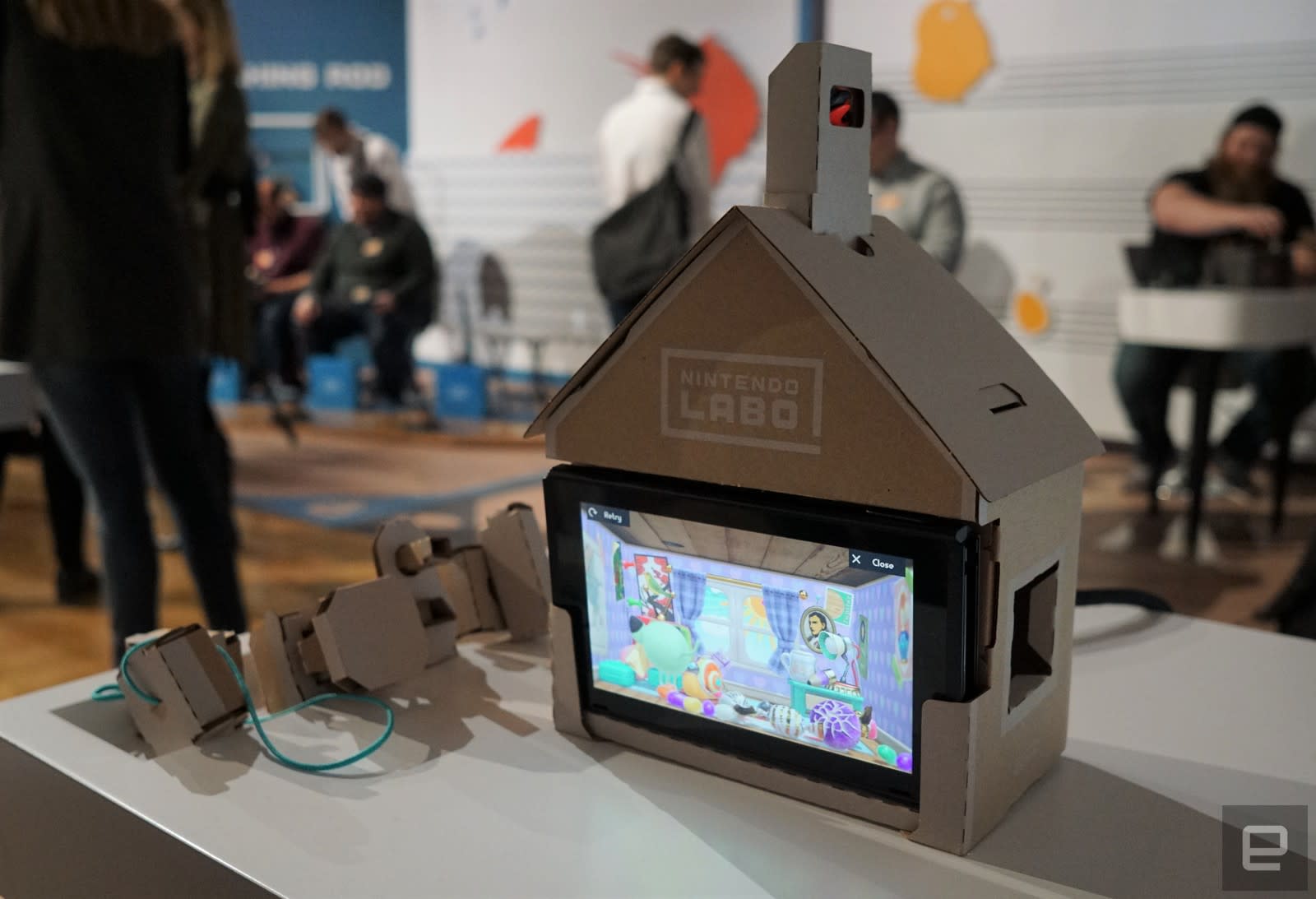
The Labo House was a bit of a curiosity. It basically looks like a dollhouse for your Switch, which interacts with a variety of cardboard accessories. Each of those has a different function: One just rotates, one serves as a large button and another is a switch with two modes. There are slots on the sides and bottom of the house for inserting the blocks, each of which changes the environment for the unfortunate inhabitant inside the virtual house. Popping in two of the blocks unlocks a minigame — the rotating crank and button, for example, unlocked a conveyor belt that charges up and gets releases when you slap the button. The crank and switch, meanwhile, let me microwave a bunch of ingredients to create a virtual cupcake.

I had more fun with the Piano Toy-con, which turns the Switch into a portable synthesizer for kids. Each of its keys were surprisingly responsive, and it had no problem registering multiple notes when I was jamming down with all ten fingers. You can also alter the notes by inserting blocks at the top of the piano, which turn the keys into things like cat cries and operatic voices. A lever on the left side lets you alter the pitch of the keys, and you can also kick off some pre-recorded songs by hitting the play button. It’s the sort of toy that could inspire kids to take music more seriously, even if its own feature set is fairly limited.
I finished off my demos with the Fishing Rod Toy-con and its accompanying game. It’s certainly a unique experience, as it’s the first title I’ve seen to use the Switch in its vertical orientation. The console sits in a tray, which also houses the string that connects to the fishing rod. The Joy-cons, meanwhile, are in the base and rotating crank portions of the rod. When you’re sitting in front of the Switch, it’s as if your physical fishing line is connected directly to its virtual counterpart. It reacts fluidly as you move the rod around, and thanks to the Joy-con’s HD rumble feature, the feedback from fish biting and fighting against my line felt almost like the real thing.

Unfortunately, I didn’t have a chance to try out the complex Toy-con Robot suit, due to limited timing during our demos. It certainly looks like fun, at least based on the reactions from kids at the session. I can’t imagine how long that would take to put together, especially since I couldn’t get the fishing rod together in an hour. I’d imagine most Switch owners would start with the $70 Toy-con variety pack, though. It includes the RC Car, Fishing Road, House and Motorbike Toy-cons. You’d have to shell out another $80 for the Robot kit alone.
When it comes to durability, several Nintendo reps at the event assured us that the Labo accessories could easily abuse from overzealous children. Still, at the event it was pretty clear that some components were already suffering from too much playtime. The cranking parts for the Fishing Rod and House felt a bit worn down. I also had to readjust the keys on the Piano a few times, after they became misaligned. I wouldn’t be surprised if the Toy-cons could last for a few months, but I seriously doubt they’d survive much longer than that. And I can’t imagine parents will be too happy when they see how quickly $70 toys can be destroyed.

Devindra Hardawar/AOL
After spending a few hours with Nintendo’s Labo accessories, I’m even more excited about their potential. The kids at the event were never bored, even as they struggled with complex instructions. Personally, I’m looking forward to gifting Labo kits to kids in my family, and helping them build each accessory. I’d bet it’d make them even more appreciative of their playtime, once they know how their toys are built.
Apple Pay Expanding to Brazil Soon [Updated]
Apple Pay is set to expand to a Brazil later this year, Apple CEO Tim Cook revealed in today’s first quarter earnings call. While Apple didn’t provide an exact date for the launch of Apple Pay in Brazil, Cook did say it would come soon.
We began hearing rumors of an Apple Pay expansion to Brazil two years ago, but in December of last year, iPhone users in Brazil were able to see terms of service information when attempting to add a Visa Platinum Personnalité card from Itaú Unibanco, suggesting an imminent launch.
It is not yet clear which banks will support Apple Pay when the feature launches, as there is not yet an Apple Pay website for the feature in the country. More details are likely to be available soon.
Since its 2014 launch, Apple has expanded Apple Pay to more than a dozen countries, including the United States, the United Kingdom, Australia, Canada, Singapore, Switzerland, Hong Kong, France, Russia, China, Japan, New Zealand, Spain, Taiwan, Ireland, Italy, Denmark, Finland, Sweden, and United Arab Emirates.
Apple Pay works on all iPhones with Touch ID or Face ID, including iPhone 6, 6s, 6, 7, 8, 6 Plus, 6s Plus, 7 Plus, 8 Plus, SE, and X. It is also available on all Apple Watch models and can be used to make purchases in apps and on the web on Macs and iPads.
During today’s earnings call, Apple also shared some details on Apple Pay, which saw its best ever quarter in Q1 2018.
Apple Pay grew 50 percent year-over-year, and it is now accepted at more than half of all retail locations in the United States, and at 2/3rds of the country’s top retailers. Global Apple Pay purchase volume was also up.
Update: Apple has launched an Apple Pay webpage on its Brazilian site.
Related Roundup: Apple Pay
Discuss this article in our forums
Apple Watch Sees Best Quarter Ever With Series 3 Sales Up More Than 100% Compared to Series 2 Sales Last Year
Apple today said that the Apple Watch saw its best quarter ever in Q1 2018, with the new Series 3 models selling at twice the volume of the Series 2 models last year. Apple Watch saw a 50% growth in units and revenue for the fourth consecutive quarter.
When combined with sales of Beats headphones and AirPods, total revenue from wearables was up almost 70 percent year-over-year.
Apple’s “Other” category, which includes Apple TV, Apple Watch, Beats, iPod, and Apple-branded and third-party accessories, was the major contributor to the company’s revenue, bringing in $5.5 billion.
Apple says wearables, including the Apple Watch, the AirPods, and Beats, were the second largest contributor to revenue growth after the iPhone.
Last year, in Q1 2017, Apple’s “Other” category was responsible for $4 billion in revenue, so overall revenue from that category was up $1.5 billion.
Related Roundups: Apple Watch, watchOS 4Buyer’s Guide: Apple Watch (Buy Now)
Discuss this article in our forums
 AIVAnet