


Latest iOS beta shows how battery health settings will work
In a letter to Senator John Thune, Apple confirmed that it would bring transparency to the way its iPhones handle CPU slowdowns due to aging lithium-ion batteries. If you have an Apple Developer account, you can check out the solution the company has baked right into its upcoming iOS 11.3 release. As first noticed by 9to5Mac, the iOS 11.3 beta has a new “Battery Health” system preference screen, with a “Performance Management” section.
In the new “Peak Performance Capability” section of the Battery Health screen, you can now see the maximum capacity of your battery (as compared to when it was new), and you can also see if the operating system has applied a performance management tweak due to an “unexpected shutdown because the battery was unable to deliver the necessary peak power,” as the explanation reads.

Image Credit: 9to5Mac
9to5Mac notes that all devices that upgrade to the new iOS will start with this management system disabled. Your iPhone will enable it if it shuts down unexpectedly, and you can disable it in the Battery Health section now. In its letter to the senator this past weekend, Apple said that newer iPhones like the 8, 8 Plus and X use a more advanced system to manage battery performance.
Source: 9to5Mac
Target Launches iTunes Digital Card Sale: Buy One, Get One 20% Off
Target this week has launched one of the first notable App Store and iTunes gift card discounts since the holidays, offering shoppers the chance to buy one iTunes card at regular price and get a second one for 20 percent off. While not as good as the straight 15 percent discounts for a single card we’ve seen over the past few months, this is one of the only iTunes card sales going on right now, so it could be a good opportunity to add some credit to your iTunes account.
Note: MacRumors is an affiliate partner with some of these vendors. When you click a link and make a purchase, we may receive a small payment, which helps us keep the site running.
The offer is valid on $15, $25, $50, and $100 iTunes cards and will be delivered via email. The 20 percent discount will be applied to the lower priced item, so multiple price tiers can be added at once, and after two cards are placed in your cart you’ll notice the discount. Target noted that quantities are limited, but the sale is planned to last through Friday, February 16 at 11:59 p.m. PT. We’ve rounded up a few examples of the savings you can net with Target’s new offer below:
- 2x $15 iTunes cards: $27, down from $30
- 2x $25 iTunes cards: $45, down from $50
- 2x $50 iTunes Cards: $90, down from $100
If you’re a Costco member, you have a chance to save a bit more money with discounts closer to the 15 percent savings seen in previous iTunes gift card sales. Costco’s members-only iTunes sale will end this Saturday, February 10.
In addition to the iTunes card sales, Amazon’s Gold Box Deal of the Day might be worth checking out for anyone interested in saving money on an older, refurbished iMac. The timed deal has the 21.5-inch iMac from late 2013 (2.9GHz, 8GB RAM, 1TB HD) priced at $699.99, down from $1,199.99. The iMac is sold by Woot through Amazon, and is said to show limited or no wear and include all original accessories.
If you’re looking for more information on the latest discounts, head over to our full Deals Roundup.
Related Roundup: Apple DealsTag: Target
Discuss this article in our forums
Apple Explains Why Power Management Features Were Introduced in January 2017 But Not Disclosed Until February 2017
iOS 10.2.1, introduced on January 23, 2017, has become one of Apple’s most infamous iOS updates as it marked the introduction of power management features that slow down older iPhones with degraded batteries.
Apple introduced the update, and designed the power management features, to fix unexpected shutdowns that were impacting iPhone 6 and 6s devices.
When iOS 10.2.1 was first released in January of 2017, Apple made no mention that it addressed unexpected shutdowns, and the company did not bring up the issue again until a month later, in February of 2017. On February 23, Apple explained that the iOS 10.2.1 introduced “improvements to reduce occurrences of unexpected shutdowns.”
In a recent inquiry, Senator John Thune, chairman of the Senate Commerce Committee, asked Apple why there was a discrepancy between the time that the update was introduced and the time when Apple explained what was in the update, a question Apple answered today.
Apple says that iOS users were not immediately informed about the power management features in iOS 10.2.1 because it first needed to confirm that the update successfully solved the problem causing unexpected shutdowns. From Reuters’ Stephen Nellis:
After gathering and analyzing data, we issued the iOS 10.2.1 software update in January 2017, for iPhone 6, iPhone 6 Plus, iPhone 6s, iPhone 6s Plus, and iPhone SE.
Then we looked at the diagnostic data made available by the update, and it indicated that the rate of unexpected shutdowns was greatly reduced for iPhone 6 and 6s owners. In February 2017, we updated our iOS 10.2.1 Read Me notes to let customers know the update “improves power management during peak workloads to avoid unexpected shutdowns.” We also provided a statement to several press outlets and said that we were seeing positive results from the software update.
Even after Apple provided details on iOS 10.2.1, customers did not know the full extent of how the power management features worked until December of 2017, which is why Apple has landed in hot water with customers and government officials around the world.
In addition to the inquiry from Senator Thule, Apple is also being investigated by the U.S. Department of Justice and the U.S. Securities and Exchange Commission to determine whether Apple violated security laws “concerning its disclosures” when it launched the iOS 10.2.1 update.
Apple is facing dozens of lawsuits over the issue, and the company is also dealing with inquiries in countries that include China, Italy, South Korea, France, and Brazil.
Discuss this article in our forums
iPhone 8, 8 Plus, and X Batteries Less Impacted by Performance Management
Apple’s newest iPhones, including the iPhone 8, iPhone 8 Plus, and iPhone X, use a “different performance management system” than older iPhones, which means any performance management features may be less noticeable on these devices.
Apple outlined the difference between its newer iPhones and older models in an updated support document covering the Battery Health features introduced in today’s iOS 11.3 beta. Apple says iPhone 8, 8 Plus, and X use a more advanced hardware and software design that’s better able to estimate power needs and battery performance.
iPhone 8, iPhone 8 Plus, and iPhone X models use a more advanced hardware and software design that provides a more accurate estimation of both power needs and the battery’s power capability to maximize overall system performance. This allows a different performance management system that more precisely allows iOS to anticipate and avoid an unexpected shutdown. As a result, the impacts of performance management may be less noticeable on iPhone 8, iPhone 8 Plus, and iPhone X. Over time, the rechargeable batteries in all iPhone models will diminish in their capacity and peak performance and will eventually need to be replaced.
Though the iPhone 8, iPhone 8 Plus, and iPhone X may be less impacted by performance management features in the future, Apple says that the rechargeable batteries in all iPhone models will eventually diminish in capacity and need to be replaced for the iPhone to continue running at peak performance.
While Apple previously said that the iPhone 8, 8 Plus, and iPhone X do not have power management features installed at the current time, today’s updated support document gives us some insight into how these devices might be affected in the future.
Apple has implemented performance management features in the iPhone 6, iPhone 6 Plus, iPhone 6s, iPhone 6s Plus, iPhone SE, iPhone 7, and iPhone 7 Plus. As of iOS 11.3 beta 2, customers can check to see if their devices are impacted by processor slowdowns in a new “Battery Health” section of the Settings app.
Installing iOS 11.3 will turn off any current performance management features on older devices, and it will only be reimplemented if and when a device experiences an unexpected shutdown. Customers also have the option of turning off the feature even after an unexpected shutdown, but it will need to be disabled after each performance failure.
For devices that have degraded batteries that are causing performance issues, replacing the battery solves the problem. Apple is continuing to offer $29 battery replacements through the end of 2018.
Discuss this article in our forums
How to Disable Apple’s Performance Management Features in Older iPhones in the iOS 11.3 Beta
Starting with the second beta of iOS 11.3, Apple has introduced a new “Battery Health” feature that’s designed to provide you with more information about the state of your battery and whether or not it’s impacting device performance.
If your iPhone has a degraded battery that is leading to throttling issues, the “Battery Health” section will let you know about it, and it will provide an option to turn off performance management to put a stop to any throttling that’s going on.
There are, however, some nuances to this feature that you need to know about, which we’ll outline below.
When Installing iOS 11.3
When you first install the iOS 11.3 update, all performance management features that might have been enabled are automatically disabled. So when you first install the beta, you don’t need to do anything because performance management is turned off.
You will, however, need to watch out for an unexpected shutdown that turns your device off, because if this happens and you have a bad battery, performance management will be turned back on. More on this below.
Accessing Battery Health
You can check out the status of your battery in the new Battery Health section, which will tell you the maximum capacity of the battery in your iPhone and whether or not it’s running at peak performance capacity. Here’s how to get to it:
Open up the Settings app.
Scroll down to “Battery” and tap it.
Tap on “Battery Health.”
All the info you need to know about your battery is listed here. Maximum Capacity will let you know how your battery is performing overall, and it directly correlates to how long your iPhone will last on a single charge.
Peak Performance Capability will let you know if a degraded battery has resulted in performance slowdowns.
What it Looks Like When Your Device Running Normally
When your iPhone is running as normal, under the “Peak Performance Capability” section, it will say “Your battery is currently supporting normal peak performance.”

You may still have somewhat degraded Maximum Battery capacity as this number slowly declines after charging cycles, but throttling does not kick in until the battery becomes severely degraded and can no longer offer enough power to support spikes in processor usage.
What it Looks Like if You Have a Bad Battery
If you have a bad battery, it will say “Your battery’s health is significantly degraded,” and it will let you know that an Apple Authorized Service Provider can replace the battery to restore full performance.
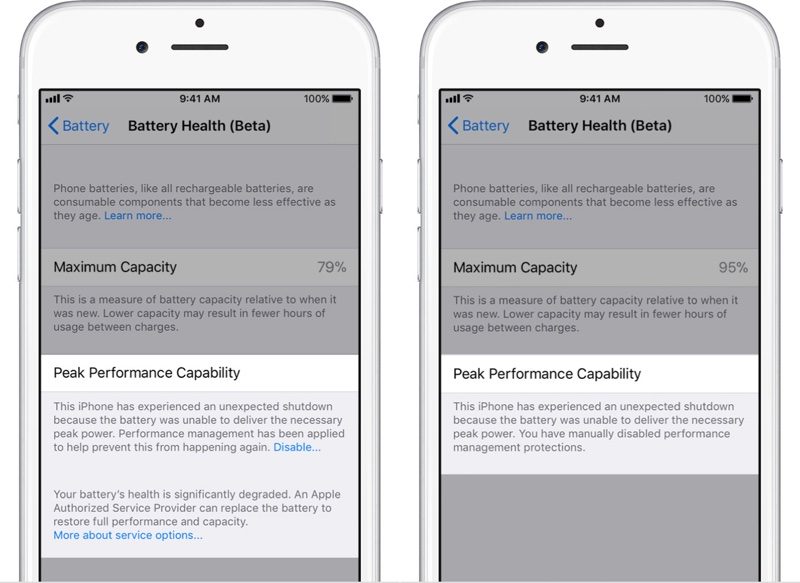
It will also tell you if performance management features have been turned on, and it will provide an option to turn them off.
What Happens When You Have an Unexpected Shutdown
As mentioned above, all performance management features are disabled automatically upon installing iOS 11.3. If your device has a bad battery and it shuts down because of it, performance management will be automatically enabled.
If this happens, you will see the following message under “Peak Performance Capability” in Battery Health.
“This iPhone has experienced an unexpected shutdown because the battery was unable to deliver the necessary peak power. Performance management has been applied to prevent this from happening again.”

If you have an unexpected shutdown AND your battery capacity is significantly degraded, you’ll see a slightly different message suggesting an immediate battery replacement.

How to Disable Performance Management if Your Battery is Bad
After experiencing an unexpected shutdown, performance management is turned on automatically on your iPhone. You will, however, see a small “Disable” option when this happens, and if you tap it, you’ll be given the option to disable performance management.

Disabling performance management will turn off any throttling that’s been applied, but it will leave your device vulnerable to future unexpected shutdowns.
You will not see the option to disable performance management until your device has experienced at least one unexpected shutdown, and once you disable it, there is no option to turn it on again.
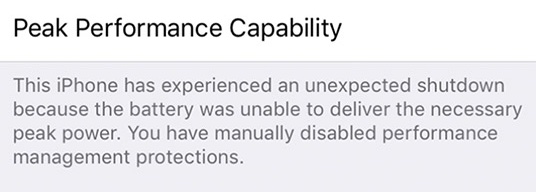
If your iPhone shuts down again while performance management is disabled, though, performance management will automatically turn it on again.
This means you will need to turn performance management off again each time your device experiences an unexpected shutdown, as Apple believes slower performance is preferable to sudden losses of power.
How to Permanently Disable Performance Management
If you have a device with a bad battery that is experiencing unexpected shutdowns and is subjected to Apple’s performance management feature, the only permanent solution is to get a new battery.
Having your battery replaced will restore an older iPhone to full working order, with maximum capacity and performance capabilities.
Apple is offering $29 battery replacements for the iPhone 6 and newer through the end of 2018. Your battery does not need to be experiencing shutdowns to be replaced – you can also get a replacement for a battery that’s not operating at maximum capacity, no questions asked. You can get one $29 battery replacement per device.
Newer devices like the iPhone 8, iPhone 8 Plus, and iPhone X that have a high maximum capacity near 100% don’t need replacement, but at levels below 90%, it could be worth getting a new battery while Apple is still offering them at a discounted price. To get a battery replacement, contact Apple Support.
If you have AppleCare+ or are under your one-year device warranty and have a battery that’s below 80 percent, you won’t even need to pay the $29 fee — that’s considered a defective battery and Apple will replace it for free.
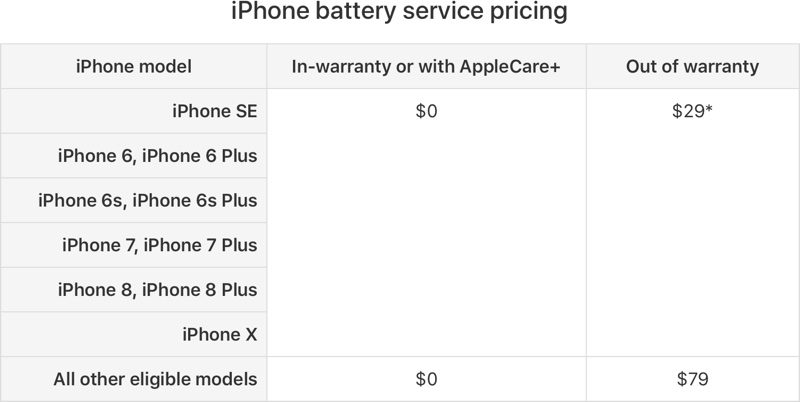
Devices Impacted by Performance Management
Performance management features have been installed on the iPhone 6, 6 Plus, 6s Plus, 7, 7 Plus, and SE. On other iPhones, like the iPhone 8, 8 Plus, and X, you will be able to see readings for Maximum Capacity and Peak Performance Capability, but you won’t need to worry about throttling or unexpected shutdowns.
Related Roundups: iPhone 7, iPhone 8, iPhone XTag: iPhone SlowdownBuyer’s Guide: iPhone 8 (Neutral), iPhone 8 (Neutral), iPhone X (Buy Now), iPhone 8 (Neutral)
Discuss this article in our forums
Apple Seeds Second Beta of macOS High Sierra 10.13.4 to Developers
Apple today seeded the second beta of an upcoming macOS High Sierra 10.13.4 update to developers, two weeks after seeding the first beta and two weeks after releasing macOS High Sierra 10.13.3.
The new macOS High Sierra 10.13.4 beta can be downloaded from the Apple Developer Center or through the Software Update mechanism in the Mac App Store with the proper profile installed.
macOS High Sierra 10.13.4 includes bug fixes and performance improvements for issues that weren’t addressed in macOS High Sierra 10.13.3. The update includes support for some features that are also available in iOS 11.3, like Messages on iCloud, which uploads all of your iMessages to the cloud. It will also support Business Chat, a feature coming when iOS 11.3 and macOS 10.13.4 are released to the public.
The new macOS update also includes the smoke cloud wallpaper that was previously only available on the iMac Pro, and it introduces a warning when opening up a 32-bit app as part of an effort to phase them out.
In the future, Apple plans to phase out 32-bit Mac apps, just like it did with 32-bit iOS apps. Apple says macOS High Sierra is the last version of macOS that will support 32-bit apps without compromises.
Related Roundup: macOS High Sierra
Discuss this article in our forums
What is Windows Polaris?
Since the release of Windows 10 in 2015, Microsoft has made it clear that it wants to move away from its past style of operating system releases and towards a new, more singular and unified approach. It’s already brought together its desktop Windows 10 OS with Windows 10 Mobile, and Xbox Live infrastructure — and Polaris could be the next step in that trend.
But what is Windows Polaris? Although we don’t know for sure just yet, as Microsoft hasn’t made any sort of official announcements, the general line of thinking is that it’s the PC component in Microsoft’s future Windows strategy. Windows Core OS will act as a base for all future Windows iterations. We’ve had hints that Andromeda OS will be the version used in mobile, which could be used on a future Surface phone. Meanwhile, Polaris could be the one you run on your desktop or laptop.
Windows Core OS
The main element that’s needed to make Windows Polaris a reality is Windows Core OS. It’s been hinted at by anonymous sources and reports since the latter months of 2017 and is the baseline operating system that Polaris and other iterations will likely be built on top of.
The idea behind Windows Core OS is to turn Microsoft’s aging Windows platform into something far more modular so it can react more swiftly to changes in the market. Where OEMs looking to build new devices at this time have to opt for pre-packaged versions of Windows, possibly containing features they don’t need, Windows Core OS would make it so that new versions could be crafted specifically for devices without much effort.
Windows Core OS would mean that any new form-factor of device could have its very own Windows operating system with all and crucially, only, the features it needs. That should in turn speed up battery life, performance, and make the whole experience easier to understand for the casual user. In that way, they wouldn’t be unlike the operating systems that have come to dominate the mobile space in recent years.
Microsoft began to move towards this ideal back in 2015 when it unified its kernel and OS core across all Windows devices. UWP apps served through the Microsoft Store are another component of that plan. With those elements in place, the last piece of the Windows Core OS puzzle, as per WinowsCentral, is Windows CShell. It lets Microsoft and device makers overhaul the look and feel of its operating system for specific devices, without having to rebuild it from the ground up.
It could even allow models to shift between UIs depending on their usage at the time — a little like how Microsoft’s already existing Continuum feature works.
Once those components of Windows Core OS are in place, Microsoft is said to be planning to release a multitude of variants off of that baseline, each known as separate “composers.” One of those is said to be called Andromeda, designed for the mobile space, while Polaris is thought to be the one aimed at traditional Windows PCs of various form-factors.
Polaris benefits
Even if Windows Core OS may be a form of Windows that more commonly mirrors the streamlined mobile operating systems like Android and iOS, Microsoft hasn’t forgotten about the desktop and laptop market. Indeed, according to Windows Central, Polaris is Microsoft’s attempt to strip back all of the legacy elements of the Windows experience to shed some fat and become far better for it.
By stripping out some of the legacy components that make the modern Windows operating system so compatible with hardware and software of yesteryear, it should operate faster, especially on lower-end devices. Its security will also be improved and we could see better battery life on portable devices as well.
Aimed more towards casual users and possibly built as a successor to Windows 10 S, Polaris will likely make itself easier to manage through a simplification of settings and back-end systems. A new UWP version of the Windows File Explorer should make navigation easier for those who haven’t been brought up on decades of Windows usage. Likewise, the Settings App would replace much of the typical functions of the Control Panel, making accessing certain backend functions more intuitive.
What will be lost?
A major component of all that streamlining though is removing functions and features that have been part of Windows for multiple versions. While that’s great for casual users who didn’t need advanced or legacy features anyway, for those more versed in Windows usage, there could be some notable absences from Windows Core OS and Windows Polaris specifically.
The traditional File Explorer and Control Panel could be just the tip of the iceberg. Certain apps like Microsoft’s Paint and Notepad could be lost, alongside things like fax support. There’s even talk of Win32 app functionality being removed, making it so anything not built using Microsoft’s UWP wouldn’t function.
While it seems unlikely that Microsoft would remove that functionality entirely — the suggestion is virtualization and cloud-streaming could allow legacy apps to still run on Polaris — Microsoft has been very keen to push people towards the Microsoft Store. There are obvious benefits to that kind of ecosystem and Android and iOS have leveraged their own application marketplaces successfully for years, but that’s not likely to be a ‘feature’ of Polaris that appeals to everyone.
How do you get it?
For now, you don’t. Polaris is very much an internal development project at Microsoft with no official anything. Although there has been some suggestion that it could see the light of day in 2019, that’s far from certain.
Should Polaris make an appearance at some point in the future though, it won’t be forced on anyone. Thought likely to run alongside traditional Windows 10 systems rather than instead of, Polaris would be something that manufacturers could offer for entry-level systems, or as a customizable option for consumers. Certain market segments with specific needs, like education and enterprise, could also be potential audiences.
Due to the way Polaris is designed off of a new baseline Windows ecosystem too, it’s unlikely that there will be an upgrade path to or from Windows 10 as it exists now. That separation may please Windows users who want the full control offered by a more traditional Windows operating system, but it would be interesting to see how that effects uptake. Existing editions of Windows 10 have taken years to overtake the beloved Windows 7 install base. Polaris could take far longer if only new devices can support it.
Editors’ Recommendations
- Microsoft is secretly building Polaris, a slimmer, more modern version of Windows
- Microsoft hints at a modular Windows 10, new mobile device category
- Insider build doesn’t want you to freak out about Windows Timeline privacy
- Windows 10 eSIM support lets laptop owners stay connected via their mobile plans
- Insider Build 17063 shows Paint is gearing up to depart for the Microsoft Store
HGST drives top Backblaze HDD reliability report again, surpass Seagate
Cloud backup provider Backblaze has once again released its hard drive reliability report and the results are similar to last time. HGST has once again proven to be the most reliable hard drive manufacturer of those used at the backup company, even beating out parent company Western Digital. Seagate however, despite being a popular choice at Backblaze, fared far worse.
For nearly the past five years, Backblaze has been recording hard drive statistics at its data centers, noting which drives failed, when they died, and how long they lasted. Backblaze’s sample size of thousands of drives means it gives us solid, actionable data in its reports, which is why when it notes that some manufacturers make much more reliable drives than others, it’s noteworthy.
That’s certainly the case following this latest report. In the fourth quarter of 2017, just 22 of 23,265 HGST drives failed. Extrapolating that data over a full 12-month period, the worst failure rate Backblaze expects of its HGST drives is 0.45 percent.
That same annualized failure rate for Western Digital drives was slightly worse, though with a sample size of 662 drives, those statistics are not quite as compelling.
Seagate’s statistics however, paint a far grimmer picture. Although the most popular drives used by Backblaze, with a total of 67,787 drives tracked by the study, it also saw the highest failure rates. In the case of one of the 8TB Seagate drives, 44 failed from around 14,000, equating to an annualized failure rate of 1.22 percent. Other annualized failure rates saw two percent and even nearly three percent in one category.
Although other drives had estimated rates of as high as 29 percent, those were far smaller sample sizes, so are arguably not as accurate.
It’s not all bleak for Seagate however. Although its drives did experience the highest failure rate of Backblaze hard drives in the last quarter, drive reliability does appear to be gradually improving. While the number of 6TB Seagate drives used by Backblaze has remained constant for the past three years, the failure rate has fallen from 2.2 percent to 0.7 percent. Western Digital has also seen improvements with its 6TB models.
HGST has been consistently the most reliable over the years though, especially at the 4TB level, wherein each of the past three years it has achieved a sub-one percent failure rate.
If you’d like to look at more data from Backblaze, its entire back catalogue of reliability tests is archived on its website.
Editors’ Recommendations
- The best laptop brands
- 2018 Toyota 4Runner: Release date, prices, features, and specs
- 2018 Toyota Tundra: Release date, prices, specs, and features
- The best cars for teens
- Here’s everything you need to know about the 2018 Honda CR-V
Painter Essentials 6 brings traditional paints to a faster digital canvas
Corel’s Painter mimics real paint mediums on a digital interface from the strokes to the way the “brush” even runs out of paint — and the new Painter Essentials is bringing more of those features to a simplified user interface. On Tuesday, January 6, Corel launched Painter Essentials 6 with enhancements to brush technology, boosts in performance, and additions previously only available on the pricier version of the software.
Like the predecessors, Painter Essentials 6 is designed with traditional art mediums in mind. Brushes from chalk and pencil to oils and watercolors are designed to behave like the real thing — digital artists can even mix the paint colors together like with the physical paint palette. When pairing the desktop software with a tablet, the program is also pressure-sensitive to the stylus (and flipping the stylus around automatically swaps to eraser mode). Along with starting from a blank canvas, Painter Essentials 6 can also convert a photo to a paint style, or, for more control, users can paint in the details of the image with the different photo cloning brushes.
While a focus on the physical paint medium was part of the software family’s focus from the start, Painter Essentials 6 brings a few new features to the line. For those traditionally inspired brushes, the dynamic speckles or paint splatters are improved. Drip and blend options have also been enhanced.
“The big thing that separates Painter is the natural media — it really mimics traditional media, emulating real-world strokes,” Corel’s Digital Arts Product Manager Chris Pierce said during an early demo of the software.
Painter Essentials 6 also includes a handful of tools designed to speed up the editing process — a mirror mode will create the other half of symmetrical drawings automatically in real time. A kaleidoscope tool will similarly repeat brush strokes across multiple plane lines.
The sixth iteration of the beginner-friendly paint program also sees a 1.3 to 1.5 times speed improvement over the previous version. Pierce says that brushes will run faster, without a delay when painting, and that users of the old version will notice a significant difference in speed. Mac users will also notice some improvements with enhanced operating system support.
The program’s workflow also sees some improvement, Pierce says, while keeping the focus on creating a paint software that’s simple for beginners. A new welcome screen means newbies can start right with a tutorial, a gallery for inspiration, or go into a photo edit or blank canvas.
Painter 2018 remains Corel’s paint flagship, but Essentials users can now purchase additional brush packs to expand the options, a feature previously only found in the more advanced software. Corel is also adding the option to upgrade from Corel Painter Essentials 6 to Painter 2018 for a discounted price of $230, a move that Pierce says gives beginners trying out the basic program room to grow into the advanced version.
Corel Painter Essentials 6 is available for both Mac and PC, along with offering compatibility with Adobe Photoshop, including preserving layers. The software retails for about $50 as a one-time purchase.
Editors’ Recommendations
- Photoshop streamlines the photo-editing process with one-click selections
- HDMI 2.1 is coming: Here’s what you need to know
- Bid farewell to lengthy Photoshop cutouts with new AI-powered tool
- HP supercharges Spectre x360 15-inch with Intel 8th-Gen Core and AMD Vega graphics
- Will your watch get Android Wear 2.0? Read our guide to find out
Apple leads tablet market as detachable devices continue their rise
The report of the International Data Corporation (IDC) on the health of the tablet market is out, and it brings with it very few surprises. Apple continues to dominate the tablet market, shipping almost as many tablets in the final quarter of the year as the second and third place manufacturers (Amazon and Samsung) combined. While sales of 13.2 million units (m.u.) only comes out to a 0.6-percent rise over last year’s 13.1 m.u. in the fourth quarter, Apple still saw an increase in sales over the whole of 2017, with sales rising 3 percent from 42.6 m.u. to 43.8 m.u.
However, the real winner in the fourth quarter and across 2017 has to be Amazon, who saw sales rise by an amazing 50.3-percent in the fourth quarter of 2017 compared to the same quarter of 2016, overtaking Samsung for second place, and seeing an increase over the year of 38 percent. Not yet enough to overtake Samsung’s sales throughout 2017, but certainly enough to worry Samsung for 2018.
Amazon’s success is likely down to dominating much of the low-end tablet market, offering its Fire tablets for a significant discount over the holiday period, and attaching its Alexa voice assistant into the devices. Huawei too had a good year, overtaking Lenovo in both the fourth quarter and in terms of annual sales to take over the fourth place position on the tables.
Despite these success stories, the overall tablet market saw a decline this year, falling 7.9 percent in the fourth quarter and 6.5 percent across 2017. However, it’s not all bad news, as within the tablet ecosystem sales of detachable tablets (tablets designed to work with detachable keyboards) continued their rise, with sales climbing by 1.6 percent over 2017. While this is a drop from the 24 percent growth seen in 2016, analysts put this lack of growth down to the delay in the launch of 2017’s Microsoft Surface device. They also warn that while the high-end range is well accounted for in detachable tablets, a solid mid range is what’s required to ensure further growth in this area.
“With the first wave of Windows on ARM products expected to begin shipping in the second quarter of 2018, we believe the detachables category has the potential to continue its growth trajectory,” said Lauren Guenveur, senior research analyst for IDC devices and displays. “Many of these products are being introduced at the premium end of the market. What remains glaringly sparse, and needed, are strong players in the mid-segment of the market.”
While old-fashioned “slate-style” tablets continue to sell, primarily as a means of consuming media more efficiently, the rise of detachable tablets may indicate tablets are increasingly finding a role as productivity machines, thanks to their slim profiles, light weight, and powerful hardware. The report warns that while some manufacturers like Lenovo are all too happy to follow the trend towards detachable tablets, others would be wise to increase their efforts in that space, judging by its growth. Huawei, in particular, could be in for a rude shock in the future should it not heed this advice.
Editors’ Recommendations
- Apple passes Samsung in smartphone sales, as newer models are shunned
- First flash sale for crowdsourced Eve V Windows 10 tablet sells out in 3 hours
- Apple reclaims wearables crown with strong third-quarter Apple Watch sales
- PlayStation VR dominates third-quarter VR headset sales
- Apple has the world’s two top-selling phones, but how well is iPhone 8 selling?
 AIVAnet