


How to take a screenshot on a Chromebook
Here’s how to take a screenshot on your Chromebook!
Sometimes, you just need to show someone else the thing that’s on your screen. In this case, taking a screenshot is the easiest thing to do. Here’s how to take a screenshot on a Chromebook!
Use the keyboard
 The window switch key on a Chromebook.
Every Chromebook has a keyboard, and taking a screenshot with the keyboard can be done in a couple ways.
- To capture your entire screen, hit Ctrl + window switch key.
- To capture only part of the screen, hit Ctrl + Shift + window switch key, then click and drag your cursor to select the area you’d like to capture.
Note: If you’re using an external keyboard, the combinations will be Ctrl + F5 and Ctrl + Shift + F5, respectively.
Use the side buttons

If you’re using your Chromebook in tablet mode, it’s pretty inconvenient to swing the keyboard back around just to take a screenshot. Fortunately, there’s an easier way: just like on an Android phone, you can press power + volume down to take a screenshot.
This only works to capture your entire screen, so if you need a cropped section, you’ll still need to use the keyboard. Keep in mind that the orientation of the volume buttons don’t change with the orientation of your screen, so you’ll need to remember which side is volume down.
Use an extension

While the built-in methods above will work for most people, some users may need a bit more power. In this case, an extension like Nimbus Screenshot & Screen Video Recorder may be worth checking out. As the name implies, Nimbus lets you do a simple screenshot, but also includes the ability to record a video of your screen or delay the capture if you need to screenshot a particular menu.
Download: Nimbus Screenshot & Screen Video Recorder in the Chrome Web Store (free)
Be sure to back it up
By default, your screenshots will be locally saved to the Downloads folder on your Chromebook.
In there, you can open the screenshot to crop it, add a filter, and access other basic editing options. If you want to back the screenshot up permanently, you can upload it to Google Photos or just back it up to Google Drive.
Chromebooks
- The best Chromebooks
- Should you buy a Chromebook?
- Google Play is coming to Chromebooks
- Acer Chromebook 14 review
- Join our Chromebook forums
Verizon will begin locking phones to its network this spring
You’ll soon have to wait a hot minute before taking your Verizon phone to another carrier.
In the United States, most all carriers require you wait a certain amount of time after buying a phone before you can use it on another network. It’s a process called “locking”, and it’s something that’s instituted by AT&T, Sprint, and T-Mobile. Beginning at some point this spring, Verizon will follow suit.

With Verizon’s current policy of selling unlocked phones, you can purchase any device from the carrier and instantly start using it on another network that supports it. It makes it easy for consumers to take their devices to other providers as they see fit, but according to Verizon, it also makes it easier for crooks to steal these devices and sell them on the black market.
Verizon’s following the industry norm.
Once Verizon changes this, you’ll need to wait for an undisclosed amount of time after buying a phone before taking it somewhere else. The carrier hasn’t said how long this waiting period will be, but if its similar to what we already have, we’ll likely be looking at anywhere from 15 – 60 days.
I don’t buy into the idea that something like this helps to cut down on theft, and instead feel that Verizon is making this change as a way to deter customers from buying its phones and using them on a competitor’s network. It can certainly be seen as a hostile act towards consumers, but from a business point-of-view, it makes sense for Verizon. The rest of the industry already does this, and if it can keep more people on its network in the process, it might as well.
There’s no timeframe as to when these changes will be made aside from “this spring”, so if you were planning on buying a Verizon phone and using it elsewhere, I’d suggest doing so soon before this goes into effect.
Android P will feature a ‘dramatic redesign’ and support notch displays
Amazon said to be making its own AI chip for faster Alexa performance
A dedicated chip would allow Alexa to perform speech recognition without contacting the almighty cloud.
Amazon Alexa is undoubtedly one of the leaders in the virtual assistant space, and while I’ve never found it to be slow on devices like the Echo, a new report suggests that it may get even faster thanks to a new AI chipset.

According to The Information, Amazon is in the process of building a dedicated hardware chip to be used with products like the Echo, Echo Show, and other Alexa-powered speakers so that they can natively process speech recognition without having to first contact the cloud. While Alexa would still need to use the cloud to pull in information and connect with skills, the chip would allow for faster responses for small commands – such as checking the time, setting an alarm, etc.
This would be a big step for Alexa, but the news is hardly surprising. Both Google and Apple already use AI chipsets for a variety of their products/services, and it was only a matter of time Amazon would follow suit – especially since the company purchased chip-designer Annapurna Labs in 2015.
We don’t have a timeframe as to when Amazon will start integrating its AI chip into Echo hardware, but this is certainly something we’ll be keeping our eyes out for in the future. Stay tuned.
Amazon Echo
- Tap, Echo or Dot: The ultimate Alexa question
- All about Alexa Skills
- Amazon Echo review
- Echo Dot review
- Echo Spot review
- Top Echo Tips & Tricks
- Amazon Echo vs. Google Home
- Get the latest Alexa news
See at Amazon
AI facial analysis demonstrates both racial and gender bias
Researchers from MIT and Stanford University found that that three different facial analysis programs demonstrate both gender and skin color biases. The full article will be presented at the Conference on Fairness, Accountability, and Transparency later this month.
Specifically, the team looked at the accuracy rates of facial recognition as broken down by gender and race. “Researchers at a major U.S. technology company claimed an accuracy rate of more than 97 percent for a face-recognition system they’d designed. But the data set used to assess its performance was more than 77 percent male and more than 83 percent white.” This narrow test base results in a higher error rate for anyone who isn’t white or male.
In order to test these systems, MIT researcher Joy Buolamwini collected over 1,200 images that contained a greater proportion of women and people of color and coded skin color based on the Fitzpatrick scale of skin tones, in consultation with a dermatologic surgeon. After this, Buolamwini tested the facial recognition systems with her new data set.
The results were stark in terms of gender classification. “For darker-skinned women . . . the error rates were 20.8 percent, 34.5 percent, and 34.7,” the release says. “But with two of the systems, the error rates for the darkest-skinned women in the data set . . . were worse still: 46.5 percent and 46.8 percent. Essentially, for those women, the system might as well have been guessing gender at random.”
There have certainly been accusations of bias in tech algorithms previously, and it’s well known that facial recognition systems often do not work as well on darker skin tones. Even with that knowledge, these figures are staggering, and it’s important that companies who work on this kind of software take into account the breadth of diversity that exists in their user base, rather than limiting themselves to the white men that often dominate their workforces.
Source: MIT
Trump’s new budget won’t land us on the moon anytime soon
Vice President Pence may have vowed that the US would return astronauts to the moon, but it looks like we aren’t getting there anytime soon. Ars Technica appears to have received an early copy of the White House’s fiscal year 2019 budget set for release at 1 PM ET today. The “Lunar Exploration Campaign” outlined in the document only provides for incremental steps to return astronauts to the moon’s surface, rather than a renewed focus on exploration.
The administration’s focus on the moon, rather than Mars (or some other, more scientifically relevant goal), was met with some grumbling in the space community. Now it appears that it isn’t even a top priority; Ars Technica reports that NASA will work on unmanned landers to the lunar surface between now and 2023. It’s only after that NASA would begin work on a lander that would return humans to the surface, and the document has no projected date for when that would happen (but it would be well after 2024). Until then, our lunar presence will be orbital only. Quartz reports that the first stage of the orbital moon outpost will launch by 2020.
The document basically supports NASA’s muddled status quo when it comes to human exploration of space, without providing much direction or the aggressive funding that the administration’s rhetoric seemed to promise. The Orion program and SLS (the mega rocket that will dwarf even SpaceX’s Falcon Heavy) will also continue to receive funding at an increased rate.
As expected, the document also ends funding to the International Space Station by 2025. According to Quartz, the budget allows $150 million in funding to ensure that private companies are able to either take over the space station or create their own habitats in low Earth orbit. The problem here is the small amount of time private companies would have to prepare to do that. It’s unclear at this point whether it would be enough, or whether private companies even hold sufficient interest in the ISS to support it.
Source: Ars Technica, Quartz
The ‘Spire’ portable recording studio is all about spontaneity
Inspiration hits you at weird times — usually when you’re in the shower or about to fall asleep. Basically, moments when you have very little chance of putting it down on paper or recording it. The $350 portable Spire Studio from iZotope probably won’t help much in those situations (unless you keep it next to your bed with a guitar or keyboard). But, for folks who write music, it’s a surprisingly simple to use 8-track recorder that hooks up to almost all your gear.
While computers have democratized music recording, they can be cumbersome when you just want to get an idea down. You have to deal with cable adaptors, varying sound levels and complex software. The Spire speeds things up by shoving the necessary audio ports and hardware into a… well, a stubby “spire” and connecting it to a robust but easy-to-use companion app (over WiFi).
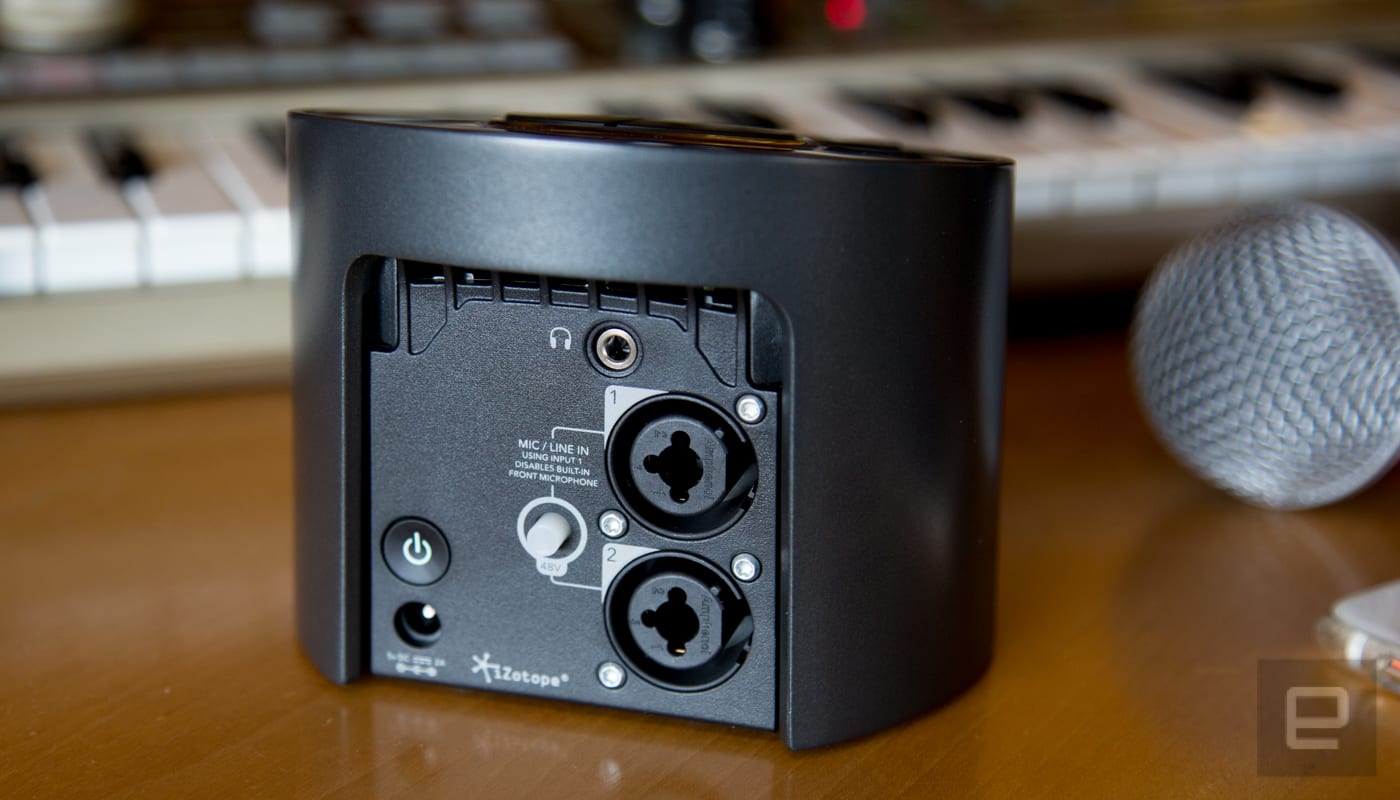
It all starts with industry-standard audio inputs. Connecting my synth, guitar, bass or drum machine to the Spire via one of the two XLR/TOS combo ports was as easy as plugging them into a soundboard. I didn’t have to hunt down dongles or adaptors like I would with my computer. The device’s four-hour battery life also meant I didn’t have to dig up an extension cord to record in my living room.
To keep audio levels from being all over the map, the Spire has a “Sound Check” button on the device and in the app. Press the button and play an instrument (or sing into a mic) and the Spire will find a level that’s appropriate for that instrument. My tests with different guitars, bass, keyboards and synths all produced solid audio levels adequate for mixing.
Playing, recording and mixing those normalized tracks only requires a few taps in the companion app. Each one is color-coded, so determining which audio is which a cinch. That said, a quick naming convention would be helpful, especially if you’re dealing with more than one track of the same instrument.
Before recording each track there are virtual amps and “spaces” (acoustic recreations of rooms) that can be added for deeper and more robust sounds. This is old hat for iZotope. The company has a long history of audio manipulation via software. Each of these effects can be fine-tuned to your liking. The amps are for guitar and bass primarily but can be applied to any instrument attached to the Spire.
If you happen to connect two instruments at once, the app automatically produces two new tracks to record on. This makes singing while playing guitar or playing with another band member as easy as playing a single instrument on your own. There’s also a built-in mic that’ll work in a pinch for singing or acoustic guitar. The quality is impressive, but not nearly as nice as plugging in the instrument or using a high-end microphone.
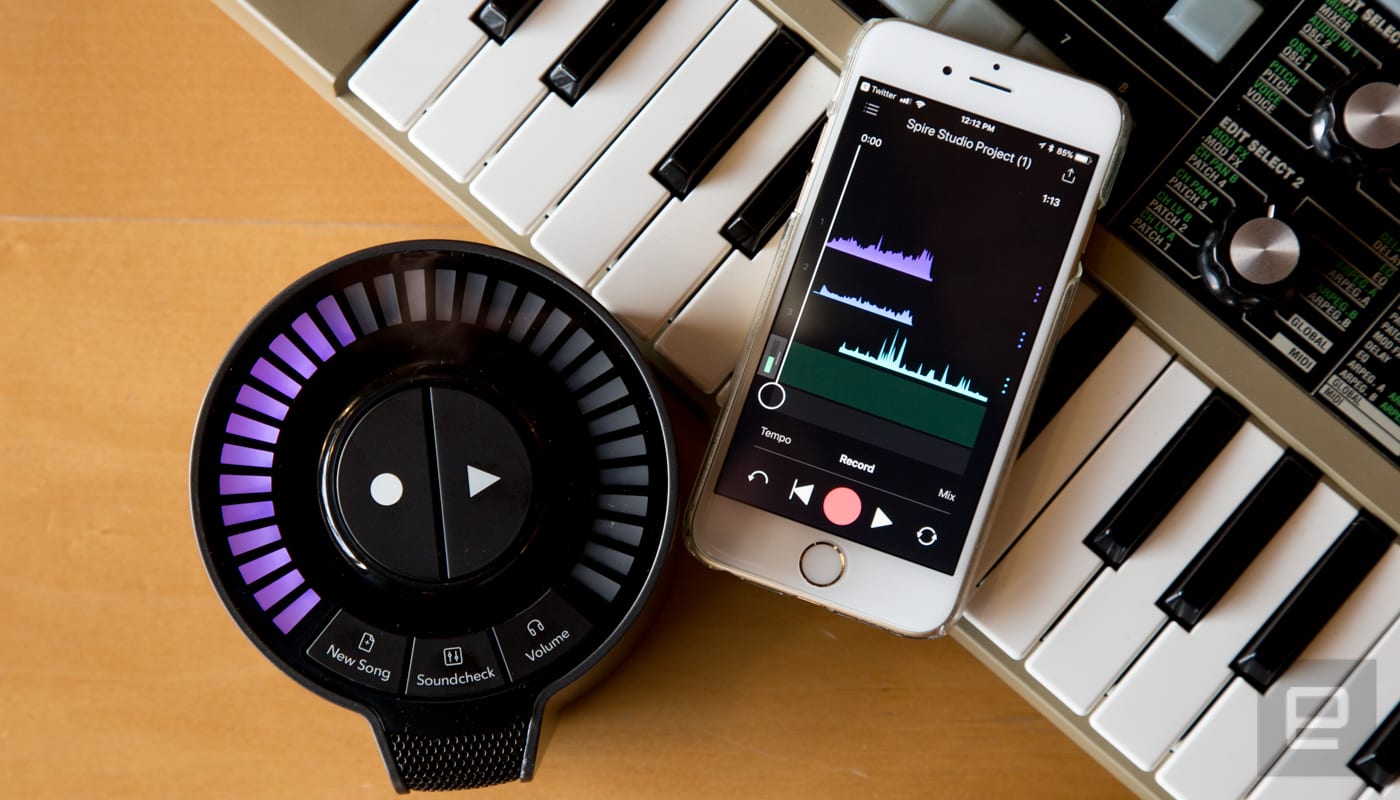
When you’re done, “mixing” is just a matter of moving your tracks in a virtual space. Higher in the space for louder and left and right for stereo mixing. It’s easy to adjust all your tracks on the fly and hear in real time how it affects the finished song. Like recording, iZotope took something that can be a huge pain and maked it visual and easy to grasp. I just wish that some of the apps slick design translated over to the actual hardware.
My biggest beef with the Spire is its circular form. It doesn’t come with a carrying case and the stubby shape makes it difficult to find a case it’ll fit in. A rectangle or square might not look as cool, but it would be a design that’s easier to shove into a gig bag. The lights on the top are nice visual indicators of what’s happening, but it really doesn’t need to be a circle for that system to work.
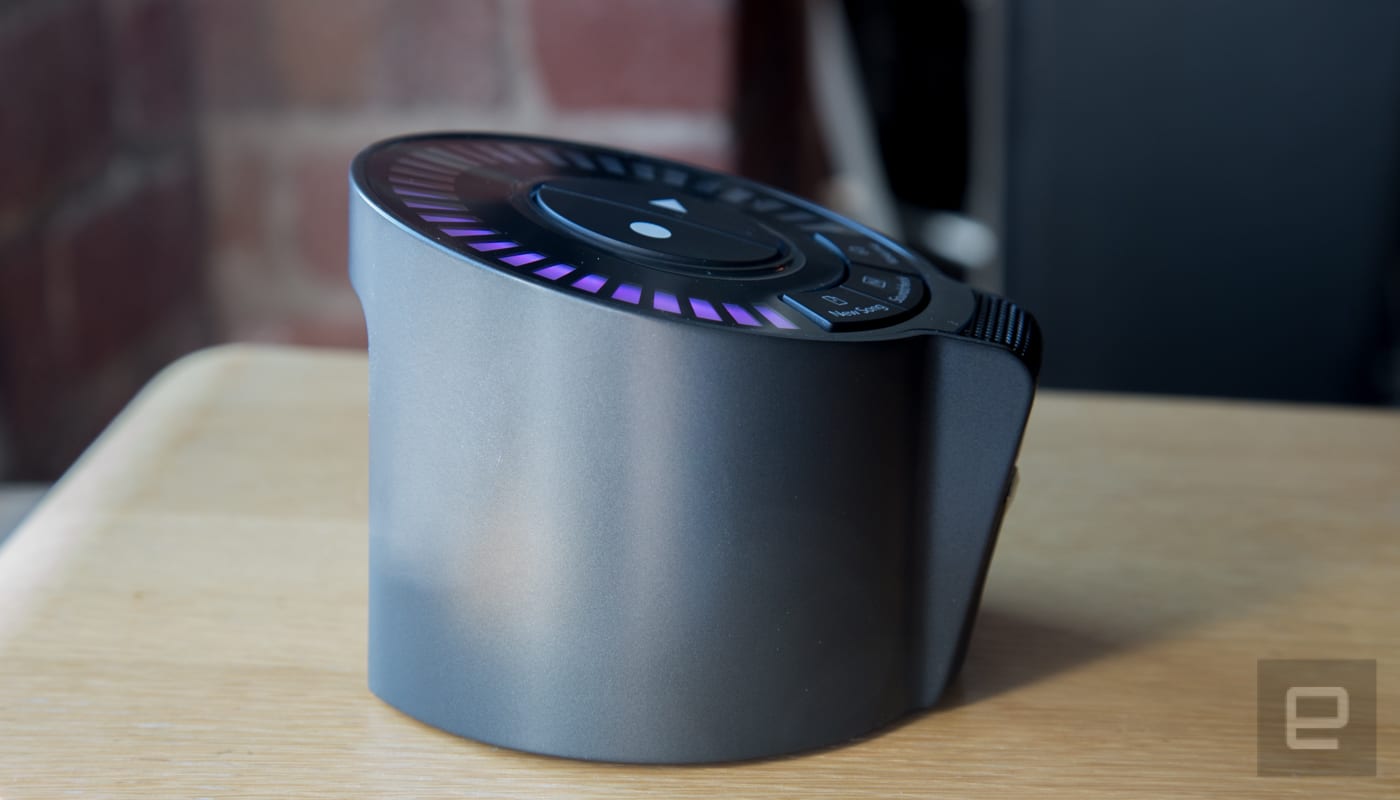
Yet, even with its odd shape and slightly high price point, the Spire is an outstanding piece of equipment for musicians. If you’re someone who misses the spontaneity of the old tape-based 4- and 8-track recorders, and you have a bag it’ll fit into, the Spire is worth checking out.
Amazon is reportedly designing AI chips to improve Alexa
Amazon has begun designing its own AI chips, according to an exclusive report from The Information. The hardware is designed for anything powered by Alexa, including the Echo, and would allow the virtual assistant to respond more quickly by adding speech recognition directly to the device.
Right now, whenever a user makes an inquiry on an Alexa-powered device, there is a delay while the virtual assistant contacts the cloud in order to interpret the request. While Echo devices would continue to rely on the cloud for complex inquiries, adding speech recognition directly would allow Alexa to perform simple tasks, such as checking the time, without that cloud delay.
Amazon acquired chip designer Annapurna Labs back in 2015, and has slowly begun churning out its own processors. It was only a matter of time before it started designing and producing chips specifically for its own hardware needs. The company has also begin hiring chip engineers for Amazon Web Services, signaling that it may be moving to its own proprietary chips for these data centers as well.
It should be noted that Google and Apple have both designed their own AI chips, and Google also is using its own chips to support services such as Street View, Photos, Search and Translate. Amazon is just the latest company to go down this route, though it should be noted that just because the company is reportedly designing these chips does not mean it will achieve the performance from them that it desires.
Source: The Information
Apple’s Animojis may come to iPad and FaceTime this fall
Apple’s biggest software updates are always scheduled for a single fall release and today Bloomberg reports on some new features that we can look forward to later this year. First up, third-party apps will be able to work across iPhones, iPads and Mac computers — a feature we’ve heard talk of before and will involve both iOS 12 and macOS 10.14. Additionally, the iPhone X’s Animojis will be getting an upgrade, with new characters and a better menu reportedly on the way as well as the ability to use them in FaceTime. And they won’t be relegated to the iPhone X for much longer. Bloomberg says Apple is working on a new iPad that will have the Face ID camera, allowing iPad users to play with Animojis as well.
Some other updates include a redesigned Stocks app, more options in the Do Not Disturb setting and changes to the iPad’s photo import interface. We can also expect to see Siri become more integrated into the iPhone’s search function and a Digital Health tool that will let parents keep track of their children’s screen time.
Bloomberg reports that while Apple will continue to haul out its major updates during its annual fall release, the company is switching up how it handles updates internally. Rather than having its team focus on the upcoming fall update, Apple will now take a wider view and keep its eye on the next two years’ updates. That way, if certain features aren’t quite ready, they don’t have to be forced out prematurely. Bloomberg’s sources say that as Apple has grown, its update strategy has begun to fail, with features launching before they’re fully ready, leaving them unreliable and buggy. With this new strategy, Apple hopes that will happen less often.
Via: Bloomberg
Don’t even try to repair Apple’s HomePod
You may not like the thought of paying Apple a pretty penny to fix the HomePod, but you might have to — it definitely isn’t meant for DIY repairs. An iFixit teardown has revealed a clever design that makes good use of a tiny space, but is also nigh-on inaccessible. It appears that you can pull the fabric mesh off with a drawstring, but almost everything else requires tearing things apart. Many parts are glued on (including the top and bottom), and there’s one seam so thoroughly sealed that iFixit needed a hacksaw and ultrasonic cutter to get in. If there’s a non-destructive way to get in, it’s not obvious.
The upshot: there are plenty of interesting design decisions. Apple uses conductive screw posts to transfer power across the speaker instead of messy wires. And since it didn’t have room for a large-diameter cone in the woofer to help pump out bass, it relied on a deeper-travel voice coil with a large magnet. A microphone inside the speaker calibrates the woofer to prevent it from overpowering other frequencies.
There’s also a hidden proprietary port at the bottom, although that’s likely used to program the HomePod at the factory.
The findings are unfortunate news if you’re the sort who’s comfortable with repairing a speaker when it breaks. With that in mind, it’s clear that Apple doesn’t think you should have to. It’s a stationary device with no external moving parts, and iFixit adds that it’s “built like a tank.” It’s not going to rattle itself apart. If it does break, though, you effectively end up with a paperweight that may need to be replaced outright.
Source: iFixit
Technology as racial exploitation in ‘Black Gooey Universe’
Art is often about making you look at regular, day-to-day objects in ways you haven’t before. Artist and UNBAG co-founder American Artist has certainly done that with Black Gooey Universe, showing at Brooklyn’s HOUSING studio until February 16th. The exhibition features pieces like “Mother of All Demos,” named after the famous XeroxPARC GUI demo, and “No State,” a 12-by-12 grid of shattered iPhones. The idea with the exhibition and accompanying essay is to show how the evolution of such devices relates to the African American experience.
Early computers were developed by and for programmers to do a variety of specific tasks and featured black screens with white or green text. All of that changed following the “mother of all demos” that introduced the mouse and graphics user interface, aka the GUI or “gooey.” “Between the Xerox Alto and Apple Lisa, the negative space of the screen began to appear white, replacing the black command-line interface used on computers prior to that,” American Artist notes.
That tech was ultimately simplified and popularized by Apple, which introduced it to the world in 1979 with the world’s first “GUI” (graphical user interface) computer, the Apple Lisa. That idea has been carried forward, and highly refined, to the smartphones of today.
The skeuomorphic interface puts a friendly face on computing, but has the effect of obscuring the complex technology and history behind it. Its development has created a shorthand communication system between humans and machines, as conceived by the mostly straight and white males in Silicon Valley. That, the artist believes, has been problematic and serves as an analogy for the history for America’s history of race relations.

2018, all images courtesy American Artist and HOUSING
“Racial Slavery — which generated Blackness as a site of permanent extraction, gratuitous physical violence, and social death — provided the material and ideological basis for the United States,” writes American Artist. “Unsurprisingly, Silicon Valley advances this constitutive anti-blackness through its technological products and processes.”
As counter-programming, Black Gooey Universe mimics the GUI name, but presents “Blackness as counterpuntal and primordial to the whiteness of the screen,” the artist writes. “No State,” for instance, shows broken black iPhones presented as a if slabs in a cemetery, with the global trade for the devices symbolic of how African Americans were trafficked in the 1800s.
Other pieces play further on those themes, with “Mother of All Demos” showing a Panasonic monitor on cinder blocks and a crude keyboard oozing black fluid. That plays on the name of the famous demo, but adds a sober subtext, relating it to black mothers who bore the slave industry’s children that made industrialization, and subsequently modern technology, possible.
You can see all the pieces for yourself at HOUSING in Brooklyn, NY until February 16th. If you want to better understand the themes, the closing reception on Friday, February 16th at 7:00 PM will feature a conversation between writer and curator Eileen Isagon Skyers and American Artist.
Via: Hyperallergic
Source: Housing Art
 AIVAnet