


IDC: Essential shipped less than 90,000 phones in 2017
Andy Rubin’s Essential Phone found its way into our best-of lists this holiday season and had a couple of great price drops, including a $399 Cyber Monday deal. Still, the phone doesn’t seem to be doing very well. According to a tweet from IDC research director Francisco Jeronimo, the phone sold less than 90,000 units in the first six months after it launched.
. @Arubin’s @essential smartphone is still a long way from becoming a successful venture. In 2017, it shipped less than 90K units (first six months after launch) pic.twitter.com/NHVlA2Gjzr
— Francisco Jeronimo (@fjeronimo) February 12, 2018
Even if Essential had sold twice or three times as many phones, it would still be a long way off from disrupting Samsung or Apple dominance in the market, with the latter company selling over 1 million iPhone 8s and Xs per day according to Forbes. Of course, this is a startup and Essential Phone is its first product. No one expects Apple-level shipments right away. Still, the number is pretty low, especially given the hype around the device. The Rubin-led company has had several snafus in getting its flagship phone to market, too, including months-long delays and lawsuits claiming that Essential’s accessory technology is stolen.
Via: The Verge
Source: Francisco Jeronimo/Twitter
Netflix will stream HBO’s ‘The Defiant Ones’ outside of the US
Netflix might make headlines for securing its latest show, but its documentaries have been powerhouses in their own right; Last year, The White Helmets won the streaming service its first Academy Award. But the company is just as open to securing non-fiction content from other providers. On March 23rd, Netflix subscribers outside the US and Canada can watch The Defiant Ones, the HBO documentary miniseries chronicling Dr. Dre’s and Jimmy Iovine’s decades-long partnership.
Yes, excluding the US and Canada: Netflix’s announcement made it clear that it’s launching the miniseries everywhere else next month. The four-episode series originally aired on HBO last July as an epic chronicle of both men’s careers and collaboration amid the rise of gangsta rap in the late 80s, the growth of the music industry in the 90s and its fall to Napster-style internet sharing, and finally, Apple’s multibillion-dollar acquisition of Beats by Dre in 2014.
Whether Netflix will acquire the US and Canadian rights is unclear. As of now, The Defiant Ones is still available on HBO GO’s browser version in America (though curiously not on mobile). If that’s disappointing, at least Netflix’s Juventus FC documentary arrives later this week.
Source: Netflix
Play ‘Overwatch’ for free (again) this weekend
Blizzard has a habit of seasonally opening up its hero shooter Overwatch for everyone to try every couple months, typically just after it announces a new hero, event or map. Fittingly, the publisher announced that new PC, PS4 and Xbox One players can try out the game for free next weekend to get a taste of the just-launched Lunar New Year seasonal event.
HEROES WANTED!
Play Overwatch FREE Feb 16–19 on PC, PlayStation 4, and Xbox One.
💻 🎮 https://t.co/Pq264DygsZ pic.twitter.com/dw31d2Z2Do
— Overwatch (@PlayOverwatch) February 12, 2018
In addition to snagging the event’s temporarily-available skins, new players can try out the newly-tweaked Capture The Flag the Thailand-inspired map made for the mode. They’ll also get to toy with the still-fresh amusement park-themed Blizzard World. Those who are coming back to Overwatch can scan the game’s patch notes to skim hero changes (e.g. Junkrat and Mercy both got slight ability nerfs on January 30th).
And finally, as with every free weekend, any skins or other items unlocked will carry over if a new player purchases the game.The gratis play runs from February 16th to 19th.
Source: Overwatch
Instagram tests screenshot warnings for Stories
Instagram is borrowing another feature from Snapchat, although this is one you’ll definitely appreciate if you value your privacy. The social site has confirmed to TechCrunch that it’s testing a screenshot warning system for Stories. If you’re in, you’ll get a notice that Story creators can see the screenshots you take. You won’t get an alert with each screenshot when you’re the creator, but you will see that people took screenshots when looking at your viewer list.
There’s no word on whether or not this will be a widely available feature. That likely depends on how the warnings affect habits. It might back away if it notices that many users stop watching, for example.
If this does roll out, however, it could encourage Story creation among those who’d otherwise hesitate to hit the record button. Stories on services like Instagram or Snapchat are alluring in part because you can share moments from your day without leaving a permanent public record. The alert system could discourage creepers from getting around that restriction to take embarrassing screenshots, and could help you spot abuse that you’d otherwise miss.
PSA: How you get notified on Instagram when someone took a screenshot of your Stories pic.twitter.com/Iua2QeyskF
— iz reading On the Edge of Scandal 🍑 (@readbyher) February 11, 2018
Source: TechCrunch, Twitter (1), (2)
Apple Maps Transit Directions Now Available in Tucson, Arizona
Apple recently updated its Maps app to add transit directions and data for Tucson, Arizona. Transit directions have been available in Phoenix, Arizona since October of 2017, but transit information for Tucson appears to be new.
Apple Maps users in Tucson can now select public transportation routes when getting directions between two locations, with SunTran bus lines available as a transit transportation option. Amtrak routes are also available, and have been for some time.
Apple has not yet added Tucson to the website where it lists locations where transit directions are available, but it should be added in the near future.
Transit directions were first added to Apple Maps in 2015 with the launch of iOS 9. Maps initially only offered transit information in a handful of cities, but over the course of the last three years, Apple has worked to expand the feature to additional areas.
Transit information is now live in dozens of cities and countries around the world, with a full list available on Apple’s iOS 11 Feature Availability website.
Tag: Apple Maps
Discuss this article in our forums
Consumer Reports: Google Home Max and Sonos One Sound Better Than HomePod
Consumer Reports has conducted some early audio testing of the HomePod, and while the full evaluation isn’t yet finished, the site believes that both the $400 Google Home Max and the $200 Sonos One sound better than Apple’s new $349 smart speaker.
The HomePod received a “Very Good” sound quality rating, as did the Sonos One and the Google Home Max, but the latter two speakers also received higher overall sound quality scores.
Consumer Reports says that its speaker tests are conducted in a dedicated listening room, with experienced testers who compare each model with “high-quality reference speakers.” In the case of the HomePod, testers found a few issues.
The bass was “boomy and overemphasized,” while midrange tones were “somewhat hazy,” and treble sounds were “underemphasized.” Overall, Consumer Reports found the HomePod’s sound to be “a bit muddy” when played next to the Sonos One and the Google Home Max.
The HomePod will serve many music fans well, but CR testers did hear some flaws. The HomePod’s bass was a bit boomy and overemphasized. And the midrange tones were somewhat hazy, meaning that some of the nuance in vocals, guitars, and horns was lost: These elements of the music couldn’t be heard as distinctly as in more highly rated speakers. Treble sounds, like cymbals, were underemphasized. But the HomePod played reasonably loudly in a midsized room.
All three smart speakers “fall significantly short” of other wireless speakers Consumer Reports has tested, like the Edifier S1000DB, priced at $350.
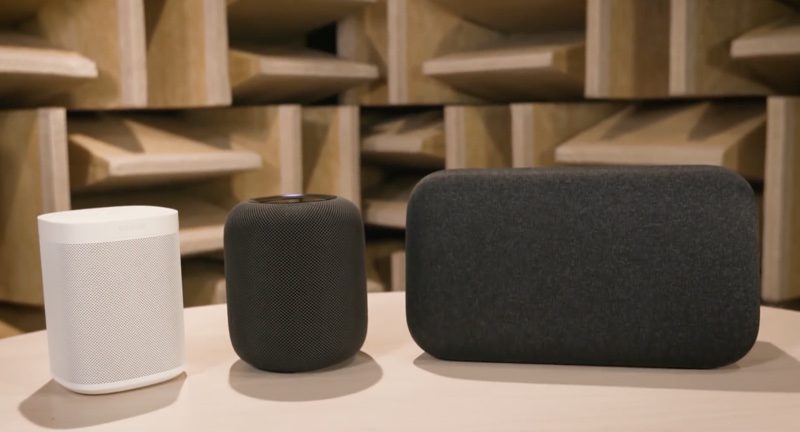
The HomePod’s sound has been highly praised both by new HomePod owners and by media sites that tested the device ahead of its release. While Consumer Reports doesn’t believe the HomePod outshines the Google Home Max and the Sonos One, other reviews have disagreed, including an extensive, in-depth review published by a self-professed audiophile earlier this morning.
Related Roundup: HomePodTags: Google, Consumer Reports, SonosBuyer’s Guide: HomePod (Buy Now)
Discuss this article in our forums
How to AirPlay Audio From Your Mac to HomePod
To play music from third-party music services like Spotify to your HomePod, you don’t need an iOS device — a Mac will work too. You can send any audio playing on your Mac right to your HomePod, and not just audio from iTunes.
To AirPlay from Mac to HomePod, your Mac and your HomePod need to be on the same Wi-Fi network.
Make Sure Volume is Enabled in Menu Bar
It’s easiest to AirPlay sound to the HomePod from a Mac using the menu bar on your Mac, but to do that, you need to make sure your audio settings are readily accessible. By default, audio settings aren’t available on the menu bar, so you’ll need to fix that.
Open up System Preferences.
Choose Sound.
Select the “Output” tab. 
Check the “Show volume in menu bar” box.
While it’s easiest to use the menu bar, you can actually AirPlay to the HomePod using the Sound section of System Preferences. To do so, double click on the HomePod, which should be named after the room that it’s in.
Selecting HomePod as an Audio Output Device from the Menu Bar
Once sound controls are accessible from the menu bar, it’s simple to route the sound from your Mac to the HomePod.
Click on the volume button in the menu bar.
Under the “Output Device” list, choose the HomePod, which is labeled as the room that it’s in. Mine is Office 2, because I have two AirPlay devices in my office. 
With the HomePod selected as the audio output device, all audio from your Mac will be sent to the HomePod. You can’t pick and choose — every sound from your Mac will be played on the HomePod instead of on your Mac’s speakers.
When using the HomePod this way, as an external speaker for the Mac, there’s no option to use Siri to do things like skip songs. tYou’ll need to control playback on your Mac, but you can use the physical controls on the HomePod to adjust volume.
AirPlaying from iTunes
For the most part, you need to use the audio output settings to AirPlay music from a third-party service to the Mac, but if you’re playing content from iTunes, you can use the built-in iTunes AirPlay controls.
Open iTunes.
Play a song from Apple Music or your music library. 
In iTunes, click on the  icon.
icon.
Select the HomePod icon.
Because you can play Apple Music and iCloud Music Library content directly on the HomePod, there’s probably not much need to AirPlay from iTunes to the HomePod, but the option is there if you need it.
Related Roundup: HomePodBuyer’s Guide: HomePod (Buy Now)
Discuss this article in our forums
Google Maps could soon let you share battery status along with location
In the not-so-distant future, you may be able to assure your friends and family that no terrible fate has befallen you simply because a terrible fate has befallen your phone (which is to say, it ran out of battery). A recent Android Police APK teardown of the Google Maps 9.71 beta suggests that the app will soon show your smartphone’s battery stats when you share your location, which could mean that when you let your loved ones know where you are, you can also let them know how much juice you have left in your phone. That could be the key to avoiding many panicky texts and voicemails.
As it stands, you can already share your location in Google Maps. You need only click the dropdown menu in the left-hand corner of the app, and determine how long and whom you’d like to update as to where you are. But as one might imagine, it gets pretty alarming when a contact suddenly drops off the map when his or her phone battery dies. Google looks to be offering a fix for this by allowing location viewers to also check out remaining battery status, though it likely won’t be terribly specific.
Rather, Android Police suggests, the basic format will read something along the lines of, ” [Person]’s battery level is between 50 percent and 75 percent and is charging.” If Maps is unable to determine battery level, either because permissions haven’t been granted or information is outdated, it will read, “[Person’s] battery level is unknown.”
Additionally, Maps looks to soon be adding the ability to create shortcuts to commonly visited mass transit stations, so you can figure out the fastest route to your nearest bus or subway stop in the midst of a pouring rain. In fact, Maps looks to be doing a mass transit overhaul in its entirety — Android Police notes that there are a number of lines that appear to be brand new, and while it’s unclear exactly what will change, our fingers are crossed for an improvement.
As ever, don’t hold your breath for any of these updates. It often takes quite some time for these new features to roll out, and it’s always possible that the features won’t come to fruition at all if testing proves unsuccessful.
Editors’ Recommendations
- Best iPhone 7 battery cases to keep your phone above 20 percent
- Get your gaming on the go with the 25 best Android games
- How to use Nova Launcher to become an Android superstar
- 35 helpful Galaxy S7 tips and tricks to master your Samsung smartphone
- Yes, Apple is slowing down your old iPhone. But if you’re angry, you’re crazy
Find out what to expect from Android P in our extensive guide
The most recent version of Google Android, 8.0 Oreo, is slowly making its way out into the world, and toward the phone in your hand; but what is coming next? Google’s alphabetical naming system suggests it’ll be Android P, and here’s everything you need to know about it now.
Android P?
Google names its major Android versions after some kind of sweet, or dessert. The most recent is Oreo, and we’ve had everything from Marshmallows to Cupcakes in the past. What will the P stand for? It’s apparently being called Pistachio Ice Cream internally, but that’s not an indication of its final name, and Google has changed its mind at the last minute in the past. What do you think it should be called? Remember, it has to be something sweet, and start with the letter P.
Design
How will Android P look? It may look quite different to existing versions. Most notably, Android P is rumored to adopt the iPhone X’s screen notch. The iPhone X’s screen covers most of the phone’s front panel, apart from a controversial notch at the top, where the camera and various sensors are placed. Google may be building support for a similar screen layout into Android P, according to sources speaking to Bloomberg. While phones that run Android are expected to arrive with a screen notch before Android P is released, they will operate a custom version of Android modified by the manufacturer, much like how the Essential phone deals with the layout now.
The adoption of the screen notch is potentially just a small part of a major redesign for Android. Google wants to attract people who choose the iPhone over an Android device by “improving the look of the software,” sources told Bloomberg. The reception to Apple’s notch on the iPhone X was mixed, and many Android users prefer the deeper customization available with Google’s software over Apple’s iOS, so bringing it closer in line with Apple’s design choices may prove controversial.
The notch may be just one new device design Google will encourage with Android P. Because manufacturers design their own hardware, many use different looks to separate their devices from others. Android P may also support designs with foldable, or flexible screens. Like the notch, Android phones with these designs have already been seen, and we expect to see more in 2018 even without official support for the design from Google. Instead, custom Android interfaces will be put to use, much like the ZTE Axon M.
Google Assistant
Google Assistant is already a key part of Android. However, Google has made it clear over the past few months that Assistant, and voice control in general, is only just getting started. Google may make Assistant even more prominent in Android P, according to a Bloomberg report, which says engineers are considering placing Assistant inside the Google search bar on the main home screen.
Additionally, developers may be able to exploit Assistant’s voice technology inside their apps. It is not clear whether this will be widely spread, or if Google will choose specific partners to utilize Assistant’s talents. The report also says neither of these two features is final, and Google may not include them in the final version of Android P.
Other new features
If Google concentrates on a new look for Android P, will the rest of the software remain similar to Android Oreo? It’s not clear yet, but more improvements to device battery life should be expected.
When will it be announced?
Google often gives us a quick look at the next version of Android during its Google I/O developer conference. We hope 2018 will be no different. Google I/O 2018 is scheduled to begin on May 8, and we’re most likely to hear about Android P during the keynote held on the first day.
When the software will be ready for your phone is a very different story. Developer previews follow the announcement and continue until a final release around September or October, traditionally. The software usually debuts on new Google-produced smartphones in the Pixel range. If you own a phone from a different manufacturer, it will come at a later date.
Editors’ Recommendations
- Everything you need to know about Android 8.0 Oreo
- When is your phone getting Android 8.0 Oreo? We asked every major manufacturer
- Here’s everything you need to know about the Huawei P20
- OnePlus 5T vs. Pixel 2: Battle of the Android superstars
- Sharp’s new iPhone 5c copy is called the Android One S3, runs stock Android
The $249 Asus Chromebook Flip can download and play apps via Google Play
Time for something new in your life.
The Asus 10.1-inch Chromebook Flip is down to $249 on Amazon. It normally sells for around $270 and has recently been selling as high as $300. This drop matches what it sold for on Black Friday and has hit a couple times since. It’s the lowest price ever and a great deal.

The Flip features a flexible 360-degree hinge and a touchscreen, allowing it to be used in either tablet, stand or laptop mode. Housed in a sleek, aluminum metal body, it weighs just two pounds and is only .6 of an inch thick. Its battery can last for up to nine hours on a single charge.
It has 4GB RAM and 16GB of storage, though there’s also a microSD card port allowing you to beef up how much storage it has. You can pick up one of these 64GB memory cards for only $23 with the money you save. You’ll definitely want one considering this computer has access to the Google Play store, allowing you to easily download tons of apps and games straight to the device as if it were an Android smartphone.
See on Amazon
 AIVAnet