


Amazon has Sony’s DualShock 4 PlayStation controller on sale for $36
Replace your worn-down controller with a fresh new one at a discount.
The Sony DualShock 4 PlayStation controller is currently on sale at Amazon for only $36 while supplies last. Though it has a retail price of $60, this controller more regularly can be found between $45 and $50 depending on where you look. With that in mind, this sale saves you at least around $10. Today’s offer is one we don’t see very often – especially at Amazon – so grab it while you can.

The DualShock 4 controller features a stereo headset jack, motion sensors, a built-in speaker, a multi-touch clickpad and more.
See at Amazon
Samsung’s former head of Bixby has reportedly moved to Google
Rhee is said to be working on IoT projects at Google.
In late December, Samsung’s newly appointed CTO Rhee In-jong announced that he was leaving the company due to family matters he needed to tend to. Now, according to a report from ZDNet, Rhee’s accepted a new position at Google as an entrepreneur-in-residence.

What exactly Rhee will be working on at Google is unclear. It’s said that he’ll focus on Internet of Things projects, but aside from that, we don’t know much else. Entrepreneur-in-residence spots are usually temporary within companies, so while Rhee could just be calling Google his home for a short period of time, we could also see him move up to a more permanent spot later on down the road.
Along with Rhee’s short-lived time as Samsung’s CTO, highlights for his career include serving as the head of Bixby development and having deep involvement with the likes of Samsung Knox and Samsung Pay.
Rhee first started working at Samsung in 2011 and didn’t leave until six years later in late 2017. We aren’t sure if he’ll spend as much time at Google, but either way, it’ll be interesting to see where Rhee goes from here.
Samsung’s CTO and former Bixby head has left the company
Best Cases for Moto X4 in 2018
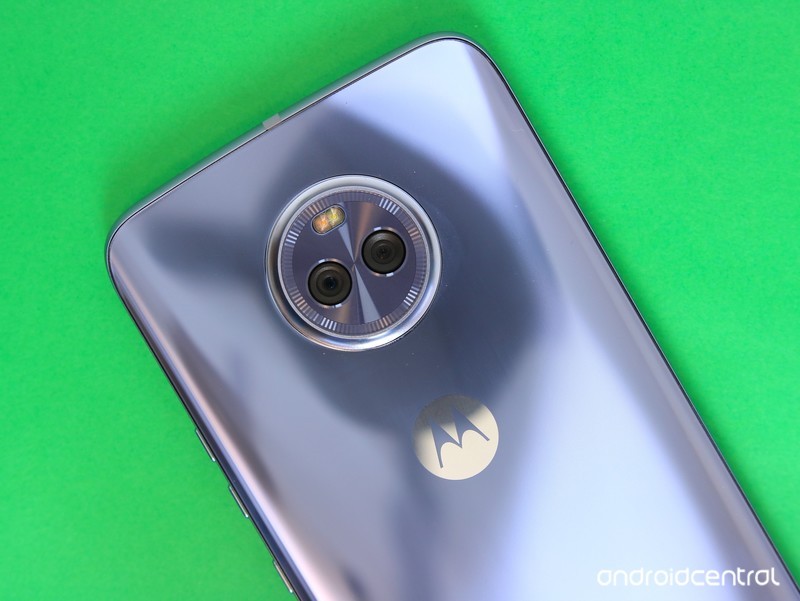
Own a Moto X4? These are the cases that deserve your dollars.
The Moto X4 is a big departure from past Moto X devices, but that doesn’t mean it’s a bad phone. In fact, it’s one of the best mid-range Android handsets on the market right now.
It’s the first entry in the Moto X series to feature a glass back, and while it looks downright gorgeous, this also makes the X4 rather fragile and easy to break. To ensure that doesn’t happen and your phone continue to look as good as can be, these are the cases we recommend checking out.
- Lenovo Touch Flip Cover
- Dretal Full-Body Protective
- Spigen Liquid Crystal
- Mustaner Dual Layer
- Encased Slim Fit Holster Shell Combo
- Anccer Colorful Series
- KuGi Flexible Soft TPU
- KwMobile Wallet
- Cimo Heavy Duty
Lenovo Touch Flip Cover
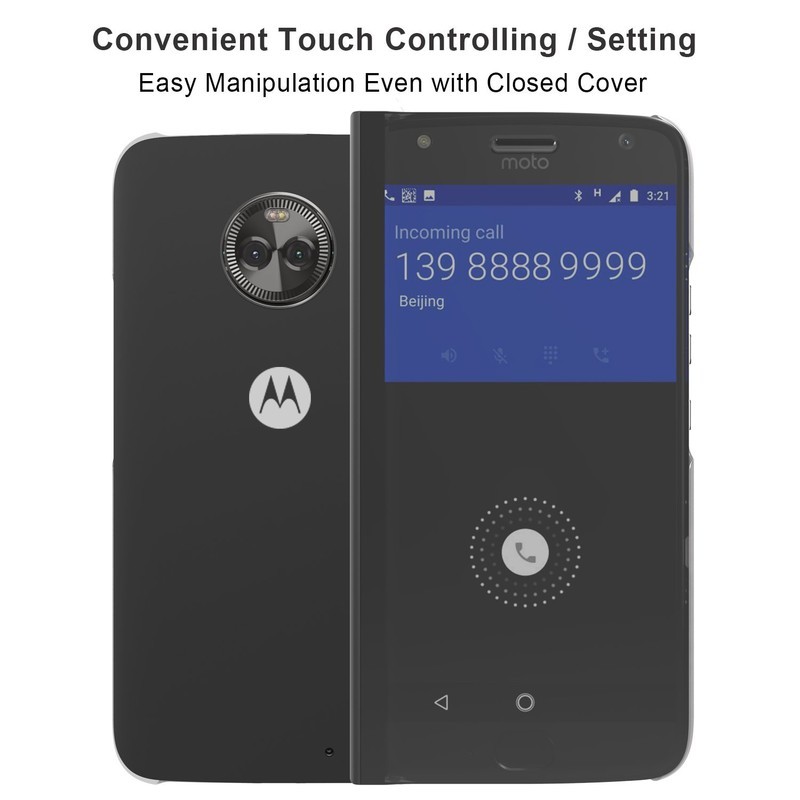
There aren’t a ton of first-party cases for the Moto X4, but one of our favorites is the Lenovo Touch Flip Cover. The case snaps onto your phone with a durable material that promises to keep you protected from any unwanted bumps or scratches, and when the case is folded up, you’ve got rock-solid protection on the front and back.
The front easily opens so you can use your Moto X4 like normal, but even when the case is closed, you can still interact with the display to see and accept/reject incoming calls thanks to the transparent design. It’s the most expensive case on this list at nearly $15, but it’s well worth it.
See at Amazon
Dretal Full-Body Protective
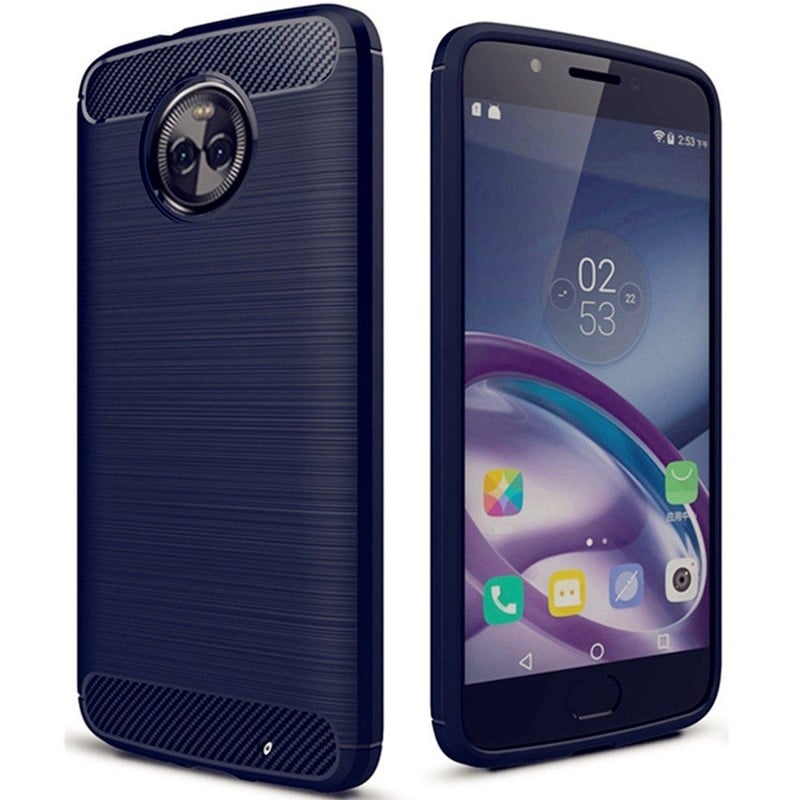
If you prefer something more traditional, cheaper, and with increased protection, Dretal’s Full-Body Protective case is certainly worth a look. The carbon fiber and anti-stretch TPU rubber design encase the Moto X4 is a durable shell, and the multi-texture design on the back adds a nice bit of flair.
There are a multitude of colors to choose from, including Navy, Black, Gray, Red, and Mint, and all of Dretal’s products come with a generous 30-day warranty. For under $8, it’s hard to complain about this one.
See at Amazon
Spigen Liquid Crystal
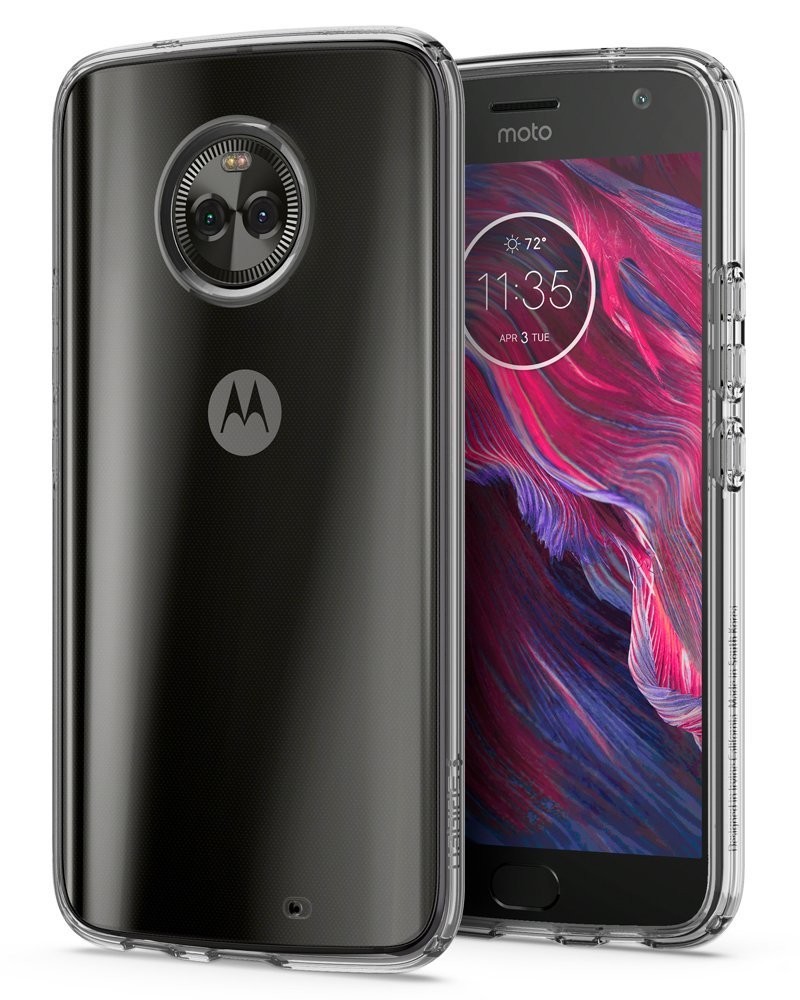
While the colors of Dretal’s case look great, you might be inclined to show off the reflective glass back of the Moto X4. We certainly don’t blame you, and if that’s the case (get it 😂), Spigen’s got your back.
The Spigen Liquid Crystal is a clear case for the Moto X4, and it does an excellent job of showing the sleek look of the X4’s back. The case is made out of a durable and anti-slip TPU material, and in addition to keeping your phone nice and safe, it still manages to remain light as a feather.
Spigen uses a dot pattern for its case, and unlike a lot of cheaper clear options, this helps to drastically cut down on the smudges it picks up. For just under $13, this isn’t a bad choice at all.
See at Amazon
Mustaner Dual Layer

For users that are rough on their phones and treat them like they would any other tool in their toolbox, Mustaner’s case is the one we’d recommend getting. This isn’t as slim or fashion-forward as some of the other options on this list, but what it lacks in aesthetics, it makes up for with awesome protection.
Mustaner’s case features a two-layer design – including a soft TPU base layer and hard shell frame that goes on top of it. This combo allows for maximum safety no matter what happens to your Moto X4, and the built-in kickstand on the back is a really nice touch.
You’ve got six different colors to choose from, and all of this comes in at under $8 before using a free 5% off coupon.
See at Amazon
Encased Slim Fit Holster Shell Combo
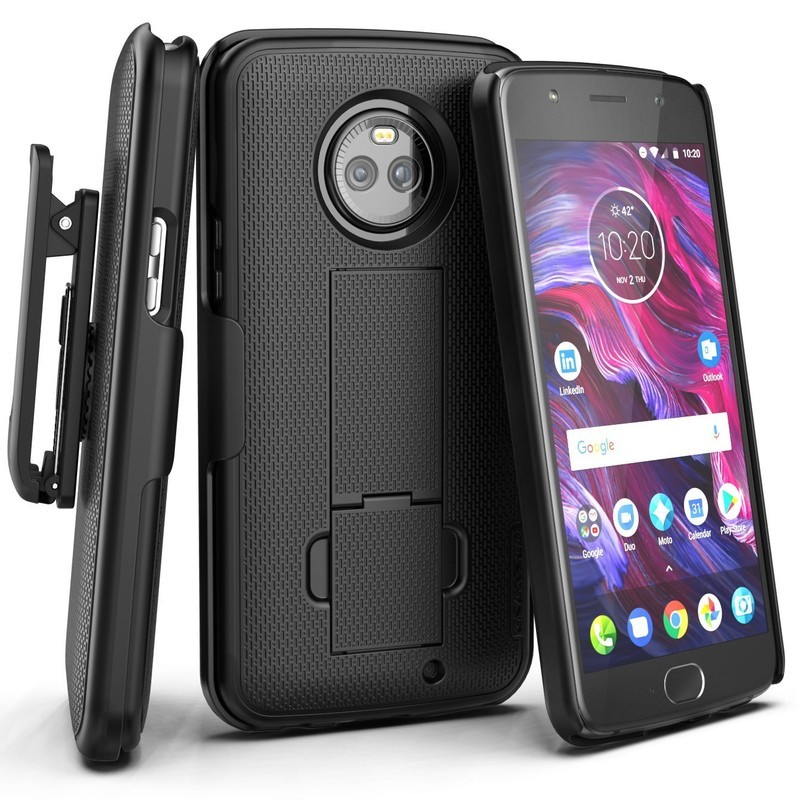
There’s a lot of functionality packed into the Mustaner case, but if you want your case to do even more for just a couple extra dollars, look no further than what Encased has to offer.
This case is made out of a reinforced polycarbonate frame, and as expected, offers ample protection against any accidental spills. You’ll find a subtle texture on the back for increased grip, and along with a kickstand that can prop up your phone vertically or horizontally, Encased also includes a holster that your Moto X4 can slide into so you can easily attach it to your belt. For less than $12, that’s a steal.
See at Amazon
Anccer Colorful Series
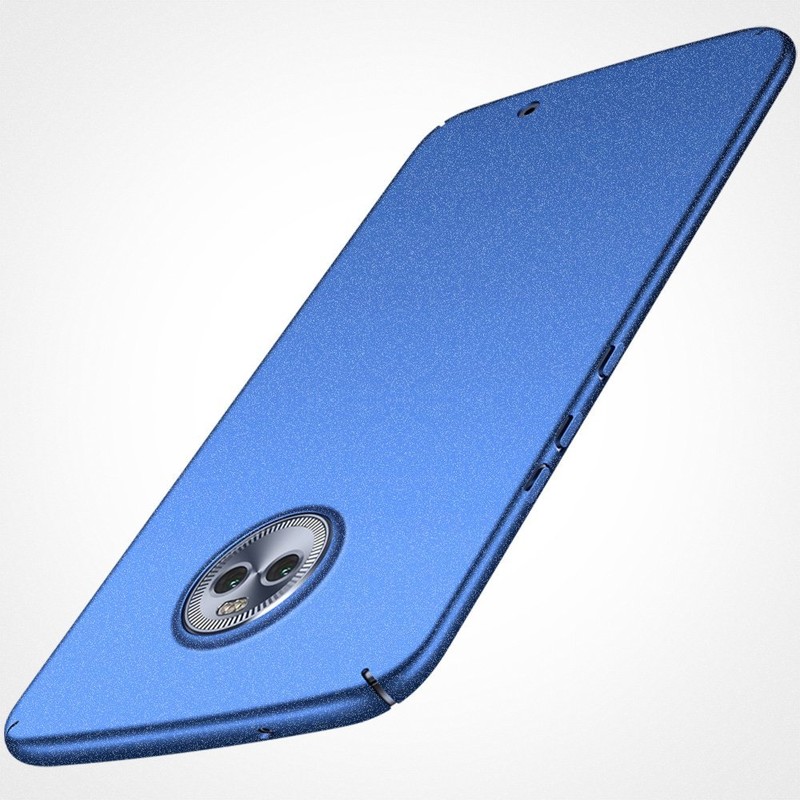
The above two cases are great for buyers that prefer function over form, but if like things the other way around, one of your best bets lies with the Anccer Colorful Series. This is the thinnest case on the list measuring in at just 0.3mm, but even with the thing design, Anccer’s case still manages to protect against, drops, bumps, and shocks.
Available colors include Black, Blue, Red, Rose Gold, Gold, and Silver, and these are available in either gravel or smooth finishes. This is a great case for adding some color to the Moto X4 while protecting it at the same time, and you can do so for about $11.
See at Amazon
KuGi Flexible Soft TPU
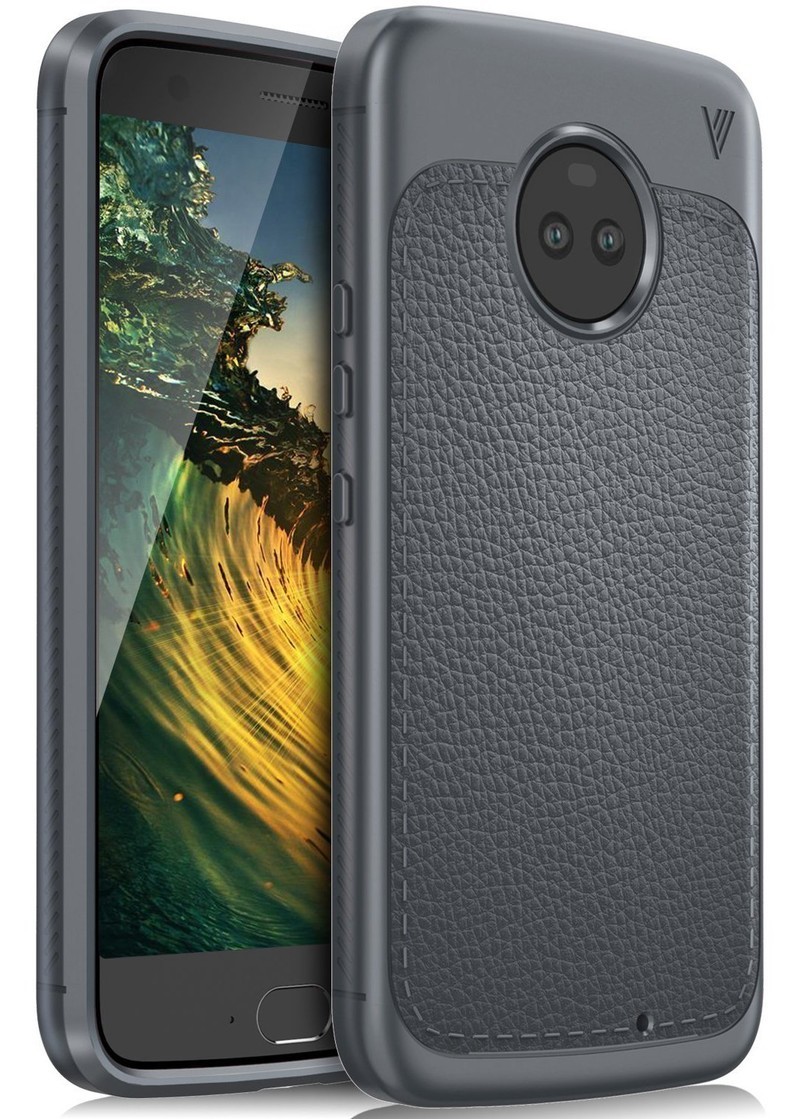
What’s a person to do if you want a case that looks awesome while still offering as much protection as can be? What you do is pick up the KuGi Flexible Soft TPU case. The TPU material that’s present here does a fantastic job at housing your X4 in a secure home from just about any element imagineable.
Non-slip sides allow you to always have a confident hold on your device, bumper guards protect against unwanted shock during a drop, and the faux-leather material on the back looks and feels like a million bucks.
KuGi sells its case in Navy, Black, and Gray, and you’ll pay just under $8 before applying an extra 8% off.
See at Amazon
KwMobile Wallet

There’s no denying the usefulness of a wallet case, and one of the best ones you can get for the Moto X4 is KwMobile’s option.
Available in Black, Black/Brown, and Grey/Black, the fabric design of the case is great for both looking and touch, and the plastic shell the X4 sits in offers ample protection against any mishaps. The front of the case is held together by magnets, and you have access to a three-card compartment for carrying around your most important plastic.
See at Amazon
Cimo Heavy Duty
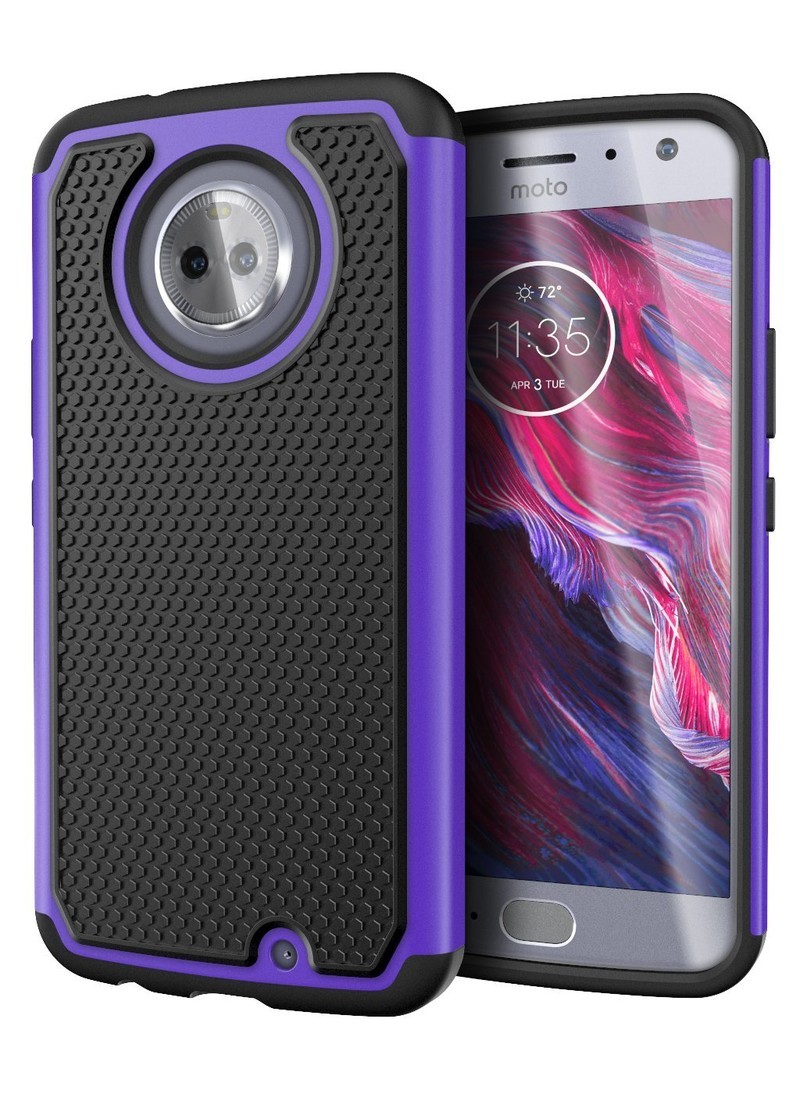
Last but not least, the Cimo Heavy Duty case is another great choice for customers that want great protection and looks at the same time.
Cimo uses a lightweight design here, and this allows your Moto X4 to stay safe and secure without adding much bulk. The two-layer design offers more than enough protection against most all drops, raised bezels help to protect the X4’s screen, and the grippy back is something we always love to see.
You’ll pay just under $8 for this case, and it comes in Armour Black, Gray, Purple, and Red color options.
See at Amazon
What one do you choose?
Which of the above cases meets your fancy? Let us know down in the comments below and if there’s another awesome pick we may have missed.
Moto X4 review: A mid-range phone done right
ASUS puts discrete graphics inside its ultra-thin ZenBook
ASUS showed off its ridiculously thin and light ZenBook 13 at CES earlier this year, but the model was missing a key component: a dedicated GPU. Now, though, the new ZenBook 13 UX331 offers the whole shebang at just 0.47-0.55 inches thick and weighing in at just 2.47lbs, with a discrete graphics card on board and a 13.3″ FHD touchscreen display.
The visual grunt work comes courtesy of an Nvidia GeForce MX150 2GB GDDR5 GPU, and will provide extra performance for gaming and GPU-intensive tasks and certainly a boost over the Intel UHD cards found in ultrabook counterparts. ASUS says it’s the world’s thinnest laptop with a discrete GPU, and it’ll no doubt play a role in bumping the brand’s sales of gaming machines, which Asus expects to increase by 33 percent this year.
The machine also features two USB 3.0 ports, a micro SD card reader, headphone-out, audio-in jack, dual band 802.11ac Wi-Fi, and a 50Wh lithium polymer battery that boasts up to 14 hours of runtime. You’ll get 60 percent charged in just 49 minutes, too, but then again you’d expect a quick charge time for such a lightweight machine. It’s on sale now for $1,000.
Source: Tom’s Hardware
Panasonic’s GX9 packs 4K video and more into a tinier body
Panasonic’s Lumix GX8 flagship compact was already a pretty innovative camera back in 2015 with 4K video, stabilization and a relatively high resolution 20.3-megapixel sensor. The next generation Lumix GX9 builds on that tech, but lowers the price and fits it into a new body borrowed from the GX85. That’s a good thing — the GX85 is a nice-looking, very compact camera with physical dials, and the GX9 brings its bigger sensor, tiltable electronic viewfinder (EVF) and other nice perks.
As you’d expect from one of Panasonic’s top Micro Four Thirds mirrorless camera, the GX9 has pretty high-end specs. That includes a 20.3-megapixel Live MOS sensor, powered by the latest Venus Engine. It’s the same resolution as before, but sans the GX8’s low-pass filter — identical to the one on the flagship GH5, it seems. The contrast AF “depth from defocus” system has face and eye detection and can focus in .07 seconds, Panasonic says. The camera now has a electromagnetic, rather than a mechanical shutter, which reduces vibrations by up to 90 percent.
The GX9 has a new wide screen 16:9 electronic viewfinder (which Panasonic calls a “live view finder,”) with 2,760 dot resolution, 90-degree tilt-up angle and 100 percent field of view. The rear LCD can be tilted, but unfortunately for vloggers or tourists who need a full self-portrait mode, it no longer flips out like it did before. You get 5-axis in-body stabilization, compared to 4-axis on the GX8, which can be paired with lens stabilization to reduce shake on telephoto shots. The GX9 also includes a built-in flash, unlike the last model.

Video is Panasonic’s strong point, and you can capture UltraHD 4K video at 30p or 24p, and 60fps 1,920 x 1,080, all with full time AF. Again, that’s identical to the GX8, but Panasonic has augmented its so-called 4K Photo options, making it easier to grab 8-megapixel equivalent photos. That’s thanks to a new “auto marking” function that will automatically find unique shots, and a “post focus” mode that uses the 4K mode to let you change the focus of shots even after you take them.
Finally, Panasonic has introduced an L.Monochrome D mode that will yield black and white images with better dynamic range and more control of grain (noise). The Panasonic GX9 will arrive in mid-March in black or silver with the kit 12-60 f/3.5-5.6 kit lens for $1,000 — a good $200 less than the GX8 with a body only.
Panasonic’s ZS200 compact camera doubles down on zoom
Along with the all-new GX9, Panasonic launched the ZS200 compact superzoom, a successor to the excellent ZS100. The new model hasn’t massively changed, as it still offers a 1-inch, 20.1 megapixel sensor, 5-axis stabilization, 4K, 30 fps video and more. However, there’s enough new stuff there to make it interesting. Mainly, the Leica-built zoom lens has an increased range of 24-360x, compared to 25-250x (35mm equivalent) for the last model, albeit at a loss in aperture speed from f/2.8-5.9 to f/3.3-6.4.
Panasonic says the new lens offers “minimal distortion and flare,” but we’ll have to see if it’s sharper than its predecessor at longer zoom lengths. It also offers a nice 3cm macro capability, all of which should make it a more useful for its intended tourist and casual shooter market. The higher minimum f/stop is unfortunate, but the ZS200 has pretty decent light sensitivity for camera with a 1-inch sensor. In particularly dim situations, you can also use the built-in flash.

The ZS200 has a new 2,330K-dot EVF and updated 4K Photo mode that makes it easier to find interesting shots and do post focus and other effects. It also gains an L.Monochrome mode for more artistic black and white shots. Features carried over from the last model include a 20.1-megapixel sensor and Venus Engine with 0.1-second contrast-detect autofocus, 4K, 30fps video, and wireless transfers via WiFi or Bluetooth 4.2. The Lumix ZS200 will hit stores on March 20th in black or silver for a suggested retail price of $800.
RED teaming with Foxconn on smaller, cheaper 8K cameras
Foxconn plans to build smaller, cheaper 8K cameras in collaboration with cinema company RED, Nikkei reports. “We will make cameras that will shoot professional-quality films in 8K resolution but at only a third of current prices and a third of current camera sizes,” CEO Terry Gou told reporters. RED currently has several 8K models, including the 3.35 pound, $30,000 Epic-W 8K (above). That means Foxconn could conceivably produce an 8K camera that costs around $10,000 and weights just over a pound — less than many DSLRs.
The news is part of a broader Foxconn effort to branch out from smartphones, a market it says has become stagnant. Foxconn currently relies on Apple for around 50 percent of its sales, manufacturing iPhones, MacBooks and other products.
The company recently purchased Sharp, and plans to drastically ramp up its production of displays, having recently announced a $10 billion investment in the US. “Not only displays, Sharp controls important chip technologies for various image sensors that go into digital cameras and televisions. We will definitely make good use of them and make more of them,” Gou explained. “And we will make these [chips] much more cheaply. That’s our important goal and project for this year.”
The company is also going into the cloud business in a big way with a new subsidiary, FII, likely because of new laws forcing foreign companies to host Chinese user data locally. According to a prospectus, it’s key clients already include Apple, Amazon, Cisco, Dell, HP and Lenovo.
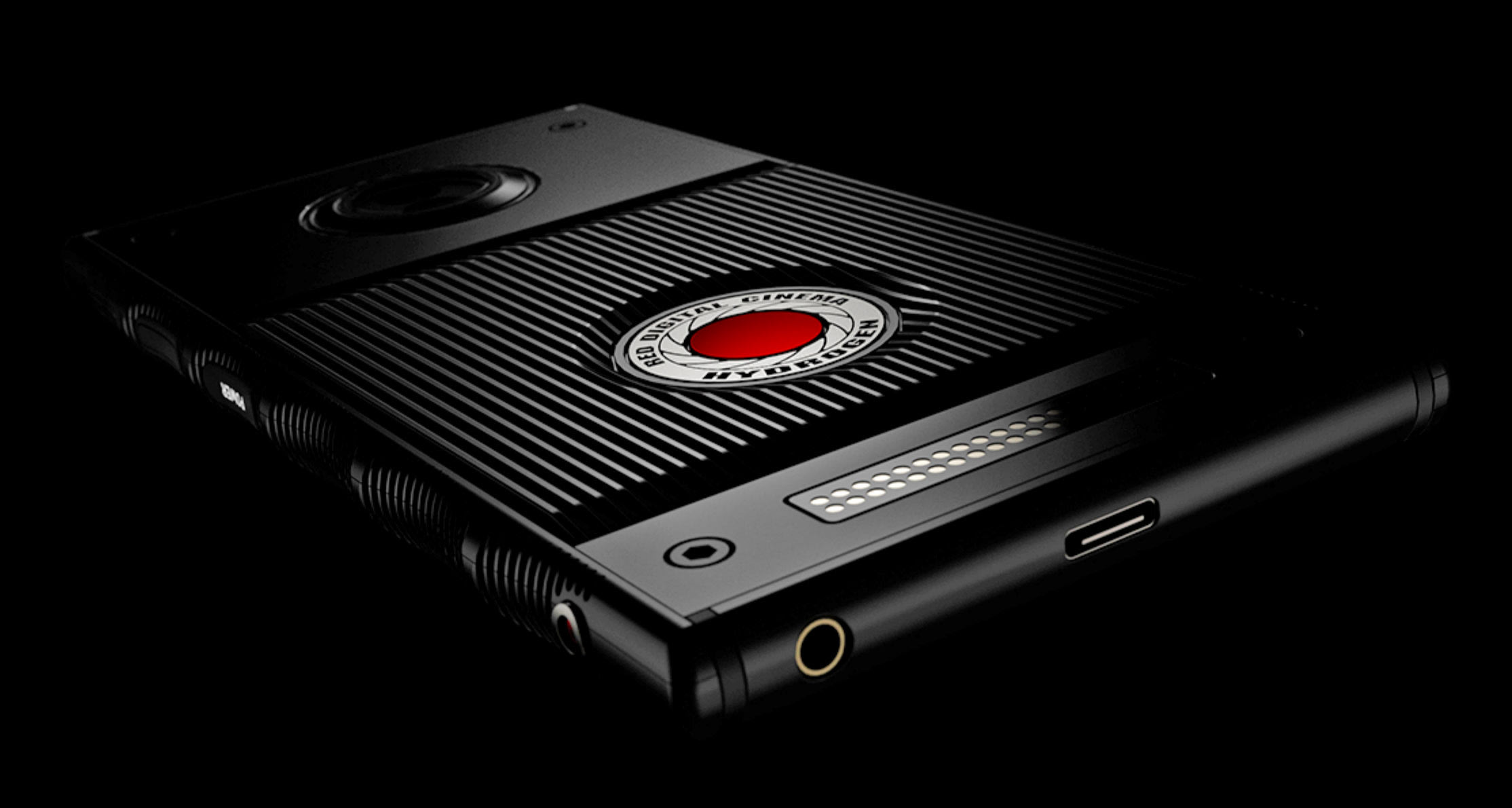
RED’s cinema cameras, including the Weapon Montro 8K VV (VistaVision) and Epic W, have been used on films like Guardians of the Galaxy, The Hobbit, Transformers and House of Cards. The company has always touted its US manufacturing, so it seems out of character for it to manufacture in China. However, it recently branched into smartphones with the Hydrogen, set to arrive this summer, and it’s unclear whether that device will be built locally.
There isn’t yet a huge market for 8K, which has so far only been used for cinema, but wider adoption for television and other mediums is coming for the 2020 Tokyo Olympics. RED would probably target a different market and have a reduced feature set if it did build a cheaper 8K cameras, so as to not cannibalize its high-end products and alienate current customers. The company hasn’t commented on Nikkei’s report, but Engadget has reached out for more details.
Source: Nikkei
The Skydio R1 might be the smartest consumer drone in the sky
Autonomous features in commercially available drones are nothing new. Heck, I’m old enough to remember when DJI Phantoms didn’t even offer follow-along technology. Shorter version: Most every drone worth its rotors possesses some level of autonomy. But then there’s Skydio’s R1, which ratchets things up a notch. Or two.
The R1 isn’t so much a drone as it is a flying, self-positioning action camera. It’s sole purpose is to record the person it’s following. Built by a team of former-MIT engineers, the R1 relies on the 13 cameras studded throughout its exterior to see the world around it and the same NVIDIA Jetson chip used in self-driving vehicles as a processing hub to navigate.
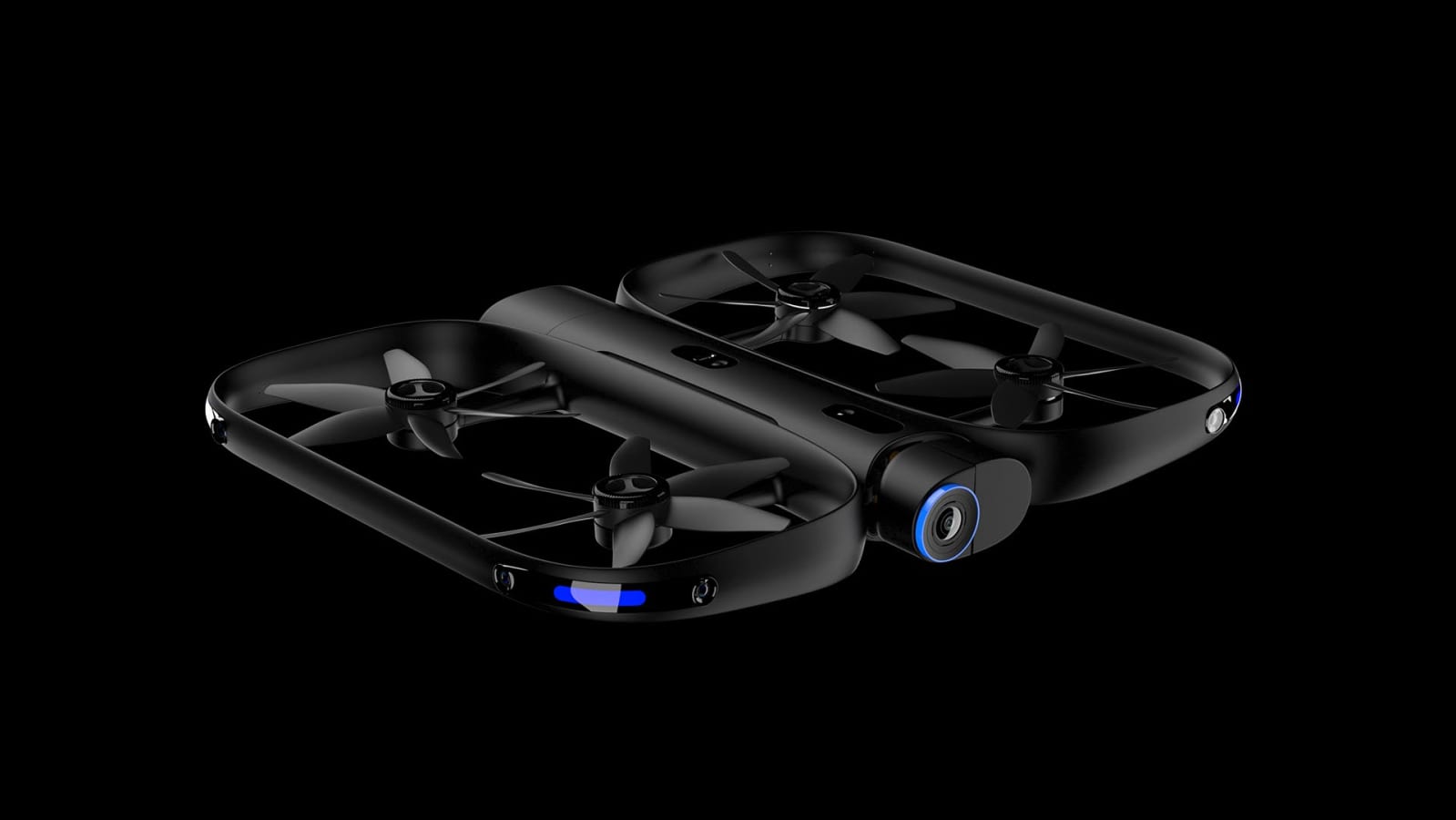
And good lordy, can it navigate. Ok so, you know how the Phantom 4 has obstacle avoidance tech? It’s where the drone, upon sensing that it will strike a low-hanging branch or phone pole, will stop following its target and hover a safe distance from the obstruction. The R1, however, does not care. During a recent demo in San Francisco’s Jefferson Square Park, the R1 easily dodged trees, power lines and more than a few curious dogs while keeping its camera trained on me.
What’s more, having the drone track me — either following, leading or steadily circling — did not require that I have my phone in my hands or even out of my pocket. The R1 is purpose-built for autonomous flight, and I can’t overstate this. You literally launch the app, launch the drone (either from the ground or from your hand), pick what filming behavior you want the drone to exhibit and go about your business. Most drones have autonomous features to supplement their manned flight. The R1 offers manual controls for the R1 almost as an afterthought — because the autonomy is that good.
The R1 uses its cameras, rather than GPS, to generate navigational information in real time. This enables it to make quicker decisions (i.e. fly faster) as well as be able to operate indoors. DJI had already made a number of advancements in this space already, however, the company’s Active Track technology does still require a GPS signal — making tracking and avoidance at the same time a more cautious affair.
Navigating by sight alone is a huge deal and not a trick many UAVs are capable of achieving — not at this speed and responsiveness, at least. What’s more, the R1 can top 20 mph. That’s slower than most of DJI’s drones, but fast enough to keep up with runners and bikers.
The R1 does have other drawbacks. For one, its battery life is around 16 minutes. That’s only enough recording time for one, maybe two, trips down the trail before you have to hot swap its battery packs. There’s also the issue of its 64GB of onboard storage, which is not expandable. Granted, you’ll likely run through your supply of batteries before your supply of storage, but the R1’s 4K primary camera is no slouch when it comes to consuming memory. Also, the system doesn’t work over water. The AI can’t figure out how to navigate the constantly shifting features of lake surfaces, and the drone itself is not waterproof.

There’s also the product’s price. You can pick up a DJI Phantom 4 Pro from Best Buy, right now, for $1,500. If you want something with more of an action-sport focus, there’s the AirDog II for $1,299. If you want an R1, however, you’d better sell that superfluous kidney of yours because this drone will set you back a solid $2,500.
That said, if you have the ways and means or just wealthy, gullible parents, this is the selfie drone you want. It works with both Android and iOS and you can pull content either from the onboard hard drive or just chop and share a quick video from the mobile app. Best of all, it will follow you to the ends of the earth (assuming they’re a 16-minute trip away).
Apple HomePod review: A great speaker that’s not so smart
For Apple, being late to the smart speaker party isn’t necessarily a sin. The company’s ethos — as explained by CEO Tim Cook time and again — is that Apple cares more about being the best than being first. The $349 HomePod is proof that’s not always true. Apple put considerable time and effort into making its first smart speaker sound better than its rivals, and I’d argue they succeeded. After a few solid days of testing, I can honestly say the HomePod is the best smart speaker I’ve ever heard — it’s just not very smart in the ways I was hoping.
Embracing the ecosystem
Just to be clear up front: Anyone who isn’t an ardent Apple user should probably just move on. The HomePod requires that you have an iOS device for the initial setup process and an Apple Music subscription to play some tunes. (You’ll be offered a three-month free trial if you aren’t already a subscriber.) In other words, if you’re primarily a Spotify person (like me) or an Apple Music user who prefers Android devices, the HomePod isn’t for you. Beyond that, the lack of audio inputs and a Bluetooth implementation that doesn’t allow for streaming from devices means your musical options are limited.
If you’re already a citizen of Apple’s walled garden, setting up the HomePod takes mere moments. Assuming Bluetooth is on and you’re running the latest version of iOS, just place your phone or iPad near the HomePod — you’ll be asked to share your Apple account settings and run through a few “Hey Siri” tests. You’ll also be asked whether you’d like the HomePod to handle what Apple refers to as “personal requests” — that is, whether it can have access to your notes or incoming messages. If you agree, the HomePod can tap into that stuff only if the associated iOS device is on the same Wi-Fi network, but that still means people at home with you could feasibly muck around with appointments or send messages to your contacts. If this sounds troubling, you can decline during setup (you could always do it later) or revoke support for personal requests after the fact.
Once all that’s done, it’s time to start listening.

Chris Velazco/Engadget
Audio quality
Let me preface this bit by mentioning I’m not an audiophile. I appreciate great sound, but I’ve never felt compelled to go out of my way to become an audiophile. Because of that, the HomePod seems tailor-made for me. This is a tiny, mesh-covered speaker that sounds fantastic, and I didn’t have to do much other than plug it in and start asking to hear some tunes. No surprise there: That’s basically what Apple has been promising since it first unveiled the HomePod last summer.
After spending more time with the HomePod, I’ve come to appreciate just how good this thing sounds. I’ve been testing it alongside some of its most notable competitors too, though, and as great as the HomePod sounds, it’s not for everyone.
For a better understanding of why the HomePod sounds the way it does, let’s take a peek under the hood. Long story short, Apple built an array of seven tweeters along the HomePod’s base and a top-firing woofer right in the center. More important, there’s an A8 chipset — you know, the one from the iPhone 6 — embedded in the touch panel at the top of the HomePod, tuning the output from each of those speakers to suit the space it’s in. While it plays your music, the HomePod listens to how the audio it’s playing reflects off surfaces and obstacles nearby to build a model of the space around it. Since you’ll probably move the HomePod at least once, a built-in accelerometer ensures that the speaker knows to reassess its surroundings when you put it down again.

Apple
That environmental data is used to determine which parts of a song should be routed through which speaker inside the HomePod, a process that helps build a surprisingly spacious soundstage. A singer’s vocals, for example, are likely to be blasted right at you while an underlying piano melody is concentrated around the sides to give it a more ambient feel. The level of complexity at play here is downright wild for a speaker of this size.
Over the past few days, I’ve asked the HomePod to play an eclectic mix of music, and with very few exceptions, every track I tried sounded bright and balanced. And, thanks to the HomePod’s omnidirectional design, you can walk around it without noticing any massive differences in sound.
One of the most notable things about the HomePod is the excellent job it does highlighting the myriad moving parts of a song. The main brass melody in “Tank!” (of Cowboy Bebop fame) gets the star treatment for most of the song, but elements like the ever-present bongo and shaker never get lost in the mix. On previous listens through different speakers and headphones, it was easy to forget that they’re there, but the HomePod did a great job balancing those bits and letting them shine. It’s not going to be as immersive as a pair of high-end bookshelf speakers, but if you close your eyes, the leap isn’t a huge one.
In general, you can expect the HomePod to emphasize vocals and mids, and that’s usually a great thing. Brian May’s guitar solo and Freddie Mercury’s growl in “Somebody to Love” felt punchy and present, while the piano and drums provided a solid foundation for the mids and highs to dance on. In Kesha’s “Praying,” her voice does most of the heavy lifting, but the HomePod’s excellent clarity revealed the tremolo in her words during the relatively bare first half. The effect isn’t always perfect, though: In They Might Be Giants’ “Ana Ng,” John Linnell’s nasal croon seemed to rise above the rest of the mix, overshadowing the rest of the instruments.

Chris Velazco/Engadget
Meanwhile, songs like Paul Simon’s “You Can Call Me Al” show off the nuance of Apple’s woofer design: The jaunty bass line gets just as much attention as Simon’s tumbling vocals, and it really shines once the band drops out and the slap solo kicks in. Ditto for grungy, fuzzy rock like Silversun Pickups’ “Panic Switch,” a song that lives or dies depending on how its driving, repetitive bass line is rendered alongside the hazy lyrics.
The thing about the HomePod’s approach to bass is that it’s deep and surprisingly powerful at times, but never overdone. The iPhone chip inside the speaker is always managing the woofer to ensure there’s no distortion, even at maximum volume. The flip side is that songs that revel in those low frequencies, like Childish Gambino’s “Redbone” and Kendrick Lamar’s “All the Stars”, can sometimes feel less impactful. This constant balancing act clearly works better for some songs than others, but overall I’d say it’s a net positive.
What the HomePod seems to lack is pure, unabashed sonic power. It’ll fill most living rooms (and conference rooms, for that matter) just fine, but it struggles to saturate significantly larger spaces. If that’s what you’re after, Google’s $399 Home Max does a better job. If you’re sitting right in its line of fire, the Home Max’s sound reaches out, grabs you and doesn’t let go until the song is over. The soundstage feels noticeably wider too, because of its dual woofers and tweeters. Meanwhile, you’ll have to wait for Apple to issue a software update before you can pair two HomePods in stereo.
The Home Max’s power comes at a price, though. At high volumes, Google’s speaker sometimes sounds distorted and indistinct, as though you were wading through a sort of musical soup. The HomePod lacks that raw oomph but instead aims for balance even at maximum volume.

Expect to see this a lot.
Chris Velazco/Engadget
Making do with Siri
There are two ways to interact with the HomePod: You can either walk up to it and tap the touch-sensitive top panel or just start talking to it. Either way, it doesn’t take long to realize that Siri — or at least this particular version of Siri — isn’t as capable as other voice assistants.

Chris Velazco/Engadget
Let’s start with the good. Thanks to the HomePod’s six far-field microphones, the device is very good at picking up “Hey Siri” requests, even when you have music blasting away at max volume. Sometimes whispering was enough to trigger Siri while music was playing and the HomePod still responded correctly. Siri’s voice recognition has been mostly spot-on, too — I can count on one hand the number of times it bungled one of my requests (and on two of those occasions I happened to be cramming chips into my maw). And when it was time to start sending text messages to friends and colleagues via the HomePod, that was all peachy too.
In my experience, Siri makes for a thoughtful DJ as well. Full disclosure: I’ve been an Apple Music subscriber since launch, but mostly because I keep forgetting to cancel it. I’m honestly a little glad that’s the case — even with infrequent use, Apple Music has proven it has a solid understanding of my eccentric musical tastes. Unlike what some of my fellow reviewers reported, Siri never presented a truly bizarre choice when I asked it to “play something I’d like” — it was all either stuff I’d listened to in the past or tracks that were similar to others in my collection.
Siri was also surprisingly good at finding playlists to suit my moods or genre preferences, but I often didn’t love a lot of those songs. (That’s mostly a matter of taste, though.) Still, the selection of tracks Siri ran through when I told the HomePod it was party time did the trick, so I’m willing to give Apple’s playlist creators some leeway. Oh, and the HomePod also doubles as a solid smart home hub, so I could control my assortment of Philips Hue lights without trouble just by asking.

Chris Velazco/Engadget
This is all basic functionality, and Apple was right to ensure that Siri could handle these tasks. The thing is, the HomePod doesn’t exist in a vacuum. Having used the multiple versions of Amazon’s Echo and Google’s Home in the past, I have certain expectations of a smart speaker. There are a few third-party integrations here, but no way to order pizzas or hail an Uber. Those examples may seem frivolous, but the fact that they exist at all is a testament to just how broad the support for assistants like Alexa has become. The value of Amazon’s and Google’s head start is undeniable.
That’s not to say that the HomePod is devoid of third-party support. You can ask Siri to fire off messages via WhatsApp or WeChat, both of which worked flawlessly. And if you’re the sort who fastidiously creates to-do lists and sets reminders to keep yourself on track, Siri handily ties into Evernote and Remember the Milk, among other services. We’ll certainly see more apps embrace Siri for the HomePod in time, but the limited functionality right now makes this smart speaker a tough sell for some.
Even if we put third-party support aside, Siri on the HomePod still feels limited. Alexa and Google Assistant can, for instance, handle multiple timers at once. They can peer into your calendar and tell you what’s next on your schedule (Alexa needs some external skills for this), which Siri simply can’t do right now. Siri also can’t initiate phone calls, even when the iOS device it’s associated with is on the same network. Before receiving the HomePod, I had hoped Apple’s devotion to building a smart speaker that connected to a tightly defined list of devices and services meant the integrations themselves would be tight as well. That might eventually be the case, but it isn’t now.

Chris Velazco/Engadget
There are other shortcomings, too. Remember how the HomePod can field personal requests and provide access to data and services stored on an associated iOS device? That wouldn’t be an issue if Siri on the HomePod could identify users by their voices, as it already does on the iPhone. Right now, however, anyone could ask my HomePod to play my unread text messages or send a text to a contact, and as long as my phone was nearby, Siri would comply without hesitation. I don’t have anything to hide, but the principle still stands: If my phone can recognize my voice, the HomePod should be able to as well. This is stuff that Google’s Assistant has already figured out, and it at least offers some protection of your privacy.
Ironically, too, for a device that’s only valuable if you’ve bought into Apple’s ecosystem, the HomePod’s version of Siri sometimes works strangely with other Apple products. You generally don’t need to worry about the iPhone picking up on commands intended for the HomePod; Siri on my iPhone X was quick recognize the difference though I still got the occasional trademark “I’m listening” sound. I wish I could say the same for the Apple Watch, though. If you have “Hey Siri” voice commands enabled on your watch and its screen is on, it’ll interpret your requests at the same time the HomePod. This led to a few situations where, after asking Siri to play something it thinks I would like, two different songs started playing on the HomePod and the iPhone. Great.

Chris Velazco/Engadget
Wrap-up
In a way, the HomePod is a remarkably pure machine: it’s meant to make your music sound great, and that’s about it. Viewed purely through that lens, the HomePod is a fantastic first attempt and one that delivers on its promise. Taken as a whole, though, the company’s first smart speaker feels like a work in progress. Over time, software updates will iron out some of these early wrinkles and add features to make the HomePod a more intelligent, more capable companion. For now, though, it’s a technical marvel and a tough sell all rolled into one.
Google plans Snapchat-esque stories for mobile search results
Assuming you have a basic understanding of social media and haven’t been living under a rock for the last year, you’re going to be familiar with “Stories” — full screen displays of content that you can swipe or tap through, which are available for a limited time. Snapchat got the ball rolling, Instagram got on board, Facebook followed suit, and now Google is getting in on the action, following the initial report it would back in August. According to a Google blog post, “AMP Stories” are in the works, and soon they could completely shake up the look of your search results.
“AMP” stands for Accelerated Mobile Pages — optimized web pages displayed on your smartphone via Google search results, and as the name would suggest, they load fast (in around a second) and use ten times less data than non-AMP pages (although they have created some controversy — their URL prefix can make link sharing a pain, and some publishers have annoyed Google by offering stripped-back content on these pages instead of the full experience). Now, instead of seeing the usual text links, you’ll see image- and video-orientated stories, much like the ones you see on Instagram et al.
The difference, of course, is that these stories aren’t coming from your old college friend who’s bought a new guitar, or from an ex-colleague who’s shakily Snapchatting their commute, but from publishers with cash to spend on the format. Back in October, Recode reported that Google planed to pay said publishers to commit to its version of stories. CNN, Conde Nast, Hearst, Mashable, Vox Media and The Washington Post are just a few of the brands Google has partnered with for this developer preview, with examples of stories including swipeable top 10 lists, explainers and animations. The Washington Post used the format to create a timeline of North Korea’s participation in the Olympics.
AMP Stories will appear in search results over time, although you’ll find them now if you go purposefully looking for them — you might see a carousel of stories content from a partner publisher if you search directly for them. It’s not yet clear how Google will surface these stories, nor how publishers can be certain they’ll be included in search results. And they’ll want some certainties before they invest time and resources into the format, as all AMP stories will have to be created from scratch. Google will have to make sure it offers the right tools to publishers to encourage take-up of AMP Stories, because they’ll be the ones that’ll ultimately determine its success.
Source: Google Developers
 AIVAnet