


Amazon’s AR shopping tool is now available on Android
Last year, Amazon debuted AR View, its augmented reality shopping tool that lets you see how certain items will look in your home before you buy them. At launch, it was only available on iOS, but as of today, 9to5Google reports, it’s available on Android devices as well. To use it, open the Amazon app and tap the camera icon in the top right corner of the screen. Select AR View and then you can try out all sorts of products like electronics, furniture and toys.
Google released ARCore 1.0 last week, which allowed Amazon to bring the feature to Android devices. But Amazon certainly isn’t the first company to use AR as a sales tool. IKEA also has a feature that lets you virtually try out its products in your home as does Target. Williams-Sonoma announced plans for a similar feature last year while Sephora and Benefit have AR tools that let you try on makeup or find your perfect eyebrow shape.
You can check out a video of Amazon’s AR View in action in the video below.
Via: 9to5Google
Source: Amazon
Samsung says its smart speaker will arrive in the second half of 2018
We’ve known for awhile now that Samsung was working on its own smart speaker, an answer to Apple’s HomePod. It appears that the speaker, which will run Samsung’s voice assistant Bixby, will debut in the second half of 2018 according to The Wall Street Journal.
This differs from what we’ve heard previously. Back in December, Bloomberg reported that Samsung’s smart speaker would release in the first half of 2018. It’s not clear whether this later release date was planned all along or whether it constitutes a delay.
We still don’t know how much the speaker will cost. Samsung’s mobile chief D.J. Koh told The Wall Street Journal that there could be pricing tiers for the device. It’s clear, though, that Samsung is aiming for a premium market with the device. “When I introduce the first model, I don’t want to give the impression that Samsung delivered another affordable mass model,” Mr. Koh said to The Wall Street Journal. “I want to focus on more premium.”
Source: The Wall Street Journal
Huawei made a Porsche slightly autonomous with a smartphone
With no flagship phone to show off to the assembled mass of journalists, bloggers and tech execs, Huawei took a different tack this year at MWC. If it wasn’t slick laptops with pop-up webcams, then it’s this: The “RoadReader.” To showcase the company’s AI push (read: remind everyone it’s really into this neural processing gig), the Huawei used its Mate 10 Pro smartphone as a lightweight autonomous car brain, inside a Porsche, right outside FC Barcelona’s stadium. I was one of the lucky few to experience what it’s like to be driven around by an Android phone.
Let’s not get ahead of ourselves: This isn’t Huawei eyeing a move into the crowded, messy world of self-driving cars. It’s a fluffy showcase of the company’s AI ambitions. As one spokesperson put it, if a phone can “drive” a car, it must be a pretty good phone. And at a time when Huawei needs to maintain a presence on par with the Samsungs of the world, anything that can help make the company even slightly more memorable is a good thing.
Those quote-marks on “drive” are necessary, by the way. The demo involved a short straight track with one of several hazard props (pop-up dog, man with bike, inexplicable giant soccer ball) that the phone picked up on its sensors, logged it, and then proceeded to avoid the obstacle during a second. The Mate 10 Pro was rigged up to control the car — actuators and levers ensured it veered or braked when needed, but we’re not getting into the heady territory of Level 3 autonomy. But given that the team managed to craft this kind of setup in five weeks, I’m not going to rake them over the coals for not crafting the best self-driving car demo ever.

The brain, then, is Huawei’s Kirin 970 chip, which is capable of processing up to 2,000 images per minute. As was teased at its announcement last year it can tap into AI programs like Google’s TensorFlow, which is exactly what’s being used here.
During the learning phase, the car runs at a very slow clip, scanning and picking up the staged obstacles I mentioned earlier. The Porsche then gets manually reversed to the starting line, and the cool part begins. Next, it’s time for a quick app intermission. The same phone that initiated the “phase one” drive with a single tap now asks me to program it to avoid those three hazards. I can swerve to the left, right or simply brake. I program my choices in, shift the gear stick to drive and we’re off.
On the second run, the car now accelerates at a fair clip, and I remember that a mere phone is in charge of what happens. It’s a little unnerving, even when the road is all-but clear and I have a trusty giant red emergency button to hand above the central console between the chairs.
The car identifies the dog moments after we start accelerating, and as programmed, swerves to the right to avoid. It’s all over in ten seconds or so.
You might notice that the setup here at MWC is a little more obvious than Huawei’s own glossy demo, embedded above. In real life, there’s a conspicuous roof rack attached to the top of a car. I thought we wouldn’t get to see what was inside the mystery box, but my skepticism was ameliorated by getting to take a look inside, where there was only a single high-end camera, telephoto lens, and a rig to ensure it stayed in place. The camera was serving as the “eyes” of the car. It kinda ruins the illusion of a car driven by a smartphone AI, doesn’t it?

Mat Smith, Engadget
That said, it’s an impressive headline grab. Samsung might have had its big Galaxy 9 launch just yesterday and is set to dominate MWC, but Huawei’s holding its own 2018 smartphone cards close to its chest for now. This Porsche-branded distraction points to more AI tricks to come when it reveals its flagship P20 in just under a month.
Catch up on the latest news from MWC 2018 right here.
The Galaxy S9 vs. the competition: Under the hood
On the outside the Galaxy S9 looks pretty familiar: not only does it maintain the same basic shape as the S8, but it’s kept the screen and battery size of its predecessor as well. In fact, other high-end phones like the Pixel 2 and iPhone 8 have also stuck with familiar design language, which means that you have to look at the specs to see what’s been revised or refined. This year it’s mostly about the S9’s cameras, with the rear-facing one boasting a dual aperture and the software adding a slew of new features for better pictures and videos. But what other changes should you look at, and how do they compare to what’s already on the market? We’ve stacked up the Galaxy S9 versus its closest competitors so you can get a better idea which one you might want to pick up this spring — though we also advise checking out our full review of the S9 when it drops next month.
Galaxy S9
Pixel 2
iPhone 8
Pricing
$720 (off contract)
$649, $749 (off contract)
$699, $849 (off contract)
Known dimensions
147.7 x 68.7 x 8.5mm (5.81 x 2.7 x 0.33 inches)
145.7 x 69.7 x 7.8mm (5.7 x 2.7 x 0.3 inches)
138.4 x 67.3 x 7.3mm (5.45 x 2.65 x 0.29 inches)
Weight
163g (5.75 ounces)
143g (5.04 ounces)
148g (5.22 ounces)
Screen size
5.8 inches (147.32mm)
5.0 inches (127mm)
4.7 inches (119.38mm)
Screen resolution
2,960 x 1,440 (570ppi)
1,920 x 1,080 (441ppi)
1,334 x 750 (326ppi)
Screen type
Quad HD+ Super AMOLED
Full HD AMOLED
Retina HD IPS LCD
Battery
3,000mAh
2,700mAh
1821mAh
Internal storage
64GB
64 / 128GB
64 / 256GB
External storage
microSD
None
None
Rear camera
12MP, dual aperture f/1.5 and f/2.4, 1.4μm pixel size
12.2MP, f/1.8, 1.4μm pixel size
12MP, f/1.8
Front-facing cam
8MP, f/1.7
8MP, f/2.4
7MP, f/2.2
Video capture
4K at 30fps
4K at 30fps
4K at 60fps
NFC
Yes
Yes
Yes
Bluetooth
v5.0
v5.0
v5.0
SoC
Qualcomm Snapdragon 845
Qualcomm Snapdragon 835
Apple A11 Bionic
CPU
2.8GHz octa-core
2.35GHz octa-core
2.39GHz hexa-core
GPU
Adreno 630
Adreno 540
Apple three-core
RAM
4GB
4GB
2GB
WiFi
Dual band, 802.11ac
Dual band, 802.11ac
Dual band, 802.11ac
Operating system
Android 8.0
Android 8.0
iOS 11
Other features
Fingerprint sensor, IP68 certified,
USB-C, 3.5mm headphone jack, WPC/PMA wireless charging
Fingerprint sensor, IP67 certified,
USB-C
Fingerprint sensor, IP67 certified, Lightning connector,
Qi wireless charging
Follow all the latest news from MWC 2018 right here.
CBS launches 24/7 sports streaming network for news and analysis
Today, CBS launched CBS Sports HQ, a new sports-focused streaming network meant to be complementary to CBS Sports and CBS Sports Network programming. The 24-hour, free streaming network will feature sports news, game previews, highlights and post-game analysis and is accessible through a number of platforms at launch. Along with being able to jump into live programming, CBS Sports HQ visitors will also be able go back and watch previous segments with the network’s DVR-like functionality.
CBS announced plans for a 24/7 sports streaming channel last year and it now joins the network’s other streaming offerings, including its subscription service CBS All Access and its 24/7 news streaming network CBSN. The company says that CBS Sports HQ is based on CBSN’s model and infrastructure. Today’s launch comes ahead of ESPN’s standalone streaming service, ESPN Plus, which is scheduled to launch this spring.
CBS Sports announcers and reporters will also appear on CBS Sports HQ programming. Anchors for the new network’s sports coverage include Jorge Andres, Dalen Cuff, Jenny Dell, Hakem Dermish, Jamie Erdahl, Chris Hassel, Casey Kiernan and Nick Kostos. Analysts include Raja Bell, Carlos Boozer, Jim Bowden, Rashad Evans, Rip Hamilton, Danny Kanell, Brady Quinn, Thomas Rongen and David Samson. You can see a full list of who will be involved in network coverage here. CBS Sports HQ is currently available on CBSSports.com, the CBS Sports app, CBSN and CBS All Access.
Source: CBS
The Galaxy S9+ vs. the competition: Beyond the dual cameras
This year’s bigger Galaxy handset focuses on its picture-taking capabilities: The S9+ is Samsung’s first flagship with a dual camera, which brings it in line with competing phones like the Pixel 2 XL as well as its sibling Galaxy Note 8. There’s also a plethora of new software tricks to make the most of its new picture taking rig, which you can read all about in our hands-on. However, if you’re all about the number crunching, check out the table below, where we’d laid out the key specs of the S9+ as well as its closest competition, including both flavors of iPhone. Of course, numbers aren’t everything, so you’ll have to stay tuned for our full review of the S9 and S9+ in a few weeks.
Galaxy S9+
Pixel 2 XL
iPhone X
iPhone 8 Plus
Pricing
$840 (off contract)
$849, $949 (off contract)
$999, $1149 (off contract)
$799, $949 (off contract)
Dimensions
158.1 x 68.7 x 8.5mm (6.22 inches)
157.9 x 76.7 x 7.9mm (6.2 x 3.0 x 0.3 inches)
143.6 x 70.9 x 7.7mm (5.65 x 2.79 x 0.30 inches)
158.4 x 78.1 x 7.5mm (6.24 x 3.07 x 0.30 inches)
Weight
189g (6.67 ounces)
175g (6.17 ounces)
174g (6.14 ounces)
202g (7.13 ounces)
Screen size
6.2 inches (157.48mm)
6 inches (152.4mm)
5.8 inches (147.32mm)
5.5 inches (139.7mm)
Screen resolution
2,960 x 1,440 (529ppi)
2,880 x 1,440 (538ppi)
2,436 x 1,125 (458ppi)
1,920 x 1,080 (401 ppi)
Screen type
Quad HD+ Super AMOLED
Quad HD pOLED
Super Retina OLED
Retina HD IPS LCD
Battery
3,500mAh
3,520mAh
2,716mAh
2,691mAh
Internal storage
64GB
64 / 128GB
64 / 256 GB
64 / 256 GB
External storage
microSD
None
None
None
Rear camera
Dual cameras:
Wide-angle, 12MP, dual aperture f/1.5 and f/2.4
Telephoto, 12MP, f/2.4
12.2MP, f/1.8, 1.4μm pixel size
Dual cameras:
Wide-angle, 12MP, f/1.8
Telephoto, 12MP, f/2.4
Dual cameras:
Wide-angle, 12MP, f/1.8
Telephoto, 12MP, f/2.8
Front-facing cam
8MP, f/1.7
8MP, f/2.4
7MP TrueDepth, f/2.2
7MP f/2.2
Video capture
4K at 30fps
4K at 30fps
4K at 60fps
4K at 60fps
NFC
Yes
Yes
Yes
Yes
Bluetooth
v5.0
v5.0
v5.0
v5.0
SoC
Qualcomm Snapdragon 845
Qualcomm Snapdragon 835
Apple A11 Bionic
Apple A11 Bionic
CPU
2.8GHz octa-core
2.35GHz octa-core
64-bit hexa-core, speed not available
64-bit hexa-core, speed not available
GPU
Adreno 630
Adreno 540
Not available
Not available
RAM
6GB
4GB
3GB
3GB
WiFi
Dual band, 802.11ac
Dual band, 802.11ac
Dual band, 802.11ac
Dual band, 802.11ac
Operating system
Android 8.0
Android 8.0
iOS 11
iOS 11
Other features
Fingerprint sensor, IP68 certified,
USB-C, 3.5mm headphone jack, WPC/PMA wireless charging
Fingerprint sensor, IP67 certified,
USB-C
Face ID, IP67 certified, Lightning connector,
Qi wireless charging
Fingerprint sensor, IP67 certified, Lightning connector,
Qi wireless charging
Follow all the latest news from MWC 2018 right here.
BlackBerry thinks shipping 850,000 KEYOne phones is a success
TCL unveiled the Blackberry KEYOne at MWC 2017 and now, a year later, we have an idea of how well it sold as well as a glimpse into the company’s outlook going forward. IDC’s Francisco Jeronimo says that just 850,000 BlackBerry devices shipped last year, a very low number that’s well behind those of companies like Apple and Samsung. But according to The Verge, who spoke to two members of the BlackBerry Mobile team, the company considers last year’s sales a success.
Blackberry and TCL are apparently coming into this year “with a feeling of mission accomplished,” which has less to do with actual sales numbers and more to do with how available their devices are to consumers. With the KEYOne, having it be available in many direct sales channels was important, and in that regard, BlackBerry is pretty pleased with how 2017 went. The company plans to launch two new phones this year.
As CNET reports, BlackBerry Mobile’s chief commercial officer, Francois Mahieu, would like to see the company grab three to five percent of the market for premium smartphones. “It doesn’t have to be a niche business,” he said. “I would not be satisfied with market share in premium (phones) that is sub-one percent forever.” And that would require sales of around 10 million units per year, according to Counterpoint Research analyst Neil Shah. One factor holding the company back is that many consumers don’t yet know that BlackBerry phones now run on Android, not BlackBerry’s own OS, says The Verge, and the company has had to put in a more concerted effort to make that more widely known. BlackBerry plans to shutter its app store at the end of 2019.
In regards to BlackBerry Mobile getting that increased market share, Shah told CNET, “That looks difficult for now.”
Via: 9to5Google
Ford is updating Sync with Waze and a driving assistant
Ford is updating its Sync infotainment software with a few new navigation options. Sygic is a name we haven’t heard in quite awhile, but the GPS company will bring its voice assistant to certain Ford vehicles. If your blue-oval-clad ride has Sync 3 and you’ve got Sygic’s nav app installed on your phone, you’ll be able to press a button on your steering wheel to activate Sygic’s new voice-powered Driving Assistant. According to TechCrunch, you can ask Driving Assistant for traffic info, gas prices and parking advice, among other tasks. It sounds quite a bit easier than using voice commands while driving with Siri, or fiddling with your car’s infotainment screen.
Like TC notes, Sygic’s navigation app has worked with Sync since last year. If you’re already a Sygic fan, this is great news. But what if you prefer Waze? You’re covered there as well. This April, TC reports that iOS users will be able to link the app with Sync 3 vehicles via AppLink. Sure you could always use Apple Maps or Google Maps, but neither of those allow Liam Neeson to get you out of a traffic jam with his particular set of skills.
Source: TechCrunch (1), (2)
FCC Chairman Ajit Pai talks 5G, net neutrality repeal at MWC 2018
After cancelling his CES 2018 appearance in January, reportedly due to death threats, FCC Chairman Ajit Pai today attended a panel at MWC 2018 in Barcelona. During the event, titled “The Future of the Industry: Transatlantic Digital Policy and Regulation,” Pai discussed his plans for 5G connectivity and, of course, his decision to repeal net neutrality in the US. He said that, despite public perception on the moves he’s made since taking over the FCC as part of President Trump’s administration, the internet will remain open and free and that “no one gets a pass.” The “no one” he mentions is likely a reference to the idea that certain companies, particularly network carriers like Verizon, will get special treatment after net neutrality ends on April 23rd.
Pai emphasized that his version of the internet won’t be any different from what was in place during the the 1990s and until 2015, which he said is what allowed companies like Amazon, Facebook and other to thrive and become the tech titans that they are now. He also said that taking his market-based, light-touch regulation approach is key to making 5G a success in the States. “To realize the promise of 5G, we will need smart networks, not dumb pipes,” Pai said. “Dumb pipes won’t deliver smart cities. Dumb pipes won’t enable millions of connected, self-driving cars to navigate the roads safely at the same time.”
He added that these “dumb pipes” won’t give US the networks needed to “enable the 5G applications of the future,” noting that he has the country’s best interest at heart and this will allow the US to be a leader in the technology. “The United States needs modern, flexible, light-touch network regulation,” he said, “not a one-size-fits-all utility model from the 1930s.” He said that model was what Obama and his FCC administration implemented in 2015: “Without question, our most important move here was to reverse the previous administration’s decision to subject our 21st century networks to 20th century utility-style regulation.”
Pai knows how many people, and the majority of tech companies, feel about his decision to repeal net neutrality. And he knows there’s a long legal battle ahead. Still, he said he’s confident consumers will see how his plan will benefit them by looking “at the facts,” rather than be influenced by viral campaigns like Burger King’s net neutrality ad — which he referred to after the panel moderator said to him that his decision was so frowned upon that even a fast-food chain felt the need to mock him.
Developing…
Catch up on the latest news from MWC 2018 right here.
I found a Gemini PDA running Sailfish OS, and it was wild
At CES, a certain portion of Engadget’s staff fell in love with the Gemini, a reimagining of the Psion PDA from the late 1990s. If the promise of a dual-booting Android and Linux phone had you drooling at the mouth, strap in, because I’ve just seen the same hardware running Sailfish OS. That’s right, the alternative mobile operating system that Jolla has been working on since 2011. It’s one of the strangest and most surprising phone collaborations of 2018, and I can’t help but applaud the audacity of it all. The only problem is that the phone isn’t very fun to use — not yet, anyway.
If you haven’t used Sailfish OS in a while, let me bring you up to speed. The Linux-based platform is a successor to the MeeGo project that then-Nokia CEO Stephen Elop abandoned in favor of Windows Phone. It’s heavily reliant on swipes; the original Jolla Phone didn’t ship with a home button or navigation keys. Instead, you have to slide your finger in from the left or right-hand side of the display to go home. From there you can swipe left to see a notification center of sorts, or up to browse the colorful app drawer.
At first, it’s a confusing interface to wrap your head around. Thankfully, I’ve used the Jolla Phone a couple of times before and quickly remembered how to traverse between the various software layers. If you’re a newbie, though, expect a few frustrating hours as you try to recall how to switch apps or find the system settings. On the Gemini, you’ll also need to grapple with its landscape-oriented display. The swipes are all the same, but it’s tricky to open the app drawer because the keyboard tends to get in the way. It’s also nearly impossible to do any of the gestures one-handed.
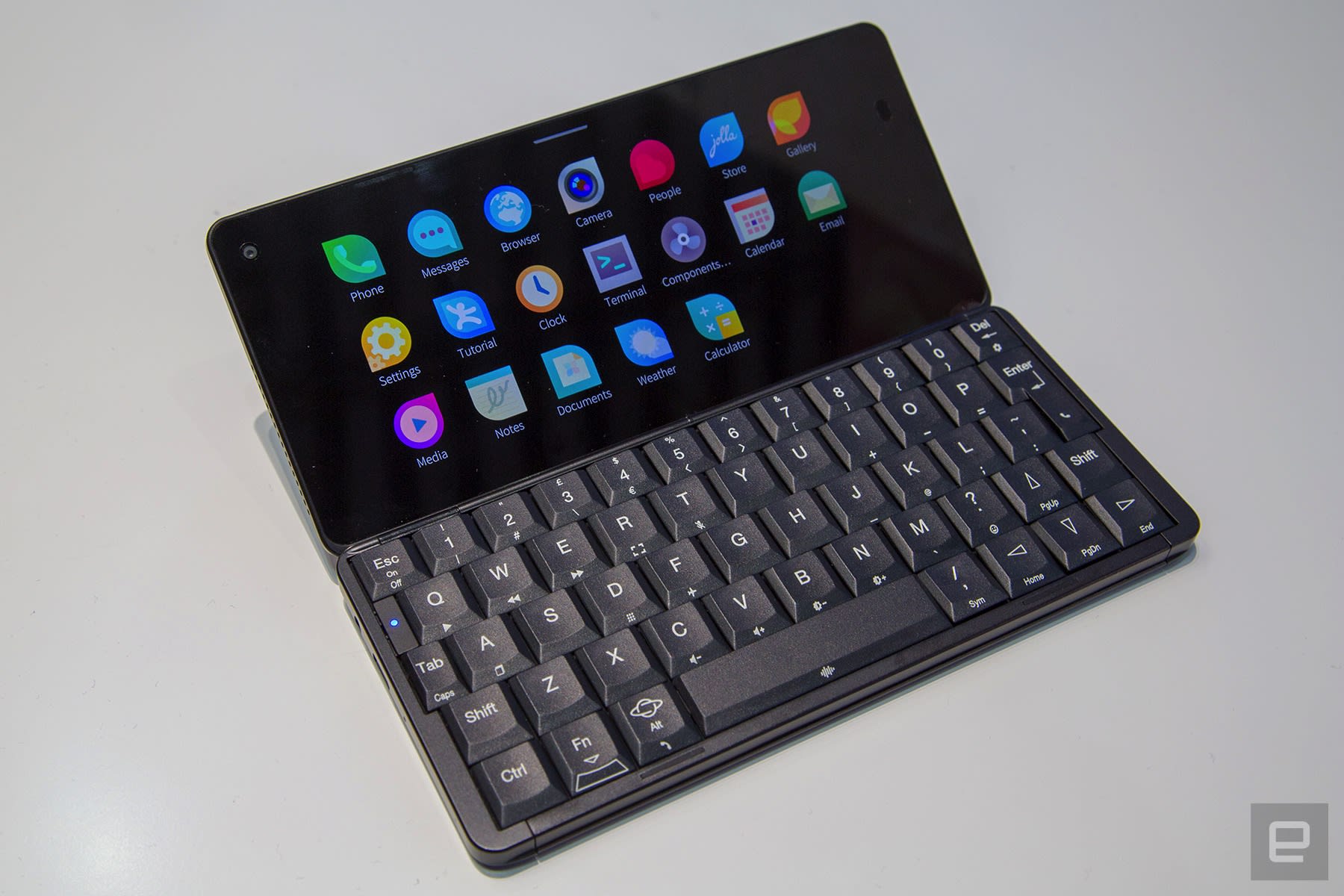
Performance was generally smooth as I opened apps and webpages in the browser. That’s no surprise given the deca-core MediaTek processor and 6GB of RAM powering the Gemini PDA. As far as I can tell, it’s the best mobile hardware that Sailfish OS has ever been paired with (Sony’s Xperia X, which also supports Sailfish OS, has a Snapdragon 650 and 3GB of RAM.) Typing, though, felt like a slog. The keyboard is cramped and the stock note-taking app missed some of my keystrokes. I also found it difficult to reach the keys in the center of the keyboard with my little thumbs.
A Jolla spokesperson stressed, however, that I wasn’t using final software. The company has a major update in the works, called Sailfish 3, that will introduce a new multitasking interface, a light theme, and “full cloud integration” including bookmark, note and photo syncing. That could eliminate some of the typing problems and add some Gemini-exclusive functionality. The Planet key, for instance (the Gemini is being built by a British company called Planet Computers) doesn’t do anything right now. A Jolla employee also hinted at keyboard shortcuts — pressing C while you’re on the home screen, for instance, could open the camera or calendar app.
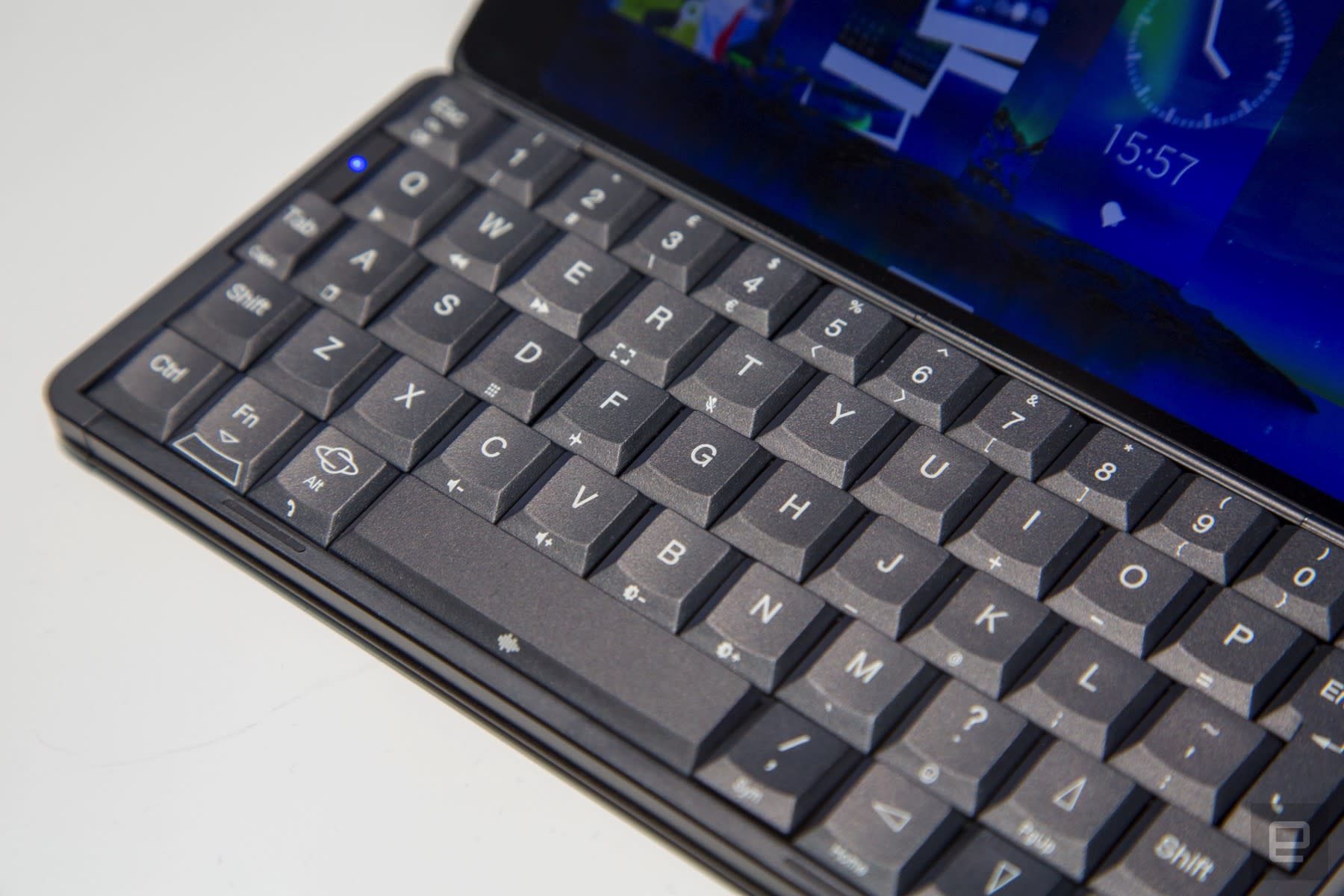
I love this idea. It would turn the Gemini into a pocket-sized laptop with Spotlight and Alfred-style key commands. I suspect it would be impractical — again, this sort of input requires both hands and a flat surface — but in a way, it would be faithful to the classic PDA and its power computing ambitions. For now, though, that sort of functionality is purely hypothetical. The device I was shown at Mobile World Congress was ultimately cumbersome and unintuitive. If you plan on buying a Gemini, you’re probably better off sticking with the Android and Linux software.
Catch up on the latest news from MWC 2018 right here.
 AIVAnet